

Le 10 Migliori Soluzioni Software per Reportistica di Vendita Recensite per il 2026

10 Migliori Software di Reportistica Vendite - Elenco


Con così tanti software di reportistica vendite disponibili, scegliere quello giusto per te può essere complicato. Vuoi sicuramente comprendere l’andamento delle tue vendite, monitorare i progressi rispetto agli obiettivi e prendere decisioni informate in modo più efficiente, ma hai bisogno di capire quale strumento sia il migliore. Ci penso io! In questo articolo ti aiuterò a scegliere facilmente, condividendo le mie esperienze personali nell’utilizzo di dozzine di diversi tool di reportistica vendite con vari team e progetti, e ti mostrerò le mie scelte per i migliori software di reportistica vendite.
Perché fidarsi dei nostri consigli sui software
Le nostre recensioni riflettono il nostro giudizio indipendente, non un discorso di vendita. Scopri come manteniamo la trasparenza.
Per questa guida, abbiamo valutato gli strumenti attraverso test pratici e ricerche indipendenti, assegnando un punteggio agli strumenti in base ai nostri criteri di selezione.
Le nostre recensioni riflettono il nostro giudizio editoriale umano, non un discorso di vendita.
| Tool | Best For | Trial Info | Price | ||
|---|---|---|---|---|---|
| 1 | Ideale per il monitoraggio delle vendite personalizzabile | Prova gratuita disponibile | Da $12/utente/mese (fatturazione annuale) | Website | |
| 2 | Ideale per previsioni di vendita personalizzabili | Demo gratuita disponibile | Prezzi su richiesta | Website | |
| 3 | Ideale per la gestione della pipeline | Piano gratuito disponibile e prova gratuita di 15 giorni | Da $7/utente/mese (fatturato annualmente) | Website | |
| 4 | Migliore piattaforma completa focalizzata sulle vendite | Prova gratuita disponibile | Da $19/utente/mese | Website | |
| 5 | Ideale per decisioni aziendali più intelligenti e guidate dai dati | Demo disponibile | Prezzi personalizzati su richiesta | Website | |
| 6 | Ideale per creare dashboard personalizzate con dati da più fonti | Piano gratuito disponibile per sempre | Da $72/mese | Website | |
| 7 | La migliore piattaforma senza codice che dà potere a tutto il tuo team | Prova gratuita disponibile | Da $1500/mese | Website | |
| 8 | Ideale per previsioni delle vendite basate sull'IA | Demo gratuita disponibile | A partire da $199/2 postazioni/mese (fatturati annualmente) | Website | |
| 9 | Ideale per ridurre i costi aumentando la produttività | Prova gratuita disponibile | Da $25/utente/mese | Website | |
| 10 | Ideale per automazione tutto-in-uno di vendite, marketing e assistenza clienti | Prova gratuita disponibile | Gratis fino a 10 utenti, Piani a partire da $8.99/utente/mese | Website |

Recensioni Migliori Software di Reportistica Vendite
Ti chiedi come ciascuno di questi software di reportistica vendite si distingue? Consulta le panoramiche qui sotto per scoprire in cosa eccellono e se sono adatti al tuo modello di business.

Ideale per il monitoraggio delle vendite personalizzabile
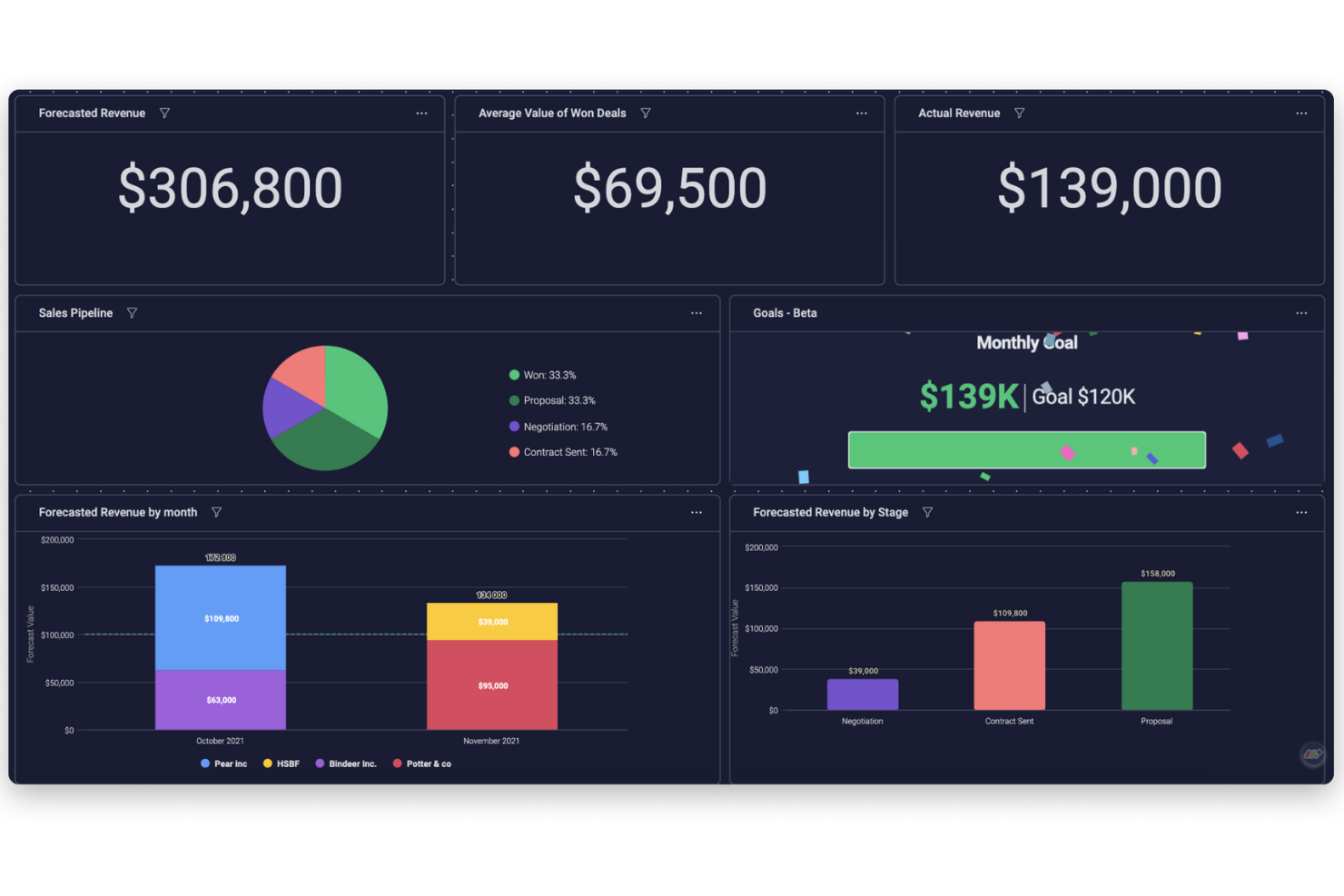
Monday sales CRM è uno strumento completamente personalizzabile progettato per gestire efficacemente le pipeline di vendita e le comunicazioni con i clienti. Si distingue per la capacità di adattare le fasi delle trattative, integrare la posta elettronica e offrire numerose opzioni di automazione, insieme a dashboard personalizzabili che forniscono una panoramica chiara delle attività di vendita. Questa adattabilità e l'interfaccia intuitiva lo rendono una scelta adatta per le aziende che cercano un approccio su misura per migliorare il monitoraggio delle vendite.
A differenza di molti CRM tradizionali, Monday sales CRM integra elementi di gestione dei progetti direttamente nella piattaforma. Ciò significa che, oltre a gestire le relazioni con i clienti e i processi di vendita, i team possono anche monitorare i progetti, assegnare compiti e gestire le scadenze all'interno dello stesso sistema. Questa integrazione è particolarmente utile per i team che hanno bisogno di allineare strettamente le attività di vendita con le tappe o le consegne dei progetti.
Monday sales CRM offre ampie capacità di personalizzazione e una visualizzazione completa dei dati, elementi essenziali per adattare il software a processi di vendita specifici. Ciò che lo distingue è la piattaforma low-code/no-code che consente agli utenti di automatizzare i processi e ottenere approfondimenti dettagliati tramite report e analisi in tempo reale.
Caratteristiche e integrazioni principali di monday sales CRM
Le funzionalità includono gestione di lead e contatti, pipeline personalizzabili, automazione delle vendite, monitoraggio delle prestazioni, integrazione con vari strumenti, reportistica avanzata e analisi, tracciamento e sincronizzazione delle email, gestione di compiti e progetti, supporto per app mobile, modelli e moduli personalizzabili.
Le integrazioni includono Slack, Google Drive, Gmail, Google Calendar, Jira, GitHub, Trello, Dropbox, Typeform e molte altre, accessibili tramite un piano a pagamento con Zapier.
Pros and Cons
Pros:
- Elevata personalizzazione e automazione
- Ampie capacità di integrazione
- Reportistica e analisi avanzate
Cons:
- Funzionalità native di email marketing limitate
- Leggera curva di apprendimento
New Product Updates from monday CRM

monday CRM Adds Meta Conversions API Integration
monday CRM now lets you connect Meta Conversions API and sync lead status back to Meta, improving targeting and conversions via a new Meta integration automation recipe. For more information, visit monday CRM's official site.
Phocas
Ideale per previsioni di vendita personalizzabili
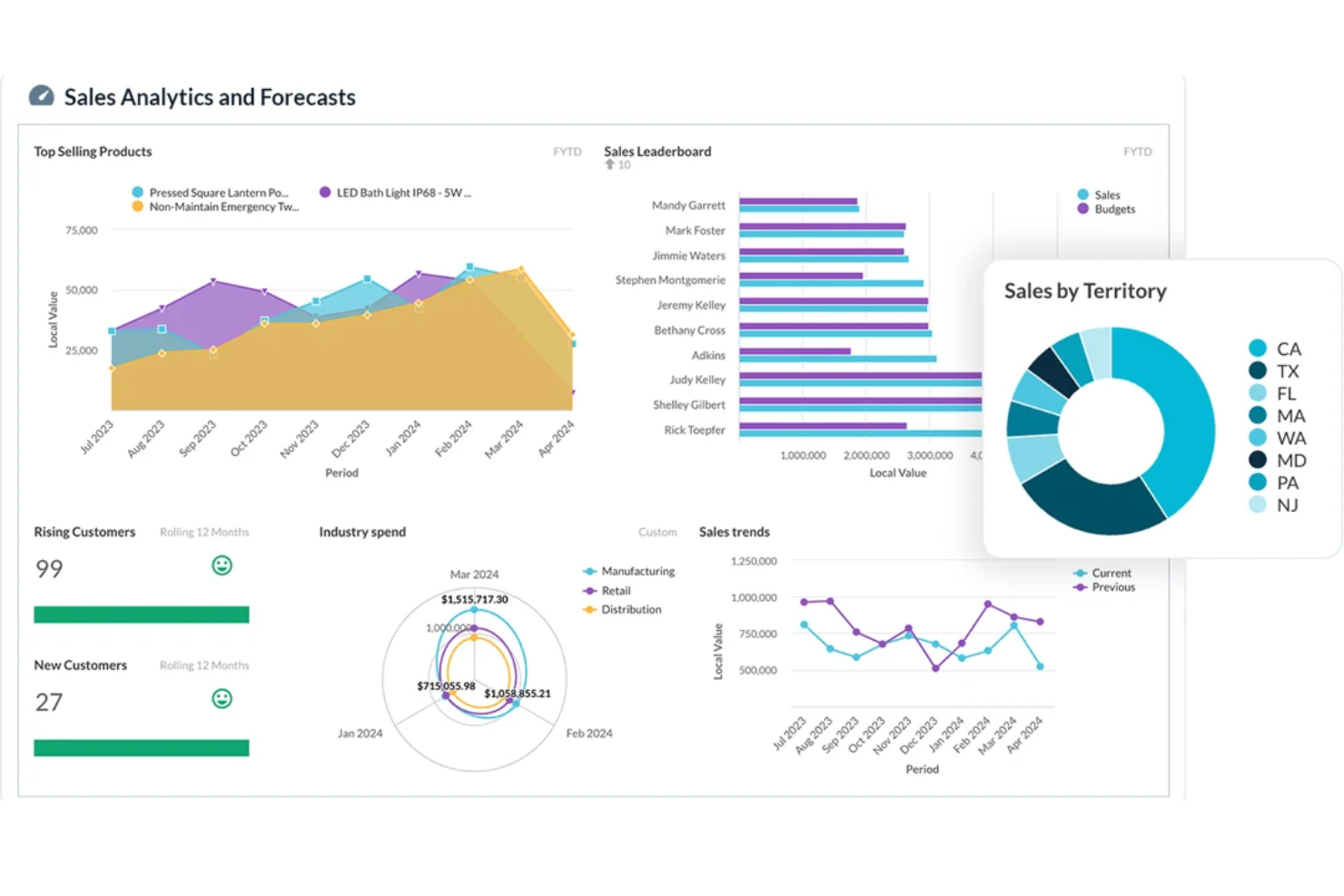
Phocas è un software di reportistica sulle vendite che fornisce alle aziende dati e approfondimenti in tempo reale per analizzare e monitorare le loro prestazioni di vendita. Offre funzionalità di reportistica e dashboard personalizzabili, consentendo agli utenti di accedere e visualizzare i propri dati di vendita, identificare tendenze e opportunità e monitorare i progressi verso gli obiettivi.
La piattaforma offre una varietà di report e strumenti di analisi per aiutare le aziende a prendere decisioni basate sui dati, inclusi accesso a bilanci, budget, rimborsi, report sulle prestazioni di vendita, report sull’attività dei clienti, report sulle vendite dei prodotti, analisi delle tendenze di vendita, report sulle prestazioni per territorio, analisi dei margini e dati CRM.
Un’altra funzione di spicco di Phocas sono i suoi strumenti avanzati di previsione e analisi predittiva. Queste funzionalità permettono ai team di vendita di creare previsioni di vendita accurate e personalizzabili, aiutando le aziende ad anticipare i cambiamenti del mercato e ad adeguare proattivamente le strategie.
Funzionalità e integrazioni di spicco di Phocas
Le funzionalità includono reportistica automatizzata, modelli predefiniti, analisi di scenario, reportistica personalizzata, visualizzazione dei KPI, dashboard personalizzabili, accesso basato su permessi e capacità dettagliate di analisi approfondita.
Le integrazioni includono Acumatica, Accolent, Datafile, Enapps, Epicor, IFS, Jonas Metals Software, Kerridge, Khaos Control, MAM Software, Merlin, Microsoft, MYOB, Netsuite, Oracle, QAD, Retail Express, Sage, SAP, Sympac, SYSPRO, Xero e altro ancora.
Pros and Cons
Pros:
- Dashboard di reportistica personalizzabili per una visibilità su misura
- Potenti funzionalità di modellazione dati
- Analisi in tempo reale
Cons:
- La quantità di dati può risultare opprimente per gli utenti
- Può essere difficile imparare a personalizzare il software
Ideale per la gestione della pipeline
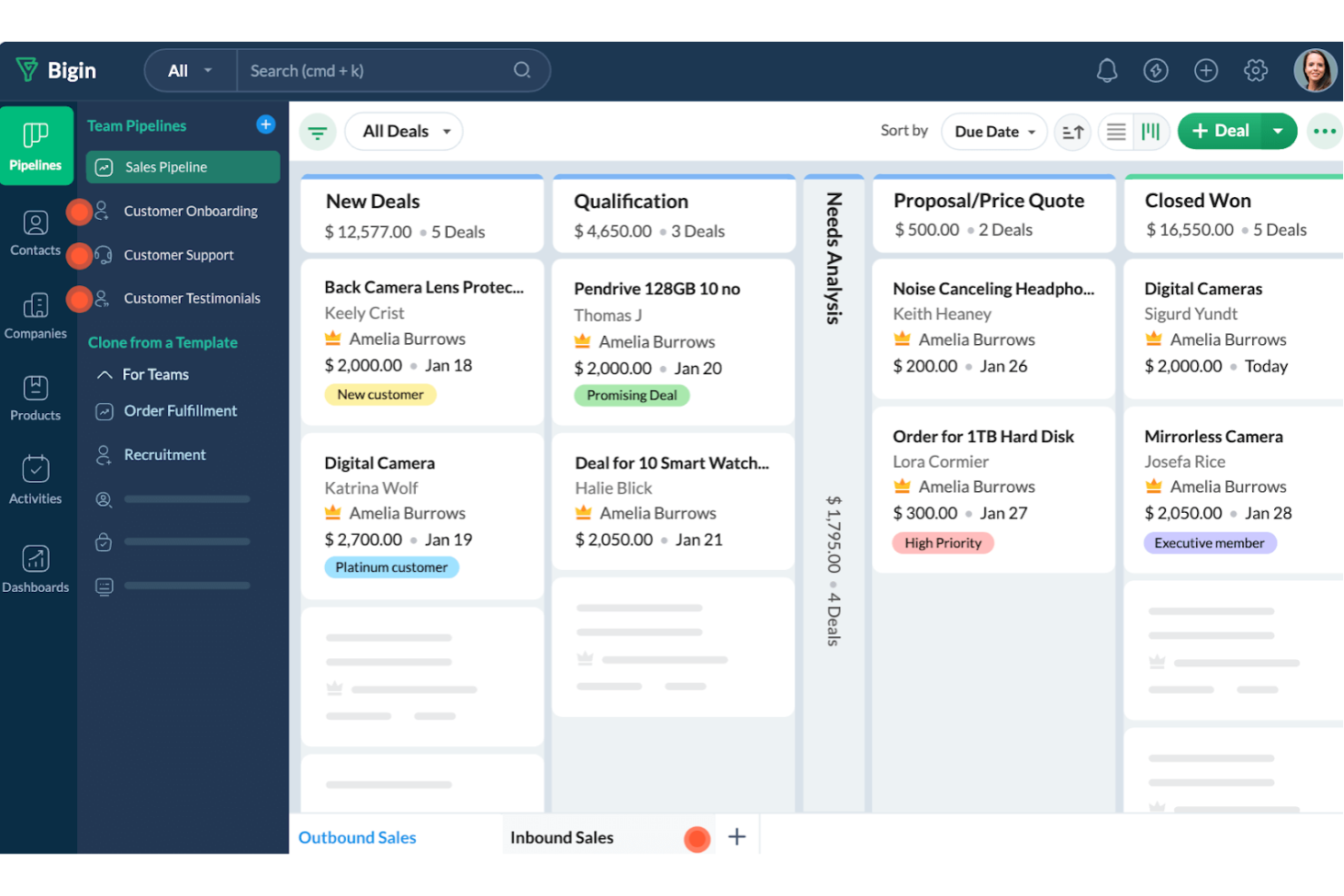
Bigin by Zoho CRM è progettato per le piccole imprese che desiderano migliorare i propri processi di vendita. Offre funzionalità che potenziano i report sulle vendite e semplificano i flussi di lavoro, rendendolo una scelta solida se vuoi aumentare l'efficienza nelle vendite.
Ho scelto Bigin by Zoho CRM per la funzionalità di gestione della pipeline, che consente di monitorare trattative e attività commerciali in ogni fase, offrendo una visione chiara del processo di vendita. Anche l'automazione si distingue, poiché aiuta il tuo team a concentrarsi sulla chiusura degli affari occupandosi delle attività ripetitive, assicurando che nulla venga trascurato.
Un altro motivo per cui Bigin è un'ottima scelta sono le sue capacità analitiche. La piattaforma fornisce approfondimenti dettagliati sulle prestazioni di vendita, permettendoti di prendere decisioni informate. Grazie alle dashboard che offrono una rappresentazione visiva dei dati di vendita, puoi monitorare facilmente metriche chiave come trattative concluse e ricavi, elemento cruciale per qualsiasi strumento di reporting sulle vendite.
Caratteristiche e integrazioni principali di Bigin by Zoho CRM
Le funzionalità includono la gestione dei clienti, che aiuta a mantenere registri dettagliati sulle interazioni e preferenze dei clienti. La comunicazione multicanale permette di coinvolgere i clienti attraverso vari canali, garantendo che nessuna opportunità venga persa. Infine, gli strumenti di collaborazione consentono al team di lavorare assieme senza intoppi, migliorando la produttività e la comunicazione tra i reparti.
Le integrazioni includono Zoho Mail, Zoho Desk, Zapier, Google Workspace, Microsoft 365, Mailchimp, Calendar, Slack, Zoom e Docusign.
Pros and Cons
Pros:
- Offre moduli personalizzati per la raccolta dati
- Permette il monitoraggio semplice di più pipeline
- Facile da configurare e subito utilizzabile
Cons:
- Manca di funzionalità di mappatura per l’assegnazione dei contatti
- Flessibilità limitata nella creazione di report personalizzati
New Product Updates from Bigin by Zoho CRM

Bigin iOS Adds Interactive WhatsApp Templates and Quick Replies
Bigin’s iOS app now supports interactive WhatsApp templates and Quick Replies, making it easier to preview and send instant messages to customers. For more information, visit Bigin by Zoho CRM's official site.
 .
.
Migliore piattaforma completa focalizzata sulle vendite
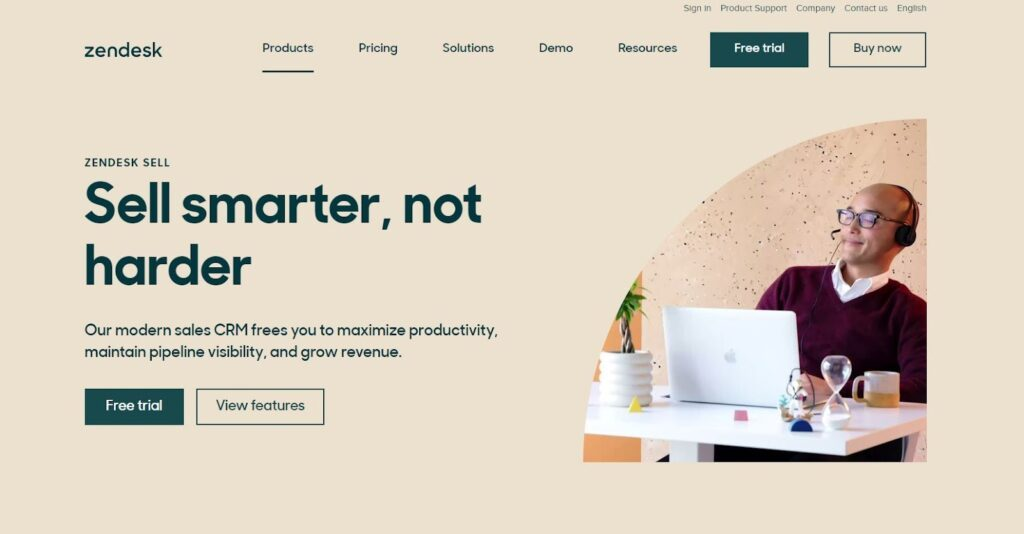
Una delle suite di prodotti Zendesk, Zendesk Sell è una piattaforma orientata alle vendite che favorisce l'adozione da parte dei rappresentanti, fornisce lead di vendita utilizzabili e assicura l'automazione della raccolta dati. Con funzionalità come visualizzazione dei dati, gestione delle opportunità e impostazione e monitoraggio degli obiettivi interni, manager e venditori possono massimizzare e accelerare la crescita dei ricavi.
Zendesk Sell offre app mobili pensate per aiutare i venditori a svolgere più attività concrete senza perdere tempo con inserimenti manuali di dati e annotazioni. Funzionalità intelligenti come il compositore di chiamate automatico e l'analisi del sentiment delle email assicurano che tutti prestino maggiore attenzione ai dettagli per offrire un'esperienza di vendita altamente personalizzata.
Tutti, dagli agenti ai responsabili vendite, possono beneficiare di approfondimenti prescrittivi, coaching individualizzato e piani personalizzati per migliorare le performance di vendita. Scala le tue vendite e fai crescere la tua azienda in modo più efficiente con una crescita dei ricavi costante supportata dall'intera suite Zendesk.
Funzionalità e integrazioni principali di Zendesk Sell
Funzionalità includono gestione degli obiettivi, sincronizzazione dei dati, strumenti di collaborazione, registrazione delle chiamate, distribuzione dei contenuti, tracciamento delle email, integrazione con chat interna, coltivazione e segmentazione dei lead, strumenti di prospezione e gestione dei modelli.
Integrazioni includono Slack, Trello, DropBox for Business, MailChimp, Rippling, HubSpot CRM and Marketing Hub, Zapier, LiveChat, Meta for Business e Social Media.
Pros and Cons
Pros:
- Programma semplice con integrazioni facili
- Migliore app mobile
- Strumenti di reportistica completi
Cons:
- La sincronizzazione con le applicazioni Google può risultare macchinosa
- Curva di apprendimento ripida

Looker
Ideale per decisioni aziendali più intelligenti e guidate dai dati
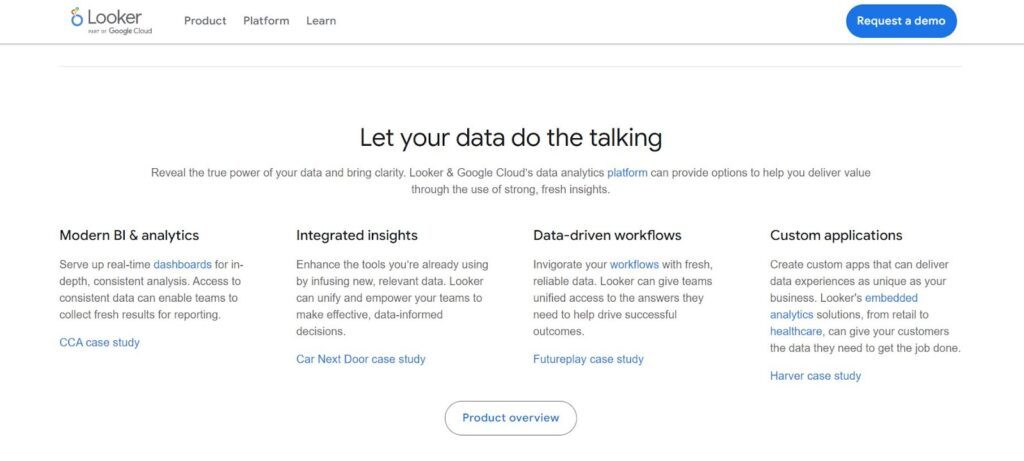
Con il suo approccio intuitivo all'esplorazione dei dati, Looker è una piattaforma web efficace che potenzia il tuo processo di vendita attraverso analisi, reportistica e business intelligence moderna. Ora alimentato da Google, potrai utilizzare Looker per verificare analisi in tempo reale, visualizzazioni incorporate e approfondimenti cross-platform, tutto in un unico luogo.
Una delle migliori funzionalità di Looker è la scoperta dei dati, che consente di creare mini applicazioni ancora più potenti ed efficienti attraverso un linguaggio flessibile chiamato LookML. Potrai semplificare lo sviluppo di strumenti personalizzati per potenziare le capacità SQL e ottimizzare le prestazioni per un'esecuzione delle query più rapida.
Looker è ideale per aziende grandi, medie e piccole che hanno bisogno di accedere rapidamente ai dati giusti. È progettato per adattarsi al tuo modo di lavorare e integrarsi perfettamente con sistemi di terze parti e applicazioni dati personalizzate.
Funzionalità e integrazioni principali di Looker
Le funzionalità includono creazione personalizzata di dati, analisi ad hoc, analisi comportamentale, pulizia dei dati, definizione e monitoraggio degli obiettivi, report di marketing, ricerca con metodi misti, mappatura radiale, analisi in tempo reale, monitoraggio della ricerca sul sito, analisi visuale e widget.
Le integrazioni includono Microsoft Excel, Slack, DropBox Business, Mailchimp, Salesforce, Asana, Rippling, HubSpot, Stripe e QuickBooks.
Pros and Cons
Pros:
- Chat di supporto al top
- Interfaccia intuitiva
- Opzioni di personalizzazione flessibili
Cons:
- I set di dati di grandi dimensioni possono causare rallentamenti
- Filtri limitati per le metriche dei dati

Databox
Ideale per creare dashboard personalizzate con dati da più fonti
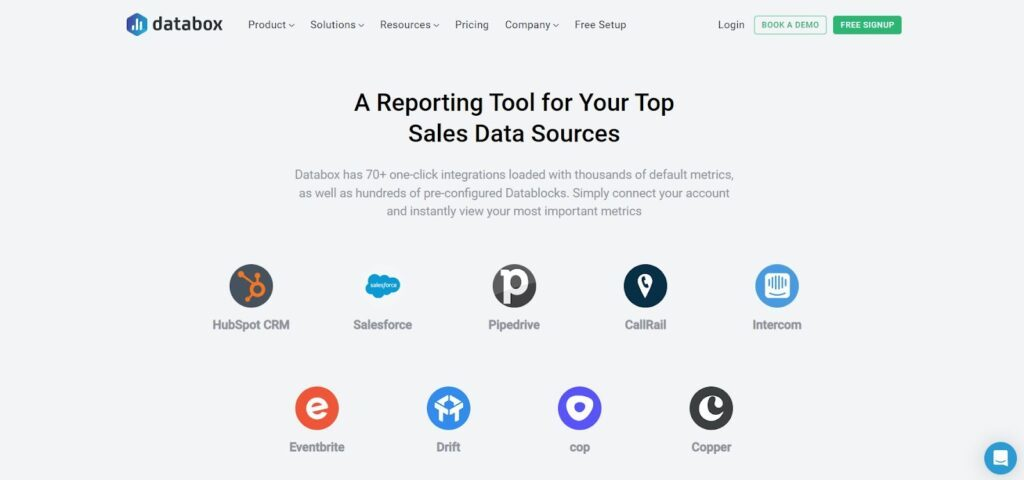
Come strumento di analisi basato su cloud con numerose integrazioni, DataBox ti permette di raccogliere informazioni da tutti gli altri tuoi strumenti per visualizzarle su un'unica dashboard. Questo sistema offre integrazioni con un clic da una vasta gamma di altri servizi cloud e API per importare dati in modo semplice e creare integrazioni personalizzate.
Personalizza la visualizzazione con l'editor drag-and-drop per vedere le performance di vendita, l'attività e le previsioni. Puoi anche modificare la visualizzazione dei dati per anteprime in tempo reale dei tassi di conversione, report personalizzati e altro ancora. Usa le impostazioni avanzate per ogni metrica per modificare valute, formati dei grafici e intervalli temporali senza necessità di programmare!
Il sistema DataBox è stato progettato per CEO, analisti e marketer che desiderano un modo semplificato di creare dashboard che forniscano scorecard giornaliere ai responsabili vendite, rappresentanti e altri collaboratori all'interno dell'azienda. Condividi dati, obiettivi, trend e codici di accesso in tempo reale con i colleghi tramite canali sicuri.
Caratteristiche e integrazioni principali di DataBox
Caratteristiche includono API, controllo pannello di accesso, tracciamento comportamentale, budgeting/previsioni, analisi delle coorti, gestione dell'esperienza cliente, estrazione e mappatura dati, tracciamento eventi in-app, monitoraggio KPI, tracciamento dei ricavi e reportistica in tempo reale.
Integrazioni includono HubSpot, Salesforce, Pipedrive, CallRail, Intercom, Eventbrite, Drift, Copper, Cop e Paypal.
Pros and Cons
Pros:
- Facile da implementare anche senza competenze tecniche
- Gli snapshot della dashboard semplificano dati complessi
- Design responsivo su tutti i dispositivi
Cons:
- Manca l'integrazione con Zendesk
- Un po' instabile con le nuove funzionalità
Grow
La migliore piattaforma senza codice che dà potere a tutto il tuo team
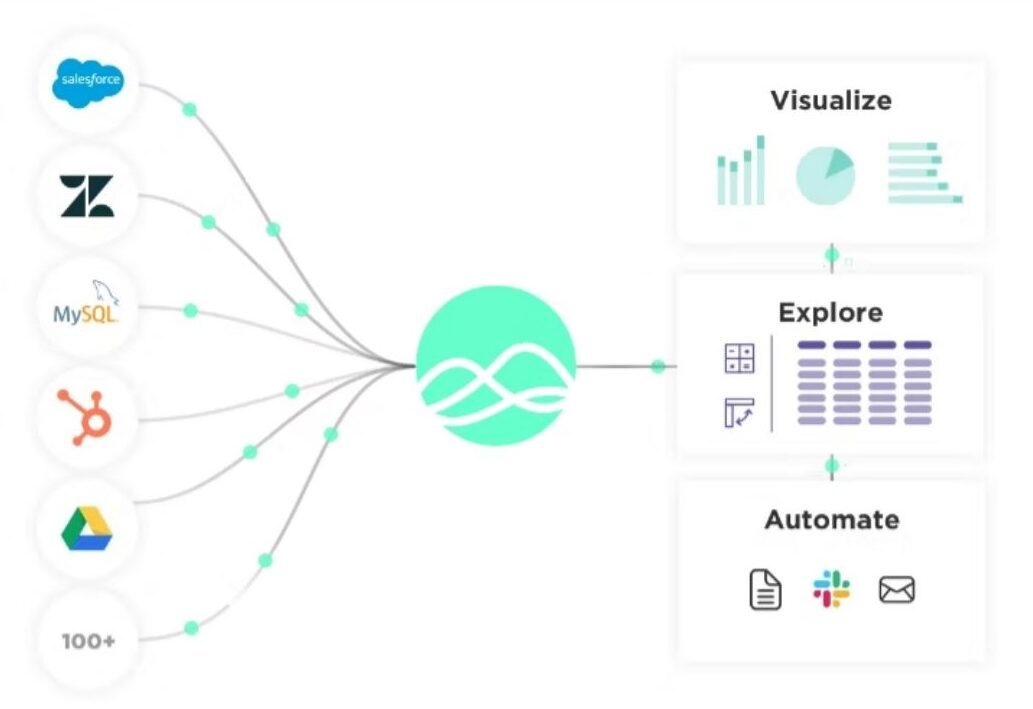
Se cerchi una soluzione tecnologica avanzata ma semplificata per il monitoraggio delle vendite, Grow ti offre ciò di cui hai bisogno con una BI full-stack senza codice. La loro piattaforma è pensata per aiutare ogni persona nella tua azienda a prendere decisioni migliori basate sui dati, grazie a un mix di data warehousing, visualizzazione ed ETL — tutto disponibile su un'unica piattaforma intuitiva.
Una delle migliori funzionalità che dimostra come Grow possa migliorare il tuo software di reportistica sulle vendite è la gestione dell'importazione e dell'archiviazione dei dati. Puoi riunire tutti i dati aziendali più importanti, aggiornati e rilevanti senza la necessità di un data warehouse di terze parti. Puoi assegnare i giusti accessi e permessi affinché le persone giuste possano collegarsi ai dati grezzi e ottenere nuovi insight.
Imparare a usare i dati è fondamentale per sfruttare le nuove opportunità. Con Grow, le piccole e medie imprese possono integrare tutte le loro fonti in un unico hub e individuare più rapidamente le tendenze. Grow può persino calcolare e manipolare i dati che gli fornisci per mostrarti cose che potresti non notare da solo.
Caratteristiche e integrazioni principali di Grow
Le funzionalità includono database, CRM, piattaforme pubblicitarie, social media, contabilità e finanza, analisi di marketing, importazione dati, trasformazioni non SQL, controlli sui permessi, viste personalizzate e dashboard dinamiche.
Le integrazioni includono Google Analytics, G Suite, PostgreSQL, social media, Stripe, HubSpot, Quickbooks Online, Salesforce, MySQL e Paypal.
Pros and Cons
Pros:
- Facile accesso per chiunque
- Ottimo servizio clienti
- Calcoli automatizzati e formule che migliorano l’analisi dei dati
Cons:
- Non offre molte opzioni di personalizzazione
Ideale per previsioni delle vendite basate sull'IA
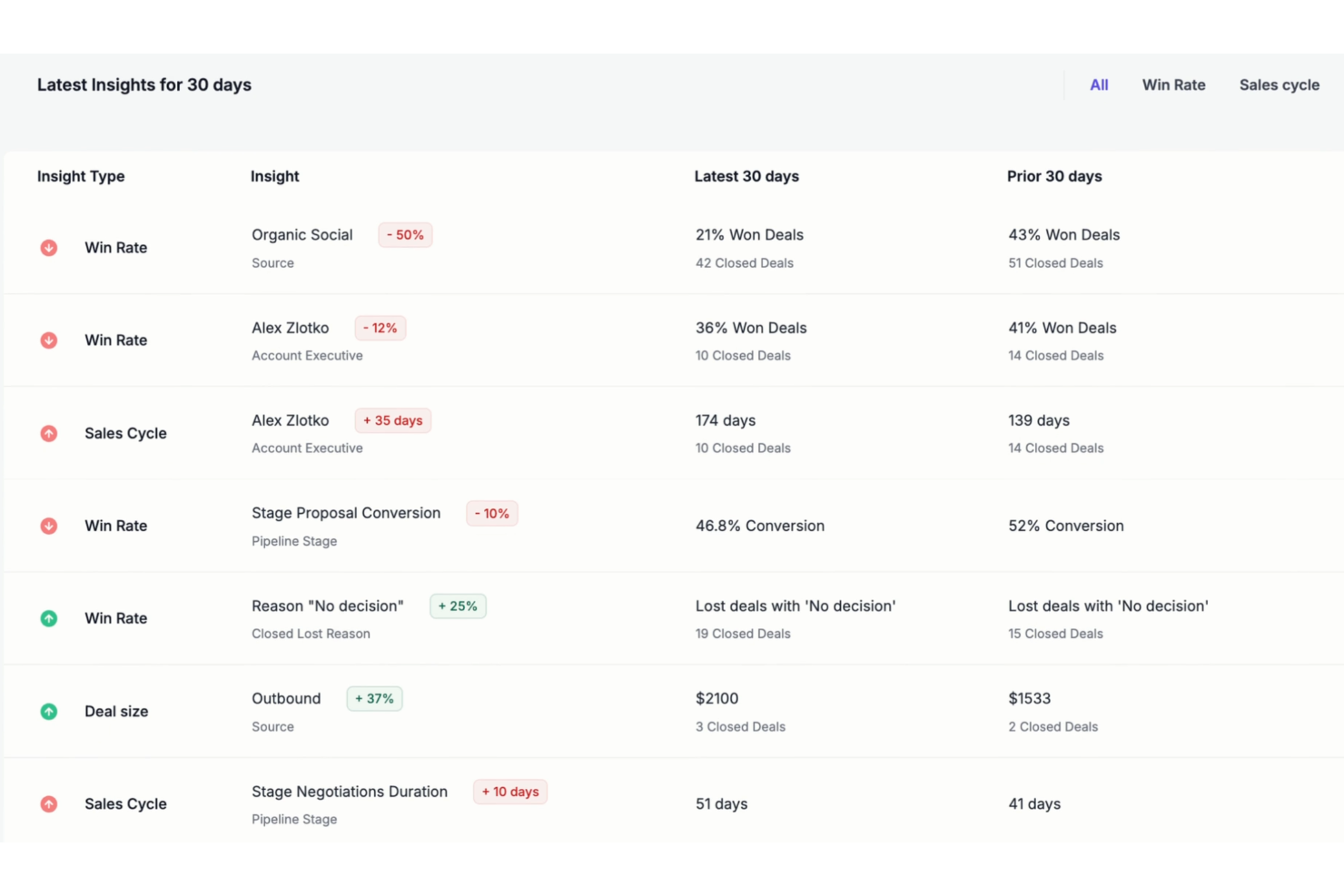
Forecastio è uno strumento di gestione delle prestazioni di vendita progettato per gli utenti di HubSpot, che fornisce informazioni e analisi basate sull'IA per migliorare le prestazioni di vendita. Offre funzionalità come l'automazione della pianificazione delle vendite, previsioni avanzate delle vendite e monitoraggio delle prestazioni in tempo reale.
La piattaforma si distingue come software per la reportistica delle vendite con funzionalità avanzate di previsione delle vendite. Sfruttando l'IA, Forecastio può prevedere i risultati futuri delle vendite analizzando i dati storici e identificando le tendenze, aiutando le aziende a prendere decisioni basate sui dati, ottimizzare le proprie strategie di vendita e allocare le risorse in modo più efficace.
Fornisce inoltre il monitoraggio in tempo reale delle metriche di vendita, aiutando i team a identificare e affrontare rapidamente i colli di bottiglia nella pipeline di vendita. Le funzionalità di definizione degli obiettivi della piattaforma consentono inoltre ai team di stabilire traguardi realistici e raggiungibili, migliorando le prestazioni complessive e i tassi di successo.
Funzionalità e integrazioni principali di Forecastio
Le funzionalità includono l'automazione della pianificazione delle vendite, scenari ipotetici, modelli di pianificazione, informazioni sulle prestazioni di vendita basate sull'IA, gestione della capacità di vendita, monitoraggio della pipeline di vendita e valutazione delle quote di vendita.
Le integrazioni includono HubSpot, consentendo agli utenti di combinare le funzionalità CRM di HubSpot con le funzionalità avanzate di previsione delle vendite e gestione delle prestazioni di Forecastio.
Pros and Cons
Pros:
- Buone funzionalità di previsione
- Funzionalità automatizzate di pianificazione delle vendite
- Informazioni sulle vendite in tempo reale
Cons:
- Il pannello di controllo potrebbe essere più personalizzabile
- Opzioni di integrazione limitate

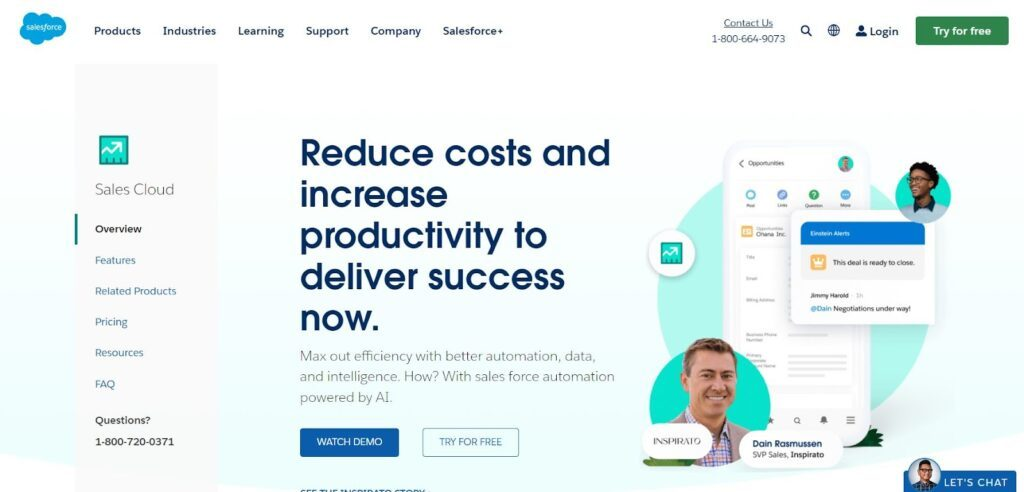
Anche se Salesforce offre numerosi strumenti per ogni aspetto della tua attività, dispone di una piattaforma focalizzata sulle vendite che mette in risalto la gestione delle relazioni con i clienti. Alimentata dall'intelligenza artificiale, consente di massimizzare l'efficienza nell'automazione dell'immissione dei dati, nell'intelligenza relativa ai clienti e nelle strategie predittive.
Una delle funzionalità più interessanti di Sales Cloud è la Gestione delle Opportunità — una funzione che mette in evidenza i dati più importanti nel tuo sistema per fornire informazioni vitali insieme alla cronologia delle attività dei clienti. Con tutte queste informazioni, potrai vedere tutte le attività associate a una trattativa e ricevere notifiche quando è il momento di passare al passaggio successivo.
La piattaforma Sales Cloud è ideale per aziende in varie fasi di sviluppo, comprese quelle che sono appena partite o che desiderano espandersi in modo aggressivo. Consiglio questo software di reportistica delle vendite per piccole e medie imprese che desiderano minimizzare le spese concentrandosi sul miglioramento delle relazioni con i clienti e sul raggiungimento degli obiettivi di vendita.
Funzionalità e integrazioni principali di Sales Cloud
Funzionalità includono automazione delle vendite, gestione delle opportunità, gestione delle previsioni, automazione dei processi, design responsivo per CRM mobile, gestione di account e contatti, gestione lead, report delle metriche di vendita, dashboard e layout personalizzati.
Integrazioni comprendono Google Tools, Slack, Trello, WordPress, MailChimp, SurveyMonkey, Asana, Jira, EverNote Teams, Rippling, Zapier e Toggl Track.
Pros and Cons
Pros:
- Onboarding e monitoraggio completo
- Rapporto qualità/prezzo imbattibile
- Piattaforma stabile, affidabile e scalabile
Cons:
- Può risultare lento e macchinoso
- Mappatura e navigazione del sito complesse
Agile CRM
Ideale per automazione tutto-in-uno di vendite, marketing e assistenza clienti
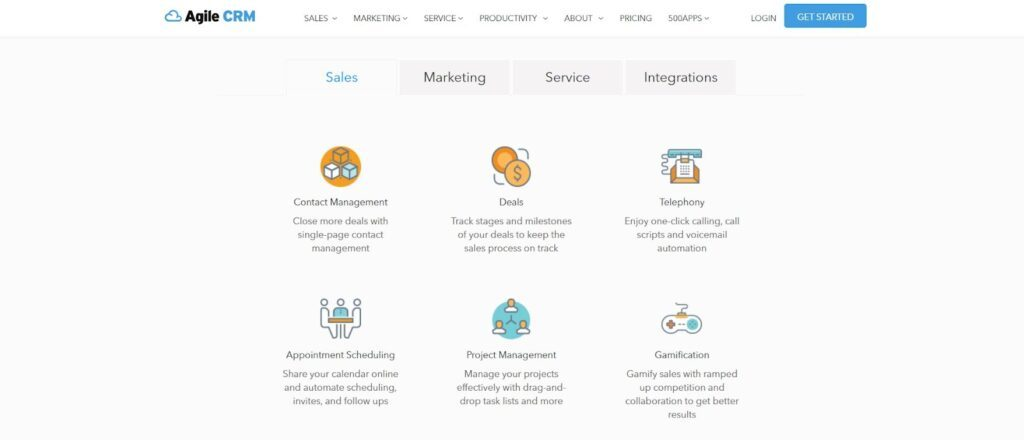
Con tutti gli strumenti necessari in un unico posto, non è più necessario integrare più piattaforme in un unico software di reportistica per aggregare tutti i tuoi dati. Agile CRM offre tutto ciò di cui hai bisogno, inclusi soluzioni per vendite, marketing e assistenza. Puoi automatizzare tutto su una piattaforma unificata per minimizzare perdite di dati e messaggi incoerenti.
Ho scelto questa piattaforma anche perché è una delle opzioni più convenienti disponibili, con un piano gratuito completo per le piccole imprese che consente di integrare ulteriori funzionalità e utenti a un piccolo costo man mano che cresci. Tutto ciò che serve alla tua azienda è integrato, ma puoi comunque aggiungere altre applicazioni di terze parti se senti la necessità di espandere la gestione dei dati, il tracciamento dei clienti e l’analisi.
Agile è ideale per tutti, dai liberi professionisti alle grandi aziende, poiché è facilmente scalabile da un solo utente a centinaia. Con molte opzioni di supporto, formazione e guide, puoi integrare rapidamente e facilmente nuovi membri.
Caratteristiche principali e integrazioni di Agile CRM
Caratteristiche includono gestione dei contatti, tracciamento del processo di vendita, telefonia, pianificazione appuntamenti, gestione dei progetti, gamification, automazione del marketing, builder di landing page, suite social, email marketing, helpdesk, smart views, ticketing e feedback.
Integrazioni includono Twitter, Facebook, Google Apps, Twilio, RingCentral, LinkedIn, Zendesk, Stripe, Magento e WooCommerce.
Pros and Cons
Pros:
- Tanta libertà di personalizzazione
- Le campagne automatizzate sono facili da creare
- Integra gestione vendite e marketing
Cons:
- Non è possibile separare utenti di supporto e di vendita
- L'interfaccia utente potrebbe essere migliorata graficamente
Altri Software di Reportistica Vendite
Ecco alcune altre opzioni che non sono rientrate nella lista dei migliori software di reportistica vendite:
- Coefficient
Ideale per integrazione dati in tempo reale
- Creatio CRM
Ideale per il reporting completo sul funnel di vendita
- Pipedrive
Ideale per la gestione semplificata della pipeline di vendita
- SPOTIO
Ideale per la gestione del team e la collaborazione con dati di vendita più accurati


Recensioni di Altri Software di Reportistica Vendite Correlati
Se non hai ancora trovato ciò che cerchi qui, dai un'occhiata a questi strumenti strettamente legati ai software di reportistica vendite che abbiamo testato e valutato.
- Software CRM
- Software Vendite
- Software Gestione Lead
- Software Business Intelligence
- Software Gestione Contratti
- Sistema di Gestione dei Ricavi
Come Valuto i Software per la Reportistica delle Vendite
Divido la mia valutazione in criteri di base che ogni strumento deve soddisfare—come la sincronizzazione con CRM e dashboard della pipeline—e fattori differenzianti che ti aiutano a capire se è quello giusto per il tuo team commerciale.
Funzionalità Core (Requisiti Indispensabili per Questa Lista)
Quando seleziono gli strumenti per la mia lista, valuto ciascuno su una scala da 0 (non offre la funzionalità) a 5 (eccelle in quest'area) per ognuna delle funzionalità core elencate qui sotto. Poi, calcolo il punteggio totale dello strumento come percentuale. Ogni strumento deve raggiungere un punteggio minimo totale del 65% per essere considerato per l'inclusione.
- Dashboard Vendite Predefinite: Verifico se lo strumento dispone di dashboard pronte per pipeline, tasso di vittoria e metriche di ricavo, così i team non devono costruirle da zero il primo giorno.
- Integrazione Dati CRM: Qui sono importanti i connettori nativi al CRM—cerco una sincronizzazione in tempo reale con piattaforme come Salesforce, HubSpot o Dynamics 365 senza dipendere da middleware di terze parti.
- Costruttore di Report Personalizzati: Ogni strumento dovrebbe permetterti di creare report con filtri, dimensioni e metriche flessibili senza scrivere SQL o attendere che il team dati fornisca i numeri.
- Previsioni di Vendita e Analisi della Pipeline: Valuto quanto bene lo strumento proietta i ricavi dai dati della pipeline—previsioni ponderate, bandiere di rischio sui deal e analisi delle conversioni per fase sono tutti fattori considerati.
- Pianificazione e Condivisione Automatica dei Report: La possibilità di programmare snapshot settimanali della pipeline o aggiornamenti delle quote via email, Slack o Teams evita che il team RevOps diventi un servizio di reportistica manuale.
- Tracciamento delle Prestazioni di Agenti e Team: Cerco viste a livello individuale e di team su raggiungimento quote, metriche di attività e confronti in classifica che i manager possano davvero usare nelle sessioni di coaching.
Una volta che ho una lista di strumenti che soddisfano questi criteri, considero ciò che distingue ogni piattaforma.
Fattori Differenzianti (Cosa Distingue i Fornitori)
Ecco come confronto e metto a confronto diversi fornitori:
Caratteristiche Distintive
Le informazioni guidate dall'intelligenza artificiale sono un grande elemento distintivo—cerco strumenti che evidenziano anomalie come un improvviso calo della velocità dei deal o un aumento improvviso delle date di chiusura slittate senza dover scavare manualmente. La modellazione dell'attribuzione dei ricavi è un'altra area che valuto attentamente, soprattutto per i team RevOps che devono collegare i ricavi chiusi a specifiche campagne o canali. Anche la gestione di obiettivi e quote integrata nello strato di reportistica è importante. Quando agenti e manager possono tracciare i progressi rispetto agli obiettivi nello stesso luogo in cui analizzano la pipeline, si riduce la dispersione su fogli di calcolo.
Oltre le Caratteristiche
La compatibilità con lo stack tecnologico è una delle prime cose che valuto. Uno strumento di reportistica vendite che si collega al tuo data warehouse, piattaforma di marketing automation e strumenti di sales engagement crea una fonte unica di verità—senza di essa, i team RevOps finiscono per unire esportazioni manualmente. Anche la velocità di implementazione è importante. Verifico se uno strumento offre modelli dati predefiniti che ti permettono di avere una dashboard funzionante in pochi giorni, non mesi. La governance dei dati completa la mia valutazione: l'accesso basato sui ruoli e la sicurezza a livello di riga sono essenziali quando i manager di territorio devono vedere soltanto i loro numeri.
Come Scegliere un Software di Reportistica Vendite
Con così tante soluzioni di software di reportistica vendite disponibili, può essere difficile decidere quale sia lo strumento più adatto alle tue esigenze.
Quando selezioni, provi e scegli un software di reportistica vendite, considera quanto segue:
- Quale problema stai cercando di risolvere - Inizia identificando la lacuna nelle funzionalità del software di reportistica delle vendite che desideri colmare, per chiarire quali funzionalità e caratteristiche il tool deve offrire.
- Chi dovrà usarlo - Per valutare costi e requisiti, considera chi utilizzerà il software e quante licenze saranno necessarie. Dovrai valutare se sarà utilizzato solo dai responsabili delle operazioni di revenue o da tutta l'organizzazione che necessiterà dell'accesso. Quando sarà chiaro, valuta se stai dando priorità alla facilità d'uso per tutti o alla velocità per i "power user" del software di reportistica vendite.
- Con quali altri strumenti deve funzionare - Chiarisci quali strumenti stai sostituendo, quali rimarranno e con quali strumenti dovrai integrarti, come software di contabilità, CRM o software di database delle vendite. Dovrai decidere se occorre integrare gli strumenti tra loro o se sia possibile sostituire più tools con un unico software di reportistica delle vendite consolidato.
- Quali risultati sono importanti - Considera il risultato che il software deve raggiungere per essere considerato di successo. Rifletti su quali capacità vuoi ottenere o cosa desideri migliorare, e come misurerai il successo. Ad esempio, un risultato potrebbe essere la possibilità di ottenere una maggiore visibilità sulle performance. Potresti confrontare per ore le funzionalità dei software di reportistica vendite, ma se non tieni conto degli obiettivi da raggiungere, rischi di sprecare molto tempo prezioso.
- Come funzionerà all'interno della tua organizzazione - Considera la scelta del software valutandola all'interno dei tuoi flussi di lavoro e della metodologia di delivery. Valuta cosa funziona bene e le aree che stanno causando problemi e necessitano attenzione. Ricorda che ogni azienda è diversa — non dare per scontato che uno strumento popolare vada bene anche per la tua organizzazione.
Tendenze nel Software di Reportistica delle Vendite per 2026
L'evoluzione del software di reportistica delle vendite riflette un più ampio passaggio verso strategie di gestione dei ricavi sempre più orientate ai dati, agili e personalizzate. Poiché le organizzazioni danno priorità a flessibilità, precisione e intuizioni fruibili nelle proprie operazioni di vendita, gli ultimi sviluppi nei tool di reportistica sono progettati per soddisfare queste esigenze con funzionalità innovative e capacità potenziate.
Dall'integrazione di analitiche avanzate all'adozione di intelligenza artificiale (AI) e machine learning (ML), il software di reportistica sulle vendite sta guidando la trasformazione nel modo in cui le aziende analizzano dati e performance commerciali. Di seguito le tendenze chiave che stanno plasmando il futuro di questi strumenti, rispondendo alle necessità in evoluzione dei responsabili delle operations revenue.
Analitica Avanzata e Integrazione con AI
- Previsioni supportate da AI: I tool di reportistica vendite stanno sempre più integrando l’AI per fornire previsioni di vendita più accurate e dinamiche, consentendo alle aziende di anticipare i cambiamenti di mercato e adeguare le strategie in maniera proattiva.
- Prova: Nuovi rilasci con algoritmi AI che analizzano dati storici di vendita e trend di mercato per prevedere le performance future con maggiore precisione.
- Intuizioni automatizzate: L’automazione della generazione di insight, grazie all'AI che mette in luce opportunità, rischi e anomalie nei dati sulle vendite, riduce l'analisi manuale e accelera i processi decisionali.
- Prova: Aggiornamenti software che introducono funzionalità in grado di rilevare automaticamente cambiamenti rilevanti nei dati di vendita e avvisare l’utente rispetto a eventuali problemi o opportunità.
Integrazione e Collaborazione
- Integrazione fluida con CRM: Un’integrazione più efficace con i sistemi CRM fa sì che gli strumenti di reportistica offrano una visione completa delle interazioni coi clienti e delle attività commerciali.
- Prova: Nuove integrazioni e API che permettono la sincronizzazione in tempo reale tra il software di reportistica vendite e le piattaforme CRM.
- Funzionalità collaborative: Capacità collaborative potenziate permettono ai team di condividere insight, report e dashboard in modo più efficiente, favorendo un approccio più condiviso alla gestione delle vendite.
- Prova: Introduzione di funzioni a supporto della collaborazione in tempo reale, librerie di report condivise e possibilità di commentare direttamente all’interno del software.
Funzionalità emergenti
- Abilitazione predittiva delle vendite: Oltre alla reportistica tradizionale, le nuove funzionalità includono l'abilitazione predittiva delle vendite, suggerendo le prossime azioni migliori per i rappresentanti di vendita basandosi sull'analisi dei dati.
- Evidenza: Funzionalità che sfruttano il machine learning per raccomandare specifiche azioni di follow up con i potenziali clienti, suggerimenti per messaggi personalizzati e il momento ottimale per contattarli.
- Elaborazione dati in tempo reale: La capacità di elaborare e riportare i dati di vendita in tempo reale, fornendo insight aggiornati al minuto sulle performance di vendita e sulle metriche operative.
- Evidenza: Aggiornamenti che potenziano la capacità del software di trasmettere e analizzare i dati in tempo reale, consentendo una visibilità immediata sulle tendenze di vendita e sugli indicatori di performance.
Con l’evoluzione del software di reportistica per le vendite, l’attenzione su analisi guidate dall’IA, personalizzazione, integrazione senza soluzione di continuità e funzionalità collaborative riflette una tendenza più ampia a fornire alle organizzazioni gli strumenti necessari per navigare efficacemente in scenari di vendita complessi. Per i responsabili delle operazioni di ricavo, scegliere un software che sia in linea con queste tendenze è cruciale per ottenere insight più approfonditi, migliorare l’efficienza delle vendite e raggiungere una crescita continua dei ricavi.
Cos’è il software di reportistica per le vendite?
Il software di reportistica per le vendite è uno strumento utilizzato dalle aziende per raccogliere, analizzare e presentare dati sulle vendite. Automatizza il processo di raccolta delle informazioni di vendita da diverse fonti, organizzandole in report e dashboard. Il software include generalmente funzionalità per la visualizzazione dei dati, il monitoraggio delle performance, l’analisi delle tendenze e la reportistica personalizzabile, il tutto volto a semplificare l’analisi dei dati di vendita.
I vantaggi del software di reportistica per le vendite comprendono una maggiore comprensione delle performance e delle tendenze di vendita, a supporto delle decisioni strategiche. Consente di risparmiare tempo automatizzando la raccolta dei dati e la generazione dei report, permettendo al team di vendita di concentrarsi maggiormente sulla vendita anziché sulle attività amministrative. Il software offre insight basati sui dati per strategie di vendita migliorate, monitoraggio efficiente delle performance del team e previsioni accurate. Nel complesso, aiuta le aziende a ottimizzare i processi di vendita e a prendere decisioni più informate per far crescere i ricavi.
Caratteristiche del software di reportistica per le vendite
La scelta del giusto software di reportistica per le vendite è fondamentale per una gestione efficace delle operazioni di ricavo. Il software ideale dovrebbe non solo offrire una panoramica completa delle attività di vendita, ma anche fornire approfondimenti in grado di guidare decisioni strategiche. Ecco le caratteristiche più importanti da ricercare in un software di reportistica per garantire che soddisfi le esigenze delle vostre operazioni di ricavo:
- Dashboard personalizzabili: Consentono agli utenti di personalizzare la visualizzazione dei dati di vendita. I dashboard personalizzabili permettono di concentrarsi sulle metriche più rilevanti per il proprio business, garantendo l’accesso rapido alle informazioni essenziali.
- Reportistica in tempo reale: Offre dati sulle prestazioni di vendita aggiornati al minuto. La reportistica in tempo reale è fondamentale per prendere decisioni tempestive in risposta a condizioni di mercato e dinamiche di vendita in rapido cambiamento.
- Previsioni di vendita: Utilizza dati storici per prevedere le tendenze future delle vendite. Previsioni accurate sono essenziali per la pianificazione e l’allocazione delle risorse, aiutando ad anticipare le richieste di mercato e adeguare di conseguenza le strategie.
- Metriche di performance e monitoraggio KPI: Monitora i principali indicatori di vendita nel tempo. Il monitoraggio di metriche di performance e KPI è essenziale per valutare l’efficacia delle strategie commerciali e individuare aree di miglioramento.
- Gestione della pipeline: Fornisce visibilità sulla pipeline di vendita. Comprendere lo stato delle varie trattative in pipeline aiuta a dare priorità agli sforzi e a prevedere i ricavi con maggiore precisione.
- Strumenti di visualizzazione dei dati: Trasformano i dati in grafici e diagrammi di facile comprensione. Una visualizzazione efficace dei dati aiuta a comprendere set di dati complessi, rendendo più semplice individuare trend e anomalie.
- Funzionalità di integrazione: Si collega senza problemi a CRM e altri sistemi aziendali. L’integrazione assicura che il software di reportistica lavori in armonia con gli strumenti esistenti, offrendo una visione unificata delle interazioni con i clienti e dei dati di vendita.
- Funzionalità collaborative: Consente la condivisione e la discussione dei report all’interno dei team. Le funzionalità collaborative sono importanti per allineare gli sforzi del team e facilitare discussioni basate sui dati.
- Accessibilità da mobile: Permette di accedere ai report di vendita da dispositivi mobili. L’accessibilità da mobile assicura che i team di vendita possano restare informati e prendere decisioni ovunque si trovino.
- Generazione di report personalizzati: Gli utenti possono creare report su misura per esigenze specifiche. La capacità di generare report personalizzati consente analisi approfondite di specifici aspetti dei dati di vendita, per rispondere a esigenze analitiche particolari.
La scelta di un software di reportistica per le vendite dotato di queste funzionalità può migliorare sensibilmente la gestione delle operazioni di ricavo. Offrendo insight azionabili, semplificando l’analisi dei dati e facilitando la pianificazione strategica, lo strumento di reportistica giusto diventa una risorsa preziosa per aumentare l’efficienza delle vendite e la crescita dei ricavi.
Vantaggi del software di reportistica sulle vendite
Il software di reportistica sulle vendite si distingue come una risorsa fondamentale per utenti e organizzazioni che puntano a semplificare i processi di vendita e ottimizzare le operazioni legate ai ricavi. Questo software offre numerosi vantaggi, dall'ottimizzazione delle decisioni all'incremento dell'efficienza nelle vendite. Di seguito sono illustrati cinque vantaggi principali che evidenziano il valore che il software di reportistica sulle vendite apporta ad utenti e organizzazioni.
- Decisioni migliori: Fornisce approfondimenti completi sui dati e sulle tendenze delle vendite. Grazie a un'analisi dettagliata delle attività commerciali, questo software consente alle aziende di prendere decisioni strategiche informate, portando a strategie di vendita più efficaci e migliori risultati finanziari.
- Maggiore produttività commerciale: Automatizza la raccolta dei dati e la generazione dei report. I team di vendita possono dedicare meno tempo alle attività amministrative e concentrarsi maggiormente su quelle che contribuiscono direttamente alle vendite, come il coinvolgimento dei potenziali clienti e la chiusura degli accordi.
- Migliore visibilità delle vendite: Offre accesso in tempo reale alle metriche di vendita e agli indicatori di prestazione. Questa visibilità permette ai responsabili di individuare rapidamente problemi e opportunità, adattare le strategie tempestivamente e garantire il raggiungimento degli obiettivi di vendita.
- Previsioni di vendita basate sui dati: Utilizza dati di vendita storici per prevedere le prestazioni future. Previsioni accurate aiutano le aziende a pianificare la crescita, gestire l'inventario in modo più efficiente e allocare le risorse dove sono più necessarie, supportando così l'ottimizzazione dei ricavi.
- Collaborazione semplificata: Facilita la condivisione di report e approfondimenti tra i membri del team. Rendendo i dati di vendita facilmente accessibili a tutti gli stakeholder interessati, il software di reportistica promuove la collaborazione, allinea gli sforzi del team e incoraggia una cultura aziendale guidata dai dati.
Costi e prezzi del software di reportistica sulle vendite
Selezionare il software di reportistica sulle vendite più adatto è fondamentale per le aziende che vogliono migliorare le strategie commerciali e le proprie operazioni di ricavo complessive. Con una moltitudine di opzioni disponibili, ognuna con caratteristiche, scalabilità e costi diversi, comprendere le varie opzioni di piano è essenziale per prendere una decisione consapevole. Il software di reportistica sulle vendite viene solitamente offerto in diversi livelli per soddisfare le esigenze sia delle piccole startup che delle grandi imprese. Di seguito una panoramica semplificata delle opzioni di piano più comuni e dei relativi prezzi per il software di reportistica sulle vendite.
Tabella comparativa dei piani per il software di reportistica sulle vendite
| Tipo di piano | Prezzo medio | Caratteristiche comuni incluse |
|---|---|---|
| Base | $10 - $25 per utente/mese | - Report standard sulle vendite - Funzionalità base della dashboard - Opzioni di esportazione dati - Supporto via email |
| Professional | $50 - $100 per utente/mese | - Analisi avanzate - Capacità di report personalizzati - Integrazione CRM - Supporto telefonico e via email |
| Enterprise | $150+ per utente/mese | - Suite completa di strumenti di analisi - Previsioni predittive - Accesso API per integrazioni personalizzate - Account manager dedicato e supporto |
| Opzione gratuita | $0 | - Funzionalità di reportistica limitate - Dashboard di base - Supporto dalla community |
Quando scegli un piano per un software di reportistica sulle vendite, valuta sia le tue necessità immediate che la crescita futura. Scegli un piano che non solo rientra nel tuo attuale budget, ma che offra anche la flessibilità di espandersi man mano che la tua azienda cresce e le tue esigenze di reportistica diventano più complesse.
Domande Frequenti sul Software di Reporting delle Vendite
Se il tuo team sta valutando l’utilizzo di un software di reporting delle vendite, probabilmente hai alcune domande prima di decidere. Diamo un’occhiata ad alcune delle domande più frequenti sul software di reporting delle vendite:
Quali sono i tipi di software di reporting delle vendite?
Quali sono alcuni tipi di report sulle vendite?
Perché dovrei utilizzare un software di reporting delle vendite?
Il software di reporting delle vendite supporta l'analisi dei dati in tempo reale?
Il software di reporting delle vendite può integrarsi con diverse fonti dati?
Il software di reporting delle vendite offre analisi predittive sulle vendite?
Recensioni alternative di software di Sales Intelligence e analisi
Ecco alcune altre opzioni software che potresti voler prendere in considerazione.
- Migliori software per le vendite
- Software per la visualizzazione dei dati
- Software di analisi predittiva
- Software per la previsione delle vendite
- Software di business intelligence
- Software di sales intelligence
- Sistemi di gestione dei ricavi
- Software per KPI
- Software di monitoraggio delle vendite
E ora?
Se sei alla ricerca di un software per la reportistica delle vendite, contatta gratuitamente un consulente SoftwareSelect per ricevere raccomandazioni personalizzate.
Compila un modulo e fai una breve chiacchierata durante la quale analizzeranno le tue esigenze specifiche. Successivamente riceverai una lista ristretta di software da valutare. Ti supporteranno anche durante l’intero processo d’acquisto, incluse le negoziazioni sul prezzo.