

10 Best Zendesk Sell Alternatives in 2026

Zendesk Sell Alternatives Shortlist


The best Zendesk Sell alternatives are customer relationship management (CRM) platforms that combine intuitive sales tracking, flexible integrations, and customization, all without sacrificing ease of use. If you’re searching for Zendesk Sell alternatives, you’re likely looking for a CRM that fits your team’s workflow, handles your pipeline, and connects smoothly with your sales stack.
This guide gives you a clear comparison of top Zendesk Sell competitors, so you can confidently choose options that boost sales productivity and adapt as your business grows.
What is Zendesk Sell?
Zendesk Sell is a cloud-based CRM designed to help sales teams manage pipelines, track leads, and automate routine sales tasks. You get a clean user interface, customizable workflows, and built-in communication tools for email, calls, and messaging.
Zendesk Sell focuses on boosting productivity by providing real-time visibility into sales activities and performance. It’s designed for businesses that want a unified, collaborative approach to this sales CRM solution.
Best Zendesk Sell Alternatives Summary
This comparison chart summarizes affordable pricing for my top Zendesk Sell alternatives selections to help you find the best one for your budget and business needs.
| Tool | Best For | Trial Info | Price | ||
|---|---|---|---|---|---|
| 1 | Best for AI-driven Microsoft 365 connectivity | 30-day free trial | From $65/user/month (billed annually) | Website | |
| 2 | Best for automation-heavy lead nurturing | 14-day free trial | From $15/month (billed annually) | Website | |
| 3 | Best for unified sales and support intelligence | 14-day free trial | From $7/user/month (billed annually) | Website | |
| 4 | Best for rapid small-team CRM setup | 14-day free trial + free demo available | From $13/user/month (billed annually) | Website | |
| 5 | Best for post-sale project relationship tracking | 14-day free trial | From $29/user/month (billed annually) | Website | |
| 6 | Best for all-in-one team collaboration tools | 15-day trial + free plan + free demo available | From $49/organization/month (billed annually) | Website | |
| 7 | Best for global enterprise sales forecasting | Free demo available | Pricing upon request | Website | |
| 8 | Best for modular open-source ERP integration | Free plan + free trial available | Pricing upon request | Website | |
| 9 | Best for enterprise-grade customizability | 30-day free trial | From $25/user/month | Website | |
| 10 | Best for high-volume integrated telephony | 14-day free trial + free demo available | From $9/user/month (billed annually) | Website |

Why Trust Our Software Recommendations
Our reviews reflect our independent judgment—not a sales pitch. Learn how we stay transparent.
For this guide, we evaluated tools using hands-on testing and independent research, scoring tools using our selection criteria.
Our reviews reflect our human editorial judgment, not a sales pitch.
Zendesk Sell Alternatives Reviews
Below are my detailed summaries of the Zendesk Sell alternatives that made it onto my shortlist. My reviews offer a detailed look at the features, best use cases, and integrations of each CRM platform to help you choose the one that best suits you.
Best for AI-driven Microsoft 365 connectivity
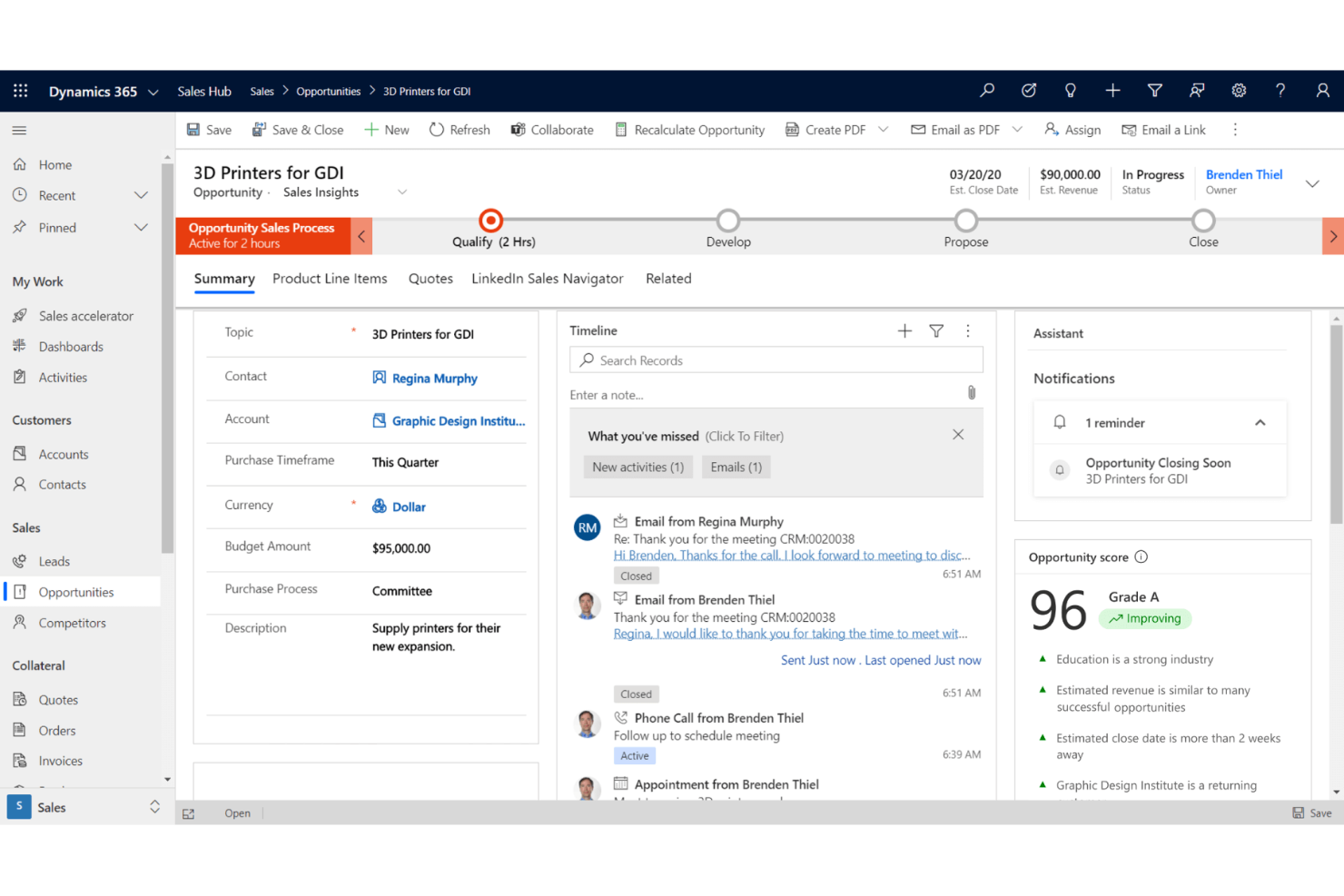
Microsoft Dynamics 365 brings together CRM and automation capabilities built for teams already using Microsoft 365 in their daily work. I think midsize to large organizations looking for unified sales, marketing, and service data under one roof will find it especially useful.
Who Is Microsoft Dynamics 365 Best For?
Sales, marketing, and service teams at midsize and enterprise companies rely on Microsoft 365 for digital collaboration and workflow.
Why Microsoft Dynamics 365 Is a Good Zendesk Sell Alternative
I picked Microsoft Dynamics 365 Sales because Copilot is woven directly into the sales workflow. When I'm reviewing a deal, Copilot pulls together opportunity summaries, recent customer news, and past meeting notes so I can walk into any call fully prepared.
The Sales Qualification Agent runs lead research autonomously, which means my reps are only spending time on opportunities that actually merit attention. And because it's built on the same platform as Microsoft 365, my team's email, calendar, and Teams activity connect directly to our CRM records without any manual logging.
Microsoft Dynamics 365 Key Features
- Revenue forecasting: Predict revenue and track performance against targets using built-in forecasting charts and pipeline analytics.
- Sales sequence automation: Distribute automated sales guidance to teams, including AI-identified failure points in your sales sequences.
- Opportunity scoring: View AI-based scoring models and prioritized work lists to focus reps on the deals most likely to close.
- Lead research automation: Run autonomous research on incoming leads using AI agents to gather context and qualify prospects before rep outreach.
Microsoft Dynamics 365 Integrations
Microsoft Dynamics 365 offers native integrations across the Microsoft ecosystem, including Microsoft 365 and Azure, as well as Zoom, PandaDoc, Docusign, and MailChimp. An API is available for custom integrations.
Pros and Cons
Pros:
- Customizable workflows for enterprise sales teams
- Automatic syncing with Microsoft 365 data
- Native AI insights powered by Copilot
Cons:
- Occasional sync delays with Outlook emails
- Requires Microsoft 365 adoption for full value
Best for automation-heavy lead nurturing
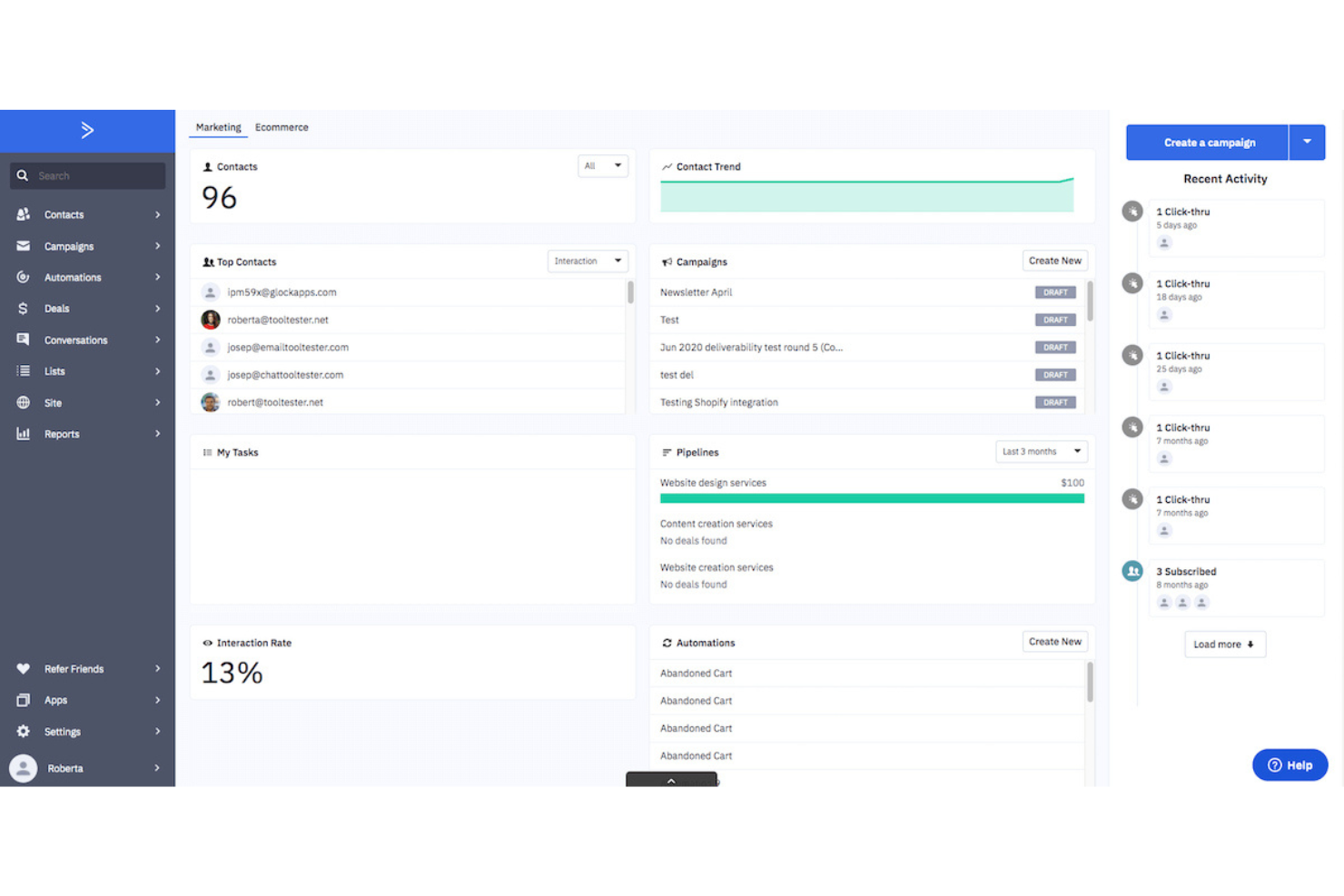
ActiveCampaign blends CRM, sales automation, and marketing features designed for teams that prioritize personalized journeys at scale. It’s a strong fit for digital agencies, e-commerce brands, and businesses looking to automate multi-channel lead handling.
Who Is ActiveCampaign Best For?
Marketing and sales teams at digital-first businesses that are seeking advanced automation for lead management and customer journeys.
Why ActiveCampaign Is a Good Zendesk Sell Alternative
I picked ActiveCampaign because its automation builder lets my team design deeply conditional lead nurturing sequences without writing a single line of code. For example, I can trigger a follow-up task for a rep the moment a lead opens an email, clicks a link, or hits a lead score threshold.
I also appreciate how deal pipelines connect directly to marketing automations, so a lead's behavior in an email campaign can automatically move them to a new pipeline stage. That kind of tight loop between marketing signals and sales actions is what makes it stand out for automation-heavy nurturing.
ActiveCampaign Key Features
- Contact scoring: Assign and update scores based on engagement behaviors like email opens, site visits, and form submissions.
- Win probability: Get an AI-generated likelihood score on each deal based on historical pipeline data.
- Sales reporting: Track deal outcomes, pipeline value, and rep activity through built-in dashboards.
- Automation builder: Create multi-step lead nurturing sequences with triggers based on user activity, deal stage updates, or score changes.
ActiveCampaign Integrations
ActiveCampaign offers over 900 native integrations, including Salesforce, Shopify, WordPress, Facebook, Google Ads, WooCommerce, Calendly, Typeform, and Slack. Zapier and an API for custom integrations are also available.
Pros and Cons
Pros:
- Highly customizable deal pipeline stages
- Built-in lead and contact scoring tools
- Extensive automation builder for sales workflows
Cons:
- Initial setup time can be lengthy
- No native customer support ticketing features
Best for unified sales and support intelligence
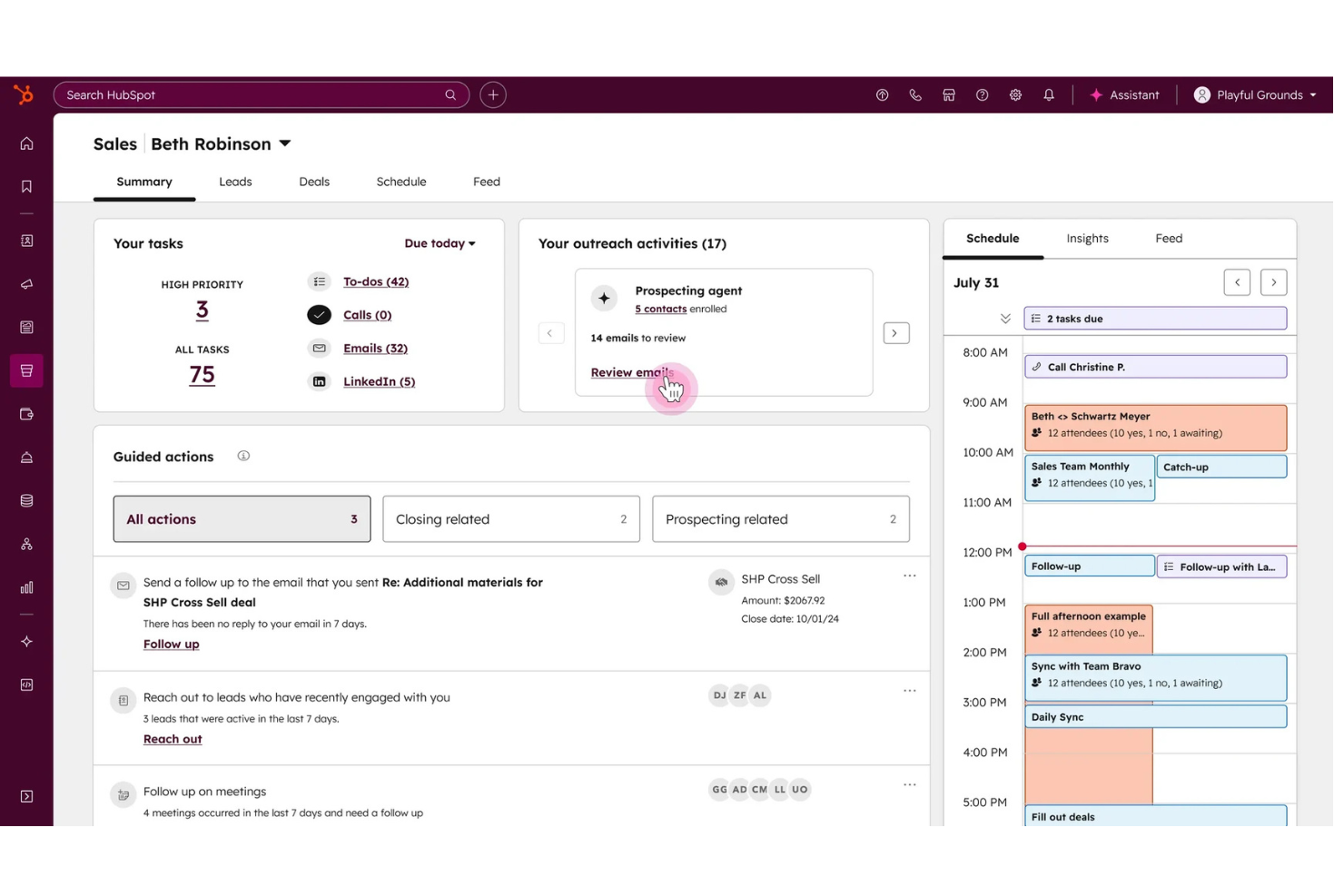
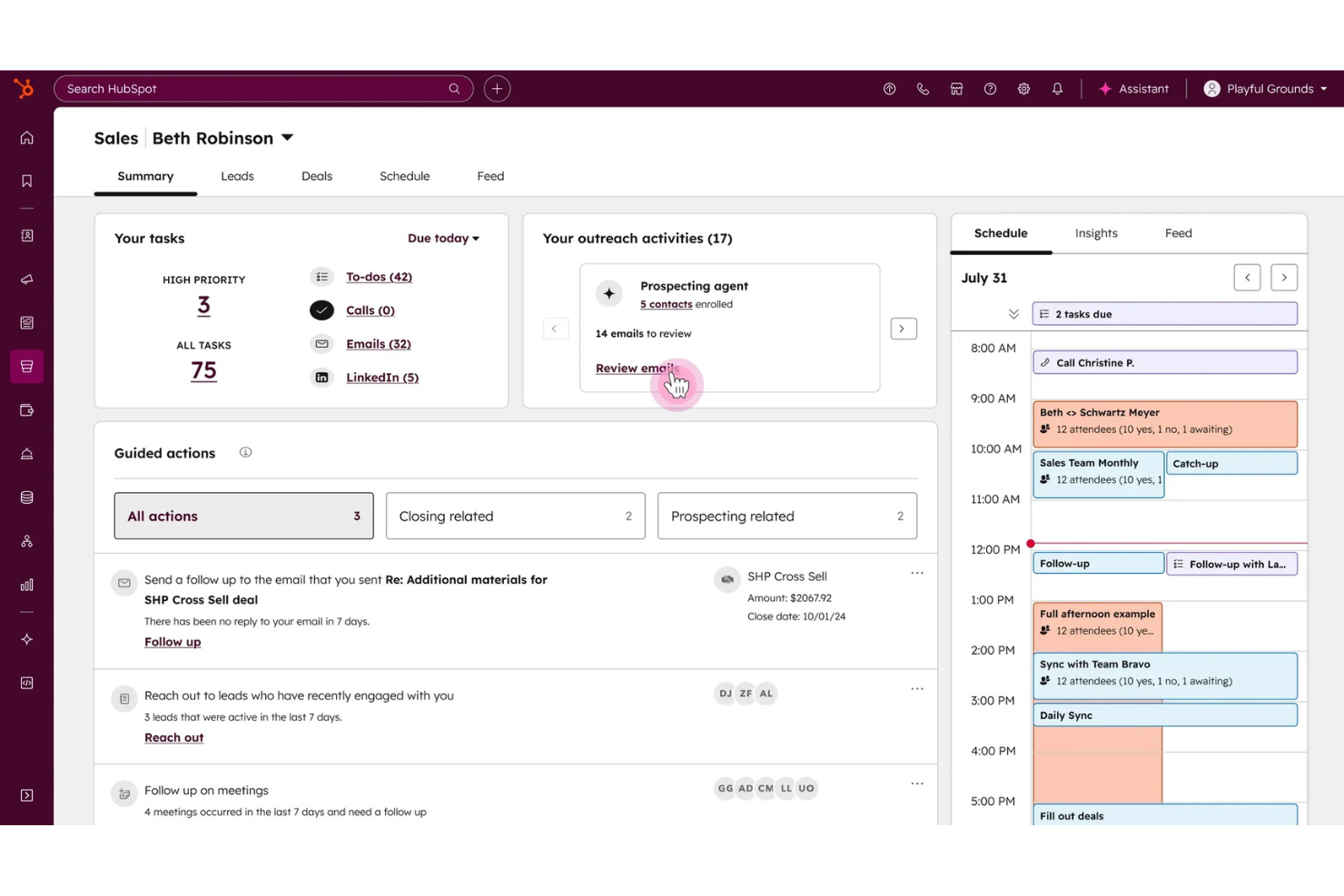
HubSpot Sales Hub unifies sales, marketing, and support data to provide a single view of the customer. It is ideal for teams that rely on integrated sales and service insights to drive growth.
Who Is HubSpot Sales Hub Best For?
Sales and customer-facing teams who need shared customer data across departments in growing businesses.
Why HubSpot Sales Hub Is a Good Zendesk Sell Alternative
I picked HubSpot Sales Hub because it connects sales activity and customer support history in a single contact record, so my team never enters a conversation blind. I appreciate the AI features like conversation intelligence, which automatically transcribes and analyzes sales calls to surface coaching moments and deal risks.
My team also uses the deal inspection view to check pipeline health alongside customer service tickets, which gives us a fuller picture of account status than most CRMs offer. In practice, that means my reps spend less time switching between tools and more time acting on the right signals.
HubSpot Sales Hub Key Features
- Email tracking: Get notified the moment a prospect opens an email or clicks a link.
- Sales sequence automation: Enroll contacts in timed email and task sequences to follow up automatically.
- Predictive lead scoring: Automatically rank contacts based on their likelihood to close.
- Conversation intelligence: Transcribe and analyze sales calls automatically to surface deal risks and coaching opportunities.
HubSpot Sales Hub Integrations
HubSpot Sales Hub offers native integrations with Asana, Gmail, Outlook, Google Workspace, Slack, Zoom, Airtable, Trello, Shopify, Jira, and more. An API is available for custom integrations.
Pros and Cons
Pros:
- Contact profile shows all sales and support activity
- Native email tracking and scheduling built in
- Pipeline and support tickets visible in one view
Cons:
- Added cost for some integrations and features
- Bulk data updates not available on all tiers

Nutshell
Best for rapid small-team CRM setup
Nutshell gives smaller sales teams a way to organize pipeline activity through an intuitive surface and customer communications with advanced features in one place. If you want a quick CRM setup that supports all team members without sacrificing easy reporting, email sync, or lead management, Nutshell fits right in.
Who Is Nutshell Best For?
Small businesses and startup sales teams that need a CRM with fast onboarding and straightforward tools for tracking deals and contacts.
Why Nutshell Is a Good Zendesk Sell Alternative
I picked Nutshell because it gets small sales teams up and running fast without weeks of configuration. I like how the guided pipeline setup walks you through deal stages right out of the box without the need for admin overhead or consulting.
My team uses Nutshell's built-in email sequencing to automate follow-ups directly from the CRM, eliminating the need for a separate tool. I also appreciate the activity reporting dashboard, which gives me a clear view of rep performance without diving into complex settings.
Nutshell Key Features
- Contact management: Store and organize contact and company records with full communication history in one view.
- Pipeline customization: Build multiple sales pipelines with custom stages to match your team's sales process.
- Lead routing: Automatically assign new leads to specific reps based on rules you define.
- Email automation: Send personalized, multi-step drip sequences directly from the CRM to automatically follow up with leads.
Nutshell Integrations
Nutshell offers more than 50 native integrations, including Google Workspace, Microsoft 365, Mailchimp, ActiveCampaign, Slack, QuickBooks Online, Dropbox, and GitHub. An API is available for custom integrations.
Pros and Cons
Pros:
- Contact records combine all communications
- Includes automated lead assignment rules
- Simple pipeline setup for small teams
Cons:
- No built-in VOIP dialer available
- No join-table reporting

Best for post-sale project relationship tracking
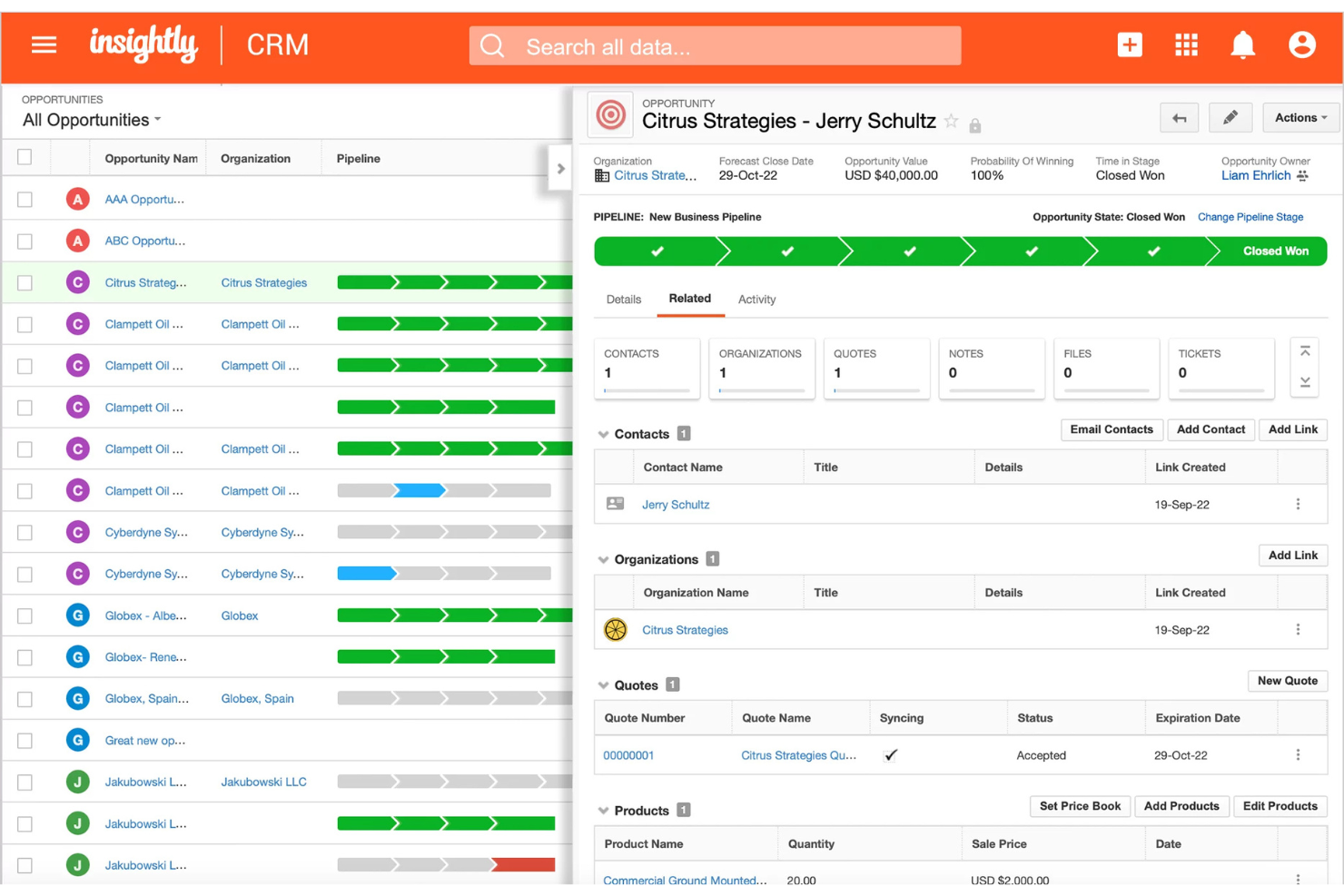
Insightly is a CRM built for teams that need to manage complex customer relationships beyond the initial sale. I think you’ll appreciate its blend of sales, project, and delivery management in one connected workspace.
Who Is Insightly Best For?
Project-driven teams in professional services or consulting firms looking to manage ongoing client work and follow-up after the initial sale.
Why Insightly Is a Good Zendesk Sell Alternative
I picked Insightly because it offers a minimal learning curve and lets my team convert a closed deal directly into a project without leaving the CRM. I appreciate the pipeline-to-project handoff feature, which means customer context, contacts, and notes carry over automatically when a deal moves into delivery.
In practice, that means my team can track milestones, assign tasks, and manage client relationships in a single system rather than bouncing between a CRM and a separate project tool. For teams doing ongoing client work, that continuity is hard to find elsewhere.
Insightly Key Features
- Workflow automation: Trigger automated email sends, record updates, and task assignments based on predefined rules.
- Products, price books, and quotes: Build product catalogs, configure pricing, and generate branded quote PDFs from within a deal record.
- Performance dashboards: Build and share custom dashboards to track pipeline health and rep activity in real time.
- Project management integration: Convert won deals directly into projects to track milestones, tasks, and client delivery within the same workspace.
Insightly Integrations
Insightly offers native integrations with Google Workspace, Microsoft 365, Mailchimp, QuickBooks Online, Xero, Slack, Dropbox, PandaDoc, DocuSign, and Zoom. It connects with Zapier and provides an API for custom integrations.
Pros and Cons
Pros:
- Relationship linking for mapping complex accounts
- Visual pipeline and Kanban board views
- Automatic project creation from closed deals
Cons:
- Email marketing tools feel basic
- Customization is limited without coding
Bitrix24
Best for all-in-one team collaboration tools
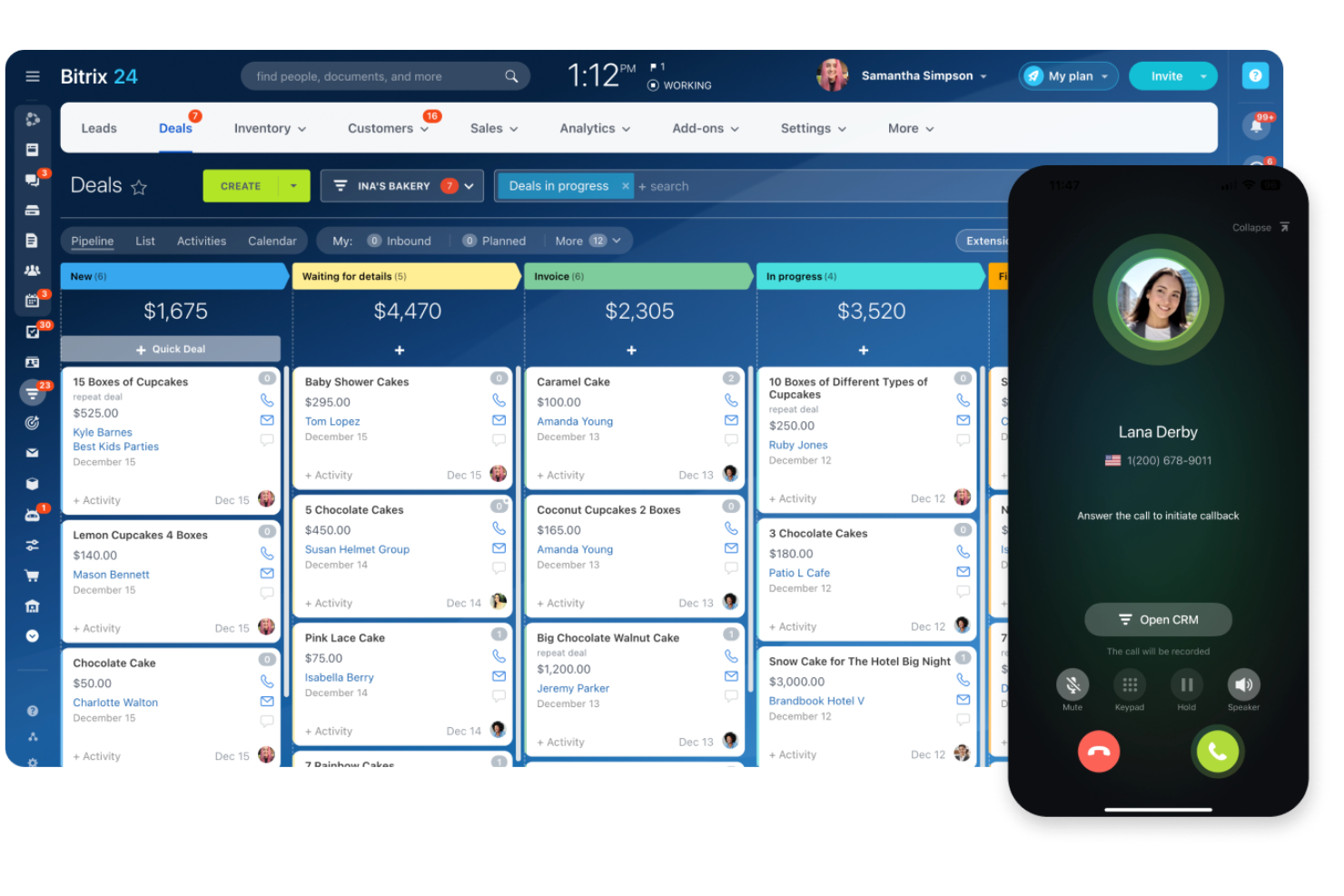
Bitrix24 is a CRM that combines sales, collaboration, and project management in one platform. It’s a strong fit for small businesses or teams looking to centralize client communication and teamwork alongside deal tracking.
Who Is Bitrix24 Best For?
Distributed teams or small businesses that need integrated CRM, project management, and communication features in a single platform.
Why Bitrix24 Is a Good Zendesk Sell Alternative
I picked Bitrix24 because it replaces multiple tools at once. Instead of stitching together a CRM, a project manager, and a chat platform, my team can handle all three inside Bitrix24. I especially rely on the built-in workgroup spaces, where we link deals directly to task boards and internal chats without switching apps.
For teams that find Zendesk Sell too narrowly focused on the sales pipeline, Bitrix24 gives the full operational picture in one place.
Bitrix24 Key Features
- Pipeline management: Build and manage multiple sales pipelines with customizable deal stages and fields.
- Omnichannel contact center: Capture leads from web forms, live chat, WhatsApp, Instagram, and email into a single inbox.
- Automated funnels: Set up trigger-based workflows that move leads through stages and send notifications without manual input.
- Task & project tracking: Link deals directly to visual task boards, Gantt charts, and time trackers to coordinate team execution.
Bitrix24 Integrations
Bitrix24 offers native integrations with Zoho, Jira, Pipedrive, Trello, QuickBooks, Shopify, Mailchimp, Google Analytics, PayPal, Xero, RingCentral, and more. An API is available for custom integrations.
Pros and Cons
Pros:
- Customizable deal pipelines for multiple teams
- Omnichannel lead capture and contact center
- Extensive workflow and sales automation options
Cons:
- CRM reporting options are less flexible
- Interface can feel crowded and overwhelming

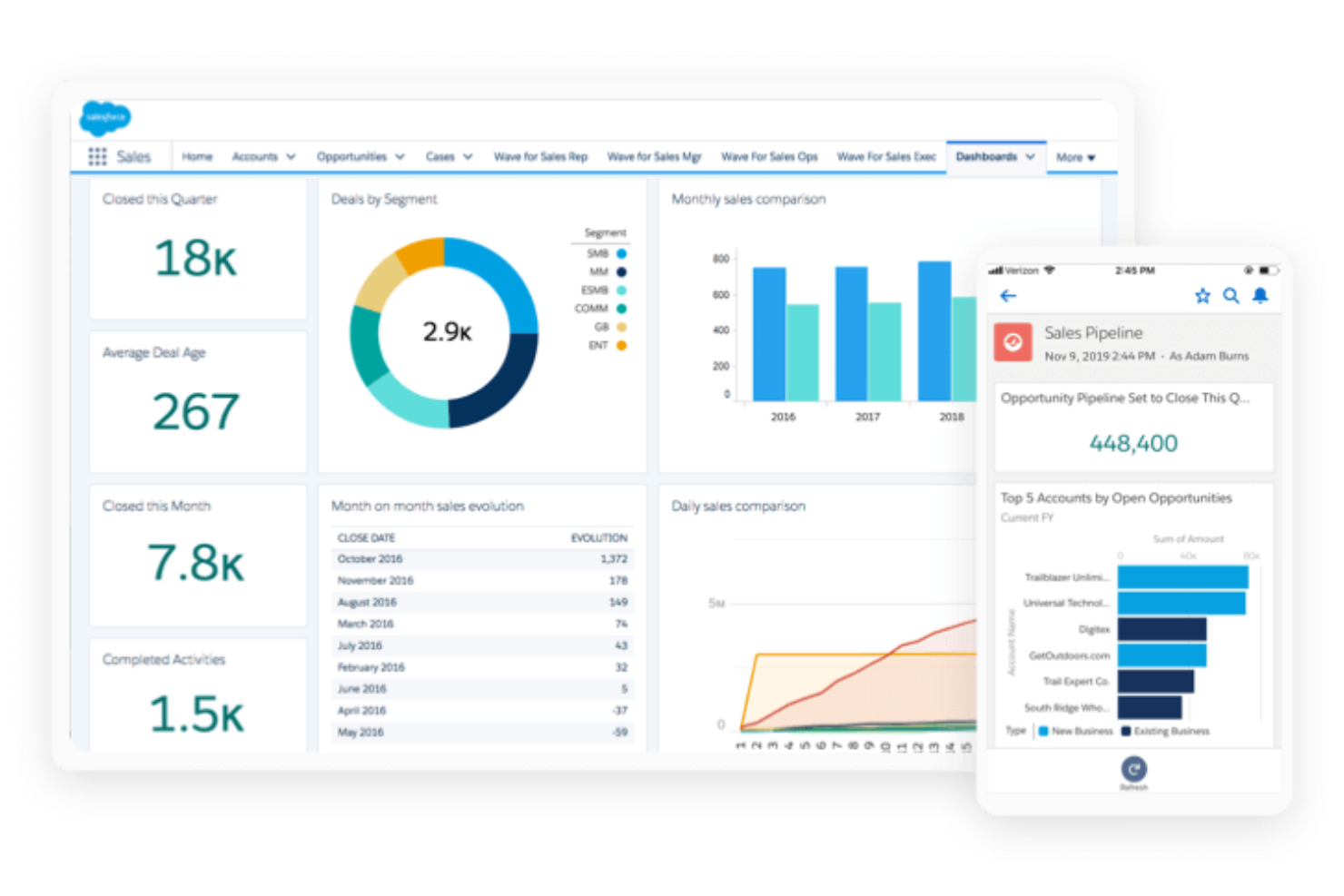
SAP Sales Cloud gives global sales organizations a CRM platform designed for complex, high-volume deal management. I think large enterprises in need of broad stakeholder collaboration and advanced sales analytics will appreciate its data-driven approach.
Who Is SAP Sales Cloud Best For?
Enterprises with global, multi-division sales teams looking for unified forecasting and complex opportunity management at scale.
Why SAP Sales Cloud Is a Good Zendesk Sell Alternative
Global enterprise forecasting is where I think SAP Sales Cloud genuinely earns its place. I rely on its predictive forecasting tools to flag at-risk deals before they slip, using real-time data and AI-driven analysis across large, multi-region pipelines.
I also appreciate how AI-optimized territory mapping and quota allocation work together, automatically balancing workloads across divisions based on actual performance data. For teams running high-complexity B2B sales cycles, that level of planning depth is hard to find in most CRM alternatives.
SAP Sales Cloud Key Features
- Guided selling: Access recommended next steps and playbooks during active deals based on deal stage and customer data.
- Visit planning: Schedule and log field sales visits with geo-mapping and route optimization built in.
- Automated lead routing: Assign incoming leads to the right reps based on predefined rules for territory, product line, or deal size.
- Predictive forecasting: Flag at-risk deals before they slip using real-time pipeline data and AI-driven analysis across multi-region teams.
SAP Sales Cloud Integrations
Native integrations include Microsoft Teams and tools in the SAP ecosystem such as SAP ERP, SAP CPQ, and SAP S/4HANA. An API is available for custom integrations.
Pros and Cons
Pros:
- Extensive territory and quota management features
- AI-driven opportunity scoring and recommendations
- Advanced enterprise-grade sales forecasting tools
Cons:
- Workflow automation features require setup expertise
- Complex implementation for most organizations
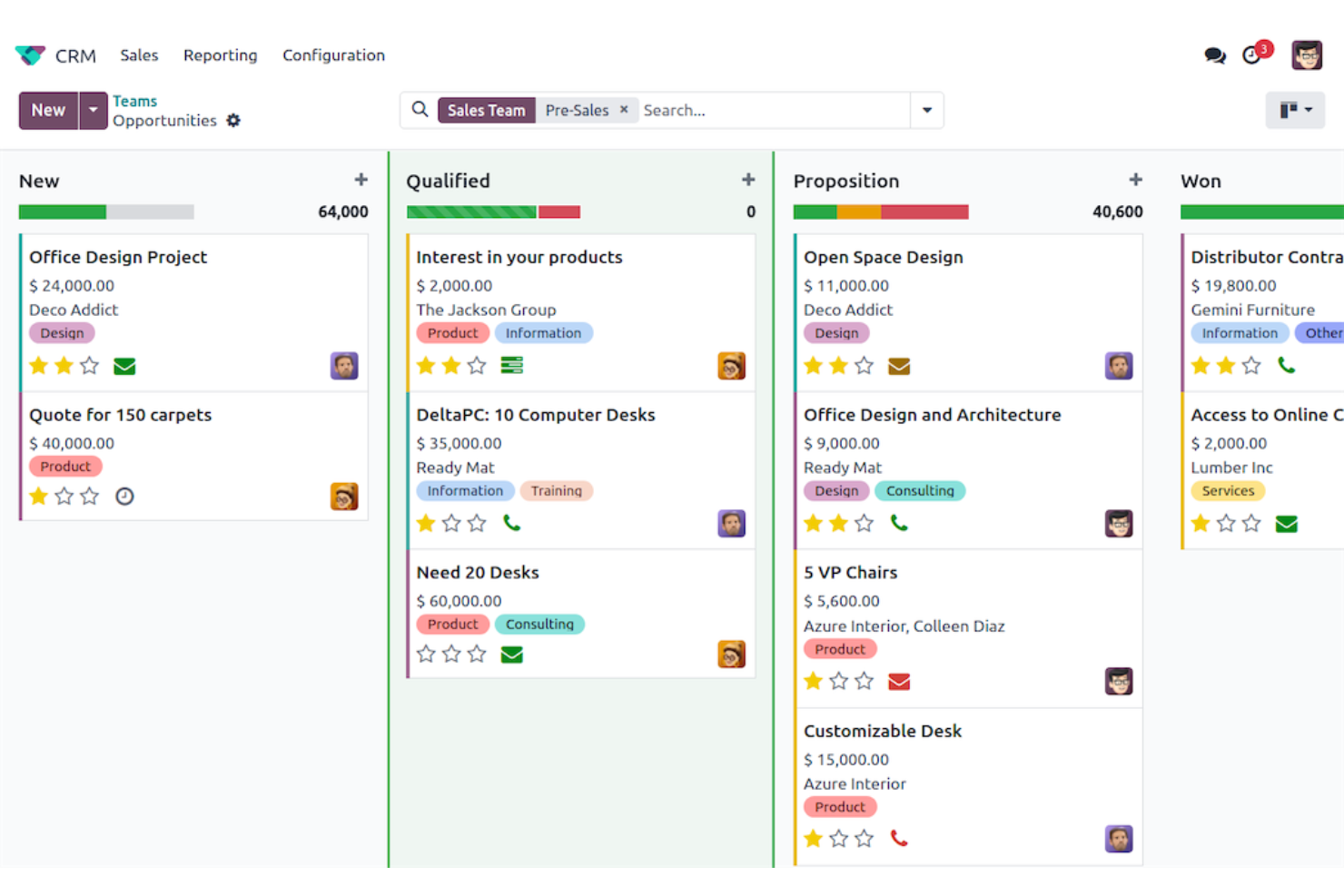
Odoo is a modular CRM platform that appeals to companies looking for tight integration with broader business operations. If you want a system that connects sales, inventory, and finance in a single, customizable environment, Odoo stands out.
Who Is Odoo Best For?
Mid-sized businesses and enterprises that want a customizable CRM connected to inventory, accounting, and project management in a unified, open-source suite.
Why Odoo Is a Good Zendesk Sell Alternative
I picked Odoo because its CRM module is designed to work alongside the rest of the Odoo suite. When a deal closes, my team doesn't have to trigger anything in a separate system manually, including sales orders, inventory updates, and invoicing.
I rely on AI lead scoring to keep reps focused on the right opportunities, and automated activity scheduling for follow-ups. For teams running on Zendesk Sell but needing tighter ERP-level visibility, Odoo closes that gap without requiring a separate platform.
Odoo Key Features
- Kanban pipeline view: Drag and drop deal cards across stages to move opportunities through your pipeline visually.
- Quotation builder: Generate product-based quotations directly from an opportunity with a built-in product catalog.
- Automated activity scheduling: Odoo plans the next sales activity automatically based on your defined sales script.
- AI lead scoring: Analyze historical deal data to rank sales opportunities automatically by their conversion probability.
Odoo Integrations
Native integrations are not publicly listed. An API is available for custom integrations.
Pros and Cons
Pros:
- Deep integration with accounting and inventory tools
- Visual pipeline with automated activity scheduling
- Modular apps for extended ERP functionality
Cons:
- Upgrades and maintenance may require IT expertise
- Steep setup process for advanced workflows
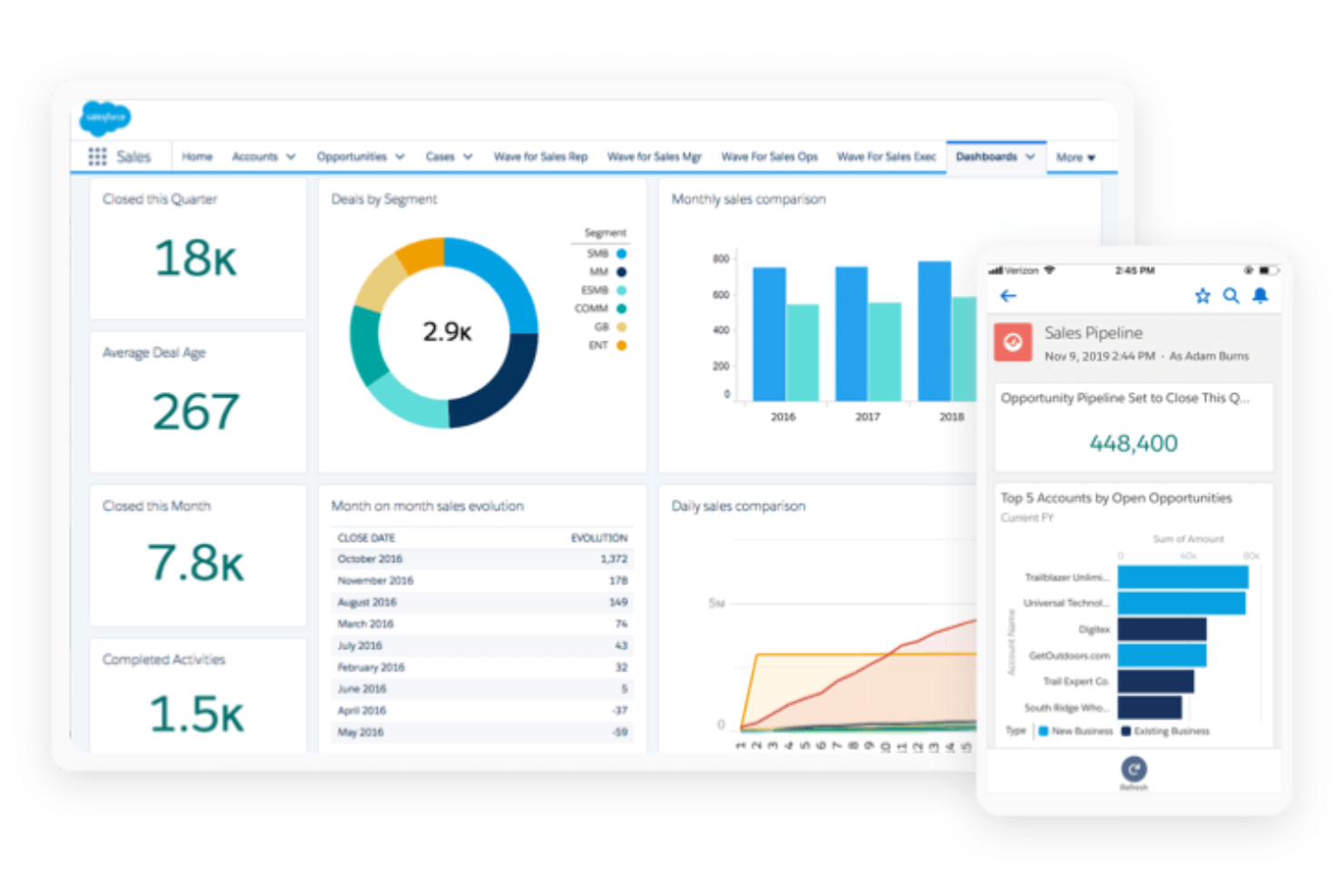
Salesforce Sales Cloud is a flexible CRM built for organizations that demand deep customization options and process control. If your business needs to manage complex sales cycles, unify data, or automate detailed workflows, this platform is built with you in mind.
Who Is Salesforce Sales Cloud Best For?
Large enterprises or multinational teams that need highly customizable workflows and advanced sales automation across multiple regions or business units.
Why Salesforce Sales Cloud Is a Good Zendesk Sell Alternative
I picked Salesforce Sales Cloud because it offers deeper levels of customization compared to some other CRM tools. Custom objects let my team model our exact sales process rather than fitting our workflow into a predefined structure.
I also rely heavily on Flow Builder, Salesforce's no-code automation tool, to trigger multi-step actions across records without touching code. For enterprise teams managing complex, non-linear sales cycles across multiple product lines or regions, that level of configurability is genuinely difficult to replicate elsewhere.
Salesforce Sales Cloud Key Features
- Opportunity management: Track deals through every stage of a customizable pipeline, with fields, views, and stage criteria you define.
- Lead management: Capture, score, and route incoming leads, then track them through to conversion without leaving the platform.
- Revenue lifecycle management: Manage product catalogs, configure CPQ, handle contracts, and connect billing all within the same system.
- Workflow automation: Build automated, multi-step business processes across records without writing code using Flow Builder.
Salesforce Sales Cloud Integrations
Salesforce Sales Cloud offers thousands of native integrations, including ActiveCampaign, Conga, PandaDoc, Jotform, QuickBooks Online, DocuSign, and more. An API is available for custom integrations.
Pros and Cons
Pros:
- Scales well for multi-region deployments
- Custom report and dashboard builder
- Advanced automation for multi-step sales processes
Cons:
- Field-level customizations can complicate data mapping
- Admin setup requires significant expertise

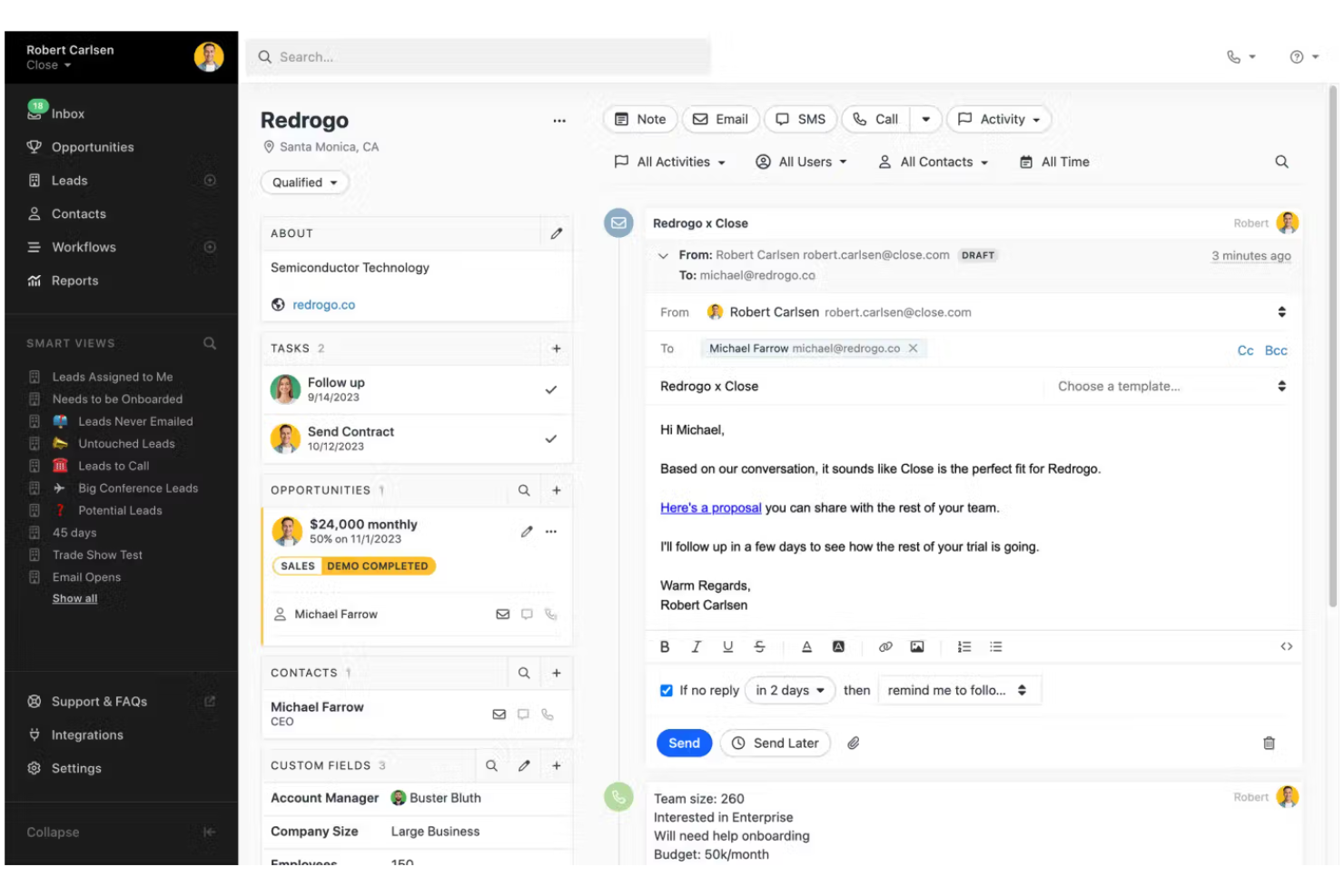
Close is a CRM designed with a focused user experience for sales teams that manage a high volume of calls and outreach. It appeals to fast-growing companies needing built-in calling, SMS, and automation to keep deals moving efficiently.
Who Is Close Best For?
Outbound sales teams in SaaS and tech companies that rely on phone outreach to drive pipeline and revenue.
Why Close Is a Good Zendesk Sell Alternative
I picked Close because the built-in power dialer lets my team call through a list automatically, logging calls and leaving voicemails without manual effort. I also appreciate the predictive dialer, which connects reps only when a live person answers, so no one wastes time on dead air.
In practice, my team can run multi-touch sequences that blend calls, emails, and SMS from a single contact record without switching tools. For outbound-heavy sales teams, that level of telephony depth is hard to find in a CRM.
Close Key Features
- Pipeline view: Visualize and manage deals across customizable stages in a drag-and-drop board.
- Smart Views: Save filtered contact and lead lists based on dynamic criteria for quick access.
- Email sequences: Automate follow-up emails with scheduled, personalized outreach tied to contact activity.
- Built-in calling & SMS: Place calls, send text messages, and log outreach automatically from directly within the CRM.
Close Integrations
Close offers 100+ native integrations, including Zoom, Microsoft 365, Calendly, Make, Google Workspace, and SavvyCal. It also connects with Zapier and has an API for custom integrations.
Pros and Cons
Pros:
- Call coaching and real-time listening features
- Integrated SMS and email in one platform
- Native power dialer for high call volume
Cons:
- No built-in customer support ticketing
- Workflow automation limited to higher tiers
Other Zendesk Sell Alternatives
Here are some additional Zendesk Sell alternatives that didn’t make it onto my shortlist, but are still worth checking out:
- Copper
For native Google Workspace integration
- SugarAI
For predictive B2B precision selling
- Salesflare
For automated zero-input data entry
- LeadSquared
For high-volume lead capture and routing
- EngageBay
For affordable all-in-one sales and support
- Bigin by Zoho CRM
For simple pipeline-focused small business
- Zoho CRM
For AI-driven sales automation value
- monday CRM
For visual pipeline and workflow agility
- Pipedrive
For AI-powered activity-based selling
- Freshsales
For AI-powered contact scoring


How I Evaluate Zendesk Sell Alternatives
I first check whether a CRM covers the basics Zendesk Sell already handles—pipeline views, built-in calling, and deal tracking reps actually use daily. From there, I evaluate what sets each tool apart for RevOps teams scaling beyond a starter CRM.
Core Functionality (Table Stakes For This List)
When I'm selecting tools for my list, I rank each one on a scale from 0 (does not offer the functionality) to 5 (excels in this area) for each core functionality listed below. Then, I calculate the tool's total score into a percentage. Each tool needs to achieve a minimum total score of 65% to be considered for inclusion.
- Sales Pipeline Management: I look for visual, drag-and-drop pipelines where reps can move deals across custom stages—similar to how Pipedrive and HubSpot structure their board views.
- Contact & Lead Management: Each tool should let you segment contacts, track interaction history, and separate leads from active accounts throughout the full lifecycle.
- Native Communication Tools: Built-in email sync and click-to-call matter here because reps shouldn't need to toggle between a CRM and a separate dialer to log a follow-up.
- Sales Reporting & Forecasting: I evaluate whether dashboards go beyond canned reports—can a RevOps manager build a custom forecast view and track rep attainment in real time?
- Workflow Automation: The tool should handle trigger-based sequences like auto-assigning inbound leads by region or creating follow-up tasks when a deal sits idle too long.
- Mobile CRM Access: Field reps need to update deals and log calls from their phones, so I check whether the mobile app supports full editing, not just read-only access.
Once I have a list of tools that meet the criteria, I consider what sets each platform apart.
Differentiating Factors (What Sets Vendors Apart)
Here's how I compare and contrast different vendors:
Standout Features
AI-powered deal insights are a major differentiator. I look for tools where an AI assistant can draft follow-up emails or flag stalled deals without reps digging through dashboards—Freshsales and HubSpot both offer versions of this. Revenue intelligence takes it further by scoring deal health and surfacing coaching moments, which matters a lot for RevOps managers running weekly pipeline reviews. Lead scoring and routing is another area I evaluate closely, since automated round-robin assignment or territory-based routing can cut response times dramatically for inbound-heavy teams.
Beyond Features
Pricing transparency matters a lot when you're migrating a whole sales team. I check whether essential features like automation and API access are included at each tier or locked behind enterprise plans. Integration depth is another key factor—your CRM needs to connect cleanly with marketing, support, and BI tools your RevOps stack already runs on. I also evaluate how quickly a team can realistically go live, including whether the vendor offers migration wizards or import tools that simplify the switch from Zendesk Sell without requiring a dedicated implementation partner.
Why Look For a Zendesk Sell Alternative?
While Zendesk Sell is a good choice of CRM software, there are a number of reasons why some users seek out alternative solutions. Zendesk Sell users might be looking for an alternative because…
- You want advanced forecasting tools
- Your business and team members need deeper workflow automation
- You require broader integration options
- Your team is scaling beyond basic CRM needs
- You operate in markets where Zendesk Sell isn’t available
- You need industry-specific sales features
If any of these sound like you, you’ve come to the right place. My list contains several CRM software options that are better suited for teams facing these challenges with Zendesk Sell and looking for alternative solutions.
Zendesk Sell Key Features
Here are some of the key features of Zendesk Sell, to help you contrast and compare what alternative solutions offer:
- Sales pipeline management: Visualize, customize, and track every stage of your selling process for greater clarity and control over deal progress.
- Lead and contact management: Store, organize, and update detailed records of leads and contacts, with activity histories and notes.
- Activity tracking: Log calls, emails, meetings, and tasks directly within deals to maintain a complete timeline of interactions.
- Reporting and analytics: Generate detailed sales reports and dashboards to monitor performance, revenue, and conversion trends.
- Automated lead scoring: Use rules and criteria to prioritize leads most likely to convert, so sales teams can focus their efforts efficiently.
- Mobile access: Access and update your sales data, contacts, and tasks on the go with the Zendesk Sell mobile app.
- Integrated communications: Make calls, send emails, and schedule appointments directly through the platform, with automatic logging.
- Task and appointment management: Set reminders, assign follow-ups, and schedule future actions to keep deals moving forward.
- Custom fields and tags: Personalize your CRM data model to capture business-specific information and segment records.
- Marketplace integrations: Extend Zendesk Sell by connecting with third-party tools for marketing, support, and productivity.