

A strong monday CRM alternative gives your team flexible pipeline management, customizable automation, and reliable integrations across your sales, marketing, and customer success workflows. If you’re searching for options beyond monday CRM, you’re likely looking for an all-in-one platform that supports task management, teamwork, and handles complex projects more effectively. Many alternatives combine CRM capabilities with a project management tool, offering advanced features, advanced reporting, and even invoicing to support growing businesses. These tools are often well-suited for small teams that need flexibility without sacrificing functionality. This list will help you compare the top monday CRM alternatives for 2026, so you can find a platform that matches your operational needs and supports your revenue goals.
What is monday CRM?
monday CRM is a customer relationship management platform designed to help teams organize sales pipelines, manage contacts, and automate routine tasks. It offers customizable workflows, visual dashboards, and integration with popular business tools. Teams use monday CRM to track leads, monitor deals, and centralize communication, making it easier to manage customer relationships and sales activities in one place.
monday CRM Alternatives Comparison Table
This comparison table summarizes pricing details for my top monday.com alternative selections.
| Tool | Best For | Trial Info | Price | ||
|---|---|---|---|---|---|
| 1 | Best for no-code pipeline and forecast customization | 14-day free trial | From $40/user/month (billed annually) | Website | |
| 2 | Best for built-in telephony features | 21-day free trial | From $9/user/month (billed annually) | Website | |
| 3 | Best with email marketing automation | 14-day free trial | From $15/month (billed annually) | Website | |
| 4 | Best for simple team onboarding | 14-day free trial + free demo available | From $13/user/month (billed annually) | Website | |
| 5 | Best with advanced analytics and reporting | 30-day free trial | From $25/user/month | Website | |
| 6 | Best for visual sales pipeline management | 14-day free trial available | From $14/user/month (billed annually) | Website | |
| 7 | Best for inside sales teams | 14-day free trial + free demo available | From $9/user/month (billed annually) | Website | |
| 8 | Best for project management capabilities | 14-day free trial | From $29/user/month (billed annually) | Website | |
| 9 | Best for integrated marketing and sales tools | 28-day free trial + free plan available | From $20/seat/month | Website | |
| 10 | Best for Google Workspace integration | Free trial available | From $59/user/month (billed annually) | Website |


Why Trust Our Software Recommendations
6,700+
Reviews
20
Industry experts
16+
Evaluation factors
14
Years
Our reviews reflect our independent judgment—not a sales pitch. Learn how we stay transparent.
For this guide, we evaluated tools using hands-on testing and independent research, scoring tools using our selection criteria.
Our reviews reflect our human editorial judgment, not a sales pitch.
monday CRM Alternatives Reviews
Below are my detailed summaries of the monday CRM alternatives that made it onto my shortlist. My reviews offer a detailed look at the features, integrations, and best use cases of each platform to help you find the best one for you.
 Best for no-code pipeline and forecast customization
- 14-day free trial
- From $40/user/month (billed annually)
Visit WebsiteCustomer Rating:4.7/5This rating combines scores from multiple user review sites to reflect overall customer sentiment about the product.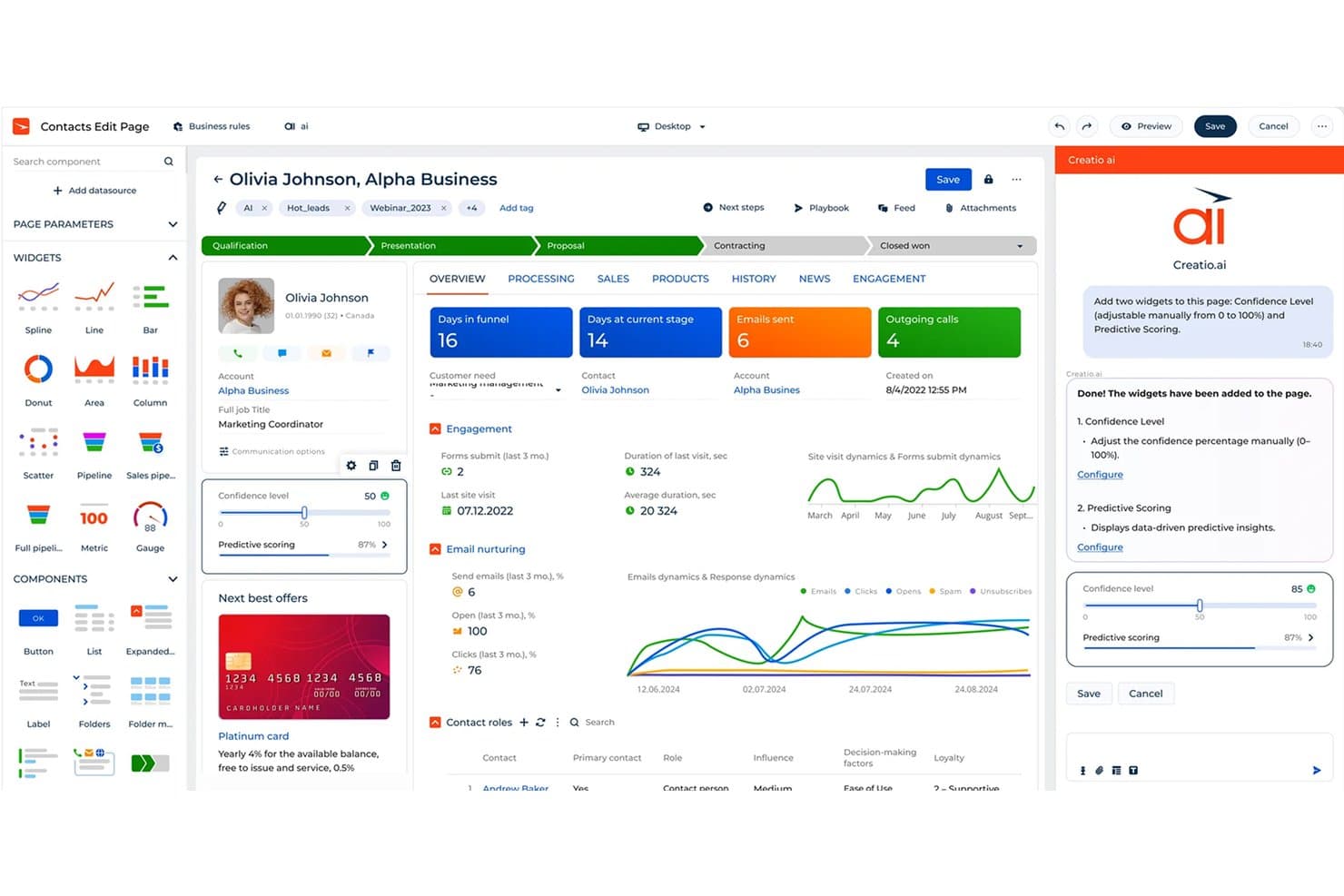
Creatio CRM uses AI to auto-add widgets like Confidence Level and Predictive Scoring. Creatio is a CRM platform for sales, marketing, and service teams that need connected customer data, automated workflows, and adaptable processes without relying heavily on developers.
Who Is Creatio CRM Best For?
Revenue operations teams that need to tailor sales stages, forecasting rules, and workflows without relying on developers.
Why Creatio CRM Is a Good monday CRM Alternative
I picked Creatio CRM because it supports no-code pipeline and forecast customization. I use its visual tools to adjust sales stages, forecast rules, and approval workflows without developer support. That helps my team adapt CRM processes when territories, qualification criteria, or revenue models change.
Creatio CRM Key Features
- Lead management: Capture, qualify, and distribute leads across sales teams.
- Account and contact management: Maintain customer profiles, relationships, and activity histories.
- Email integration: Sync messages and track correspondence within customer records.
- Sales dashboards: Monitor activities, conversion rates, and revenue metrics in configurable views.
Creatio CRM Integrations
Creatio offers 700+ marketplace apps, connectors, and integrations, including DocuSign and Zapier. It also provides APIs for custom integrations.
Pros and Cons
Pros:
- Configurable forecasting supports changing revenue models
- Cross-functional workflows connect sales and service
- No-code tools reshape stages and approvals
Cons:
- Some standard CRM features need workarounds
- Advanced setup often needs specialist support
Learn more about Creatio CRM: Best for built-in telephony features
- 21-day free trial
- From $9/user/month (billed annually)
Visit WebsiteCustomer Rating:4.6/5This rating combines scores from multiple user review sites to reflect overall customer sentiment about the product.
Freshsales uses AI to prioritize leads and automate sales workflows. Freshsales is designed for sales teams that want built-in telephony alongside their CRM workflows. It’s especially useful for businesses that rely on outbound calling, follow-ups, and real-time conversation tracking within the same platform. If you need a CRM that combines contact management with native calling features, Freshsales offers a more integrated and cost-effective approach than monday CRM and similar tools. With support for unlimited users, seamless integrations, and strong pipeline visualization, it also fits teams that need flexible work management and scalable, enterprise-level capabilities.
Why Freshsales Is a Good monday CRM Alternative
Unlike monday CRM, Freshsales includes built-in telephony features that let you make calls directly from the CRM. I picked Freshsales because it offers call recording, call notes, and automatic call logging, all within the same platform where you manage your leads and deals. The tool also provides call routing and number masking, which are valuable for teams handling high call volumes or sensitive client information. If your sales process depends on real-time conversations and tracking, Freshsales gives you a level of telephony integration that monday CRM doesn’t match.
Freshsales Key Features
Some other features in Freshsales that may interest you include:
- Visual Sales Pipeline: Lets you track deals through customizable stages using a drag-and-drop interface.
- AI-Based Deal Insights: Surfaces recommendations and next steps for deals using built-in AI.
- Email Tracking: Notifies you when leads open or click your emails sent from the CRM.
- Workflow Automation: Automates repetitive tasks like lead assignment and follow-up reminders.
Freshsales Integrations
Integrations include Freshdesk, PandaDoc, QuickBooks, Xero, Stripe, and more.
Pros and Cons
Pros:
- Visual pipeline with drag-and-drop stages
- AI-based deal insights for sales prioritization
- Built-in telephony with call recording included
Cons:
- Data model limits relationship customization
- Email sequences lack multi-branch flexibility
Learn more about Freshsales: Best with email marketing automation
- 14-day free trial
- From $15/month (billed annually)
Visit WebsiteCustomer Rating:4.4/5This rating combines scores from multiple user review sites to reflect overall customer sentiment about the product.
ActiveCampaign automates marketing and sales with advanced customer journeys. If your team relies on email marketing as a core part of your customer engagement strategy, ActiveCampaign is worth a close look. This platform combines CRM features with advanced email automation, making it a strong fit for marketing-driven sales teams and ecommerce businesses. Unlike monday CRM, ActiveCampaign lets you build complex, automated email journeys that connect directly to your sales pipeline and contact management, while also supporting visual workflows similar to Kanban boards and timeline planning features like Gantt charts.
Why ActiveCampaign Is a Good monday CRM Alternative
For teams that want to connect sales and marketing in one platform, ActiveCampaign stands out for its email marketing automation capabilities. I picked ActiveCampaign because it lets you design multi-step email workflows that trigger based on contact behavior, deal stage, or custom fields. The platform’s visual automation builder and dynamic content tools help you personalize outreach and nurture leads automatically. This level of automation is especially valuable for businesses that need to coordinate marketing campaigns with sales follow-up, something monday CRM doesn’t offer natively.
ActiveCampaign Key Features
Some other features in ActiveCampaign that may interest you include:
- Lead Scoring: Assigns scores to contacts based on engagement and custom criteria.
- Deal Pipeline Management: Lets you create and manage multiple sales pipelines with customizable stages.
- Site and Event Tracking: Tracks website visits and user actions to inform sales and marketing activities.
- Task Automation: Automates task creation and assignment for sales and support teams.
ActiveCampaign Integrations
Integrations include Shopify, Salesforce, WordPress, Facebook, Slack, Google Sheets, WooCommerce, Calendly, Zendesk, and more.
Pros and Cons
Pros:
- Built-in SMS messaging alongside email campaigns
- Native lead scoring for contact prioritization
- Visual automation builder for complex workflows
Cons:
- Email template editor can be slow to load
- Reporting dashboards lack advanced filtering options
Learn more about ActiveCampaign: Best for simple team onboarding
- 14-day free trial + free demo available
- From $13/user/month (billed annually)
Visit WebsiteCustomer Rating:4.3/5This rating combines scores from multiple user review sites to reflect overall customer sentiment about the product.
Nutshell simplifies sales processes for teams needing a quick setup. Getting new team members up and running quickly is where Nutshell shines. This CRM is a strong fit for small businesses and sales teams that want a straightforward setup and minimal onboarding friction. Unlike monday CRM, Nutshell keeps its interface and workflows simple, so teams can start tracking leads and managing contacts with little training required.
Why Nutshell Is a Good monday CRM Alternative
For teams that want to get started without a steep learning curve, Nutshell is a strong option. I picked Nutshell because its guided onboarding tools and built-in tutorials help new users get comfortable with the platform right away. The platform’s simple pipeline setup and customizable sales stages make it easy for teams to start tracking deals and contacts from day one. This focus on straightforward onboarding helps businesses avoid the delays and confusion that can come with more complex CRM solutions like monday CRM.
Nutshell Key Features
Some other features in Nutshell that may interest you include:
- Built-In Email Sequencing: Lets you automate follow-up emails to leads and contacts directly from the CRM.
- Sales Reporting Dashboard: Provides visual sales reports and activity tracking for individuals and teams.
- Team Collaboration Tools: Includes shared calendars, notes, and activity feeds to keep everyone aligned.
- Web Form Integration: Captures leads from your website and adds them directly to your pipeline.
Nutshell Integrations
Integrations include Gmail and Google Calendar, Google Sheets, Google Meet, Facebook Messenger, Dropbox Sign, Dropbox DocSend, Dialpad, Calendly, and more.
Pros and Cons
Pros:
- Web form integration for direct lead capture
- Built-in email sequencing for sales outreach
- Guided onboarding with in-app setup checklists
Cons:
- Lacks advanced permissions for complex team structures
- Limited workflow automation compared to monday CRM
Learn more about Nutshell: Best with advanced analytics and reporting
- 30-day free trial
- From $25/user/month
Visit WebsiteCustomer Rating:4.4/5This rating combines scores from multiple user review sites to reflect overall customer sentiment about the product.
Salesforce delivers enterprise CRM with advanced AI-driven sales insights. Salesforce is a CRM platform built for teams that need advanced analytics and customizable reporting. It’s a strong fit for larger organizations or those with complex sales processes that require deep data insights and tailored dashboards. If you’re looking for a CRM that goes beyond basic tracking and offers granular control over analytics, Salesforce stands out from monday CRM and similar tools.
Why Salesforce Is a Good monday CRM Alternative
For teams that need more than basic reporting, Salesforce offers advanced analytics capabilities that set it apart from monday CRM. I picked Salesforce because its customizable dashboards and in-depth forecasting tools let you analyze pipeline health and sales performance at a granular level. The platform’s report builder allows you to create tailored reports using a wide range of filters and data sources. If your business relies on data-driven decision-making, Salesforce gives you the flexibility and depth that monday CRM doesn’t provide.
Salesforce Key Features
Some other features in Salesforce that may interest you include:
- Opportunity Management: Tracks deals through every stage of your sales process.
- Lead Assignment Rules: Automatically routes leads to the right sales reps based on set criteria.
- Case Management: Manages customer service requests and support tickets within the CRM.
- AppExchange Marketplace: Offers thousands of pre-built apps and integrations to extend platform functionality.
Salesforce Integrations
Native integrations include Outlook, Gmail, QuickBooks, Mailchimp, DocuSign, LinkedIn, Slack, Dropbox, Google Drive, and more.
Pros and Cons
Pros:
- AppExchange offers thousands of add-ons
- Custom report builder supports complex queries
- Advanced forecasting tools for sales teams
Cons:
- Workflow automation setup is not intuitive
- Data storage limits can trigger extra fees
Learn more about Salesforce : Best for visual sales pipeline management
- 14-day free trial available
- From $14/user/month (billed annually)

Pipedrive helps sales teams automate pipelines and close deals faster. Pipedrive is a CRM platform designed for teams that want a highly visual approach to managing sales pipelines. Sales managers and reps who need clear deal tracking and customizable stages will find its drag-and-drop interface especially useful. If your team struggles with pipeline visibility or wants a more intuitive way to organize deals, Pipedrive offers a focused solution with strong ease of use, the ability to track tasks, and built-in collaboration features.
Why Pipedrive Is a Good monday CRM Alternative
What sets Pipedrive apart as a monday CRM alternative is its focus on visual sales pipeline management. I picked Pipedrive for teams that want to see every deal’s stage at a glance using customizable, drag-and-drop pipelines. The platform’s color-coded progress bars and activity reminders help sales reps prioritize follow-ups and keep deals moving. If you need a CRM that makes pipeline visibility central to your workflow, Pipedrive delivers a clear advantage.
Pipedrive Key Features
Some other features in Pipedrive that may interest CRM buyers include:
- Email Integration: Connects with your email provider so you can send, receive, and track emails directly from the CRM.
- Lead Capture Forms: Lets you create web forms to capture leads and automatically add them to your pipeline.
- Sales Reporting: Offers customizable reports and dashboards to track sales performance and team activities.
- Mobile App: Provides a dedicated mobile app for managing deals, contacts, and activities on the go.
Pipedrive Integrations
Integrations include Gmail, Slack, QuickBooks, Zoom, Trello, Microsoft Teams, PandaDoc, Leadfeeder, JustCall, and more.
Pros and Cons
Pros:
- Built-in email tracking and templates
- Customizable sales stages for unique workflows
- Visual pipeline makes deal tracking simple
Cons:
- Workflow automation is basic compared to peers
- Limited project management features
Learn more about Pipedrive : Best for inside sales teams
- 14-day free trial + free demo available
- From $9/user/month (billed annually)

Close focuses on built-in calling and email for small sales teams. Sales teams that rely on high-volume calling and outreach will find Close designed for their workflow. This CRM is built specifically for inside sales teams that need built-in calling, SMS, and email tools to manage leads and follow-ups. Unlike monday CRM, Close offers a power dialer and automatic call logging to help reps move quickly through call lists and track every interaction.
Why Close Is a Good monday CRM Alternative
If your team’s sales process centers on outbound calls and rapid follow-up, Close is purpose-built for that environment. I picked Close because it includes a built-in power dialer, automatic call logging, and SMS capabilities, all within the CRM. These features let inside sales reps manage call lists, track conversations, and send follow-up messages without switching tools. For teams that need to maximize call volume and keep detailed records of every interaction, Close offers a focused alternative to monday CRM’s more general project-based approach.
Close Key Features
Some other features in Close that may interest you include:
- Customizable Sales Pipelines: Lets you build and adjust multiple pipelines to match your sales process.
- Email Sequence Automation: Sends scheduled, multi-step email sequences to leads directly from the CRM.
- Built-In Reporting Tools: Provides real-time dashboards and activity reports for tracking team performance.
- Lead Import and Deduplication: Imports leads in bulk and automatically detects and merges duplicates.
Close Integrations
Integrations include Calendly, Gmail, Google Calendar, HubSpot, Microsoft 365, Segment, SavvyCal, Fivetran, Zoom, and more.
Pros and Cons
Pros:
- Multi-step email sequences for lead nurturing
- Automatic call and SMS logging
- Built-in power dialer for outbound calling
Cons:
- Limited multi-channel support
- Limited marketing automation capabilities
Learn more about Close: Best for project management capabilities
- 14-day free trial
- From $29/user/month (billed annually)

Insightly combines CRM and project management for time-efficient teams. Teams that need both CRM and project management in one platform often turn to Insightly. This solution is a strong fit for service-based businesses and agencies that want to manage sales pipelines and post-sale project delivery together. Unlike monday CRM, Insightly connects opportunities, tasks, and projects in a single workflow, making it easier to track client work from first contact through completion.
Why Insightly Is a Good monday CRM Alternative
If your team needs project management built into your CRM, Insightly is worth considering. I picked Insightly because it lets you convert won opportunities directly into projects, linking sales and delivery in one place. You can assign tasks, set milestones, and track project progress alongside your customer records. This approach helps teams manage both client relationships and project execution without switching between separate tools.
Insightly Key Features
Some other features in Insightly that may interest you include:
- Custom Fields and Page Layouts: Lets you tailor records and layouts to match your business processes.
- Workflow Automation: Automates repetitive actions like sending emails or updating records based on triggers you define.
- Email Tracking: Tracks when emails are opened and links them to the right contacts and opportunities.
- Lead Assignment Rules: Routes new leads to the right team members based on criteria you set.
Insightly Integrations
Integrations include QuickBooks Online, Workday, Unbounce, ZoomInfo, WordPress, Slack, Jira, Shopify, Xero, and more.
Pros and Cons
Pros:
- Workflow automation for sales and delivery
- Opportunity records convert directly into projects
- Built-in project management with task linking
Cons:
- Limited dashboard customization for reporting
- No built-in quoting or proposal tools
Learn more about Insightly: Best for integrated marketing and sales tools
- 28-day free trial + free plan available
- From $20/seat/month

HubSpot CRM offers an easy-to-use CRM for startups scaling sales. For teams that want marketing and sales tools in one place, HubSpot CRM brings everything together in a single platform. It’s especially useful for smaller teams that need to manage contacts, automate campaigns, and track deals without juggling multiple systems. If you’re looking for a CRM that connects marketing, sales, and customer data natively, HubSpot CRM offers a user-friendly interface and can integrate with project management software and time tracking tools to support broader workflows.
Why HubSpot CRM Is a Good monday CRM Alternative
If you want a CRM that combines marketing and sales tools in one platform, HubSpot CRM is a strong choice. I picked HubSpot CRM because it offers built-in marketing automation, email campaign management, and sales pipeline tracking—all within the same system. The platform’s contact management and lead nurturing features are tightly integrated, so your marketing and sales teams can work from a single source of truth. For businesses that need unified tools for both functions, HubSpot CRM delivers a level of integration that monday CRM doesn’t match.
HubSpot CRM Key Features
Some other features in HubSpot CRM that may interest you include:
- Live Chat: Lets your team communicate with website visitors in real time.
- Meeting Scheduler: Allows prospects to book meetings directly with your sales team.
- Custom Properties: Enables you to create and track fields unique to your business.
- Sales Playbooks: Provides guided content and templates for your sales reps to use during calls and meetings.
HubSpot CRM Integrations
Integrations include Gmail, Outlook, Google Calendar, Slack, Zoom, Salesforce, Microsoft Teams, Google Meet, WordPress, and more.
Pros and Cons
Pros:
- Email tracking shows open and click rates
- Built-in meeting scheduler links to calendars
- Marketing and sales data sync automatically
Cons:
- Data export options are restricted by plan
- Contact storage limits apply to free plan
Learn more about HubSpot CRM: 10Best for Google Workspace integration
Copper
- Free trial available
- From $59/user/month (billed annually)
Visit WebsiteCustomer Rating:4.5/5This rating combines scores from multiple user review sites to reflect overall customer sentiment about the product.
Copper integrates CRM directly inside Google Workspace tools. If your team relies on Google Workspace for daily operations, Copper is built to fit right into your workflow. This CRM is especially appealing to small and midsize businesses that want deep Gmail, Calendar, and Drive integration without extra plugins. Unlike monday CRM, Copper automatically syncs emails, contacts, and files from Google Workspace, reducing manual data entry and context switching. It also supports managing simple projects, organizing data in a spreadsheet-like view, and handling subtasks with basic task dependencies. With API access for customization, Copper helps teams extend functionality while keeping workflows simplified.
Why Copper Is a Good monday CRM Alternative
For teams that live in Google Workspace, Copper offers a level of integration that monday CRM doesn’t provide. I picked Copper because it automatically syncs Gmail conversations, Google Calendar events, and Drive files directly to your CRM records. You can manage contacts, track deals, and log activities without ever leaving your Google apps. This tight connection helps reduce manual entry and keeps your sales data up to date in real time, with support for calendar views and task lists to organize daily work.
Copper Key Features
Some other features in Copper that may interest you include:
- Pipeline Management: Lets you visualize and manage sales opportunities through customizable pipeline stages.
- Task Automation: Automates repetitive actions like follow-ups and reminders based on triggers you set.
- Reporting and Analytics: Provides built-in dashboards and custom reports for tracking sales performance.
- Mobile App: Offers a dedicated mobile app for managing contacts, deals, and tasks on the go.
Copper Integrations
Integrations include Gmail, Google Calendar, Google Drive, Mailchimp, Google Sheets, LinkedIn, RingCentral, DocuSign, QuickBooks, and more.
Pros and Cons
Pros:
- Built-in workflow automation for sales tasks
- Chrome extension for in-inbox CRM access
- Automatic contact and email syncing
Cons:
- Lacks advanced marketing automation tools
- Limited pipeline customization options
Learn more about Copper:
Other monday CRM alternatives
Here are some additional monday crm alternatives that didn’t make it onto my shortlist, but are still worth checking out:
- 11Zoho CRMBest with customizable automation workflows
- 12KeapBest for small business client management
- 13Zendesk SellBest for sales email tracking features
- 14BIGContactsBest for managing contact history timelines
How I Evaluate monday CRM Alternatives
I split each evaluation into two layers: the baseline every CRM must clear—pipelines, automation, forecasting—and the differentiators that matter for RevOps teams.
Core Functionality (Table Stakes For This List)
When I'm selecting tools for my list, I rank each one on a scale from 0 (does not offer the functionality) to 5 (excels in this area) for each core functionality listed below. Then, I calculate the tool's total score into a percentage. Each tool needs to achieve a minimum total score of 65% to be considered for inclusion.
- Customizable Sales Pipelines: I check whether you can create multiple pipelines with editable stages and views—like separating new business from expansion deals in distinct boards.
- Contact & Account Management: Each tool should link contacts, companies, and deals into a clear hierarchy so reps can trace a deal back to every stakeholder involved.
- Workflow Automation: I look for no-code automation builders that handle real RevOps tasks like round-robin lead assignment, stage-change notifications, and auto-task creation.
- Reporting & Forecasting: Pipeline forecasting and custom dashboards matter here—I evaluate whether you can build a weighted forecast view without exporting data to a spreadsheet.
- Native Integrations & API: The tool needs to connect to your existing stack. I look at native connectors for marketing automation and BI tools, plus REST API access for custom syncs.
- Custom Objects & Fields: RevOps teams often need data models beyond standard CRM objects. I check whether you can create custom objects—like partner records or renewal trackers—with relational linking.
Once I have a list of tools that meet this criteria, I consider what sets each platform apart.
Differentiating Factors (What Sets Vendors Apart)
Here's how I compare and contrast different vendors:
Standout Features
AI-powered deal scoring is a big differentiator—I look for tools that flag at-risk deals based on pipeline activity so RevOps teams can intervene before a quarter goes sideways. Revenue intelligence takes this further when a CRM includes native call recording and conversation analytics, giving managers coaching signals without a separate tool. I also evaluate built-in sales engagement sequences, since multi-channel cadences inside the CRM mean fewer integrations to maintain and cleaner attribution data.
Beyond Features
Revenue stack integrations matter a lot here. I check how well each CRM syncs with marketing automation, BI, and data warehouse tools—because a CRM that can't feed clean data into your Snowflake instance or Tableau dashboards creates more work than it solves. Pricing transparency is another factor I weigh, especially hidden costs for automation limits or API calls that balloon as your team scales. I also evaluate scalability—whether the platform supports role-based permissions, sandbox environments, and multi-business-unit structures that growing RevOps orgs need.
Why Look For a monday CRM Alternative?
While monday CRM is a good choice of customer relationship management platform, there are a number of reasons why some users seek out alternative solutions. You might be looking for a monday CRM alternative because…
- You need built-in calling or SMS tools
- Your team requires advanced sales automation
- You want more granular pipeline customization
- You need deeper reporting and analytics
- Your business operates outside monday CRM’s supported regions
- You prefer a CRM focused on sales rather than project management
If any of these sound like you, you’ve come to the right place. My list contains several customer relationship management platform options that are better suited for teams facing these challenges with monday CRM and looking for alternative solutions.
monday CRM Key Features
Here are some of the key features of monday CRM, to help you contrast and compare what alternative solutions offer:
- Customizable sales pipelines
- Contact and account management
- Automated workflow automation
- Email integration and tracking
- Activity and deal tracking
- Task assignment and reminders
- Custom dashboards and reporting
- Lead capture forms
- Mobile app access
- Permissions and role-based access controls