

Sales teams are under more pressure than ever to hit targets, close deals faster, and keep customers happy — all while juggling countless tools.
If you’ve ever felt overwhelmed trying to find the right sales software, you’re not alone. With so many options promising to automate tasks, boost productivity, and drive growth, it’s hard to know where to start. We get it — and we’ve been there too.
That’s why we’ve done the legwork for you, cutting through the noise to highlight the top sales software that actually delivers. Whether you’re looking to streamline your workflow, track customer interactions, or scale your business, these tools are built to help you do just that — without the endless trial and error.
Why Trust Our Software Recommendations
6,700+
Reviews
20
Industry experts
16+
Evaluation factors
14
Years
Our reviews reflect our independent judgment—not a sales pitch. Learn how we stay transparent.
For this guide, we evaluated tools using hands-on testing and independent research, scoring tools using our selection criteria.
Our reviews reflect our human editorial judgment, not a sales pitch.
| Tool | Best For | Trial Info | Price | ||
|---|---|---|---|---|---|
| 1 | Best with real-time verified B2B contact data | Free plan + 14-day free trial + free demo available | From $49/user/month (billed annually) | Website | |
| 2 | Best for automated email sequences | 30-day free trial + free demo available | From $29/user/month (billed annually) | Website | |
| 3 | Best for customizable automations for your sales pipeline | 14-day free trial + free demo available | From $12/seat/month (billed annually) | Website | |
| 4 | Best for automating quote-to-revenue flows | Free demo available | Pricing upon request | Website | |
| 5 | Best for global outbound calling management | 14-day free trial | From $25/user/month (billed annually) | Website | |
| 6 | Best sales software with social media features | 15-day free trial + free plan available | From $14/user/month (billed annually) | Website | |
| 7 | Best for real-time sales call guidance | Free demo available | Pricing upon request | Website | |
| 8 | Best for route optimized sales teams | Free 60-day trial available | Pricing upon request | Website | |
| 9 | Best for digital sales rooms | Free plan + free demo available | From $350/month (billed annually) | Website | |
| 10 | Best for sales motivation insights | 15-day free trial | From $23/user/month (billed annually) | Website |


Best Sales Software Reviews
Here’s a short summary of the top sales platforms to help you analyze each tool’s best use case, price, unique features, and where they fall short to help you find the right one.
 Best with real-time verified B2B contact data
- Free plan + 14-day free trial + free demo available
- From $49/user/month (billed annually)
Visit WebsiteCustomer Rating:4.5/5This rating combines scores from multiple user review sites to reflect overall customer sentiment about the product.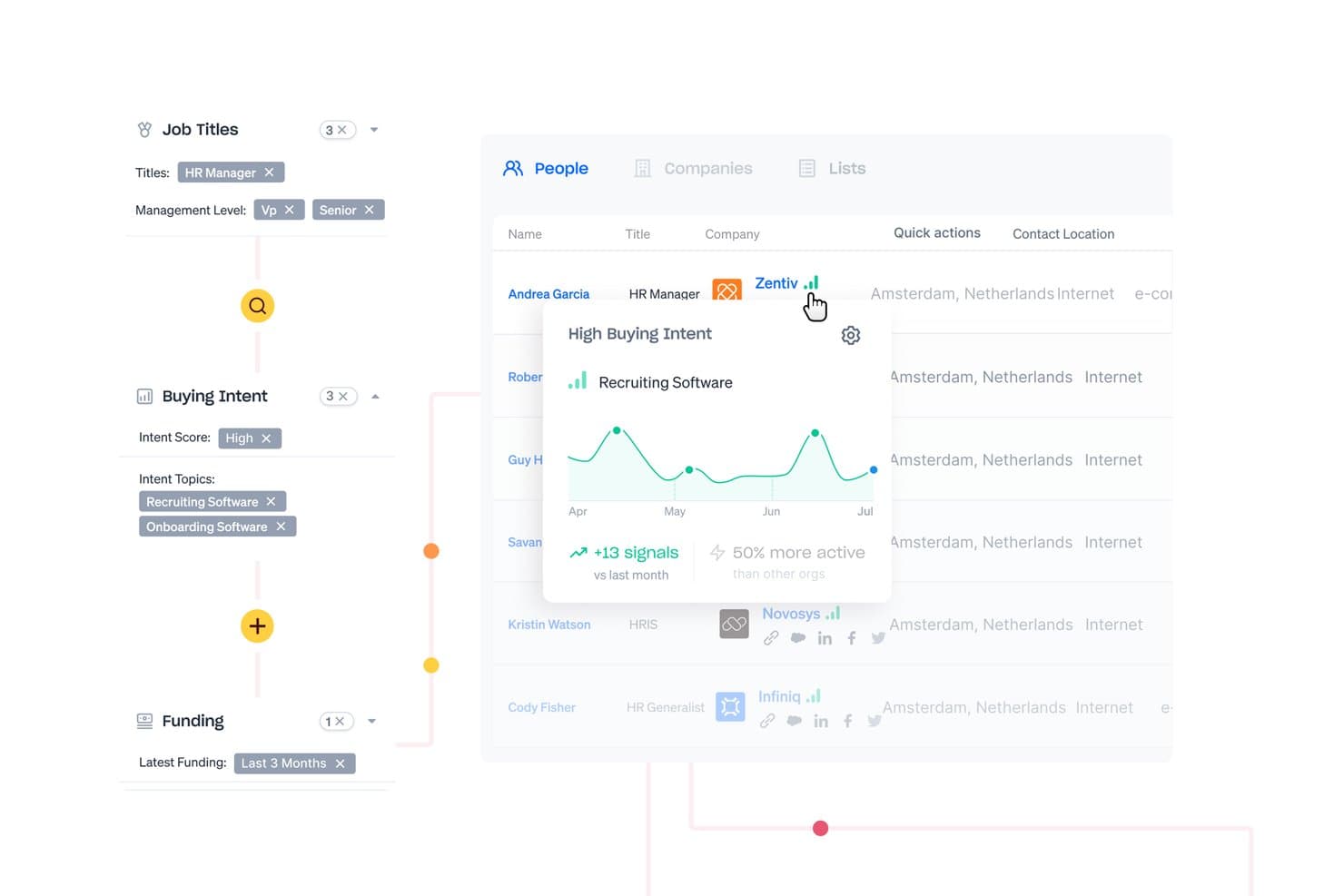
Apollo.io offers buying intent filters and signal tracking to help sales teams identify and prioritize high-intent prospects. Apollo.io is a B2B sales intelligence and engagement platform that combines a verified contact database, multi-channel outreach sequencing, a built-in dialer, and pipeline management tools in a single system.
Who Is Apollo.io Best For?
Apollo.io suits sales and RevOps teams at SMBs and mid-market companies that run high-volume outbound prospecting and need verified contact data without managing a separate data vendor.
Why I Picked Apollo.io
Apollo.io earns its spot on my shortlist because of how tightly its data layer connects to outreach execution. I particularly like the topic-level buying intent signals, which let my team filter prospects by the specific topics they're actively researching, not just firmographic criteria. Pair that with 97% claimed email accuracy across 275M+ contacts, and my team spends less time scrubbing lists and more time working leads that are actually in-market.
Apollo.io Key Features
- Pipeline management: Track deals across customizable sales stages with progress, values, and activities visible in one view.
- Sequenced task automation: Set up multi-step outreach including calls, emails, and manual LinkedIn tasks triggered automatically.
- Integration with Salesforce and HubSpot: Sync contact, activity, and deal data bi-directionally for unified pipeline updates.
- Performance dashboards: Monitor rep activities, outcomes, and pipeline health with built-in analytics and standard sales KPIs.
Apollo.io Integrations
Apollo.io offers native integrations with Salesforce, HubSpot, Outreach, Salesloft, LinkedIn, Marketo, and SendGrid. An API is available for custom integrations.
Pros and Cons
Pros:
- Combines prospecting and sequencing in one place
- Intent signals surface in-market buyers quickly
- Built-in contact data removes separate vendor need
Cons:
- Forecasting tools are basic versus dedicated platforms
- Data accuracy drops for niche international markets
Learn more about Apollo.io: Best for automated email sequences
- 30-day free trial + free demo available
- From $29/user/month (billed annually)
Visit WebsiteCustomer Rating:4.7/5This rating combines scores from multiple user review sites to reflect overall customer sentiment about the product.
Salesflare's account timeline centralizes all team interactions, emails, and meetings for seamless collaboration and relationship tracking. Salesflare is a CRM designed specifically for small and medium-sized B2B businesses. It offers a range of features that help you track sales, integrate emails, and manage your pipeline, all tailored to enhance your sales processes.
Why I Picked Salesflare: Salesflare provides an automated email sequences and lead finder, which allow you to engage with your prospects in a personalized way without needing extra tools. These features are great for generating leads and maintaining customer relationships, ensuring you never miss an opportunity. Additionally, Salesflare provides visual sales pipelines that make managing your leads straightforward and effective, helping your team focus on closing deals.
Salesflare Standout Features & Integrations
Features include email templates, customizable dashboards, mobile app access, data enrichment tools, email and web tracking, and an advanced lead finder solution.
Integrations include QuickBooks Online, Slack, Google Sheets, Mailchimp, Intercom, Google Contacts, Typeform, Facebook Lead Ads, StoryChief, CatchApp Bookings, Voxloud, and SyncPenguin.
Pros and Cons
Pros:
- Real-time notifications for contact engagement
- Bulk action management
- Unlimited contacts
Cons:
- Basic reporting features
- Limited customization options
Learn more about Salesflare: Best for customizable automations for your sales pipeline
- 14-day free trial + free demo available
- From $12/seat/month (billed annually)
Visit WebsiteCustomer Rating:4.6/5This rating combines scores from multiple user review sites to reflect overall customer sentiment about the product.
Monday Sales CRM distinguishes itself with its visually engaging and highly customizable workspaces. Monday Sales CRM is a fully customizable tool designed to centralize sales work, offering a suite of features that include flexible customization options, centralized client communication, and automated sales processes. It provides comprehensive overviews of deals and customizable dashboards, positioning itself as a suitable solution for sales automation that can be tailored to specific business needs without requiring development expertise.
Why I Picked monday sales CRM: monday sales CRM offers comprehensive customization options and user-friendly interface. A standout feature is the ability to tailor the CRM to our specific sales processes without requiring extensive technical knowledge, which is a significant differentiator from other tools in the market. I believe monday sales CRM is best for sales workflow automation because it offers a low-code/no-code platform that empowers our team to automate sales tasks and visualize data effectively.
monday sales CRM Standout Features & Integrations
Features include lead and contact management, customizable pipelines, sales automation, performance tracking, integration with various tools, advanced reporting and analytics, email tracking and synchronization, task and project management, mobile app support, and customizable templates and forms.
Integrations include Slack, Google Drive, Gmail, Google Calendar, Jira, GitHub, Trello, Dropbox, Typeform and many more, accessible through a paid plan with Zapier.
Pros and Cons
Pros:
- Advanced reporting and analytics
- Robust integration capabilities
- High customizability & automation-friendly
Cons:
- Slight learning curve
- Limited native email marketing features
 Best for automating quote-to-revenue flows
- Free demo available
- Pricing upon request
Visit WebsiteCustomer Rating:4.7/5This rating combines scores from multiple user review sites to reflect overall customer sentiment about the product.
DealHub AI lets sales teams manage, track, and update all active proposals in one organized dashboard. DealHub AI is a unified sales software platform designed to automate the entire quote-to-revenue process. It combines CPQ, contract management, billing, and digital sales rooms to help your team close deals faster and with fewer manual steps.
Why I picked DealHub AI : I picked DealHub AI because it automates the most time-consuming parts of the sales cycle—from quote generation to signed contract and invoicing. Its CPQ engine uses built-in pricing logic to ensure every quote is accurate and compliant, while automated workflows handle approvals, discount thresholds, and contract routing without manual input. The platform connects sales, finance, and customer success teams through shared data and real-time deal visibility. This automation makes it easier for reps to manage renewals, expansions, and amendments while maintaining pricing integrity across all deal types.
DealHub AI Standout Features and Integrations
Standout features include dynamic pricing automation that adapts to usage-based, tiered, and fixed pricing structures for complex deal models. Additionally, contract lifecycle automation creates, routes, and finalizes agreements with built-in redlining and eSign tools.
Integrations include Salesforce, HubSpot, Microsoft Dynamics 365, Slack, Gong, DocuSign, Google, LinkedIn, Optimizely, Solarwinds, SalesLoft, and Meta Platforms.
Pros and Cons
Pros:
- Connects sales, finance, and operations data
- Ensures pricing accuracy with built-in logic
- Automates quotes, contracts, and billing in one flow
Cons:
- May lag on very large data-heavy deals
- Heavy automation can take time to configure
Learn more about DealHub AI: Best for global outbound calling management
- 14-day free trial
- From $25/user/month (billed annually)
Visit WebsiteCustomer Rating:4.4/5This rating combines scores from multiple user review sites to reflect overall customer sentiment about the product.
CloudTalk gives teams a smarter way to manage calls, analytics, and customer conversations — making it one of the best Gong alternatives for growing sales and support teams. CloudTalk is a cloud-based call center platform built for sales teams, offering outbound dialers, local presence calling, AI conversation intelligence, customizable call routing, and two-way CRM integrations.
Who Is CloudTalk Best For?
CloudTalk is a strong fit for inside sales teams and outbound call centers at mid-sized companies that run high-volume calling across multiple regions or countries.
Why I Picked CloudTalk
CloudTalk earns its spot as one of the best on my shortlist because of how well it handles outbound calling at a global scale. I rely on the local presence feature to dial from numbers that match the region I'm calling into—across 160+ countries—which noticeably improves answer rates. Paired with the Power Dialer and campaign management tools, my team can run structured, high-volume outreach without manually queuing up calls or losing track of where each contact sits in a sequence.
CloudTalk Key Features
- AI conversation intelligence: Automatically transcribes calls and surfaces sentiment analysis and talk-to-listen ratios for each rep.
- Whisper coaching: Lets managers listen to live calls and speak directly to the rep without the prospect hearing.
- Voicemail drop: Lets reps leave a pre-recorded message with one click instead of waiting through a voicemail greeting.
- Real-time analytics dashboard: Tracks active calls, queue status, and rep activity as it happens across your team.
CloudTalk Integrations
CloudTalk offers 35+ native integrations, including Salesforce, HubSpot, Pipedrive, Zoho CRM, Microsoft Teams, MS Dynamics 365, Intercom, Zendesk, Outreach, Salesloft, and Gong. It connects with Zapier and Make, and has an API for custom integrations.
Pros and Cons
Pros:
- AI sentiment analysis on recorded calls
- Power dialer and smart dialer included
- International numbers in 160+ countries
Cons:
- Call quality drops during peak hours
- Mobile app can be unreliable
Learn more about CloudTalk: Best sales software with social media features
- 15-day free trial + free plan available
- From $14/user/month (billed annually)
Visit WebsiteCustomer Rating:4.2/5This rating combines scores from multiple user review sites to reflect overall customer sentiment about the product.
Zoho’s CRM drives seamless lead generation and customer engagement through simple social media integrations. In 2005, Zoho came onto the market to challenge Salesforce and Siebel in the CRM game. For 18 years, Zoho has been one of the leading sales tools for marketing and sales teams. The sales software is great for small businesses that are focused on a social-first strategy to attract leads.
Why I picked Zoho CRM: Zoho enables synchronization between its CRM and social accounts to generate leads. Zoho’s social form generation allows you to pull in contacts automatically. Plus, the CRM lets you easily communicate with contacts on social media through Zoho’s platform.
Zoho CRM Standout Features and Integrations:
Features include sales automation tools through your site, social media, and website to generate leads automatically through forms. I think the feature where it auto-assigns salespeople by social media actions is really impressive. Zoho also features Zia, an AI-powered assistant, to power your sales teams with insights on your prospects, leads, and customers. The platform also includes different pipelines for different teams and custom dashboards to help you grow your revenue.
Integrations include G Suite, Office 365, Leadfeeder, Mailchimp, Slack, Quickbooks, DocuSign, Google Workspace, PandaDoc, Twilio, SMS-Magic, Zoom, Leadfeeder, Shopify, and Facebook Ads.
Pros and Cons
Pros:
- Mobile app to improve customer communication
- 24/7 customer service
- Zia (AI tool) helps identify high-conversion prospects
- Form creation on social media, website, email
- Plenty of sales automation tools
Cons:
- Pretty expensive compared to other sales software
- The platform is a bit challenging to learn
 Best for real-time sales call guidance
- Free demo available
- Pricing upon request
Visit WebsiteCustomer Rating:4.9/5This rating combines scores from multiple user review sites to reflect overall customer sentiment about the product.
Attention uses conversational intelligence to listen to calls, generate insights, and provide real-time feedback and guidance. Attention is an AI-powered tool designed to enhance sales performance in real time. It provides actionable intelligence by analyzing customer conversations, automating CRM updates, and generating follow-up emails. Additionally, it offers features such as sales training, performance measurement, and integration with various sales tools to improve sales outcomes.
Why I Picked Attention: One of the most compelling features is its real-time actionable intelligence, which provides sales reps with live guidance during calls. This feature helps sales reps improve their techniques and methodologies on the spot, leading to more effective sales conversations and higher conversion rates. Additionally, Attention automates CRM data entry, a task that typically consumes a significant amount of time. By automatically filling CRM fields based on the content of sales calls, Attention allows sales reps to focus more on selling.
Attention Standout Features & Integrations
Features include actionable insights from customer conversations, sales training, KPI tracking, automated CRM updates, follow-up email automation, cross-call insights, deal analysis, sales messaging, and custom triggers so that Attention's AI listens to what matters most to you.
Integrations include Zoom, Meets, Teams, Salesforce, HubSpot, Gmail, Outlook, Slack, and Zapier.
Pros and Cons
Pros:
- Provides actionable insights by analyzing conversations
- Real-time sales coaching using AI
- Personalized follow-up emails
Cons:
- Custom integrations may require additional assistance
- Reliance on AI may not suit all users
Learn more about Attention: Best for route optimized sales teams
- Free 60-day trial available
- Pricing upon request
Visit WebsiteCustomer Rating:4.6/5This rating combines scores from multiple user review sites to reflect overall customer sentiment about the product.
SimplyDepo dashboard displaying sales metrics, order activity, route performance, and field rep insights across desktop and mobile views. Looking to enhance your sales operations with a tool that truly understands the needs of distributors and field teams? SimplyDepo is designed to streamline your workflow and improve customer relationships, making it an ideal choice for brands, distributors, and merchandisers. With its focus on optimizing sales processes and empowering field teams, SimplyDepo addresses challenges like order management and route planning, helping your team achieve better efficiency and increased revenue.
Why I Picked SimplyDepo
I picked SimplyDepo because it excels in empowering field sales teams with tools that address core sales challenges. For instance, its B2B order management feature simplifies the order process, ensuring accuracy and efficiency. Additionally, the route planning tool optimizes travel paths for sales representatives, saving time and resources. These features align perfectly with the needs of sales software users, providing tangible improvements in workflow and customer engagement.
SimplyDepo Key Features
In addition to its standout features, SimplyDepo offers several other tools that can benefit your team:
- Retail Execution: Provides tools to manage retail operations and promotions effectively.
- CRM for Distributors: Tailored to enhance customer relationship management.
- Sales Rep Empowerment: Offers features that boost sales team capabilities and interactions.
- Distribution Management: Aids in managing delivery and inventory processes.
SimplyDepo Integrations
Integrations include Stripe, Twilio SendGrid, ShipStation, and QuickBooks.
Pros and Cons
Pros:
- Route planning and territory mapping
- Integrated CRM for account tracking
- Built-in B2B order management system
Cons:
- No transparent API documentation
- Limited advanced reporting customization
Learn more about SimplyDepo: 9Best for digital sales rooms
Dock
- Free plan + free demo available
- From $350/month (billed annually)
Visit WebsiteCustomer Rating:4.9/5This rating combines scores from multiple user review sites to reflect overall customer sentiment about the product.
Dock's digital sales room feature provides a central place for important documents, product tours, action plans, and pricing. Dock is a sales and onboarding software that helps businesses manage their sales processes, nurture leads, and guide clients through the onboarding phase. It offers features like sales deal rooms, client portals, and content management, providing a central platform for teams to create personalized experiences, manage deals, and collaborate with customers.
Why I Picked Dock: As a sales software, Dock offers digital sales rooms with comprehensive features to help sales and revenue teams. These sales rooms provide an all-in-one place for your sales content and documentation, from product tours to proposals and action plans. I also like that the platform has engagement analytics to see how prospects interact in the sales room, providing you with insights into the best leads and how to target your sales strategies.
Dock Standout Features & Integrations
Features include content management, templates for forms and other important documents, customizable client portals, branded sales rooms, order form status tracking, digital signature collection, approval workflows for unique or large agreements, and mutual onboarding action plans.
Integrations include HubSpot, Salesforce, Slack, Zoom, Airtable, Pandadoc, Typeform, and more.
Pros and Cons
Pros:
- Quoting and order form features
- Tailored client portals for a personalized experience
- Centralized place for all sales content
Cons:
- Learning curve for new users
- Salesforce and HubSpot integration limited to higher-tier plans
Learn more about Dock: Best for sales motivation insights
- 15-day free trial
- From $23/user/month (billed annually)
Visit WebsiteCustomer Rating:4.7/5This rating combines scores from multiple user review sites to reflect overall customer sentiment about the product.
Salesmate helps sales reps stay motivated by tracking each step of the sales pipeline with simple revenue forecasting. Salesmate helps sales teams stay connected with prospects, nurture leads, and close deals through a user-friendly interface that prioritizes clarity and momentum. It’s designed for managers who need visibility into performance and for reps who benefit from structured follow-ups and organized workflows.
Why I Picked Salesmate
I picked Salesmate for its visual sales forecasting, which gives your team a clear picture of pipeline movement and individual performance. You can set targets directly in the dashboard so reps always know what they’re working toward. Automated email follow-ups reduce manual tasks, and the task-tracking tools create a predictable workflow that keeps deals progressing.
Salesmate Key Features
- Sales motivators: Set goals and track performance to keep reps engaged.
- Automated email follow-ups: Ensure prospects hear from you consistently.
- Task scheduling: Plan next steps with clear deadlines.
- Task tracking: Maintain visibility into progress across all deals.
- Lead nurturing tools: Guide prospects through the sales cycle.
Salesmate Integrations
Integrations include Slack, DocuSign, Microsoft Outlook, Mailchimp, Zendesk Suite, Zapier, QuickBooks Online, ActiveCampaign, and WordPress.
Pros and Cons
Pros:
- User-friendly interface
- Automated, trigger-based emails
- Auto-assign leads to specific reps
- Easy onboarding
- Great for motivating sales reps
Cons:
- Customer support can be a bit slow sometimes
- Doesn’t include a free plan
Learn more about Salesmate:
Other Sales Software
Here are a few more unique options that didn’t make this sales software shortlist but should still be considered:
- 11Pipedrive CRMBest for visual sales management
- 12ZoomInfoBest sales intelligence and analytics software
- 13HighspotBest for sales enablement
- 14BomboraBest for intent data-driven sales strategies
- 15WalnutBest for SaaS demos to drive sales
- 16ZendeskBest for prospecting and lead scoring
- 17Salesforce CPQBest for generating accurate quotes
- 18BrainsharkBest for sales team training
- 19Less Annoying CRMBest affordable sales software for micro businesses
- 20PitchMonsterBest for ramping up new sales hires
- 21Creatio CRMBest for no-code platform customization
- 22PipedriveBest lead management for small businesses
- 23Salesforce CRMBest customization for scaling companies
- 24RevcastBest for revenue planning
- 25CopperBest sales software for security
- 26StreakBest Gmail-integrated sales software
- 27SaleshandyBest for email-driven lead management
- 28OnePageCRMBest for simple task management
Related Sales Software Reviews
If you still haven't found what you're looking for here, check out these tools closely related to sales software that we've tested and evaluated.
- Lead Management Software
- Business Intelligence Software
- Contract Management Software
- Revenue Management System
- CPQ Software
- CRM Software
How I Evaluate Sales Software
I look at sales software in two layers: core must-haves—like deal pipeline tracking and revenue forecasting—and differentiators that separate RevOps-ready platforms from standalone rep tools.
Core Functionality (Table Stakes For This List)
When I'm selecting tools for my list, I rank each one on a scale from 0 (does not offer the functionality) to 5 (excels in this area) for each core functionality listed below. Then, I calculate the tool's total score into a percentage. Each tool needs to achieve a minimum total score of 75% to be considered for inclusion.
- Pipeline & Deal Management: I evaluate how each tool handles deal stages, custom pipelines, and progression tracking—for example, whether reps can move a deal from discovery to negotiation with stage-specific fields and automated triggers.
- Sales Forecasting & Analytics: Forecast accuracy depends on more than gut feel, so I check for weighted pipeline forecasts, trend dashboards, and the ability to break projections down by rep, region, or product line.
- Contact & Account Management: I look at how contacts link to accounts, whether activity history rolls up cleanly, and if the tool supports relationship mapping—like tying multiple stakeholders to a single enterprise deal.
- Sales Activity Automation: Automating follow-ups and task creation is table stakes, but I also evaluate multi-step sequence builders and conditional logic, such as re-routing a lead to a different cadence based on engagement signals.
- CRM Integration or Native CRM: Whether a platform is a CRM itself (like Salesforce or HubSpot) or plugs into one, I check for bi-directional sync depth, custom object mapping, and real-time data flow between systems.
- Sales Performance Tracking: Quota attainment dashboards, rep activity metrics, and team leaderboards all factor in here—I look for tools that let managers drill into individual performance without building reports from scratch.
Once I have a list of tools that meet this criteria, I consider what sets each platform apart.
Differentiating Factors (What Sets Vendors Apart)
Here's how I compare and contrast different vendors:
Standout Features
AI-powered deal insights are a major differentiator—I look for tools that score deal health and flag risks based on activity patterns, not just rep input. Conversation intelligence adds another layer, letting managers review call transcripts to spot coaching gaps or recurring objections across the team. I also evaluate revenue attribution capabilities, since connecting closed deals back to specific campaigns or touchpoints gives RevOps leaders the cross-functional visibility they need for forecasting and GTM planning.
Beyond Features
Integration depth matters a lot here—I check whether a platform connects natively with the CRM, marketing automation, and CS tools already in the stack, since RevOps teams live and die by data flowing cleanly between systems. Scalability is another factor I weigh, especially whether the tool supports multi-currency deals, territory structures, and role-based permissions as the org grows. I also evaluate pricing transparency, looking at whether per-seat costs and add-on fees for AI or premium features are clearly documented upfront.
How To Choose Sales Software
The key to finding the right sales software is to narrow down your choices based on your specific needs, team size, and business goals. Here’s how to do it the right way.
1. Identify the Problem You’re Trying to Solve
Every sales team faces unique challenges, so start by pinpointing the pain points you’re trying to address. Ask yourself:
- What’s slowing down your sales process?
- Are manual tasks eating up too much time?
- Do you lack visibility into sales performance?

Author's Tip
If you’re looking to save time on manual data entry, prioritize sales software with automation and CRM integration features.
Once you’ve identified the core issues, focus on finding software with features that directly address those challenges, such as automation, analytics, or contact management.
2. Determine Who Will Use the Software
Sales software isn’t a one-size-fits-all solution. Think about who on your team will be using it and how often. This can impact your costs, onboarding, and overall experience.
- Sales Reps — Prioritize ease of use and mobile access.
- Revenue Operations Teams — Look for detailed reporting, integrations, and workflow automation.
- Sales Managers — Seek tools that provide visibility into pipeline, forecasts, and team performance.
Author's Tip
If the entire sales team will be using the software, prioritize tools with intuitive user interfaces and strong onboarding support to reduce training time.
Consider licensing costs. Will everyone need access, or just a few power users? Understanding this can prevent overspending on unnecessary seats, especially when evaluating pricing software options.
3. Ensure It Integrates With Your Existing Tools
The best sales software doesn't operate in a silo. It's critical to think about your existing tech stack, including how it integrates with AI CRM tools. Make a list of essential integrations:
- Customer Relationship Management (CRM) tools like Salesforce or HubSpot
- Accounting and Invoicing software like QuickBooks or Xero
- Marketing Automation tools like Mailchimp or Marketo
Author's Tip
The best sales software will integrate seamlessly with your CRM, giving you a single source of truth for all customer data.
Ask potential vendors about integration options. Can the software sync with your CRM, contract automation software, and analytics tools? If it's not compatible, it's likely not worth the investment.
4. Define the Outcomes You Want to Achieve
Before you compare features, define what success looks like. This ensures you’re choosing software that delivers measurable results.
- Do you want to increase sales velocity?
- Are you focused on improving sales forecast accuracy?
- Do you want better visibility into team performance?
- Do you want to speed up sales onboarding?
Author's Tip
For teams aiming to increase sales velocity, look for software with lead scoring, automation, and fast pipeline management.
Once you’ve set your goals, use them as a filter for choosing the right sales software. For example, if better visibility is your goal, prioritize software with robust reporting dashboards and customizable KPIs.
5. Assess How It Fits Within Your Organization
No two sales teams operate the same way. Your workflows, processes, and delivery methods matter when selecting a tool.
- Look at existing workflows — What’s working and what’s not?
- Identify bottlenecks — Are deals getting stuck in certain pipeline stages?
- Consider change management — How much disruption will new software cause?
Author's Tip
If your current sales process relies on manual follow-ups, look for sales software that automates follow-ups and task reminders for reps.
Make sure the software can be customized to fit your workflows instead of forcing you to change them. Tools that allow custom pipelines, deal stages, and reporting can have a significant impact on adoption and efficiency.
Choosing the right sales software requires a strategic approach. Identify your core pain points, involve your team in the selection process, and prioritize tools that integrate seamlessly with your existing stack. For example, if your company has a remote-selling model, you may find that inside sales software better suits your needs. By focusing on the outcomes you’re trying to achieve, you’ll end up with a tool that streamlines workflows, boosts productivity, and drives revenue growth.
Trends In Sales Software For 2026
Sales software has witnessed a significant evolution, driven by advancements in technology and the changing needs of revenue operations, with specialized tools like sales compensation software becoming increasingly sophisticated. The latest product updates, press releases, and release logs from leading sales software tools reveal a clear direction towards more integrated, intelligent, and user-focused solutions. These developments aim to address the complex challenges faced by sales teams, enhancing efficiency, accuracy, and driving revenue growth. Below, we explore the key trends shaping the future of sales software, highlighting the features and functionalities that are most rapidly evolving and in demand.
Integration and Automation
- Seamless CRM Integration: Modern sales software is placing a stronger emphasis on deep integration with CRM systems to ensure a unified approach to customer management and sales activities.
- Evidence: Enhanced API capabilities allowing for real-time data exchange between sales and CRM platforms, facilitating a 360-degree view of customer interactions.
- Advanced Sales Process Automation: Automating repetitive tasks within the sales cycle, from lead assignment to follow-up reminders, is becoming more sophisticated, incorporating AI to personalize interactions based on lead behavior.
- Evidence: The introduction of AI-driven workflow automation that adapts to individual lead engagement patterns, significantly reducing manual effort and increasing conversion rates.
AI and Data Analytics
- Predictive Sales Analytics: The use of artificial intelligence to analyze sales data and predict future trends is becoming more prevalent, offering actionable insights for sales strategy optimization.
- Evidence: Sales software now includes predictive analytics features that forecast sales outcomes, helping teams to focus on the most promising opportunities.
- AI-Driven Lead Scoring: Moving beyond basic lead scoring models, sales software is incorporating AI to dynamically score leads based on a wide array of behavioral and demographic factors.
- Evidence: Implementation of machine learning algorithms that continuously refine lead scoring criteria, improving the accuracy of sales prioritization.
Customer Engagement
- Personalized Communication Tools: As personalization becomes key in sales strategies, sales software is integrating tools that enable customized communication at scale.
- Evidence: Features allowing sales reps to tailor email campaigns and messages based on detailed lead profiles and interaction history.
- Omnichannel Sales Support: Acknowledging the diverse channels through which customers engage, sales software now supports omnichannel strategies, providing consistent experiences across all touchpoints.
- Evidence: Omnichannel platforms that manage sales interactions across email, social media, phone, and in-person meetings, ensuring a cohesive customer journey.
User Experience and Mobility
- Enhanced User Interfaces: Recognizing the importance of user adoption, the design and usability of sales software have seen significant improvements, focusing on intuitive navigation and customization.
- Evidence: The redesign of user interfaces with customizable dashboards and drag-and-drop features that simplify the creation of sales workflows.
- Mobile Sales Enablement: With the increasing need for sales teams to operate remotely, software with mobile sales functionality has become a critical feature.
- Evidence: Mobile apps offering full sales software functionality, enabling sales reps to manage their pipelines, communicate with leads, and access sales materials from anywhere.
These trends underscore a broader shift towards making sales software more intelligent, integrated, and user-friendly, with a strong emphasis on personalizing customer interactions and leveraging data for strategic decision-making. For revenue operation leaders, selecting sales software that aligns with these advancements is crucial for staying competitive and driving sales effectiveness.
What Is Sales Software?
Sales software is a tool that helps you organize, track, and manage your sales activities in one place. Salespeople, account managers, and sales teams use it to keep up with leads, follow up with customers, and handle quotes and deals more efficiently. It saves you time on repetitive tasks and gives you insights to make smarter decisions and close more sales.
Features Of Sales Software
When selecting sales software, keep an eye out for the following key features:
- Lead management: This feature helps you organize, track, and nurture leads from the first point of contact to closing the sale. Staying on top of every lead means you’ll never lose track of a warm prospect, which is a game-changer if you thrive on consistent follow-ups.
- Contact and account management: Manage all customer data, interactions, and account histories in one place. This lets you quickly recall who said what—and avoid awkward moments when following up.
- Pipeline and opportunity tracking: Visualize and monitor every opportunity as it moves through your sales pipeline. You can spot bottlenecks, see which deals need love, and keep forecasts accurate with a glance.
- Sales automation: Automate repetitive tasks like follow-up emails, reminders, and scheduling. With these tasks off your plate, you can focus on building real connections and closing deals (not just herding paperwork).
- Quote and proposal management: Quickly create, send, and track quotes or proposals to clients. This lets you respond faster than your competition, and ensures pricing or contract details don’t get lost in a messy inbox.
- Reporting and analytics: Get real-time insights into your team’s performance and your sales pipeline. Detailed dashboards help you celebrate wins, spot weaknesses, and plan your next move with confidence.
- Integration with other tools: Connect your sales software to CRM, marketing, or accounting programs. Smooth integrations cut down on double-entries and help you see the big picture without bouncing between a dozen apps.
- Mobile access: Access your sales tools from anywhere using your smartphone or tablet. Perfect for those who are always on the go and can’t be chained to a desk.
Common Sales Software AI Features
Beyond the standard sales software features listed above, many of these solutions are incorporating AI with features like:
- Conversation intelligence: AI analyzes sales calls and meetings to identify buying signals, objections, or areas for improvement. You get actionable feedback that helps you hone your pitch and close more sales.
- Predictive lead scoring: AI analyzes prospect data and engagement history to prioritize your leads. You’ll know exactly which prospects are most likely to buy—saving you time chasing dead ends.
- Sales forecasting: AI-powered models crunch historical and current data to generate accurate sales forecasts. This helps you spot trends, plan resources, and reduce surprises when month-end rolls around.
- Automated data capture: AI can automatically log calls, emails, and meetings from your calendar and inbox to your CRM. That means less manual entry for you—and more reliable data for everyone.
- Deal coaching and recommendations: AI reviews your deals and suggests next steps, like when to follow up or what content to send. Consider it a virtual sales mentor in your pocket, nudging you toward more closed deals.
Benefits Of Sales Software
Leveraging the right sales software is paramount for organizations aiming to streamline their sales processes and bolster revenue operations. Sales software equips teams with the tools necessary to manage their sales activities more efficiently, from prospecting to creating compelling proposals with specialized proposal software to closing deals. Understanding the primary benefits of sales software can help potential buyers make informed decisions that align with their operational needs and strategic goals. Here are five key advantages:
- Increased Sales Efficiency: Automates routine sales tasks. This automation frees up sales representatives' time, allowing them to focus on engaging with prospects and customers, ultimately leading to more opportunities and closed deals.
- Enhanced Customer Relationship Management: Consolidates customer interactions and data. Having all customer information in one place enables sales teams to build stronger relationships through personalized communication and timely follow-ups, enhancing customer satisfaction and loyalty.
- Improved Sales Visibility: Offers real-time insights into the sales pipeline. Visibility into every stage of the sales process helps managers identify bottlenecks, forecast sales more accurately, and allocate resources where they are needed most.
- Data-Driven Decision Making: Provides detailed analytics and reporting. Access to comprehensive sales data allows teams to analyze trends, measure performance against sales targets, and make informed decisions to drive sales strategy and revenue growth.
- Scalability: Adapts to business growth. Sales software can easily scale to accommodate an increasing volume of sales activities and customer data, ensuring that businesses can continue to manage their sales processes effectively as they expand.
Costs & Pricing For Sales Software
Choosing the right sales software is a critical decision for businesses looking to enhance their sales operations and drive revenue growth. With a myriad of options available in the market, each offering different features and pricing models, understanding the various plan options is key to selecting a solution that best fits your organization's needs and budget. Sales software typically comes in several tiers, catering to businesses of different sizes and with varying requirements. Below is an overview of common plan options and their pricing for sales software, though you may also want to explore specialized account management software for more targeted client relationship features.
Plan Comparison Table For Sales Software
| Plan Type | Average Price | Common Features Included | Best For |
| Basic | $10 - $25 per user/month | - Contact and lead management - Basic reporting and analytics - Email integration - Task and activity tracking | Small businesses and startups |
| Professional | $50 - $100 per user/month | - Advanced CRM features - Customizable reports and dashboards - Sales forecasting - Pipeline management - Automation of sales processes | Growing businesses needing more advanced tools |
| Enterprise | $150+ per user/month | -Complete sales suite - Advanced analytics and AI capabilities - Team performance management - Custom integrations - Enhanced security features | Large enterprises with complex needs |
| Free | $0 | - Limited contact management - Basic task management - Simple reporting capabilities | Individuals and small teams on a budget |
When evaluating sales software plans, consider not only the immediate needs of your sales team but also future scalability and integration capabilities. Opt for a plan that offers a balance between essential features and affordability, ensuring it can grow with your business.
Sales Software Frequently Asked Questions
Thinking about leveraging more sales tools to optimize your sales performance? Well, you likely have a few questions in mind before you’re ready to pick one. Here are some common questions about sales software:
Alternative RevOps Reviews
Looking for more RevOps software? Here are a few more software reviews from The CRO Club:
- The Best CRM Software
- The Best Sales Forecasting Software
- The Best Field Sales Software
- The Best CPQ Software
- The Best Revenue Intelligence Platforms
- The Best Sales Automation Software
- The Best Contract Management Software
- The Best Lead Intelligence Software

Conclusion
Sales teams and reps are facing a number of challenges today, with prospecting at the forefront, followed by a lack of time available due to many admin tasks. Thankfully, it’s never been easier to get ahead. You just need to leverage the right tools.
Just remember, not every tool is created equal. What works for one company or sales team may not be the best fit for you. Remember to check out how enterprise sales software can fit into your current sales tech stack, especially when it comes to integrations and workflows.
Want to learn more about the latest sales insights and tech from experts in the industry? Sign up for the RevOpsTeam newsletter.