

18 Best Predictive Analytics Software Reviewed For 2026

10 Best Predictive Analytics Software Shortlist


With so many different predictive analytics software available, figuring out which is right for you is tough. You know you want to identify the likelihood of future business outcomes based on historical data but need to figure out which tool is best. I've got you! In this post I'll help make your choice easy, sharing my personal experiences using dozens of different predictive analytics tools with various teams and projects, with my picks of the best predictive analytics software.
Why Trust Our Software Reviews
We’ve been testing and reviewing RevOps software since 2022. As RevOps leaders ourselves, we know how critical and difficult it is to make the right decision when selecting software.
We invest in deep research to help our audience make better software purchasing decisions. We’ve tested more than 2,000 tools for different RevOps use cases and written over 1,000 comprehensive software reviews. Learn how we stay transparent & our software review methodology.
Best Predictive Analytics Software Summary
This comparison chart summarizes pricing details for my top predictive analytics software selections to help you find the best one for your budget and business needs.
| Tool | Best For | Trial Info | Price | ||
|---|---|---|---|---|---|
| 1 | Best for scalable, governed, and safe business analytics | Free plan available | From $15/user/month (billed annually) | Website | |
| 2 | Best for data visualization across any industry | Free trial available | From $15/user/month (billed annually) | Website | |
| 3 | Best for working with spreadsheet models | Not available | Student and faculty pricing is $410 | Website | |
| 4 | Best for developing and deploying secure Python solutions | Free plan available | From $9/month | Website | |
| 5 | Best for unifying strategy, finance, and operations | Free demo available | Pricing upon request | Website | |
| 6 | Best for robust data visualization capabilities | 14-day free trial available | From $0.55 units/hour | Website | |
| 7 | Best for AI optimization of predictive analytics | Free plan available | Pricing upon request | Website | |
| 8 | Best for easily building customizable dashboards | Free trial available | From $300/10 users/month (billed annually) | Website | |
| 9 | Best for running programs in SAS language without translation | Free trial available + free demo | Pricing upon request | Website | |
| 10 | Best for powering model-driven businesses | Not available | Pricing upon request | Website |
-

Prisync
Visit WebsiteThis is an aggregated rating for this tool including ratings from Crozdesk users and ratings from other sites.4.7 -
Expedite Commerce
Visit Website -
QuickBooks Online
Visit WebsiteThis is an aggregated rating for this tool including ratings from Crozdesk users and ratings from other sites.4





Best Predictive Analytics Software Reviews
Below are my detailed summaries of the best predictive analytics software that made it onto my shortlist. My reviews offer a detailed look at the key features, pros & cons, integrations, and ideal use cases of each tool to help you find the best one for you.

This analytics software is designed for the simplification and optimization of data mining processes through a suite of products that include RapidMiner Studio, Radoop, Server, and Streams. Features include batch processing, template library, and automated charts, as well.
One focus of RapidMiner is predictive maintenance that determines the lifetime of factory machines and components to help users predict repair and maintenance schedules. They paired cloud-based computing systems with intuitive machine learning tools to analyze data from the shop floor and keep a closer eye on equipment health.
RapidMiner provides solutions for small, medium, and large businesses across a number of industries, including utilities, automotive, communications, energy, manufacturing, logistics, and life sciences.
RapidMiner Standout Features and Integrations
Features include automated data science, real-time scoring, hybrid cloud deployment, visual analytics workflow, code-based data science, data engineering, model building, AI app building, and ML ops.
Integrations include Braincube, Clarkson Consulting, Google Cloud Platform, Hivecell, Hexware Technologies, Tableau Software, Qlik, and UI Path.
Pros and Cons
Pros:
- Many support videos
- Easy to install
- Simplifies the user experience
Cons:
- Slow to update new algorithms
- Has a bit of a learning curve


Tableau offers a web and cloud-based platform with a variety of data tools that are designed to provide a data-driven experience to fit into your current strategy and workflow.
One of Tableau’s signature tools is their embedded analytics, which provide interactive analytical capabilities to help users increase product engagement and enhance customer satisfaction. This feature delivers rich content, data, and analytics that provide predictive data, forecasting analysis, and readable visuals to interpret what you’re seeing.
Tableau has solutions for businesses of all sizes, including freelancers as well as enterprise-grade organizations. They offer tools by industry, technology, and department so business leaders can pinpoint the features that best fit their needs.
Tableau Standout Features and Integrations
Features include data preparation and visualization, reports interface and dashboard, on-premise servers, cloud tools, desktop tools, auto modeling, data discovery, big data services, and collaboration tools.
Integrations include Amazon Athena, Amazon Redshift, Google Analytics, Google BigQuery, Hive, PostgreSQL, Salesforce, Snowflake, Splunk, and Vertica.
Pros and Cons
Pros:
- Simplified user interface
- Data is very visually appealing
- Accessible through all devices
Cons:
- Large data sets are slow to collate
- Limited phone app capabilities


Oracle Crystal Ball was designed to be the leading spreadsheet-based app for forecasting, predictive modeling, optimization, and simulation. Crystal Ball offers a complete suite of tools for uncertainty management to help businesses determine the best results while minimizing risk.
One of the unique features of Crystal Ball is that it offers a classroom edition for the academic community through a fully functional version designed for students and teachers. This product includes Crystal Ball Decision Optimizer to add optimization power for any classroom simulation. They offer both student and faculty editions.
Crystal Ball provides solutions for education, financial analysts, engineers, strategic planners, scientists, marketing managers, venture capitalists, and Six Sigma professionals. With tiered pricing for on-premise and cloud applications, Crystal Ball can be the right tool for businesses of all sizes.
Crystal Ball Standout Features and Integrations
Features include algorithms, data interactions, analysis, modeling, data unification, report generation, data visualizations, designed for Monte Carlo simulations, spreadsheet-based, time series forecasting, and optimization.
Integrations include Excel.
Pros and Cons
Pros:
- Data visualization is easy to read
- Low barrier for entry
- User friendly interface
Cons:
- Excel add-on occasionally crashes
- Limited uncertainty data displays

This open-source data science platform provides tools to help engineers and data scientists develop performant machine learning applications with Python. This platform also allows users to perform predictive modeling, visualize, publish, and share data, analyze financial time series, and handle Jupyter Notebooks.
Anaconda delivers the ability to code with what they claim is the world’s most trusted distribution for lightweight queries and AI solutions. They currently offer over 6,000 Python libraries, 2,000 interoperable R packages, and source-built, tamper-free solutions.
Because it’s an open-source data science platform, Anaconda provides solutions for academic institutions, government agencies, enterprises, and individuals. This platform offers tiered pricing that can provide solutions for businesses of all sizes, as well as students and teachers.
Anaconda Standout Features and Integrations
Features include basic repository, cloud-hosted notebooks and workspace storage, on-demand training courses, predictive analytics, and online payment functionality. Panel app deployments and data catalogs are coming soon.
Integrations include Azure Data Science Virtual Machines, Celebrus Customer, Celebrus Fraud, Datapell WMS, Domino Data Lab, Jovian, Kixie PowerCall, OpenSCAP, QuantRocket, and statsmodels.
Pros and Cons
Pros:
- Flexible and robust platform
- Comprehensive onboarding and training
- Great community support
Cons:
- Slows down with large data sets
- A bit of a learning curve
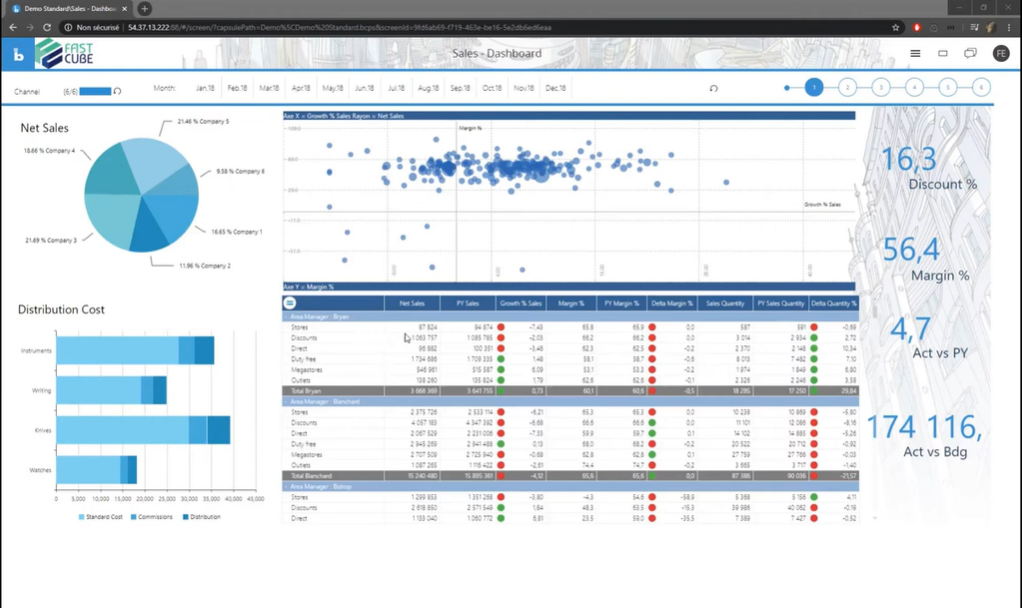
This predictive analytics software provides the tools businesses need to explore crucial insights into what drives their operations. Used by over 2,000 companies globally, some of Board’s top customers use their end-to-end planning applications for comprehensive business performance.
One of the tools Board offers for better data analysis is the simulation feature, which allows users to run multiple scenarios at speed. With a simulation, data scientists may create models to reflect the results of decision making based on your business challenges to ensure you have more information about the effects of every choice.
Board offers solutions by department and by industry. They have targeted plans for finance, supply chain, sales performance management, and workforce planning departments, as well as opportunities to support retail, CPG, and professional services industries.
Board Standout Features and Integrations
Features include reporting interface, report generation, data visualization, big data services, dashboards, graphs and charts, score cards, self-service, data column filtering, collaboration tools, auto modeling, and simulation tools.
Integrations include Google Analytics 360, HubSpot CRM, Marketo Engage, Microsoft Office, Oracle On Demand, Salesforce Sales Cloud, SAP HANA Cloud, Service Max, SugarCRM, and Veeva CRM.
Pros and Cons
Pros:
- Can handle large amounts of data
- All-in-one platform
- Easy to implement
Cons:
- No dynamic system maintenance
- Reporting alignment is tricky

Best for robust data visualization capabilities

With navigation, visualization, and analysis capabilities, SAS Advanced Analytics is designed to provide actionable insights with no coding, as well as versatile programming options with fourth-generation language abilities that support SQL, data visualization, and data mining. In addition to providing solutions for organizations like Honda, SAS has also been used to tackle human trafficking and public health needs.
SAS Advanced Analytics offers a number of statistical analysis features, including SAS Visual Forecasting Software that allows users to generate a massive variety of accurate forecasts very quickly. SAS claims this is a future-proof forecasting tool that helps you plan better by generating, visualizing, and deploying reliable forecasts at scale – with no human involvement.
This web-based predictive analysis tool offers solutions for businesses of all sizes. Some of their most popular use cases include marketing, risk management, fraud, and IoT in industries like banking, insurance, the public sector, retail, consumer goods, and life sciences.
SAS Advanced Analytics Standout Features and Integrations
Features include scripting statistical tools, data mining, algorithms, data analysis, data interactions, modeling, data visualizations, report generation, and knowledge base.
Integrations include SAS Integration Technologies for API integration.
Pros and Cons
Pros:
- Similar to SQL
- Ease of use
- Free training
Cons:
- Limited pre-built module functionality
- Error messages aren’t always clear

This cloud-based data management tool is designed for analysts, data scientists, and developers with features that include AI lifecycle automation, automated data preparation, visual model development, automated feature engineering, hyperparameter optimization, predictive analytics, and decision optimization.
In addition to predictive analytics, IBM Watson Studio also offers prescriptive analytics that are designed to provide businesses with recommendations for optimal actions for specific business objectives. Once a user specifies their business needs, like customer satisfaction or cost savings, the prescriptive analytics help solve the most complex decisions with these constraints in mind.
IBM Watson Studio is designed to be as versatile as possible with free plans, as well as pay-as-you-go solutions. They also offer subscription services for optimal savings. Some of the industries in which this company specializes include sustainability, security, and infrastructure.
IBM Watson Studio Standout Features and Integrations
Features include data integrations suite for ETL, automation for financial and operational planning, IDE to build and run AI models, complex optimization model building, analytics engine that adapts to custom domains, and data warehouses.
Integrations include App Connect, Coveo, Facebook Messenger, Google Custom Search, HubSpot, Salesforce, Slack, Twilio Flex, WhatsApp, and Zendesk
Pros and Cons
Pros:
- All-in-one analytics platform
- Integrates with open-source platforms, like Python
- Accurate and reliable models
Cons:
- Premium price point
- Slows down with large data sets
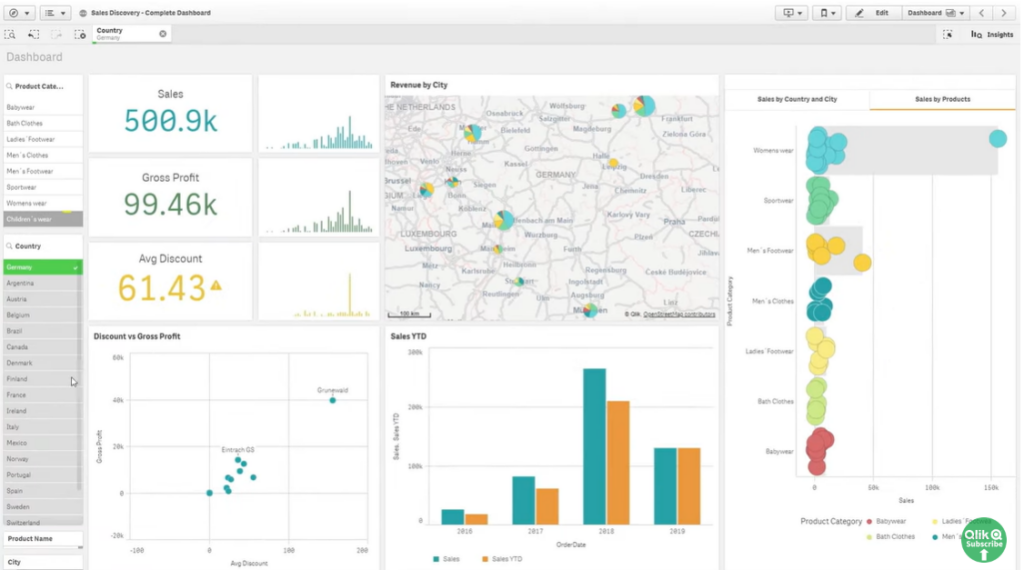
Qlik is a data science tool that’s useful for predictive analytics, as its software can quickly generate machine learning models and analyze a variety of what-if scenarios through a code-free user interface.
The main predictive analytics tool you’ll be using for data mining is a cloud-based solution called the Qlik AutoML, which provides a code-free way to conduct experiments and identify key drivers in your training models and data. Publish the data or integrate it into other dashboards for a more fully interactive analysis.
Qlik offers data integration and predictive analytics solutions for SMBs and enterprise-grade organizations through two tiered plan options. Enterprise solutions are completely customized for the needs of business users. Some industries they specialize in supporting include healthcare, retail, communications, life sciences, and energy and utilities.
Qlik Sense Standout Features and Integrations
Features include smart visualization and dashboard, phone app for Android and Apple, augmented analytics with advanced AI, flexible APIs and custom extensions, self-service analysis creation, and data change alerts.
Integrations include Amazon Web Services, Databricks, Google, Microsoft, Mongo DB, Rowshare, Smartsheet, Snowflake, SysAid, and TOPdesk.
Pros and Cons
Pros:
- Tons of customization
- Quick to implement
- Easy to use
Cons:
- Limited navigation features
- Limited data modeling

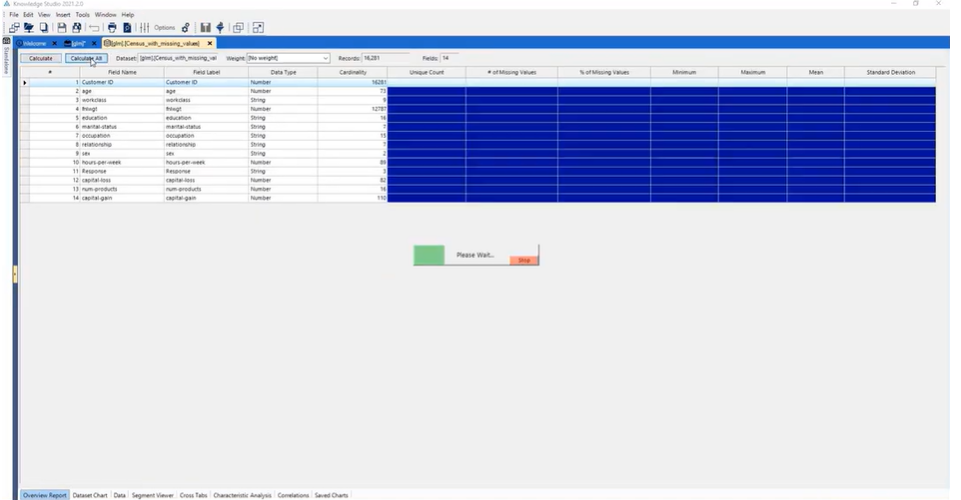
As a global tech company, Altair provides data mining and analytics solutions for high levels of throughput. Their platform supports SAS language and macro syntax, as well as tools for statistics, operational research, machine learning, graphics, time series analytics, and output delivery.
One standout feature of the Altair platform is its ability to combine programming languages to ensure the best language for the job. Users can write data-centric applications, mixing syntax inside a single program. They also offer no-code tools to empower users to create and run models that will translate into SQL, R, Python, and SAS languages.
Altair is designed to provide solutions for businesses in all stages of development with customizable pricing that appeals to freelancers, small businesses, and large organizations alike. They offer solutions for aerospace and defense, energy, architecture and engineering, healthcare, industrial machinery, weather and climate, retail, and education industries.
Altair Standout Features and Integrations
Features include data analytics and AI tools, electronic system design, data joining and sharing, data modeling, breadth of data sources, data workflows, consolidation, data cleaning, and metadata management.
Integrations include Acrome, Amazon, Deltek, FactSet, GitHub, Google Cloud, Hewlett Packard Enterprise, Immersion Consulting, Intel, and Lenovo.
Pros and Cons
Pros:
- Cost-effective solution
- Works with code and no-code preferences
- Easy setup options
Cons:
- Some limitations when working with SAS language
- Limited graphic visualizations


Designed to power model-driven businesses, Domino offers a platform that can accelerate the development and deployment of data science, while simultaneously focusing on governance and increasing collaboration.
One of their most popular tools is a risk management solution that can provide a comprehensive approach to modeling risk management and considers regulations, including CCAR, GDPR, and SR 11-7. This tool also tracks documentation, history, and model inventories to ensure better syncing throughout the organization.
Domino provides solutions by role, industry, and use case to target organizational needs at every level. Find solutions for chief data and analytics executives, data science leaders, and IT leaders throughout the financial services, health and life sciences, and insurance sectors.
Domino Data Lab Standout Features and Integrations
Features include managing, developing, deploying, and monitoring models, managing users, tracking resource usage, updating system configurations, and creating environments.
Integrations include Accenture, Amazon, Anaconda, Azure, Google Cloud Platform, NVIDIA, Red Hat, Snowflake, Stata, and VMWare.
Pros and Cons
Pros:
- Great customer support team
- UI and UX are intuitive
- Result-oriented platform
Cons:
- VPC installation takes awhile
- Documentation could be improved
Other Predictive Analytics Software
Here are some additional predictive analytics software options that didn’t make it onto my shortlist, but are still worth checking out:
- Databricks
For unifying AI, data, and analytics all in one place
- Alteryx
For all-in-one content, sales, customer, and project reporting and analysis
- KNIME
Open-source predictive analytics platform for all types of businesses
- Adobe Analytics
Marketing attribution tool for insights into customer interactions
- TIBCO
For unlocking business potential with real-time data and analytics
- Dataiku
For learning how to utilize artificial intelligence in a self-service tool
- DataRobot
Library of open-source machine learning algorithms and techniques
- SAP Predictive Analytics
Comprehensive predictive models in a business context


Predictive Analytics Software Selection Criteria
When selecting the best predictive analytics software to include in this list, I considered common buyer needs and pain points like ease of data integration and the ability to handle large datasets. I also used the following framework to keep my evaluation structured and fair:
Core Functionality (25% of total score)
To be considered for inclusion in this list, each solution had to fulfill these common use cases:
- Predictive modeling
- Data visualization
- Data integration
- Reporting and dashboards
- Machine learning algorithms
Additional Standout Features (25% of total score)
To help further narrow down the competition, I also looked for unique features, such as:
- Real-time analytics
- Automated machine learning
- Natural language processing
- Collaboration tools
- Cloud-based deployment
Usability (10% of total score)
To get a sense of the usability of each system, I considered the following:
- Intuitive interface
- Easy navigation
- Customizable dashboards
- Minimal training required
- Responsive design
Onboarding (10% of total score)
To evaluate the onboarding experience for each platform, I considered the following:
- Availability of training videos
- Interactive product tours
- Access to webinars
- Comprehensive documentation
- Supportive community forums
Customer Support (10% of total score)
To assess each software provider’s customer support services, I considered the following:
- 24/7 support availability
- Live chat options
- Dedicated account managers
- Fast response times
- Access to knowledge bases
Value For Money (10% of total score)
To evaluate the value for money of each platform, I considered the following:
- Competitive pricing
- Flexible payment plans
- Free trial availability
- Feature set vs. cost
- Discounts for long-term contracts
Customer Reviews (10% of total score)
To get a sense of overall customer satisfaction, I considered the following when reading customer reviews:
- Overall satisfaction ratings
- Commonly reported issues
- Praise for specific features
- Feedback on customer support
- User recommendations
How to Choose Predictive Analytics Software
It’s easy to get bogged down in long feature lists and complex pricing structures. To help you stay focused as you work through your unique software selection process, here’s a checklist of factors to keep in mind:
| Factor | What to Consider |
|---|---|
| Scalability | Can the software grow with your needs? Consider if it supports increasing data volumes and users without degrading performance. Look for tools that can scale both vertically and horizontally. |
| Integrations | Does it work with your existing tools? Check compatibility with your current data sources, CRM, and ERP systems to avoid siloed data. |
| Customizability | Can you tailor it to your workflows? Assess how much you can customize dashboards, reports, and processes to fit your team's specific needs. |
| Ease of use | How quickly can your team get up to speed? Look for intuitive interfaces and minimal training requirements to reduce the learning curve. |
| Implementation and onboarding | How long will it take to get started? Evaluate the setup process, availability of tutorials, and support during the initial phase. Consider time and resources needed for a smooth transition. |
| Cost | Is it within your budget? Compare pricing models, including subscription fees, hidden costs, and long-term contracts. Weigh the benefits against the expense. |
| Security safeguards | How does it protect your data? Ensure the software complies with industry standards and offers data encryption, access controls, and regular security updates. |
What Is Predictive Analytics Software?
Predictive analytics software is a tool that uses your past and current data to predict what might happen in the future. Data analysts, marketers, and business leaders use it to spot trends, forecast sales, and plan ahead with more confidence. It helps you see what’s coming so you can act early, reduce risks, and catch new opportunities before they pass you by.
Features
When selecting predictive analytics software, keep an eye out for the following key features:
- Predictive modeling: Uses historical data to forecast future outcomes, helping you make informed business decisions.
- Data visualization: Transforms complex data sets into visual formats like graphs and charts, making insights easier to understand.
- Machine learning: Automates the analysis process by learning from data patterns, enhancing prediction accuracy.
- Scenario analysis: Allows you to explore different business strategies and their potential impacts, aiding in strategic planning.
- Real-time analytics: Provides up-to-date insights as new data comes in, supporting timely decision-making.
- Data integration: Connects with multiple data sources to provide a comprehensive view of your analytics landscape.
- Customizable dashboards: Lets you tailor the display of data and reports to fit your specific needs and preferences.
- Automated reporting: Generates reports automatically, saving time and ensuring you have the latest data at your fingertips.
- Natural language processing: Interprets and analyzes human language data, expanding the scope of your data insights.
- Sensitivity analysis: Identifies key variables that impact outcomes, helping prioritize focus areas for improvement.
Benefits
Implementing predictive analytics software provides several benefits for your team and your business. Here are a few you can look forward to:
- Improved decision-making: By using predictive modeling and real-time analytics, you can make more informed decisions based on data-driven insights.
- Increased efficiency: Automated reporting and machine learning features reduce manual workload, allowing your team to focus on strategic tasks.
- Enhanced strategic planning: Scenario analysis and sensitivity analysis help you explore different strategies and their potential impacts, improving your planning processes.
- Better resource allocation: With data visualization and customizable dashboards, you can easily identify areas that need attention and allocate resources effectively.
- Risk mitigation: Predictive modeling helps identify potential risks before they occur, allowing you to take proactive measures to mitigate them.
- Customer insights: Natural language processing and data integration provide deeper insights into customer behavior, helping tailor your offerings to meet their needs.
Costs & Pricing
Selecting predictive analytics software requires an understanding of the various pricing models and plans available. Costs vary based on features, team size, add-ons, and more. The table below summarizes common plans, their average prices, and typical features included in predictive analytics software solutions:
Plan Comparison Table for Predictive Analytics Software
| Plan Type | Average Price | Common Features |
|---|---|---|
| Free Plan | $0 | Basic data visualization, limited data integration, and community support. |
| Personal Plan | $10-$30/user/month | Enhanced data visualization, basic predictive modeling, and limited customer support. |
| Business Plan | $40-$80/user/month | Advanced predictive modeling, real-time analytics, customizable dashboards, and standard support. |
| Enterprise Plan | $100-$200/user/month | Full data integration, automated reporting, scenario analysis, and dedicated account management. |
Predictive Analytics Software FAQs
Here are some answers to common questions about predictive analytics software:
How do I determine if my business needs predictive analytics software?
First, consider whether your team relies heavily on data to make decisions. If you’re dealing with large datasets and require accurate forecasting, predictive analytics software can be beneficial. It helps identify trends and patterns that aren’t easily visible, aiding in strategic planning. If your industry is data-driven, like finance or healthcare, the software can provide a competitive edge by improving decision-making and operational efficiency.
What kind of governance and compliance issues do you need to consider with predictive analytics software?
When your models work with customer data or sensitive information, you’ll need clear policies around access, privacy, auditability and explainability. If your software uses machine learning models whose decisions affect business outcomes, your team must manage model validity, bias and transparency. Governance frameworks ensure you’re not exposed to risks of inaccurate predictions or regulatory problems down the line.
How do you determine whether to build predictive analytics capabilities in-house or purchase a commercial solution?
If your team already has strong data science, engineering skills and domain knowledge, building might give you more customization. But it tends to be resource-intensive—you’ll need data scientists, time for modelling, infrastructure and ongoing maintenance. Buying a solution lets you deploy faster and rely partly on vendor expertise, but you might trade off some flexibility or need to adapt to their workflows. Align decision with your budget, timeline and in-house skillset.
What are the typical adoption hurdles when rolling out predictive analytics software across teams?
Even with good tech, your software will under-deliver if front-line users don’t trust it or can’t act on its output. Common hurdles include lack of training, unclear use cases, integration gaps with daily workflows, and models delivered as “black boxes”. Your team should emphasise training, attach predictions to concrete business actions, embed the tool in existing systems and encourage collaboration between analysts and business users.
How do you manage model decay or “drift” in predictive analytics software over time?
Once deployed, predictive models can lose accuracy if data patterns change (for example, customer behaviour shifts, market conditions evolve or new variables emerge). Monitoring performance regularly, retraining models when needed and keeping a feedback loop with business users are essential practices. Without that, predictions may become stale and misleading.
What’s Next:
If you're in the process of researching predictive analytics software, connect with a SoftwareSelect advisor for free recommendations.
You fill out a form and have a quick chat where they get into the specifics of your needs. Then you'll get a shortlist of software to review. They'll even support you through the entire buying process, including price negotiations.