

I 10 migliori software per la gestione dei lead recensiti per il 2026

10 Migliori software di gestione dei lead: selezione


Nessuno vuole sentirsi dire «Non ho mai ricevuto una risposta» da un lead interessato, soprattutto quando si è sotto pressione per raggiungere gli obiettivi di fatturato del trimestre. La realtà è che persino i team di vendita più efficienti non riescono a monitorare manualmente ogni punto di contatto, attività di ricontatto e passaggio di consegne con una precisione del 100%. I lead si perdono. Le opportunità sfumano. E il fatturato ne risente.
La buona notizia è questa: i software di gestione dei lead esistono proprio per risolvere questi problemi. Ho vissuto questa realtà in prima persona, cercando di bilanciare le esigenze di crescita con la complessità operativa, e so quanto possa fare la differenza il software giusto.
Per questo ho raccolto un elenco dei 18 migliori strumenti software di gestione dei lead per 2026. Che tu voglia semplificare le attività di ricontatto, automatizzare l'assegnazione dei lead o ottenere una visibilità completa sul tuo funnel di vendita, questi strumenti sono progettati per aiutarti a crescere in modo più intelligente. Iniziamo.
Perché fidarsi dei nostri consigli sui software
Le nostre recensioni riflettono il nostro giudizio indipendente, non un discorso di vendita. Scopri come manteniamo la trasparenza.
Per questa guida, abbiamo valutato gli strumenti attraverso test pratici e ricerche indipendenti, assegnando un punteggio agli strumenti in base ai nostri criteri di selezione.
Le nostre recensioni riflettono il nostro giudizio editoriale umano, non un discorso di vendita.
| Tool | Best For | Trial Info | Price | ||
|---|---|---|---|---|---|
| 1 | Ideale per un'ampia disponibilità di dati globali sui contatti B2B | Prova gratuita di 14 giorni + piano gratuito + demo gratuita disponibili | A partire da 49/postazione/mese (con fatturazione annuale) | Website | |
| 2 | Ideale per PMI B2B | Prova gratuita di 30 giorni + demo gratuita disponibile | Da $29/utente/mese (fatturato annualmente) | Website | |
| 3 | Ideale per contabilità e fatturazione automatizzate | Demo gratuita disponibile | Prezzo su richiesta | Website | |
| 4 | Ideale per l'automazione delle vendite personalizzabile | Prova gratuita disponibile | Da $12/utente/mese (fatturazione annuale) | Website | |
| 5 | Ideale per insight di vendita basati sull’IA | Prova gratuita di 15 giorni + piano gratuito disponibile | Da $14/utente/mese (fatturazione annuale) | Website | |
| 6 | Ideale per acquisire lead tramite richiamata istantanea | Prova gratuita di 7 giorni | A partire da $25/utente/mese (Basic+) | Website | |
| 7 | Ideale per la gestione visiva della pipeline di vendita | Demo gratuita + prova gratuita di 14 giorni disponibile | Da $14/utente/mese (fatturazione annuale) | Website | |
| 8 | Ideale per CRM e automazione del marketing | Demo gratuita disponibile | Prezzi su richiesta | Website | |
| 9 | Ideale per creare landing page personalizzate | Prova gratuita di 14 giorni | Da $99/utente/mese (Launch) | Website | |
| 10 | Ideale per la qualificazione dei lead | Prova gratuita di 30 giorni | Da $19/utente/mese (Team) | Website |


Recensioni dei migliori software di gestione dei lead
Ecco una breve descrizione di ciascun software di gestione dei lead, con il principale caso d’uso di ogni fornitore, le funzionalità più interessanti e alcuni pro e contro. Ho incluso anche delle schermate per offrirti una panoramica della relativa interfaccia utente.

Ideale per un'ampia disponibilità di dati globali sui contatti B2B
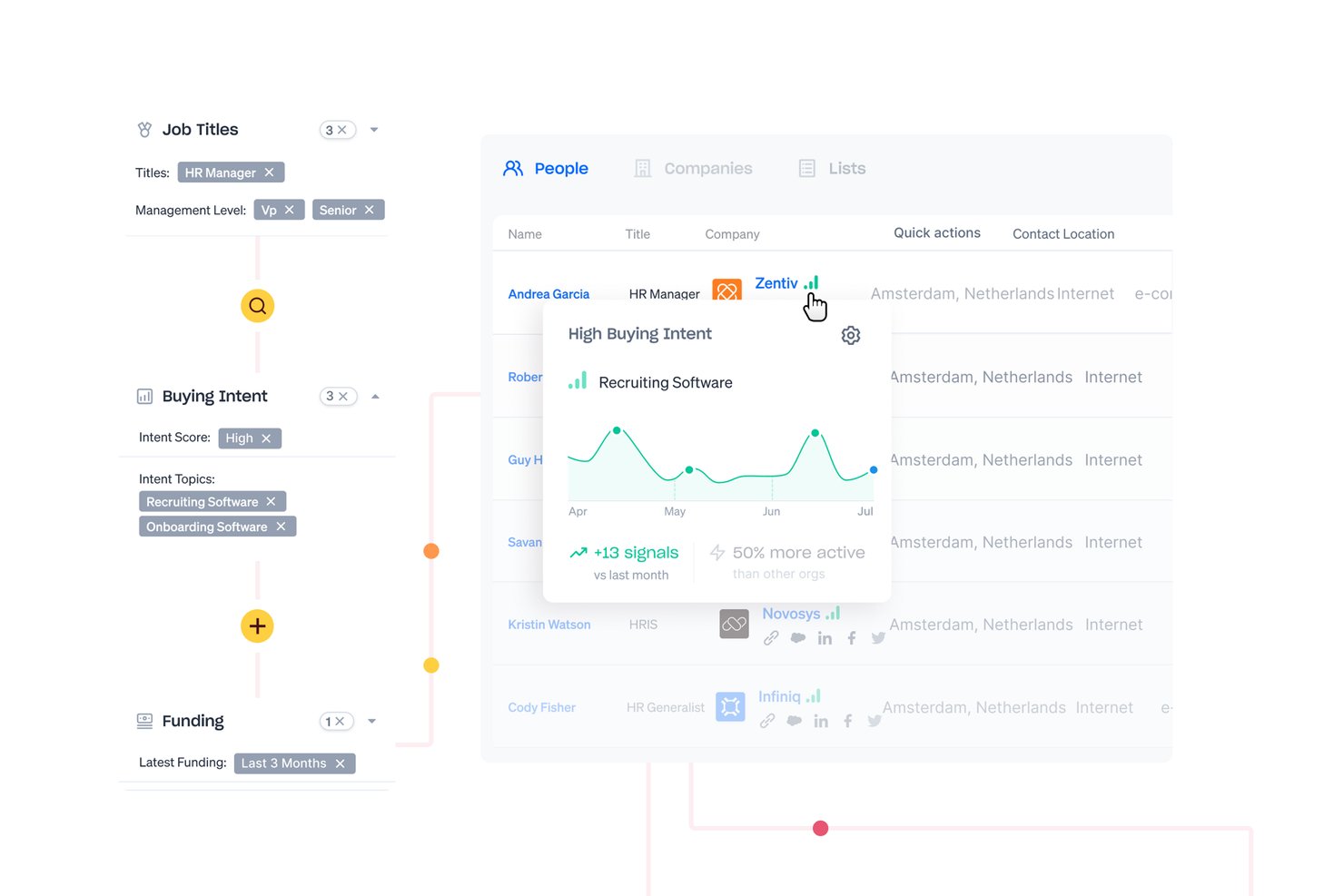
Apollo.io è una piattaforma di intelligence commerciale e gestione dei lead che combina un database di oltre 210 milioni di contatti con assegnazione di punteggi ai lead, instradamento dei lead in entrata, automazione delle sequenze e monitoraggio del flusso delle opportunità in un unico sistema integrato.
Per chi è più adatto Apollo.io?
Apollo.io è adatto ai team di vendita B2B e alle divisioni responsabili delle operazioni sui ricavi che svolgono attività di prospezione in uscita ad alto volume e hanno bisogno di dati sui contatti, sequenze e instradamento dei lead senza dover gestire diversi strumenti separati.
Perché ho scelto Apollo.io
Apollo.io è entrato nella mia lista ristretta perché la profondità del suo database di contatti B2B cambia davvero ciò che è possibile fare nella gestione dei lead. Mi piace molto il fatto che il processo di verifica delle email in 7 fasi faccia sì che io assegni punteggi e instradi lead che arriveranno effettivamente nelle caselle di posta, anziché contatti inesistenti. L'assegnazione dei punteggi ai lead basata sull'IA classifica poi automaticamente quei contatti verificati in base ai criteri del mio ICP, così il mio team non deve esaminare manualmente un elenco sovraccarico.
Funzionalità principali di Apollo.io
- Instradatore dei lead in entrata: Instrada istantaneamente i nuovi lead in entrata in base al territorio, alla corrispondenza dell'account o alle regole personalizzate impostate dal tuo team.
- Motore di automazione dei flussi di lavoro: Automatizza attività ripetitive di gestione dei lead come assegnazione, follow-up e segmentazione utilizzando flussi di lavoro basati su regole.
- Sincronizzazione bidirezionale con il CRM: Sincronizza in tempo reale i dati dei lead e degli account con Salesforce, HubSpot e altri importanti CRM per garantire report accurati e un passaggio di consegne efficace.
- Compositore e registrazione delle chiamate integrati: Consente ai rappresentanti di effettuare chiamate direttamente dalla piattaforma e registra automaticamente l'attività delle chiamate nella scheda di ogni lead.
Integrazioni di Apollo.io
Apollo.io offre integrazioni native con Salesforce, HubSpot, Outreach, Salesloft, Pipedrive, Zoho CRM e Slack, oltre a connettersi con Zapier. È disponibile un'API per le integrazioni personalizzate.
Pros and Cons
Pros:
- Enorme database integrato di contatti B2B verificati
- L'assegnazione dei punteggi ai lead tramite IA li classifica automaticamente in base ai criteri dell'ICP
- Prospezione e contatto gestiti in un unico posto
Cons:
- Accuratezza dei dati inferiore al di fuori dei mercati nordamericani
- La profondità dei report è inferiore a quella degli strumenti di analisi dedicati

Ideale per PMI B2B
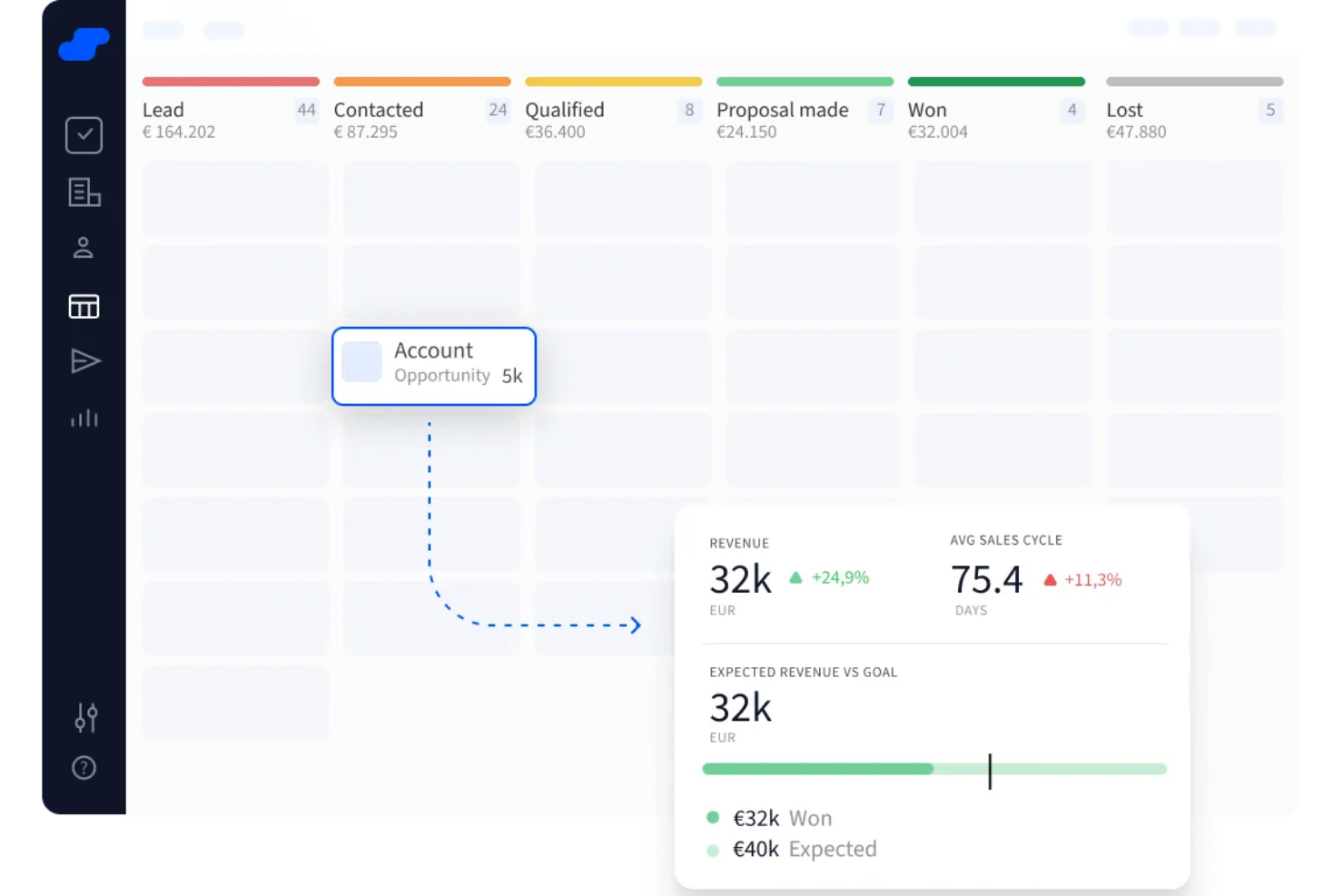
Salesflare è un CRM progettato per aiutare le piccole e medie squadre B2B a gestire i propri lead in modo intuitivo. Raccoglie automaticamente dettagli di contatto e aziendali da email, social media e fonti pubbliche.
Perché ho scelto Salesflare: Ho scelto Salesflare perché include un lead finder che ti permette di trovare nuovi lead da settori, aree geografiche o ruoli specifici direttamente all’interno del CRM—senza dover gestire dati o duplicati. Puoi anche ottenere gli indirizzi email aziendali di questi lead con un solo clic, semplificando l’inserimento di lead di qualità nel tuo sistema.
Un altro motivo sono le pipeline visuali che consentono di tracciare i lead lungo tutto il percorso—da lead ad affare—utilizzando bacheche drag‑and‑drop. Ti permette perfino di iscrivere nuovi lead a sequenze di email direttamente dal CRM, così puoi seguirli automaticamente senza dover cambiare applicazione.
Funzionalità principali e integrazioni
Le funzionalità principali includono un email finder che permette di ottenere email aziendali con il minimo sforzo, un’estensione Chrome che ti consente di gestire i lead ovunque navighi—Gmail, LinkedIn, qualsiasi sito web—e un CRM potenziato dall’IA che offre lead scoring e promemoria automatizzati, così sai sempre quando ricontattare o rispondere.
Le integrazioni includono Google Workspace, Intercom, MailChimp, QuickBooks Online, Slack, Stripe, Shopify e Calendly.
Pros and Cons
Pros:
- Le pipeline visuali mostrano esattamente a che punto sono i lead
- Automatizza l'inserimento dei dati di contatto dalle interazioni email
- Ti ricorda i follow‑up e le prossime azioni
Cons:
- Mancano workflow altamente personalizzati per team complessi
- Personalizzazione limitata di dashboard e report

Phonexa
Ideale per contabilità e fatturazione automatizzate
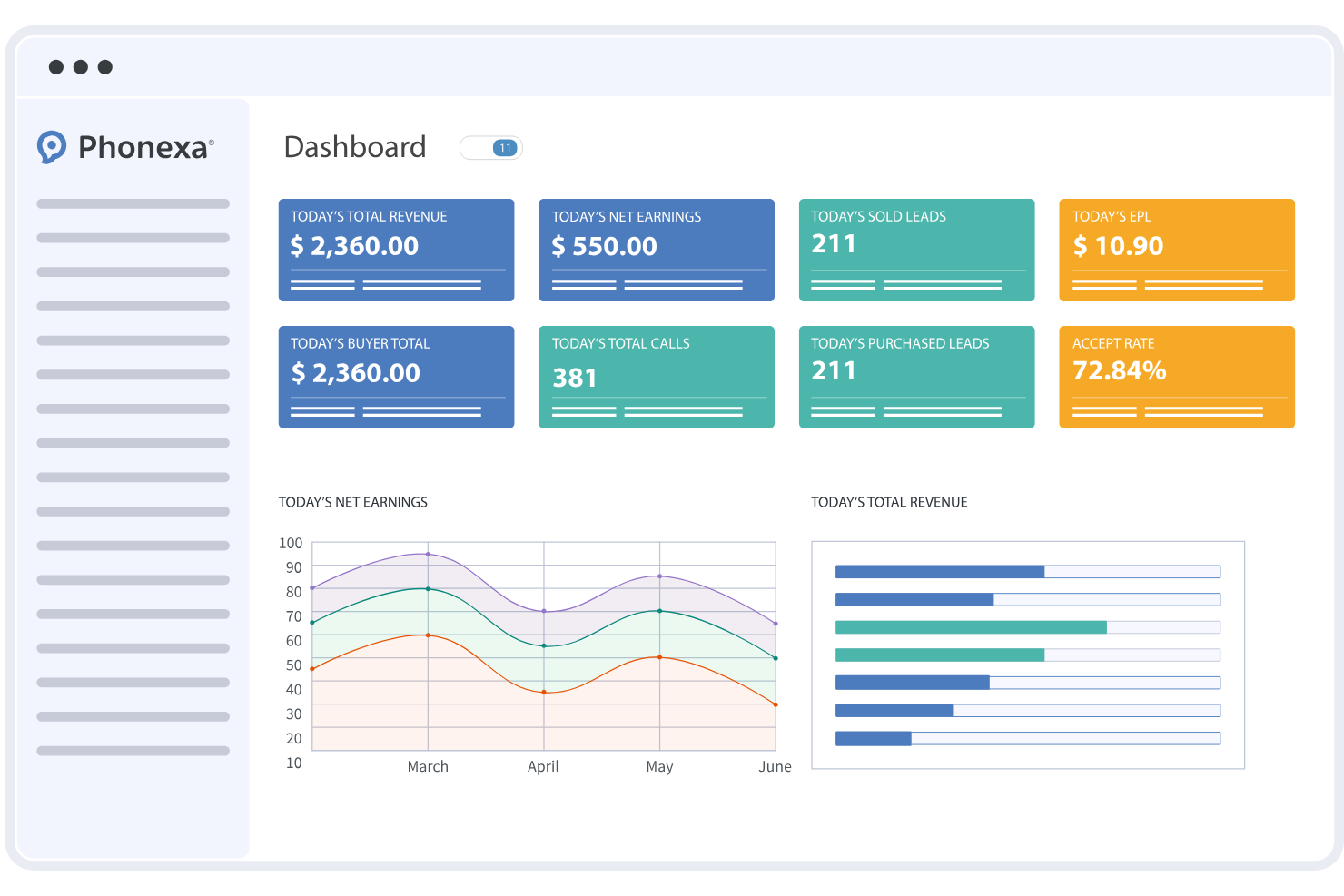
Phonexa è una piattaforma di gestione dei lead che combina monitoraggio dei lead, analisi delle chiamate, contabilità automatizzata, strumenti per la conformità e reportistica in un unico sistema. Aiuta i team di marketing e le agenzie a gestire elevati volumi di lead in entrata su più canali, mantenendo l'attribuzione delle entrate e i pagamenti organizzati.
Per chi è indicato Phonexa?
Phonexa è adatto a team di marketing, marketer orientati alle performance e agenzie che gestiscono grandi volumi di lead e chiamate e hanno bisogno di un monitoraggio strutturato tra campagne, acquirenti e fonti.
Perché ho scelto Phonexa
Ho scelto Phonexa perché include contabilità e fatturazione automatizzate direttamente all'interno del flusso di lavoro di gestione dei lead. I team possono configurare regole di fatturazione per diverse fonti di lead e la piattaforma genera fatture basate su lead e attività di chiamata registrate. Questo rende più semplice riconciliare i pagamenti e monitorare le entrate senza dover ricorrere a sistemi di contabilità separati.
Funzionalità principali di Phonexa
- Motore di distribuzione dei lead: Instrada automaticamente i lead utilizzando regole personalizzabili in base alla fonte, ai requisiti dell'acquirente o ai criteri della campagna.
- Monitoraggio delle chiamate: Monitora le chiamate in entrata con numeri di monitoraggio, logiche di instradamento e strumenti di reportistica.
- Automazione dell'email marketing: Crea e gestisci campagne email direttamente dalla piattaforma.
- Gestione della conformità: Configura flussi di lavoro che aiutano a supportare i requisiti normativi e di settore.
- Contabilità automatizzata: Genera fatture e gestisci la fatturazione collegata direttamente all'attività di lead e chiamate.
Integrazioni Phonexa
Phonexa si integra con Salesforce, HubSpot, Mailchimp, QuickBooks e Google Analytics. È disponibile un'API per ulteriori integrazioni.
Pros and Cons
Pros:
- Monitoraggio delle chiamate in tempo reale con analisi dettagliate
- Flussi di lavoro di contabilità e fatturazione automatizzati
- Motore di distribuzione dei lead con regole di instradamento avanzate
Cons:
- Nessun piano gratuito per sempre disponibile
- Il processo di configurazione può richiedere tempo
New Product Updates from Phonexa

Phonexa Expands Automated Traffic and Offer Routing
Phonexa adds tag-based publisher distribution, fallback bidding for Ping Post Calls, and Logic Links for smarter offer routing. These updates reduce manual traffic management and help route leads and calls to better available options. For more information, visit Phonexa’s official site.
 .
.
Ideale per l'automazione delle vendite personalizzabile
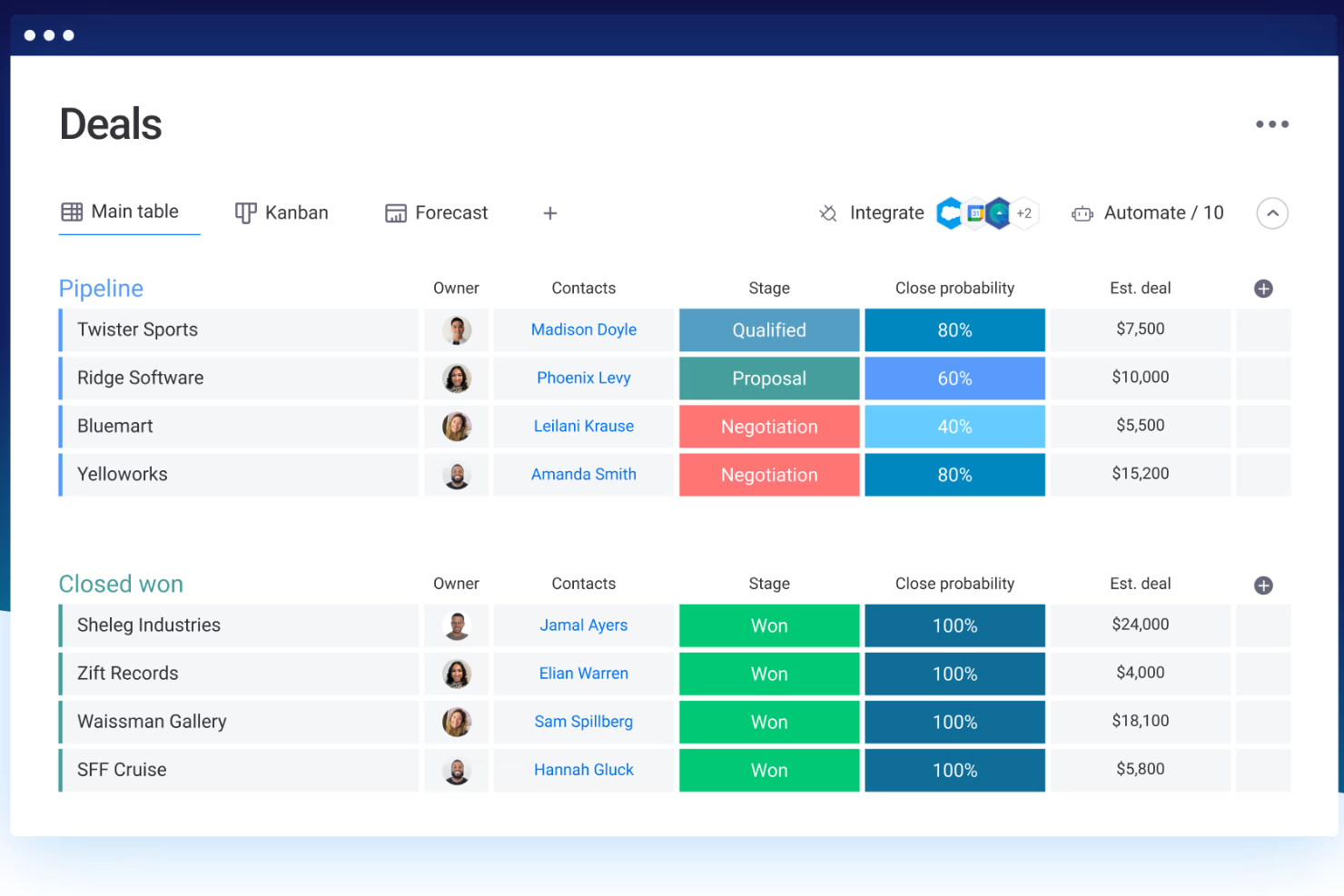
Monday sales CRM è una piattaforma di gestione delle relazioni con i clienti (CRM) personalizzabile, progettata per centralizzare i processi di vendita, la comunicazione con i clienti e la gestione delle trattative. Si distingue per la capacità di creare flussi di lavoro su misura, supportando l'affermazione che sia la soluzione ideale per flussi di lavoro personalizzati, poiché le aziende possono adattare il CRM ai loro cicli e processi di vendita unici.
Perché ho scelto Monday sales CRM: Monday.com eccelle nella gestione dei lead offrendo una piattaforma centralizzata dove i team possono acquisire, tracciare e coltivare i lead in modo efficace. Il suo punto di forza risiede nella possibilità di personalizzare i flussi di lavoro per adattarsi al processo di vendita specifico di ogni team, garantendo che i lead siano gestiti e seguiti in modo efficiente. Gli strumenti di automazione interni al CRM semplificano le attività ripetitive come l'assegnazione dei lead e i follow-up, liberando tempo per un coinvolgimento più personalizzato.
La natura collaborativa della piattaforma aumenta la visibilità tra i team, assicurando che tutti siano aggiornati sullo stato dei lead e sulle azioni necessarie, favorendo un approccio coeso alla conversione dei potenziali clienti in clienti effettivi. Grazie ad analisi integrate, monday.com offre informazioni utili sul comportamento dei lead e sulla salute della pipeline, facilitando decisioni più informate e l'ottimizzazione delle strategie.
Funzionalità principali e integrazioni
Funzionalità principali: Pipeline di vendita visivamente intuitive, non solo facili da comprendere e gestire, ma anche dotate di funzioni di automazione integrate. Queste automazioni possono gestire compiti ripetitivi, come invio di email di follow-up, assegnazione di task e lead scoring, senza intervento manuale. Questa integrazione tra pipeline visive e automazione è una caratteristica distintiva che aumenta l'efficienza e riduce la possibilità di errori umani.
Integrazioni includono: Applicazioni di project management come Slack, Google Drive, Gmail, Google Calendar, Jira, GitHub, Trello, Dropbox, Typeform e molte altre, accessibili tramite un piano a pagamento con Zapier.
Pros and Cons
Pros:
- Flussi di lavoro e dashboard altamente personalizzabili
- Riconosciuto per la sua interfaccia intuitiva e visivamente gradevole
- Consente una collaborazione interfunzionale
- Strumenti di automazione integrati
Cons:
- La grande quantità di funzionalità può risultare opprimente per i nuovi utenti
- Il Sales CRM non prevede un piano gratuito
New Product Updates from monday CRM

monday CRM Adds Meta Conversions API Integration
monday CRM now lets you connect Meta Conversions API and sync lead status back to Meta, improving targeting and conversions via a new Meta integration automation recipe. For more information, visit monday CRM's official site.
Zoho CRM
Ideale per insight di vendita basati sull’IA
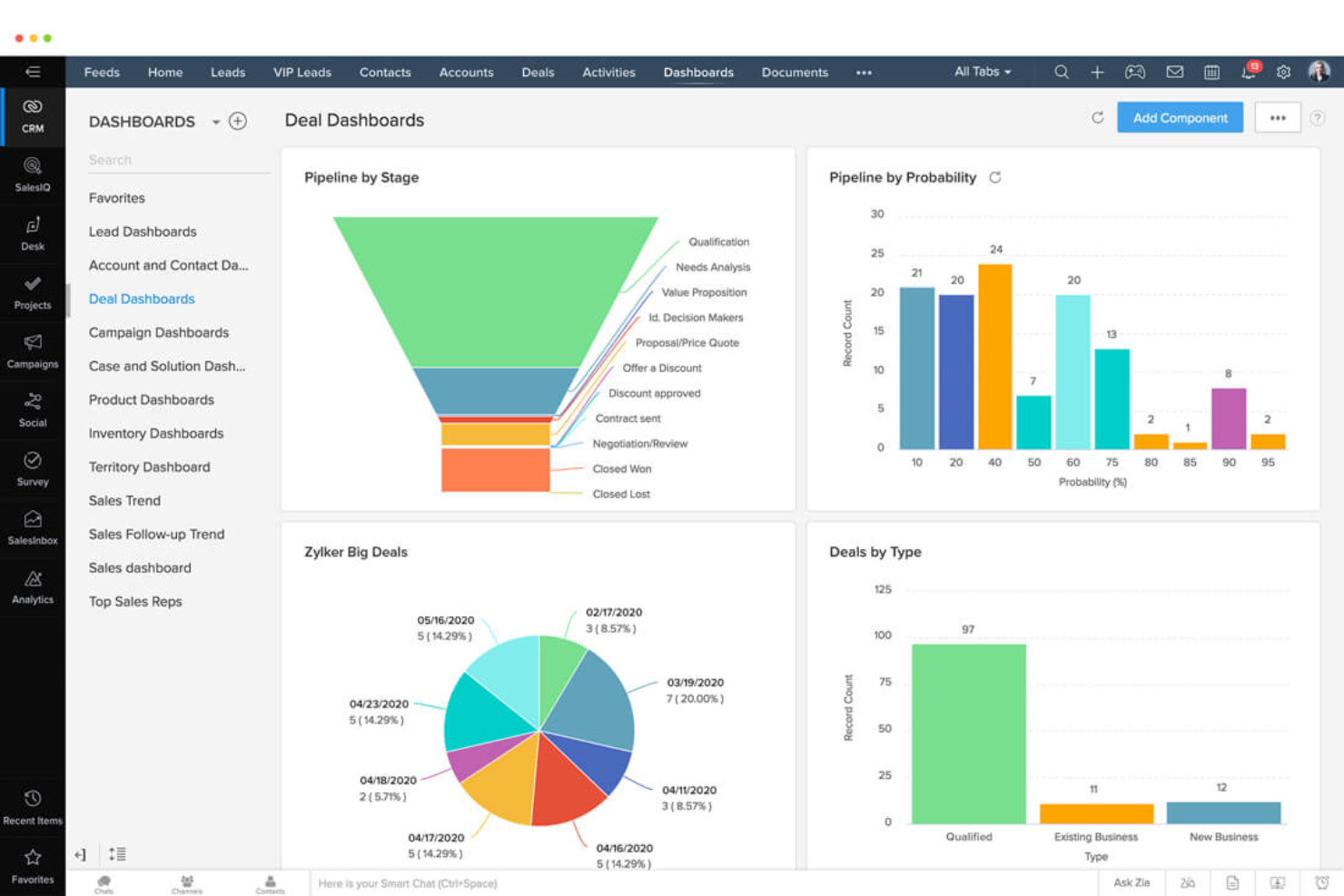
Zoho CRM è un software completo per la gestione delle relazioni con i clienti che offre una vasta gamma di funzionalità per aiutare le aziende a gestire le attività di vendita, marketing e assistenza clienti. Funziona come un unico repository per unificare le operazioni, rendendolo adatto ad aziende di tutte le dimensioni e settori.
Perché ho scelto Zoho CRM: Mi piace che il software offra un sistema completo di gestione dei lead che include funzionalità come generazione, valutazione, distribuzione, nutrimento e analisi dei lead. Raccoglie lead da vari canali, inclusi moduli web, social media ed email, e si integra con piattaforme come Google Ads e Facebook per fornire una visione completa delle spese pubblicitarie online e della generazione dei lead.
Il sistema offre anche analisi avanzate per monitorare lo stato dei lead e i tassi di conversione, garantendo che i venditori possano concentrarsi sui lead più promettenti. Inoltre, Zoho CRM fornisce strumenti basati sull’intelligenza artificiale per l’arricchimento dei lead, l’analisi predittiva e l’ottenimento di informazioni complessive sulle vendite, migliorando il processo di coltivazione dei lead.
Funzionalità principali e integrazioni
Funzionalità principali: Zoho CRM include funzionalità come la previsione di lead e opportunità che utilizza l’intelligenza artificiale per prevedere la probabilità che i lead si trasformino in opportunità e Zia, un assistente AI che aiuta a gestire varie funzioni del CRM. Offre inoltre automazione dei processi, comunicazione omnicanale, processi di approvazione, layout di pagine personalizzati, analisi e un’app CRM.
Le integrazioni includono Google Workspace, Microsoft 365, RingCentral, Twilio, MailChimp, Facebook Ads Manager, Dropbox, PayPal, Adobe Sign, DocuSign, Typeform, Jotform, Trello, SurveyMonkey, Zapier e altre app di Zoho.
Pros and Cons
Pros:
- Ampie opzioni di personalizzazione
- Funzionalità di assistente basata sull’IA
- App mobile disponibile per l’accesso da dispositivi mobili
Cons:
- Curva di apprendimento per i nuovi utenti
- La configurazione può richiedere tempo
New Product Updates from Zoho CRM

Zoho CRM Adds Reusable Canvas Templates for Forms
Zoho CRM now supports Canvas templates in the Forms view, so you can design a form layout once and reuse it across records for a consistent, faster experience. For more information, visit Zoho CRM's official site.
 .
.
CallPage
Ideale per acquisire lead tramite richiamata istantanea
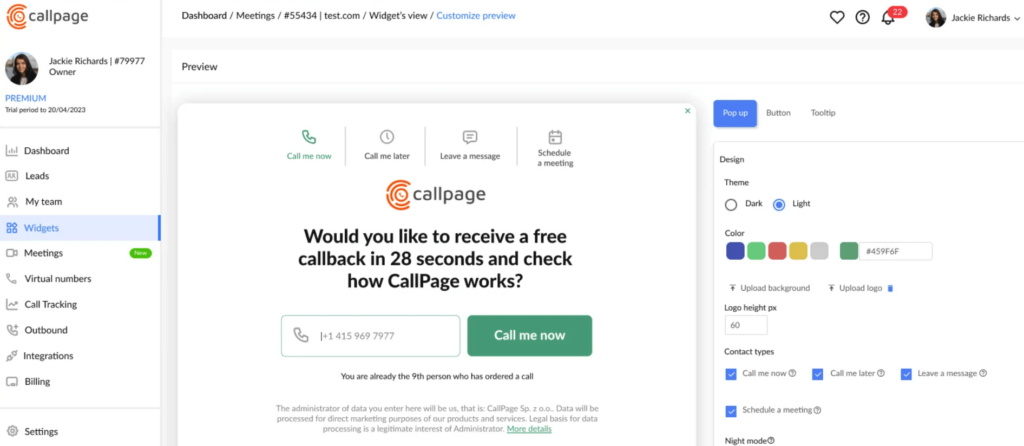
Callpage è pensato per i team che si affidano molto alle chiamate in uscita e desiderano un modo semplice per convertire i visitatori del sito web in conversazioni di vendita. Offre strumenti per automatizzare i flussi di lavoro delle chiamate e monitorare l’efficacia delle attività outbound. Se il tuo team di vendita dà priorità alla rapida risposta, Callpage ti aiuta a connetterti con i potenziali clienti prima che perdano interesse.
Perché ho scelto Callpage
Ho scelto Callpage perché centralizza le chiamate in uscita e la gestione dei lead in un’unica piattaforma intuitiva. Puoi automatizzare il tracciamento, la valutazione e il follow-up delle chiamate, eliminando passaggi manuali nel processo di vendita. Il widget di richiamata sul sito è una soluzione immediata—consente ai potenziali clienti di richiedere una chiamata istantaneamente, spesso aumentando i tassi di conversione. Inoltre, ottieni una panoramica delle prestazioni delle chiamate in uscita tramite l’analisi integrata. È ideale per i team che vogliono snellire i processi di chiamata senza ulteriore complessità.
Funzionalità principali di Callpage
- Widget di richiamata: Consente ai visitatori del sito di richiedere chiamate immediate dai commerciali.
- Tracciamento delle chiamate: Monitora le attività in uscita e l’efficacia delle fonti.
- Lead scoring: Identifica automaticamente i potenziali clienti di maggior valore.
- Automazione delle chiamate in uscita: Gestisce follow-up e attività di chiamata in modo più efficiente.
- Analisi delle prestazioni: Valuta quali iniziative producono più conversioni.
Integrazioni di Callpage
Le integrazioni includono Salesforce, HubSpot, Pipedrive, Zapier e Google Analytics.
Pros and Cons
Pros:
- Piattaforma facile da usare con interfaccia intuitiva
- Funzionalità avanzate di tracciamento e reportistica delle chiamate
- Il widget di richiamata integrato aiuta a catturare lead direttamente dal tuo sito web
Cons:
- Opzioni di personalizzazione limitate per il widget di chiamata
- Non adatto ad aziende con processi di vendita complessi

Ideale per la gestione visiva della pipeline di vendita
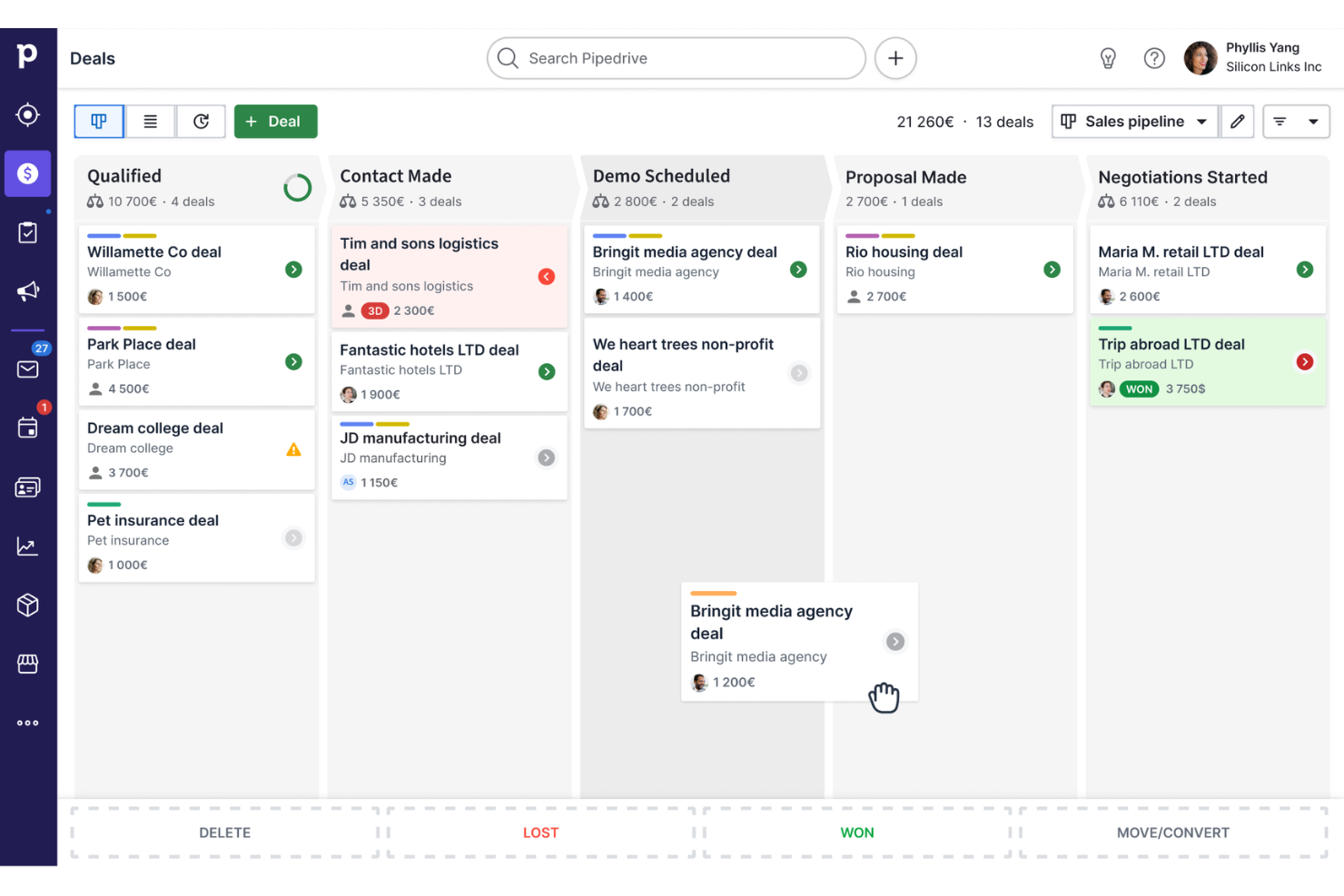
Pipedrive è un CRM per le vendite e un software di gestione delle pipeline progettato per aiutare i team commerciali a gestire i propri processi di vendita e le relazioni con i clienti.
Perché ho scelto Pipedrive CRM: Ho scelto Pipedrive perché offre un'interfaccia intuitiva e visiva per gestire la pipeline di vendita e monitorare i lead in ogni fase del processo. L'interfaccia drag-and-drop consente ai team commerciali di spostare facilmente le trattative tra le varie fasi, offrendo una visione trasparente e in tempo reale del loro processo di vendita.
Ogni fase della pipeline può essere personalizzata, permettendo agli utenti di adattare il flusso di lavoro alle proprie esigenze specifiche. Inoltre, gli indicatori di stato codificati per colore e i segnali visivi semplificano la prioritizzazione delle trattative e mettono in evidenza le azioni più importanti.
Funzionalità principali e integrazioni
Funzionalità principali: Pipedrive offre gestione dei lead, reportistica approfondita e automazione delle vendite. Include anche strumenti per la generazione dei lead, la gestione dei progetti e l'email marketing. Inoltre, il suo assistente alle vendite basato su intelligenza artificiale può fornire raccomandazioni, mentre l'API aperta permette ampie opzioni di personalizzazione.
Le integrazioni includono HubSpot, JustCall, Mailchimp, Google Meet, Zoom, DocuSign, Trello, Monday.com, Zendesk e Google Workspace.
Pros and Cons
Pros:
- Pipeline e dashboard altamente personalizzabili
- Funzionalità di previsione delle vendite
- Interfaccia facile da usare
Cons:
- La configurazione iniziale può essere complicata
- L'assistente alle vendite IA è disponibile solo nei piani di livello superiore
Ideale per CRM e automazione del marketing
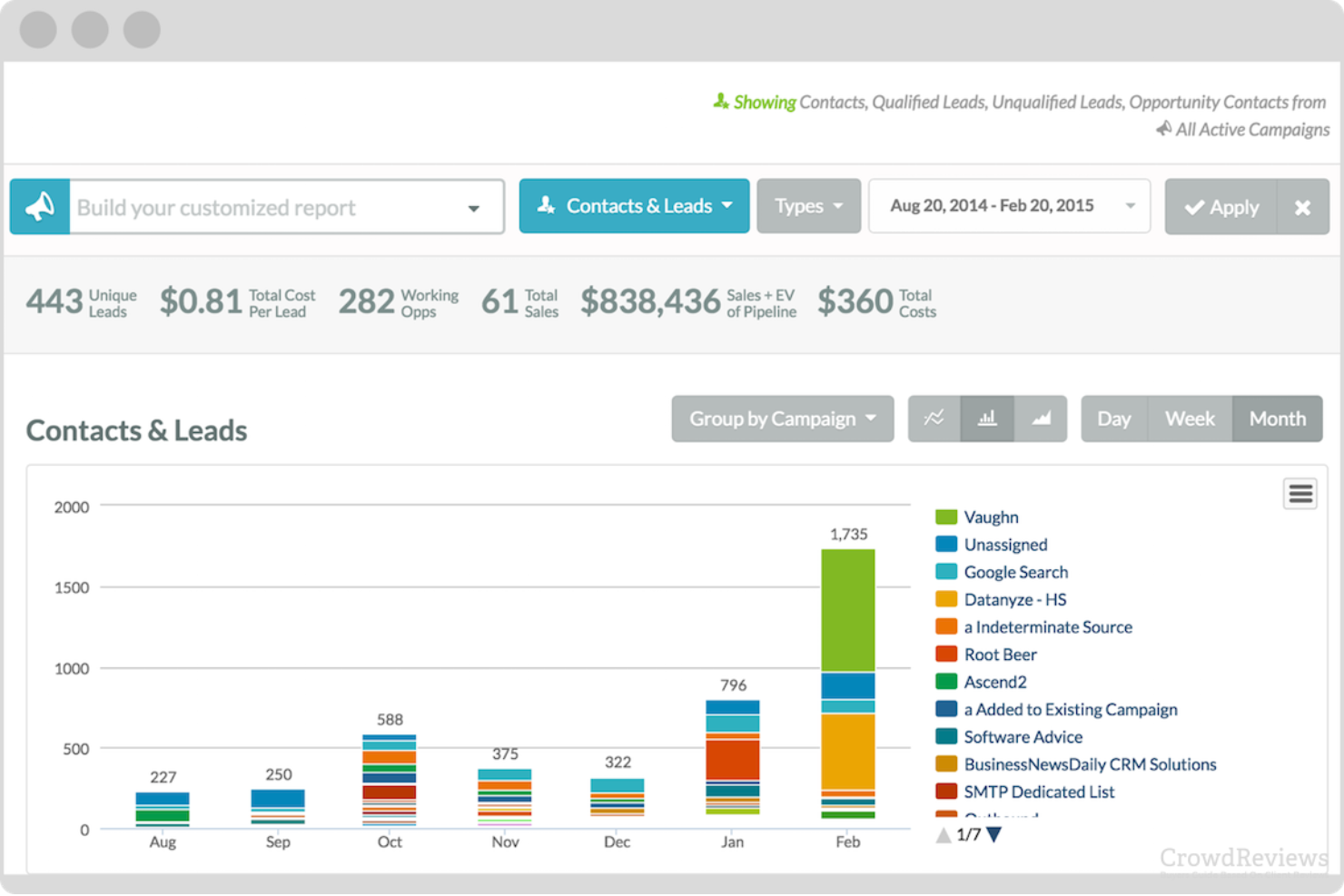
SharpSpring è una piattaforma di automazione del marketing e CRM che unifica la gestione dei lead, il coinvolgimento delle vendite e l'analisi per le piccole e medie imprese. Semplifica l'intero ciclo di vita del lead, dalla cattura alla conversione, aiutando i team a migliorare il coinvolgimento, automatizzare i follow-up e allineare le attività di marketing e vendita.
Perché ho scelto SharpSpring: SharpSpring si distingue per l'integrazione di una solida automazione del marketing con funzionalità CRM integrate, eliminando la necessità di gestire più strumenti scollegati. Funzionalità come VisitorID e i moduli dinamici offrono ai team visibilità sui visitatori anonimi del sito e una raccolta adattiva dei lead, mentre i flussi di lavoro automatizzati e i messaggi personalizzati favoriscono tassi di conversione più elevati. Il pricing flessibile e le opzioni adatte alle agenzie lo rendono accessibile ai team che gestiscono portafogli di più clienti.
Caratteristiche principali e integrazioni:
Le funzionalità includono la lead scoring per dare priorità ai potenziali clienti, il monitoraggio dei comportamenti su più touchpoint, l'automazione delle email che si adatta al comportamento dell'utente e il monitoraggio delle campagne per ottenere informazioni sulle prestazioni in tempo reale.
Le integrazioni includono Salesforce, Google Ads, Google Analytics, LinkedIn, Facebook, Zoom, Shopify, HubSpot e Slack.
Pros and Cons
Pros:
- SharpSpring offre funzionalità complete di automazione del marketing, tra cui moduli dinamici e tracciamento dei visitatori, che migliorano le capacità di gestione dei lead.
- La piattaforma offre un'interfaccia intuitiva per creare campagne di automazione, rendendola accessibile a utenti con diversi livelli di competenza tecnica.
- SharpSpring è conveniente rispetto a concorrenti come Pardot e Marketo, offrendo un valore significativo per le sue funzionalità.
Cons:
- Alcuni utenti riportano opzioni di personalizzazione limitate per alcune funzionalità, che possono risultare restrittive per le aziende in cerca di soluzioni su misura.
- Sono stati segnalati dagli utenti problemi di prestazioni, come bug occasionali e rallentamenti, che incidono sull'esperienza complessiva dell'utente.
Unbounce
Ideale per creare landing page personalizzate
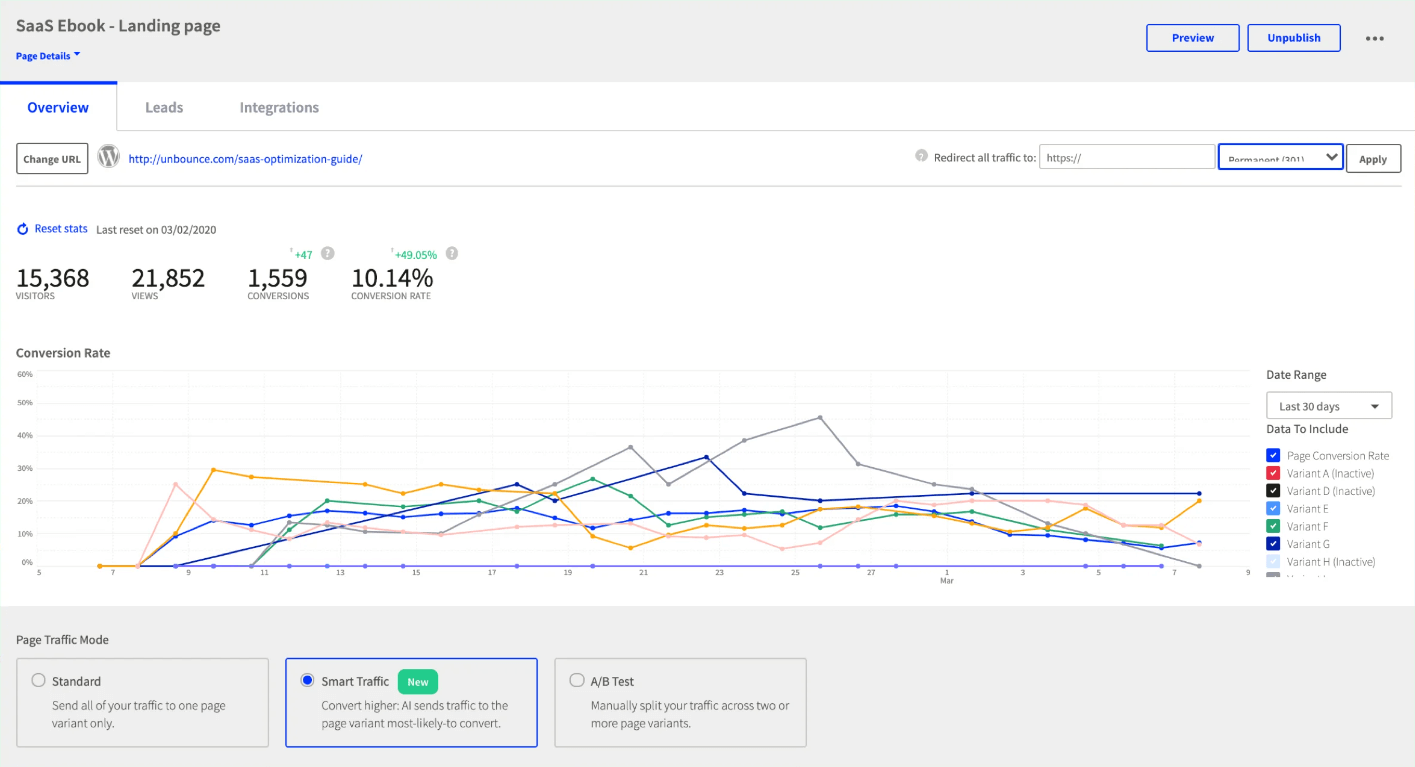
Unbounce è un costruttore di landing page che rende semplice creare e ottimizzare pagine di atterraggio su misura per profili cliente specifici, facilitando la conversione dei lead in clienti.
Perché ho scelto Unbounce: Ho selezionato Unbounce perché aiuta le aziende a creare facilmente pagine di atterraggio personalizzate per le loro campagne di marketing senza alcuna conoscenza di programmazione. La sua gamma di template rende semplice creare landing page ad alto tasso di conversione.
Caratteristiche principali e integrazioni
Caratteristiche principali: Amo Unbounce per il livello di personalizzazione che offre alle landing page. Il software ha un'interfaccia drag-and-drop che permette di personalizzare ciascun elemento della tua pagina, e i suoi strumenti di A/B testing consentono di ottimizzare le pagine per la massima conversione.
Integrazioni: includono Mailchimp, Salesforce CRM, Google Analytics, WordPress, Hubspot e Zapier.
Pros and Cons
Pros:
- Unbounce offre una gamma di template e strumenti di design
- Rendendo semplice creare landing page dall'aspetto professionale
- L'editor drag-and-drop è intuitivo e facile da usare
- Gli strumenti di A/B testing facilitano l'ottimizzazione delle landing page per la conversione
Cons:
- Unbounce può risultare costoso rispetto ad altri costruttori di landing page
- L'interfaccia può essere a volte un po' lenta e macchinosa.

Zendesk Sell
Ideale per la qualificazione dei lead
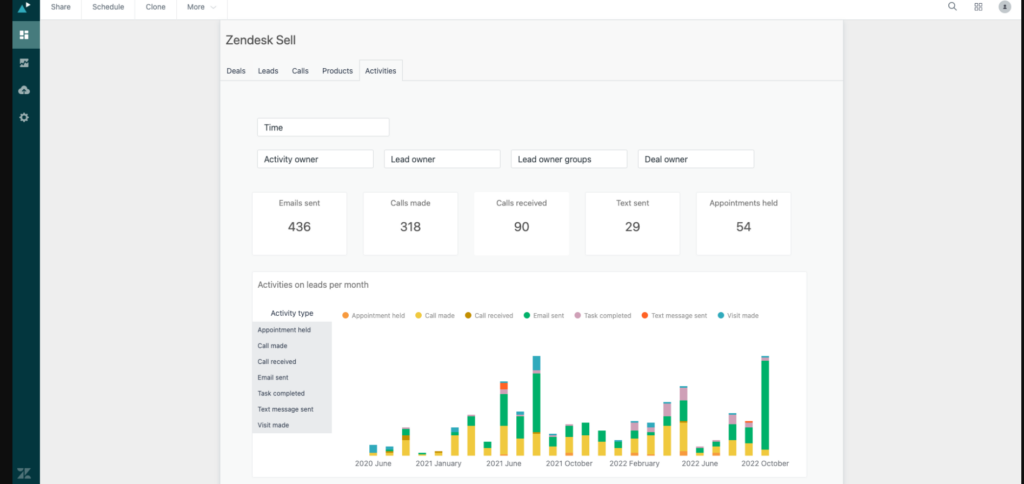
Zendesk Sell è un software di gestione dei lead che aumenta la produttività e la visibilità della pipeline per le aziende. Con Zendesk Sell, puoi qualificare facilmente i lead in base a criteri chiave come budget, tempistiche e dimensioni dell’azienda, assicurandoti di perseguire solo le opportunità più promettenti.
Perché ho scelto Zendesk Sell: Ho selezionato Zendesk Sell perché è ottimo per la qualificazione dei lead, in quanto aiuta a prioritarli in base alla loro probabilità di conversione. Offre inoltre potenti strumenti di reportistica e analisi per aiutare i team di vendita a monitorare i propri progressi.
Caratteristiche distintive e integrazioni di Zendesk Sell:
Caratteristiche distintive: La mia caratteristica preferita di Zendesk Sell è l’automazione del nurturing dei lead tramite email e SMS, che consente alle aziende di rimanere in contatto con i lead lungo tutto il percorso cliente. Le funzionalità di reportistica e analisi della piattaforma offrono anche preziose informazioni sulle prestazioni dei lead, permettendo alle aziende di ottimizzare continuamente il processo di qualificazione.
Integrazioni includono Salesforce CRM, Microsoft Dynamics 365, Slack, Zendesk Support, Zoom, Google Workspace e altro ancora.
Pros and Cons
Pros:
- Funzionalità avanzate di scoring dei lead e gestione della pipeline
- Interfaccia facile da usare e accessibilità da mobile
- Integrazione senza soluzione di continuità con altri prodotti Zendesk
Cons:
- Alcuni utenti segnalano opzioni di personalizzazione limitate per i modelli email
- Prezzo più elevato rispetto ad altri software di gestione lead
Altri software di gestione dei lead
Ecco alcuni altri tra i migliori software di gestione dei lead che non sono stati menzionati nell’articolo.
- Kustomer
Ideale per assistenza clienti omnicanale
- Drift
Ideale per il marketing conversazionale
- Heyflow
Ideale per creare funnel di iscrizione
- AeroLeads
Ideale per costruire liste email
- D&B Hoovers
Ideale per la creazione di elenchi di prospect
- OptinMonster
Ideale per acquisizione e segmentazione dei lead
- Adapt
Ideale per la generazione di lead
- Copper
Ideale per l'integrazione con Gmail
- Freshsales
Ideale per la valutazione dei lead potenziata dall’IA


Recensioni correlate sui software di gestione dei lead
Se non hai ancora trovato quello che cerchi, dai un'occhiata a questi strumenti strettamente correlati ai software di gestione dei lead che abbiamo testato e valutato.
- Software CRM
- Software per le vendite
- Software di business intelligence
- Software per la gestione dei contratti
- Sistema di gestione dei ricavi
- Software CPQ
Come Valuto i Software di Lead Management
Valuto i software di lead management su due livelli: le capacità di base che uno strumento deve avere—come acquisizione, scoring e assegnazione dei lead—e i fattori differenzianti che distinguono una piattaforma dall'altra.
Funzionalità di Base (Requisiti Minimi per Questa Lista)
Quando seleziono gli strumenti per la mia lista, classifico ciascuno su una scala da 0 (non offre la funzionalità) a 5 (eccelle in quest'area) per ogni funzionalità di base elencata di seguito. Poi, trasformo il punteggio totale in percentuale. Ogni strumento deve raggiungere un punteggio minimo totale del 65% per essere considerato.
- Acquisizione e Ingestione dei Lead: Verifico se i lead provenienti da moduli, chat, annunci e importazioni confluiscono tutti in un unico database senza dover caricare manualmente file CSV tra sistemi diversi.
- Capacità di Lead Scoring: Il modello di scoring di ciascuno strumento è importante—cerco valutazioni multidimensionali che considerano sia il comportamento che l'idoneità, non solo un singolo campo statico.
- Routing e Assegnazione dei Lead: Valuto le logiche di routing come le regole per territorio, il round-robin e l'assegnazione basata sulla capacità per vedere quanto velocemente i commerciali vengono abbinati ai giusti lead.
- Segmentazione e Workflow di Nurturing: List building dinamico e sequenze di nurturing automatiche sono ciò che cerco, soprattutto la riattivazione automatica dei lead che si raffreddano.
- Monitoraggio e Gestione del Ciclo di Vita: Esamino quanto chiaramente uno strumento traccia l'avanzamento di fase da MQL a SQL e poi a opportunità, inclusa la registrazione automatica dei passaggi di fase.
- Reportistica della Pipeline e Analisi: La suddivisione dei tassi di conversione per fonte, commerciale e fase ti mostra dove i lead si bloccano—valuto quanto facilmente ogni strumento mette in evidenza queste informazioni.
Dopo aver selezionato gli strumenti che soddisfano questi criteri, considero cosa distingue ogni piattaforma.
Fattori Differenzianti (Cosa Distingue i Fornitori)
Ecco come confronto i diversi fornitori:
Caratteristiche Distintive
Il matching basato sull'account è un aspetto molto importante per me—quando i singoli lead vengono raggruppati automaticamente sotto gli account principali, i team RevOps possono monitorare il coinvolgimento dei comitati d'acquisto invece di inseguire contatti isolati. Valuto anche il tracking SLA e la velocità di risposta ai lead, poiché sapere se i commerciali rispondono entro le finestre definite incide direttamente sui tassi di conversione. Il rilevamento dei duplicati è altrettanto importante, soprattutto quando i lead arrivano da più campagne e canali. Uno strumento che rileva e unisce i duplicati mantiene le attribuzioni corrette e i numeri della pipeline affidabili.
Oltre le Caratteristiche
Le integrazioni con CRM e MarTech sono la prima cosa che verifico—uno strumento di lead management che non si sincronizza in modo bidirezionale con il tuo CRM e la piattaforma di marketing automation crea lacune di dati che compromettono la reportistica della pipeline. Anche l'implementazione e il time-to-value pesano molto nella mia valutazione, perché uno strumento che richiede mesi per essere operativo ritarda ogni iniziativa RevOps successiva. Presto attenzione anche alla trasparenza dei prezzi, in particolare se i costi crescono in modo prevedibile man mano che aumentano il volume dei lead e il team, poiché spese impreviste su API o contatti possono portare rapidamente a sforare il budget.
Come scegliere un software di gestione dei lead
Sul mercato sono disponibili moltissime opzioni per la gestione dei lead. Tuttavia, con il giusto approccio puoi selezionare lo strumento più adatto alle esigenze della tua azienda, in grado di crescere insieme a te e di generare un impatto positivo sui ricavi.
Ecco il mio semplice metodo per scegliere un software di gestione dei lead:
1. Identifica il problema che vuoi risolvere
- Inizia da un obiettivo chiaro: hai difficoltà a monitorare i lead, a migliorare i tempi di risposta o a semplificare il passaggio dal marketing alle vendite? Individua con precisione il divario che stai cercando di colmare.
- Elenca le funzionalità indispensabili: ti servono l'assegnazione automatizzata dei lead, report personalizzati o l'integrazione con il CRM? Sapere di cosa hai bisogno ti aiuta a evitare strumenti sovraccarichi di funzionalità non necessarie.

2. Determina chi utilizzerà il software
- Valuta la base di utenti: lo utilizzeranno solo i responsabili delle operazioni sui ricavi o l’intero team commerciale deve avere accesso? Questo incide sui costi delle licenze.
- Dai priorità all’usabilità: se i rappresentanti commerciali utilizzeranno lo strumento ogni giorno, la facilità d’uso è essenziale. Gli strumenti complessi possono rallentarne l’adozione.
3. Verifica la compatibilità con gli strumenti esistenti
- Mappa il tuo stack tecnologico: quali strumenti stai sostituendo? Con quali strumenti vuoi integrarlo, come CRM, piattaforme di contabilità o di email marketing?
- Cerca integrazioni native: il software con integrazioni preconfigurate fa risparmiare tempo ed evita costosi sviluppi personalizzati.
4. Definisci i risultati principali e le metriche di successo
- Qual è l’obiettivo finale?: cerchi una migliore visibilità sui lead, tempi di risposta più rapidi o un maggior numero di opportunità di vendita?
- Stabilisci obiettivi misurabili: tra i risultati attesi potrebbero esserci “ridurre del 30% i tempi di risposta ai lead” oppure “aumentare la visibilità della pipeline con report in tempo reale”.
5. Valuta l’integrazione nei flussi di lavoro della tua organizzazione
- Esamina i processi attuali: cosa funziona? Cosa non funziona? Il nuovo software dovrebbe supportare e migliorare il tuo flusso di lavoro, non costringerti a cambiarlo.
- Considera l’adozione da parte del team: se il tuo team è abituato ai fogli di calcolo, cerca software con una funzione intuitiva di importazione ed esportazione.
Scegliere il software giusto per la gestione dei lead significa molto più che valutare le funzionalità. Significa allineare lo strumento alle esigenze del tuo team, ampliarlo insieme alla crescita della tua azienda e ottenere risultati significativi. Mantieni obiettivi e flussi di lavoro sempre al centro e avrai tutti gli elementi per prendere una decisione consapevole.
Tendenze del software di gestione dei lead per 2026
Il software di gestione dei lead ha subito una trasformazione significativa, determinata dalle esigenze in evoluzione delle operazioni sui ricavi e dalla ricerca continua di processi di vendita più efficienti ed efficaci. L’analisi dei recenti aggiornamenti dei prodotti, dei comunicati stampa e dei registri delle versioni dei principali strumenti evidenzia una tendenza a sfruttare tecnologie avanzate per migliorare le funzionalità di gestione dei lead. Queste tendenze riflettono un movimento più ampio del settore verso l’automazione, la personalizzazione e il processo decisionale basato sui dati, con l’obiettivo di ottimizzare i tassi di conversione dei lead e semplificare la pipeline di vendita.
Automazione avanzata e personalizzazione
- Attribuzione del punteggio e definizione delle priorità dei lead basate sull'IA: l'uso dell'intelligenza artificiale per attribuire automaticamente un punteggio ai lead e stabilirne le priorità è diventato più sofisticato, consentendo alle aziende di concentrare i propri sforzi sui prospect più promettenti.
- Evidenza: gli strumenti offrono ora funzionalità di analisi predittiva che valutano in tempo reale il comportamento e il coinvolgimento dei lead per modificare dinamicamente i punteggi.
- Flussi di lavoro automatizzati per la fidelizzazione dei lead: automazione avanzata delle campagne di fidelizzazione dei lead, con contenuti personalizzati distribuiti in base alle attività e agli interessi dei lead.
- Evidenza: soluzioni che integrano algoritmi di apprendimento automatico per personalizzare le campagne e-mail e i consigli sui contenuti in base alle preferenze dei singoli lead.
Integrazione e utilizzo dei dati
- Integrazione perfetta con il CRM: una maggiore integrazione con i sistemi CRM garantisce che i dati dei lead fluiscano senza problemi tra marketing e vendite, offrendo una visione unificata del percorso del cliente.
- Evidenza: le piattaforme di gestione dei lead offrono ora integrazioni API più avanzate, consentendo la sincronizzazione dei dati in tempo reale con le principali piattaforme CRM.
- Strumenti avanzati di analisi e reportistica: lo sviluppo di funzionalità di analisi più complete, che forniscono informazioni più approfondite sulle tendenze di generazione e conversione dei lead.
- Evidenza: introduzione di dashboard e strumenti di reportistica personalizzabili che consentono alle aziende di monitorare con maggiore precisione le metriche delle prestazioni e il ROI.
Esperienza utente e accessibilità
- Ottimizzazione per dispositivi mobili: la spinta verso esperienze di gestione dei lead completamente ottimizzate per dispositivi mobili consente ai team di vendita di accedere e aggiornare le informazioni sui lead da qualsiasi luogo.
- Evidenza: le applicazioni mobili e il design web responsivo sono diventati lo standard, garantendo l'accessibilità su tutti i dispositivi e migliorando il coinvolgimento degli utenti.
Evoluzione delle priorità delle funzionalità
- Declino dell'inserimento manuale dei dati: il passaggio da funzionalità che richiedono un ampio inserimento manuale, grazie al miglioramento delle capacità di automazione e integrazione dei dati.
- Evidenza: maggiore attenzione all'automazione della raccolta dei dati da diversi punti di contatto digitali, riducendo la necessità di inserire manualmente i lead.
Le tendenze nel software di gestione dei lead evidenziano un cambiamento verso la creazione di processi di gestione dei lead più personalizzati, efficienti e basati sui dati. Per i responsabili delle operazioni sui ricavi, la capacità di sfruttare queste funzionalità avanzate significa non solo semplificare le operazioni, ma anche ottenere informazioni strategiche che favoriscono la crescita delle vendite. Con la continua evoluzione di queste tendenze, scegliere un software di gestione dei lead in linea con tali sviluppi sarà fondamentale per le aziende che mirano a rimanere competitive e a massimizzare il proprio potenziale di conversione dei lead.
Che cos'è il software di gestione dei lead?
Il software di gestione dei lead è uno strumento utilizzato dalle aziende per gestire il processo di acquisizione e fidelizzazione dei potenziali clienti, noti come lead. Automatizza e organizza il monitoraggio, la segmentazione e la fidelizzazione dei lead dalla loro acquisizione iniziale fino alla conversione. Il software integra diverse funzionalità, come l'acquisizione dei lead, l'attribuzione del punteggio e la gestione delle attività di follow-up.
Tra i vantaggi del software di gestione dei lead vi sono una migliore organizzazione e definizione delle priorità dei lead, che portano a conversioni più efficienti e di successo. Aiuta i team di vendita a concentrarsi sui lead più promettenti automatizzando le attività di routine e fornendo informazioni basate sui dati. Ciò contribuisce ad aumentare la produttività delle vendite e i tassi di conversione. Il software allinea inoltre gli sforzi di marketing e vendita, garantendo un approccio coerente alla fidelizzazione dei lead e all'acquisizione dei clienti.
Funzionalità del software di gestione dei lead
Quando selezioni un software di gestione dei lead, presta attenzione alle seguenti funzionalità chiave:
- Strumenti per acquisire lead: consentono di raccogliere lead da varie fonti, come moduli web, social media ed e-mail. Semplificano il processo, così non perdi potenziali clienti che rischiano di sfuggire.
- Monitoraggio e valutazione dei lead: puoi monitorare la posizione di ogni lead nella pipeline e assegnare a ciascuno un punteggio basato sull'interesse o sulla probabilità di conversione. In questo modo, concentri le tue energie sui lead con maggiori probabilità di acquisto.
- Gestione dei contatti: archivia, organizza e aggiorna tutti i dati dei tuoi lead e clienti in un unico posto. Questo semplifica la personalizzazione delle conversazioni e ti assicura di non dimenticare mai gli aspetti importanti.
- Flussi di lavoro automatizzati: configura azioni automatiche, come l'invio di e-mail di follow-up o l'assegnazione dei lead ai membri del team. Questo riduce il lavoro manuale e assicura che i lead continuino ad avanzare.
- Promemoria delle attività e gestione delle attività: programma promemoria e gestisci le tue cose da fare per rimanere al passo con follow-up e riunioni. È come avere un assistente personale concentrato esclusivamente sulla conclusione degli accordi.
- Funzionalità di integrazione: collega il software agli altri strumenti che utilizzi, come CRM, strumenti di automazione del marketing o piattaforme e-mail. Questo riunisce tutti gli strumenti di vendita, mantenendo aggiornate le informazioni e facendoti risparmiare tempo.
- Report e analisi: ottieni informazioni chiare su come i lead avanzano nel tuo funnel, quali fonti forniscono i risultati migliori e in quali punti il processo necessita di ottimizzazione. Questo ti aiuta a prendere decisioni più intelligenti basate su dati reali.
Funzionalità comuni dell'intelligenza artificiale nei software di gestione dei lead
Oltre alle funzionalità standard dei software di gestione dei lead elencate sopra, molte di queste soluzioni stanno integrando l'intelligenza artificiale con funzionalità come:
- Elaborazione del linguaggio naturale per la qualificazione dei lead: l'intelligenza artificiale analizza e-mail, chat o chiamate per determinare l'intenzione di acquisto e qualificare automaticamente i lead, eliminando le incertezze su chi merita il tuo tempo.
- Valutazione predittiva dei lead: l'intelligenza artificiale analizza i dati esistenti per prevedere quali lead hanno maggiori probabilità di diventare clienti, così puoi concentrarti sulle opportunità migliori senza dover fare supposizioni.
- Arricchimento automatico dei lead: l'intelligenza artificiale estrae dati dal web per completare le informazioni mancanti sui lead, aggiornando i profili in tempo reale e risparmiandoti il lavoro della ricerca manuale.
- Suggerimenti intelligenti per il follow-up: sulla base del comportamento degli utenti e delle interazioni passate, l'intelligenza artificiale consiglia i momenti e i modi migliori per effettuare il follow-up, così puoi contattare i lead quando sono più ricettivi.
- Analisi dell'intento: l'intelligenza artificiale esamina le tracce digitali, come le visite al sito web e le aperture delle e-mail, per identificare quali lead sono pronti a interagire e quali necessitano di ulteriore supporto.
Vantaggi dei software di gestione dei lead
Il software di gestione dei lead svolge un ruolo cruciale nella semplificazione dei processi di vendita e nel miglioramento dell'efficienza delle operazioni relative ai ricavi. Automatizzando e organizzando l'acquisizione, il monitoraggio e la gestione dei lead, questo software fornisce una solida base alle aziende per ampliare la propria clientela e aumentare le vendite. Per le organizzazioni che stanno valutando l'implementazione di un software di gestione dei lead, comprenderne i principali vantaggi può mostrare come questo strumento sia indispensabile per ottimizzare le operazioni relative ai ricavi. Ecco cinque vantaggi principali:
- Maggiore organizzazione dei lead: offre un'archiviazione centralizzata dei dati dei lead. Questa funzionalità semplifica la gestione delle informazioni sui lead, garantendo che tutti i membri del team abbiano accesso a dati aggiornati, essenziali per follow-up tempestivi e comunicazioni personalizzate.
- Migliore definizione delle priorità dei lead: facilita meccanismi efficaci di valutazione dei lead. Assegnando automaticamente un punteggio ai lead in base al loro coinvolgimento e alla probabilità di conversione, i team di vendita possono concentrare i propri sforzi sui potenziali clienti più promettenti, aumentando l'efficienza del processo di vendita.
- Gestione automatizzata dei lead: consente di realizzare campagne di marketing mirate. Le campagne automatizzate di gestione dei lead mantengono i potenziali clienti coinvolti con contenuti e offerte pertinenti, guidandoli gradualmente attraverso il funnel di vendita verso la conversione.
- Analisi e report dettagliati: offre informazioni preziose sul comportamento dei lead e sulle prestazioni delle campagne. Questa funzionalità consente alle aziende di prendere decisioni basate sui dati, ottimizzando le strategie di marketing e migliorando nel tempo i tassi di conversione dei lead.
- Maggiore produttività delle vendite: riduce il tempo dedicato alle attività manuali. L'automazione delle attività di routine nella gestione dei lead consente ai team di vendita di dedicare più tempo alla costruzione delle relazioni e alla conclusione degli accordi, contribuendo direttamente alla crescita dei ricavi.
Costi e prezzi dei software di gestione dei lead
Selezionare il software giusto per la gestione dei lead è fondamentale per le aziende che mirano a ottimizzare il proprio imbuto di vendita e a garantire che nessun potenziale cliente sfugga. Con una varietà di opzioni software disponibili, ognuna delle quali offre funzionalità diverse a vari livelli di prezzo, comprendere la gamma di opzioni dei piani è fondamentale per prendere una decisione informata. Questi piani sono progettati per soddisfare le esigenze di aziende di tutte le dimensioni, dalle startup alle grandi imprese, garantendo una soluzione adatta a ogni necessità e budget. Di seguito è riportata una panoramica semplificata delle opzioni e dei prezzi tipici dei piani per i software di gestione dei lead.
Tabella di confronto dei piani per i software di gestione dei lead
| Tipo di piano | Prezzo medio | Funzionalità comunemente incluse | Ideale per |
| Base | $10 - $25 per utente/mese | - Acquisizione e monitoraggio dei lead - Segmentazione di base dei lead - Integrazione con le email - Reportistica di base | Piccole aziende e startup che necessitano di strumenti essenziali per la gestione dei lead |
| Professionale | $50 - $100 per utente/mese | - Segmentazione avanzata dei lead - Coltivazione automatizzata dei lead - Integrazione con il CRM - Report personalizzabili | Aziende in crescita che necessitano di una gestione dei lead più sofisticata e dell'integrazione con altri strumenti |
| Aziendale | $150+ per utente/mese | - Analisi complete - Valutazione dei lead basata sull'intelligenza artificiale - Funzionalità di automazione avanzate - Assistenza premium | Grandi imprese che necessitano di analisi complete, automazione avanzata e assistenza di alto livello |
| Opzione gratuita | $0 | - Acquisizione limitata dei lead - Monitoraggio di base - Reportistica semplice | Freelance e piccoli team con esigenze minime di gestione dei lead e budget ridotti |
Quando si valuta quale piano software per la gestione dei lead scegliere, è essenziale esaminare le esigenze specifiche e le prospettive di crescita della propria azienda. Optate per un piano che non solo sia in linea con le vostre attuali esigenze di gestione dei lead, ma che offra anche la scalabilità necessaria per supportare l'espansione futura.
Domande frequenti sul software per la gestione dei lead
Se il tuo team sta valutando l’utilizzo di un software per la gestione dei lead, probabilmente hai alcune domande prima di procedere. Vediamo alcune delle domande frequenti sul software per la gestione dei lead:
Che cos'è il software per la gestione dei lead e in che modo può essere utile alla mia startup SaaS?
Come scelgo il software giusto per la gestione dei lead per la mia attività?
Quali funzionalità dovrei cercare in un software per la gestione dei lead?
Il software per la gestione dei lead può integrarsi con gli altri strumenti utilizzati dal mio team?
Qual è la differenza tra il software per la gestione dei lead e il software CRM?
Quali sono le opzioni di prezzo per il software di gestione dei lead e sono disponibili prove gratuite?
Ulteriore software per le operazioni sulle entrate
- Miglior software per la gestione dei clienti
- Miglior software per la gestione delle vendite
- Miglior software per database dei clienti
Conclusione
La gestione dei lead è una componente fondamentale di qualsiasi funnel di marketing di successo. Se utilizzato correttamente, il software per la gestione dei lead può aumentare le probabilità di convertire i lead in clienti a lungo termine. Tuttavia, sul mercato sono disponibili centinaia di strumenti per la gestione dei lead e devi selezionare quello più adatto in base alle tue esigenze specifiche.
Per ulteriori informazioni chiave da parte dei leader del settore sulla gestione dei lead, iscriviti alla newsletter di The CRO Club.