

Le 10 migliori soluzioni software per la gestione delle commissioni di vendita nel 2026

10 Migliori Software per la Gestione delle Provvigioni di Vendita - Elenco Rapido


Con così tanti software per la gestione delle provvigioni di vendita disponibili, capire qual è quello giusto per te non è facile. Sai di voler adottare un approccio più efficiente e privo di errori nella gestione degli incentivi alle vendite, ma devi ancora scoprire quale sia lo strumento più adatto.
Ci penso io! In questo articolo ti aiuterò a scegliere facilmente, condividendo le mie esperienze personali dopo aver testato decine di diversi software per la gestione delle provvigioni con vari team e account, presentandoti i migliori secondo la mia valutazione.
Perché fidarsi dei nostri consigli sui software
Le nostre recensioni riflettono il nostro giudizio indipendente, non un discorso di vendita. Scopri come manteniamo la trasparenza.
Per questa guida, abbiamo valutato gli strumenti attraverso test pratici e ricerche indipendenti, assegnando un punteggio agli strumenti in base ai nostri criteri di selezione.
Le nostre recensioni riflettono il nostro giudizio editoriale umano, non un discorso di vendita.
Riepilogo dei Migliori Software per la Gestione delle Provvigioni di Vendita
Questa tabella comparativa riassume i dettagli sui prezzi delle mie migliori scelte di software per la gestione delle provvigioni così da aiutarti a trovare il migliore per il tuo budget e le esigenze della tua azienda.
| Tool | Best For | Trial Info | Price | ||
|---|---|---|---|---|---|
| 1 | Ideale per piani commissione senza codice | Demo gratuita disponibile | Prezzo su richiesta | Website | |
| 2 | Ideale per flussi di lavoro di approvazione integrati | Demo gratuita disponibile | Prezzo su richiesta | Website | |
| 3 | Ideale per allineare la compensazione alla strategia di accesso al mercato | Demo gratuita disponibile | Prezzo su richiesta | Website | |
| 4 | Migliore con agenti AI per la progettazione automatizzata dei piani di compensazione | Piano gratuito disponibile | Da $31,50/utente/mese | Website | |
| 5 | La migliore gestione delle compensazioni, adattiva con IA e facile da usare | Demo gratuita disponibile | Prezzo su richiesta | Website | |
| 6 | Ideale per venditori orientati al mobile | Demo gratuita disponibile | Prezzi personalizzati disponibili su richiesta | Website | |
| 7 | Il miglior software di gestione delle compensazioni a livello enterprise facile da usare | Demo gratuita disponibile | Prezzi personalizzati con un minimo di 30 utenti | Website | |
| 8 | Ideale per automatizzare i calcoli di commissioni di vendita complesse | Demo gratuita disponibile | Da $20/beneficiario/mese (minimo 15 utenti) | Website | |
| 9 | Ideale per la gestione automatizzata e trasparente dei pagamenti | Demo gratuita disponibile | Da $25/utente/mese | Website | |
| 10 | Ideale per team di vendita che lavorano in modo nativo su Salesforce | Not available | Da $39/utente/mese | Website |
Recensioni dei Migliori Software per la Gestione delle Provvigioni di Vendita
Di seguito trovi i miei riassunti dettagliati dei migliori software per la gestione delle provvigioni che sono riusciti a entrare nel mio elenco. Le mie recensioni offrono uno sguardo approfondito su funzionalità chiave, pro e contro, integrazioni e casi d’uso ideali di ciascuno strumento per aiutarti a trovare quello giusto per te.

Ideale per piani commissione senza codice

Everstage è una piattaforma per la gestione delle commissioni di vendita progettata per i team di operations sul fatturato e i responsabili delle vendite che desiderano automatizzare processi di commissione complessi, migliorare la trasparenza e dare ai rappresentanti una visibilità in tempo reale dei loro guadagni.
Per chi è ideale Everstage?
Everstage è particolarmente adatto per team di vendita di medie e grandi aziende che necessitano di una gestione flessibile e scalabile dei piani di commissione senza dover dipendere da risorse di ingegneria.
Perché ho scelto Everstage
Ho scelto Everstage perché il suo designer di piani senza codice elimina il collo di bottiglia IT che rallenta molti team RevOps. Posso creare, testare e implementare strutture di commissione complesse — tariffe a scaglioni, acceleratori, suddivisioni — senza scrivere alcun codice. La funzione Time Machine mi permette di simulare come un nuovo piano avrebbe pagato sulla base dei dati storici prima di renderlo operativo, così il mio team può vedere l'impatto finanziario di una modifica al piano.
Caratteristiche principali di Everstage
- Approvazioni e override dei pagamenti: Gestisci le approvazioni delle commissioni attraverso un flusso di lavoro strutturato, con la possibilità di aggiungere override manuali e commenti prima di finalizzare i pagamenti.
- Previsione Crystal: Offre ai rappresentanti una visione in tempo reale dei guadagni previsti sulla base della pipeline attuale, riducendo gli scambi con RevOps per chiarimenti sui pagamenti attesi.
- Reportistica ASC 606: Genera automaticamente report per il riconoscimento dei ricavi conformi alle normative, tracciando obbligazioni di performance, capitalizzazione e ammortamenti.
- Tracciamento risoluzione delle contestazioni: Permette ai rappresentanti di segnalare contestazioni sulle commissioni direttamente dalla piattaforma, con un workflow di risoluzione tracciato per evitare che si perdano nelle email.
Integrazioni di Everstage
Le integrazioni includono Salesforce, HubSpot, Microsoft Dynamics CRM, Zoho CRM, Netsuite, Stripe, QuickBooks, Shopify, Bamboo HR e Slack.
Pros and Cons
Pros:
- Accesso facile alle tracce di performance
- Fornisce insight e avvisi utili
- Favorisce la collaborazione tra i team di vendita
Cons:
- I tracker e i rendiconti possono contenere informazioni non aggiornate
- Alcuni problemi di accesso e lentezza nel login

Qobra
Ideale per flussi di lavoro di approvazione integrati

Qobra è una piattaforma per la gestione delle commissioni di vendita progettata per i team di operation dei ricavi e per i responsabili delle vendite che necessitano di automatizzare piani di compensazione complessi, ridurre gli errori manuali e ottenere visibilità in tempo reale sui dati delle commissioni.
Per chi è più indicato Qobra?
Qobra è particolarmente adatto a organizzazioni di vendita di fascia media e enterprise dove i team finanziari e RevOps necessitano di processi di commissione strutturati e verificabili in team di vendita ampi o distribuiti.
Perché ho scelto Qobra
Qobra si è guadagnato un posto nella mia selezione grazie alla gestione efficace delle approvazioni nel management delle commissioni. Apprezzo in particolare il flusso di lavoro di blocco e validazione, che consente a manager, HR e finanza di approvare gli importi delle commissioni prima che vengano erogati. Il mio team può così individuare le discrepanze nella fase corretta, invece di dover intervenire dopo la chiusura delle buste paga. La funzione di discussione integrata permette agli stakeholder di segnalare e risolvere le eccezioni direttamente nel contesto, evitando inutili scambi di email quando una trattativa necessita di un trattamento particolare.
Funzionalità principali di Qobra
- Costruttore di piani senza codice: Progetta e gestisci i piani di compensazione tramite un'interfaccia drag-and-drop, senza bisogno di competenze tecniche o supporto di sviluppatori.
- Simulazione e test in sandbox dei piani: Metti alla prova nuovi piani di compensazione o modifiche in un ambiente isolato prima di implementarli al tuo team.
- Riepiloghi delle commissioni in tempo reale: Ogni commerciale ha accesso a un resoconto aggiornato e dettagliato delle commissioni, che si aggiorna automaticamente al chiudersi delle trattative nel tuo CRM.
- Audit trail: Registra tutte le azioni effettuate sulla piattaforma per mantenere una cronologia sicura e verificabile di ogni modifica apportata ai dati delle commissioni.
- Agenti QobrAI: Usa The Architect, The Analyst e The Sales Coach per generare piani istantaneamente, rilevare anomalie nei calcoli e inviare insight proattivi al tuo team di vendita.
Integrazioni di Qobra
Le integrazioni includono Salesforce, HubSpot, Microsoft Dynamics 365, Google BigQuery, Snowflake, Workday, Slack e un'API aperta per integrazioni personalizzate.
Pros and Cons
Pros:
- Supporta modelli di retribuzione complessi come acceleratori e bonus ibridi
- Automatizza il calcolo manuale delle commissioni
- Visibilità immediata sulla ripartizione delle commissioni
Cons:
- La sincronizzazione dei dati o gli aggiornamenti di sistema a volte possono essere in ritardo
- Problemi occasionali nell'integrazione con sistemi esistenti

Xactly
Ideale per allineare la compensazione alla strategia di accesso al mercato
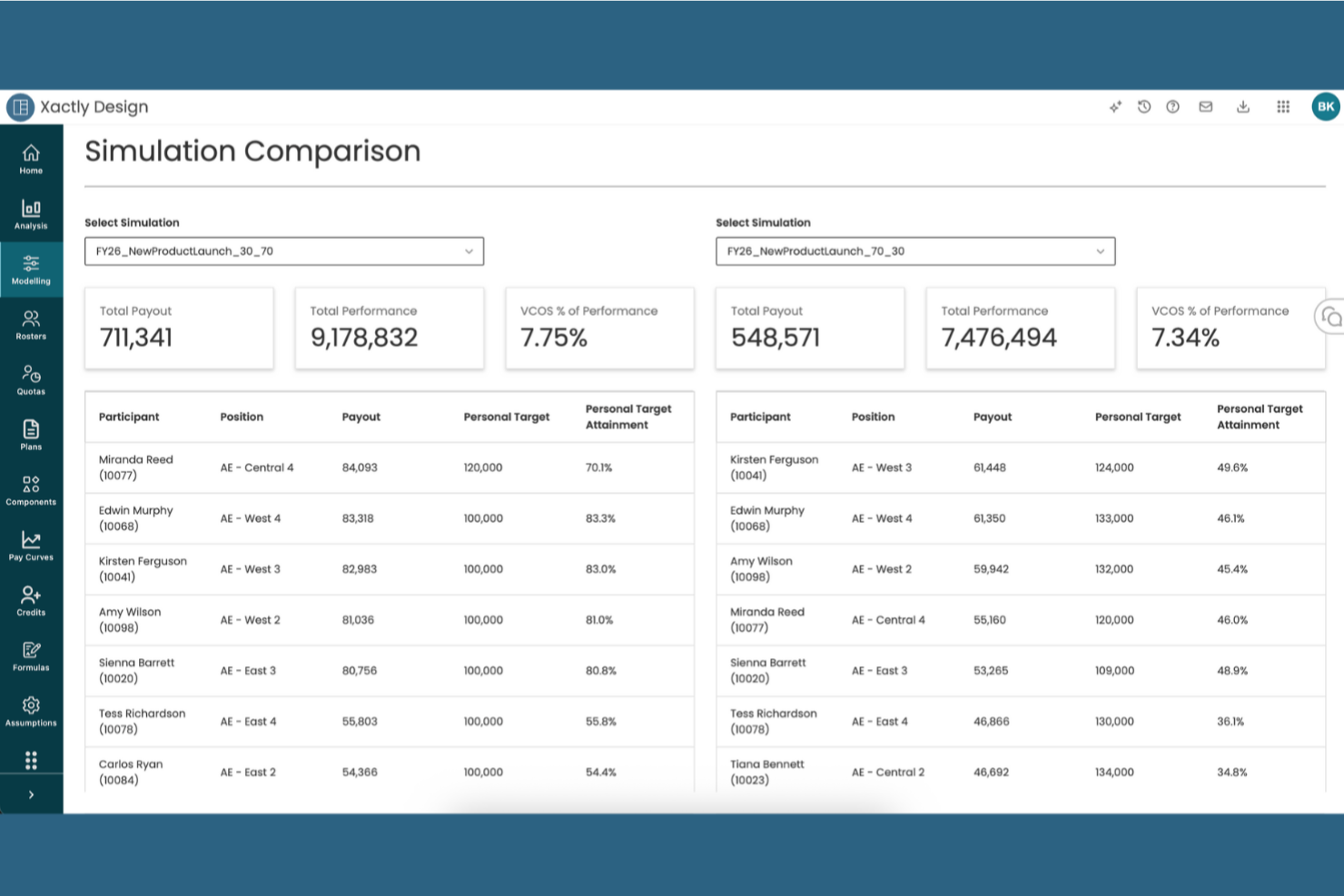
Xactly è una piattaforma per la gestione delle commissioni di vendita creata per i team delle operations di revenue e i responsabili delle vendite che devono automatizzare processi di compensazione complessi, migliorare la precisione dei pagamenti e ottenere informazioni in tempo reale sulle prestazioni di vendita.
Per chi è ideale Xactly?
Xactly è particolarmente indicato per organizzazioni di vendita di livello medio e enterprise che gestiscono grandi team commerciali con strutture di compensazione multi-livello e complesse.
Perché ho scelto Xactly
Xactly si è guadagnato un posto nella mia shortlist perché è una delle poche piattaforme di commissioni progettate per collegare direttamente la progettazione della compensazione alla strategia di accesso al mercato. Apprezzo il fatto che gli strumenti di impostazione delle quote e di gestione dei territori di Xactly permettano al mio team di allineare fin da subito gli incentivi dei rappresentanti agli obiettivi di pipeline ad ogni ciclo di pianificazione. Le funzionalità di modellazione della compensazione consentono di simulare scenari 'what-if' prima di implementare nuovi piani, così da poter valutare in anticipo l'impatto delle modifiche sia sui comportamenti dei rappresentanti sia sui risultati di fatturato. Gli insight basati sull'intelligenza artificiale di Xactly segnalano inoltre quando i piani di compensazione stanno inducendo comportamenti errati, una caratteristica assente nella maggior parte degli strumenti di commissionamento.
Caratteristiche principali di Xactly
- Configuratore di compensazione: Crea e gestisci piani complessi sfruttando regole riutilizzabili, quote e tabelle delle aliquote, con un'intelligenza artificiale addestrata su 20 anni di dati proprietari.
- Rendiconti incentivi personalizzati: Fornisci ai rappresentanti una scomposizione chiara e dettagliata di come vengono calcolate le loro commissioni per ridurre contestazioni e richieste di chiarimento sui pagamenti.
- Contabilizzazione delle spese di commissione: Automatizza i calendari di ammortamento e l'adeguamento dei cambiamenti, mantenendo la conformità con gli standard ASC 606 e IFRS 15.
- Dashboard di benchmarking: Confronta i tuoi piani di compensazione e i livelli di raggiungimento con quelli del settore utilizzando il database proprietario Xactly su compensi e performance.
Integrazioni di Xactly
Le integrazioni includono Salesforce, Microsoft, Oracle, Workday, ServiceNow e Amazon Web Services; è disponibile un'API per integrazioni personalizzate.
Pros and Cons
Pros:
- Riduce gli errori manuali nei calcoli
- Aumenta la fiducia dei rappresentanti grazie alla trasparenza sulle retribuzioni
- Automatizza facilmente regole di commissionamento complesse
Cons:
- Le regole personalizzate possono richiedere competenze esperte
- Per calcoli accurati sono necessari dati puliti
New Product Updates from Xactly
Xactly and ServiceNow Connect CRM Workflows to Revenue Performance
Xactly has partnered with ServiceNow to connect Xactly’s Intelligent Revenue Platform with ServiceNow CRM, embedding revenue performance intelligence into CRM workflows and surfacing commission and quota impacts in CPQ and Sales CRM. For more information, visit Xactly's official site.
 .
.
Driven
Migliore con agenti AI per la progettazione automatizzata dei piani di compensazione
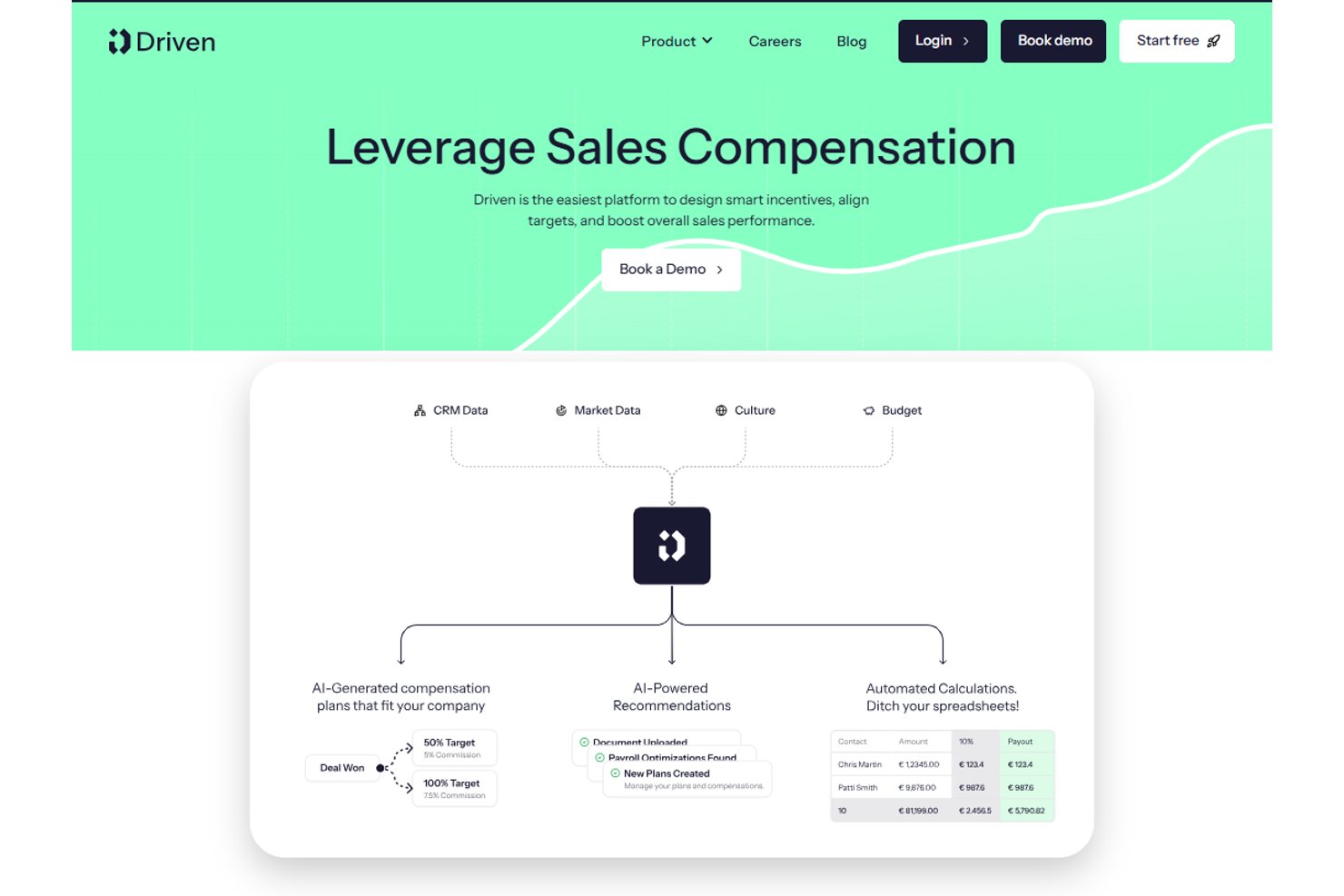
Driven è una piattaforma di commissioni di vendita nativa per l'IA che utilizza agenti autonomi per automatizzare la progettazione dei piani di compensazione, calcolare le commissioni in tempo reale, gestire le revisioni delle contestazioni e fornire dashboard personalizzate dei guadagni per i rappresentanti.
Per Chi È Meglio Driven?
Driven è particolarmente adatto per i team RevOps e finanziari di aziende B2B in crescita che usano HubSpot o Salesforce e sono pronte ad abbandonare i fogli di calcolo.
Perché Ho Scelto Driven
Driven si guadagna un posto nella mia shortlist grazie al suo approccio agentico alla progettazione dei piani di compensazione, unico nel suo genere. Invece di configurare manualmente i piani tramite un'interfaccia basata su regole, l'agente AI progetta o aggiorna la tua strategia di compensazione tramite un costruttore basato su chat. Mi piace anche la funzione di Revisioni Contestazioni in Autopilota, dove l'agente gestisce automaticamente le contestazioni analizzando i commenti sulle trattative, riducendo il lavoro manuale che rallenta i team finanziari a fine trimestre.
Caratteristiche Principali di Driven
- Dashboard delle performance: Analizza rapidamente l'efficacia del piano, i modelli di guadagno e le lacune di raggiungimento usando le analisi integrate.
- Integrazione nativa con HubSpot e Salesforce: Sincronizza i dati delle trattative e dei rappresentanti direttamente dai CRM più comuni per calcoli di commissione accurati e sempre aggiornati.
- Dashboard personalizzate per i rappresentanti: Offri a ogni venditore un portale sicuro in cui visualizzare le commissioni, il progresso verso l'obiettivo e i report sui pagamenti in tempo reale.
- Supporto per valute multiple e anno fiscale: Configura strutture di vendita complesse con valute globali e calendari fiscali personalizzati per un tracciamento accurato della compensazione.
Integrazioni Driven
Driven offre integrazioni native con Salesforce, HubSpot e Slack, e mette a disposizione un'API per integrazioni personalizzate.
Pros and Cons
Pros:
- L'agente AI automatizza la progettazione dei piani
- Motore di calcolo in tempo reale con modellazione di scenari
- Dashboard integrata per i rappresentanti e risoluzione delle contestazioni
Cons:
- La reportistica ASC 606 non è completamente automatizzata
- Meno recensioni degli utenti rispetto ai concorrenti più affermati

Visdum
La migliore gestione delle compensazioni, adattiva con IA e facile da usare
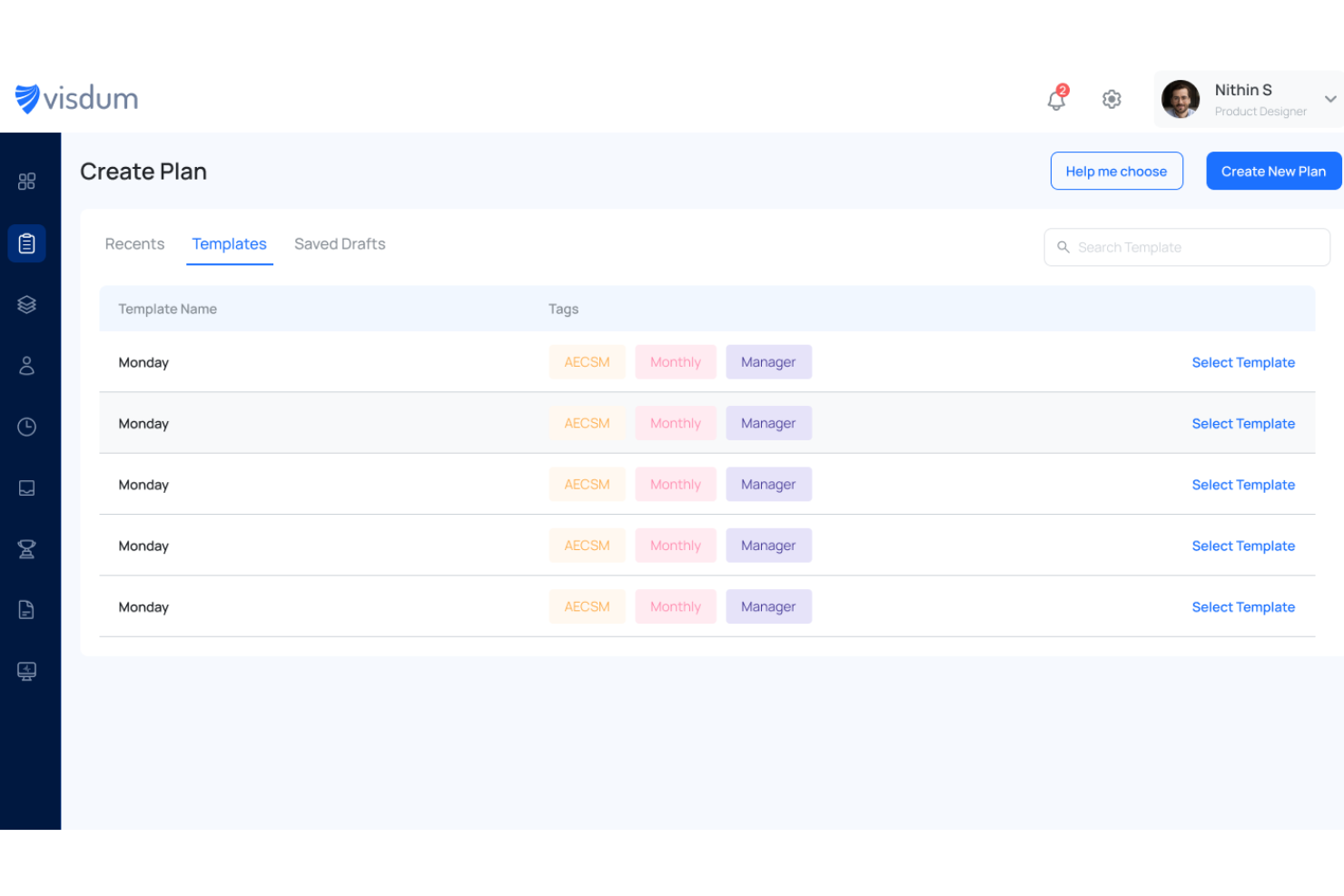
Visdum è una piattaforma di gestione delle commissioni di vendita progettata per i team di operations di fatturato e i responsabili vendite che hanno bisogno di automatizzare piani di compensazione complessi, ridurre errori manuali e ottenere visibilità in tempo reale sui dati delle commissioni.
Per chi è più indicato Visdum?
Visdum è particolarmente adatto per aziende SaaS di medie dimensioni in cui i team sales operations e finance devono gestire e automatizzare strutture di provvigioni multilivello senza ricorrere ai fogli di calcolo.
Perché ho scelto Visdum
Visdum si guadagna un posto nella mia lista perché il suo motore AI-Adaptive gestisce gli aspetti della gestione delle commissioni che di solito falliscono su larga scala. L’AI Copilot simula scenari di pagamento in tempo reale mentre costruisci o modifichi i piani di compensazione, permettendo al mio team di individuare errori logici prima che vengano effettuati i pagamenti e si creino contestazioni. Inoltre, il progettista di piani senza codice significa che non devo aspettare che l’ingegneria aggiorni una soglia di quota o aggiunga un nuovo livello di commissioni. Inoltre, il livello di validazione guidato dall’intelligenza artificiale monitora ogni ciclo di calcolo e segnala automaticamente gli errori, riducendo i rimbalzi tra finance e RevOps durante la chiusura.
Caratteristiche principali di Visdum
- Simulatore di commissioni per i rappresentanti: I rappresentanti di vendita possono eseguire scenari 'what-if' direttamente sulla loro dashboard per prevedere i guadagni basati sulle trattative presenti nel pipeline.
- Gestione di SPIFF e concorsi: I responsabili vendita possono impostare e gestire programmi di incentivi a breve termine e competizioni aggiuntive sui piani di compensazione esistenti senza ricostruire la struttura del piano.
- Strumenti per recuperi e rettifiche in corso d’anno: I team finance e RevOps possono applicare recuperi, integrazioni o correzioni in corso d’anno in pochi passaggi, con un audit trail completo allegato.
- Automazione della conformità ASC 606 e IFRS 15: Visdum struttura automaticamente l'ammortamento delle commissioni in linea con gli standard di riconoscimento dei ricavi, riducendo il lavoro manuale di compliance.
Integrazioni Visdum
Le integrazioni includono Salesforce, HubSpot, Oracle NetSuite, Microsoft Dynamics, Sage Intacct, QuickBooks, Workday, HiBob, ADP e DocuSign.
Pros and Cons
Pros:
- Interfaccia intuitiva e facile da usare
- Visibilità chiara sui guadagni
- Dashboard delle performance in tempo reale
Cons:
- La configurazione iniziale può essere complessa
- Supporto mobile disponibile solo per i piani superiori

Ideale per venditori orientati al mobile

SmartWinnr è una piattaforma per la gestione delle commissioni e degli incentivi di vendita progettata per i team e le organizzazioni commerciali che desiderano automatizzare il monitoraggio delle commissioni, motivare i rappresentanti e incrementare le prestazioni con analisi in tempo reale e gamification.
Per chi è SmartWinnr?
SmartWinnr è particolarmente adatto per organizzazioni di vendita di medie e grandi dimensioni nei settori assicurativo, farmaceutico e dei servizi finanziari che gestiscono team di vendita distribuiti o sul campo.
Perché ho scelto SmartWinnr
Ho scelto SmartWinnr tra i migliori per come serve efficacemente i rappresentanti che trascorrono la maggior parte della giornata lontani dalla scrivania. Il modulo di coaching sul campo è stato progettato prima di tutto per dispositivi mobili: i manager possono compilare moduli di coaching, lasciare note e assegnare esercitazioni di follow-up direttamente dal telefono, anche offline, con tutto che si sincronizza una volta tornati online. Apprezzo anche il fatto che le classifiche in tempo reale si aggiornano immediatamente su dispositivi mobili, permettendo ai rappresentanti sul campo di controllare la loro posizione nelle gare e i progressi nei KPI associati alle commissioni senza dover accedere a un computer desktop. Per i team di vendita distribuiti in cui i rappresentanti sono raramente davanti a un computer, questo tipo di visibilità sulle prestazioni e sugli incentivi in mobilità è davvero utile.
Caratteristiche principali di SmartWinnr
- Configurazione dei piani di incentivazione: Crea e gestisci strutture di commissioni e piani di incentivi multipli per diversi ruoli, regioni o linee di prodotto.
- Quiz di vendita alimentati dall'AI: Eroga controlli di conoscenza brevi ai rappresentanti per rafforzare la conoscenza dei prodotti e la formazione sulla conformità insieme al monitoraggio delle prestazioni.
- Monitoraggio obiettivi vs. risultati: Tieni sotto controllo in tempo reale i progressi individuali e di squadra rispetto ai target con dashboard visive collegate agli esiti delle commissioni.
- Gestione dei concorsi: Imposta gare di vendita a tempo con regole personalizzate, criteri di ammissibilità e strutture di premi per stimolare le prestazioni a breve termine.
Integrazioni SmartWinnr
Le integrazioni includono Salesforce, Microsoft Teams, Slack, SAP SuccessFactors, Oracle, Workday, Cornerstone OnDemand, Moodle, Zoom e un'API per integrazioni personalizzate.
Pros and Cons
Pros:
- Approccio focalizzato sul mobile
- Disponibilità multilingue
- Supporto reattivo e rapido
Cons:
- Non è un sistema di erogazione delle commissioni
- Nessuna prova gratuita

Il miglior software di gestione delle compensazioni a livello enterprise facile da usare
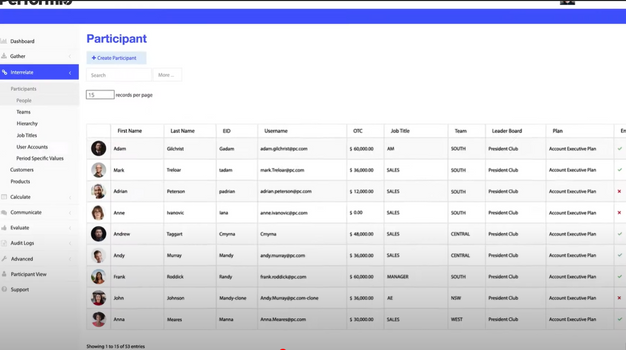
Performio è un software per la gestione delle commissioni di vendita progettato per i team di operation e finanza che necessitano di automatizzare processi di compensazione complessi, migliorare la precisione e fornire una chiara visibilità sui dati delle commissioni per organizzazioni di grandi dimensioni o in rapida crescita.
Per chi è più adatto Performio?
Performio è particolarmente indicato per le organizzazioni di vendita di fascia media e grandi aziende che devono gestire un alto volume di calcoli di commissioni su team di vendita ampi o distribuiti.
Perché ho scelto Performio
Performio merita di essere nella mia lista perché offre realmente una gestione delle commissioni di livello enterprise senza i soliti problemi di implementazione. Quello che apprezzo di più è il costruttore di piani strutturati—puoi configurare obiettivi, logiche di accredito, recuperi, anticipi e conguagli senza scrivere nemmeno una formula o dover chiamare servizi professionali. Trovo inoltre particolarmente utile l’AI Admin Assistant per i team aziendali: segnala anomalie nei calcoli e accelera la risoluzione delle controversie in tempo reale, riducendo le lungaggini che solitamente rallentano gli amministratori delle retribuzioni su larga scala. Il modello dati flessibile è un altro punto di forza per le grandi organizzazioni, perché Performio si adatta al formato dei dati esistente invece di costringerti a riformattare tutto prima dell’importazione.
Funzionalità principali di Performio
- Portale per i rappresentanti commerciali: Un portale configurabile dove i rappresentanti possono visualizzare i risultati delle proprie commissioni, i dettagli delle trattative, le classifiche e i calcolatori “what-if” sia da desktop che da mobile.
- Conformità ASC606 e log di audit: Supporto integrato per le linee guida contabili ASC606, con cronologia completa degli audit e capacità di override per eccezioni e casi particolari.
- Previsioni e simulazioni sulle commissioni: Strumenti per modellare e prevedere i costi di commissione, gestire gli accantonamenti e pianificare gli scenari per la capacità di vendita e la progettazione dei territori.
- Analytics Studio: Un livello di reportistica BI potenziato dall’IA che genera dashboard personalizzati, classifiche e visualizzazioni dei dati direttamente dai tuoi dati sulle compensazioni.
Integrazioni Performio
Le integrazioni includono Salesforce, NetSuite, HubSpot, Microsoft Dynamics CRM, QuickBooks Online, Xero, Workday, Bamboo HR, Amazon Redshift e Google BigQuery.
Pros and Cons
Pros:
- Facile e intuitivo da usare
- Implementazione rapida
- Servizi personalizzati di alta qualità
Cons:
- Focalizzato sulle grandi aziende
- Flessibilità limitata nei report utente

Ideale per automatizzare i calcoli di commissioni di vendita complesse

Core Commissions è pensato per le aziende che devono gestire strutture di commissione di vendita complesse, aiutando i team finanziari e delle operazioni commerciali ad automatizzare i calcoli, tracciare i pagamenti e ridurre gli errori manuali.
Per chi è Core Commissions?
Core Commissions è ideale per aziende di medie e grandi dimensioni che gestiscono programmi di commissione multi-livello o ad alto volume e che hanno superato i limiti del monitoraggio tramite fogli di calcolo.
Perché ho scelto Core Commissions
Core Commissions è tra le mie soluzioni preferite perché gestisce strutture di commissione che metterebbero in difficoltà la maggior parte dei fogli di calcolo. L'ho scelto per il suo motore di calcolo basato su regole, che consente al mio team di definire piani multi-livello, suddividere i crediti e sovrascrivere la logica senza bisogno di codice personalizzato. I registri di audit automatizzati tracciano ogni calcolo, così quando un rappresentante contesta un pagamento posso recuperare la formula esatta e i dati usati per generarla. Quel livello di trasparenza è difficile da raggiungere con processi manuali.
Funzionalità principali di Core Commissions
- Gestione delle contestazioni: Un workflow integrato che permette ai rappresentanti di inviare contestazioni sulle commissioni, che i manager possono rivedere, gestire o inoltrare direttamente nella piattaforma.
- Core Portal: Un portale web personalizzabile dove i singoli rappresentanti possono accedere per visualizzare i propri cedolini e i dati sulle performance.
- Progettazione report drag-and-drop: Un modulo di reportistica personalizzabile che consente di creare report sulle commissioni e dashboard tramite un'interfaccia visiva drag-and-drop.
- Pianificazione flessibile dei cicli di commissione: Supporta cicli di commissione illimitati che possono funzionare contemporaneamente, in qualsiasi periodo—mensile, trimestrale o personalizzato.
Integrazioni di Core Commissions
Le integrazioni includono Salesforce, Microsoft Dynamics, Oracle NetSuite, HubSpot, Freshsales e QuickBooks.
Pros and Cons
Pros:
- Processo di calcolo delle commissioni automatizzato
- Modulo ETL per la trasformazione dei dati
- Livello di supporto impareggiabile
Cons:
- Versione cloud limitata
- Occasionali problemi tecnici che possono interrompere il servizio
- Nessuna applicazione mobile dedicata

Ideale per la gestione automatizzata e trasparente dei pagamenti
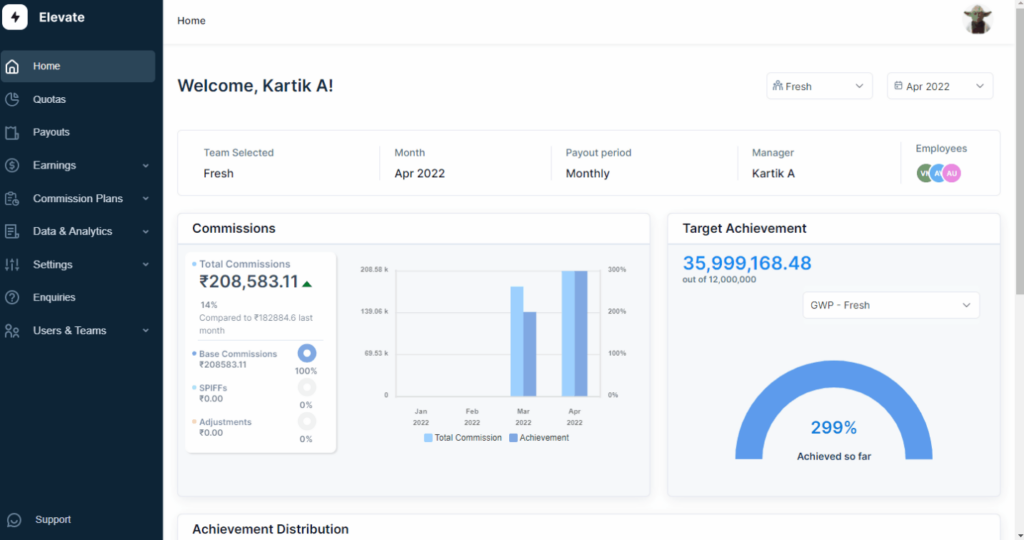
ElevateHQ è una piattaforma di gestione delle commissioni di vendita pensata per i team commerciali che hanno bisogno di automatizzare calcoli complessi delle commissioni, migliorare la precisione dei pagamenti e offrire ai venditori una visibilità in tempo reale sui loro guadagni.
Per chi è ideale ElevateHQ?
ElevateHQ è perfetto per team di vendita B2B in crescita che devono superare la gestione su fogli di calcolo e amministrare piani provvigionali a più livelli o basati su obiettivi, su larga scala.
Perché ho scelto ElevateHQ
ElevateHQ si è guadagnato un posto tra i migliori della mia selezione per l’ottima gestione della trasparenza dei pagamenti e della riconciliazione. Apprezzo molto la funzione di riconciliazione dei pagamenti—se il tuo team paga le commissioni sulle fatture incassate, ElevateHQ abbina automaticamente i pagamenti ricevuti agli affari e ai venditori, riducendo il lavoro manuale a fine mese. Inoltre, la funzione di deroghe e traccia record consente di fare eccezioni alle regole sulle commissioni registrando ogni modifica, così esiste una traccia chiara e consultabile di quanto e perché è stato pagato. I venditori possono anche visualizzare esattamente come vengono calcolate le loro commissioni grazie a flussi di pagamento trasparenti, limitando drasticamente le contestazioni.
Funzionalità principali di ElevateHQ
- Progettazione piani commissioni: Crea strutture personalizzate di commissioni con un designer no-code che supporta regole complesse, condizioni multiple e campi CRM personalizzati.
- Simulazione piani: Testa nuovi piani provvigionali prima di implementarli per vedere come influenzeranno i pagamenti e le performance dei team.
- Incoraggiamenti comportamentali: Mostra suggerimenti basati sugli incentivi che indicano ai venditori dove possono agire per guadagnare di più con l’attuale piano commissionale.
- Gestione contestazioni: Gestisci le controversie sulle commissioni con un sistema di ticketing integrato che conserva conversazioni, documenti di supporto e deroghe in un unico luogo.
Integrazioni ElevateHQ
Le integrazioni includono Salesforce, HubSpot, Microsoft Teams, Pipedrive, Slack, Chargebee, QuickBooks, Salesloft, Xero e NetSuite.
Pros and Cons
Pros:
- Monitoraggio delle commissioni efficiente e preciso
- Notifiche per modifiche a piani o commissioni
- Semplice e facile da usare
Cons:
- Nessuna funzionalità di gamification
- Il software può rallentare con grandi volumi di dati

Leaptree
Ideale per team di vendita che lavorano in modo nativo su Salesforce
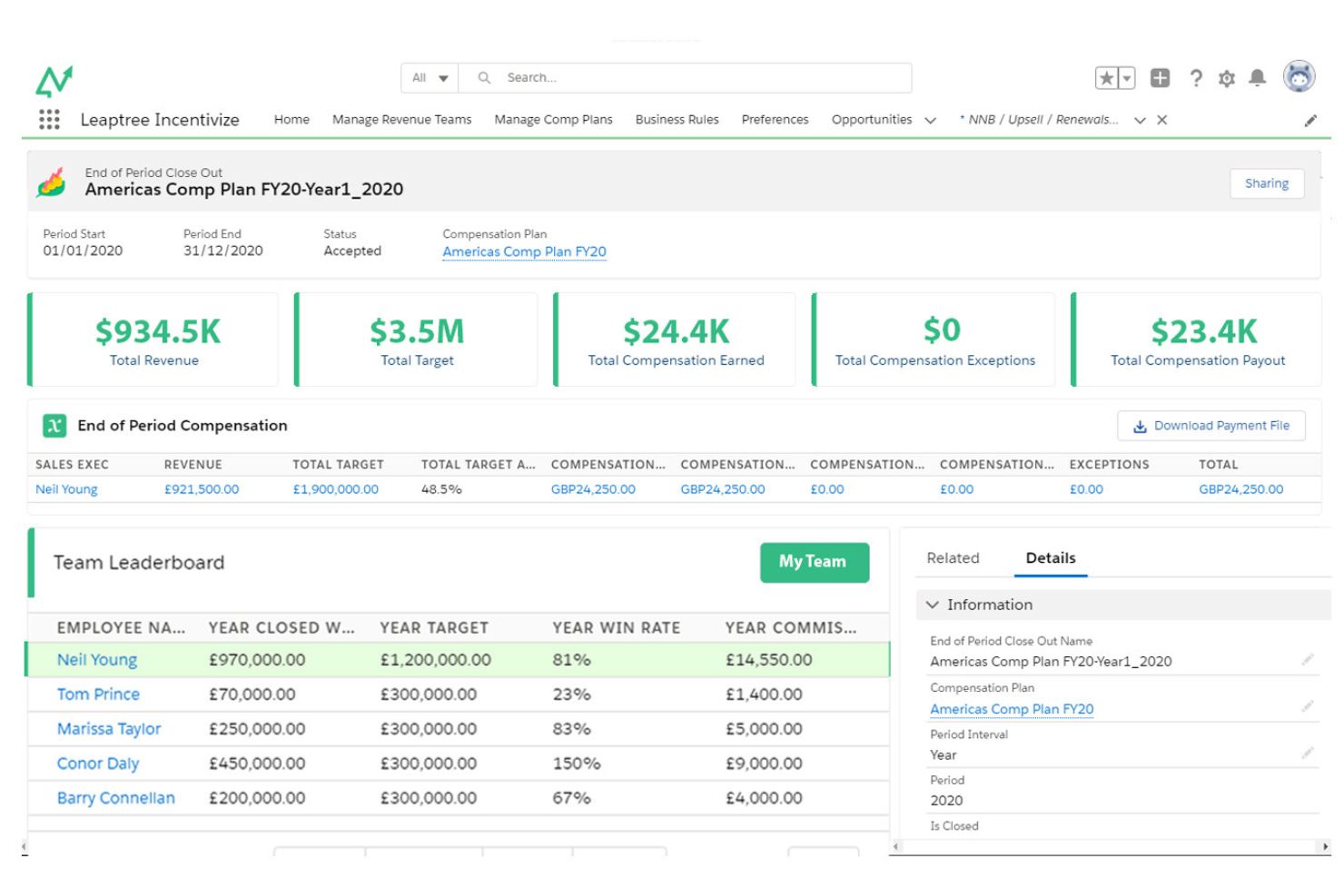
Leaptree è una piattaforma di gestione delle commissioni progettata per i team di vendita che necessitano di calcoli delle commissioni automatizzati, monitoraggio delle prestazioni in tempo reale e integrazione nativa con Salesforce per semplificare processi di incentivi complessi.
Per chi è ideale Leaptree?
Leaptree è particolarmente adatto per i team di operations di vendita e RevOps in aziende di medie dimensioni che gestiscono tutti i processi di revenue esclusivamente su Salesforce.
Perché ho scelto Leaptree
Ho scelto Leaptree tra i migliori perché è costruito al 100% all'interno di Salesforce—non solo collegato. Questa distinzione è importante nella pratica. Il mio team non deve gestire connessioni API, errori di sincronizzazione o dati duplicati su più piattaforme. I calcoli delle commissioni vengono effettuati direttamente dai dati di opportunità e contratti presenti in Salesforce, quindi non serve esportare manualmente né fare riconciliazioni tra CRM e strumento per le commissioni. Apprezzo anche il sistema di creazione dei piani di incentivazione senza codice, che permette a chi si occupa di operations di configurare strutture di commissioni complesse e multilivello senza il supporto di sviluppatori. Inoltre, le dashboard personalizzate per ogni venditore offrono una panoramica in tempo reale di quanto è stato guadagnato e di cosa manca per raggiungere il prossimo livello—un tipo di trasparenza che può davvero influenzare il comportamento dei venditori.
Caratteristiche principali di Leaptree
- Modellazione dei piani di remunerazione: Confronta scenari 'what if' fianco a fianco per prevedere l'impatto di nuove strutture di commissione prima di implementarle.
- Gestione di clawback ed eccezioni: Monitora e risolvi le controversie sulle commissioni relative a clawback e eccezioni, con una riduzione segnalata del 50% delle dispute correlate.
- Report per rappresentanti esterni: Genera automaticamente report sulle commissioni per i venditori esterni a $10/rep/mese, senza bisogno di licenze o accessi Salesforce.
- Dashboard delle prestazioni in tempo reale: Offri ai responsabili vendita una visione aggiornata dei dati di pagamento di tutto il team, con la possibilità di approfondire per singolo venditore e affare.
Integrazioni di Leaptree
Le integrazioni includono Salesforce. Al momento non sono indicate integrazioni native oltre a Salesforce.
Pros and Cons
Pros:
- Schede di valutazione personalizzabili
- Interfaccia intuitiva
- Forte integrazione con Salesforce
Cons:
- Capacità analitiche limitate
- Richiede abbonamento Salesforce Lightning
Altri Software per la Gestione delle Provvigioni di Vendita
Ecco alcune ulteriori opzioni di software per la gestione delle provvigioni che non sono entrate nel mio elenco principale, ma che vale comunque la pena prendere in considerazione:
- Varicent
Il miglior software per le commissioni di vendita per risolvere i problemi commissionali delle aziende del mercato medio
- Spiff
Ideale per scalare con qualsiasi complessità e volume
- Palette
Ideale per piccoli team che necessitano di automatismi basati su regole
- Commissionly
Il miglior software per le commissioni di vendita per l'attivazione rapida e semplice
- Creatio CRM
Ideale per l'automazione dei processi di commissione senza codice
- QuotaPath
Ideale per la pianificazione delle compensazioni guidata dall’IA
- EasyComp
Ideale per una progettazione e una simulazione semplici dei piani


Come valuto i software per commissioni di vendita
Scompongo la mia valutazione in criteri di base—come il calcolo automatico delle commissioni e l'integrazione CRM—e fattori differenzianti come la modellizzazione what-if e il supporto all'implementazione.
Funzionalità di base (Requisiti minimi per questa lista)
Quando seleziono gli strumenti per la mia lista, valuto ciascuno su una scala da 0 (non offre la funzionalità) a 5 (eccelle in questo ambito) per ognuna delle funzionalità di base elencate qui sotto. Poi calcolo il punteggio totale dello strumento convertendolo in percentuale. Ogni strumento deve raggiungere un punteggio minimo totale del 65% per essere preso in considerazione.
- Motore di calcolo delle commissioni: Verifico se lo strumento gestisce tariffe a scaglioni, acceleratori, suddivisioni e override—ad esempio suddivisioni di affari tra più rappresentanti su trattative con partner di canale.
- Progettazione dei piani incentivanti: Ogni piattaforma deve permettere agli amministratori di costruire strutture SPIF, bonus trimestrali e piani scalari senza bisogno di supporto del fornitore o codice personalizzato.
- Dashboard guadagni per i rappresentanti: I rappresentanti hanno bisogno di visibilità in tempo reale su raggiungimento obiettivi e pagamenti previsti, non di PDF statici inviati per email a fine mese.
- Flussi di lavoro per contestazioni e approvazioni: Cerco flussi strutturati per l’invio, tracciamento e approvazione multilivello che sostituiscano le conversazioni su Slack durante i cicli di pagamento.
- Integrazione CRM e ERP: Lo strumento deve sincronizzare i dati degli accordi da piattaforme come Salesforce o HubSpot e inviare i pagamenti approvati a sistemi di payroll o ERP.
- Conformità e reportistica ASC 606: Valuto se la piattaforma automatizza i piani di ammortamento delle commissioni e mantiene tracce di audit ai fini degli standard di riconoscimento dei ricavi.
Una volta ottenuta la lista degli strumenti conformi a questi criteri, considero ciò che distingue ciascuna piattaforma.
Fattori differenzianti (Cosa distingue i fornitori)
Ecco come confronto e metto a confronto i diversi fornitori:
Funzionalità distintive
La modellizzazione di scenari what-if è fondamentale per me. Prima di lanciare un nuovo piano di incentivi, il vostro team dovrebbe poter simulare come le modifiche a tariffe o quote influenzano i pagamenti in tutta l'organizzazione. Cerco anche strumenti di gestione di territori e quote integrati nella piattaforma, poiché le regole di accredito incidono direttamente sulla precisione delle commissioni. Le analisi con intelligenza artificiale aggiungono un ulteriore livello—mettendo in evidenza tendenze come il rischio di abbandono dei rappresentanti o il superamento dei costi dei piani prima che diventino problemi.
Oltre le funzionalità
I tempi di implementazione sono molto importanti in questo settore. Migrare da fogli di calcolo o da un sistema legacy a metà trimestre può compromettere i pagamenti, quindi valuto se i fornitori offrono consulenti dedicati e template di piani preimpostati per accelerare il go-live. Sicurezza e conformità sono altrettanto essenziali—verifico la certificazione SOC 2 Type II e i controlli di accesso basati sui ruoli che limitino chi può visualizzare o modificare i dati di pagamento. Anche la scalabilità è fondamentale, specialmente per team che prevedono di aumentare il personale o espandersi in strutture multi-entità.
Come Scegliere un Software per la Gestione delle Provvigioni
È facile perdersi tra liste infinite di funzionalità e strutture di prezzo complesse. Per aiutarti a rimanere concentrato durante il tuo percorso di selezione, ecco una checklist dei fattori da considerare:
| Fattore | Cosa Considerare |
|---|---|
| Scalabilità | Il software può crescere con la tua azienda? Valuta le esigenze future e verifica che lo strumento possa gestire un aumento di utenti e transazioni senza problemi. |
| Integrazioni | Funziona con i sistemi che già utilizzi? Verifica la compatibilità con il tuo CRM, ERP e altri strumenti fondamentali per evitare silos di dati. |
| Personalizzazione | Puoi adattarlo ai tuoi flussi di lavoro? Scegli opzioni che permettano di modificare impostazioni, report e dashboard in base ai processi del tuo team. |
| Facilità d’uso | Quanto è intuitivo? Valuta se il tuo team può adottarlo rapidamente senza bisogno di una formazione lunga o frustrazione. |
| Implementazione e onboarding | Quanto tempo serve per iniziare? Considera tempi e risorse necessari alla messa in funzione, inclusi eventuali training previsti. |
| Costo | Rientra nel tuo budget? Confronta i piani tariffari e fai attenzione a costi nascosti. Assicurati che il valore corrisponda al prezzo. |
| Sicurezza dei dati | Quanto sono protetti i tuoi dati? Cerca crittografia, controlli di accesso e conformità agli standard di protezione dei dati. |
| Supporto | Che opzioni di supporto sono disponibili? Verifica se il fornitore offre assistenza tempestiva via chat, email o telefono quando serve. |
Tendenze nei Software per la Gestione delle Provvigioni di Vendita per 2026
L'evoluzione del software per la gestione delle commissioni di vendita riflette le tendenze più ampie della tecnologia aziendale, con un'enfasi su automazione, trasparenza e conoscenze strategiche. Esploriamo le tendenze specifiche che stanno attualmente plasmando il software per le commissioni di vendita:
Automazione e Integrazione
- Automazione avanzata: Si assiste a una chiara tendenza verso funzionalità di automazione sempre più sofisticate, che riducono il lavoro manuale necessario per il calcolo e la distribuzione delle commissioni. L'automazione si estende all'importazione dei dati, all'applicazione delle regole e persino alla risoluzione delle controversie, semplificando l'intero processo delle commissioni.
- Integrazione approfondita con CRM ed ERP: Gli strumenti per la gestione delle commissioni di vendita offrono integrazioni più profonde e senza soluzione di continuità con i sistemi CRM ed ERP, consentendo il flusso dei dati in tempo reale e garantendo che le performance di vendita e i calcoli delle commissioni siano sempre allineati ai dati aziendali più recenti.
Analisi e Trasparenza
- Analisi avanzate: I rapidi progressi nell'ambito delle analisi nei software per le commissioni di vendita consentono un monitoraggio delle performance più dettagliato e un'analisi delle tendenze più approfondita. Queste informazioni possono guidare le decisioni strategiche in ambito vendite e finanza, ottimizzando i piani di commissione per risultati migliori.
- Maggiore trasparenza: Gli strumenti offrono sempre più funzionalità che migliorano la trasparenza per tutti gli stakeholder. Ciò include dashboard e report dettagliati accessibili da parte di agenti di vendita, manager e team finanziari, favorendo fiducia e comprensione all'interno dell'organizzazione.
Evoluzione della Domanda
- Diminuzione della domanda di soluzioni standalone: Con le aziende sempre più orientate alla razionalizzazione dei propri strumenti tecnologici, la richiesta di software per commissioni di vendita come soluzione autonoma sta diminuendo. Al contrario, si preferiscono piattaforme complete che offrano una gestione delle performance di vendita a 360°.
- Minor enfasi sulle funzioni di calcolo di base: Sebbene le funzionalità di base restino fondamentali, si registra un significativo spostamento verso funzionalità più complesse e di valore aggiunto come la pianificazione di scenari e le analisi predittive.
Comprendendo queste tendenze, i responsabili delle operation di revenue possono selezionare un software per commissioni di vendita che non solo soddisfi le esigenze operative attuali, ma che li posizioni al meglio per affrontare le sfide e cogliere le opportunità future. Il software giusto dovrebbe offrire una combinazione di profondità funzionale, facilità d'uso e informazioni strategiche, consentendo all'organizzazione di ottimizzare gli incentivi di vendita e guidare la crescita dei ricavi in modo efficace.
Che cos'è il software per commissioni di vendita?
Il software per commissioni di vendita è uno strumento digitale che automatizza il calcolo e la gestione delle commissioni di vendita. Viene utilizzato dalle aziende per gestire strutture di commissione complesse, monitorare la performance dei rappresentanti commerciali e garantire pagamenti accurati delle commissioni. Il software si integra con i sistemi di vendita e di gestione paghe per semplificare il processo delle commissioni, dalla fase di calcolo a quella di distribuzione.
Funzionalità
Quando scegli un software per commissioni di vendita, presta attenzione alle seguenti funzionalità chiave:
- Calcoli automatizzati: Elabora automaticamente le commissioni sulla base dei dati di vendita per ridurre gli errori e risparmiare tempo.
- Integrazione con CRM: Sincronizza con i sistemi CRM già in uso per garantire un flusso dati accurato e aggiornamenti in tempo reale.
- Report personalizzabili: Genera report su misura per analizzare le tendenze delle commissioni e i parametri di performance.
- Piani di commissione multipli: Supporta diverse strutture di commissione per adattarsi a vari ruoli commerciali e strategie di vendita.
- Aggiornamenti dei dati in tempo reale: Fornisce accesso immediato alle informazioni più recenti su vendite e commissioni per decisioni informate.
- Accesso mobile: Consente agli utenti di consultare e gestire i dati delle commissioni in mobilità, migliorando flessibilità e accessibilità.
- Sicurezza dei dati: Protegge i dati finanziari sensibili tramite crittografia e controlli di accesso, garantendo la conformità normativa.
- Interfaccia intuitiva: Favorisce la facilità d'uso per una rapida adozione da parte dei team commerciali e degli amministratori.
- Risorse formative: Offre tutorial, webinar e guide per aiutare gli utenti a sfruttare al meglio il software.
- Assistenza clienti: Fornisce supporto tempestivo attraverso diversi canali per risolvere problemi e rispondere alle domande.
Vantaggi
L'implementazione di un software per commissioni di vendita offre numerosi vantaggi al tuo team e alla tua azienda. Ecco alcuni di quelli a cui puoi aspirare:
- Aumento dell’accuratezza: I calcoli automatizzati riducono gli errori nei pagamenti delle commissioni, garantendo equità e fiducia.
- Risparmio di tempo: Automatizzando l’inserimento dei dati e i calcoli, il tuo team può concentrarsi su compiti più strategici.
- Maggiore motivazione: Un monitoraggio chiaro e preciso delle commissioni incentiva i team di vendita collegando la retribuzione direttamente alle performance.
- Migliore trasparenza: Report personalizzabili e aggiornamenti in tempo reale offrono una visione chiara delle vendite e delle commissioni.
- Flessibilità: Piani di commissione multipli e accesso da mobile consentono di adattarsi a diversi ruoli di vendita e ambienti di lavoro.
- Migliore processo decisionale: Gli aggiornamenti dei dati in tempo reale aiutano i manager a prendere decisioni informate basate sulle performance di vendita attuali.
- Sicurezza e conformità: Solide misure di sicurezza proteggono i dati sensibili, garantendo la conformità agli standard di settore.
Costi e prezzi
La scelta di un software per la gestione delle commissioni di vendita richiede la comprensione dei vari modelli e piani di pricing disponibili. I costi variano in base alle funzionalità, alla dimensione del team, agli add-on e altro ancora. La tabella seguente riassume i piani più comuni, i loro prezzi medi e le caratteristiche tipiche incluse nelle soluzioni di software per commissioni di vendita:
Tabella di confronto dei piani per software di commissioni di vendita
| Tipologia di piano | Prezzo medio | Funzionalità comuni |
|---|---|---|
| Piano gratuito | $0 | Monitoraggio base delle commissioni, utenti limitati e reportistica di base. |
| Piano personale | $5-$25/user/month | Calcoli avanzati, integrazione CRM e report personalizzabili. |
| Piano Business | $30-$60/user/month | Piani di commissione multipli, accesso mobile e funzionalità di sicurezza avanzate. |
| Piano Enterprise | $70-$100/user/month | Aggiornamenti dati in tempo reale, supporto dedicato e opzioni di completa personalizzazione. |
Domande frequenti sul software di commissioni di vendita
Ecco alcune risposte alle domande più comuni sul software di commissioni di vendita:
Come faccio a capire se la mia azienda ha bisogno di un software per la gestione delle commissioni di vendita?
Se il tuo team dedica troppo tempo ai calcoli manuali delle commissioni o se hai frequenti errori, è il momento di considerare un software per le commissioni di vendita. È particolarmente utile se il tuo team di vendita sta crescendo o se utilizzi strutture di commissioni complesse. Valuta i tuoi processi attuali e, se ti sembrano macchinosi o soggetti a errori, il software potrebbe essere un investimento intelligente.
Il software per le commissioni di vendita è sicuro?
Sì, i principali software per la gestione delle commissioni di vendita includono misure di sicurezza come la crittografia e i controlli di accesso. Verifica sempre le caratteristiche in termini di sicurezza e la conformità alle normative sulla protezione dei dati. Questo è fondamentale per proteggere le informazioni finanziarie sensibili. Chiedi ai fornitori informazioni sulle certificazioni di sicurezza e su come gestiscono eventuali violazioni dei dati.
In che modo il software di commissioni di vendita migliora la trasparenza dei pagamenti?
Assicurati che gli agenti possano vedere gli incassi, gli obiettivi e i prossimi pagamenti. La trasparenza riduce le controversie e genera fiducia.
E ora?
Se stai cercando un software per la gestione delle commissioni di vendita, contatta gratuitamente un consulente SoftwareSelect per avere raccomandazioni su misura.
Compila un modulo e avrai una breve chiamata in cui il consulente approfondirà le tue esigenze. Poi riceverai una lista ristretta di software da valutare. Ti supporteranno durante tutto il processo d’acquisto, incluse le trattative sui prezzi.