

With so many different sales automation software available, figuring out which is right for you is tough. You know you want to increase the efficiency and productivity of your sales teams through automation but need to figure out which tool is best. I've got you! In this post I'll help make your choice easy, sharing my personal experiences using dozens of different sales automation tools with various teams and accounts, with my picks of the best sales automation software.
Why Trust Our Software Recommendations
6,700+
Reviews
20
Industry experts
16+
Evaluation factors
14
Years
Our reviews reflect our independent judgment—not a sales pitch. Learn how we stay transparent.
For this guide, we evaluated tools using hands-on testing and independent research, scoring tools using our selection criteria.
Our reviews reflect our human editorial judgment, not a sales pitch.
Sales Automation Software Comparison Table
| Tool | Best For | Trial Info | Price | ||
|---|---|---|---|---|---|
| 1 | Best with real-time verified B2B lead data | Free plan + 14-day free trial + free demo available | From $49/user/month (billed annually) | Website | |
| 2 | Best for timesaving automation | 14-day free trial + free demo available | From $12/user/month (billed annually) | Website | |
| 3 | Best for developing sales strategies | 30-day free trial | From $25/user/month | Website | |
| 4 | Best for automating quote-to-revenue flows | Free demo available | Pricing upon request | Website | |
| 5 | Best for streamlined email sequences | 30-day free trial | From $39/user/month | Website | |
| 6 | Best for automating lead management | Not available | From $1,000/month (billed annually) | Website | |
| 7 | Best for AI-driven sales insights | Free plan + 15-day free trial+ free demo available | From $14/user/month (billed annually) | Website | |
| 8 | Best for automating administrative tasks | Free demo available | Pricing upon request | Website | |
| 9 | Best for finding leads that match user’s criteria | Free trial available | From $397/month | Website | |
| 10 | Best for visual and customizable sales management | 14-day free trial | From $14/user/month (billed annually) | Website |


Best Sales Automation Software Reviews
Here’s a brief description of each sales automation software to showcase each tool’s best use case, some noteworthy features, and screenshots to give a snapshot of the user interface.
 Best with real-time verified B2B lead data
- Free plan + 14-day free trial + free demo available
- From $49/user/month (billed annually)
Visit WebsiteCustomer Rating:4.5/5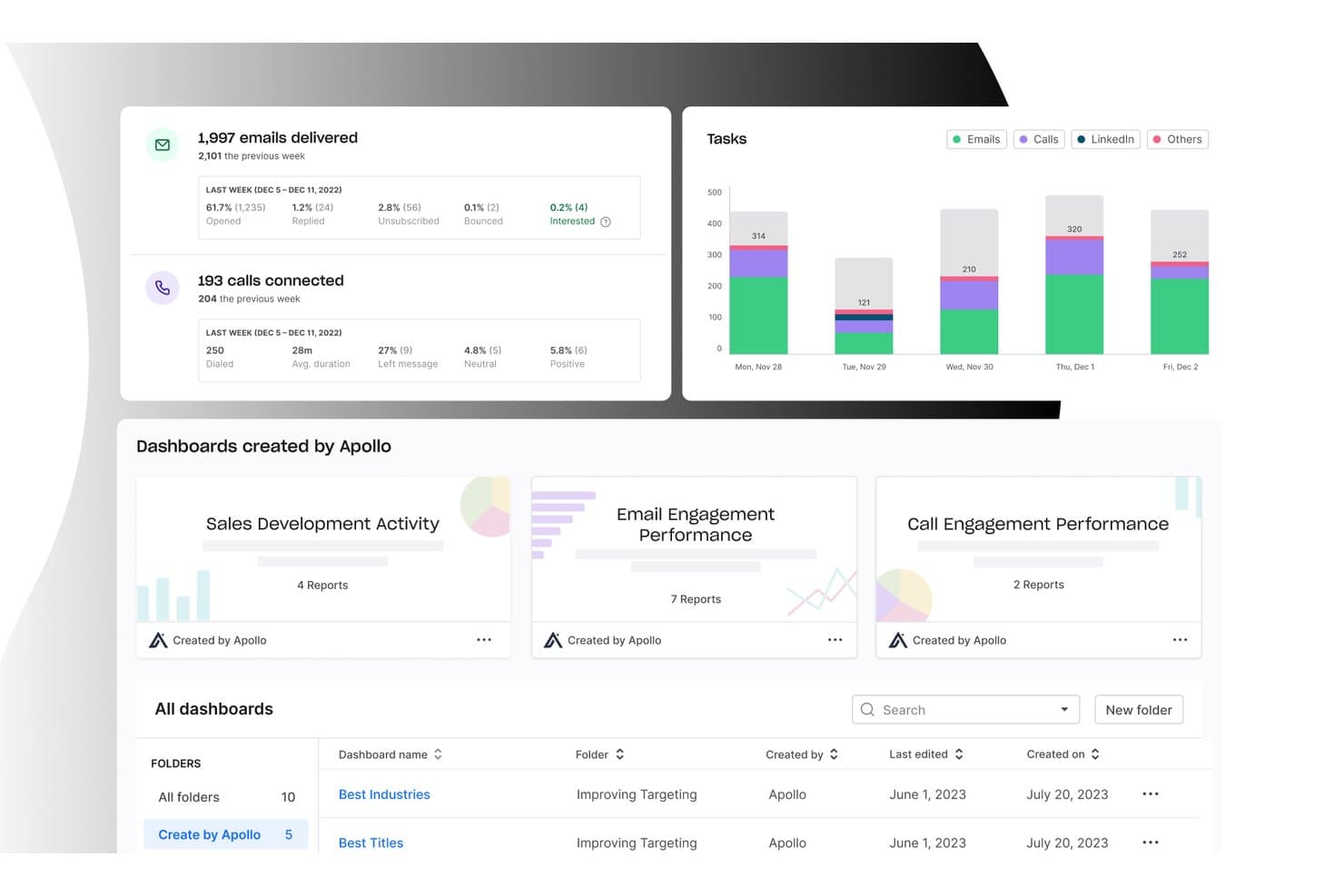
Apollo.io offers an analytics dashboard with email delivery stats, call connection metrics, task breakdowns by channel, and pre-built sales performance dashboards. Apollo.io is a sales intelligence and engagement platform that combines a 275M+ contact database with multi-channel sequencing, a built-in dialer, AI-powered lead scoring, and bi-directional CRM sync in a single workspace.
Who Is Apollo.io Best For?
Apollo.io is a strong fit for startups and mid-market revenue teams running outbound sales who want prospecting data and sequencing in one place rather than managing separate tools.
Why I Picked Apollo.io
Apollo.io earns its spot on my shortlist because its 7-step email verification process runs before contacts ever reach my sequences, so I'm not burning send reputation on stale data. The waterfall enrichment feature pulls from multiple data providers in priority order, automatically checking the next source if one comes up short on a verified phone number. I also rely on its real-time job change enrichment to catch when a key contact shifts roles, keeping my pipeline accurate without manual list scrubbing.
Apollo.io Key Features
- Automated multi-channel cadences: Build sequences across email, phone, and LinkedIn for unified outreach workflows.
- AI email writer and research assistant: Generate personalized email drafts and surface research insights for each prospect.
- Native dialer with call recording: Place, record, transcribe, and analyze sales calls without leaving the platform.
- Bi-directional CRM sync: Automatically logs activities and updates records in Salesforce, HubSpot, Pipedrive, and Zoho CRM.
Apollo.io Integrations
Apollo.io offers native integrations with Salesforce, HubSpot, Outreach, Airtable, Amplitude, Asana, and Gmail, and provides an API for custom integrations.
Pros and Cons
Pros:
- AI-drafted emails speed up outbound at scale
- Sequences and dialer run from one platform
- Massive verified contact database built in
Cons:
- Sequence reporting lacks deeper multi-touch attribution
- Data accuracy varies outside North American markets
Learn more about Apollo.io: Best for timesaving automation
- 14-day free trial + free demo available
- From $12/user/month (billed annually)
Visit WebsiteCustomer Rating:4.6/5
See each lead’s progress through your personalized sales funnel. monday Sales CRM empowers organizations and sales teams to automate many aspects of the sales cycle.
Why I picked monday Sales CRM: The automation available with the monday Sales CRM platform can provide you with the timesaving and organizational capabilities that you may find in a project management software. The automation uses simple trigger and action templates that work with the software’s features and are compatible with many third-party applications. This makes it incredibly easy to automate an endless list of tasks.
monday Sales CRM helps small to medium-sized companies and small business owners, sales teams, and managers customize any pipeline, process, and workflow to optimize efficiency. The platform allows sales teams to manage all post-sales operations, such as onboarding new clients and gain insight into what they need and when they need it. It’s also an excellent option if you’re already a customer of the monday CRM because they can use it on top of the operating system.
monday Sales CRM Standout Features and Integrations
Features include marketing automation, project management, expense tracking, file sharing, forecasting, lead scoring, supplier management, task scheduling and tracking, and lead management.
Integrations include Mailchimp, Zendesk Suite, Shopify, Stripe, Aircall, Slack, Dropbox, Google Drive, PandaDoc, Typeform, Gmail, Salesforce, and Zapier.
Pros and Cons
Pros:
- Managers can easily access their team’s progress, delays, and escalations.
- Each subscription comes with 24/7 customer support.
- The automation is effortless to develop and deploy.
Cons:
- Automations have a set number of actions each month.
- Each subscription plan has a three-user minimum.
 Best for developing sales strategies
- 30-day free trial
- From $25/user/month
Visit WebsiteCustomer Rating:4.2/5
See which stage each sales opportunity is in. Salesforces offers businesses the Sales Cloud option, which helps business leaders grow faster by creating effective sales strategies.
Why I picked Salesforce: The Sales Cloud platform from Salesforce helps team managers get the best insights to understand the company’s sales cycle and develop effective sales strategies to improve sales. The tools Salesforce provides make managing sales processes hassle-free. It can extract data that are beneficial when building and executing sales pipelines.
Salesforce has everything businesses of all sizes need to sell smarter and faster. These tools include lead and contact management, sales forecasting, and pipeline tracking. After implementing the software, you and your teams can win more deals by developing better customer relationships.
Salesforce Standout Features and Integrations
Features include appointment management, dashboard, audience targeting, calendar management, data import and export, inbound and outbound calls, dialer, reporting and analytics, forecasting, interaction tracking, and lead management.
Integrations include Dropbox, Yesware, Quickbooks, Mailchimp, ClearSlide, Five9, GoToMeeting, QlikView, Expensify, SurveyMonkey, Smartsheet, and Gmail.
Pros and Cons
Pros:
- It uses all activities and engagements to create a lead score.
- Users can track all conversations to help hand them over to other teams.
- It helps users manage leads from multiple sources.
Cons:
- Maintaining the data can be complex when uploading it manually every day.
- It has a high learning curve for new users.
Learn more about Salesforce CRM: Best for automating quote-to-revenue flows
- Free demo available
- Pricing upon request
Visit WebsiteCustomer Rating:4.7/5
DealHub AI lets sales teams manage, track, and update all active proposals in one organized dashboard. DealHub AI is a sales automation software built to reduce manual tasks and speed up your entire quote-to-close process. It combines CPQ, contract management, billing, and seller-buyer collaboration in one system.
Why I picked DealHub AI: I picked DealHub AI because it automates much of the work that drags sales cycles down. It reads your product and price books, applies pricing rules automatically, and routes deals through structured approval flows. DealHub AI’s AI agents offer quote suggestions and detect risky terms in contracts. Its real-time notifications and built-in analytics help you monitor proposals, engagement, and bottlenecks across deals.
DealHub AI Standout Features and Integrations
Standout features include DealStream, which tracks buyer engagement inside proposals and surfaces intent so you can act when buyers are most interested. It has guided quoting workflows that walk your reps through product configuration and discounting logic. It also supports API-first, headless quoting so you can embed automated quote generation into self-service portals or partner systems.
Integrations include Salesforce, HubSpot, Microsoft Dynamics 365, Slack, Gong, DocuSign, Google, LinkedIn, Optimizely, Solarwinds, SalesLoft, and Meta Platforms.
Pros and Cons
Pros:
- Enforces discount guardrails to protect margins
- Surfaces buyer behavior via dealstream
- Automates approvals based on rules and thresholds
Cons:
- Complex pricing models require careful rule setup
- Headless quoting needs developer support
Learn more about DealHub AI: Best for streamlined email sequences
- 30-day free trial
- From $39/user/month
Visit WebsiteCustomer Rating:4.7/5
Salesflare's workflow automation streamlines email outreach with timed sequences, performance tracking, and smart triggers based on contact behavior. Salesflare is a smart CRM designed to simplify the sales process by helping manage leads, track sales activities, and boost engagement with potential customers.
Why I picked Salesflare: Salesflare offers automated email sequences that personalize your engagement with leads. With the systems ability to take care of sending out timely emails based on interactions, you can be sure you'll never miss a follow-up. Additionally, the platform's lead finder tool generates new leads, helping you discover potential customers with ease and keeping your pipeline full.
While testing Salesflare, I also took note of its relationship intelligence feature, which helps strengthen connections within your team and with your clients. By analyzing data, it provides insights into the best times to reach out and the most effective ways to engage with prospects, ultimately increasing your interaction rates.
Salesflare Standout Features and Integations
Features include AI suggestions, a mobile app, customizable dashboards, sales tracking, email templates, email and web tracking, and data enrichment tools.
Integrations include Google Workspace, Slack, Mailchimp, QuickBooks Online, Shopify, Stripe, Intercom, Calendly, Google Sheets, Google Drive, Google Calendar, and Asana.
Pros and Cons
Pros:
- Unlimited contacts and users with advanced filtering.
- Effective automation features boost productivity by reducing manual tasks.
- Strong integration capabilities with popular tools like Outlook and LinkedIn.
Cons:
- Initial setup for automated workflows can be challenging for some users.
- Limited email templates available.
Learn more about Salesflare: Best for automating lead management
- Not available
- From $1,000/month (billed annually)
Visit WebsiteCustomer Rating:4.8/5
Default lets users manage leads and automate various processes, like lead scoring and scheduling. Default is an all-in-one automation platform tailored for fast-growing B2B teams, designed to improve workflows, enhance lead conversion, and reduce manual tasks. The platform offers a variety of features such as forms, scheduling, and automated workflows that help teams efficiently manage inbound leads and improve speed-to-lead.
Why I picked Default: One of its most prominent strengths is its ability to automate lead routing and qualification based on real-time enrichment and CRM data. This ensures that leads are promptly assigned to the right sales reps, cutting down response times and boosting conversions. Additionally, Default's routing system supports complex workflows, including round-robin scheduling and account-based routing.
Another critical feature is its integrated scheduling tool, which allows users to automatically schedule meetings based on lead submissions through web forms or booking links. The scheduler supports various automation options, such as sending reminders, handling no-shows, and dynamically adjusting rep availability based on changes like vacations.
Default Standout Features and Integrations
Features include automated workflows, emails, scheduling, customizable forms, data enrichment from various sources, real-time data, CRM insights, follow-up tools, customizable templates, and lead assignments.
Integrations include Salesforce, HubSpot, Salesloft, Outreach, Marketo, Customer.io, Google Calendar, Slack, Apollo, and Clearbit.
Pros and Cons
Pros:
- Good lead routing capabilities
- Good inbound scheduling and qualification
- Robust workflow automation
Cons:
- Could offer more customization options for the emails sent from Default
- Learning curve for more advanced workflows
Learn more about Default: Best for AI-driven sales insights
- Free plan + 15-day free trial+ free demo available
- From $14/user/month (billed annually)
Visit WebsiteCustomer Rating:4.2/5
Zoho CRM's AI assistant, Zia, can offer intelligent recommendations and help with various sales automation processes. Zoho CRM is a versatile customer relationship management software designed to enhance and automate the sales, marketing, and support operations of businesses.
Why I picked Zoho CRM: A standout aspect is Zoho CRM's AI-driven sales insights, which use sophisticated algorithms to analyze sales data and offer actionable recommendations to help teams identify high-potential leads and optimize their sales strategies. Aside from general workflow and process automation, the platform's lead management system automates lead scoring and assignment, ensuring that high-potential leads are promptly followed up.
Furthermore, the sales forecasting tools use historical data and predictive analytics to provide accurate sales projections while its email automation capabilities allow users to create and schedule email campaigns, track email interactions, and automate follow-ups based on customer responses.
Zoho CRM Standout Features and Integrations
Features include Zia AI-powered assistant, lead and contact management, sales forecasting, email integration, a mobile app, a sandbox environment, custom dashboards, role-based security, and gamification tools.
Integrations include Mailchimp, LinkedIn, Zapier, QuickBooks, Slack, Microsoft Office 365, Google Workspace, Trello, HubSpot, Zendesk, DocuSign, Dropbox, Shopify, WooCommerce, RingCentral, Twilio, SurveyMonkey, Xero, Asana, and more.
Pros and Cons
Pros:
- Predictive analytics and sales forecasting capabilities
- Mobile app available for on-the-go management
- AI assistant for suggestions and automation
Cons:
- Set up may be time consuming
- Learning curve for new users
 Best for automating administrative tasks
- Free demo available
- Pricing upon request
Visit WebsiteCustomer Rating:4.9/5
Aside from CRM and email automation, Attention also automatically listens to conversations and generates insights on the spot. Attention is an AI-powered sales platform designed to enhance the efficiency and effectiveness of sales teams. It provides real-time actionable intelligence to sales representatives during calls, offering personalized guidance and strategies to help close deals.
Why I picked Attention: The platform uses AI to automate various administrative tasks. For example, it can analyze sales conversations to craft personalized email follow-ups. It can also automatically populate CRM fields with data from sales conversations, eliminating the need for manual data entry. This not only saves time but also ensures that the data is accurate and up-to-date, allowing sales reps to focus more on selling rather than admin.
Attention Standout Features and Integrations
Features include insights from customer conversations, sales training, KPI tracking, cross-call insights, deal analysis, sales messaging, and custom triggers so that Attention's AI listens to what matters most to you.
Integrations include Zoom, Meets, Teams, Salesforce, HubSpot, Gmail, Outlook, Slack, and Zapier.
Pros and Cons
Pros:
- Real-time sales coaching on calls
- Personalized follow-up emails
- Actionable insights with AI
Cons:
- Reliance on AI may not suit all users
- Some integrations may require additional assistance
Learn more about Attention: Best for finding leads that match user’s criteria
- Free trial available
- From $397/month
Visit WebsiteCustomer Rating:4.7/5
Collect all contact information and social profiles for leads. When your challenge is sourcing the right leads (and contact information) rather than just managing them, LeadFuze excels. I picked it because you can define filters such as role, company size, geography, and the platform returns leads with verified contact details and technology stack information — helping your outreach start strong.
Why I Picked LeadFuze
I picked LeadFuze because before you can sell, you often first need good leads. LeadFuze lets you build target lists tailored to your ideal customer profile, pull verified contact data, and export that into your outreach workflow. That means you spend less time hunting and more time reaching out with confidence.
LeadFuze Key Features
- Audience targeting filters: Filter by location, industry, company size, job role, technology use.
- Verified contact database: Get clean email addresses, social profiles and firmographic data.
- Lead list export & management: Build, segment and export lead lists into your systems or outreach tools.
- Integration with outreach platforms: Connect with email campaign and CRM tools to automate outreach.
LeadFuze Integrations
Integrations include Mailshake, Salesforce, Zapier, Google Sheets, Salesflare, HubSpot, Close.io, JazzHR, Pipedrive, FreshSales, Woodpecker, Reply, AppyPie.
Pros and Cons
Pros:
- All emails the platform provides are double-verified.
- The tools help users target and customize outreach efforts.
- Connects users with access to an extensive lead database.
Cons:
- The vendor might try to tie new users to a one-year contract.
- Its knowledge base could use more work.
Learn more about LeadFuze: Best for visual and customizable sales management
- 14-day free trial
- From $14/user/month (billed annually)
Visit WebsiteCustomer Rating:4.5/5
Pipedrive allows users to customize workflow automations to help handle repetitive tasks. Pipedrive CRM is a cloud-based customer relationship management tool designed primarily for sales teams to manage leads, track sales activities, and close deals.
Why I picked Pipedrive CRM: I like that the platform offers a visual pipeline that helps users track deals from start to finish, providing a clear overview of the sales process. Its drag-and-drop interface also allows for easy customizability. As for sales automation, Pipedrive can handle email follow-ups for a range of cases. It also has an auto-lead assignment feature and an AI sales assistant.
Pipedrive Standout Features and Integrations
Features include sales automation, lead management, customizable reports, email marketing tools, project management, custom pipelines and dashboards, an AI sales assistant, and a mobile app.
Integrations include HubSpot, JustCall, Mailchimp, Google Meet, Zoom, DocuSign, Trello, Monday.com, Zendesk, and Google Workspace.
Pros and Cons
Pros:
- Real-time reporting and analytics
- Offers customizable pipelines
- Easy-to-navigate interface
Cons:
- May take time to learn the platform
- AI sales assistant limited to higher tier plans
Learn more about Pipedrive CRM:
Other Sales Automation Software
- 11AutokloseBest for increasing the sales team’s productivity
- 12ZoomInfoBest for lead prospecting
- 136senseBest for revenue AI
- 14HubSpot Sales HubBest complete set of sales tools
- 15SeismicBest for providing easy document access
- 16RollWorksBest for engaging prospects
- 17Creatio CRMBest for opportunity management
- 187LearningsBest for AI-driven predictive pricing
- 19SugarAIBest for organizing lead and customer details
Related Sales Automation Software Reviews
If you still haven't found what you're looking for here, check out these tools closely related to sales automation software that we've tested and evaluated.
- Sales Software
- Lead Management Software
- Business Intelligence Software
- Contract Management Software
- Revenue Management System
- CPQ Software
How I Evaluate Sales Automation Software
I look at every tool through two lenses: whether it clears the baseline—think bi-directional CRM sync, trigger-based workflows, and multi-channel sequencing—and then what genuinely sets it apart.
Core Functionality (Table Stakes For This List)
When I'm selecting tools for my list, I rank each one on a scale from 0 (does not offer the functionality) to 5 (excels in this area) for each core functionality listed below. Then, I calculate the tool's total score into a percentage. Each tool needs to achieve a minimum total score of 75% to be considered for inclusion.
- Multi-Channel Sequencing: I evaluate whether a tool lets you build outreach cadences that span email, phone, social, and SMS—not just single-channel drip campaigns.
- CRM Sync & Activity Capture: Real-time, bi-directional sync with CRMs like Salesforce and HubSpot matters here, along with auto-logging of calls, emails, and meetings.
- Workflow & Task Automation: I look for trigger-based rules that handle lead assignment, follow-up reminders, and deal stage progression without reps doing it manually.
- Email Automation & Personalization: Beyond bulk sends, I check for dynamic merge fields, template libraries, A/B testing, and inbox rotation for high-volume outbound teams.
- Lead & Pipeline Management: Scoring models, automated routing logic, and customizable pipeline stages show whether a tool can support a structured GTM motion at scale.
- Sales Analytics & Reporting: Dashboards should cover rep activity, sequence performance, and conversion rates—enough for RevOps to spot bottlenecks without exporting to a BI tool.
Once I have a list of tools that meet the criteria, I consider what sets each platform apart.
Differentiating Factors (What Sets Vendors Apart)
Here's how I compare and contrast different vendors:
Standout Features
AI-powered insights separate good tools from great ones—I look for platforms that can draft outreach, suggest next steps, or flag at-risk deals without manual analysis. Conversation intelligence is another differentiator worth evaluating, especially for teams running high-volume discovery calls where coaching moments get buried in recordings. I also check whether a tool offers native data enrichment and intent signals, since some platforms bundle contact data and buying signals in while others require third-party providers to fill the gaps.
Beyond Features
Integration depth matters—I evaluate how well a platform connects to your existing CRM, marketing automation, and data stack without relying on middleware for every connection. Data governance is equally important; I check whether RevOps admins can control field mapping, enforce template approvals, and manage deduplication rules directly. For growing teams, I also consider how a tool handles multi-region deployments, territory hierarchies, and role-based permissions as headcount scales.
How To Choose Sales Automation Software
With so many different sales automation software solutions available, it can be challenging to make decisions on what tool is going to be the best fit for your needs.
As you're shortlisting, trialing, and selecting sales automation software, consider the following:
- What problem are you trying to solve - Start by identifying the sales automation software feature gap you're trying to fill to clarify the features and functionality the tool needs to provide.
- Who will need to use it - To evaluate cost and requirements, consider who'll be using the software and how many licenses you'll need. You'll need to evaluate if it'll just be the revenue operation leaders or the whole organization that will require access. When that's clear, it's worth considering if you're prioritizing ease of use for all or speed for your sales automation software power users.
- What other tools it needs to work with - Clarify what tools you're replacing, what tools are staying, and the tools you'll need to integrate with, such as accounting, CRM, or HR software. You'll need to decide if the tools will need to integrate together or if you can replace multiple tools with one consolidated sales automation software.
- What outcomes are important - Consider the result that the software needs to deliver to be considered a success. Consider what capability you want to gain or what you want to improve, and how you will be measuring success. For example, an outcome could be the ability to get greater visibility into performance. You could compare sales automation software features until you’re blue in the face but if you aren’t thinking about the outcomes you want to drive, you could be wasting a lot of valuable time.
- How it would work within your organization - Consider the software selection alongside your workflows and delivery methodology. Evaluate what's working well and the areas that are causing issues that need to be addressed. Remember every business is different — don’t assume that because a tool is popular that it'll work in your organization.
Trends In Sales Automation Software For 2026
Sales automation software is becoming increasingly integral to managing revenue operations efficiently, providing businesses with the capabilities to automate complex sales processes, enhance customer engagement, and drive growth. Here's a summary of the key trends based on recent product updates, press releases, and release logs from leading sales automation software providers:
Key Trends in Sales Automation Software
Integration with Advanced Technologies:
- Artificial Intelligence and Machine Learning: Sales automation platforms are increasingly harnessing AI and ML to offer predictive analytics, lead scoring, and automated decision-making, providing sales teams with deeper insights and more strategic guidance.
- Enhanced CRM Integration: Seamless integration with CRM systems is becoming more sophisticated, enabling a more unified view of customer interactions and data across different stages of the sales funnel.
Most Rapidly Evolving Features
- Automation of Complex Workflows: Advanced workflow automation capabilities are evolving rapidly, allowing businesses to automate intricate sales processes and operations, reducing manual effort and increasing efficiency.
- Real-Time Analytics: The ability to provide real-time insights and analytics is becoming more prevalent, enabling sales teams to make data-driven decisions swiftly and adapt their strategies dynamically.
Most Novel and Unusual Functionalities
- Blockchain for Data Security: Some sales automation platforms are beginning to incorporate blockchain technology to enhance data security and trust, particularly in B2B sales environments.
- Virtual and Augmented Reality: Innovative uses of VR and AR are emerging, such as virtual product demos or enhanced sales training experiences, providing unique ways to engage customers and equip sales teams.
Most Important and In-Demand Features
- Mobile Accessibility: Given the increasingly mobile nature of sales teams, robust mobile functionality is in high demand, ensuring sales professionals have access to critical tools and information on the go.
- Integration Ecosystem: The ability to integrate seamlessly with a wide range of other business tools and platforms is highly valued, enabling businesses to create a more interconnected and efficient technology ecosystem.
Declining Features
- Basic Email Automation: As sales automation software becomes more sophisticated, basic email automation features are no longer sufficient; businesses are seeking more advanced and integrated communication tools.
- Standalone Solutions: There is a decreasing interest in standalone sales automation solutions that do not offer comprehensive integration or adaptability, as businesses prefer more holistic and flexible platforms.
Sales automation software is becoming more intelligent, integrated, and customer-centric, reflecting the need for businesses to adapt quickly in a dynamic market environment. For revenue operation leaders, staying ahead of these trends is crucial for selecting software that will not only meet current needs but also drive future growth and innovation.
What is Sales Automation Software?
Sales automation software is a tool that helps sales teams automate various aspects of the sales process. It manages tasks like lead tracking, email communication, sales pipeline management, and report generation. The software integrates with customer relationship management systems to streamline the entire sales cycle, from initial customer contact to closing deals.
The benefits of sales automation software include increased productivity and efficiency in sales operations. It reduces the time spent on repetitive tasks, allowing sales teams to focus more on engaging with customers and closing sales. The software provides valuable insights into sales performance and customer behavior, aiding in strategic decision-making and improving sales outcomes. Additionally, it ensures consistency in sales processes and enhances customer engagement through timely and personalized communication.
Features Of Sales Automation Software
When selecting sales automation software, keep an eye out for the following key features:
- Lead management: Track leads from the moment they enter your pipeline to when they close, giving you a clear view of opportunities and preventing anyone from slipping through the cracks. This helps your team prioritize outreach and nurture relationships efficiently.
- Contact and account management: Store all your customer information—calls, emails, meeting notes, and account details—in a central place. This lets you know exactly where every relationship stands and keeps your team on the same page.
- Sales pipeline tracking: Visualize each deal’s stage in your sales process, so you can forecast revenue, spot bottlenecks, and take action before deals stall. Being able to see your full pipeline at a glance turns chaos into clarity.
- Task and activity automation: Say goodbye to repetitive busywork. Automate follow-up reminders, email sends, and meeting scheduling, so you can spend less time checking boxes and more time talking to customers.
- Email integration: Connect your email inbox with your sales automation software to automatically log correspondence, track opens and clicks, and send personalized messages at scale—without jumping between tools.
- Reporting and analytics: Dive into real-time dashboards that break down performance by rep, deal stage, or campaign. Use these insights to celebrate wins, spot challenges early, and make smarter decisions.
- Customizable workflows: Adapt the software to match your unique sales process by setting up custom triggers, approval steps, and automations. This flexibility means your software works the way you do—not the other way around.
- Mobile accessibility: Access your sales automation solution from your phone or tablet, so you can update deals, check tasks, or reach out to leads even when you’re on the move.
Common Sales Automation Software AI Features
Beyond the standard sales automation software features listed above, many of these solutions are incorporating AI with features like:
- Conversation insights: AI listens in on sales calls and surfaces key action items, sentiment analysis, and talking points, so you can coach reps or refine your pitch with evidence, not guesswork.
- Predictive lead scoring: AI analyzes historical data to identify which leads are most likely to convert, so you can focus your energy where it counts the most.
- Automated data entry: AI captures and updates contact details, notes, and activity logs by extracting data from emails and calls, saving you from manual entry and minimizing errors.
- Intelligent email recommendations: AI suggests the best times to send emails or even drafts personalized messages based on customer behavior, boosting your engagement rates.
- Deal win probability forecasting: AI evaluates your pipeline and predicts which deals are most likely to close, helping you prioritize high-value opportunities and allocate resources more effectively.
Benefits Of Sales Automation Software
By automating repetitive tasks, providing valuable insights, and enabling more personalized customer engagement, sales automation tools help organizations optimize their sales operations and drive growth. Here are five primary benefits of leveraging sales automation software:
- Enhanced Productivity: Automates routine sales tasks, allowing sales teams to focus on engaging with prospects and closing deals.
- This increase in productivity translates to more time spent on high-value activities, directly impacting sales outcomes and revenue generation.
- Improved Lead Management: Streamlines the process of tracking and nurturing leads, ensuring that no opportunity is missed.
- Effective lead management enables sales teams to prioritize their efforts, focusing on leads that are most likely to convert, thereby maximizing the efficiency of the sales funnel.
- Data-Driven Insights: Offers comprehensive analytics and reporting tools, providing a deeper understanding of sales performance and customer behavior.
- Access to these insights allows sales managers to make informed decisions, tailor strategies, and quickly adapt to market changes, ensuring a competitive edge.
- Consistent Customer Engagement: Facilitates scheduled communications and ensures timely follow-ups, fostering stronger relationships with prospects and customers.
- Consistent engagement helps maintain a positive customer experience, builds trust, and can significantly increase conversion rates and customer retention.
- Scalability: Adapts to the growth of the business, supporting an increasing number of users, data volume, and complexity of sales processes.
- The scalability of sales automation software ensures that as the business expands, the software continues to provide the necessary support without the need for frequent changes or upgrades.
Costs & Pricing For Sales Automation Software
Sales automation software provides a variety of features to streamline sales operations, manage customer relationships, and analyze performance data. Here's a guide to understanding different plan options and pricing for sales automation software, aimed at helping software buyers make an informed decision:
Plan Comparison Table For Sales Automation Software
| Plan Type | Average Price | Common Features Included |
|---|---|---|
| Plan TypeBasic | Average Price$10 - $30 per user/month | Common Features IncludedContact management, email automation, basic reporting |
| Plan TypeProfessional | Average Price$30 - $75 per user/month | Common Features IncludedAdvanced analytics, CRM integration, workflow automation |
| Plan TypeEnterprise | Average Price$75 - $150+ per user/month | Common Features IncludedCustom integrations, premium support, advanced features |
| Plan TypeFree | Average Price$0 | Common Features IncludedLimited contacts, basic features, minimal automation |
When choosing a sales automation software plan, consider the size of your sales team, the complexity of your sales processes, and the specific features that will most benefit your organization. Ensure the plan you select not only fits your current needs but also offers scalability to accommodate future growth. The right sales automation software should streamline your sales activities, provide valuable insights, and contribute to achieving your business objectives.
Sales Automation Software Frequently Asked Questions
Here are a few commonly asked questions about sales automation tools. I’ll quickly cover the basics for anyone looking for more information.
What are the types of sales automation tools?
Sales automation tools are designed to streamline various aspects of the sales process, enhancing efficiency and improving outcomes for sales teams. These tools can be categorized based on the specific functions they automate or the stages of the sales process they support. Here are some key types of sales automation tools:
- CRM Systems: Customer Relationship Management (CRM) systems are foundational sales automation tools that store and manage customer and prospect information, track interactions, and facilitate communication throughout the sales cycle.
- Email Automation Platforms: These tools automate the process of sending out emails to prospects and customers at predefined intervals or based on specific triggers, helping maintain consistent communication and nurture leads.
- Lead Management Systems: These tools automate lead capture, scoring, segmentation, and nurturing, ensuring that sales teams focus their efforts on the most promising prospects.
- Sales Intelligence Software: Sales intelligence tools provide sales teams with data and insights about prospects and customers, enabling them to target their outreach more effectively and personalize their sales approaches.
- Dialer Software: Auto-dialer software automates the process of making phone calls, increasing call volume, and ensuring that sales representatives spend more time in conversation with potential and existing customers.
- Proposal and Quote Management Software: These tools automate the creation and delivery of proposals and quotes, reducing manual errors and accelerating the sales cycle.
- Sales Forecasting Tools: Sales forecasting software uses historical data and analytics to predict future sales trends, helping sales and business leaders plan more effectively.
- Contract Management Systems: These tools streamline the process of creating, negotiating, and signing contracts, reducing bottlenecks in the final stages of the sales cycle.
- Order Management Systems: Automating the order processing, these tools ensure accuracy and efficiency from sales order to fulfillment, enhancing customer satisfaction and operational efficiency.
- Sales Analytics and Reporting Tools: Providing real-time insights into sales activities and performance, these tools help sales teams and leaders measure success, identify areas for improvement, and make data-driven decisions.
Each type of sales automation tool addresses different needs within the sales process, helping organizations improve their sales operations' efficiency, effectiveness, and scalability. By selecting the right mix of sales automation tools, businesses can streamline their sales processes, enhance customer engagement, and ultimately drive more revenue.
How does sales automation software integrate with existing CRM systems?
Sales automation software typically integrates with existing CRM systems through APIs or built-in connectors. This seamless integration ensures that all customer data and interactions are synchronized between the CRM and sales automation tools, enabling a unified approach to managing sales pipelines and customer relationships.
Can sales automation software automate cross-platform tasks?
Yes, modern sales automation software is designed to automate tasks across multiple platforms, such as emailing, social media interactions, and customer relationship management. By using automation rules and triggers, these tools streamline repetitive tasks, ensuring consistency and efficiency across different sales channels.
Can sales automation software handle international sales operations?
Sales automation software is well-equipped to handle international sales operations, offering features like multi-currency support, multilingual communication capabilities, and compliance with various international sales regulations. This enables businesses to expand their operations globally without compromising on the efficiency or compliance of their sales processes.
Who uses sales automation tools?
Sales automation tools are leveraged by a variety of professionals across different roles within an organization to streamline sales processes, enhance productivity, and drive revenue growth. Here's an overview of the primary users of sales automation tools:
- Sales Representatives: They are the primary users, utilizing these tools to automate routine tasks such as scheduling follow-ups, sending emails, and logging call notes, allowing them more time to focus on engaging with prospects and closing deals.
- Sales Managers: Managers use sales automation tools to track the performance and activities of their teams, set and monitor sales targets, and coach team members based on actionable insights generated by the software.
- Marketing Teams: Marketing professionals leverage sales automation for lead nurturing campaigns, scoring leads based on their interaction with marketing content, and handing off qualified leads to the sales team. For example, marketing teams use LinkedIn automation software to streamline outreach and follow-up with prospects based on their engagement levels.
- Customer Service Representatives: While primarily focused on post-sale engagement, customer service teams can use sales automation tools to ensure they have up-to-date customer information, helping them provide better service and identify opportunities for upsells or cross-sells.
- Sales Operations Specialists: These individuals rely on sales automation tools to optimize sales processes, ensure data accuracy, manage CRM systems, and produce reports that help the organization make informed business decisions.
- Business Executives: Company leaders use insights generated by sales automation tools to understand overall sales performance, make strategic decisions, and forecast revenue.
- IT Professionals: They may use sales automation tools to integrate them with other systems within the organization, ensure data integrity, and maintain the security of the sales automation system.
- Entrepreneurs and Small Business Owners: In smaller businesses without dedicated sales teams, owners and entrepreneurs use sales automation tools to manage their sales processes efficiently, track customer interactions, and grow their businesses.
By using sales automation tools, these diverse groups can achieve more with less effort, improve communication and collaboration, make data-driven decisions, and ultimately enhance customer satisfaction and business outcomes.
Why should I use sales automation tools?
Sales automation tools are designed to streamline sales processes, enhance efficiency, and improve outcomes. Here are key reasons why you should consider using sales automation tools:
- Increased Efficiency: Sales automation tools reduce the need for manual tasks, such as data entry, scheduling follow-ups, and tracking communications, allowing sales teams to focus more on selling and less on administrative tasks.
- Enhanced Productivity: By automating routine sales activities, sales representatives can manage their time more effectively, increasing their capacity to engage with more prospects and customers, thereby boosting their productivity.
- Improved Sales Processes: Automation tools provide structured processes and workflows, ensuring that all sales activities are carried out consistently and systematically, which helps in streamlining the sales cycle and reducing the potential for errors.
- Data-Driven Insights: Sales automation tools offer advanced analytics and reporting features that provide valuable insights into sales performance, customer behaviors, and market trends, enabling more informed decision-making.
- Better Lead Management: These tools help in effectively capturing, tracking, and nurturing leads, ensuring that no potential opportunities are missed and that leads are efficiently converted into customers.
- Enhanced Customer Relationships: Automation tools enable personalized and timely communication with prospects and customers, improving engagement and fostering stronger relationships, which can lead to increased customer loyalty and higher sales.
- Scalability: As your business grows, sales automation tools can scale to accommodate increased data, more complex sales processes, and a larger sales force, supporting your business's growth without the need for proportionally larger increases in resources.
- Competitive Advantage: By leveraging sales automation tools, you can enhance your sales capabilities, respond more quickly to market changes, and provide superior customer experiences, all of which can give you a competitive edge in your industry.
Sales automation tools are indispensable for modern sales organizations, offering a range of functionalities that can significantly improve sales efficiency, effectiveness, and outcomes, while also providing the agility to adapt to changing market conditions and business needs.
