

10 Best Inside Sales Software Reviewed For 2026

10 Best Inside Sales Software Shortlist


With so many different inside sales software available, figuring out which is right for you is tough. You know you want to optimize and streamline your remote sales process but need to figure out which tool is best.
I've got you! In this post I'll help make your choice easy, sharing my personal experiences using dozens of different inside sales tools with various teams and accounts, with my picks of the best inside sales software.
Why Trust Our Software Recommendations
Our reviews reflect our independent judgment—not a sales pitch. Learn how we stay transparent.
For this guide, we evaluated tools using hands-on testing and independent research, scoring tools using our selection criteria.
Our reviews reflect our human editorial judgment, not a sales pitch.
Best Inside Sales Software Summary
This comparison chart summarizes pricing details for my top inside sales software selections to help you find the best one for your budget and business needs.
| Tool | Best For | Trial Info | Price | ||
|---|---|---|---|---|---|
| 1 | Best for meeting scheduling and lead routing | Free plan + 14-day free trial + free demo available | From $49/user/month (billed annually) | Website | |
| 2 | Best for having the largest integration ecosystem on the market | Free demo available | Pricing upon request | Website | |
| 3 | Best for reducing missed opportunities by prioritizing high-value activities | Free 14-day trial | From $89/user/month (billed annually) | Website | |
| 4 | Best for creating and closing the sales pipeline | Free demo available | Pricing upon request | Website | |
| 5 | Best for closing and managing mortgage deals | Free demo available | From $60/month | Website | |
| 6 | Best ISO 27701-certified sales intelligence solution | Free plan available | From $37.45/month (billed annually) | Website | |
| 7 | Best lead database with over 200 million contacts | Free plan available | From $49/user/month (billed annually) | Website | |
| 8 | Best for help desk and customer support solutions | 14-day free trial + free demo available | From $25/seat/month (billed annually) | Website | |
| 9 | Best as a single, unified platform for executives and salespeople | Free demo available | Pricing upon request | Website | |
| 10 | Best for all-in-one solutions with sales CRM, project management, and invoicing capabilities | Free trial available | From $15/user/month (billed annually) | Website |

Best Inside Sales Software Reviews
Below are my detailed summaries of the best inside sales software that made it onto my shortlist. My reviews offer a detailed look at the key features, pros & cons, integrations, and ideal use cases of each tool to help you find the best one for you.

Best for meeting scheduling and lead routing
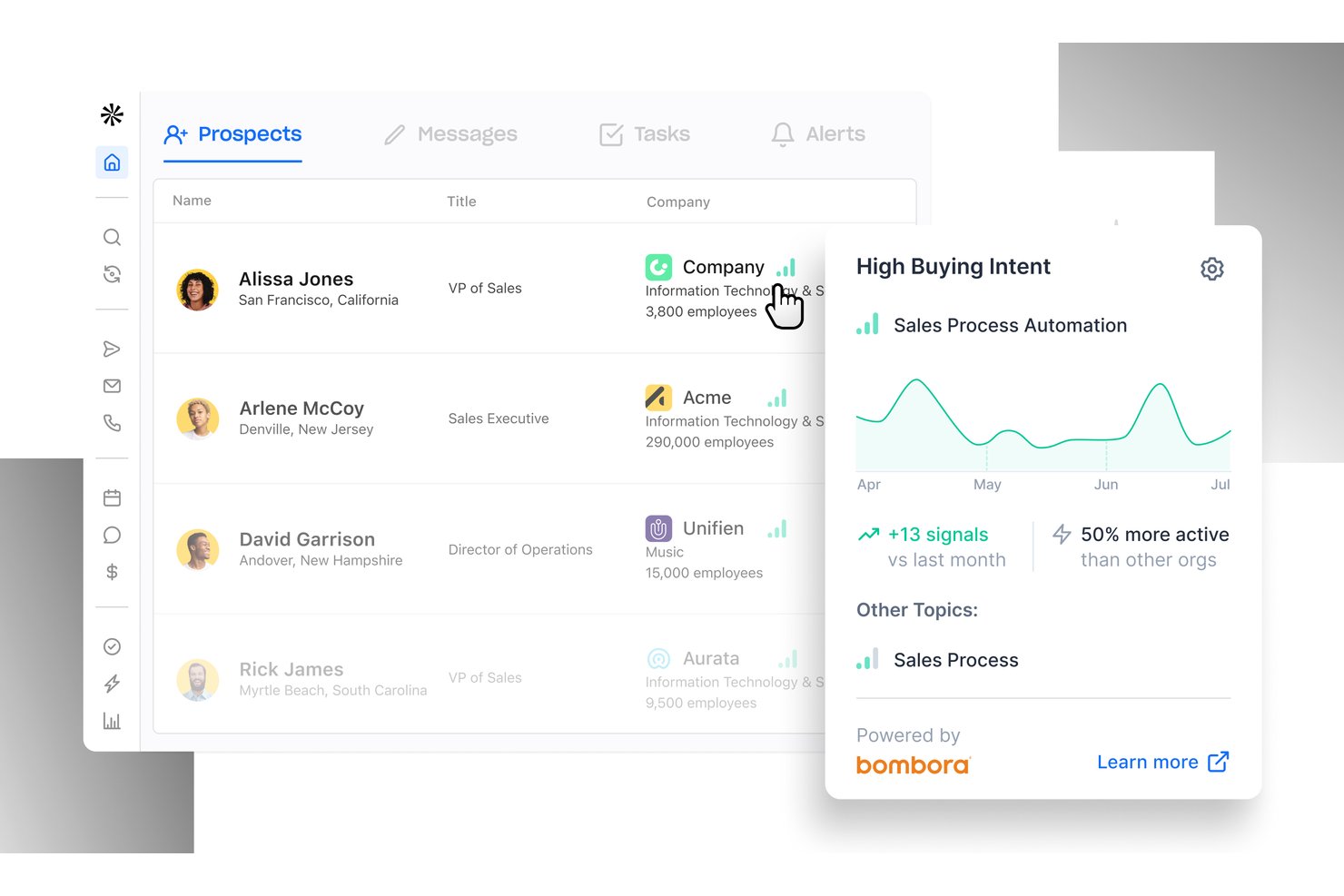
Apollo.io is an AI-powered sales intelligence and engagement platform that combines a 210M+ contact B2B database, multi-channel outreach sequences, a built-in power dialer, and automated lead routing in a single workspace.
Who Is Apollo.io Best For?
Apollo.io suits SDR teams and inside sales managers at SMB and mid-market B2B companies that run high-volume outbound prospecting.
Why I Picked Apollo.io
Apollo.io earns its spot on my shortlist because of how tightly its meeting scheduler connects to the rest of the outreach workflow. When a prospect clicks a booking link from an Apollo sequence, the platform automatically advances the deal stage in HubSpot or Salesforce and queues a follow-up task for the rep. I also like the Inbound Lead Router, which scores and assigns incoming leads based on real-time buying signals before a rep ever picks up the phone.
Apollo.io Key Features
- AI email personalization: Automatically generate tailored outreach messages and subject lines based on prospect data and engagement history.
- Local presence dialing: Dynamically match outbound caller ID to the prospect’s area code to boost pickup rates.
- Sales playbooks and scripts: Surface dynamic call scripts and objection-handling guides within the dialer during live conversations.
- Buyer intent signals: Track web and behavioral intent data to trigger timely prospect engagement and cadence enrollment.
Apollo.io Integrations
Apollo.io offers native integrations with Salesforce, HubSpot, Outreach, Salesloft, Pipedrive, Zoho CRM, and Slack, and it connects with Zapier. An API is available for custom integrations.
Pros and Cons
Pros:
- Native power dialer with voicemail drop included
- AI-driven email personalization scales outbound cadences
- Built-in prospecting database removes separate data subscriptions
Cons:
- Analytics reporting less advanced than dedicated competitors
- Contact data accuracy inconsistent outside North America

Gong
Best for having the largest integration ecosystem on the market

As a revenue intelligence platform, Gong.io captures all customer interactions from every channel to deliver insights that are designed to help your sales representatives close more deals. With customer data from every call, email, and SMS, Gong runs all essential touchpoints through their AI revenue engine to provide strategy that improves productivity and deals.
Why I picked Gong.io: The main reason Gong caught my eye was their integration capabilities. With one of the most comprehensive integration solutions, Gong can automatically capture and update all data across your entire tech stack to improve visibility across every team and every deal. You can also connect Gong to your power dialer and collect call recordings, customer information, and phone numbers.
Gong.io Standout Features and Integrations
Standout features include a custom coaching program based on your data with actionable guidance for the team and Smart Trackers that can train Gong’s AI to pick up on essential concepts across all customer interactions.
Integrations include Apollo.io, Chili Piper, Conquer, Gainsight, Highspot, HubSpot CRM, Klue, Lessonly, Salesforce, Slack, and Zoom. Gong has over 100 native integrations with more coming soon.
Pros and Cons
Pros:
- Massive selection of integrations
- Quick to learn how to use
- Very easy to implement
Cons:
- Limited training from the Gong team
- There are occasional transcription errors

Mixmax
Best for reducing missed opportunities by prioritizing high-value activities

As a general sales productivity app, Mixmax prioritizes email communication and workflow automation with email tracking, templates, CRM sync, nurture sequences, and one-click scheduling. This platform is an online solution that provides more flexibility for email communication with leads.
Why I picked Mixmax: This solution is on my list because of the way it measures revenue generating activities. The interactive reports and dashboards help you track which social media and other communications are getting the most engagement and push these tactics through to the rest of your team to enhance lead generation and increase conversion rates.
Mixmax Standout Features and Integrations
Standout features include sales engagement tracking with actionable insights that help you develop a better-performing sales playbook and one-click meeting scheduling with automated reminders to ensure better attendance.
Integrations include Box, Dropbox, Giphy, Github, Gong, Google Calendar, Markdown, Salesforce, Slack, Twitter, and Zoom.
Pros and Cons
Pros:
- Intuitive navigation and clean interface
- Easy to learn and use
- Combines scheduling, analytics, and email tracking
Cons:
- Meeting planning with outside platforms is clunky
- Video conferencing links are not auto-generated

Outreach
Best for creating and closing the sales pipeline

As a comprehensive sales management platform, Outreach strives to integrate conversational intelligence, sales engagement, and revenue intelligence all in one place. This platform was designed as a single source of truth for all sales activities. Sales reps should be able to find everything they need here, including engagement tools, mutual action plans, coaching, deal insights, and sales forecasting.
Why I picked Outreach: This platform caught my eye because of a feature called Mutual Action Plans. With this tool, Outreach aims to build buyer trust and de-risk your deals. Salespeople can use it to digitally collaborate with all stakeholders, allowing any sales plan to evolve with everyone’s needs. This space also acts as a central repository for a deal, so even if stakeholders or team members change, they can still get up to speed right away.
Outreach Standout Features and Integrations
Standout features include an inside sales team dashboard that shows active opportunities and allows the rep to edit close dates, deal values, next steps, and sales stages for every open opportunity and an engagement timeline that shows buyer and seller activities, including meetings, emails, and calls.
Integrations include Constant Contact, Copper, Gmail, HubSpot, Linkedin Sales Navigator, Mailchimp, Microsoft 365, Okta, Rippling, Robly, and Salesforce. All integrations are bi-directional.
Pros and Cons
Pros:
- Comprehensive array of tools and features
- Global capabilities with time zone and language options
- Intuitive user interface for easy navigation
Cons:
- Steep learning curve if you’re not tech-savvy
- Complexity of the tool can be difficult to navigate

Velocify
Best for closing and managing mortgage deals

As a cloud-based CRM application that incorporates email marketing, telecommunications, sales management, scheduling, and customer management, Velocify offers a massive array of tools in one platform. Currently, Velocify has Pulse® for Salesforce integration, LeadManager Enterprise™ for outreach management, and Dial-IQ® as your outbound sales dialer.
Why I picked Velocify: I added this platform to my list of inside sales software because they bill themselves as a solution for today’s modern mortgage market. They offer their software as part of the ICE Mortgage Technology® Platform to enhance your sales automation, keep your team organized, and prioritize the activities that help your sales reps close more deals.
Velocify Standout Features and Integrations
Standout features include broker and seller portals that allow you to collaborate with wholesale customers, automated underwriting solutions with Fannie Mae and Freddie Mac, and an online customer portal that allows them to fill out an application, engage with their loan officer, and e-sign documents.
Integrations include Adobe Commerce, Constant Contact, Eventbrite, Gong, GoTo Webinar, HubSpot, iContact, Keap, Mailchimp, and Marketo Engage.
Pros and Cons
Pros:
- User-friendly learning process and intuitive navigation
- Competitive pricing when compared to similar software
- Comprehensive customization options for every need
Cons:
- Takes a lot of effort to custom configure the software
- Dialer option has a lag when used remotely
Lusha
Best ISO 27701-certified sales intelligence solution

This web-based sales solution is designed to help your organization prospect, qualify, and reach leads with dynamic, accurate data. As the only ISO-certified sales intelligence platform, Lusha empowers your team to tap into their prospecting tools to build and update contact lists with bulk enrichment through custom filters, alerts, and rules.
Why I picked Lusha: What made this platform stand out to me is its prospecting capabilities. Using the contact searching and data verification tools, you can get a list of up to 1,000 leads that connect you directly with decision-makers.
Lusha Standout Features and Integrations
Standout features include intent reports that identify a company’s willingness and readiness to buy your product, job change filters and alerts so you can reach out to warm leads who already know your product, and data enrichment that includes company name, location, industry, size, and technology.
Integrations include Bullhorn, Gmail, HubSpot, Microsoft Dynamics, Outlook, Outreach, Pipedrive, Salesforce, SalesLoft, Zapier, and Zoho.
Pros and Cons
Pros:
- Chrome extension for instant contact information
- User-friendly and intuitive navigation
- Up-to-date contact information and enrichment
Cons:
- Limited tutorials and support
- Credit-based app use


This platform is an all-in-one sales intelligence solution that provides you with the tools you need to find new leads and engage new prospects. With a database of over 200 million contacts and 30 million companies, all you need to do to find new leads is build your ideal buyer profile and apply those filters to search the database.
Why I picked Apollo: I like the Apollo platform because you get more than just a lead generation database. This solution takes sales a step farther with a massive template library that allows you to automate and streamline outreach while customizing emails for more personalized connections.
Apollo Standout Features and Integrations
Standout features include a pre-built suite of reports and dashboards that showcase granular insights about message effectiveness and team productivity, as well as automated CRM enrichment that ensures accurate data across your entire tech stack.
Integrations include Gmail, HubSpot, LinkedIn for Business, Marketo Engage, Microsoft Outlook, Salesforce, SalesLoft, SendGrid, and Zapier.
Pros and Cons
Pros:
- Zapier integration provides access to other apps
- Once trained, the app is easy to use
- Massive existing lead database
Cons:
- Training can take extra time
- Implementation can be challenging
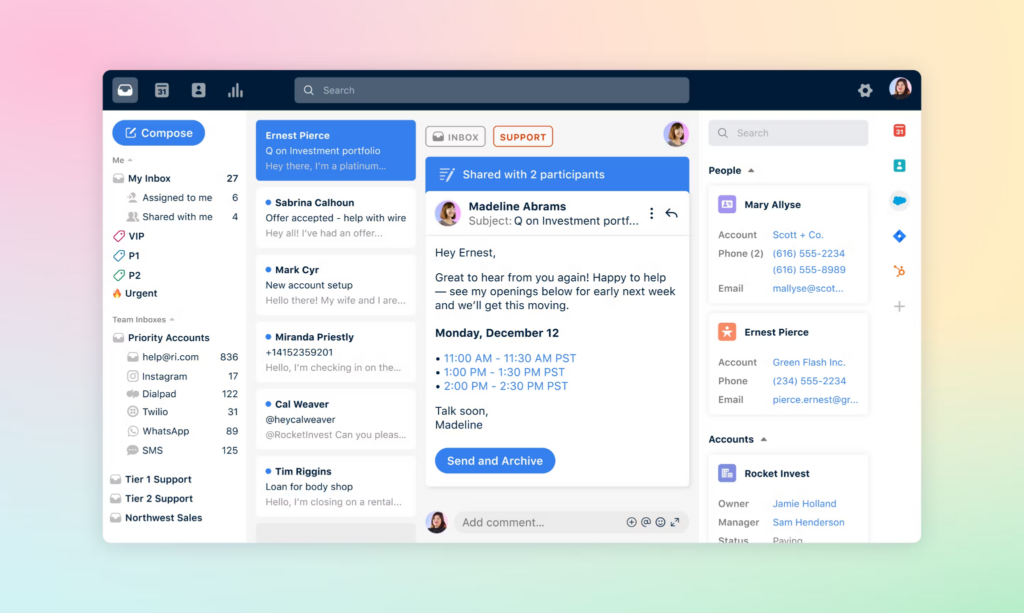
If you’re looking for an inside sales software to support customers and provide help desk solutions to your team, Front is the platform designed to enable sales, support, and account management teams that deliver service at scale. With this software, your team can streamline customer communication, as it combines the efficiency of a help desk with the visual and navigational elements of email.
Why I picked Front: While Front may seem like an after-sales software that’s focused on customer nurturing, it actually also provides an inbound sales solution with centralized, multi-channel communication and automated routing that ensures leads and prospects can connect with the right people.
Front Standout Features and Integrations
Standout features include collaboration functionalities that allow you to quickly loop in team members or bosses for faster solutions and approvals, as well as customer history and data pulled from bi-directional integrations with your CRM.
Integrations include Asana, DropBox Business, Gmail, HubSpot, Microsoft 365, Salesforce, Slack, Trello, WhatsApp, Zapier, and Zoom Meetings.
Pros and Cons
Pros:
- Versatile pricing for small businesses and enterprise needs
- Intuitive navigation for basic features and functionality
- Easy to learn due to the familiar visuals of an email inbox
Cons:
- Limited keyword search functionality
- Complex features have a steeper learning curve

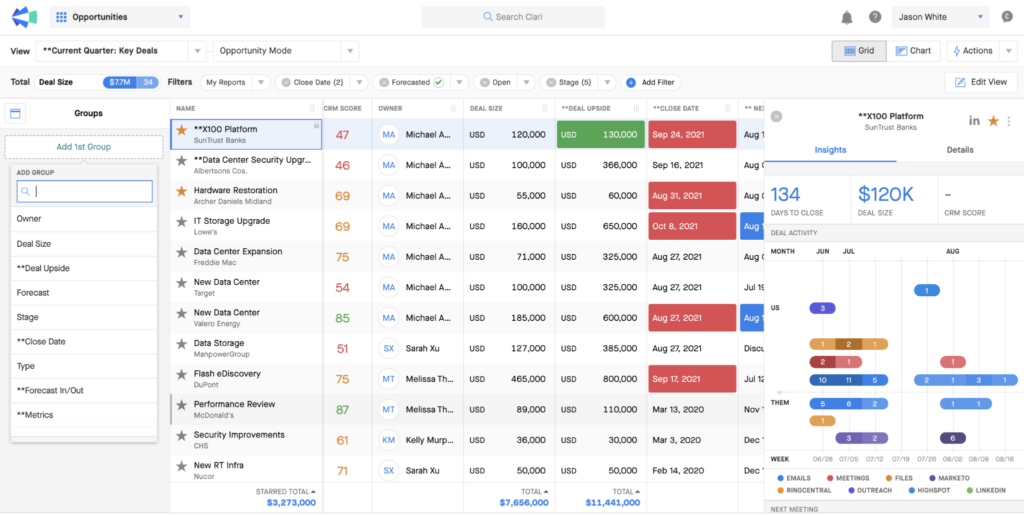
This web-based inside sales software solution can help empower your revenue team to close more deals through conversation intelligence that provides reps and executives the information they need to spot revenue leaks, improve predictability, and align buyers and sellers. The Copilot product, specifically, powers workflows with generative AI and provides proactive, actionable alerts.
Why I picked Clari Copilot: This solution stood out to me because it highlighted the need to unite execs and reps in one place. Their platform provides sales leaders with real-time pipeline status and executives with reporting tools for the board of directors.
Clari Copilot Standout Features and Integrations
Standout features include real-time monologue and battlecards alerts that help sales reps navigate objections from prospects and enterprise grade security that’s SOC 2 Type 2 certified.
Integrations include BlueJeans Meetings, Freshsales, Google Meet, HubSpot CRM, Microsoft Teams, Outreach, Pipedrive, Salesforce Sales Cloud, Slack, and Zoom Meetings.
Pros and Cons
Pros:
- Visual tool for better understanding data
- Intuitive navigation and learning experience
- Highly collaborative tool for top-down execution
Cons:
- Data updates can lag
- Limited information in error messages

Apptivo
Best for all-in-one solutions with sales CRM, project management, and invoicing capabilities

As a sales and marketing tool, Apptivo strives to provide everything you need from a sales engagement platform, including lead management, contact management, campaign management, marketing automation, and an opportunity pipeline with intuitive dashboards.
Why I picked Apptivo: One unique feature that put Apptivo on my radar is the help desk. While many other platforms offer tons of management tools, Apptivo is one of the only ones concerned with customer relationship management from this angle. With these help desk features, you can continue nurturing customer relationships even after you close deals.
Apptivo Standout Features and Integrations
Standout features include CRM tools to track the complete sales process from initial sales call to deal close and expense logging and reporting that are accessible through a mobile app.
Integrations include Dropbox Business, Gmail, Google Drive, Microsoft 365, OneDrive, PayPal, Slack, Stripe, WordPress, and Xero.
Pros and Cons
Pros:
- Outstanding customer service
- Highly customizable during the implementation stage
- Very affordable solution for companies of all sizes
Cons:
- Some API integrations require more work on the back end
- Some limited functionality in the mobile app
Other Inside Sales Software
Here are some additional inside sales software options that didn’t make it onto my shortlist, but are still worth checking out:
- Kixie Powercall
For advanced sales dialing and outreach
- ExecVision
Conversation intelligence platform with a proprietary AI-powered engine
- Numerik
For providing salespeople with more targeted direction
- Creatio CRM
For no-code workflow automation
- Really Simple Systems
CRM-focused sales software for small teams
- LeadSquared
Software for lead management and sales tracking features
- Salesloft
Sales software with AI-driven predictability insights
- Bitrix24
For custom workspaces with replacements for other SaaS solutions
- Freshsales
All-in-one option with CRM, outreach, and lead management features
- Pipedrive
Sales software for small companies with pipeline-focused initiatives
- DialedIn
Inside sales software for call center-focused solutions
- Salesforce Sales Cloud
Sales software driven by AI and GPT features


How I Evaluate Inside Sales Software
I evaluate inside sales software across two layers: the baseline a tool must hit—like native dialing and CRM sync—and the differentiators that make one platform better for your team.
Core Functionality (Table Stakes For This List)
When I'm selecting tools for my list, I rank each one on a scale from 0 (does not offer the functionality) to 5 (excels in this area) for each core functionality listed below. Then, I calculate the tool's total score into a percentage. Each tool needs to achieve a minimum total score of 65% to be considered for inclusion.
- Multi-Channel Outreach: I check whether reps can run phone, email, and SMS or social touches from a single workflow instead of toggling between disconnected tools.
- Built-In Sales Dialer: Power or parallel dialing matters here—I look for native dialers with voicemail drop, call recording, and dispositions baked in.
- Sales Cadence Automation: Each tool should let you build multi-step sequences with scheduled triggers, branching logic, and A/B testing across channels.
- CRM Integration: I evaluate bi-directional sync with CRMs like Salesforce and HubSpot, checking that activities, contacts, and opportunities flow both ways in real time.
- Lead Management & Routing: The platform should route inbound and outbound leads to the right rep using rules based on territory, scoring, or round-robin assignment.
- Sales Activity Analytics: I look for dashboards that track rep-level metrics like calls made, connect rates, and cadence conversion so managers can spot gaps fast.
Once I have a list of tools that meet this criteria, I consider what sets each platform apart.
Differentiating Factors (What Sets Vendors Apart)
Here's how I compare and contrast different vendors:
Standout Features
Conversation intelligence is a major differentiator—I look for tools that transcribe calls, flag objection patterns, and surface coaching moments so managers can ramp new reps faster. Local presence dialing also moves the needle because matching caller ID to a prospect's area code lifts connect rates on outbound calls. I evaluate whether a platform offers buyer intent signals, like website visit tracking or third-party intent data, that automatically enroll high-priority prospects into cadences before a competitor reaches them.
Beyond Features
Compliance is a factor I check early. Outbound dialing platforms need to handle DNC list scrubbing and consent management, especially as call regulations tighten across regions. I also evaluate how well a tool fits into an existing RevOps stack—connectors to platforms like LinkedIn Sales Navigator, ZoomInfo, or Gong matter when your reps rely on those daily. Pricing transparency rounds out my evaluation; I look for clear per-seat or usage-based models so RevOps leaders can forecast costs as the team scales.
How to Choose Inside Sales Software
It’s easy to get bogged down in long feature lists and complex pricing structures. To help you stay focused as you work through your unique software selection process, here’s a checklist of factors to keep in mind:
| Factor | What to Consider |
|---|---|
| Scalability | How well will the software grow with your team? Consider if it can handle an increase in users or data without performance issues. |
| Integrations | Does it connect with your existing tools like CRM or email platforms? Check for easy API access or pre-built integrations to save time. |
| Customizability | Can you tailor it to your specific sales processes? Look for options that let you adjust workflows and data fields to suit your needs. |
| Ease of use | Is the interface user-friendly for your team? A simple, intuitive design reduces training time and speeds up adoption. |
| Implementation and onboarding | How long does it take to get set up? Evaluate the resources provided for onboarding, such as tutorials and support, to ensure a smooth transition. |
| Cost | Are the pricing plans clear and within your budget? Consider the total cost of ownership, including any hidden fees or add-ons. |
| Security safeguards | Does it comply with your security standards? Look for encryption, data privacy features, and compliance with regulations like GDPR. |
| Support availability | When can you reach support if issues arise? Ensure there’s adequate support during your business hours, whether via chat, phone, or email. |
Trends In Inside Sales Software For 2026
Inside sales software continues to evolve rapidly, reflecting broader trends in sales technology and the growing sophistication of revenue operations. These advancements are driven by a demand for greater efficiency, deeper insights, and a more personalized sales approach. Analyzing recent product updates, press releases, and release logs reveals several key trends shaping the future of inside sales software.
Evolving Features and Technologies
- Integration of AI and Machine Learning: AI functionalities are increasingly being integrated to provide predictive analytics, lead scoring, and automated customer interaction insights, helping sales teams to prioritize their efforts more effectively.
- Enhanced Automation: Automation features are expanding beyond simple task automation to include more advanced aspects of the sales process, such as automated outreach and follow-ups based on customer behavior or engagement metrics.
- Increased Focus on Data Analytics: There is a clear trend towards more sophisticated data analytics capabilities, enabling sales teams to leverage data for strategic planning, performance tracking, and real-time decision-making.
Most Important and In-Demand Features
- CRM Integration: Seamless integration with CRM systems remains crucial, as it ensures that sales teams have access to comprehensive customer data, enabling more informed interactions and strategies.
- Collaboration Tools: Features that enhance collaboration among sales team members, even in remote or hybrid environments, are increasingly important, facilitating the sharing of insights and strategies.
Novel and Unusual Functionality
- Voice and Sentiment Analysis: Some of the most novel features include the ability to analyze voice tones and sentiments in sales calls, providing sales reps with deeper insights into customer emotions and reactions.
Features Losing Ground
- Standard Reporting: Basic reporting functionalities are becoming less valued as users seek more advanced analytics that offer deeper insights and actionable intelligence.
- Rigid, One-Size-Fits-All Solutions: There is a declining interest in inflexible software solutions, as businesses increasingly look for customizable and scalable tools that can adapt to their evolving needs.
For revenue operation leaders, staying on top of these trends is important for selecting software that not only addresses current needs but is also poised to adapt to future sales landscapes. As such, prioritizing software with advanced analytics, AI integration, and personalization capabilities will be key to driving sales success in the evolving digital marketplace.
What Is Inside Sales Software?
Inside sales software is a tool that helps sales teams connect with customers without meeting in person. It lets you manage leads, track sales pipelines, make calls, send emails, and automate routine tasks—all from your computer. Sales reps, managers, and anyone handling remote selling use this to stay organized, keep up with prospects, and close deals faster, whether they're in the office or working from home.
Features
When selecting inside sales software, keep an eye out for the following key features:
- Lead tracking: Helps you monitor and manage potential customers throughout the sales pipeline.
- Contact management: Organizes and stores contact information for easy access and communication.
- Sales forecasting: Provides insights and predictions to help plan future sales activities and targets.
- Email integration: Connects with email platforms to streamline communication and follow-ups.
- Reporting and analytics: Offers data-driven insights to evaluate sales performance and strategies.
- AI-driven insights: Uses artificial intelligence to provide recommendations and optimize sales efforts.
- Customizable dashboards: Allows you to tailor your interface to display relevant metrics and data.
- Mobile app availability: Enables sales activities and updates on the go, ensuring flexibility.
- Automated workflow triggers: Saves time by automating repetitive tasks and processes.
- Security safeguards: Protects sensitive customer data and complies with privacy regulations.
Benefits
Implementing inside sales software provides several benefits for your team and your business. Here are a few you can look forward to:
- Improved efficiency: Automated workflows reduce manual tasks, freeing up time for more strategic activities.
- Better organization: Centralized contact management keeps all customer information in one place for easy access.
- Enhanced communication: Email integration ensures timely follow-ups and consistent interactions with leads.
- Data-driven decisions: Reporting and analytics provide insights to make informed sales strategies and adjustments.
- Increased flexibility: Mobile app availability allows sales teams to work and update information from anywhere.
- Accurate predictions: Sales forecasting helps in setting realistic targets and anticipating market trends.
- Secure data handling: Security safeguards protect customer information and maintain compliance with regulations.
Costs & Pricing
Selecting inside sales software requires an understanding of the various pricing models and plans available. Costs vary based on features, team size, add-ons, and more. The table below summarizes common plans, their average prices, and typical features included in inside sales software solutions:
Plan Comparison Table for Inside Sales Software
| Plan Type | Average Price | Common Features |
|---|---|---|
| Free Plan | $0 | Basic contact management, lead tracking, and email integration. |
| Personal Plan | $5-$25/user/month | Advanced contact management, basic analytics, and limited customization options. |
| Business Plan | $30-$60/user/month | Full analytics, custom dashboards, mobile app access, and automated workflows. |
| Enterprise Plan | $70+/user/month | Advanced security features, full customization, priority support, and comprehensive reporting tools. |
Inside Sales Software FAQs
Here are some answers to common questions about inside sales software:
What are the types of inside sales software?
There are several types of inside sales software, each catering to different aspects of the sales process. Understanding these types can help organizations choose the right tools to enhance their sales operations:
- CRM (Customer Relationship Management) Software:
- Centralizes customer data and interactions, providing sales teams with detailed insights into customer behaviors and preferences. This software type is essential for managing leads, opportunities, and customer accounts.
- Sales Engagement Platforms:
- These platforms automate and optimize customer interactions across various channels, including email, phone, and social media. They provide features like email templates, call scripts, and activity tracking to enhance engagement efficiency.
- Dialer Software:
- Specifically designed for making and managing calls, dialer software can automate dialing processes, record calls, and provide analytics on call outcomes, helping sales teams maximize their phone-based outreach. There are several types of dialer software available, including sales dialer tools and auto-dialer software.
- Sales Automation Tools:
- These tools automate repetitive tasks within the sales process, such as follow-ups, scheduling, and updating sales records, allowing sales reps to focus more on selling and less on administrative tasks.
- Email Tracking Software:
- This software provides insights into how recipients interact with sent emails, offering metrics like open rates, click rates, and reply rates, which can inform follow-up strategies and content optimization.
- Sales Analytics and Performance Management:
- These tools offer detailed analytics and reporting features that help sales managers track performance, identify trends, and make data-driven decisions to improve sales strategies and outcomes.
- Sales Training and Onboarding Software:
- Designed to accelerate the training and ramp-up time for new sales reps, these tools provide educational content, simulations, and progress tracking to enhance sales skills and product knowledge.
- Proposal and Quote Management Software:
- These tools streamline the creation, sending, and tracking of sales proposals and quotes, ensuring accuracy and consistency while enabling faster turnaround times for closing deals.
By selecting the appropriate mix of inside sales software, organizations can optimize their sales processes, improve rep productivity, enhance customer engagement, and ultimately drive higher sales performance.
How secure is my data with inside sales software?
Inside sales software providers typically implement security measures like encryption and data privacy protocols to protect your information. It’s essential to verify that the software complies with relevant regulations, such as GDPR, to ensure data safety. Always review the provider’s security policies and consider additional safeguards, like two-factor authentication, for enhanced protection.
How does inside sales software speed up deal cycles?
Look for automated follow-ups, task triggers, and deal alerts. These features help your team close faster with less manual work.
What metrics should we track in inside sales software?
Monitor lead response time, deal speed, and activity volume. These show if the software improves your team’s workflow.
What’s Next:
If you're in the process of researching inside sales software, connect with a SoftwareSelect advisor for free recommendations.
You fill out a form and have a quick chat where they get into the specifics of your needs. Then you'll get a shortlist of software to review. They'll even support you through the entire buying process, including price negotiations.