
25 Best Sales Onboarding Software Reviewed For 2026

10 Best Sales Onboarding Software Shortlist
Here's my pick of the 10 best software from the 25 tools reviewed.


With so many different sales onboarding software available, figuring out which is right for you is tough. You know you want to equip new hires with the skills and knowledge required for their sales roles effectively and efficiently but need to figure out which tool is best. I've got you! In this post I'll help make your choice easy, sharing my personal experiences using dozens of different sales onboarding tools with various new hires, with my picks of the best sales onboarding software.
Why Trust Our Software Reviews
We’ve been testing and reviewing RevOps software since 2022. As RevOps leaders ourselves, we know how critical and difficult it is to make the right decision when selecting software.
We invest in deep research to help our audience make better software purchasing decisions. We’ve tested more than 2,000 tools for different RevOps use cases and written over 1,000 comprehensive software reviews. Learn how we stay transparent & our software review methodology.
Best Sales Onboarding Software Summary
This comparison chart summarizes pricing details for my top sales onboarding software selections to help you find the best one for your budget and business needs.
| Tool | Best For | Trial Info | Price | ||
|---|---|---|---|---|---|
| 1 | Best for AI-powered roleplays | Free trial available | Pricing upon request | Website | |
| 2 | Best for efficient employee onboarding | Free 14-day trial + free demo available | Pricing upon request | Website | |
| 3 | Best for customizable sales automation | Free trial available | From $12/seat/month (billed annually) | Website | |
| 4 | Best for corporate eLearning automation | 30-day free trial available | From $3.97/user/month | Website | |
| 5 | Best for AI roleplay coaching | 14-day free trial | From $79/month or $2/users (minimum 40 users) | Website | |
| 6 | Best for structured sales training paths | Free plan available | From $119/month | Website | |
| 7 | Best for an intuitive learner experience | Free trial + free demo available | Pricing upon request | Website | |
| 8 | Best sales onboarding software for SOP documentation | Free demo available | Pricing upon request | Website | |
| 9 | Best sales onboarding software for ease of use | Free demo available | Pricing available upon request | Website | |
| 10 | Best for creating onboarding guides with AI | Free 7-day trial + free plan + free demo available | From $18/creator/month (billed annually) | Website |


-

Pipedrive CRM
Visit WebsiteThis is an aggregated rating for this tool including ratings from Crozdesk users and ratings from other sites.4.3 -
Creatio CRM
Visit WebsiteThis is an aggregated rating for this tool including ratings from Crozdesk users and ratings from other sites.4.7 -
monday CRM
Visit WebsiteThis is an aggregated rating for this tool including ratings from Crozdesk users and ratings from other sites.4.6




Best Sales Onboarding Software Reviews
Below are my detailed summaries of the best sales onboarding software that made it onto my shortlist. My reviews offer a detailed look at the key features, pros & cons, integrations, and ideal use cases of each tool to help you find the best one for you.

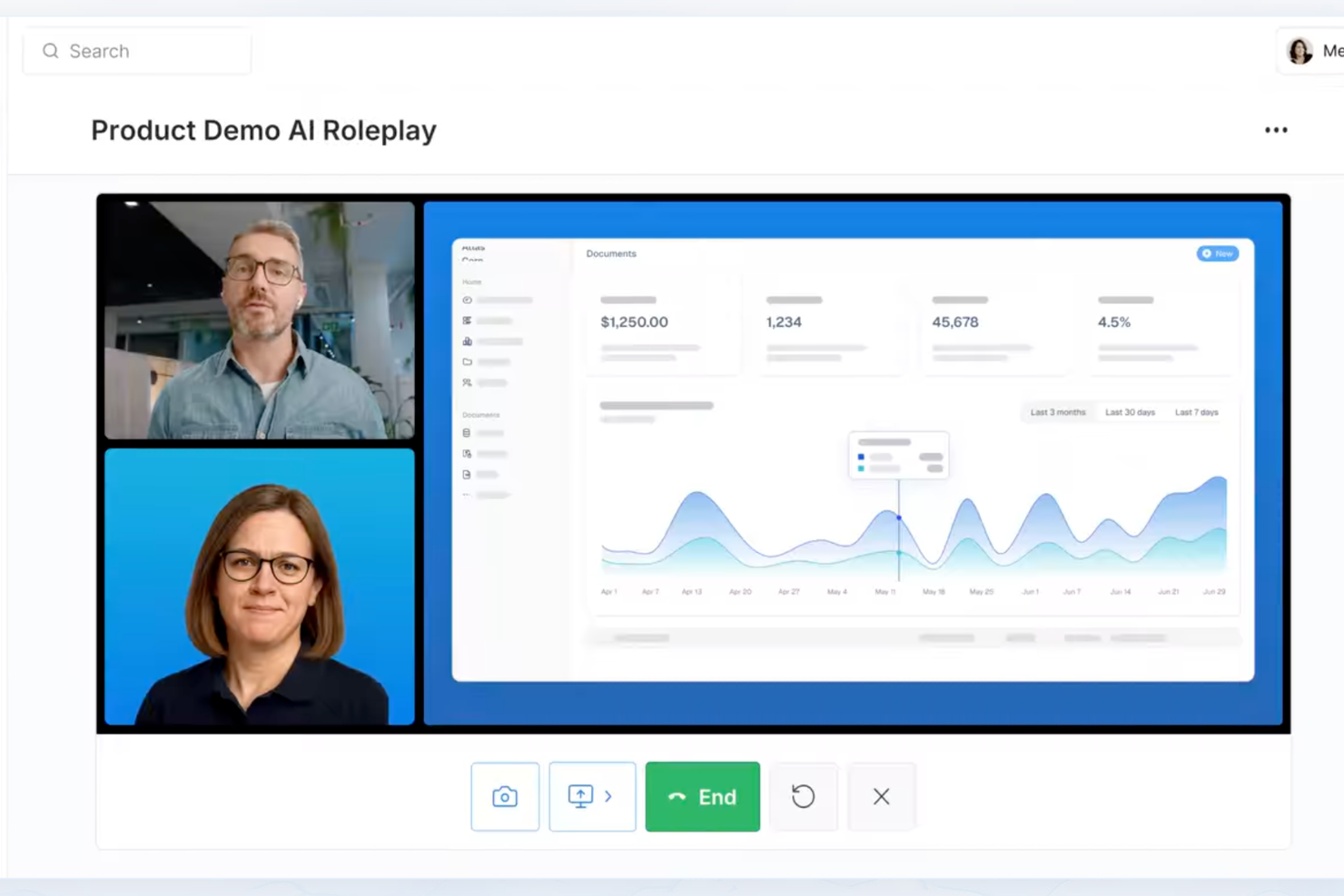
For sales teams that need a stronger onboarding solution, Exec offers a platform built around AI-driven simulations and personalized practice. It works well for enterprises focused on improving performance in high-stakes sales conversations. By analyzing real interactions and tracking measurable progress, Exec helps close the gap between training and real-world execution.
Why I Picked Exec
I chose Exec for its focus on AI-powered roleplays that simulate real sales conversations, giving your team a safe place to practice and refine their skills. It also includes call scoring, which pinpoints specific areas for improvement. The customizable learning paths let you tailor training to your team’s needs, so each person gets relevant, targeted practice. Together, these features support sales onboarding tied to measurable performance gains.
Exec Key Features
In addition to its AI-driven simulations, Exec offers several other features that make it a valuable tool for sales onboarding.
- Call Scoring: Analyzes recorded calls to identify skill gaps and coaching opportunities, helping you target areas that need improvement.
- Customizable Learning Paths: Allows you to create tailored training programs that align with your team's specific goals and challenges.
- Progress Analytics: Provides detailed insights into your team's development, tracking progress and ROI to ensure training effectiveness.
- High Program Completion Rate: Exec boasts a 92% completion rate, reflecting its engaging and effective training approach.
Exec Integrations
Native integrations are not currently listed by Exec.
Pros and Cons
Pros:
- Built-in call scoring insights
- Customizable onboarding learning paths
- Realistic AI-powered sales simulations
Cons:
- No publicly listed native integrations
- Setup may require admin configuration


SkyPrep is an an intuitive and easy-to-use award-winning online training software that offers a variety of features such as learner engagement, course creation, user management, reporting and analytics, and customization. It is best known for its efficient employee onboarding solution, which helps new hires get up to speed quickly and be productive from day one.
Why I picked SkyPrep: I chose SkyPrep because it provides a highly customized and efficient onboarding training program that is designed to help new employees quickly understand their roles and the company's culture. What makes SkyPrep stand out is its focus on delivering role-focused training in an engaging manner, which is crucial for equipping new hires with the necessary tools and knowledge to be productive from the start.
Skyprep Standout Features & Integrations
Features include an intuitive course builder that empowers users to create engaging training content without the need for technical expertise. The drag-and-drop interface, multimedia support, and customizable assessments enable organizations to design interactive courses tailored to their specific needs.
Users can also take advantage of SkyPrep's partnership with OpenSesame for access to thousands of pre-built courses across various industry verticals and topics.
Integrations include Okta, SAML, onelogin, Stripe, PayPal, Shopify, ADP, Workday, Salesforce, HubSpot, Zoom, GoTo, Webex, G Suite, Office 365, Twilio, iorad, UKG, and more.
Pros and Cons
Pros:
- Branding personalization
- Customizable workflow automations
- User-friendly interface
Cons:
- Pricing structure may not work for all org sizes
- Minimal advanced reporting functionality


Monday sales CRM is a fully customizable tool that centralizes client communication, automates sales processes, and provides a full overview of each deal. Its unique selling proposition is its ability to be tailored to fit the specific sales cycle of each user, making it the best choice for custom workflows.
Why I picked Monday sales CRM: Monday.com excels as a sales onboarding software by streamlining the integration of new sales reps into the team's workflow and culture. Its intuitive design and customizable templates make it easy for newcomers to understand the sales process, track their tasks, and manage their pipelines from day one. The platform's collaborative environment encourages interaction and learning, allowing seasoned team members to share insights and resources efficiently.
Automation features reduce the learning curve by handling routine tasks, enabling new hires to focus on more strategic activities and customer engagement early on. With its ability to track progress and performance, monday.com not only facilitates a smooth onboarding experience but also accelerates the time it takes for new sales reps to become productive members of the team, all while fostering a sense of belonging and teamwork.
Monday sales CRM Standout Features and Integrations
Features include a highly collaborative environment that extends beyond the sales team to include marketing, customer support, and product development teams within the same workspace. This cross-functional visibility is unusual in traditional CRMs, which often silo information within departments. By breaking down these barriers, Monday.com facilitates a more cohesive approach to customer relationship management.
Integrations include project management apps like Slack, Google Drive, Gmail, Google Calendar, Jira, GitHub, Trello, Dropbox, Typeform and many more, accessible through a paid plan with Zapier.
Pros and Cons
Pros:
- Integrated automation tools
- Enables cross-functional collaboration
- Known for its intuitive and visually appealing interface
- Highly customizable workflows and dashboards
Cons:
- Sales CRM dosen't have a free plan
- Vast array of features can be overwhelming for new users
New Product Updates from monday CRM

monday CRM Introduces Activity Tracker Widget
monday CRM introduces an Activity Tracker widget for real-time visibility into activities. This update helps users monitor performance and prioritize work more effectively. For more information, visit monday CRM's official site.


iSpring LMS is a learning management system (LMS) that facilitates corporate training by providing a platform for eLearning.
Why I picked iSpring LMS: iSpring LMS provides a platform where companies can create effective onboarding programs and automatically assign them to new sales representatives. This enables a faster learning process, ensuring that newcomers have a better grasp of their roles and responsibilities.
The platform includes interactive courses, role-plays, and quizzes designed to develop sales communication skills. It also allows for the assessment of team strengths and weaknesses through comprehensive reports. The tool is used across various industries to improve sales team growth and performance, offering 24/7 access to training content and support resources such as online training software and microlearning options.
iSpring LMS Standout Features and Integrations
Standout features include an eLearning authoring toolkit, compliance training, industry-specific and case-specific solutions, and a learning management system that includes user management, content organization, and automation of routine tasks like enrollment.
Integrations include Microsoft Teams, Zoom, Salesforce, Shopify, BambooHR, Outlook Calendar, ProctorEdu, PowerBI, OrangeHRM, and Bitrix24.
Pros and Cons
Pros:
- Easy-to-use interface
- Provides a user self-registration feature
- Includes native iOS & Android apps for offline access
Cons:
- Some problems with importing data
- Lacks gamification elements
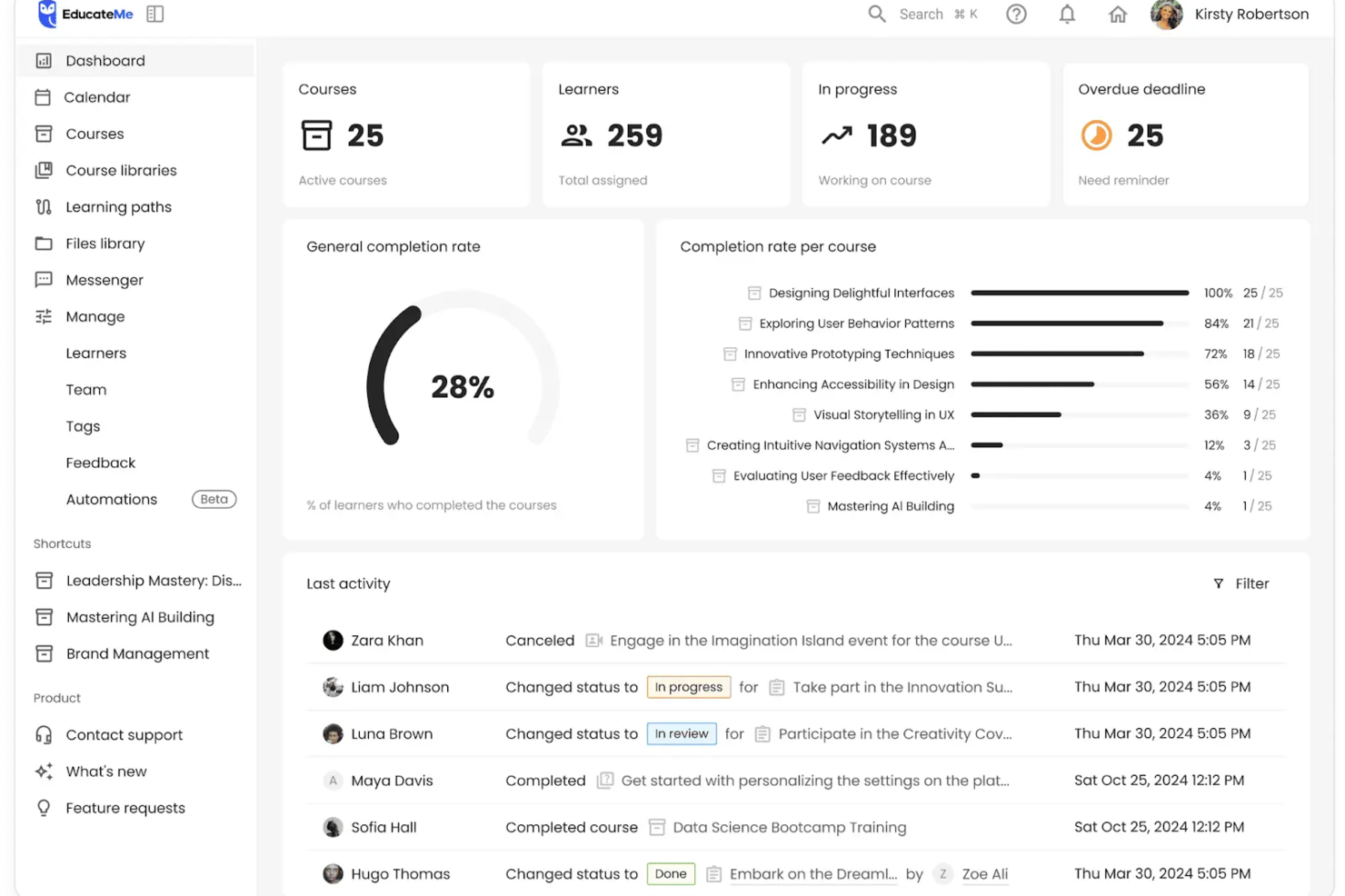
For those seeking a solution to streamline sales onboarding, EducateMe LMS presents a compelling option. Tailored for corporations and training agencies, it offers specialized features like AI roleplay coaching and real-time analytics to address the challenges of effective onboarding. This platform not only enhances the learning experience but also simplifies the onboarding process, making it an attractive choice for businesses looking to optimize their sales training efforts.
Why I Picked EducateMe LMS
I picked EducateMe LMS for its unique approach to sales onboarding, particularly through its AI roleplay coaching. This feature allows your team to simulate real-world sales scenarios, providing invaluable practice and feedback. Additionally, the platform's real-time analytics offer insights into each learner's progress, enabling you to tailor training to individual needs. These capabilities align well with the goal of creating a dynamic and responsive sales onboarding experience.
EducateMe LMS Key Features
In addition to its AI roleplay coaching and analytics, EducateMe LMS offers several other features that enhance sales onboarding.
- Content Creation Tools: These allow you to design customized training materials tailored to your sales team's needs.
- Collaborative Learning Environment: Facilitates team-based learning and knowledge sharing, fostering a culture of continuous improvement.
- White-label Solutions: Enables you to brand your training materials, providing a consistent and professional appearance.
- Interactive Activities: Engage your team with quizzes and simulations that reinforce learning and retention.
EducateMe LMS Integrations
Integrations include popular tools like Slack, Zoom, Salesforce, Microsoft Teams, Google Workspace, HubSpot, Mailchimp, Shopify, WordPress, and Trello.
Pros and Cons
Pros:
- Customizable learning paths align training with sales roles
- Real-time analytics track onboarding progress and performance gaps
- AI roleplay simulations support practical sales skill development
Cons:
- Advanced configuration may require initial setup time
- Pricing may be steep for some
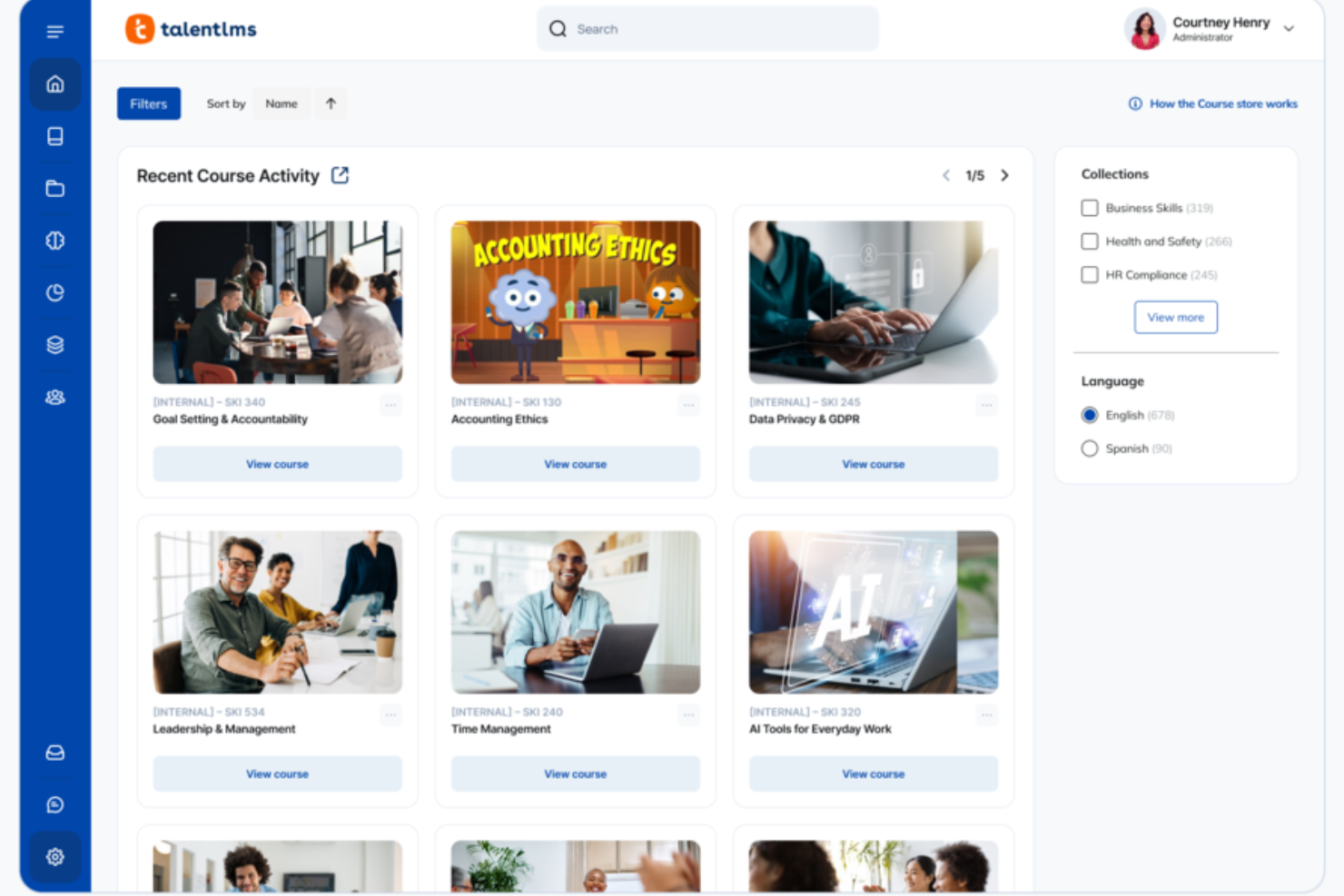
TalentLMS gives your revenue organization a structured way to onboard new reps without overwhelming them or your sales managers. If you’re trying to build consistent product knowledge, repeatable workflows, and a predictable ramp timeline, the platform helps you organize the entire learning journey in one place.
Why I Picked TalentLMS
I picked TalentLMS because it gives you the control and structure you need to deliver repeatable, role-specific sales onboarding at scale. Its user groups, branches, and custom roles let you tailor onboarding tracks for SDRs, AEs, and CS teams without duplicating work. I also like that you can build blended programs—mixing product training, pitch practice, SCORM content, and live sessions—to match how reps learn best. And with automation rules and real-time reporting, you always know who’s ready to ramp, who needs coaching, and where onboarding timelines are slipping.
TalentLMS Key Features
Aside from the structured onboarding tools I mentioned earlier, you also get several features that help your sales training run smoothly:
- TalentLibrary™: Access to over 1,000 curated courses that can be used to enhance your sales training programs.
- Gamification: Introduces elements like badges and points to keep your sales team engaged and motivated throughout their training.
- AI Content Creator: Generate product explainers, pitch scenarios, onboarding modules, and flashcards in minutes without relying on L&D bandwidth.
- Reporting Tools: Provides detailed analytics on training progress and completion, helping you to track the effectiveness of your onboarding efforts.
TalentLMS Integrations
Integrations include Salesforce, Shopify, WordPress, Zoom, Microsoft Teams, GoTo, BigBlueButton, BambooHR, ADP Workforce Now, and HubSpot.
Pros and Cons
Pros:
- AI tools speed up creating product and sales skills content.
- Role-based groups deliver tailored sales training by segment.
- Gamification boosts engagement for competitive sales teams.
Cons:
- Video practice and role-play tools aren’t built in natively.
- Large multimedia files may require external hosting solutions.
New Product Updates from TalentLMS
TalentLMS Introduces Save Course Feature
TalentLMS now lets learners bookmark their courses so they can easily revisit them at any time. For more information, visit TalentLMS's official site.


Absorb LMS is a comprehensive learning management system that offers a range of features and products to deliver impactful eLearning, enhance the learner experience, and dive deeper into learner data. With a focus on learner engagement, smart administration, and a variety of content libraries, Absorb LMS provides an intuitive learner experience, making it the best choice for organizations looking to prioritize the learner's needs and engagement.
Why I picked Absorb: I chose Absorb LMS after carefully comparing its extensive features and use cases against other options. Its comprehensive suite of tools, including smart administration, learner engagement, and robust reporting & analytics, positions it as a strong contender in the realm of sales onboarding.
Absorb LMS Standout Features and Integrations
Features include content creation, user administration, AI-driven recommendations, eCommerce, analytics, instructor-led training, and performance tracking.
Integrations are available natively with multiple apps, including BambooHR, Ceridian Dayforce, Cisco Webex, Namely, Oracle Peoplesoft, Salesforce, Workday, and Zoom.
Pros and Cons
Pros:
- Offline and online learning
- Great customization and localization options
- Responsive customer support
Cons:
- Search filters are not very specific
- System has a learning curve
New Product Updates from Absorb LMS
Absorb LMS Improves Analyze Performance With Faster Sync and Data Model Updates
Absorb LMS introduces improved sync frequency in Analyze Essentials and a streamlined Analyze BI/Direct data model. These updates enhance reporting speed, improve data reliability, and strengthen overall analytics performance. For more information, visit Absorb LMS's official site.
 .
.

Trainual is cloud-based software that helps businesses create training manuals for new or existing employees, customers, contractors, interns, and volunteers. It also helps businesses organize the chaos of onboarding and training.
Why I picked Trainual: I picked Trainual due to its SOP (Standard Operating Procedure) documentation feature. SOPs play a crucial role in onboarding new hires as they provide guidance related to the organization's processes and expectations.
Trainual's built-in AI capabilities can help you create content for SOPs. You can also embed PDFs, GIFs, videos, and other formats. Additionally, it provides a centralized platform for storing all SOPs in one place that sales reps can access easily. The content can be organized into collections based on departments, teams, locations, or any category to make it easy for people to find what they need faster.
Trainual Standout Features and Integrations:
Standout features include the smart time estimates feature that allows users to view the estimated time required for a specific training session.
Integrations include Loom, Quickbooks Payroll, Slack, Justworks, Paylocity, Zenefits, Namely, TriNet, Square Payroll, and Paycom. You can also get additional integrations through Zapier and API.
Pros and Cons
Pros:
- Built-in user walkthroughs and guides
- It offers a huge variety of templates
- Simple and intuitive dashboard
Cons:
- Limited native integrations
- Limited user seats


Continu is a modern learning platform and learning management system (LMS) designed for enterprise organizations to create, track, measure, and share learning initiatives while improving engagement.
Why I picked Continu: Continu is an easy-to-use sales onboarding software offering a centralized employee onboarding and training solution. It has an intuitive and easy-to-navigate interface, which makes it easy for new hires to access and complete the onboarding program.
Your sales rep can easily browse the content using the Explore page, and self-register for courses and workshops. They can also filter content based on location, department, and more. Additionally, Continu integrates with essential workplace tools, such as GSuite, Slack, Zoom, etc.
Continu Standout Features and Integrations
Standout features include real-time analytics, customized reporting, and robust admin and manager features to measure important metrics.
Integrations include Microsoft Teams, Google Meet, Slack, Google Analytics, CreateOne, LinkedIn Learning, Open Sesame, Udemy for Business, Google Calendar, and Zoom.
Pros and Cons
Pros:
- Great authoring tools
- Offers customized reporting
- Easy-to-use interface
Cons:
- No free plan/trial available
- Pricing details are not transparent


Guidde is a generative AI platform for your team to create sales onboarding videos faster. By automating the capture, editing, and distribution of training videos, it generates step-by-step guides in multiple formats that new hires will understand. It is as easy to use as editing presentation slides.
Why I picked Guidde: Guidde's 'magic capture' feature lets you record your workflow with just a click via their web browser plugin or desktop app, and once you complete recording, the AI creates a step-by-step guide in multiple formats such as link, PDF, MP4 and HTML. This is particularly useful for sales onboarding, as it allows you to create detailed guides that new team members can follow to learn sales processes effectively. Additionally, Guidde offers AI-generated voiceovers in multiple languages, which can help you cater to a diverse team and ensure that everyone understands the training material.
I also like its built-in editor, which allows you to customize your guides by adding text annotations, images, multiple calls to action (CTAs), and other elements to highlight important information. This customization ensures that your sales onboarding materials are tailored to your team's specific needs, making the training process more effective. Furthermore, Guidde's analytics feature provides insights into how your team interacts with the guides, helping you identify areas where additional training might be needed.
Guidde Standout Features and Integrations
Standout features include motion and transitions, a background music library, a built-in editor, multi-language support, screen recording (web and desktop), webcam recording, easy share options, multiple CTAs, video privacy controls, video analytic insights, auto-translation, and SSO integration.
Integrations include Salesforce, Google Drive, Microsoft OneDrive, Slack, Zoom, Zendesk, ServiceNow, Chrome, and Confluence.
Pros and Cons
Pros:
- Utilizes AI for automatic storyline creation
- Includes interactive elements and professional voiceovers
- Multilanguage support
Cons:
- Reliance on AI may hinder creativity in content creation
- Some users may find the editing features slightly restrictive
Other Sales Onboarding Software
Here are some additional sales onboarding software options that didn’t make it onto my shortlist, but are still worth checking out:
- MindTickle
Sales onboarding software for reinforced training
- 360Learning
Sales onboarding software for reinforcement
- SmartWinnr
Sales onboarding software for reinforcement
- Lessonly by Seismic
Sales onboarding software for enterprises
- Allego
Sales onboarding software for remote teams
- Workramp
Sales onboarding software for assessments
- Second Nature AI
Sales onboarding software for AI-powered onboarding
- SalesHood
Sales onboarding software for role-based learning
- Wonderway
Sales onboarding software for improving ramp-time
- Gradual
Sales onboarding software for small teams
- Creatio CRM
For no-code customization
- Spekit
Sales onboarding software for real-time on-screen guidance
- Auzmor Learn
Sales onboarding software for adaptive, data-backed learning pathways
- LearnUpon LMS
Sales onboarding software for diverse learning content delivery
- sharpsell.ai
Sales onboarding software for personalized coaching and training


Sales Onboarding Software Selection Criteria
When selecting the best sales onboarding software to include in this list, I considered common buyer needs and pain points like ease of integration with existing systems and user-friendly interfaces. I also used the following framework to keep my evaluation structured and fair:
Core Functionality (25% of total score)
To be considered for inclusion in this list, each solution had to fulfill these common use cases:
- Provide training modules
- Track learner progress
- Integrate with CRM systems
- Offer reporting and analytics
- Support multiple user roles
Additional Standout Features (25% of total score)
To help further narrow down the competition, I also looked for unique features, such as:
- AI-driven personalized learning paths
- Gamification elements
- Interactive quizzes
- Multilingual support
- Mobile app access
Usability (10% of total score)
To get a sense of the usability of each system, I considered the following:
- Intuitive navigation
- Clean interface design
- Customizable dashboards
- Minimal learning curve
- Responsive design
Onboarding (10% of total score)
To evaluate the onboarding experience for each platform, I considered the following:
- Availability of training videos
- Interactive product tours
- Pre-built templates
- Access to webinars
- Chatbot assistance
Customer Support (10% of total score)
To assess each software provider’s customer support services, I considered the following:
- 24/7 support availability
- Live chat options
- Comprehensive help center
- Dedicated account managers
- Community forums
Value For Money (10% of total score)
To evaluate the value for money of each platform, I considered the following:
- Competitive pricing
- Transparent pricing tiers
- Free trial availability
- Discounts for annual plans
- Feature-to-price ratio
Customer Reviews (10% of total score)
To get a sense of overall customer satisfaction, I considered the following when reading customer reviews:
- Overall satisfaction ratings
- Feedback on ease of use
- Comments on customer support
- Testimonials on feature effectiveness
- Reports on software reliability
How to Choose Sales Onboarding Software
It’s easy to get bogged down in long feature lists and complex pricing structures. To help you stay focused as you work through your unique software selection process, here’s a checklist of factors to keep in mind:
| Factor | What to Consider |
|---|---|
| Scalability | Will the software grow with your team? Consider if it can handle more users or features as your sales force expands. |
| Integrations | Does it work well with your existing CRM and other tools? Check compatibility to avoid disruptions in your workflows. |
| Customizability | Can you tailor it to fit your processes? Look for options that allow customization without needing deep technical knowledge. |
| Ease of use | How intuitive is the interface? A user-friendly design reduces training time and boosts adoption rates among new team members. |
| Implementation and onboarding | How long does it take to get up and running? Consider the time and resources your team will need for a smooth transition. |
| Cost | Are pricing plans clear and within your budget? Watch out for hidden fees or costs that could add up over time. |
| Security safeguards | Does it protect your data? Ensure it complies with industry standards and offers robust security features to keep your information safe. |
| Support availability | What support does the vendor offer? Consider availability and response times, especially if you have a global or 24/7 operation. |
Trends In Sales Onboarding Software For 2026
Sales onboarding software is rapidly advancing, shaped by the increasing need for streamlined, efficient, and personalized onboarding experiences that align with broader revenue operation strategies. As organizations strive to maximize their sales potential in a competitive landscape, the role of innovative onboarding tools has become more critical than ever, reflecting a clear trend towards more integrated, adaptive, and user-focused solutions.
Integration and Ecosystem Compatibility:
- Enhanced integration capabilities, ensuring seamless connectivity with existing CRM systems, sales tools, and productivity platforms, facilitating a unified and efficient onboarding process across various software ecosystems.
- The rise of platforms offering extensive API support, enabling custom integrations and allowing organizations to tailor onboarding experiences to their specific operational workflows and tech stacks.
Engagement and Interactivity:
- Growing adoption of gamification and interactive elements within onboarding software to boost engagement, motivation, and participation, making the learning process more enjoyable and effective.
- Implementation of virtual and augmented reality modules for immersive training experiences, helping new hires grasp complex sales concepts and scenarios in a more interactive and memorable manner.
Data-Driven Insights and Analytics:
- Advanced analytics features becoming more prevalent, offering deeper insights into onboarding effectiveness, individual progress, and areas needing attention, enabling data-driven improvements to training programs.
- Real-time feedback mechanisms that provide immediate guidance and support to new hires, facilitating a more responsive and adaptive onboarding experience.
Declining Features:
- Reduced focus on one-size-fits-all content, moving away from generic training modules to more customized and role-specific resources.
- Decrease in standalone onboarding platforms as integration and ecosystem compatibility become crucial, with businesses favoring solutions that offer broader utility and seamless workflow integration.
For revenue operation leaders, understanding these trends and selecting software that aligns with them is key to building a high-performing sales team equipped to thrive in today's dynamic market environment with the right sales software solutions.
What Is Sales Onboarding Software?
Sales onboarding software is a tool that helps you train, guide, and ramp up new sales reps faster. Sales managers, trainers, and HR teams use it to organize training, track progress, and make sure new hires pick up core skills right away. You get interactive lessons and built-in tests that replace confusing paperwork or scattered coaching, so new reps know what to do from day one. Many organizations pair these tools with comprehensive sales training platforms to create a complete learning ecosystem.
Features
When selecting sales onboarding software, keep an eye out for the following key features:
- Training modules: Provide structured content to educate new sales reps on products, processes, and company policies.
- Progress tracking: Monitor the learning journey of new hires and identify areas where they may need additional support.
- CRM integration: Connect seamlessly with existing customer relationship management systems to ensure data consistency and workflow efficiency.
- Customizability: Allow users to tailor the platform to fit specific business needs and training processes without requiring technical expertise.
- Analytics and reporting: Offer insights into onboarding effectiveness and areas for improvement through detailed reports and data analysis.
- Mobile access: Enable learners to access training materials on-the-go, supporting flexible learning environments.
- Gamification: Engage users with interactive elements like quizzes and leaderboards to motivate and enhance learning experiences.
- Interactive product tours: Provide guided walkthroughs of features and tools to help new users quickly become familiar with the platform.
- Security safeguards: Ensure data protection and compliance with industry standards to maintain user trust and safety.
- Multilingual support: Cater to diverse teams by offering content in multiple languages, enhancing accessibility and inclusivity.
Benefits
Implementing sales onboarding software alongside comprehensive sales enablement tools provides several benefits for your team and your business. Here are a few you can look forward to:
- Faster ramp-up time: Reduce the time it takes for new hires to become productive with structured training modules and interactive product tours.
- Consistent training: Ensure all new sales reps receive the same high-quality training with standardized content and progress tracking.
- Improved retention: Keep new hires engaged and motivated through gamification and personalized learning paths, reducing turnover rates.
- Data-driven insights: Use analytics and reporting to assess training effectiveness and make informed decisions about improvements.
- Increased flexibility: Support diverse learning preferences with mobile access and multilingual support, allowing training anywhere, anytime.
- Enhanced collaboration: Facilitate better team integration and communication through CRM integration and shared learning resources.
Costs & Pricing
Selecting sales onboarding software requires an understanding of the various pricing models and plans available. Costs vary based on features, team size, add-ons, and more. The table below summarizes common plans, their average prices, and typical features included in sales onboarding software solutions:
Plan Comparison Table for Sales Onboarding Software
| Plan Type | Average Price | Common Features |
|---|---|---|
| Free Plan | $0 | Basic training modules, limited user access, and standard reporting. |
| Personal Plan | $5-$25/user/month | Customizable content, progress tracking, and email support. |
| Business Plan | $30-$60/user/month | CRM integration, advanced analytics, and gamification features. |
| Enterprise Plan | $70-$100/user/month | Dedicated account manager, multilingual support, and full customization options. |
Sales Onboarding Software FAQs
Here are some answers to common questions about sales onboarding software:
How long does it take to implement sales onboarding software?
The time it takes to implement sales onboarding software varies. It can range from a few days to several weeks, depending on the complexity of your existing systems and the software’s features. To speed up the process, prepare by gathering all necessary documentation and training materials in advance. Ensure your team is ready to engage with the new system and allocate time for any necessary training sessions. Partnering with a vendor that offers strong support can also help facilitate a smooth transition.
Can sales onboarding software integrate with other tools?
Yes, most sales onboarding software can integrate with other tools like CRM systems, email platforms, and analytics software. Integration ensures that your data flows seamlessly between systems, reducing manual entry and errors. Before purchasing, check if the software supports the specific tools your team already uses. This will help maintain your existing workflows and increase the software’s value. Look for platforms that offer APIs or pre-built integrations to simplify the process.
Is sales onboarding software suitable for remote teams?
Yes, sales onboarding software is well-suited for remote teams. It provides online training modules and resources that team members can access from anywhere, fostering consistency and engagement across different locations. To maximize effectiveness, choose software with mobile access and interactive features. These elements keep remote employees engaged and help them learn at their own pace. Ensure the software also includes communication tools to facilitate collaboration and feedback.
How do I measure the success of sales onboarding software?
Measure success by tracking metrics like time-to-productivity, completion rates of training modules, and sales performance improvements. Collect feedback from new hires to understand their experience and identify areas for improvement. Use analytics and reporting features within the software to gain insights into how well the onboarding process is working. Regularly review these metrics to adjust your approach and ensure the software continues to meet your team’s needs.
What’s Next:
If you're in the process of researching sales onboarding software, connect with a SoftwareSelect advisor for free recommendations.
You fill out a form and have a quick chat where they get into the specifics of your needs. Then you'll get a shortlist of software to review. They'll even support you through the entire buying process, including price negotiations.