

10 Best Sales Mapping Software Reviewed For 2026

10 Best Sales Mapping Software Shortlist


With so many different sales mapping software available, figuring out which is right for you is tough. You know you want to enhance the efficiency and effectiveness of your sales operations by leveraging geographic insights but need to figure out which tool is best. I've got you! In this post I'll help make your choice easy, sharing my personal experiences using dozens of different sales mapping tools with various teams and accounts, with my picks of the best sales mapping software.
Why Trust Our Software Recommendations
Our reviews reflect our independent judgment—not a sales pitch. Learn how we stay transparent.
For this guide, we evaluated tools using hands-on testing and independent research, scoring tools using our selection criteria.
Our reviews reflect our human editorial judgment, not a sales pitch.
Best Sales Mapping Software Summary
This comparison chart summarizes pricing details for my top sales mapping software selections to help you find the best one for your budget and business needs.
| Tool | Best For | Trial Info | Price | ||
|---|---|---|---|---|---|
| 1 | Best for compensation-linked territory planning | Free demo available | Pricing upon request | Website | |
| 2 | Best for visit prep & next-best-action guidance | Not available | Pricing upon request | Website | |
| 3 | Best for customizable automations for your sales pipeline | 14-day free trial + free demo available | From $12/seat/month (billed annually) | Website | |
| 4 | Best for Google integration and global coverage | 10-day free trial available | From $250 for a 45-day pass | Website | |
| 5 | Best for integrated field sales and B2B ordering | 14-day free trial | From $200/month | Website | |
| 6 | Best for customizing the look of your maps for engaging visualizations | Free trial available | From $99/month | Website | |
| 7 | Best for creating and publishing interactive maps | Free plan available | From $19.95/month | Website | |
| 8 | Best for combining action-based dashboards, data storytelling, and automated analysis | 30-day free trial + free demo available | Pricing upon request | Website | |
| 9 | Best for all-in-one geo operations with dispatch and scheduling | Free plan available | Custom pricing available | Website | |
| 10 | Best for analyzing and understanding the impact of geography on your organization | Free trial + free demo available | From $695/year | Website |

Best Sales Mapping Software Reviews
Below are my detailed summaries of the best sales mapping software that made it onto my shortlist. My reviews offer a detailed look at the key features, pros & cons, integrations, and ideal use cases of each tool to help you find the best one for you.

Xactly
Best for compensation-linked territory planning
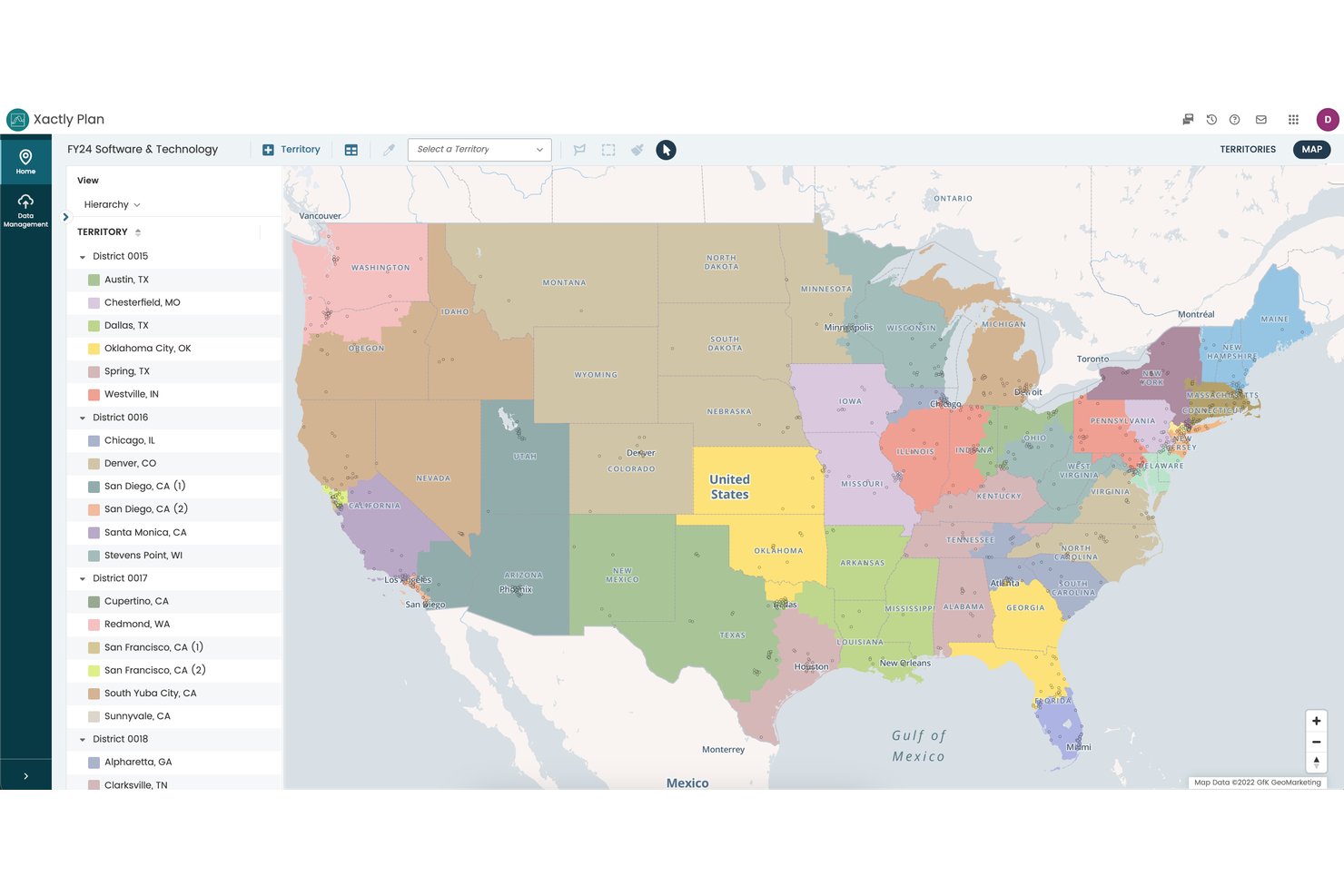
Xactly is a sales performance management platform that combines territory mapping, quota planning, and incentive compensation management into a single connected system for enterprise sales organizations.
Who Is Xactly Best For?
Xactly is a strong fit for enterprise revenue operations and sales planning teams that manage large, complex sales forces with layered compensation structures.
Why I Picked Xactly
Xactly earns its spot on my shortlist because no other sales mapping tool ties territory design directly to quota allocation and compensation in a single workflow. I particularly like the Alignment Report Card, which automatically grades territory balance against your objectives, so I can spot inequities before they become rep retention issues. The "what-if" scenario modeling in AlignStar lets my team test configurations and see the quota impact before any changes go live.
Xactly Key Features
- Interactive territory maps: Edit, split, and reassign sales territories visually with drag-and-drop tools.
- CRM integration: Sync account data and territory assignments directly with Salesforce, HubSpot, and Microsoft Dynamics.
- Multi-source data processing: Combine up to 10 data sources for territory design and account mapping.
- Alignment Report Card: Instantly benchmark territory performance using automated grading against your company's targets.
Xactly Integrations
Xactly offers native integrations with Salesforce, ServiceNow, Workday, and SAP. An API is available for custom integrations.
Pros and Cons
Pros:
- Automated territory balance grading built in
- Scenario modeling previews quota impact before changes
- Connects territory design directly to compensation planning
Cons:
- Implementation requires significant time and resources
- Lacks dedicated field rep route optimization
New Product Updates from Xactly
Xactly and ServiceNow Connect CRM Workflows to Revenue Performance
Xactly has partnered with ServiceNow to connect Xactly’s Intelligent Revenue Platform with ServiceNow CRM, embedding revenue performance intelligence into CRM workflows and surfacing commission and quota impacts in CPQ and Sales CRM. For more information, visit Xactly's official site.
 .
.
SPOTIO
Best for visit prep & next-best-action guidance
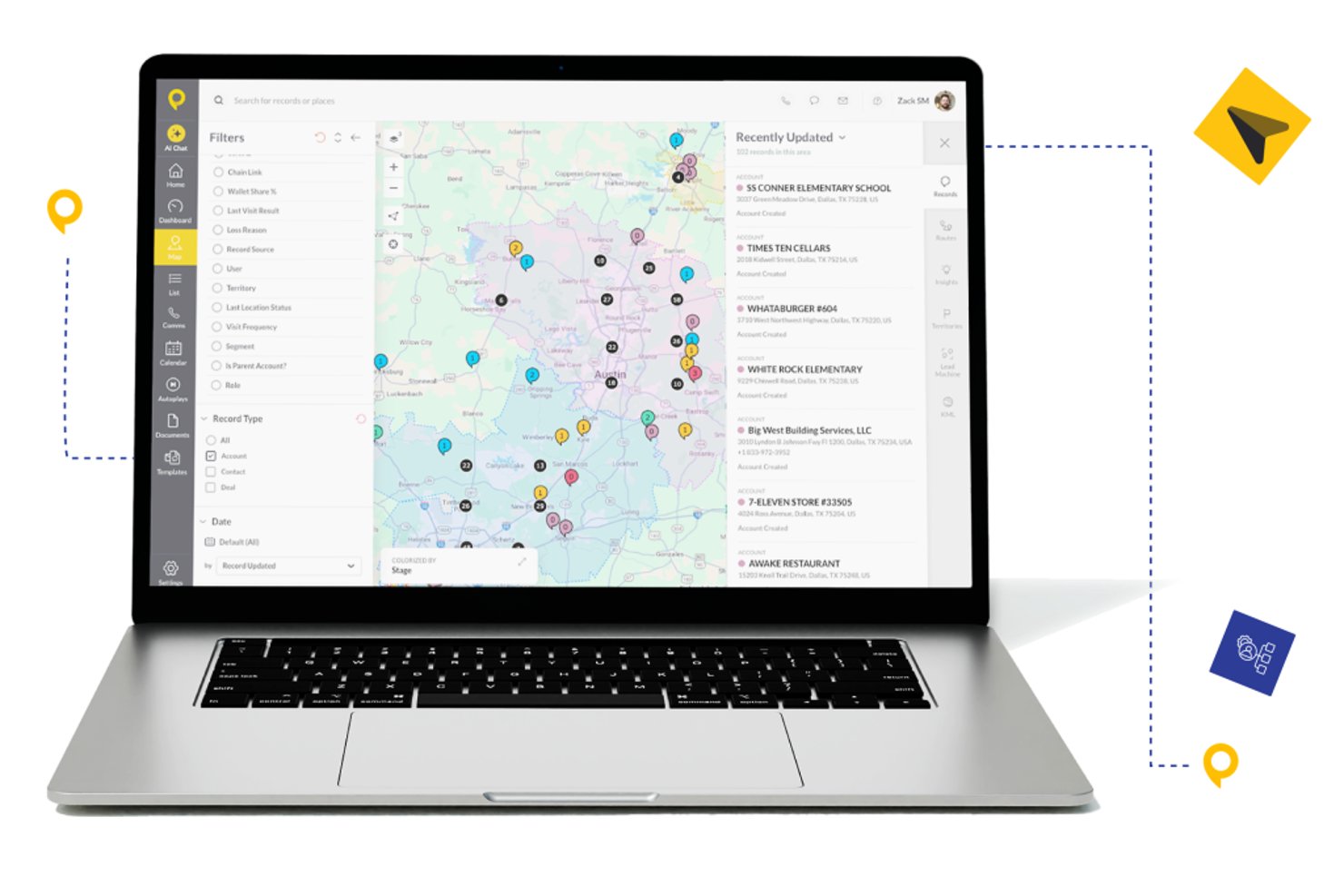
SPOTIO is a field sales mapping and execution platform that combines territory management, interactive account mapping, route optimization, and AI-powered visit guidance for outside sales teams.
Who Is SPOTIO Best For?
SPOTIO is a strong fit for B2C field sales teams in industries like solar, roofing, telecom, and home services that run door-to-door or territory-based outside sales operations.
Why I Picked SPOTIO
SPOTIO earns its spot on my shortlist because of how it layers AI directly into the field rep's workflow. The DASH AI co-pilot preps reps before each visit, surfacing account context so they walk in informed rather than guessing. I also like how the Next Best Action module uses predictive scoring to tell reps which accounts to prioritize next, turning territory maps from static visuals into active sales playbooks.
SPOTIO Key Features
- Territory creation and management: Build, edit, and assign sales territories using zip codes, counties, or custom-drawn boundaries on a map.
- Mobile field sales app: Access leads, manage appointments, and check in at locations from an iOS or Android device, even offline.
- Real-time CRM data synchronization: Bidirectional sync with Salesforce and integration with HubSpot, Dynamics, and custom systems through Zapier or API.
- Route planning and optimization: Generate multi-stop driving routes that minimize travel time and help field reps plan efficient schedules.
SPOTIO Integrations
SPOTIO offers native integration with Salesforce and supports integrations with HubSpot, Microsoft Dynamics, Zoho CRM, and over 5,000 apps via Zapier. An open API is available for custom integrations.
Pros and Cons
Pros:
- Next Best Action scoring prioritizes territory visits
- Mobile app supports offline field check-ins
- AI visit prep surfaces account context automatically
Cons:
- Built primarily for B2C door-to-door teams
- Territory scenario modeling is relatively limited

Best for customizable automations for your sales pipeline

Monday sales CRM is a customer relationship management platform designed to manage sales pipelines and client communications effectively. It distinguishes itself with extensive customization options, including email integration, automations, and customizable dashboards, which offer a detailed view of sales operations, making it a preferred solution for businesses seeking tailored sales tracking capabilities.
Why I Picked monday sales CRM: monday.com's sales CRM tool includes AI-assisted email composition, which streamlines the process of writing emails with advanced HTML editing and customizable templates. It also offers the capability to send mass personalized emails, useful for large-scale communication efforts. The CRM features activity management to keep track of sales-related tasks, performance tracking to gauge sales success, and customizable dashboards for a visual representation of sales metrics. Additionally, it provides sales forecasting to anticipate future trends, centralizes data for easy access, and includes lead capturing from various sources.
monday sales CRM Standout Features & Integrations
Features include lead and contact management, customizable pipelines, sales automation, performance tracking, integration with various tools, advanced reporting and analytics, email tracking and synchronization, task and project management, mobile app support, and customizable templates and forms.
Integrations include Slack, Google Drive, Gmail, Google Calendar, Jira, GitHub, Trello, Dropbox, Typeform and many more, accessible through a paid plan with Zapier.
Pros and Cons
Pros:
- Advanced reporting and analytics
- Robust integration capabilities
- High customizability & automation-friendly
Cons:
- Slight learning curve
- Limited native email marketing features
New Product Updates from monday CRM

monday CRM Adds Meta Conversions API Integration
monday CRM now lets you connect Meta Conversions API and sync lead status back to Meta, improving targeting and conversions via a new Meta integration automation recipe. For more information, visit monday CRM's official site.

Maptive
Best for Google integration and global coverage

As a cloud-based, web-accessible mapping solution, Maptive targets the creation of insightful, custom maps with beautiful visualization of data to enhance your Google Maps foundation. Build a variety of different map types for local or global needs, including territory maps, heat maps, sales density maps, and store locators so users can plan the optimal route between every location on their list.
Why I picked Maptive: This platform caught my eye because of their Google-centric functionality. Maptive specifically integrates with Google Maps to utilize additional data and features for more flexibility. You can access Google Places and Google Street View for street views, real-time traffic, updated geographic information, and satellite imagery.
Maptive Standout Features and Integrations
Standout features include fully customizable maps and location markers that are unique to your organizational needs, turn-by-turn navigation in-platform in Google Maps, and one-click interactive map sharing to provide access to everyone who needs it.
Integrations include Google Maps, Google Places, and Google Street View.
Pros and Cons
Pros:
- Mobile app for use on every device
- Fast load speeds for mapping and routing
- User-friendly visuals and navigation
Cons:
- Limited integration options — still in development
- Is a little bit more expensive than other solutions

Best for integrated field sales and B2B ordering
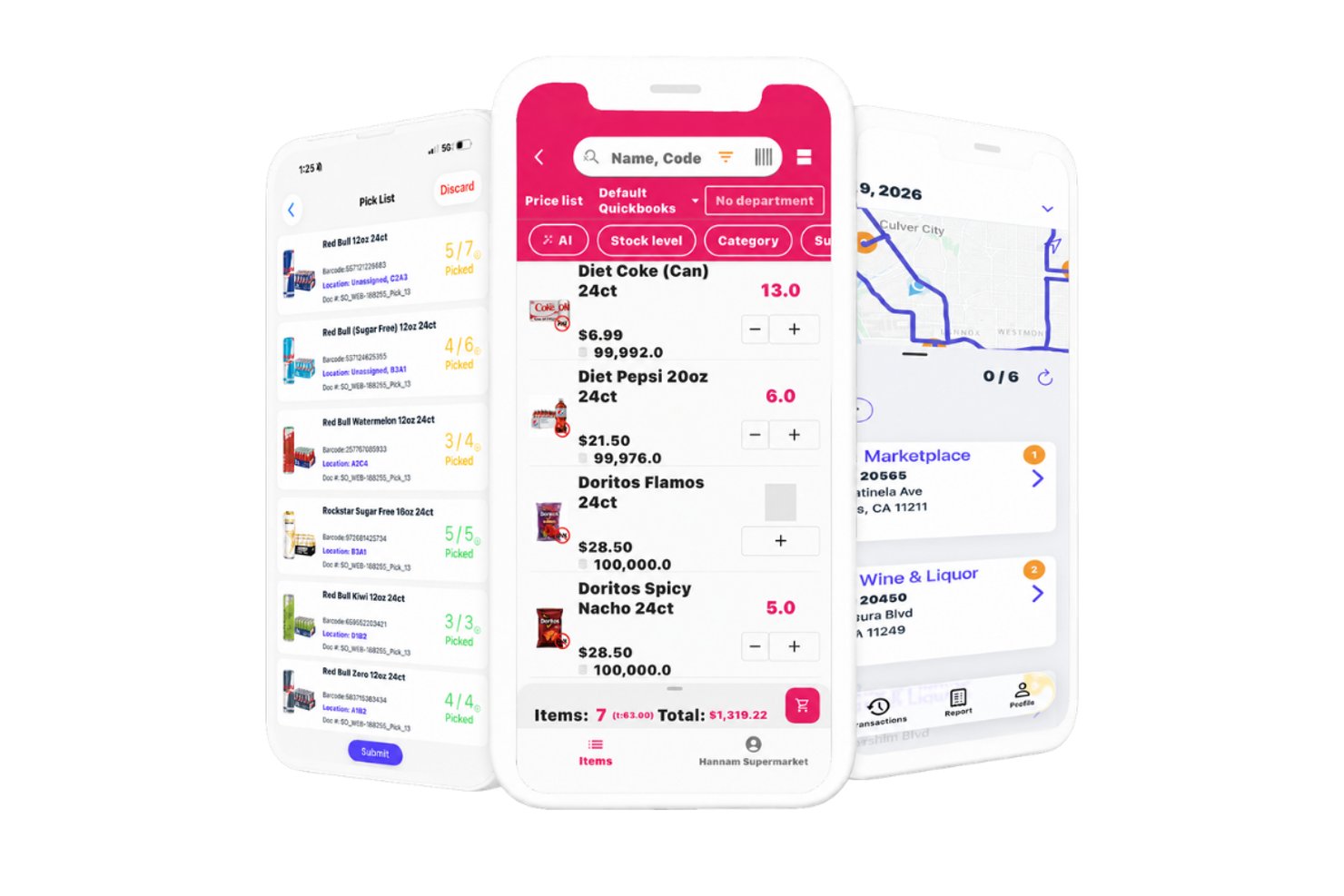
InSitu Sales is a mobile field sales and B2B order management platform that combines route optimization, GPS tracking, territory-based account management, and real-time inventory visibility for wholesale distribution teams.
Who Is InSitu Sales Best For?
InSitu Sales is a strong fit for wholesale distributors and food & beverage companies whose outside reps manage accounts, take orders, and process payments in the field.
Why I Picked InSitu Sales
I picked InSitu Sales because it's one of the few tools that fully closes the loop between field routing and B2B order capture in one platform. When my reps are standing in front of a restaurant buyer, they can pull up real-time inventory levels, place the order on the spot, and process payment without switching apps. The DSD route optimization and dispatch app means the whole cycle, from stop planning to proof of delivery, lives in one place.
InSitu Sales Key Features
- Live GPS tracking: Lets managers monitor sales reps’ real-time locations and movements during field activities.
- Custom barcode scanning: Allows reps to scan products in the field for fast inventory checks and order creation.
- Customer-specific pricing lists: Supports the assignment of unique pricing and discounts per customer record.
- Proof of delivery and signature capture: Captures customer signatures and photo proof directly within the delivery workflow.
InSitu Sales Integrations
InSitu Sales offers native integrations with QuickBooks Online, QuickBooks Desktop, Oracle NetSuite, SAP Business One, Xero, Zoho, Odoo, Epicor, Siigo, and Fishbowl, and provides an API for custom integrations.
Pros and Cons
Pros:
- Supports customer-specific pricing structure
- Built-in order management and payments
- Real-time GPS tracking for field reps
Cons:
- Lacks multi-territory and coverage analytics
- No native CRM or salesforce integration


This web-based tool is designed to allow the creation of custom maps from location data in just a few minutes through drag-and-drop uploads that accept spreadsheet and CSV file information. With BatchGeo, you can also visualize your data and gain new insights with advanced tools like batch processing that allows you to plot thousands of data points at the same time and geocoding that automatically matches addresses with longitude and latitude.
Why I picked BatchGeo: The feature that sets BatchGeo apart and assured it a spot on my list is the powerful customization options for your map style. Choose from street view, satellite, and terrain maps, along with unique colors, labels, and markers that ensure your maps are readable, informative, and engaging for your team.
BatchGeo Standout Features and Integrations
Standout features include Map Badges with a dynamic map thumbnail for your website, Map Grouping to break down data and spot trends, and map marker clustering to sum the value of potential leads, existing appointments, or current accounts.
Integrations include Google Docs, Google Maps, and Microsoft Excel.
Pros and Cons
Pros:
- Quick to set up and start mapping
- Easy to use with intuitive navigation
- Native mobile app for Apple devices
Cons:
- Editing maps is difficult and it’s easier to restart
- Free version has some limitations


This platform is a geographic information system that’s designed to help you make and publish your maps across various websites, as well as capture information from spreadsheets, GeoRSS feeds, and location lists. You can use ZeeMaps to analyze spatial locations, show real-time traffic overlays, display visual information with 3D maps, and aggregate regional data in one place.
Why I picked ZeeMaps: This tool made my list because of how many customization options they offer in map creation. In addition to customizable marker icons that utilize your preferred images, you can also leverage searchable custom fields, hand-draw regions, and color regions based on zip code, county, city, or state information.
ZeeMaps Standout Features and Integrations
Standout features include private mapping through HIPAA-compliant infrastructure, multimedia capabilities that add videos and images to your markers, and multi-point route optimization for planning trips.
Integrations include Google Analytics 360, Google Sheets, and Microsoft Excel.
Pros and Cons
Pros:
- Great customer service
- Offers a lot of flexibility through customization
- Very easy to learn how to use
Cons:
- Design is a little outdated
- Some locations are not 100% accurate

Best for combining action-based dashboards, data storytelling, and automated analysis

Unlike most other apps on my list, Yellowfin is a comprehensive Business Intelligence platform that delivers data, dashboards, and collaborative BI experiences. With advanced BI features that enable charts, tables, maps, and graphic components, like images and video, Yellowfin provides you with a no-code platform that strives to simplify analytics.
Why I picked Yellowfin: I chose this platform for my sales mapping list because it does offer location intelligence functionality to merge spatial and traditional business analytics for better decision-making. You can use the Google Maps API or Yellowfin’s built-in mapping capabilities to put your business on the map.
Yellowfin Standout Features and Integrations
Standout features include augmented dashboards to visualize and monitor essential data, Automated Business Monitoring with threshold alerts and signals, and data storytelling for presentations and reports.
Integrations include Dynamics 365, GitHub, Google Analytics 360, Google Sheets, Instagram, Meta for Business, Salesforce Sales Cloud, Tableau, Xero, and Zendesk Suite.
Pros and Cons
Pros:
- Effective online training tools
- No-code (SQL) interface and tools
- Easy to use and navigate
Cons:
- Some customizations require coding
- No cloud-based option available


This web-based sales mapping and intelligence software is designed for individuals and businesses of every size, as it allows you to upload your data, visualize it on a map, and create reports and charts. Manage dispatch, scheduling, routing, and other operation essentials in one place to get analytics and insights that add real-world context to your data.
Why I picked Mapline: This software caught my eye because in addition to meeting your basic routing and mapping needs, Mapline also provides automated route optimization with their Dispatch feature. This essential function can route your salespeople based on visit urgency, location priority, vehicle availability, and various other custom factors.
Mapline Standout Features and Integrations
Standout features include mapping analytics with detailed maps through features like custom territories and heat mapping, GEO Dispatch to automate daily routing and optimize stops, and Geo Scheduling with appointment and recurring visit scheduling for deliveries or servicing.
Integrations include Mapline’s API that can help you integrate it into your tech stack to update data and configure your data visualizations.
Pros and Cons
Pros:
- Customization options for territory mapping
- Excel add-on to link maps and spreadsheets
- Outstanding customer support and guidance
Cons:
- No phone number for customer support — email only
- UK regions are inaccurate and require support to configure

Maptitude
Best for analyzing and understanding the impact of geography on your organization

Maptitude from Caliper provides businesses with a GIS solution with customer demographic data and maps that enable you to visualize data and explore geographic patterns. With data that relates to customer location, drive time, and sales opportunities, you can deploy field sales people more effectively.
Why I picked Maptitude: I like this platform because they have a spatial mapping tool that allows you to estimate the population of a specific area to build custom territories that will help you identify under and over-served areas, find valuable sites, and determine trade areas. You can visualize your data as charts, heat maps, and 3D prism maps.
Maptitude Standout Features and Integrations
Standout features include pin map creation by postal code, address, or coordinates, drive-time and distance ring estimator, distance measuring to find the most efficient routes.
Integrations include Google Maps, Microsoft Access, Microsoft Excel, and TransCAD.
Pros and Cons
Pros:
- Affordable for small businesses
- Knowledgeable and responsive customer service
- User-friendly interface and design
Cons:
- Advanced features require extra effort to learn
- Navigation could be a little more intuitive
Other Sales Mapping Software
Here are some additional sales mapping software options that didn’t make it onto my shortlist, but are still worth checking out:
- eSpatial
For mapping the most efficient routes — even when things change
- Geopointe
For mapping all your Salesforce data
- Ascent Cloud
For building, balancing, and optimizing your territories
- AlignMix
For account-based or geographical realignment
- GeoMetrx
For gathering census-based, site-specific data
- Badger Maps
Tool for sales rep route planning to automate and optimize routes
- Anaplan
For unifying sales, finance, supply chain, and workforce management
- MapBusinessOnline
Cloud-based solution for small and medium-sized businesses
- Pipedrive
For combining sales mapping with automation and lead management
- Portatour
Tool for automated route planning to visit more customers in one day
- Callproof
Outside sales-focused CRM tool with route planning and mapping
- Google Maps
For getting detailed geospatial data with dynamic location info


How I Evaluate Sales Mapping Software
I split my evaluation into baseline criteria—territory design, CRM sync, geospatial mapping—and the differentiators, like scenario modeling and mobile access, that separate good tools from great ones.
Core Functionality (Table Stakes For This List)
When I'm selecting tools for my list, I rank each one on a scale from 0 (does not offer the functionality) to 5 (excels in this area) for each core functionality listed below. Then, I calculate the tool's total score into a percentage. Each tool needs to achieve a minimum total score of 65% to be considered for inclusion.
- Territory Design & Management: I evaluate whether I can draw, adjust, and balance territories on a map using attributes like ZIP code, revenue, or account count per rep.
- Geospatial Account Mapping: Every tool should let me plot accounts on an interactive map and layer data points like deal stage or account size onto those pins.
- CRM Data Integration: I check for bidirectional sync with CRMs like Salesforce or HubSpot so territory changes flow back into the system of record automatically.
- Route Planning & Optimization: Field teams need multi-stop routing that accounts for distance and time. I look at how each tool handles daily or weekly visit planning.
- Segmentation & Filtering: The map view should support filtering by CRM fields such as industry, annual revenue, or opportunity stage to isolate target accounts quickly.
- Territory Analytics & Reporting: I look for dashboards that show coverage gaps, account distribution, and rep workload so RevOps teams can back up territory decisions with data.
Once I have a list of tools that meet this criteria, I consider what sets each platform apart.
Differentiating Factors (What Sets Vendors Apart)
Here's how I compare and contrast different vendors:
Standout Features
Scenario modeling is a big differentiator. I look for tools that let me build side-by-side territory plans—say, splitting a high-density region two ways versus three—and compare projected workload and coverage before committing. Whitespace analysis matters just as much; the best tools surface untapped accounts by geography so your GTM team can prioritize expansion zones. A dedicated mobile app also makes a real difference for field-heavy teams, giving reps map access, check-ins, and route updates without needing to open a laptop between meetings.
Beyond Features
Integration depth matters a lot here. I check whether a tool connects to your broader stack—BI platforms, marketing automation, sales engagement—beyond just the CRM. Pricing structure is another factor I evaluate closely, especially how vendors license admin seats versus field rep seats, since mapping tools often serve very different user types. I also consider deployment scale. A tool built for a 10-rep team may fall apart when you're managing territories across hundreds of reps and multiple regions, so I look at how well each platform scales with organizational complexity.
How to Choose Sales Mapping Software
It’s easy to get bogged down in long feature lists and complex pricing structures. To help you stay focused as you work through your unique software selection process, here’s a checklist of factors to keep in mind:
| Factor | What to Consider |
|---|---|
| Scalability | Will the software grow with your business? Check if it can handle more data and users as you expand. Look for tiered plans or features that suit different business sizes. |
| Integrations | Does it connect with your existing tools? Ensure the software integrates with your CRM, email, and other applications to avoid data silos and enhance workflow efficiency. |
| Customizability | Can you tailor it to your needs? Look for software that lets you modify maps, fields, and reports to match your specific workflows and objectives. |
| Ease of use | Is it user-friendly for your team? Assess the interface and navigation. A tool that's hard to use can slow down adoption and reduce productivity. |
| Implementation and onboarding | How long does it take to get started? Consider the resources needed for setup and training. Look for tools with guided onboarding, tutorials, or dedicated support teams. |
| Cost | Does it fit your budget? Compare pricing plans, including hidden fees or required add-ons. Consider the total cost of ownership over time, not just the initial price. |
| Security safeguards | Are your data and privacy protected? Check for encryption, compliance with data regulations, and user permissions to ensure your information is secure. |
| Support availability | What help can you expect? Look for 24/7 support, multiple contact options, and a responsive team that can assist with issues or questions as they arise. |
What Is Sales Mapping Software?
Sales mapping software is a tool that lets you see your sales data on a map, showing where your customers are, how territories are divided, and how each area is performing. Sales managers, territory planners, and field reps use it to organize sales routes, balance territories, and spot hidden market opportunities. This saves time, cuts down on travel hassles, and helps you make smarter decisions about where to focus your sales efforts.
Features
When selecting sales mapping software, keep an eye out for the following key features:
- Geographic visualization: Allows users to see sales territories and customer locations on a map, providing a clear overview of market distribution.
- Territory management: Helps define and manage sales regions to ensure balanced workloads and efficient resource allocation.
- Route optimization: Plans the most efficient travel paths for sales teams, saving time and reducing travel costs.
- Data integration: Connects with CRM and other data sources to provide a comprehensive view of customer information and sales activities.
- Customizable maps: Lets users tailor map views and data layers to fit specific business needs and objectives.
- Heat mapping: Visualizes data density and trends, helping identify areas of opportunity or concern.
- Real-time updates: Ensures that teams have access to the latest information, enhancing decision-making and responsiveness.
- Demographic analysis: Provides insights into market potential by overlaying demographic data on sales maps.
- Interactive sharing: Enables teams to share maps and insights easily, fostering collaboration and informed decision-making.
- Workload balancing: Ensures fair distribution of tasks among team members, optimizing productivity and efficiency.
Benefits
Implementing sales mapping software provides several benefits for your team and your business. Here are a few you can look forward to:
- Improved decision-making: Visualizing sales data on maps helps you make informed decisions about territories and resources.
- Increased efficiency: Route optimization reduces travel time and costs, allowing your team to focus more on selling.
- Better resource allocation: Territory management ensures balanced workloads and maximizes your team's productivity.
- Enhanced collaboration: Interactive sharing of maps and data fosters teamwork and informed strategies.
- Deeper market insights: Demographic analysis provides a clearer understanding of market potential and customer needs.
- Real-time responsiveness: Access to up-to-date information allows your team to react quickly to market changes.
- Fair workload distribution: Workload balancing ensures tasks are assigned evenly, keeping morale and performance high.
Costs & Pricing
Selecting sales mapping software requires an understanding of the various pricing models and plans available. Costs vary based on features, team size, add-ons, and more. The table below summarizes common plans, their average prices, and typical features included in sales mapping software solutions:
Plan Comparison Table for Sales Mapping Software
| Plan Type | Average Price | Common Features |
|---|---|---|
| Free Plan | $0 | Basic mapping, limited data points, and basic visualization tools. |
| Personal Plan | $10-$30/user/month | Customizable maps, route optimization, and data import/export capabilities. |
| Business Plan | $40-$70/user/month | Advanced territory management, demographic analysis, and integration options. |
| Enterprise Plan | $80-$150/user/month | Real-time data updates, priority support, and extensive customization options. |
Sales Mapping Software FAQs
Here are some answers to common questions about sales mapping software:
How do you create a sales map?
While each platform is a little different, there are a few standard steps you must take when creating a sales map, including:
- Evaluating customer information (zip codes, state boundaries, existing customers, and prospect demographics)
- Creating customer segments to group customers and divide them among your salespeople evenly
- Factoring your sales goals to ensure you’re providing sales reps with equal opportunities to achieve those objectives
- Using a SWOT analysis to assess the opportunities and threats in a territory, as well as the strengths and weaknesses of your reps
- Defining the number of existing accounts in each territory or region and finding details about potential prospects
- Assigning each territory based on sales rep experience, skills, and capacity for handling various volume levels
What data do I need to use sales mapping software?
You need basic location data, such as addresses or geographic coordinates, to use sales mapping software. This data allows you to plot customer locations and sales territories on a map. Having detailed customer information, like sales history or demographic data, can enhance your analysis. Make sure your data is clean and well-organized before importing it into the software. This helps ensure accurate mapping and meaningful insights.
Is it difficult to learn how to use sales mapping software?
No, most sales mapping software is designed to be user-friendly, with intuitive interfaces and helpful tutorials. However, the learning curve can vary depending on the complexity of the tool and your team’s familiarity with mapping concepts. Look for software that offers training resources, like video tutorials or interactive guides, to help your team get up to speed quickly.
Can remote or hybrid reps use sales mapping software effectively?
Yes — even if your team isn’t always in the field, the visual maps and account clusters still help keep everyone on the same page. Make sure your remote reps have access and can view the geographic layouts, even if they don’t travel daily. That way you avoid mismatches in coverage and ensure everyone sees where priority accounts are.
What are the common mistakes teams make when rolling out mapping tools?
One frequent mistake is skipping the data cleanup step: inaccurate addresses, duplicates or missing region tags mess up the map. Another is not aligning team roles with the map visuals — if reps aren’t clear which accounts they own, the tool becomes a confusion rather than a help. Also, neglecting training on how to read and act on maps can cause low adoption.
What’s Next:
If you're in the process of researching sales mapping software, connect with a SoftwareSelect advisor for free recommendations.
You fill out a form and have a quick chat where they get into the specifics of your needs. Then you'll get a shortlist of software to review. They'll even support you through the entire buying process, including price negotiations.