

10 Best B2B Sales Software Reviewed For 2026

Best B2B Sales Software Shortlist


With so many different B2B sales software available, figuring out which is right for you is tough. You know you want to support and streamline your business-to-business sales process but need to figure out which tool is best. I've got you! In this post I'll help make your choice easy, sharing my personal experiences using dozens of different B2B sales tools with various teams and accounts, with my picks of the best B2B sales software.
Why Trust Our Software Recommendations
Our reviews reflect our independent judgment—not a sales pitch. Learn how we stay transparent.
For this guide, we evaluated tools using hands-on testing and independent research, scoring tools using our selection criteria.
Our reviews reflect our human editorial judgment, not a sales pitch.
Best B2B Sales Software Summary
This comparison chart summarizes pricing details for my top B2B sales software selections to help you find the best one for your budget and business needs.
| Tool | Best For | Trial Info | Price | ||
|---|---|---|---|---|---|
| 1 | Best with automated sales workflow builder | Free plan + 14-day free trial + free demo available | From $49/user/month (billed annually) | Website | |
| 2 | Best for territory mapping and route optimization | Not available | Pricing upon request | Website | |
| 3 | Best for customizable quote templates | Free demo available | From $39/user/month | Website | |
| 4 | Best for AI-driven lead suggestions | 30-day free trial + free demo available | From $29/user/month (billed annually) | Website | |
| 5 | Best for AI-guided quote optimization | Free demo available | Pricing upon request | Website | |
| 6 | Best for AI-driven conversation insights | 14-day free trial | From $25/user/month (billed annually) | Website | |
| 7 | Best for order tracking | Free 60-day trial available | Pricing upon request | Website | |
| 8 | Best for action planning in digital sales rooms | Free plan + free demo available | From $350/month (billed annually) | Website | |
| 9 | Best for lead verification and qualification | 7-day free trial + free demo available | From $74/month (billed annually) | Website | |
| 10 | Best for enterprises who use Salesforce or Salesforce Industry Clouds | 14-day free trial | From $49/month | Website |

Best B2B Sales Software Review
With this information in mind, it’s time to get into my tool summaries for more specifics on which lead generation or data capture tool is right for your use case. Find noteworthy features and a snapshot of each interface for a brief overview.

Best with automated sales workflow builder
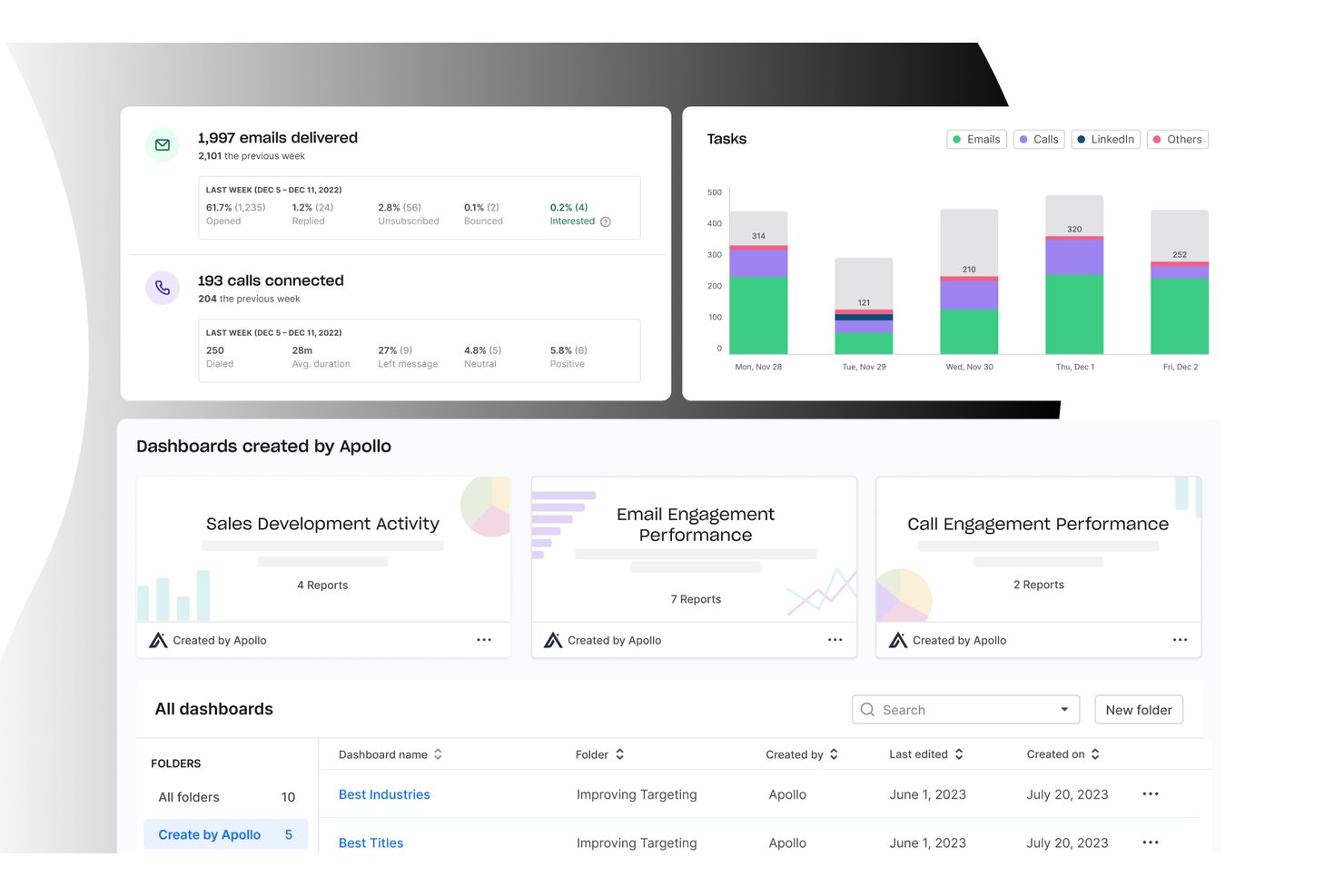
Apollo.io is a B2B sales intelligence and engagement platform that combines a 210M+ contact database with multi-channel sequencing, an integrated dialer, workflow automation, and deal management in one workspace.
Who Is Apollo.io Best For?
Apollo.io is a strong fit for outbound sales teams at SMBs and mid-market B2B companies that need to consolidate prospecting, outreach, and pipeline management without stitching together multiple tools.
Why I Picked Apollo.io
I picked Apollo.io as one of the best because its workflow automation engine genuinely replaces the need for separate sequencing and routing tools. I like how it handles multi-channel sequences across email, phone, and LinkedIn automatically, with trigger-based enrollment and auto-logging back to the CRM. Its agentic AI can build a prospect list and draft a full outreach sequence from a single natural language prompt, which cuts hours off what used to be a manual setup process.
Apollo.io Key Features
- Conversation intelligence: Records and analyzes sales calls to surface key moments for coaching and deal risk.
- Enrichment engine: Automatically adds missing firmographic and contact data to CRM records in real time.
- Lead scoring: Uses AI to rate and prioritize leads for outbound and inbound sales motions.
- Multi-CRM integration: Syncs contacts, accounts, and engagement data with Salesforce, HubSpot, Marketo, and more.
Apollo.io Integrations
Apollo.io offers native integrations with Salesforce, HubSpot, Outreach, Airtable, Amplitude, Asana, and Gmail, and provides an API for custom integrations.
Pros and Cons
Pros:
- Trigger-based enrollment automates multi-channel outreach
- AI builds prospect lists from a prompt
- Database, dialer, and sequences in one
Cons:
- Pipeline analytics lack depth for revenue forecasting
- Contact data accuracy inconsistent outside North America

SPOTIO
Best for territory mapping and route optimization
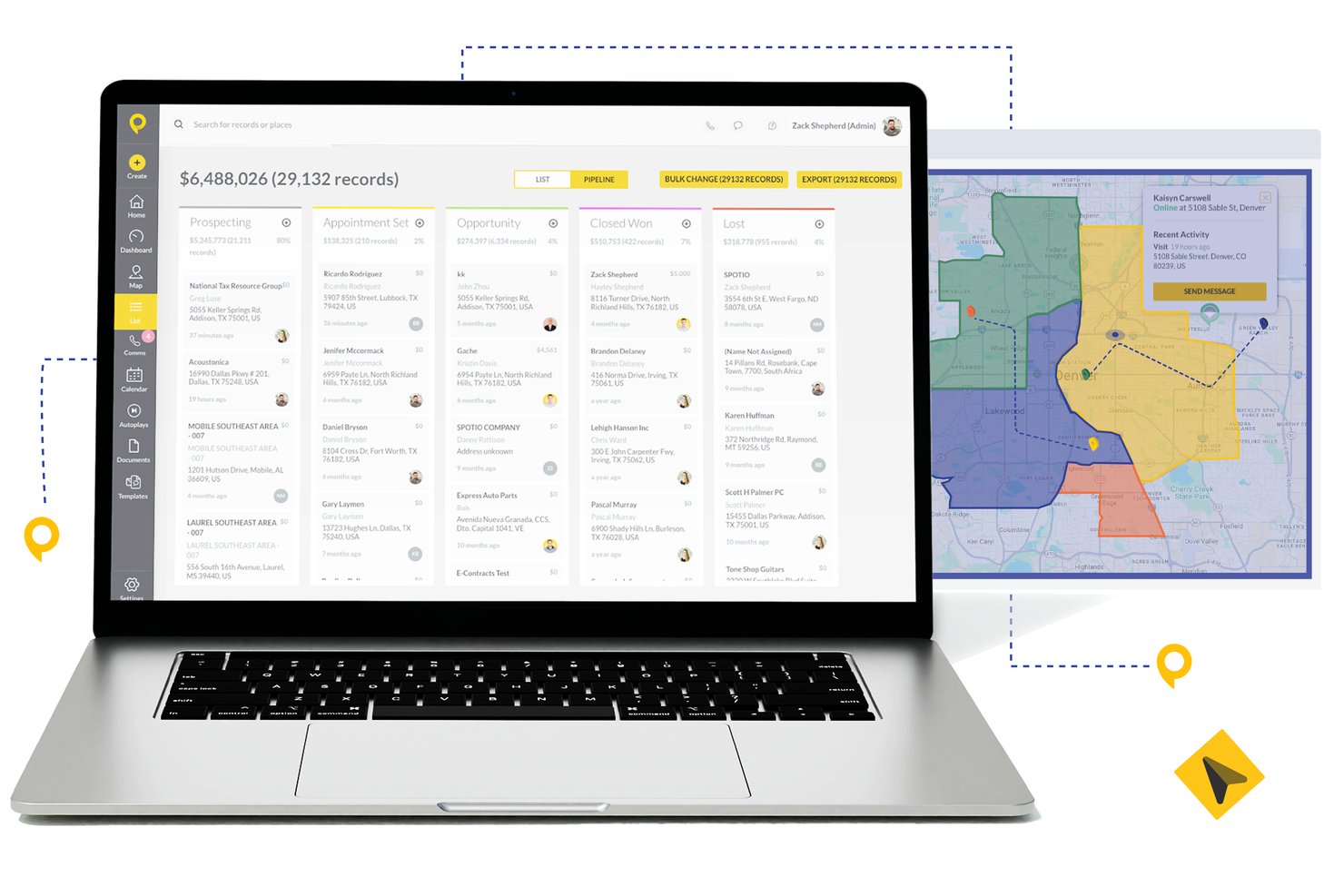
SPOTIO is a field sales execution platform that combines territory management, route optimization, lead tracking, pipeline management, and rep activity monitoring in one mobile-first solution.
Who Is SPOTIO Best For?
SPOTIO is a strong fit for outside and door-to-door sales teams in industries like telecom, solar, roofing, and commercial services that manage large geographic territories.
Why I Picked SPOTIO
I picked SPOTIO as one of the best because its territory mapping goes well beyond drawing boundaries. I love that you can build territories by zip code, county, or custom shape and layer on 200+ demographic data overlay points to prioritize the highest-value areas. The route optimization engine then sequences stops to cut drive time and pack more face-to-face visits into each rep's day, which is something I haven't seen executed this precisely in competing field sales tools.
SPOTIO Key Features
- Multi-channel communications: Call, email, and text prospects and customers directly from the platform.
- Activity tracking dashboard: Monitor rep activity and location-verified check-ins in real time.
- Native CRM integrations: Sync accounts, contacts, and deal data with Salesforce, HubSpot, and Microsoft Dynamics 365.
- DASH AI co-pilot: Use AI to capture field data, draft emails, and suggest next steps during sales visits.
SPOTIO Integrations
SPOTIO offers native integrations with Salesforce, HubSpot, Microsoft Dynamics 365, Zoho CRM, and Pipedrive. Zapier and an open API are also available for additional connectivity and custom integrations.
Pros and Cons
Pros:
- Mobile-first design suited for on-the-road reps
- Real-time rep activity tracking and check-ins
- Strong territory mapping for field sales teams
Cons:
- Reporting depth limited for complex B2B pipelines
- Limited forecasting depth for inside sales teams

Best for customizable quote templates
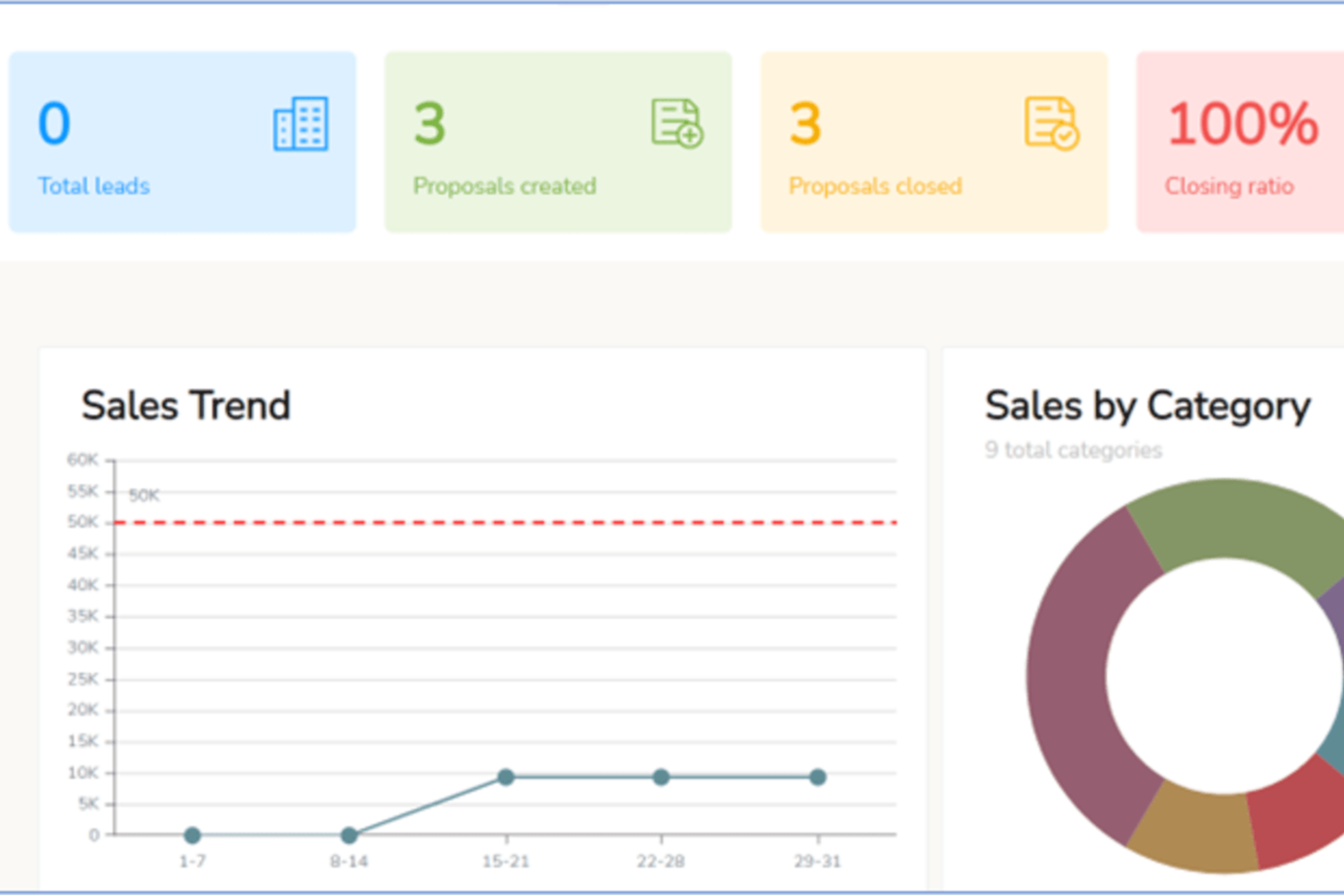
iQuoteXpress is a configure, price, quote (CPQ) platform that gives B2B sales teams tools for product configuration, branded proposal creation, quote tracking, and multi-currency pricing management.
Who Is iQuoteXpress Best For?
iQuoteXpress is a good fit for B2B sales teams in product-heavy industries that need to generate accurate, professional quotes without a lengthy manual process.
Why I Picked iQuoteXpress
I've included iQuoteXpress in my top picks because its quote template system goes well beyond selecting a layout. Admins define template categories by segment, region, or product line, and reps get the right template loaded automatically, with logos, fonts, colors, and legal language already locked in. I also like that T&Cs are managed in a dedicated panel, so any updates apply instantly on the next generated proposal without any copy-paste work. The document library feature lets you attach cover pages, spec sheets, and contracts in one click, and iQuoteXpress assembles everything into a single proposal packet.
iQuoteXpress Key Features
- Product catalog management: Build and organize a searchable product and services catalog with pricing, descriptions, and images that reps pull directly into quotes.
- Quote tracking and analytics: Monitor quote status, open rates, and win/loss data from a centralized dashboard to identify where deals stall.
- Multi-currency pricing: Set and display pricing in multiple currencies to support sales across different markets.
- eSignature support: Collect client signatures directly within the platform without routing documents to a separate signing tool.
iQuoteXpress Integrations
iQuoteXpress works as a standalone solution or integrates with CRM and ERP platforms through out-of-the-box connections with single sign-on. Native integrations include Salesforce, Microsoft Dynamics 365, Zoho CRM, Zoho Books, Oracle, and HubSpot CRM, as well as QuickBooks Online Advanced and DocuSign. It also connects with Acumatica and Shopify for ERP and ecommerce workflows. A REST API is available for building custom integrations with third-party applications.
Pros and Cons
Pros:
- Reps generate quotes without manager involvement
- Cuts new rep onboarding time significantly
- Multi-level product configurators for complex quotes
Cons:
- Configurator setup requires vendor assistance
- No mobile app for quoting on-the-go

Best for AI-driven lead suggestions
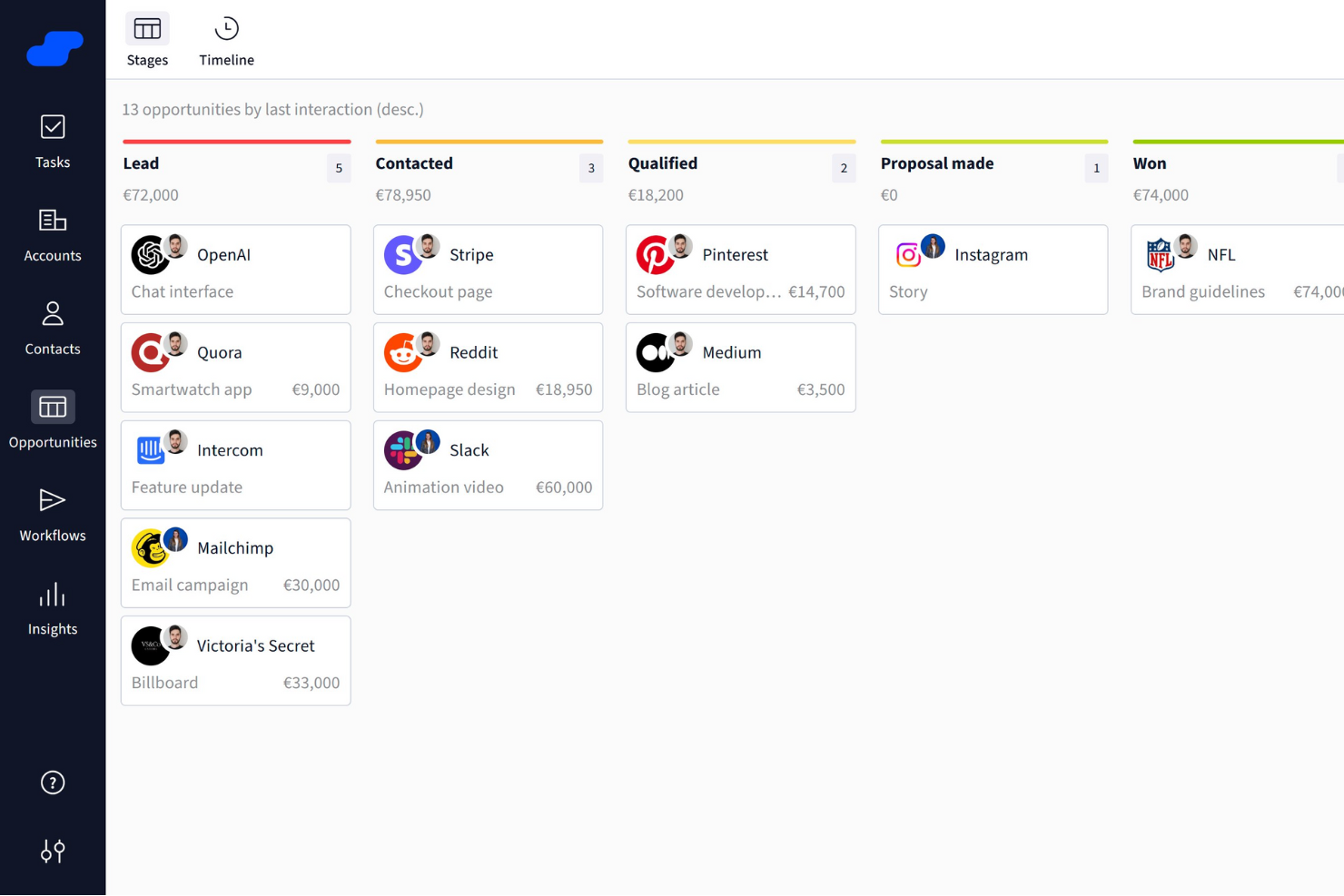
Salesflare is a smart CRM crafted specifically for small and medium-sized B2B businesses. It offers a suite of features that enhance your sales processes, making it easier to manage leads and boost sales success.
Why I Picked Salesflare: I chose Salesflare as a B2B sales software for its strong focus on sales intelligence, offering features like relationship insights, AI-driven lead suggestions, LinkedIn integration, and a built-in lead finder to keep your pipeline full. Its visual sales pipelines, automated reminders, and collaboration tools streamline deal tracking, reduce admin work, and help teams focus on closing more deals efficiently.
Salesflare Standout Features and Integrations
Features include automated email sequences that allow for personalized engagement with your leads, enhancing your relationship-building efforts. The platform also offers a lead finder that helps you streamline lead generation, ensuring that your sales pipeline remains robust. Additionally, Salesflare's relationship intelligence feature enhances team collaboration by providing insights that help prioritize leads and improve decision-making.
Integrations include QuickBooks Online, Slack, KrispCall, Nectar Desk, Typeform, Facebook Lead Ads, Google Contacts, CalendarHero, Bit Integrations, Google Sheets, Intercom, and MailChimp.
Pros and Cons
Pros:
- Strong integration capabilities with popular tools like Outlook and LinkedIn
- Effective automation features boost productivity by reducing manual tasks
- Unlimited contacts and users with advanced filtering
Cons:
- Limited email templates available
- Initial setup for automated workflows can be challenging for some users

Best for AI-guided quote optimization
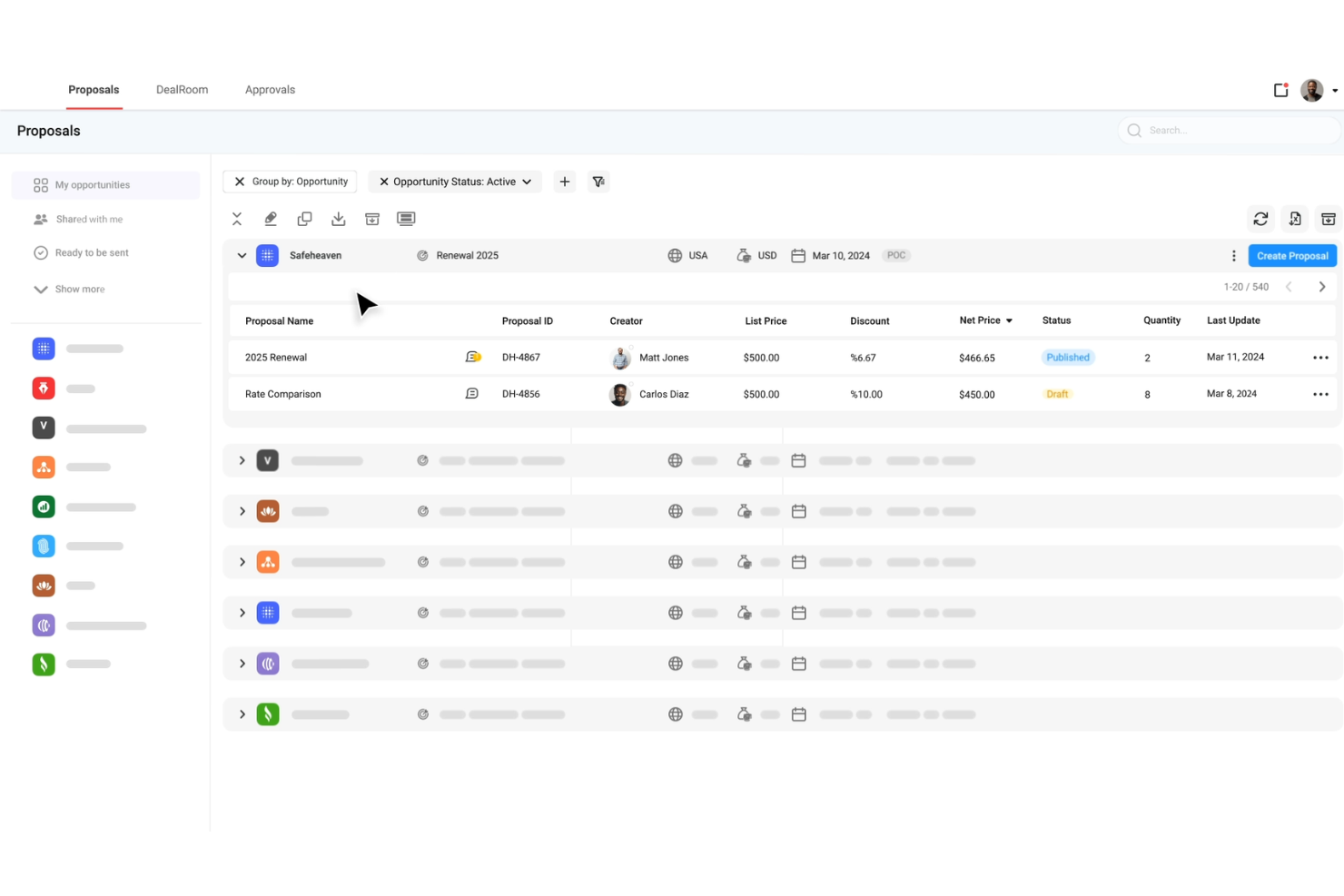
DealHub AI is a quote-to-revenue platform built for B2B sales teams, combining CPQ, contract lifecycle management, subscription billing, and digital deal rooms in a single system.
Why I picked DealHub AI: I picked DealHub AI because of how it surfaces buyer behavior and lets you act on it. Its dealstream feature tracks buyer engagement within proposals and surfaces intent signals—so your team can follow up at the right moment. Also, its built-in AI agents provide pricing and product mix suggestions based on historical wins, helping reps optimize their quotes. And its adaptive pricing models support usage-based, tiered, and fixed pricing, letting you handle complex deals and prevent manual mispricing.
DealHub AI Standout Features and Integrations
Standout features include the digital sales room or dealroom, which centralizes all deal assets, content, communications, and real-time notifications, letting buyers and sellers collaborate in one branded space. It also includes contract management tools such as dynamic contract creation, clause libraries, and negotiation workflows to speed approvals.
Integrations include Salesforce, HubSpot, Microsoft Dynamics 365, Slack, Gong, DocuSign, Google, LinkedIn, Optimizely, Solarwinds, SalesLoft, and Meta Platforms.
Pros and Cons
Pros:
- Supports subscription billing and renewals
- AI agents guide reps on pricing and product mix
- Accelerates deal cycles via digital sales rooms
Cons:
- Advanced feature setup takes more time, effort, and support than expected
- Slow loading or lag with large deals or complex proposal pages
New Product Updates from DealHub AI

DealHub AI Expands Bundle Attribute Automation
DealHub AI introduces Assignment Rules for child proposal attributes and numeric aggregation for bundles. These updates give admins more control over bundle attribute automation and configuration. For more information, visit DealHub’s official site.
 .
.
Best for AI-driven conversation insights
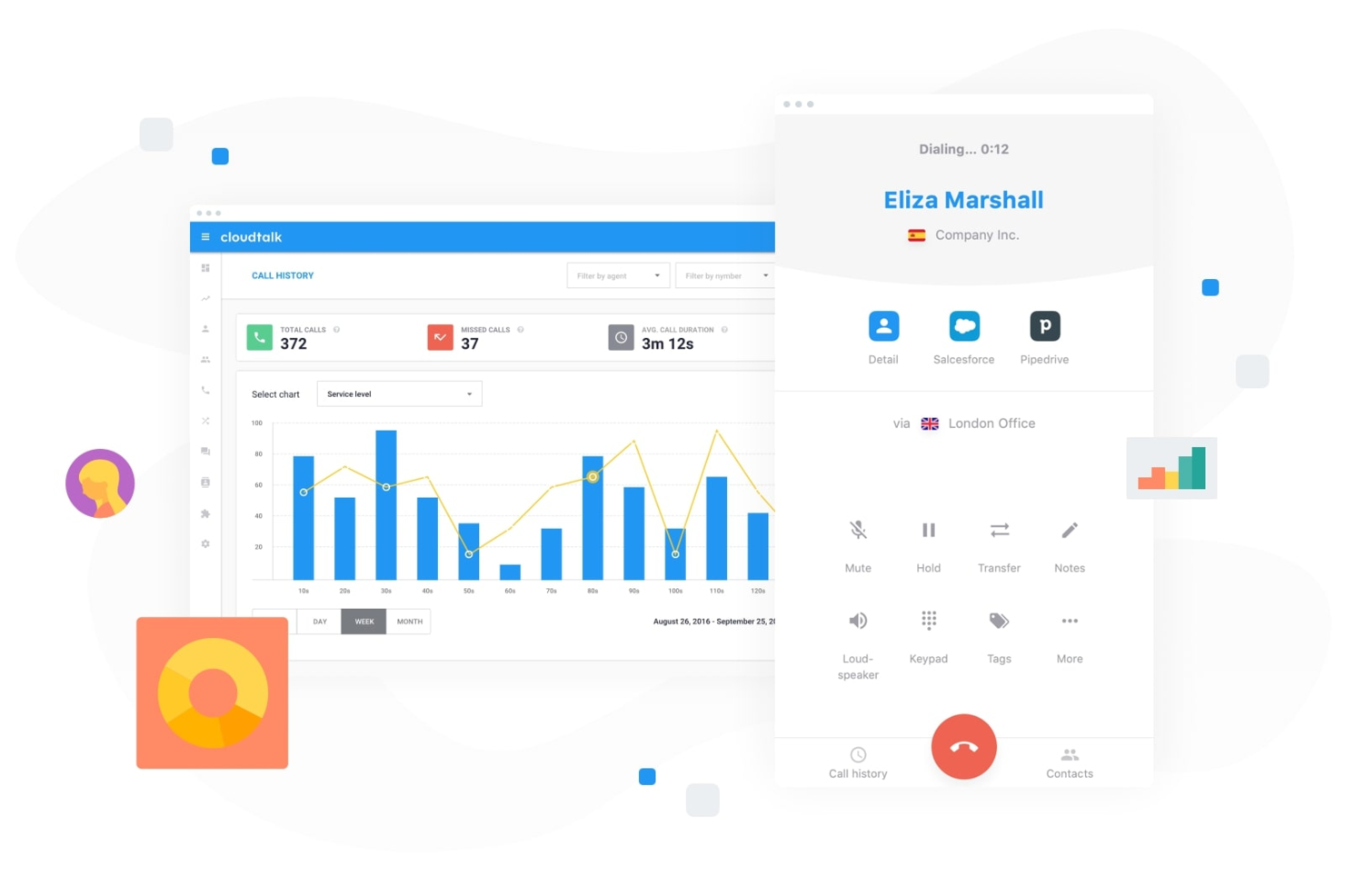
For businesses seeking to enhance their B2B sales efforts, CloudTalk offers a dynamic cloud-based call center solution tailored to meet the needs of sales teams across various industries. With features designed to streamline communication and improve sales performance, CloudTalk appeals to sales professionals and organizations looking to optimize their customer interactions and drive better outcomes. Whether you need advanced call management, global reach, or robust analytics, CloudTalk addresses the challenges of managing sales calls efficiently and effectively.
Why I Picked CloudTalk
I picked CloudTalk for its unique capability to enhance sales performance through AI-driven conversation intelligence. This feature provides automated call summaries, scoring, and sentiment analysis, allowing your team to focus on meaningful interactions. Additionally, its AI sales dialer, which includes options like parallel dialing and voicemail drop, maximizes your team's outreach potential by ensuring high-value conversations are prioritized. These functionalities are particularly beneficial for teams aiming to boost their sales efficiency and achieve better results.
CloudTalk Key Features
In addition to its AI-driven tools, I also found the following useful:
- Custom Call Routing: Directs calls to the right team members based on predefined criteria, ensuring efficient handling and customer satisfaction.
- Interactive Voice Response (IVR): Automates call handling with a menu system that guides callers to the appropriate department or service.
- Real-Time Analytics: Offers insights into call performance and team productivity, helping you make informed decisions.
- Global SMS and WhatsApp Support: Enables multi-channel communication, allowing your team to reach customers through their preferred platforms.
CloudTalk Integrations
Integrations include Salesforce, HubSpot, Zoho, Pipedrive, Zendesk, Shopify, Intercom, Freshdesk, Aircall, and Microsoft Dynamics.
Pros and Cons
Pros:
- Extensive CRM integration options
- Multiple outbound dialer modes
- AI-powered conversation intelligence tools
Cons:
- International number availability can be inconsistent
- Parallel dialer stability issues
Best for order tracking
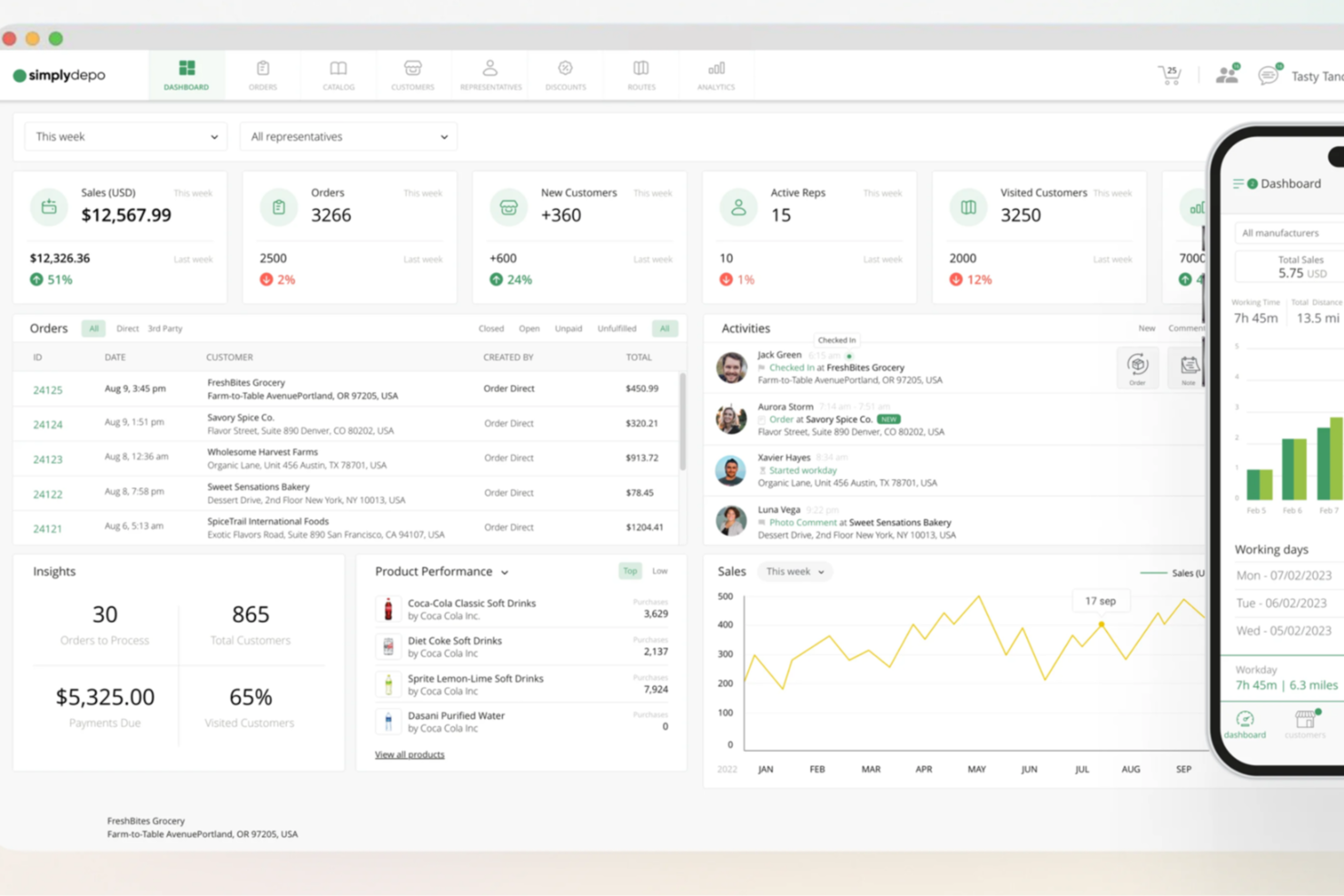
SimplyDepo offers a tailored solution for brands, distributors, and merchandisers seeking to enhance their B2B sales operations. Designed with startups and growing businesses in mind, it addresses challenges in retail execution, order management, and customer relationship management. By integrating essential features like route planning and field sales tools, SimplyDepo aims to streamline processes and drive growth.
Why I Picked SimplyDepo
I picked SimplyDepo for its specialized focus on enhancing B2B sales efficiency through its unique combination of retail execution and field sales tools. Its B2B order management system is particularly appealing for those looking to streamline their sales processes and improve customer relationships. The inclusion of CRM capabilities further strengthens its position as a comprehensive solution for managing business-client interactions and optimizing sales routes.
SimplyDepo Key Features
In addition to its strengths in order management and CRM, I also found the following to be useful:
- Route Planning: Optimize delivery and sales routes to enhance efficiency and reduce operational costs.
- Sales Rep App: Equip your sales team with a mobile app to manage tasks and customer interactions on the go.
- Prospect Management: Track and manage potential clients to ensure no opportunity is missed.
- Task Management: Organize and prioritize tasks to maintain focus and productivity across your team.
SimplyDepo Integrations
Integrations include Stripe, Twilio SendGrid, ShipStation, and QuickBooks.
Pros and Cons
Pros:
- Route planning and territory mapping
- Integrated CRM for account tracking
- Built-in B2B order management system
Cons:
- No transparent API documentation
- Limited advanced reporting customization

Dock
Best for action planning in digital sales rooms
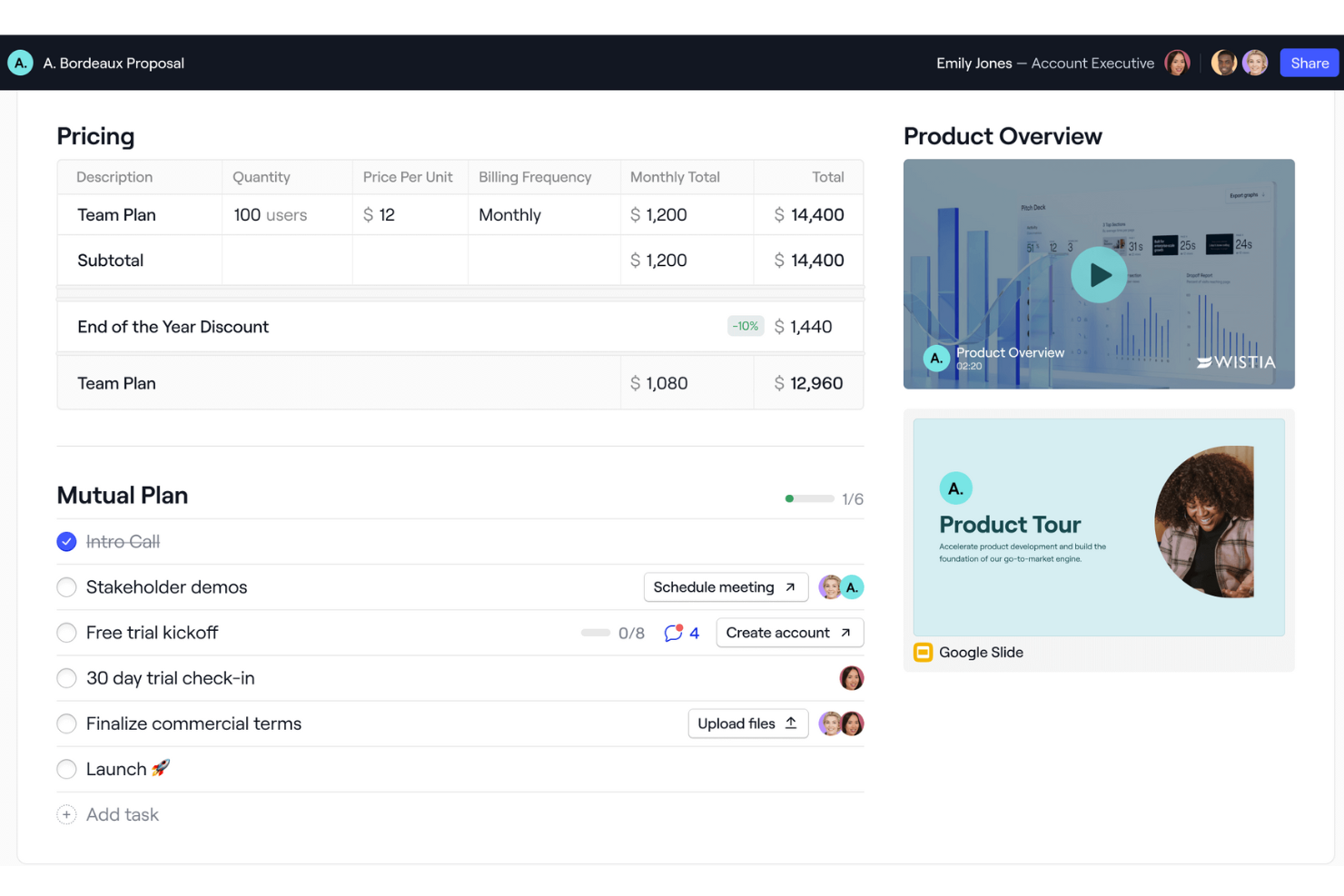
Dock is a B2B sales software that provides a comprehensive platform for managing sales, onboarding, and client interactions. It offers features such as digital sales rooms, onboarding portals, and client-facing workspaces, which help businesses organize and share content with customers in a branded environment.
Why I picked Dock: I like that Dock offers a centralized space for sales teams to manage client-facing content, while also providing tools and templates to standardize sales processes. Its digital sales room particularly stands out with features like mutual action plans to guide buyers through different stages of the process. Additionally, Dock's analytics-focused customer experience tracks interactions and progress, helping sales teams gather metrics and follow up with leads effectively.
Dock Standout Features and Integrations
Standout features include buying signals, dynamic action plans, a flexible workspace editor, custom branding, pricing and order forms, secure sharing, digital signature collection, and customizable templates.
Integrations include Airtable, Pandadoc, Typeform, HubSpot, Salesforce, Slack, Zoom, and more.
Pros and Cons
Pros:
- Analytics for customer engagement
- Mutual action plans
- Templates for standardizing processes
Cons:
- Learning curve for new users wanting to maximize the features
- HubSpot and Salesforce integration only available for higher tiers

UpLead
Best for lead verification and qualification
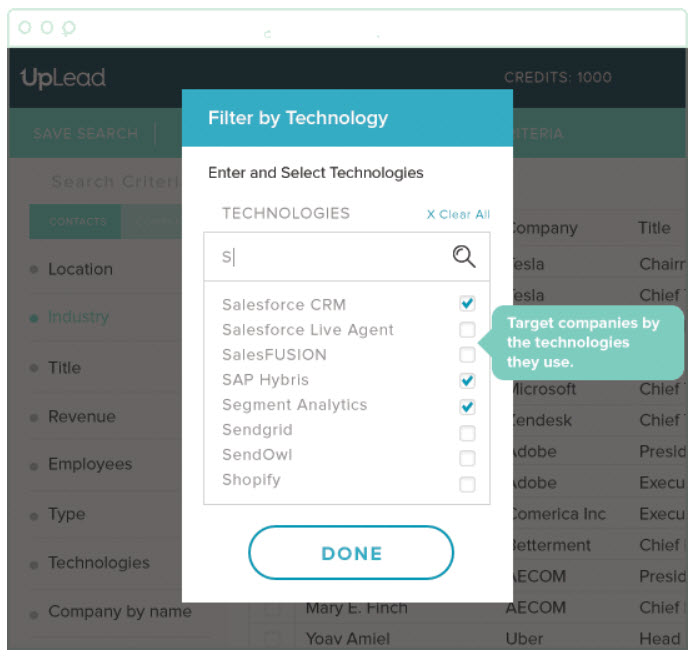
This lead generation software was built to help SMBs and large organizations manage their sales workflow through account-based marketing, targeted sales generation, real-time email verification, and opportunity engagement. You can build customizable B2B lists with criteria for lead qualification that eliminates bad-fit buyers and low quality leads.
Why I picked UpLead: The reason I chose UpLead was due to their comprehensive lead filtering tools. It’s not enough to find high-quality leads, they also need to be a good fit for your product or service. Using their filtering tool, you can target leads by technology, number of employees, revenue, and over 50 other search filters.
UpLead Standout Features and Integrations
Standout features include access to over 100 million contacts with 95% data accuracy, appending key contact data from disorganized lists, Chrome extension for grabbing leads straight from the browser, and an email checker tool that helps verify valid addresses.
Integrations include Close, Copper, Dynamics 365, Insightly, Mailshake, Nimble, Outreach, Pipedrive, Salesforce Sales Cloud, and Zapier.
Pros and Cons
Pros:
- CSV file upload functionality for non-integrated CRMs
- Can generate lists quickly
- Low email bounce back
Cons:
- Limited lead coverage
- Pricing isn’t as flexible
Groove
Best for enterprises who use Salesforce or Salesforce Industry Clouds
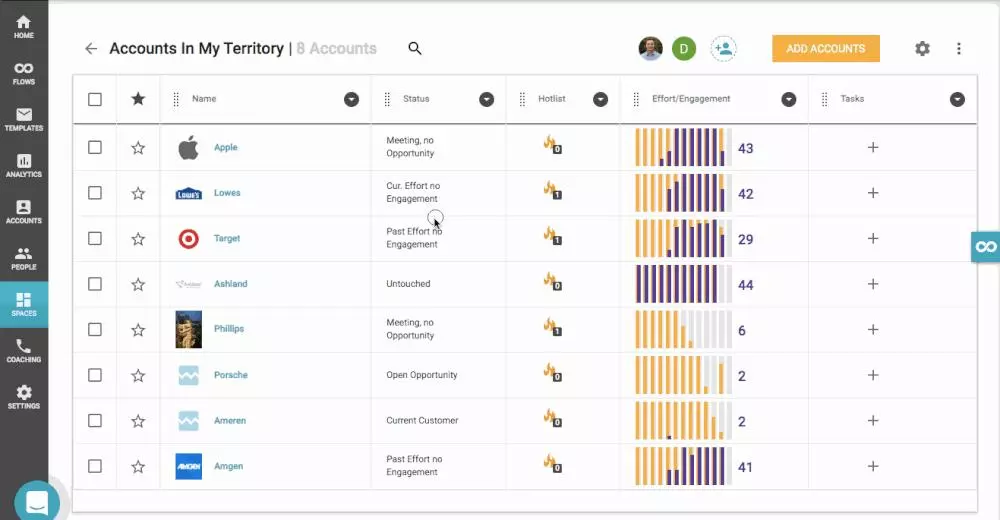
This sales productivity platform is designed to enable sales leaders to boost the revenue-per-rep across the entire organization by automating admin tasks, making it easier to update and access Salesforce, and generating repeatable playbooks by leveraging AI to transform complicated data into actionable insights.
Why I picked Groove: I chose Groove for this list because it’s the only current Salesforce-native market leader. With Groove, you won’t have any data latency or sync issues, you get industry-leading security and compliance, and it works with even the most customized versions of Salesforce.
Groove Standout Features and Integrations
Standout features include campaign automation through email, SMS, and calls; visibility on sales calls for better coaching; real-time insights into sales activity; and dedicated implementation and onboarding specialists.
Integrations include CloudTalk, Constant Contact, ExecVision, Gmail, Gong, LinkedIn Sales Navigator, Microsoft Outlook, Seismic, Spinify, and Vidyard.
Pros and Cons
Pros:
- Powerful execution roadmap
- Great customer support
- Friendly user-interface
Cons:
- Not enough tutorials for combining with Zoom Phone, etc.
- Limited mass texting capabilities
Other Options
I chose a few more tools that were on my radar but didn’t make the final list to provide a truly comprehensive selection of B2B sales software for you to explore.
- Cognism
For unrestricted access to information, unfettered by credit limits or geography restrictions
- Hunter
All-in-one email outreach platform
- Pipedrive CRM
For custom sales pipelines
- Lusha
For reaching company decision makers to close deals faster
- InSitu Sales
With integrated field sales & B2B ecommerce
- Forecastio
For sales forecasting and planning
- Leadinfo
For tracking which companies are visiting your website
- Enlyft
For discovering what technologies your prospects are already using
- BookYourData
For pay-as-you-go B2B prospecting
- LeadIQ
For improving prospecting for SaaS sales teams


How I Evaluate B2B Sales Software
I split my evaluation into two layers: baseline criteria a tool must hit—like pipeline management and CRM sync—and differentiators that separate the best options for RevOps teams.
Core Functionality (Table Stakes For This List)
When I'm selecting tools for my list, I rank each one on a scale from 0 (does not offer the functionality) to 5 (excels in this area) for each core functionality listed below. Then, I calculate the tool's total score into a percentage. Each tool needs to achieve a minimum total score of 65% to be considered for inclusion.
- Pipeline & Deal Management: I evaluate how well a tool handles multi-stage, multi-stakeholder deal cycles—things like separate pipelines for new business vs. expansion and stakeholder mapping within opportunities.
- Sales Engagement Tools: Multi-channel cadences matter here, so I look for sequencing across email, phone, and LinkedIn rather than just basic email templates with no follow-up logic.
- CRM Integration or Native CRM: Whether a platform is a CRM itself or syncs with one like Salesforce or HubSpot, I check for bi-directional data flow that keeps account and deal records consistent.
- Revenue Forecasting & Analytics: I look at how a tool surfaces pipeline health and predicted outcomes—weighted forecasts, deal velocity tracking, and stage conversion reporting all factor in.
- Lead & Account Management: B2B sales rarely involve a single buyer, so I evaluate support for account hierarchies, buying committees, and structured lead routing across territories or segments.
- Sales Workflow Automation: Repetitive tasks like activity logging, deal stage updates, and task assignment eat into selling time, so I check for rule-based triggers that handle these automatically.
Once I have a list of tools that meet this criteria, I consider what sets each platform apart.
Differentiating Factors (What Sets Vendors Apart)
Here's how I compare and contrast different vendors:
Standout Features
Conversation intelligence is a major differentiator—I look for tools that transcribe and analyze sales calls to surface deal risks or competitor mentions without manual review. AI deal scoring adds another layer, helping RevOps teams prioritize pipeline by predicted win probability rather than gut feel. I also evaluate territory and quota planning capabilities, especially for orgs managing multiple segments where balanced rep coverage directly impacts forecast accuracy.
Beyond Features
Integration depth matters a lot here—I check whether a platform connects natively to CRMs, marketing automation tools, and BI systems so RevOps teams aren't stuck building custom middleware. Scalability is equally important, especially for growing orgs that need to add business units or territories without rebuilding their workflows. I also evaluate pricing transparency, because hidden costs for add-on modules like forecasting or analytics can blow up a RevOps budget quickly.
How to Choose B2B Sales Software
It’s easy to get bogged down in long feature lists and complex pricing structures. To help you stay focused as you work through your unique software selection process, here’s a checklist of factors to keep in mind:
| Factor | What to Consider |
|---|---|
| Scalability | Can the software grow with your business? Look for tools that support additional users and increased data volume without a drop in performance. |
| Integrations | Does it connect with your existing systems like CRM, email, and analytics tools? Ensure compatibility to avoid data silos. |
| Customizability | Can you tailor the tool to fit your specific workflows? Check for options to customize fields, dashboards, and reports. |
| Ease of Use | How intuitive is the interface? A steep learning curve can slow down adoption. Look for user-friendly navigation and straightforward processes. |
| Implementation and Onboarding | What resources are needed to get started? Consider the time and support required for setup and training. |
| Cost | Is the pricing clear and within budget? Compare cost structures, including hidden fees or extra charges for essential features. |
| Security Safeguards | Does the tool comply with industry security standards? Look for encryption, data protection, and regular security updates to safeguard your data. |
| Support Availability | What support options are available? Ensure timely assistance through channels like phone, email, or chat, especially during critical business hours. |
What Is B2B Sales Software?
B2B sales software is a tool that helps businesses manage and improve their sales processes with other businesses. Sales professionals, account managers, and business development teams typically use these tools to boost efficiency and close deals faster.
Features like lead management, sales tracking, and reporting help with organizing sales activities and gaining customer insights. Overall, these tools provide a structured way to manage sales efforts and drive business growth.
Features
When selecting B2B sales software, keep an eye out for the following key features:
- Lead management: Helps organize and track potential customers, ensuring no opportunities are missed.
- Sales pipeline tracking: Provides a visual overview of sales stages, helping teams manage and prioritize deals.
- Reporting and analytics: Offers insights into sales performance, aiding in data-driven decision-making.
- Customizable dashboards: Allows users to tailor views to their specific needs, enhancing usability.
- Integration capabilities: Connects with existing tools like CRM and email, ensuring a seamless workflow.
- Mobile access: Enables sales teams to manage tasks on the go, increasing flexibility.
- Automated tasks: Reduces manual work by automating repetitive tasks, saving time and effort.
- Security safeguards: Protects sensitive data with encryption and compliance with industry standards.
- User-friendly interface: Ensures ease of use with intuitive navigation and straightforward design.
- Customer insights: Provides detailed information on customer behavior, aiding in personalized sales strategies.
Benefits
Implementing B2B sales software provides several benefits for your team and your business. Here are a few you can look forward to:
- Improved organization: Lead management features help keep track of potential customers, reducing chaos.
- Increased efficiency: Automated tasks save time by handling repetitive work, freeing up your team for more strategic activities.
- Better decision-making: Reporting and analytics provide insights into sales performance, supporting informed choices.
- Enhanced flexibility: Mobile access allows your team to manage sales activities on the go, ensuring they're not tied to a desk.
- Stronger customer relationships: Customer insights offer detailed information on behavior, helping tailor sales approaches.
- Simplified workflows: Integration capabilities ensure the software works smoothly with existing tools, reducing disruptions.
- Enhanced data security: Security safeguards protect sensitive information, providing peace of mind.
Costs and Pricing
Selecting B2B sales software requires an understanding of the various pricing models and plans available. Costs vary based on features, team size, add-ons, and more.
The table below summarizes common plans, their average prices, and typical features included in B2B sales software solutions:
Plan Comparison Table for B2B Sales Software
| Plan Type | Average Price | Common Features |
|---|---|---|
| Free Plan | $0 | Basic lead management, limited reporting, and email integration. |
| Personal Plan | $5-$25/user/month | Advanced lead management, sales tracking, and basic analytics. |
| Business Plan | $30-$60/user/month | Full CRM integration, customizable dashboards, and automation features. |
| Enterprise Plan | $70-$150/user/month | Advanced security, custom integrations, and dedicated support. |
B2B Sales Software FAQs
Have more questions? Here are answers to some common FAQs.
What is the primary purpose of B2B sales software?
The primary purpose of B2B sales software is to help businesses manage their sales processes more efficiently. It organizes customer information, tracks sales activities, and provides insights into sales performance. By centralizing data, your team can access everything they need in one place, making it easier to manage leads and close deals.
How does B2B software work?
Most of the software listed here is related to lead generation, so the method depends on the tool. Some of these tools help you capture the information of website visitors, others aggregate data from social media and other public profiles, and some provide ready-made lists for a flat rate.
Most options also operate on a data accuracy guarantee that helps you check the validity of phone numbers, email addresses, and other publicly available information before reaching out to new contacts so you don’t waste time on inaccessible leads.
How do I know if my team is ready for B2B sales software?
Your team is ready for B2B sales software if you’re managing a growing number of leads and deals manually becomes cumbersome. If data is scattered across spreadsheets and emails, it’s time to centralize.
Assess if your team is facing challenges in tracking sales activities or generating reports. Look for signs of inefficiency or missed opportunities. Involve your team in the decision-making process to ensure they’re on board and ready to leverage the software’s capabilities.
What's Next?
If you're in the process of researching B2B sales software, connect with a SoftwareSelect advisor for free recommendations.
You fill out a form and have a quick chat where they get into the specifics of your needs. Then you'll get a shortlist of software to review. They'll even support you through the entire buying process, including price negotiations.