

I 10 migliori CRM per piccole imprese recensiti per il 2026

10 Miglior CRM per piccole imprese: selezione


Con così tanti CRM diversi per piccole imprese disponibili, capire quale sia quello giusto per te è difficile. Sai di voler costruire relazioni più solide con i clienti e favorire la crescita aziendale a un costo accessibile, ma devi capire quale strumento sia il migliore. Ti aiuto io! In questo articolo ti aiuterò a rendere facile la tua scelta, condividendo le mie esperienze personali nell'utilizzo di decine di CRM diversi per piccole imprese con vari team e progetti, insieme alle mie scelte dei migliori CRM per piccole imprese.
Perché fidarsi dei nostri consigli sui software
Le nostre recensioni riflettono il nostro giudizio indipendente, non un discorso di vendita. Scopri come manteniamo la trasparenza.
Per questa guida, abbiamo valutato gli strumenti attraverso test pratici e ricerche indipendenti, assegnando un punteggio agli strumenti in base ai nostri criteri di selezione.
Le nostre recensioni riflettono il nostro giudizio editoriale umano, non un discorso di vendita.
Riepilogo dei migliori CRM per piccole imprese
| Tool | Best For | Trial Info | Price | ||
|---|---|---|---|---|---|
| 1 | Ideale per flussi di lavoro personalizzabili | Prova gratuita disponibile | Da $12/utente/mese (fatturazione annuale) | Website | |
| 2 | Ideale per le capacità di automazione | Prova gratuita di 14 giorni | A partire da $29/utente/mese (fatturazione annuale) | Website | |
| 3 | Il miglior CRM per team di vendita B2B delle piccole imprese | Prova gratuita di 30 giorni disponibile | Da $35/utente/mese | Website | |
| 4 | Ideale per integrazioni e facilità d'uso | Prova gratuita di 14 giorni + piano gratuito disponibile | Da $18/utente/mese (fatturato annualmente) | Website | |
| 5 | Miglior CRM per piccoli produttori | Prova gratuita di 30 giorni disponibile | A partire da $49/utente/mese | Website | |
| 6 | Miglior rapporto qualità-prezzo per le piccole imprese | Prova gratuita di 30 giorni + demo gratuita disponibile | Da $25/utente/mese (fatturazione mensile o annuale) | Website | |
| 7 | Ideale per monitorare le fasi di vendita | Piano gratuito disponibile e prova gratuita di 15 giorni | Da $7/utente/mese (fatturazione annuale) | Website | |
| 8 | Miglior CRM per team di vendita outbound | Prova gratuita di 14 giorni disponibile | Da $29/utente/mese | Website | |
| 9 | Ideale per professionisti indipendenti che vendono servizi | Prova gratuita di 30 giorni | Da $29/mese (fatturazione annuale) | Website | |
| 10 | Ideale per potenziare le vendite con un CRM unificato | Piano gratuito disponibile | Da $9/utente/mese (fatturazione annuale) | Website |

Recensioni dei migliori CRM per piccole imprese
Qui puoi trovare una panoramica dettagliata di ogni CRM per piccole imprese, con il relativo caso d’uso migliore, le funzionalità più importanti e alcuni pro e contro. Ho incluso anche schermate per darti un’idea del loro aspetto e della loro esperienza d’uso.
Ideale per flussi di lavoro personalizzabili
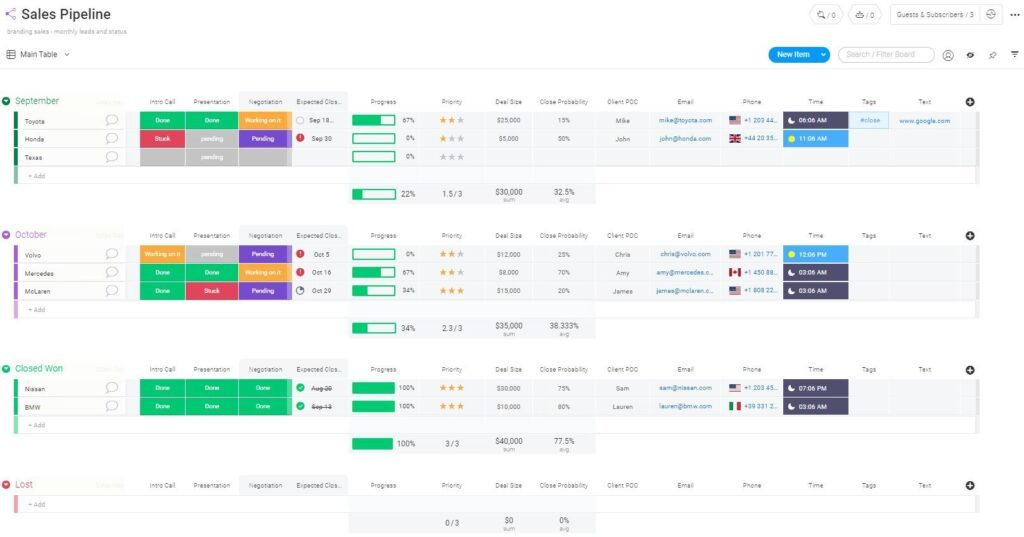
Se la tua piccola impresa ha bisogno di un CRM che si adatti ai tuoi specifici processi di vendita o assistenza, monday CRM offre una piattaforma flessibile per creare flussi di lavoro personalizzati. È particolarmente utile per i team che vogliono progettare da soli pipeline, dashboard e automazioni senza doversi affidare a modelli rigidi. monday CRM è una scelta valida per le aziende che valorizzano la gestione visiva dei progetti e desiderano personalizzare ogni fase del percorso cliente.
A chi è rivolto monday CRM?
Team trasversali che desiderano un CRM visivo e personalizzabile integrato in un sistema più ampio di gestione del lavoro.
Perché ho scelto monday CRM
Ciò che distingue monday CRM è il livello di personalizzazione che si può applicare a ogni aspetto del flusso di lavoro, particolarmente prezioso per le piccole imprese con processi unici. Puoi costruire pipeline personalizzate, aggiungere colonne illimitate e progettare dashboard che riflettono le priorità del tuo team. Apprezzo che monday CRM permetta di automatizzare le attività ripetitive e impostare logiche condizionali, così che il CRM si adatti alla crescita del tuo business. Per i team che vogliono un CRM che si modelli sul loro modo di lavorare — e non il contrario — monday CRM offre una flessibilità senza paragoni.
Funzionalità principali di monday CRM
Altre funzionalità di monday CRM che possono risultare utili alle piccole imprese includono:
- Integrazione email: Collega i tuoi account email per inviare, ricevere e tracciare i messaggi direttamente all'interno del CRM.
- Cronologia attività: Visualizza la cronologia cronologica di tutte le interazioni e gli aggiornamenti per ogni contatto o trattativa.
- Gestione documenti: Conserva, condividi e collabora sui file legati a trattative e contatti.
- App mobile: Accedi e aggiorna i dati del CRM ovunque ti trovi tramite app dedicate per iOS e Android.
Integrazioni monday CRM
Le integrazioni includono oltre 200 applicazioni di terze parti, quali Salesforce, Mailchimp, Aircall, Pandadoc e Twilio.
Pros and Cons
Pros:
- Bacheche illimitate per organizzare clienti, progetti e processi
- Sviluppo e implementazione delle automazioni semplici
- Assistenza clienti 24/7
Cons:
- Nessun report personalizzabile
- Tutti i piani prevedono un minimo di tre utenti
New Product Updates from monday CRM

monday CRM Adds Meta Conversions API Integration
monday CRM now lets you connect Meta Conversions API and sync lead status back to Meta, improving targeting and conversions via a new Meta integration automation recipe. For more information, visit monday CRM's official site.
Attio
Ideale per le capacità di automazione
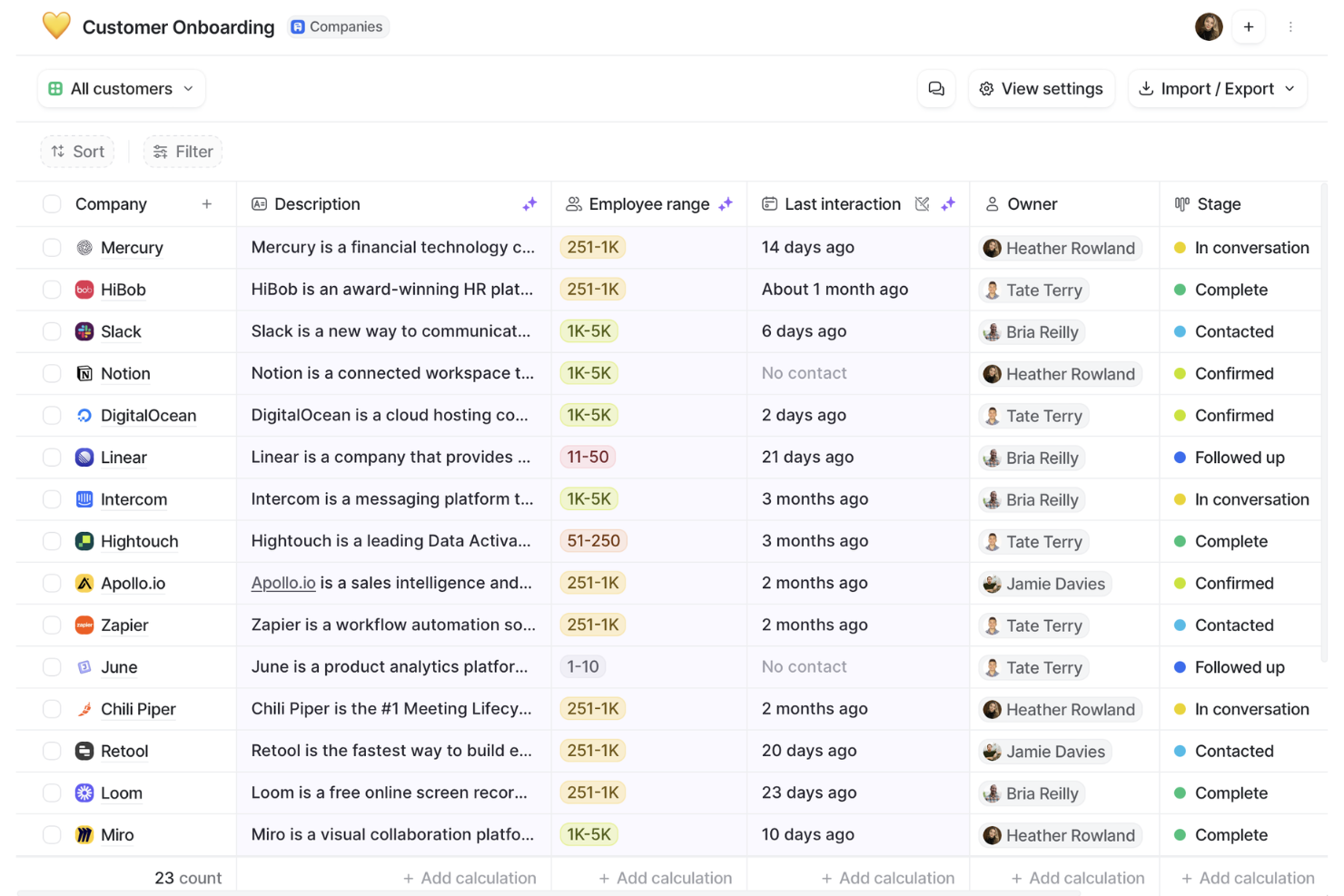
Attio è una piattaforma CRM progettata per i team che desiderano automatizzare e personalizzare i flussi di lavoro per la gestione dei clienti. È particolarmente adatta alle piccole imprese che necessitano di un'organizzazione flessibile dei dati e di un'automazione avanzata senza complesse configurazioni iniziali. Se il tuo team vuole semplificare le attività ripetitive e adattare i processi CRM man mano che cresce, Attio offre un approccio moderno.
Per chi è ideale Attio?
Startup in rapida crescita e team commerciali moderni che desiderano un CRM estremamente flessibile, incentrato sull'automazione e con strutture dati personalizzabili.
Perché ho scelto Attio
Ho scelto Attio perché le sue capacità di automazione sono particolarmente vantaggiose per le piccole imprese che vogliono ridurre il lavoro manuale e mantenere processi coerenti. Attio permette di creare flussi di lavoro personalizzati usando trigger e azioni, così puoi automatizzare i follow-up, l'aggiornamento dei dati e l'assegnazione dei compiti man mano che le trattative avanzano nella pipeline. La piattaforma supporta anche campi dati dinamici, permettendo di adattare l'automazione al tuo specifico processo di vendita o di assistenza. Per i team che desiderano risparmiare tempo e ridurre gli errori, le funzionalità di automazione di Attio lo rendono una scelta valida nel panorama dei CRM.
Funzionalità principali di Attio
Altre funzionalità di Attio che le piccole imprese possono trovare utili includono:
- Workspace collaborativi: Più membri del team possono collaborare in tempo reale su pipeline e liste di contatti condivise.
- Viste personalizzabili: Crea e salva viste diverse per contatti, aziende e trattative in base al flusso di lavoro del tuo team.
- Sincronizzazione email: Sincronizza automaticamente le email con contatti e trattative per tenere la cronologia della comunicazione organizzata.
- Controllo dei permessi: Imposta livelli di accesso dettagliati per gestire chi può visualizzare o modificare dati specifici.
Integrazioni di Attio
Le integrazioni includono Airtable, Asana, Ashby, Brevo, Fillout, GitHub, Google Calendar, Google Drive, Google Forms, Gmail, HubSpot, Intercom e Jira.
Pros and Cons
Pros:
- La piattaforma è flessibile e personalizzabile
- Arricchisce automaticamente i dati
- Supporta la collaborazione in tempo reale
Cons:
- L'app mobile è priva di alcune funzionalità
- Potrebbe offrire funzionalità di reportistica più avanzate
New Product Updates from Attio

Attio Improves Ask Attio With Suggested Actions and Consistent Chat
Attio adds suggested next actions, example prompts, a consistent chat panel, aligned shortcuts, and a minimize option to Ask Attio. These updates make the AI assistant easier to use across different pages. For more information, visit Attio’s official site.
 .
.
Il miglior CRM per team di vendita B2B delle piccole imprese
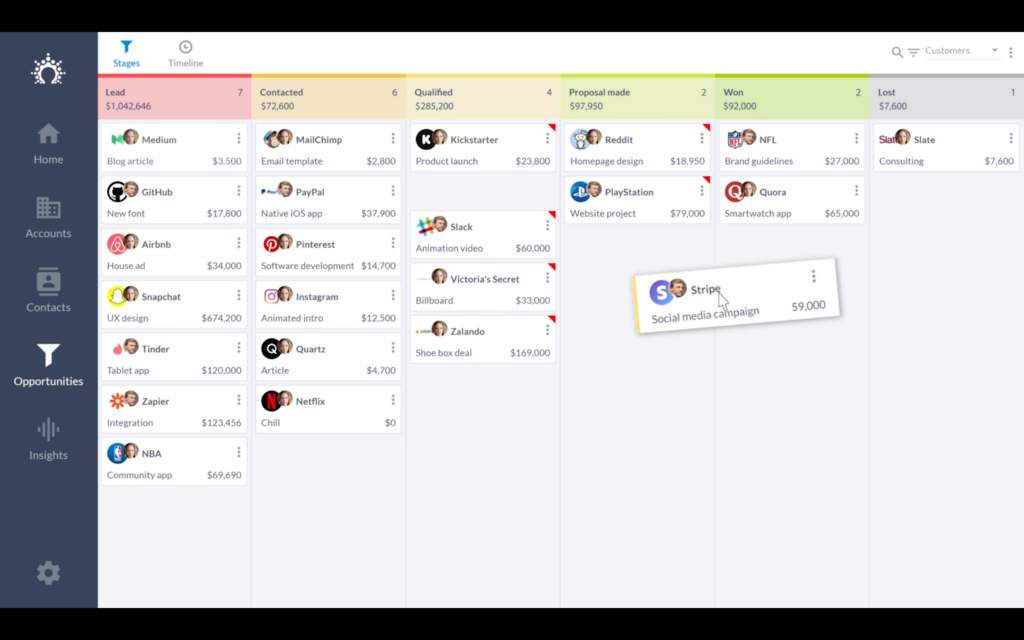
Salesflare è pensato per i team di vendita B2B delle piccole imprese che desiderano un CRM per automatizzare l'inserimento dei dati e mantenere pipeline accurate. È particolarmente utile per i team che si affidano ad attività via email, calendario e LinkedIn per far progredire le trattative. Salesflare aiuta le aziende orientate alla vendita a catturare ogni punto di contatto e tenere aggiornati i contatti senza sforzi manuali.
Per chi è ideale Salesflare?
Piccoli team di vendita B2B che desiderano una raccolta automatica dei dati e il monitoraggio delle relazioni senza dover aggiornare manualmente il CRM.
Perché ho scelto Salesflare
Per i team di vendita delle piccole imprese B2B, Salesflare si distingue perché raccoglie automaticamente dati di contatto e aziendali da email, calendari e profili social. Questo significa che il tuo team dedica meno tempo all'inserimento manuale dei dati e più tempo alla costruzione di relazioni. Ho scelto Salesflare perché i suoi strumenti di gestione delle pipeline sono concepiti appositamente per monitorare i cicli di vendita B2B multi-touch. La piattaforma mette inoltre in evidenza le opportunità ancora non sfruttate, permettendoti di far avanzare le trattative ed evitare che i lead vadano persi.
Caratteristiche principali di Salesflare
Altre funzionalità che rendono Salesflare interessante per i team di vendita delle piccole imprese includono:
- Tracciamento email: Ricevi notifiche in tempo reale quando i contatti aprono o cliccano sulle tue email.
- Sequenze email integrate: Imposta email di follow-up automatiche direttamente dal CRM.
- Strumenti di collaborazione di team: Condividi pipeline, note e file con il tuo team in un unico posto.
- App mobile: Accedi ai dati del tuo CRM e aggiorna le trattative mentre sei in movimento tramite le app iOS e Android.
Integrazioni di Salesflare
Le integrazioni includono Gmail, iCloud, Office 365, Exchange e una REST API per creare connettori personalizzati. Puoi utilizzare Zapier per integrare il software con ulteriori strumenti.
Pros and Cons
Pros:
- Sono disponibili numerosi tutorial sul canale YouTube dell'azienda
- Interfaccia utente semplice e intuitiva, facile da imparare
- Le funzionalità collaborative favoriscono la trasparenza all'interno del team
Cons:
- L'assistenza clienti non è disponibile telefonicamente
- Manca di funzioni native per calendario e pianificazione
Capsule
Ideale per integrazioni e facilità d'uso
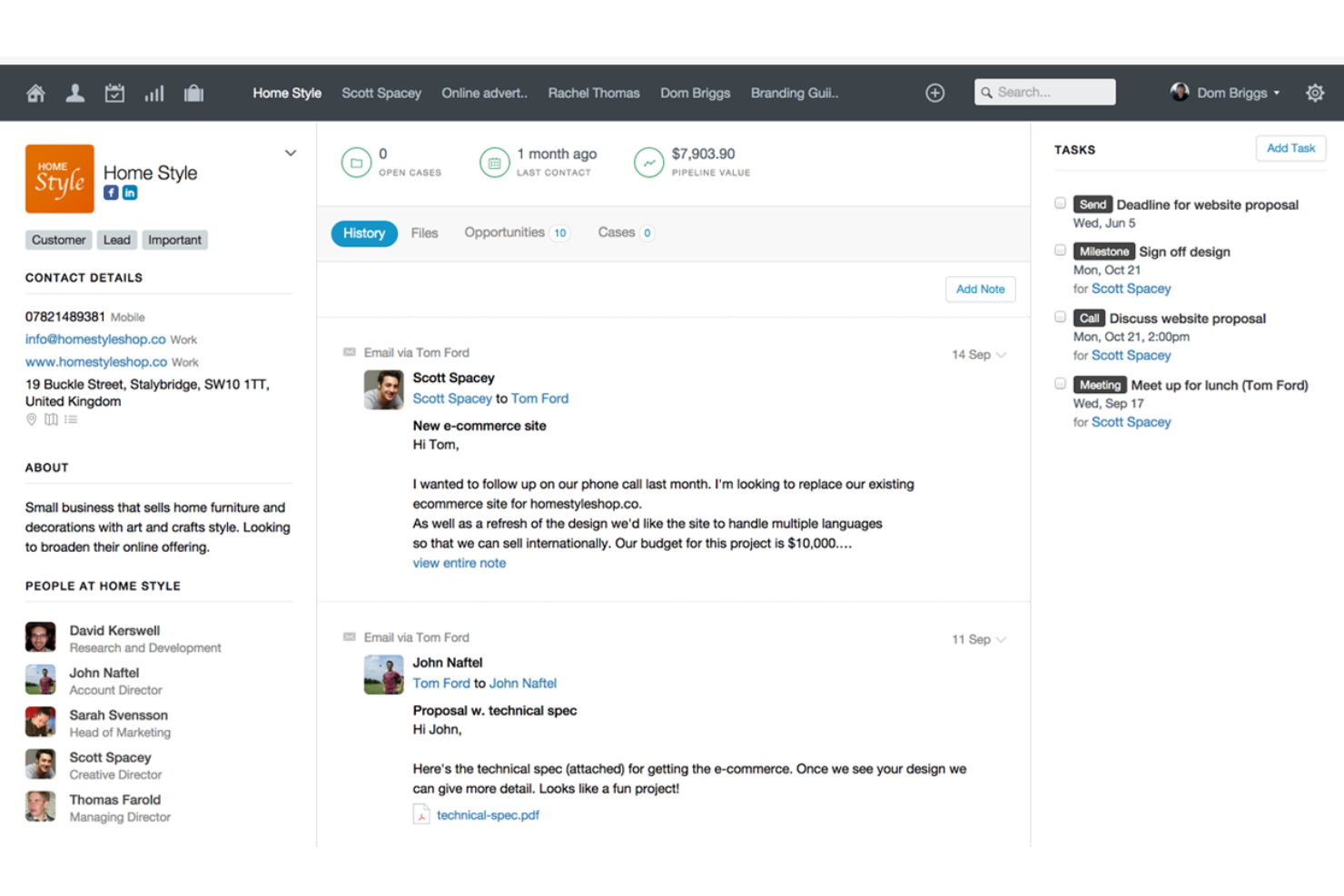
Capsule è un CRM progettato per le piccole imprese che desiderano collegare i propri strumenti preferiti e mantenere i processi semplici. È particolarmente adatto a team che si affidano alle integrazioni con piattaforme di contabilità, email e marketing per gestire le relazioni con i clienti. Capsule ti aiuta a centralizzare i contatti, monitorare le vendite e automatizzare le attività senza aggiungere complessità al tuo flusso di lavoro.
A Chi È Destinato Capsule?
Piccole imprese che danno priorità alla facilità d’uso e a solide integrazioni con terze parti, invece di una personalizzazione avanzata.
Perché Ho Scelto Capsule
Ciò che mi ha colpito di Capsule è il modo in cui aiuta le piccole imprese a collegare gli strumenti che già utilizzano senza aggiungere passaggi extra al lavoro quotidiano. La libreria di integrazioni Zapier di Capsule e i collegamenti diretti a piattaforme come Xero e Mailchimp consentono di sincronizzare i dati e automatizzare le attività in tutto il tuo stack tecnologico. Ho scelto Capsule perché la vista pipeline delle vendite e i campi personalizzabili rendono semplice adattare il CRM al flusso di lavoro del tuo team. Queste caratteristiche aiutano le piccole imprese a mantenere tutto organizzato continuando a usare le app che già conoscono.
Funzionalità Principali di Capsule
Altre funzionalità che rendono Capsule utile per i team delle piccole imprese includono:
- Gestione delle Attività: Assegna attività ai membri del team e imposta scadenze direttamente all’interno dei record di contatto o di opportunità.
- Integrazione con Email: Collega il tuo account email per monitorare le conversazioni e salvare la corrispondenza con i contatti.
- Gestione dei Casi: Gestisci le richieste di assistenza clienti e monitora i progressi insieme alle opportunità di vendita.
- App Mobile: Accedi al tuo CRM, aggiorna i record e gestisci le attività da dispositivi iOS e Android.
Integrazioni di Capsule
Le integrazioni includono Google Workspace (Gmail, Docs, Calendar), Microsoft Office 365, Mailchimp, Xero, QuickBooks, Slack, FreshBooks e molte altre tramite Zapier.
Pros and Cons
Pros:
- Intuitivo e facile da utilizzare
- Gestione integrata delle attività del calendario
- Invia e ricevi email direttamente in Capsule CRM
Cons:
- Non è possibile trascinare e rilasciare tag o campi dati
- Sarebbero utili ulteriori integrazioni per il marketing digitale
New Product Updates from Capsule

Capsule Adds AI Meeting Prep for External Calls
Capsule introduced AI Meeting Prep with relationship summaries, color-coded signals, and CRM context for upcoming external calls. This helps users review key contact details and prepare for meetings without searching through records manually. For more information, visit Capsule’s official site.
 .
.
MRPeasy
Miglior CRM per piccoli produttori
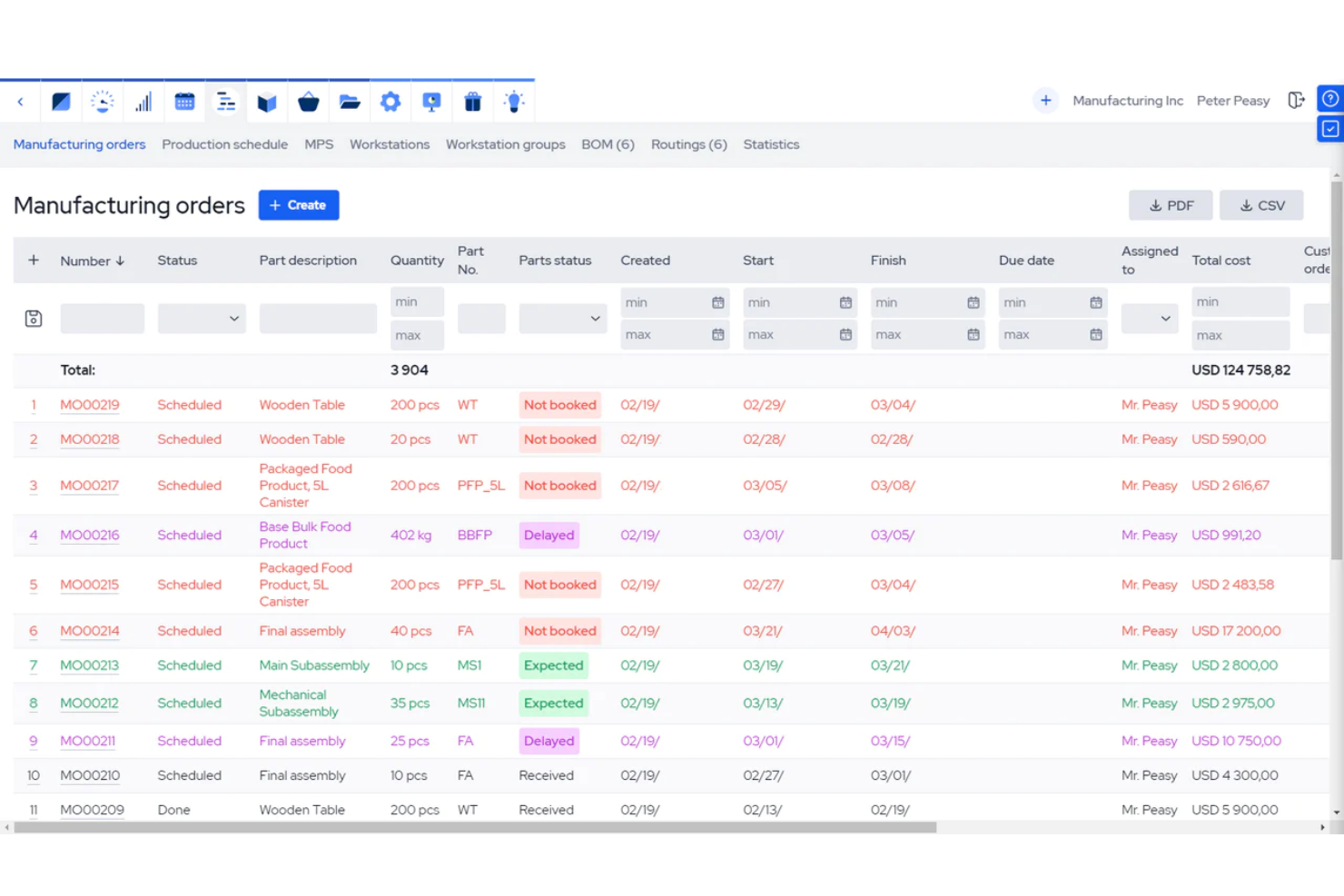
MRPeasy è progettato per i piccoli produttori che necessitano di funzionalità CRM strettamente integrate con la produzione, la gestione dell'inventario e degli ordini. È una soluzione ideale per le aziende che vogliono collegare i pipeline di vendita direttamente ai flussi di lavoro produttivi e alla pianificazione delle risorse. MRPeasy ti aiuta a gestire le relazioni con i clienti mentre tieni traccia di ordini, materiali e programmi di produzione in un'unica piattaforma.
Per chi è più indicato MRPeasy?
Piccole aziende manifatturiere che necessitano di un CRM perfettamente integrato con la pianificazione della produzione e il controllo dell'inventario.
Perché ho scelto MRPeasy
A differenza della maggior parte dei CRM, MRPeasy è stato sviluppato appositamente per i piccoli produttori che devono collegare la gestione clienti ai processi produttivi e di inventario. La piattaforma permette di monitorare le opportunità di vendita collegandole automaticamente a preventivi, ordini di lavoro e livelli di magazzino. Ho scelto MRPeasy perché unisce CRM e pianificazione delle risorse produttive, consentendo di gestire relazioni con i clienti e flussi di produzione in un unico sistema. Questo approccio aiuta i piccoli produttori a evitare l'inserimento manuale dei dati e a mantenere allineati i team di vendita, magazzino e produzione.
Funzionalità principali di MRPeasy
Altre funzionalità che rendono MRPeasy prezioso per i piccoli produttori includono:
- Gestione delle distinte base: Crea e gestisci distinte base multilivello per tutti i tuoi prodotti.
- Programmazione della produzione: Pianifica le operazioni produttive e monitora i progressi in tempo reale.
- Gestione ordini di acquisto: Genera e gestisci ordini di acquisto per materie prime e componenti.
- Scansione codici a barre: Usa la scansione dei codici a barre per tracciare i movimenti di magazzino e le fasi di produzione.
Integrazioni MRPeasy
Le integrazioni includono Amazon, Xero, WooCommerce, BigCommerce, Crossfire, Dropbox, Google Drive, OneDrive, HubSpot, QuickBooks, ShipStation, Salesforce, Shopify, Zapier e altre.
Pros and Cons
Pros:
- Pianificazione della produzione automatizzata
- Interfaccia intuitiva per chi ha poca dimestichezza con la tecnologia
- Possibilità di cambiare lingua
Cons:
- Funzionalità di report e statistiche limitate
- Nessun supporto tecnico telefonico
New Product Updates from MRPeasy
MRPeasy Expands REST API v2 With New Data Endpoints
MRPeasy expands REST API v2 with new endpoints for reports, dashboard data, production resources, stock, and settings. This gives users broader programmatic access to operational data. For more information, visit MRPeasy’s official site.
 .
.
Miglior rapporto qualità-prezzo per le piccole imprese
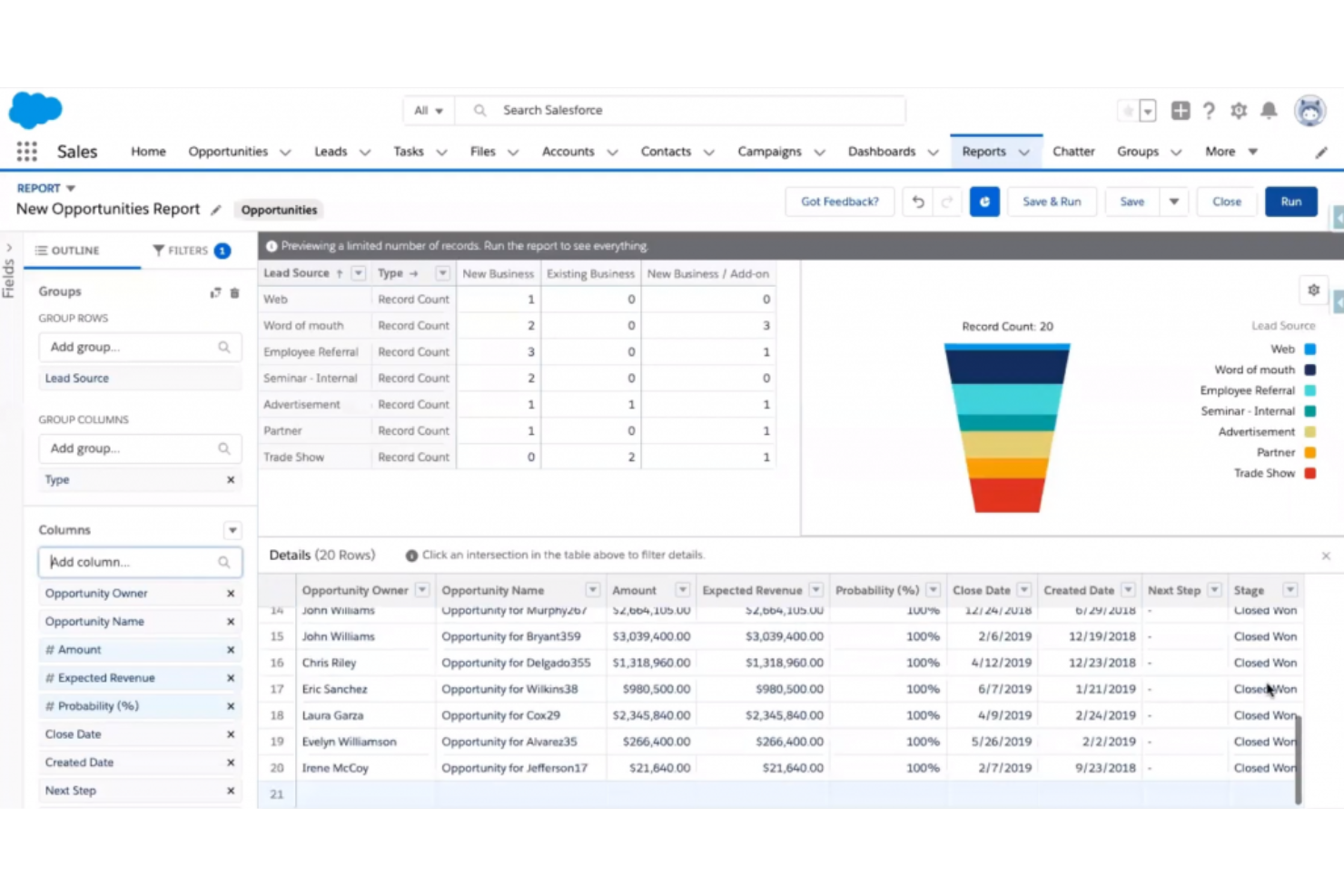
Salesforce CRM offre alle piccole imprese l'accesso a strumenti avanzati per la gestione delle vendite e dei clienti, solitamente riservati alle organizzazioni più grandi. È una scelta solida per i team che desiderano flussi di lavoro personalizzabili, report dettagliati e una vasta gamma di integrazioni senza una curva di apprendimento ripida. Salesforce CRM ti aiuta a centralizzare i dati dei clienti, automatizzare i processi di vendita e scalare con la crescita dell'azienda.
Per chi è ideale Salesforce CRM?
Piccoli team di vendita B2B che desiderano acquisizione automatica dei dati e tracciamento delle relazioni senza aggiornamenti manuali del CRM.
Perché ho scelto Salesforce CRM
Cercando il miglior rapporto qualità-prezzo in un CRM per la tua piccola impresa, Salesforce si distingue per la profondità delle funzionalità a un prezzo accessibile. Ho scelto Salesforce CRM perché offre pipeline di vendita personalizzabili e strumenti di automazione che aiutano i piccoli team a gestire lead e trattative senza lavoro manuale aggiuntivo. Gli strumenti integrati di reportistica e dashboard offrono un'ampia visibilità sulle prestazioni di vendita e sulle attività dei clienti. Queste caratteristiche rendono Salesforce CRM una scelta pratica per le piccole imprese che desiderano funzionalità di livello enterprise senza spendere troppo.
Caratteristiche principali di Salesforce CRM
Altre funzionalità che rendono Salesforce CRM interessante per i team di piccole imprese includono:
- AppExchange Marketplace: Accedi a un'ampia libreria di app di terze parti per estendere la funzionalità del tuo CRM.
- Gestione dei contatti e degli account: Archivia registri dettagliati per ogni cliente e azienda con cui collabori.
- Calendario integrato e monitoraggio delle attività: Pianifica riunioni, imposta promemoria e gestisci le attività quotidiane all'interno della piattaforma.
- App mobile: Gestisci lead, contatti e opportunità da dispositivi iOS e Android.
Integrazioni di Salesforce CRM
Le integrazioni includono Slack, Gmail, Outlook, QuickBooks, HubSpot, Mailchimp, Dropbox, Microsoft Teams, Zapier e Google Workspace.
Pros and Cons
Pros:
- Si adatta alla crescita dell'azienda
- Analisi in tempo reale per approfondimenti sui clienti
- Automazioni efficaci per attività ripetitive
Cons:
- Il processo di configurazione può sembrare complesso
- Il supporto può essere lento nei periodi di punta
New Product Updates from Salesforce CRM

Salesforce CRM Adds Automated CMS Access Expiration
Salesforce CRM adds automated access expiration and a new view-only support role for Point of Sale CMS users. These controls reduce manual access cleanup and help teams limit unnecessary permissions. For more information, visit Salesforce CRM’s official site.
 .
.
Ideale per monitorare le fasi di vendita
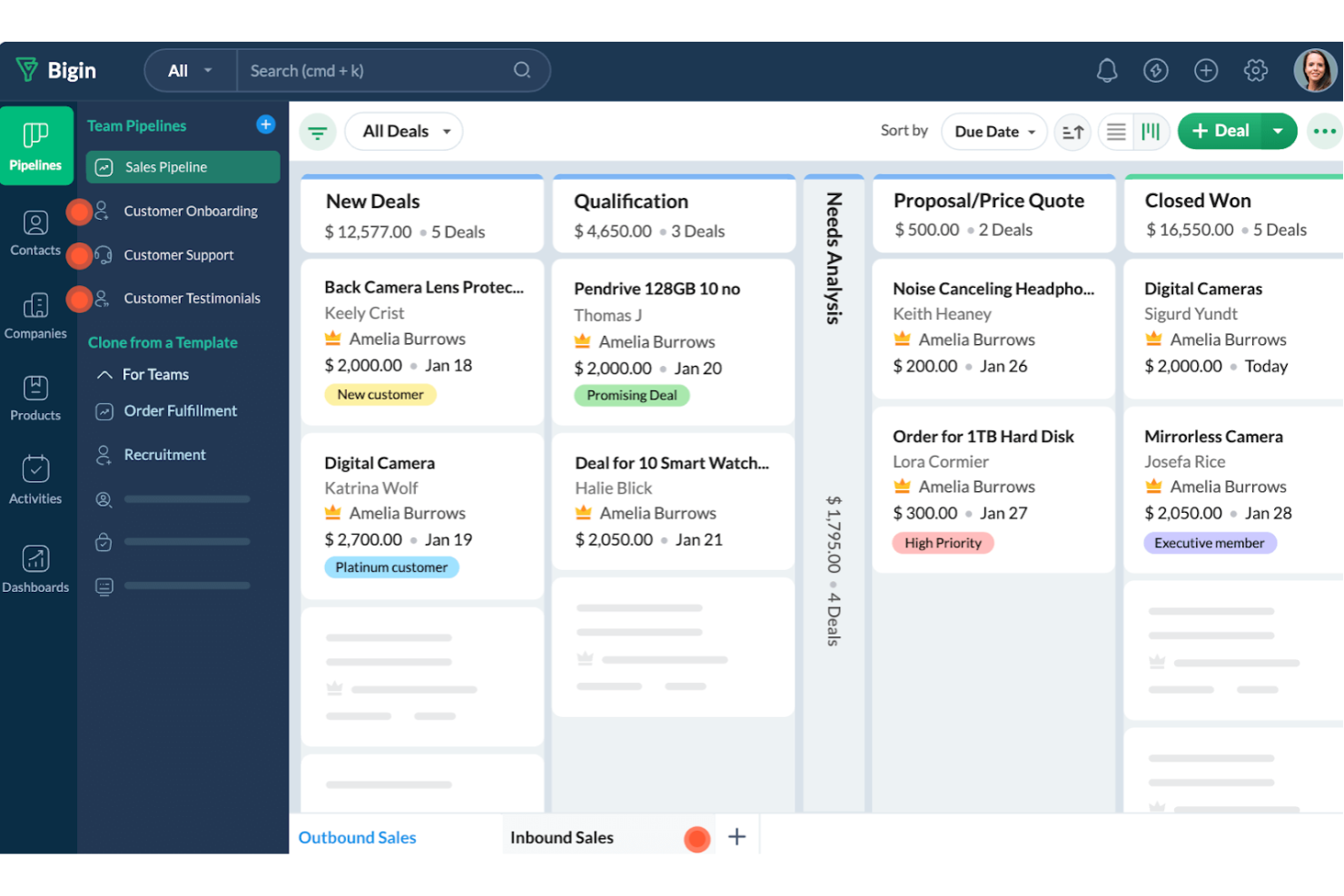
Bigin by Zoho CRM è progettato per le piccole imprese che desiderano un modo semplice per monitorare ogni fase della pipeline di vendita. È particolarmente utile per i team che hanno bisogno di una gestione visiva e chiara delle trattative senza la complessità dei tradizionali CRM. Bigin ti aiuta a organizzare i lead, monitorare i progressi e mantenere attivo il processo di vendita con una configurazione minima.
Per chi è ideale Bigin?
Microimprese e startup nelle fasi iniziali che hanno bisogno di un CRM leggero, focalizzato sulla pipeline, senza la complessità aziendale.
Perché ho scelto Bigin by Zoho CRM
Ciò che mi ha attratto di Bigin by Zoho CRM è la sua attenzione nell’aiutare le piccole imprese a visualizzare e gestire ogni fase del processo di vendita. La vista pipeline ti permette di trascinare e rilasciare le trattative tra le fasi, facilitando la visione immediata dello stato di ogni opportunità. Apprezzo la possibilità di personalizzare le fasi di vendita secondo il proprio workflow, così la pipeline si adatta sempre all’attività. Bigin include anche il tracciamento delle attività per ogni trattativa, in modo che non si perda mai di vista i follow-up o i prossimi passi.
Caratteristiche principali di Bigin by Zoho CRM
Altre funzionalità che rendono Bigin by Zoho CRM interessante per i piccoli team includono:
- Telefonia integrata: Effettua e ricevi chiamate direttamente dal CRM e registra i dettagli delle chiamate automaticamente.
- Integrazione email: Collega il tuo account email per inviare, ricevere e tracciare le email all'interno della piattaforma.
- Automazione dei workflow: Imposta semplici automazioni per compiti ripetitivi come promemoria di follow-up o aggiornamenti di stato.
- App mobile: Accedi alla pipeline di vendita e ai contatti da dispositivi iOS e Android.
Integrazioni di Bigin by Zoho CRM
Le integrazioni includono Zoho Books, Zoho CRM, Zoho Desk, Zoho Campaigns, Zoho Analytics, Google Workspace, Microsoft 365, Microsoft Teams, Mailchimp e QuickBooks Online.
Pros and Cons
Pros:
- Offre moduli personalizzati per la raccolta dati
- Permette di monitorare facilmente più pipeline
- Configurazione semplice e immediata
Cons:
- Mancano funzionalità di mappatura per l'assegnazione dei contatti
- Flessibilità limitata nella creazione di report personalizzati
New Product Updates from Bigin by Zoho CRM

Bigin iOS Adds Interactive WhatsApp Templates and Quick Replies
Bigin’s iOS app now supports interactive WhatsApp templates and Quick Replies, making it easier to preview and send instant messages to customers. For more information, visit Bigin by Zoho CRM's official site.
 .
.
Miglior CRM per team di vendita outbound
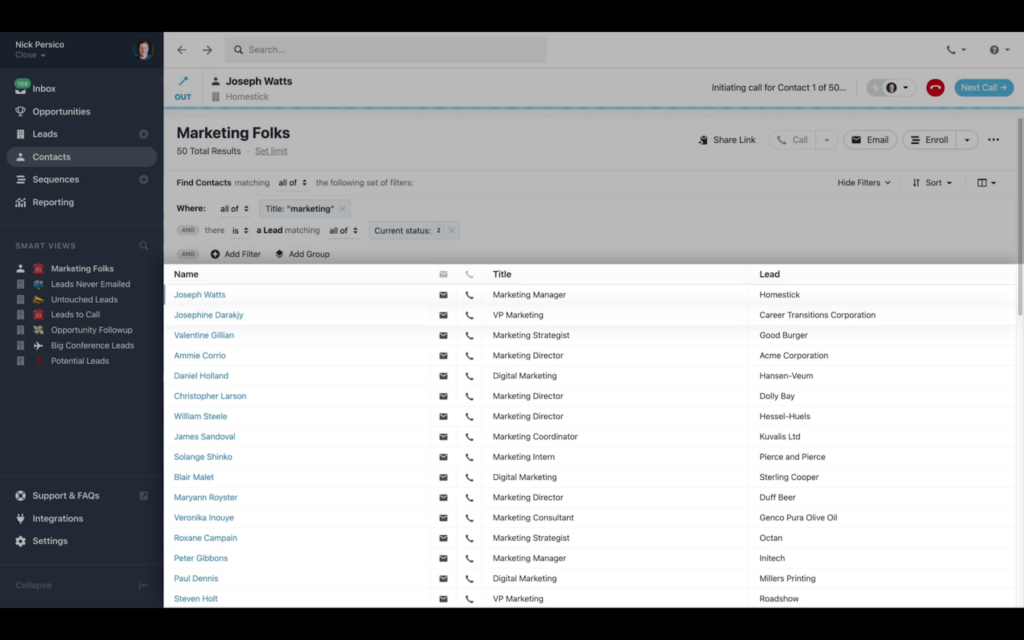
Progettato pensando ai team di vendita outbound, Close CRM offre strumenti integrati per chiamate, SMS ed email per aiutare le piccole imprese a generare più conversazioni. È particolarmente adatto a startup e organizzazioni orientate alla vendita che devono gestire un elevato volume di contatti senza dover utilizzare più piattaforme. Close CRM risolve la sfida di monitorare ogni punto di contatto e follow-up in un unico posto, così il tuo team può concentrarsi sulla chiusura dei contratti.
A chi è destinato Close CRM?
I team di vendita focalizzati sull’outbound che danno priorità a chiamate, SMS ed email direttamente nel CRM.
Perché ho scelto Close CRM
Ciò che distingue Close CRM per le piccole imprese è l’attenzione ai processi di vendita outbound. Ho scelto Close CRM perché combina chiamate, SMS e sequenze email integrate, così i team di vendita possono gestire i contatti senza cambiare strumenti. Il Power Dialer della piattaforma aiuta i team a effettuare più chiamate in meno tempo, particolarmente utile in ambienti di vendita ad alto volume. I promemoria automatici per i follow-up e il monitoraggio delle attività fanno sì che ogni potenziale cliente avanzi nella pipeline, rendendolo una soluzione ideale per team che lavorano in outbound.
Funzionalità principali di Close CRM
Altre funzionalità che rendono Close CRM utile per i team di vendita delle piccole imprese includono:
- Pipeline personalizzabili: Configura più pipeline di vendita su misura per diversi prodotti o processi.
- Smart Views: Filtra e segmenta i lead sulla base di criteri personalizzati per attività di contatto mirate.
- Modelli email: Crea e conserva modelli email riutilizzabili per una comunicazione coerente.
- Dashboard di reportistica: Accedi a metriche di vendita e report attività in tempo reale in una dashboard centralizzata.
Integrazioni di Close CRM
Le integrazioni includono ActionDesk, Alice, Enthu, Fathom Video, Geckoboard, Gmail, Google Calendar, Intersect, Leadinfo, SavvyCal, Segment, Wingman e Zoom. Zapier è incluso nei piani a pagamento e offre ulteriori integrazioni.
Pros and Cons
Pros:
- Funzionalità di chiamata complete per le vendite outbound
- L’integrazione con Zapier è inclusa nei piani a pagamento per ulteriori connessioni
- Configurazione veloce, onboarding semplice e rapido ritorno sull’investimento
Cons:
- Mancano funzionalità di marketing e automazione delle email
- La casella di posta non consente di personalizzare ciò che appare nella lista delle attività

Ideale per professionisti indipendenti che vendono servizi
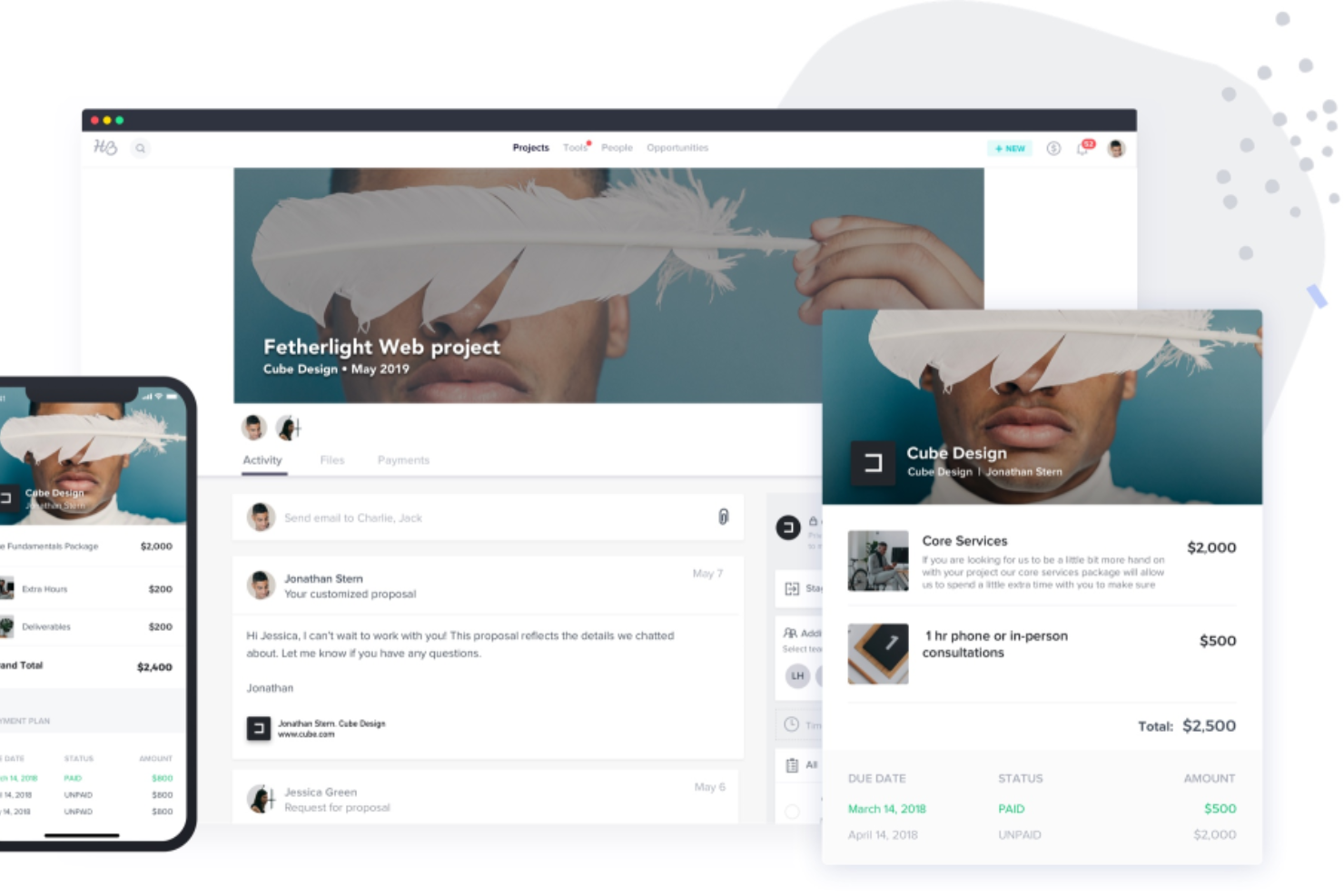
Se sei un professionista indipendente o una piccola impresa basata sui servizi, HoneyBook è progettato pensando al tuo flusso di lavoro. Riunisce comunicazione con i clienti, contratti, fatturazione e pianificazione in un unico luogo, così puoi gestire i progetti dalla prima richiesta fino al pagamento finale. HoneyBook è particolarmente utile per freelance, consulenti e imprenditori creativi che desiderano un CRM in grado di gestire sia le relazioni con i clienti che le operazioni aziendali.
A chi è più adatto HoneyBook?
Fornitori di servizi indipendenti e imprenditori creativi che necessitano di CRM, contratti, pagamenti e gestione clienti in un'unica piattaforma.
Perché ho scelto HoneyBook
Per i professionisti indipendenti che vendono servizi, HoneyBook si distingue perché combina la gestione dei clienti con le operazioni aziendali in un'unica piattaforma. Ho scelto HoneyBook perché ti permette di inviare proposte personalizzate, contratti e fatture direttamente ai clienti, tutto da una sola dashboard. Lo strumento di pianificazione integrato aiuta anche a gestire appuntamenti e consulenze senza dover cambiare applicazione. Questa attenzione all'intero percorso del cliente rende HoneyBook una soluzione ideale per freelance e fornitori di servizi indipendenti che vogliono mantenere tutto organizzato e professionale.
Principali funzionalità di HoneyBook
Altre caratteristiche che rendono HoneyBook interessante per le esigenze CRM delle piccole imprese includono:
- Promemoria di pagamento automatici: Imposta promemoria automatici per sollecitare i clienti riguardo ai pagamenti imminenti o scaduti.
- Moduli di acquisizione lead: Inserisci moduli personalizzabili sul tuo sito per raccogliere e tracciare nuove richieste da parte dei clienti.
- Bacheche di gestione attività: Organizza le attività e le scadenze dei progetti con bacheche visive dedicate a ciascun cliente o progetto.
- Accesso tramite app mobile: Gestisci progetti, invia fatture e comunica con i clienti da telefono o tablet.
Integrazioni di HoneyBook
Le integrazioni includono Zoom, QuickBooks, Gmail e Google Calendar.
Pros and Cons
Pros:
- Gestione clienti tutto-in-uno
- Fatture e contratti automatizzati
- Reportistica su finanze e fonti dei lead
Cons:
- Integrazioni limitate senza Zapier
- Personalizzazione dei report limitata
Freshsales
Ideale per potenziare le vendite con un CRM unificato
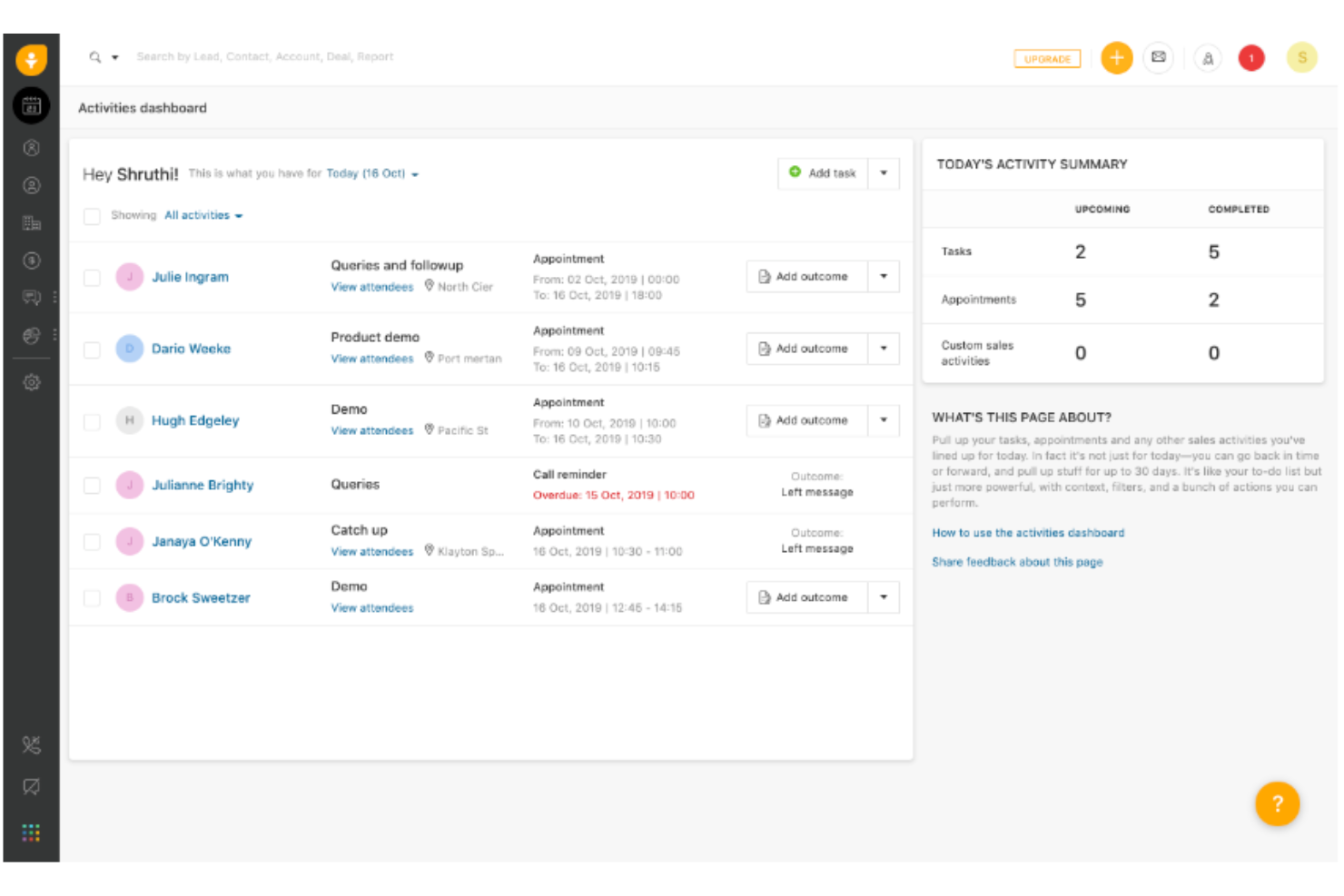
Freshsales unisce vendite, marketing e coinvolgimento del cliente in un'unica piattaforma CRM, rendendolo una scelta solida per i team che desiderano dati e flussi di lavoro unificati. È particolarmente utile per le piccole imprese che vogliono automatizzare i processi di vendita, gestire i lead e monitorare le trattative da un unico cruscotto. Freshsales si distingue per le sue funzionalità integrate di telefono, email e approfondimenti basati sull'IA che aiutano i team di vendita ad aumentare la produttività senza dover gestire più strumenti.
Per chi è Freshsales?
I team di vendita che desiderano chiamate integrate, email e lead scoring basato su IA all'interno di un unico CRM unificato.
Perché ho scelto Freshsales
Per le piccole aziende che desiderano unificare il processo di vendita, Freshsales offre una piattaforma unica dove i team possono gestire lead, trattative e comunicazioni con i clienti senza cambiare strumento. Ho scelto Freshsales perché combina funzioni integrate di telefono, email e chat con il lead scoring basato su IA, così i rappresentanti di vendita possono dare priorità ed entrare in contatto con i potenziali clienti da un unico luogo. La pipeline di vendita visuale permette di monitorare in modo semplice l'avanzamento delle trattative e individuare rapidamente i blocchi. Questo approccio unificato aiuta i piccoli team a restare organizzati e concentrati sulla chiusura di un numero maggiore di accordi.
Caratteristiche principali di Freshsales
Altre funzionalità che rendono Freshsales interessante per i team delle piccole imprese includono:
- Automazione dei flussi di lavoro: Imposta azioni automatiche per attività ripetitive di vendita e follow-up.
- Campi e moduli personalizzabili: Personalizza i campi dei dati e i moduli per adattarli al tuo processo di vendita specifico.
- Monitoraggio delle attività di vendita: Registra e monitora chiamate, riunioni e attività direttamente nel CRM.
- App CRM mobile: Accedi ai dati dei clienti e gestisci le trattative da dispositivi iOS e Android.
Integrazioni Freshsales
Le integrazioni includono Freshdesk, Freshchat, Freshconnect, Freshcaller, Mailchimp, HubSpot, QuickBooks, Trello, Adobe Commerce, Shopify e Docusign.
Pros and Cons
Pros:
- Strumenti di lead scoring basati su IA
- Pipeline di vendita visuale
- Accesso integrato a telefono ed email
Cons:
- La configurazione può richiedere tempo ai nuovi utenti
- Le regole di automazione richiedono una pianificazione attenta
Altri CRM per piccole imprese
Se non hai trovato un’opzione adatta alle tue esigenze nella selezione dei migliori CRM per piccole imprese, ecco alcune altre opzioni che vale la pena valutare:
- NetHunt
Il miglior CRM per vendite con integrazione a LinkedIn e Gmail
- Kintone
Ideale per costruire sistemi CRM personalizzati
- Pipedrive CRM
Il miglior CRM di vendita per la gestione visiva della pipeline
- ActiveCampaign
Ideale per il tracciamento automatizzato del percorso del cliente
- Really Simple Systems
Il miglior software CRM per piccole aziende B2B
- Act!
Ideale per le sue opzioni di implementazione ibride
- GoHighLevel
Ideale per la gestione integrata di marketing e vendite
- Insightly
La migliore soluzione CRM scalabile per piccole imprese
- Less Annoying CRM
Il miglior CRM con un'interfaccia utente semplice
- Thryv
Il miglior software completo di gestione per piccole imprese
- Copper
Miglior CRM per piccole imprese con integrazione Google Workspace
- Velaris
Ideale per viste a 360 gradi sui dati dei clienti
- SimplyDepo
Ideale per flussi di lavoro di esecuzione al dettaglio


Recensioni correlate sui CRM per piccole imprese
Se non hai ancora trovato quello che cerchi, dai un'occhiata a questi strumenti strettamente correlati ai CRM per piccole imprese che abbiamo testato e valutato.
- Software CRM
- Software per le vendite
- Software per la gestione dei lead
- Software di business intelligence
- Software per la gestione dei contratti
- Sistema di gestione dei ricavi
Come valuto i CRM per le piccole imprese
Valuto due aspetti: se un CRM offre le funzionalità di base—gestione della pipeline, automazione e gestione dei contatti—necessarie affinché un piccolo team RevOps possa operare senza un amministratore dedicato, e cosa lo distingue dagli altri.
Funzionalità di base (requisiti minimi per questa lista)
Quando seleziono gli strumenti per la mia lista, valuto ciascuno di essi su una scala da 0 (non offre la funzionalità) a 5 (eccelle in quest'area) per ogni funzionalità di base elencata di seguito. Poi calcolo il punteggio totale dello strumento in percentuale. Ogni strumento deve raggiungere un punteggio totale minimo del 65% per poter essere incluso.
- Gestione contatti & lead: Valuto come ogni CRM archivia e segmenta i contatti—campi personalizzati, tag, cronologia delle attività e acquisizione lead che mantengono il database di un piccolo team pulito.
- Monitoraggio pipeline & affari: Sono importanti le visualizzazioni della pipeline con fasi personalizzabili. Controllo se sia possibile monitorare le trattative dal primo contatto alla chiusura senza dover cambiare strumento.
- Automazione vendite & flussi di lavoro: Valuto le automazioni integrate come sequenze di follow-up, regole di assegnazione dei lead e trigger basati sulle fasi che risparmiano ai commerciali attività ripetitive e manuali.
- Reportistica & previsioni di ricavi: Dashboard e strumenti di previsione sono fondamentali per RevOps. Controllo se la piattaforma consente di creare report personalizzati e monitorare i parametri della pipeline in tempo reale.
- Integrazione email & comunicazione: La sincronizzazione bidirezionale con Google Workspace o Microsoft 365, insieme a chiamate registrate ed email tracciate, mi mostra che il CRM mantiene centralizzati i dati di comunicazione.
- Piani e integrazioni adatti alle PMI: Prezzi di ingresso abbordabili e un solido ecosistema di integrazioni mi dicono che lo strumento si adatta al budget di una piccola impresa e si collega a strumenti come QuickBooks, Slack e Mailchimp.
Dopo aver identificato gli strumenti che soddisfano questi criteri, considero i fattori che distinguono ciascuna piattaforma.
Fattori di differenziazione (cosa distingue i fornitori)
Ecco come confronto e differenzio i vari fornitori:
Funzionalità distintive
L'automazione di marketing integrata è un fattore di differenziazione importante. Se un CRM include campagne email native e sequenze di nurturing, un piccolo team può gestire marketing e vendite da un'unica piattaforma invece che combinare strumenti separati. Valuto anche la personalizzazione senza codice—se i responsabili RevOps possono creare oggetti o flussi di lavoro personalizzati senza uno sviluppatore. Funzionalità per il successo del cliente come il monitoraggio dei rinnovi e i punteggi di salute sono importanti per i team che gestiscono l'intero ciclo, dall'acquisizione alla fidelizzazione.
Oltre le funzionalità
Il costo totale di proprietà è una variabile che considero con attenzione. Un CRM dal prezzo iniziale basso può diventare costoso rapidamente se funzionalità chiave come automazione o reportistica sono disponibili solo nei livelli superiori. Il tempo necessario per ottenere valore è altrettanto importante: verifico se la piattaforma offre configurazione guidata, strumenti di importazione dati e template, così che un piccolo team possa iniziare senza dover assumere un consulente. Un altro fattore fondamentale è la scalabilità. Valuto se il CRM supporta permessi basati sui ruoli e setup multi-pipeline che possano crescere con la maturità del team RevOps.
Come scegliere un CRM per piccole imprese
Con così tante soluzioni CRM diverse per piccole imprese disponibili, può essere difficile decidere quale strumento sia più adatto alle tue esigenze.
Durante la selezione iniziale, la prova e la scelta di un CRM per piccole imprese, considera quanto segue:
- Quale problema stai cercando di risolvere - Inizia identificando la lacuna nelle funzionalità del CRM per piccole imprese che stai cercando di colmare, per chiarire le caratteristiche e le funzionalità che lo strumento deve offrire.
- Chi dovrà utilizzarlo - Per valutare costi e requisiti, considera chi utilizzerà il software e di quante licenze avrai bisogno. Dovrai valutare se l'accesso sarà necessario solo per i responsabili delle operazioni relative ai ricavi o per l'intera organizzazione. Una volta chiarito questo aspetto, vale la pena considerare se stai dando priorità alla facilità d'uso per tutti oppure alla velocità per gli utenti esperti del CRM per piccole imprese.
- Con quali altri strumenti deve funzionare - Chiarisci quali strumenti stai sostituendo, quali rimarranno in uso e con quali strumenti dovrai integrarlo, come software di contabilità, CRM o gestione delle risorse umane. Dovrai decidere se gli strumenti dovranno integrarsi tra loro o se puoi sostituire più strumenti con un unico CRM per piccole imprese consolidato.
- Quali risultati sono importanti - Considera il risultato che il software deve offrire per essere considerato un successo. Rifletti sulle funzionalità che vuoi ottenere o sugli aspetti che vuoi migliorare e su come misurerai il successo. Ad esempio, un risultato potrebbe essere la possibilità di ottenere una maggiore visibilità sulle prestazioni. Potresti confrontare le funzionalità dei CRM per piccole imprese fino allo sfinimento, ma se non stai pensando ai risultati che vuoi ottenere, potresti sprecare molto tempo prezioso.
- Come funzionerebbe all'interno della tua organizzazione - Valuta la scelta del software insieme ai tuoi flussi di lavoro e alla metodologia di erogazione. Analizza ciò che funziona bene e gli aspetti che stanno causando problemi e devono essere risolti. Ricorda che ogni azienda è diversa: non dare per scontato che, solo perché uno strumento è popolare, funzionerà anche nella tua organizzazione.
Tendenze dei CRM per piccole imprese per 2026
Poiché le aziende cercano di massimizzare efficienza e crescita, le soluzioni CRM che adottano stanno diventando più sofisticate e offrono una gamma di funzionalità personalizzate in base alle loro esigenze specifiche. Di seguito è riportato un riepilogo delle tendenze attuali basato sui recenti aggiornamenti dei software, sui comunicati stampa e sui registri delle versioni:
Integrazione e automazione:
- Funzionalità di integrazione avanzate: I sistemi CRM offrono sempre più spesso un'integrazione fluida con un'ampia gamma di altri strumenti aziendali, tra cui piattaforme di commercio elettronico, software di contabilità e strumenti di comunicazione, favorendo un approccio più unificato alla gestione aziendale.
- Automazione avanzata: Le funzionalità di automazione si stanno evolvendo fino a coprire flussi di lavoro più complessi e articolati, consentendo alle piccole imprese di risparmiare tempo e ridurre gli errori nei processi di gestione delle relazioni con i clienti.
Personalizzazione ed esperienza del cliente:
- Funzionalità di personalizzazione migliorate: I CRM offrono strumenti più sofisticati per segmentare i clienti e personalizzare le comunicazioni, aiutando le piccole imprese a migliorare il coinvolgimento e la fidelizzazione dei clienti.
- Mappatura del percorso del cliente: Si pone sempre più l'accento sulle funzionalità che consentono alle aziende di mappare e analizzare l'intero percorso del cliente, fornendo informazioni utili per ottimizzare le strategie di marketing e le interazioni con i clienti.
Analisi dei dati e report:
- Analisi avanzata: Le funzionalità di visualizzazione dei dati e di creazione dei report stanno diventando più avanzate e offrono informazioni più approfondite sulle tendenze delle vendite, sul comportamento dei clienti e sull'efficacia delle campagne.
- Analisi predittiva: Un numero crescente di CRM integra l'analisi predittiva, aiutando le piccole imprese a prevedere le tendenze delle vendite e le esigenze dei clienti sulla base dei dati storici.
Mobilità e accessibilità:
- Accesso mobile migliorato: Riconoscendo la necessità di accedere ai dati in mobilità, i fornitori di CRM stanno migliorando le proprie applicazioni mobili per offrire funzionalità complete, garantendo ai titolari e ai dipendenti delle aziende l'accesso alle informazioni fondamentali in qualsiasi momento e luogo.
- Soluzioni basate sul cloud: La tendenza verso i CRM basati sul cloud continua, offrendo alle piccole imprese flessibilità, scalabilità e facilità di accesso, con una crescente attenzione alla sicurezza e alla protezione dei dati.
Nella scelta di un CRM, le piccole imprese dovrebbero considerare queste tendenze per selezionare un software che non solo soddisfi le esigenze attuali, ma sia anche pronto a crescere insieme a loro, consentendo una gestione efficace delle operazioni relative ai ricavi e sostenendo l'espansione aziendale.
Che cos'è un CRM per piccole imprese?
Il CRM per piccole imprese è uno strumento software progettato per gestire le relazioni con i clienti in modo semplice e intuitivo. Centralizza le informazioni sui clienti, semplifica la comunicazione e automatizza i processi di vendita, marketing e assistenza clienti. Questo software è dimensionato per soddisfare le esigenze e le risorse delle aziende più piccole.
I vantaggi di un CRM per le piccole imprese includono il miglioramento delle interazioni con i clienti e una maggiore efficienza nella gestione delle relazioni. Consente a queste aziende di comprendere meglio i propri clienti e di soddisfarne le esigenze, favorendo la fidelizzazione e la ripetizione degli acquisti. Con un CRM, le piccole imprese possono monitorare efficacemente le opportunità di vendita, ottimizzare le attività di marketing e offrire un servizio clienti personalizzato, contribuendo così alla crescita e alla fidelizzazione dei clienti.
Funzionalità di un CRM per le piccole imprese
Quando scegli un CRM per le piccole imprese, presta attenzione alle seguenti funzionalità chiave:
- Gestione dei contatti: archivia, organizza e accedi rapidamente a tutti i dettagli relativi a lead, clienti e partner in un unico luogo. Questo ti aiuta a visualizzare ogni conversazione e relazione a colpo d'occhio, così non perdi mai di vista chi è chi e non perdi alcuna opportunità di ricontatto.
- Monitoraggio della pipeline di vendita: visualizza ogni fase del processo di vendita. Puoi individuare dove le trattative si bloccano, dare priorità ai ricontatti e prendere decisioni più intelligenti su dove concentrare il tuo tempo ogni giorno.
- Automazione di attività e operazioni: automatizza attività ripetitive come promemoria, ricontatti e pianificazione. Lasciando che sia il CRM a occuparsi del lavoro più impegnativo, puoi dedicare le tue energie alla costruzione di relazioni e alla conclusione delle trattative invece di destreggiarti tra post-it e avvisi del calendario.
- Integrazione con la posta elettronica: invia, ricevi e monitora le email direttamente nel tuo CRM. Questa funzionalità ti aiuta a mantenere tutte le comunicazioni con i clienti in un unico luogo, rendendo più semplice personalizzare i tuoi messaggi e restare organizzato.
- Report e analisi: ottieni report chiari e personalizzabili che mostrano le prestazioni del tuo team e in quali ambiti stai ottenendo risultati (o perdendo) commerciali. Queste informazioni ti consentono di prendere decisioni basate sui dati e modificare rapidamente le tue strategie.
- Accesso da dispositivi mobili: accedi al tuo CRM dal telefono o dal tablet, così puoi aggiornare i record, gestire le trattative e rispondere ai clienti ovunque ti trovi–perché il business non si svolge sempre alla tua scrivania.
- Gestione dei lead: acquisisci, valuta e coltiva i lead in modo efficiente. Puoi assicurarti che nessun potenziale cliente sfugga e sapere esattamente quali lead contattare successivamente.
- Integrazione con altri strumenti: sincronizza il CRM con i software di contabilità, marketing o commercio elettronico che già utilizzi. In questo modo crei un flusso di lavoro unico e semplificato, evitando di duplicare attività o informazioni.
- Opzioni di personalizzazione: adatta il CRM al tuo modo di lavorare, non il contrario. Dai campi personalizzati alle dashboard personalizzate, puoi renderlo davvero tuo.
- Controlli di sicurezza e privacy: proteggi i dati dei clienti con impostazioni relative alle autorizzazioni, crittografia e backup regolari. Avrai la tranquillità di sapere che le tue informazioni sensibili sono protette.
Funzionalità comuni basate sull'IA nei CRM per le piccole imprese
Oltre alle funzionalità standard dei CRM per le piccole imprese elencate sopra, molte di queste soluzioni integrano l'IA con funzionalità come:
- Assistenti IA conversazionali: forniscono risposte in tempo reale alle domande dei clienti o assistono il tuo team con informazioni rapide–così puoi offrire un servizio più veloce e coerente con meno lavoro manuale.
- Previsioni delle vendite predittive: analizzano le vendite passate e i comportamenti dei clienti per prevedere i ricavi futuri, aiutandoti a dare priorità ai lead e a pianificare le risorse con meno imprevisti.
- Valutazione dei lead basata sull'IA: valutano e classificano automaticamente i lead in base alla probabilità di conversione, così puoi concentrarti sui prospect più propensi a diventare clienti.
- Informazioni automatizzate sui clienti: individuano tendenze chiave e schemi nascosti nei dati dei clienti, fornendoti suggerimenti pratici per migliorare il coinvolgimento e la fidelizzazione.
- Raccomandazioni intelligenti per le email: suggeriscono i momenti e i contenuti migliori per le email di ricontatto sulla base delle interazioni precedenti e del comportamento dei clienti, rendendo le attività di contatto più efficaci senza dover procedere per tentativi.
Vantaggi di un CRM per le piccole imprese
Centralizzando le informazioni sui clienti e automatizzando le attività principali, le soluzioni CRM consentono alle piccole imprese di operare in modo più efficiente e offrire esperienze cliente superiori. Ecco cinque vantaggi principali dell'adozione di un software CRM per le piccole imprese:
- Informazioni centralizzate sui clienti: consolida tutti i dati dei clienti in un unico luogo.
- Facilita l'accesso a profili cliente completi, migliorando l'efficienza e la personalizzazione delle comunicazioni e delle attività di vendita.
- Gestione delle vendite ottimizzata: semplifica il processo di vendita dal contatto alla chiusura.
- Fornisce una piattaforma strutturata per monitorare le opportunità di vendita, consentendo una gestione e una previsione più efficaci del processo di vendita, che contribuiscono direttamente alla crescita dei ricavi.
- Maggiore coinvolgimento dei clienti: offre strumenti per interagire meglio con i clienti.
- Consente alle aziende di coltivare le relazioni con i clienti attraverso comunicazioni mirate e attività di ricontatto, portando a una maggiore soddisfazione e fidelizzazione dei clienti.
- Processo decisionale basato sui dati: offre informazioni utili attraverso report e analisi.
- Fornisce alle aziende dati utili e concreti sulle tendenze delle vendite, sul comportamento dei clienti e sull'efficacia delle campagne, supportando decisioni strategiche consapevoli che favoriscono la crescita aziendale.
- Aumento della produttività: automatizza le attività di routine e ottimizza i flussi di lavoro.
- Riduce il tempo dedicato alle attività amministrative, consentendo ai team di vendita di concentrarsi sull'interazione con i clienti e sulla chiusura degli accordi, aumentando così la produttività complessiva e i ricavi.
Costi e prezzi del CRM per le piccole imprese
Scegliere il software CRM giusto è una decisione fondamentale per le piccole imprese che desiderano ottimizzare le relazioni con i clienti e semplificare i processi di vendita. Con diversi piani disponibili, è importante comprendere le funzionalità e i prezzi che meglio si adattano alle esigenze e al budget della propria azienda. Di seguito è riportata una panoramica delle opzioni di piano CRM più comuni pensate per le piccole imprese:
Tabella di confronto dei piani CRM per le piccole imprese
| Tipo di piano | Prezzo medio | Funzionalità comunemente incluse |
|---|---|---|
| Gratuito | $0 | Gestione di base dei contatti, utenti limitati, integrazioni essenziali |
| Base | $10 - $25 per utente/mese | Gestione dei contatti e dei potenziali clienti, integrazione della posta elettronica, report di base |
| Professionale | $25 - $75 per utente/mese | Analisi avanzate, automazione del marketing, maggiore personalizzazione |
| Aziendale | $75+ per utente/mese | Accesso a tutte le funzionalità, integrazioni avanzate, assistenza prioritaria |
Quando scegli un piano CRM, considera le dimensioni della tua azienda, la complessità dei processi di coinvolgimento dei clienti e i tuoi obiettivi di crescita a lungo termine. Scegli un piano che non solo soddisfi le tue esigenze attuali, ma che abbia anche il potenziale per crescere insieme alla tua azienda, garantendo un investimento valido per il successo futuro della tua attività.
Domande frequenti sul CRM per le piccole imprese
L'elenco precedente è ricco di informazioni, quindi potresti avere ancora, comprensibilmente, alcune domande. Ecco le risposte ad alcune domande frequenti sui software CRM per la tua piccola impresa.
Quali sono i tipi di CRM per le piccole imprese?
I software CRM per le piccole imprese sono disponibili in diversi tipi, per soddisfare esigenze e obiettivi operativi differenti. Comprendere queste tipologie può aiutare i titolari di piccole imprese a scegliere la soluzione CRM più adatta. Ecco i principali tipi di software CRM disponibili per le piccole imprese:
- CRM operativo: Si concentra sulla semplificazione delle operazioni quotidiane, comprese le attività di vendita, marketing e assistenza clienti. Automatizza e ottimizza i processi aziendali per aumentare l'efficienza e migliorare l'esperienza dei clienti.
- CRM analitico: Pone l'accento sull'analisi dei dati per fornire informazioni sul comportamento, sulle preferenze e sulle tendenze dei clienti. Questo tipo di CRM aiuta le aziende a prendere decisioni informate sulla base di dati analizzati, migliorando le strategie di marketing e il coinvolgimento dei clienti.
- CRM collaborativo: Mira a migliorare la comunicazione e la collaborazione tra team e reparti. Garantisce che tutte le parti interessate abbiano accesso a informazioni sui clienti coerenti e aggiornate, favorendo un approccio unitario al coinvolgimento dei clienti.
- CRM per la gestione delle campagne: Progettato specificamente per assistere nelle campagne di marketing, questo CRM integra strumenti per la pianificazione, l'esecuzione e l'analisi delle campagne, aiutando le aziende a raggiungere e coinvolgere i clienti in modo più efficace.
- CRM strategico: Si concentra sullo sviluppo delle relazioni con i clienti nel lungo periodo e sulle strategie di fidelizzazione. Aiuta le aziende a comprendere il valore dei clienti e ad allineare le proprie operazioni agli obiettivi aziendali più ampi, favorendo la fidelizzazione dei clienti e stimolando la crescita.
- CRM sociale: Integra le piattaforme di social media nel sistema CRM, offrendo alle aziende strumenti CRM sociali per monitorare le interazioni con i clienti, tenere sotto controllo le menzioni del marchio e raccogliere feedback e informazioni.
- CRM mobile: Offre le funzionalità CRM sui dispositivi mobili, fornendo ai team di vendita e agli altri utenti l'accesso ai dati dei clienti, agli strumenti di comunicazione e alle funzioni CRM in qualsiasi momento e luogo, migliorando flessibilità e reattività.
- CRM B2B: Si concentra sulle esigenze specifiche delle organizzazioni tra aziende.
Individuando le esigenze e gli obiettivi specifici della propria azienda, i titolari di piccole imprese possono selezionare il tipo di CRM più adatto alle proprie esigenze operative e alle aspirazioni di crescita, assicurandosi di poter gestire efficacemente le relazioni con i clienti e favorire il successo aziendale.
I CRM per le piccole imprese possono monitorare i livelli di soddisfazione dei clienti?
Sì, i CRM per le piccole imprese possono monitorare i livelli di soddisfazione dei clienti integrandosi con strumenti per sondaggi o utilizzando funzioni di feedback integrate per raccogliere e analizzare le risposte dei clienti. Queste informazioni possono aiutare le aziende a comprendere le esigenze dei clienti, migliorare il servizio e aumentare la soddisfazione complessiva.
Come gestiscono i CRM per le piccole imprese la qualificazione e il punteggio dei lead?
I CRM per le piccole imprese spesso includono funzioni di qualificazione e assegnazione del punteggio ai lead che automatizzano il processo di valutazione sulla base di criteri predefiniti, come il livello di coinvolgimento, la cronologia degli acquisti e le informazioni demografiche. Questo aiuta le aziende a dare priorità ai lead con maggiori probabilità di conversione, ottimizzando gli sforzi e le risorse di vendita.
Come si integrano i CRM per le piccole imprese con le piattaforme di commercio elettronico?
I CRM per le piccole imprese possono integrarsi con le piattaforme di commercio elettronico per sincronizzare i dati dei clienti, la cronologia degli ordini e i registri delle interazioni, offrendo una visione unificata delle attività dei clienti. Questa integrazione facilita campagne di marketing mirate, esperienze personalizzate per i clienti e processi di vendita semplificati.
Una piccola impresa dovrebbe utilizzare un CRM?
In definitiva, la scelta spetta a te, ma un CRM può fare una grande differenza in termini di efficienza e produttività del tuo team. Prima configuri il CRM, meno lavoro manuale tedioso dovranno accumulare i tuoi team nel tempo.
Inoltre, la maggior parte delle soluzioni CRM è progettata per crescere insieme alla tua azienda. Invece di dover affrontare una grande migrazione in futuro, puoi iniziare fin da subito ad affidarti a un software per gestire i tuoi contatti, le comunicazioni con i clienti, i documenti e i dati.
Quanto costa utilizzare un sistema CRM?
Molti fattori influenzano il costo, inclusa la piattaforma che scegli di utilizzare. Alcune offrono piani gratuiti, periodi di prova gratuiti o dimostrazioni gratuite, che possono aiutarti a valutare le funzionalità e la facilità d'uso dello strumento. Sebbene molte strutture tariffarie si basino su un costo per utente al mese, altre prevedono tariffe fisse o prezzi basati sull'utilizzo.
Ulteriori software per le operazioni legate ai ricavi
Cerchi maggiori informazioni sulla gestione delle relazioni con i clienti? Ecco altro materiale di approfondimento:
- Che cos'è la gestione delle relazioni con i clienti?
- I 10 migliori software per la gestione dei clienti nel 2026
- I 10 migliori software CRM del 2026
- Come funziona il funnel di marketing e vendite (con esempi)
Conclusione
Il fatto che tu gestisca una piccola impresa non significa che tu non possa stare al passo con il futuro digitale e basato sui dati del mondo degli affari. Strumenti come i software CRM possono fare una grande differenza nel modo in cui gestisci la tua attività, amministri le tue trattative e mantieni soddisfatti i clienti.
Per ricevere altri contenuti sulle operazioni relative ai ricavi e sulle soluzioni software per le piccole imprese, iscriviti alla nostra mailing list della newsletter!