

With so many different sales tracking software available, figuring out which is right for you is tough. You know you want to record, analyze, and report on sales data more efficiently but need to figure out which tool is best. I've got you! In this post I'll help make your choice easy, sharing my personal experiences using dozens of different sales tracking tools with various teams and projects, with my picks of the best sales tracking software.
Why Trust Our Software Recommendations
6,700+
Reviews
20
Industry experts
16+
Evaluation factors
14
Years
Our reviews reflect our independent judgment—not a sales pitch. Learn how we stay transparent.
For this guide, we evaluated tools using hands-on testing and independent research, scoring tools using our selection criteria.
Our reviews reflect our human editorial judgment, not a sales pitch.
Sales Tracking Software Comparison Table
This comparison table summarizes pricing details for my top sales tracking software selections.
| Tool | Best For | Trial Info | Price | ||
|---|---|---|---|---|---|
| 1 | Best with advanced B2B data enrichment filters | Free plan + 14-day free trial + free demo available | From $49/user/month (billed annually) | Website | |
| 2 | Best for AI territory and route optimization | Not available | Pricing upon request | Website | |
| 3 | Best for customizable sales automation | 14-day free trial + free demo available | From $12/seat/month (billed annually) | Website | |
| 4 | Best cloud-based 360 solution for data | 30-day free trial | From $25/user/month | Website | |
| 5 | Best for small and medium-sized businesses selling B2B | 30-day free trial + free demo available | From $29/user/month (billed annually) | Website | |
| 6 | Best for startups and small businesses | 14-day free trial + free plan available | From $18/user/month (billed annually) | Website | |
| 7 | Best for customer | 15-day free trial + free plan available | From $14/user/month (billed annually) | Website | |
| 8 | Best for multi-channel prospecting | Free trial available | From $5.30/GB (pay-as-you-go) | Website | |
| 9 | Best for small and medium-sized Agile teams | Free plan available | From $8.99/user/month | Website | |
| 10 | Best for small businesses | 14-day free trial | From $29/user/month (billed annually) | Website |


Best Sales Tracking Software Reviews
Below are my detailed summaries of the best sales tracking software that made it onto my shortlist. My reviews offer a detailed look at the key features, pros & cons, integrations, and ideal use cases of each tool to help you find the best one for you.
 Best with advanced B2B data enrichment filters
- Free plan + 14-day free trial + free demo available
- From $49/user/month (billed annually)
Visit WebsiteCustomer Rating:4.5/5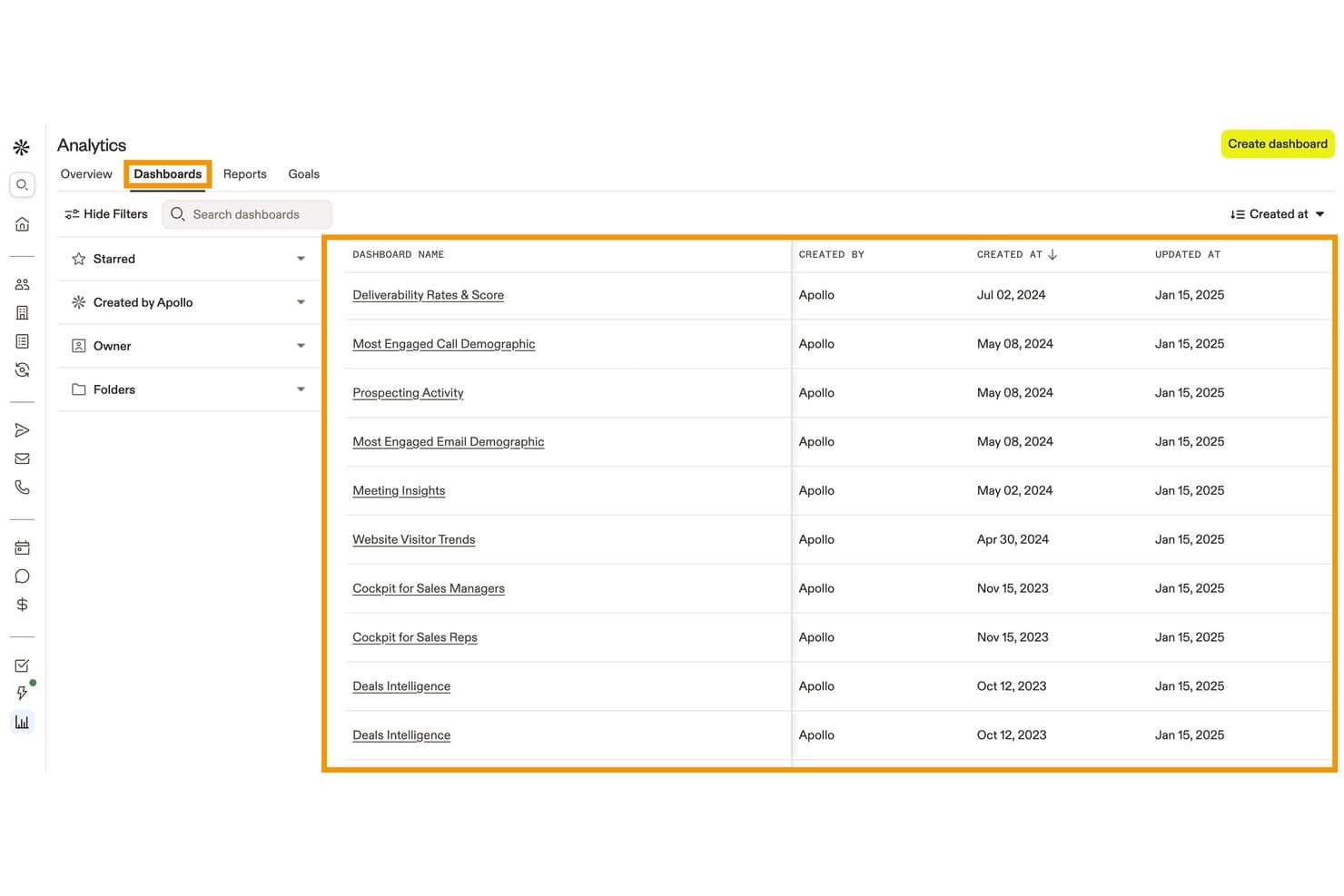
Apollo.io centralizes sales analytics dashboards for tracking team performance. Apollo.io is a sales tracking and engagement platform that combines pipeline management, AI-driven forecasting, automated activity logging, and performance dashboards with a built-in B2B contact database.
Who Is Apollo.io Best For?
Apollo.io suits revenue operations and sales teams that want to consolidate prospecting, outreach, and pipeline tracking into one platform instead of managing separate tools for each.
Why I Picked Apollo.io
Apollo.io earns its spot on my shortlist because its B2B database of 240M+ contacts isn't just for prospecting—it feeds directly into pipeline tracking through Waterfall Enrichment, keeping deal records clean and complete as leads move through stages. I especially like how AI-driven agents can research accounts and prioritize leads based on your ICP, so your pipeline reflects real buying signals rather than stale data. The Deal Insights layer then surfaces that enriched data in analytics, giving you a sharper view of which deals are worth pursuing.
Apollo.io Key Features
- Sales activity logging: Automatically records calls, emails, meetings, and AI transcripts.
- AI-hybrid forecasting: Supports commit, best-case, and worst-case revenue submissions.
- Custom dashboards: Builds reports around sales KPIs, sequence results, and rep performance.
- CRM integrations: Syncs data with Salesforce, HubSpot, Outreach, Salesloft, and 200+ tools.
Apollo.io Integrations
Apollo.io offers 200+ integrations through Apollo Anywhere and its integrations marketplace, including Salesforce, HubSpot, Outreach, Salesloft, Marketo, SendGrid, LinkedIn, Gmail, ChatGPT, and Claude. API access is available on Custom plans for custom integrations.
Pros and Cons
Pros:
- Calls, emails, and meetings log without manual entry
- AI forecasting predicts deal close probability accurately
- Built-in B2B database enriches pipeline records automatically
Cons:
- International contact data accuracy drops noticeably
- Quota and commission tracking are not built in
Learn more about Apollo.io: Best for AI territory and route optimization
- Not available
- Pricing upon request
Visit WebsiteCustomer Rating:4.3/5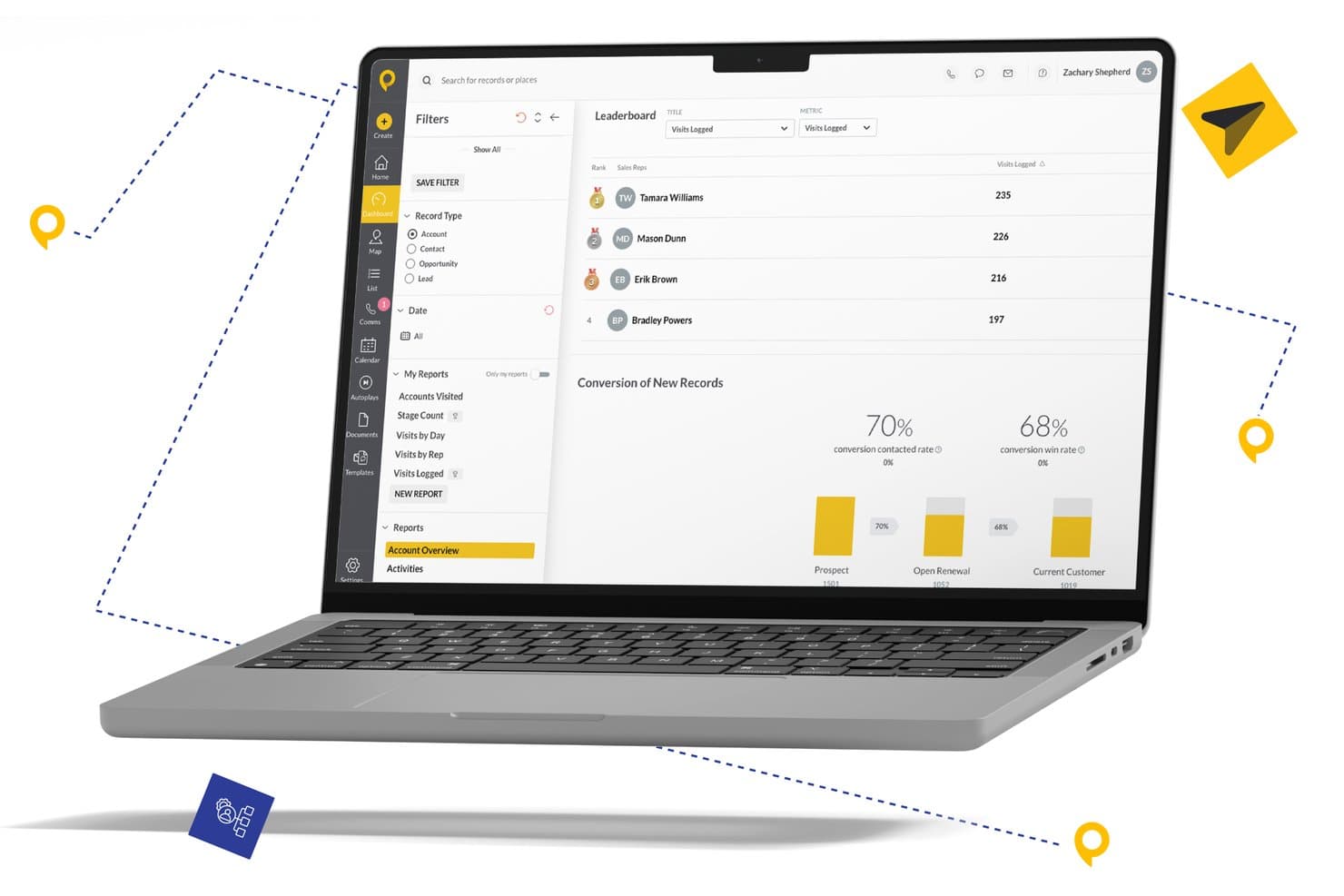
SPOTIO offers a sales leaderboard dashboard that tracks visits logged per rep alongside conversion rates for prospects, open renewals, and current customers. SPOTIO is a field sales tracking platform built for outside sales teams, combining territory management, route optimization, GPS-verified activity logging, and rep performance analytics in a single mobile-first workspace.
Who Is SPOTIO Best For?
SPOTIO is a strong fit for sales directors and ops managers leading field or door-to-door sales teams across industries like solar, roofing, telecom, and home services.
Why I Picked SPOTIO
SPOTIO earns its spot on my shortlist because its territory intelligence goes well beyond drawing map boundaries. I like that Next Best Action (NBA) scores leads by predicted value and tells reps exactly who to visit next, turning a daily route into a prioritized plan. DASH AI layers voice-captured activity logging and real-time coaching on top, so I can track both where reps are going and what they're doing when they get there.
SPOTIO Key Features
- Territory management mapping: Define, assign, and edit sales territories using zip codes, custom boundaries, or demographic overlays.
- Activity feed with GPS verification: Log and view sales activities geographically with automatic timestamping and location stamping.
- Customizable performance dashboards: Track rep productivity and territory results with adjustable filters and segmentation.
- Native CRM integrations: Sync data with platforms like Salesforce, HubSpot, or Microsoft Dynamics for real-time updates.
SPOTIO Integrations
SPOTIO offers native integrations with Salesforce, HubSpot, Microsoft Dynamics, SAP, and Oracle, and connects with Zapier. An API is available for custom integrations.
Pros and Cons
Pros:
- Real-time rep performance visibility on mobile
- AI-driven territory scoring and route planning
- GPS-verified activity logging for field reps
Cons:
- Reporting customization is fairly basic
- Limited forecasting depth for inside sales teams
Learn more about SPOTIO: Best for customizable sales automation
- 14-day free trial + free demo available
- From $12/seat/month (billed annually)
Visit WebsiteCustomer Rating:4.6/5
Monday sales CRM centralizes customer data and sales processes for streamlined team collaboration. Monday sales CRM is a customer relationship management platform designed to centralize client communication and automate sales processes, providing a comprehensive overview of deals through customizable dashboards. Its unique selling point lies in its highly adaptable workflows, which enable users to modify the CRM system to align with their specific sales operations, leveraging flexible column types, detailed subitems, and robust sorting capabilities.
Why I picked Monday sales CRM: Monday.com excels in streamlining sales tracking through its intuitive interface and customizable dashboards, enabling teams to efficiently monitor deals, manage contacts, and follow up on leads with precision. Its automation features reduce manual tasks, allowing sales reps to focus on building relationships and closing deals.
The platform fosters collaboration across departments, ensuring all team members are aligned and informed. With real-time analytics, sales performance is transparent, aiding in strategic decision-making and driving sales growth. Monday.com is a robust tool that simplifies sales tracking while enhancing team productivity and customer engagement.
Monday sales CRM Standout Features and Integrations
Features include embedded analytics and customizable reporting features within the platform. This allows users to generate real-time insights about their sales activities, pipeline health, and performance metrics directly within their workflow. The ability to create and access these reports without needing specialized analytical tools or software is a unique feature that streamlines operations and decision-making processes.
Integrations include project management apps like Slack, Google Drive, Gmail, Google Calendar, Jira, GitHub, Trello, Dropbox, Typeform and many more, accessible through a paid plan with Zapier.
Pros and Cons
Pros:
- Integrated automation tools
- Enables cross-functional collaboration
- Known for its intuitive and visually appealing interface
- Highly customizable workflows and dashboards
Cons:
- Sales CRM dosen't have a free plan
- Vast array of features can be overwhelming for new users
 Best cloud-based 360 solution for data
- 30-day free trial
- From $25/user/month
Visit WebsiteCustomer Rating:4.2/5
The opportunities tab in Salesforce shows your sales funnel and deals in each pipeline stage Salesforce is the best cloud-based 360 solution because it provides options for businesses in any industry of any size. It's highly customizable. This does mean it can be a little more complex to set up and use, but it's ideal for businesses that need something tailor-made.
Why I picked Salesforce: Salesforce is an all-in-one solution that, to some people, is one of the tools that 'do too much,' but for others, it does everything they could wish for. I chose Salesforce because it helps teams run their business, collaborate in one central location, and is more than just sales tracking.
Although startups and small businesses may find the features overwhelming, the power behind Salesforce makes it a sales tracking tool for others to strive toward.
Salesforce Standout Features and Integrations:
Features include forecasting, one-click reporting, and sales management tools. With a data-rich dashboard and lead generation data mining, you can monitor your prospect's journey through the sales funnel and create premium user experiences.
Integrations include over 3,000 apps in the Salesforce AppExchange, including LinkedIn, Google Workspace, Asana, Microsoft 365, and WhatsApp. The Salesforce API allows you to create custom integrations.
Pros and Cons
Pros:
- Pipeline and forecast one-click reporting
- Email integration with Gmail or Outlook
- Customizable to suit any business
Cons:
- Steep learning curve
- No free plan
Learn more about Salesforce CRM: Best for small and medium-sized businesses selling B2B
- 30-day free trial + free demo available
- From $29/user/month (billed annually)
Visit WebsiteCustomer Rating:4.7/5
Salesflare's visual sales pipeline tracks opportunities by stage, value, and interaction history in a drag-and-drop interface. Salesflare is easy to use and can automate every part of your sales process. With a clean pipeline and organized CRM, it's simple yet powerful.
Why I picked Salesflare: I chose Salesflare because it can find any email address with a name and company, making outreach a breeze. Salesflare gathers information across all digital channels from one contact, automatically updating your CRM. Where time can often be tight, smaller teams will appreciate the automatic calendar and phone meeting logs.
Salesflare Standout Features and Integrations:
Features include powerful client data gathering, organized document and pipeline interface, and a mobile app that matches the power of the desktop version.
Integrations are limited natively to tools such as Gmail (Google Workspace), Outlook (Microsoft 365), and LinkedIn. Mailchimp, Slack, and thousands more are available using Zapier or Make.
Pros and Cons
Pros:
- Time-saving automation features
- Email address finder
- Full-feature mobile app
Cons:
- Reporting locked behind higher-tier plans
- Limited native integrations
Learn more about Salesflare: Best for startups and small businesses
- 14-day free trial + free plan available
- From $18/user/month (billed annually)
Visit WebsiteCustomer Rating:4.7/5
A company page in Capsule provides a high-level overview and shows the latest activity with anyone associated with the company. Capsule prides itself on four core principles: simple, approachable, trusted, and playful. This approach is reflected in the platform's simplicity and is perfect for startups needing fuss-free solutions from reliable providers.
Why I picked Capsule: Capsule has a clean and modern interface, is simple to use, and has all the features needed from a sales tracking tool. It's not necessarily got anything special regarding functionality or features, but I think it’s executed beautifully. Everything is slick, playful, and approachable.
Capsule Standout Features and Integrations:
Features include visual pipeline management with opportunity filtering, PM capabilities with task automation, and comprehensive reporting options.
Integrations include Microsoft 365, Google Workspace, Xero, and Mailchimp. Zapier opens many more connection choices, and custom integrations can be created with the Capsule API.
Pros and Cons
Pros:
- Unlimited custom fields
- AI content assistance
- Multiple sales pipelines
Cons:
- Limited for large businesses
- Limited native integrations
Learn more about Capsule: Best for customer
- 15-day free trial + free plan available
- From $14/user/month (billed annually)
Visit WebsiteCustomer Rating:4.2/5
The Zoho CRM prediction view provides the expected revenue in your sales pipeline, including prediction scores–perfect for sales forecasting. Over 250,000 businesses already use Zoho’s product suite. Built for networking, you can capture leads anywhere–online or offline.
Why I picked Zoho CRM: I chose Zoho CRM because it makes connecting with people easy. With an omnichannel presence and powerful segmentation features, you can engage with your prospects at the right time and place.
With a comprehensive mobile app, the ability to scan business cards into your CRM, and connect your CRM contacts to your phone network, it’s easy to make sales on the go.
Zoho CRM Standout Features and Integrations:
Features include predictive intelligence, multiple pipelines, sales forecasting, and client portals. With the Zoho suite offering tools in marketing, accounting, HR, operations, and customer service, too, users can ensure customer loyalty with personalized experiences.
Integrations include over 800 native apps, with Mailchimp, WhatsApp, Outlook, Xero, and Google Adwords. You can make additional connections with Zapier and create custom integrations with the Zoho API.
Pros and Cons
Pros:
- Rich analytics and reporting dashboards
- Capture lead details anywhere
- Flexible contracts with no lock-in periods
Cons:
- Automation on premium plans only
- No integrations on free plan
 Best for multi-channel prospecting
- Free trial available
- From $5.30/GB (pay-as-you-go)
Visit WebsiteCustomer Rating:4.4/5
Here’s a contact card in Nimble CRM—with a link to every social platform you can think of to communicate with prospects and clients. With powerful social listening and profile-matching features, Nimble CRM is ideal for multi-channel prospecting. Nimble CRM is customer-driven and focuses on the most efficient way to build relationships.
Why I picked Nimble CRM: I chose Nimble CRM because of its multi-channel data-gathering abilities. Integrating with Google Workspace and Microsoft 365, users can take their usual workflow to the next level. The Nimble Prospector extension allows users to collect insights on leads across any platform, and the social profile matching brings leads to you so you can focus on relationship building.
Nimble CRM Standout Features and Integrations:
Features include lead qualification flows, group messaging, custom deal dashboard reports, and sales forecasting.
Integrations include Google Workspace and Microsoft 365. Other integrations are available through the Nimble API.
Pros and Cons
Pros:
- Works within Google Workspace or Microsoft 365
- Social listening and profile matching
- Nimble Prospector browser extension for lead generation
Cons:
- Limited native integrations
- No free plan
Learn more about Nimble: Best for small and medium-sized Agile teams
- Free plan available
- From $8.99/user/month

Clean and simple—here's the main Agile CRM dashboard, which provides several reports in one view. The workflow automation and task management features make Agile CRM an excellent sales tracking solution for Agile teams. Team dashboards make stand-up meetings a breeze, while goal-setting features keep sprints on track.
Why I picked Agile CRM: Agile CRM offers a generous free plan with up to ten users. The lead, deal, and contact management dashboards stand out to me because they are simple, but sophisticated automations take them to the next level. Lead scoring and custom deal milestones are essential for sprint planning and ensuring the team hits smaller goals on the way to larger targets.
Agile CRM Standout Features and Integrations:
Features include custom data fields, appointment scheduling, post-call automations, call recordings, and automated voicemails. Making this a great tool for sales teams who work with prospects on the phone, too.
Integrations include 50 native integrations, with Facebook, Stripe, Quickbooks, and LinkedIn being popular. Zapier allows further connections, and the Agile CRM API is available for custom integrations.
Pros and Cons
Pros:
- Importing contacts is quick and easy
- Gamification option to improve efficiency
- Generous free plan
Cons:
- Limited customization options
- No tutorials for advanced features
Learn more about Agile CRM: Best for small businesses
- 14-day free trial
- From $29/user/month (billed annually)

The Insightly sales pipeline shows you how much potential revenue you have at each stage of your sales funnel. Insightly is best for small businesses because it's easy to use and understands small business owners' complex roles. It helps teams avoid working in silos and manage time to shorten sales cycles and close more deals.
Why I picked Insightly: I focused on how Insightly scales with businesses. As a sales tracking tool and CRM, its features are rich but also seen in other tools. What stands out is the personalization elements while retaining its simplicity. Adding client details that help to maintain meaningful relationships is why Insightly is ideal for small businesses.
Insightly Standout Features and Integrations:
Features include customizable templates and sales processes, and relationship linking. A unique feature I like is converting won opportunities into projects, with task management and a Kanban view available.
Integrations include Google, Microsoft 365, Quickbooks, and Xero. Using Zapier and AppConnect, there are over 2,000 integrations available.
Pros and Cons
Pros:
- Mobile business card scanning
- Native project management
- Built-in business intelligence dashboards
Cons:
- No phone support
- Automation on premium plans only
Learn more about Insightly:
Other Sales Tracking Software
Here are some additional sales tracking software options that didn’t make it onto my shortlist, but are still worth checking out:
- 11Creatio CRMBest for 360-degree customer views
- 12CopperBest for Google Workspace users
- 13FreshsalesBest for AI-powered engagement features
- 14PipedriveBest for visual pipeline management and integrated reporting dashboards
- 15SugarAIBest for advanced automation
- 16InsightSquaredBest for revenue forecasting and analytics
- 17MixmaxBest for prospecting in Gmail
- 18SalesmateBest for range of native integrations
- 19SpiroBest for manufacturers
- 20VtigerBest for small businesses that like to use a central dashboard
- 21SalesRabbitBest for outside sales teams, including field sales and door-to-door
- 22OnePageCRMBest for teams who like clean and simple workflows
- 23Close CRMBest for fast-scaling teams
- 24NutshellBest for a fuss-free sales process
- 25VanillaSoftBest for sales teams that nurture leads over the phone
- 26ApptivoBest for non-technical users
How I Evaluate Sales Tracking Software
I look at sales tracking tools in two layers: the must-haves like pipeline visibility and quota attainment, and the differentiators—like AI forecasting—that set the strongest options apart.
Core Functionality (Table Stakes For This List)
When I'm selecting tools for my list, I rank each one on a scale from 0 (does not offer the functionality) to 5 (excels in this area) for each core functionality listed below. Then, I calculate the tool's total score into a percentage. Each tool needs to achieve a minimum total score of 75% to be considered for inclusion.
- Pipeline Tracking: I evaluate how each tool visualizes deal stages—whether you can customize pipelines, filter by rep or region, and spot stalled deals before they quietly die.
- Sales Activity Logging: Each tool should capture calls, emails, and meetings tied to deals and contacts. I check whether logging is manual-only or syncs automatically from calendars and inboxes.
- Dashboards & Sales Reporting: I look at how easily you can build views around KPIs like win rate, conversion by stage, and rep productivity without relying on a BI tool or data team.
- Sales Forecasting: Forecasting should go beyond summing weighted pipeline values. I evaluate whether tools offer rollups by team, adjustable categories, and historical trend comparisons.
- Goal & Quota Management: I check whether you can set and track quotas at the rep, team, and period level—and whether reps and managers can see real-time attainment without pulling a separate report.
- CRM & Data Integrations: The tool needs to connect to your existing CRM and sales stack. I look at native integrations with platforms like Salesforce, HubSpot, and Pipedrive, plus open API access.
Once I have a list of tools that meet this criteria, I consider what sets each platform apart.
Differentiating Factors (What Sets Vendors Apart)
Here's how I compare and contrast different vendors:
Standout Features
AI-powered deal insights are a major differentiator—I look for tools that flag at-risk deals and recommend next steps based on historical win patterns, not just stage probability. Conversation intelligence adds another layer, tying call recordings and transcripts directly to deal outcomes so managers can coach reps with real data. I also evaluate revenue attribution tracking, which helps RevOps teams connect closed-won revenue back to specific campaigns and touchpoints across the buyer journey.
Beyond Features
Tech stack integration depth matters a lot here. I check whether a tool offers true bi-directional CRM sync or just surface-level data pushes—because one-way syncs create reporting headaches fast. Implementation and time-to-value also weigh heavily. A platform with guided onboarding and pipeline templates gets a sales team tracking deals in days, not months. Pricing transparency rounds out my evaluation; I look for clear per-user costs and visibility into what's gated behind higher tiers before a team commits.
How to Choose Sales Tracking Software
It’s easy to get bogged down in long feature lists and complex pricing structures. To help you stay focused as you work through your unique software selection process, here’s a checklist of factors to keep in mind:
| Factor | What to Consider |
|---|---|
| FactorScalability | What to ConsiderWill the software grow with your business? Consider whether it can handle increased data volume and user count without performance issues as your team expands. |
| FactorIntegrations | What to ConsiderDoes it connect with your existing tools? Check compatibility with your current CRM, email, and communication platforms to ensure smooth workflow integration. |
| FactorCustomizability | What to ConsiderCan you tailor it to your needs? Look for options to adjust workflows, fields, and reports to fit your unique processes without needing developer support. |
| FactorEase of use | What to ConsiderIs it user-friendly for your team? Evaluate the interface and navigation. Simple tools reduce training time and improve adoption rates. |
| FactorImplementation and onboarding | What to ConsiderHow quickly can you get started? Assess available training resources, support, and setup assistance to avoid a drawn-out implementation process. |
| FactorCost | What to ConsiderDoes it fit your budget? Compare pricing plans, including hidden costs like setup fees or additional charges for extra features. Look for flexible billing options. |
| FactorSecurity safeguards | What to ConsiderAre your data and privacy protected? Check for encryption standards, data backup policies, and compliance with relevant regulations like GDPR or CCPA. |
Trends in Sales Tracking Software for 2026
Sales tracking software continues to evolve rapidly, incorporating advanced technologies and methodologies to offer deeper insights and more efficient workflows. As businesses increasingly focus on data-driven decision-making, the role of sales tracking in understanding and optimizing revenue operations grows ever more critical. For larger organizations, enterprise sales software provides the scalability and advanced features needed to manage complex sales processes. Below are key trends and developments shaping the sales tracking software landscape:
Integration and Automation:
- Enhanced CRM Integration: Sales tracking software is increasingly offering deeper, more seamless integration with CRM platforms, allowing for a unified view of customer interactions and sales activities.
- Automated Data Capture: The ability to automatically capture and log sales interactions across various channels is improving, reducing manual entry and increasing data accuracy.
Advanced Analytics and AI:
- Predictive Analytics: Sales tracking tools are incorporating advanced analytics and AI to forecast sales trends, identify opportunities, and predict customer behaviors, enabling proactive decision-making.
- AI-driven Insights: The use of artificial intelligence to provide actionable insights and recommendations is becoming more prevalent, helping sales teams prioritize their efforts more effectively.
Collaboration and Mobility:
- Real-time Collaboration Features: There is an increasing emphasis on features that support real-time collaboration among team members, regardless of their location, enhancing team synergy and responsiveness.
- Mobile Optimization: With sales teams increasingly mobile, sales tracking software is emphasizing robust mobile experiences, ensuring full functionality and access to critical data on the go.
Emerging Technologies:
- Blockchain for Data Security: Some sales tracking solutions are beginning to incorporate blockchain technology to enhance data security and trust, particularly in industries where data sensitivity is paramount.
- IoT Integration: The integration with Internet of Things (IoT) devices is starting to emerge, allowing for more automated data collection and innovative ways to track customer interactions and product performance.
Evolving Features:
- Decreased Focus on Manual Data Entry: As automation and integration capabilities improve, the need for manual data entry is diminishing, with software increasingly capable of aggregating and synthesizing data automatically.
- Less Emphasis on Basic Reporting: Basic reporting functionalities are becoming less of a selling point as users expect more dynamic, interactive, and predictive reporting features.
Sales tracking software is becoming more integral to strategic sales planning and execution, driven by advances in AI, analytics, and integration capabilities. For revenue operation leaders, choosing software that aligns with these trends will be key to unlocking deeper insights, driving efficiency, and staying competitive in the evolving business landscape.
What Is Sales Tracking Software?
Sales tracking software is a tool that helps you log, track, and manage all your sales activities in one place. Sales managers and sales reps use it to follow leads, monitor deals, and see real-time reports on how the team’s doing. It cuts down on busywork, shows you what’s working (and what’s not), and keeps everyone focused on closing more sales.
Features
When selecting sales tracking software, keep an eye out for the following key features:
- Lead tracking: Monitors potential customers and helps manage follow-ups to convert leads into sales.
- Sales forecasting: Predicts future sales based on historical data, aiding in planning and strategy.
- Reporting capabilities: Generates detailed reports on sales activities and performance to inform business decisions.
- Automation: Automates repetitive tasks like data entry and follow-ups, freeing up time for more strategic activities.
- Customizable dashboards: Allows users to tailor data views to match their specific needs and preferences.
- Contact management: Organizes customer information and interaction history for easy access and reference.
- Mobile app accessibility: Provides on-the-go access to sales data and tools, ensuring productivity outside the office.
- Pipeline management: Visualizes the sales process to help teams track opportunities and progress through stages.
- Integration options: Connects with other tools and platforms to ensure data consistency and workflow efficiency.
Benefits
Implementing sales tracking software provides several benefits for your team and your business. Here are a few you can look forward to:
- Improved efficiency: Automation of repetitive tasks saves time and allows your team to focus on closing deals.
- Better decision-making: Reporting capabilities provide insights into sales performance, helping you make informed strategic choices.
- Enhanced collaboration: Shared dashboards and data ensure everyone is on the same page and working towards common goals.
- Increased sales: Lead tracking and pipeline management help you close more deals by keeping potential sales opportunities organized and prioritized.
- Greater flexibility: Mobile app access allows your team to work effectively from anywhere, not just at their desks.
- Streamlined communication: Contact management keeps all customer interactions in one place, making it easier to maintain strong relationships.
- Scalability: As your business grows, the software can adapt to increased data and user needs without compromising performance.
Costs & Pricing
Selecting sales tracking software requires an understanding of the various pricing models and plans available. Costs vary based on features, team size, add-ons, and more, with free sales tracking software available for teams that only need the basics. The table below summarizes common plans, their average prices, and typical features included in sales tracking software solutions:
Plan Comparison Table for Sales Tracking Software
| Plan Type | Average Price | Common Features |
|---|---|---|
| Plan TypeFree Plan | Average Price$0 | Common FeaturesBasic lead tracking, simple contact management, and limited reporting. |
| Plan TypePersonal Plan | Average Price$5-$25/user/month | Common FeaturesEnhanced reporting, email integration, and basic automation. |
| Plan TypeBusiness Plan | Average Price$30-$60/user/month | Common FeaturesAdvanced analytics, customizable dashboards, and workflow automation. |
| Plan TypeEnterprise Plan | Average Price$70-$150/user/month | Common FeaturesFull integration capabilities, dedicated account management, and priority support. |
Sales Tracking Software FAQs
Here are some answers to common questions about sales tracking software:
What are the types of sales tracking software?
Sales tracking software is an essential tool for businesses aiming to optimize their sales processes and enhance performance. Various types of sales tracking software cater to different needs, scales, and objectives of organizations. Here are the main types of sales tracking software:
- CRM-based Sales Tracking: This software integrates sales tracking within a broader Customer Relationship Management (CRM) system. It not only tracks sales but also manages customer interactions, providing a holistic view of customer engagement and sales activities.
- Lead Tracking Software: Focused specifically on tracking potential sales leads, this software helps businesses monitor lead sources, interactions, and progress through the sales funnel, optimizing lead conversion strategies.
- Sales Analytics Software: Emphasizing data analysis, this software type offers deep insights into sales trends, performance metrics, and forecasting, enabling data-driven decision-making to enhance sales strategies and outcomes.
- Pipeline Management Software: This type centers on managing and visualizing the sales pipeline, helping sales teams track the status of various deals at different stages, identify bottlenecks, and forecast revenue effectively.
- Sales Activity Tracking Software: Concentrating on the day-to-day activities of sales teams, this software tracks calls, emails, meetings, and other sales-related tasks, ensuring accountability and maximizing productivity.
- Sales Performance Management Software: Beyond tracking sales metrics, this software type focuses on evaluating sales team performance, setting targets, offering feedback, and facilitating training and development.
- Field Sales Tracking Software: Designed for businesses with on-the-go sales teams, this mobile-centric software helps track location-based activities, client visits, and in-person interactions, optimizing field sales operations.
- POS (Point of Sale) Sales Tracking: Particularly useful for retail businesses, this software tracks sales transactions, inventory movement, and customer purchase behavior at the point of sale.
- E-commerce Sales Tracking: Tailored for online businesses, this software integrates with e-commerce platforms to monitor online transactions, customer interactions, and web analytics, providing insights specific to digital sales channels.
Each type of sales tracking software serves distinct purposes and offers unique benefits. When selecting a sales tracking solution, it’s crucial to consider your business’s specific needs, sales processes, and the data insights required to drive your sales objectives effectively.
Why is monitoring sales performance important?
A clear overview of your sales funnel, with historical performance and expected revenues, is imperative to know if your business is growing and at what rate. Sales performance tracking provides clear expectations of whether opportunities in the pipeline will meet or exceed current targets and where there are gaps. Tracking data such as win rates and response times will also help monitor your sales teams’ efficiency.
Is training required to use sales tracking software?
Yes, training is often required to get the most out of sales tracking software. While some tools are intuitive, others may need more in-depth training sessions. Look for providers that offer training resources like video tutorials, webinars, and user guides. These resources can help your team quickly learn the software and maximize its potential.
What are common mistakes to avoid when using sales tracking software?
One common mistake is overcomplicating your setup with too many fields or stages. Another is failing to review the data regularly, which leads to outdated insights. Keep your process simple, train your team well, and check reports often to maintain usefulness.