

10 Best Sales Management Software for Small Business 2026

Best Sales Management Software for Small Businesses Shortlist


Sales management software helps you boost sales efficiency, organize customer data, and streamline your sales pipeline—all in one place. For small businesses, it’s essential for managing growth, tracking leads, and saving time.
After testing top sales management software firsthand, I’ve compared the best options and broken down what you need to know so you can confidently choose the right fit for your business.
Why Trust Our Software Reviews
We’ve been testing and reviewing RevOps software since 2022. As RevOps leaders ourselves, we know how critical and difficult it is to make the right decision when selecting software.
We invest in deep research to help our audience make better software purchasing decisions. We’ve tested more than 2,000 tools for different RevOps use cases and written over 1,000 comprehensive software reviews. Learn how we stay transparent & our software review methodology.
Best Sales Management Software for Small Businesses Summary
This comparison chart summarizes pricing details for my top selections for sales management software for small businesses to help you find the best one for your budget and business needs.
| Tool | Best For | Trial Info | Price | ||
|---|---|---|---|---|---|
| 1 | Best for small B2B teams | 30-day free trial + free demo available | From $29/user/month (billed annually) | Website | |
| 2 | Best for multichannel sales pipeline tracking | Free plan available | From $7/user/month (billed annually) | Website | |
| 3 | Best for B2B order management | Free 60-day trial available | Pricing upon request | Website | |
| 4 | Best for simplicity in tasks | 21-day free trial + free demo available | From $9.95/user/month | Website | |
| 5 | Best for remote sales teams | 14-day free trial | From $35/user/month (billed annually) | Website | |
| 6 | Best for AI-driven insights | Free plan available | From $9/user/month (billed annually) | Website | |
| 7 | Best for Google Workspace users | Free demo + 14-day free trial available | From $9/user/month (billed annually) | Website | |
| 8 | Best for lead conversion focus | Free demo available | Pricing upon request | Website | |
| 9 | Best for integration capabilities | 14-day free trial | From $7/user/month (billed annually) | Website | |
| 10 | Best for small teams needing customization | Free plan available + free demo available | From $12/user/month (billed annually) | Website |
Best Sales Management Software for Small Businesses Reviews
Below are my detailed summaries of the best sales management software for small businesses that made it onto my shortlist. My reviews offer a detailed look at the key features, pros & cons, integrations, and ideal use cases of each tool to help you find the best one for you.

Best for small B2B teams

Salesflare is a CRM built for small B2B teams that helps you keep track of your leads, deals, and contacts automatically. It pulls in information from your email, calendar, and public sources so you don’t have to enter data yourself.
Why I Picked Salesflare: I picked Salesflare because of its automated enrichment. You don’t need to manually enter contacts or companies—Salesflare suggests and populates them from your interactions, saving you time and effort. It fills in details like email signatures and web profiles so your contact data stays up to date without extra work. I also like its visual pipeline combined with follow‑up reminders. With drag‑and‑drop pipelines, you can easily move deals through stages, and the system nudges you when it’s time to follow up or reply.
Standout features & integrations:
Features include smart lead suggestions that help you spot contacts and accounts you’re already interacting with so you don’t miss anyone, lead scoring that alerts you when a prospect is gaining interest based on their activity, and live tracking of email and website behavior so you know exactly when someone engages.
Integrations include Google Workspace, Intercom, MailChimp, QuickBooks Online, Slack, Stripe, Shopify, and Calendly.
Pros and Cons
Pros:
- Automatically fills contact data from emails
- Follow-up reminders reduce lead drop-off
- Contact timelines show full communication history
Cons:
- Limited options for bulk editing records
- Email workflow builder can feel cluttered
Best for multichannel sales pipeline tracking
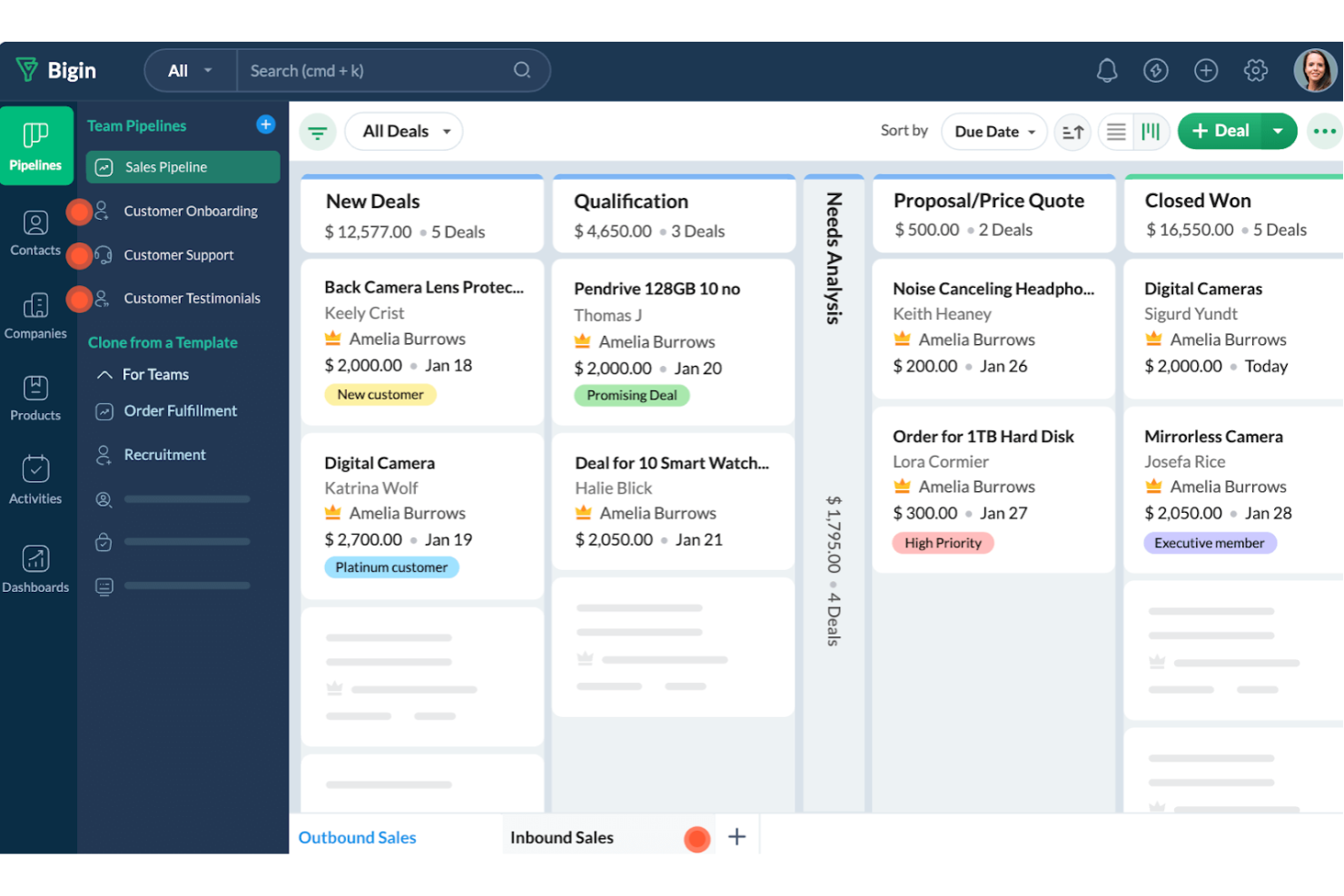
Bigin by Zoho CRM is a customer relationship management tool designed specifically for small businesses. It offers a range of features that help manage sales processes and customer interactions in an organized and effective manner.
Why I Picked Bigin by Zoho CRM: I picked Bigin by Zoho CRM because it gives you a clear view of your sales pipeline and lets you set stage rules to keep deals moving without bottlenecks. You can manage all customer interactions in one place and communicate through email, phone, or WhatsApp without leaving the CRM. I also like how automation handles repetitive tasks so you can focus more on closing deals and building strong client relationships.
Standout features & integrations:
Features include team collaboration tools that allow you to work closely with your colleagues by sharing data and insights, which can improve your team's overall performance. Bigin also offers customization options, enabling you to tailor the CRM to fit your specific business needs with custom fields and modules. Furthermore, its analytics and reporting features provide valuable insights into your sales performance, helping you make informed decisions to drive growth.
Integrations include Zoho Mail, Zoho Desk, Zapier, Google Workspace, Microsoft 365, Mailchimp, Calendar, Slack, Zoom, and Docusign.
Pros and Cons
Pros:
- Simple to set up for immediate use
- Allows easy tracking of multiple pipelines
- Offers custom forms for data collection
Cons:
- Limited flexibility in custom report creation
- Lacks mapping features for routing contacts
New Product Updates from Bigin by Zoho CRM

Bigin iOS Adds Interactive WhatsApp Templates and Quick Replies
Bigin’s iOS app now supports interactive WhatsApp templates and Quick Replies, making it easier to preview and send instant messages to customers. For more information, visit Bigin by Zoho CRM's official site.
 .
.
Best for B2B order management
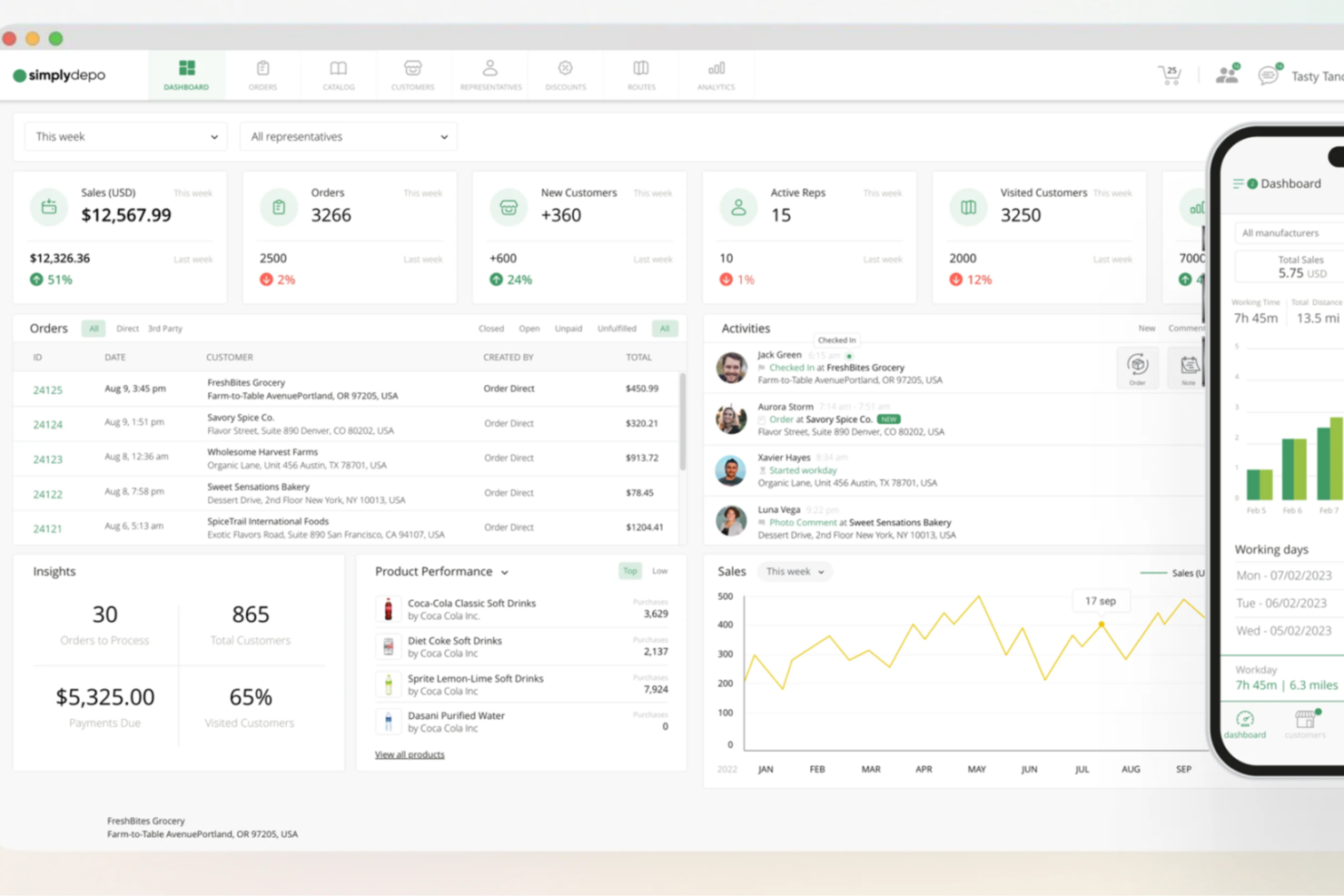
For small businesses in distribution and retail, SimplyDepo offers a tailored solution to improve your sales management processes. As a comprehensive platform, it not only empowers field sales teams but also enhances customer relationships through efficient CRM capabilities. By addressing challenges like order management and route planning, SimplyDepo helps your business scale smoothly while improving workflow efficiency and boosting sales growth.
Why I Picked SimplyDepo
I chose SimplyDepo because it excels in addressing the key challenges faced by small businesses in sales management. One standout feature is its B2B order management system, which simplifies and accelerates the order process, allowing your team to focus more on customer engagement. Additionally, the route planning optimization feature is crucial for small businesses looking to save time and resources by ensuring efficient delivery routes. These features, combined with its CRM capabilities, make SimplyDepo a practical choice for businesses seeking to enhance their sales operations.
SimplyDepo Key Features
In addition to its standout features, I also found SimplyDepo to offer several other valuable tools for small businesses:
- Field CRM: Provides tools to manage and enhance customer relationships directly from the field.
- Mobile Access: Enables your team to access the platform and manage tasks on-the-go, ensuring flexibility and responsiveness.
- Personalized Support: Offers tailored support to help your team maximize the software's benefits.
- Easy Onboarding: Simplifies the process of getting started, allowing your team to quickly adapt and utilize the platform effectively.
SimplyDepo Integrations
Integrations include Stripe, Twilio SendGrid, ShipStation, and QuickBooks.
Pros and Cons
Pros:
- Route planning and territory mapping
- Integrated CRM for account tracking
- Built-in B2B order management system
Cons:
- No transparent API documentation
- Limited advanced reporting customization
Best for simplicity in tasks

OnePageCRM is a sales management tool designed for small businesses focused on streamlining sales processes. It simplifies task management and helps your team prioritize daily sales actions effectively.
Why I picked OnePageCRM: OnePageCRM's unique approach to task management ensures your team remains focused on the next actionable step. It transforms your sales pipeline into a to-do list, making it easy to manage tasks without feeling overwhelmed. This simplicity is perfect for small teams that need to maintain clarity and focus. The tool's emphasis on actionable tasks helps prevent leads from falling through the cracks.
Standout features & integrations:
Features include a contact management system that keeps all your customer information organized and accessible. The notes and call logging feature allows your team to track every interaction with clients easily. Additionally, its sales reporting tools provide insights into team performance and sales trends.
Integrations include Google Workspace, Mailchimp, Xero, QuickBooks, Zapier, Outlook, Dropbox, Evernote, Skype, and HubSpot.
Pros and Cons
Pros:
- Effective contact management
- Clear action-based pipeline
- Task-focused sales approach
Cons:
- No built-in project management
- Limited advanced features

Best for remote sales teams

Close CRM is a sales management software designed for small to medium-sized remote sales teams. It focuses on enhancing communication and sales processes through built-in calling and email features.
Why I picked Close CRM: Close CRM offers a unique combination of built-in calling and emailing capabilities tailored for remote teams. These features let your team communicate with clients directly through the CRM, reducing the need for external tools. The platform supports remote collaboration with real-time sales updates, ensuring everyone stays informed. Its user-friendly dashboard helps your team track and manage leads effectively.
Standout features & integrations:
Features include a customizable sales pipeline that allows your team to adjust stages based on your sales process. The smart views feature gives you a clear overview of your leads, helping prioritize follow-ups. Additionally, the predictive dialer speeds up the calling process, saving time for your sales team.
Integrations include Zapier, Slack, Mailchimp, Zendesk, HubSpot, QuickBooks, Docusign, Pipedrive, Intercom, and Trello.
What’s free? Close CRM offers a 14-day free trial, allowing full access to premium features.
Pros and Cons
Pros:
- Real-time sales updates
- Easy remote collaboration
- Built-in communication tools
Cons:
- Basic reporting capabilities
- Integration setup complexities
Best for AI-driven insights
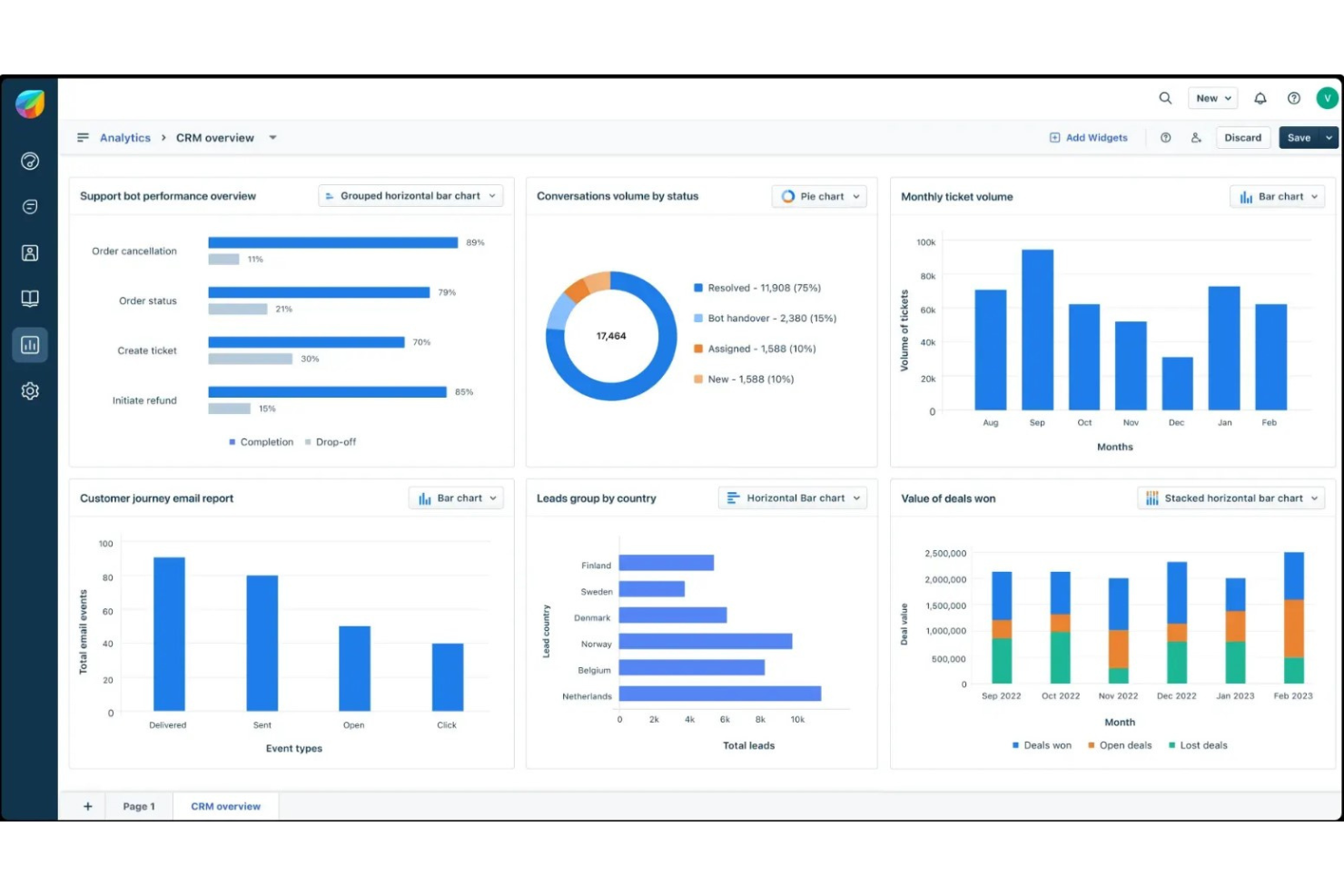
Freshsales is a cloud-based customer relationship management tool designed for sales teams to enhance lead management and sales automation. It serves small to medium-sized businesses aiming to cinch in their sales processes and improve customer engagement.
Why I picked Freshsales: Freshsales sets itself apart with its AI-driven insights, which help your team make data-informed decisions. The software offers features like Freddy AI that assist in lead scoring and sales forecasting. This ensures you're focusing on the leads most likely to convert. Additionally, its intuitive interface allows your team to manage sales pipelines efficiently, making it a great fit for businesses seeking to optimize their sales efforts.
Standout features & integrations:
Features include an extensive contact management system, which allows your team to easily track interactions and conversations with clients. The built-in phone system lets you make calls directly from the CRM, saving time and effort. Additionally, you can automate routine tasks like sending follow-up emails, freeing up your team to focus on closing deals.
Integrations include Google Workspace, Microsoft Office 365, Mailchimp, Zapier, QuickBooks, Slack, Shopify, Docusign, Twilio, and Xero.
Pros and Cons
Pros:
- Automated email sequences
- Customizable sales pipelines
- AI-driven lead scoring
Cons:
- Basic reporting features
- Learning curve for new users
Best for Google Workspace users

Copper CRM is a customer relationship management tool tailored for small to medium-sized businesses, particularly those using Google Workspace. It integrates seamlessly with Google apps to manage leads and automate workflows efficiently.
Why I picked Copper CRM: Copper CRM is designed specifically for users who rely heavily on Google Workspace, making it a natural fit for teams using Gmail and Google Calendar. It automatically logs emails and events, ensuring you never miss important client interactions. The simple user interface allows your team to focus on building relationships rather than managing data. Its deep integration with Google products is a key differentiator, providing a cohesive experience for Google Workspace users.
Standout features & integrations:
Features include a sales pipeline management system that helps your team track deals through various stages. Automated data entry reduces manual work, letting you focus on sales activities. Additionally, customizable dashboards offer insights into sales trends and performance, helping your team make informed decisions.
Integrations include Google Workspace, Slack, Mailchimp, QuickBooks, RingCentral, Docusign, Zendesk, Zapier, HubSpot, and Xero.
Pros and Cons
Pros:
- Real-time collaboration features
- Automated data entry
- Google Workspace integration
Cons:
- Limited customization options
- Basic reporting tools

Best for lead conversion focus

LeadSquared is a sales execution and marketing automation platform designed for businesses focused on improving lead conversion. It helps sales teams track and manage leads efficiently, minimizing missed opportunities.
Why I picked LeadSquared: LeadSquared excels at enhancing lead conversion through its specialized features. Your team can score and prioritize leads based on predefined criteria, ensuring focus on high-potential prospects. The tool's lead nurturing capabilities help maintain engagement with prospects until they are ready to convert. Its automation features speed up repetitive tasks, freeing up your team to focus on closing deals.
Standout features & integrations:
Features include visual sales pipelines that help your team track deals through different stages. The real-time activity tracking feature provides insights into customer behavior, allowing you to tailor your approach. Additionally, its reporting tools offer detailed analytics on sales performance and marketing effectiveness.
Integrations include Salesforce, Zapier, Mailchimp, Microsoft Dynamics 365, Google Workspace, Outlook, QuickBooks, Shopify, Zoho CRM, and Facebook.
Pros and Cons
Pros:
- Time-saving automation tools
- Efficient lead scoring system
- Focus on lead conversion
Cons:
- Basic mobile application
- Complex initial setup
Best for integration capabilities

HubSpot Sales Hub is a sales management platform designed for small to medium-sized businesses looking to enhance their sales processes. It provides tools for lead tracking, sales automation, and customer relationship management.
Why I picked HubSpot Sales Hub: HubSpot Sales Hub offers extensive integration capabilities, making it an ideal choice for businesses that need to connect various tools. Your team can manage and automate sales tasks efficiently with features like email tracking and pipeline management. The platform's integration with other HubSpot services allows for a centralized approach to marketing and sales. This connectivity ensures you can streamline operations without switching between multiple software.
Standout features & integrations:`
Features include customizable dashboards that offer real-time insights into sales performance. The email tracking feature ensures you know when leads open your emails, helping you follow up at the right time. Additionally, the meeting scheduling tool simplifies appointment setting by integrating directly with your calendar.
Integrations include Google Workspace, Microsoft Office 365, Mailchimp, Slack, Zapier, QuickBooks, Salesforce, Shopify, WordPress, and LinkedIn.
Pros and Cons
Pros:
- Easy meeting scheduling
- Centralized sales and marketing
- Effective email tracking
- Customizable dashboards
- Extensive integration options
Cons:
- Requires technical knowledge
- Occasional feature limitations
- Complex setup for new users
- Limited offline functionality
- Learning curve for beginners

Vtiger CRM
Best for small teams needing customization
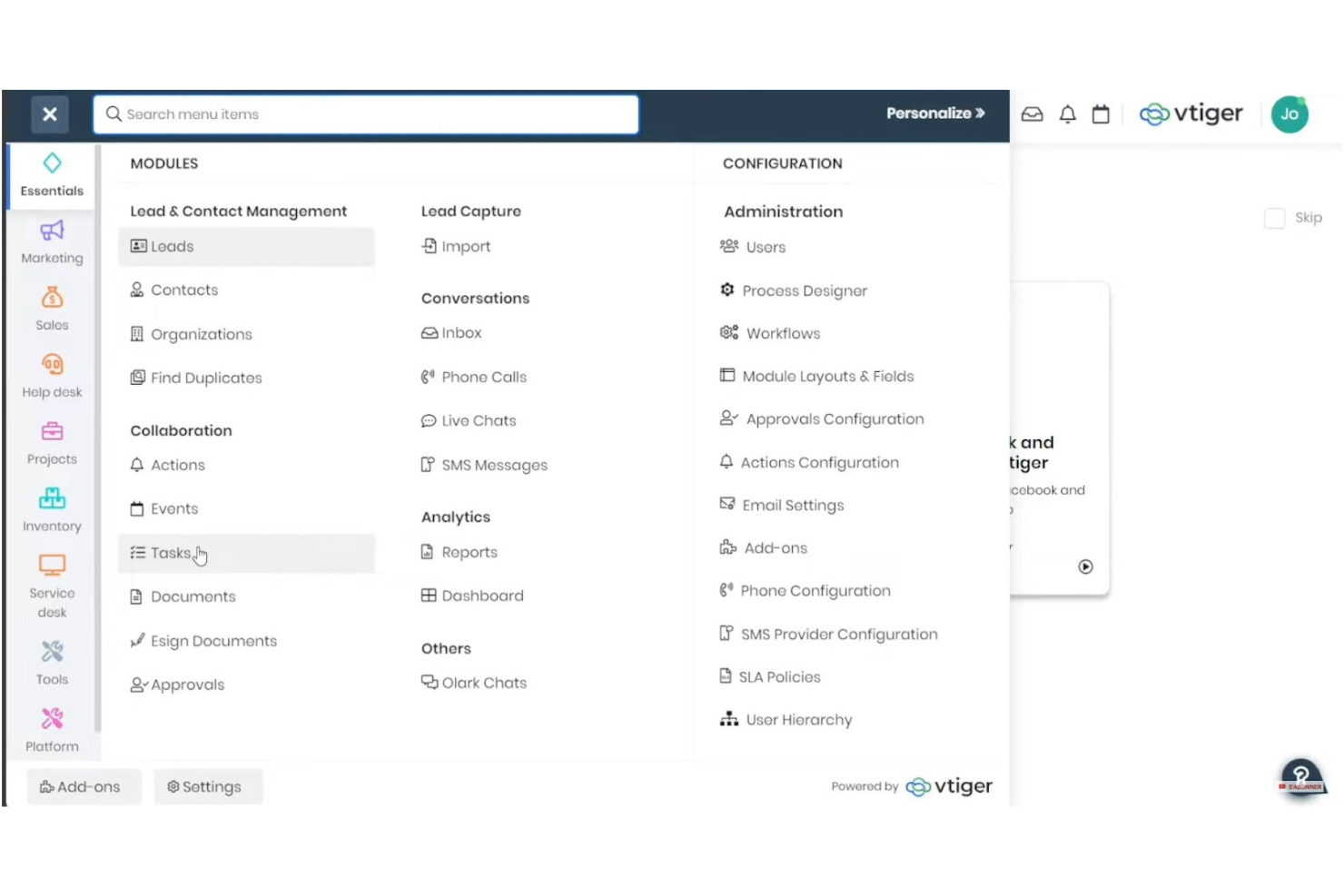
Vtiger CRM is a versatile tool designed for small to medium-sized businesses looking for a customizable CRM solution. It offers key functions like sales automation, customer support, and project management, all in one platform.
Why I picked Vtiger CRM: Vtiger CRM provides a high level of customization, allowing your team to tailor the system to fit specific business needs. You can modify fields, workflows, and reports to match your processes. This flexibility is ideal for small teams that require a personalized approach to their CRM. Additionally, its comprehensive set of features, from contact management to helpdesk support, consolidates various business functions in one place.
Standout features & integrations:
Features include a built-in email marketing tool that helps your team engage with leads effectively. The sales insights feature provides analytics and forecasts to guide your sales strategies. Moreover, the project management module helps in organizing and tracking project progress seamlessly.
Integrations include Google Workspace, Microsoft Office 365, Mailchimp, QuickBooks, Zapier, Xero, Twilio, Docusign, Dropbox, and Slack.
Pros and Cons
Pros:
- Integrated project management
- Effective sales insights
- Built-in email marketing
- Comprehensive feature set
- Highly customizable interface
Cons:
- Configuration requires learning curve
- Limited advanced reporting
- Basic mobile application
- Occasional feature overload
- Initial setup complexity
Other Sales Management Software for Small Business
Here are some additional sales management software for small business options that didn’t make it onto my shortlist, but are still worth checking out:
- Agile CRM
For all-in-one features
- Insightly
For project management integration
- Nutshell CRM
For easy team collaboration
- Apptivo
For affordable features
- SugarAI
For data privacy compliance
- Clarify
For autonomous AI sales agents
- Less Annoying CRM
For free and personalized onboarding
- Zoho CRM
For extensive customization
- Bitrix24
For free plan with unlimited free users
- Pipedrive
For visual sales pipelines


How I Evaluate Sales Management Software for Small Business
I look at every tool through two lenses: the core functionality a lean sales team can't go without, and the differentiators that set the best options apart.
Core Functionality (Table Stakes For This List)
When I'm selecting tools for my list, I rank each one on a scale from 0 (does not offer the functionality) to 5 (excels in this area) for each core functionality listed below. Then, I calculate the tool's total score into a percentage. Each tool needs to achieve a minimum total score of 65% to be considered for inclusion.
- Pipeline Management: I check whether each tool offers visual, customizable deal stages that reflect how small teams actually sell—like a three-stage pipeline for a consulting firm vs. a longer cycle for B2B SaaS.
- Contact & Lead Management: Every tool should centralize contacts, companies, and leads in one place so reps aren't toggling between spreadsheets and email to find a prospect's history.
- Sales Forecasting & Reporting: I evaluate whether the platform gives RevOps clear pipeline reports and revenue forecasts, not just raw data dumps that require a separate BI tool to interpret.
- Activity & Task Tracking: Reps on small teams wear many hats, so I look for tools that log calls, emails, and follow-ups against specific deals and make it easy to see what's overdue at a glance.
- Sales Team Performance Tracking: I look at whether managers can view quota attainment and rep activity metrics from a single dashboard rather than pulling manual reports each week.
- Sales Workflow Automation: Small teams benefit most here, so I evaluate whether the tool automates repeatable steps like follow-up sequences and deal stage transitions without requiring complex setup.
Once I have a list of tools that meet this criteria, I consider what sets each platform apart.
Differentiating Factors (What Sets Vendors Apart)
Here's how I compare and contrast different vendors:
Standout Features
Built-in communication tools matter for small teams. When reps can call, email, and text from the CRM, every interaction gets logged automatically without manual data entry. I also look for AI-powered deal insights that flag stalled opportunities before they slip through the cracks. For founder-led teams who sell on the road, a full-featured mobile app makes a real difference—it lets you update a deal stage right after a client meeting instead of waiting to get back to your desk.
Beyond Features
Pricing transparency is a big deal for small businesses, so I check whether vendors offer clear per-user costs and a free trial or freemium tier to get started. Time-to-value matters just as much—a five-person sales team shouldn't need a consultant to go live. I also evaluate each tool's integration ecosystem, especially native connections to Google Workspace, Microsoft 365, QuickBooks, and marketing platforms like Mailchimp or HubSpot, since RevOps depends on data flowing cleanly between systems.
How to Choose Sales Management Software for a Small Business
It’s easy to get bogged down in long feature lists and complex pricing structures. To help you stay focused as you work through your unique software selection process, here’s a checklist of factors to keep in mind:
| Factor | What to Consider |
| Scalability | Will the software grow with your business? |
| Integrations | Does it connect with tools your team already uses? |
| Customizability | Can you tailor it to fit your specific needs? |
| Ease of Use | Is the software intuitive for your team to use? |
| Budget | Does it fit within your financial constraints? |
| Security Safeguards | Does it meet your company's security requirements? |
| Support | Is reliable customer support available when needed? |
| Mobile Access | Can your team access it easily on mobile devices? |
Trends in Sales Management Software for Small Businesses
In my research, I sourced countless product updates, press releases, and release logs from different sales management software for small business vendors. Here are some of the emerging trends I’m keeping an eye on:
- AI-driven analytics: More tools are using AI to analyze sales data and predict trends. This helps small businesses make informed decisions. For example, Freshsales uses AI to score leads based on their likelihood to convert.
- Voice recognition technology: Some vendors are integrating voice commands to facilitate hands-free operation. This can accelerate data entry and task management. HubSpot Sales Hub is experimenting with voice-activated features to enhance user experience.
- Customizable automation workflows: Instead of one-size-fits-all automation, businesses can now tailor workflows to specific needs. This allows teams to automate tasks that best fit their processes. Pipedrive offers customizable automation that adapts to varying sales cycles.
- Advanced data visualization: Tools are providing more sophisticated data visualization options to help teams interpret sales data quickly. This feature turns complex data into easy-to-understand visuals. Zoho CRM has introduced new dashboard widgets that enhance data presentation.
- Enhanced security features: With data breaches on the rise, security is a growing concern. Vendors are implementing stronger security protocols to protect sensitive information. Salesforce Starter Suite emphasizes data security with advanced encryption and compliance features.
What is Sales Management Software for Small Businesses?
Sales management software is a tool that helps you organize sales activities, track leads, and manage customer info all in one place. Sales reps, managers, and small business owners use it to keep tabs on every deal, follow up with leads, and stay on top of daily tasks. It lets you see your pipeline clearly, automate routine work, and gives you more time to focus on selling instead of paperwork.
Features of Sales Management Software for Small Businesses
When selecting sales management software for your small business, look for features that enhance productivity, streamline workflows, and improve customer interactions. Many of these capabilities are also found in enterprise sales software platforms. Here are key elements to consider:
- Lead Tracking: Monitor potential customers throughout the sales funnel, ensuring no opportunities are missed. With integrated segmentation, teams can prioritize leads more effectively based on key metrics.
- Contact Management: Organize customer information in a central database for easy access, enabling organized customer interactions and fostering a stronger customer experience.
- Sales Automation: Automate repetitive tasks like follow-ups and data entry, allowing sales reps to focus on lead generation and closing deals.
- Email Tracking and Notifications: Get notified when emails are opened, empowering teams to time their responses strategically and enhance the impact of email campaigns.
- Customizable Pipelines: Tailor sales processes to match your specific business needs. This flexibility is especially valuable for startups and small businesses looking to scale.
- Reporting and Sales Analytics: Gain insights into sales performance through visualized data, empowering teams with actionable information for continuous improvement.
- Integration Capabilities: Connect with spreadsheets, CRM platforms, and other sales tools to create a unified workflow.
- Mobile Access: Manage sales activities on-the-go, ensuring productivity for salespeople and teams working in dynamic environments.
- Security Features: Protect sensitive customer data with encryption and compliance measures, safeguarding your business and maintaining customer trust.
- Task Management: Prioritize and organize daily sales activities, making time-consuming tasks more manageable and boosting overall efficiency.
Benefits of Sales Management Software for Small Business
Implementing sales management software for small businesses provides several benefits for your team and your business. Here are a few you can look forward to:
- Improved organization: Centralizes all customer and lead information, making it easy to access and manage.
- Increased efficiency: Automates routine tasks like follow-ups and data entry, freeing up time for more important sales activities.
- Better decision-making: Provides insights through reporting and analytics, helping teams make informed choices.
- Enhanced communication: Tracks interactions with leads and customers, ensuring consistent and timely follow-ups.
- Customization options: Adapts to your business's unique sales processes with customizable features and workflows.
- Data security: Keeps sensitive information safe with advanced security features and compliance with regulations.
- Mobile productivity: Allows sales teams to access tools and information on-the-go, maintaining productivity outside the office.
Costs and Pricing of Sales Management Software for Small Businesses
Selecting sales management software for a small business requires an understanding of the various pricing models and plans available. Pricing ranges from free sales management options to paid plans, with costs varying based on features, team size, add-ons, and more. The table below summarizes common plans, their average prices, and typical features included in sales management software for small business solutions:
Plan Comparison Table for Sales Management Software for Small Businesses
| Plan Type | Average Price | Common Features |
| Free Plan | $0/user/ month | Basic contact management, limited storage, and basic reporting. |
| Personal Plan | $5-$25/user/month | Contact management, email tracking, and task management. |
| Business Plan | $30-$60/ user/month | Advanced reporting, sales automation, and customizable pipelines. |
| Enterprise Plan | $70-$150/ user/month | Enhanced security, advanced analytics, and dedicated support. |
Sales Management Software for Small Businesses FAQs
Here are some answers to common questions about sales management software for small business:
How can sales management software improve my team's productivity?
Sales management software can boost your team’s productivity by automating repetitive tasks like data entry and follow-ups. It helps organize customer information, making it easy for your team to access and manage leads. With features like task management and email tracking, your team can prioritize their activities and focus on closing deals more efficiently.
Is it necessary to train my team to use sales management software?
Training your team is important to ensure they can make the most out of the software. While many tools are user-friendly, a brief training session can help your team understand specific features and how to integrate them into their workflows. Some vendors offer tutorials, webinars, and support to facilitate this process.
What should I consider when choosing sales management software for my small business?
When choosing sales management software, consider your business’s specific needs, such as lead tracking, automation, and reporting capabilities. Evaluate the software’s ease of use and how well it integrates with other tools your team uses. Also, consider your budget and the value the software brings to your sales process.
How customizable is sales management software?
Most sales management software offers some level of customization, allowing you to tailor it to your business’s unique processes. You can often customize pipelines, reports, and workflows to match your team’s needs. However, the extent of customization varies between vendors, so it’s important to choose one that aligns with your requirements.
Can sales management software integrate with other tools my team uses?
Yes, many sales management software solutions offer integrations with popular tools like email clients, calendars, and accounting software. This integration helps create a cohesive ecosystem where all your tools work together, reducing the need for manual data entry. Check the vendor’s integration capabilities to ensure compatibility with your existing tools.
What kind of support can I expect from sales management software vendors?
Support varies between vendors, but most offer resources like FAQs, knowledge bases, and customer support. Some provide 24/7 support through chat, email, or phone, while others may have dedicated account managers for more personalized assistance. It’s a good idea to assess the level of support you might need and choose a vendor that meets those expectations.
What’s Next?
Want to take your RevOps game to the next level? Subscribe to The CRO Club newsletter for expert advice, software reviews, and other resources to help you deliver predictable growth at scale.