

26 Best Sales Management Software Of 2026

20 Best Sales Management Software Shortlist


The right sales management software helps you organize leads, track deals, and automate your sales process so you can close more business with less hassle. Choosing the best one can feel overwhelming when there are so many options vying for your attention.
I’ve tested dozens of these tools with different teams and clients, so I can give you my top picks and real insights to help you find the sales management software that actually works for you.
Why Trust Our Sales Management Software Reviews?
We’ve been testing and reviewing sales management software since 2022. As revenue operation leaders ourselves, we know how critical and difficult it is to make the right decision when selecting software.
We invest in deep research to help our audience make better software purchasing decisions. We’ve tested more than 2,000 tools for different RevOps use cases and written over 1,000 comprehensive software reviews. Learn how we stay transparent & our sales management software review methodology.
Table of Contents
- Why Trust Our Sales Management Software Reviews?
- Best Sales Management Software Reviews
- Related Sales Management Software Reviews
- Selection Criteria For Sales Management Software
- How To Choose Sales Management Software
- Trends In Sales Management Software For 2026
- What Is Sales Management Software?
- Features Of Sales Management Software
- Benefits Of Sales Management Software
- Costs and Pricing For Sales Management Software
- Additional Revenue Operations Options
- Conclusion
| Tool | Best For | Trial Info | Price | ||
|---|---|---|---|---|---|
| 1 | Best for customizable automations for your sales pipeline | Free trial available | From $12/seat/month (billed annually) | Website | |
| 2 | Best for enterprise functionality | 30-day free trial | From $25/user/month | Website | |
| 3 | Best for small and medium B2B teams | 30-day free trial + free demo available | From $29/user/month (billed annually) | Website | |
| 4 | Best for real-time sales guidance | Not available | Pricing upon request | Website | |
| 5 | Best for hybrid, small and medium businesses | 15-day free trial + free plan + free demo available | From $14/user/month (billed annually) | Website | |
| 6 | Best for distributor focused CRM | Free 60-day trial available | Pricing upon request | Website | |
| 7 | Best for analyzing deals | Free demo available | Pricing upon request | Website | |
| 8 | Best for digital sales rooms | Free plan + free demo available | From $350/month (billed annually) | Website | |
| 9 | Best sales management software for automation | 15-day free trial + free demo available | From $23/user/month (billed annually) | Website | |
| 10 | Best for AI-powered sales CRM | Free plan + free demo available | From $11.04/user/month (billed biennially) | Website | |
| 11 | Best for fast team-member onboarding | Free forever plan available | From $3.99/user/month (billed annually) | Website | |
| 12 | Best for automating cold emailing | Free 7-day trial available | From $25/month | Website | |
| 13 | Best for visual sales pipeline management | Free demo + 14-day free trial available | From $14/user/month (billed annually) | Website | |
| 14 | Best for closing deals through great customer service | Free demo available | From $19/user/month | Website | |
| 15 | Best for enterprise teams to turn conversational data into sales insights | 14-day free trial + free demo available | Pricing upon request | Website | |
| 16 | Best AI-driven sales management software | Free 14-day trial | Pricing upon request | Website | |
| 17 | Best for managing accounts with multiple decision-makers | 14-day free trial | From $10.50/user/month (billed annually) | Website | |
| 18 | Best for no-code sales workflows | 14-day free trial available | From $25/user/month | Website | |
| 19 | Best for Google Workspace integration | 14-day free trial + free demo available | From $9/seat/month (billed annually) | Website | |
| 20 | Best software for AI-lead scoring | 21-day free trial available | From $9/user/month (billed annually) | Website |

-

Pipedrive CRM
Visit WebsiteThis is an aggregated rating for this tool including ratings from Crozdesk users and ratings from other sites.4.4 -
Creatio CRM
Visit WebsiteThis is an aggregated rating for this tool including ratings from Crozdesk users and ratings from other sites.4.7 -
monday CRM
Visit WebsiteThis is an aggregated rating for this tool including ratings from Crozdesk users and ratings from other sites.4.6


Best Sales Management Software Reviews
Here’s a brief summary of the top 10 sales management software to help you see each platform’s best use case, some unique features, pricepoint, and each tool’s weak spots to help you analyze which is the best fit for your team.


monday sales CRM gives teams a flexible workspace for managing leads, deals, and ongoing customer relationships without relying on developers. Its no-code environment lets you shape pipelines, views, and automations around the way your team actually works. It’s ideal for organizations that need structure but don’t want to be boxed into rigid CRM workflows.
Why I Picked monday sales CRM
I picked monday sales CRM because it offers a wide range of customization options that non-technical users can manage confidently. You can build and automate your entire sales cycle with drag-and-drop tools, making it easier for every team member to contribute. The platform also excels at visualizing data, giving you flexible dashboards and views to understand performance at a glance. Email tracking, contact management, and sync options help keep communication organized. Its user-friendly design makes building complex automations feel straightforward.
monday sales CRM Key Features
- Lead & contact management: Store and organize customer information in one place.
- Customizable pipelines: Adapt stages and workflows to your unique sales process.
- Sales automation: Trigger alerts, assignments, updates, and follow-ups automatically.
- Advanced reporting: Build dashboards to monitor performance and KPIs.
- Email sync & tracking: Keep outreach connected to your CRM records.
monday sales CRM Integrations
Integrations include Slack, Google Drive, Gmail, Google Calendar, Jira, GitHub, Trello, Dropbox, Typeform, and additional options through Zapier (paid plan).
Pros and Cons
Pros:
- Advanced reporting and analytics
- Robust integration capabilities
- High customizability & automation-friendly
Cons:
- Slight learning curve
- Limited native email marketing features
New Product Updates from monday CRM

monday CRM Introduces Activity Tracker Widget
monday CRM introduces an Activity Tracker widget for real-time visibility into activities. This update helps users monitor performance and prioritize work more effectively. For more information, visit monday CRM's official site.

For years, Salesforce has been one of the market leaders in sales management software. While Salesforce offers mid-to-high-tier pricing for enterprise teams, they’re one of the highest-quality platforms available for sales teams and sales managers.
Why I picked Salesforce CRM: While Salesforce can help sales teams from businesses of any size, the platform is especially favorable for enterprise teams. In my opinion, it’s one of the best CRM tools simply due to its wide range of features and apps. The ability to customize the platform for your needs is impressive.
Salesforce CRM Standout Features and Integrations:
Standout features include email marketing, audience discovery, contact management, marketing automation and workflows. My favorite feature is “Einstein,” their AI which gives tips and insights. Salesforce also features opportunity management, and the Salesforce mobile app.
Integrations include Slack, Outlook, ActiveCampaign, G Suite, Paperflite, Zoho Forms, DocuSign, MailChimp, Marketo, Clari, Calendly, Talkdesk, Quickbooks, Woopra, monday.com, Hubspot, LinkedIn, Dropbox, Gong, Zapier.
Pros and Cons
Pros:
- Easily monitor sales performance
- Great onboarding and training
- Plenty of integrations
- Impressive customization for enterprise sales teams.
- Multiple sales apps within the platform
- Wide range of integrations
Cons:
- Lower-tiered plans don’t have the best customer support
- Setup can take some time without the help of support
- Compared to other software, pricing is a bit high

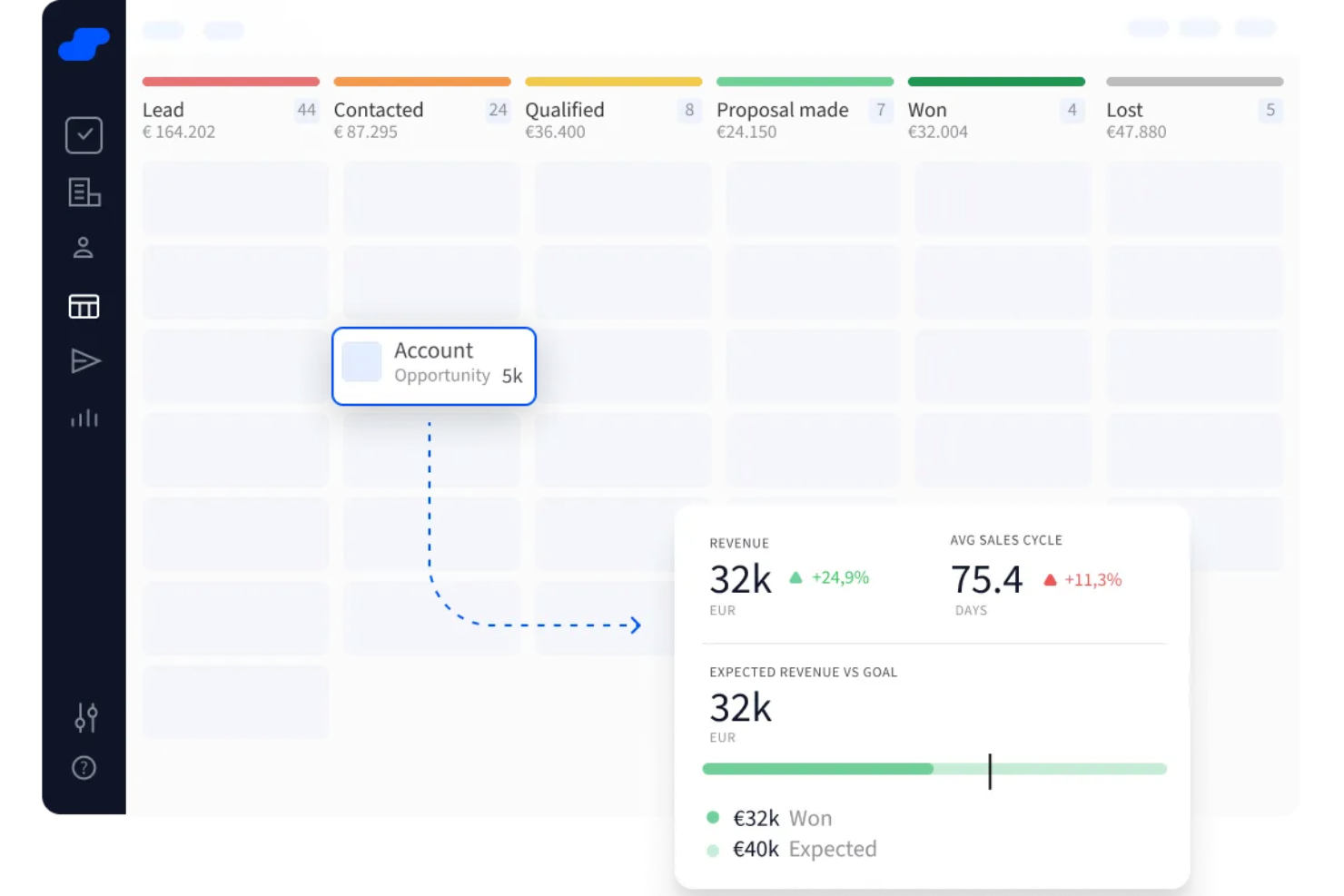
Salesflare is a sales management software designed specifically for small and medium-sized B2B businesses. It automates the process of collecting and organizing contact information, helping sales teams focus on selling rather than data entry.
Why I Picked Salesflare: One major reason I picked Salesflare is its automated pipeline tracking. Salesflare automatically builds visual pipelines based on your sales stages and opportunities without requiring manual updates. As new interactions happen—emails sent, meetings scheduled, documents exchanged—the software updates your pipeline to reflect real-time activity. This helps you prioritize deals based on engagement levels and take action on stalled opportunities, making it easier to keep your funnel healthy without tedious updates.
Salesflare Standout Features & Integrations
Features include collaborative account timelines, where all team activities related to a lead are shown in one view, making handoffs and updates transparent. Salesflare also offers built-in task suggestions, which prompt your team with what to do next for each opportunity based on deal history and engagement.
Integrations include Google Workspace, Intercom, MailChimp, QuickBooks Online, Slack, Stripe, Shopify, and Calendly.
Pros and Cons
Pros:
- Automatically fills contact data from emails
- Follow-up reminders reduce lead drop-off
- Contact timelines show full communication history
Cons:
- Lacks highly tailored workflows for complex teams
- Limited options for bulk editing records

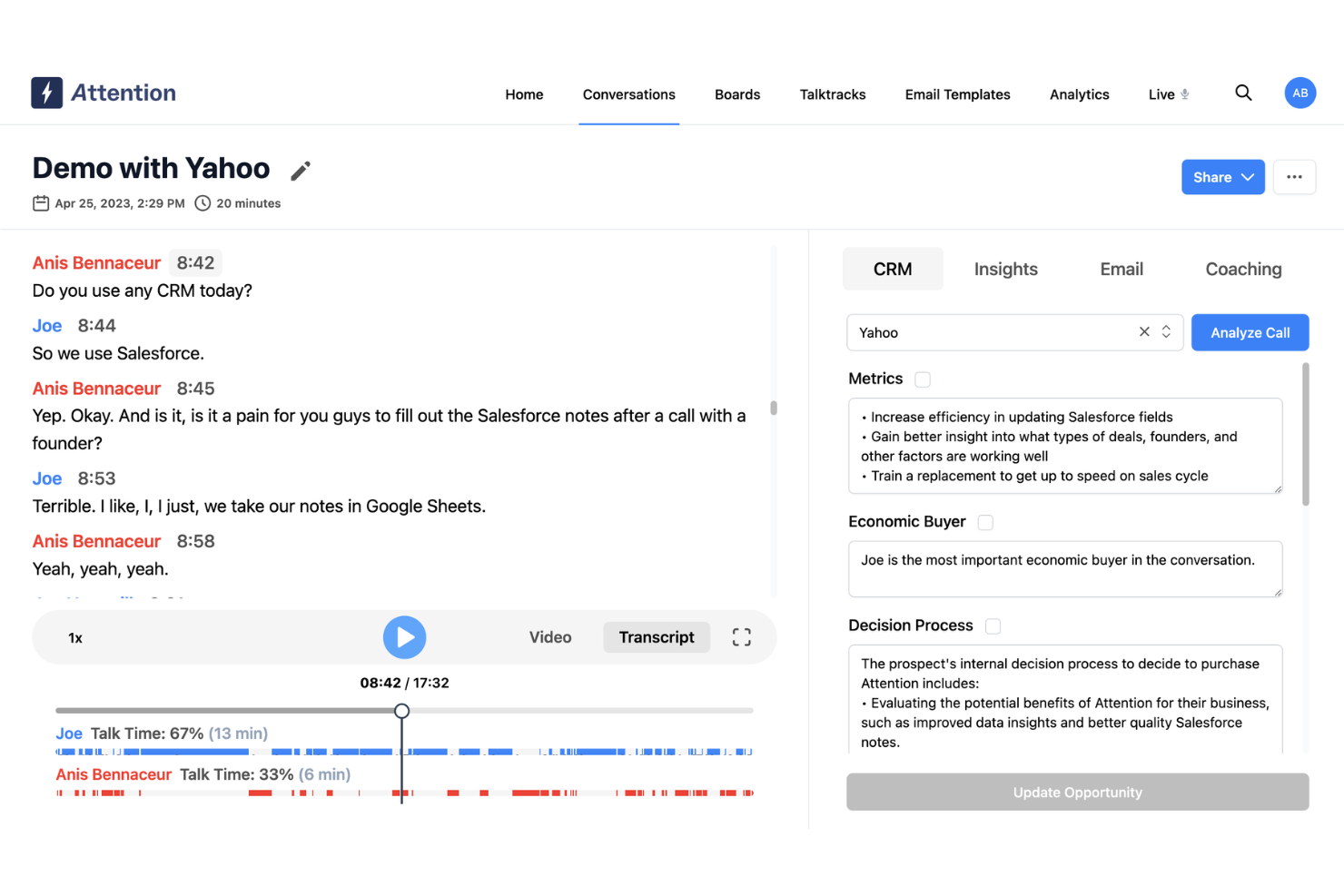
Attention is an AI-powered platform designed to enhance the efficiency and effectiveness of sales teams. The tool provides real-time actionable intelligence during customer conversations, automating CRM data entry, and offering insights into customer objections and reasons for lost deals.
Why I Picked Attention: Attention stands out as a sales management software with its AI and automation capabilities. Utilizing advanced AI algorithms, Attention analyzes sales interactions and provides personalized suggestions and strategies to sales representatives during calls. This real-time guidance helps sales reps handle objections more effectively, follow the sales methodology, and ultimately close more deals. AI is also used to provide actionable insights to help sales teams adjust their strategies.
Attention Standout Features & Integrations
Features include insights from customer conversations, sales training, KPI tracking, automated CRM updates, follow-up email automation, cross-call insights, deal analysis, sales messaging, and custom triggers so that Attention's AI listens to what matters most to you.
Integrations include Zoom, Meets, Teams, Salesforce, HubSpot, Gmail, Outlook, Slack, and Zapier.
Pros and Cons
Pros:
- Real-time sales coaching on calls
- Personalized follow-up emails
- Actionable insights with AI
Cons:
- Some integrations may require additional assistance
- Reliance on AI may not suit all users

Zoho CRM is one of the leading customer relationship management (CRM) tools on the market. The sales management tool is best suited for small and medium-sized businesses that are hybrid or remote to improve sales activities, optimize performance, and increase leads and conversions.
Why I picked Zoho CRM: Zoho CRM allows teams in multiple locations (in the office or at home), to work together seamlessly, making it perfect for hybrid businesses. The tool offers a nifty gamification feature to stir up friendly competition between sales reps within your team, which is great for motivating sales.
Zoho CRM Standout Features and Integrations:
Features include Zia (an AI-powered assistant), a comprehensive reporting feature for pre-made sales reports, deal gamification and rewards for deals closed, simple customization as your business grows, custom dashboards, and multiple pipelines for different teams. These gamification and custom dashboard features help your salespeople stay on target and work more efficiently, even in a hybrid environment.
Integrations include over 300 third-party integrations such as Mailchimp, G Suite, Office 365, Slack, Google Workspace, Shopify, Facebook Ads, PandaDoc, Twilio, SMS-Magic, Zoom, Quickbooks, DocuSign, and Leadfeeder.
Pros and Cons
Pros:
- Mobile app to improve communication with customers
- Impressive security features
- 24/7 customer support
- Zia (AI) helps identify prospects your team can convert
- Great for hybrid and remote teams
Cons:
- Advanced features gated behind top-tier subscriptions
- Pricey compared to other tools
- Difficult platform to learn
New Product Updates from Zoho CRM

Zoho CRM Makes System Dashboards Editable
Zoho CRM's system-defined dashboards are now editable, allowing customization of charts for better insights. For more information, visit Zoho CRM's official site.
 .
.
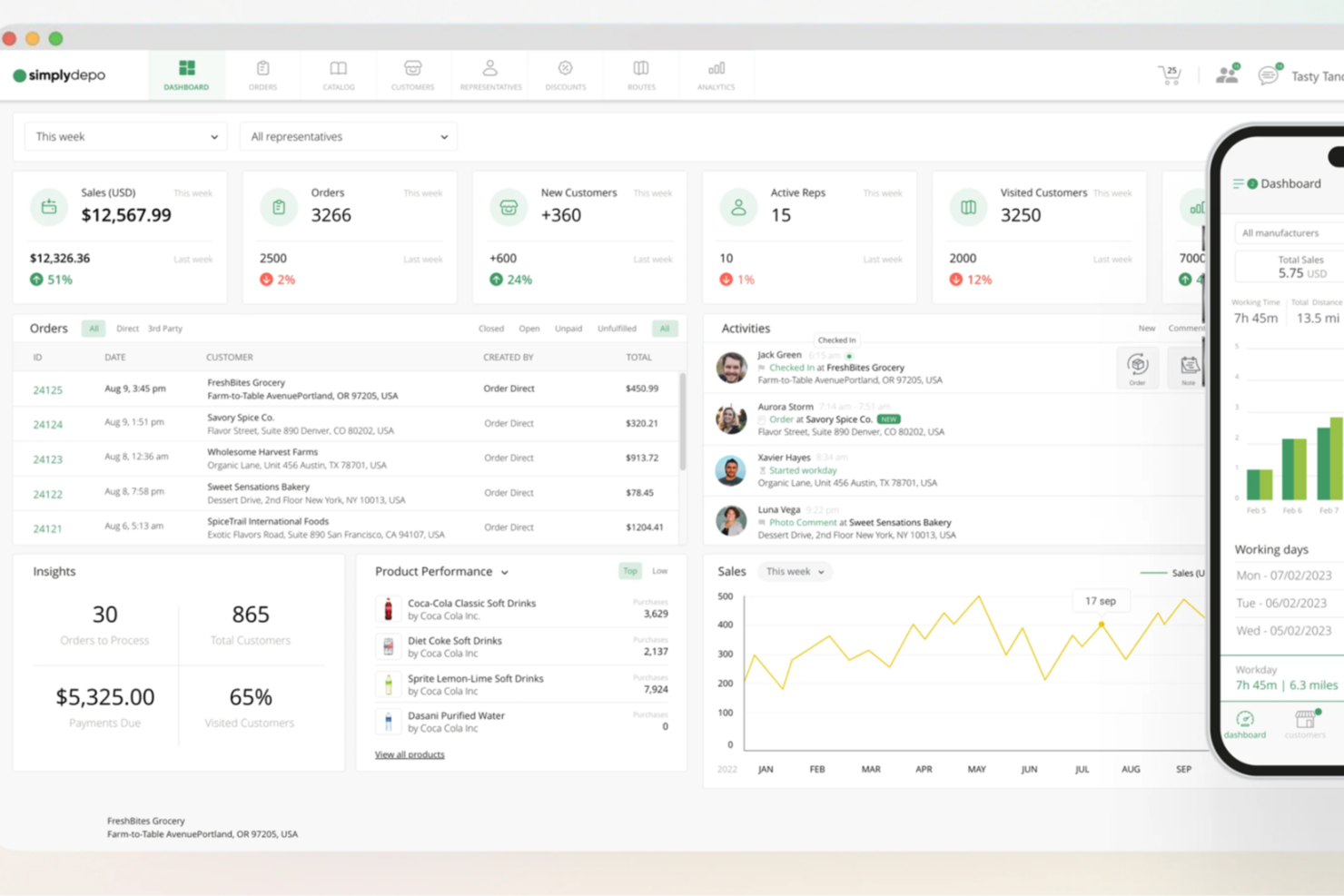
For businesses looking to elevate their sales operations, SimplyDepo stands out as a versatile solution tailored for brands, distributors, and merchandisers. It addresses the challenges of managing complex sales processes by providing tools for retail execution and B2B order management. Whether you're a startup or an established business, SimplyDepo offers a streamlined approach to enhancing efficiency and building stronger customer relationships.
Why I Picked SimplyDepo
I picked SimplyDepo for its targeted approach to solving key sales management challenges, particularly in retail execution and field sales empowerment. With features like route planning, SimplyDepo allows your team to optimize travel routes, saving time and reducing costs. Additionally, its CRM for distributors helps in maintaining and nurturing customer relationships, a crucial aspect of any successful sales strategy.
SimplyDepo Key Features
In addition to its standout features, SimplyDepo offers several other capabilities:
- Distribution Management: This feature helps you manage logistics and supply chain aspects seamlessly.
- Mobile Access: Allows your team to access the platform on-the-go, ensuring flexibility and real-time updates.
- Order Management: Facilitates efficient handling of orders from start to finish, minimizing errors.
- Reporting and Analytics: Provides insights into sales performance and helps in making data-driven decisions.
SimplyDepo Integrations
Integrations include Stripe, Twilio SendGrid, ShipStation, and QuickBooks.
Pros and Cons
Pros:
- Route planning and territory mapping
- Integrated CRM for account tracking
- Built-in B2B order management system
Cons:
- No transparent API documentation
- Limited advanced reporting customization

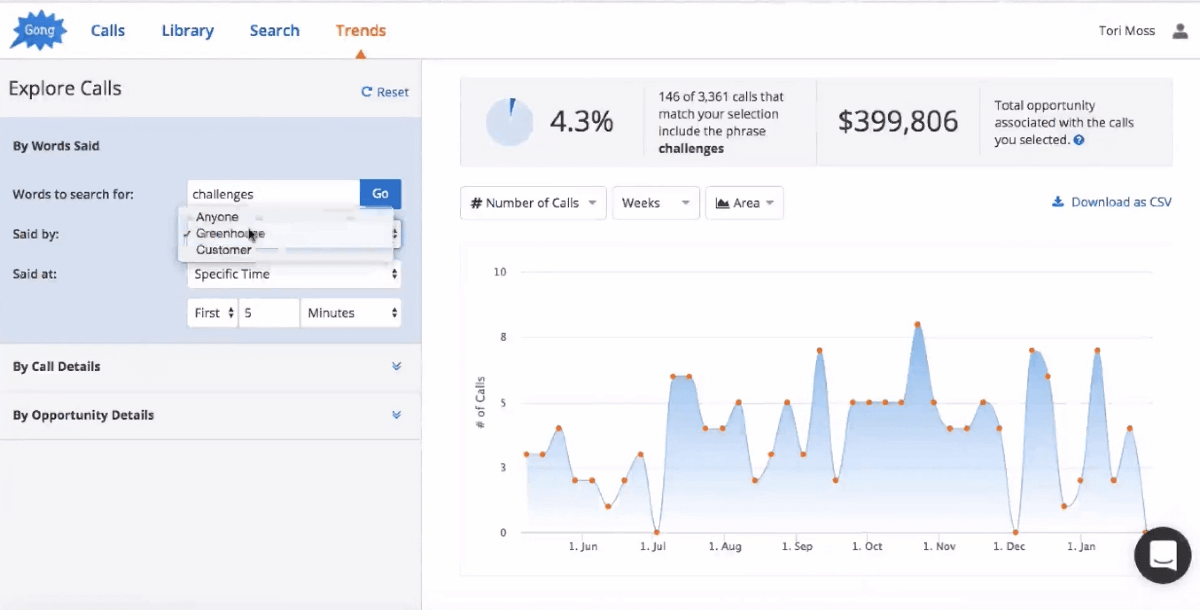
Gong.io is one of the top sales management tools available and is relied on by top brands like LinkedIn, Shopify, Slack, Sprout Social, and Paychex. The patented Gong Revenue Intelligence Platform in the platform allows sales teams to leverage customer interactions to provide in-depth insights. While it can be used by enterprise teams, it’s best suited for small and medium-sized businesses.
Why I picked Gong: This tool allows you to automatically learn what’s happening with your customers so you can improve sales functions. The platform has impressive recording technology that gives you deep insights into sales performance from real conversations with clients. Plus, it also gives you insights into your overall market to optimize your sales processes.
Gong Standout Features and Integrations:
Features include recordings of sales conversations that can be turned into training modules, which I think stands out from other software. Gong also has market insights for optimization, chat transcripts, deal management, call monitoring, file transfer, competitive analysis.
Integrations include Salesforce, G Suite, HubSpot, Teams, RingCentral, Slack, Chili Piper, Highspot, Microsoft Teams, Office 365, Outreach, Slack, Zoom, and Aircall.
Pros and Cons
Pros:
- Sales reps get automated emails as reminders to follow up
- Transcripts to help find keywords from conversations
- Automatically fast-forward recording for specific people
- Tracking email, phone, and web conference interactions
Cons:
- Can’t review how much a lead talks compared to sales reps
- Transcripts aren’t always accurate

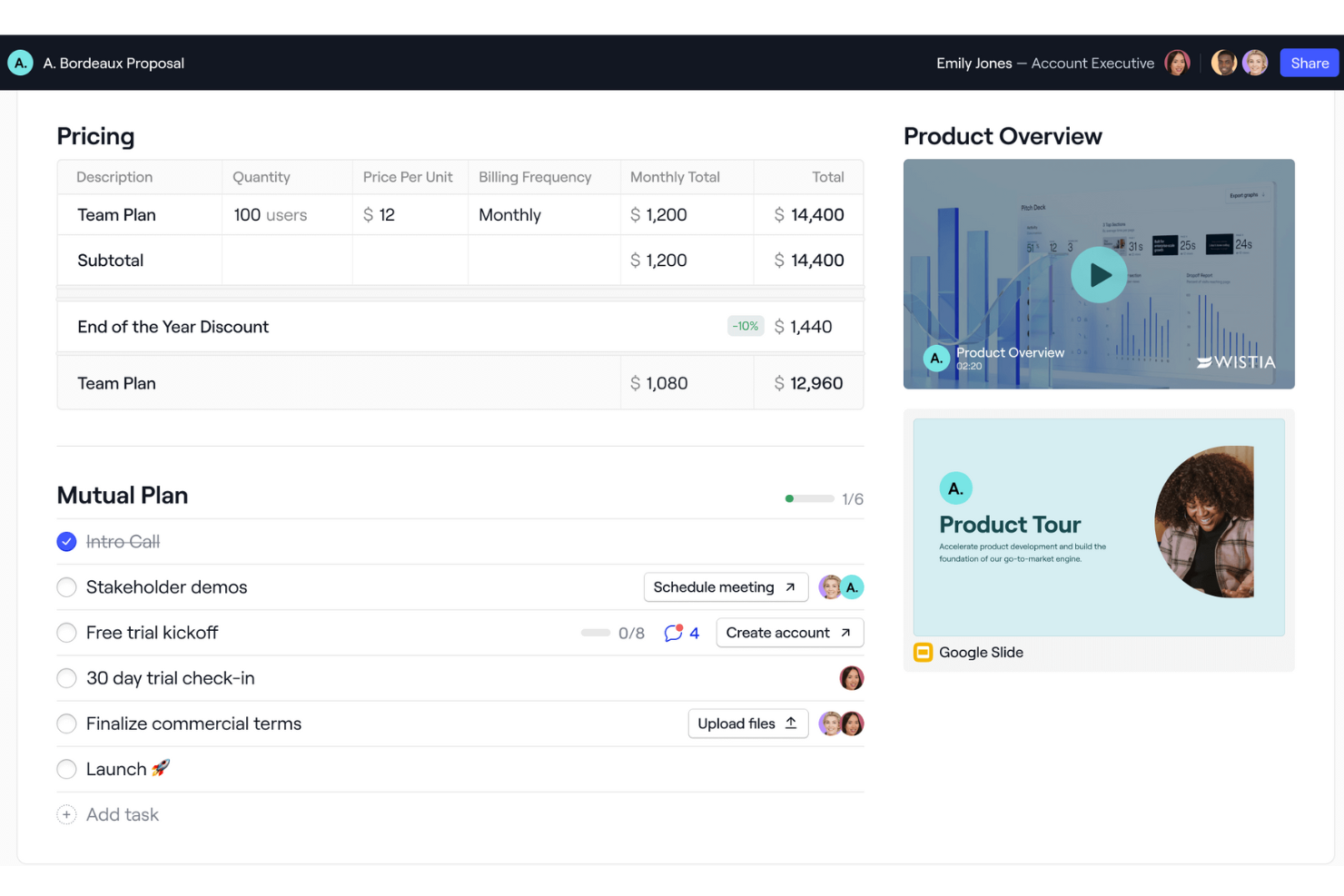
Dock offers a platform to help sales and revenue teams manage all aspects of the customer journey, from new lead nurturing to proposals, deals, and onboarding.
Why I picked Dock: As a sales management software, Dock stands out with its digital sales room feature. This is a centralized place for teams to manage all their sales content, educate new leads on their product, create and share proposals, quotes, agreements, and order forms, and provide a step-by-step onboarding experience. It also offers robust engagement analytics so you can target the best quality leads who are most likely to close on a deal.
Dock Standout Features and Integrations:
Standout features include buyer signals, dynamic action plans, custom branding, personalized client portals, templates for important documents, secure digital signatures, contract status tracking, and repeatable follow-up processes.
Integrations include HubSpot, Salesforce, Slack, Zoom, Airtable, Pandadoc, Typeform, and more.
Pros and Cons
Pros:
- Content management features
- Templates to standardize sales processes
- Personalized customer portals
Cons:
- Order form features are an add-on
- Salesforce and HubSpot integration only available on higher-tier plans


Salesmate is a powerful CRM tool that’s fueled by its automation features. With this sales management software, you can easily stay in touch with prospects, nurture leads, and close more deals thanks to its user-friendly platform.
Why I picked Salesmate: Salesmate gives sales managers an automated forecast summary they can use to identify top sales reps and track their team’s overall performance, which is super impressive, and makes it a standout choice for anyone wanting to use automations. You can set specific sales targets for your team right from the dashboard to help motivate reps and boost performance.
Salesmate Standout Features and Integrations:
Features include all of the standard features that make sales management software most effective, including automated emails, follow-ups, a sales motivator, notifications, lead scoring, call tracking, a softphone, task scheduling, task tracking, and pipeline management.
Integrations include Quickbooks Online, Zendesk Suite, Zapier, Slack, ActiveCampaign, WordPress, Microsoft Outlook, Mailchimp, and Docusign.
Pros and Cons
Pros:
- Great security
- User-friendly platform
- Automated follow-up emails
- Automated, personalized emails
- Auto-assign leads to reps
- Quick onboarding
Cons:
- Customer support isn’t the best compared to other tools
- No free plan
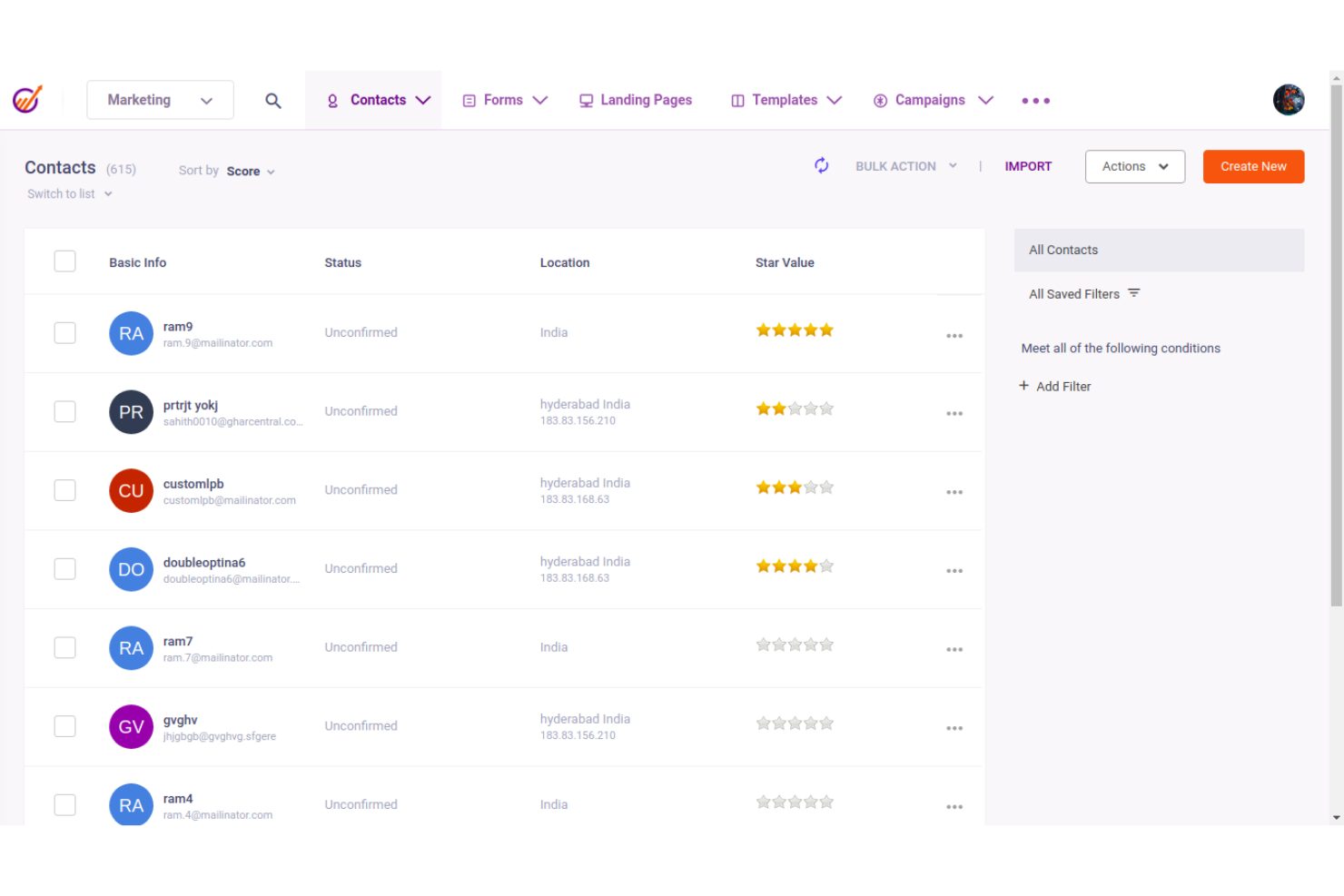
EngageBay is an all-in-one sales management and CRM platform that streamlines sales processes for small to mid-sized businesses. It combines AI-powered lead scoring, automation, and communication tools to help teams manage pipelines, track deals, and nurture customer relationships—without the overhead of enterprise systems.
Why I picked EngageBay: EngageBay stands out for its AI-powered Sales CRM, which automates lead prioritization and follow-ups, freeing sales teams to focus on conversions. Its blend of automation, reporting, and integrated communication tools makes it a strong choice for SMBs seeking efficiency and visibility without the high cost of complex CRM suites.
Standout features & integrations:
Features include AI-powered CRM, contact and deal management, sales automation, integrated calling and email, performance reporting, and forecasting tools. These capabilities enable teams to organize pipelines, automate workflows, and make data-driven decisions.
Integrations include Mailgun, Mandrill, SendGrid, Xero, QuickBooks, Shopify, BigCommerce, Stripe, PayPal, and Twilio.
Pros and Cons
Pros:
- The platform's automation capabilities streamline sales processes and improve efficiency.
- Users appreciate its intuitive design and ease of use, even for those new to CRM platforms.
- EngageBay offers a cost-effective all-in-one CRM solution that integrates marketing, sales, and service automation.
Cons:
- Reporting and analytics are seen as less robust compared to larger competitors.
- Some users note limitations in its landing page and live chat features.

Draftalizer link: https://draftalizer.com/app/drafts/96050?show_steps=true
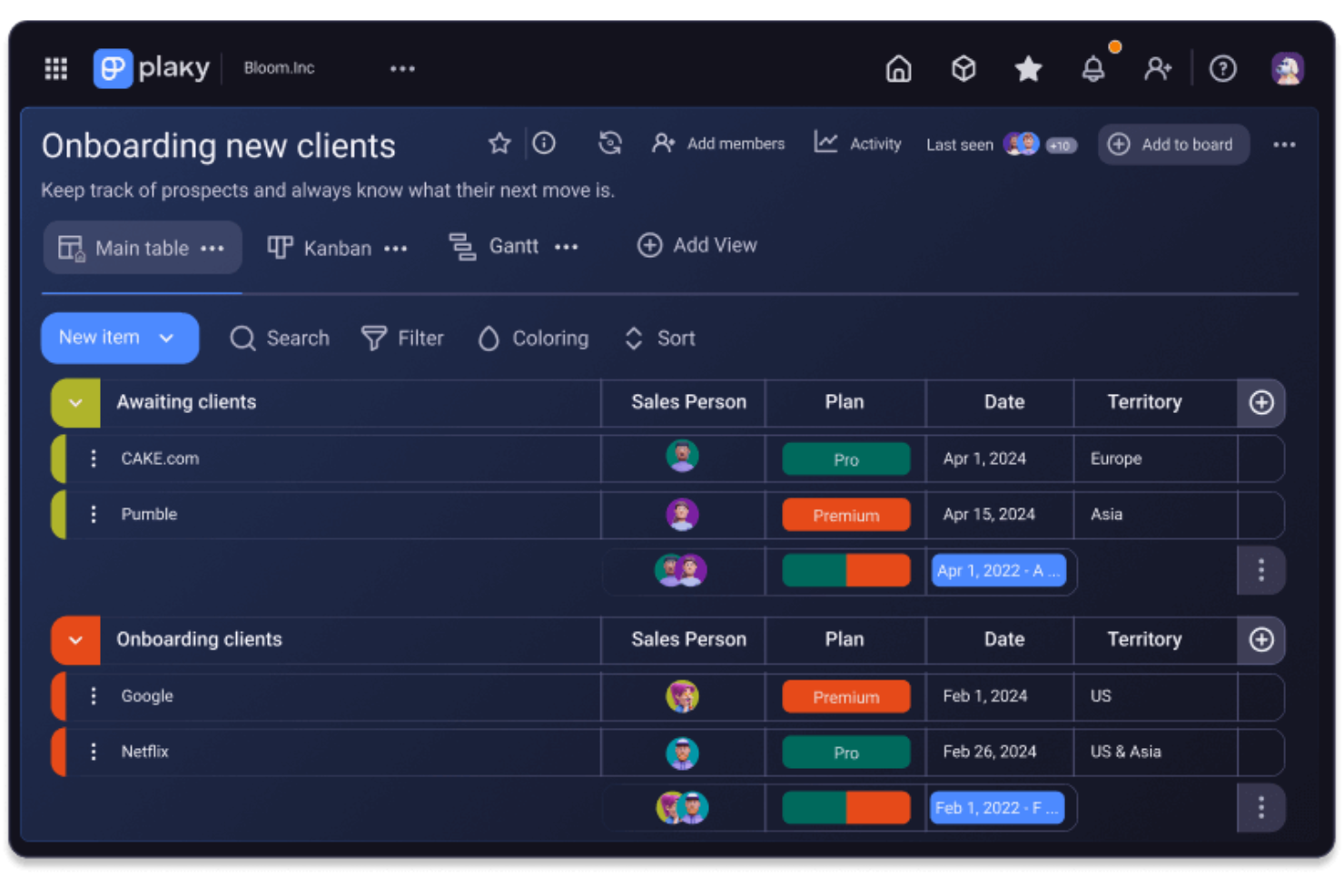
For teams seeking a user-friendly tool to streamline their sales operations, Plaky is a compelling choice. It helps manage the entire sales process from lead generation to deal closure, making it ideal for small businesses and nonprofits. By centralizing communication and offering quick access to sales data, Plaky addresses the challenges of managing multiple sales tasks effectively.
Why I Picked Plaky
I appreciate Plaky for its customizable sales pipelines, which let you tailor stages and rules to fit your unique sales process. This personalization ensures that your team can manage leads and prospects more effectively. Additionally, Plaky's task management features, such as boards and progress tracking, keep your team organized and focused on closing deals. These specific functionalities make it a valuable tool for anyone seeking to improve their sales management.
Plaky Key Features
In addition to its customizable pipelines and task management capabilities, Plaky offers several other features that enhance its value for sales teams.
- Lead and Client Management: Plaky centralizes all your lead information, making it easier to track and nurture prospects.
- Automations: Reduce repetitive tasks with automation features, allowing your team to focus on strategic activities.
- Real-Time Collaboration: Keep your team connected with real-time updates and document sharing within tasks.
- Security Standards: Plaky adheres to international security standards to ensure your data is safe.
Plaky Integrations
Native integrations are not currently listed by Plaky.
Pros and Cons
Pros:
- Integrates with Clockify for time tracking, adding value for time management needs.
- User-friendly interface, making it accessible for small teams and individual users.
- Intuitive setup process allows for quick onboarding and minimal training time.
Cons:
- Does not support extensive integrations, which may hinder its appeal for users needing comprehensive connectivity.
- Lacks advanced workflow tools and automation options, limiting its use for complex projects.


Saleshandy is a sales engagement platform that automates cold emailing and lead generation for sales teams. It combines AI-powered outreach, deliverability optimization, and unified inbox management to help teams scale personalized outreach and improve response rates.
Why I picked Saleshandy: Saleshandy stands out for automating one of the most time-intensive parts of outbound sales—cold emailing. Its AI-driven email sequences help teams maintain context and personalize outreach at scale, while sender rotation and spam detection tools safeguard deliverability. For CROs and RevOps leaders managing multi-channel outreach, this balance of automation and precision helps reduce manual workload and boost pipeline efficiency.
Standout features & integrations:
Features include AI Lead Finder for sourcing verified B2B leads, a unified inbox for tracking replies across multiple accounts, and advanced deliverability tools like email verification, sender rotation, and spam word detection. Additional tools such as LinkedIn prospecting and email tracking make it easier to discover, reach, and engage with high-value prospects.
Integrations include Salesforce, HubSpot, Pipedrive, Zoho CRM, Mailchimp, Google Sheets, Google Workspace, Slack, Microsoft Outlook, and Zapier.
Pros and Cons
Pros:
- Offers a unified inbox to manage replies from multiple accounts efficiently.
- Provides an extensive database for verified B2B lead generation.
- Automates cold emailing with AI-powered sequences that personalize outreach at scale.
Cons:
- Some users report occasional email deliverability issues that affect campaign results.
- Initial setup and sequence automation can be complex for new users.


Pipedrive CRM is a sales management software that helps businesses organize and track their sales activities. It is particularly known for its visual sales pipeline management, which allows users to track interactions and progress with leads through customizable stages.
Why I Picked Pipedrive CRM: The intuitive, drag-and-drop interface allows sales teams to effortlessly move deals through stages, providing a clear, real-time view of their sales process. Each stage is customizable, enabling users to tailor the pipeline to their unique workflows. Additionally, Pipedrive’s color-coded statuses and visual cues make it easy to prioritize deals and focus on the most critical actions.
Pipedrive CRM Standout Features & Integrations
Features include sales automation, lead management, insights and reports, and marketing automation. The platform also provides AI-driven sales tools, supports fully customizable pipelines and dashboards, and offers forecasting tools to aid decision-making.
Integrations include Zapier, PandaDoc, Leadfeeder, JustCall, LinkPort, Slack, Trello, Gmail, Zoom, QuickBooks, and more.
Pros and Cons
Pros:
- Automated workflows and AI assistance features
- Fully customizable pipelines
- Easy-to-use interface
Cons:
- AI sales assistant limited to higher-tier plans
- Initial setup can be complex

Zendesk was originally launched as a customer support tool, but, in 2018 branched out into the sales game with Zendesk Sell. The tool allows sales reps and managers to manage their sales pipeline with ease and build relationships with leads.
Why I picked Zendesk Sell: This sales management platform is great for closing deals because it helps sales teams close more deals by offering great customer service functions. Sales reps can accelerate their sales performance by improving their relationships with prospects and customers.
Zendesk Sell Standout Features and Integrations:
Features include meeting scheduling, deal history monitoring, developing targeted lists of verified records, an auto-dialer to help sales reps with cold calls, and a mobile application, so salespeople can close deals on the move..
Integrations include Microsoft Outlook, G Suite, Hubspot Marketing, Quickbooks, Mailchimp, Dropbox, Google Drive, PandaDoc, Microsoft 365, and Xero.
Pros and Cons
Pros:
- Impressive relationship-building features
- Great customer support
- Centralized dashboard for all sales activities
- Easy onboarding
- Enables great customer service for your customers
- User-friendly tool
Cons:
- Mid and top-tier plans are quite pricey
- Limited pipeline visibility

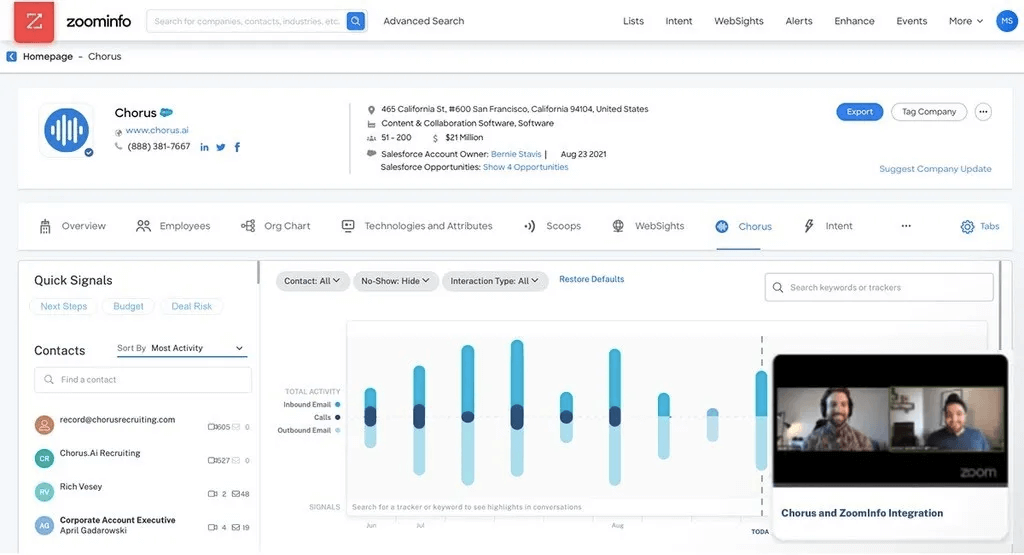
Chorus is a sales management tool that was acquired by Zoominfo in 2021 for more than half a billion dollars. The AI-led conversational intelligence tool allows sales to analyze sales conversations to optimize performance.
Why I picked Chorus: The tool is led by artificial intelligence technology that automatically records sales conversations and then provides insights into what behaviors lead to conversions. In my opinion, it’s an impressive tool for sales managers from enterprise businesses to improve team performance.
Chorus Standout Features and Integrations:
Features include automatic interaction capture and AI analysis from calls for deal-closing insights. My favorite Chorus feature is the ability to silently notify colleagues during sales calls for help. Chorus also can have recordings that can be converted to onboarding training or 1:1 coaching, which I think is impressive. It also has automatic transcriptions, recommended next steps, automated email reminders, and the ability to send quick video recordings to prospects or colleagues.
Integrations include RingCentral, Zoom, G2, Slack, Zoho CRM, NeverBounce, Pipedrive, Engage, HubSpot, Salesforce, and Marketo.
Pros and Cons
Pros:
- Synchronizes with Salesforce and Zoom
- Impressive team collaboration during live calls
- Great for enterprise businesses
- Easy file sharing
Cons:
- Can be hard to find analytics for specific recordings
- Transcriptions aren’t super accurate
- Doesn’t include editing tools to piece together video clips

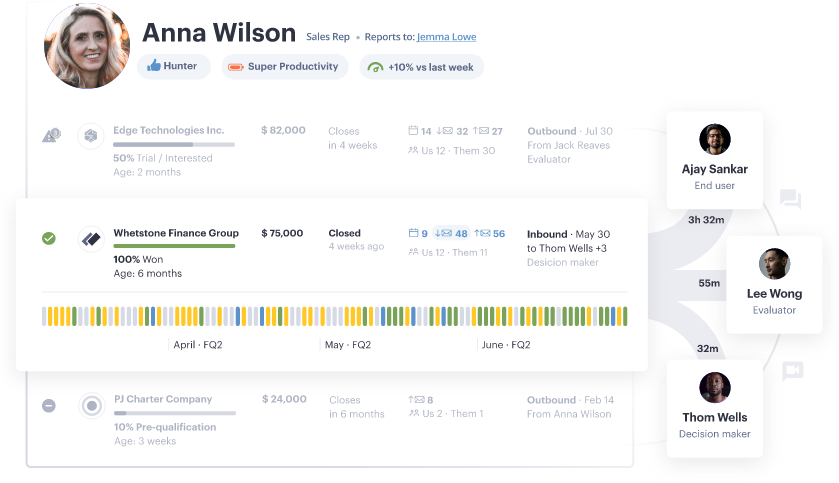
Revenue Grid is a powerful AI-led, all-in-one acceleration platform that gives sales managers and sales teams great visibility over their sales process.
Why I picked Revenue Grid: Revenue Grid separates itself from the other sales management platforms because of its advanced AI technology. The tool features artificial intelligence that automates different engagement sequences and gives sales teams data-driven recommendations to close more deals.
Revenue Grid Standout Features and Integrations:
Features include automatic sales data capture from different channels and AI-guided selling, making it my favorite for AI-driven sales management. Revenue Grid also features seamless Salesforce integration for automated email follow-ups, pipeline visibility that helps sales managers identify relationships between sales tasks and conversions.
Integrations include Salesforce, Outlook, Gmail, Oracle Sales Cloud, Office 365, Dropbox, Google Drive, Box, SharePoint, and 360 SMS App.
Pros and Cons
Pros:
- Helpful customer support
- Automatic syncing with Gmail and Outlook
- Engagement data gives insights to optimize conversations
- Full visibility of lead/customer interaction history and deal status
- Great value for enterprise sales teams
Cons:
- Customizations can be challenging to navigate
- Not the best tool for small organizations

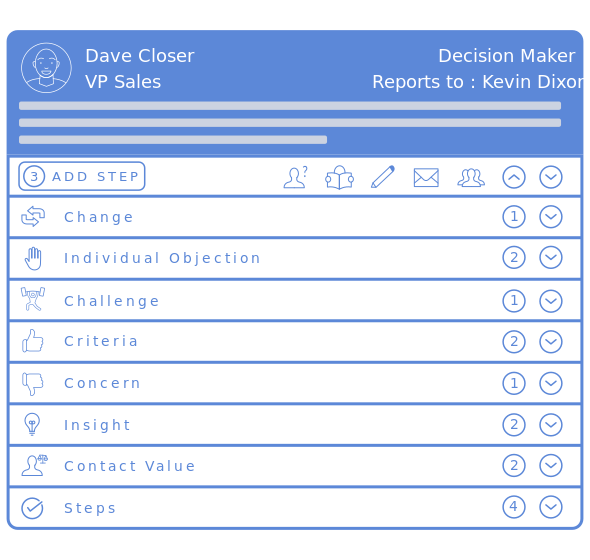
Boxxstep is a unique style of sales management software that focuses intently on customers. Also known as a BRM, or buyer relationship manager, this tool helps sales managers and sales reps better manage their accounts.
Why I picked Boxxstep: Boxxstep is a great multi-tool for sales managers looking to gain insights on their customers, track sales, and improve project management. In my opinion, the platform is fantastic for managing multiple decision-makers and shortening the timeline to close deals.
Boxxstep Standout Features and Integrations:
Features that stood out to me were relationship and account mapping to understand what matters for each decision-maker, visual organizational charts for accounts, collaborative task planning for milestones, synced follow-ups, and automated feedback collection through questionnaires.
Integrations include Salesforce, Microsoft Dynamics 365, DocHub, and Pleo.
Pros and Cons
Pros:
- Automated feedback capture
- Great for stacking with a CRM
- Easy to use
- Quick set up
- Help close multiple decision-makers
Cons:
- Not many integrations available
- Double entry data sometimes required
- Analytics aren’t very comprehensive


CRM Creatio is a no-code platform designed to automate business workflows and customer relationship management without requiring coding expertise.
Why I picked CRM Creatio: I like its business process management engine, which automates complex workflows and sales processes without requiring coding knowledge. With a comprehensive 360° customer view, you can empower your team to personalize interactions and build stronger relationships. The platform's lead and opportunity management tools are also useful, as they automate lead tracking and nurture potential clients through the sales pipeline, helping your team quickly identify promising opportunities and key sales indicators.
CRM Creatio Standout Features and Integrations:
Standout features include sales forecasting, contact management, pipeline management, reporting and analytics, customizable dashboards, workflow automation, marketing tools, and order management.
Integrations include Accelo, Act!, ActiveCampaign, Acumatica, Adobe Analytics, Asana, Microsoft Exchange, Excel, Mailchimp, HubSpot Marketing Hub, Google Calendar, and Tableau.
Pros and Cons
Pros:
- A scalable solution
- No-code platform
- Extensive customization options
Cons:
- Data migration may be complex
- Customization can be time-consuming
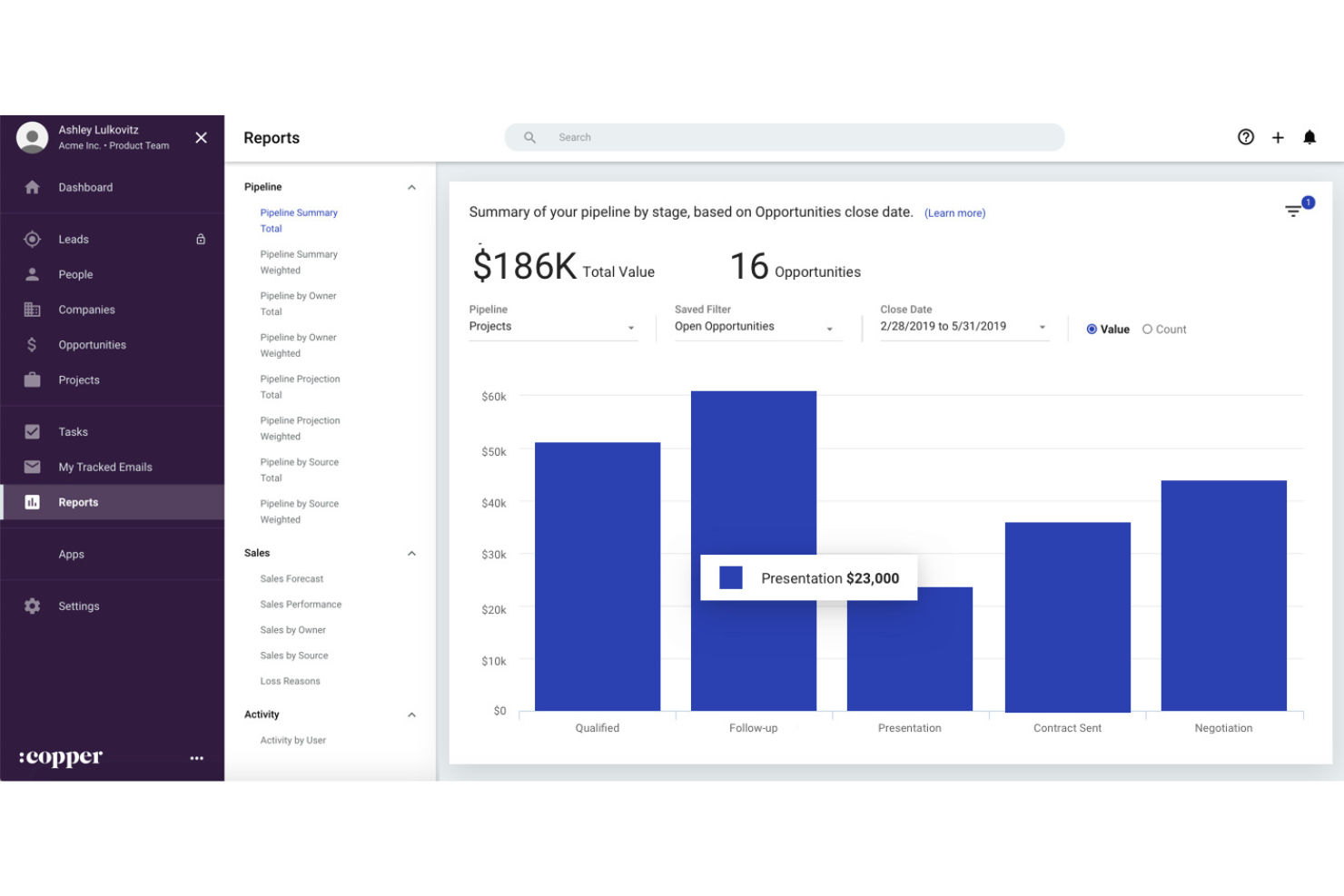
Copper CRM is a sales management tool that streamlines relationship management and automates workflows for teams using Google Workspace. It connects directly to Gmail, Calendar, and other Google apps—helping sales teams manage contacts, track deals, and automate follow-ups without leaving their inbox.
Why I picked Copper CRM: It’s purpose-built for Google Workspace users—making it a natural fit for agencies, consultants, and SMBs that rely on Google tools daily. Copper eliminates CRM admin overhead, keeping reps focused on selling instead of data entry, and delivers visibility into deal progress, pipeline health, and team performance.
Standout features & integrations:
Features include sales pipeline management with drag-and-drop controls, customizable reporting and analytics, activity tracking, mobile access, and workflow automation.
Integrations include Google Workspace (Gmail, Calendar, Drive), Slack, QuickBooks, and Mailchimp—ensuring seamless collaboration and data sync across sales and marketing workflows.
Pros and Cons
Pros:
- The interface is designed for easy navigation and management of sales activities.
- Automation features handle repetitive tasks like email follow-ups and data entry.
- Integration with Google Workspace enables users to manage contacts and emails directly from Gmail.
Cons:
- Higher pricing compared to competitors, may not suit small businesses on a budget.
- Limited functionality outside Google Workspace can restrict broader application use.


Freshsales is a CRM that enables sales teams to quickly and automatically identify leads to help them identify their best sales opportunities.
Why I picked Freshsales: I love Freshsales because it’s led by an AI tool named Freddy, who helps sales managers and teams find the top leads to invest in to generate more sales. Freddy gives sales teams an in-depth view of customers based on sales data, engagement, and activities to help improve sales cycles.
Freshsales Standout Features and Integrations:
Features include the aforementioned Freddy, the AI tool for lead scoring, the Freshchat messaging tool, personalized email marketing campaigns, contact management, predictive sales performance, revenue forecasting, and simple deal management.
Integrations include Fresconnect, Freshcaller, Freshmarketer, Freshdesk, and third-party apps like Zapier, HubSpot, Quickbooks, Office 365 Calendar, and Mailchimp.
Pros and Cons
Pros:
- Industry-specific solutions
- Access to all Freshsales integrated apps
- Several built-in tools
- Great Customization
- Automated AI sales insights
- Automated lead scoring with AI
Cons:
- Configuration updates are quite frequent
- Free plan doesn’t come with reports
Other Sales Management Software
Here are a few more notable options that didn’t make this Sales Management Software shortlist but should still be considered:
- Act!
For simplicity and ease of use
- Microsoft Dynamics 365
For sales tracking analytics
- UpLead
For easy lead management
- Less Annoying CRM
Low-cost CRM for small businesses
- Ambition
For motivating sales reps
- Clari
For identifying leaks in your sales pipeline


Related Sales Management Software Reviews
If you still haven't found what you're looking for here, check out these tools closely related to sales management software that we've tested and evaluated.
- Sales Software
- Lead Management Software
- Business Intelligence Software
- Contract Management Software
- Revenue Management System
- CPQ Software
Selection Criteria For Sales Management Software
Sales management software typically encompasses a variety of features designed to streamline sales processes, enhance team productivity, and provide actionable insights into performance. Through extensive personal testing and research, I have identified key functionalities and use cases essential for effective sales management software.
Core Sales Management Software Functionality: 25% of total weighting score
To be considered for inclusion on my list of the best sales management software, the solution had to support the ability to fulfill common use cases such as:
- Efficiently managing leads and opportunities to maximize conversions.
- Providing accurate sales forecasts to inform strategic planning.
- Offering deep insights into sales pipeline health and individual performance.
- Enabling seamless collaboration and communication within sales teams.
- Facilitating easy integration with other business systems for a holistic view of operations.
Additional Standout Features: 25% of total weighting score
- AI-Driven Insights: The ability to leverage artificial intelligence for predictive analytics and intelligent recommendations, enhancing decision-making processes.
- Automation of Complex Workflows: Advanced automation capabilities that streamline intricate sales processes, reducing manual workload and increasing efficiency.
- Enhanced Customization: Highly customizable platforms that allow businesses to tailor the software to their unique processes and needs.
- Comprehensive Mobile Experience: Robust mobile functionality that ensures sales professionals have full access to critical tools and information on the go.
- Integrative Ecosystem: The capacity for seamless integration with a wide array of other software solutions, extending the utility and effectiveness of the sales management system.
Usability: 10% of total weighting score
- Intuitive User Interface: A clear and user-friendly interface that minimizes learning curves and enhances user adoption rates.
- Interactive Learning Resources: Availability of comprehensive learning materials and interactive guides that facilitate understanding and utilization of the software.
- Customizable Viewing Options: Flexible viewing and reporting options that cater to different user preferences and requirements.
Onboarding: 10% of total weighting score
- Streamlined Onboarding Processes: Quick and straightforward setup and onboarding processes that expedite the transition to the new system.
- Dedicated Support: Access to dedicated support teams during the onboarding phase to ensure smooth implementation and resolution of any issues.
Customer Support: 10% of total weighting score
- Responsive and Knowledgeable Support: Timely and effective customer support that addresses user needs and facilitates optimal software use.
- Multi-channel Support Availability: Offering various support channels to cater to different preferences, including live chat, email, and phone.
Value For Money: 10% of total weighting score
- Transparent Pricing: Clear and competitive pricing structures that align with the features and benefits offered.
- Scalable Investment: Pricing plans that accommodate businesses of different sizes and growth stages, providing long-term value.
Customer Reviews: 10% of total weighting score
- Positive User Testimonials: Strong user feedback that attests to the software's impact, usability, and support quality.
- Consistent Performance Ratings: High ratings across various review platforms, indicating reliable performance and user satisfaction.
In selecting sales management software, it's crucial to choose a platform that aligns with your organization's specific needs, integrates seamlessly with your existing systems, and provides the scalability and support necessary for ongoing success. The right software should empower your sales teams, enhance operational efficiency, and contribute significantly to your revenue growth objectives.
How To Choose Sales Management Software
With so many different sales management software available, it can be challenging to make decisions on what tool is going to be the best fit for your needs.
As you're shortlisting, trialing, and selecting sales management software, consider the following:
- What problem are you trying to solve - Start by identifying the sales management software feature gap you're trying to fill to clarify the features and functionality the tool needs to provide.
- Who will need to use it - To evaluate cost and requirements, consider who'll be using the software and how many licenses you'll need. You'll need to evaluate if it'll just be the revenue operation leaders or the whole organization that will require access. When that's clear, it's worth considering if you're prioritizing ease of use for all or speed for your sales management software power users.
- What other tools it needs to work with - Clarify what tools you're replacing, what tools are staying, and the tools you'll need to integrate with, such as accounting, CRM, or HR software. You'll need to decide if the tools will need to integrate together or if you can replace multiple tools with one consolidated sales management software.
- What outcomes are important - Consider the result that the software needs to deliver to be considered a success. Consider what capability you want to gain or what you want to improve, and how you will be measuring success. For example, an outcome could be the ability to get greater visibility into performance. You could compare sales management software features until you’re blue in the face but if you aren’t thinking about the outcomes you want to drive, you could be wasting a lot of valuable time.
- How it would work within your organization - Consider the software selection alongside your workflows and delivery methodology. Evaluate what's working well and the areas that are causing issues that need to be addressed. Remember every business is different — don’t assume that because a tool is popular that it'll work in your organization.
Trends In Sales Management Software For 2026
Sales management software is experiencing significant evolution, driven by advancements in technology and shifting business needs. These developments are shaping how organizations manage their sales processes, engage with customers, and drive revenue growth. By examining the latest product updates, press releases, and release logs from leading sales management software providers, several key trends emerge, highlighting the future direction of this technology.
Integration and Automation
- Enhanced CRM Integration: Sales management software is offering deeper and more seamless integration with CRM systems, allowing for real-time data exchange and a unified view of customer interactions across different platforms.
- Advanced Automation Capabilities: There is a noticeable shift toward more sophisticated automation, particularly in areas like lead management, task assignment, and follow-up scheduling, which are crucial for streamlining sales processes and improving efficiency.
Data-Driven Decision Making
- Predictive Analytics: Incorporating machine learning and AI, sales management software is increasingly providing predictive insights, enabling sales teams to forecast trends, identify opportunities, and make data-informed decisions.
- Real-Time Reporting: Enhanced real-time analytics and reporting features are becoming more prevalent, allowing sales leaders to monitor performance, track progress against goals, and adapt strategies promptly.
Personalization and Customer Engagement
- AI-Powered Personalization: Novel uses of AI are enabling sales management tools to offer more personalized customer engagement strategies, tailoring communication and recommendations based on individual customer data and behavior patterns.
- Omnichannel Sales Strategies: The ability to manage and synchronize sales efforts across multiple channels is becoming a standard feature, addressing the need for a consistent and integrated customer experience.
Emerging and Declining Features
- Blockchain for Data Security: An unusual yet emerging feature in sales management software is the use of blockchain technology for enhancing data security and trust, particularly in B2B environments.
- Declining Manual Data Entry: Automation and integration capabilities are reducing the need for manual data entry, as software becomes more adept at capturing and synthesizing data from various sources.
Sales management software is becoming more integrated, intelligent, and user-centric, reflecting the industry's move towards more strategic, data-driven, and personalized sales approaches. For revenue operation leaders, understanding these trends is crucial for selecting software that not only addresses current needs but is also poised to adapt to future challenges and opportunities in the sales domain.
What Is Sales Management Software?
Sales management software is a tool that helps you organize, track, and improve how you handle sales and customer relationships. Sales managers, reps, and business owners use it to manage leads, track deals, automate follow-ups, and see how sales are doing. With everything in one place, your team can spend less time on busywork and more time talking to customers and closing sales.
Features of Sales Management Software
When selecting sales management software, keep an eye out for the following key features:
- Lead management: Efficiently organize, track, and nurture leads from first contact through to closing the deal. This helps you avoid letting any prospects slip through the cracks and ensures your team always knows where to focus their energy.
- Pipeline tracking: Visualize your sales pipeline at every stage, making it easy to see which deals are moving forward and which are stuck. You can quickly identify bottlenecks and make decisions to keep sales flowing smoothly.
- Contact management: Store and manage detailed records of your customers and prospects. This feature ensures you have up-to-date information at your fingertips, making every interaction more personal and productive.
- Sales reporting and analytics: Access real-time data and customizable reports on performance, revenue, and team productivity. This arms you with the insights you need to spot trends and make smarter business decisions.
- Task and activity management: Set reminders, assign tasks, and track follow-ups for your team. It keeps everyone on top of their daily to-dos, reducing missed opportunities and boosting accountability.
- Goal setting and tracking: Set sales targets, monitor progress, and celebrate wins as your team achieves milestones. This keeps motivation high and helps everyone stay focused on the big picture.
- Integration capabilities: Connect with your favorite tools, like email, calendar apps, or marketing platforms, to streamline your workflow and avoid double data entry.
- Collaboration tools: Share updates, notes, and files with your team directly within the software. It makes teamwork seamless—no more hunting through endless email threads or group chats.
Common Sales Management Software AI Features
Beyond the standard sales management software features listed above, many of these solutions are incorporating AI with features like:
- Smart follow-up reminders: Intelligent reminders notify you when it’s the best time to check in with prospects, increasing your chances of moving deals forward without nagging your memory.
- Predictive lead scoring: AI analyzes your historical sales data to score and prioritize leads most likely to convert. This helps you focus your efforts where they’ll pay off the most.
- Sales forecasting: Advanced algorithms sift through your past performance, current pipeline, and external trends to generate accurate sales forecasts. You can set more realistic targets and plan better for the future.
- Automated data entry: AI automatically fills in contact details, updates records, and logs interactions by pulling data from emails and calls. Less paperwork means more time for selling.
- AI-driven coaching suggestions: The software reviews call transcripts and sales activities to provide personalized coaching tips, helping your team sharpen their skills and close more deals.
- Customer sentiment analysis: AI evaluates communication with clients to gauge mood and intent, alerting you to potential risks or opportunities before they escalate.
Benefits Of Sales Management Software
By providing a suite of features designed to optimize various aspects of sales operations, sales management software can deliver significant benefits to users and organizations alike. Here are five primary benefits of implementing sales management software:
- Enhanced Sales Productivity: Automates routine tasks and provides sales teams with tools to manage their pipelines efficiently, allowing them to spend more time on high-value activities.
- This increase in productivity leads to more deals closed and a higher overall revenue for the organization.
- Improved Data Accuracy and Accessibility: Centralizes and organizes sales data, ensuring that it is accurate, up-to-date, and easily accessible to those who need it.
- Access to reliable data enhances decision-making processes and ensures that sales strategies are based on factual information.
- Streamlined Communication and Collaboration: Facilitates better communication and collaboration within sales teams and across different departments, ensuring everyone is aligned with the sales objectives.
- Enhanced collaboration contributes to a more cohesive team environment, reducing misunderstandings and aligning efforts towards common goals.
- Data-Driven Sales Forecasting: Leverages historical sales data to generate accurate forecasts, helping organizations plan their strategies and allocate resources effectively.
- Accurate forecasting enables better strategic planning, resource allocation, and expectation setting, all of which are crucial for long-term success.
- Comprehensive Performance Insights: Offers detailed analytics and reporting capabilities, providing insights into sales activities, team performance, and market trends.
- These insights enable sales managers to identify areas of strength and opportunity, tailor coaching efforts, and recognize and replicate success across the team.
Costs & Pricing For Sales Management Software
Choosing the right sales management software is a critical step for organizations aiming to optimize their sales processes and enhance their overall revenue operations. The market offers a variety of software plans to cater to different sizes of businesses and their unique needs, making it essential for buyers to understand what each plan provides in terms of features and value. Here's a breakdown of typical plan options and their pricing for sales management software:
Plan Comparison Table For Sales Management Software
| Plan Type | Average Price | Common Features Included |
|---|---|---|
| Basic | $10 - $25 per user/month | Contact management, deal tracking, basic reporting |
| Professional | $25 - $75 per user/month | Advanced analytics, custom reports, integration capabilities |
| Enterprise | $75 - $150+ per user/month | Premium support, advanced customization, API access |
| Free | $0 | Limited contacts, basic features, community support |
When considering sales management software, buyers should assess their business's specific needs, the size of their sales team, and the complexity of their sales processes. It's important to select a plan that not only fits the current requirements but also offers room for growth and scalability. The right software should provide a good balance of features, usability, and cost-effectiveness, ensuring a tangible return on investment for the organization.
Sales Management Software Frequently Asked Questions
If your team is considering working with a sales management platform, you probably have a few questions on your mind before you’re ready to pick a tool. Let’s look at some FAQs about sales management software:
What is the most important tool for sales?
Can sales management software automate forecasting reports?
How do sales management software enhance lead tracking processes?
Do these solutions offer real-time sales analytics?
Is CRM a tool or strategy?
Which system is an example of a sales management system?
Which sales data software is the most widely used?
Additional Revenue Operations Options
Here are a few other tools and articles that may pique your interest.
- Best Sales Software
- CPQ Software
- Quote Management Software
- Sales Automation Software
- 10 Best Sales Automation Software in 2026
Conclusion
One of the essential tools sales professionals are investing in today is sales management software. You can leverage this platform as a sales rep, sales manager, or Sales Ops manager to streamline your sales operations, optimize prospecting, and improve productivity for a bigger bottom line.
If you want to learn more about sales management and revenue operations from experts in the field, remember to subscribe to our newsletter.