

10 Best CRMs For Mac Reviewed In 2026

Best CRMs for Mac Shortlist


Choosing the right CRM software is vital for any business, especially for Mac users who seek seamless integration with their ecosystem. Not every CRM is designed for Mac platforms, which can make finding the right software a bit of a challenge.
With my extended experience in revenue operations and CRM software, I tested and reviewed several of the top CRMs for Mac to help teams through their software buying process. Whether you're a small business owner or part of a larger organization, my insights will help you find a CRM that enhances productivity and customer relationships on your Mac devices.
Why Trust Our Software Recommendations
Our reviews reflect our independent judgment—not a sales pitch. Learn how we stay transparent.
For this guide, we evaluated tools using hands-on testing and independent research, scoring tools using our selection criteria.
Our reviews reflect our human editorial judgment, not a sales pitch.
Best CRMs For Mac Summary
| Tool | Best For | Trial Info | Price | ||
|---|---|---|---|---|---|
| 1 | Best for built-in relationship intelligence | 30-day free trial + free demo available | From $29/user/month (billed annually) | Website | |
| 2 | Best for sales pipeline automation | 14-day free trial + free demo available | From $12/seat/month (billed annually) | Website | |
| 3 | Best for no-code CRM workflows | 14-day free trial | From $40/user/month (billed annually) | Website | |
| 4 | Best for all-in-one marketing solutions | Free plan + free demo available | From $13.79/user/month (billed annually) | Website | |
| 5 | Best for social media integration | Free trial available | From $5.30/GB (pay-as-you-go) | Website | |
| 6 | Best for client relationship tracking | 30-day free trial | From $29/user/month | Website | |
| 7 | Best for comprehensive customization | 30-day free trial | From $325/user/month (billed annually) | Website | |
| 8 | Best for project management features | 14-day free trial | From $29/user/month (billed annually) | Website | |
| 9 | Best for contact management | Free trial available | From $65/month (billed annually) | Website | |
| 10 | Best for integrated marketing automation | Free plan available | From $8.99/user/month | Website |


Best CRMs for Mac Reviews
This in-depth analysis provides overviews of each of the best CRM software for Mac. It covers the pros and cons, features, and best use cases for each tool.

Best for built-in relationship intelligence
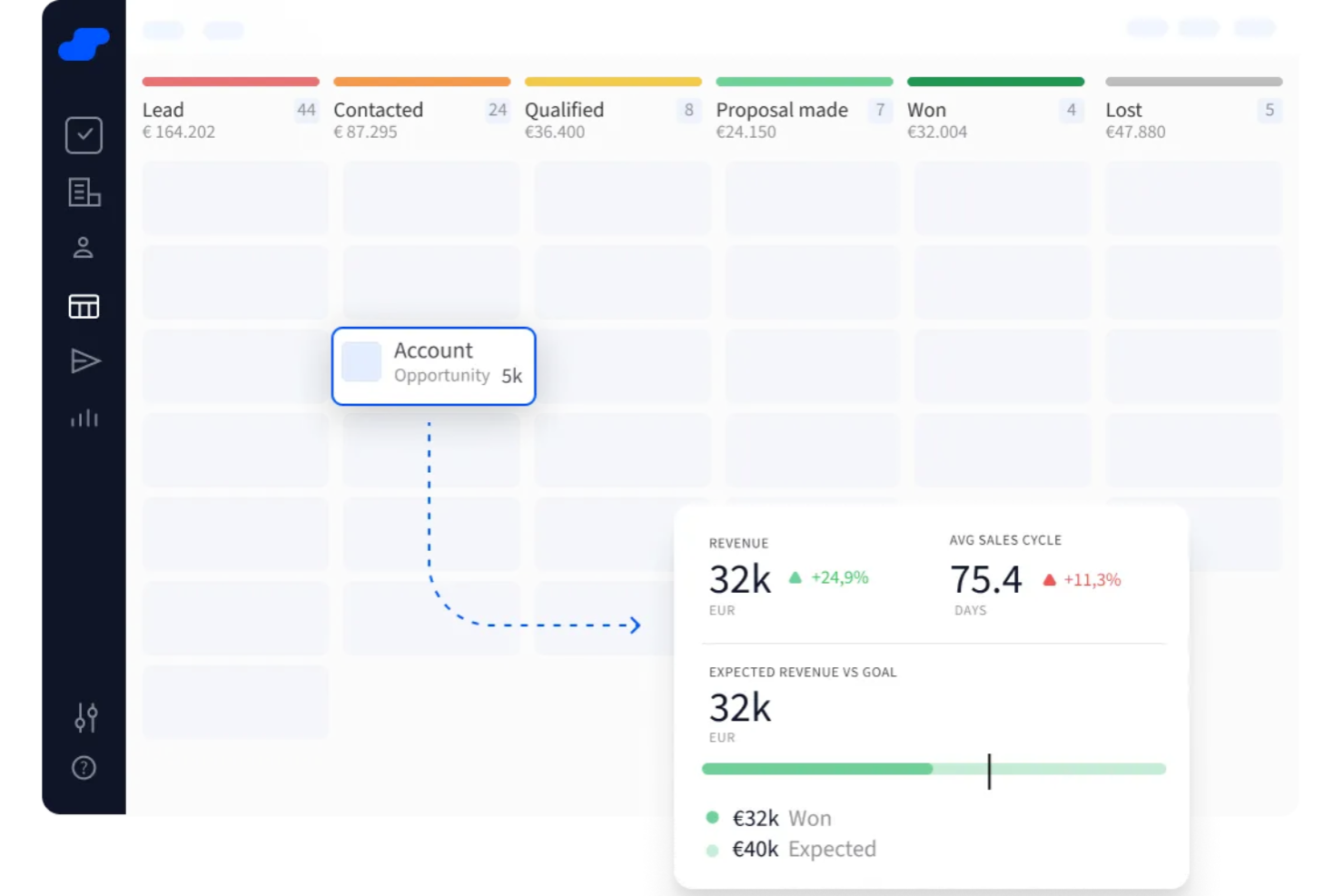
Salesflare is a Customer Relationship Management (CRM) platform for Mac that helps small and medium-sized B2B businesses automate data entry and organize customer interactions. Its strength lies in automatically pulling together the information your team needs so you can focus on building relationships rather than updating records.
Why I Picked Salesflare: I picked Salesflare because of its built-in relationship intelligence. Instead of relying on manual data entry, the platform automatically compiles emails, calendar events, and calls into a complete contact history. This feature means you always have the context you need when reaching out to prospects or clients. I also liked the visual sales pipelines, which make it easy to track deals, spot bottlenecks, and keep opportunities moving forward.
Standout features & integrations
Features include automated email sequences to nurture leads, data enrichment that fills in missing contact details, and a Chrome extension for quick access while working online.
Integrations include Better Proposals, Emailable, Leadinfo, StoryChief, SyncPenguin, Voxloud, CatchApp Bookings, Google Sheets, Intercom, MailChimp, QuickBooks Online, and Slack.
Pros and Cons
Pros:
- Integrated email sequences
- Visual pipeline tracking
- Automated data enrichment
Cons:
- Basic reporting functionality
- Limited dashboard customization
Best for sales pipeline automation
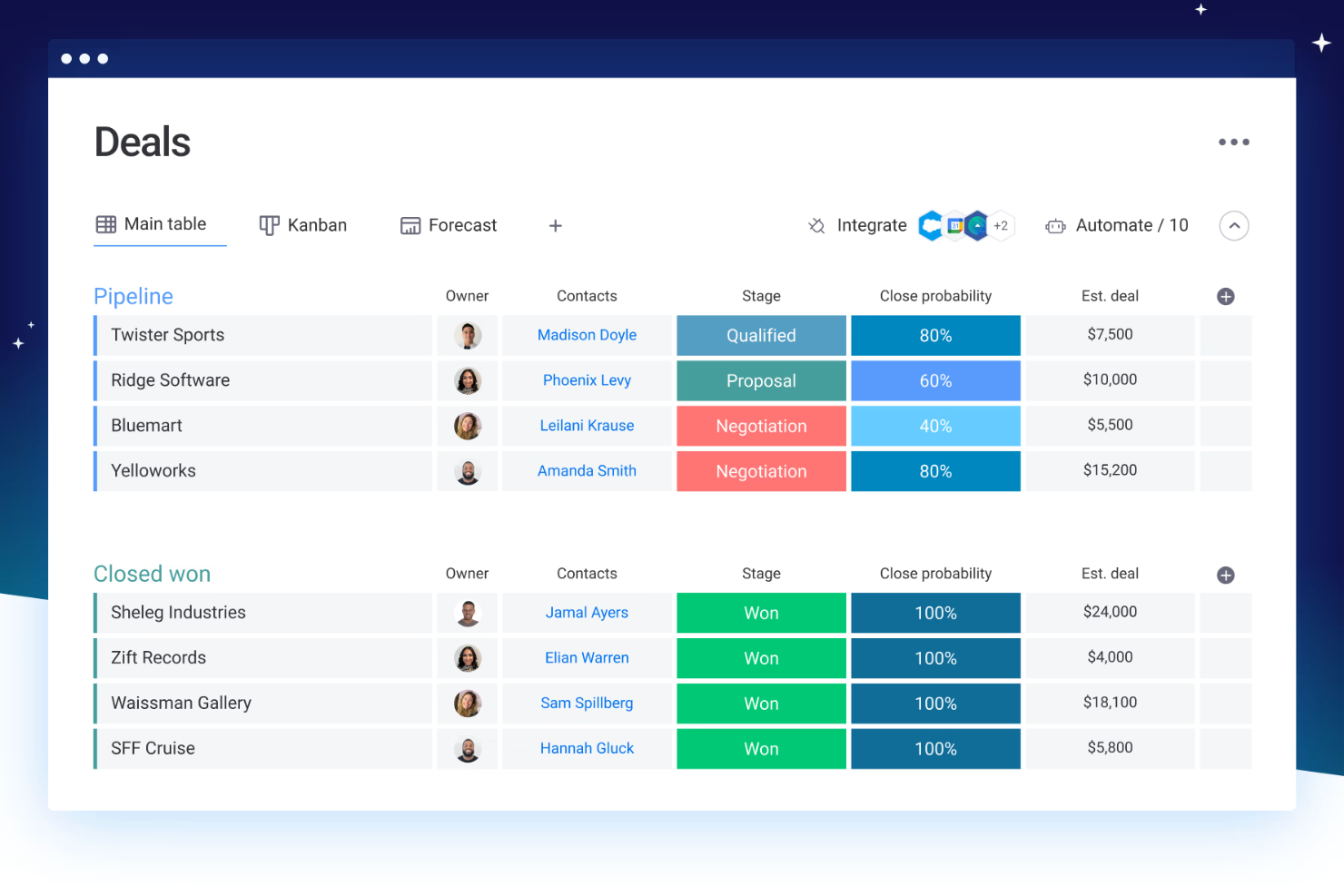
monday CRM is an AI-enhanced CRM built for managing sales pipelines, automating workflows, and aligning sales operations. Its no-code structure and Mac-compatible interface make it a great fit for small teams or growing companies looking for a flexible, visual approach to sales and customer management.
Why I Picked monday CRM: I chose monday CRM for its automation, and intuitive design. It’s ideal for teams that want a visual, drag-and-drop approach to sales. Recent AI features like smart dashboards, lead scoring, and auto-generated emails streamline workflows and boost productivity.
Standout features & integrations:
Features include AI automation, contact management, project tracking, dashboards, and mass email tools.
Integrations include Slack, Gmail, Outlook, Microsoft Teams, Mailchimp, GitLab, Excel, NetSuite, Salesforce, HubSpot, ChatGPT (OpenAI), DocuSign, Google Drive, and more.
Pros and Cons
Pros:
- Offers a variety of task management views
- Strong collaboration tools improve team communication
- Intuitive drag-and-drop interface enhances usability
Cons:
- Task filtering tools can be restrictive
- Limited reporting capabilities
New Product Updates from monday CRM

monday CRM Adds Meta Conversions API Integration
monday CRM now lets you connect Meta Conversions API and sync lead status back to Meta, improving targeting and conversions via a new Meta integration automation recipe. For more information, visit monday CRM's official site.

Best for no-code CRM workflows
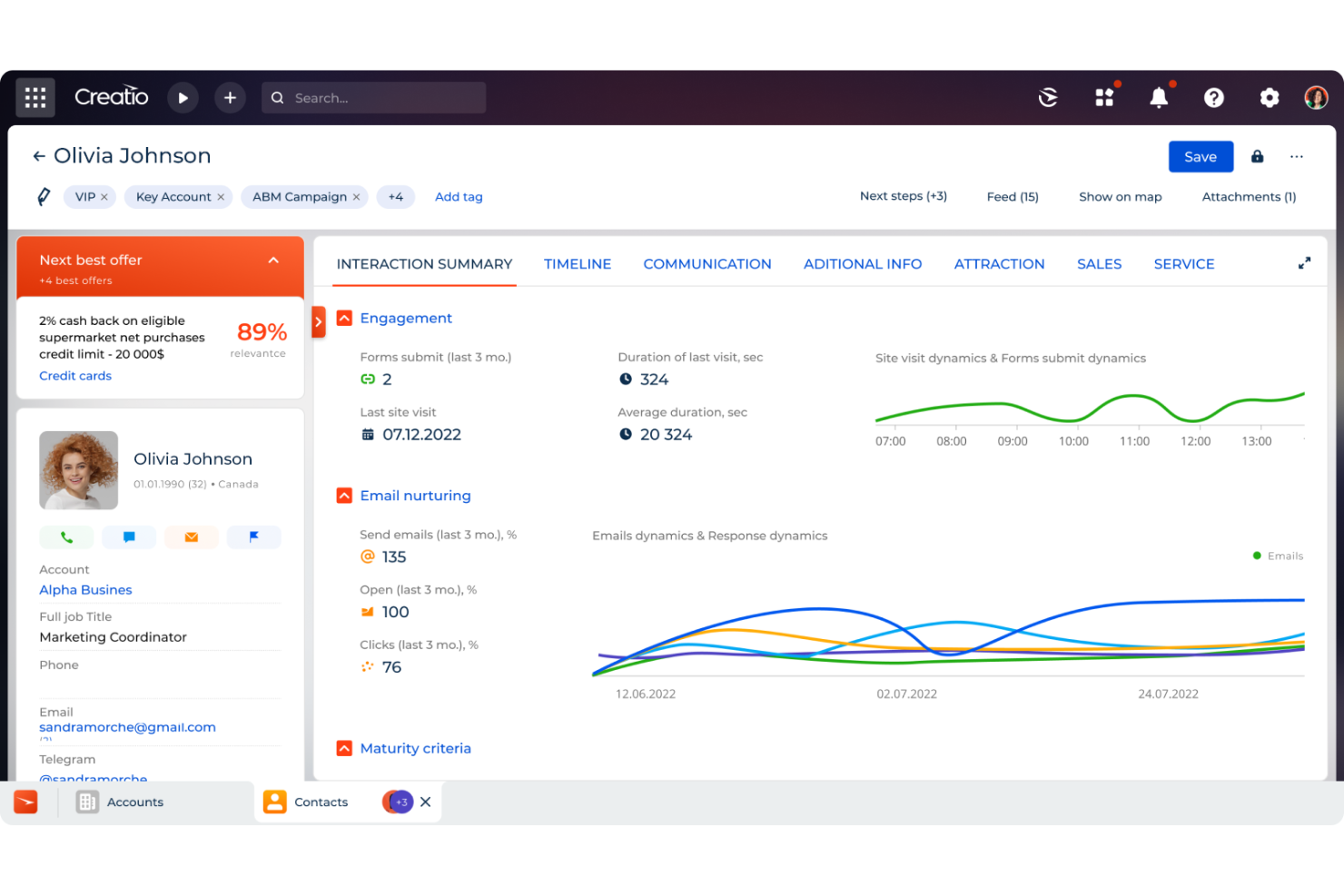
Creatio CRM is a no-code platform designed to automate marketing, sales, and service processes, offering a unified solution for managing customer relationships. It's tailored to meet the needs of businesses seeking to enhance their customer engagement strategies.
Why I picked Creatio CRM: Creatio CRM stands out as an excellent choice for Mac users due to its cloud-based architecture, ensuring seamless access across different operating systems, including macOS. This flexibility allows your team to work from anywhere, using any device, without compatibility concerns. Additionally, Creatio CRM's no-code customization empowers you to tailor workflows and processes to your specific business needs without requiring extensive technical expertise. Another compelling feature is its comprehensive customer data management system. Creatio CRM provides a 360-degree view of your customers, consolidating information from various touchpoints into a single platform.
Standout features & integrations:
Features include sales forecasting, opportunity tracking, order management, contract management, marketing automation, campaign management, customer segmentation, case management, knowledge base, field service management, and business process automation.
Integrations include Accelo, Act!, ActiveCampaign, Acumatica, Adobe Analytics, Asana, Microsoft Exchange, Excel, Mailchimp, HubSpot Marketing Hub, Google Calendar, and Tableau.
Pros and Cons
Pros:
- Supports scaling businesses
- No-code platform
- Extensive customization options
Cons:
- Data migration may be complex
- Customization can be time-consuming

Best for all-in-one marketing solutions
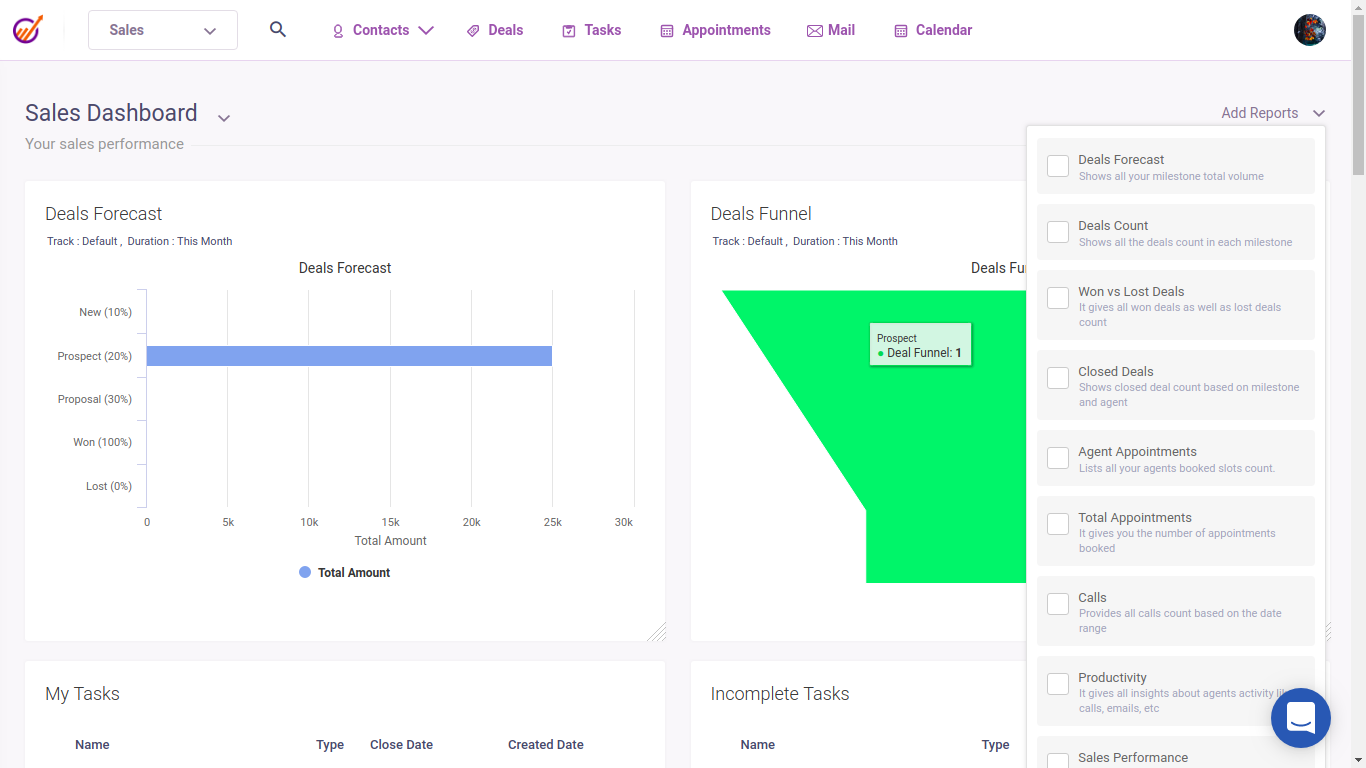
EngageBay is a unified CRM for Mac that provides marketing automation, sales management, and customer support functionalities.
Why I picked EngageBay: EngageBay seamlessly manages the entire customer lifecycle, from lead generation to post-sale support. It has powerful email marketing capabilities and landing page builders that enable businesses to enhance marketing efforts, analytics, and reporting tools to provide insights into customer behavior and campaign performance, and integrated social media management to manage social channels directly from the CRM. EngageBay is highly scalable and offers cost-effective pricing, making it an ideal CRM tool for organizations seeking an all-in-one platform.
Standout features & integrations:
Features include powerful marketing automation, sales pipeline tracking, integrated customer support tools, landing page builder, lead scoring and social media management.
Integrations include Mailchimp, Zapier, HubSpot, Salesforce, Microsoft Office 365, Google Workspace, Twilio, Shopify, Stripe, and QuickBooks.
Pros and Cons
Pros:
- Comprehensive analytics and reporting
- Powerful marketing automation tools
- Integrated landing page builder for lead capture
Cons:
- Basic reporting capabilities
- Less functional mobile device app
Nimble
Best for social media integration
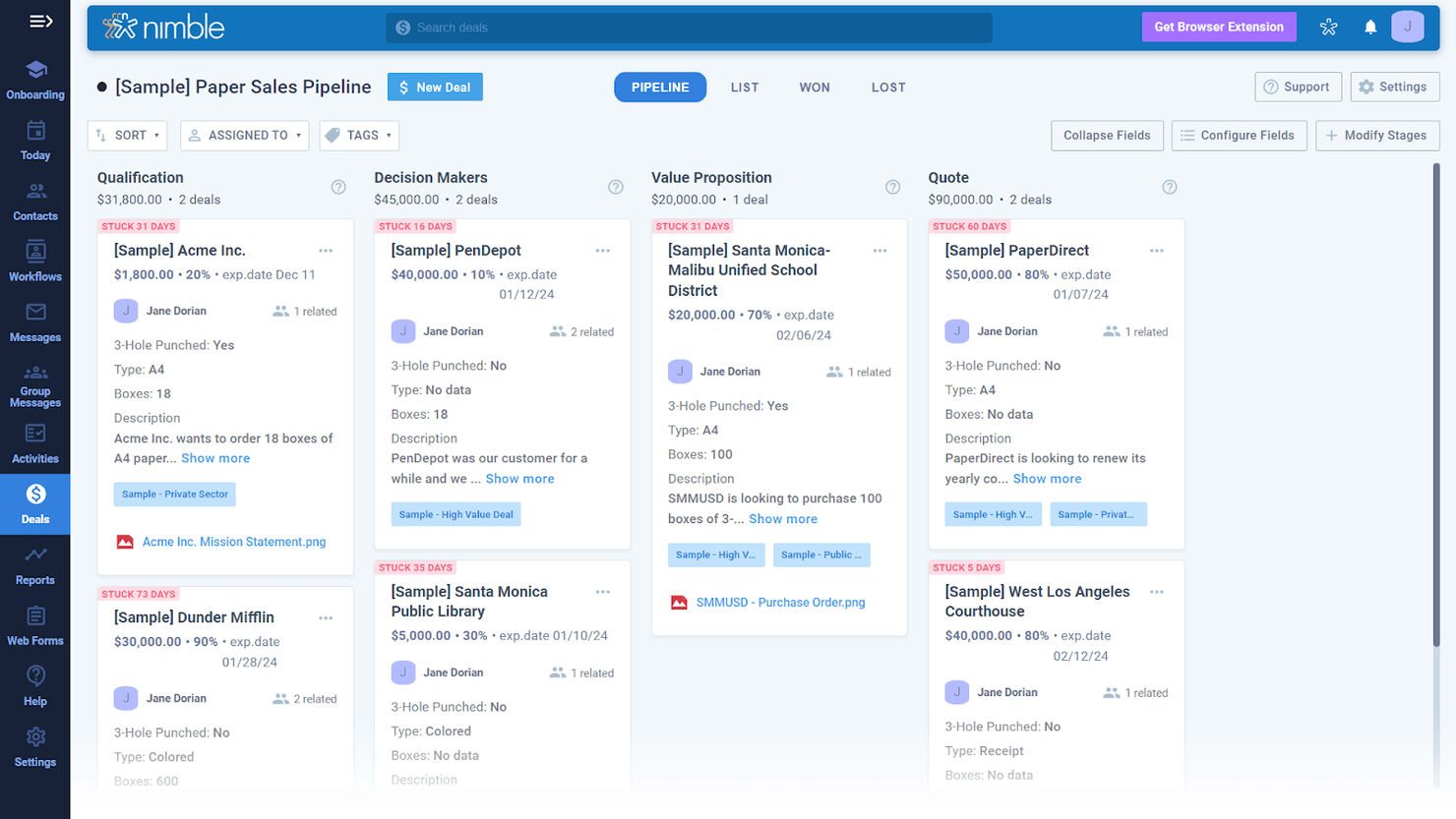
Nimble is a CRM that excels in social media integration, combining contact management with social profile enrichment to enhance customer interactions.
Why I picked Nimble: Nimble offers users a strong social media profile integration, providing enriched contact insights and fostering strong customer relationships. It comes with automated social profile matching and a view of customer interaction across various platforms, making it an ideal software for businesses relying on social media for customer engagement and relationship building. Additionally, the platform has email tracking and automated reminders to ensure timely follow-ups, helping businesses stay on top of their customer relationships and sales pipeline.
Standout features & integrations:
Features include social profile matching and enrichment, automated contact management, email tracking, and an advanced view of customer interactions.
Integrations include Microsoft 365, Google Workspace, Mailchimp, HubSpot, QuickBooks, Slack, Zoom, Evernote, Hootsuite, and Zapier.
Pros and Cons
Pros:
- Advanced engagement tracking
- Unified contact management
- Strong social media integrations
Cons:
- Custom reporting limitations
- Limited CRM functionalities

Daylite
Best for client relationship tracking
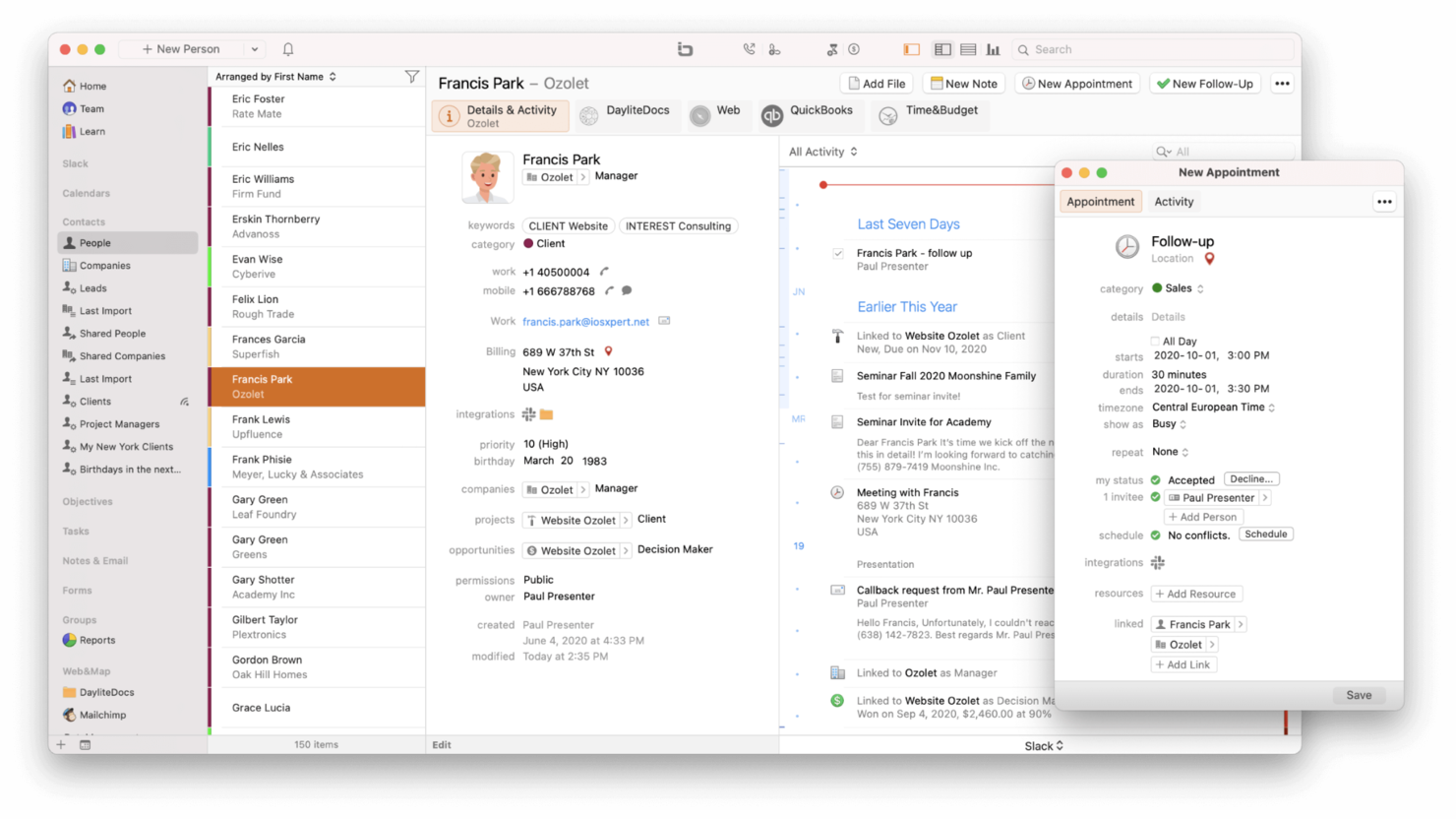
Daylite is a CRM for Mac focused on client relationship tracking, project management, and team collaboration.
Why I picked Daylite: Daylite’s client relationship tracking features and seamless integration with the Apple ecosystem make it the perfect CRM for Mac users. It has offline capabilities, allowing users to access and manage CRM data without an internet connection, tools for client management, project tracking, and team collaboration to streamline businesses that primarily use Apple products. Daylite also boasts strong security features, ensuring client data is protected.
Standout features & integrations:
Features include detailed client relationship management, project tracking, offline access, smooth Apple ecosystem integration, and customizable dashboards.
Integrations include Apple Mail, Calendar, Contacts, Reminders, Siri, Zapier, Slack, Microsoft Outlook, Google Calendar, and Mailchimp.
Pros and Cons
Pros:
- Automate and project management features
- Offline access available
- Integrates seamlessly with the Apple ecosystem
Cons:
- Limited third-party integrations
- Mac-only platform

Best for comprehensive customization

Salesforce CRM is a highly customizable platform offering extensive sales, marketing, and customer service tools.
Why I picked Salesforce CRM: Salesforce offers unmatched customization capabilities, allowing businesses to tailor the platform to their needs. It comes with automation tools and extensive integration options that support complex workflows and requirements. Additionally, Salesforce’s Einstein AI capabilities provide advanced insights and predictive analytics that enable data-driven decision-making, and its Lightning Platform allows custom app creation and workflow.
Standout features & integrations:
Features include advanced automation, detailed analytics, extensive customization options, sales, service, and marketing management tools, and Customer 360 to see every customer interaction.
Integrations include Slack, Google Workspace, Microsoft 365, Mailchimp, QuickBooks, Dropbox, Zoom, HubSpot, LinkedIn, and Docusign.
Pros and Cons
Pros:
- Several customization options
- Offline mobile app mode
- Extensive AppExchange Marketplace
Cons:
- Challenging setup and configuration
- Complex pricing structure

Best for project management features
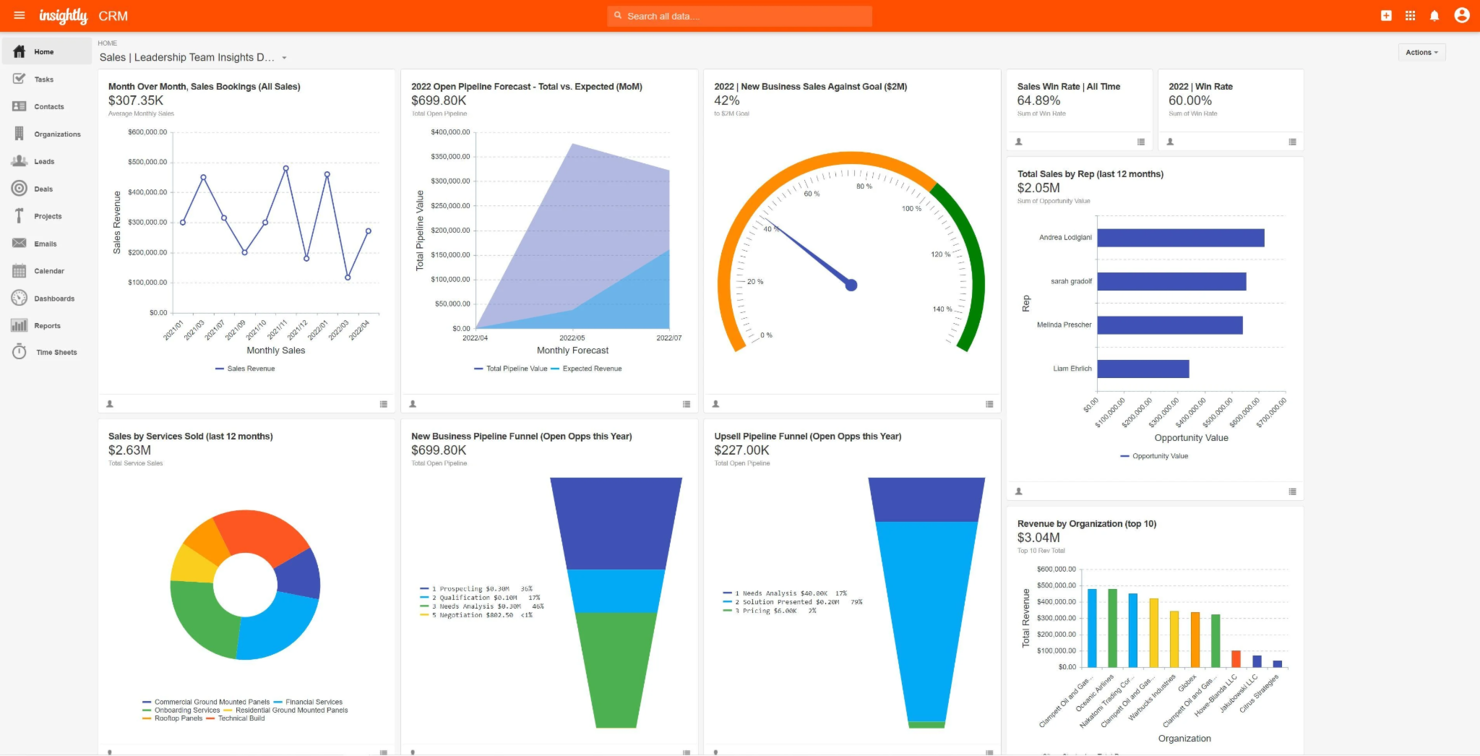
Insightly is a CRM that integrates project management features, helping businesses streamline sales, marketing, and project processes within one platform.
Why I picked Insightly: Insightly gives users access to strong CRM functionalities, project tracking, and workflow automation. It provides a holistic solution for businesses looking to streamline their sales, marketing, and operational processes through built-in marketing tools, customizable dashboards, and detailed reporting features. The software’s focus on project and customer data integration helps businesses maintain a 360-degree view of their operations, leading to more informed decision-making and improved customer satisfaction.
Standout features & integrations:
Features include advanced project management, workflow automation, and detailed reporting.
Integrations include Google Workspace, Microsoft 365, Slack, Mailchimp, QuickBooks, Xero, Dropbox, Evernote, Zapier, and Mailgun.
Pros and Cons
Pros:
- Built-in marketing
- Workflow automation
- Strong project tracking tools
Cons:
- Limited customization options
- Performance issues with large data sets

Best for contact management
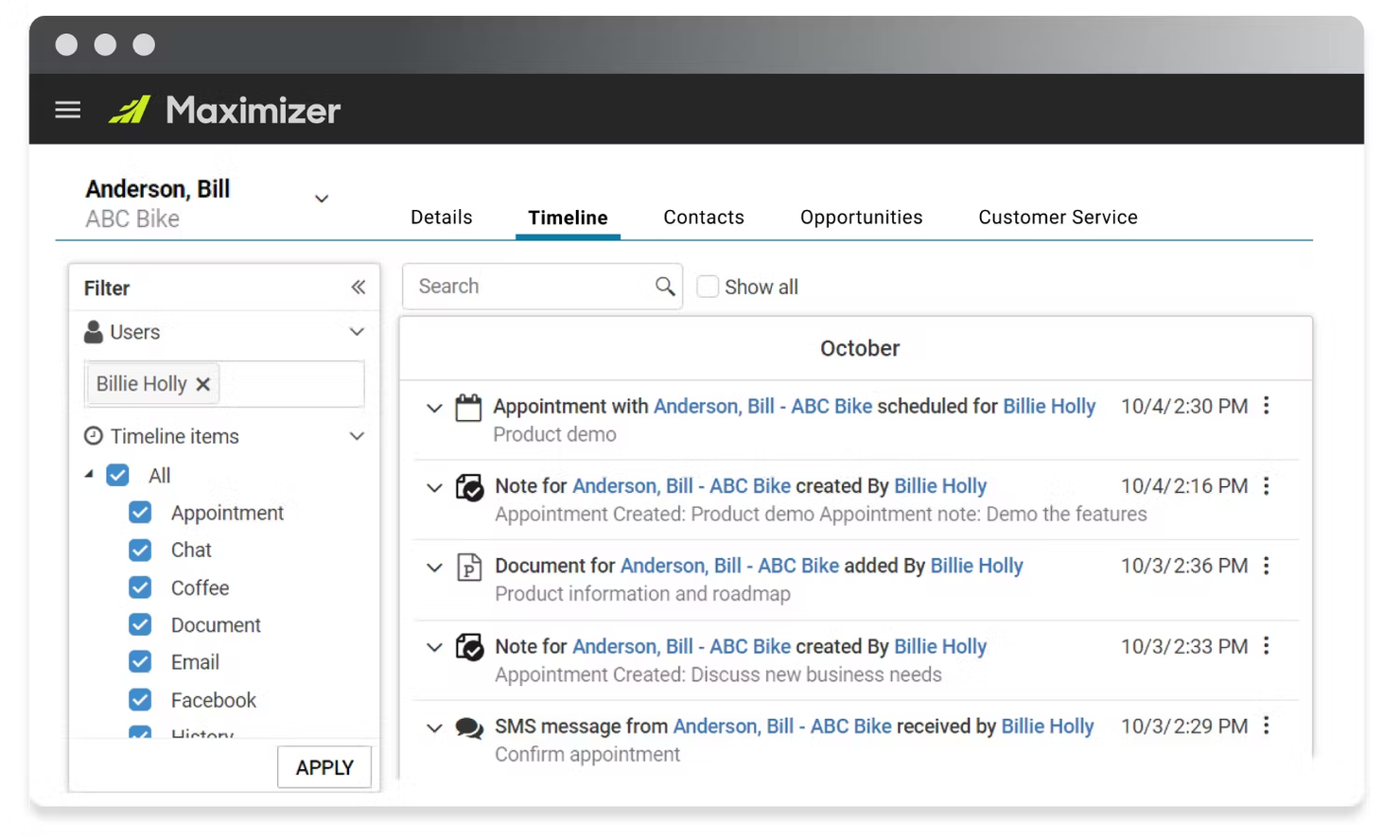
Maximizer is a powerful CRM designed for in-depth contact management, sales pipeline tracking, and marketing automation.
Why I picked Maximizer: Maximizer provides users with detailed contact management and smooth integration with sales and marketing tools. This CRM combines contact tracking, sales automation, and customer service features, making it an excellent choice for businesses looking to streamline customer interactions and improve sales processes. Maximizer also has customizable dashboards and built-in marketing campaign management for an end-to-end solution for customer management.
Standout features & integrations:
Features include extensive contact management, sales pipeline tracking, detailed customer service modules, marketing automation, detailed reporting and analytics, strict security measures, and mobile access.
Integrations include Microsoft Outlook, QuickBooks, Gmail, Mailchimp, Constant Contact, Microsoft Excel, WordPress, Microsoft Teams, Zapier, and Slack.
Pros and Cons
Pros:
- Comprehensive customer service module
- Strict focus on data security
- Strong contact management capabilities
Cons:
- Minimal customization flexibility
- Outdated interface


Agile CRM is a CRM that integrates sales automation, marketing automation, and customer service tools in one unified platform.
Why I picked Agile CRM: Agile CRM’s advanced marketing and sales automation, and customer service tools allow businesses to streamline their operations and enhance customer engagement efficiently. This CRM provides advanced campaign management, email marketing, detailed analytics and reporting, and a drag-and-drop interface for creating campaigns and workflows, simplifying the user experience and making it easier for teams with varying technical expertise.
Standout features & integrations:
Features include advanced marketing automation, sales tracking, customer service management, automated marketing campaigns, sales pipeline management, and exceptional customer support.
Integrations include Google Workspace, Microsoft 365, Mailchimp, QuickBooks, Slack, Twilio, RingCentral, LinkedIn, Facebook, and Twitter.
Pros and Cons
Pros:
- Affordable pricing tiers
- Advanced campaign management
- Integrated marketing automation
Cons:
- Some integrations are complex
- Limited customization capabilities
Other CRMs for Mac
Below is a list of additional CRMs for Mac that I shortlisted. While they didn’t make the top 10, they’re still valuable and worth further research.
- Less Annoying CRM
For small teams
- Spotler CRM
For email marketing campaigns
- Freshsales
For AI-driven insights
- HoneyBook
For creative professionals
- Clarify
For Mac-first teams looking for a native app
- SugarAI
For customer support features
- Zoho CRM
For small business solutions
- Attio
For collaborative workspaces
- Bitrix24
For team communication tools
- Pipedrive
For sales pipeline management


Related CRM Reviews
If you still haven't found what you're looking for here, check out these tools closely related to all-in-one CRMs that we've tested and evaluated.
- CRM Software
- Sales Software
- Lead Management Software
- Business Intelligence Software
- Contract Management Software
- Revenue Management System
How I Evaluate CRM for Mac
My evaluation splits into two layers: the non-negotiables—pipeline tracking, native Mac support, Apple Mail sync—and the differentiators like AI insights and RevOps reporting that push a tool ahead.
Core Functionality (Table Stakes For This List)
When I'm selecting tools for my list, I rank each one on a scale from 0 (does not offer the functionality) to 5 (excels in this area) for each core functionality listed below. Then, I calculate the tool's total score into a percentage. Each tool needs to achieve a minimum total score of 65% to be considered for inclusion.
- Native Mac Compatibility: I check whether the CRM runs reliably on macOS through a dedicated app or optimized browser experience—no workarounds like virtualization or Boot Camp required.
- Apple Ecosystem Integration: Tools that sync with Apple Mail, Calendar, and Contacts earn higher marks, especially for teams that live in iCloud for scheduling and correspondence.
- Pipeline & Deal Management: I look for customizable stages, multi-pipeline support, and forecasting views that give RevOps teams clear visibility into deal progression and revenue projections.
- Contact & Account Management: Each tool should centralize customer records with linked activity histories, so reps and CS leads can pull up a full account timeline before any call.
- Workflow Automation: I evaluate how well a CRM handles automated lead routing, task triggers, and cross-team handoffs—the kind of logic that keeps deals moving without manual nudges.
- iOS Mobile Parity: The iPhone and iPad apps should cover core CRM actions like updating deals and logging notes, so field reps and traveling managers aren't stuck waiting for a laptop.
Once I have a list of tools that meet the criteria, I consider what sets each platform apart.
Differentiating Factors (What Sets Vendors Apart)
Here's how I compare and contrast different vendors:
Standout Features
AI-powered deal scoring matters here—I look for tools that surface which opportunities are likely to close and recommend next steps, saving RevOps teams from manually sifting through pipeline data. Revenue reporting dashboards are another differentiator. The strongest ones let you track forecast accuracy and pipeline velocity in real time without exporting to a spreadsheet. I also evaluate Siri and Shortcuts support, which lets Mac-first users trigger CRM actions like logging a call or creating a task without opening the app.
Beyond Features
Integration ecosystem depth is a big one—I check whether a CRM connects natively to tools like Slack, Zapier, and billing platforms that RevOps teams rely on daily. Scalability also matters. A solo founder's CRM needs to grow into custom objects, territory management, and multi-team visibility without forcing a full replatform. I also evaluate pricing transparency, specifically whether iOS and macOS app access comes included or requires an upgrade. Hidden costs for Apple-native features can quietly bloat a team's software budget.
How To Choose CRMs For Mac
As you work through your unique software selection process, keep the following points in mind:
- Compatibility with macOS: Ensure the CRM software is fully compatible with macOS. This includes checking for native macOS applications and operating system features, such as integration with Apple Mail, Calendar, and Contacts.
- User Interface and Experience: Look for a CRM with an intuitive and user-friendly interface. A CRM with a cluttered or non-intuitive interface can hinder productivity and slow business processes.
- Integration Capabilities: Make sure to evaluate the CRM's ability to integrate with other tools and software you already use. This includes email marketing platforms, project management tools, and accounting software.
- Customization and Scalability: Consider whether the CRM can be customized to fit your specific business processes and can scale as your business grows. For example, a startup might need a CRM that allows for custom fields and workflows to match their unique sales process, while also being able to handle increased data and users as the company expands.
- Customer Support and Training: Make sure to assess the customer support and training the CRM vendor provides. This is important for ensuring a smooth implementation and ongoing usage. For instance, a non-profit organization might require extensive training and support to ensure its team fully utilizes the CRM's features for donor management and fundraising activities.
Trends for CRMs for Mac
Here are some trends I’ve noticed for CRMs for Mac, plus what they might mean for the future of the revenue operations industry. I sourced countless product updates, press releases, and release logs to tease out the most important insights.
- AI-Powered Insights: AI is being integrated into CRM systems to provide predictive analytics, helping businesses anticipate customer needs. It's important for staying competitive.
- Voice Command Integration: Voice command features are becoming more common in CRM software as this allows hands-free operation. This helps to improve efficiency for busy professionals.
- Enhanced Data Security: Data security measures are being strengthened in CRM systems. This is vital for protecting sensitive customer information and building trust with clients.
- Mobile Optimization: CRM platforms are increasingly optimized for mobile use. This ensures that sales teams can access data on the go, and support remote work and flexibility.
- Customizable Dashboards: Customizable dashboards are gaining popularity. They allow users to tailor their interface to their needs, enhancing user experience and productivity.
As we look to the future, it's clear that CRMs for Mac are evolving to offer more intuitive interfaces, enhanced AI-driven insights, and greater integration capabilities. Staying ahead of these trends will empower businesses to leverage their Mac systems more effectively, ensuring a competitive edge in customer relationship management.
What are CRMs for Mac?
A customer relationship management (CRM) system is a software tool designed to help businesses manage and analyze customer interactions and data throughout the customer lifecycle. CRMs for Mac are specifically optimized or compatible with macOS, ensuring seamless integration with Apple’s ecosystem. These software are designed to provide Mac users with a smooth and intuitive experience, leveraging the unique features and functionalities of macOS.
Features of CRMs for Mac
When shopping for a new CRM, there are key features you should consider before purchasing. Below, I will outline the most important features to look for in a CRM for Mac, ensuring that your business can leverage the full potential of your Apple devices.
- Marketing Tools: Marketing tools in a CRM help manage campaigns, including social media, email, and events. This feature is important for generating new leads and nurturing existing ones through targeted marketing efforts.
- Email Management: Email management capabilities allow businesses to build templates, automate workflows, and track email performance. This feature is vital for maintaining effective communication with clients and prospects.
- Pipeline Management: Pipeline management is a visual representation of where leads and deals are in the sales process. This helps track high-value leads and ensure they are nurtured effectively to become customers.
- Activity Tracking: Activity tracking keeps a record of all interactions and activities related to sales. This feature is important for understanding customer engagement and improving sales strategies.
- Mobile Apps: Mobile apps for iOS ensure access to the CRM on the go. This feature is useful for sales reps who need to manage leads and deals while away from their desks.
- Territory Management: Territory management allows account segmentation and leads into specific territories. This feature helps plan and optimize sales routes, especially for businesses with field sales teams.
- Lead Scoring: Lead scoring ranks leads based on engagement and potential value. This feature helps prioritize efforts on the most promising leads, improving sales efficiency.
- Sales Forecasting: Sales forecasting uses analytics to predict future sales performance. This feature is essential for strategic planning and resource allocation.
- Multi-Currency and Multi-Language Support: For businesses operating globally, multi-currency and multi-language support ensures that the CRM can handle transactions and communications in different currencies and languages.
- Integration Marketplace: An integration marketplace allows the CRM to connect with other tools and applications, such as Slack, Google Workspace, and LinkedIn. This feature enhances the CRM's functionality and ensures it fits seamlessly into your existing tech stack.
Choosing the right CRM for Mac involves considering these core features and how they align with your business needs. A CRM that integrates well with Apple products and offers functionalities can significantly enhance customer relationship management efforts.
Benefits of CRMs for Mac
Different CRMs have their own set of unique benefits. Here are some of the primary perks you may experience while using CRM for Mac:
- Seamless Integration with Apple Ecosystem: CRM software designed for Mac integrates effortlessly with other Apple products, such as Apple Mail, Contacts, and Calendar. This ensures Apple users have a consistent and familiar interface, enhancing data management and communication efficiency.
- Enhanced Mobility and Accessibility: Mac-compatible CRM systems often come with mobile apps that allow users to access CRM data on the go via iPhones and iPads. This mobility ensures that sales teams and customer service representatives can stay connected and productive, regardless of location, leading to more responsive and efficient customer service.
- Improved Data Management and Reporting: CRM for Mac provides powerful reporting and analytics features that offer valuable insights into sales performance, customer interactions, and overall business trends. This data-driven approach enables businesses to make informed decisions, optimize their sales strategies, and identify areas for improvement.
- Automation of Repetitive Tasks: CRM software for Mac automates various repetitive tasks, such as data entry, follow-up reminders, and email marketing campaigns. This automation frees up time for employees to focus on high-value activities, such as building customer relationships and closing deals, ultimately boosting productivity and efficiency.
- Customizable and Scalable Solutions: Many CRM systems for Mac offer customizable fields and workflows, allowing businesses to tailor the software to their specific needs. These CRM solutions are scalable, meaning they can grow with the businesses and accommodate additional users and features as the organization expands.
By automating repetitive tasks and providing customizable solutions, a CRM designed specifically for Mac helps businesses streamline their operations, make informed decisions, and ultimately enhance customer satisfaction and loyalty.
Costs & Pricing of CRMs for Mac
When considering a CRM for Mac, it's important to understand the various pricing plans and what each offers. CRM software can vary widely in price and features, so find a plan that aligns with your business needs and budget. Below is an overview of typical plan options and their pricing, including common features.
CRMs for Mac Plan Comparison Table
| Plan Type | Average Price | Common Features |
| Free | $0 | Basic contact management, limited storage, and basic support |
| Basic | $12/user/month | Contact management, task tracking, and email integration |
| Standard | $25/user/month | Advanced reporting, custom fields, and team collaboration |
| Professional | $50/user/month | Automation workflows, advanced analytics, and phone support |
| Enterprise | $100/user/month | Custom solutions, dedicated account manager, and premium support |
Choosing the right plan depends on the specific needs and the size of your business. By carefully comparing different pricing plans and their respective offerings, you can ensure you select a CRM that delivers optimal value and supports your growth objectives.
CRMs for Mac FAQs
Can I use a web-based CRM on my Mac?
Absolutely. Web-based CRMs like Salesforce, HubSpot CRM, and Zoho CRM can be accessed through any web browser on a Mac, providing full functionality without additional software.
What are the system requirements for running a CRM on a Mac?
CRMs typically have minimal system requirements, often just needing a recent version of macOS and a stable internet connection. Specific requirements vary by CRM provider, so check their documentation.
Are there any free CRM options for Mac?
Yes, HubSpot CRM offers a free version fully compatible with Mac. It includes essential features like contact management, deal tracking, and email integration.
Do CRMs for Mac support mobile access?
Most CRMs for Mac, such as Salesforce and Zoho CRM, offer mobile apps for iOS devices. This allows users to access their CRM data on the go, ensuring they stay connected and productive.
How do I ensure my CRM data is secure on a Mac?
To ensure CRM data security on a Mac, choose a CRM provider that offers strict security features such as data encryption, two-factor authentication, and regular security updates. Additionally, ensure your Mac runs the latest macOS version and has up-to-date antivirus software.
Can I integrate my CRM with other Mac applications?
Yes, many CRMs offer integrations with popular Mac applications. For example, Daylite integrates with Apple Mail, Calendar, and Contacts, while Salesforce and Zoho CRM integrate with various third-party apps through APIs and app marketplaces.
Is customer support available for Mac-specific CRM issues?
Most major CRM providers offer customer support that can assist with Mac-specific issues. This support can be accessed through various channels such as phone, email, and live chat.
Can I migrate data from a Windows-based CRM to a Mac CRM?
Yes, data migration is possible and often supported by CRM providers. They may offer tools or services to assist with the migration. Ensure you have a backup of your data before starting the migration process.
What’s Next?
Need CRM integrations for Mac? Check out our shortlist of CRM software that integrates with Outlook, Mailchimp, Xero, QuickBooks, Office 365, and even social media.
If you're in the process of researching crm for mac, connect with a SoftwareSelect advisor for free recommendations.
You fill out a form and have a quick chat where they get into the specifics of your needs. Then you'll get a shortlist of software to review. They'll even support you through the entire buying process, including price negotiations.