

I 10 migliori software per il monitoraggio delle vendite recensiti per il 2026

10 Selezione dei migliori software di monitoraggio delle vendite


Con così tanti software diversi per il monitoraggio delle vendite disponibili, capire quale sia quello giusto per te può essere difficile. Sai di voler registrare, analizzare e creare report sui dati di vendita in modo più efficiente, ma devi capire quale strumento sia il migliore. Ci penso io! In questo articolo ti aiuterò a rendere semplice la tua scelta, condividendo le mie esperienze personali nell'utilizzo di decine di diversi strumenti di monitoraggio delle vendite con vari team e progetti, con le mie scelte dei migliori software di monitoraggio delle vendite.
Perché fidarsi dei nostri consigli sui software
Le nostre recensioni riflettono il nostro giudizio indipendente, non un discorso di vendita. Scopri come manteniamo la trasparenza.
Per questa guida, abbiamo valutato gli strumenti attraverso test pratici e ricerche indipendenti, assegnando un punteggio agli strumenti in base ai nostri criteri di selezione.
Le nostre recensioni riflettono il nostro giudizio editoriale umano, non un discorso di vendita.
Riepilogo dei migliori software di monitoraggio delle vendite
Questa tabella comparativa riassume i dettagli dei prezzi delle mie migliori scelte di software per il monitoraggio delle vendite, per aiutarti a trovare quello più adatto al tuo budget e alle esigenze della tua azienda.
| Tool | Best For | Trial Info | Price | ||
|---|---|---|---|---|---|
| 1 | Ideale con filtri avanzati per l'arricchimento dei dati B2B | Piano gratuito disponibile | A partire da 49 $/utente/mese (con fatturazione annuale) | Website | |
| 2 | Ideale per ottimizzazione AI di territori e percorsi | Demo gratuita disponibile | Prezzo su richiesta | Website | |
| 3 | Ideale per l'automazione personalizzabile delle vendite | Prova gratuita disponibile | Da $12/utente/mese (fatturato annualmente) | Website | |
| 4 | Migliore soluzione cloud-based a 360° per i dati | Prova gratuita di 30 giorni | Da $25/utente/mese (fatturato annualmente) | Website | |
| 5 | Ideale per piccole e medie imprese che vendono B2B | Prova gratuita di 30 giorni | Da $35/utente/mese | Website | |
| 6 | Ideale per startup e piccole imprese | Piano gratuito disponibile | Da $15/utente/mese | Website | |
| 7 | Ideale per la gestione dei clienti | Piano gratuito disponibile | Da $20/utente/mese | Website | |
| 8 | Ideale per la prospezione multicanale | Prova gratuita di 14 giorni | A partire da $29.90/utente/mese | Website | |
| 9 | Ideale per team Agile di piccole e medie dimensioni | Piano gratuito disponibile | A partire da $14.99/mese | Website | |
| 10 | Ideale per le piccole imprese | Prova gratuita di 14 giorni | Da $29/utente/mese | Website |


Recensioni dei migliori software di monitoraggio delle vendite
Di seguito trovi i miei riepiloghi dettagliati dei migliori software di monitoraggio delle vendite inclusi nella mia selezione ristretta. Le mie recensioni offrono una panoramica dettagliata delle funzionalità principali, dei pro & contro, delle integrazioni e dei casi d’uso ideali di ogni strumento, per aiutarti a trovare quello più adatto a te.

Ideale con filtri avanzati per l'arricchimento dei dati B2B
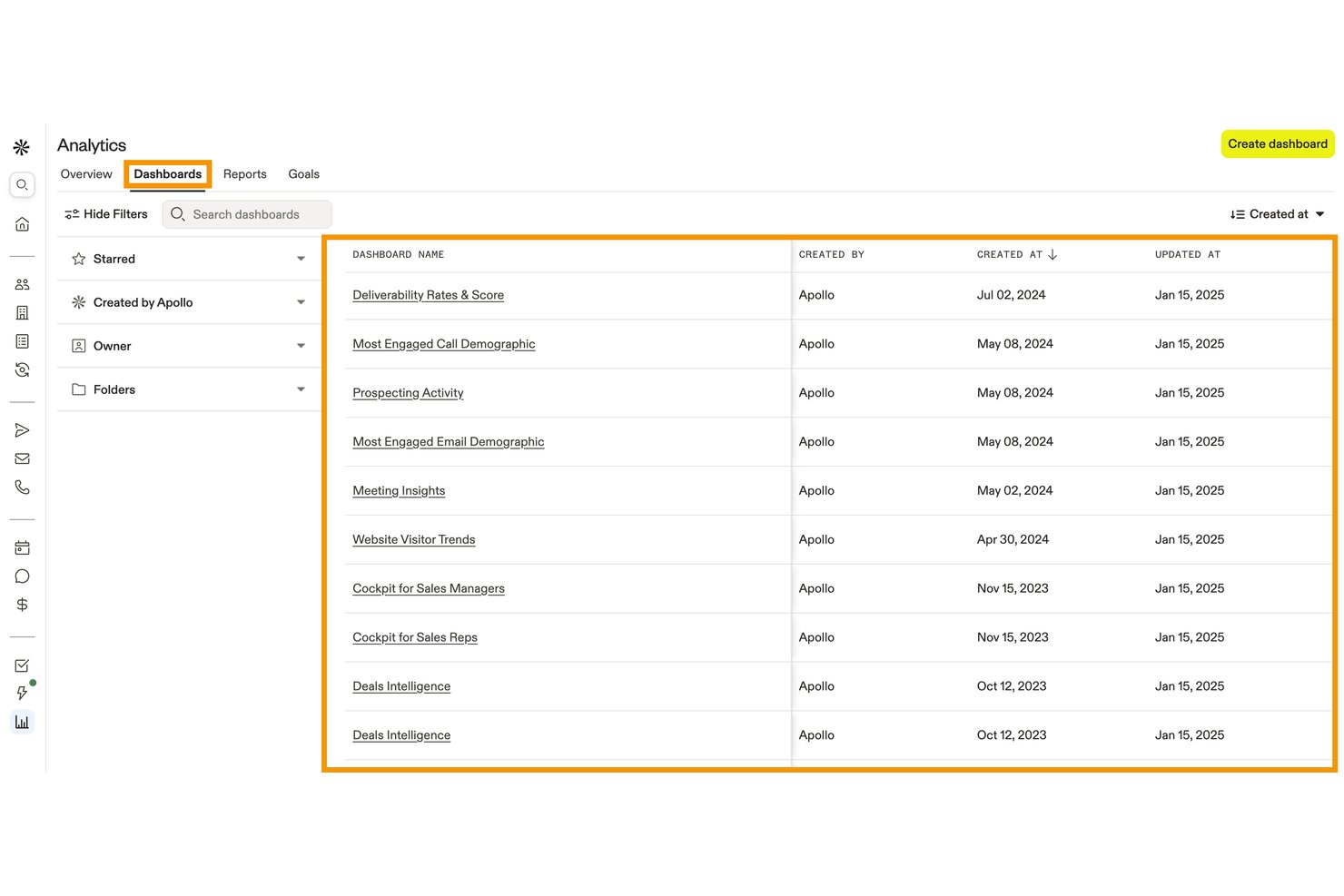
Apollo.io è una piattaforma di monitoraggio e coinvolgimento delle vendite che combina la gestione della pipeline, le previsioni basate sull'intelligenza artificiale, la registrazione automatica delle attività e i dashboard delle prestazioni con un database di contatti B2B integrato.
Per chi è più adatto Apollo.io?
Apollo.io è adatto ai team responsabili delle operazioni sui ricavi e ai team di vendita che desiderano concentrare la ricerca di potenziali clienti, le attività di contatto e il monitoraggio della pipeline in un'unica piattaforma, invece di gestire strumenti separati per ciascuna attività.
Perché ho scelto Apollo.io
Apollo.io è nella mia lista ristretta perché il suo database B2B di oltre 240 milioni di contatti non serve solo alla ricerca di potenziali clienti: alimenta direttamente il monitoraggio della pipeline attraverso l'arricchimento a cascata, mantenendo i record delle trattative completi e aggiornati mentre i lead avanzano nelle varie fasi. Apprezzo particolarmente il fatto che gli agenti basati sull'intelligenza artificiale possano analizzare gli account e dare priorità ai lead in base al tuo profilo cliente ideale (ICP), così la tua pipeline riflette segnali di acquisto reali invece di dati obsoleti. Il livello di analisi delle trattative rende poi disponibili questi dati arricchiti nelle analisi, offrendo una visione più precisa delle trattative che vale la pena perseguire.
Funzionalità principali di Apollo.io
- Registrazione delle attività di vendita: registra automaticamente chiamate, email, riunioni e trascrizioni generate dall'intelligenza artificiale.
- Previsioni ibride basate sull'intelligenza artificiale: supporta le previsioni di ricavi più probabili, migliori e peggiori.
- Dashboard personalizzati: crea report basati su indicatori chiave delle vendite, risultati delle sequenze e prestazioni dei rappresentanti.
- Integrazioni CRM: sincronizza i dati con Salesforce, HubSpot, Outreach, Salesloft e oltre 200 strumenti.
Integrazioni di Apollo.io
Apollo.io offre oltre 200 integrazioni tramite Apollo Anywhere e il suo marketplace delle integrazioni, tra cui Salesforce, HubSpot, Outreach, Salesloft, Marketo, SendGrid, LinkedIn, Gmail, ChatGPT e Claude. L'accesso API è disponibile nei piani personalizzati per le integrazioni personalizzate.
Pros and Cons
Pros:
- Il database B2B integrato arricchisce automaticamente i record della pipeline
- Le previsioni basate sull'intelligenza artificiale predicono con precisione la probabilità di chiusura delle trattative
- Registra chiamate, email e riunioni senza inserimento manuale
Cons:
- Il monitoraggio delle quote e delle commissioni non è integrato
- L'accuratezza dei dati dei contatti internazionali diminuisce notevolmente

SPOTIO
Ideale per ottimizzazione AI di territori e percorsi
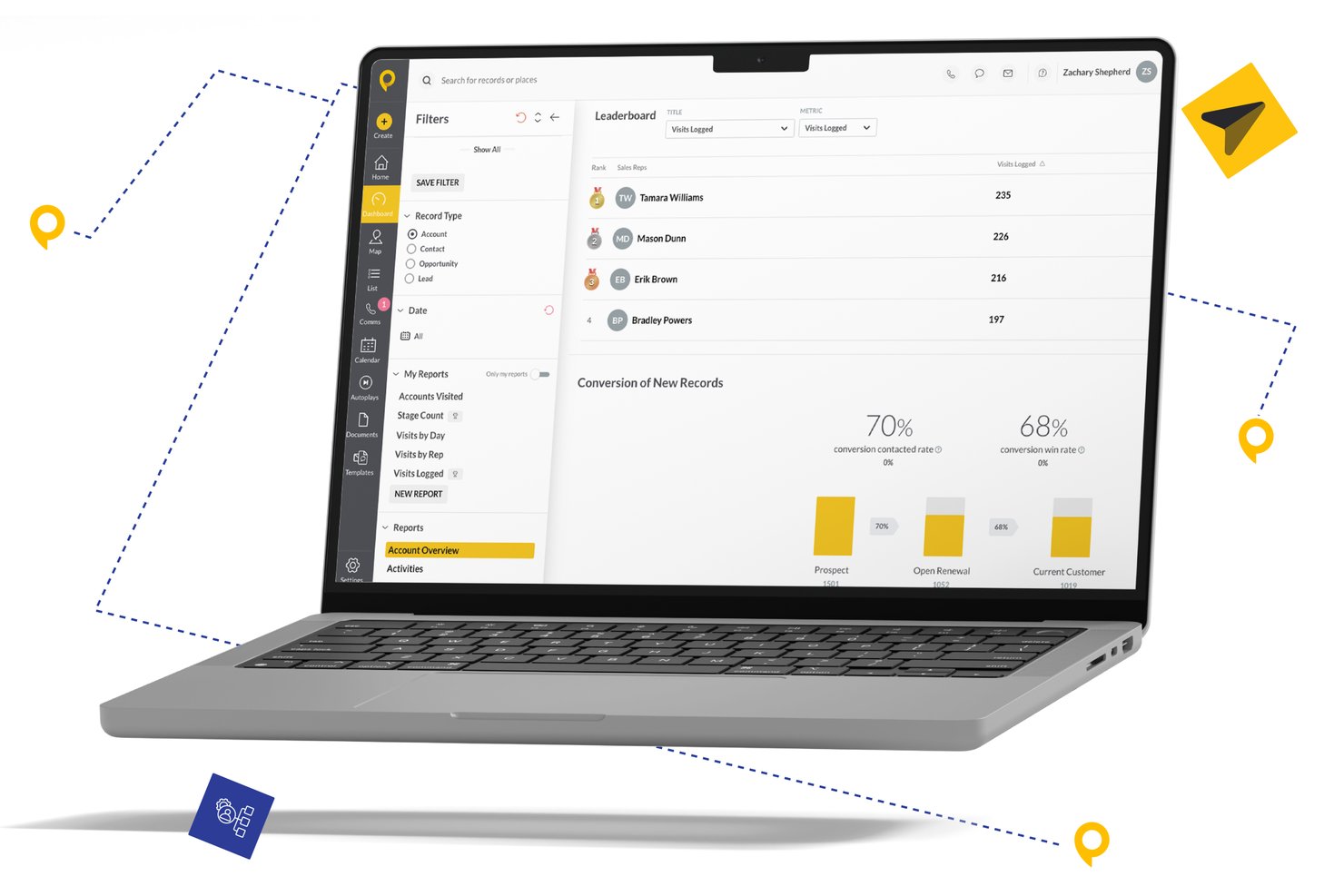
SPOTIO è una piattaforma di monitoraggio delle vendite sul campo progettata per team di vendita esterni, che combina gestione dei territori, ottimizzazione dei percorsi, registrazione delle attività con verifica GPS e analisi delle prestazioni dei rappresentanti in un unico ambiente di lavoro orientato al mobile.
Per Chi è Ideale SPOTIO?
SPOTIO è una soluzione ideale per direttori commerciali e manager operativi che guidano team di vendita sul campo o porta a porta in settori come solare, coperture, telecomunicazioni e servizi per la casa.
Perché Ho Scelto SPOTIO
Ho inserito SPOTIO nella mia lista perché la sua intelligenza territoriale va ben oltre la semplice delimitazione su mappa. Mi piace che Next Best Action (NBA) attribuisca un punteggio ai lead in base al valore previsto e indichi esattamente ai rappresentanti chi visitare in seguito, trasformando il percorso quotidiano in un piano di priorità. DASH AI aggiunge la registrazione vocale delle attività e il coaching in tempo reale, così posso monitorare sia dove vanno i rappresentanti sia cosa fanno una volta arrivati.
Funzionalità Principali di SPOTIO
- Mappatura per la gestione dei territori: Definisci, assegna e modifica i territori di vendita utilizzando codici postali, confini personalizzati o sovrapposizioni demografiche.
- Feed delle attività con verifica GPS: Registra e visualizza le attività di vendita geograficamente con marcatura automatica di orario e posizione.
- Dashboard delle prestazioni personalizzabili: Monitora la produttività dei rappresentanti e i risultati per territorio con filtri e segmentazioni regolabili.
- Integrazioni CRM native: Sincronizza i dati con piattaforme come Salesforce, HubSpot o Microsoft Dynamics per aggiornamenti in tempo reale.
Integrazioni di SPOTIO
SPOTIO offre integrazioni native con Salesforce, HubSpot, Microsoft Dynamics, SAP e Oracle e si collega tramite Zapier. È disponibile anche un'API per integrazioni personalizzate.
Pros and Cons
Pros:
- Registrazione delle attività con verifica GPS per i rappresentanti sul campo
- Punteggio dei territori e pianificazione dei percorsi guidati dall'intelligenza artificiale
- Visibilità delle prestazioni dei rappresentanti in tempo reale su mobile
Cons:
- Previsioni limitate per i team di vendita interna
- La personalizzazione dei report è piuttosto basilare

Ideale per l'automazione personalizzabile delle vendite
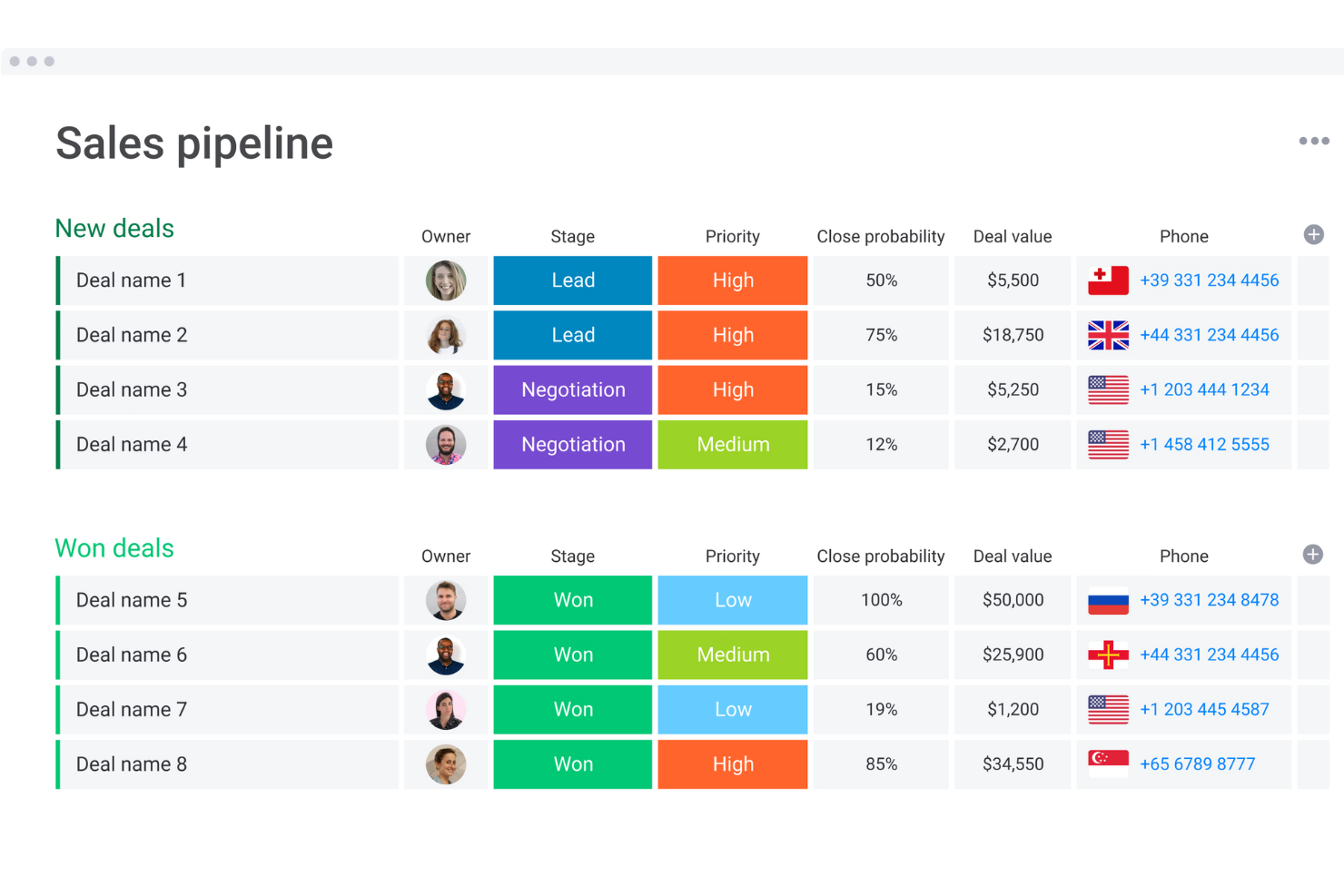
Monday sales CRM è una piattaforma di gestione delle relazioni con i clienti progettata per centralizzare la comunicazione con i clienti e automatizzare i processi di vendita, offrendo una panoramica completa delle trattative attraverso dashboard personalizzabili. Il suo punto di forza risiede nei flussi di lavoro altamente adattabili, che permettono agli utenti di modificare il sistema CRM per allinearlo alle proprie operazioni di vendita specifiche, sfruttando tipi di colonna flessibili, sottoelementi dettagliati e robuste capacità di ordinamento.
Perché ho scelto Monday sales CRM: Monday.com eccelle nel semplificare il monitoraggio delle vendite grazie a un'interfaccia intuitiva e dashboard personalizzabili, consentendo ai team di gestire e monitorare efficacemente trattative, contatti e follow-up sui lead con precisione. Le sue funzionalità di automazione riducono le attività manuali, permettendo ai commerciali di concentrarsi sulla costruzione di relazioni e sulla chiusura delle trattative.
La piattaforma favorisce la collaborazione tra i reparti, assicurando che tutti i membri del team siano allineati e informati. Grazie alle analisi in tempo reale, la performance di vendita è trasparente, supportando decisioni strategiche e guidando la crescita delle vendite. Monday.com è uno strumento solido che semplifica il monitoraggio delle vendite e allo stesso tempo migliora la produttività del team e l'engagement dei clienti.
Funzionalità principali e integrazioni di Monday sales CRM
Funzionalità includono analytics integrati e funzionalità di reportistica personalizzabile all'interno della piattaforma. Questo consente agli utenti di generare insight in tempo reale sulle proprie attività di vendita, sulla salute della pipeline e sulle metriche di performance direttamente nel proprio flusso di lavoro. La possibilità di creare e visualizzare questi report senza la necessità di strumenti analitici specializzati o software dedicati è una caratteristica unica che semplifica i processi operativi e decisionali.
Integrazioni includono app di project management come Slack, Google Drive, Gmail, Google Calendar, Jira, GitHub, Trello, Dropbox, Typeform e molte altre, accessibili tramite un piano a pagamento con Zapier.
Pros and Cons
Pros:
- Flussi di lavoro e dashboard altamente personalizzabili
- Noto per l'interfaccia intuitiva e visivamente accattivante
- Favorisce la collaborazione interfunzionale
- Strumenti di automazione integrati
Cons:
- La vasta gamma di funzionalità può risultare opprimente per i nuovi utenti
- La versione gratuita non è disponibile per il Sales CRM
New Product Updates from monday CRM

monday CRM Adds Meta Conversions API Integration
monday CRM now lets you connect Meta Conversions API and sync lead status back to Meta, improving targeting and conversions via a new Meta integration automation recipe. For more information, visit monday CRM's official site.

Migliore soluzione cloud-based a 360° per i dati
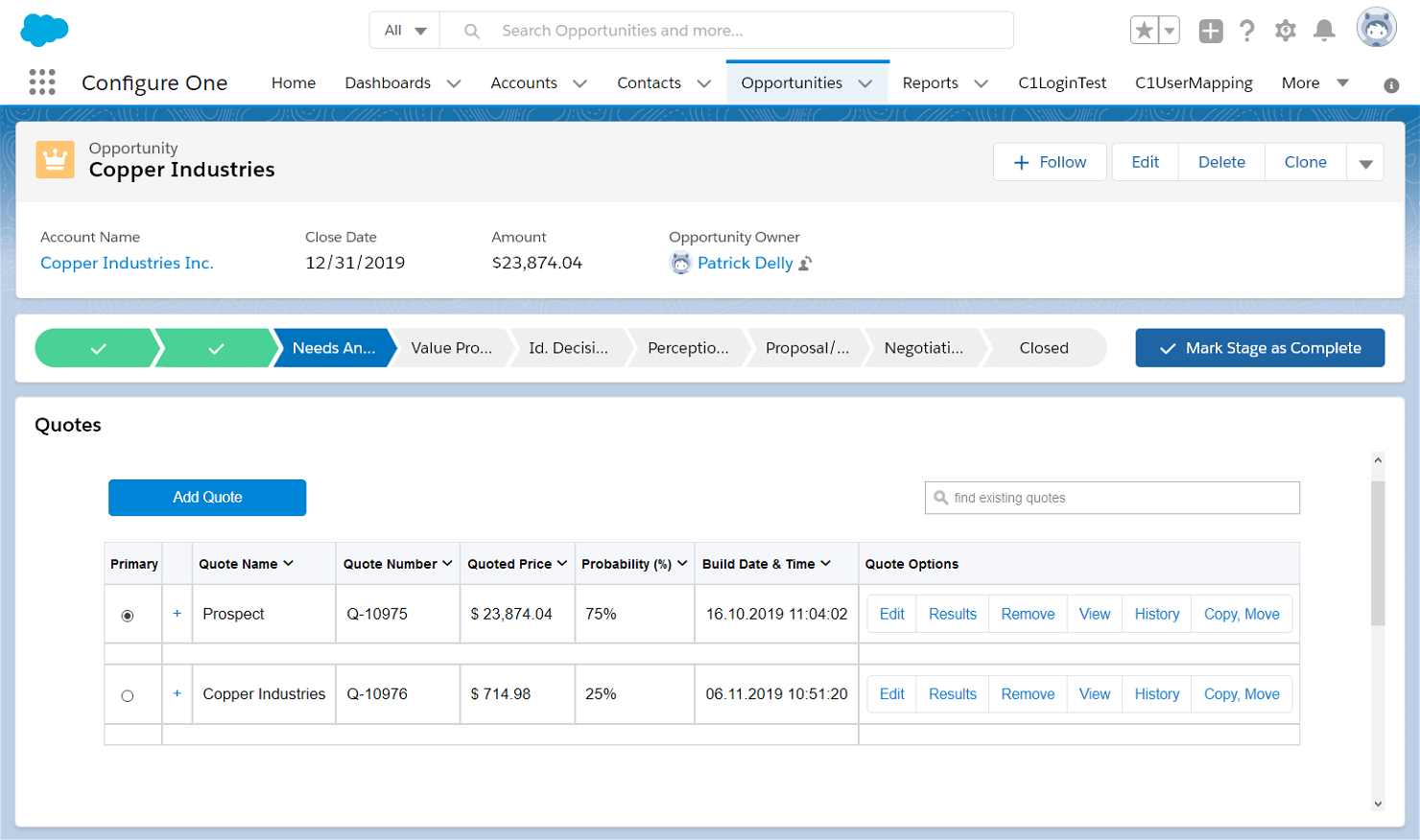
Salesforce è la migliore soluzione cloud-based a 360° perché offre opzioni per aziende di qualsiasi settore e dimensione. È altamente personalizzabile. Questo significa che può risultare un po’ più complesso da configurare e utilizzare, ma è l’ideale per le aziende che hanno bisogno di qualcosa di su misura.
Perché ho scelto Salesforce: Salesforce è una soluzione completa che, secondo alcuni, offre fin troppe funzionalità, ma per altri rappresenta tutto ciò che desiderano. Ho scelto Salesforce perché aiuta i team a gestire l’azienda, collaborare in un unico luogo centrale e offre molto di più del semplice monitoraggio delle vendite.
Sebbene startup e piccole imprese possano trovare le sue funzionalità travolgenti, la potenza di Salesforce lo rende uno strumento di tracciamento delle vendite a cui ambire.
Funzionalità e integrazioni principali di Salesforce:
Funzionalità includono strumenti di previsione, reportistica con un clic e gestione delle vendite. Con una dashboard ricca di dati e data mining per la generazione di lead, puoi monitorare il percorso dei tuoi potenziali clienti nel funnel di vendita e creare esperienze utente premium.
Integrazioni comprendono oltre 3.000 app nella Salesforce AppExchange, tra cui LinkedIn, Google Workspace, Asana, Microsoft 365 e WhatsApp. L’API Salesforce consente di creare integrazioni personalizzate.
Pros and Cons
Pros:
- Personalizzabile per ogni tipo di azienda
- Integrazione email con Gmail o Outlook
- Reportistica sul pipeline e previsioni con un clic
Cons:
- Nessun piano gratuito
- Curva di apprendimento ripida
New Product Updates from Salesforce CRM

Salesforce CRM Adds Automated CMS Access Expiration
Salesforce CRM adds automated access expiration and a new view-only support role for Point of Sale CMS users. These controls reduce manual access cleanup and help teams limit unnecessary permissions. For more information, visit Salesforce CRM’s official site.
 .
.
Ideale per piccole e medie imprese che vendono B2B

Salesflare è facile da usare e può automatizzare ogni parte del tuo processo di vendita. Con una pipeline pulita e un CRM organizzato, è semplice ma potente.
Perché ho scelto Salesflare: Ho scelto Salesflare perché può trovare qualsiasi indirizzo email partendo da nome e azienda, rendendo il contatto molto semplice. Salesflare raccoglie informazioni da tutti i canali digitali di un contatto, aggiornando automaticamente il CRM. Quando il tempo è spesso limitato, i team più piccoli apprezzeranno la registrazione automatica di appuntamenti in calendario e chiamate telefoniche.
Funzionalità e integrazioni distintive di Salesflare:
Le funzionalità includono una potente raccolta dati dei clienti, una gestione ordinata di documenti e pipeline, e un'app mobile che offre la stessa potenza della versione desktop.
Le integrazioni sono limitate nativamente a strumenti come Gmail (Google Workspace), Outlook (Microsoft 365) e LinkedIn. Mailchimp, Slack e migliaia di altre piattaforme sono disponibili tramite Zapier o Make.
Pros and Cons
Pros:
- App mobile completa di tutte le funzioni
- Ricerca indirizzi email
- Funzionalità di automazione che fanno risparmiare tempo
Cons:
- Integrazioni native limitate
- Le funzioni di reportistica sono disponibili solo nei piani superiori

Capsule
Ideale per startup e piccole imprese

Capsule si distingue per quattro principi fondamentali: semplicità, approccio accessibile, affidabilità e un tocco giocoso. Questo approccio si riflette nella semplicità della piattaforma, rendendola perfetta per startup che cercano soluzioni senza complicazioni da fornitori affidabili.
Perché ho scelto Capsule: Capsule offre un'interfaccia pulita e moderna, è facile da usare e include tutte le funzionalità necessarie per uno strumento di monitoraggio delle vendite. Non offre necessariamente nulla di speciale in termini di funzionalità, ma secondo me è realizzata in modo eccellente. Tutto è fluido, giocoso e accessibile.
Funzionalità e integrazioni principali di Capsule:
Funzionalità includono la gestione visuale della pipeline con filtraggio delle opportunità, capacità di gestione dei progetti con automazione delle attività e opzioni di reportistica completa.
Le integrazioni includono Microsoft 365, Google Workspace, Xero e Mailchimp. Zapier offre molte altre possibilità di connessione e tramite l'API di Capsule è possibile creare integrazioni personalizzate.
Pros and Cons
Pros:
- Più pipeline di vendita
- Assistenza AI per i contenuti
- Campi personalizzati illimitati
Cons:
- Integrazioni native limitate
- Limitato per aziende di grandi dimensioni
New Product Updates from Capsule

Capsule Adds AI Meeting Prep for External Calls
Capsule introduced AI Meeting Prep with relationship summaries, color-coded signals, and CRM context for upcoming external calls. This helps users review key contact details and prepare for meetings without searching through records manually. For more information, visit Capsule’s official site.
 .
.
Zoho CRM
Ideale per la gestione dei clienti
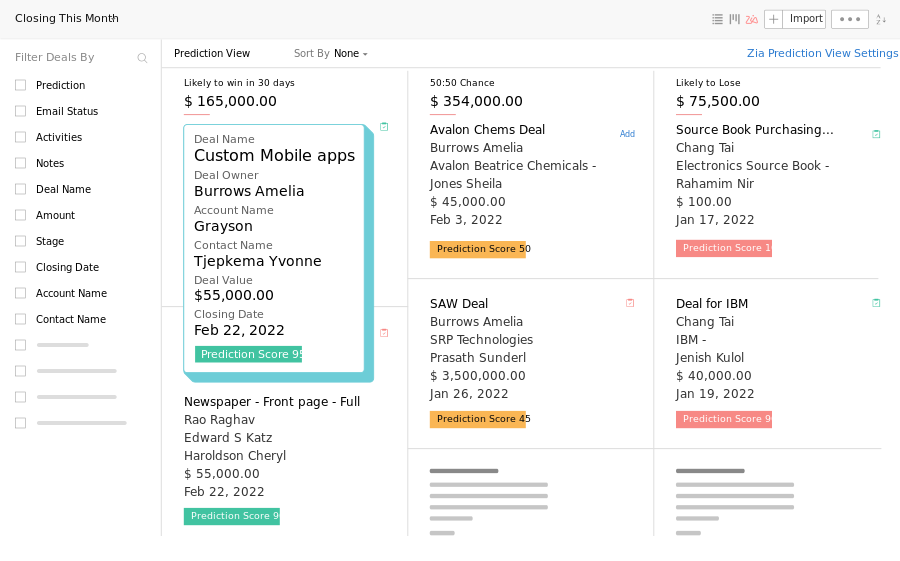
Oltre 250.000 aziende utilizzano già la suite di prodotti Zoho. Progettata per il networking, ti consente di acquisire lead ovunque–online o offline.
Perché ho scelto Zoho CRM: Ho scelto Zoho CRM perché rende facile entrare in contatto con le persone. Grazie a una presenza omnicanale e a potenti funzionalità di segmentazione, puoi coinvolgere i tuoi potenziali clienti nel momento e nel luogo giusti.
Con un'app mobile completa, la possibilità di acquisire biglietti da visita direttamente nel tuo CRM e di collegare i contatti CRM alla rete telefonica, è semplice concludere vendite ovunque ti trovi.
Caratteristiche principali e integrazioni di Zoho CRM:
Le funzionalità includono intelligenza predittiva, pipeline multiple, previsioni di vendita e portali per i clienti. Grazie alla suite Zoho che offre strumenti per marketing, contabilità, risorse umane, operations e servizio clienti, gli utenti possono assicurare la fidelizzazione dei clienti con esperienze personalizzate.
Le integrazioni includono oltre 800 app native, tra cui Mailchimp, WhatsApp, Outlook, Xero e Google Adwords. Puoi aggiungere ulteriori collegamenti con Zapier e creare integrazioni personalizzate tramite le API di Zoho.
Pros and Cons
Pros:
- Contratti flessibili senza periodi di vincolo
- Acquisisci i dettagli dei lead ovunque
- Dashboard di analisi e reportistica avanzati
Cons:
- Nessuna integrazione nel piano gratuito
- Automazione disponibile solo nei piani premium
New Product Updates from Zoho CRM

Zoho CRM Adds Reusable Canvas Templates for Forms
Zoho CRM now supports Canvas templates in the Forms view, so you can design a form layout once and reuse it across records for a consistent, faster experience. For more information, visit Zoho CRM's official site.
 .
.
Nimble
Ideale per la prospezione multicanale

Con potenti funzionalità di ascolto dei social e corrispondenza dei profili, Nimble CRM è ideale per la prospezione multicanale. Nimble CRM è incentrato sul cliente e si concentra sul modo più efficiente per costruire relazioni.
Perché ho scelto Nimble CRM: Ho scelto Nimble CRM per le sue funzionalità di raccolta dei dati attraverso più canali. Integrandosi con Google Workspace e Microsoft 365, gli utenti possono portare il loro normale flusso di lavoro a un livello superiore. L'estensione Nimble Prospector consente agli utenti di raccogliere informazioni sui lead su qualsiasi piattaforma, mentre la corrispondenza dei profili social porta i lead direttamente a voi, permettendovi di concentrarvi sulla costruzione delle relazioni.
Funzionalità distintive e integrazioni di Nimble CRM:
Le funzionalità includono flussi di qualificazione dei lead, messaggistica di gruppo, report personalizzati della dashboard delle trattative e previsioni di vendita.
Le integrazioni includono Google Workspace e Microsoft 365. Altre integrazioni sono disponibili tramite l'API Nimble.
Pros and Cons
Pros:
- Estensione del browser Nimble Prospector per la generazione di lead
- Ascolto dei social e corrispondenza dei profili
- Funziona all'interno di Google Workspace o Microsoft 365
Cons:
- Nessun piano gratuito
- Integrazioni native limitate
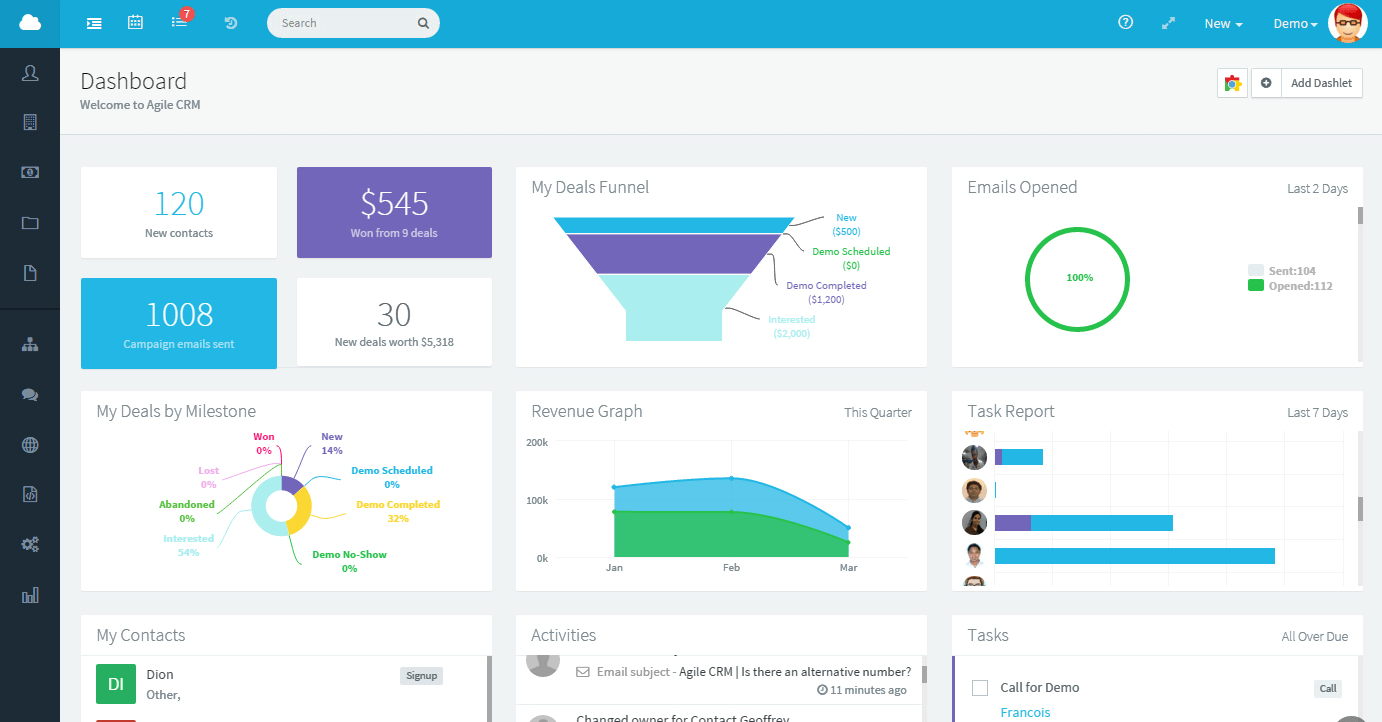
Le funzionalità di automazione del flusso di lavoro e gestione delle attività rendono Agile CRM un'eccellente soluzione di monitoraggio delle vendite per i team Agile. I cruscotti di squadra facilitano le riunioni stand-up, mentre le funzionalità di impostazione degli obiettivi mantengono i cicli di sprint sulla giusta strada.
Perché ho scelto Agile CRM: Agile CRM offre un piano gratuito generoso fino a dieci utenti. I cruscotti per la gestione di lead, trattative e contatti spiccano per la loro semplicità, ma le automazioni sofisticate li portano a un livello superiore. La valutazione dei lead e le fasi personalizzate delle trattative sono essenziali per la pianificazione degli sprint e per garantire che il team raggiunga piccoli obiettivi lungo il percorso verso traguardi più importanti.
Funzionalità e integrazioni principali di Agile CRM:
Le funzionalità includono campi dati personalizzati, pianificazione degli appuntamenti, automazioni post-chiamata, registrazioni delle chiamate e messaggi vocali automatici. È quindi un ottimo strumento per i team di vendita che lavorano anche con i potenziali clienti al telefono.
Le integrazioni includono 50 integrazioni native, tra cui Facebook, Stripe, Quickbooks e LinkedIn sono le più popolari. Zapier consente ulteriori collegamenti ed è disponibile l'API di Agile CRM per integrazioni personalizzate.
Pros and Cons
Pros:
- Piano gratuito generoso
- Opzione di gamification per migliorare l'efficienza
- Importare i contatti è rapido e semplice
Cons:
- Nessun tutorial per le funzionalità avanzate
- Opzioni di personalizzazione limitate


Insightly è ideale per le piccole imprese perché è facile da usare e comprende i ruoli complessi dei titolari di piccole aziende. Aiuta i team a evitare di lavorare a compartimenti stagni e a gestire il tempo per ridurre i cicli di vendita e concludere più affari.
Perché ho scelto Insightly: Mi sono concentrato su come Insightly si adatta alla crescita delle aziende. Come strumento per il monitoraggio delle vendite e CRM, le sue funzionalità sono ricche ma simili a quelle di altri strumenti. Ciò che spicca sono gli elementi di personalizzazione pur mantenendo la semplicità. Aggiungere dettagli sui clienti che aiutano a mantenere relazioni significative è il motivo per cui Insightly è ideale per le piccole aziende.
Funzionalità e integrazioni principali di Insightly:
Le funzionalità includono modelli e processi di vendita personalizzabili e collegamenti tra relazioni. Una funzionalità unica che apprezzo è la possibilità di convertire opportunità vinte in progetti, con gestione dei compiti e vista Kanban disponibili.
Le integrazioni includono Google, Microsoft 365, Quickbooks e Xero. Utilizzando Zapier e AppConnect, sono disponibili oltre 2.000 integrazioni.
Pros and Cons
Pros:
- Cruscotti di business intelligence integrati
- Gestione progetti integrata
- Scansione di biglietti da visita tramite app mobile
Cons:
- Automazioni solo nei piani premium
- Nessun supporto telefonico
Altri software di monitoraggio delle vendite
Ecco alcune ulteriori opzioni di software per il monitoraggio delle vendite che non sono entrate nella mia selezione ristretta, ma che vale comunque la pena prendere in considerazione:
- Creatio CRM
Ideale per una visione cliente a 360 gradi
- Copper
Ideale per utenti di Google Workspace
- Freshsales
Ideale per le funzionalità di engagement potenziate dall’intelligenza artificiale
- Pipedrive
Ideale per la gestione visiva delle pipeline e dashboard di reportistica integrata
- SugarAI
Ideale per l'automazione avanzata


Come valuto il software per il monitoraggio delle vendite
Analizzo gli strumenti di monitoraggio delle vendite su due livelli: le funzionalità imprescindibili come la visibilità della pipeline e il raggiungimento delle quote, e i fattori differenzianti—come la previsione AI—che distinguono le opzioni migliori.
Funzionalità principali (requisiti fondamentali per questa lista)
Quando seleziono gli strumenti per la mia lista, valuto ciascuno su una scala da 0 (non offre la funzionalità) a 5 (eccelle in quest'area) per ogni funzionalità principale elencata sotto. Poi calcolo il punteggio totale dello strumento come percentuale. Ogni strumento deve raggiungere un punteggio minimo totale del 75% per essere incluso.
- Monitoraggio della pipeline: Valuto come ogni strumento visualizza le fasi delle trattative—verificando se è possibile personalizzare le pipeline, filtrare per commerciale o area geografica, e individuare le trattative bloccate prima che vengano perse silenziosamente.
- Registrazione delle attività di vendita: Ogni strumento dovrebbe registrare chiamate, email e riunioni collegate a trattative e contatti. Controllo se la registrazione è solo manuale o se si sincronizza automaticamente da calendari e caselle di posta.
- Dashboard & reportistica sulle vendite: Verifico quanto sia semplice costruire viste sui KPI come tasso di successo, conversione per fase e produttività dei commerciali senza dover ricorrere a un tool BI o al team dati.
- Previsione delle vendite: La previsione dovrebbe andare oltre la semplice somma dei valori ponderati della pipeline. Valuto se gli strumenti offrono aggregazioni per team, categorie regolabili e confronti con trend storici.
- Gestione di obiettivi & quote: Controllo se si possono impostare e monitorare quote a livello di commerciale, team e periodo—e se commerciali e manager possono vedere i risultati in tempo reale senza dover generare report separati.
- CRM & integrazioni dati: Lo strumento deve collegarsi al CRM e al stack di vendite esistente. Esamino le integrazioni native con piattaforme come Salesforce, HubSpot e Pipedrive, oltre all'accesso API aperto.
Una volta che ho una lista di strumenti che rispondono a questi criteri, considero cosa distingue ogni piattaforma.
Fattori differenzianti (cosa distingue i fornitori)
Ecco come confronto i diversi fornitori:
Funzionalità distintive
Le intuizioni sulle trattative basate su intelligenza artificiale sono un vero differenziatore—cerco strumenti che individuano trattative a rischio e raccomandano le prossime azioni basandosi sui modelli storici di successo, non solo sulla probabilità di fase. L'intelligenza conversazionale offre un altro livello, collegando registrazioni e trascrizioni delle chiamate direttamente agli esiti delle trattative così i manager possono formare i commerciali con dati reali. Valuto anche il monitoraggio dell'attribuzione delle entrate, utile ai team RevOps per collegare i ricavi “closed-won” a specifiche campagne e touchpoint lungo il percorso d’acquisto.
Oltre le funzionalità
La profondità d’integrazione con il tech stack è cruciale. Verifico se uno strumento offre una vera sincronizzazione bidirezionale col CRM o solo trasferimenti superficiali di dati—perché le sincronizzazioni unidirezionali creano rapidamente problemi nei report. Implementazione e rapidità nel generare valore sono fondamentali. Una piattaforma con onboarding guidato e modelli di pipeline consente al team vendite di monitorare le trattative in pochi giorni, non mesi. La trasparenza dei prezzi completa la mia valutazione; cerco costi chiari per utente e visibilità su cosa è bloccato in piani superiori prima che il team si impegni.
Come scegliere un software di monitoraggio delle vendite
È facile perdersi in lunghi elenchi di funzionalità e strutture tariffarie complesse. Per aiutarti a mantenere la concentrazione mentre affronti il tuo esclusivo processo di selezione del software, ecco un elenco di fattori da tenere a mente:
| Fattore | Cosa considerare |
|---|---|
| Scalabilità | Il software crescerà insieme alla tua azienda? Valuta se è in grado di gestire un aumento del volume dei dati e del numero di utenti senza problemi di prestazioni con l'espansione del tuo team. |
| Integrazioni | Si connette agli strumenti che già utilizzi? Verifica la compatibilità con il tuo CRM, la posta elettronica e le piattaforme di comunicazione attuali per garantire un'integrazione fluida del flusso di lavoro. |
| Personalizzazione | Puoi adattarlo alle tue esigenze? Cerca opzioni per modificare flussi di lavoro, campi e report in base ai tuoi processi specifici senza dover ricorrere al supporto di uno sviluppatore. |
| Semplicità d'uso | È facile da usare per il tuo team? Valuta l'interfaccia e la navigazione. Gli strumenti semplici riducono i tempi di formazione e migliorano i tassi di adozione. |
| Implementazione e configurazione iniziale | Quanto velocemente puoi iniziare? Valuta le risorse formative, il supporto e l'assistenza alla configurazione disponibili per evitare un processo di implementazione eccessivamente lungo. |
| Costo | Rientra nel tuo budget? Confronta i piani tariffari, inclusi i costi nascosti come le commissioni di configurazione o gli addebiti aggiuntivi per le funzionalità extra. Cerca opzioni di fatturazione flessibili. |
| Misure di sicurezza | I tuoi dati e la tua privacy sono protetti? Verifica gli standard di crittografia, le politiche di backup dei dati e la conformità alle normative pertinenti come il GDPR o il CCPA. |
Tendenze dei software di monitoraggio delle vendite per 2026
Il software per il monitoraggio delle vendite continua a evolversi rapidamente, incorporando tecnologie e metodologie avanzate per offrire informazioni più approfondite e flussi di lavoro più efficienti. Poiché le aziende si concentrano sempre più sul processo decisionale basato sui dati, il ruolo del monitoraggio delle vendite nella comprensione e nell'ottimizzazione delle operazioni legate ai ricavi diventa sempre più importante. Per le organizzazioni più grandi, il software per le vendite aziendali offre la scalabilità e le funzionalità avanzate necessarie per gestire processi di vendita complessi. Di seguito sono riportate le principali tendenze e gli sviluppi che stanno plasmando il panorama del software per il monitoraggio delle vendite:
Integrazione e automazione:
- Integrazione avanzata con i CRM: Il software per il monitoraggio delle vendite offre sempre più un'integrazione profonda e fluida con le piattaforme CRM, consentendo una visione unificata delle interazioni con i clienti e delle attività di vendita.
- Acquisizione automatizzata dei dati: La capacità di acquisire e registrare automaticamente le interazioni di vendita attraverso vari canali sta migliorando, riducendo l'inserimento manuale e aumentando l'accuratezza dei dati.
Analisi avanzata e intelligenza artificiale:
- Analisi predittiva: Gli strumenti di monitoraggio delle vendite stanno integrando analisi avanzate e intelligenza artificiale per prevedere le tendenze delle vendite, identificare le opportunità e prevedere i comportamenti dei clienti, consentendo un processo decisionale proattivo.
- Informazioni basate sull'intelligenza artificiale: L'uso dell'intelligenza artificiale per fornire informazioni e raccomandazioni concrete sta diventando sempre più diffuso e aiuta i team di vendita a definire le priorità in modo più efficace.
Collaborazione e mobilità:
- Funzionalità di collaborazione in tempo reale: Si pone sempre maggiore enfasi sulle funzionalità che supportano la collaborazione in tempo reale tra i membri del team, indipendentemente dalla loro posizione, migliorando la sinergia e la reattività del team.
- Ottimizzazione per dispositivi mobili: Poiché i team di vendita lavorano sempre più in mobilità, il software per il monitoraggio delle vendite pone l'accento su esperienze mobili solide, garantendo piena funzionalità e accesso ai dati critici anche in movimento.
Tecnologie emergenti:
- Blockchain per la sicurezza dei dati: Alcune soluzioni per il monitoraggio delle vendite stanno iniziando a integrare la tecnologia blockchain per migliorare la sicurezza e l'affidabilità dei dati, soprattutto nei settori in cui la sensibilità dei dati è fondamentale.
- Integrazione con l'IoT: L'integrazione con i dispositivi dell'Internet delle cose (IoT) sta iniziando a diffondersi, consentendo una raccolta dei dati più automatizzata e modalità innovative per monitorare le interazioni con i clienti e le prestazioni dei prodotti.
Funzionalità in evoluzione:
- Minore attenzione all'inserimento manuale dei dati: Con il miglioramento delle funzionalità di automazione e integrazione, la necessità di inserire manualmente i dati sta diminuendo, poiché il software è sempre più in grado di aggregare e sintetizzare i dati automaticamente.
- Minore enfasi sulla reportistica di base: Le funzionalità di reportistica di base stanno diventando un elemento di vendita meno importante, poiché gli utenti si aspettano funzionalità di reportistica più dinamiche, interattive e predittive.
Il software per il monitoraggio delle vendite sta diventando sempre più essenziale per la pianificazione e l'esecuzione strategica delle vendite, grazie ai progressi nell'intelligenza artificiale, nell'analisi e nelle funzionalità di integrazione. Per i responsabili delle operazioni legate ai ricavi, scegliere un software in linea con queste tendenze sarà fondamentale per ottenere informazioni più approfondite, aumentare l'efficienza e rimanere competitivi in un panorama aziendale in continua evoluzione.
Che cos'è il software per il monitoraggio delle vendite?
Il software per il monitoraggio delle vendite è uno strumento che aiuta a registrare, monitorare e gestire tutte le attività di vendita in un unico luogo. I responsabili delle vendite e i rappresentanti commerciali lo utilizzano per seguire i contatti potenziali, monitorare le trattative e visualizzare report in tempo reale sull'andamento del team. Riduce le attività ripetitive, mostra cosa funziona (e cosa no) e mantiene tutti concentrati sulla conclusione di un maggior numero di vendite.
Funzionalità
Quando scegli il software per il monitoraggio delle vendite, presta attenzione alle seguenti funzionalità chiave:
- Monitoraggio dei lead: Monitora i potenziali clienti e aiuta a gestire i follow-up per convertire i lead in vendite.
- Previsione delle vendite: Prevede le vendite future sulla base dei dati storici, agevolando la pianificazione e la strategia.
- Funzionalità di reportistica: Genera report dettagliati sulle attività e sulle prestazioni di vendita per supportare le decisioni aziendali.
- Automazione: Automatizza attività ripetitive come l'inserimento dei dati e i follow-up, lasciando più tempo per attività strategiche.
- Pannelli personalizzabili: Consente agli utenti di adattare le visualizzazioni dei dati alle proprie esigenze e preferenze specifiche.
- Gestione dei contatti: Organizza le informazioni sui clienti e la cronologia delle interazioni per facilitarne l'accesso e la consultazione.
- Accessibilità tramite app mobile: Fornisce accesso ai dati e agli strumenti di vendita anche in mobilità, garantendo la produttività fuori dall'ufficio.
- Gestione della pipeline: Rappresenta visivamente il processo di vendita per aiutare i team a monitorare le opportunità e i progressi attraverso le varie fasi.
- Opzioni di integrazione: Si connette ad altri strumenti e piattaforme per garantire la coerenza dei dati e l'efficienza dei flussi di lavoro.
Vantaggi
L'implementazione di un software per il monitoraggio delle vendite offre numerosi vantaggi al tuo team e alla tua azienda. Ecco alcuni dei benefici che puoi aspettarti:
- Maggiore efficienza: L'automazione delle attività ripetitive fa risparmiare tempo e consente al tuo team di concentrarsi sulla chiusura degli accordi.
- Migliore capacità decisionale: Le funzionalità di reportistica forniscono informazioni sulle prestazioni di vendita, aiutandoti a prendere decisioni strategiche consapevoli.
- Collaborazione potenziata: I pannelli e i dati condivisi garantiscono che tutti siano allineati e lavorino verso obiettivi comuni.
- Aumento delle vendite: Il monitoraggio dei lead e la gestione della pipeline aiutano a chiudere più accordi, mantenendo organizzate e dando priorità alle potenziali opportunità di vendita.
- Maggiore flessibilità: L'accesso tramite app mobile consente al tuo team di lavorare efficacemente ovunque, non solo alla propria scrivania.
- Comunicazione semplificata: La gestione dei contatti riunisce tutte le interazioni con i clienti in un unico luogo, facilitando il mantenimento di relazioni solide.
- Scalabilità: Con la crescita della tua azienda, il software può adattarsi all'aumento dei dati e alle esigenze degli utenti senza compromettere le prestazioni.
Costi & Prezzi
La scelta di un software per il monitoraggio delle vendite richiede la comprensione dei vari modelli e piani tariffari disponibili. I costi variano in base alle funzionalità, alle dimensioni del team, agli extra e ad altri fattori; sono disponibili anche software gratuiti per il monitoraggio delle vendite per i team che necessitano solo delle funzionalità di base. La tabella seguente riassume i piani più comuni, i relativi prezzi medi e le funzionalità tipicamente incluse nelle soluzioni software per il monitoraggio delle vendite:
Tabella comparativa dei piani per i software di monitoraggio delle vendite
| Tipo di piano | Prezzo medio | Funzionalità comuni |
|---|---|---|
| Piano gratuito | $0 | Monitoraggio di base dei lead, gestione semplice dei contatti e reportistica limitata. |
| Piano personale | $5-$25/utente/mese | Reportistica avanzata, integrazione con le email e automazione di base. |
| Piano aziendale | $30-$60/utente/mese | Analisi avanzate, pannelli personalizzabili e automazione dei flussi di lavoro. |
| Piano aziendale avanzato | $70-$150/utente/mese | Funzionalità di integrazione complete, gestione dedicata dell'account e assistenza prioritaria. |
Domande frequenti sul software di monitoraggio delle vendite
Ecco alcune risposte alle domande comuni sul software di monitoraggio delle vendite:
Quali sono i tipi di software per il monitoraggio delle vendite?
Il software di monitoraggio delle vendite è uno strumento essenziale per le aziende che puntano a ottimizzare i propri processi di vendita e migliorare le prestazioni. Diversi tipi di software per il monitoraggio delle vendite rispondono a esigenze, dimensioni e obiettivi differenti delle organizzazioni. Ecco i principali tipi di software per il monitoraggio delle vendite:
- Monitoraggio delle vendite basato sul CRM: Questo software integra il monitoraggio delle vendite in un sistema più ampio di gestione delle relazioni con i clienti (CRM). Non si limita a monitorare le vendite, ma gestisce anche le interazioni con i clienti, offrendo una visione completa del coinvolgimento dei clienti e delle attività di vendita.
- Software per il monitoraggio dei lead: Incentrato specificamente sul monitoraggio dei potenziali lead di vendita, questo software aiuta le aziende a monitorare le fonti dei lead, le interazioni e i progressi nel funnel di vendita, ottimizzando le strategie di conversione dei lead.
- Software di analisi delle vendite: Ponendo l’accento sull’analisi dei dati, questo tipo di software offre approfondimenti sulle tendenze delle vendite, sulle metriche delle prestazioni e sulle previsioni, consentendo di prendere decisioni basate sui dati per migliorare le strategie e i risultati delle vendite.
- Software di gestione della pipeline: Questo tipo di software si concentra sulla gestione e sulla visualizzazione della pipeline di vendita, aiutando i team di vendita a monitorare lo stato delle diverse trattative nelle varie fasi, a individuare i colli di bottiglia e a prevedere efficacemente i ricavi.
- Software di monitoraggio delle attività di vendita: Concentrandosi sulle attività quotidiane dei team di vendita, questo software monitora chiamate, e-mail, riunioni e altre attività legate alle vendite, garantendo la responsabilità e massimizzando la produttività.
- Software di gestione delle prestazioni di vendita: Oltre a monitorare le metriche di vendita, questo tipo di software si concentra sulla valutazione delle prestazioni del team di vendita, sulla definizione degli obiettivi, sulla fornitura di feedback e sulla facilitazione della formazione e dello sviluppo.
- Software di monitoraggio delle vendite sul campo: Progettato per le aziende con team di vendita sempre in movimento, questo software incentrato sui dispositivi mobili aiuta a monitorare le attività basate sulla posizione, le visite ai clienti e le interazioni di persona, ottimizzando le operazioni di vendita sul campo.
- Monitoraggio delle vendite tramite POS (punto vendita): Particolarmente utile per le attività di vendita al dettaglio, questo software monitora le transazioni di vendita, il movimento dell’inventario e il comportamento d’acquisto dei clienti al punto vendita.
- Monitoraggio delle vendite e-commerce: Pensato per le attività online, questo software si integra con le piattaforme e-commerce per monitorare le transazioni online, le interazioni con i clienti e le analisi web, offrendo informazioni specifiche sui canali di vendita digitali.
Ogni tipo di software per il monitoraggio delle vendite ha obiettivi distinti e offre vantaggi specifici. Quando si seleziona una soluzione per il monitoraggio delle vendite, è fondamentale considerare le esigenze specifiche dell’azienda, i processi di vendita e le informazioni necessarie per raggiungere efficacemente gli obiettivi di vendita.
Perché è importante monitorare le prestazioni di vendita?
Avere una panoramica chiara del funnel di vendita, con le prestazioni storiche e i ricavi previsti, è fondamentale per sapere se la propria azienda sta crescendo e a quale ritmo. Il monitoraggio delle prestazioni di vendita fornisce aspettative chiare sul fatto che le opportunità nella pipeline raggiungeranno o supereranno gli obiettivi attuali e indica dove sono presenti delle lacune. Il monitoraggio di dati come i tassi di successo e i tempi di risposta aiuta inoltre a controllare l’efficienza dei team di vendita.
È necessaria una formazione per utilizzare il software di monitoraggio delle vendite?
Sì, spesso è necessaria una formazione per ottenere il massimo dal software di monitoraggio delle vendite. Sebbene alcuni strumenti siano intuitivi, altri potrebbero richiedere sessioni di formazione più approfondite. È consigliabile scegliere fornitori che offrano risorse formative come tutorial video, webinar e guide per gli utenti. Queste risorse possono aiutare il team a imparare rapidamente a usare il software e a sfruttarne al massimo le potenzialità.
Quali sono gli errori comuni da evitare quando si utilizza un software di monitoraggio delle vendite?
Un errore comune consiste nel complicare eccessivamente la configurazione con troppi campi o fasi. Un altro è non esaminare regolarmente i dati, con conseguenti informazioni obsolete. Mantieni il processo semplice, forma adeguatamente il team e controlla spesso i report per conservarne l’utilità.
Prossimi passi:
Se stai cercando un software di monitoraggio delle vendite, contatta gratuitamente un consulente SoftwareSelect per ricevere consigli.
Compili un modulo e fai una breve conversazione durante la quale il consulente approfondirà le tue esigenze specifiche. In seguito riceverai una lista ristretta di software da esaminare. Ti assisterà inoltre durante l'intero processo di acquisto, comprese le negoziazioni sul prezzo.