
29 Best CRM Software Reviewed For 2026

20 Best CRM Software Shortlist
Here's my pick of the 20 best software from the 30 tools reviewed.


Swamped by all the CRM options out there? You’re not alone. With so many platforms promising to “revolutionize” your sales process, it’s easy to feel stuck in analysis paralysis. One wrong move, and you’re left with clunky software that no one wants to use.
I know what it's like to juggle growth targets, pipeline visibility, and cross-functional alignment as you scale. The last thing you need is another tool that adds more complexity than clarity. That’s why we’ve done the heavy lifting for you.
After evaluating countless CRMs, we’ve narrowed it down to the 26 best CRM software options for 2026. Whether you need to streamline customer data, track deals, or fuel your revenue engine, there’s something here for every stage of growth. Let’s find your perfect match.
Why Trust Our CRM Software Reviews?
We’ve been testing and reviewing CRM software since 2022. As revenue operation leaders ourselves, we know how critical and difficult it is to make the right decision when selecting software.
We invest in deep research to help our audience make better software purchasing decisions. We’ve tested more than 2,000 tools for different RevOps use cases and written over 1,000 comprehensive software reviews. Learn how we stay transparent & our CRM software review methodology.
| Tool | Best For | Trial Info | Price | ||
|---|---|---|---|---|---|
| 1 | Best for managing your entire sales cycle | Free demo available | Pricing upon request | Website | |
| 2 | Best for customizable CRM solutions | 14-day free trial | From $29/user/month (billed annually) | Website | |
| 3 | Best for no-code CRM automation | 14-day free trial available | From $25/user/month | Website | |
| 4 | Best customizable CRM | Free trial + free plan available | From $25/user/month (billed annually) | Website | |
| 5 | Best for automated lead tracking | 30-day free trial | From $29/user/month (billed annually) | Website | |
| 6 | Best for small manufacturers | Free trial available | From $49/user/month (up to 10 users) | Website | |
| 7 | Best for smart, simple CRM solutions | 14-day free trial + free plan available | From $18/user/month (billed annually) | Website | |
| 8 | Best for remote and hybrid teams | Free plan + free demo + free trial available | From $14/user/month (billed annually) | Website | |
| 9 | Best for B2B order management | Free 60-day trial available | Pricing upon request | Website | |
| 10 | Best for implementing a CRM in Gmail | 14-day free trial available | From $49/user/month (billed annually) | Website | |
| 11 | Best for sales pipeline visualization | 14-day free trial | From $14/user/month (billed annually) | Website | |
| 12 | Best for increasing sales efficiency | Free demo available | From $19/agent/month (billed annually) | Website | |
| 13 | Best for using customer data to personalize experiences | Free demo available | Pricing upon request | Website | |
| 14 | Best for sharing customer data | Free demo + free trial available | From $29/user/month (billed annually) | Website | |
| 15 | Best for ease of use | 14-day free trial + free plan available | From $18/user/month (billed annually) | Website | |
| 16 | Best for small business management | Free demo available | From $244/month | Website | |
| 17 | Best for AI-powered lead scoring | Free demo + 21-day free trial available | From $9/user/month (billed annually) | Website | |
| 18 | Best for AI-powered customer insights | Free demo available | Pricing upon request | Website | |
| 19 | Best for visual sales pipelines | 14-day free trial available | From $14/seat/month (billed annually) | Website | |
| 20 | Best for developer-oriented customizations. | Free demo available | From $59/user/month (billed annually) | Website |

-

Zendesk
Visit WebsiteThis is an aggregated rating for this tool including ratings from Crozdesk users and ratings from other sites.4.3 -
Pipedrive CRM
Visit WebsiteThis is an aggregated rating for this tool including ratings from Crozdesk users and ratings from other sites.4.3 -
Creatio CRM
Visit WebsiteThis is an aggregated rating for this tool including ratings from Crozdesk users and ratings from other sites.4.7


Best CRM Software Reviews
Here’s a brief description of each CRM software that showcases each tool’s best use case, outstanding features, and some pros and cons. I’ve also included screenshots to give you a snapshot of their user interface.

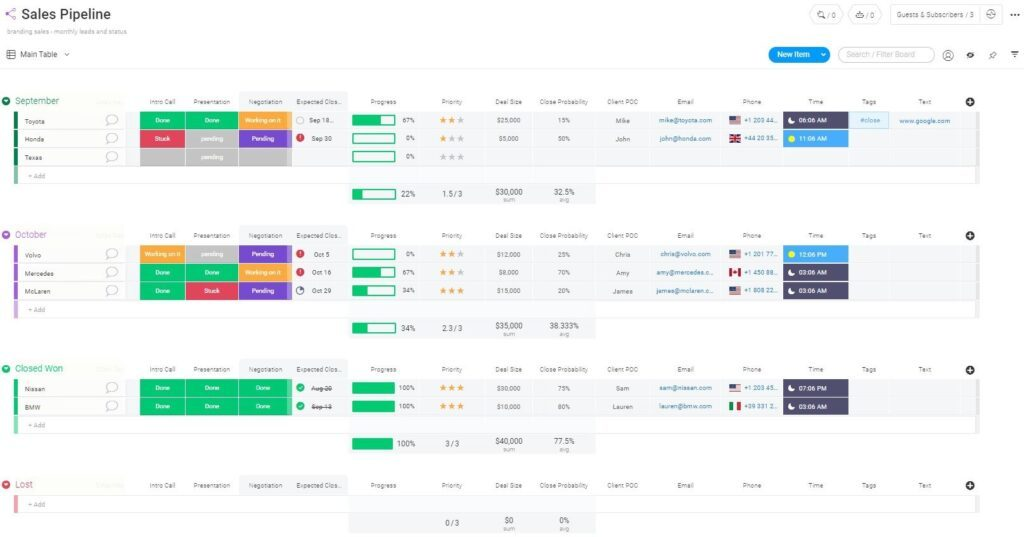
monday CRM gives sales teams and growing businesses a customizable platform to organize contacts, automate workflows, and track deals from first touch to close, making it easier to manage complex sales processes in one place.
Who Is monday CRM Best For?
monday CRM is a strong fit for small to mid-sized sales teams that need a flexible, visual way to manage pipelines without the complexity of enterprise CRM platforms.
Why I Picked monday CRM
monday CRM earns its spot on my shortlist because it genuinely covers the full sales cycle in one place, from lead capture to post-sale client management. I like that you can customize pipeline stages without touching a line of code, and drag deals between stages as they progress. AI-powered task generation stands out: it converts meeting notes or call transcripts into next steps, preventing tasks from falling through the cracks between stages. The post-sales management module is something I don't see in many CRMs at this level, letting my team track client projects and collections without switching tools.
monday CRM Key Features
- Lead scoring: Automatically score incoming leads based on custom criteria to help your team prioritize the most promising opportunities.
- Personalized email sequences: Build and send targeted email sequences to contacts at specific pipeline stages, with open tracking built in.
- One-click automations: Set up trigger-based automations to assign leads, send reminders, and notify reps when contacts engage, with no coding required.
- Sales performance dashboards: Build real-time dashboards that surface deal status, expected revenue, and individual rep performance in one view.
monday CRM Integrations
Integrations include Salesforce, QuickBooks, HubSpot, Zendesk, Slack, Gmail, Google Calendar, Outlook, Microsoft Teams, and Mailchimp.
Pros and Cons
Pros:
- 24/7 customer support.
- Easy to develop and implement automations.
- Unlimited boards to organize clients, projects, and processes.
Cons:
- All plans have a three-user minimum.
- No customizable reports.
New Product Updates from monday CRM

monday CRM Introduces Activity Tracker Widget
monday CRM introduces an Activity Tracker widget for real-time visibility into activities. This update helps users monitor performance and prioritize work more effectively. For more information, visit monday CRM's official site.
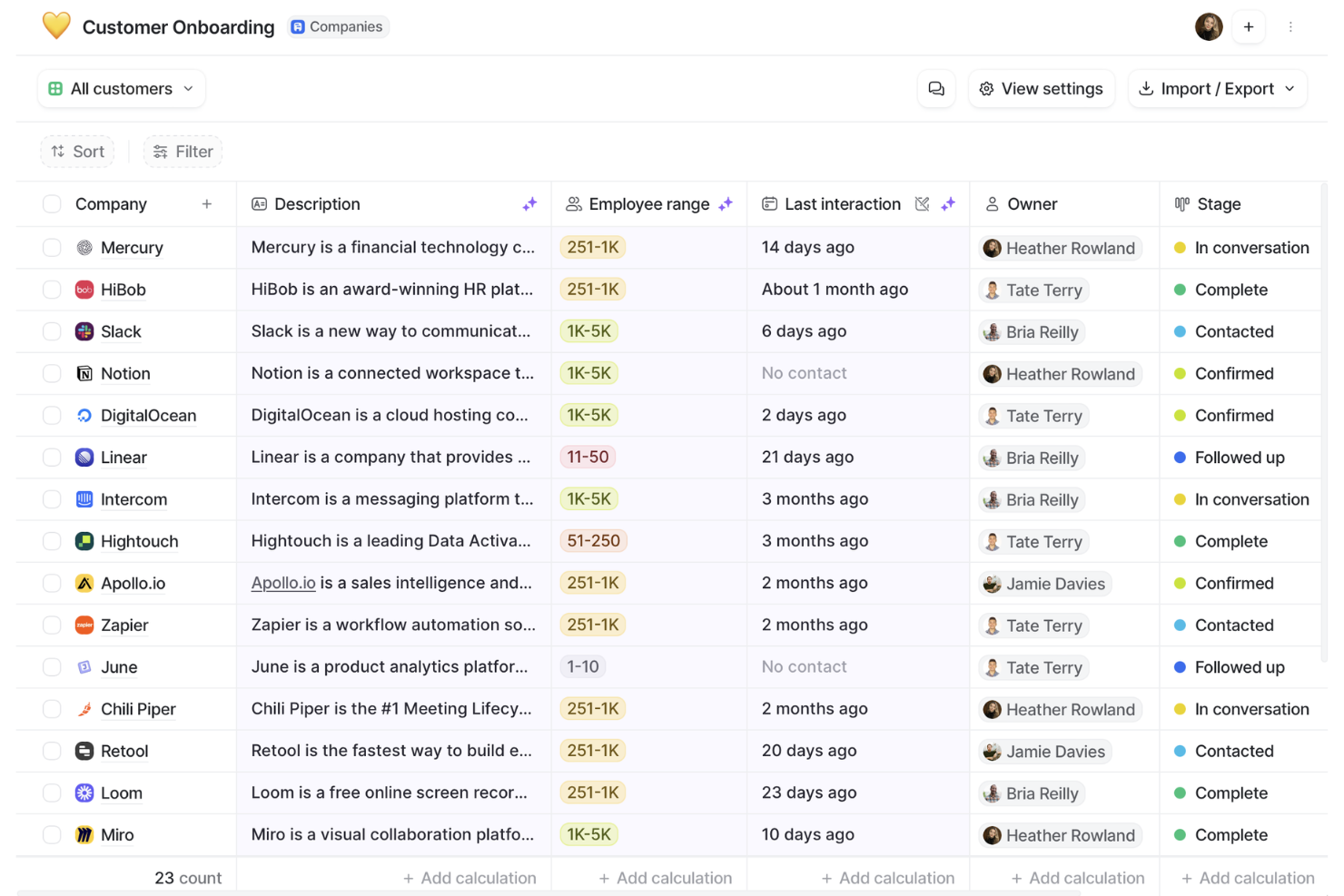
Attio is a modern CRM platform for teams building flexible, collaborative workspaces that adapt to their unique sales, marketing, and relationship management needs.
Who Is Attio Best For?
Attio is a strong fit for fast-growing startups and scale-ups that need a CRM they can shape around their own data models and go-to-market processes.
Why I Picked Attio
Attio is one of my top picks because I love how far you can push its data model without needing a developer. I can create custom objects for things like partnerships or investor relationships, define my own attributes, and link records together using a graph model that actually reflects how my business operates. In practice, that means my team isn't forced into a rigid contact-company-deal structure. The visual workflow builder layers on top of that flexibility nicely, letting me automate GTM processes based on those custom objects and attributes rather than just standard pipeline triggers.
Attio Key Features
- Real-time reporting dashboards: Build custom dashboards with line charts, bar graphs, and geospatial maps that pull live data across your entire GTM pipeline.
- Email sequences: Enroll contacts based on behavioral signals and send automated, personalized email sequences with auto-assigned senders.
- Activity timelines: View a full interaction history for every record, including emails, meetings, and notes, all in one place.
- Automatic data enrichment: Pull in firmographic data like revenue, employee count, and location from hundreds of sources directly into contact and company records.
Attio Integrations
Integrations include Gmail, Outlook, Segment, Mailchimp, Slack, Outreach, Mixmax, and Typeform.
Pros and Cons
Pros:
- Good collaboration features
- Automatically enriches contact data
- Highly customizable CRM
Cons:
- Mobile app lacks some functionalities
- Lacks some advanced email features
New Product Updates from Attio
Attio Improves Call Recorder Controls and Playback Experience
Attio introduces branding options in Call Recorder and enhanced call recording management. These updates improve control over recordings and make playback more seamless. For more information, visit Attio’s official site.
 .
.
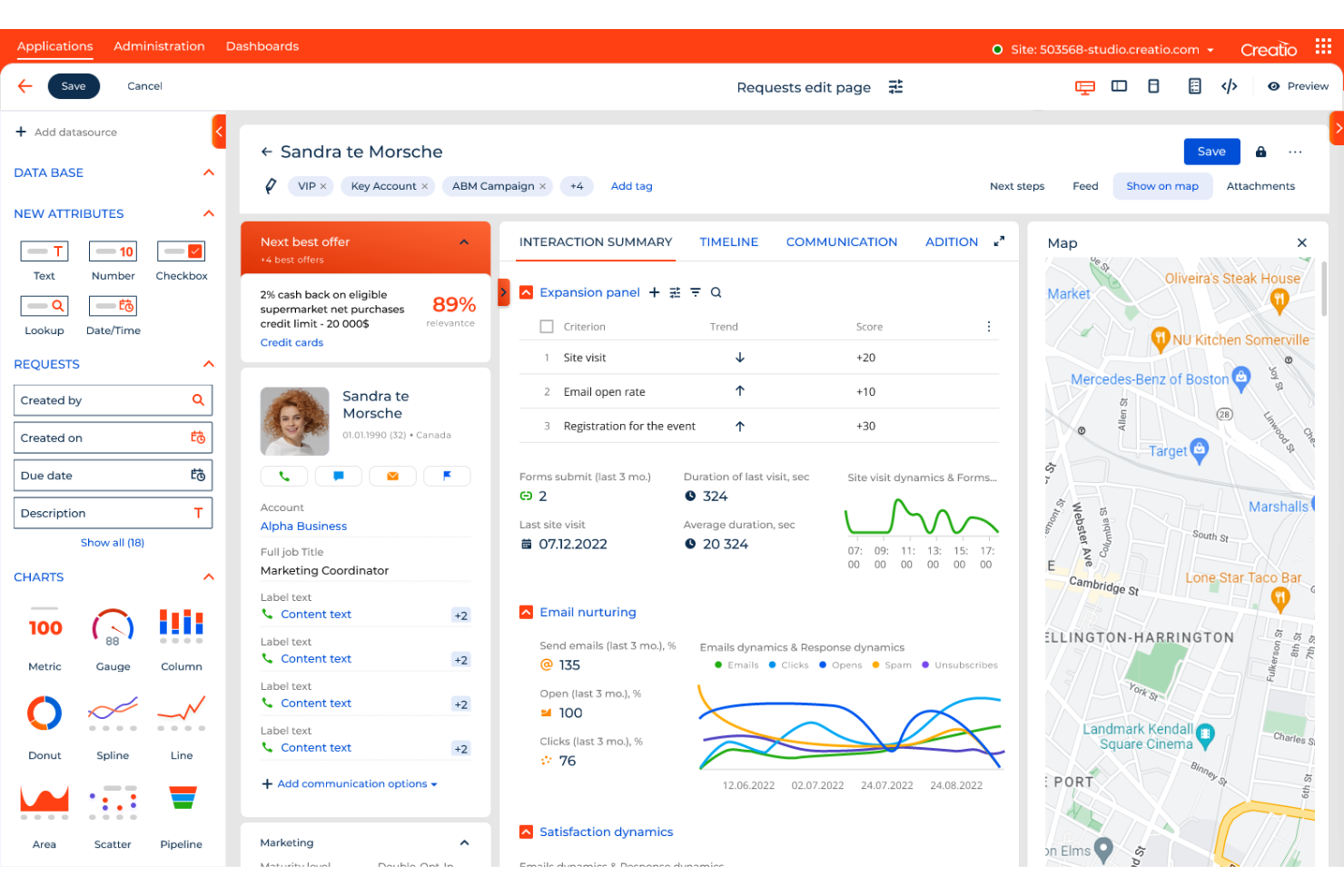
Creatio CRM gives sales, marketing, and service teams in mid-sized and large businesses a unified platform to manage customer relationships, automate processes, and adapt workflows to fit changing business needs.
Who Is Creatio CRM Best For?
Creatio CRM is a strong fit for mid-sized to enterprise businesses that need a customizable CRM without relying on developers to build or modify workflows.
Why I Picked Creatio CRM
Creatio CRM earns its spot on my shortlist because of how far its no-code automation goes. Most CRMs let you tweak a field or set up a basic email trigger. With Creatio, I can redesign entire workflows, rebuild data models, and create custom pages without writing a single line of code—within one visual workspace. The no-code process designer handles both structured workflows and dynamic case management, so my team can automate something as predictable as a lead nurture sequence or as fluid as a multi-step service escalation. I also like that Creatio ships with pre-built workflow templates for 20 industries, which means you're not starting from scratch when you need to automate something specific to your vertical.
Creatio CRM Key Features
- AI agent library: Creatio ships with role-specific AI agents for sales, marketing, and service—covering tasks like account research, quote generation, lead scoring, and case routing.
- 360-degree contact and account management: View a complete history of customer interactions, preferences, and account details in a single, unified profile.
- Multichannel marketing automation: Build, execute, and track campaigns across email, digital ads, and social channels with built-in audience segmentation and micro-targeting tools.
- Omnichannel service management: Handle support cases across email, phone, chat, and social from one agent desktop, with SLA tracking and automated case escalation.
Creatio CRM Integrations
Integrations include Salesforce, Microsoft Dynamics 365, Zendesk, HubSpot, Zoho, Pega, LinkedIn, Google Workspace, Mailchimp, and DocuSign.
Pros and Cons
Pros:
- Detailed reporting and analytics
- Customizable features
- Advanced tools for lead management and client communication
Cons:
- Lack of integration with social media networks
- Learning curve for new users
New Product Updates from Creatio CRM

Creatio CRM Expands AI Across Marketing and Collaboration
Creatio CRM introduces AI-assisted landing page generation, template-based email generation, RAG-enabled knowledge governance, a Microsoft Teams personal tab, and AI meeting summaries. These updates help teams create content faster and streamline AI-powered workflows. For more information, visit Creatio’s official site.
 .
.
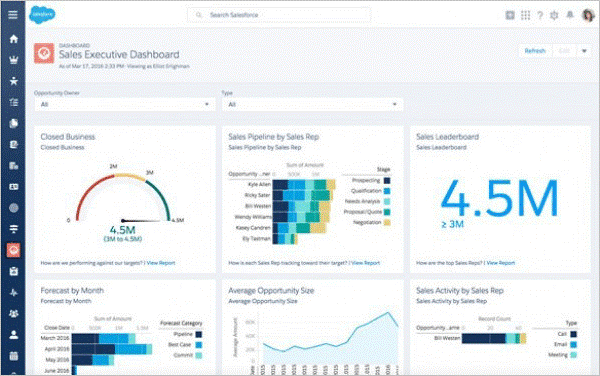
Salesforce CRM gives sales, marketing, and customer success teams a flexible platform to manage leads, automate workflows, and centralize customer data for businesses that need tailored processes and deep reporting.
Who Is Salesforce CRM Best For?
Salesforce CRM is a strong fit for mid-size to enterprise businesses that need a highly configurable CRM to match complex sales processes and cross-functional workflows.
Why I Picked Salesforce CRM
Salesforce CRM earns its spot on my shortlist because the depth of customization available is hard to match. I like that you can use Flow Builder to design complex, multi-step sales workflows with drag-and-drop logic—most use cases don't require a developer. For example, I've built territory assignment rules and automated lead routing that adapt based on deal size, region, and rep capacity, all without touching a line of code. Additionally, the custom objects and fields let you reshape the data model to fit your specific sales process rather than forcing your process to fit the CRM.
Salesforce CRM Key Features
- Opportunity management: Track deals through every stage of your pipeline with customizable stage names, probability scores, and close date forecasting.
- Einstein AI: Get AI-generated lead scores, opportunity insights, and next-best-action recommendations directly within your CRM records.
- AppExchange marketplace: Browse and install thousands of pre-built apps and integrations to extend your CRM without custom development.
- Reports and dashboards: Build real-time reports and visual dashboards using drag-and-drop tools to monitor pipeline health and team performance.
Salesforce CRM Integrations
Integrations include Slack, Outlook, Gmail, QuickBooks, Mailchimp, HubSpot, DocuSign, LinkedIn, Dropbox, and Google Drive.
Pros and Cons
Pros:
- 24/7 customer support via e-mail, phone, and tickets.
- Cloud-based system allows access from anywhere.
- Wide variety of features and customizations.
Cons:
- There can be a steep learning curve.
- Many features add to the price of the subscription.

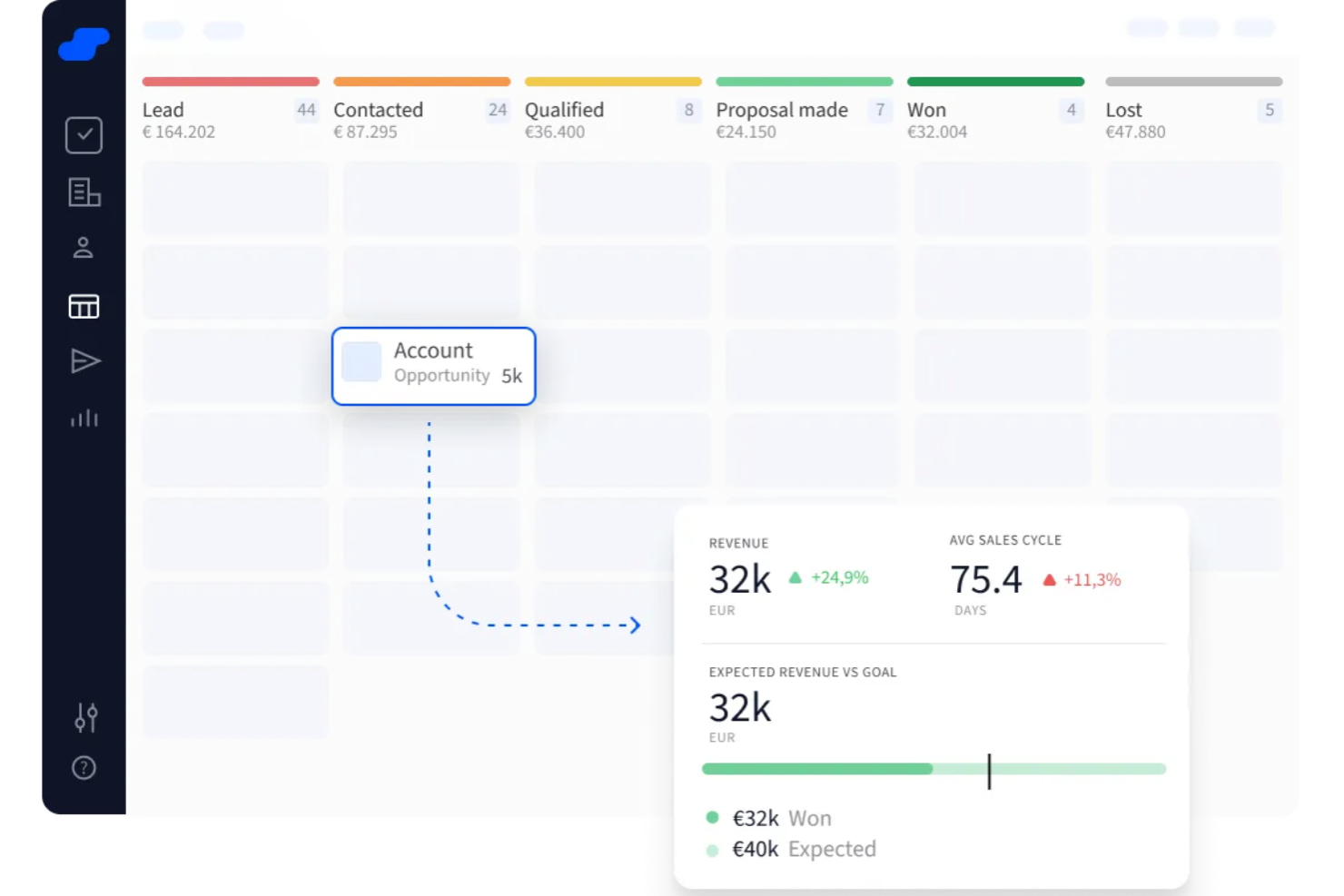
Salesflare is a CRM platform designed for small and medium-sized businesses that want to simplify sales processes, automate data entry, and keep their pipelines organized without manual effort.
Who Is Salesflare Best For?
Salesflare is a strong fit for small and medium-sized B2B sales teams that want a low-maintenance CRM with minimal manual data entry.
Why I Picked Salesflare
Salesflare earns its spot as one of the best on my shortlist because of how well it handles automated lead tracking without requiring reps to log every interaction manually. I like that it pulls contact data, email threads, and meeting notes together automatically, so my team's pipeline stays current even on busy days. The timeline view on each contact record gives me a clear picture of where every lead stands without digging through notes. I also rely on the automated follow-up reminders, which flag leads that have gone quiet so nothing slips through.
Salesflare Key Features
- Visual pipeline management: Drag-and-drop sales pipeline boards let you move deals across stages and track progress at a glance.
- Email tracking: Get notifications when a contact opens your email or clicks a link, so you know when to follow up.
- Team collaboration: Share contact records, notes, and deal activity with teammates so everyone stays on the same page.
- Mobile app: Log calls, check pipeline status, and access contact data from your phone while you're on the go.
Salesflare Integrations
Integrations include Google Workspace, Outlook, LinkedIn, Slack, Mailchimp, QuickBooks Online, Stripe, Shopify, Calendly, and Intercom.
Pros and Cons
Pros:
- Mobile CRM app supports on-the-go updates
- AI-driven insights help prioritize leads
- Visual pipelines make deal tracking straightforward
Cons:
- Some integrations require extra setup
- Limited customization options in pipelines
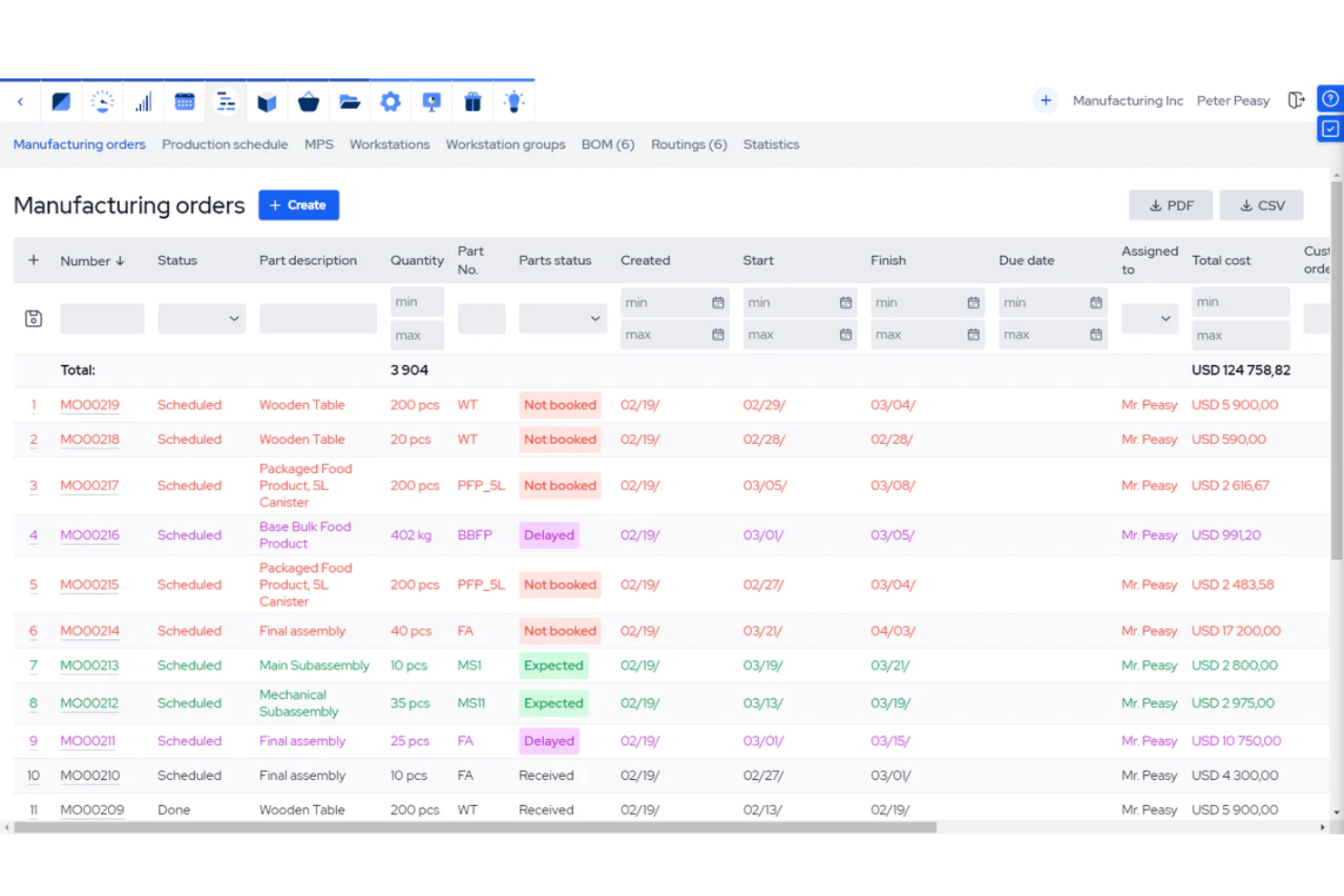
MRPeasy is a manufacturing-focused platform that gives small manufacturers and distributors basic CRM tools alongside production planning, inventory management, and order tracking to help manage customer relationships within a manufacturing workflow.
Who Is MRPeasy Best For?
MRPeasy is a good fit for small manufacturing and distribution businesses that need to manage customer orders alongside production and inventory in one place.
Why I Picked MRPeasy
I picked MRPeasy as one of the best because it's built specifically for small manufacturers who need customer management tied to production—not bolted on as an afterthought. What I like most is the automatic cost and delivery time estimation: when a customer order comes in, MRPeasy calculates lead times based on real production capacity and material availability. That means my team can quote accurately without manually cross-referencing inventory or the production schedule. The B2B customer portal is another feature I find genuinely useful, letting customers track their own orders without needing to contact your team.
MRPeasy Key Features
- Customer order tracking: Track every customer order from initial quotation through to final delivery in a single view.
- Quoting and invoicing: Generate quotes and invoices within the platform, tied to real inventory and production data.
- Customer and sales reports: Run built-in reports on customer activity and sales performance without needing a separate analytics tool.
- Tiered pricing: Set up different price lists for different customers or order volumes within the sales module.
MRPeasy Integrations
Integrations include QuickBooks Online, Xero, Shopify, Magento, Microsoft Power BI, BigCommerce, WooCommerce, Pipedrive, ShipStation, and HubSpot.
Pros and Cons
Pros:
- Sales funnel management
- Real-time inventory tracking
- Integrates CRM with production
Cons:
- Lack of advanced features due to simple interface
- May lack in technical support
New Product Updates from MRPeasy
MRPeasy Adds Estimated Weight Calculation for Items
MRPeasy introduces an estimated weight calculation feature, enhancing efficiency. For more information, visit MRPeasy's official site.
 .
.
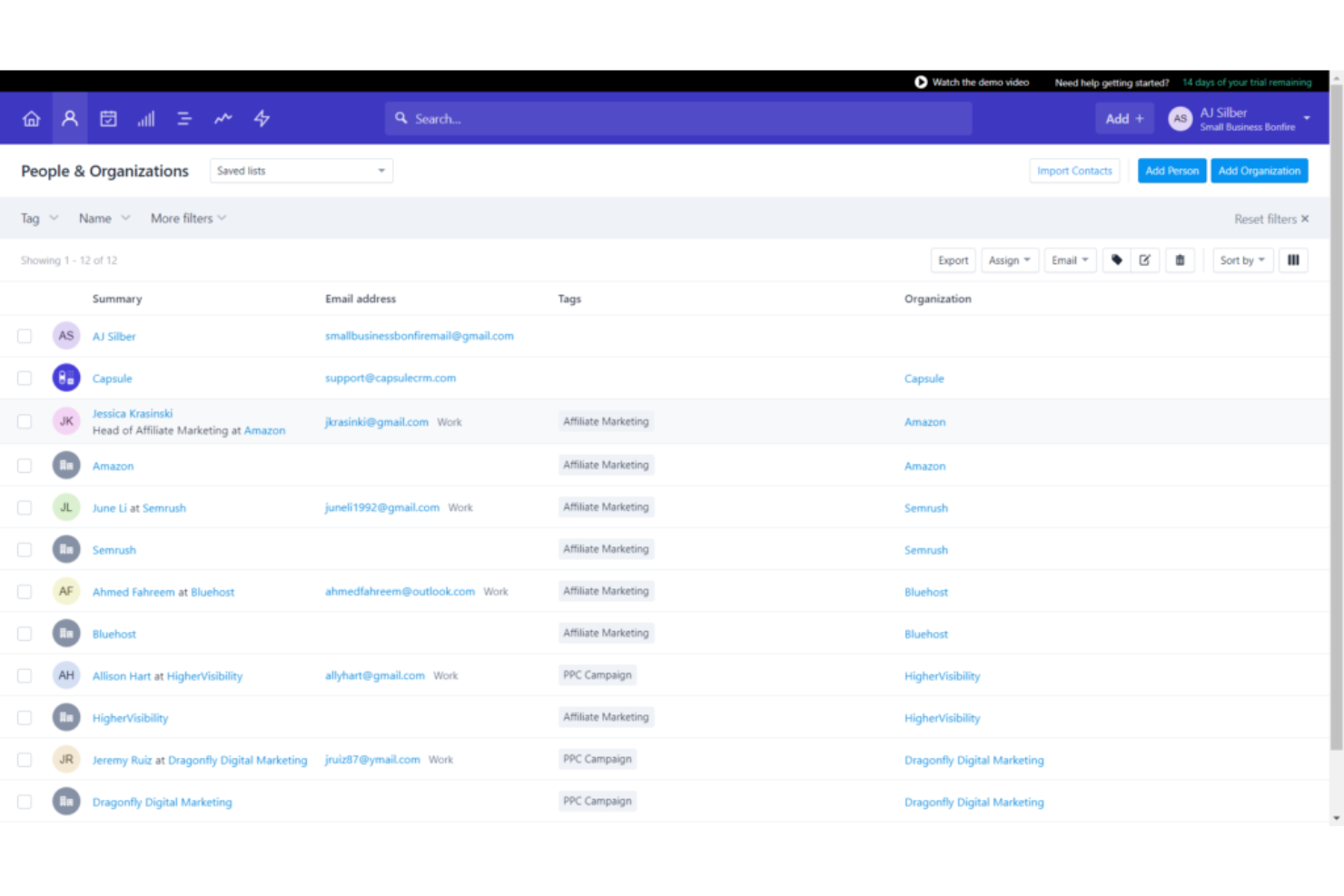
Capsule is a CRM platform for small businesses and sales teams who want to organize contacts, manage sales pipelines, and keep track of customer relationships without the complexity of traditional CRM systems.
Who Is Capsule Best For?
Capsule is a strong fit for small and growing businesses that need a straightforward CRM without a steep learning curve or lengthy setup process.
Why I Picked Capsule
Capsule earns its spot as one of the best on my shortlist because it genuinely delivers on the promise of a smart, simple CRM without cutting corners on functionality. I love the AI Pipeline Generator—you describe your business and sales process, and Capsule builds out a fully staged pipeline for you in seconds. That's a real time-saver when you're setting up from scratch. I also find the AI Summaries feature particularly useful: before a call, it pulls together recent notes, emails, and activity for any contact or opportunity so you walk in prepared. The contact management side is clean and well-structured, with auto-enriched profiles that pull in company data like revenue and headcount. It's a CRM that keeps things focused without feeling stripped down.
Capsule Key Features
- Sales pipeline dashboard: View conversion rates, pipeline milestones, and revenue forecasts in a single dashboard.
- Task automation: Set up sequences of tasks that run in order to keep deals and projects moving.
- Email templates: Create and save reusable email templates that your whole team can access and send directly from Capsule.
- Custom fields and tags: Add custom fields, tags, and lost reasons to tailor Capsule's data structure to your specific sales process.
Capsule Integrations
Integrations include Gmail, Outlook, Xero, QuickBooks, Sage, Slack, Mailchimp, Microsoft 365, Google Workspace, and Zapier.
Pros and Cons
Pros:
- Send and receive emails right in Capsule CRM
- Integrated calendar tasks management
- Intuitive and easy to use
Cons:
- More digital marketing integration welcomed
- Can't drag-and-drop data tags or fields
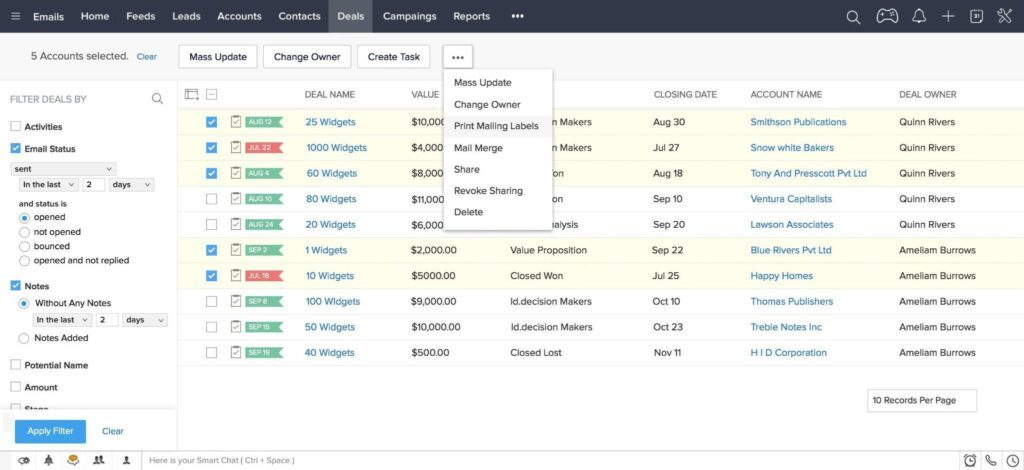
Zoho CRM gives sales, marketing, and support teams a unified platform to manage leads, automate workflows, and track customer interactions across channels, making it a popular choice for businesses that want customizable CRM tools and strong integration options.
Who Is Zoho CRM Best For?
Zoho CRM is a strong fit for small to mid-sized businesses that need a flexible, affordable CRM with deep customization and a broad ecosystem of integrated tools.
Why I Picked Zoho CRM
I've included Zoho CRM in my top picks because it's one of the few CRM platforms that genuinely addresses how distributed teams actually work. The CRM for Everyone feature lets you create dedicated Teamspaces for each department—sales, marketing, legal, HR—so everyone operates within the same CRM environment without stepping on each other's data. I also like the Requester Modules, which let a sales rep submit a request for a custom pitch deck directly inside the CRM, with both teams able to track progress in real time. That kind of cross-functional visibility matters a lot when your team isn't in the same room.
Zoho CRM Key Features
- Zia AI assistant: An AI layer built into the CRM that detects anomalies, predicts deal outcomes, and suggests next-best actions based on your sales data.
- Blueprint process automation: A visual tool for mapping and enforcing sales processes step by step, with conditional rules that ensure reps follow the right actions at each stage.
- Omnichannel communication: Connects email, phone, live chat, and social media into a single interface so your team can engage customers across channels without switching tools.
- Canvas design studio: A no-code layout editor that lets you redesign CRM record views, rearrange fields, and build custom interfaces.
Zoho CRM Integrations
Integrations include Google Workspace, Microsoft 365, Mailchimp, Slack, QuickBooks, Shopify, Zoom, LinkedIn, Twilio, and DocuSign.
Pros and Cons
Pros:
- Mobile app helps you stay in touch with customers from anywhere.
- Advanced security features.
- 24-hour premium user support.
Cons:
- Advanced features are only available in higher-priced subscriptions.
- Steep learning curve
New Product Updates from Zoho CRM

Zoho CRM Makes System Dashboards Editable
Zoho CRM's system-defined dashboards are now editable, allowing customization of charts for better insights. For more information, visit Zoho CRM's official site.
 .
.
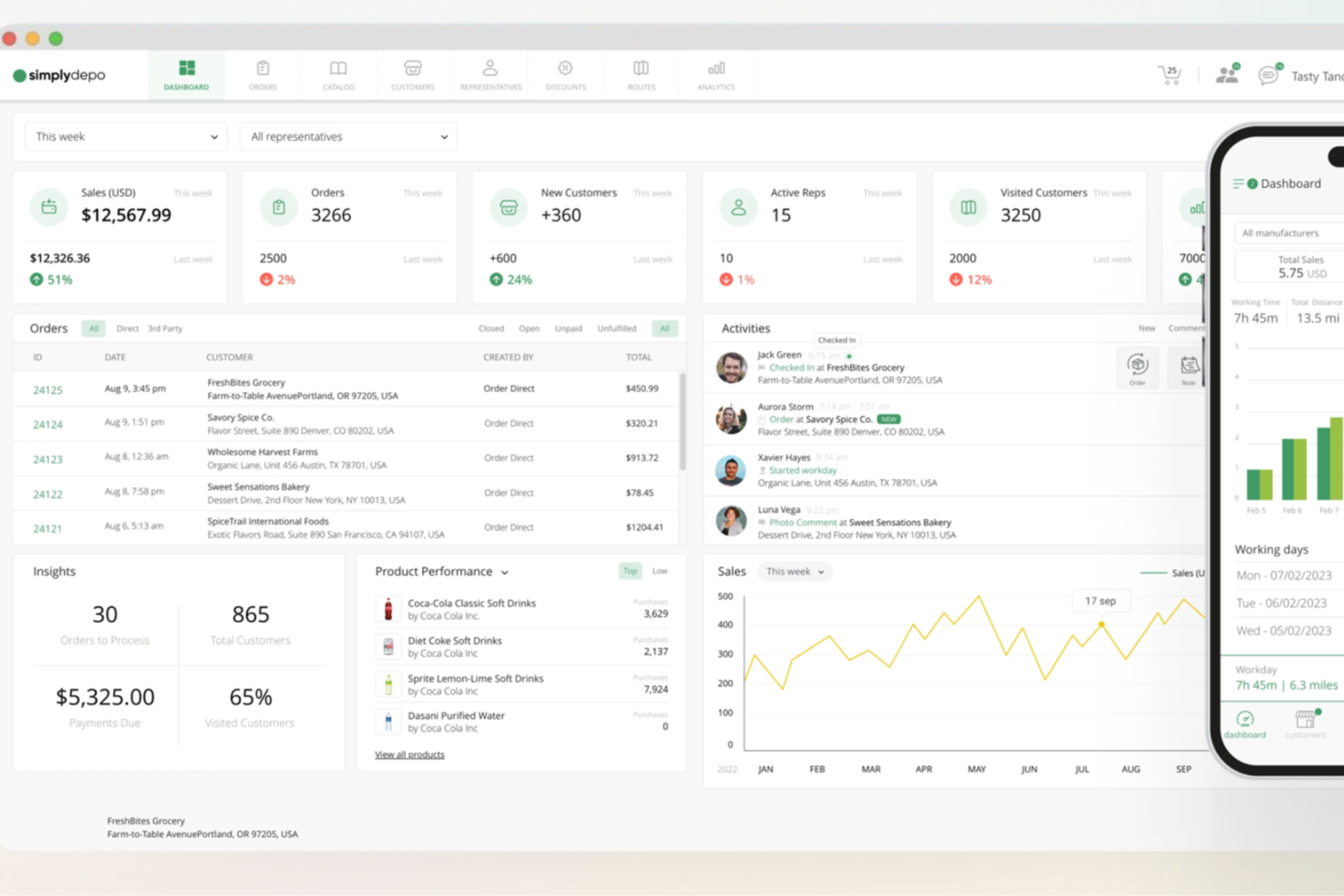
SimplyDepo is a CRM platform designed for wholesale distributors and B2B sales teams who need to manage customer relationships, streamline order workflows, and track sales performance in one place.
Who Is SimplyDepo Best For?
SimplyDepo is a strong fit for wholesale distributors, consumer goods brands, and field sales teams managing B2B accounts and order workflows.
Why I Picked SimplyDepo
I picked SimplyDepo as one of the best because of how tightly it connects CRM account management with B2B order workflows. Most CRMs track relationships but leave order capture to a separate system—SimplyDepo keeps both in one place. I like that reps can pull up a customer's full order history, pricing agreements, and account activity before placing an order, which cuts down on errors and back-and-forth. The mobile order capture with offline support is also a real differentiator—my team can create and update orders in the field without needing a connection, and everything syncs automatically.
SimplyDepo Key Features
- Order lifecycle management: Track and manage every wholesale order from initial capture through fulfillment and invoicing in a single workflow, with built-in pricing and approval rules.
- Customer activity tracking: View real-time visit activity, order history, communications, and account health across all accounts so reps and managers stay aligned.
- Route intelligence: Monitor route completion, track sales activity by territory, and identify missed visits or coverage gaps across field teams.
- Custom tasks and digital forms: Build store-specific tasks and digital forms to capture structured data and photo proof, replacing paper-based reporting.
SimplyDepo Integrations
Integrations include QuickBooks, Stripe, ShipStation, Shopify, HubSpot, Zapier, Zebra, and Acumatica.
Pros and Cons
Pros:
- Real-time field visibility supports in-store compliance tracking
- B2B ordering reduces manual entry and order errors
- Combines CRM with retail execution and route planning
Cons:
- Dependence on internet connectivity for real-time features
- Native integrations not publicly listed
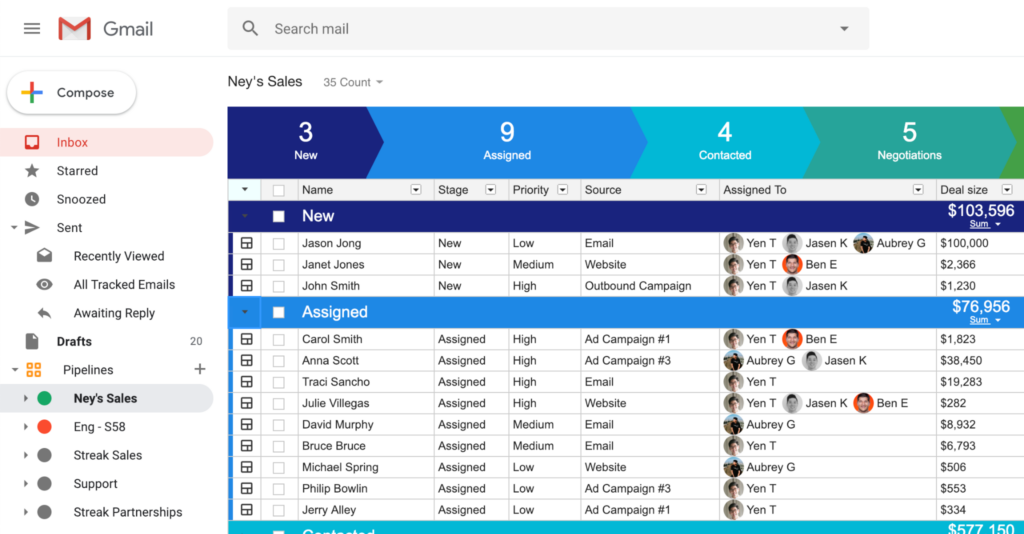
Streak brings CRM features directly into Gmail, making it a go-to choice for small businesses, sales teams, and consultants who want to manage pipelines, track contacts, and automate workflows without leaving their inbox.
Who Is Streak Best For?
Streak is a strong fit for freelancers, solopreneurs, and small sales teams who run their business primarily through Google Workspace.
Why I Picked Streak
Streak earns its spot on my shortlist because it's the only CRM I've used that lives entirely inside Gmail—no tab-switching, no separate platform to log into. I like how the inbox heads-up feature surfaces priority deals right at the top of my inbox, so my team can act on what matters without digging through a pipeline view. The AI autofill feature is also a standout for me: it scans email threads and automatically populates custom CRM fields like deal size and region, which cuts down on the manual data entry that slows most teams down. For teams already working out of Google Workspace, Streak removes the friction of adopting a separate CRM tool entirely.
Streak Key Features
- Data validation: Set required fields and custom rules to keep pipeline data complete and consistent across your team.
- Follow-up sequences: Schedule automated email follow-ups triggered by no reply, directly from your Gmail account.
- Magic columns: Automatically log real-time data points for every deal, like last interaction date, without manual entry.
- CRM automation: Build trigger-based workflows to automate lead assignments, task creation, and pipeline stage updates.
Streak Integrations
Integrations include Gmail, Google Sheets, Slack, LinkedIn, Google Forms, the Gmail mobile app, and a native dialer, with an API available for custom integrations.
Pros and Cons
Pros:
- Customers can use the platform for many specific use cases and industries.
- Integrates well in Google environments.
- Allows users to build and manage any process.
Cons:
- Only works within Gmail.
- Lacks tools for marketing campaigns other than e-mail based.

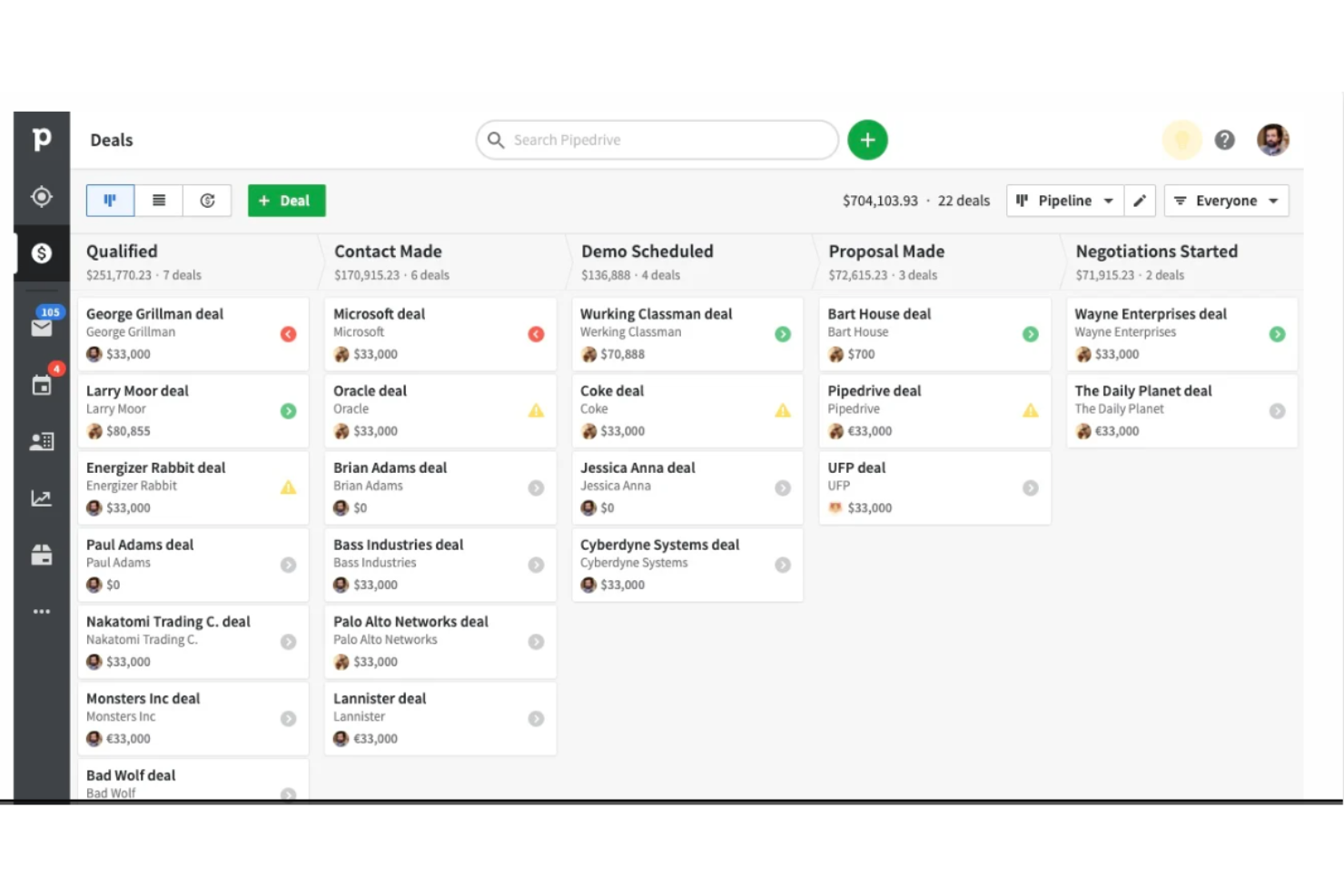
Pipedrive CRM gives sales teams and small businesses a visual, intuitive way to manage leads, track deals, and organize sales activities so they can focus on closing more business and keeping their pipeline moving.
Who Is Pipedrive CRM Best For?
Pipedrive CRM is a great fit for small to mid-sized sales teams that need a straightforward, deal-focused CRM without the complexity of enterprise platforms.
Why I Picked Pipedrive CRM
Pipedrive CRM earns its spot on my shortlist because its pipeline visualization is genuinely the core of the product, not just a feature bolted on. The primary view is a kanban-style board where I can see every deal by stage at a glance, with color-coded cues that flag deals going cold before they slip through the cracks. I also like that you can build multiple custom pipelines for different teams or sales motions, so a team running both inbound and outbound doesn't have to cram everything into one view. Pipedrive's Insights feature ties directly into the pipeline, surfacing real-time metrics like conversion rates by stage and deal value so you can spot exactly where deals are stalling.
Pipedrive CRM Key Features
- Contact management: Store and organize contact records with a full history of interactions, linked deals, and activity logs in one place.
- Sales automation: Set trigger-based workflows to automatically assign tasks, send emails, or move deals between stages without manual input.
- Email sync and tracking: Connect your inbox to Pipedrive and get real-time notifications when contacts open or click your emails.
- Lead management: Collect and qualify leads in a dedicated leads inbox before promoting them to active deals in your pipeline.
Pipedrive CRM Integrations
Integrations include Google Workspace, Microsoft Outlook, Slack, Trello, Asana, Mailchimp, QuickBooks, Xero, Zapier, and PandaDoc.
Pros and Cons
Pros:
- Can sync multiple email accounts
- Good value for money
- Provides customizable pipelines
Cons:
- Limited functionality for large companies
- Customer support services could be improved
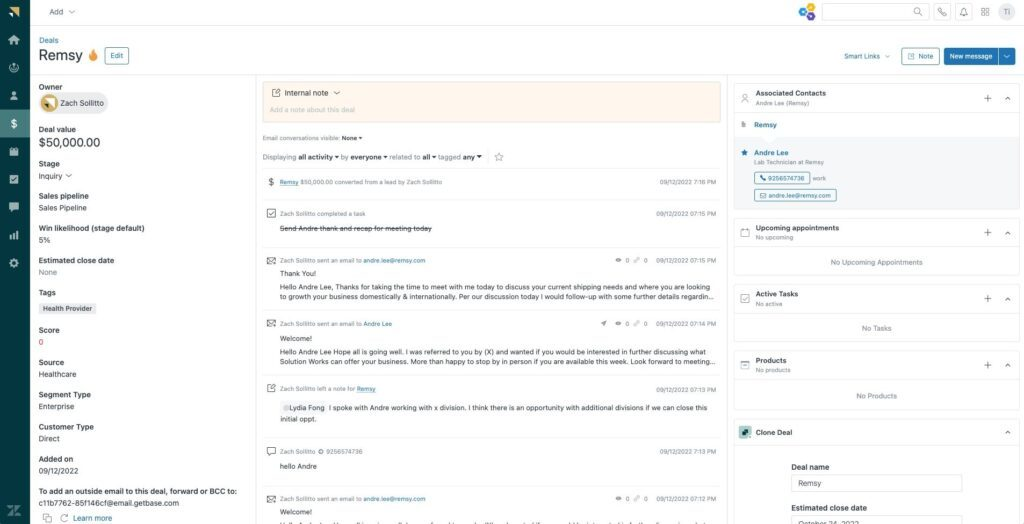
Zendesk Sell is a CRM platform built for sales teams who want to manage leads, track deals, and automate sales workflows without the complexity of traditional CRM systems.
Who Is Zendesk Sell Best For?
Zendesk Sell is a good fit for small to mid-sized sales teams that need a straightforward CRM with built-in automation and clear pipeline visibility.
Why I Picked Zendesk Sell
Zendesk Sell earns its spot as one of the best on my shortlist because of how well it cuts down on the admin work that slows sales reps down. I particularly like the Task Player feature, which lets reps work through routine activities like outreach and follow-ups in one uninterrupted flow. The power dialer is another feature I rely on—it automatically cycles through a custom call list so reps spend more time talking and less time dialing. Sales triggers also let me automate actions based on deal or contact activity, so nothing slips through the cracks between pipeline stages.
Zendesk Sell Key Features
- Email integration: Sync your existing email to Sell to get automatic tracking, alerts, and pre-built templates directly in the CRM.
- Pipeline analysis: Track lead and deal progression across each pipeline stage to spot bottlenecks before they stall revenue.
- Smart lists and templates: Segment and filter leads and deals in real time, then save those views for quick access later.
- Activity reporting: Access out-of-the-box reports covering key metrics like calls made, email outcomes, and appointments held.
Zendesk Sell Integrations
Integrations include PandaDoc, Harvest, Geckoboard, WhatsApp Connector for Sell by Respira, Textline, CloudTalk, ChargeDesk, Aircall, Recurly, and ActiveCampaign.
Pros and Cons
Pros:
- Excellent customer support.
- Centralized dashboard provides all sales-related activity.
- Simple onboarding and team-creation features.
Cons:
- Limited pipelines.
- Can become pricy beyond lowest subscription.
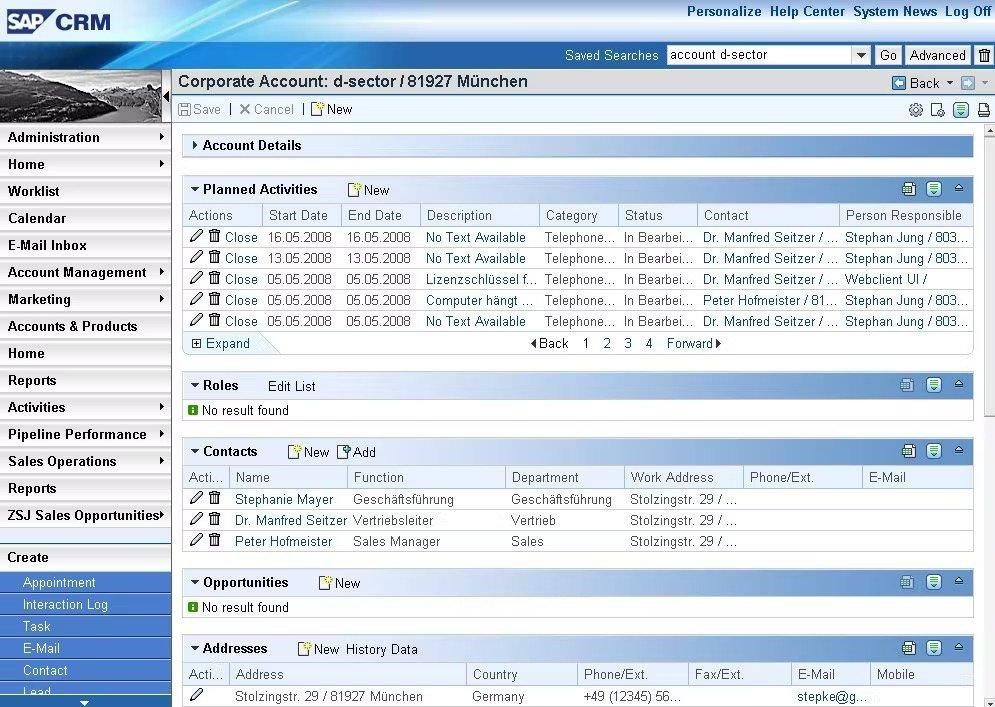
SAP CRM is an enterprise-grade platform designed for large organizations that need to unify sales, marketing, and service data to drive smarter customer engagement and business growth.
Who Is SAP CRM Best For?
SAP CRM is a strong fit for large enterprises that need a deeply integrated CRM solution across complex, multi-department operations.
Why I Picked SAP CRM
SAP CRM earns its spot on my shortlist because of how it connects customer data to real-time personalization at an enterprise scale. I'm particularly impressed by SAP Customer Data Platform, which unifies individual and account-level customer profiles by pulling in data from ERP, supply chain, and commerce systems into a single, shared data model. That means my team can build audience segments and trigger personalized interactions based on signals like order status or inventory levels—not just behavioral data. SAP Engagement Cloud then takes that unified data and activates it across email, SMS, web, and ads using a centralized decision engine with embedded AI for smarter targeting and timing.
SAP CRM Key Features
- SAP Sales Cloud pipeline management: Track deals, forecast revenue, and monitor at-risk opportunities using real-time data and AI-driven analysis across the full sales cycle.
- Configure, Price, Quote (CPQ): Build and deliver accurate quotes for complex products with automated approval workflows and built-in margin protection.
- SAP Service Cloud case management: Route, categorize, and resolve customer service cases across channels using AI-guided workflows and automated status updates.
- Field service management: Dispatch technicians, optimize routes, and improve first-time fix rates using mobile tools and AI-based parts availability recommendations.
SAP CRM Integrations
Integrations include Anypoint Platform, eBuyer Assist Procurement, Marketo, Mule ESB, and more.
Pros and Cons
Pros:
- Provides users with various tools, reports, and views to help analyze and forecast your business.
- Robust and flexible with a significant number of features.
- Provides a complete view for all customers.
Cons:
- Doesn’t support automatic sales order creation.
- Requires a very skilled professional to deploy the platform on-premises.

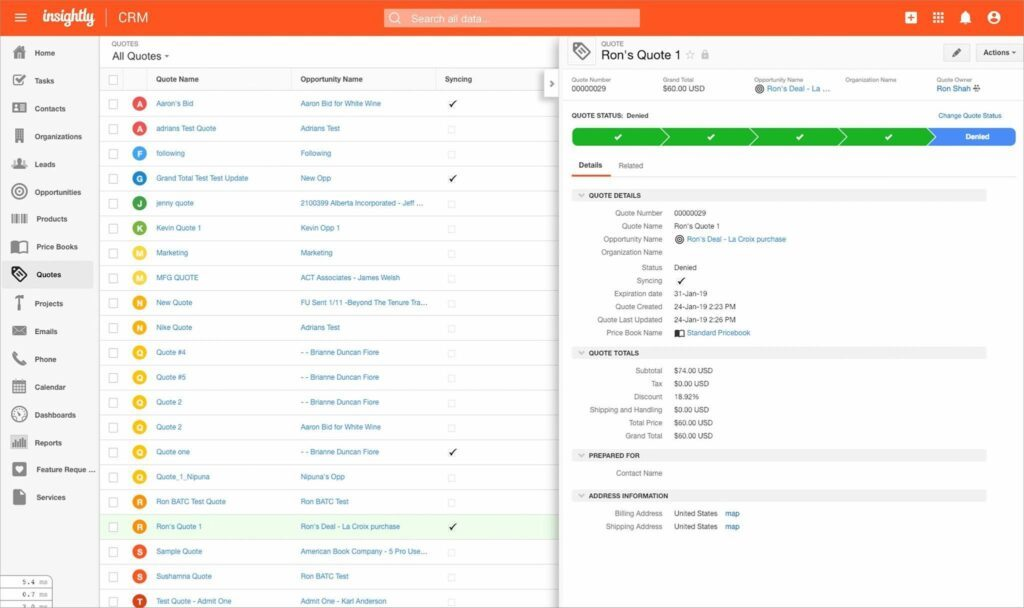
Insightly is a CRM platform designed for growing businesses that need to manage complex sales pipelines, automate workflows, and keep teams aligned with up-to-date customer information across departments.
Who Is Insightly Best For?
Insightly is a strong fit for small to mid-sized businesses that need a single system to keep sales, marketing, and customer success teams working from the same customer data.
Why I Picked Insightly
Insightly earns its spot on my shortlist because of how well it handles customer data visibility across teams. I particularly like the relationship linking feature, which lets you connect contacts, organizations, opportunities, and projects so every team member sees the full picture of a customer relationship—not just their slice of it. I also use the shareable dashboards to give sales, marketing, and customer success a shared view of pipeline and account health in real time. The bidirectional email sync means every customer conversation is logged and visible to whoever picks up the relationship next, so nothing gets lost between handoffs.
Insightly Key Features
- Workflow automation: Build automated sequences that trigger emails, update records, and assign tasks based on deal or project activity.
- Lead and opportunity management: Track leads through customizable pipelines with fields and stages tailored to your sales process.
- Products, price books, and quotes: Configure and generate branded quotes directly from opportunity records, with support for custom pricing templates.
- Project and task management: Convert closed deals into projects, carrying over all related records, tasks, and contact details automatically.
Insightly Integrations
Integrations include Microsoft, DocuSign, Shopify, Unbounce, PandaDoc, Netsuite, QuickBooks, and Google.
Pros and Cons
Pros:
- Customer support is available to users by phone, e-mail, and tickets.
- Highly customizable and scalable.
- Compatible with Android and iOS devices.
Cons:
- Higher price tiers can be expensive.
- Only focuses on sales, CRM, and marketing, not customer support.
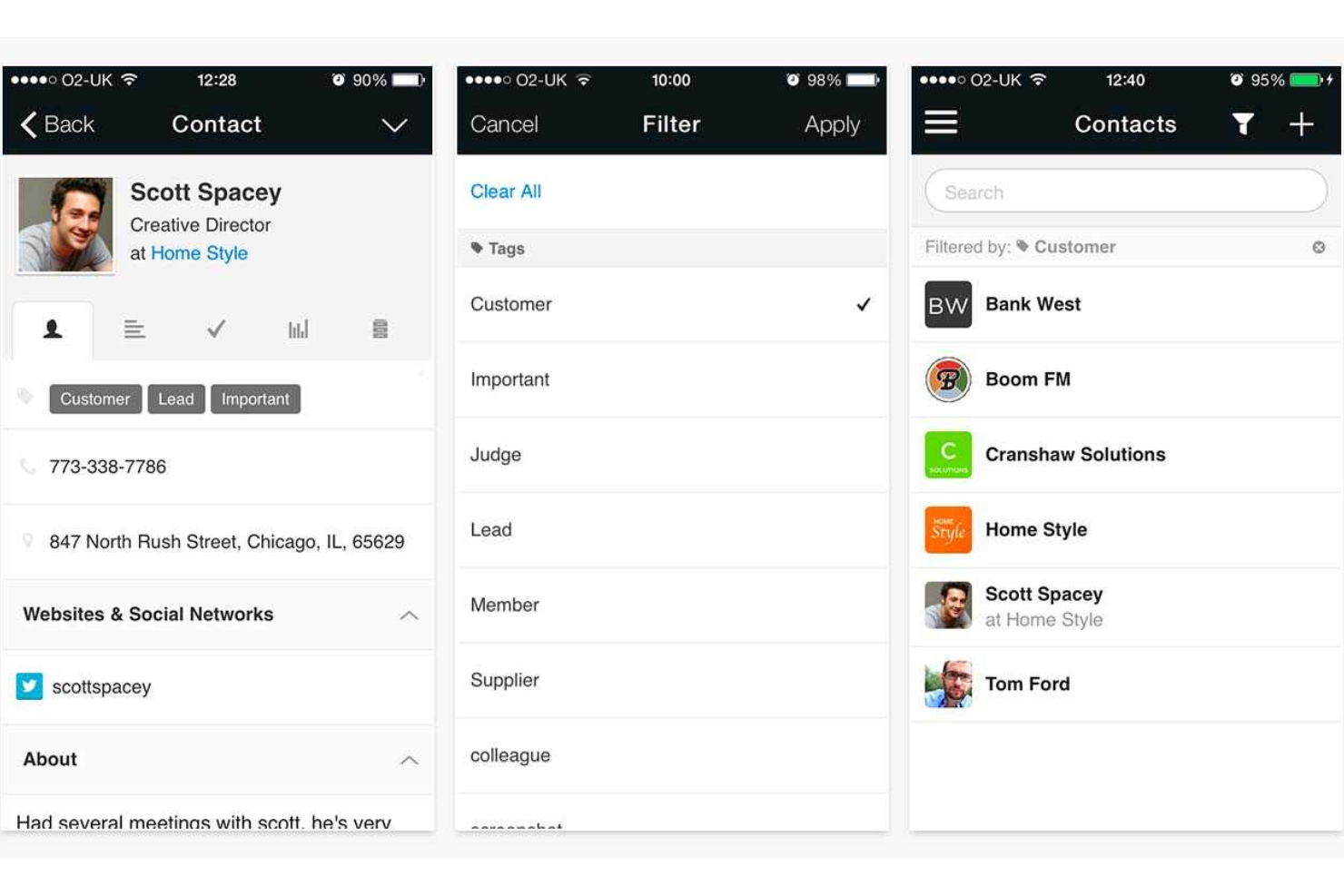
Capsule is a CRM platform designed for small businesses and sales teams who want to organize contacts, manage sales pipelines, and keep track of customer relationships without dealing with complex or bloated systems.
Who Is Capsule Best For?
Capsule is a strong fit for small and growing businesses that need a straightforward CRM without a steep learning curve or lengthy setup process.
Why I Picked Capsule
I picked Capsule as one of the best because it genuinely delivers on the promise of a CRM you can get into and use on day one. I like that contact profiles automatically pull in social network data, so my team isn't manually hunting down LinkedIn profiles or company details before a call. The Tracks feature is another one I find myself relying on—it lets you set up a sequence of tasks that trigger one after another, so a new deal or onboarding process follows a consistent path without anyone having to remember what comes next. That kind of built-in structure means less time managing the CRM and more time actually working deals.
Capsule Key Features
- Sales pipeline dashboard: View conversion rates, pipeline milestones, and revenue forecasts in a single dashboard.
- Email templates: Create and save reusable email templates that your entire team can access and send directly from Capsule.
- Custom fields and tags: Add custom fields, tags, and lost reasons to tailor Capsule's records to how your business actually tracks information.
- Website form lead capture: Embed a lead capture form on your website to pull new contacts directly into Capsule.
Capsule Integrations
Integrations include Xero, QuickBooks Online, Mailchimp, Gmail, Microsoft Outlook, Zendesk, Google Calendar, LinkedIn (via Add to CRM), FreshBooks, and Shopify.
Pros and Cons
Pros:
- Competitive pricing with a useful free tier for starters
- Flexible customization options to tailor the CRM to specific business processes
- User-friendly interface that requires minimal training
Cons:
- Limited reporting capabilities compared to more advanced CRM systems
- The feature set might be too basic for larger businesses or those with complex CRM needs
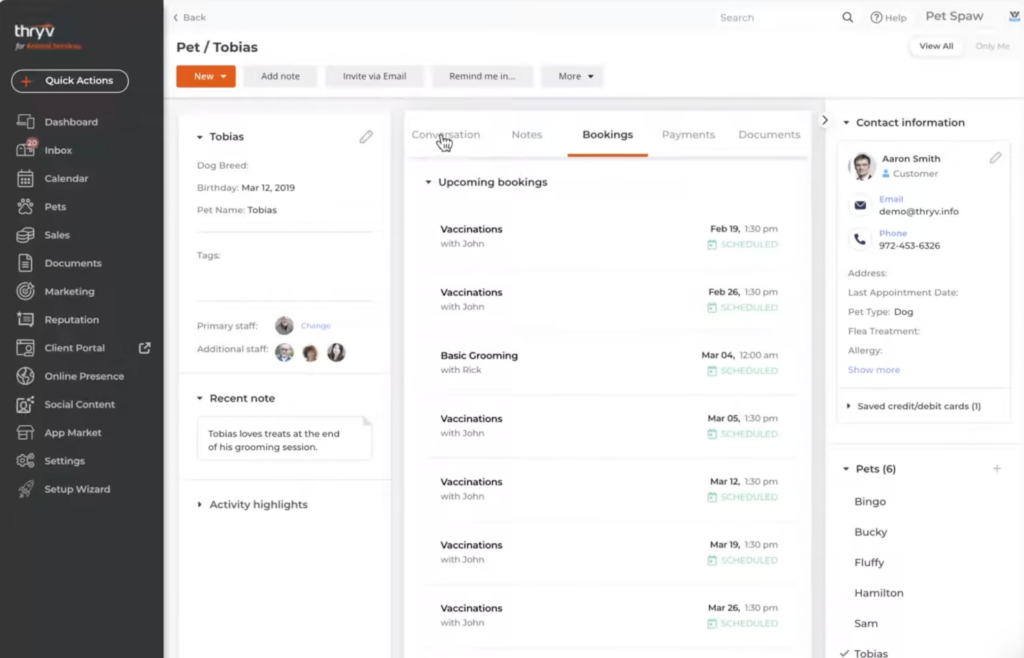
Thryv bundles CRM, communications, marketing, reputation, events, and payments to simplify operations for local businesses.
Why I Picked Thryv
Small teams need fewer tabs and clearer workflows. Thryv’s multi-channel inbox, contact database, and marketing tools cover day-to-day engagement. Reputation management keeps your Google Business Profile and review sites in check. Calendar features handle appointments, classes, and events, while integrated payments close the loop.
Thryv Key Features
- Reputation management: Monitor and respond to reviews.
- Unified inbox: Manage messages across channels.
- Scheduling & events: Run bookings, classes, and reservations.
- Payments & invoices: Process cards and recurring payments.
Thryv Integrations
Integrations include Clover, Facebook Messenger, Gmail, Indeed, Instagram Messenger, Jotform, Mailchimp, MYOB, QuickBooks, Twilio, Typeform, Zoom.
Pros and Cons
Pros:
- Large database of how-to videos on YouTube
- All-in-one solution for small businesses
- Contract and document management included
Cons:
- Somewhat basic email automation capabilities
- Lacks task management features
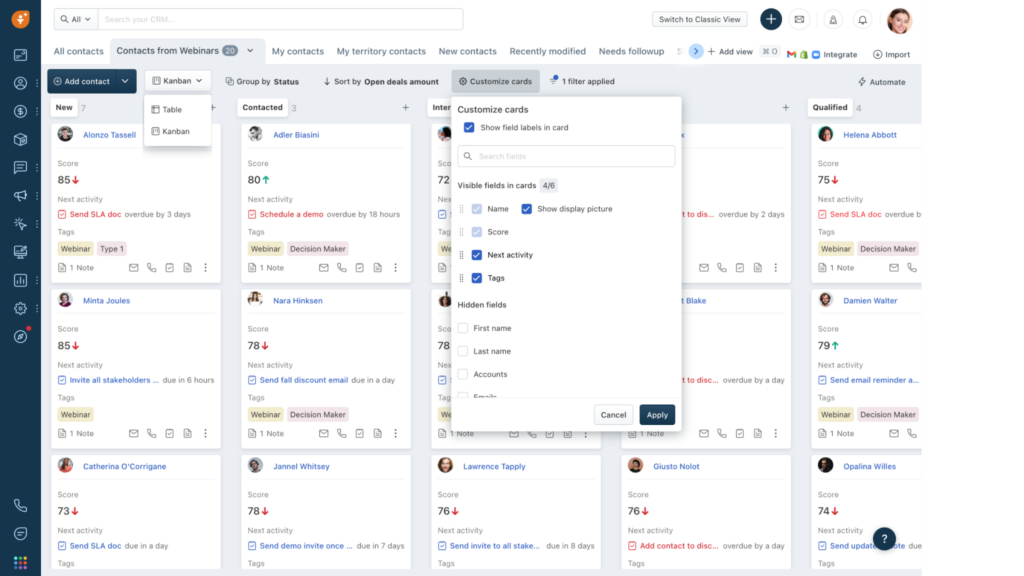
Freshsales uses Freddy AI to score leads, forecast revenue, and recommend next steps. It’s built to help reps understand who to contact, when, and how.
Why I Picked Freshsales
I picked it for teams that want AI guidance alongside approachable UX. Freshchat supports customers with bot-assisted messaging, freeing agents for complex issues. Personalized email campaigns and deal management are built in, and revenue forecasting gives leaders an early read on targets.
Freshsales Key Features
- Freddy AI scoring: Prioritize leads and deals with confidence.
- Freshchat bots: Automate frontline support and routing.
- Forecasting & analytics: Predict performance and spot gaps.
- Personalized campaigns: Engage prospects with relevant content.
Freshsales Integrations
Integrations include Freshdesk, Freshmarketer, Freshconnect, Freshcaller, Mailchimp, Zapier, HubSpot Marketing, QuickBooks, Office 365 Calendar.
Pros and Cons
Pros:
- Event tracking to help plan future customer approaches.
- API to help modify, read, add, and delete data.
- High-level automations and intelligent workflows.
Cons:
- Configuration updates can be frequent.
- Reports are not available in the free plan.

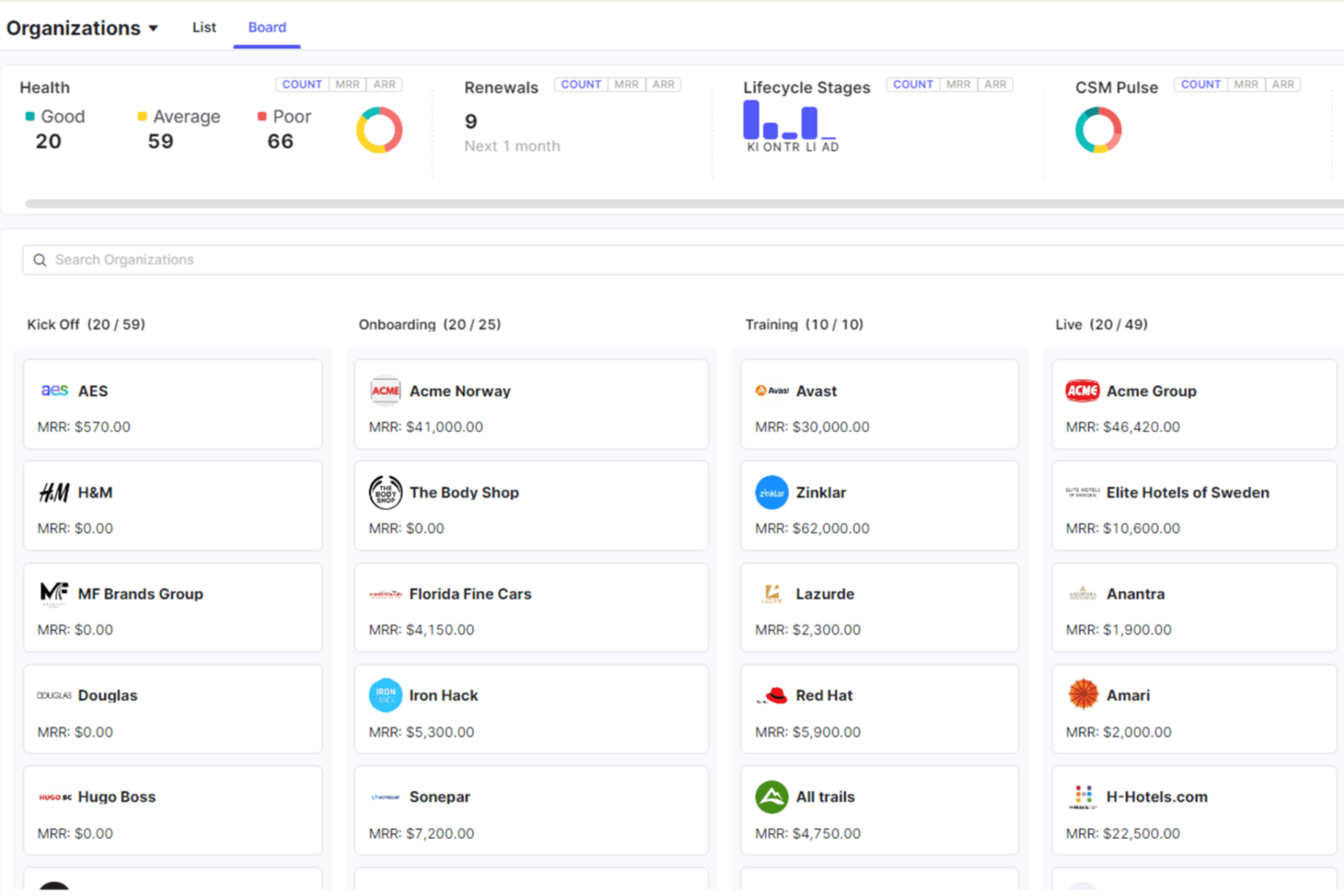
Velaris unifies product, support, and account data into a 360° view for customer success teams. AI analyzes sentiment and health to flag risks and surface expansion opportunities.
Why I Picked Velaris
I picked it for CS organizations that need proactive signals. Dynamic health scores adapt to lifecycle stage, while AI summaries and churn risk predictions sharpen your playbooks. Drag-and-drop automations turn insights into action—no scripting required.
Velaris Key Features
- AI analytics: Surface trends in behavior, usage, and sentiment.
- Health scoring: Tailored to lifecycle stages.
- Success plans & playbooks: Standardize interventions.
- Workflow automation: Build complex sequences visually.
Velaris Integrations
Integrations include Slack, Microsoft Teams, Intercom, Mailchimp, Outlook, Google Drive, HubSpot, Jira, Salesforce.
Pros and Cons
Pros:
- Unified 360° customer view with AI insights
- AI meeting summaries and churn risk predictions
- Drag-and-drop automation for tasks and playbooks
Cons:
- Pricing undisclosed and requires vendor contact
- No public API for deeper custom integrations
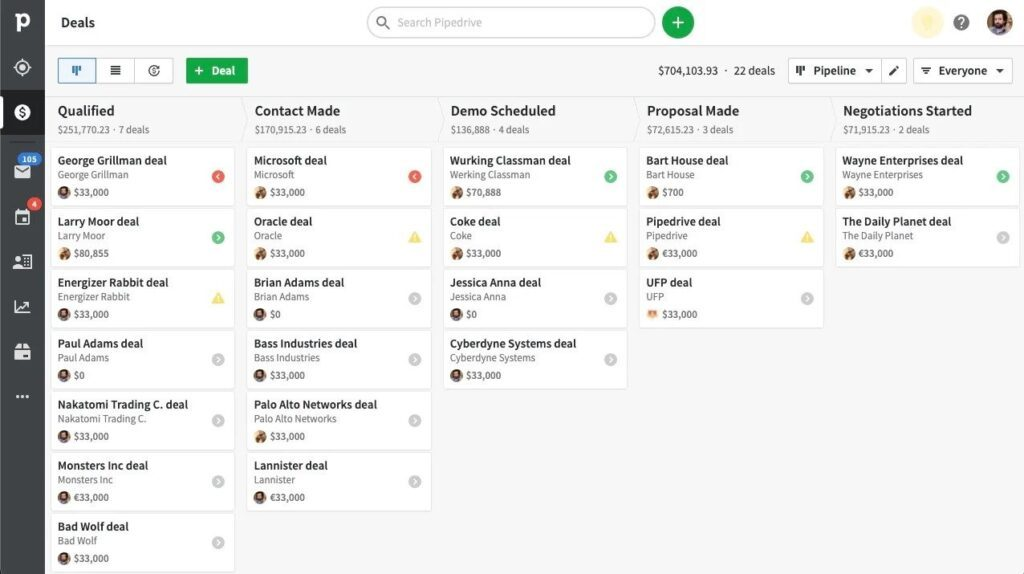
Pipedrive emphasizes a clean, visual pipeline with automation and an AI assistant to keep reps focused on actions that move deals.
Why I Picked Pipedrive
It’s easy to implement without IT and gives immediate visibility into pipeline volume, velocity, and value. The AI sales assistant nudges next steps, and workflow templates accelerate follow-ups. Reports cover deal duration, forecasts, and goals so managers can coach in real time.
Pipedrive Key Features
- AI sales assistant: Daily suggestions and prioritization.
- Workflow templates: Pre-built automations for common tasks.
- Reporting & goals: Track deal duration and weekly targets.
- Maps view: Visualize customers geographically (via Google Maps).
Pipedrive Integrations
Integrations include Zapier, Slack, Dropbox, Highrise, Google Maps.
Pros and Cons
Pros:
- User-friendly user interface.
- Offers an intuitive interface with a deal-driven workflow.
- Track e-mails to make them easier to find.
Cons:
- Extra features, such as in-app phone capabilities, come with an additional charge.
- No tracking of customer responses within the platform.

Other CRM Software
Here are a few more options that didn’t make the best CRM software list:
- Accelo
For getting overall business health insights.
- Microsoft Dynamics 365
For developing growth through solid customer relationships.
- Salesforce Financial Services Cloud
For a comprehensive ecosystem
- Pipedrive
For visual sales pipelines
- WORKetc
For managing an entire business from the cloud.
- Freshdesk
For collaboration on all lead and customer needs.
- Zendesk
For implementing a CRM into your help desk.
- Apptivo
For cloud-based integrated modules.
- Scoro
For end-to-end work management.
- PipelineDeals
For transitioning from working with spreadsheets.


Related CRM Software Reviews
If you still haven't found what you're looking for here, check out these account management software tools closely related to CRM software that we've tested and evaluated.
- Sales Software
- Lead Management Software
- Business Intelligence Software
- Contract Management Software
- Revenue Management System
- CPQ Software
Selection Criteria For CRM Software
Selecting the right Customer Relationship Management (CRM) software is a strategic decision that significantly impacts an organization's ability to engage with customers, manage relationships, and drive sales. Through my personal experience and extensive research into various CRM tools, I've developed a comprehensive set of criteria that prioritize functionality, integration capabilities, and user experience. A robust CRM system should not only facilitate the management of customer interactions but also provide insights and tools to enhance sales, marketing, and customer service processes. The best CRM email marketing software combines these capabilities seamlessly.
Core CRM Software Functionality: - 25% of total weighting score
To be considered for inclusion on my list of the best CRM software, the solution had to support the ability to fulfill common use cases:
- Streamlining lead and contact management processes
- Automating sales workflows to increase efficiency
- Providing comprehensive insights into sales performance
- Enhancing customer support and service management
- Integrating with marketing tools to support campaigns and lead generation
Additional Standout Features: - 25% of total weighting score
Beyond basic functionalities, standout features differentiate the best CRM tools in the market:
- Advanced analytics and AI for predictive sales insights
- Seamless integration with a wide range of third-party applications
- Customizable AI chatbots for automated customer interactions
- Social media integration for comprehensive customer engagement
- Advanced security features to protect sensitive customer data
Identifying and exploring these features helps in finding CRM software that offers innovative solutions to modern sales and customer management challenges.
Usability: - 10% of total weighting score
An intuitive user interface and ease of use are crucial for the adoption and effective use of CRM software:
- A clean, user-friendly interface that minimizes training time
- Drag-and-drop functionalities for customizing dashboards and reports
- Mobile optimization for access on various devices
- Quick navigation and easy access to frequently used features
Onboarding: - 10% of total weighting score
The sales onboarding process is key to realizing the value of CRM software quickly:
- Comprehensive training materials and resources for new users
- Interactive product tours and webinars to demonstrate key features
- Supportive customer service during setup and initial use
- A vibrant community forum for peer advice and troubleshooting
Customer Support: - 10% of total weighting score
Effective customer support is essential for ongoing CRM success:
- Multiple channels for support, including live chat, email, and phone
- Prompt and knowledgeable responses to inquiries
- Proactive support options, such as regular check-ins and updates
- Access to a detailed knowledge base for self-service solutions
Value For Money: - 10% of total weighting score
Assessing value involves considering the balance between cost and the benefits provided:
- Transparent pricing models without hidden fees
- Scalable options that grow with your business needs
- Free trials or demos to evaluate software functionality
- A clear return on investment through improved sales and customer satisfaction
Customer Reviews: - 10% of total weighting score
Feedback from current users provides real-world insights into CRM performance:
- High satisfaction ratings for usability and support
- Positive impact stories on sales efficiency and customer engagement
- Constructive criticism and the development team's response to feedback
By applying these criteria, I guide software buyers towards selecting a CRM tool that aligns with their business needs, supports revenue operations effectively, and offers a seamless user experience. The right CRM software is a powerful asset for any organization, enabling better customer relationships, streamlined sales processes, and ultimately, driving business growth.
How To Choose CRM Software
When choosing a CRM, it’s not about picking the most "popular" option—it’s about finding the right fit for your company’s unique needs. Here’s a quick checklist to guide your CRM selection process:
1. Identify Your Primary Problem to Solve
Before looking at any CRM features, ask yourself: “What’s the #1 challenge we’re trying to fix?” Examples might include:
- Disjointed customer data — Are you manually piecing together customer interactions from emails, spreadsheets, and notes?
- Lack of sales visibility — Do you need real-time pipeline tracking to hit revenue targets? Or do you need a dedicated B2B CRM?
- Poor customer experience — Are leads slipping through the cracks due to disorganized follow-ups?
Pro Tip: Write down the top 3 pain points your team faces with current processes. Use these pain points as your "must-have" filters when evaluating CRM software.
This exercise will help you control the project budget, focus on what’s most important, and choose the type of CRM that works best for your business.

2. Determine Who Will Use the CRM
Knowing who will be using the CRM is critical. This affects cost, user experience, and onboarding needs.
- Is it just your revenue ops team? If so, prioritize advanced reporting and customization tools.
- Will the whole company be using it? Look for intuitive interfaces and self-serve onboarding.
- Will it be used by customer success or marketing teams too? You’ll need features that support cross-functional collaboration, like shared customer profiles and task management. According to Ryan Tanner, Delivery Manager at Go Nimbly, you should include your entire GTM team and any other affected teams during this step and have an owner or sponsor for every requirement.
Pro Tip: Some CRMs charge per user, so if your whole team needs access, factor in licensing costs.
3. Map Out Key Integrations
Your CRM doesn’t operate in a vacuum. It’s critical to ensure it works with your existing tech stack.
- Email & Calendar: Does it sync with Google Workspace or Outlook?
- Sales & Marketing Tools: Will it integrate with tools like HubSpot, Salesloft, or Mailchimp?
- Accounting & Invoicing: Do you need it to talk to QuickBooks or Xero?
- Custom API Integrations: Does your team rely on in-house tools or proprietary systems?
Pro Tip: Make a list of every tool your team relies on, then check for compatibility before you commit.
I recommend mapping your basic GTM strategy and process first. The most important thing is to start at the foundation (business processes and buyer journey) before considering any tooling, including a CRM.

4. Clarify the Desired Outcomes
What does "success" look like for your CRM implementation? If you’re only focused on features, you’re missing the point. Start with outcomes.
- Revenue Impact: Do you want better pipeline visibility to increase close rates?
- Time Savings: Are you looking to reduce manual data entry and automate lead routing?
- Customer Experience: Are you trying to deliver faster, more personalized responses to customer inquiries?
Pro Tip: Use the "If / Then" test: "If we use this CRM, then we will achieve [X outcome]." If you can’t answer this, go back to the drawing board.
5. Assess Organizational Fit
Every business operates differently. Don’t assume that just because a CRM is popular, it’ll work for you.
- How will it support your sales process? Does it align with how your sales team tracks leads, deals, and renewals?
- Is it flexible enough to scale with you? Will it still work if you grow from 10 reps to 100?
- How will it impact current workflows? Will it disrupt existing processes or support them?
Pro Tip: Interview other companies in your industry or stage of growth to see what’s worked for them.
The biggest mistake I’ve seen through the years—organizations don’t invest in the CRM they will need in the following growth stages. What it creates is one of the heaviest and biggest projects for a RevOps team if a migration is needed in future years.

By focusing on these five key areas, you’ll avoid the "shiny object syndrome" that comes with feature-loaded CRMs. Instead, you’ll choose a tool that drives meaningful business impact and grows with your company.
Trends In CRM Software For 2026
The landscape of CRM software continues to evolve rapidly, driven by the growing demands of revenue operation leaders for tools that not only manage customer relationships but also directly support and enhance revenue operations. The latest product updates, press releases, and release logs from the leading CRM platforms reveal key trends that are shaping the future of CRM technology, including remote and inside sales. These trends reflect the industry's shift towards more integrated, intelligent, and user-focused solutions, aiming to provide deeper insights, automate complex processes, and improve customer engagement.
Evolving Features and Functionality
- Integration with AI and Machine Learning: CRM platforms are increasingly leveraging AI and machine learning for predictive analytics, lead scoring, and personalized customer engagement strategies. This trend highlights the shift towards more proactive and intelligent revenue operation strategies.
- Evidence: Enhanced AI algorithms for predicting customer behavior and automating task prioritization.
- Advanced Automation and Workflow Customization: There's a significant focus on automating repetitive tasks and providing users with powerful tools for customizing workflows, enabling revenue operations teams to focus on strategic activities rather than manual processes.
- Evidence: New workflow engines that allow for complex, multi-step automation based on specific triggers and conditions.
- Enhanced Data Analytics and Visualization: CRM tools are offering more sophisticated analytics features and visualization tools, making it easier for users to derive actionable insights from their data and make informed decisions to drive revenue growth.
- Evidence: Introduction of dynamic dashboards and reporting tools that offer real-time insights into sales performance and customer trends.
Novel and In-Demand Features
- Seamless Integration with Communication Platforms: The ability to integrate seamlessly with various communication platforms, enabling teams to engage with customers across multiple channels from within the CRM system, is highly sought after.
- Evidence: Built-in integrations with email, social media, and messaging apps for unified customer communication.
- Comprehensive Customer 360° Views: CRM systems are evolving to provide a more holistic view of the customer by aggregating data from multiple touchpoints and systems, offering a complete picture of customer interactions, preferences, and history.
- Evidence: Aggregation of customer data from sales, marketing, and service interactions to provide a unified customer profile.
Declining Importance
- Manual Data Entry and Management: The need for manual data entry and management is becoming less critical, thanks to the rise of automation and data integration capabilities that minimize manual workload and reduce the potential for errors.
- Evidence: Automated data capture and enrichment features that reduce the need for manual input.
These trends indicate a clear move towards making AI CRM software more intelligent, integrated, and user-friendly, with a strong emphasis on supporting revenue operations through enhanced insights, automation, and customer engagement. As CRM technology continues to advance, revenue operation leaders should focus on selecting tools that align with these trends to maximize their organization's ability to grow and compete in the digital age.
What is CRM Software?
CRM (Customer Relationship Management) software is a tool used by businesses to manage and analyze customer interactions and data throughout the customer lifecycle. It serves to improve business relationships with customers, streamline processes, and enhance profitability. CRM software centralizes customer information, tracks interactions, and manages customer accounts, making it an essential tool for sales, marketing, and customer service departments.
The benefits of using CRM software include improved customer relations, leading to increased customer retention and satisfaction. It provides a comprehensive view of customer interactions, helping businesses to better understand and respond to customer needs. This, in turn, can lead to more effective sales and marketing strategies and improved customer service. Additionally, CRM software enhances operational efficiency by automating and organizing customer-related processes, allowing businesses to focus more on strategic activities rather than administrative tasks.
Features of CRM Software
When selecting CRM software, keep an eye out for the following key features:
- Contact management: This feature lets you organize all your customer information—names, emails, phone numbers, and notes—in one place. It streamlines how you track interactions, so you can build stronger relationships and respond quickly to customer needs.
- Sales pipeline tracking: Sales pipeline tracking gives you a visual overview of every deal as it moves through your sales process. You can spot bottlenecks, prioritize hot leads, and make sure nothing slips through the cracks, all while boosting your team’s confidence and momentum.
- Task and activity management: With this tool, you can assign tasks, schedule follow-ups, and keep your to-dos in line with every customer or deal. It’s like giving yourself (and your team) a built-in accountability partner, so nothing gets missed.
- Lead and opportunity management: This feature helps you capture, qualify, and nurture leads until they’re ready to buy. You’ll have a clear view of your opportunities, helping you focus on the deals most likely to close and maximize your win rate.
- Reporting and analytics: Reporting and analytics let you dig into your sales performance, spot trends, and measure what’s working (and what’s not). You can create custom dashboards or reports that help you make smarter decisions and celebrate the wins you’ve earned.
- Integration capabilities: Integration connects your CRM software with the other systems you use—like email, marketing tools, calendars, and accounting platforms. This unifies your operations, saves you time, and ensures data flows effortlessly across your business.
- Customization options: No two businesses work exactly the same. Customization lets you tailor fields, workflows, and dashboard views, so your CRM fits the way you do business—not the other way around.
- Mobile access: Mobile access means you can view and update customer info or deals right from your phone or tablet—perfect for those days when you’re out of the office but still need to stay connected and responsive.
- Security and permissions: Security features protect your sensitive data through role-based access and permissions, ensuring only the right people can view or edit information. This keeps your customer data safe and helps you stay compliant with industry standards.
- Customer support tools: Built-in customer support features, like ticketing or case management, help you deliver timely solutions and track every client’s experience. These tools make it easier to turn customer service into one of your secret weapons for building loyalty.
Common CRM Software AI Features
Beyond the standard CRM software features listed above, many of these solutions are incorporating AI with features like:
- Churn risk analysis: Advanced AI models evaluate customer behavior to flag accounts that might be at risk of leaving. You can then jump in proactively to recover those relationships and reduce churn.
- Predictive lead scoring: This uses AI to analyze customer data and predict which leads are most likely to convert. It saves you from chasing dead ends and helps you invest your energy in opportunities that really matter.
- Intelligent workflow automation: AI-powered automation can route leads, assign tasks, or send reminders based on real-time data and patterns, freeing up your team’s time for more strategic or creative work.
- Natural language processing (NLP): NLP helps you analyze emails, chat messages, or notes to extract context, sentiment, and action items—making every customer interaction easier to understand and respond to.
- Sales forecasting: AI-driven sales forecasting crunches your historical data, identifies patterns, and generates reliable future sales predictions. You get a crystal-clear view of what’s coming up, so you can plan confidently.
- Customer insights and recommendations: AI sifts through mountains of customer data to recommend next steps or personalized offers. This helps you deliver exactly what your customers need, often before they ask for it.
Benefits Of CRM Software
Customer Relationship Management (CRM) software stands as a cornerstone for businesses aiming to streamline their revenue operations and enhance customer engagement. By centralizing customer information and automating key sales and service processes, CRM software delivers substantial benefits to users and organizations. These advantages are particularly vital for those in revenue operations management, seeking to optimize their strategies and drive business growth. Here are five primary benefits that CRM software provides:
- Centralized Customer Information: Ensures all customer data is stored in one place. This centralization makes it easier for teams to access and manage customer information, leading to improved communication and customer service.
- Enhanced Customer Segmentation: Allows for detailed customer segmentation. By categorizing customers based on various criteria, businesses can tailor their marketing and sales efforts more effectively, resulting in higher conversion rates and customer satisfaction.
- Automated Sales Processes: Automates routine sales tasks. Automation increases efficiency and consistency in sales operations, enabling sales teams to focus more on strategy and less on administrative tasks.
- Improved Reporting and Analytics: Offers comprehensive insights into business performance. Access to detailed analytics helps businesses make informed decisions, identify trends, and adjust strategies to meet revenue goals.
- Increased Customer Retention: Facilitates proactive customer engagement. By understanding customer needs and behaviors, organizations can develop strategies to increase customer loyalty and lifetime value.
Costs & Pricing for CRM Software
Selecting the right Customer Relationship Management (CRM) software is a critical decision for businesses looking to optimize their customer interactions and drive sales growth. CRM software varies widely in terms of features, scalability, and pricing, catering to businesses of all sizes and across industries. From free versions designed for small teams to advanced enterprise solutions with comprehensive features, understanding the different plan options and their pricing is key to choosing a CRM that best fits your business needs and budget constraints.
Plan Comparison Table for CRM Software
Certainly! Here is the table with an added "Best For" column:
| Plan Type | Average Price | Common Features Included | Best For |
|---|---|---|---|
| Free | $0 | - Basic contact management - Task management - Limited email integration - Basic reporting | Startups, small teams, individuals |
| Starter | $10 - $25 per user/month | - Enhanced contact management - Lead tracking - Email campaigns - Basic automation - User dashboards | Small to medium businesses |
| Professional | $50 - $100 per user/month | - Advanced sales automation - Customized reporting - Integration with third-party apps - Team collaboration tools | Growing businesses, sales teams |
| Enterprise | $150+ per user/month | - Comprehensive automation - Advanced analytics - Increased customization - Superior integration capabilities - Dedicated support | Large enterprises, corporations |
When choosing a CRM plan, consider both your immediate requirements and anticipated future needs. It's crucial to select a plan that not only fits your current budget but also offers the scalability and features necessary to support your business as it grows. Balancing cost against the value provided by each plan will ensure you make an investment that drives tangible improvements in customer management and sales efficiency.
CRM Software Frequently Asked Questions
If your team is considering working with a CRM software platform, you likely have a few questions before signing on. Let's take a look at some of the FAQs about CRM software:
What is CRM software used For?
CRM software, or Customer Relationship Management software, is a tool businesses use to manage interactions with customers and prospects. It centralizes customer data, making it easier to stay organized and streamline communication by:
- Managing customer information: Stores contact details, communication history, and notes on interactions.
- Tracking sales leads: Helps sales teams follow up on potential customers and track the progress of deals.
- Improving customer service: Gives support teams a clear view of customer issues and previous interactions.
- Automating tasks: Reduces manual work like sending follow-up emails or scheduling calls.
- Enhancing collaboration: Ensures all departments have access to the same customer data.
What types of businesses benefit from using CRM software?
There are companies that use CRMs across industries, from small startups to large enterprises. Some CRMs are modified to specific industries. Financial services companies, for example, use specialized CRM solutions that address compliance, client portfolio management, and regulatory reporting requirements. The software is especially beneficial for those who are scaling their business and need better insight into customer relationships, sales pipelines, and support interactions.
What Are The Types Of CRM Software?
There are three main types of CRM software— operational, analytical, and collaborative:
- Operational CRM: This type of CRM focuses on streamlining customer-facing processes like sales, marketing, and support, helping businesses manage leads, close deals, and provide customer service through tools like contact management and email marketing. Vendors: Salesforce, Monday.
- Analytical CRM: Designed to analyze customer data, this CRM helps businesses understand customer behavior and trends, offering insights to guide decision-making with tools like data mining and online analytical processing. Vendors: Pipedrive, Insightly.
- Collaborative CRM: This CRM is all about improving communication and teamwork both within the company and with external partners, using features like document sharing and workflow automation to ensure a unified approach to customer interactions. Vendors: HubSpot, Zoho.
How much does CRM software typically cost?
The costs of CRM software vary depending on the software and the number of users, with options ranging from free plans for small businesses to more expensive solutions with advanced features for large teams. Consider using specialized pricing software to optimize your subscription costs.
How long does it take to implement a CRM system?
CRM implementation time depends on the complexity of the system and the size of the business. It can take anywhere from a few days to a few months, depending on customization and data migration needs.
How Do CRM Systems Enhance Customer Experience and Loyalty?
CRM systems play a big role in improving the customer experience and building loyalty by making interactions more personalized and efficient. Not to mention the benefits of a CRM for your internal team.
Here’s how CRM systems enhance customer experience and loyalty:
- Building trust and loyalty: By staying organized and delivering a seamless, positive experience across multiple touchpoints, businesses can build stronger, long-term relationships with their customers.
- Personalized interactions: CRM systems store detailed customer information, so businesses can tailor communications and offers based on individual preferences and past behavior.
- Faster response times: With all customer data in one place, support teams can quickly access the information they need to resolve issues, leading to faster and more efficient service.
- Consistent communication: CRMs track every interaction with a customer, making sure no one drops the ball when it comes to follow-ups, so customers feel valued and heard.
- Proactive engagement: Businesses can use CRM tools to anticipate customer needs by analyzing behavior patterns, sending reminders, or offering personalized recommendations.
Alternative RevOps Resources
- How Much Does a CRM Cost?
- Best CRM for Small Business
- Best Free CRM Software
- Best Customer Management Software
- CRM & Marketing Automation: The Differences, Benefits, and Why You Need Both
- What is Customer Relationship Management? Your Key to Successful Growth
Conclusion
The right CRM software in your business can make a significant and immediate difference. As you might guess, these platforms can make staying organized easier, so you and your teams can make customers happy.
Each of the software I discussed offers an extensive range of features. Some are more suitable for your business than others. The best CRM software for your company depends on your business’s size and the parts you require the most. So, when searching for the best CRM software for your business, use the criteria I provided as you go through your journey to make your final decision.
If you’re looking for more information to help you with your RevOps team, remember to search through our list of tool reviews. Our team reviews new software for your business regularly to help you decide which is the best for you and your needs.
To stay up to date on all the latest from our subject matter experts, don't forget to subscribe to our newsletter.