

10 Best CRM For Small Business Reviewed For 2026

10 Best CRM For Small Business Shortlist


With so many different CRM for small business available, figuring out which is right for you is tough. You know you want to build stronger relationships with customers and drive business growth affordably but need to figure out which tool is best. I've got you! In this post I'll help make your choice easy, sharing my personal experiences using dozens of different CRM for small business with various teams and projects, with my picks of the best CRM for small business.
Why Trust Our Software Reviews
We’ve been testing and reviewing RevOps software since 2022. As RevOps leaders ourselves, we know how critical and difficult it is to make the right decision when selecting software.
We invest in deep research to help our audience make better software purchasing decisions. We’ve tested more than 2,000 tools for different RevOps use cases and written over 1,000 comprehensive software reviews. Learn how we stay transparent & our software review methodology.
Best CRM For Small Business Summary
| Tool | Best For | Trial Info | Price | ||
|---|---|---|---|---|---|
| 1 | Best for customizable workflow | Free trial available | From $12/user/month (billed annually) | Website | |
| 2 | Best for automation capabilities | 14-day free trial | From $29/user/month (billed annually) | Website | |
| 3 | Best CRM for B2B small business sales teams | 30-day free trial + free demo available | From $29/user/month (billed annually) | Website | |
| 4 | Best for integrations and ease of use | 14-day free trial + free plan available | From $18/user/month (billed annually) | Website | |
| 5 | Best CRM for small manufacturers | 30-day free trial | From $44.92/user/month (billed annually) | Website | |
| 6 | Best value for money for small businesses | 30-day free trial available | From $25/user/month | Website | |
| 7 | Best for tracking sales stages | Free plan available | From $7/user/month (billed annually) | Website | |
| 8 | Best CRM for outbound sales teams | 14-day free trial | From $35/user/month (billed annually) | Website | |
| 9 | Best for independent professionals selling services | 30-day free trial | From $29/month (billed annually) | Website | |
| 10 | Best for unified CRM sales boost | Free plan available | From $9/user/month (billed annually) | Website |
Best CRM For Small Business Reviews
Here you can find a detailed overview of each CRM for small business that showcases each software’s best use case, noteworthy features, and some pros and cons. I’ve also included screenshots to give you a sense of their look and feel.

Best for customizable workflow
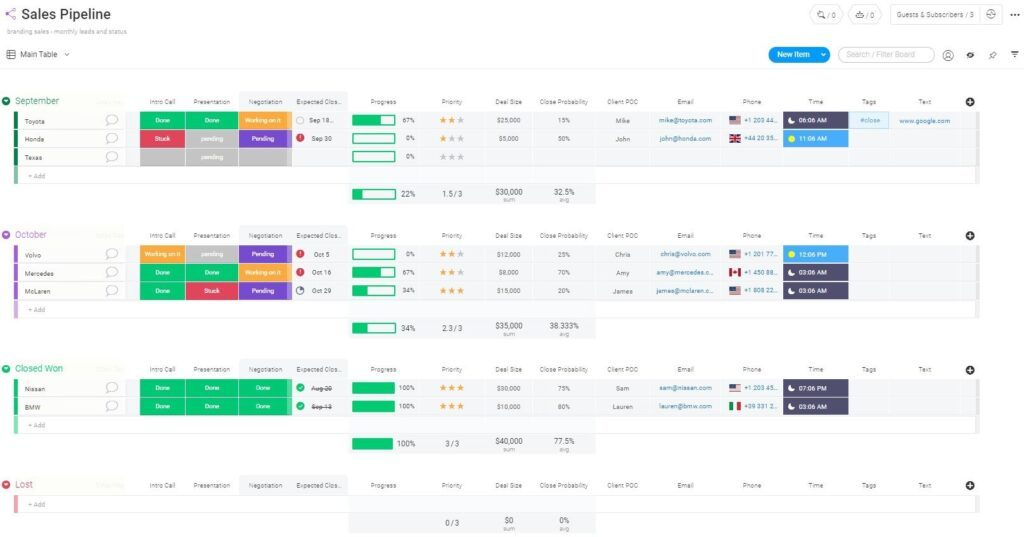
If your small business needs a CRM that adapts to your unique sales or service process, monday CRM offers a flexible platform for building custom workflows. It’s especially useful for teams that want to design their own pipelines, dashboards, and automations without relying on rigid templates. monday CRM is a strong choice for businesses that value visual project management and want to tailor every stage of their customer journey.
Who Is monday CRM For?
Cross-functional teams that want a visual, customizable CRM embedded within a broader work management system.
Why I Picked monday CRM
What sets monday CRM apart is how deeply you can customize every aspect of your workflow, which is especially valuable for small businesses with unique processes. You can build custom pipelines, add unlimited columns, and design dashboards that reflect your team’s priorities. I appreciate that monday CRM lets you automate repetitive tasks and set up conditional logic, so your CRM adapts as your business grows. For teams that want a CRM to fit their way of working—not the other way around—monday CRM offers unmatched flexibility.
monday CRM Key Features
Some other features in monday CRM that small businesses may find valuable include:
- Email Integration: Connect your email accounts to send, receive, and track messages directly within the CRM.
- Activity Timeline: View a chronological history of all interactions and updates for each contact or deal.
- Document Management: Store, share, and collaborate on files related to deals and contacts.
- Mobile App: Access and update your CRM data from anywhere using dedicated iOS and Android apps.
monday CRM Integrations
Integrations include over 200 third-party applications, such as Salesforce, Mailchimp, Aircall, Pandadoc, and Twilio.
Pros and Cons
Pros:
- 24/7 customer support
- Easy to develop and implement automations
- Unlimited boards to organize clients, projects, and processes
Cons:
- All plans have a three-user minimum
- No customizable reports
New Product Updates from monday CRM

monday CRM Adds Meta Conversions API Integration
monday CRM now lets you connect Meta Conversions API and sync lead status back to Meta, improving targeting and conversions via a new Meta integration automation recipe. For more information, visit monday CRM's official site.
 .
.
Attio
Best for automation capabilities
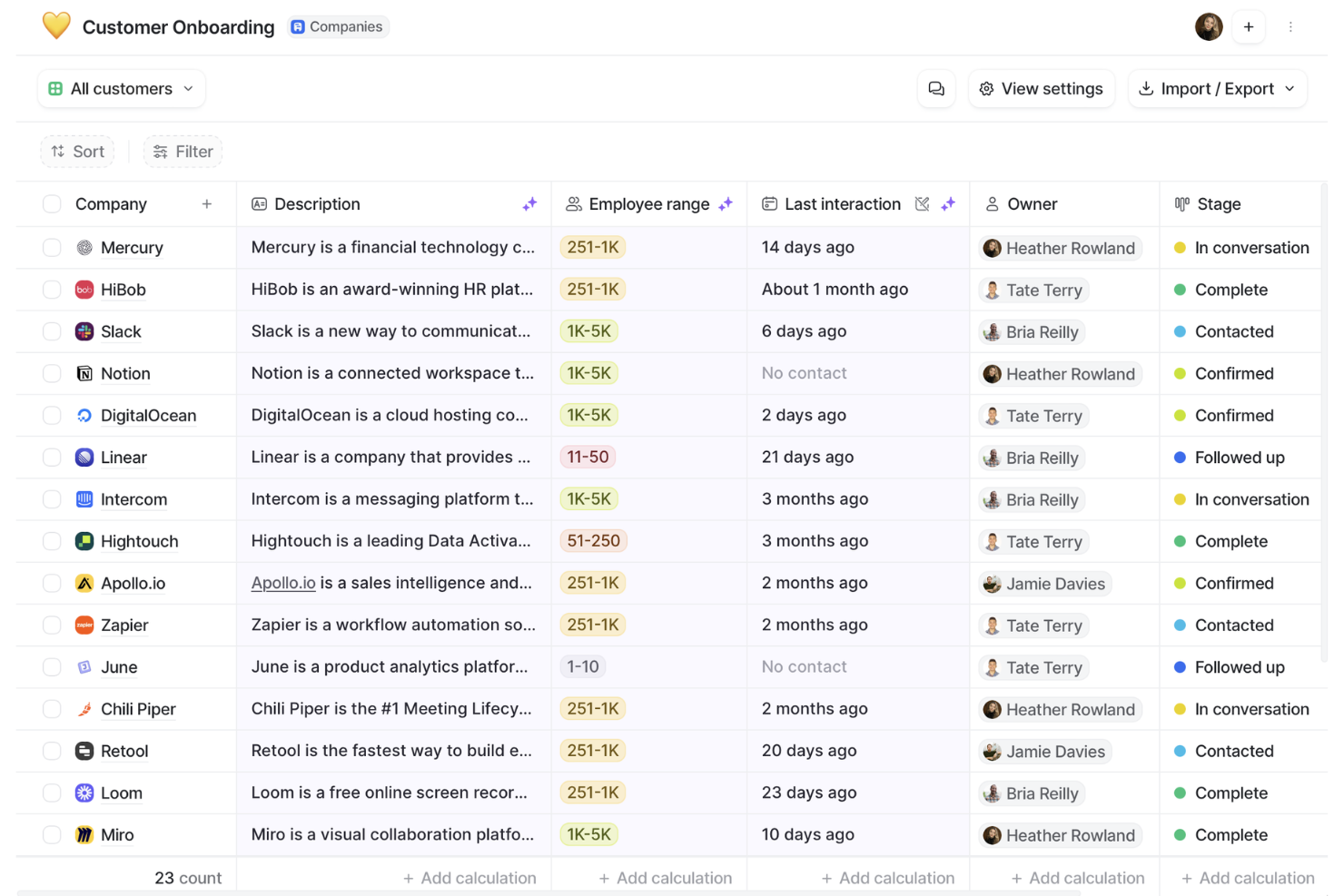
Attio is a CRM platform built for teams that want to automate and customize their customer management workflows. It’s a strong fit for small businesses that need flexible data organization and advanced automation without heavy setup. If your team wants to streamline repetitive tasks and adapt CRM processes as you grow, Attio offers a modern approach.
Who Is Attio Best For?
Fast-growing startups and modern revenue teams that want a highly flexible, automation-first CRM with customizable data structures.
Why I Picked Attio
I picked Attio because its automation capabilities stand out for small businesses that want to reduce manual work and keep processes consistent. Attio lets you build custom workflows using triggers and actions, so you can automate follow-ups, data updates, and task assignments as deals move through your pipeline. The platform also supports dynamic data fields, which means you can tailor automation to match your unique sales or service process. For teams looking to save time and minimize errors, Attio’s automation features make it a strong contender in the CRM space.
Attio Key Features
Some other features in Attio that small businesses may find useful include:
- Collaborative Workspaces: Multiple team members can work together on shared pipelines and contact lists in real time.
- Customizable Views: Create and save different views for contacts, companies, and deals to match your team’s workflow.
- Email Sync: Automatically sync emails with contacts and deals to keep communication history organized.
- Permission Controls: Set granular access levels for users to manage who can view or edit specific data.
Attio Integrations
Integrations include Airtable, Asana, Ashby, Brevo, Fillout, GitHub, Google Calendar, Google Drive, Google Forms, Gmail, HubSpot, Intercom, and Jira.
Pros and Cons
Pros:
- Supports real-time collaboration
- Automatically enriches data
- Platform is flexible and customizable
Cons:
- Could offer more advanced reporting features
- Mobile app lacks some functionalities
New Product Updates from Attio
Attio Expands Developer Platform APIs and MCP Capabilities
Attio expands its developer platform with new API endpoints, MCP tools, and App SDK 1.0.0. These updates give developers more ways to automate data, app, and workflow management. For more information, visit Attio’s official site.
 .
.
Best CRM for B2B small business sales teams
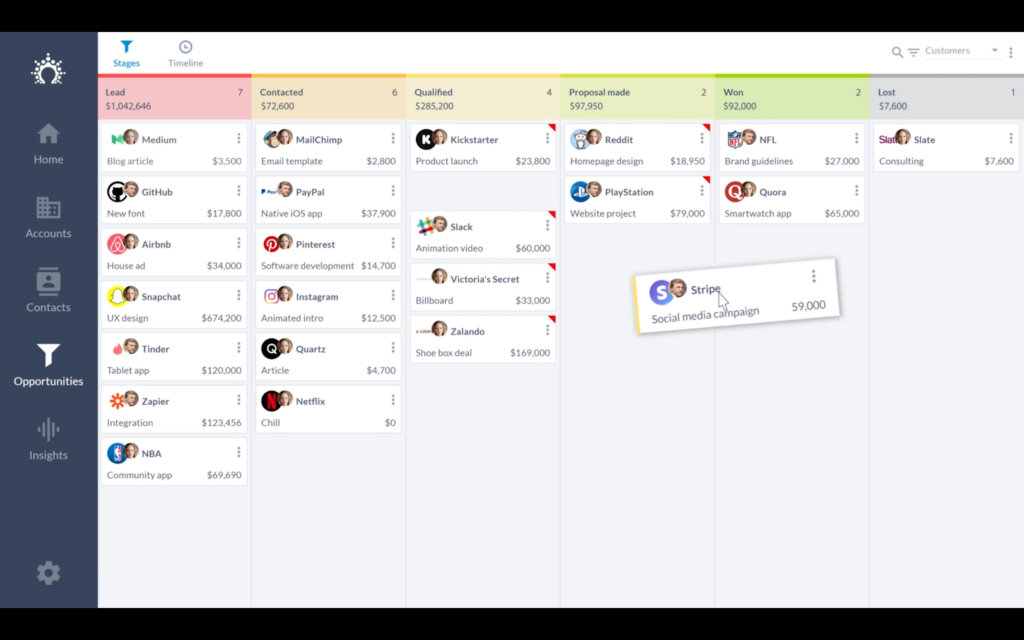
Salesflare is designed for B2B small business sales teams that want a CRM to automate data entry and keep pipelines accurate. It’s especially useful for teams that rely on email, calendar, and LinkedIn activity to drive deals forward. Salesflare helps sales-focused businesses capture every touchpoint and keep contacts up to date without manual effort.
Who Is Salesflare Best For?
Small B2B sales teams that want automated data capture and relationship tracking without manual CRM updates.
Why I Picked Salesflare
For B2B small business sales teams, Salesflare stands out because it automatically gathers contact and company data from emails, calendars, and social profiles. This means your team spends less time on manual data entry and more time building relationships. I picked Salesflare because its pipeline management tools are built specifically for tracking multi-touch B2B sales cycles. The platform also highlights untapped opportunities, allowing you to keep deals moving and avoid letting leads slip through the cracks.
Salesflare Key Features
Some other features that make Salesflare appealing for small business sales teams include:
- Email Tracking: Get real-time notifications when contacts open or click your emails.
- Built-In Email Sequences: Set up automated follow-up emails directly from the CRM.
- Team Collaboration Tools: Share pipelines, notes, and files with your team in one place.
- Mobile App: Access your CRM data and update deals on the go with iOS and Android apps.
Salesflare Integrations
Integrations include Gmail, iCloud, Office 365, Exchange and a REST API to build custom connectors. Zapier can be used to integrate the software with additional tools.
Pros and Cons
Pros:
- Collaborative features help create team transparency
- Simple, straightforward user interface is easy to learn
- Plenty of tutorials are available on the company’s YouTube channel
Cons:
- Lacks native calendar and scheduling features
- Customer support is not available by phone
Capsule
Best for integrations and ease of use
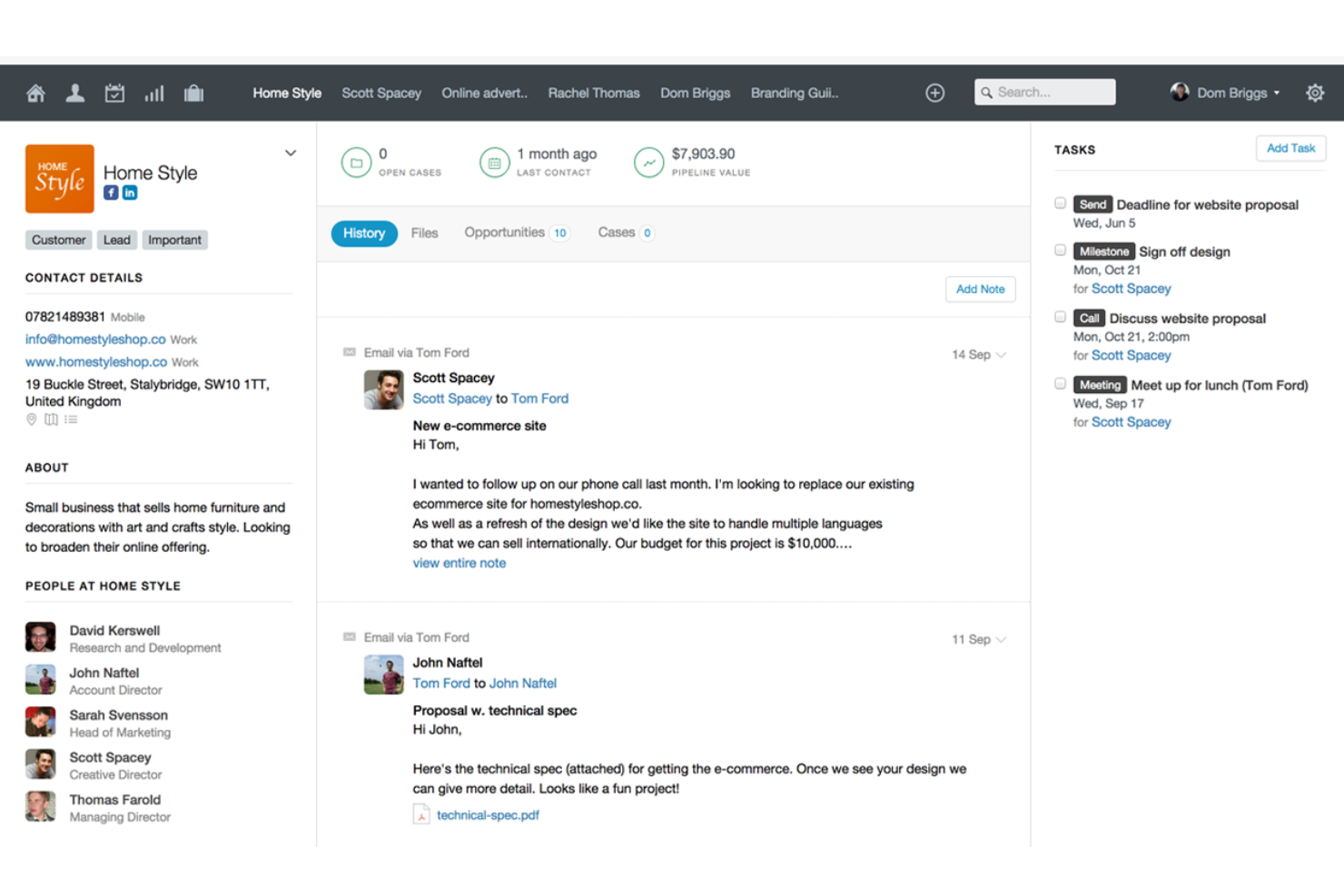
Capsule is a CRM built for small businesses that want to connect their favorite tools and keep processes simple. It’s a strong fit for teams that rely on integrations with accounting, email, and marketing platforms to manage customer relationships. Capsule helps you centralize contacts, track sales, and automate tasks without adding complexity to your workflow.
Who Is Capsule Best For?
Small businesses that prioritize ease of use and strong third-party integrations over advanced customization.
Why I Picked Capsule
What drew me to Capsule is how it helps small businesses connect their existing tools without adding extra steps to daily work. Capsule’s Zapier integration library and direct connections to platforms like Xero and Mailchimp let you sync data and automate tasks across your tech stack. I picked Capsule because its sales pipeline view and customizable fields make it easy to adapt the CRM to your team’s workflow. These features help small businesses keep everything organized while still working with the apps they already use.
Capsule Key Features
Some other features that make Capsule useful for small business teams include:
- Task Management: Assign tasks to team members and set deadlines directly within contact or opportunity records.
- Email Integration: Connect your email account to track conversations and store correspondence with contacts.
- Case Management: Manage customer service cases and track their progress alongside sales opportunities.
- Mobile App: Access your CRM, update records, and manage tasks from iOS and Android devices.
Capsule Integrations
Integrations include Google Workspace (Gmail, Docs, Calendar), Microsoft Office 365, Mailchimp, Xero, QuickBooks, Slack, FreshBooks, and more using Zapier.
Pros and Cons
Pros:
- Send and receive emails right in Capsule CRM
- Integrated calendar tasks management
- Intuitive and easy to use
Cons:
- More digital marketing integration welcomed
- Can't drag-and-drop data tags or fields
New Product Updates from Capsule

Capsule Adds AI Meeting Prep for External Calls
Capsule introduced AI Meeting Prep with relationship summaries, color-coded signals, and CRM context for upcoming external calls. This helps users review key contact details and prepare for meetings without searching through records manually. For more information, visit Capsule’s official site.
 .
.
MRPeasy
Best CRM for small manufacturers
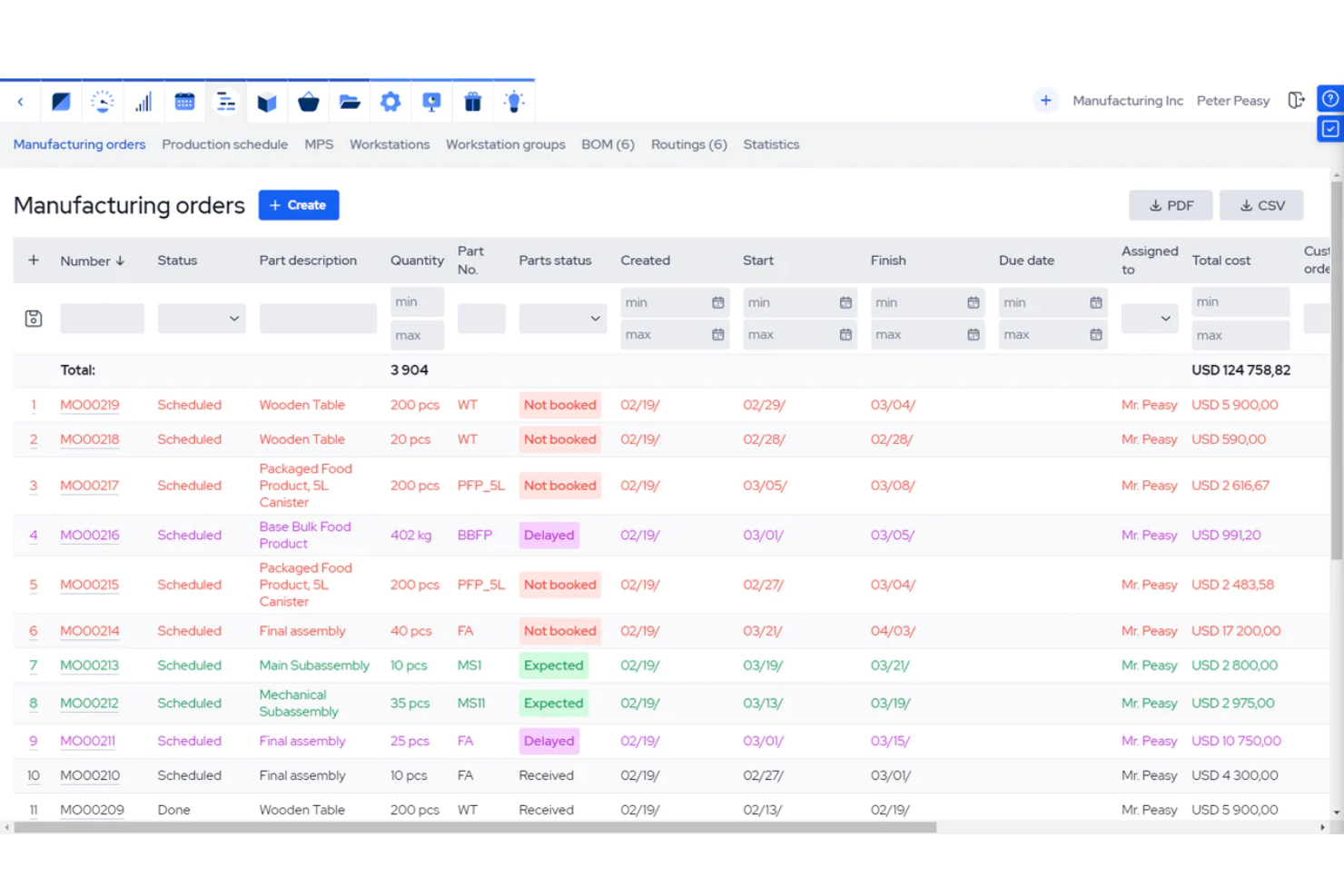
MRPeasy is designed for small manufacturers that need CRM features tightly integrated with production, inventory, and order management. It’s a strong fit for businesses that want to connect sales pipelines directly to manufacturing workflows and resource planning. MRPeasy helps you manage customer relationships while tracking orders, materials, and production schedules in one place.
Who Is MRPeasy Best For?
Small manufacturing companies that require a tightly integrated CRM with production planning and inventory control.
why I Picked MRPeasy
Unlike most CRMs, MRPeasy is built specifically for small manufacturers who need to connect customer management with production and inventory processes. The platform lets you track sales opportunities while automatically linking them to quotes, work orders, and stock levels. I picked MRPeasy because it brings together CRM and manufacturing resource planning, so you can manage customer relationships and production workflows in one system. This approach helps small manufacturers avoid manual data entry and keep sales, inventory, and production teams aligned.
MRPeasy Key Features
Some other features that make MRPeasy valuable for small manufacturers include:
- Bill of Materials Management: Create and manage multi-level bills of materials for all your products.
- Production Scheduling: Schedule manufacturing operations and track progress in real time.
- Purchase Order Management: Generate and manage purchase orders for raw materials and components.
- Barcode Scanning: Use barcode scanning to track inventory movements and production steps.
MRPeasy Integrations
Integrations include Amazon, Xero, WooCommerce, BigCommerce, Crossfire, Dropbox, Google Drive, OneDrive, HubSpot, QuickBooks, ShipStation, Salesforce, Shopify, Zapier, and more.
Pros and Cons
Pros:
- Ability to switch between languages
- Intuitive interface for less tech savvy individuals
- Automated production planning
Cons:
- No technical support via phone
- Report and statistics features are limited
New Product Updates from MRPeasy
MRPeasy Expands REST API v2 With New Data Endpoints
MRPeasy expands REST API v2 with new endpoints for reports, dashboard data, production resources, stock, and settings. This gives users broader programmatic access to operational data. For more information, visit MRPeasy’s official site.
 .
.
Best value for money for small businesses
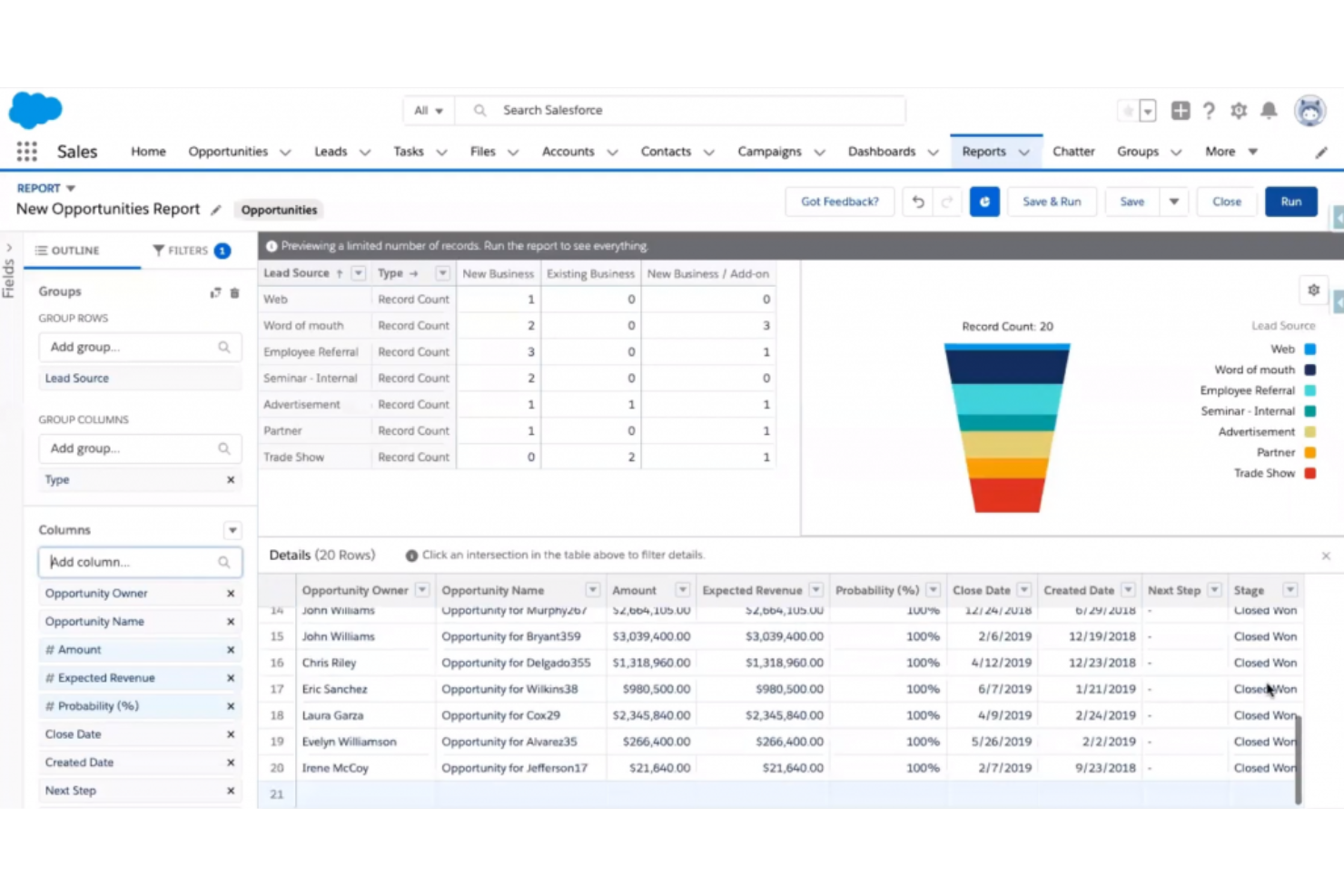
Salesforce CRM gives small businesses access to advanced sales and customer management tools that are usually reserved for larger organizations. It’s a strong choice for teams that want customizable workflows, detailed reporting, and a wide range of integrations without a steep learning curve. Salesforce CRM helps you centralize customer data, automate sales processes, and scale as your business grows.
Who Is Salesforce CRM Best For?
Small B2B sales teams that want automated data capture and relationship tracking without manual CRM updates.
Why I Picked Salesforce CRM
When looking for the best value for money in a CRM for your small business, Salesforce stands out for its depth of features at an accessible entry price. I picked Salesforce CRM because it offers customizable sales pipelines and automation tools that help small teams manage leads and deals without extra manual work. The built-in reporting and dashboard tools give you clear visibility into sales performance and customer activity. These features make Salesforce CRM a practical choice for small businesses that want enterprise-grade capabilities without overspending.
Salesforce CRM Key Features
Some other features that make Salesforce CRM appealing for small business teams include:
- AppExchange Marketplace: Access a large library of third-party apps to extend your CRM’s functionality.
- Contact and Account Management: Store detailed records for every customer and company you work with.
- Built-In Calendar and Task Tracking: Schedule meetings, set reminders, and manage daily activities within the platform.
- Mobile App: Manage leads, contacts, and opportunities from iOS and Android devices.
Salesforce CRM Integrations
Integrations include Slack, Gmail, Outlook, QuickBooks, HubSpot, Mailchimp, Dropbox, Microsoft Teams, Zapier, and Google Workspace.
Pros and Cons
Pros:
- Strong automation for repetitive tasks
- Real-time analytics for customer insights
- Scales well as your business grows
Cons:
- Support can be slow at peak times
- Setup process can feel overwhelming
New Product Updates from Salesforce CRM
Salesforce CRM Adds Agent Access Controls in Agentforce Builder
Salesforce CRM adds Agent Access controls in Agentforce Builder for managing user and agent permissions. This gives admins more control over who can use Employee agents and what Service agents can access. For more information, visit Salesforce CRM’s official site.
 .
.
Best for tracking sales stages
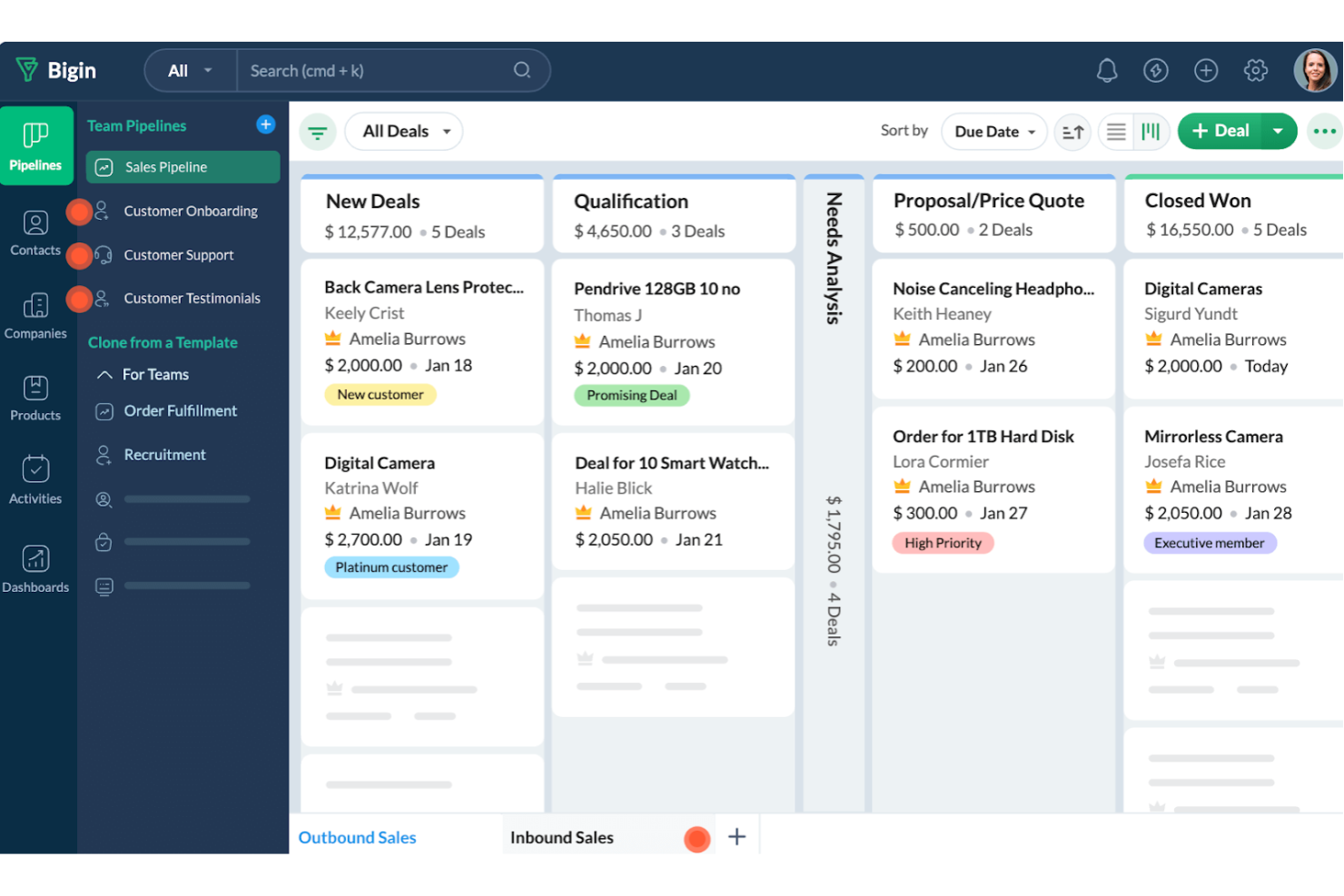
Bigin by Zoho CRM is designed for small businesses that want a simple way to track every stage of their sales pipeline. It’s especially useful for teams that need clear, visual deal management without the complexity of traditional CRMs. Bigin helps you organize leads, monitor progress, and keep your sales process moving forward with minimal setup.
Who Is Bigin Best For?
Micro-businesses and early-stage startups that need a lightweight, pipeline-focused CRM without enterprise complexity.
Why I Picked Bigin by Zoho CRM
What drew me to Bigin by Zoho CRM is its focus on helping small businesses visualize and manage every stage of their sales process. The pipeline view lets you drag and drop deals between stages, making it easy to see where each opportunity stands at a glance. I appreciate how you can customize sales stages to match your unique workflow, so your pipeline always fits your business. Bigin also includes activity tracking for each deal, so you never lose sight of follow-ups or next steps.
Bigin by Zoho CRM Key Features
Some other features that make Bigin by Zoho CRM appealing for small business teams include:
- Built-In Telephony: Make and receive calls directly from the CRM and log call details automatically.
- Email Integration: Connect your email account to send, receive, and track emails within the platform.
- Workflow Automation: Set up simple automations for repetitive tasks like follow-up reminders or status updates.
- Mobile App: Access your sales pipeline and contacts from iOS and Android devices.
Bigin by Zoho CRM Integrations
Integrations include Zoho Books, Zoho CRM, Zoho Desk, Zoho Campaigns, Zoho Analytics, Google Workspace, Microsoft 365, Microsoft Teams, Mailchimp, and QuickBooks Online.
Pros and Cons
Pros:
- Simple to set up for immediate use
- Allows easy tracking of multiple pipelines
- Offers custom forms for data collection
Cons:
- Limited flexibility in custom report creation
- Lacks mapping features for routing contacts
New Product Updates from Bigin by Zoho CRM

Bigin iOS Adds Interactive WhatsApp Templates and Quick Replies
Bigin’s iOS app now supports interactive WhatsApp templates and Quick Replies, making it easier to preview and send instant messages to customers. For more information, visit Bigin by Zoho CRM's official site.
 .
.
Best CRM for outbound sales teams
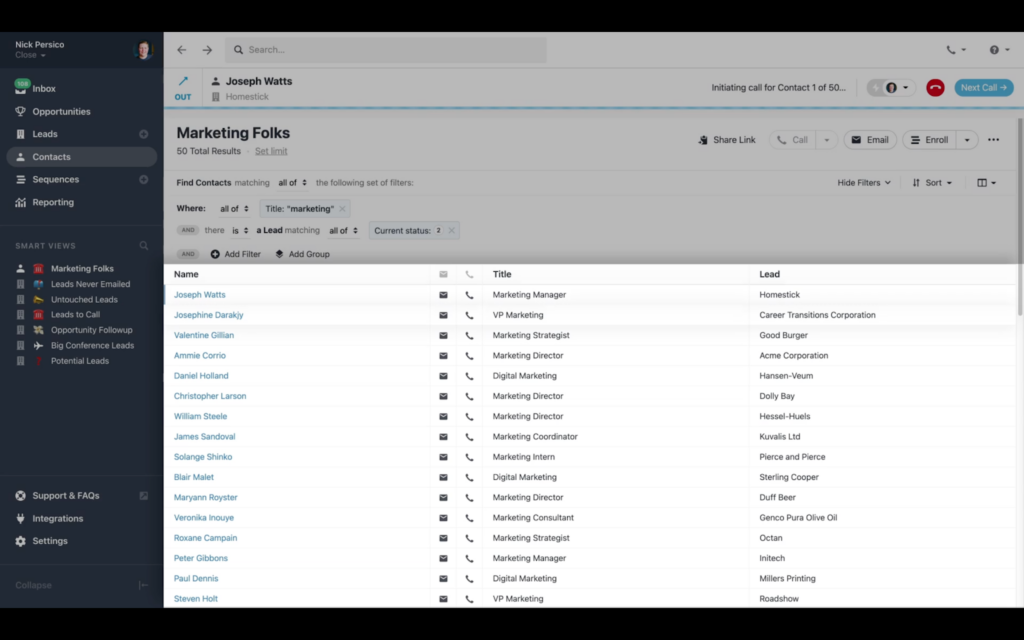
Designed with outbound sales teams in mind, Close CRM offers built-in calling, SMS, and email tools to help small businesses drive more conversations. It’s a strong fit for startups and sales-driven organizations that need to manage high-volume outreach without juggling multiple platforms. Close CRM addresses the challenge of tracking every touchpoint and follow-up in one place, so your team can focus on closing deals.
Who Is Close CRM Best For?
Outbound-focused sales teams that prioritize calling, SMS, and email outreach inside the CRM.
Why I Picked Close CRM
What sets Close CRM apart for small businesses is its focus on outbound sales workflows. I picked Close CRM because it combines built-in calling, SMS, and email sequences, so sales teams can manage outreach without switching tools. The platform’s Power Dialer helps teams make more calls in less time, which is especially useful for high-volume sales environments. Automated follow-up reminders and activity tracking keep every prospect moving through the pipeline, making it a strong fit for outbound-focused teams.
Close CRM Key Features
Some other features that make Close CRM useful for small business sales teams include:
- Customizable Pipelines: Set up multiple sales pipelines tailored to different products or processes.
- Smart Views: Filter and segment leads based on custom criteria for targeted outreach.
- Email Templates: Create and store reusable email templates for consistent communication.
- Reporting Dashboard: Access real-time sales metrics and activity reports in a centralized dashboard.
Close CRM Integrations
Integrations include ActionDesk, Alice, Enthu, Fathom Video, Geckoboard, Gmail, Google Calendar, Intersect, Leadinfo, SavvyCal, Segment, Wingman, and Zoom. Zapier is included with paid plans and hosts additional integrations.
Pros and Cons
Pros:
- Quick setup, onboarding, and time to value
- Zapier integration is included with paid plans for additional integrations
- Comprehensive calling features for outbound sales
Cons:
- Inbox lacks customization of what appears on to-do list
- Lacking in marketing and email automation
Best for independent professionals selling services

If you’re an independent professional or small service-based business, HoneyBook is designed with your workflow in mind. It brings together client communication, contracts, invoicing, and scheduling in one place, so you can manage projects from first inquiry to final payment. HoneyBook is especially useful for freelancers, consultants, and creative entrepreneurs who want a CRM that handles both client relationships and business operations.
Who Is HoneyBook Best For?
Independent service providers and creative entrepreneurs who need CRM, contracts, payments, and client management in one place.
Why I Picked HoneyBook
For independent professionals who sell services, HoneyBook stands out because it combines client management with business operations in a single platform. I picked HoneyBook since it lets you send branded proposals, contracts, and invoices directly to clients, all from one dashboard. The built-in scheduling tool also helps you manage appointments and consultations without switching apps. This focus on the full client journey makes HoneyBook a strong fit for freelancers and solo service providers who want to keep everything organized and professional.
HoneyBook Key Features
Some other features that make HoneyBook appealing for small business CRM needs include:
- Automated Payment Reminders: Set up automatic reminders to prompt clients about upcoming or overdue payments.
- Lead Capture Forms: Embed customizable forms on your website to collect and track new client inquiries.
- Task Management Boards: Organize project tasks and deadlines with visual boards for each client or project.
- Mobile App Access: Manage projects, send invoices, and communicate with clients from your phone or tablet.
HoneyBook Integrations
Integrations include Zoom, QuickBooks, Gmail, and Google Calendar.
Pros and Cons
Pros:
- Reporting on finances and lead sources
- Automated invoices and contracts
- All-in-one client management workflow
Cons:
- Reporting customization is restricted
- Limited integrations without Zapier
Freshsales
Best for unified CRM sales boost
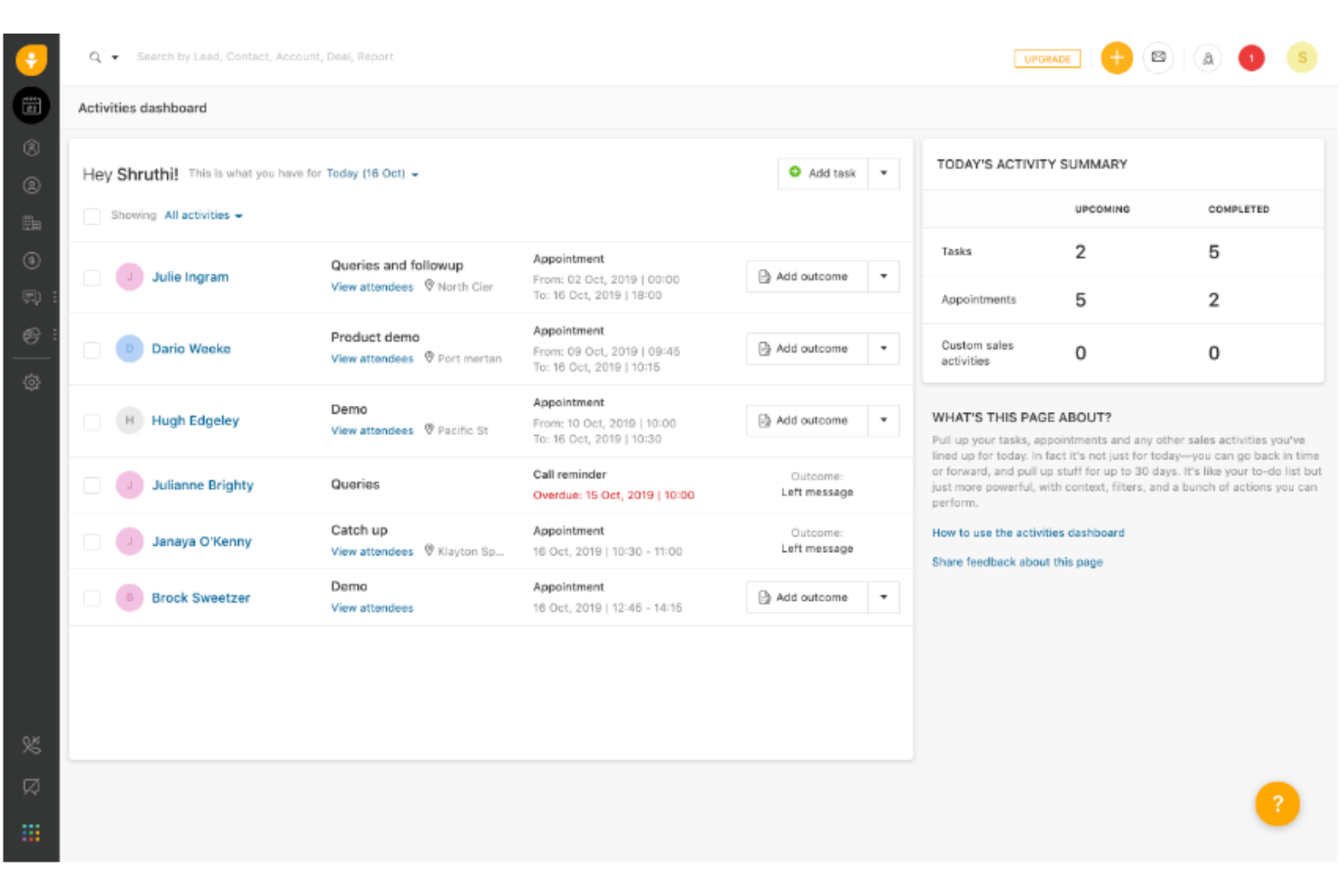
Freshsales brings sales, marketing, and customer engagement together in one CRM platform, making it a strong choice for teams that want unified data and workflows. It’s especially useful for small businesses looking to automate sales processes, manage leads, and track deals from a single dashboard. Freshsales stands out for its built-in phone, email, and AI-powered insights that help sales teams boost productivity without juggling multiple tools.
Who Is Freshsales Best For?
Sales teams that want built-in calling, email, and AI lead scoring within a single unified CRM.
Why I Picked Freshsales
For small businesses that want to unify their sales process, Freshsales offers a single platform where teams can manage leads, deals, and customer communications without switching between tools. I picked Freshsales because it combines built-in phone, email, and chat features with AI-driven lead scoring, so sales reps can prioritize and engage prospects from one place. The visual sales pipeline makes it easy to track deal progress and spot bottlenecks quickly. This unified approach helps small teams stay organized and focused on closing more deals.
Freshsales Key Features
Some other features that make Freshsales appealing for small business teams include:
- Workflow Automation: Set up automated actions for repetitive sales tasks and follow-ups.
- Customizable Fields and Modules: Tailor data fields and modules to match your unique sales process.
- Sales Activity Tracking: Log and monitor calls, meetings, and tasks directly within the CRM.
- Mobile CRM App: Access customer data and manage deals from iOS and Android devices.
Freshsales Integrations
Integrations include Freshdesk, Freshchat, Freshconnect, Freshcaller, Mailchimp, HubSpot, QuickBooks, Trello, Adobe Commerce, Shopify, and Docusign.
Pros and Cons
Pros:
- Built-in phone and email access
- Visual sales pipeline tracking
- AI-powered lead scoring tools
Cons:
- Automation rules need careful planning
- Setup may take time for new users
Other CRM For Small Business
If you didn’t find an option to meet your needs in the the best CRM for small business short list, here are a few more options worth looking into:
- NetHunt
Sales CRM with LinkedIn and Gmail integrations
- Kintone
For building custom CRM systems
- Pipedrive CRM
Sales CRM for visual pipeline management
- ActiveCampaign
For automated customer journey tracking
- Really Simple Systems
CRM software for small B2B businesses
- Act!
For its hybrid deployment options
- GoHighLevel
For all-in-one marketing and sales management
- Insightly
Scalable CRM solution for small business
- Less Annoying CRM
CRM with a simple user interface
- Thryv
Complete small business management software
- Copper
CRM for small business with Google Workspace integration
- Velaris
For 360-degree customer data views
- SimplyDepo
For retail execution workflows
- ClickUp
CRM for cross-team collaboration
- Zoho CRM
CRM for its customer service features
- Solid Performers CRM
CRM for live training
- Kylas Sales CRM
CRM for field-based sales reps
- Flowlu
CRM for project management
- SuiteDash
CRM for client portal software
- Salesforce Sales Cloud
CRM for a large software ecosystem


Related CRM For Small Business Reviews
If you still haven't found what you're looking for here, check out these tools closely related to CRM for small business that we've tested and evaluated.
- CRM Software
- Sales Software
- Lead Management Software
- Business Intelligence Software
- Contract Management Software
- Revenue Management System
How I Evaluate CRM for Small Business
I look at two things: whether a CRM has the core functionality—pipeline tracking, automation, and contact management—for a small RevOps team to run without a dedicated admin, and what sets it apart.
Core Functionality (Table Stakes For This List)
When I'm selecting tools for my list, I rank each one on a scale from 0 (does not offer the functionality) to 5 (excels in this area) for each core functionality listed below. Then, I calculate the tool's total score into a percentage. Each tool needs to achieve a minimum total score of 65% to be considered for inclusion.
- Contact & Lead Management: I look at how each CRM stores and segments contacts—custom fields, tags, activity history, and lead capture that keep a small team's database clean.
- Pipeline & Deal Tracking: Visual pipeline views with customizable stages matter here. I check whether you can track deals from first touch through close without switching tools.
- Sales Automation & Workflows: I evaluate built-in automations like follow-up sequences, lead assignment rules, and stage-based triggers that save reps from repetitive manual work.
- Reporting & Revenue Forecasting: Dashboards and forecasting tools are key for RevOps. I look at whether a platform lets you build custom reports and track pipeline metrics in real time.
- Email & Communication Integration: Two-way sync with Google Workspace or Microsoft 365, plus logged calls and tracked emails, shows me the CRM keeps communication data centralized.
- SMB-Friendly Pricing & Integrations: Entry-tier pricing and a solid integration ecosystem tell me the tool fits a small business budget and connects to tools like QuickBooks, Slack, and Mailchimp.
Once I have a list of tools that meet this criteria, I consider what sets each platform apart.
Differentiating Factors (What Sets Vendors Apart)
Here's how I compare and contrast different vendors:
Standout Features
Built-in marketing automation is a major differentiator. When a CRM includes native email campaigns and nurture sequences, a small team can run marketing and sales from one platform instead of stitching together separate tools. I also evaluate no-code customization—whether RevOps leads can build custom objects or workflows without a developer. Customer success features like renewal tracking and health scores matter for teams managing the full lifecycle from acquisition through retention.
Beyond Features
Total cost of ownership is something I look at closely. A CRM with a low entry price can get expensive fast if key features like automation or reporting sit behind higher tiers. Time-to-value matters just as much—I check whether a platform offers guided setup, data import tools, and templates so a small team can go live without hiring a consultant. Scalability is the other big factor. I evaluate whether the CRM supports role-based permissions and multi-pipeline setups that grow with a team's RevOps maturity.
How To Choose CRM For Small Business
With so many different CRM for small business solutions available, it can be challenging to make decisions on what tool is going to be the best fit for your needs.
As you're shortlisting, trialing, and selecting CRM for small business, consider the following:
- What problem are you trying to solve - Start by identifying the CRM for small business feature gap you're trying to fill to clarify the features and functionality the tool needs to provide.
- Who will need to use it - To evaluate cost and requirements, consider who'll be using the software and how many licenses you'll need. You'll need to evaluate if it'll just be the revenue operation leaders or the whole organization that will require access. When that's clear, it's worth considering if you're prioritizing ease of use for all or speed for your CRM for small business power users.
- What other tools it needs to work with - Clarify what tools you're replacing, what tools are staying, and the tools you'll need to integrate with, such as accounting, CRM, or HR software. You'll need to decide if the tools will need to integrate together or if you can replace multiple tools with one consolidated CRM for small business.
- What outcomes are important - Consider the result that the software needs to deliver to be considered a success. Consider what capability you want to gain or what you want to improve, and how you will be measuring success. For example, an outcome could be the ability to get greater visibility into performance. You could compare CRM for small business features until you’re blue in the face but if you aren’t thinking about the outcomes you want to drive, you could be wasting a lot of valuable time.
- How it would work within your organization - Consider the software selection alongside your workflows and delivery methodology. Evaluate what's working well and the areas that are causing issues that need to be addressed. Remember every business is different — don’t assume that because a tool is popular that it'll work in your organization.
Trends In CRM For Small Business For 2026
As businesses seek to maximize efficiency and growth, the CRM solutions they adopt are becoming more sophisticated, offering a range of features tailored to their unique needs. Below is a summary of the current trends based on recent software updates, press releases, and release logs:
Integration and Automation:
- Enhanced Integration Capabilities: CRM systems are increasingly offering seamless integration with a wide range of other business tools, including e-commerce platforms, accounting software, and communication tools, facilitating a more unified business management approach.
- Advanced Automation: Automation features are evolving to cover more complex, nuanced workflows, allowing small businesses to save time and reduce errors in customer relationship management processes.
Personalization and Customer Experience:
- Improved Personalization Features: CRMs are providing more sophisticated tools for segmenting customers and personalizing communications, helping small businesses enhance customer engagement and retention.
- Customer Journey Mapping: There's a growing emphasis on features that allow businesses to map and analyze the entire customer journey, providing insights that can be used to optimize marketing strategies and customer interactions.
Data Analysis and Reporting:
- Advanced Analytics: Data visualization and reporting features are becoming more advanced, offering deeper insights into sales trends, customer behavior, and campaign effectiveness.
- Predictive Analytics: More CRMs are incorporating predictive analytics, helping small businesses forecast sales trends and customer needs based on historical data.
Mobility and Accessibility:
- Enhanced Mobile Access: Recognizing the need for on-the-go access, CRM providers are improving their mobile applications to offer comprehensive functionality, ensuring business owners and employees can access critical information anytime, anywhere.
- Cloud-based Solutions: The trend towards cloud-based CRMs continues, offering small businesses flexibility, scalability, and ease of access, with increasing emphasis on security and data protection.
When choosing a CRM, small businesses should consider these trends to select software that not only meets their current needs but is also poised to grow with them, enabling effective revenue operations management and supporting business expansion.
What Is A CRM For Small Business?
CRM for small business is a software tool tailored to manage customer relationships in a compact and user-friendly manner. It centralizes customer information, streamlines communication, and automates sales, marketing, and customer service processes. This software is scaled to meet the needs and resources of smaller businesses.
The benefits of CRM for small businesses include improved customer interactions and increased efficiency in managing relationships. It enables these businesses to better understand and cater to their customers, fostering loyalty and repeat business. With a CRM, small businesses can effectively track sales opportunities, optimize marketing efforts, and provide personalized customer service, all of which contribute to growth and customer retention.
Features Of A CRM For Small Business
When selecting a CRM for small businesses, keep an eye out for the following key features:
- Contact management: Store, organize, and quickly access all details about your leads, customers, and partners in one place. This helps you see every conversation and relationship at a glance, so you never lose track of who’s who or miss a chance to follow up.
- Sales pipeline tracking: Visualize every stage of your sales process. You can spot where deals are stalling, prioritize follow-ups, and make smarter choices about where to focus your time each day.
- Task and activity automation: Automate repetitive tasks like reminders, follow-ups, and scheduling. By letting the CRM handle the busywork, you can use your energy on building relationships and closing deals instead of juggling sticky notes and calendar alerts.
- Email integration: Send, receive, and track emails directly within your CRM. This feature helps you keep all customer communications in one place, making it easier to personalize your outreach and stay organized.
- Reporting and analytics: Get clear, customizable reports that show how your team is performing and where you’re winning (or losing) business. These insights give you the power to make data-driven decisions and tweak your strategies on the fly.
- Mobile access: Tap into your CRM from your phone or tablet, so you can update records, manage deals, and respond to customers on the go–because business doesn’t always happen at your desk.
- Lead management: Capture, score, and nurture leads efficiently. You can make sure no potential customer slips through the cracks, and you know exactly which leads to pursue next.
- Integration with other tools: Sync the CRM with accounting, marketing, or e-commerce software you’re already using. This creates one streamlined workflow and makes sure you’re not duplicating effort or information.
- Customization options: Adapt the CRM to fit how you work, not the other way around. From custom fields to personalized dashboards, you can make it your own.
- Security and privacy controls: Safeguard customer data with permission settings, encryption, and regular backups. You’ll have peace of mind knowing your sensitive information is protected.
Common CRM for Small Businesses AI Features
Beyond the standard CRM for small businesses features listed above, many of these solutions are incorporating AI with features like:
- Conversational AI assistants: Provide real-time answers to customer questions or assist your team with quick information–so you deliver faster, more consistent service with less manual effort.
- Predictive sales forecasting: Analyze past sales and customer behaviors to predict future revenue, helping you prioritize leads and plan resources with fewer surprises.
- AI-powered lead scoring: Automatically evaluate and rank leads based on likelihood to convert, so you can focus on the prospects who are most likely to turn into customers.
- Automated customer insights: Surface key trends and hidden patterns from customer data, giving you actionable suggestions to improve engagement and retention.
- Smart email recommendations: Suggest the best times and content for follow-up emails based on previous interactions and customer behavior, making outreach more effective without all the guesswork.
Benefits Of A CRM For Small Business
By centralizing customer information and automating key tasks, CRM solutions empower small businesses to operate more efficiently and deliver superior customer experiences. Here are five primary benefits of adopting CRM software for small businesses:
- Centralized Customer Information: Consolidates all customer data in one place.
- Facilitates easy access to comprehensive customer profiles, improving the efficiency and personalization of communication and sales efforts.
- Enhanced Sales Management: Streamlines the sales process from lead to close.
- Provides a structured platform for tracking sales opportunities, enabling more effective pipeline management and forecasting, which directly contributes to revenue growth.
- Improved Customer Engagement: Delivers tools for better interaction with customers.
- Enables businesses to nurture customer relationships through targeted communication and follow-ups, leading to increased customer satisfaction and loyalty.
- Data-Driven Decision Making: Offers insights through reporting and analytics.
- Equips businesses with actionable data on sales trends, customer behavior, and campaign effectiveness, supporting informed strategic decisions that drive business growth.
- Increased Productivity: Automates routine tasks and streamlines workflows.
- Reduces time spent on administrative tasks, allowing sales teams to focus on engaging with customers and closing deals, thereby enhancing overall productivity and revenue.
Costs & Pricing For CRM For Small Business
Choosing the right CRM software is a pivotal decision for small businesses seeking to optimize their customer relationships and streamline sales processes. With various plans available, it's important to understand the features and pricing that best align with your business needs and budget. Below is an overview of typical CRM plan options tailored for small businesses:
Plan Comparison Table For CRM For Small Business
| Plan Type | Average Price | Common Features Included |
|---|---|---|
| Free | $0 | Basic contact management, limited users, essential integrations |
| Basic | $10 - $25 per user/month | Contact and lead management, email integration, basic reporting |
| Professional | $25 - $75 per user/month | Advanced analytics, marketing automation, increased customization |
| Enterprise | $75+ per user/month | Full feature access, advanced integrations, priority support |
When selecting a CRM plan, consider the size of your business, the complexity of your customer engagement processes, and your long-term growth objectives. Choose a plan that not only fits your current requirements but also has the potential to scale with your business, ensuring a valuable investment in your company's future success.
CRM For Small Business Frequently Asked Questions
The list above is jam-packed with information, so you might (understandably) still have some questions. Here are answers to a few frequently asked questions about CRM software for your small business.
What are the types of CRM for small business?
CRM software for small businesses comes in various types to cater to different operational needs and objectives. Understanding these types can help small business owners choose the most suitable CRM solution. Here are the primary types of CRM software available for small businesses:
- Operational CRM: Focuses on streamlining daily operations, including sales, marketing, and customer service activities. It automates and optimizes business processes to increase efficiency and improve customer experiences.
- Analytical CRM: Emphasizes data analysis to provide insights into customer behavior, preferences, and trends. This type of CRM helps businesses make informed decisions based on data-driven insights, enhancing marketing strategies and customer engagement.
- Collaborative CRM: Aims to improve communication and collaboration between teams and departments. It ensures that all relevant stakeholders have access to consistent and updated customer information, fostering a unified approach to customer engagement.
- Campaign Management CRM: Specifically designed to assist with marketing campaigns, this CRM integrates tools for campaign planning, execution, and analysis, helping businesses target and engage customers more effectively.
- Strategic CRM: Focuses on long-term customer relationship development and retention strategies. It helps businesses understand customer value and align their operations with broader business goals to foster customer loyalty and drive growth.
- Social CRM: Integrates social media platforms into the CRM system, giving businesses social CRM tools for tracking customer interactions, monitoring brand mentions, and gathering feedback and insights.
- Mobile CRM: Offers CRM functionality on mobile devices, providing sales teams and other users with access to customer data, communication tools, and CRM features anytime, anywhere, enhancing flexibility and responsiveness.
- B2B CRM: Focuses on the specialized needs for business-to-business organizations.
By identifying the specific needs and goals of their business, small business owners can select the type of CRM that best aligns with their operational requirements and growth aspirations, ensuring they can effectively manage customer relationships and drive business success.
Can CRMs for small business track customer satisfaction levels?
Yes, CRMs for small businesses can track customer satisfaction levels by integrating with survey tools or utilizing built-in feedback features to collect and analyze customer responses. These insights can help businesses understand customer needs, improve service, and enhance overall satisfaction.
How do CRMs for small business manage lead qualification and scoring?
CRMs for small businesses often include lead qualification and scoring features that automate the evaluation process based on predefined criteria such as engagement level, purchase history, and demographic information. This helps businesses prioritize leads likely to convert, optimizing sales efforts and resources.
How do CRMs for small business integrate with ecommerce platforms?
CRMs for small businesses can integrate with e-commerce platforms to synchronize customer data, order history, and interaction logs, providing a unified view of customer activities. This integration facilitates targeted marketing campaigns, personalized customer experiences, and streamlined sales processes.
Should a small business use a CRM?
This choice will ultimately be yours to make, but a CRM can make a big difference in your team’s efficiency and productivity. The earlier you set up your CRM, the less your teams will accumulate a tedious manual workload over time.
Not only that, but most CRM solutions are built to scale with your company. Instead of facing a big migration down the road, you can start relying on software to manage your contacts, customer communications, documents, and data early on.
How much does it cost to use a CRM system?
Many factors will influence cost, including which platform you decide to go with. Some offer free plans, free trials, or free demos, which can give you a sense of the tool’s functionality and ease of use. While many pricing structures are based on a cost per user per month, others have flat-rate structures or usage-based pricing.
Additional Revenue Operation Software
Looking for more information about managing customer relationships? Here’s some additional reading material:
- What Is Customer Relationship Management?
- 10 Best Customer Management Software In 2026
- 10 Best CRM Software of 2026
- How The Marketing Sales Funnel Works (With Examples)
Conclusion
Just because you’re a small business doesn’t mean you can’t keep up with the digital, data-driven future of business. Tools like CRM software can make a big difference in how you run your business, manage your deals, and keep clients happy.
To receive more content on Revenue Operations and small business software solutions, sign up for our newsletter mailing list!