
The 24 Best Sales Forecasting Software Of 2026

20 Best Sales Forecasting Software Shortlist
Here's my pick of the 20 best software from the 23 tools reviewed.


With so many different sales forecasting software available, figuring out which is right for you is tough. You know you want to predict future sales performance more efficiently but need to figure out which tool is best. I've got you! In this post I'll help make your choice easy, sharing my personal experiences using dozens of different sales forecasting tools with various teams, with my picks of the best sales forecasting software.
Why Trust Our Sales Forecasting Software Reviews?
We’ve been testing and reviewing sales forecasting software since 2022. As revenue operation leaders ourselves, we know how critical and difficult it is to make the right decision when selecting software.
We invest in deep research to help our audience make better software purchasing decisions. We’ve tested more than 2,000 tools for different RevOps use cases and written over 1,000 comprehensive software reviews. Learn how we stay transparent & our sales forecasting software review methodology.
| Tool | Best For | Trial Info | Price | ||
|---|---|---|---|---|---|
| 1 | Best for AI-driven revenue predictability | Free demo available | Pricing upon request | Website | |
| 2 | Best for customizable automations for your sales pipeline | 14-day free trial + free plan available | From $12/seat/month (billed annually) | Website | |
| 3 | Best for SMBs selling B2B | 30-day free trial | From $29/user/month (billed annually) | Website | |
| 4 | Best for generating engaging reports | Free demo + free plan available | From $13.79/user/month (billed annually) | Website | |
| 5 | Best for accelerating sales opportunities | Not available | Website | ||
| 6 | Best for identifying ideal B2B customers | Free trial available | From $380/month (billed annually) | Website | |
| 7 | Best for using data and science to enhance sales activities | MadKudu doesn’t have a free trial, but they do offer a free subscription to users who sign-up through Hubspot’s app marketplace. This free plan allows users to score up to 100 new contacts each month. | From $1,999/month for up to 2,000 leads per month | Website | |
| 8 | Best for motivating your top sales performer | Free 15-day trial + free demo available | From $23/user/month | Website | |
| 9 | Best for Gmail integration | 14-day free trial available | From $49/user/month (billed annually) | Website | |
| 10 | Best for proactive AI recommendations | Free demo available | From $1,500/user/year | Website | |
| 11 | Best for evaluating all customer relationships | 30-day free trial of the extension pack you choose | EspoCRM is free to use, but there’s a fee to use integrations with the platform. These extensions cost from $190/month, which includes a year of upgrades. | Website | |
| 12 | Best for predictive intelligence using machine learning | Not available | Custom pricing upon request | Website | |
| 13 | Best with dynamic forecasting | Free trial + free demo available | Pricing upon request | Website | |
| 14 | Best for tracking website visitors | 14-day free trial for new users | Custom pricing upon request | Website | |
| 15 | Best for KPI forecasting | Free trial available | From $10/month/user | Website | |
| 16 | Best for scenario modeling | Free demo available | From $199/2 seats/month (billed annually) | Website | |
| 17 | Best for AI-enhanced CRM integration | Free trial available | From $15/user/month | Website | |
| 18 | Best for no-code, customizable dashboards | 14-day free trial available | From $25/user/month | Website | |
| 19 | Best for identifying bottlenecks in sales pipelines | 14-day free trial available | From $14/seat/month (billed annually) | Website | |
| 20 | Best for capacity‑informed forecasting | Free trial available | Pricing upon request | Website |
-

Prisync
Visit WebsiteThis is an aggregated rating for this tool including ratings from Crozdesk users and ratings from other sites.4.7 -
Expedite Commerce
Visit Website -
QuickBooks Online
Visit WebsiteThis is an aggregated rating for this tool including ratings from Crozdesk users and ratings from other sites.4





Best Sales Forecasting Software Reviews
Here’s a brief description of each sales forecasting platform to showcase each tool’s best use case, some noteworthy features, and screenshots to give a snapshot of the user interface.

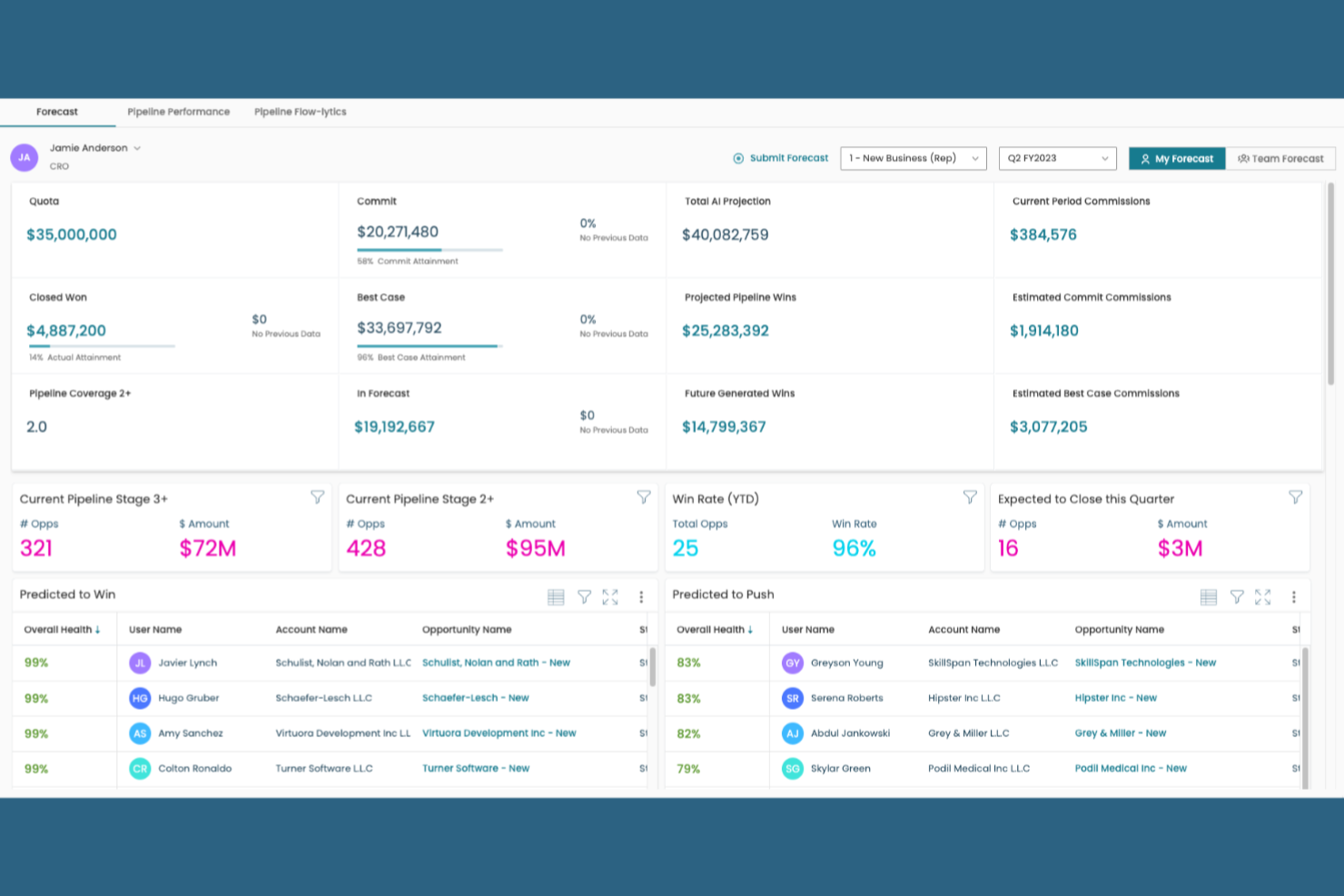
Xactly provides an AI-powered revenue predictability platform that transforms sales forecasting from an opaque process into a strategic, data-driven science. By unifying complex, multi-source revenue data (including CRM and compensation inputs), Xactly gives sales leaders the objective confidence they need to call the number accurately. The platform's real-time predictive insights empower CROs, sales leaders, and finance teams to adapt swiftly to market changes and mitigate deal risk before it impacts the quarter.
Why I Picked Xactly
I picked Xactly because it is engineered to maximize forecasting accuracy and execution alignment. Its platform strength lies in integrating extensive revenue data with AI to deliver actionable insights that guide sales teams on best practices and next steps. Xactly provides the crucial capability to identify pipeline change and mitigate slippage in real-time, therefore stabilizing the sales pipeline and ensuring your revenue predictions are grounded in objective data, not just opinion.
Xactly Key Features
In addition to AI-driven pipeline insights, Xactly offers:
- Flexible Forecast Views: Allows sales leaders to integrate precise forecasting directly into existing processes, improving visibility across complex revenue streams.
- Consolidated Data Access: Unifies CRM, compensation, and pipeline inputs in an interactive dashboard to give leaders a single source of truth for performance measurement and objective prediction.
- Role-Specific Tools: Tailored dashboards for CROs, Sales Leaders, and Finance to monitor performance, track execution, and identify forecast risks across the organization.
- Add-Ons for Revenue Planning: Includes extensions for territory and quota management, as well as commission earnings forecasting, to complete your end-to-end revenue planning ecosystem.
Xactly Integrations
Integrations include Salesforce, Oracle, NetSuite, Microsoft Dynamics, Workday, SAP, ADP, SuccessFactors, Tableau, and Marketo.
Pros and Cons
Pros:
- Centralized SaaS solution accessible across multiple languages
- Facilitates informed resource allocation and budgeting based on accurate predictions
- Offers customizable forecasting templates for diverse GTM needs
Cons:
- Some users report delays in data updates
- Interface and usability feel dated for some users


Monday sales CRM a customizable CRM tool that centralizes client communication, automates sales processes, and provides a full overview of each deal.
Why I Chose monday sales CRM: I chose Monday sales CRM for sales forecasting because of its high customizability and user-friendly interface, which centralizes sales work and client communication effectively. Its standout features include flexible automation and customizable dashboards, which cater to a diverse range of sales processes. I believe Monday.com is best for customizable sales workflows due to its extensive data visualization options and its low-code/no-code platform.
Monday Sales CRM offered a level of customization that was quite unique. Users could tailor almost every aspect of their workflow, including the sales pipeline, to fit their specific business needs. This customization extended beyond just visual aspects; it included the ability to create custom fields, automate specific actions, and integrate with a wide range of external tools.
monday sales CRM Standout Features & Integrations
Features include lead and contact management, customizable pipelines, sales automation, performance tracking, integration with various tools, advanced reporting and analytics, email tracking and synchronization, task and project management, mobile app support, and customizable templates and forms.
Integrations include Slack, Google Drive, Gmail, Google Calendar, Jira, GitHub, Trello, Dropbox, Typeform and many more, accessible through a paid plan with Zapier.
Pros and Cons
Pros:
- Advanced reporting and analytics
- Robust integration capabilities
- High customizability & automation-friendly
Cons:
- Slight learning curve
- Limited native email marketing features
New Product Updates from monday CRM

monday CRM's AI-Powered Lead Scoring Boosts Sales Efficiency
monday CRM introduces AI-Powered Lead Scoring to prioritize high-value prospects through data-driven insights. For more information, visit monday CRM's official site.


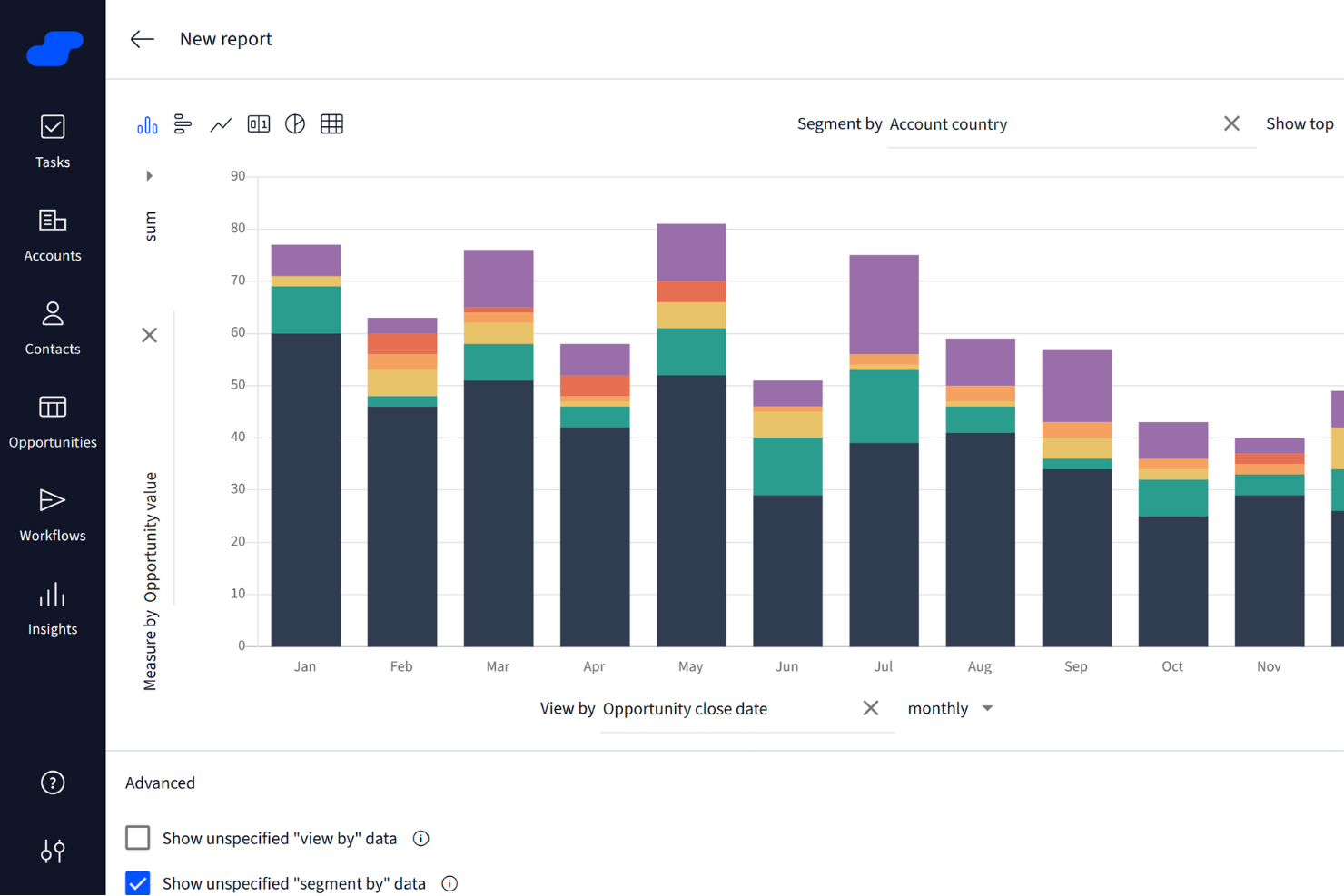
Salesflare is a CRM designed specifically for small and medium-sized B2B businesses. It provides tools that help you manage customer relationships and sales processes effectively.
Why I Chose Salesflare: I chose Salesflare because of its focus on sales tracking and management. The platform offers visual sales pipelines, which allows you to see where each lead is in the sales process and predict future sales outcomes more accurately.
Another reason I picked Salesfare is for its emphasis on sales intelligence. With features like relationship insights and data enrichment, you gain a deeper understanding of your customers and prospects. This data-driven approach supports better decision-making and helps you forecast sales more accurately.
Salesflare Standout Features & Integrations
Features include automated email sequences that allow for personalized engagement with your leads, a lead finder feature to help you discover potential customers, and detailed insights into customer interactions, which can be invaluable when trying to close deals.
Integrations include Google Docs, Google Drive, Google Sheets, Google Workspace, Intercom, Leadfeeder, Mailchimp, QuickBooks Online, Shopify, Slack, Stripe, and Calendly.
Pros and Cons
Pros:
- Responsive and helpful customer support
- Customizable dashboards for personalized insights and user experience
- Effective tracking of customer interactions and sales activities
Cons:
- Not ideal for larger enterprises with complex requirements
- Limited advanced reporting features for in-depth analysis
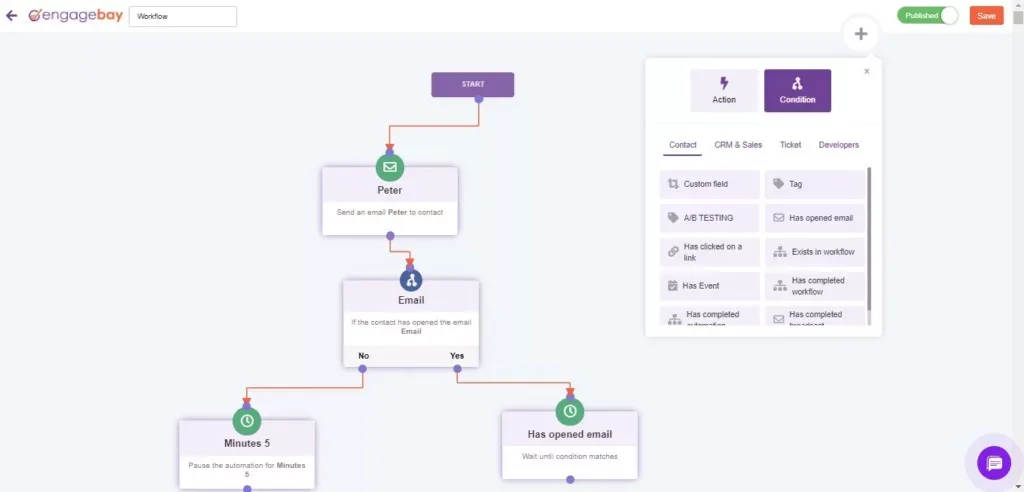
EngageBay is an all-in-one marketing, sales forecasting software, and customer support software.
Why I Chose EngageBay: EngageBay provides businesses with sales forecasting features, such as customer profiles, deal pipelines, sales automation, account-based marketing, and sales gamification. The platform’s custom reporting provides users with the flexibility to set KPIs according to their requirements. This helps you get detailed forecasts on a precise level using your sales data. You can also update these reports in real-time.
EngageBay helps start-ups and small businesses acquire, engage, and convert customers to grow their operations. Your marketing and sales teams can use the platform to guide leads and contacts through your sales pipelines in a synchronous platform. They can also get visibility into your pipelines and track each lead’s status.
EngageBay Standout Features and Integrations
Features include customer management, data import, conversion tracking, e-mail integration, data visualization, calendar management, sales proposals, pipeline management, and sales motivator.
Integrations include Xero, Zapier, Mailgun, SendGrid, Hubspot, Gravity Forms, Zendesk, Twilio, Stripe, Intercom, and Mandrill.
Pros and Cons
Pros:
- Easy-to-use form and e-mail editors
- Significant value for features
- The free plan works for start-ups
Cons:
- Some outdated e-mail templates
- Limited e-mail editing widgets

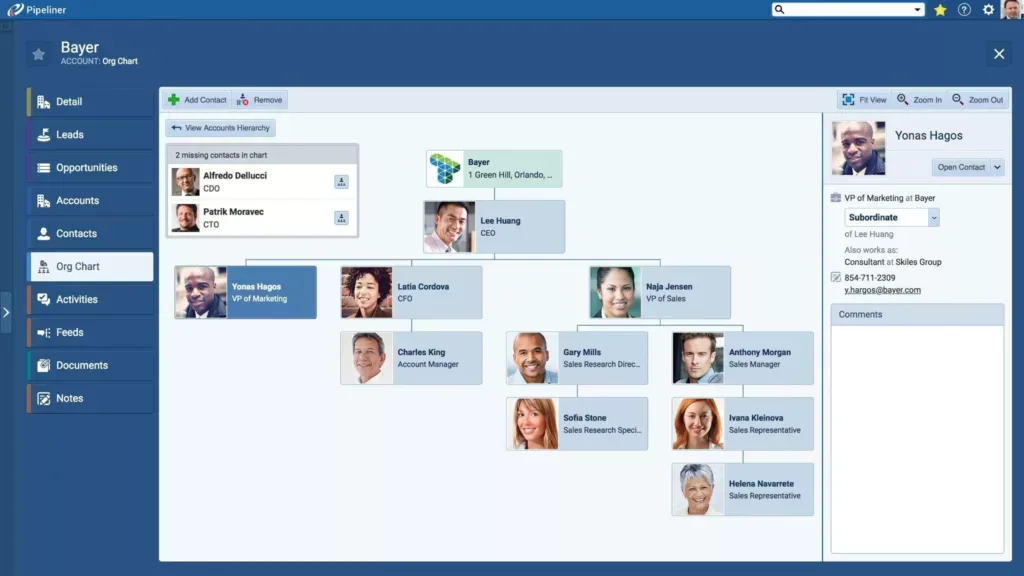
Pipeliner helps businesses enhance user engagement by focusing on core competencies.
Why I Chose Pipeliner: Pipeliner provides a more-visual approach when presenting an overview of a company’s pipeline. This helps sales and marketing teams get an updated view of the business’s current activities. These features can help your business monitor sales opportunities and see the status of any ongoing deals, allowing you to predict your future sales.
Pipeliner’s platform is for small and medium businesses that are looking for a solution to track, monitor, and follow sales workflows. Your teams can use the platform to discover valuable information that can help your business increase repeat purchases and increase sales. They can do this by using Pipeliner’s pipeline view, which instantly displays your opportunities and the stage in which one is. You can also create as many pipelines as you want to get a deeper insight into what you can expect in the future.
Pipeliner Standout Features and Integrations
Features include lead management, relationship mapping, contact management, data import and export, file sharing, and project management.
Integrations include Quickbooks, Zendesk, Slack, Intercom, Asana, Salesforce, and Constant Contact.
Pros and Cons
Pros:
- Great onboarding support
- Excellent graphics and visuals
- Users can work offline
Cons:
- Limited custom reports
- Extra features require an added fee

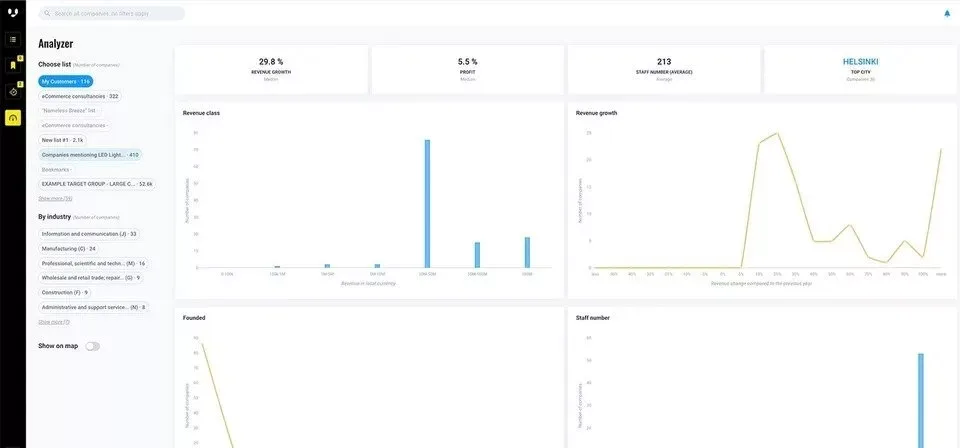
Vainu is a sales intelligence and prospecting platform with a database of over 108,000,000 companies that are enriched with public, open, and predictive information.
Why I Chose Vainu: Vainu helps businesses of all sizes transform haphazard company data into insightful leads for their sales campaigns. This data also helps them locate actionable account insights, identify prospecting signals, and determine their valuable prospects. According to website analysis, the information includes technographics, firmographics, buying signals, and the platform’s proprietary data, such as industry classifications.
Vainu helps salespeople and marketers who focus on B2B sales move through real-time company data. The platform compiles raw data from millions of public and private sources. It transforms it into information you can trust. Your sales teams can find and analyze your best leads and understand when the best time is to reach them.
Vainu Standout Features and Integrations
Features include audience targeting, data visualization, customer management, data import and export, CRM integration, and lead scoring.
Integrations include Salesforce, Pipedrive, HubSpot, Microsoft Dynamics 365, and Zapier. They also provide an API that helps you connect their platform to your current systems.
Pros and Cons
Pros:
- Good customer support
- Easy to use
- Top-quality business leads
Cons:
- It can be challenging to configure triggers
- If you don’t pay attention, you can end up with unhelpful information
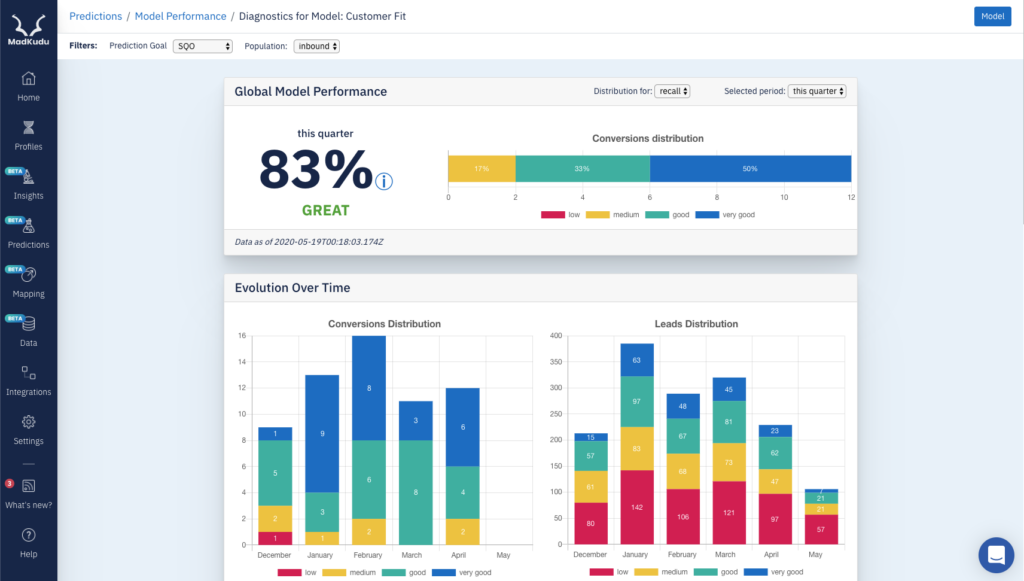
MadKudu is a platform that helps SaaS enterprises analyze opportunities to increase revenue.
Why I Chose MadKudu: MadKudu leverages sales analytics to help businesses enhance sales functions, such as lead scoring and accumulation. Companies can use this data to optimize marketing efforts to generate more leads. The platform also helps teams identify their best leads by analyzing behavioral and demographic data, enabling them to narrow the leads down to who’s ready to buy.
MadKudu helps sales managers and reps in large businesses who focus on B2B sales share high-quality leads with teammates. It provides direction on which leads your business should prioritize, giving you an insight into what your revenue can look like in the future.
MadKudu Standout Features and Integrations
Features include customer management, lead scoring, forecasting, data visualization, audience targeting, and data import.
Integrations include Zapier, Salesforce, Segment, Kissmetrics, Intercom, Hubspot, Marketo, and Amplitude.
Pros and Cons
Pros:
- Excellent customer service
- Helpful sales visuals
- Enhanced lead scoring
Cons:
- The interface can be complex
- Expensive

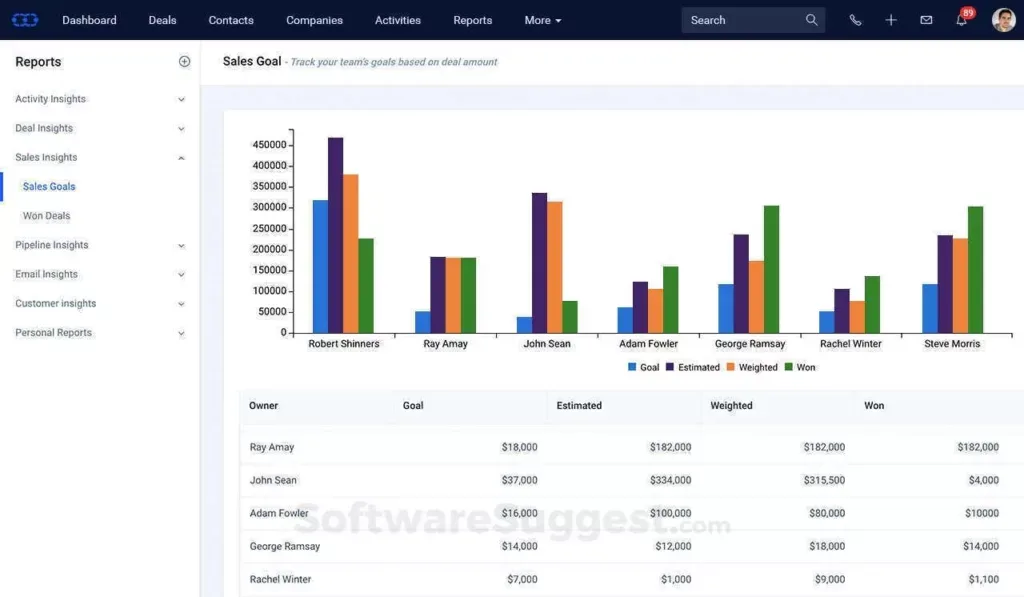
Salesmate is a CRM tool that helps users stay in touch with and nurture leads in their sales pipeline.
Why I Chose Salesmate: Salesmate provides sales managers with a forecast summary they can use to identify who their lead sales rep is and monitor their team’s strength. From the dashboard, you can set higher team targets to motivate your reps and best performers and develop a strategy to meet them. You can use Salesmate to identify any sales pipeline shortages and implement improvement methods to help increase your revenue.
Salesmate provides a solution that helps start-ups, as well as small, medium, and large businesses, simplify complex sales processes. The platform helps sales managers split forecasts by reps, teams, pipeline, and periods. This information can help companies to identify bottlenecks and enhance their sales teams’ performance.
Salesmate Standout Features and Integrations
Features include lead scoring, notifications, sales motivator, softphone, call tracking, task scheduling and tracking, and pipeline management.
Integrations include Zapier, Slack, Zendesk Suite, Quickbooks Online, WordPress, ActiveCampaign, Docusign, Mailchimp, and Microsoft Outlook.
Pros and Cons
Pros:
- Excellent security
- Fast user onboarding
- Easy to use
Cons:
- Customer support could use some improvement
- No free subscription level
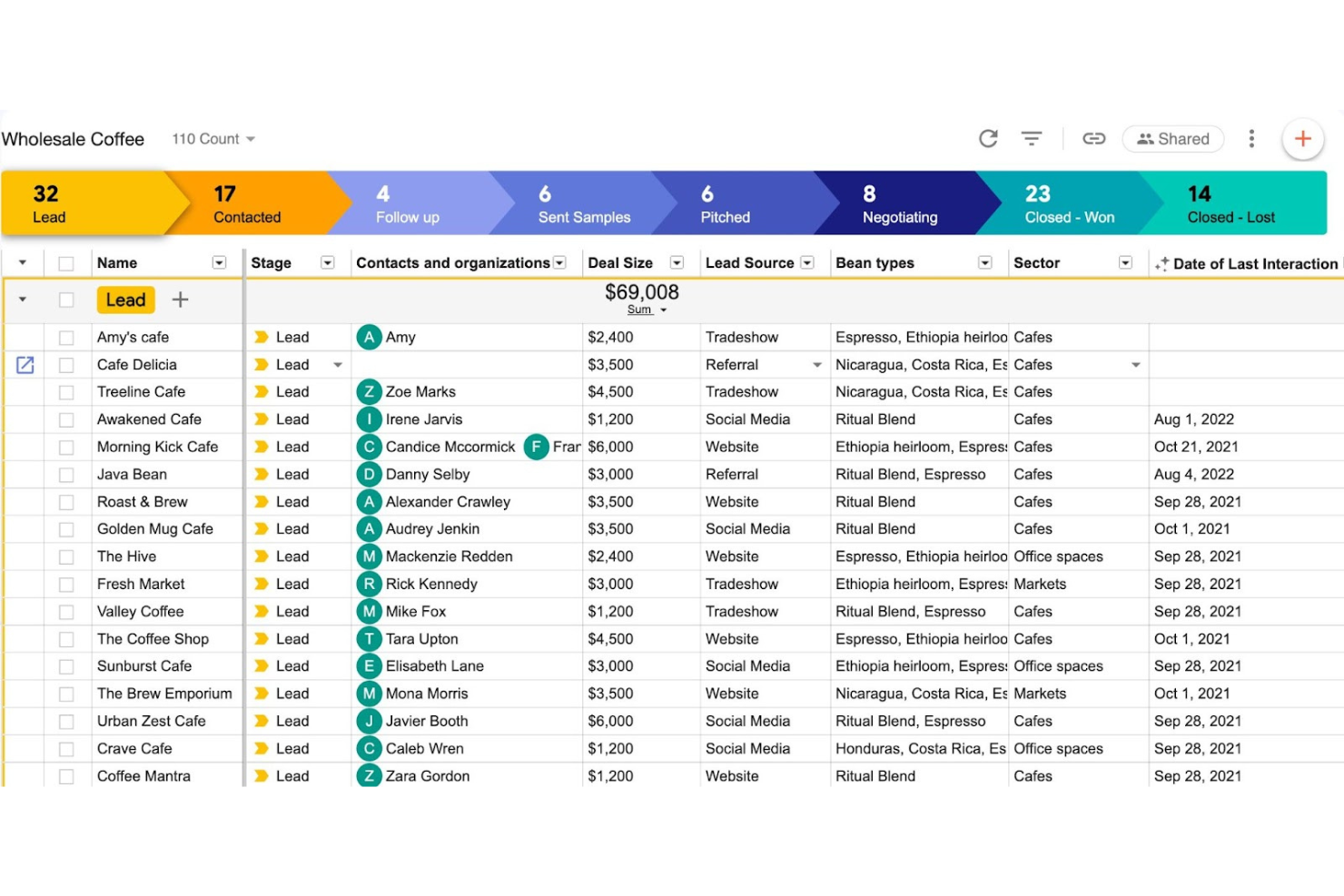
Streak is a Gmail-based CRM and forecasting tool that embeds pipeline management, reporting, and automations directly into your inbox. It covers customizable pipelines, email tracking, AI-driven insights, and collaborative contact management, helping teams forecast more accurately while staying in their existing workflow.
Why I picked Streak: Managing your sales process without leaving Gmail removes friction and improves adoption—especially for smaller teams that already live in their inbox. Its AI-generated summaries, automated data entry, and clear pipeline views make it easy to keep forecasts updated and understand deal health at a glance.
Standout features & integrations:
Features include customizable pipelines for tailored sales processes, AI-driven deal insights, collaborative contact management, automated data entry, and analytics/reporting for revenue forecasting.
Integrations include Gmail, Google Forms, Calendly, Typeform, Slack, LinkedIn, Google Hangouts Chat, Google Voice, and API-based custom integrations.
Pros and Cons
Pros:
- Email tracking provides real-time engagement insights.
- Customizable pipelines allow tailored sales process management.
- Seamless integration with Gmail enhances workflow efficiency.
Cons:
- Pricing can be steep for budget-conscious users.
- Limited automation compared to advanced CRM platforms.


Spiro is a sales forecasting software and relationship management platform that makes automatic prioritizations for users.
Why I Chose Spiro: Spiro provides users with Artificial Intelligence (AI) that helps them increase revenues by making proactive business recommendations. The platform can recognize pipeline anomalies and recommend the best steps to take. It can give sales managers top insights into their team’s activities and help them focus on the right opportunities.
Spiro offers businesses a standard CRM, telephone service, and sales enablement features. The platform analyzes your sales data and provides you with the best forecasts to help you increase revenue. It’s an excellent fit for businesses with between 100 to 1,500 employees.
Spiro Standout Features and Integrations
Features include customer management, data visualization, contact management, analytics, data import and export, contact sharing, lead management, and marketing automation.
Integrations include Microsoft Dynamics 365, Plex, SAP, Xero, Gmail, Google Docs, Office 365, Mailchimp, DocuSign, Hubspot, and Zapier.
Pros and Cons
Pros:
- Intelligent AI
- Excellent customer service
- Easy to use
Cons:
- Lack of filtering can slow processes
- Data capturing isn’t always precise
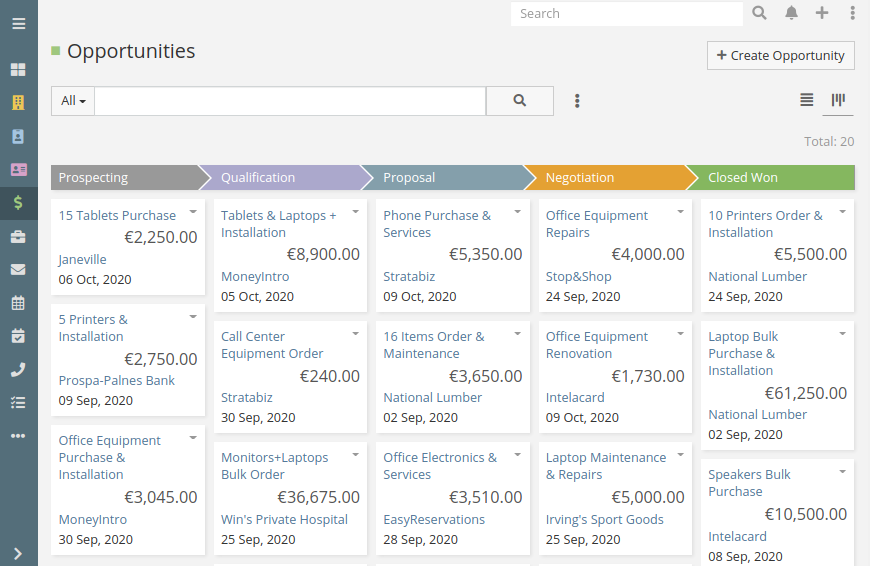
EspoCRM is a cloud-based, open-source sales forecasting software that lets businesses analyze their customers’ behavior and actions.
Why I Chose EspoCRM: EspoCRM provides data that helps businesses drive growth by giving them an overview of their stakeholder relationships. This information can help you modify your marketing approach, identify future revenue opportunities, and increase your sales. The platform’s reporting tools also transform your relationship data into beneficial insights via a range of indicators, so your team can follow their success through various stages.
EspoCRM helps businesses of any size identify all types of opportunities, clients, and connections through its interface. You can modify the dashboard and interface to match your unique requirements and expectations. The platform also provides information that can help you optimize your products and services.
EspoCRM Standout Features and Integrations
Features include audience targeting, e-mail integration, data visualization, contact management, lead management, lead scoring, task scheduling and tracking, forecasting, inventory tracking, and sales automation.
Integrations include Google Calendar, Mailchimp, Microsoft Azure, Google Contacts, and VoIP providers.
Pros and Cons
Pros:
- Easy learning curve
- Customizable
- Flexible
Cons:
- Slow customer support
- No combined, single dashboard
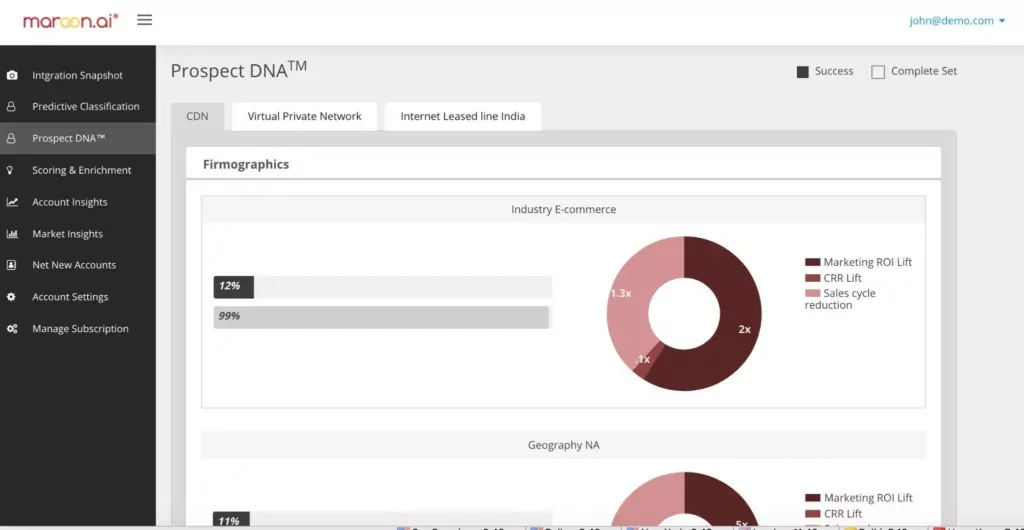
Maroon.ai helps businesses discover high-propensity prospects and develop winning engagement strategies.
Why I Chose Maroon.ai: Maroon.ai provides a plug-and-play system that integrates with your current marketing automation and CRM platforms. It uses machine learning and predictive intelligence to help users determine their business’s most profound context and predict sales. The information from this context can enhance your sales funnel’s quality, whether it’s inbound or outbound.
Maroon.ai helps enterprises prioritize leads by showing a correct valuation estimation and assigning the information to proper workflows. The platform also allows users to assign the right leads to the right sales managers to close them. It uses the data you currently have with your systems to give you insights and manager assignment features.
Maroon.ai Standout Features and Integrations
Features include keyword tracking, data import, conversion tracking, audience targeting, A/B testing, analytics, and marketing automation.
Integrations include Salesforce, Hubspot, and Marketo.
Pros and Cons
Pros:
- Identifies powerful intent triggers for leads
- Leads come with correct decision-maker information
- Predictive scoring
Cons:
- Complex onboarding process
- Limited targeting-related features

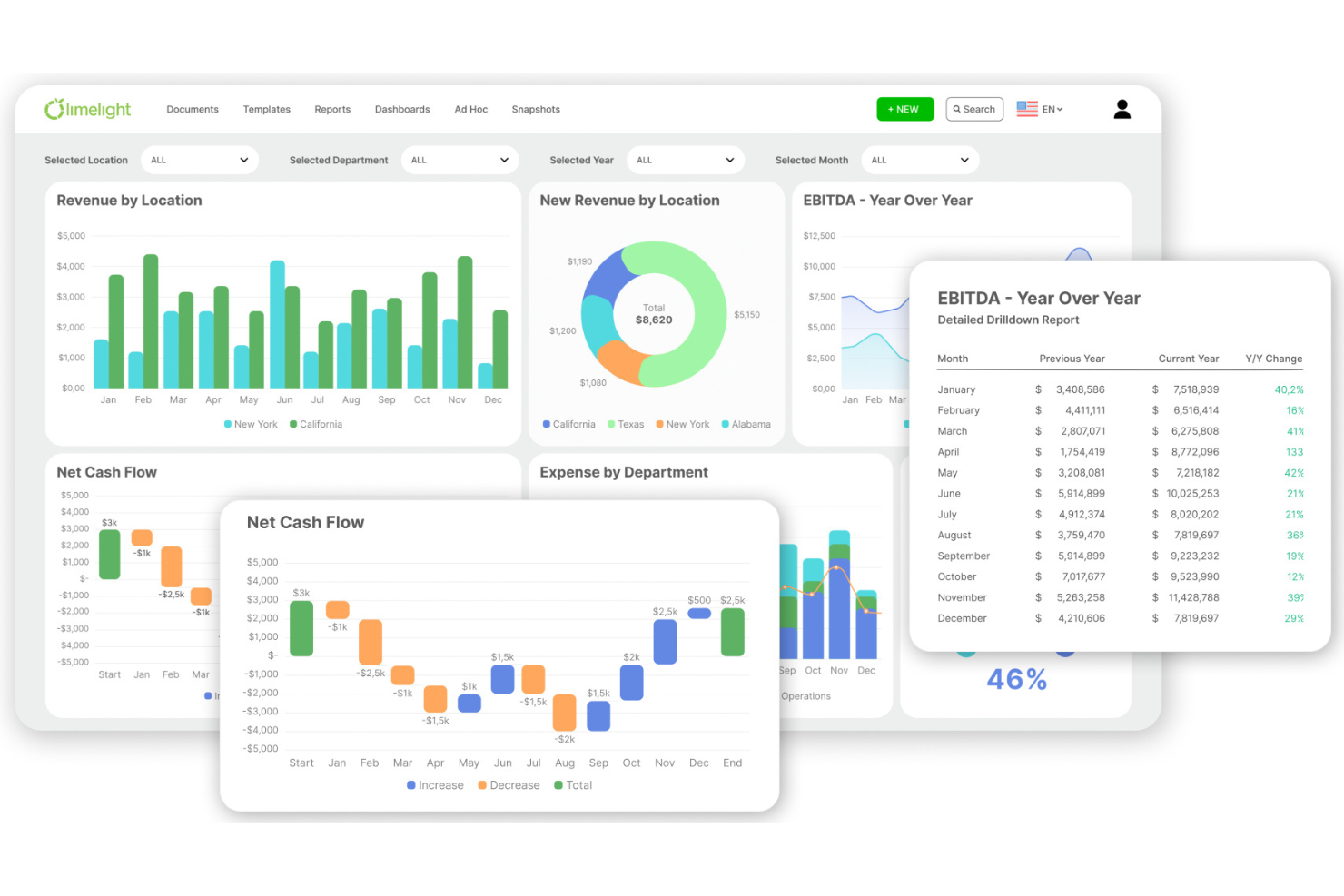
Limelight is a cloud FP&A and sales-forecasting tool that centralizes financial data and automates revenue modeling for finance teams. It covers driver-based forecasting, scenario planning, and real-time ERP syncs, helping teams shift from static spreadsheets to faster, more reliable projections.
Why I picked Limelight: It brings real-time data directly into forecasting models, which shortens cycle times and improves forecast accuracy. Interactive dashboards make trends easier to spot, and finance-owned modeling means teams can update assumptions quickly without relying on IT.
Standout features & integrations:
Features include dynamic, driver-based forecasting, interactive dashboards for clearer analysis, scenario planning for market shifts, and prebuilt templates that speed up modeling.
Integrations include Sage Intacct, Oracle NetSuite, QuickBooks Online, plus an API for custom connections.
Pros and Cons
Pros:
- Interactive dashboards simplify trend identification.
- Dynamic forecasting adjusts to changing market conditions.
- Real-time data integration enhances forecasting accuracy.
Cons:
- Learning curve for users new to FP&A tools.
- Initial setup can be complex for some users.

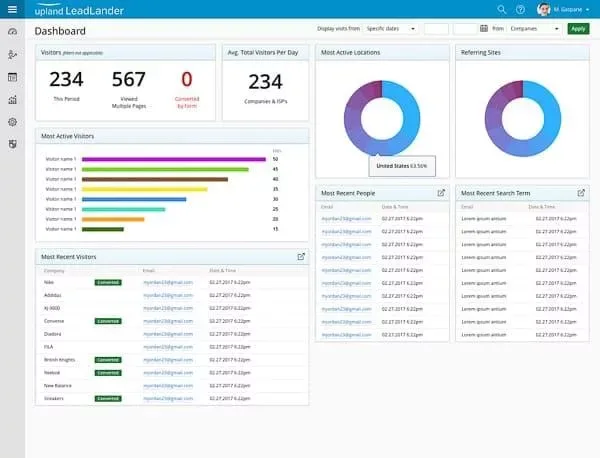
LeadLander empowers your sales and business development teams by providing the data to send targeted messages to your leads.
Why I Chose LeadLander: LeadLander helps businesses identify their website visitors and understand their activities on their websites. The platform derives data regarding your visitors’ behavior from search engines, e-mail, Google Adwords, and contact forms. These companies can use this information to improve lead generation and make accurate predictions regarding revenue.
LeadLander helps B2B businesses of all sizes get an understanding of their marketing campaigns and measure the effectiveness of these efforts. They can identify visitor characteristics, such as company information, and generate activity reports and monitor historical user data. This information can be valuable to your sales teams when attempting to turn these visitors into customers.
LeadLander Standout Features and Integrations
Features include analytics, data visualization, data export, referral tracking, lead scoring, sales motivator, and notifications.
Integrations include Salesforce, Zapier, and Google Analytics.
Pros and Cons
Pros:
- Easy onboarding process
- Great customer support
- Excellent user interface
Cons:
- Lack of integrations
- Some information might not be complete due to private geo locations

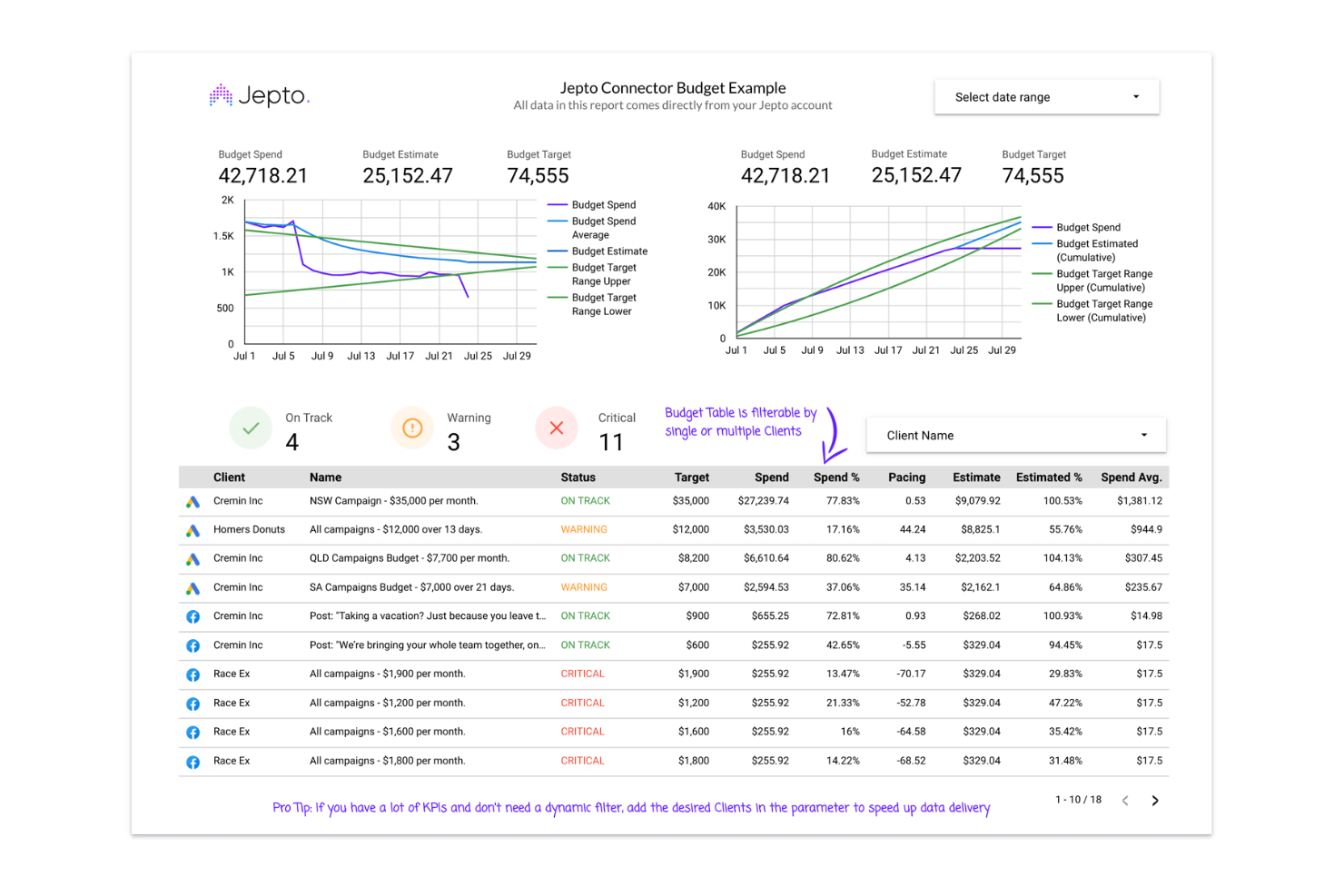
Jepto is a marketing intelligence and automation tool that delivers KPI forecasting and anomaly detection for agencies and digital-first teams. It centralizes performance data across channels, covering budget tracking, alerting, and task automation so teams can spot issues earlier and keep campaigns on target.
Why I picked Jepto: Its KPI forecasting is the standout—giving agencies a way to predict performance, set targets, and monitor pivots in real time. Paired with anomaly detection, Jepto helps teams catch unexpected shifts quickly, which improves planning and reduces wasted spend.
Standout features & integrations:
Features include KPI forecasting, anomaly detection for unusual metric swings, budget tracking to keep spend on plan, task automation for routine checks, and optional tools like local listings management and social scheduling.
Integrations include Slack, Zapier, Make, Google Analytics, Google Ads, Google Search Console, Google Business Profile, Facebook, Microsoft Ads, TikTok, LinkedIn, Twitter, and Instagram.
Pros and Cons
Pros:
- Budget tracking ensures adherence to financial plans.
- Anomaly detection feature provides timely alerts on data changes.
- Real-time KPI forecasting enhances strategic planning efficiency.
Cons:
- Some users find the interface less intuitive for beginners.
- Limited advanced reporting features compared to competitors.
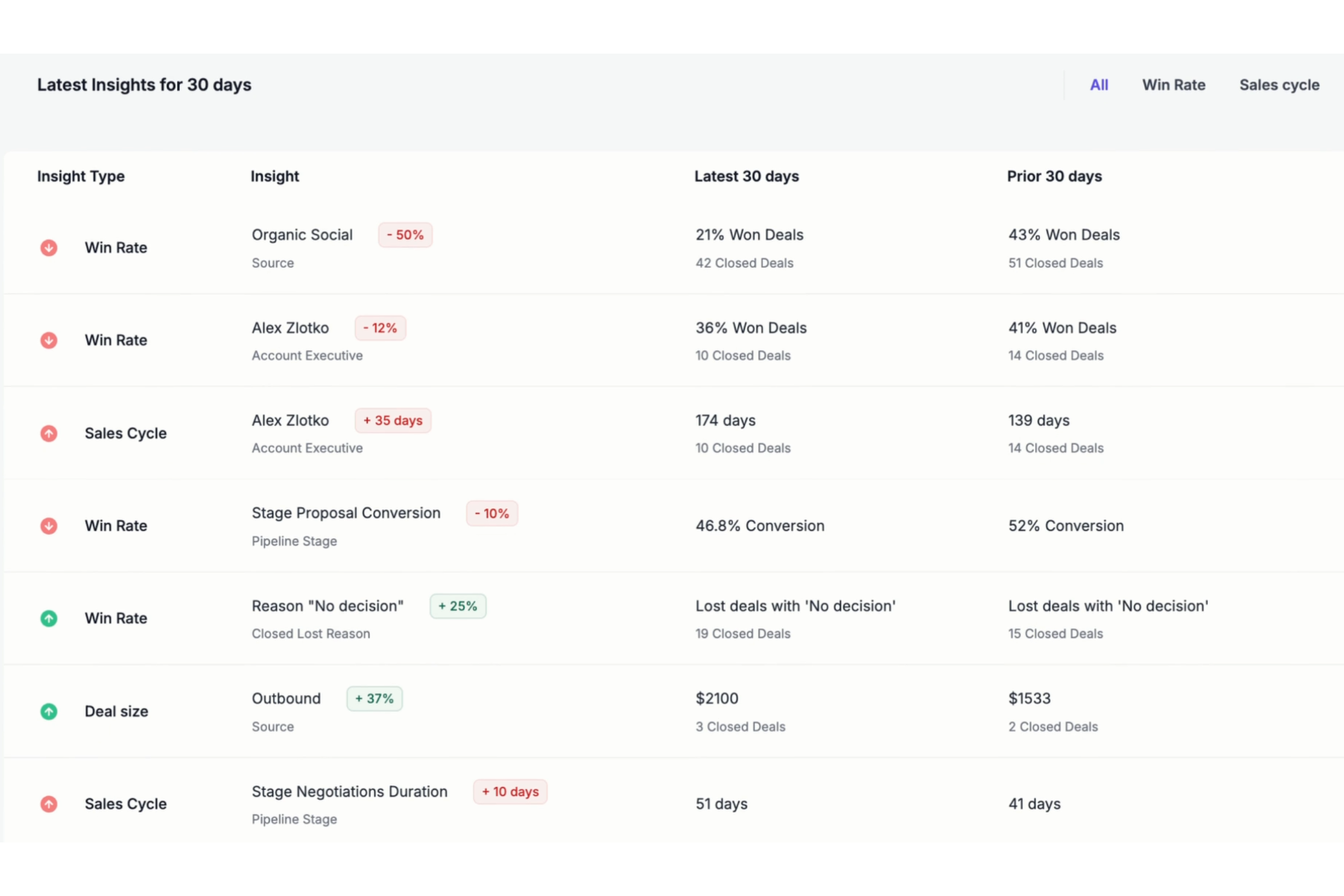
Forecastio is a sales performance management tool designed for HubSpot users, offering AI-powered sales planning automation, performance insights, and advanced sales forecasting.
Why I Chose Forecastio: Forecastio stands out with its advanced AI-driven forecasting capabilities. By analyzing historical sales data, market trends, and external variables, Forecastio's algorithms provide highly accurate sales predictions. This allows businesses to anticipate demand, optimize inventory levels, and allocate resources more effectively.
Additionally, Forecastio includes advanced features such as proactive "what-if" scenario modeling, enabling businesses to explore various potential outcomes and adjust their strategies accordingly. This functionality helps optimize resource allocation and ensure sales targets are achievable under different conditions.
Forecastio Standout Features & Integrations
Features include sales planning automation, what-if scenarios, planning templates, AI-based sales performance insights, sales capacity management, sales pipeline monitoring, goal management, capacity management, and sales quota assessment.
Integrations include HubSpot for CRM synchronization.
Pros and Cons
Pros:
- Real-time sales insights
- Sales planning features with templates
- Robust forecasting capabilities using AI
Cons:
- Dashboards could be more flexible
- Limited integrations
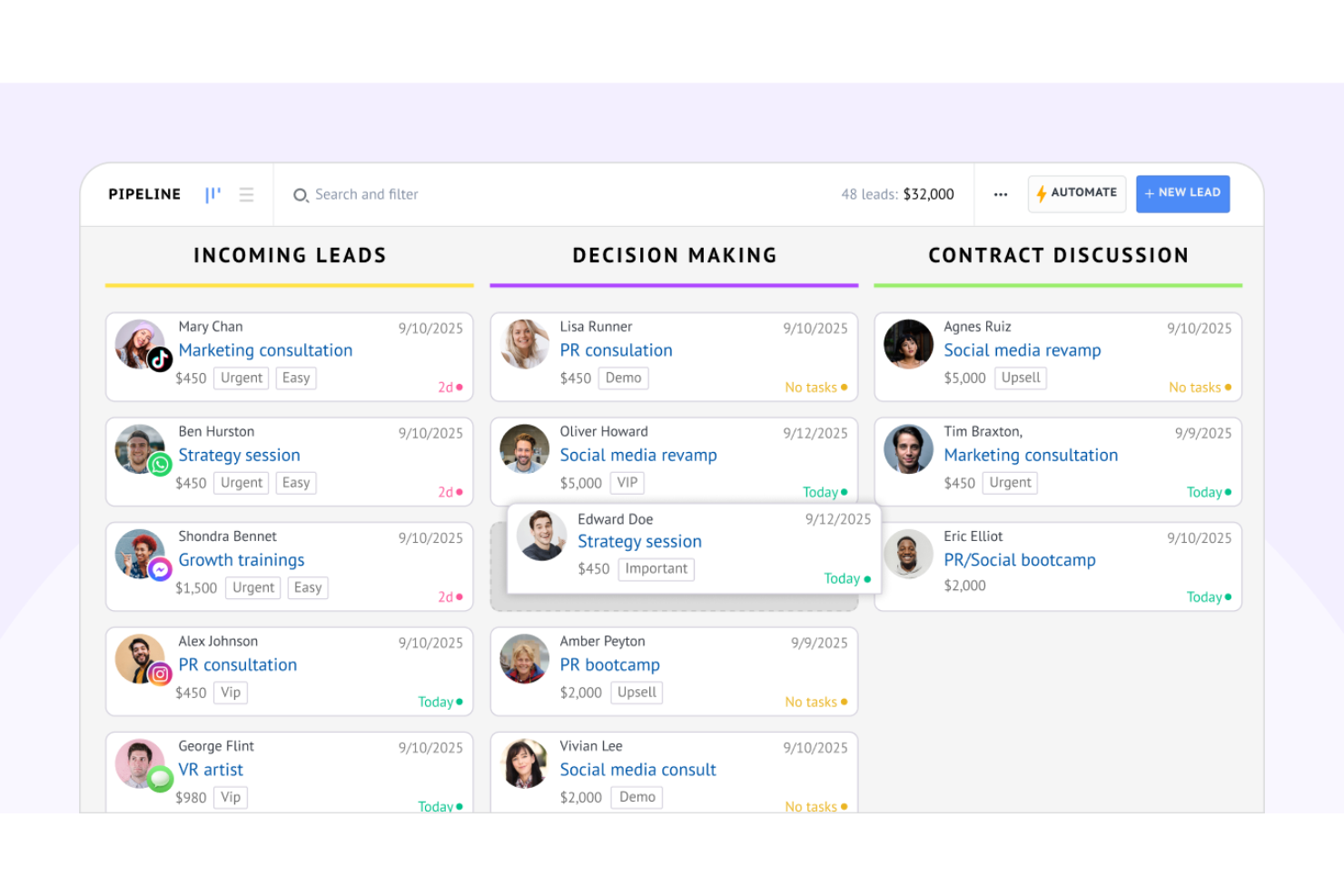
Kommo is an AI-enhanced CRM and sales forecasting tool that streamlines pipeline management, messaging-based client communication, and predictive insights for teams that rely on fast, high-volume customer interactions. It covers forecasting, dashboards, automations, and multichannel messaging, helping teams tighten their pipeline, automate follow-ups, and make data-driven decisions.
Why I picked Kommo: Its CRM, forecasting, and messaging channels live in one workflow, making it easier to manage conversations, automate routine tasks, and keep forecasts current without extra tools. The visual pipeline and AI-powered salesbot reduce manual work and help leaders spot bottlenecks and adjust strategy faster.
Standout features & integrations:
Features include predictive analytics for forecasting lead value, customizable dashboards and goal tracking, a visual CRM pipeline, automations via a salesbot and AI agent, and comprehensive reporting such as win-loss analysis and prospective sales forecasts.
Integrations include WhatsApp, Instagram, TikTok, other popular messaging platforms, and an API for custom connections.
Pros and Cons
Pros:
- Automates routine tasks with no-code salesbots.
- Offers a customizable CRM pipeline for effective sales management.
- Integrates with popular messaging apps for better client interaction.
Cons:
- User experience may need improvement for complex tasks.
- Limited customization options compared to competitors.

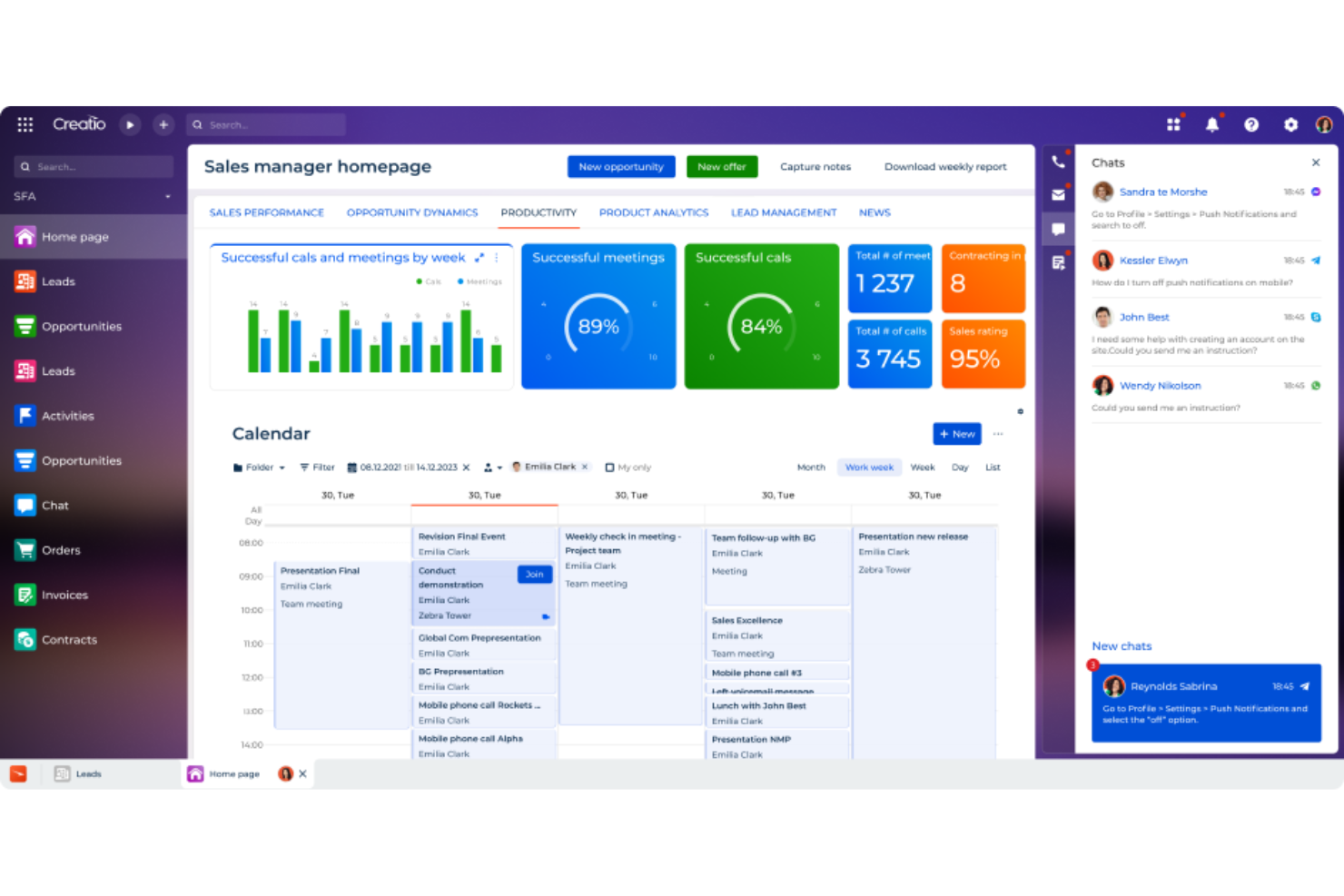
CRM Creatio is a versatile customer relationship management platform tailored for small to medium-sized businesses and larger enterprises.
Why I Chose CRM Creatio: CRM Creatio is a no-code platform that allows users to customize their workflows and dashboards without the need for technical expertise. This is especially helpful for users who need to build comprehensive forecasting dashboards.
The platform uses AI and machine learning for predictive analysis. This advanced technology allows businesses to generate accurate forecasts by analyzing vast amounts of data and identifying patterns that might not be immediately obvious to human analysts.
CRM Creatio Standout Features & Integrations
Features include workflow automation, real-time analytics, AI-assisted app development, contact and account management, lead and opportunity management, task management, and performance management.
Integrations include Accelo, Act!, ActiveCampaign, Acumatica, Adobe Analytics, Asana, Microsoft Exchange, Excel, Mailchimp, HubSpot Marketing Hub, Google Calendar, and Tableau.
Pros and Cons
Pros:
- Supports low-code development
- Allows for extensive customization to meet specific organizational needs
- No-code platform enables easy workflow automation
Cons:
- Learning curve for new users
- Customization can require significant time
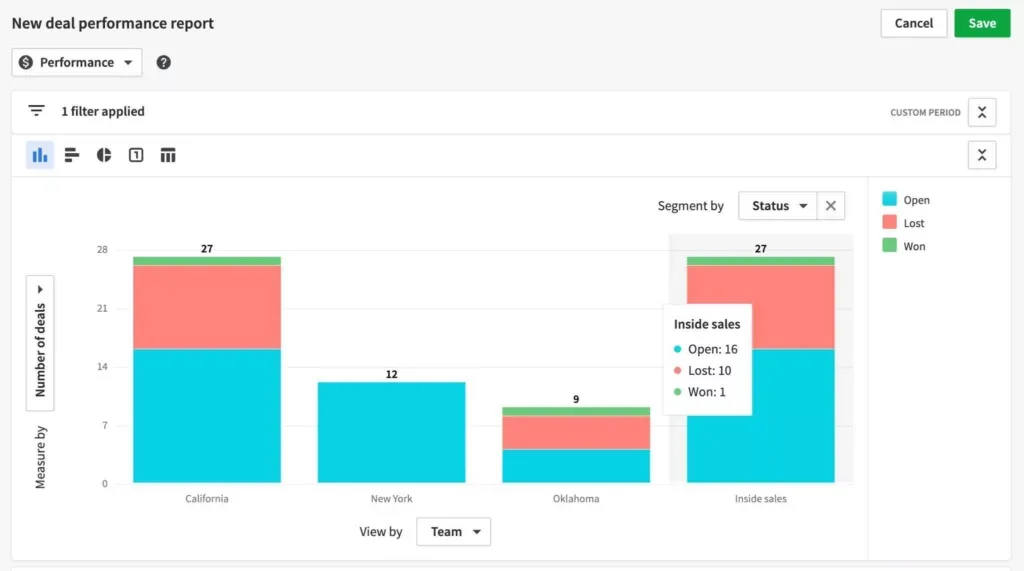
Pipedrive provides a visual sales pipeline, reports, and insights to help businesses take action.
Why I Chose Pipedrive: Pipedrive enables users to identify the areas that require more attention and improvement to maximize efficiency and productivity. The live staff dashboard shows real-time transactions and performance indicators. These features allow businesses to track progress toward their goals with Pipedrive’s precise insights.
Pipedrive is an advanced CRM solution for all types of businesses. Using the platform, you can monitor your performance, forecast revenue, and prioritize your deals. The tools Pipedrive provides to users can help enterprises to further ROI objectives.
Pipedrive Standout Features and Integrations
Features include file sharing, forecasting, file transfer, data import and export, CRM integrations, dashboard, and task scheduling and tracking.
Integrations include Dropbox, Google Drive, Highrise, Zapier, Microsoft Teams, Dealbot for Slack, and Hubspot.
Pros and Cons
Pros:
- Easily accessible from the mobile app
- Easy set-up
- Customizable dashboards
Cons:
- Customer support could be better
- Sales forecasting features are only available on the higher tier plan
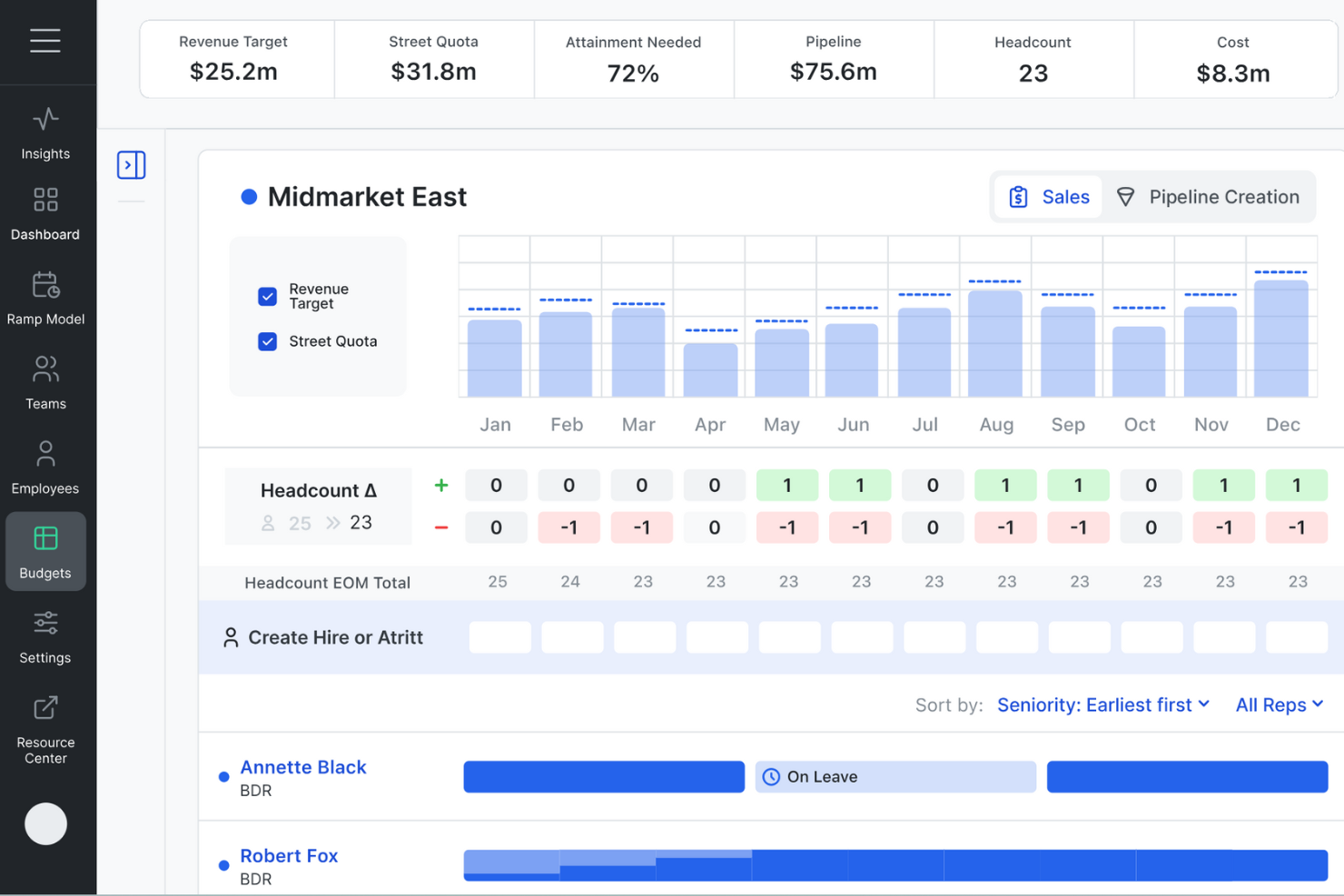
Revcast is an AI-powered sales forecasting software that brings together real-time data from your people, pipeline, performance, and costs. It acts as a revenue plan operating system, constantly predicting revenue and helping you stay on track.
Why I Chose Revcast: I picked Revcast because it enriches your weekly forecasts by incorporating capacity-based insights. It taps into CRM and HR systems to pull data on headcount changes, ramp progress, quota on the street, attrition, and marketing or BDR contributions. That means your team can act on emerging risks and opportunities instead of just reacting at quarter-end.
Additionally, Revcast's AI-driven forecasting overlays scenario planning and comparison views onto your pipeline waterfall and gap analysis. You can simulate different hiring, quota, and ramp assumptions, then compare those plans side-by-side to see which hits targets with minimal cost.
Revcast Standout Features & Integrations
Features include real-time KPI tracking, proactive alerting, automated contact enrichment, smart role‑change monitoring, pipeline scenario modeling, capacity-based forecasting, CRM cleanup, unified performance dashboards, headcount and attrition inputs, quota attainment tracking, cost vs. revenue modeling, marketing, and BDR contribution metrics.
Integrations are not currently listed by Revcast.
Pros and Cons
Pros:
- Tracks renewals, expansion, churn alongside new sales
- Scenario planning with AI summaries helps choose optimal paths
- Capacity‑based forecasting enriches weekly call insights
Cons:
- May not suit very early-stage startups lacking RevOps support
- Complexity of AI insights may challenge non‑technical users
Other Sales Forecasting Software
Here are a few more options that didn’t make the best sales forecasting software list:
- EverString
Sales forecasting software to leverage data signals to develop defined lead scoring to enhance your marketing outreach.
- Limecall
Create analytic dashboards to analyze and optimize the best times to call customers and increase revenue.
- Put It Forward Delphi AI
Check fields, remediate errors, handle exceptions, and manage audits throughout your business to develop predictive analytics and gain relevant, accurate insights.


Related Sales Forecasting Software Reviews
If you still haven't found what you're looking for here, check out these tools closely related to sales forecasting software that we've tested and evaluated.
- CRM Software
- Sales Software
- Lead Management Software
- Business Intelligence Software
- Contract Management Software
- Revenue Management System
Selection Criteria For Sales Forecasting Software
Sales forecasting software provides crucial insights that help in anticipating market trends, aligning sales efforts with business objectives, and optimizing resource allocation. My evaluation criteria, based on thorough personal testing and research, are designed to identify software that not only meets general expectations but also addresses specific user needs and pain points effectively.
Core Sales Forecasting Software Functionality: 25% of total weighting score
To be considered for inclusion on my list of the best sales forecasting software, the solution had to support the ability to fulfill common use cases such as:
- Accurate sales predictions based on historical data and market conditions
- Identification of potential sales bottlenecks and opportunities
- Facilitation of collaborative forecasting processes among teams
- Integration with CRM and other sales tools for a unified workflow
- Provision of actionable insights to inform strategic decision-making
Additional Standout Features: 25% of total weighting score
- Advanced AI and machine learning capabilities that provide predictive insights beyond basic trend analysis
- Unique data visualization tools that offer intuitive and insightful representations of sales forecasts
- Real-time forecasting updates that reflect current sales activities and market changes
- Exceptional customization options allowing users to tailor the software to their specific industry or business model
- Innovative collaboration features that enhance alignment and communication across departments
Usability: 10% of total weighting score
- Intuitive interface design that minimizes the learning curve and enhances user adoption
- Clear and logical navigation paths that facilitate easy access to key features
- Responsive design ensuring compatibility across various devices and platforms
- Visual elements like drag-and-drop functionality that simplify complex data manipulation
Onboarding: 10% of total weighting score
- Comprehensive training materials such as videos, guides, and tutorials that accelerate the learning process
- Interactive onboarding experiences like product tours or webinars that provide a hands-on introduction to the software
- Ready-to-use templates and resources that help new users quickly leverage the software's capabilities
- Support channels like chatbots or dedicated onboarding specialists that assist with initial setup and usage
Customer Support: 10% of total weighting score
- Timely and knowledgeable assistance across various channels (phone, chat, email) to resolve user issues
- Proactive support resources like community forums, FAQs, or knowledge bases
- Regular software updates and clear communication about new features or changes
- Personalized support experiences that address the specific needs of each user or organization
Value For Money: 10% of total weighting score
- Competitive pricing that aligns with the software's feature set and performance
- Transparent pricing structures without hidden fees or charges
- Flexible pricing plans that cater to businesses of different sizes and requirements
- Evidence of ROI, demonstrating how the software contributes to improved sales outcomes and business growth
Customer Reviews: 10% of total weighting score
- Positive feedback on user experience, highlighting ease of use and impactful features
- Customer testimonials that validate the software's effectiveness in improving sales forecasting
- Reviews that emphasize reliability and customer satisfaction
- Consistent praise for specific aspects like support, customization, or integration capabilities
When choosing sales forecasting software, it is crucial to select a solution that not only aligns with your business's current needs but also has the potential to adapt and scale as your organization evolves. The right software should empower your team to make informed, data-driven decisions that drive revenue growth and operational efficiency.
How To Choose Sales Forecasting Software
With so many different sales forecasting software solutions available, it can be challenging to make decisions on what tool is going to be the best fit for your needs.
As you're shortlisting, trialing, and selecting sales forecasting software, consider the following:
- What problem are you trying to solve - Start by identifying the sales forecasting software feature gap you're trying to fill to clarify the features and functionality the tool needs to provide.
- Who will need to use it - To evaluate cost and requirements, consider who'll be using the software and how many licenses you'll need. You'll need to evaluate if it'll just be the revenue operation leaders or the whole organization that will require access. When that's clear, it's worth considering if you're prioritizing ease of use for all or speed for your sales forecasting software power users.
- What other tools it needs to work with - Clarify what tools you're replacing, what tools are staying, and the tools you'll need to integrate with, such as accounting, CRM, or HR software. You'll need to decide if the tools will need to integrate together or if you can replace multiple tools with one consolidated sales forecasting software.
- What outcomes are important - Consider the result that the software needs to deliver to be considered a success. Consider what capability you want to gain or what you want to improve, and how you will be measuring success. For example, an outcome could be the ability to get greater visibility into performance. You could compare sales forecasting software features until you’re blue in the face but if you aren’t thinking about the outcomes you want to drive, you could be wasting a lot of valuable time.
- How it would work within your organization - Consider the software selection alongside your workflows and delivery methodology. Evaluate what's working well and the areas that are causing issues that need to be addressed. Remember every business is different — don’t assume that because a tool is popular that it'll work in your organization.
Trends In Sales Forecasting Software For 2026
Sales forecasting software is enjoying a dynamic evolution, driven by advances in technology and the growing demands of revenue operations management. As businesses strive for greater accuracy in their forecasts and deeper insights into their sales processes, the latest software updates, press releases, and release logs reveal key trends shaping the industry. These developments highlight the areas where innovation is most rapid, pinpointing the functionalities that are setting new standards in sales forecasting.
Integration and Automation
- Enhanced CRM Integration: Sales forecasting tools are increasingly offering deeper and more seamless integrations with CRM systems, enabling real-time data exchange and more accurate forecasting based on a comprehensive view of customer interactions.
- Automated Data Syncing: The ability to automatically synchronize data from various sources is becoming a standard feature, reducing manual data entry and the potential for errors, thus ensuring that forecasts are based on the most current and complete information.
Advanced Analytics and AI
- Predictive Analytics: There is a significant uptrend in the use of predictive analytics, with software now capable of analyzing past sales data and market trends to forecast future sales more accurately.
- AI-Driven Insights: The incorporation of AI technologies is providing novel capabilities, such as identifying underlying patterns and factors that influence sales outcomes, offering users not just forecasts but also actionable insights.
User Experience and Accessibility
- Intuitive Dashboards: The focus on user experience is evident in the enhanced design of dashboards and interfaces, which are becoming more intuitive, customizable, and visually engaging, facilitating easier access to key data and insights.
- Mobile Accessibility: As remote work and on-the-go decision-making continue to rise, the demand for robust mobile access to sales forecasting tools has grown, with platforms enhancing their mobile interfaces for better usability and feature parity.
Demand Shifts in Features
- Real-Time Forecasting: The need for real-time forecasting capabilities is on the rise, reflecting businesses' requirements for agile decision-making in fast-changing market conditions.
- Collaborative Forecasting: Features that support collaboration across teams and departments are increasingly important, as companies recognize the value of incorporating diverse insights and expertise into their forecasts.
- Declining Features: Standalone forecasting tools that lack integration capabilities or offer limited collaboration features are seeing reduced demand, as businesses prefer comprehensive solutions that fit seamlessly into their broader tech ecosystems.
The trends in sales forecasting software suggest a clear movement toward more integrated, intelligent, and user-friendly solutions. For revenue operation leaders, understanding these trends is crucial in selecting software that will not only meet their current needs but also offer the adaptability and depth to support future challenges and opportunities.
What is Sales Forecasting Software?
Sales forecasting software is a tool that businesses use to predict future sales performance. It analyzes historical sales data, market trends, and other relevant business factors to estimate sales over a coming period. This software employs statistical methods and predictive analytics to provide insights into future sales outcomes, helping businesses in strategic planning and decision-making.
The benefits of sales forecasting software include informed decision-making based on data-driven predictions. It assists businesses in resource allocation, budget planning, and setting realistic sales targets. By providing an understanding of potential market trends and sales risks, it aids in proactive planning and risk mitigation. Sales forecasting software also enhances operational efficiency, helping with inventory management and overall business planning, thereby supporting sustainable business growth and performance optimization.
Features of Sales Forecasting Software
When selecting sales forecasting software, keep an eye out for the following key features:
- Data integration: The software should connect easily with your existing CRM, ERP, and other business systems. This ensures you have all your sales, customer, and inventory data in one place, so your forecasts reflect the big picture.
- Customizable dashboards: A dashboard that you can tweak and personalize lets you focus on what matters most to you. You can track KPIs, trends, and pipeline health at a glance, making information more actionable.
- Scenario analysis: With this feature, you can play out different “what if” scenarios. For example, you can see how launching a new product or changing pricing might affect your future sales, helping you make smarter decisions.
- Collaboration tools: Features like shared notes, team forecasting, and approval workflows make it easy for teams to work together, weigh in on projections, and keep everyone in the loop.
- Automated reporting: Instead of manually crunching numbers, the software generates detailed, up-to-date reports on sales metrics and forecasts. This saves you time and reduces the risk of errors.
- Historical data analysis: By analyzing previous sales patterns, the software helps you spot seasonal trends and recurring behaviors. This makes your future forecasts more grounded in reality.
- Customizable forecasting models: Not every business fits a one-size-fits-all approach. Customizable models allow you to adjust forecasting methods to match your unique sales process or industry demands.
- User-friendly interface: An intuitive layout means you (and your team) spend less time fumbling around and more time actually using the forecasts to plan and strategize.
Common Sales Forecasting Software AI Features
Beyond the standard sales forecasting software features listed above, many of these solutions are incorporating AI with features like:
- Anomaly detection: AI identifies unusual sales activity or forecast deviations early, so you can investigate issues—like unexpected sales drops or sudden spikes—before they become bigger problems.
- Predictive analytics: AI analyzes massive amounts of data, spotting patterns and making more accurate predictions about future sales by learning from past trends and behaviors.
- Automated data cleansing: The AI automatically detects and corrects errors or duplicates in your data, so your forecasts are always based on clean, reliable information without extra manual work.
- Lead scoring: Using AI, the software assesses and ranks your leads by likelihood to convert, helping you focus your efforts on the most promising opportunities.
- Natural language processing (NLP) insights: With NLP, the software can scan emails, meeting notes, and other communications, pulling out insights about deal stages or shifting customer sentiment that might affect your forecasts.
Benefits Of Sales Forecasting Software
By leveraging sales forecasting software, organizations can enhance their understanding of market trends, optimize their sales processes, and improve overall revenue operations. Here are five primary benefits of implementing sales forecasting software:
- Enhanced Accuracy of Sales Predictions: Provides sophisticated algorithms and data analysis tools to generate accurate sales forecasts. This benefit allows businesses to plan more effectively, reducing the risks associated with uncertain market conditions.
- Data-Driven Decision Making: Consolidates historical sales data and market trends to inform strategic decisions. Organizations can use this feature to allocate resources efficiently, target the right markets, and adjust sales strategies in response to forecasted demand.
- Improved Resource Allocation: Helps businesses anticipate sales volumes and manage inventory, staffing, and budgeting accordingly. Effective resource allocation ensures that companies can meet customer demand without overextending their capabilities.
- Increased Operational Efficiency: Automates the data collection and analysis process, saving time and reducing the likelihood of human error. This efficiency allows sales teams to focus on strategic activities and relationship building rather than manual data handling.
- Strategic Planning Support: Offers insights into potential future trends and market conditions, aiding in long-term business planning and strategy development. Organizations can use these insights to identify growth opportunities and prepare for potential challenges.
Costs & Pricing For Sales Forecasting Software
Sales forecasting software often comes with diverse plans tailored to meet the needs of different business sizes and types, each offering a specific set of features and capabilities. Below is a comprehensive overview of typical plan options you might encounter in the market:
Plan Comparison Table For Sales Forecasting Software
| Plan Type | Average Price | Common Features Included |
|---|---|---|
| Basic | $10 - $50 per user/month | Basic forecasting, simple integrations, limited reports |
| Professional | $50 - $150 per user/month | Advanced analytics, CRM integration, custom reports |
| Enterprise | $150 - $300+ per user/month | AI-powered forecasts, advanced integrations, dedicated support |
| Free | $0 | Basic forecasting capabilities, limited data access |
When choosing a sales forecasting software plan, consider the size of your business, the complexity of your sales processes, and the level of detail you need from forecasts. Ensure the plan you select not only fits your current needs but also offers room to grow as your business and forecasting sophistication increase.
Sales Forecasting Software Frequently Asked Questions
What are the types of sales forecasting software?
How do sales forecasting software handle different sales cycles?
How accurate are the forecasting models?
How do sales forecasting software secure forecasting data?
How can sales forecasting software help you hit your quarterly quota?
How do you get started with sales forecasting software?
Additional Sales Intelligence & Analytics Software Reviews
Here are some other software options you might want to consider.
- Best Sales Software
- Data Visualization Software
- Predictive Analytics Software
- Business Intelligence Software
- Sales Reporting Software
- Sales Intelligence Software
- Revenue Management Systems
- KPI Software
- Sales Tracking Software
- How to Use Sales Enablement to Boost Your Bottom Line
- The Foolproof Sales Forecasting Formula You've Been Looking For
Conclusion
97% of companies who use forecasting techniques achieve their quotas, compared to the 55% of those who aren’t using forecasting. Therefore, effective forecasting gives you that edge over your competition, who are relying on guesswork.
Sales forecasting software is an important tool to help you achieve your quarterly quota and sales targets. It can also help you better manage your customer relationships by providing customer relationship management (CRM) features. Consider implementing sales compensation software alongside your forecasting tools to ensure your team is properly incentivized to meet those targets.
There are many different sales forecasting software programs available, so it is important to do your research to find the one that best suits your need.
And to stay up to date on all the latest from industry insiders, don't forget to subscribe to our newsletter.