
17 Best Lead Management Software Reviewed For 2026

20 Best Lead Management Software Shortlist
Here's my pick of the 20 best software from the 17 tools reviewed.


No one wants to hear “I never got a response” from a hot lead—especially when you’re under pressure to hit this quarter’s revenue targets. The reality is, even the most well-oiled sales teams can’t manually track every touchpoint, follow-up, and handoff with 100% precision. Leads get lost. Opportunities slip away. And revenue takes a hit.
Here’s the good news: lead management software exists to solve these problems. I’ve been in the trenches—balancing growth demands with operational complexity—and I know the difference the right software can make.
That’s why I’ve put together this list of the 18 best lead management software tools for 2026. Whether you’re looking to streamline follow-ups, automate lead routing, or get crystal-clear visibility into your pipeline, these tools are purpose-built to help you scale smarter. Let’s dig in.
Why Trust Our Lead Management Software Reviews?
We’ve been testing and reviewing lead management software since 2022. As revenue operation leaders ourselves, we know how critical and difficult it is to make the right decision when selecting software.
We invest in deep research to help our audience make better software purchasing decisions. We’ve tested more than 2,000 tools for different RevOps use cases and written over 1,000 comprehensive software reviews. Learn how we stay transparent & our lead management software review methodology.
| Tool | Best For | Trial Info | Price | ||
|---|---|---|---|---|---|
| 1 | Best for B2B SMBs | 30-day free trial | From $29/user/month (billed annually) | Website | |
| 2 | Best for customizable sales automation | 14-day free trial + free plan available | From $12/seat/month (billed annually) | Website | |
| 3 | Best for AI-driven sales insights | 15-day free trial + free demo available | From $14/user/month (billed annually) | Website | |
| 4 | Best for instant callback lead capture | 7-day free trial available | From $25/month | Website | |
| 5 | Best for CRM and marketing automation | Free demo available | Pricing upon request | Website | |
| 6 | Best for conversational marketing | Free demo available | Price upon request | Website | |
| 7 | Best for creating personalized landing pages | Free plan available | From $22/month (billed annually) | Website | |
| 8 | Best for omnichannel customer support | Free demo available | From $89/user/month | Website | |
| 9 | Best for visual sales pipeline management | 14-day free trial | From $14/user/month (billed annually) | Website | |
| 10 | Best for lead qualification | Free trial + free demo | From $19/user/month | Website | |
| 11 | Best for building email lists | Free trial available | From $39/month | Website | |
| 12 | Best for prospect list creation | 7-day free trial | Pricing upon request | Website | |
| 13 | Best for lead capture and segmentation | Free demo available | From $9/month (billed annually) | Website | |
| 14 | Best for creating sign-up funnels | 14-day free trial | From $54/user/month (Basic) | Website | |
| 15 | Best for lead generation | Free plan available | From $49/month | Website | |
| 16 | Best for Gmail integration | 14-day free trial available | From $12/seat/month (billed annually) | Website | |
| 17 | Best for AI-powered lead scoring | Free demo + 21-day free trial available | From $9/user/month (billed annually) | Website |

-

Prisync
Visit WebsiteThis is an aggregated rating for this tool including ratings from Crozdesk users and ratings from other sites.4.7 -
Expedite Commerce
Visit Website -
QuickBooks Online
Visit WebsiteThis is an aggregated rating for this tool including ratings from Crozdesk users and ratings from other sites.4





Best Lead Management Software Reviews
Here’s a brief description of each lead management software that showcases each vendor’s best use case, their noteworthy features, and some pros and cons. I’ve also included screenshots to give you a snapshot of their user interface too.

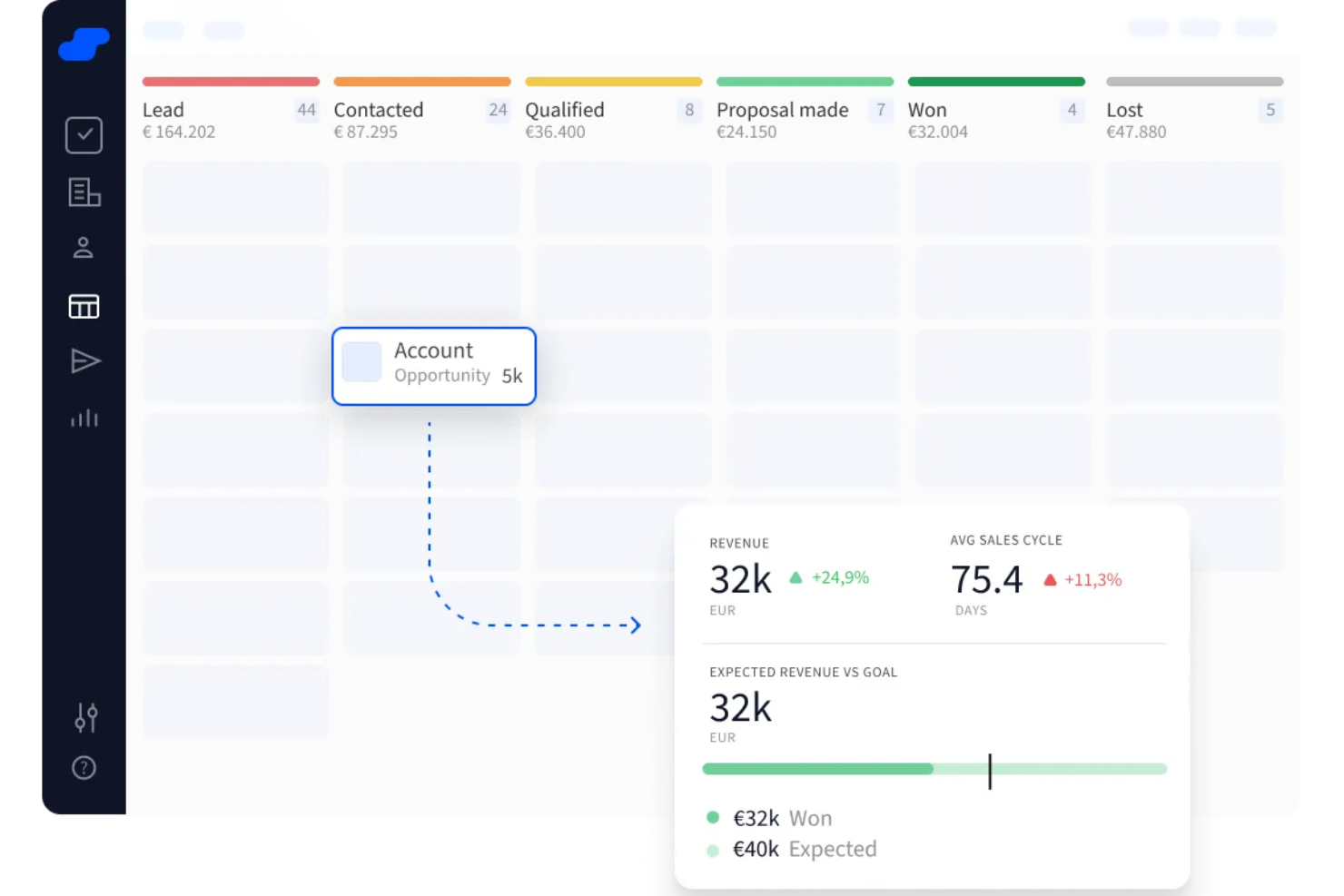
Salesflare is a CRM designed to help small and medium B2B teams manage their leads intuitively. It automatically pulls in contact and company details from emails, social media, and public sources.
Why I picked Salesflare: I picked Salesflare because it includes a lead finder that lets you find new leads from specific industries, geographies, or roles directly within the CRM—no juggling of data or duplicates. You can also unlock business email addresses for those leads with a single click, streamlining how you add quality leads into your system.
Another reason is its visual pipelines to track leads all the way through—from lead to deal—using drag‑and‑drop boards. It even lets you enroll new leads in email sequences right from the CRM, so you can follow up automatically without switching apps.
Standout Features and Integrations
Standout features include an email finder that lets you get business emails with minimal effort, a Chrome extension that lets you manage leads wherever you browse—Gmail, LinkedIn, any website—and an AI‑powered CRM that gives you lead scoring and automated reminders so you know when to follow up or reply.
Integrations include Google Workspace, Intercom, MailChimp, QuickBooks Online, Slack, Stripe, Shopify, and Calendly.
Pros and Cons
Pros:
- Reminds you of follow‑ups and next actions
- Automates contact data entry from email interactions
- Visual pipelines show exactly where leads stand
Cons:
- Limited customization of dashboards and reports
- Lacks highly tailored workflows for complex teams

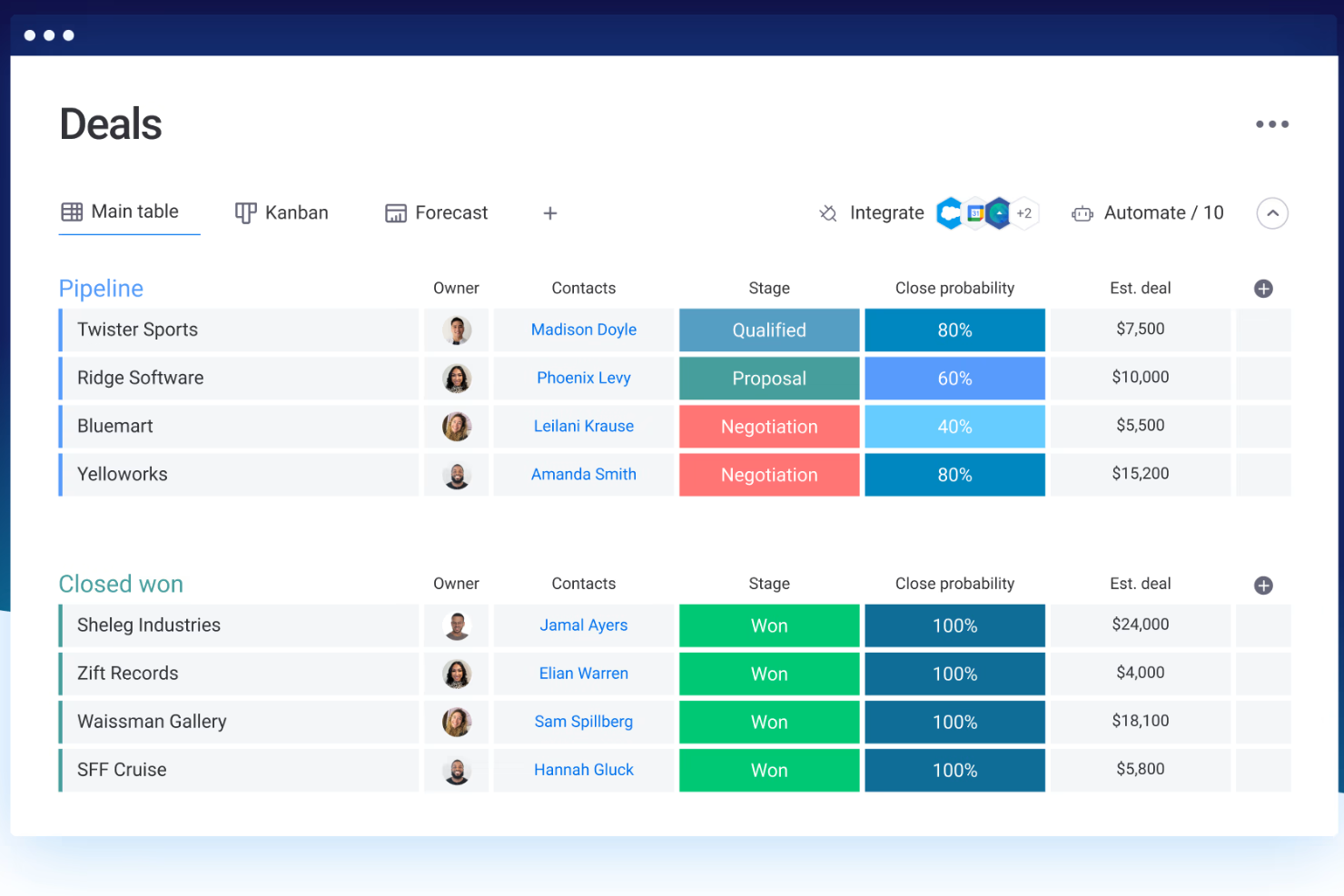
Monday sales CRM is a customizable customer relationship management platform designed to centralize sales processes, client communication, and deal management. It stands out for its ability to create tailored workflows, which supports the claim that it is best suited for custom workflows, as businesses can adapt the CRM to their unique sales cycles and processes.
Why I picked Monday sales CRM: Monday.com shines in lead management by offering a centralized platform where teams can capture, track, and nurture leads effectively. Its strength lies in the ability to customize workflows to match the unique sales process of any team, ensuring leads are managed and progressed efficiently. Automation tools within the CRM streamline repetitive tasks such as lead assignment and follow-ups, freeing up time for personalized engagement.
The platform's collaborative nature enhances visibility across teams, ensuring everyone is updated on lead status and actions needed, fostering a cohesive approach to converting prospects into customers. With integrated analytics, monday.com provides actionable insights into lead behavior and pipeline health, aiding in informed decision-making and strategy optimization.
Standout Features and Integrations
Standout features: Visually intuitive sales pipelines that are not only easy to understand and manage but also come with integrated automation features. These automations can handle repetitive tasks, such as follow-up emails, task assignments, and lead scoring, without manual intervention. This integration of visual pipelines with automation is a distinctive feature that enhances efficiency and reduces the likelihood of human error.
Integrations include: Project management apps like Slack, Google Drive, Gmail, Google Calendar, Jira, GitHub, Trello, Dropbox, Typeform and many more, accessible through a paid plan with Zapier.
Pros and Cons
Pros:
- Integrated automation tools
- Enables cross-functional collaboration
- Known for its intuitive and visually appealing interface
- Highly customizable workflows and dashboards
Cons:
- Sales CRM dosen't have a free plan
- Vast array of features can be overwhelming for new users
New Product Updates from monday CRM

monday CRM's AI-Powered Lead Scoring Boosts Sales Efficiency
monday CRM introduces AI-Powered Lead Scoring to prioritize high-value prospects through data-driven insights. For more information, visit monday CRM's official site.

Zoho CRM is a comprehensive customer relationship management software that offers a wide range of features to help businesses manage their sales, marketing, and customer support activities. It acts as a single repository to unify operations, making it suitable for businesses of all sizes and industries.
Why I picked Zoho CRM: I like that the software offers a comprehensive lead management system that includes features such as lead generation, scoring, distribution, nurturing, and analysis. It captures leads from various channels, including web forms, social media, and email, and integrates with platforms like Google Ads and Facebook to provide a complete picture of online ad spending and lead generation.
The system also offers advanced analytics to track lead status and conversion rates, ensuring that sales reps can focus on the most promising leads. Additionally, Zoho CRM provides AI-powered tools for lead enrichment., predictive analysis, and overall sales insights, enhancing the lead nurturing process.
Standout Features and Integrations
Standout features: Zoho CRM includes features like lead and deal prediction which uses AI to predict the likelihood of leads converting into deals and Zia, an AI assistant to help manage various CRM functions. It also offers workflow automation, omnichannel communication, approval processes, custom page layouts, analytics, and a CRM app.
Integrations include Google Workspace, Microsoft 365, RingCentral, Twilio, MailChimp, Facebook Ads Manager, Dropbox, PayPal, Adobe Sign, DocuSign, Typeform, Jotform, Trello, SurveyMonkey, Zapier, and other Zoho apps.
Pros and Cons
Pros:
- Mobile app available for on the go access
- AI-powered assistant feature
- Extensive customization options
Cons:
- Set up can be time consuming
- Learning curve for new users
New Product Updates from Zoho CRM

Zoho CRM Makes System Dashboards Editable
Zoho CRM's system-defined dashboards are now editable, allowing customization of charts for better insights. For more information, visit Zoho CRM's official site.
 .
.
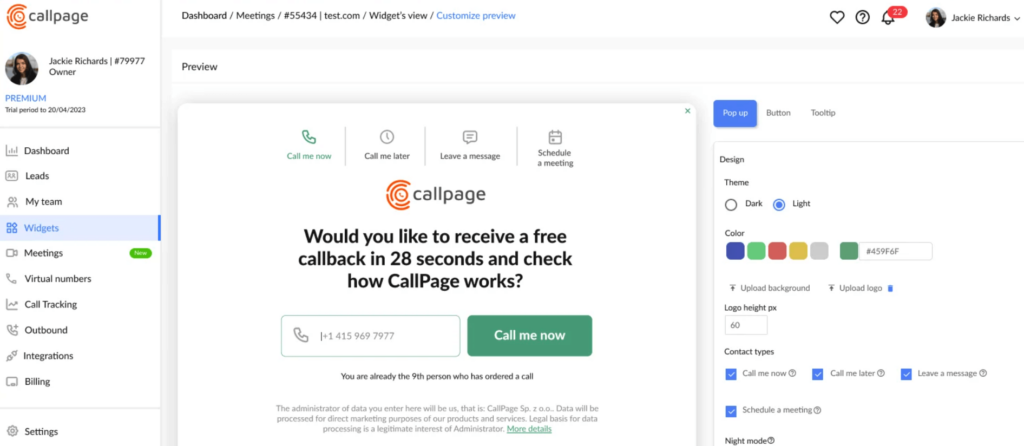
Callpage is built for teams that rely heavily on outbound calling and want a simple way to convert website visitors into sales conversations. It offers tools for automating call workflows and tracking the effectiveness of outbound efforts. If your sales team prioritizes fast follow-up, Callpage helps you connect with prospects before they lose interest.
Why I Picked Callpage
I picked Callpage because it centralizes outbound calling and lead management into one approachable platform. You can automate call tracking, scoring, and follow-up, removing manual steps from your sales process. The website callback widget is a quick win—it lets prospects request a call instantly, which often increases conversion rates. You also gain insight into how your outbound calls perform through built-in analytics. It’s well-suited for teams aiming to streamline their calling processes without extra complexity.
Callpage Key Features
- Callback widget: Let website visitors request immediate calls from sales reps.
- Call tracking: Monitor outbound activities and source effectiveness.
- Lead scoring: Identify higher-value prospects automatically.
- Outbound automation: Manage follow-ups and call tasks more efficiently.
- Performance analytics: Evaluate which efforts drive the most conversions.
Callpage Integrations
Integrations include Salesforce, HubSpot, Pipedrive, Zapier, and Google Analytics.
Pros and Cons
Pros:
- Built-in callback widget helps to capture leads directly from your website
- Advanced call tracking and reporting capabilities
- Easy-to-use platform with intuitive UI
Cons:
- Not suitable for businesses with complex sales processes
- Limited customizability options for the call widget

SharpSpring is a marketing automation and CRM platform that unifies lead management, sales engagement, and analytics for small to midsize businesses. It streamlines the entire lead lifecycle—from capture to conversion—helping teams improve engagement, automate follow-ups, and align marketing and sales activities.
Why I picked SharpSpring: SharpSpring stands out for integrating robust marketing automation with built-in CRM functionality, eliminating the need to manage multiple disconnected tools. Features like VisitorID and dynamic forms give teams visibility into anonymous site visitors and adaptive lead collection, while automated workflows and personalized messaging drive higher conversion rates. Its flexible pricing and agency-friendly options make it accessible for teams managing multiple client portfolios.
Standout features & integrations:
Features include lead scoring to prioritize prospects, behavior tracking across touchpoints, email automation that adapts to user behavior, and campaign tracking for real-time performance insights.
Integrations include Salesforce, Google Ads, Google Analytics, LinkedIn, Facebook, Zoom, Shopify, HubSpot, and Slack.
Pros and Cons
Pros:
- SharpSpring is cost-effective compared to competitors like Pardot and Marketo, offering significant value for its features.
- The platform provides a user-friendly interface for building automation campaigns, making it accessible for users with varying technical skills.
- SharpSpring offers comprehensive marketing automation features, including dynamic forms and visitor tracking, which enhance lead management capabilities.
Cons:
- Performance issues, such as occasional bugs and slowdowns, have been noted by users, impacting overall user experience.
- Some users report limited customization options for certain features, which can be restrictive for businesses seeking tailored solutions.
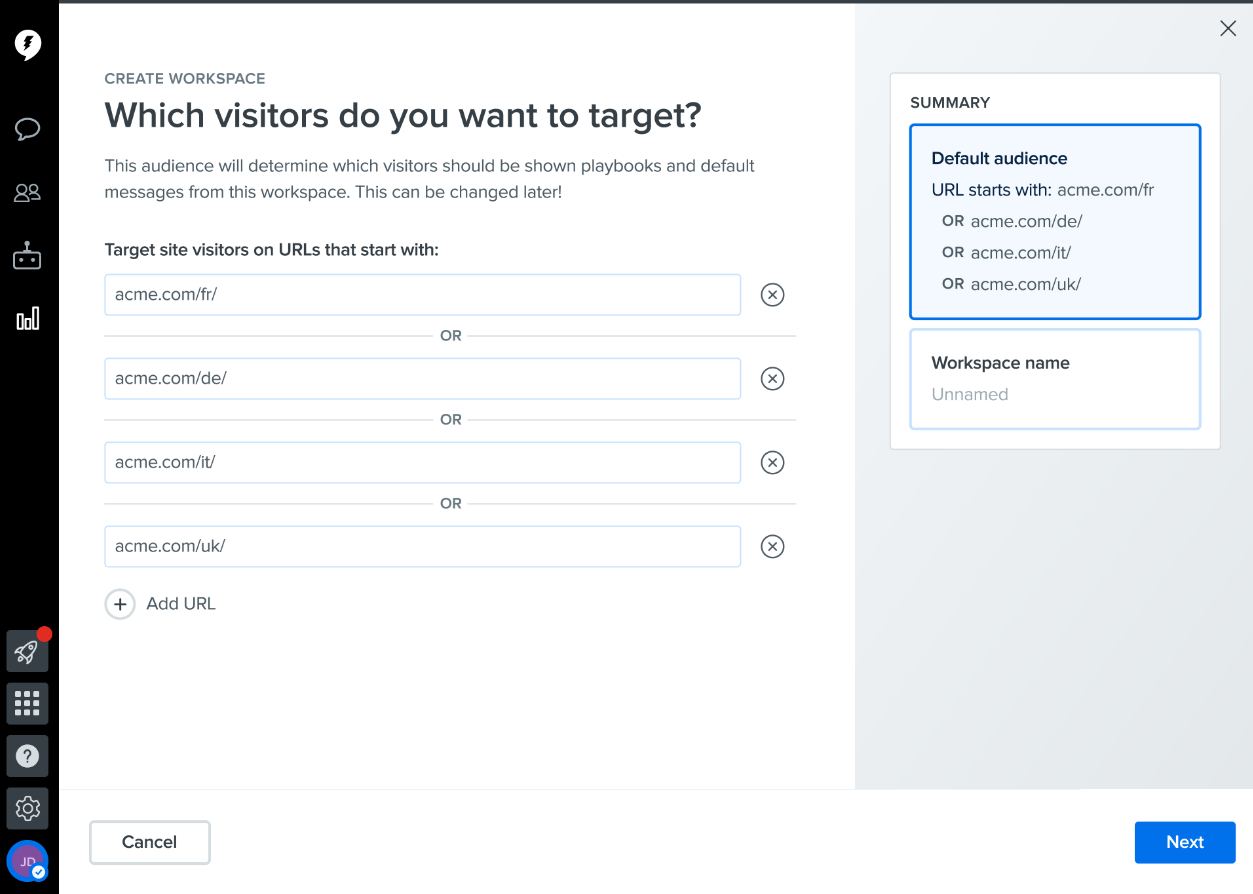
Drift is a conversational marketing platform that enables businesses to create personalized landing pages, chatbots, and other marketing assets that are tailored to the specific needs and interests of individual leads.
Why I picked Drift: I selected Drift because it offers a range of tools for targeted marketing, including chatbots, email marketing, and lead management. Drift's conversational AI technology allows businesses to engage with customers in a more human way, leading to higher conversion rates and improved customer satisfaction.
Standout Features and Integrations
Standout features: Features that differentiate Drift from its competitors include its conversational marketing capabilities. I was impressed by the fact that businesses can engage with website visitors in real-time via chatbots and personalized messaging. The platform offers lead capture and management tools, automated workflows, and integrations with popular CRM systems.
Integrations: include Salesforce CRM, Hubspot, Marketo, Zapier, Google Analytics, Slack, and Zendesk Support
Pros and Cons
Pros:
- Advanced integrations with CRMs and marketing automation tools
- Easy to use and set up
- Powerful conversational marketing tools for personalized and targeted marketing
Cons:
- Steep learning curve for more complex features
- Higher price point compared to some other lead marketing software options

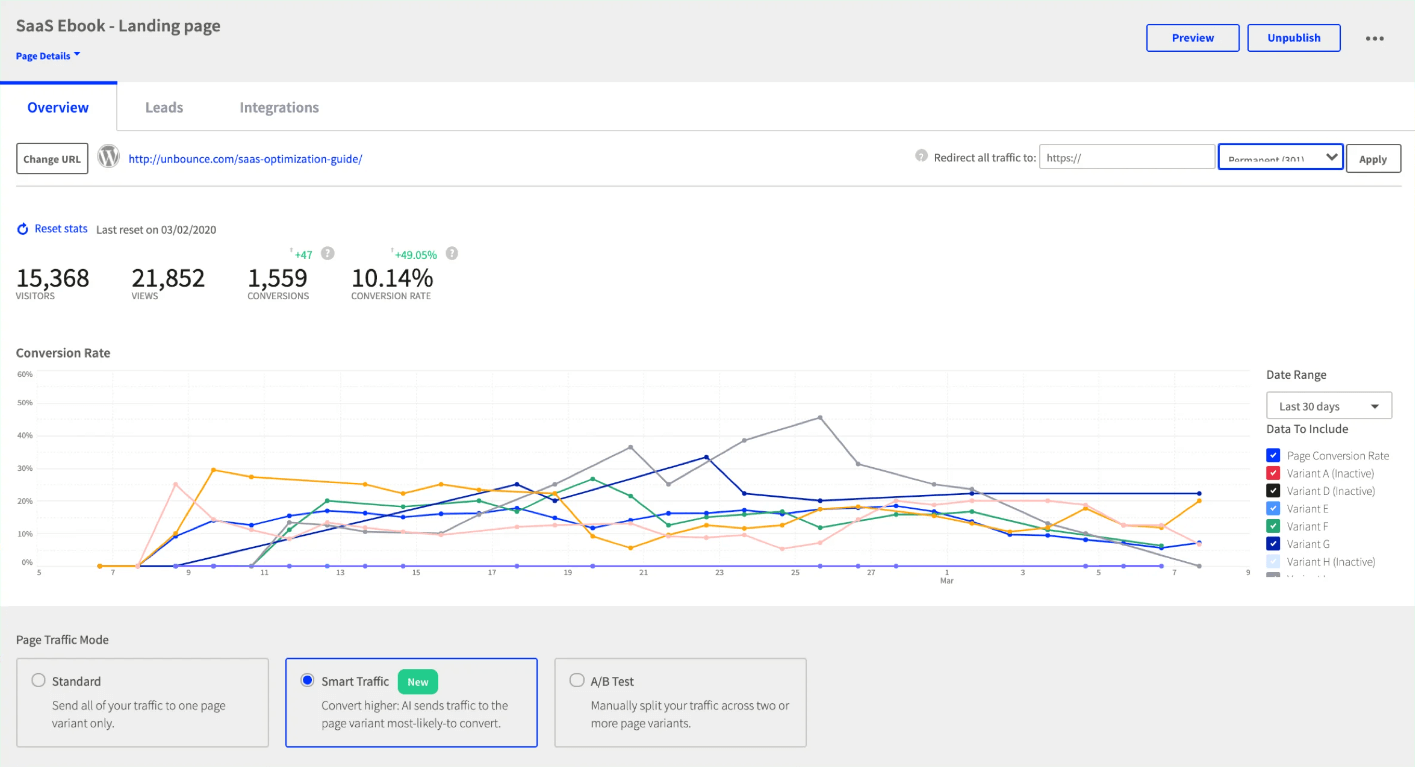
Unbounce is a landing page builder that makes it easy to create and optimize landing pages that are tailored to specific customer profiles, making it easier to convert leads into customers.
Why I picked Unbounce: I selected Unbounce because it helps businesses to easily create custom landing pages for their marketing campaigns without any coding knowledge. It’s range of templates makes it easy to create high-converting landing pages.
Standout Features and Integrations
Standout Features: I love Unbounce because of how customizable it can make your landing pages. The software features a drag-and-drop interface that allows you to customize each element of your landing page, and its A/B testing tools enable you to optimize your pages for maximum conversions.
Integrations: include Mailchimp, Salesforce CRM, Google Analytics, WordPress, Hubspot, and Zapier.
Pros and Cons
Pros:
- The A/B testing tools make it easy to optimize landing pages for conversions
- The drag-and-drop editor is intuitive and easy to use
- Making it easy to create professional-looking landing pages
- Unbounce offers a range of templates and design tools
Cons:
- The interface can be a bit slow and clunky at times.
- Unbounce can be a bit pricey compared to some other landing page builders

Kustomer is a comprehensive customer support platform that enables businesses to manage customer interactions across multiple channels, including email, social media, phone, and more.
Why I picked Kustomer: Kustomer’s omnichannel support and advanced analytics help businesses provide personalized customer support and improve their customer experience, making it my top pick for customer profiling.
Standout features: Kustomer’s AI-powered chatbot is my favorite feature since it helps automate customer interactions. It also features a range of advanced tools, such as automation and real-time chat, that enable you to engage with your customers in a meaningful way.
Integrations include Facebook Messenger, WhatsApp, Twitter, Shopify, and Magento.
Pros and Cons
Pros:
- Real-time analytics and reporting
- Comprehensive omnichannel support capabilities
- Advanced AI-powered chatbot for automating customer interactions
Cons:
- Integration with some apps may require additional setup
- Limited customization options for some features


Pipedrive is a sales CRM and pipeline management software designed to help sales teams manage their sales processes and customer relationships.
Why I picked Pipedrive CRM: I picked Pipedrive because it offers an intuitive, visual interface for managing your sales pipeline and tracking leads through each stage of the sales process. The intuitive drag-and-drop interface lets sales teams seamlessly transition deals through various stages, offering a transparent, real-time perspective of their sales process.
Each sales stage can also be customized, allowing users to adapt the pipeline to their specific workflows. Furthermore, Pipedrive’s color-coded statuses and visual indicators simplify the prioritization of deals and highlight the most crucial actions.
Standout Features and Integrations
Standout features: Pipedrive offers lead management, in-depth reporting, and sales automation. It also includes features for lead generation, project management, and email marketing. Additionally, its AI-powered sales assistant can make recommendations while its open API allows for extensive customization options.
Integrations include HubSpot, JustCall, Mailchimp, Google Meet, Zoom, DocuSign, Trello, Monday.com, Zendesk, and Google Workspace.
Pros and Cons
Pros:
- Easy-to-use interface
- Sales forecasting features
- Highly customizable pipelines and dashboards
Cons:
- AI sales assistant limited to higher-tier plans
- Initial setup and configuration can be complicated

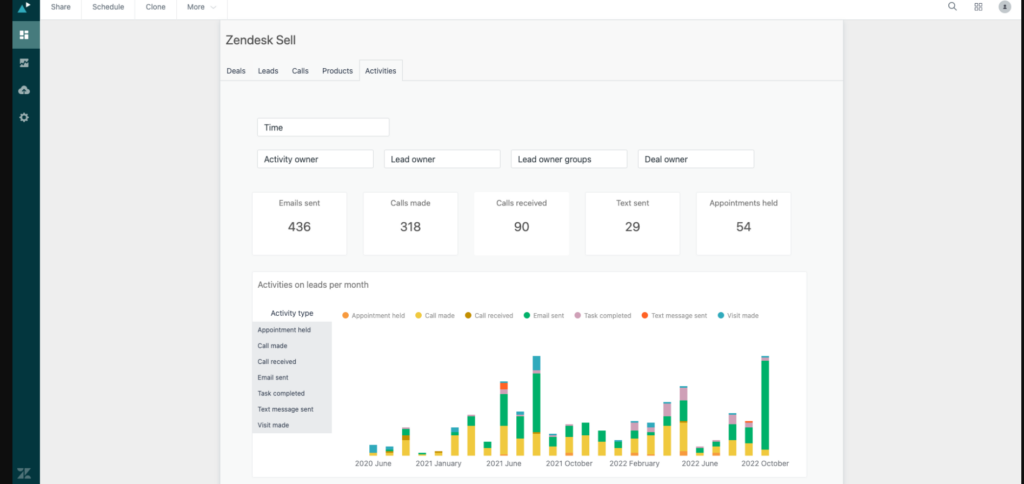
Zendesk Sell is a lead management software that enhances productivity and pipeline visibility for businesses. With Zendesk Sell, you can easily qualify leads based on key criteria like budget, timeline, and company size, ensuring that you're only pursuing the most promising opportunities.
Why I picked Zendesk Sell: I selected Zendesk Sell because it is great for lead qualification as it helps to prioritize leads based on their likelihood to convert. It also offers robust reporting and analytics tools to help sales teams track their progress.
Zendesk Sell Standout Features and Integrations:
Standout Features: My favorite Zendesk Sell feature is that it provides automated lead nurturing through email and SMS, ensuring that businesses can stay engaged with their leads throughout the customer journey. The platform's reporting and analytics features also provide valuable insights into lead performance, enabling businesses to optimize their lead qualification process continually.
Integrations include Salesforce CRM, Microsoft Dynamics 365, Slack, Zendesk Support, Zoom, Google Workspace, and more.
Pros and Cons
Pros:
- Seamless integration with other Zendesk products
- Easy-to-use interface and mobile accessibility
- Robust lead scoring and pipeline management features
Cons:
- Higher pricing compared to some other lead management software
- Some users report limited customization options for email templates

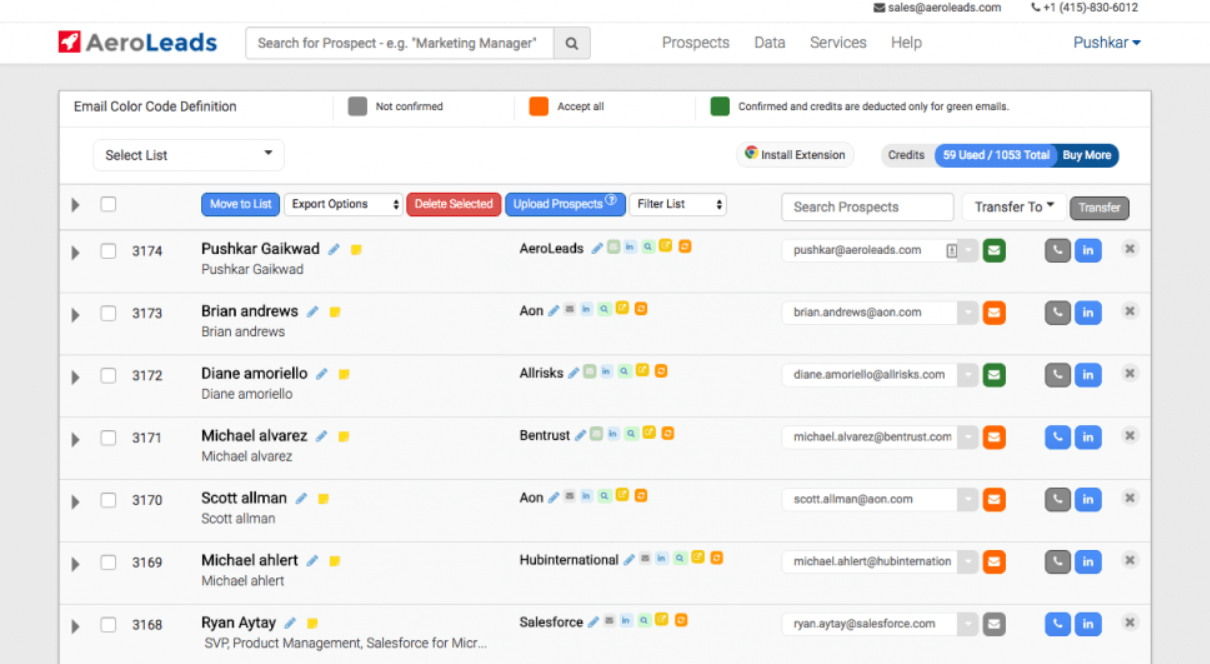
Aeroleads is an excellent tool for building high-quality email lists quickly and efficiently. It makes it easy to build targeted email lists by searching for and verifying contact information for prospects in your target market.
Why I picked Aeroleads: I picked Aeroleads because of its powerful AI-powered algorithms, which can help businesses find the contact information of decision-makers in companies of all sizes and industries. This makes it a must-have for businesses looking to grow their email marketing lists.
Standout Features and Integrations
Standout Features: My favorite features include the ability to find email addresses and contact information from social media platforms and websites, AI-powered email verification, and integration with popular CRMs like Salesforce, Zoho, and Hubspot.
Integrations include Salesforce CRM, Zoho CRM, Freshsales, Hubspot, Pipedrive, Slack, and Google Sheets.
Aeroleads integrates with several popular CRMs, including Salesforce, Zoho, and Hubspot, making it easy to import and manage contact information. It also integrates with Zapier, allowing for seamless integration with hundreds of other apps and services.
Pros and Cons
Pros:
- Integrates with popular CRMs like Salesforce, Zoho, and Hubspot.
- Powerful AI-powered algorithms for building high-quality email lists quickly and efficiently.
Cons:
- The user interface could be more intuitive and user-friendly.

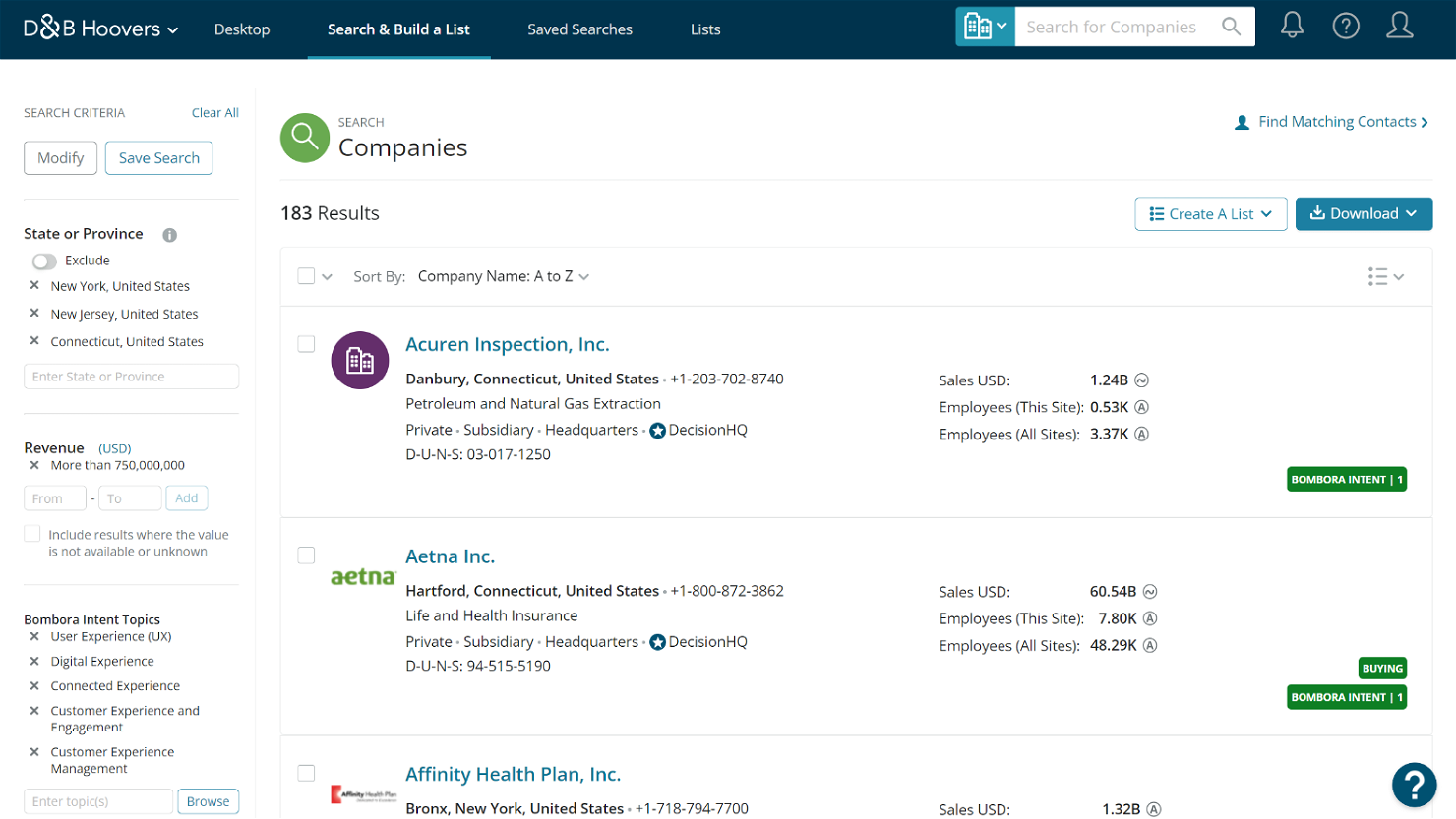
D&B Hoovers is an excellent lead marketing software for businesses looking to build high-quality prospect lists quickly and easily. D&B Hoovers offers a large database of company and contact information, making it easy to build targeted prospect lists and conduct in-depth research on potential customers.
Why I picked D&B Hoovers: I picked D&B Hoovers for its ability to create prospect lists. With its massive database of over 150 million companies, D&B Hoovers can help businesses find and target potential customers with ease.
Standout Features and Integrations
Standout features: I like D&B Hoovers’s advanced search filters and segmentation capabilities, which allow businesses to refine their search and target specific industries, geographies, and company sizes.
Integrations include Salesforce CRM, Microsoft Dynamics 365, Marketo, Eloqua, Hubspot, and more.
D&B Hoovers integrates with popular CRMs like Salesforce and Microsoft Dynamics, allowing businesses to import and manage contact information seamlessly. It also integrates with marketing automation tools like Marketo, Eloqua, and Pardot. These tools enable businesses to automate their lead nurturing and follow-up processes.
Pros and Cons
Pros:
- Integrates with popular CRMs and marketing automation tools.
- Advanced search filters and segmentation capabilities.
- Massive database of over 150 million companies and contacts.
Cons:
- Expensive pricing plans make it more suitable for large enterprises and corporations.
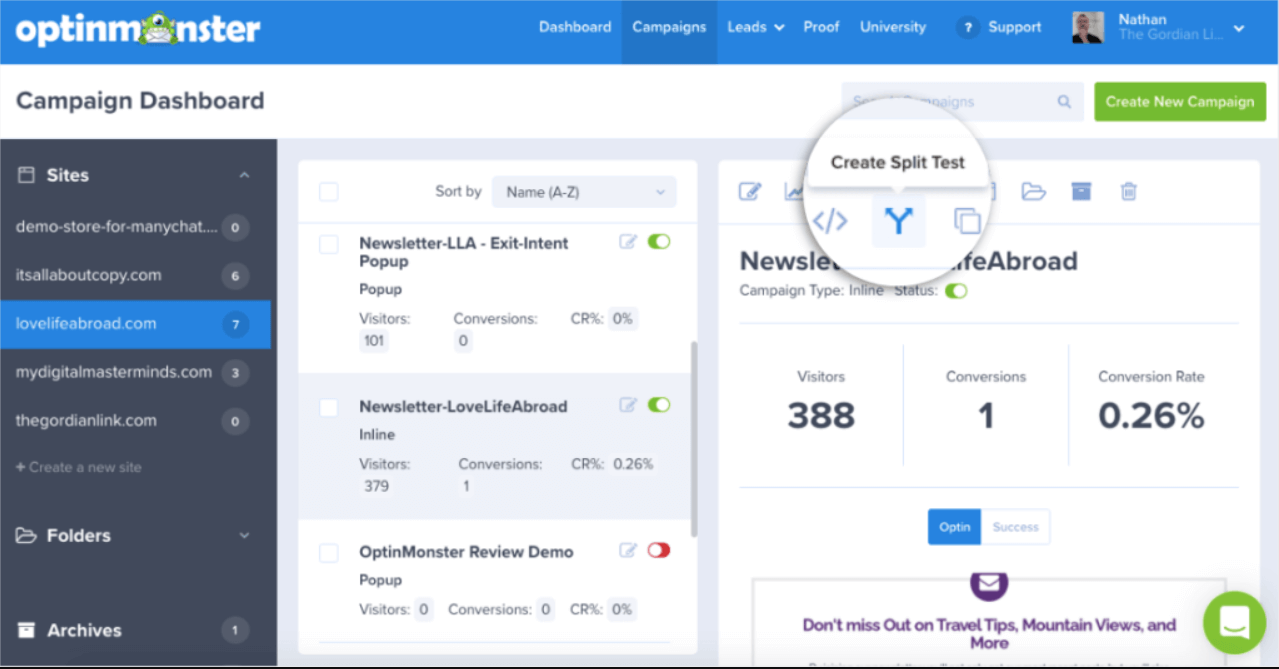
OptinMonster is a powerful lead generation tool that helps businesses capture leads and segment them based on their behavior. OptinMonster offers a range of tools for capturing leads on your website and segmenting them based on key criteria like interests, behavior, and more.
Why I picked OptinMonster: I picked OptinMonster because it’s well-known for its drag-and-drop builder, which allows users to create eye-catching opt-in forms, pop-ups, and other lead capture tools that can be integrated with popular marketing tools and CRMs.
Standout Features and Integrations
Standout features: The platform provides a wide range of customizable opt-in forms that can be added to a business's website, enabling them to capture leads effectively. OptinMonster also provides advanced segmentation features. My favorite feature is that it allows businesses to target their leads with personalized messaging.
Integrations include Salesforce, Mailchimp, Hubspot, Constant Contact, and AWeber
Pros and Cons
Pros:
- Multiple trigger options for displaying opt-in forms
- Wide range of targeting and segmentation options
- User-friendly interface with an easy-to-use drag-and-drop editor
Cons:
- Integration with some marketing tools may require additional setup
- Limited customization options for some form types

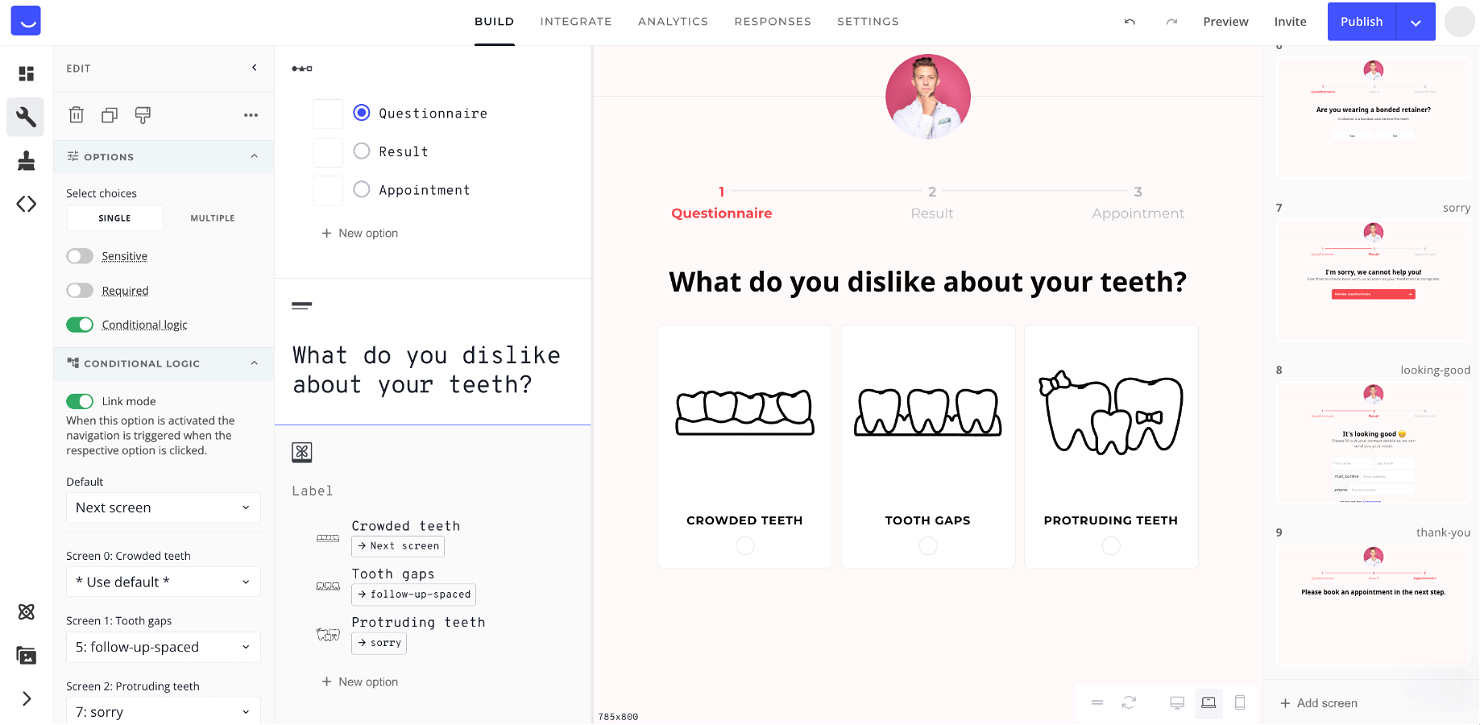
Heyflow offers a range of tools for creating engaging sign-up funnels that help you capture leads and move them through your sales pipeline more efficiently.
Why I picked Heyflow: I picked Heyflow because it’s great for creating sign-up funnels, as it offers a range of customizable templates and design tools. It also provides analytics to track user behavior and conversion rates.
Heyflow Standout Features and Integrations:
Standout Features: I love Heyflow’s simple drag-and-drop interface for building custom funnels, allowing businesses to tailor their sign-up process to their unique needs. Heyflow also provides advanced A/B testing capabilities, enabling businesses to optimize their sign-up funnels continually.
Integrations include Zapier, Mailchimp, Slack, Trello, Hubspot, ActiveCampaign, Pipedrive, Salesforce CRM, and more.
Pros and Cons
Pros:
- Affordable pricing compared to some other lead management software
- Easy-to-use interface and analytics tracking
- Customizable templates and design tools
Cons:
- Some users report a lack of advanced customization options
- Limited integrations with other software


Adapt is a global B2B database provider with over 100 million business contacts. Contacts are categorized by industry and contain information such as name, job title, phone numbers and email addresses.
Why I picked Adapt: Adapt is my pick for the best lead generation because because it offers an easy-to-use platform that streamlines the lead management process. Its intuitive interface and advanced automation features enable businesses to capture, track, and nurture leads effectively.
Adapt’s Standout Features and Integrations:
Standout features: Adapt gives access to over 100 million business contacts, allowing businesses to create thorough prospect lists. Its reporting and analytics capabilities particularly stand out to me, providing valuable insights into lead performance and conversion rates, enabling businesses to optimize their lead generation efforts continually.
Integrations include Salesforce CRM, Mailchimp, Constant Contact, WordPress, Hubspot, Zoho, Microsoft Dynamics 365, Outreach, Marketo, Eloqua, and more.
Pros and Cons
Pros:
- Integrates with popular software and tools
- Real-time tracking and reporting
- Customizable scoring and qualification criteria
- Automation saves time and improves efficiency
- Centralized platform for managing leads and sales pipeline
Cons:
- Integration with certain tools may require additional setup
- Limited customization options for some features
- Learning curve for new users
- Pricing can be expensive for small businesses
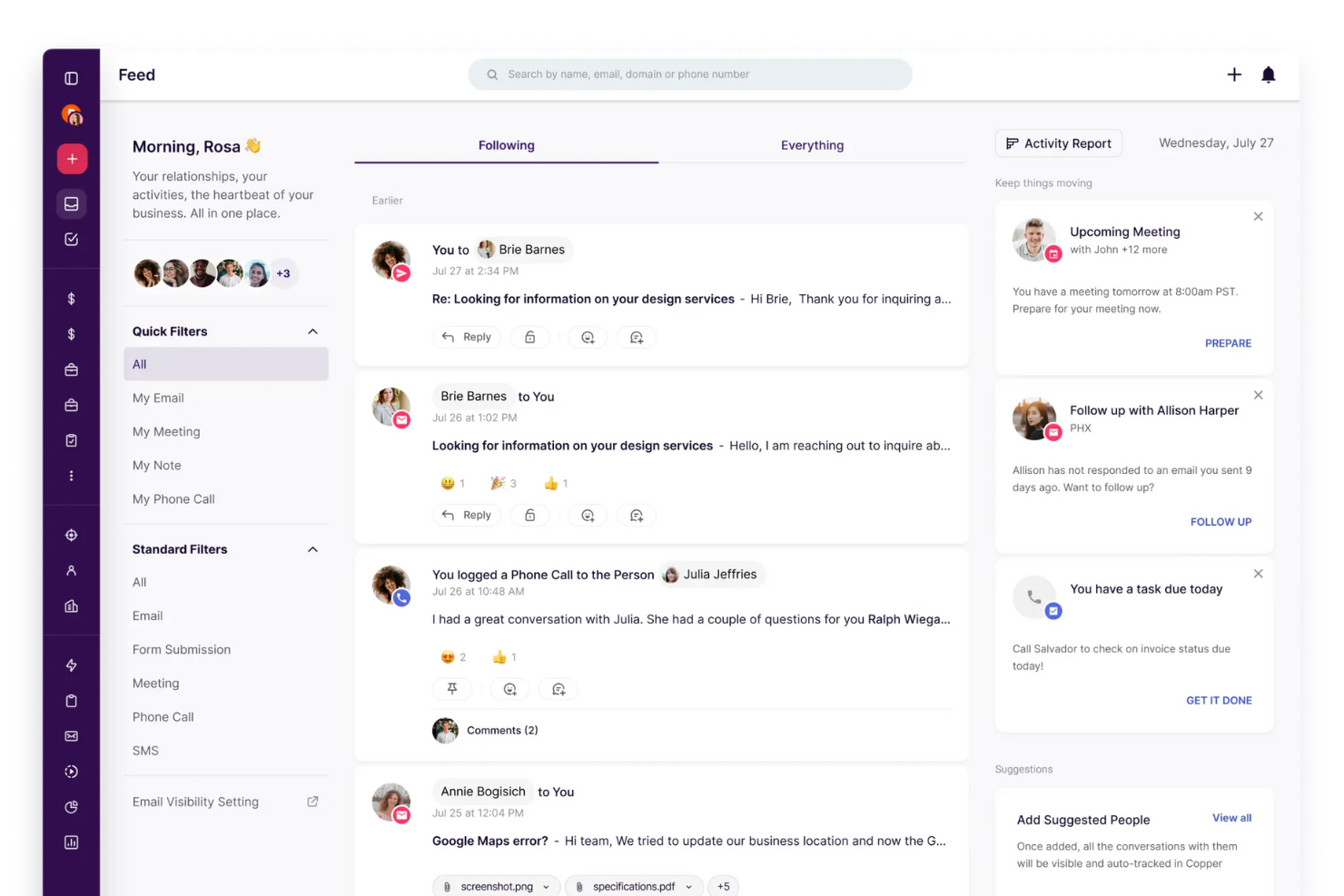
Copper CRM is a lead management tool that streamlines sales processes for teams working within Google Workspace. It integrates directly with Gmail and Google Calendar, helping users capture, qualify, and convert leads without leaving their inbox. The platform automates key sales tasks, supports custom pipelines, and provides analytics for pipeline visibility and team performance.
Why I picked Copper: I picked Copper for its deep Gmail and Google Workspace integration—it lets teams manage contacts, track deals, and automate follow-ups right where they already work. For CROs and RevOps leaders, that means less time toggling between tools and more time focused on pipeline health, conversion rates, and rep productivity. The automated reminders and customizable workflows also reduce friction across sales cycles, ensuring consistent follow-up and faster close rates.
Standout features & integrations:
Features include automated follow-ups, customizable sales pipelines, project tracking, and task management that keeps teams aligned and accountable.
Integrations include Google Workspace (Gmail, Sheets, Calendar), Mailchimp, LinkedIn, RingCentral, JustCall, DocuSign, PandaDoc, QuickBooks, Dropbox, and Calendly—with API access for custom workflows.
Pros and Cons
Pros:
- Built-in workflow automation reduces manual effort and improves sales team efficiency.
- Its drag-and-drop pipeline management makes tracking deals and stages intuitive and fast.
- Copper CRM integrates seamlessly with Google Workspace, allowing teams to manage leads directly from Gmail.
Cons:
- Advanced customization options for fields and pipelines are limited in lower-tier plans.
- Copper relies heavily on Google Workspace, limiting functionality for non-Google users.

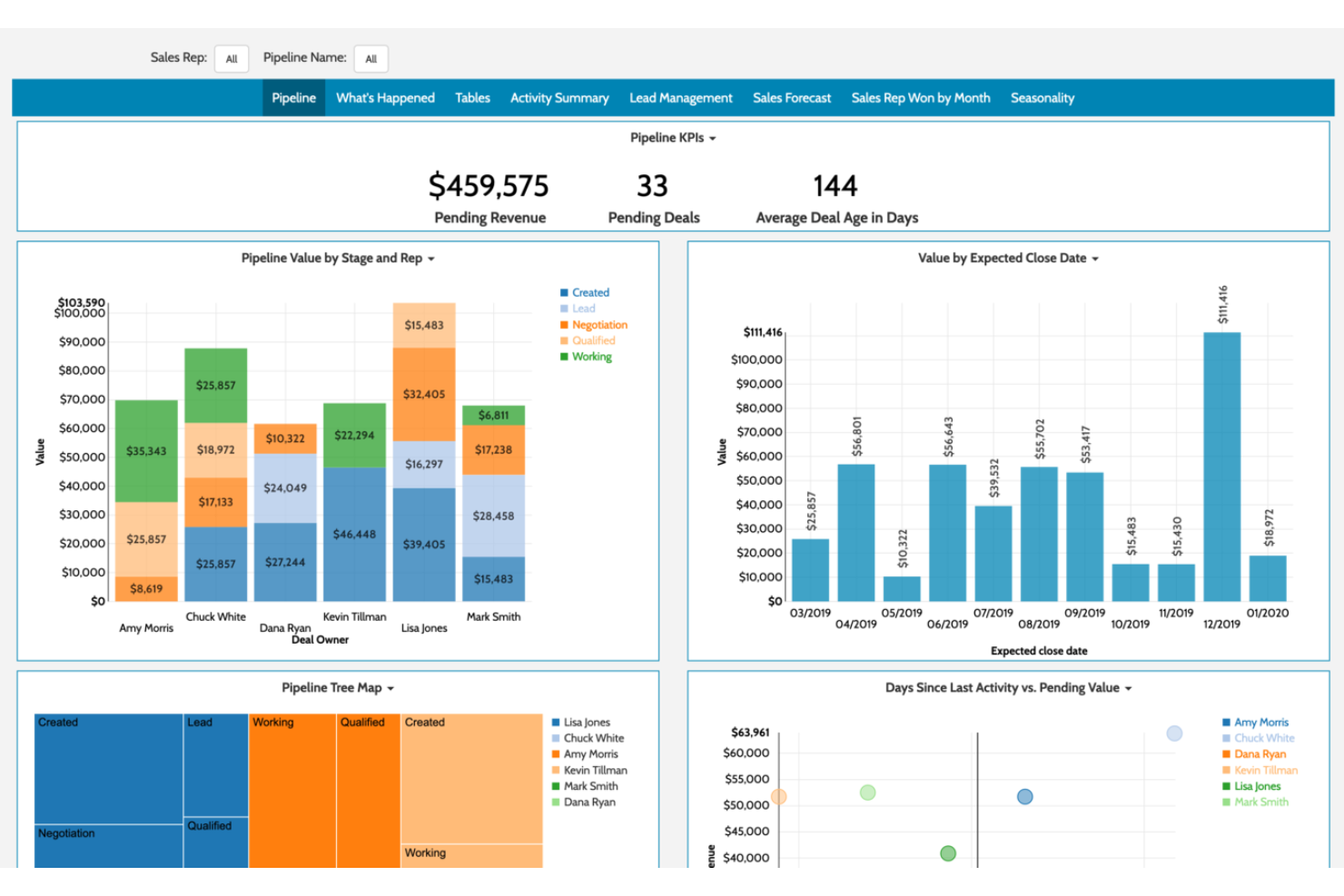
Freshworks is a CRM and lead management tool that streamlines lead generation, nurturing, and conversion for modern sales teams. It covers everything from lead scoring and segmentation to automation and reporting, helping teams stay organized, responsive, and focused on high-value opportunities.
Why I picked Freshworks: Freshworks stands out for its balance of automation and adaptability—especially its AI-powered lead scoring, real-time alerts, and customizable sales pipelines. These features enable CROs and RevOps leaders to prioritize high-intent leads, maintain consistent multi-channel communication, and align marketing and sales efforts for better conversion rates.
Standout features & integrations:
Features include AI-driven lead scoring, customizable pipelines, automated workflows, real-time notifications, and detailed analytics for visibility into performance. Its built-in telephony and marketing automation tools further streamline engagement.
Integrations include Google Workspace, Slack, Mailchimp, QuickBooks, Zapier, Shopify, Xero, HubSpot, Segment, and Trello.
Pros and Cons
Pros:
- The platform includes customizable sales pipelines that adapt to specific business processes.
- It provides a comprehensive suite of communication tools across email, social, and SMS channels.
- Freshworks offers AI-powered lead scoring to help prioritize leads and boost sales efficiency.
Cons:
- Some users report slower or automated customer support response times.
- The extensive feature set can be overwhelming for new users during onboarding.
Other Lead Management Software
Here are a few other top lead management software that weren’t mentioned in the article.
- AeroLeads
For building email lists
- D&B Hoovers
For prospect list creation
- OptinMonster
For lead capture and segmentation
- HeyFlow
For creating sign-up funnels
- Adapt
For lead generation
- Copper
For Gmail integration
- Freshsales
For AI-powered lead scoring


Related Lead Management Software Reviews
If you still haven't found what you're looking for here, check out these tools closely related to lead management software that we've tested and evaluated.
- CRM Software
- Sales Software
- Business Intelligence Software
- Contract Management Software
- Revenue Management System
- CPQ Software
Selection Criteria For Lead Management Software
Selecting the right lead management software is crucial for businesses aiming to optimize their sales funnel and enhance revenue operations. Through my experience and thorough research into these tools, I've developed a focused approach to evaluate their functionality and suitability for specific use cases. Effective lead management software not only captures and organizes leads but also nurtures and qualifies them for the sales pipeline, addressing key pain points in lead conversion and customer acquisition processes.
Core Lead Management Software Functionality: - 25% of total weighting score
To be considered for inclusion on my list of the best lead management software, the solution had to support the ability to fulfill common use cases:
- Efficiently capturing leads from multiple channels
- Segmenting and tracking leads throughout the sales funnel
- Automating lead nurturing campaigns
- Scoring and qualifying leads for sales readiness
- Providing actionable insights through analytics
Additional Standout Features: - 25% of total weighting score
Some solutions go above and beyond with innovative features that set them apart:
- AI-driven insights for lead scoring and prioritization
- Advanced integration capabilities with marketing platforms and social media
- Automated personalization for email campaigns
- Real-time alerts for lead activity
- Robust mobile apps for on-the-go lead management
Identifying and testing these features helps pinpoint which lead management tools offer exceptional value, driving efficiency and effectiveness in managing leads.
Usability: - 10% of total weighting score
Ease of use is paramount for ensuring tool adoption and effectiveness:
- Intuitive interface and navigation
- Customizable dashboards and reports
- Easy setup and configuration
- Drag-and-drop functionality for campaign design
Onboarding: - 10% of total weighting score
Smooth onboarding is essential for a quick start:
- Comprehensive training materials and resources
- Interactive onboarding sessions or webinars
- Accessible customer support for setup assistance
- Community forums for user tips and best practices
Customer Support: - 10% of total weighting score
Quality support is crucial for ongoing success:
- Multiple channels for support (phone, email, chat)
- Prompt and knowledgeable assistance
- Proactive software updates and maintenance communication
- Online knowledge base and FAQs
Value For Money: - 10% of total weighting score
Assessing cost-effectiveness is key:
- Clear pricing structures and plans
- Scalable options that grow with your business
- Free trials or demos to evaluate the software
- Demonstrated ROI through efficiency gains and lead conversion
Customer Reviews: - 10% of total weighting score
Feedback from users offers insights into real-world use:
- Positive ratings for ease of use and functionality
- Success stories of improved lead management and conversion rates
- Constructive criticism and responsiveness to feature requests
- Overall satisfaction with customer support and value
By applying these criteria, I guide software buyers toward solutions that not only streamline lead management processes but also align with strategic goals in revenue operations. The ideal lead management software should not only capture and nurture leads efficiently but also provide the insights and functionalities necessary to convert leads into valuable customers.
How to Choose Lead Management Software
There are a lot of lead management options on the market. But with the right approach, you can select the right tool that fits your business needs, scales with your growth, and drives revenue impact.
Here's my simple framework for selecting lead management software:
1. Identify the Problem You're Solving
- Start with a clear goal: Are you struggling to track leads, improve response times, or streamline your marketing-to-sales handoff? Pinpoint the gap you're trying to close.
- List must-have features: Do you need automated lead routing, custom reporting, or CRM integration? Knowing this helps you avoid bloated tools with unnecessary features.

2. Determine Who Will Use the Software
- Assess the user base: Will only RevOps leaders use it, or does your entire sales team need access? This impacts licensing costs.
- Prioritize usability: If sales reps will be using the tool daily, ease of use is essential. Complex tools can slow down adoption.
3. Check Compatibility with Existing Tools
- Map your tech stack: Which tools are you replacing? Which tools do you want it to integrate with (like CRMs, accounting, or email marketing platforms)?
- Look for native integrations: Software with pre-built integrations saves time and avoids costly custom development.
4. Define Key Outcomes and Success Metrics
- What’s the end goal?: Are you looking for better lead visibility, faster response times, or more sales opportunities?
- Set measurable goals: Example outcomes could be "reduce lead response times by 30%" or "increase pipeline visibility with real-time reporting."
5. Evaluate Fit Within Your Organization’s Workflows
- Look at your current processes: What’s working? What’s not? Your new software should support and enhance your workflow, not force you to change it.
- Consider team adoption: If your team’s used to spreadsheets, look for software with an intuitive import/export function.
Choosing the right lead management software is about more than features. It’s about aligning the tool with your team’s needs, scaling it as your business grows, and driving meaningful outcomes. Keep your goals and workflows front and center, and you’ll be equipped to make a confident decision.
Trends In Lead Management Software For 2026
Lead management software has undergone significant transformation, driven by the evolving needs of revenue operations and the continuous pursuit of more efficient, effective sales processes. Analysis of recent product updates, press releases, and release logs from leading tools reveals a trend towards leveraging advanced technologies to enhance lead management capabilities. These trends reflect a broader industry movement towards automation, personalization, and data-driven decision-making, aiming to optimize lead conversion rates and streamline the sales pipeline.
Advanced Automation and Personalization
- AI-Powered Lead Scoring and Prioritization: The use of artificial intelligence to automatically score and prioritize leads has become more sophisticated, allowing businesses to focus their efforts on the most promising prospects.
- Evidence: Tools now offer predictive analytics capabilities that assess lead behavior and engagement in real-time to adjust scores dynamically.
- Automated Lead Nurturing Workflows: Enhanced automation of lead nurturing campaigns, with personalized content delivered based on lead activities and interests.
- Evidence: Solutions incorporating machine learning algorithms to tailor email campaigns and content recommendations to individual lead preferences.
Integration and Data Utilization
- Seamless CRM Integration: Tighter integration with CRM systems ensures that lead data flows smoothly between marketing and sales, providing a unified view of the customer journey.
- Evidence: Lead management platforms are now offering more advanced API integrations, enabling real-time data syncing with major CRM platforms.
- Enhanced Analytics and Reporting Tools: The development of more comprehensive analytics features, providing deeper insights into lead generation and conversion trends.
- Evidence: Introduction of customizable dashboards and reporting tools that allow businesses to track performance metrics and ROI more accurately.
User Experience and Accessibility
- Mobile Optimization: The push towards fully mobile-optimized lead management experiences, enabling sales teams to access and update lead information from anywhere.
- Evidence: Mobile applications and responsive web design have become standard, ensuring accessibility across devices and improving user engagement.
Shifting Feature Priorities
- Decline in Manual Data Entry: A move away from features requiring extensive manual input, as automation and data integration capabilities improve.
- Evidence: Enhanced focus on automating data capture from various digital touchpoints, reducing the need for manual lead entry.
The trends in lead management software underscore a shift towards creating more personalized, efficient, and data-driven lead management processes. For revenue operation leaders, the ability to harness these advanced functionalities means not only streamlining operations but also gaining strategic insights that drive sales growth. As these trends continue to evolve, selecting lead management software that aligns with these advancements will be crucial for businesses aiming to stay competitive and maximize their lead conversion potential.
What is Lead Management Software?
Lead management software is a tool used by businesses to handle the process of acquiring and nurturing potential customers, known as leads. It automates and organizes the tracking, segmenting, and nurturing of leads from their initial capture to the point of conversion. The software integrates various functionalities like lead capture, scoring, and follow-up task management.
The benefits of lead management software include improved organization and prioritization of leads, leading to more efficient and successful conversions. It helps sales teams to focus on the most promising leads by automating routine tasks and providing data-driven insights. This contributes to increased sales productivity and higher conversion rates. The software also aligns marketing and sales efforts, ensuring a cohesive approach to lead nurturing and customer acquisition.
Features Of Lead Management Software
When selecting lead management software, keep an eye out for the following key features:
- Lead capture tools: These allow you to collect leads from various sources like web forms, social media, and emails. It streamlines the process so you don’t lose potential customers slipping through the cracks.
- Lead tracking and scoring: You can monitor where each lead is in your pipeline and give every lead a score based on interest or likelihood to convert. This way, you focus your energy on the leads most likely to buy.
- Contact management: Store, organize, and update all your lead and customer details in one place. This makes it easy for you to keep conversations personalized and ensures you never forget the important stuff.
- Automated workflows: Set up actions to happen automatically, like sending follow-up emails or assigning leads to team members. This reduces manual effort and makes sure your leads keep moving forward.
- Activity reminders and task management: Schedule reminders and manage your to-dos to stay on top of follow-ups and meetings. It's like having a personal assistant laser-focused on closing deals.
- Integration capabilities: Connect your software to other tools you use, like CRMs, marketing automation, or email platforms. This brings all your sales tools together, keeping your information up to date and saving you time.
- Reporting and analytics: Gain clear insights into how leads are moving through your funnel, which sources deliver the best results, and where your process needs a tune-up. This helps you make smarter decisions with real data.
Common Lead Management Software AI Features
Beyond the standard lead management software features listed above, many of these solutions are incorporating AI with features like:
- Natural language processing for lead qualification: AI reviews emails, chats, or calls to determine buying intent and qualify leads automatically, taking the guesswork out of who’s worth your time.
- Predictive lead scoring: AI analyzes your existing data to predict which leads are most likely to become customers, so you can focus on the best opportunities without guessing.
- Automated lead enrichment: AI scrapes the web to fill in missing lead details, updating profiles in real time and saving you the grind of manual research.
- Smart follow-up suggestions: Based on user behavior and past interactions, AI recommends the best times and ways to follow up, so you can reach out when leads are most receptive.
- Intent analysis: AI examines digital footprints—like website visits and email opens—to identify which leads are ready to engage and which need more nurturing.
Benefits Of Lead Management Software
Lead management software plays a crucial role in streamlining sales processes and enhancing the efficiency of revenue operations. By automating and organizing lead capture, tracking, and nurturing, this software provides a solid foundation for businesses to grow their customer base and increase sales. For organizations considering the implementation of lead management software, understanding its primary benefits can illuminate how this tool is indispensable for optimizing revenue operations. Here are five primary benefits:
- Enhanced Lead Organization: Provides centralized lead data storage. This feature simplifies the process of managing lead information, ensuring that all team members have access to up-to-date data, which is essential for timely follow-ups and personalized communication.
- Improved Lead Prioritization: Facilitates effective lead scoring mechanisms. By automatically scoring leads based on their engagement and likelihood to convert, sales teams can focus their efforts on the most promising prospects, increasing the efficiency of the sales process.
- Automated Lead Nurturing: Delivers targeted marketing campaigns. Automated nurturing campaigns keep potential customers engaged with relevant content and offers, gently guiding them through the sales funnel towards conversion.
- Insightful Analytics and Reporting: Offers valuable insights into lead behavior and campaign performance. This feature allows businesses to make data-driven decisions, optimizing their marketing strategies and improving lead conversion rates over time.
- Increased Sales Productivity: Reduces time spent on manual tasks. Automating routine lead management tasks frees up sales teams to spend more time on building relationships and closing deals, directly contributing to revenue growth.
Costs & Pricing For Lead Management Software
Selecting the right lead management software is pivotal for businesses aiming to optimize their sales funnel and ensure no potential customer slips through the cracks. With a variety of software options available, each offering different functionalities at various price points, understanding the spectrum of plan options is key to making an informed decision. These plans are designed to cater to businesses of all sizes, from startups to large enterprises, ensuring that there's a solution that fits every need and budget. Below is a simplified overview of typical plan options and their pricing for lead management software.
Plan Comparison Table For Lead Management Software
| Plan Type | Average Price | Common Features Included | Best For |
| Basic | $10 - $25 per user/month | - Lead capture and tracking - Basic lead segmentation - Email integration - Basic reporting | Small businesses and startups needing essential lead management tools |
| Professional | $50 - $100 per user/month | - Advanced lead segmentation - Automated lead nurturing - CRM integration - Customizable reports | Growing businesses requiring more sophisticated lead management and integration with other tools |
| Enterprise | $150+ per user/month | - Comprehensive analytics - AI-driven lead scoring - Advanced automation features - Premium support | Large enterprises needing comprehensive analytics, advanced automation, and top-tier support |
| Free option | $0 | - Limited lead capture - Basic tracking - Simple reporting | Freelancers and small teams with minimal lead management needs and tight budgets |
When considering which lead management software plan to choose, it's essential to assess your business's specific needs and growth prospects. Opt for a plan that not only aligns with your current lead management requirements but also offers the scalability to accommodate future expansion.
Lead Management Software Frequently Asked Questions
If your team is considering working with lead management software, you likely have a few questions before signing on. Let’s take a look at some of the FAQs about lead management software:
What is lead management software, and how can it benefit my SaaS startup?
How do I choose the right lead management software for my business?
What features should I look for in lead management software?
Can lead management software integrate with other tools my team uses?
What’s the difference between lead management software and CRM software?
What are the pricing options for lead management software, and are there free trials?
Additional RevOps Software
Conclusion
Lead management is a powerful component of any successful marketing funnel. When used correctly, lead management software can increase your chance of converting leads into long-term customers. But, there are hundreds of lead management tools available on the market, and you need to select the best fit based on your specific needs.
For more key insights from industry leaders regarding lead management, sign up to The CRO Club newsletter.