The right sales proposal software software can help teams simplify the proposal creation process and improve collaboration among team members. But finding the right fit for your needs can be a challenge, especially with so many options available.
I’ve tested and compared many sales proposal software systems to help you find the best software for your unique needs. I’m confident that you’ll discover your next sales proposal software in the list below.
Why Trust Our Software Recommendations
6,700+
Reviews
20
Industry experts
16+
Evaluation factors
14
Years
Our reviews reflect our independent judgment—not a sales pitch. Learn how we stay transparent.
For this guide, we evaluated tools using hands-on testing and independent research, scoring tools using our selection criteria.
Our reviews reflect our human editorial judgment, not a sales pitch.
Sales Proposal Software Comparison Table
This comparison table summarizes pricing details for my top sales proposal software selections:
| Tool | Best For | Trial Info | Price | ||
|---|---|---|---|---|---|
| 1 | Best for AI RFP responses | Free demo available | Pricing upon request | Website | |
| 2 | Best with no-code workflow automation | Free demo available | From $399/month (billed annually) | Website | |
| 3 | Best for data-driven proposal creation | Free demo available | Pricing upon request | Website | |
| 4 | Best for automated proposal creation | Free demo available | From $39/user/month | Website | |
| 5 | Best for inbound RFP response automation | 30-day money-back guarantee | From $899/month (billed annually) | Website | |
| 6 | Best for proposal analytics insights | 14-day free trial + free demo available | From $19/user/month (billed annually) | Website | |
| 7 | Best for real-time proposal analytics | Free demo available | Pricing upon request | Website | |
| 8 | Best for interactive proposal templates | 14-day free trial | From $35/user/month (billed annually) | Website | |
| 9 | Best for white-label proposal solutions | Free demo available | From $119/month | Website | |
| 10 | Best proposal management software for quoting field services | Free demo available | Pricing upon request | Website |


Best Sales Proposal Software Reviews
Below are my detailed summaries of the best sales proposal software that made it onto my shortlist. My reviews offer a detailed look at the key features, pros & cons, integrations, and ideal use cases of each tool to help you find the best one for you.


Inventive AI auto-generates structured, source-backed RFP responses and flags content conflicts for your review. If you're in the market for a sales proposal software solution, Inventive AI might be just what your team needs to transform the way you handle RFPs. This innovative tool is designed for professionals who want to streamline their proposal processes and improve win rates. By leveraging AI-driven automation, Inventive AI helps you produce context-aware, tailored responses quickly, addressing the common challenges of time-consuming and inefficient proposal management.
Why I Picked Inventive AI
I picked Inventive AI because of its standout feature: AI RFP Responses. With this feature, your team can generate first drafts ten times faster while ensuring context-aware accuracy. This functionality directly addresses the need for quick and precise proposal responses, a common challenge for many businesses. Additionally, the Unified Knowledge Hub centralizes all your information, allowing for seamless integration with internal data systems. This ensures that your team has easy access to relevant content, further enhancing the efficiency of your proposal process.
Inventive AI Key Features
In addition to these core functionalities, Inventive AI offers several other features that make it a compelling choice for teams:
- AI Content Manager: Automatically identifies and updates stale or duplicate content, ensuring your proposals are always consistent and credible.
- AI Agents Hub: Provides a suite of AI agents to enhance productivity, assisting with competitor research and refining responses to improve proposal quality.
- Performance Metrics: Offers insights into proposal success rates, helping you track improvements and optimize strategies.
- Data Security: Prioritizes data protection with end-to-end encryption and compliance with GDPR and CCPA standards, ensuring your information is safe and secure.
Inventive AI Integrations
Integrations include Salesforce, Google Drive, Jira, and Slack.
Pros and Cons
Pros:
- Advanced search options enhance content retrieval.
- Centralized knowledge hub streamlines content management.
- AI-powered response generation speeds up proposal creation.
Cons:
- Dependency on quality and freshness of your content library.
- Basic reporting features limit data insights.
Learn more about Inventive AI: Best with no-code workflow automation
- Free demo available
- From $399/month (billed annually)
Visit WebsiteCustomer Rating:4.5/5
altaFlow enables automated proposal generation, document pre-fill, and approval workflows, giving sales teams clear visibility into document status and execution. altaFlow is a sales proposal software platform that combines no-code workflow automation, document generation, CRM and ERP integrations, and compliance controls for managing complex sales processes.
Who Is altaFlow Best For?
altaFlow suits enterprise sales teams and operations leaders who need advanced workflow automation and integration with existing business systems.
Why I Picked altaFlow
I picked altaFlow as one of the best because its no-code workflow automation lets my team build and adjust sales proposal processes without developer support. I can set up automated approval chains, document routing, and custom triggers for proposal milestones. This flexibility means I can quickly adapt workflows as our sales process evolves.
altaFlow Key Features
- Document generation: Create, edit, and manage sales proposals directly within the platform.
- Role-based access controls: Set permissions for users to control who can view or edit proposals.
- Audit trails: Track every change and action taken on a proposal for compliance and transparency.
- Template library: Access and customize pre-built proposal templates for different sales scenarios.
altaFlow Integrations
altaFlow offers native integrations with Salesforce, Microsoft Dynamics 365, NetSuite, and SAP. An API is available for custom integrations.
Pros and Cons
Pros:
- Supports multi-level approval workflows
- Advanced version control for proposal documents
- No-code workflow automation for proposal processes
Cons:
- Reporting features lack advanced analytics
- Customization options require admin-level access
Learn more about altaFlow: Best for data-driven proposal creation
- Free demo available
- Pricing upon request
Visit WebsiteCustomer Rating:4.7/5
DealHub AI lets sales teams manage, track, and update all active proposals in one organized dashboard. DealHub AI is a quote-to-revenue platform that helps teams manage every stage of the sales proposal process—from configuration to close—in one place. Built for modern B2B organizations, it combines CPQ, contract lifecycle management, subscription billing, and digital deal rooms to help you create proposals that convert faster and with fewer errors.
Why I picked DealHub AI: I picked DealHub AI because it turns proposals into interactive, data-driven documents instead of static files. Its CPQ engine applies configuration logic and pricing rules automatically, helping your team create accurate, profitable proposals every time. The adaptive price book supports usage-based, tiered, and fixed pricing models for flexible deal structures. Plus, the deal desk dashboard gives clear visibility into proposal progress, approvals, and discounting trends so you can spot and fix bottlenecks fast.
DealHub AI Standout Features and Integrations
Standout features include guided quote configuration, which leads your sales reps through a question-based flow and smart filters so they don’t need to remember every product rule. It also has automated approval workflows: If a discount or configuration exceeds your thresholds, the system routes it to the right approver with collaboration tools.
Integrations include Salesforce, HubSpot, Microsoft Dynamics 365, Slack, Gong, DocuSign, Google, LinkedIn, Optimizely, Solarwinds, SalesLoft, and Meta Platforms.
Pros and Cons
Pros:
- Handles usage, tiered, and fixed pricing models
- Supports multiple sales motions (renewals, expansions)
- Prevents invalid configurations with guided logic
Cons:
- Admin setup of discount rules is time-intensive
- API/headless quoting may require dev support
Learn more about DealHub AI: Best for automated proposal creation
- Free demo available
- From $39/user/month
Visit WebsiteCustomer Rating:4.8/5
iQuoteXpress displays a detailed dashboard for sales analytics. iQuoteXpress is a sales proposal and CPQ software that helps businesses streamline how they create, manage, and deliver quotes. It’s designed for teams in industries like distribution, manufacturing, and professional services who need to build detailed, accurate proposals fast while maintaining brand consistency.
Why I picked iQuoteXpress: I picked iQuoteXpress because it automates the proposal process to save your team time and reduce errors. The customizable templates make it easy to align every proposal with your brand, and the product configuration engine ensures even complex pricing structures are accurate. You can also track proposal activity through detailed CPQ analytics, helping you refine your sales strategy and close deals more effectively.
iQuoteXpress standout features and integrations:
Features include customizable proposal templates, a CPQ engine that manages complex pricing, and detailed analytics that show how your proposals perform. It also includes contact management and eCommerce modules for companies managing both direct and online sales.
Integrations include Dynamics 365, Salesforce, HubSpot, Pipedrive, Xero, Oracle, and Zoho CRM.
Pros and Cons
Pros:
- Built-in CPQ analytics and reporting
- Configurable templates for brand consistency
- Quick proposal generation
Cons:
- Setup requires manual configuration support
- Limited bidirectional CRM integrations
Learn more about iQuoteXpress: Best for inbound RFP response automation
- 30-day money-back guarantee
- From $899/month (billed annually)
Visit WebsiteCustomer Rating:5/5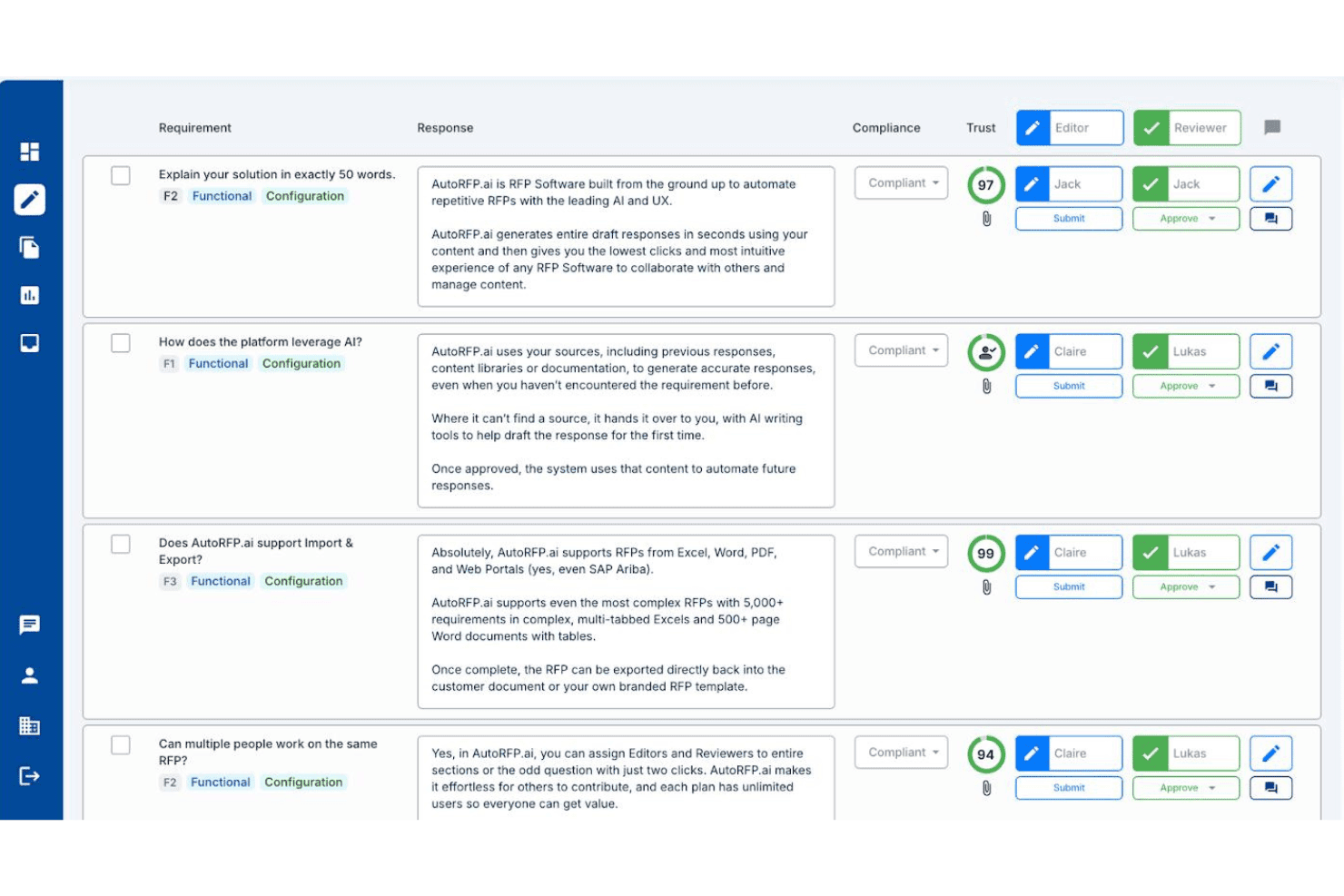
AutoRFP.ai streamlines RFP review with editor and reviewer workflows. AutoRFP.ai is an AI-powered RFP response platform that automates inbound questionnaire replies, manages a self-building content library, and routes answers through internal approval workflows.
Who Is AutoRFP.ai Best For?
AutoRFP.ai is a strong fit for presales and bid management teams that handle high volumes of inbound RFPs, DDQs, and security questionnaires.
Why I Picked AutoRFP.ai
I've included AutoRFP.ai in my top picks because it's purpose-built for inbound RFP response automation in a way that most general proposal tools simply aren't. Its AI Response Engine drafts answers from your own approved content library, and customers consistently report 80–90% of those first drafts need only minor edits before submission. I also like the Go/No-Go Analysis feature, which scans incoming RFPs for deal-breakers before your team commits any time to a response.
AutoRFP.ai Key Features
- Self-building content library: Automatically ingests and tags approved responses from past RFPs and connected knowledge bases like SharePoint, Confluence, and Google Drive.
- Multilingual translation: Translates and localizes RFP responses into 44+ languages, including regional English variants, without manual intervention.
- Browser extension for procurement portals: Pulls questions and auto-pastes AI-generated answers directly inside web-based portals like SAP Ariba, Coupa, and Workday Strategic Sourcing.
- Salesforce native integration: Creates RFP projects directly from Salesforce opportunities and syncs project status back to CRM records in real time.
AutoRFP.ai Integrations
AutoRFP.ai lists 18+ integrations, including native Salesforce plus Slack, Microsoft Teams, SharePoint, Confluence, Google Drive, and OneDrive. It also supports an open API and webhooks for custom RevOps integrations.
Pros and Cons
Pros:
- Unlimited users included with every plan
- Multilingual RFP automation for global teams
- AI automates up to 90% of drafts
Cons:
- No native e-signature or pricing tools
- Lacks buyer engagement analytics entirely
Learn more about AutoRFP.ai: Best for proposal analytics insights
- 14-day free trial + free demo available
- From $19/user/month (billed annually)
Visit WebsiteCustomer Rating:4.6/5
Proposify streamlines proposal creation, tracking, and signing for various industries. Proposify is a proposal software that simplifies sales by allowing users to create, track, and sign professional proposals efficiently. It primarily serves industries such as professional services, IT, and construction.
Why I picked Proposify: The software offers features like proposal automation, interactive quotes, and contract management, which help streamline the proposal creation process.
Customizable templates and a centralized content library ensure your documents are professional and consistent. Its e-signature functionality speeds up the signing process and reduces delays. Proposify also integrates with various CRM platforms, minimizing approval bottlenecks and reducing errors.
Standout features & integrations:
Features include proposal automation, interactive quotes, and contract management. You can customize templates and use a centralized content library to improve document quality. The e-signature functionality speeds up the signing process and reduces delays.
Integrations include Salesforce, HubSpot, QuickBooks, Stripe, Zapier, Pipedrive, Insightly, Zoho CRM, FreshBooks, and Basecamp.
Pros and Cons
Pros:
- Adaptive AI content suggestions
- White-label branding options
- Real-time client notifications
Cons:
- No interactive pricing tables
- Restrictive discounting rules
Learn more about Proposify: Best for real-time proposal analytics
- Free demo available
- Pricing upon request
Visit WebsiteCustomer Rating:4.6/5
Responsive is an efficient proposal software that helps sales teams streamline and manage proposals. Responsive is a software designed to help sales teams create and manage professional proposals efficiently. It serves sales professionals looking to streamline their proposal process and boost productivity.
Why I picked Responsive: It allows you to create customized proposal templates using automated RFP parsing, ensuring each proposal is tailored to your client's needs.
The content management feature makes it easy to maintain brand consistency while personalizing each proposal. Additionally, the engagement tracking feature provides real-time analytics, helping you understand how your clients interact with your proposals.
Standout features & integrations:
Features include template creation, content management, and engagement tracking. You can design and customize proposal templates specific to your industry. The platform lets you use pre-approved content to maintain brand consistency. Real-time analytics also help you track how clients engage with your proposals.
Integrations include Salesforce, HubSpot, Microsoft Dynamics 365, Google Workspace, Slack, Microsoft Teams, Dropbox, Box, DocuSign, and Adobe Sign.
Pros and Cons
Pros:
- Multi-user conflict resolution
- Built-in proposal scorecard
- Proposal version tracking
Cons:
- No dynamic pricing adjustments
- Restrictive proposal formatting
Learn more about Responsive: Best for interactive proposal templates
- 14-day free trial
- From $35/user/month (billed annually)
Visit WebsiteCustomer Rating:4.5/5
Qwilr automates and designs sales proposals, streamlining the creation process. Qwilr is a sales proposal software for sales leaders, customer success teams, marketers, and developers. It streamlines the proposal process by automating content creation, enabling quick proposal generation using beautifully designed collateral to capture buyer attention.
Why I picked Qwilr: Qwilr allows you to create interactive, web-like sales collateral with customizable templates and interactive content such as videos and pricing. You can use e-signatures and instant payment options to close deals faster.
Real-time tracking of buyer engagement ensures you know when and how your business proposals are viewed. With centralized assets and team collaboration features, your team can maintain brand consistency and improve productivity.
Standout features & integrations:
Features include customizable templates, interactive content like videos and pricing, and e-signatures. You can also track buyer engagement in real time and automate content creation by integrating with your CRM system.
Integrations include HubSpot, Salesforce, Stripe, Xero, QuickBooks, Slack, Google Analytics, Zapier, Intercom, and Dropbox.
Pros and Cons
Pros:
- Personalized proposal URLs
- Mobile-responsive proposals
- Integrated payment processing
Cons:
- Complex pricing workarounds
- No multi-language support
Learn more about Qwilr: Best for white-label proposal solutions
- Free demo available
- From $119/month
Visit WebsiteCustomer Rating:4.5/5
Vendasta helps agencies create quick, effective proposals with CRM integration. Vendasta is a sales proposal software that helps agencies and businesses create effective proposals quickly. It integrates with your CRM, marketplace, and fulfillment system to streamline the proposal process.
Why I picked Vendasta: Vendasta offers customizable templates that help you create polished proposals in minutes. You can easily track proposal statuses and client interactions, ensuring your team stays informed. The integration with your CRM means that all your client data is in one place and allows automated follow-ups to save time and increase efficiency.
Standout features & integrations:
Features include customizable templates, real-time tracking, and automated follow-ups. You can create professional proposals quickly and manage client interactions efficiently. The integration with your CRM keeps all client data centralized.
Integrations include Google Workspace, QuickBooks, Stripe, Xero, PayPal, Microsoft 365, HubSpot, Salesforce, Slack, and Mailchimp.
Pros and Cons
Pros:
- Embedded payment options
- One-click approval
- Client review capture
Cons:
- Basic performance reporting
- Limited automation
Learn more about Vendasta: 10Best proposal management software for quoting field services
BuildOps
- Free demo available
- Pricing upon request
Visit WebsiteCustomer Rating:4.5/5
BuildOps offers real-time quoting and tracking for commercial contractors. BuildOps offers field service software for commercial contractors, enabling your team to create and track proposals and quotes in real-time, ensuring fast and efficient job scheduling.
Why I picked BuildOps: BuildOps lets you generate quotes on-site and quickly convert them into scheduled jobs. It provides customizable options for proposals and quotes, enabling your team to tailor them to specific requirements. You can include photos and videos in your proposals to accelerate customer approvals.
Additionally, customers can easily access all their proposals and quotes through an online portal, streamlining the process and increasing transparency.
Standout features & integrations:
Features include automated quoting, easy-to-use proposal templates, and customizable service packages. You can streamline your field service operations and enhance team efficiency. The software's intuitive interface helps you quickly generate accurate quotes on-site.
Integrations include QuickBooks, Sage, Microsoft Dynamics, Salesforce, Xero, ServiceTitan, Oracle, SAP, Acumatica, and Zoho.
Pros and Cons
Pros:
- Custom service packages
- Cost comparison tool
- Offline proposal creation
Cons:
- No built-in e-signatures
- No interactive elements
Learn more about BuildOps:
Other Sales Proposal Software
Here are some additional sales proposal software options that didn’t make it onto my shortlist, but are still worth checking out:
- 11DIGIDECKBest for personalized proposal presentations
- 12Fresh ProposalsBest proposal software for interactive client feedback
- 13Salesforce CPQBest software for CRM integration in proposals
- 14DealHubBest CPQ software for guided selling features
- 15GetAcceptBest software for video-enhanced proposals
- 16OneflowBest proposal management software for real-time contract collaboration
- 17ZomentumBest sales proposal software for managed service providers
How I Evaluate Sales Proposal Software
I evaluate proposal tools on two levels: the baseline must-haves—template management, e-sign, CRM sync—and the differentiators that determine whether a deal desk or RevOps team gets value.
Core Functionality (Table Stakes For This List)
When I'm selecting tools for my list, I rank each one on a scale from 0 (does not offer the functionality) to 5 (excels in this area) for each core functionality listed below. Then, I calculate the tool's total score into a percentage. Each tool needs to achieve a minimum total score of 65% to be considered for inclusion.
- Proposal Templates & Content Library: I look for a flexible template library where reps can pull approved sections—like case studies, scope blocks, or compliance language—into proposals without starting from scratch each time.
- Dynamic Pricing & Quoting: Pricing tables need to support configurable line items, discounts, and bundled packages so deal desk teams can build accurate quotes directly inside the proposal rather than toggling between spreadsheets.
- E-Signature & Approval Workflows: I evaluate whether the tool handles both internal approvals (manager sign-off on non-standard discounts, for example) and buyer-facing e-signatures in a single workflow instead of requiring a separate signing tool.
- CRM Integration Depth: The connection to your CRM matters—I check whether deal data like contact info, opportunity stage, and custom fields flow into proposals automatically and whether signed-proposal status syncs back to the record in tools like Salesforce or HubSpot.
- Engagement Analytics: Real-time tracking of who opened a proposal, which sections they spent time on, and whether they forwarded it gives reps actionable follow-up signals, so I evaluate the granularity and alert options each platform provides.
- Collaboration & Version Control: Multi-stakeholder deals require co-editing, commenting, and clear version history—I look at how each tool handles internal red-lines and external negotiation rounds without creating duplicate documents.
Once I have a list of tools that meet this criteria, I consider what sets each platform apart.
Differentiating Factors (What Sets Vendors Apart)
Here's how I compare and contrast different vendors:
Standout Features
Deal rooms are a major differentiator—I look for platforms that give buyers a single workspace to review proposals, access collateral, and track mutual action plans with their buying committee. Conditional content logic also matters: tools that auto-swap sections like legal terms or pricing tiers based on deal size or segment save reps from manual edits on every proposal. I evaluate revenue intelligence reporting too, where engagement data rolls up into win-rate and cycle-time dashboards your RevOps team can use for pipeline forecasting.
Beyond Features
Tech stack integration depth is one of the first things I evaluate—proposal tools need to connect to your CPQ, billing, and CRM layers so deals flow from quote to close without manual handoffs. Pricing model matters just as much, especially whether per-seat licensing scales reasonably as your sales org grows. I also check compliance posture: teams in regulated industries need SOC 2 Type II and SSO/SAML at minimum, and e-signatures should meet ESIGN and eIDAS standards to hold up across regions.
How to Choose Sales Proposal Software
It’s easy to get bogged down in long feature lists and complex pricing structures. To help you stay focused as you work through your unique software selection process, keep the following factors in mind:
| Factor | What to Consider |
| Scalability | Will this software grow with your business? |
| Integrations | Does it integrate with your existing tools and systems? |
| Customizability | Can you tailor it to fit your specific needs? |
| Ease of Use | Is it user-friendly for you and your team? |
| Budget | Does it fit within your budget constraints? |
| Security Safeguards | Are there robust security measures to protect your data? |
| Customer Support | Is reliable support available when you need it? |
| Analytics | Does it offer insightful reporting and analytics features? |
Keep these factors in mind to ensure your software selection process stays organized and focused.
Also consider whether to invest in a dedicated sales proposal tool or a holistic proposal software that can be used by other functions.
What is Sales Proposal Software?
Sales proposal software is a tool used to create and manage sales proposals for potential customers. Sales and marketing professionals generally use these tools to help them save time and increase their chances of closing deals by using templates and other helpful features.
Features like templates, real-time analytics, and e-signature capabilities help with improving efficiency, tracking proposal status, and ensuring faster deal closures. Overall, these tools make creating, sending, and managing proposals easier and more effective for your sales reps.
Features of Sales Proposal Software
When shopping for a new sales proposal software, there are some key features you should keep in mind to help you get the most out of your solution. This includes:
| Feature | What to Consider |
| Template Library | Provides customizable proposal templates to save time and ensure consistency across proposals. |
| E-Signature Integration | Allows clients to sign electronically, speeding up approvals and reducing paperwork for your team. |
| Analytics and Tracking | Tracks views and interactions to give you insights into how clients engage with your proposals. |
| Collaboration Tools | Enables team members to work together on proposals, improving efficiency and communication. |
| CRM Integration | Connects to your CRM to pull in client data automatically, streamlining the proposal process. |
| Automated Workflows | Automates tasks like follow-up emails, saving you time and ensuring timely communication. |
| Content Library | Stores reusable content like pricing tables and terms, helping you build proposals quickly. |
| Interactive Pricing Tables | Lets clients customize options and see updated pricing in real time, improving the proposal’s interactivity. |
| Approval Workflows | Facilitates internal approvals before sending the proposal to the client, ensuring accuracy and compliance. |
| Mobile Compatability | Ensures proposals can be created, edited, and viewed on mobile devices, providing flexibility for users on the go. |
Costs and Pricing of Sales Proposal Software
Selecting sales proposal software requires an understanding of the various pricing models and plans available. Costs vary based on features, team size, add-ons, and more. The table below summarizes common plans, their average prices, and typical features included in sales proposal software solutions:
Plan Comparison Table for Sales Proposal Software
| Plan Type | Average Price | Common Features |
| Free Plan | $0 | Basic templates, limited customization, and basic analytics |
| Personal Plan | $10-$20 per user, per month | Customizable templates, e-signatures, and basic integrations |
| Business Plan | $30-$50 per user, month | Advanced analytics, CRM integrations, team collaboration, and custom branding |
| Enterprise Plan | $60-$100 per user, month | Full customization, advanced security, dedicated support, and extensive integrations |
A breakdown of sales proposal software plan types and their costs and features.