

I 10 migliori software per dashboard recensiti nel 2026

La migliore selezione di software per dashboard


Il software per dashboard ti aiuta a trasformare dati complessi in informazioni chiare e visive, così puoi prendere decisioni più intelligenti e rapidamente. Centralizzando le metriche e i report principali in un unico posto, ottieni una panoramica in tempo reale della tua attività, senza dover più setacciare fogli di calcolo o cercare di capire cosa conta davvero.
Ho testato i migliori software per dashboard per i professionisti delle attività operative legate ai ricavi, quindi analizziamo le opzioni migliori per aiutarti a scegliere quella più adatta alle esigenze del tuo team.
Perché fidarsi dei nostri consigli sui software
Le nostre recensioni riflettono il nostro giudizio indipendente, non un discorso di vendita. Scopri come manteniamo la trasparenza.
Per questa guida, abbiamo valutato gli strumenti attraverso test pratici e ricerche indipendenti, assegnando un punteggio agli strumenti in base ai nostri criteri di selezione.
Le nostre recensioni riflettono il nostro giudizio editoriale umano, non un discorso di vendita.
Riepilogo dei migliori software per dashboard
Questa tabella comparativa riassume i dettagli sui prezzi delle mie migliori selezioni di software per dashboard, per aiutarti a trovare quello più adatto al tuo budget e alle esigenze della tua attività.
| Tool | Best For | Trial Info | Price | ||
|---|---|---|---|---|---|
| 1 | Ideale per la sicurezza unificata e l'osservabilità | Prova gratuita di 14 giorni disponibile | Prezzo su richiesta | Website | |
| 2 | Ideale per agenzie di marketing | Prova gratuita di 14 giorni + demo gratuita disponibile | Da $44/mese (fatturati annualmente) | Website | |
| 3 | Ideale per report automatizzati senza analisti | Piano gratuito disponibile | A partire da $29/mese | Website | |
| 4 | Ideale per la creazione di dashboard con poco codice | Piano gratuito disponibile | Da $20/sviluppatore/mese | Website | |
| 5 | Ideale per piccole imprese | Prova gratuita di 14 giorni | Da $120/mese (fatturato annualmente) | Website | |
| 6 | Ideale per l'analisi visiva dei dati | Prova gratuita + piano gratuito disponibile | Da $15/utente/mese (fatturazione annuale) | Website | |
| 7 | Ideale per dashboard aziendali tutto-in-uno | Prova gratuita di 14 giorni disponibile | Da $29/mese | Website | |
| 8 | Ideale per analisi basate su SQL | Prova gratuita + demo gratuita disponibili | Da $25/utente/mese (fatturazione annuale) | Website | |
| 9 | Ideale per l’accesso da dispositivi mobili | Piano gratuito + prova gratuita + demo gratuita disponibili | Da $64/mese (fatturazione annuale) | Website | |
| 10 | Ideale per l’analisi incorporata | Prova gratuita di 7 giorni + demo gratuita disponibile | Prezzo su richiesta | Website |
Recensioni dei migliori software per dashboard
Di seguito trovi i miei riepiloghi dettagliati dei migliori software per dashboard entrati nella mia selezione. Le mie recensioni offrono un’analisi approfondita delle funzionalità principali, dei vantaggi e degli svantaggi, delle integrazioni e dei casi d’uso ideali di ogni strumento, per aiutarti a trovare quello più adatto a te.
Ideale per la sicurezza unificata e l'osservabilità
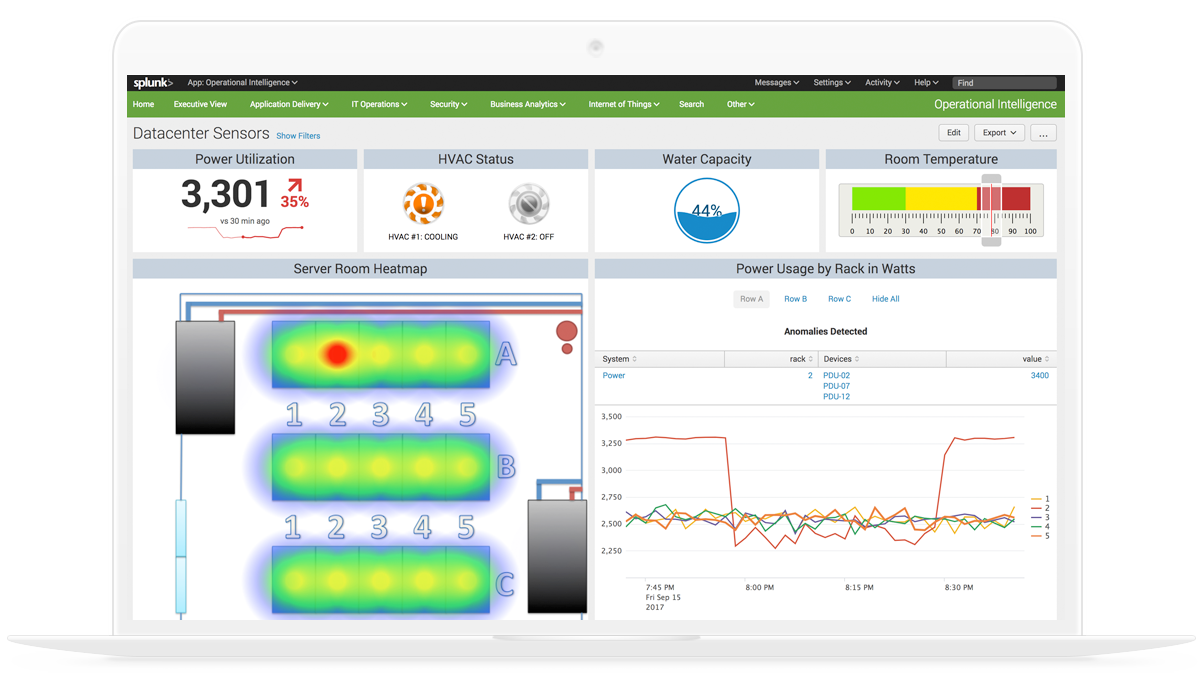
Splunk Enterprise riunisce l'ingestione dei dati, l'analisi basata sulla ricerca e un costruttore di dashboard visive per monitorare log, metriche ed eventi negli ambienti IT, di sicurezza e operativi.
Per chi è ideale Splunk Enterprise?
Splunk Enterprise è particolarmente indicato per i team IT aziendali, di sicurezza e DevOps che devono monitorare e analizzare grandi volumi di dati generati dalle macchine.
Perché ho scelto Splunk Enterprise
Ho incluso Splunk Enterprise tra le mie migliori scelte perché è una delle poche piattaforme di dashboard che unifica realmente i dati di sicurezza e osservabilità in una sola vista. Utilizzando Dashboard Studio, posso creare dashboard in tempo reale che attingono contemporaneamente sia dai log degli eventi di sicurezza che dalle metriche di infrastruttura, senza passare da uno strumento all'altro. Inoltre, mi piace che supporti dashboard predefiniti sia per il rilevamento delle minacce che per la salute dei servizi affiancati, così il mio team può mettere in relazione un picco di accessi non riusciti con un aumento nell'utilizzo della CPU sulla stessa schermata.
Funzionalità chiave di Splunk Enterprise
- Query dei dati basata su SPL: Usa il Search Processing Language di Splunk per scrivere query personalizzate per ciascun pannello della dashboard con dati precisi e filtrati.
- Layout a trellis: Suddividi una singola visualizzazione in più pannelli, ciascuno focalizzato su un diverso valore di campo, all'interno della stessa dashboard.
- Drilldown dinamici: Configura i pannelli della dashboard per collegarsi a ricerche, altre dashboard o URL esterni quando viene selezionato un punto dati.
- Permessi della dashboard basati sui ruoli: Controlla quali utenti o gruppi possono visualizzare, modificare o pubblicare specifiche dashboard nel tuo ambiente Splunk.
Integrazioni di Splunk Enterprise
Splunk Enterprise offre oltre 2.300 integrazioni disponibili su Splunkbase, fra cui add-on per AWS, ServiceNow, Jira, Slack, PagerDuty, Microsoft Azure, Google Cloud Platform e Kubernetes. Fornisce inoltre SDK, API e strumenti per sviluppatori per creare integrazioni personalizzate.
Pros and Cons
Pros:
- Il linguaggio di query SPL gestisce correlazioni complesse tra fonti diverse
- Le dashboard forniscono una fonte unica di verità durante gli incidenti
- Incluso kit di strumenti per l'apprendimento automatico gratuito
Cons:
- La creazione di dashboard curate richiede molto tempo
- Le installazioni on-premise richiedono risorse infrastrutturali considerevoli

DashThis
Ideale per agenzie di marketing
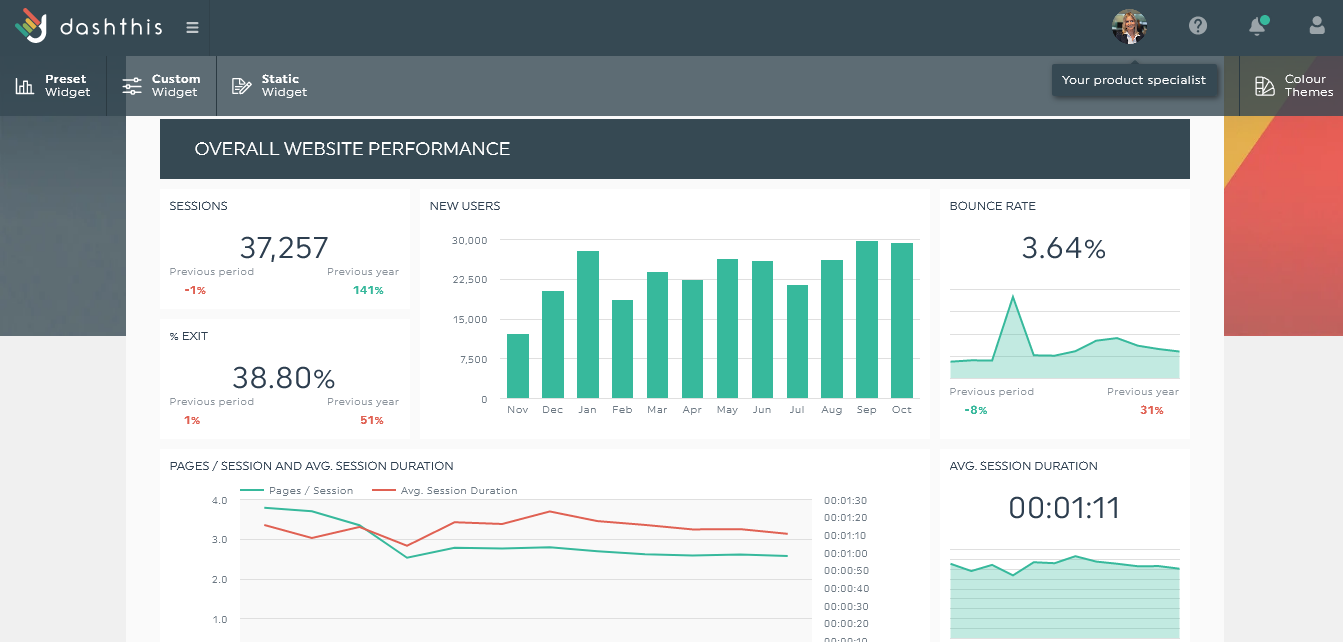
DashThis è uno strumento di dashboard per il reporting progettato per le agenzie di marketing, che consente di consolidare i dati provenienti da diverse fonti in un'unica piattaforma. Semplifica il processo di creazione e condivisione dei report con i clienti, facendo risparmiare tempo e fatica.
Perché ho scelto DashThis: DashThis offre una piattaforma intuitiva pensata specificamente per le agenzie di marketing. La sua funzionalità di reporting automatizzato permette di generare report rapidamente senza inserimento manuale dei dati, mentre i modelli personalizzabili aiutano il tuo team a creare report visivamente accattivanti. Nel complesso, DashThis è ideale per le agenzie che desiderano ottimizzare i propri processi di reporting.
Caratteristiche e integrazioni principali:
Caratteristiche includono report automatizzati che riducono il tempo dedicato alle attività manuali, modelli personalizzabili che permettono di creare report dall'aspetto professionale adatti allo stile della tua agenzia e un'interfaccia intuitiva.
Integrazioni includono Google Analytics, Facebook Ads, Instagram Insights, LinkedIn Ads, Twitter, Mailchimp, Moz, HubSpot, YouTube e Shopify.
Pros and Cons
Pros:
- Modelli di report personalizzabili
- Reporting automatizzato e veloce
- Ideale per metriche di marketing
Cons:
- Opzioni basilari di visualizzazione dati
- Personalizzazione avanzata limitata
New Product Updates from DashThis
DashThis Adds Spotify Ads Integration
DashThis adds a Spotify Ads integration for bringing campaign spend, reach, impressions, clicks, and video views into dashboards. This helps teams report on audio campaigns alongside other advertising channels. For more information, visit DashThis’s official site.
 .
.
Signara
Ideale per report automatizzati senza analisti
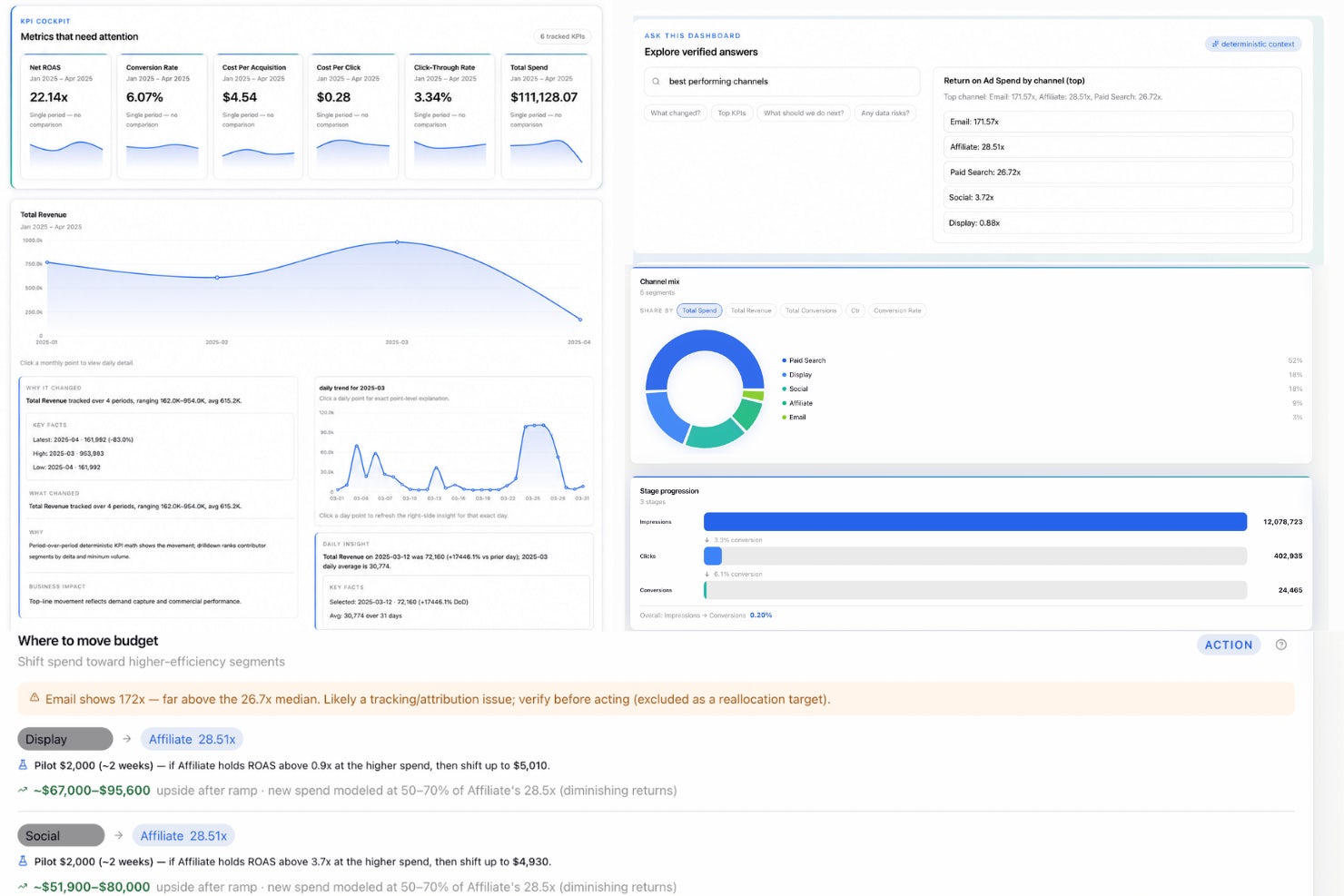
Signara è una piattaforma di analisi basata su agenti che genera automaticamente cruscotti KPI, narrazioni dirigenziali scritte dall'IA e report pronti per il consiglio di amministrazione a partire da fonti dati collegate, utilizzando un motore di calcolo deterministico e privo di allucinazioni.
Per chi è più adatto Signara?
Signara è particolarmente adatto alle PMI e ai team snelli che necessitano di report KPI affidabili e ricorrenti, ma non dispongono di un analista dei dati o di un ingegnere BI dedicato nello staff.
Perché ho scelto Signara
Signara si è guadagnato un posto nella mia lista dei preferiti grazie al modo in cui colma il divario tra dati grezzi e un report pronto per prendere decisioni. Mi piace il fatto che ogni cruscotto generato includa una raccomandazione classificata per priorità, non solo un grafico, così puoi sapere immediatamente cosa è cambiato, perché è cambiato e su cosa agire in seguito. Il suo motore KPI deterministico calcola ogni metrica tramite codice verificabile, il che significa che i numeri nella presentazione per il consiglio di amministrazione sono sempre coerenti e tracciabili, mai stimati dall'IA.
Funzionalità principali di Signara
- Integrazione MCP con Claude: Esegui report e cruscotti direttamente nell'interfaccia di chat di Claude utilizzando il Protocollo del contesto del modello.
- Elaborazione dei dati multi-agente: Agenti specializzati analizzano i tuoi dati in sequenza, assicurando che ogni set di dati riceva un'analisi approfondita prima della creazione del report.
- Motore matematico deterministico: Tutti i KPI vengono calcolati tramite formule trasparenti nel codice, senza essere mai stimati o dedotti dall'IA.
- Connettori dati per strumenti BI e magazzini dati: I connettori includono Snowflake, Databricks, BigQuery, HubSpot, Google Sheets e il caricamento di file CSV/Excel.
Integrazioni di Signara
Signara offre integrazioni native con HubSpot, Snowflake, BigQuery, Databricks, PostgreSQL, MySQL, Google Sheets e GA4, oltre a supportare il caricamento di file CSV ed Excel. È disponibile un'API per le integrazioni personalizzate.
Pros and Cons
Pros:
- Genera automaticamente raccomandazioni classificate per priorità per ogni cruscotto
- I report includono narrazioni dirigenziali scritte dall'IA
- I calcoli dei KPI sono completamente verificabili nel codice
Cons:
- Personalizzazione dei grafici limitata rispetto alle piattaforme BI
- Nessuna analisi dettagliata in autonomia o esplorazione ad hoc

Ideale per la creazione di dashboard con poco codice
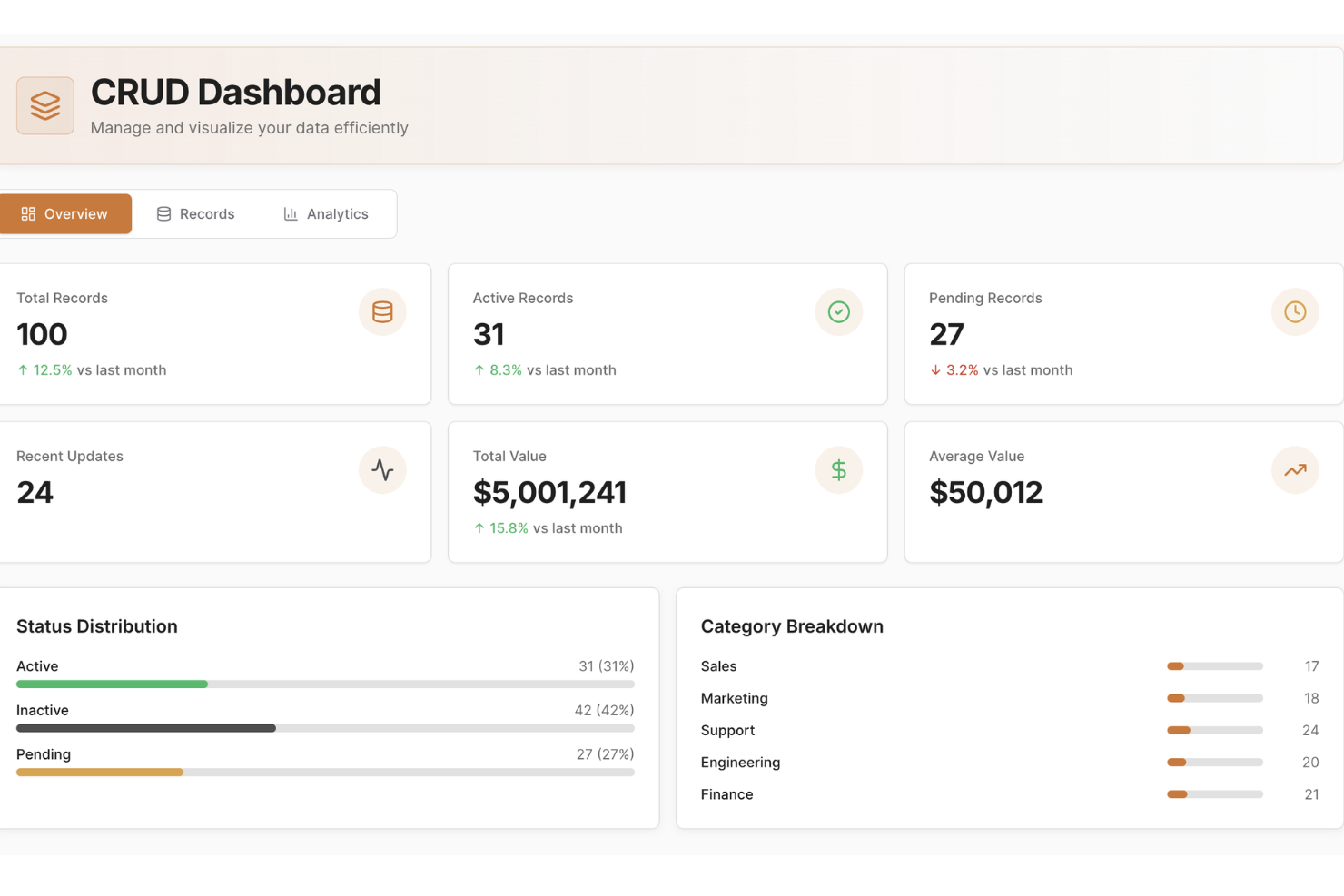
UI Bakery consente alle aziende di creare dashboard dinamiche e strumenti interni senza una vasta conoscenza di codifica. Ideale per le aziende che desiderano ottimizzare le operazioni e migliorare il coinvolgimento dei clienti, questa piattaforma offre un'interfaccia intuitiva per integrare i dati e automatizzare i flussi di lavoro senza difficoltà.
Perché ho scelto UI Bakery
Ho scelto UI Bakery perché unisce la semplicità di un sistema low-code al controllo reale su dati e logica, aiutandoti a creare dashboard che si collegano direttamente ai tuoi database (SQL, NoSQL o API) e ti permettono di visualizzare dati e analisi in tempo reale. Il suo costruttore di interfacce drag-and-drop, combinato con l’integrazione delle fonti dati, rende tutto immediato per ottenere rapidamente una dashboard funzionante o uno strumento interno. Apprezzo anche la possibilità di aggiungere logiche personalizzate — usando SQL o JavaScript — quindi, se i dati necessitano di trasformazione o filtro prima della visualizzazione, non sei limitato dal costruttore visuale.
Per i team che gestiscono set di dati complessi o in evoluzione, questa combinazione di semplicità e flessibilità significa che non si deve scegliere tra velocità e potenza.
Caratteristiche principali di UI Bakery
Oltre alle funzionalità legate alla connessione dei dati e al controllo della logica di cui sopra, avrai anche:
- Libreria di componenti predefiniti: un'ampia varietà di componenti (tabelle, grafici, form, modali, ecc.) che puoi trascinare nell'interfaccia per costruire dashboard o strumenti interni.
- Costruttore visuale di workflow/automazioni: crea automazioni o workflow CRUD per recuperare, inserire, aggiornare o cancellare dati — utile per dashboard che fungono anche da strumenti di gestione.
- Design reattivo e personalizzazione temi: realizza interfacce che si adattano a varie dimensioni di schermo e applica la personalizzazione del brand, stili e formattazione per rispecchiare l’identità della tua organizzazione.
- Controllo di versione e opzioni di distribuzione: gestisci le versioni delle app, traccia la cronologia e pubblica sia sul cloud di UI Bakery che su infrastruttura self-hosted, offrendo flessibilità per hosting e gestione dei rilasci.
Integrazioni di UI Bakery
Le integrazioni includono MySQL, PostgreSQL, Salesforce, Twilio, AWS, Google Sheets, HubSpot, MongoDB, Firebase e REST API.
Pros and Cons
Pros:
- Permette di costruire dashboard e strumenti interni senza sviluppatori full stack
- Supporta molte fonti di dati tra cui SQL, NoSQL, API e fogli
- Template e dashboard predefiniti riducono il tempo necessario per lanciare app di dashboard
Cons:
- La personalizzazione oltre i componenti integrati può richiedere conoscenze di programmazione
- La varietà dei template e le opzioni di stile visivo possono risultare limitate per design di dashboard altamente specializzati
New Product Updates from UI Bakery
UI Bakery Improves MCP Editing and AI Setup
UI Bakery improves MCP with changed-file updates and faster setup for Claude, ChatGPT, and Cursor. It also adds multi-value table filtering for more flexible data views. For more information, visit UI Bakery’s official site.
 .
.
Ideale per piccole imprese
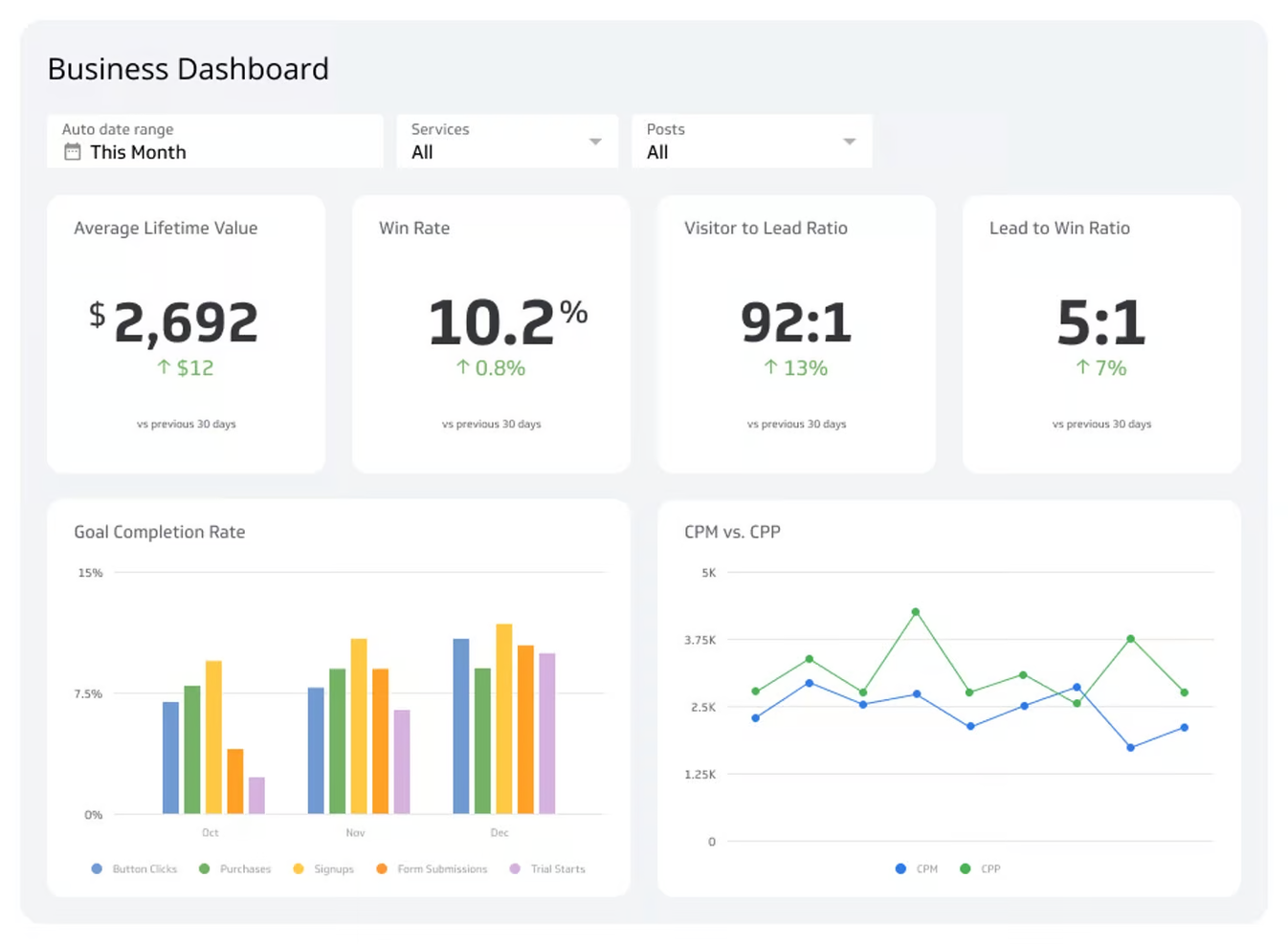
Klipfolio è una piattaforma di dashboard basata su cloud pensata per piccole imprese e startup. Consente agli utenti di creare dashboard aziendali in tempo reale per visualizzare e monitorare i principali indicatori di performance.
Perché ho scelto Klipfolio: Klipfolio offre un'esperienza di dashboard intuitiva su misura per le piccole imprese. Mette a disposizione modelli predefiniti che semplificano la creazione delle dashboard, rendendola accessibile anche a chi non ha particolari competenze tecniche, mentre l’attenzione del software ai dati in tempo reale garantisce di essere sempre aggiornati sulle metriche aziendali. In definitiva, la sua convenienza e facilità d'uso lo rendono una scelta pratica per startup e piccoli team.
Funzionalità e integrazioni principali:
Funzionalità includono modelli predefiniti per una configurazione rapida delle dashboard, visualizzazione dei dati in tempo reale per mantenere il team informato sulle ultime metriche e opzioni di personalizzazione che permettono di adattare le dashboard alle esigenze specifiche aziendali.
Integrazioni includono Google Analytics, Salesforce, Facebook Ads, HubSpot, Twitter, Stripe, Shopify, LinkedIn Ads, Xero e QuickBooks.
Pros and Cons
Pros:
- Accessibilità tramite cloud
- Configurazione rapida con modelli
- Conveniente per piccoli team
Cons:
- Può essere lento con grandi quantità di dati
- Funzionalità avanzate limitate

Tableau
Ideale per l'analisi visiva dei dati
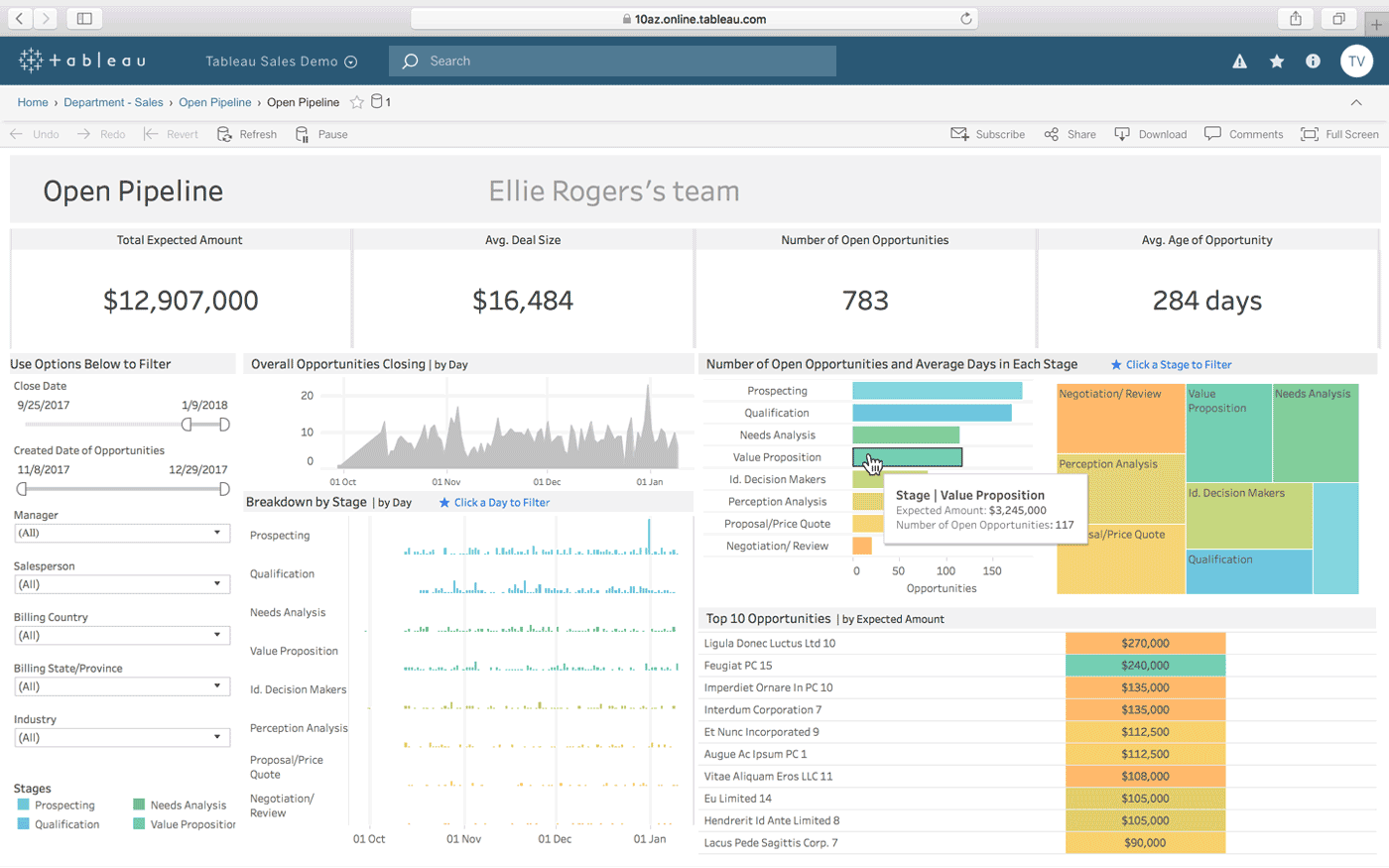
Tableau è uno strumento di visualizzazione dei dati utilizzato principalmente da analisti e professionisti dell'intelligenza aziendale. Aiuta gli utenti a trasformare dati grezzi in dashboard interattivi e condivisibili che facilitano decisioni informate.
Perché ho scelto Tableau: Tableau eccelle nel visualizzare set di dati complessi in formati facili da comprendere. La sua interfaccia drag-and-drop consente di creare rapidamente grafici e diagrammi interattivi, e la sua capacità di gestire grandi volumi di dati senza problemi di prestazioni è degna di nota. Il software offre anche ampie opzioni di personalizzazione, rendendolo ideale per analisi dettagliate dei dati.
Caratteristiche e integrazioni di rilievo:
Caratteristiche includono funzionalità intuitive di drag-and-drop, dashboard interattivi, sofisticate capacità di visualizzazione dei dati, personalizzazione di grafici e diagrammi, e analisi visiva dei dati.
Integrazioni includono Salesforce, Google Analytics, Microsoft Excel, Amazon Redshift, Oracle NetSuite, SAP HANA, Teradata, Snowflake, Google BigQuery e Splunk.
Pros and Cons
Pros:
- Visualizzazioni dati interattive
- Ampie opzioni di personalizzazione
- Gestisce grandi quantità di dati
Cons:
- Curva di apprendimento ripida per i principianti
- Richiede formazione per compiti complessi

Cyfe
Ideale per dashboard aziendali tutto-in-uno
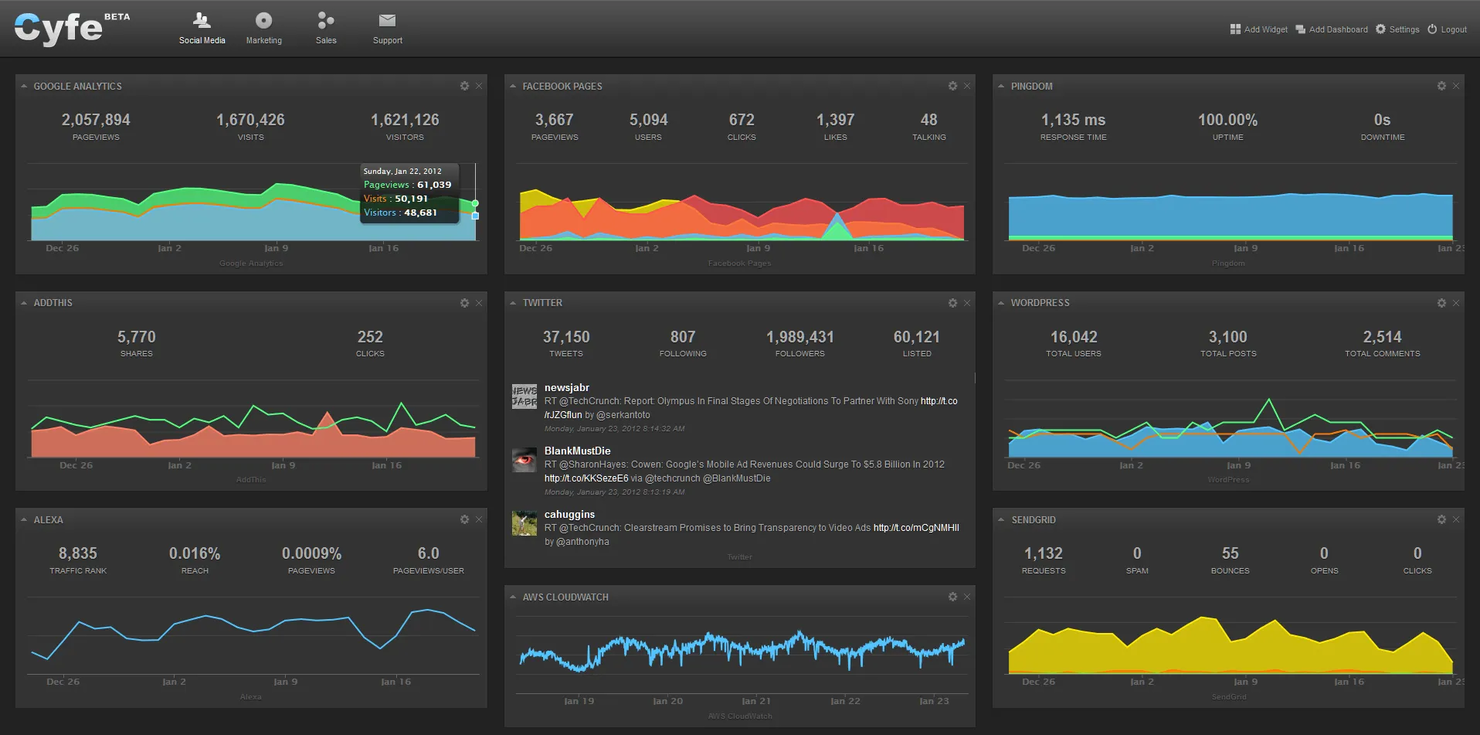
Cyfe è una soluzione di dashboard aziendale progettata per le aziende che desiderano consolidare i dati provenienti da più fonti in un'unica visualizzazione. Consente alle aziende di monitorare e analizzare le metriche di performance tra i diversi reparti.
Perché ho scelto Cyfe: Cyfe offre una piattaforma avanzata per monitorare diverse metriche aziendali in un solo posto. Fornisce widget predefiniti che rendono la configurazione delle dashboard rapida e semplice per il tuo team. Inoltre, l'approccio tutto-in-uno dello strumento ti consente di tenere traccia di marketing, vendite, finanza e altro ancora senza dover cambiare piattaforma. Con il suo focus su una visione d'insieme dell'attività, Cyfe semplifica il processo di consolidamento dei dati migliorando allo stesso tempo l'esperienza utente.
Caratteristiche principali & integrazioni:
Caratteristiche includono una serie di widget predefiniti che ti permettono di iniziare subito a monitorare i dati, dashboard aziendali tutto-in-uno per aiutarti a tenere d'occhio le metriche nei diversi reparti e un'interfaccia facile da usare.
Integrazioni includono Google Analytics, Salesforce, Facebook, Twitter, Mailchimp, QuickBooks, Shopify, Wordpress, Instagram e LinkedIn.
Pros and Cons
Pros:
- Traccia molteplici metriche aziendali
- Configurazione semplice tramite widget
- Consolidamento dati completo
Cons:
- Opzioni di visualizzazione di base
- Analisi avanzata limitata

Mode
Ideale per analisi basate su SQL
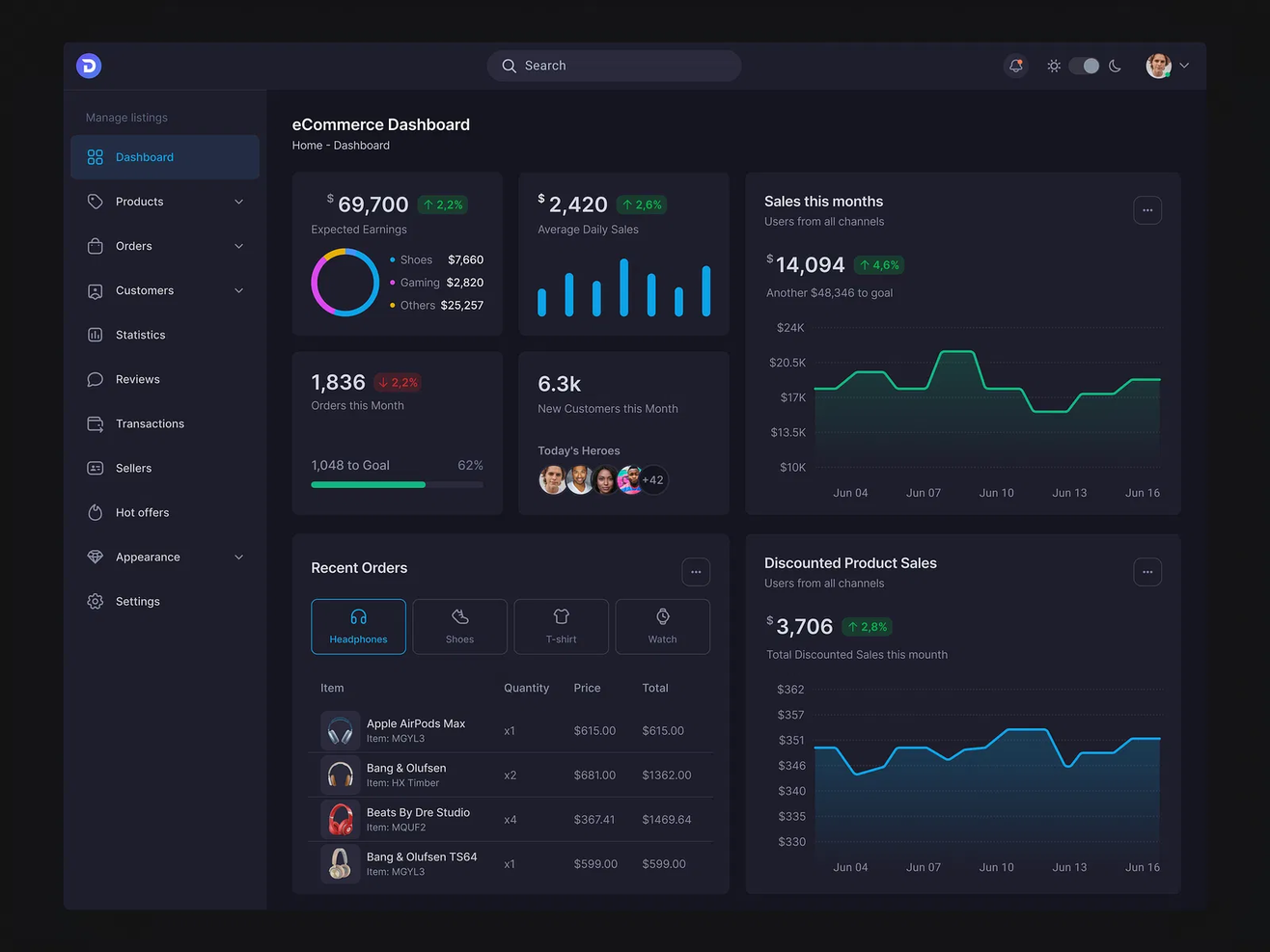
Mode è una piattaforma avanzata di analytics progettata per data scientist e analisti che fanno grande affidamento su SQL per l'esplorazione dei dati. Consente agli utenti di interrogare i dati, creare visualizzazioni e collaborare su progetti di dati.
Perché ho scelto Mode: Mode è pensato per team che necessitano di una forte integrazione con SQL, rendendo l'analisi dei dati più efficiente. Permette di eseguire query complesse e visualizzare i risultati senza passare da uno strumento all'altro. Le funzionalità di collaborazione della piattaforma consentono inoltre al tuo team di lavorare insieme su progetti di dati in modo fluido. Di conseguenza, Mode è ideale per team orientati ai dati che desiderano ottenere insight dai dati grezzi.
Funzionalità e integrazioni principali:
Funzionalità includono un editor SQL che supporta query complesse, rendendo l'analisi dei dati semplice ed efficiente. Mode offre anche strumenti di visualizzazione che ti permettono di trasformare i risultati delle query in grafici interattivi, e solide funzionalità di collaborazione che permettono al team di condividere insight e lavorare insieme sui progetti di dati.
Integrazioni includono Salesforce, Google Analytics, Amazon Redshift, PostgreSQL, MySQL, BigQuery, Snowflake, Oracle NetSuite, SAP HANA e Microsoft SQL Server.
Pros and Cons
Pros:
- Favorisce la collaborazione di team
- Supporta query dati complesse
- Potenti funzionalità SQL
Cons:
- Potrebbe richiedere supporto tecnico
- Opzioni di visualizzazione basilari
Databox
Ideale per l’accesso da dispositivi mobili
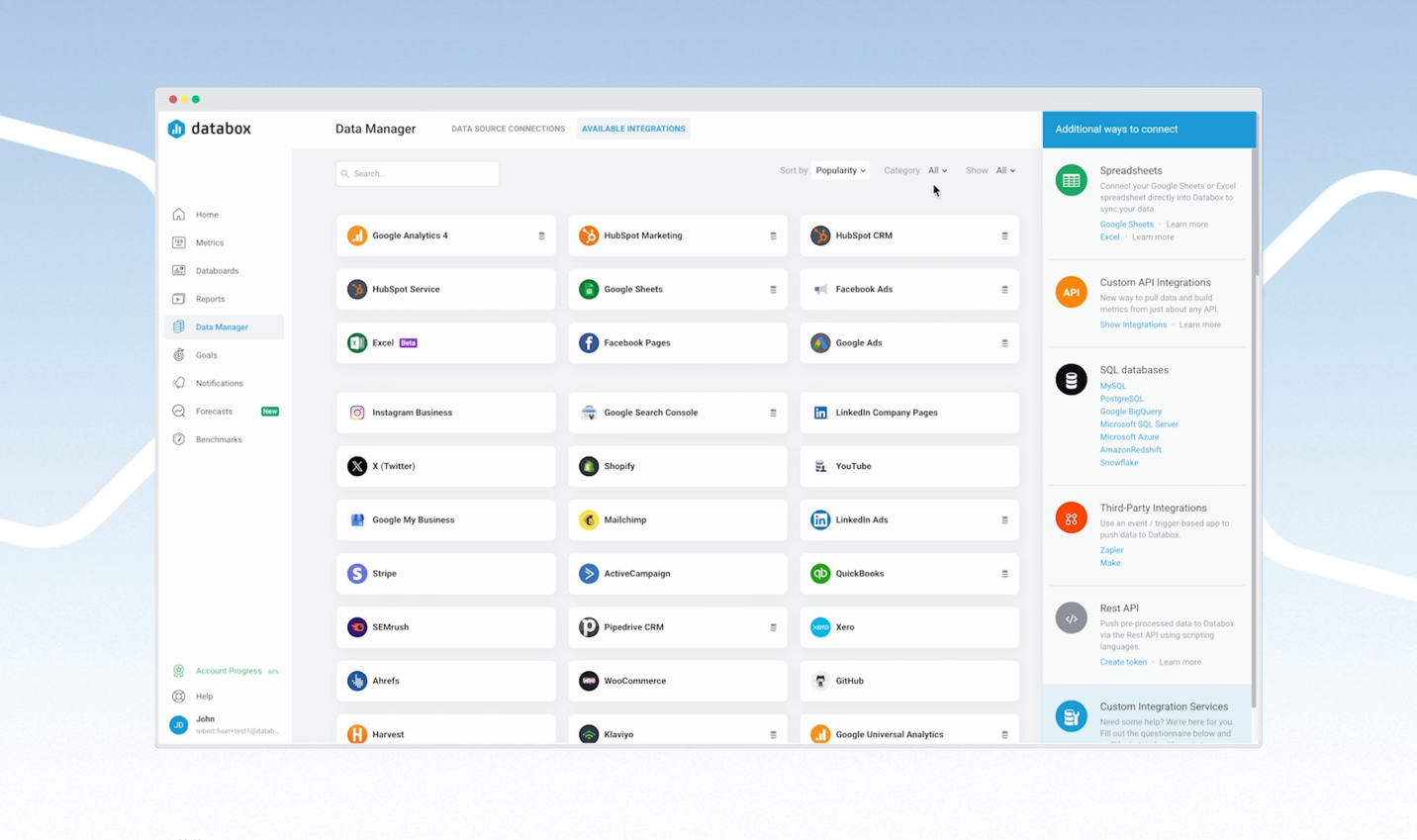
Databox è uno strumento di analisi aziendale progettato per i team di marketing e vendite per monitorare le metriche di performance. Permette agli utenti di accedere a dati e approfondimenti ovunque si trovino grazie alle sue dashboard ottimizzate per dispositivi mobili.
Perché ho scelto Databox: Databox offre un'esperienza mobile unica, consentendo al tuo team di monitorare gli indicatori chiave di performance ovunque si trovi. I suoi modelli preimpostati facilitano la configurazione rapida delle dashboard, mentre gli avvisi personalizzabili permettono di restare aggiornati con i dati in tempo reale. Inoltre, l'approccio mobile-first del software assicura accesso costante alle metriche più importanti, rendendo l'analisi dei dati semplice ed efficiente.
Caratteristiche principali e integrazioni:
Caratteristiche includono dashboard ottimizzate per dispositivi mobili per mantenere sempre il collegamento con i dati, avvisi personalizzabili per non perdere mai aggiornamenti importanti e modelli preimpostati che aiutano il tuo team nella rapida configurazione e visualizzazione dei dati.
Le integrazioni includono Google Analytics, HubSpot, Salesforce, Facebook Ads, QuickBooks, Shopify, Stripe, LinkedIn Ads, Instagram Insights e Mailchimp.
Pros and Cons
Pros:
- Avvisi personalizzabili in tempo reale
- Configurazione rapida tramite modelli
- Design mobile-first
Cons:
- Richiede connessione internet costante
- Funzionalità desktop limitate
Sisense
Ideale per l’analisi incorporata
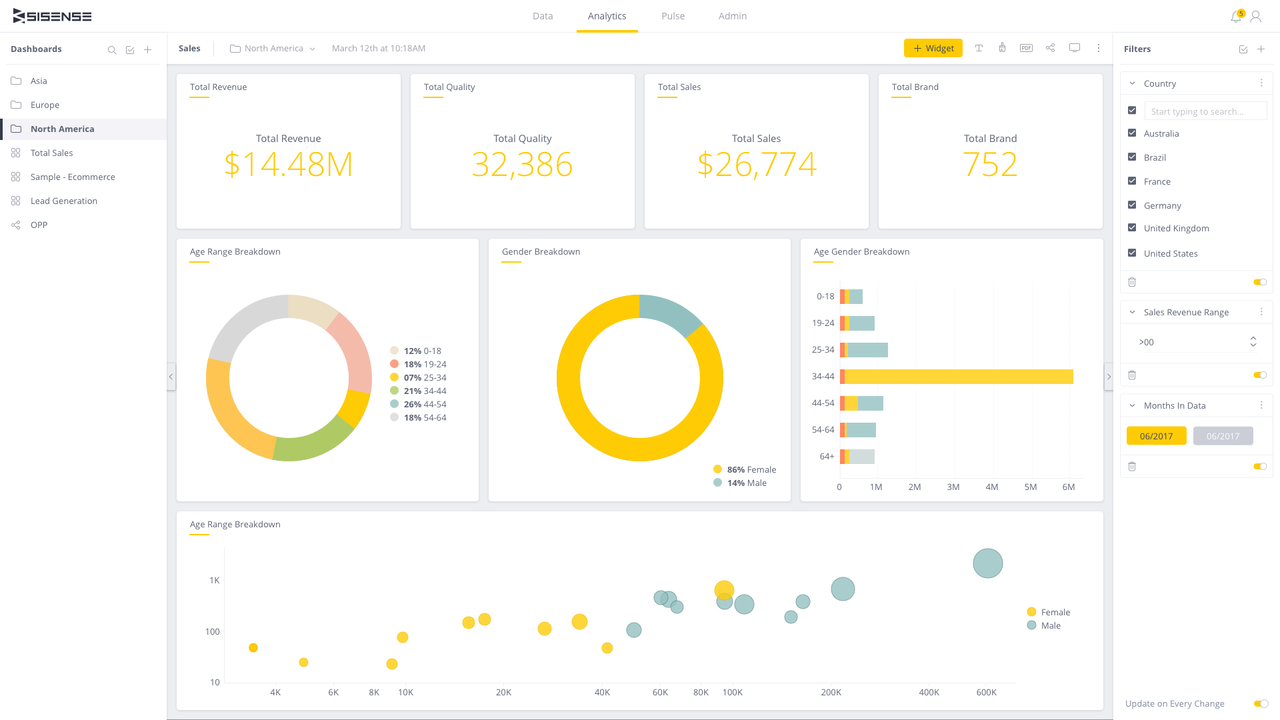
Sisense è una piattaforma di analisi progettata per analisti di dati e team aziendali che desiderano incorporare l’analisi nei loro applicativi. Fornisce strumenti per integrare l’analisi nei flussi di lavoro, consentendo decisioni basate sui dati.
Perché ho scelto Sisense: Sisense offre funzionalità avanzate di analisi incorporata, permettendo al tuo team di integrare direttamente le informazioni sui dati nelle vostre applicazioni. La sua architettura unica supporta la gestione efficiente di grandi volumi di dati. La piattaforma fornisce inoltre dashboard personalizzabili, che rendono semplice inserire l’analisi nei tuoi strumenti esistenti.
Funzionalità e integrazioni principali:
Funzionalità includono dashboard personalizzabili per adattare la visualizzazione dei dati alle esigenze del team, forti capacità di integrazione dei dati e tecnologia in-chip per accelerare l’elaborazione dei dati.
Integrazioni includono Salesforce, Google Analytics, Amazon Redshift, Oracle, SAP, Snowflake, Microsoft SQL Server, Google BigQuery, Zendesk e HubSpot.
Pros and Cons
Pros:
- Elaborazione dati efficiente
- Dashboard personalizzabili
- Gestisce grandi volumi di dati
Cons:
- Configurazione iniziale complessa
- Richiede competenze tecniche
Altri software per dashboard
Ecco alcune opzioni aggiuntive di software per dashboard che non sono entrate nella mia selezione, ma che vale comunque la pena valutare:
- Athenic
Ideale per dashboard basate su intelligenza artificiale
- Microsoft Power BI
Ideale per l'integrazione con strumenti Microsoft
- Grafana Cloud
Ideale per il monitoraggio open-source
- Adobe Customer Journey Analytics
Ideale per lo stitching identitario omnicanale
- Qlik Sense
Ideale per dashboard interattive
- Coefficient
Ideale per dashboard live nativi su fogli di calcolo
- FineBI 6.1
Ideale per la BI self-service


Come Valuto il Software di Dashboard
Divido la mia valutazione in due livelli: le capacità di base indispensabili per uno strumento—come la connettività con il CRM e il monitoraggio in tempo reale degli indicatori chiave di prestazione (KPI)—e i fattori che differenziano le migliori opzioni specifiche per i team RevOps.
Funzionalità di Base (Requisiti Fondamentali per Questa Lista)
Quando seleziono gli strumenti per la mia lista, valuto ciascuno su una scala da 0 (non offre la funzionalità) a 5 (eccelle in quest'area) per ogni funzionalità essenziale elencata di seguito. Successivamente, calcolo il punteggio totale dello strumento come percentuale. Ogni strumento deve raggiungere un punteggio totale minimo del 65% per poter essere considerato nell'elenco.
- Integrazioni con le Fonti Dati: Controllo la presenza di connettori nativi ai sistemi realmente utilizzati dai team RevOps—CRM come Salesforce e HubSpot, data warehouse come Snowflake e piattaforme di fatturazione.
- Visualizzazioni Personalizzabili: Tipologie di grafico, costruttori di layout e opzioni widget sono fondamentali. Cerco la possibilità di creare visualizzazioni come diagrammi a cascata della pipeline o trend line per l’ARR senza dover scrivere codice.
- Aggiornamento Dati in Tempo Reale: Dati obsoleti minano la fiducia nei dashboard. Valuto la frequenza di aggiornamento di ciascun tool, dai sincronismi programmati alle connessioni live, e quanto siano configurabili tali intervalli.
- Metriche RevOps Predefinite: Template per la velocità della pipeline, il monitoraggio di MRR/ARR, e il raggiungimento dei target fanno risparmiare molto tempo di configurazione. Ricerco dashboard pronti per i team go-to-market.
- Condivisione & Collaborazione: I dashboard RevOps sono pensati per leader delle vendite, marketing, finanza e dirigenti. Valuto accessi basati su ruoli, invio programmato di report e opzioni di incorporamento per una distribuzione ampia.
- Esplorazione Dettagliata & Filtri: Poter passare da un riepilogo dei ricavi ad alto livello a dettagli per agente o segmento è fondamentale. Verifico il supporto per i filtri incrociati e l'esplorazione multilivello.
Una volta che ho una lista di strumenti che soddisfano questi criteri, considero cosa distingue ogni piattaforma.
Fattori Differenzianti (Cosa Distingue i Fornitori)
Ecco come confronto e differenzio i vari fornitori:
Caratteristiche Distintive
Le analisi basate sull’intelligenza artificiale sono un elemento distintivo. Cerco strumenti che individuano anomalie come un improvviso calo della copertura nella pipeline oppure segnalano trattative a rischio senza doverle cercare manualmente. Le capacità di previsione sono altrettanto importanti, specialmente quando lo strumento può simulare scenari come "cosa accade al Q4 se il tasso di vittoria diminuisce di cinque punti". Valuto inoltre il monitoraggio di obiettivi e quote: visualizzare l’avanzamento in tempo reale rispetto ai target a livello di agente e di team è sempre meglio che attendere un foglio di calcolo settimanale.
Oltre le Caratteristiche
La compatibilità con lo stack tecnologico è il primo fattore che controllo. Uno strumento di dashboard deve collegarsi veramente al tuo stack di revenue—CRM, automazione marketing, fatturazione e data warehouse—senza soluzioni alternative complesse. Anche i modelli di prezzo meritano particolare attenzione. Valuto se i posti di sola visualizzazione siano accessibili per i responsabili vendite e i dirigenti che hanno bisogno di accesso ma non devono creare dashboard. Il tempo di messa a valore completa la mia valutazione: template RevOps preimpostati e configurazione self-service permettono al team di lanciare il primo dashboard attivo in pochi giorni, non mesi.
Come scegliere un software per dashboard
È facile perdersi in lunghi elenchi di funzionalità e strutture tariffarie complesse. Per aiutarti a rimanere concentrato mentre affronti il tuo specifico processo di selezione del software, ecco una lista di fattori da tenere a mente:
| Fattore | Cosa considerare |
| Scalabilità | Questo software crescerà insieme al tuo team? |
| Integrazioni | Si collega agli strumenti che già utilizzi? |
| Personalizzazione | Puoi adattarlo alle tue esigenze specifiche? |
| Facilità d'uso | È semplice da imparare e utilizzare per il tuo team? |
| Budget | Rientra nei tuoi vincoli finanziari? |
| Misure di sicurezza | Soddisfa i tuoi requisiti di sicurezza e conformità? |
| Assistenza | È disponibile un'assistenza clienti adeguata? |
| Accesso da dispositivi mobili | Puoi accedervi facilmente da dispositivi mobili? |
Tendenze nei software per dashboard
Nel corso della mia ricerca, ho raccolto innumerevoli aggiornamenti dei prodotti, comunicati stampa e registri delle versioni di diversi fornitori di software per dashboard. Ecco alcune delle tendenze emergenti che sto tenendo d'occhio:
- Approfondimenti basati sull'AI: Un numero crescente di strumenti utilizza l'AI per offrire approfondimenti più dettagliati sui dati. Questo aiuta gli utenti a prendere decisioni informate più rapidamente, analizzando i modelli e prevedendo le tendenze future.
- Visualizzazioni personalizzabili: Gli utenti cercano una maggiore personalizzazione nei propri dashboard. Ora gli strumenti offrono opzioni di personalizzazione avanzate, consentendo alle aziende di adattare le visualizzazioni alle proprie esigenze specifiche. Questa tendenza facilita la concentrazione dei team sulle metriche più importanti per loro.
- Analisi integrate: Le aziende desiderano funzionalità di analisi all'interno degli strumenti e dei flussi di lavoro esistenti. Molti fornitori offrono ora soluzioni di analisi integrate, consentendo agli utenti di accedere agli approfondimenti senza cambiare piattaforma.
- Attenzione alla privacy dei dati: Con l'inasprimento delle normative sui dati, gli strumenti per dashboard stanno potenziando le proprie funzionalità di tutela della privacy dei dati. Garantire la conformità a normative come il GDPR sta diventando una priorità e le aziende stanno integrando controlli della privacy più avanzati. Questa tendenza risponde alle crescenti preoccupazioni relative alla sicurezza dei dati.
- Analisi aumentata: Questa tendenza prevede l'utilizzo dell'apprendimento automatico per automatizzare la preparazione dei dati e la generazione di approfondimenti. Semplifica le analisi complesse, rendendole accessibili agli utenti non tecnici.
Che cos'è un software per dashboard?
Il software per dashboard consente ai professionisti CRO e RevOps di riunire dati provenienti da più fonti in un'unica visualizzazione interattiva. Consolidando le principali metriche dei ricavi e gli indicatori di performance, queste piattaforme permettono ai responsabili di monitorare lo stato di salute della pipeline, seguire i progressi verso gli obiettivi e prendere decisioni informate basate sui dati. Grazie a funzionalità come visualizzazioni personalizzabili, approfondimenti basati sull'AI e un'integrazione fluida delle analisi, il software per dashboard semplifica la reportistica e aiuta i team a identificare rapidamente le opportunità e ad affrontare le sfide nell'intera gestione dei ricavi.
Funzionalità del software per dashboard
Quando scegli un software per dashboard, presta attenzione alle seguenti funzionalità chiave:
- Visualizzazione dei dati: Trasforma i dati grezzi in formati visivi come grafici e diagrammi, facilitando la comprensione immediata degli approfondimenti.
- Aggiornamenti dei dati in tempo reale: Fornisce informazioni aggiornate all'ultimo minuto, consentendo agli utenti di prendere decisioni tempestive e informate.
- Dashboard personalizzabili: Consente agli utenti di adattare i propri dashboard per concentrarsi sulle metriche più importanti in base alle loro esigenze specifiche.
- Integrazione dei dati da più fonti: Combina dati provenienti da diverse piattaforme, offrendo una visione completa delle performance aziendali in un unico luogo.
- Approfondimenti basati sull'AI: Utilizza l'intelligenza artificiale per analizzare i modelli dei dati e prevedere le tendenze future, migliorando il processo decisionale.
- Analisi integrate: Integra le funzionalità di analisi direttamente negli strumenti esistenti, consentendo agli utenti di accedere agli approfondimenti all'interno del proprio flusso di lavoro.
- Dashboard interattive: Offrono un'interattività che consente agli utenti di esplorare i dati in profondità, scoprendo approfondimenti dettagliati attraverso visualizzazioni dinamiche.
- Controlli della privacy dei dati: Garantiscono la conformità alle normative sui dati e proteggono le informazioni sensibili, affrontando le problematiche relative alla sicurezza.
- Funzionalità di collaborazione: Consentono ai team di condividere approfondimenti e lavorare insieme sui progetti basati sui dati, favorendo un ambiente collaborativo.
- Analisi aumentata: Automatizza la preparazione dei dati e la generazione di approfondimenti, rendendo le analisi complesse accessibili agli utenti non tecnici.
Vantaggi del software per dashboard
L'implementazione di un software per dashboard offre diversi vantaggi al tuo team e alla tua azienda. Eccone alcuni:
- Miglioramento del processo decisionale: Gli aggiornamenti dei dati in tempo reale e gli approfondimenti basati sull'AI aiutano il tuo team a prendere rapidamente decisioni informate.
- Maggiore comprensione dei dati: La visualizzazione dei dati trasforma insiemi di dati complessi in elementi visivi facili da comprendere, rendendo più chiari gli approfondimenti.
- Maggiore efficienza: I dashboard personalizzabili consentono agli utenti di concentrarsi sulle metriche chiave, riducendo il tempo dedicato alla ricerca delle informazioni.
- Collaborazione migliore: Le funzionalità di collaborazione permettono ai team di condividere facilmente gli approfondimenti e lavorare insieme a progetti basati sui dati.
- Maggiore accessibilità dei dati: L'integrazione dei dati da più fonti riunisce tutti i dati in un unico luogo, offrendo una visione completa della tua azienda.
- Conformità e sicurezza: I controlli della privacy dei dati garantiscono che i dati rispettino i requisiti normativi e rimangano sicuri.
- Valorizzazione degli utenti non tecnici: L'analisi aumentata rende accessibili le analisi complesse dei dati, consentendo a un numero maggiore di membri del team di interagire con i dati.
Costi e prezzi del software per dashboard
La scelta di un software per cruscotti richiede la comprensione dei vari modelli e piani tariffari disponibili. I costi variano in base alle funzionalità, alle dimensioni del gruppo, ai componenti aggiuntivi e ad altro ancora. La tabella seguente riassume i piani più comuni, i loro prezzi medi e le funzionalità tipicamente incluse nelle soluzioni software per cruscotti:
Tabella comparativa dei piani per software di cruscotti
| Tipo di piano | Prezzo medio | Funzionalità comuni |
| Piano gratuito | $0 | Visualizzazione di base dei dati, cruscotti limitati e supporto della comunità. |
| Piano personale | $5-$25/utente/mese | Cruscotti personalizzabili, integrazione di più fonti e supporto via e-mail. |
| Piano aziendale | $30-$70/utente/mese | Aggiornamenti dei dati in tempo reale, strumenti di collaborazione e funzionalità di sicurezza avanzate. |
| Piano per grandi aziende | $75-$150/utente/mese | Analisi avanzate, supporto dedicato e ampie opzioni di personalizzazione. |
Domande frequenti sul software per cruscotti
Ecco alcune risposte alle domande comuni sul software per cruscotti:
Quali sono alcuni degli svantaggi dell'utilizzo dei cruscotti?
I cruscotti possono talvolta non disporre del rilevamento delle anomalie in tempo reale, il che potrebbe impedire una gestione proattiva degli incidenti. Potrebbero inoltre fare eccessivo affidamento sui dati storici, trascurando potenzialmente piccoli incidenti che potrebbero avere un impatto negativo sulla tua attività. Un’eccessiva dipendenza può portare a cruscotti sovraccarichi, con falsi positivi e una mancanza di definizione intelligente delle priorità.
Perché la maggior parte dei cruscotti fallisce?
Molti cruscotti falliscono perché includono metriche non allineate che sovraccaricano l’interfaccia con dati non correlati. Ciò può distrarre gli utenti dalle informazioni chiave e portare a una paralisi decisionale. Quando sono sopraffatti dalle informazioni, i responsabili delle decisioni potrebbero avere difficoltà a trarre conclusioni operative.
In che modo i cruscotti possono migliorare le prestazioni aziendali?
I cruscotti migliorano le prestazioni aziendali fornendo una panoramica chiara delle metriche principali in tempo reale. Aiutano il tuo gruppo a prendere decisioni informate in modo rapido ed efficiente. Consolidando i dati provenienti da più fonti, i cruscotti garantiscono che tutti abbiano accesso alle stesse informazioni aggiornate.
I cruscotti possono essere personalizzati per diverse esigenze aziendali?
Sì, la maggior parte dei software per cruscotti consente la personalizzazione per soddisfare diverse esigenze aziendali. Puoi adattare la disposizione, scegliere quali metriche visualizzare e impostare avvisi per punti dati specifici. Questa flessibilità garantisce l’accesso alle informazioni più rilevanti per la tua attività.
In che modo i cruscotti migliorano la collaborazione del gruppo?
I cruscotti migliorano la collaborazione del gruppo fornendo una piattaforma centralizzata in cui tutti possono accedere agli stessi dati. Consentono di condividere informazioni e risultati in tempo reale, semplificando la discussione e l’allineamento sulle strategie da parte dei gruppi. Con i cruscotti condivisi, i membri del gruppo possono contribuire in modo più efficace ai progetti basati sui dati.
Cosa succede ora:
Se stai cercando un software per cruscotti, contatta gratuitamente un consulente SoftwareSelect per ricevere consigli.
Compili un modulo e fai una breve conversazione durante la quale vengono analizzate in dettaglio le tue esigenze. In seguito riceverai una lista ristretta di software da valutare. Ti supporteranno anche durante l'intero processo di acquisto, comprese le negoziazioni sul prezzo.