

I 10 migliori software CRM sanitari recensiti per il 2026

10 Selezione dei migliori software CRM sanitari


Con così tanti software CRM sanitari diversi disponibili, capire quale sia quello giusto per te può essere difficile. Sai di voler offrire ai pazienti un'assistenza più personalizzata ed efficiente, ma devi capire quale strumento sia il migliore. Ci penso io! In questo articolo ti aiuterò a rendere semplice la tua scelta, condividendo la mia esperienza personale nell'utilizzo di decine di diversi strumenti CRM sanitari con vari team e pazienti, insieme alla mia selezione dei migliori software CRM sanitari.
Perché fidarsi dei nostri consigli sui software
Le nostre recensioni riflettono il nostro giudizio indipendente, non un discorso di vendita. Scopri come manteniamo la trasparenza.
Per questa guida, abbiamo valutato gli strumenti attraverso test pratici e ricerche indipendenti, assegnando un punteggio agli strumenti in base ai nostri criteri di selezione.
Le nostre recensioni riflettono il nostro giudizio editoriale umano, non un discorso di vendita.
Riepilogo dei migliori software CRM sanitari
Questa tabella comparativa riassume i dettagli dei prezzi dei miei migliori software CRM sanitari selezionati, per aiutarti a trovare quello più adatto al tuo budget e alle esigenze della tua attività.
| Tool | Best For | Trial Info | Price | ||
|---|---|---|---|---|---|
| 1 | Ideale per ridurre i costi operativi e aumentare l'efficienza | Prova gratuita di 30 giorni + demo gratuita disponibile | Da $350/utente/mese (fatturato annualmente) | Website | |
| 2 | Ideale per l'automazione del marketing per coinvolgere i pazienti | Demo gratuita disponibile | A partire da $60/utente/mese | Website | |
| 3 | Ideale per organizzazioni di salute animale e ambulatori veterinari | Not available | Prezzo su richiesta | Website | |
| 4 | Ideale per l'assegnazione automatica degli appuntamenti dei medici | Demo gratuita disponibile | Da $19/utente/mese | Website | |
| 5 | Ideale per prevedere il rischio e migliorare gli esiti dei pazienti | Prova gratuita di 30 giorni disponibile | Da $80/utente/mese | Website | |
| 6 | Ideale per offrire esperienze focalizzate sul paziente | Prova gratuita disponibile | Da $29/utente/mese | Website | |
| 7 | Ideale per l'automazione per ridurre gli errori | Prova gratuita di 30 giorni | Prezzo su richiesta | Website | |
| 8 | Ideale per l'integrazione con tutte le tue fonti di dati essenziali | Demo gratuita disponibile | Prezzo su richiesta | Website | |
| 9 | Ideale per offrire soluzioni a specifiche operazioni sanitarie | Prova gratuita disponibile | Prezzo su richiesta | Website | |
| 10 | Ideale per ottimizzare le operazioni di laboratorio per crescita e fidelizzazione del cliente | Demo gratuita disponibile | Prezzo su richiesta | Website |
Recensione dei migliori software CRM sanitari
Di seguito trovi i miei riepiloghi dettagliati dei migliori software CRM sanitari entrati nella mia selezione. Le mie recensioni offrono una panoramica dettagliata delle funzionalità principali, dei pro e dei contro, delle integrazioni e dei casi d’uso ideali di ogni strumento, per aiutarti a trovare quello più adatto a te.
Ideale per ridurre i costi operativi e aumentare l'efficienza
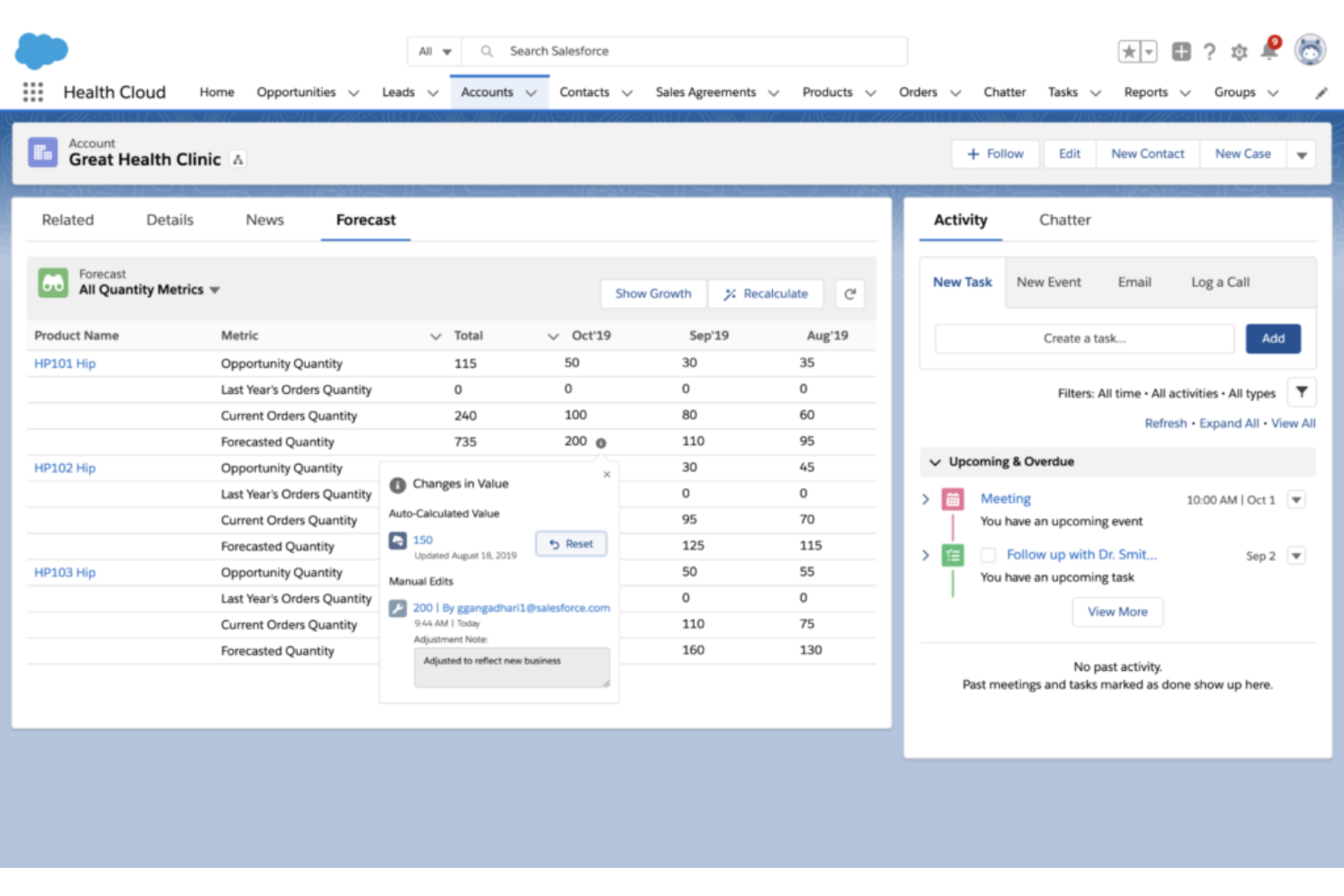
Questo software gestionale per fornitori di servizi sanitari è una soluzione CRM basata su cloud e di gestione dei pazienti, che si concentra sulla collaborazione tra fornitori, pazienti e finanziatori. Sviluppato sulla piattaforma CRM Salesforce, risponde alle esigenze del settore sanitario consentendo a coordinatori delle cure, infermieri domiciliari e familiari di interagire in modo sicuro con i team di assistenza.
Perché ho scelto Health Cloud: Una caratteristica che mi ha colpito di questa piattaforma è la Health Cloud Timeline. Grazie a questo strumento, i fornitori possono ottenere una visione a 360 gradi di tutte le interazioni cliniche e non cliniche con pazienti, famiglie e membri. Queste interazioni possono includere prescrizioni, incontri, ostacoli all'assistenza e il monitoraggio delle attività dei piani di cura.
Caratteristiche distintive e integrazioni di Health Cloud
Caratteristiche distintive includono modelli di dati personalizzabili e pronti all'uso per il processo decisionale clinico e assicurativo, nonché il supporto per l'assistenza virtuale che permette ai medici di effettuare triage e diagnosticare i pazienti digitalmente.
Le integrazioni includono Cadalys CareIQ, CancerNav, CareIQ for Salesforce, CharmHealth, Elixir CRM, HealtheCRM by Cerner, Optum Care Coordination, ProviderMatch e SightCall Virtual Support.
Pros and Cons
Pros:
- Centralizza ogni processo sanitario interno
- Offre soluzioni per il settore sanitario e le scienze della vita
- Fornisce modelli per la maggior parte delle esigenze di EHR, account e farmaci
Cons:
- Troppo costoso per le organizzazioni di piccole dimensioni
- Problema di funzionalità con lo strumento di registrazione automatica delle chiamate

Ideale per l'automazione del marketing per coinvolgere i pazienti
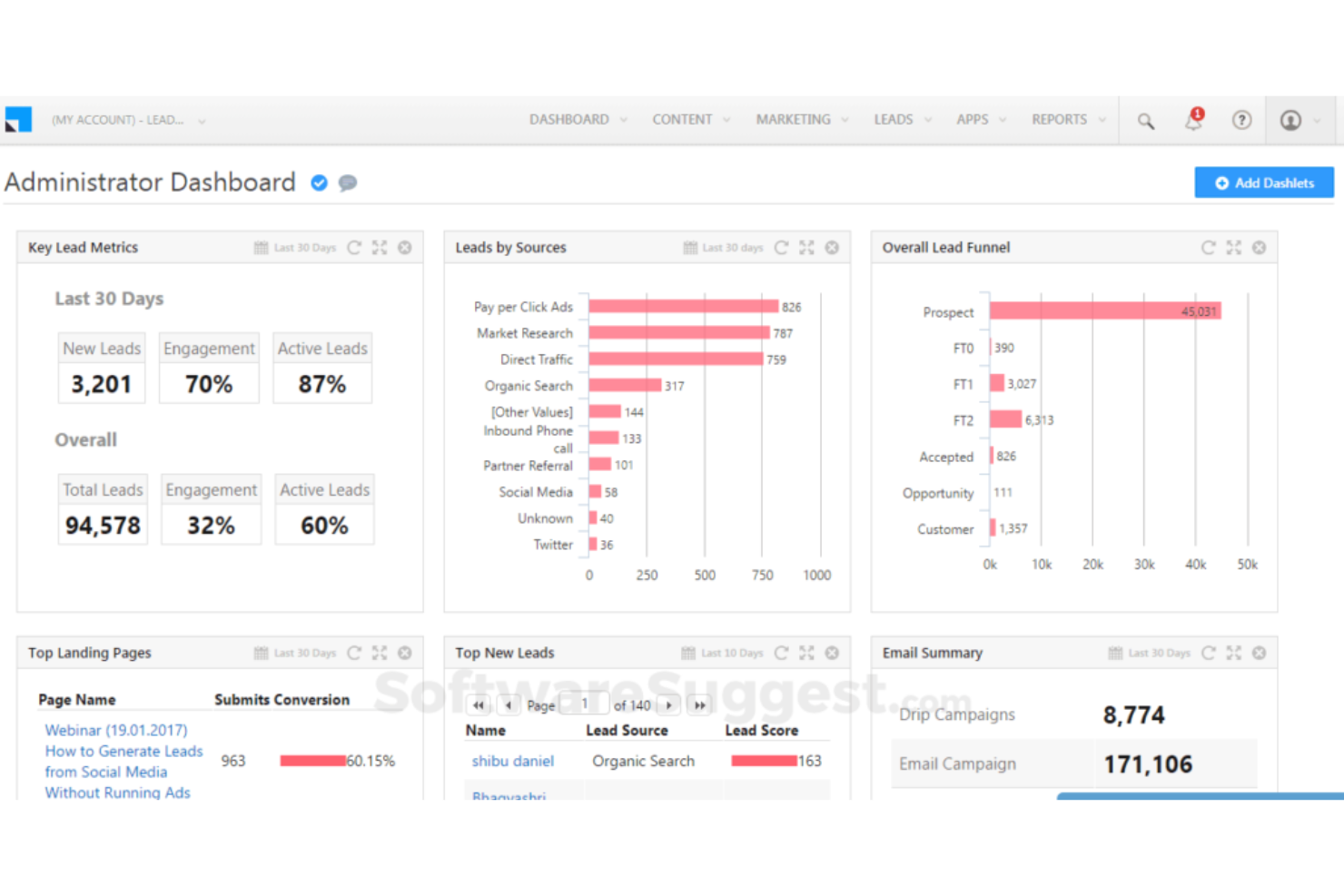
Leadsquared è uno strumento CRM sanitario tutto-in-uno progettato per offrire automazione dei flussi di lavoro, coinvolgimento personalizzato, acquisizione di pazienti, marketing segmentato e tracciamento del percorso del paziente — tutto al 100% conforme HIPAA.
Perché ho scelto Leadsquared: Ciò che mi ha fatto aggiungere questa piattaforma alla mia lista è stato il modo in cui Leadsquared ha affrontato l'automazione del marketing. Con analisi dei pazienti in tempo reale e supporto per comunicazione omnicanale, si concentrano sull'aumento dei tassi di fidelizzazione dei pazienti attraverso un contatto personalizzato.
Funzionalità principali e integrazioni di Leadsquared
Le funzionalità principali includono il monitoraggio delle conversioni per le campagne di marketing, percorsi automatizzati dei pazienti con azioni scatenate da eventi e automazione dell'accettazione dei pazienti con portali self-service.
Le integrazioni comprendono Acuity Scheduling, Freshdesk, Gmail, Google Analytics 360, LiveChat, Microsoft Outlook, Salesforce Sales Cloud, Shopify, WordPress e Zapier.
Pros and Cons
Pros:
- App mobile per l'assistenza domiciliare
- Ha una soglia di ingresso bassa
- Capacità di segmentazione approfondita
Cons:
- La navigazione è un po' macchinosa
- Può essere troppo costoso per le PMI

Ideale per organizzazioni di salute animale e ambulatori veterinari
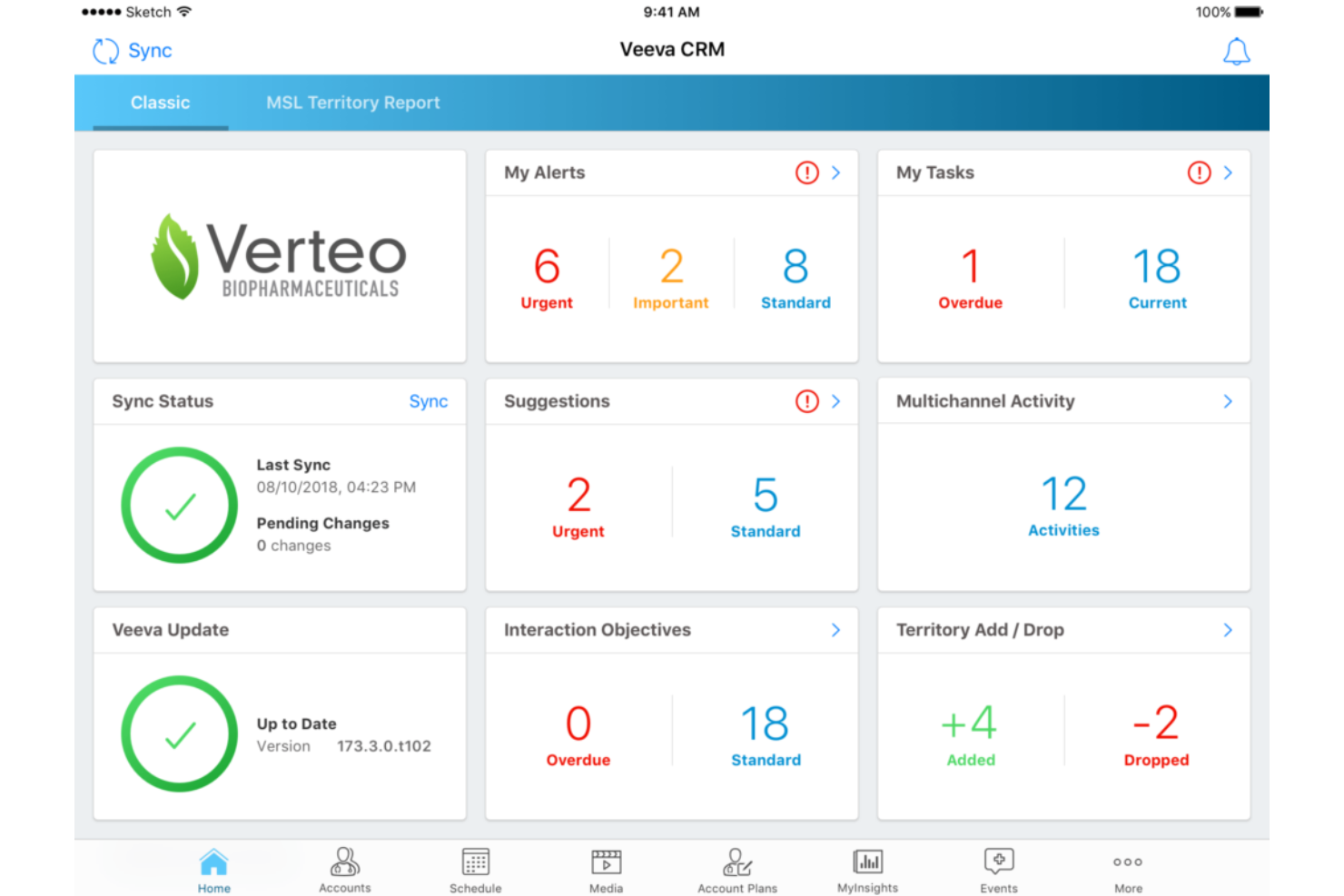
Questo CRM medico per professionisti sanitari offre supporto aziendale per organizzazioni nei settori biotecnologico, salute dei consumatori, farmaceutico e salute animale. Il CRM medico Veeva fornisce strumenti fondamentali per i team sul campo, approfondimenti medici, pianificazione degli stakeholder e coinvolgimento dei clienti. È inoltre accessibile tramite desktop o browser per piena funzionalità sia online che offline.
Perché ho scelto Veeva: Questa piattaforma ha attirato la mia attenzione perché menziona specificamente un CRM per la salute animale. Con la possibilità di tracciare le cartelle cliniche in base alle informazioni dell'animale o del proprietario, è possibile mantenere registrazioni mediche più accurate per i pazienti animali.
Caratteristiche distintive e integrazioni di Veeva
Caratteristiche distintive includono uno strato di configurazione visiva che permette di implementare nuovi processi senza programmazione, oltre a reportistica integrata e dashboard per ottimizzare i prossimi passi e le attività da svolgere.
Integrazioni includono Adobe Acrobat Sign, BEE Pro, Board, Guidebook, Knak, Mobile Locker, ON24, Pipefy, Salesforce Sales Cloud, Sisense e Workato.
Pros and Cons
Pros:
- Funzionalità all'avanguardia disponibili su tutti i dispositivi
- Implementazione e onboarding rapidi
- Facile da imparare e utilizzare
Cons:
- La versione offline non è ben mantenuta per iOS
- L'onboarding richiede l'assistenza del supporto clienti
Ideale per l'assegnazione automatica degli appuntamenti dei medici
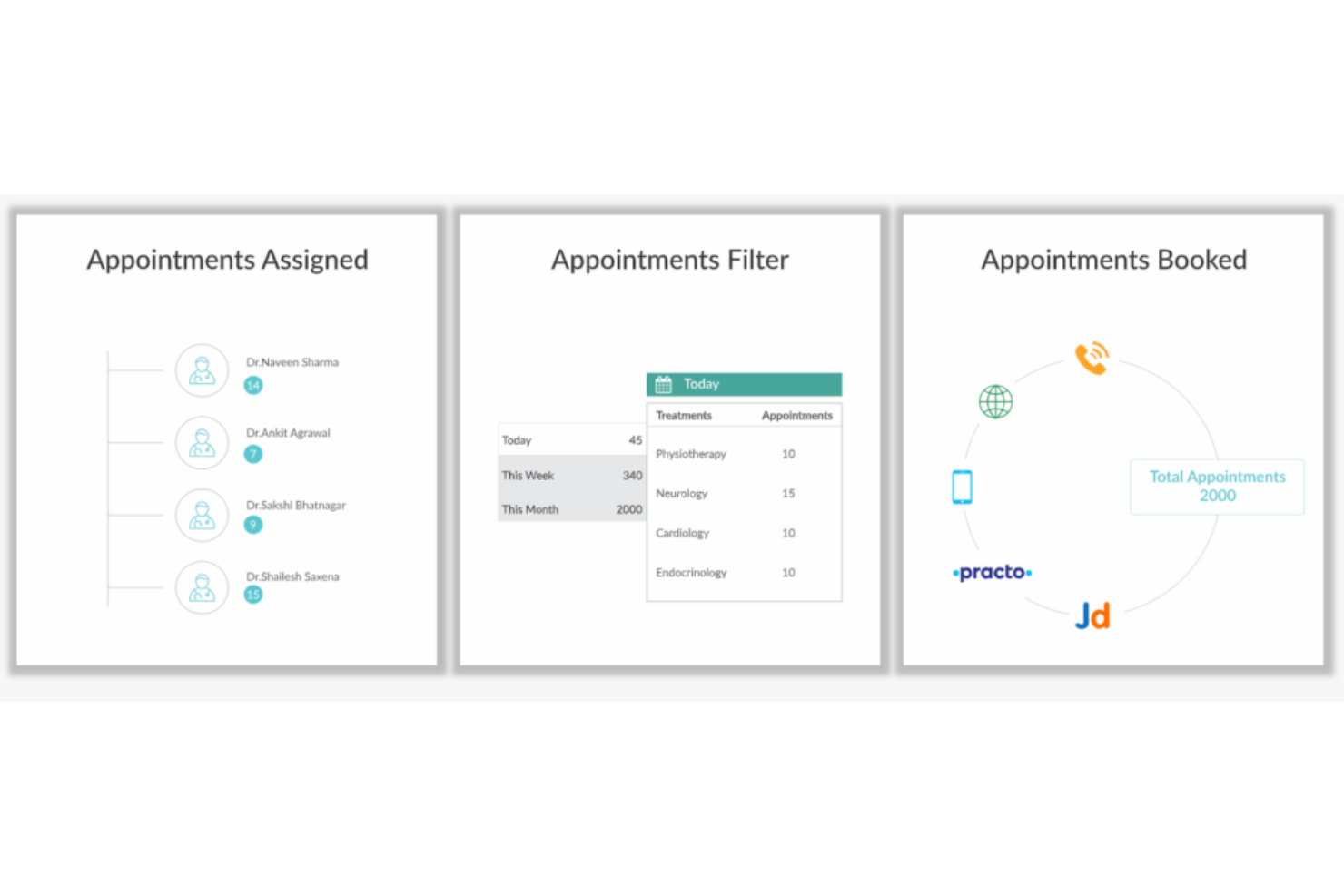
Progettato per offrire un'assistenza robusta su una varietà di piattaforme senza esporre i dati dei pazienti, Kapture CRM può supportare sia i pazienti che i medici con un accesso centralizzato a tutte le attività — dalla prenotazione degli appuntamenti ai rapporti sull'uso delle prescrizioni e sulla storia dei trattamenti.
Perché ho scelto Kapture CRM: Una caratteristica unica di questa piattaforma è l'assegnazione automatica degli appuntamenti ai medici. Invece di lasciare che le richieste di appuntamento riempiano la casella di posta di amministratori e assistenti, Kapture CRM si occupa di tutto, leggendo ogni richiesta e assegnandola al medico giusto.
Funzionalità di spicco e integrazioni di Kapture CRM
Funzionalità di spicco includono notifiche mobili per medici e pazienti, archiviazione dati su cloud per la storia clinica del paziente e un sistema di feedback multicanale per valutare le esigenze dei pazienti.
Le integrazioni includono Freshbooks, Google Analytics, Google Calendar, Grow, Meta for Business, Plivo, SAP Customer Experience, Shopify, Twilio e WordPress.
Pros and Cons
Pros:
- Interfaccia molto intuitiva
- Navigazione e dashboard semplici
- Squadra di assistenza clienti eccezionale
Cons:
- I tempi di caricamento possono essere lenti
- Lo strumento non è compatibile con iOS

Ideale per prevedere il rischio e migliorare gli esiti dei pazienti
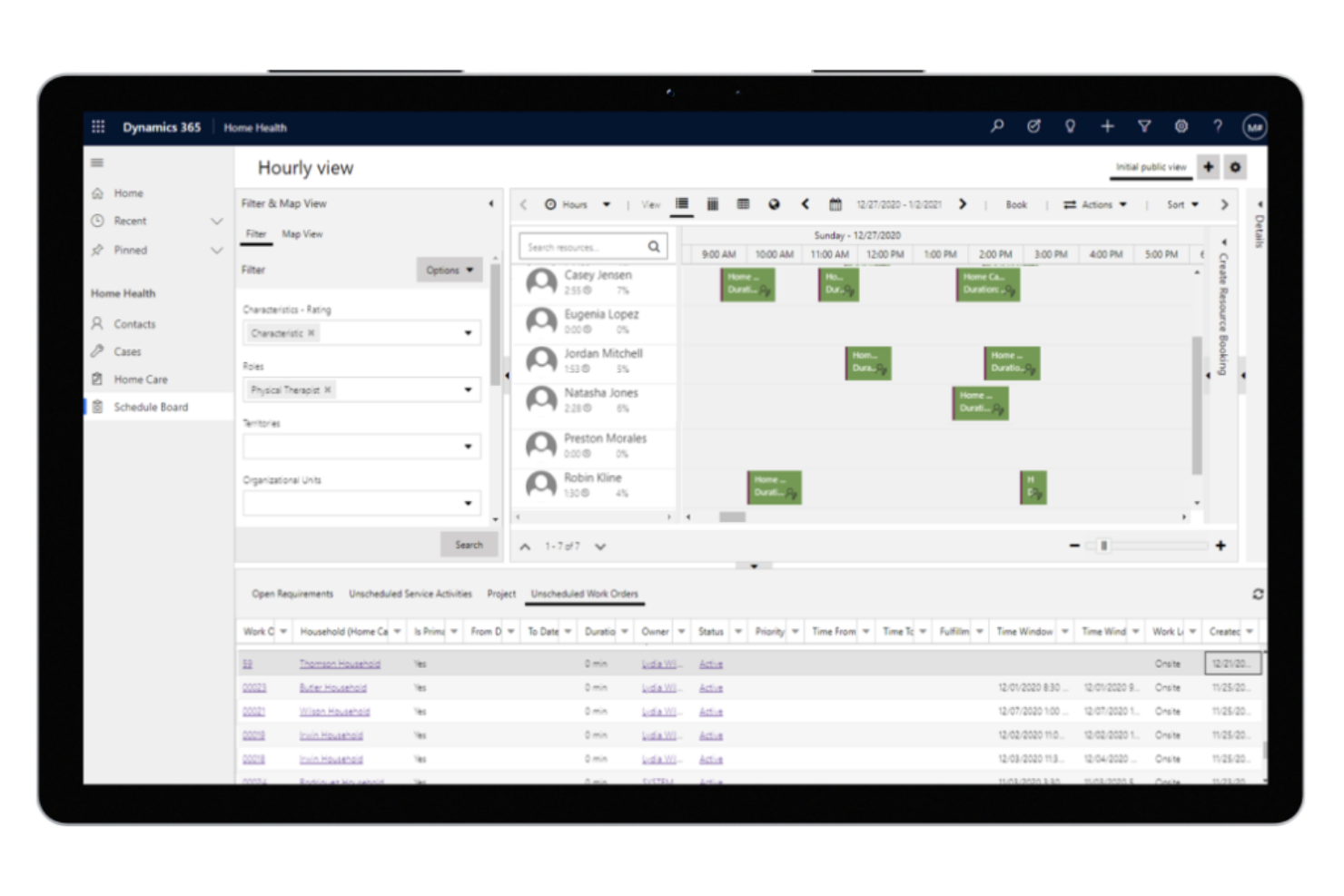
In quanto CRM per il settore sanitario che dà priorità al miglioramento delle esperienze sanitarie lungo l'intero percorso del paziente, Microsoft Dynamics 365 Healthcare si concentra su collegare persone, processi e dati per garantire profili paziente più unificati e una migliore coordinazione delle cure. Offre soluzioni per pagatori, fornitori e scienze della vita.
Perché ho scelto Microsoft Dynamics 365 Healthcare: Questa piattaforma si distingue perché si impegna a integrare informazioni pre-visita, post-visita e dei piani di cura per i fornitori, al fine di migliorare le esperienze cliniche e gli approfondimenti operativi attraverso l'analisi dei dati. Fa lo stesso per i pagatori tramite l'engagement dei membri, la gestione dei casi e delle cure, e il reclutamento dei membri.
Funzionalità e integrazioni distintive di Microsoft Dynamics 365 Healthcare
Funzionalità distintive includono campagne di marketing basate sulla fidelizzazione per l'acquisizione di nuovi pazienti e pianificazione abilitata dall'IA per offrire assistenza medica a domicilio che riduce il carico sulle strutture.
Integrazioni includono Adobe Acrobat Sign, ADP Workforce Now, DocuSign, Emburse Certify Expense, LinkedIn for Business, Microsoft Teams, PandaDoc, Salesforce Sales Cloud, signNow e Zoho Expense.
Pros and Cons
Pros:
- Fornisce accesso all'intera suite Microsoft
- Innovazione costante che porta a nuove funzionalità
- Team di assistenza clienti sempre disponibile
Cons:
- Costoso per le organizzazioni più piccole
- Quantità di funzionalità e strumenti difficile da gestire

Ideale per offrire esperienze focalizzate sul paziente
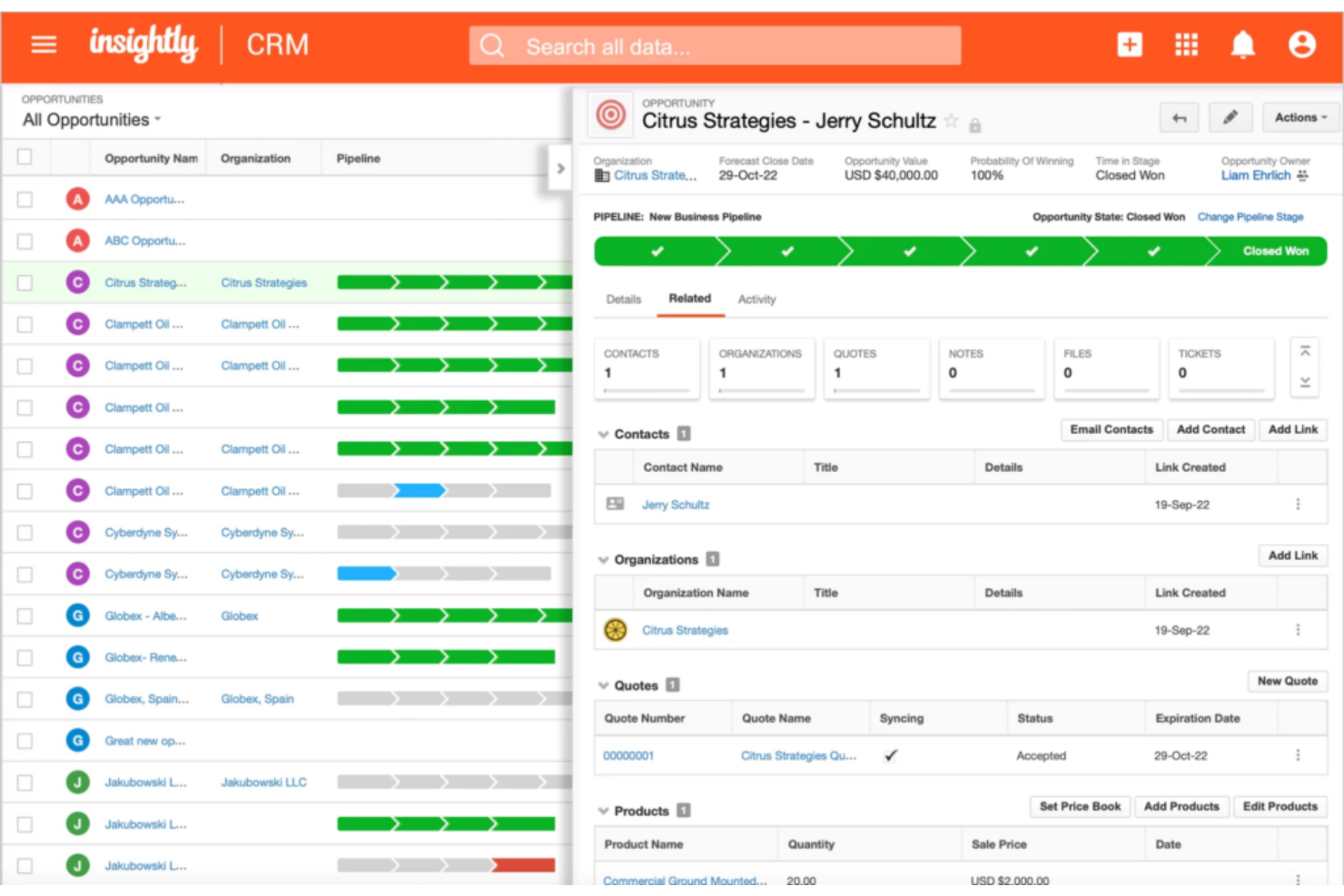
Progettato per gli studi medici che hanno davvero bisogno di rifocalizzarsi sulla gestione delle relazioni con i pazienti, Insightly Health & Wellness CRM è stato pensato per costruire rapporti con i pazienti, accelerare la crescita e monitorare metriche chiave. Ti aiuta a mettere i pazienti al centro collegando i record in modo flessibile, così da garantire una migliore comprensione delle relazioni organizzative complesse.
Perché ho scelto Insightly Health & Wellness CRM: Una cosa che spicca in questa piattaforma di coinvolgimento dei pazienti è il suo focus sulla rapidità di ottenimento dei risultati. Insightly è stato concepito per essere facile da adottare, molto flessibile e facilmente integrabile, così la tua organizzazione può implementarlo subito.
Funzionalità distintive e integrazioni di Insightly
Funzionalità distintive includono un sistema di ticketing con un comodo portale per i pazienti e il monitoraggio delle metriche con visualizzazioni dei dati facilmente comprensibili.
Le integrazioni comprendono ADP Workforce Now, Asana, BambooHR, Calendly, DocuSign, Drift, Gong, Jira, Magento, Microsoft Power BI, NetSuite e Okta. Insightly offre integrazioni con oltre 2.000 applicazioni, compresi i software sanitari più diffusi.
Pros and Cons
Pros:
- Interfaccia molto intuitiva
- Implementazione e onboarding rapidi
- La maggior parte delle funzionalità è facile da imparare
Cons:
- Opzioni di personalizzazione limitate
- Nessuna funzione nativa per la creazione di moduli

La soluzione per la gestione delle relazioni con i clienti nel settore sanitario di Pegasystems mira a integrare e coordinare tutte le persone, i sistemi e i dati coinvolti nel processo di gestione sanitaria. Questa piattaforma dà priorità all'automazione delle attività, inclusi instradamento, messa in coda, escalation e prioritizzazione, per ridurre gli errori manuali e ottimizzare i flussi di lavoro.
Perché ho scelto Pega Healthcare CRM: Questo strumento è entrato nella mia lista grazie alla sua gestione automatizzata del settore sanitario offerta dalla piattaforma Build for Change. Questo framework è preconfigurato specificamente per le esigenze sanitarie, con flussi di lavoro, modelli di dati e interfacce utente dedicati al settore.
Caratteristiche distintive e integrazioni di Pega Healthcare CRM
Le caratteristiche distintive includono automazioni per la gestione dei programmi Medicare e Medicaid, nonché per l’elaborazione di ricorsi e reclami.
Le integrazioni comprendono Abbyy, Avaya, Box, Cisco, DocuSign, Microsoft Outlook, qTest, React, Salesforce Sales Cloud e Squirro.
Pros and Cons
Pros:
- Academy di formazione per supporto onboarding
- Piattaforma low-code con maggiori possibilità di personalizzazione
- Numerose opzioni di integrazione
Cons:
- Forte attenzione al BPM invece che al CRM
- Costi elevati per le piccole imprese

Ideale per l'integrazione con tutte le tue fonti di dati essenziali
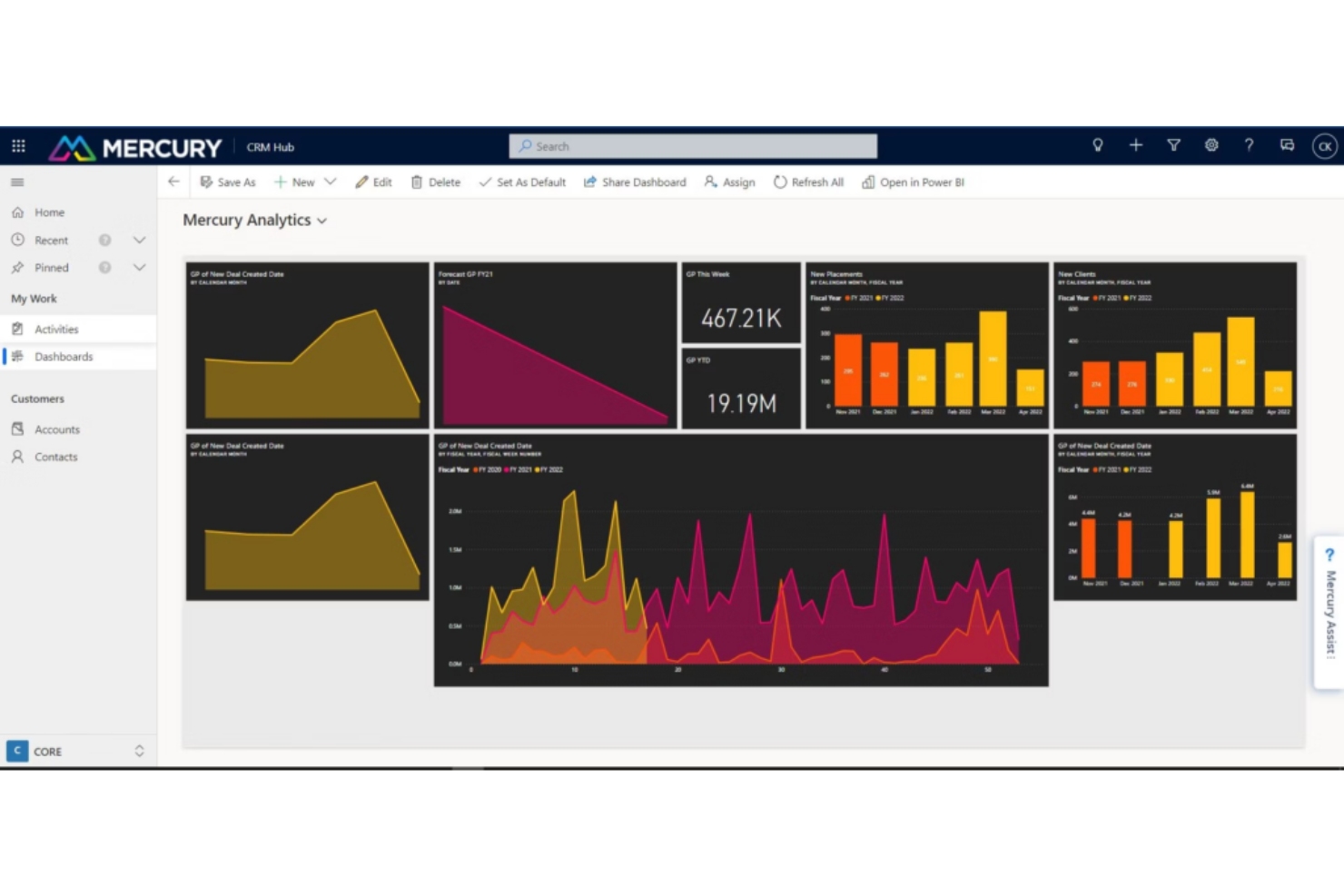
Questa soluzione software CRM per il settore sanitario è progettata per sfruttare le potenzialità di LinkedIn, Microsoft Power Platform e altre applicazioni al fine di far crescere la tua organizzazione. I tuoi dati vengono ospitati in un unico luogo, sincronizzandosi regolarmente con altre app per garantire che le informazioni siano sempre aggiornate.
Perché ho scelto Mercury Healthcare CRM: Il valore di questo strumento risiede nella sua capacità di integrarsi con centinaia di feed EMR per assicurarti di avere i dati necessari a prendere decisioni migliori. Oltre ai dati comportamentali sui pazienti grazie alle funzionalità CRM, otterrai anche dati clinici, dati dei provider, dati sul ciclo dei ricavi e dati operativi.
Caratteristiche principali e integrazioni di Mercury Healthcare CRM
Le caratteristiche principali includono profili a 360 gradi che aiutano gli operatori del contact center a ottenere una visione completa dei pazienti e modelli predittivi che supportano la creazione di campagne di marketing mirate.
Le integrazioni includono HubSpot, LinkedIn Sales Navigator, Marketo, Microsoft Bookings, Microsoft Excel, Microsoft Power Platform, Oracle Eloqua, Salesforce e Zoho CRM.
Pros and Cons
Pros:
- Piani personalizzati per esigenze specifiche
- Elevata trasparenza nel mostrare il ROI
- Assistenza clienti eccellente
Cons:
- Richiede formazione per l'apprendimento
- Impossibile imparare a usare tutte le funzionalità
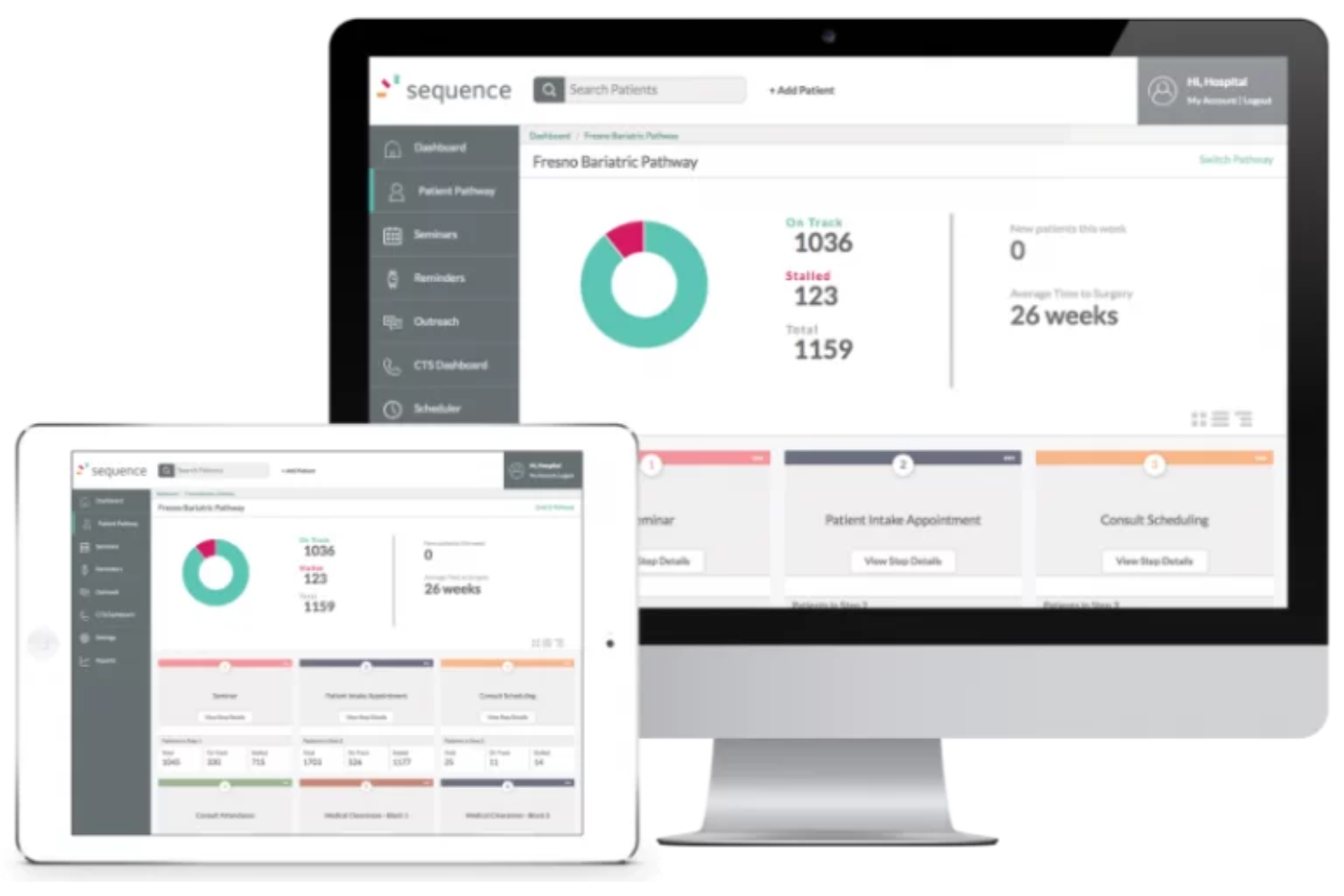
Questo CRM sanitario offre soluzioni di coinvolgimento del paziente per garantire un'assistenza mirata e centrata sul paziente, con funzionalità che soddisfano esigenze sanitarie specifiche e soluzioni uniche per telemedicina, chirurgia bariatrica, cure primarie, chirurgia generale, salute della donna, cardiologia, oncologia, sperimentazioni FDA, dispositivi medici, trapianti di organi, cura della vista, salute comportamentale e neurologia.
Perché ho scelto Sequence Health: Uno degli strumenti che mi ha fatto inserire questa piattaforma nella mia lista è la funzionalità audio e video per la telemedicina conforme a HIPAA, a cui i pazienti possono accedere con un solo clic. I pazienti nuovi ed esistenti possono richiedere un appuntamento di telemedicina in qualsiasi momento, attivando una pianificazione automatizzata sia per pazienti che per il personale amministrativo.
Caratteristiche distintive e integrazioni di Sequence Health
Le caratteristiche distintive includono integrazioni con il tuo EMR e con il tuo sito web, oltre a un software di monitoraggio dei pazienti con scambi di dati in tempo reale conformi a HIPAA.
Le integrazioni non sono elencate al momento.
Pros and Cons
Pros:
- Soluzioni mirate per diverse esigenze sanitarie
- Formazione e supporto online
- Focus sulla sicurezza dei dati dei pazienti
Cons:
- Prezzi elevati rispetto ai concorrenti
- Nessuna versione di prova gratuita
Ideale per ottimizzare le operazioni di laboratorio per crescita e fidelizzazione del cliente

Questo sistema di gestione di laboratorio per professionisti sanitari mira a potenziare il personale di laboratorio affinché collabori in modo più efficiente, scopra insight significativi e migliori le relazioni con i clienti grazie a un software completamente configurabile che dà priorità all'integrazione dei dati. HC1 è una soluzione specifica per i laboratori, conforme HIPAA e certificata HITRUST.
Perché ho scelto HC1: La ragione per cui questa piattaforma figura tra le migliori soluzioni software CRM è che offre una vista a pagina singola con dati in tempo reale che mostrano come i clienti interagiscono con il laboratorio. È possibile vedere tutte le metriche essenziali per analizzare le tendenze dei volumi per account, individuare quali fornitori necessitano di maggiore attenzione e quali test sono in crescita.
Funzionalità principali e integrazioni di HC1 Healthcare CRM
Le funzionalità principali includono dashboard intuitive che identificano tendenze chiave e aree di miglioramento, oltre ad avvisi automatici per specifici team e utenti che stimolano azioni immediate.
Le integrazioni comprendono Amazon Web Services, Beckman Coulter, CliniSys e Quest Diagnostics. Si integra inoltre con altre piattaforme EMR, sistemi informativi di laboratorio e software di fatturazione sanitaria.
Pros and Cons
Pros:
- Sistema web-based per una maggiore accessibilità
- App iOS per lavorare da remoto
- Ottimo team di assistenza clienti
Cons:
- Azienda relativamente giovane con poca esperienza
- Nessuna prova gratuita
Altri software CRM sanitari
Ecco alcune ulteriori opzioni di software CRM sanitari che non sono entrate nella mia selezione, ma che vale comunque la pena prendere in considerazione:
- Creatio CRM
Ideale per l’automazione dei flussi di lavoro aziendali senza codice
- PlanPlus Online
Ideale per le esigenze di pianificazione dei pazienti con particolare attenzione alla programmazione degli appuntamenti e all'integrazione dei calendari
- VerioMed
Ideale per soluzioni di laboratorio che soddisfano le esigenze di gestione della catena di fornitura e dell'inventario


Come Valuto il Software CRM per la Sanità
Valuto gli strumenti su due livelli: i requisiti fondamentali come la gestione dei dati conforme a HIPAA, le cartelle dei pazienti e l’integrazione con EHR, e i fattori differenzianti come la profondità del percorso delle segnalazioni e i report di attribuzione.
Funzionalità di Base (Requisiti Minimi per Questa Lista)
Quando seleziono gli strumenti per la mia lista, valuto ciascuno su una scala da 0 (non offre la funzionalità) a 5 (eccelle in quest’area) per ogni funzionalità di base elencata di seguito. Poi, calcolo il punteggio totale dello strumento in percentuale. Ogni strumento deve raggiungere un punteggio totale minimo del 55% per essere considerato per l'inclusione.
- Gestione dei Dati Conforme a HIPAA: Verifico la presenza di BAAs firmati, standard di crittografia, controlli di accesso basati sui ruoli e log di audit che attestino la protezione dei PHI in ogni flusso di lavoro.
- Gestione della Relazione con il Paziente: Qui sono importanti i profili unificati dei pazienti—cerco campi specifici per la sanità come la fase del percorso di cura, la fonte della segnalazione e le preferenze di comunicazione.
- Tracciabilità di Segnalazioni e Fornitori: Valuto come ogni strumento acquisisce, instrada e riporta le segnalazioni da medici e partner in modo che i team RevOps possano individuare tempestivamente eventuali perdite di flusso.
- Coinvolgimento Multi-Canale dei Pazienti: Le comunicazioni automatiche tramite email, SMS e voce sono una condizione imprescindibile—analizzo la profondità della segmentazione e le capacità di campagne attivate da trigger.
- Integrazione con EHR/EMR: Cerco sincronizzazioni in tempo reale con sistemi come Epic, Cerner o Athenahealth, incluso se l’integrazione è nativa, via API o tramite file flat.
- Analisi di Ricavi e Attribuzione: Valuto se la piattaforma collega le campagne e le fonti di segnalazione ai ricavi reali dei pazienti con attribuzione multi-touch e dashboard di ROI.
Una volta stilata la lista degli strumenti che soddisfano questi criteri, considero ciò che distingue ciascuna piattaforma.
Fattori Differenzianti (Ciò che Distingue i Fornitori)
Ecco come confronto e metto a paragone diversi fornitori:
Funzionalità Distintive
Cerco insight sui pazienti alimentati da AI che identifichino rischi di abbandono e punteggi di valore del ciclo di vita, offrendo ai team RevOps un modo chiaro per dare priorità agli investimenti in outreach. La segmentazione per linea di servizio è un altro elemento distintivo—gli strumenti che permettono di costruire campagne separate, ad esempio, per cardiologia rispetto a salute comportamentale rendono i report di attribuzione molto più efficaci. Valuto anche funzioni per i referenti medici, come il logging delle visite da mobile e la gestione dei territori per i team sul campo che coltivano relazioni di segnalazione.
Oltre le Funzionalità
L’ecosistema di integrazione è molto importante qui—verifico se gli strumenti supportano gli standard HL7 e FHIR insieme ai loro connettori EHR, poiché questo determina quanto bene i dati fluiscano verso i sistemi di fatturazione e RCM. Anche i tempi di implementazione variano molto. Un sistema sanitario multi-sede con un’integrazione Epic può richiedere mesi per essere operativo, quindi cerco fornitori con team dedicati all’implementazione sanitaria. La trasparenza dei prezzi completa la mia valutazione—voglio vedere modelli chiari per utente o per sede, che i responsabili RevOps possano collegare agli obiettivi di costo di acquisizione pazienti.
Come scegliere un software CRM sanitario
È facile perdersi in lunghi elenchi di funzionalità e strutture tariffarie complesse. Per aiutarti a rimanere concentrato mentre affronti il tuo esclusivo processo di selezione del software, ecco una lista di controllo dei fattori da tenere a mente:
| Fattore | Cosa considerare |
|---|---|
| Scalabilità | Il software può crescere insieme al tuo studio? Considera il numero di utenti e il volume di dati che supporta. Evita gli strumenti che potrebbero limitare la tua espansione. |
| Integrazioni | Si connette ai sistemi esistenti, come il software per le cartelle cliniche elettroniche o per la fatturazione? Verifica la compatibilità per evitare interruzioni del flusso di lavoro. |
| Possibilità di personalizzazione | Puoi adattare il CRM alle tue esigenze specifiche? Cerca campi e flussi di lavoro flessibili che corrispondano ai tuoi processi. |
| Semplicità d'uso | L'interfaccia è intuitiva per il tuo team? Raccogli opinioni sull'esperienza utente per garantire un'adozione rapida e senza frustrazioni. |
| Implementazione e avviamento | Quanto tempo occorrerà per iniziare? Valuta le risorse per la formazione e l'assistenza disponibili per garantire una transizione senza problemi. |
| Costo | Il prezzo rientra nel tuo budget? Esamina i costi nascosti e quelli a lungo termine per evitare sorprese. |
| Misure di sicurezza | In che modo il CRM protegge i dati dei pazienti? Assicurati che rispetti gli standard di settore, come l'HIPAA, per mantenere conformità e fiducia. |
| Disponibilità dell'assistenza | Quali opzioni di assistenza sono disponibili? Verifica la disponibilità 24 ore su 24, 7 giorni su 7, o di responsabili dedicati dell'account per risolvere rapidamente i problemi. |
Che cos'è un software CRM sanitario?
Il software CRM sanitario è uno strumento specializzato utilizzato dagli operatori sanitari per gestire e migliorare le interazioni con i pazienti. Integra in un'unica piattaforma funzionalità come la gestione delle informazioni sui pazienti, la programmazione degli appuntamenti, gli strumenti di comunicazione e le strategie di coinvolgimento dei pazienti.
Questo software adatta le funzionalità tradizionali dei CRM alle esigenze specifiche del settore sanitario, concentrandosi sulla gestione delle relazioni con i pazienti e sul coordinamento dei servizi sanitari.
Funzionalità
Quando scegli un software CRM sanitario, presta attenzione alle seguenti funzionalità principali:
- Gestione dei dati dei pazienti: Organizza e archivia in modo sicuro le informazioni sui pazienti, rendendole facilmente accessibili agli operatori sanitari.
- Pianificazione degli appuntamenti: Consente di prenotare e gestire in modo efficiente gli appuntamenti dei pazienti, riducendo le assenze e ottimizzando il tempo.
- Comunicazione automatizzata: Invia automaticamente promemoria e aggiornamenti ai pazienti, migliorando il coinvolgimento e riducendo il lavoro manuale.
- Report e analisi: Genera informazioni utili dai dati dei pazienti per aiutare gli operatori a prendere decisioni consapevoli e migliorare la qualità dell'assistenza.
- Funzionalità di integrazione: Si connette ai sistemi esistenti, come i software EHR e di fatturazione, per mantenere flussi di lavoro fluidi.
- Flussi di lavoro personalizzabili: Si adatta alle esigenze specifiche dello studio, consentendo processi su misura e una maggiore efficienza.
- Integrazione della telemedicina: Supporta le consulenze virtuali e le interazioni a distanza con i pazienti, ampliando l'accesso all'assistenza.
- Strumenti per la conformità HIPAA: Garantisce la sicurezza dei dati dei pazienti e soddisfa le normative del settore per mantenere la fiducia e la conformità.
- Supporto multilingue: Offre comunicazioni in diverse lingue per soddisfare le esigenze di popolazioni di pazienti diversificate.
- Portali per i pazienti: Fornisce ai pazienti l'accesso alle proprie informazioni, migliorando la trasparenza e il coinvolgimento.
Vantaggi
L'implementazione di un software CRM per l'assistenza sanitaria offre diversi vantaggi al tuo team e alla tua attività. Ecco alcuni dei vantaggi che puoi aspettarti:
- Maggiore coinvolgimento dei pazienti: La comunicazione automatizzata e i portali per i pazienti li mantengono informati e coinvolti nel proprio percorso di cura.
- Maggiore efficienza operativa: La pianificazione degli appuntamenti e i flussi di lavoro personalizzabili contribuiscono a ridurre gli oneri amministrativi e a risparmiare tempo.
- Migliore gestione dei dati: La gestione dei dati dei pazienti garantisce che tutte le informazioni siano organizzate e facilmente accessibili, favorendo il processo decisionale.
- Maggiore conformità: Gli strumenti per la conformità HIPAA contribuiscono a mantenere la sicurezza dei dati e a soddisfare gli standard normativi.
- Ampliamento dell'accesso all'assistenza: L'integrazione della telemedicina consente consulenze a distanza, ampliando l'accesso all'assistenza sanitaria per i pazienti.
- Processo decisionale consapevole: I report e le analisi forniscono informazioni utili per orientare strategie e risultati migliori nell'assistenza sanitaria.
- Inclusività culturale: Il supporto multilingue garantisce una comunicazione efficace con popolazioni di pazienti diversificate.
Costi e prezzi
La scelta di un software CRM per l'assistenza sanitaria richiede la comprensione dei vari modelli di prezzo e dei piani disponibili. I costi variano in base alle funzionalità, alle dimensioni del team, agli add-on e ad altri fattori. La tabella seguente riassume i piani più comuni, i relativi prezzi medi e le funzionalità tipicamente incluse nelle soluzioni software CRM per l'assistenza sanitaria:
Tabella comparativa dei piani per software CRM per l'assistenza sanitaria
| Tipo di piano | Prezzo medio | Funzionalità comuni |
|---|---|---|
| Piano gratuito | $0 | Gestione di base dei dati dei pazienti, pianificazione degli appuntamenti e report limitati. |
| Piano personale | $15-$30/user/month | Strumenti di comunicazione avanzati, portali per i pazienti e analisi di base. |
| Piano aziendale | $50-$75/user/month | Integrazione avanzata dei dati, flussi di lavoro personalizzabili e comunicazione automatizzata. |
| Piano per grandi aziende | $100-$200/user/month | Personalizzazione completa, integrazione della telemedicina e analisi complete. |
Domande frequenti sul software CRM sanitario
Ecco alcune risposte alle domande più comuni sul software CRM sanitario:
Qual è la differenza tra il CRM sanitario e l'EHR?
CRM significa gestione delle relazioni con i clienti, mentre EHR indica le cartelle cliniche elettroniche. Sebbene entrambi archivino e gestiscano dati, offrano strumenti di comunicazione e collaborazione e generino report tramite l’analisi dei dati, i CRM si concentrano sul miglioramento delle relazioni con i pazienti, mentre gli EHR sono progettati per documentare ed erogare le cure.
Un’altra grande differenza tra i due riguarda la fonte delle informazioni. I CRM raccolgono dati dai moduli compilati dai pazienti, ma utilizzano anche i social media, i siti web e i sondaggi per ottenere ulteriori informazioni. Gli EHR raccolgono principalmente dati da laboratori, farmacie e dispositivi medici. Inoltre, i CRM si concentrano soprattutto sui dati comportamentali e sulle tendenze, mentre gli EHR trattano esclusivamente trattamenti, diagnosi, farmaci e anamnesi clinica.
Il software CRM sanitario è sicuro?
Sì, il software CRM sanitario è progettato tenendo conto della sicurezza e spesso include funzionalità come la crittografia dei dati e i controlli di accesso. È essenziale scegliere una soluzione conforme agli standard del settore, come l’HIPAA, per proteggere le informazioni dei pazienti. Esamina sempre le misure di sicurezza offerte da un CRM per assicurarti che soddisfino le esigenze della tua struttura.
Quanto tempo occorre per implementare un software CRM sanitario?
I tempi di implementazione variano, ma in genere vanno da alcune settimane a qualche mese. Fattori come le dimensioni della tua organizzazione, la complessità dei sistemi esistenti e il livello di personalizzazione richiesto possono influire sulle tempistiche. Una buona pianificazione e una comunicazione costante con il fornitore possono contribuire ad accelerare il processo e garantirne il successo.
Come si può testare l'usabilità prima del lancio?
Esegui un progetto pilota con utenti e flussi di lavoro reali. Monitora la facilità con cui il personale gestisce i dati dei pazienti, i ricontatti e le attività di contatto tramite il CRM.
Prossimi passi:
Se stai cercando un software CRM sanitario, contatta gratuitamente un consulente SoftwareSelect per ricevere consigli personalizzati.
Compilerai un modulo e parteciperai a una breve conversazione durante la quale verranno analizzate nel dettaglio le tue esigenze. Riceverai poi una selezione ristretta di software da esaminare. Ti supporteranno anche durante l'intero processo di acquisto, comprese le trattative sul prezzo.