

Le 10 migliori soluzioni software per database clienti recensite per il 2026

10 Migliori software per database clienti - Elenco breve


Con così tanti software per database clienti disponibili, capire quale sia quello giusto per te può essere complicato. Sai di voler tracciare efficacemente le interazioni con i clienti, personalizzare le esperienze e ottimizzare le tue strategie comunicative ma devi individuare lo strumento più adatto. Non preoccuparti! In questo post ti aiuterò a scegliere facilmente, condividendo le mie esperienze personali nell’utilizzo di decine di strumenti per database clienti con diversi team e progetti, e ti presenterò la mia selezione dei migliori software per database clienti.
Perché fidarsi dei nostri consigli sui software
Le nostre recensioni riflettono il nostro giudizio indipendente, non un discorso di vendita. Scopri come manteniamo la trasparenza.
Per questa guida, abbiamo valutato gli strumenti attraverso test pratici e ricerche indipendenti, assegnando un punteggio agli strumenti in base ai nostri criteri di selezione.
Le nostre recensioni riflettono il nostro giudizio editoriale umano, non un discorso di vendita.
Riepilogo migliori software per database clienti
Questa tabella riassume i dettagli sui prezzi delle mie principali scelte di software per database clienti, per aiutarti a trovare quello migliore per il tuo budget e le esigenze aziendali.
| Tool | Best For | Trial Info | Price | ||
|---|---|---|---|---|---|
| 1 | Ideale per la raccolta automatica dei dati dei clienti | Prova gratuita di 30 giorni + demo gratuita disponibile | Da $29/utente/mese (fatturazione annuale) | Website | |
| 2 | Ideale per database flessibili | Prova gratuita di 14 giorni | Da $29/utente/mese (fatturazione annuale) | Website | |
| 3 | Ideale per flussi di lavoro personalizzabili | Prova gratuita disponibile | Da $12/utente/mese (fatturazione annuale) | Website | |
| 4 | Ideale per integrazioni e facilità d'uso | Prova gratuita di 14 giorni + piano gratuito disponibile | Da $18/utente/mese (fatturato annualmente) | Website | |
| 5 | Miglior database clienti per piccole imprese | Piano gratuito disponibile e prova gratuita di 15 giorni | Da $7/utente/mese (fatturazione annuale) | Website | |
| 6 | Ideale per piccole e medie imprese | Prova gratuita di 14 giorni | Da $39/mese (8 utenti e 10GB di spazio di archiviazione) | Website | |
| 7 | Il miglior software di database clienti per aziende B2B | Prova gratuita disponibile | A partire da $21/utente/mese | Website | |
| 8 | Ideale per una visione a 360 gradi delle informazioni dei clienti | Piano gratuito + demo gratuita disponibile | A partire da $25/utente/mese | Website | |
| 9 | Ideale per solide funzionalità di project management | Prova gratuita disponibile | A partire da $29/utente/mese (fatturazione annuale) | Website | |
| 10 | Miglior software di database clienti on-premise | Versione gratuita disponibile | A partire da $14,99/mese | Website |

Recensioni migliori software per database clienti
Qui sotto trovi i miei riassunti dettagliati dei migliori software per database clienti che hanno raggiunto la mia shortlist. Le mie recensioni offrono una panoramica dettagliata delle funzionalità principali, pro e contro, integrazioni e casi d’uso ideali di ogni strumento, per aiutarti a trovare quello più adatto a te.

Ideale per la raccolta automatica dei dati dei clienti
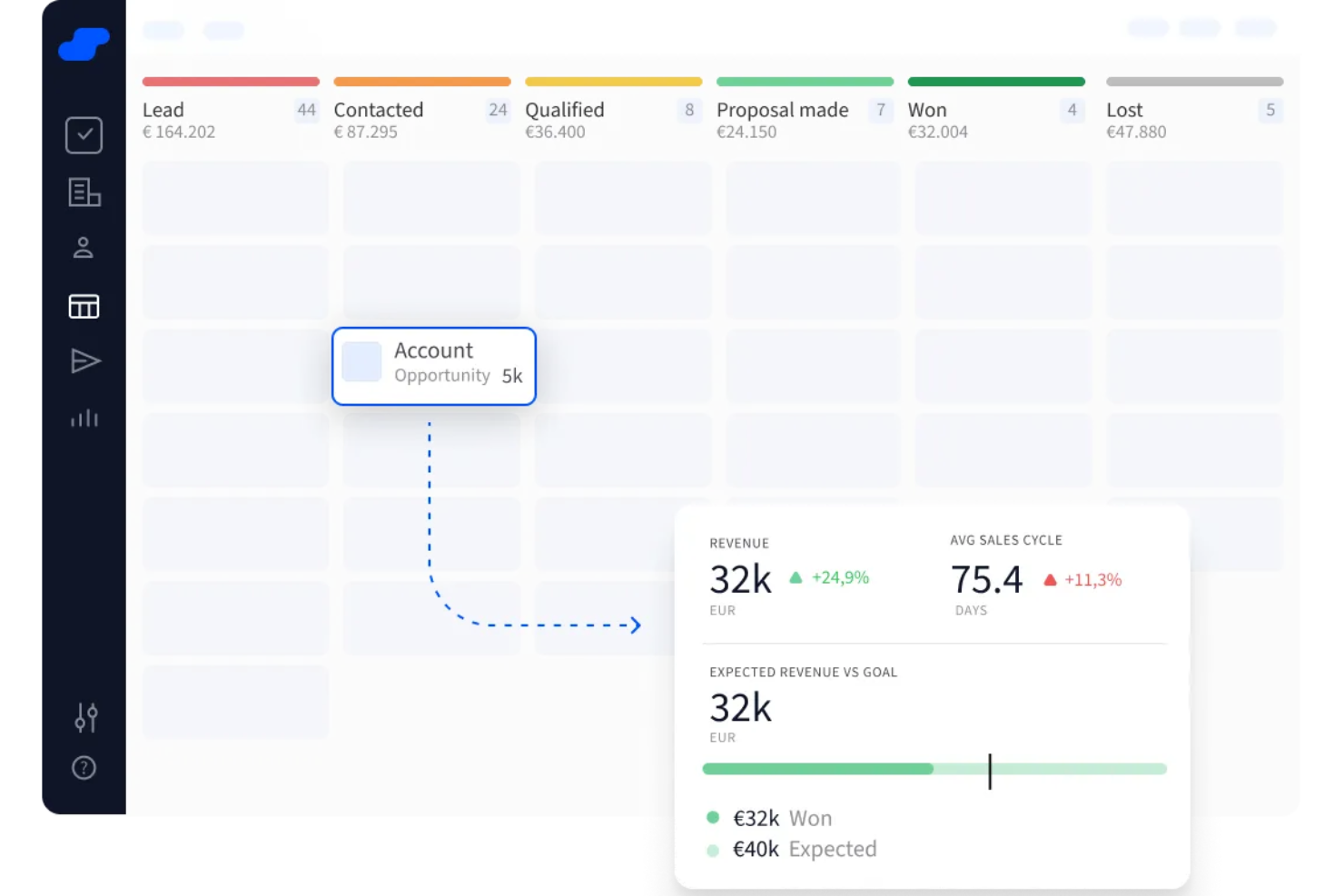
Salesflare è un CRM progettato per le piccole e medie imprese B2B che vogliono gestire i dati dei clienti senza essere sommersi dalla burocrazia. Se il tuo team lavora nelle vendite o in ruoli a contatto con i clienti e gestisce molte relazioni, questo strumento elimina il lavoro manuale di aggiornamento del database clienti.
Perché ho scelto Salesflare: Salesflare si distingue perché automatizza la creazione del tuo database clienti—raccogliendo email, riunioni, firme e attività web per costruire profili dettagliati di contatti e aziende senza alcuno sforzo manuale. Questo significa che non perdi tempo a inserire dati; lo strumento mantiene silenziosamente il tuo database aggiornato in background.
Ti aiuta anche a gestire le opportunità con una pipeline di vendita visiva, dove puoi trascinare le trattative tra le fasi per vedere esattamente cosa c’è da fare dopo. Nel frattempo, invia promemoria per i follow‑up, traccia aperture di email e attività web, e suggerisce persino chi dovresti contattare successivamente—così il tuo database clienti è sempre aggiornato e operativo.
Funzionalità e integrazioni principali di Salesflare
Le funzionalità includono un arricchimento intelligente dei dati che compila automaticamente i dettagli di contatti e aziende in base alle firme email e ai dati pubblici, mantenendo il tuo database clienti dettagliato senza dover fare nulla. Offre anche il lead‑scoring che ti avvisa quando è il momento giusto per contattare un cliente, aiutandoti a dare priorità alle tue attività di vendita.
Le integrazioni includono Google Workspace, Intercom, MailChimp, QuickBooks Online, Slack, Stripe, Shopify e Calendly.
Pros and Cons
Pros:
- Cattura automaticamente i dati dei clienti da molteplici fonti
- Offre un monitoraggio efficace delle email e notifiche
- Fornisce promemoria utili e suggerimenti per i follow-up
Cons:
- Mancano funzionalità avanzate di gestione degli account
- Opzioni limitate per la modifica massiva dei record

Attio
Ideale per database flessibili
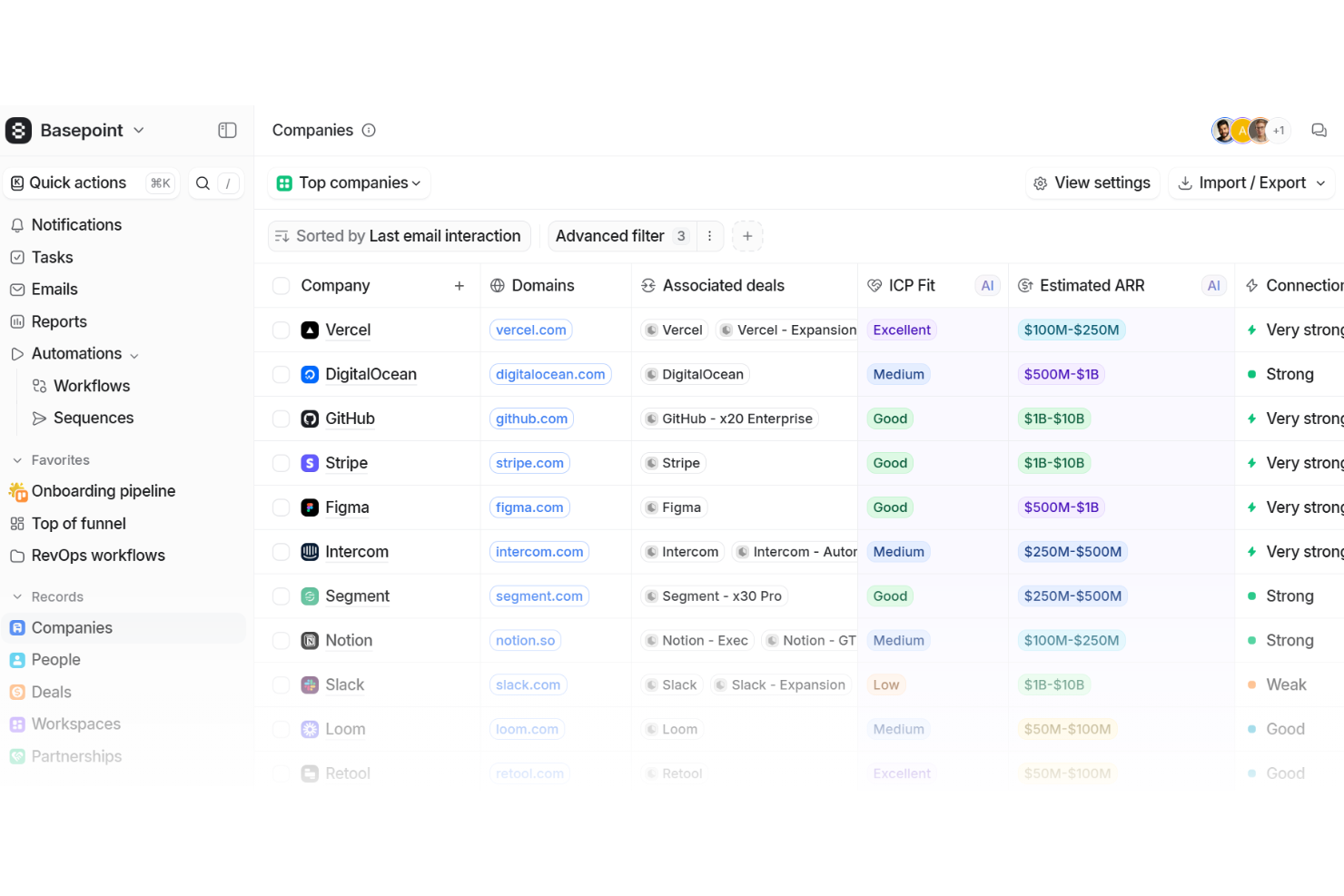
Attio è un software di database clienti nativo AI progettato per offrire al tuo team una fonte unica di verità per ogni relazione e interazione. Organizza persone, aziende, trattative e record personalizzati in una struttura flessibile che rispecchia il modo in cui opera la tua azienda.
Perché ho scelto Attio: Ho scelto Attio perché il suo modello di dati adattivo ti permette di modellare il database in base alle esigenze uniche della tua attività. Invece di essere vincolato a modelli rigidi, puoi creare oggetti personalizzati come fatture, progetti o partnership accanto ai record standard come persone e aziende. Questa flessibilità significa che il tuo database cresce insieme alla tua azienda, dandoti la sicurezza che nessun dettaglio venga trascurato.
Apprezzo anche la sua capacità di unificare informazioni sparse in un unico sistema connesso. Sincronizzando i dati di utilizzo del prodotto, fatturazione e supporto direttamente nei record dei clienti, puoi visualizzare l’intero percorso di un cliente in un’unica soluzione.
Caratteristiche e integrazioni principali di Attio:
Le funzionalità includono un motore di automazione che consente di impostare regole per aggiornare i record, instradare i lead o segnalare account per il follow-up. Il suo assistente AI aiuta in attività come la ricerca di potenziali clienti e l’identificazione degli stakeholder chiave, così puoi mantenere un database sempre aggiornato con il minimo sforzo. Gli strumenti di reportistica offrono inoltre informazioni in tempo reale sulla tua base clienti, aiutandoti a monitorare coinvolgimento, entrate e indicatori di salute tramite dashboard personalizzabili.
Integrazioni incluse Vercel, DigitalOcean, GitHub, Stripe, Figma, Intercom, Segment, Notion, Slack, Loom, Retool e Customer.io.
Pros and Cons
Pros:
- L'AI aiuta ad arricchire i record dei clienti
- Oggetti database personalizzabili adatti alle esigenze aziendali
- Centralizza i dati da più fonti
Cons:
- Nessuna funzione di chiamata telefonica integrata
- L'eccessiva personalizzazione può confondere gli utenti
New Product Updates from Attio

Attio Improves Ask Attio With Suggested Actions and Consistent Chat
Attio adds suggested next actions, example prompts, a consistent chat panel, aligned shortcuts, and a minimize option to Ask Attio. These updates make the AI assistant easier to use across different pages. For more information, visit Attio’s official site.
 .
.
Ideale per flussi di lavoro personalizzabili
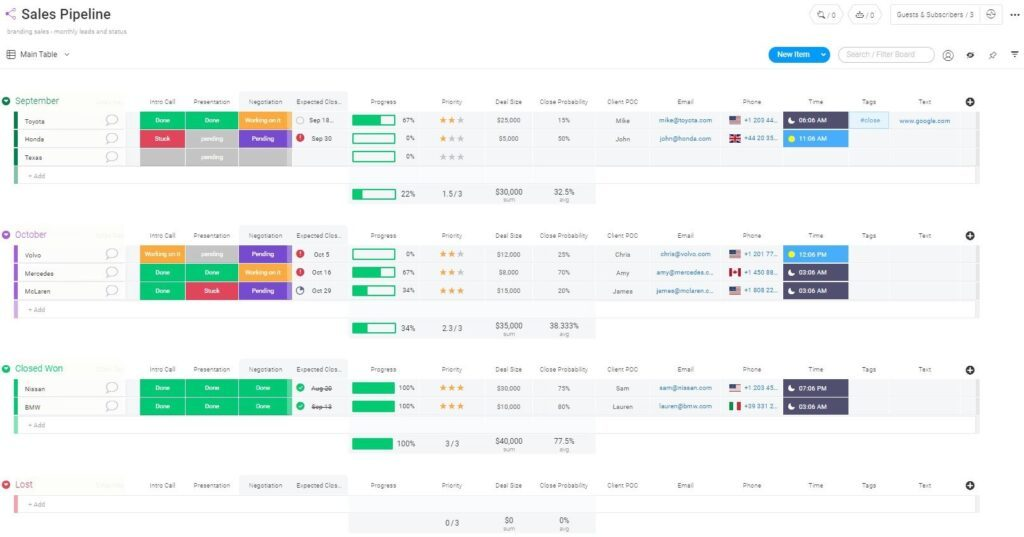
monday Sales CRM è uno strumento completamente personalizzabile progettato per centralizzare la comunicazione con i clienti, automatizzare i processi di vendita e offrire una panoramica completa delle trattative commerciali. Il suo punto di forza distintivo è l’ampia capacità di personalizzazione, che include tipi di colonne flessibili, sottoelementi dettagliati e viste personalizzabili, supportando la creazione di flussi di lavoro su misura per soddisfare le esigenze specifiche delle aziende.
Perché ho scelto monday Sales CRM: Ho scelto monday Sales CRM per la sua elevata personalizzazione e l’interfaccia intuitiva, che consente una visione chiara delle pipeline di vendita e centralizza le interazioni con i clienti. Si distingue per la capacità di gestire efficacemente le attività di vendita dal pre-vendita al post-vendita, offrendo una visualizzazione completa dei dati e un ambiente low-code/no-code che favorisce la creazione di flussi di lavoro personalizzati.
Quello che rende unico monday Sales CRM è la fiducia riposta da una base globale di oltre 180.000 utenti e la sua idoneità per una vasta gamma di attività legate alle vendite. Credo che monday Sales CRM sia ideale per flussi di lavoro personalizzabili grazie alle sue funzioni di automazione avanzate, viste personalizzabili e solide capacità di ordinamento, che permettono agli utenti di adattare la piattaforma alle proprie esigenze specifiche senza necessità di elevate competenze tecniche.
Caratteristiche principali di monday Sales CRM
Le funzionalità includono una tecnologia intuitiva che supporta il successo della tua azienda, sia che tu stia sviluppando una dashboard personalizzata per specifiche esigenze di comunicazione, sia che tu voglia analizzare i dati dei clienti tramite strumenti di visualizzazione. Utilizzando i semplici modelli di trigger e azioni offerti dalla piattaforma, puoi creare rapidamente numerose automazioni che fanno risparmiare tempo. È inoltre possibile implementare sistemi di notifica per eliminare riunioni non necessarie, avvisando i membri del team quando un’attività o un progetto è pronto per azioni successive.
Le integrazioni comprendono oltre 200 applicazioni di terze parti come Salesforce, Mailchimp, Aircall, Pandadoc e Twilio.
Pros and Cons
Pros:
- Board illimitate per organizzare clienti, progetti e processi
- Semplice da sviluppare e implementare automazioni
- Assistenza clienti 24/7
Cons:
- Nessun report personalizzabile
- Tutti i piani prevedono un minimo di tre utenti
New Product Updates from monday CRM

monday CRM Adds Meta Conversions API Integration
monday CRM now lets you connect Meta Conversions API and sync lead status back to Meta, improving targeting and conversions via a new Meta integration automation recipe. For more information, visit monday CRM's official site.
Capsule
Ideale per integrazioni e facilità d'uso
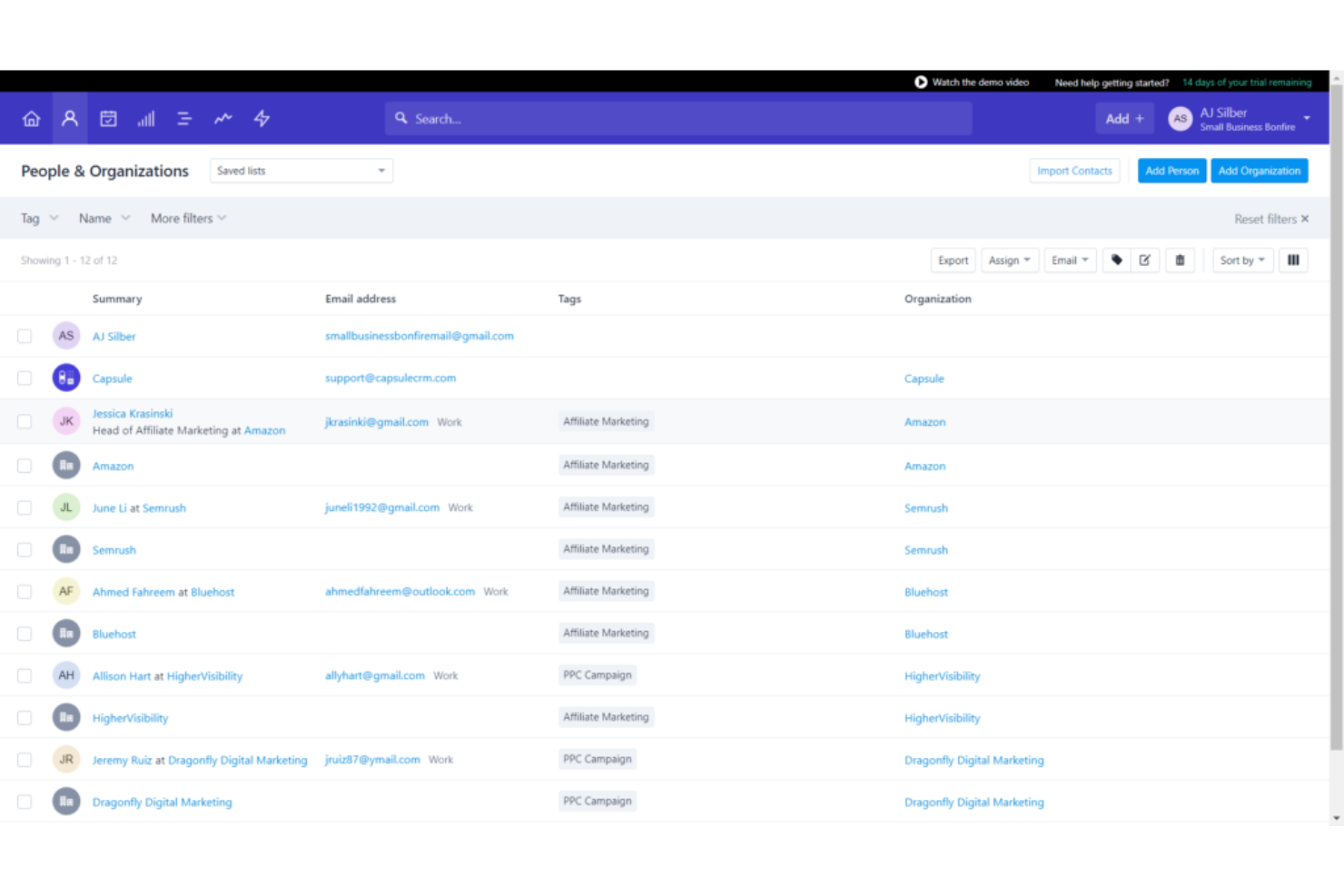
Capsule CRM offre un approccio semplificato alla gestione delle relazioni con i clienti, dei processi di vendita e delle attività in un'unica piattaforma intuitiva, facilitando alle aziende di tutte le dimensioni il monitoraggio delle interazioni con i clienti e il miglioramento dei propri processi di vendita.
Perché ho scelto Capsule CRM: Come software per la gestione dei database clienti, Capsule CRM si distingue per il design user-friendly, l'integrazione semplice con gli strumenti esistenti e una visione completa delle interazioni con i clienti, aiutando le aziende a comprendere meglio la propria base clienti e ad adattare di conseguenza le strategie di marketing e vendita.
Ciò che rende Capsule CRM unico è il suo sistema integrato di gestione delle attività che collega senza soluzione di continuità le attività con le opportunità di vendita, i contatti e le pratiche. Questa integrazione consente agli utenti di gestire follow-up, scadenze e traguardi di progetto direttamente nel contesto delle attività CRM. Il sistema di gestione delle attività supporta categorizzazione, prioritizzazione e pianificazione, facilitando la collaborazione del team e consentendo di rimanere sempre aggiornati su tutte le attività correlate ai clienti.
Funzionalità e integrazioni principali di Capsule CRM
Le funzionalità includono 'Tracks' e 'Tags' che offrono un approccio approfondito alla gestione di contatti e attività. I 'Tracks' sono sequenze predefinite di attività che guidano gli utenti attraverso un processo, garantendo coerenza ed efficienza in attività come l'onboarding di nuovi clienti o il follow-up dei lead. I 'Tags' consentono una categorizzazione dinamica di contatti, opportunità e pratiche, offrendo un sistema flessibile e facile da utilizzare per la segmentazione che può adattarsi all'evoluzione delle esigenze aziendali.
Le integrazioni comprendono Google Workspace (Gmail, Docs, Calendar), Microsoft Office 365, Mailchimp, Xero, QuickBooks, Slack, FreshBooks e molto altro tramite Zapier.
Pros and Cons
Pros:
- Intuitivo e facile da usare
- Gestione integrata dei compiti e calendario
- Invia e ricevi email direttamente in Capsule CRM
Cons:
- Impossibile trascinare e rilasciare tag o campi dati
- Si auspica maggiore integrazione con strumenti di digital marketing
New Product Updates from Capsule

Capsule Adds AI Meeting Prep for External Calls
Capsule introduced AI Meeting Prep with relationship summaries, color-coded signals, and CRM context for upcoming external calls. This helps users review key contact details and prepare for meetings without searching through records manually. For more information, visit Capsule’s official site.
 .
.
Miglior database clienti per piccole imprese
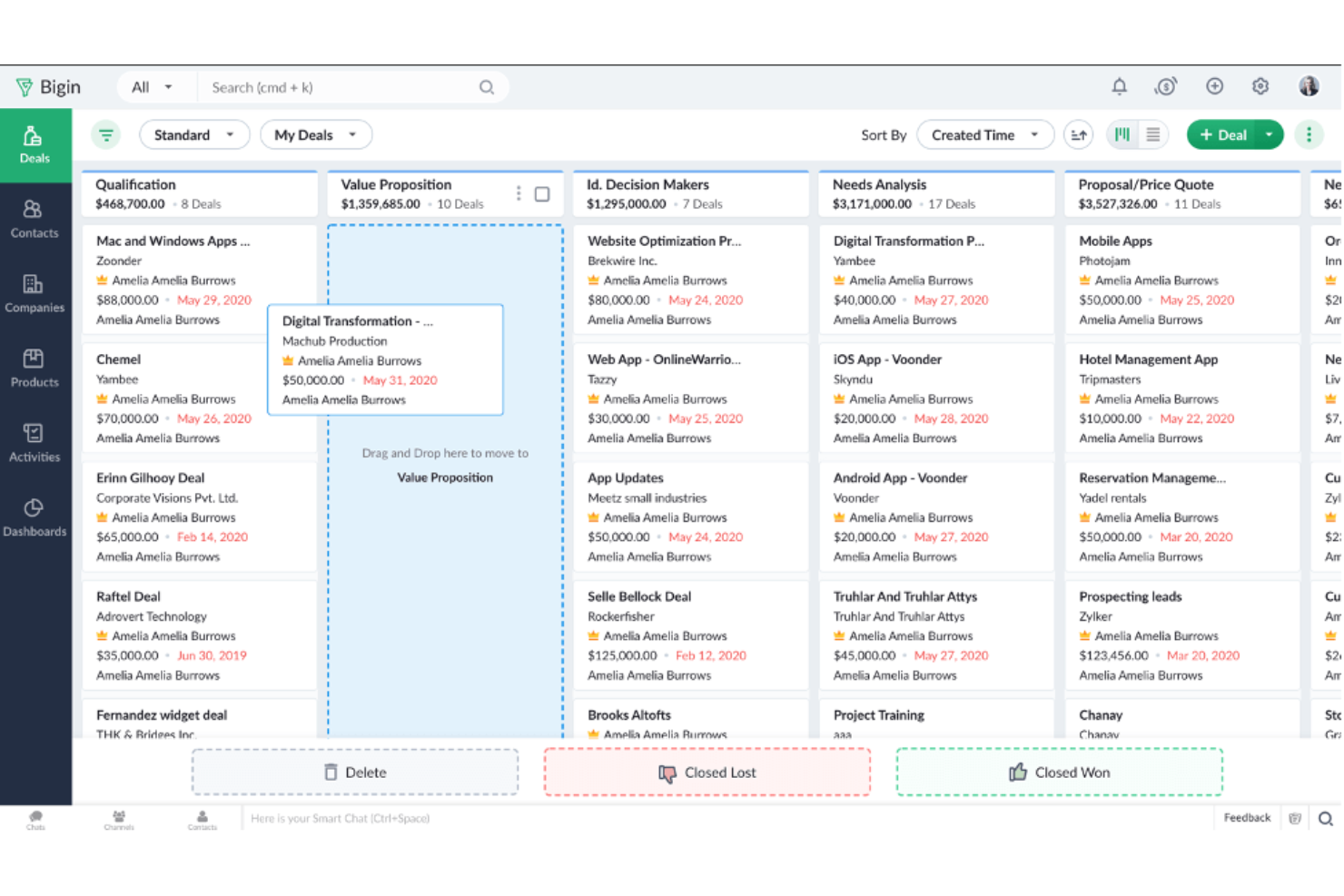
Bigin by Zoho CRM è una piattaforma di gestione delle relazioni con i clienti pensata per le piccole imprese. Riduce le funzionalità complete di Zoho CRM a una versione più snella, così il tuo team può concentrarsi sugli strumenti che userete davvero. Puoi mantenere tutti i dati dei clienti in un unico posto, gestire le comunicazioni e impostare una pipeline di vendita semplice senza la complessità extra.
Perché ho scelto Bigin by Zoho CRM:
Ottieni un database centrale che si adatta alle esigenze della tua attività, con campi e moduli personalizzabili. Puoi importare i tuoi dati da fogli di calcolo o acquisire nuove informazioni tramite moduli personalizzati, per poi esportarli quando necessario. Gli strumenti di comunicazione multicanale ti permettono di gestire email, telefono e social media in un'unica interfaccia. Puoi anche creare una pipeline di vendita che traccia i lead passo dopo passo e utilizza trigger per spostare automaticamente i contatti nelle varie fasi. Una dashboard di report personalizzata ti tiene aggiornato sulle prestazioni del tuo team.
Caratteristiche principali e integrazioni:
Le funzionalità includono modelli di email che ti fanno risparmiare tempo nei contatti con i clienti, flussi di lavoro che automatizzano le attività ripetitive e una vista della pipeline che mostra esattamente a che punto si trova ogni trattativa. Inoltre hai la telefonia integrata, così puoi effettuare e registrare chiamate direttamente dal sistema.
Le integrazioni includono Zoho Books, Zoho Invoice, Google Workspace, Microsoft 365, Mailchimp, Zapier, Trello, Slack, DocuSign e QuickBooks.
Pros and Cons
Pros:
- Configurazione facile per piccoli team
- Campi personalizzati per adattarsi ai tuoi processi
- Vista semplificata per il monitoraggio delle trattative
Cons:
- Funzionalità limitate rispetto a Zoho CRM
- Poche opzioni avanzate di automazione
New Product Updates from Bigin by Zoho CRM

Bigin iOS Adds Interactive WhatsApp Templates and Quick Replies
Bigin’s iOS app now supports interactive WhatsApp templates and Quick Replies, making it easier to preview and send instant messages to customers. For more information, visit Bigin by Zoho CRM's official site.
 .
.
Flowlu
Ideale per piccole e medie imprese
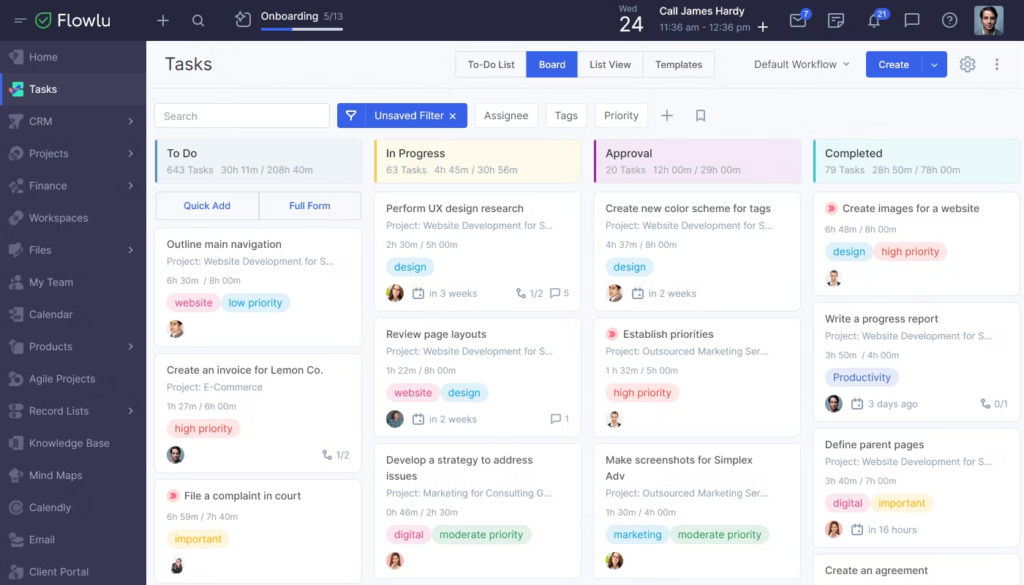
Flowlu è una piattaforma di gestione aziendale pensata per piccole e medie imprese in diversi settori. Consente alle aziende di archiviare e gestire i dati relativi ai clienti, come informazioni di contatto, cronologia delle comunicazioni, opportunità di vendita e storico degli acquisti.
Perché ho scelto Flowlu: Flowlu è un software per database clienti che consente una gestione end-to-end dei progetti. Oltre alle funzionalità di gestione dei contatti, il software permette agli utenti di creare e gestire progetti, assegnare compiti, fissare scadenze, monitorare i progressi e collaborare con i membri del team. Gli strumenti finanziari e contabili aiutano nella gestione della fatturazione, emissione delle fatture e monitoraggio delle spese.
Flowlu offre anche funzionalità di reportistica e analisi, permettendo alle aziende di ottenere informazioni sui propri progetti, sulle vendite e sulle prestazioni finanziarie.
Caratteristiche salienti e integrazioni di Flowlu
Le funzionalità includono un portale clienti, gestione dei progetti, monitoraggio delle attività, CRM (gestione delle relazioni con i clienti), fatturazione, strumenti per la gestione delle vendite, collaborazione tra team e gestione finanziaria. Queste funzioni offrono una soluzione completa per le aziende che desiderano gestire progetti, clienti e finanze.
Le integrazioni sono disponibili con gateway di pagamento online, software di posta elettronica, telefonia, CRM, calendari e altre applicazioni. Tra questi software figurano PayPal, Stripe, Gmail, Twilio, Mailchimp, JivoChat, Calendly, Google Calendar, Zendesk e Slack.
Pros and Cons
Pros:
- Si integra con Slack
- Interfaccia semplice e visivamente intuitiva
- Include funzionalità che fanno risparmiare tempo come la fatturazione automatica
Cons:
- Integrazioni limitate
- Opzioni di personalizzazione limitate
Il miglior software di database clienti per aziende B2B
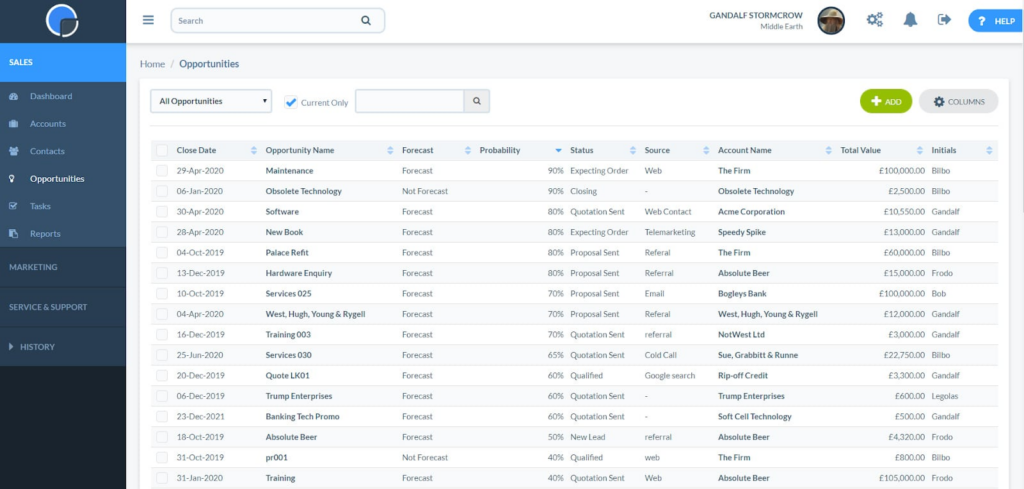
Le aziende B2B spesso necessitano di strumenti di gestione delle relazioni con i clienti che possano essere implementati rapidamente senza risorse IT estese. Really Simple CRM offre un processo di configurazione semplice e un'interfaccia intuitiva.
Perché ho scelto Really Simple CRM: Ho scelto Really Simple CRM per le sue eccezionali funzionalità di reportistica e analisi. Il software mette a disposizione una vasta gamma di report preimpostati che offrono preziose informazioni sui dati dei clienti, sul processo di vendita e sui tassi di conversione dei lead. Inoltre, la possibilità di creare report personalizzati consente agli utenti di concentrarsi sulle metriche più rilevanti per la propria attività.
Gli strumenti di visualizzazione, come grafici e tabelle, permettono agli utenti di individuare rapidamente i trend e prendere decisioni basate sui dati. Grazie a queste robuste capacità di reportistica e analisi, Really Simple CRM ti consentirà di monitorare le prestazioni, misurare il successo e migliorare continuamente le tue strategie aziendali.
Caratteristiche distintive e integrazioni di Really Simple CRM
Le funzionalità includono gestione di contatti e pipeline, preventivi, opportunità, integrazione email, archiviazione di documenti, attività, eventi e calendario.
Le integrazioni includono Xero, Zapier, Microsoft Azure, OneLogin, Sage Business Cloud e KashFlow. Puoi creare integrazioni aggiuntive con Zapier.
Pros and Cons
Pros:
- Interfaccia utente semplice
- Piano gratuito disponibile per sempre
- Integrazione nativa con Zapier
Cons:
- Integrazioni limitate
- Funzionalità di gestione lead limitate
Ideale per una visione a 360 gradi delle informazioni dei clienti
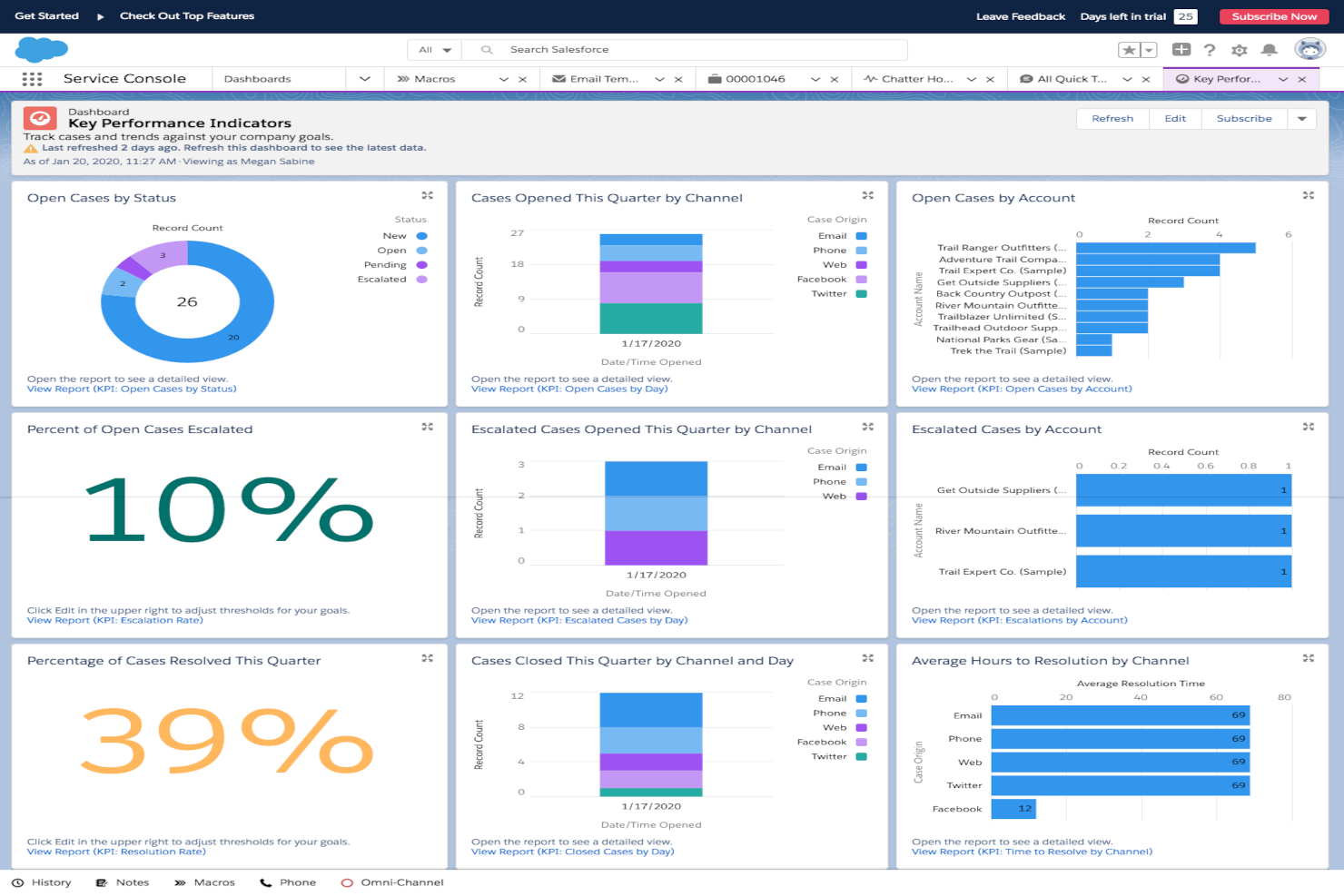
Salesforce Service Cloud è una piattaforma per l'assistenza e il supporto clienti che aiuta il tuo team a tracciare, gestire e risolvere i casi dei clienti. Memorizza inoltre i dettagli dei clienti in un unico posto, così puoi vedere le interazioni su vari touchpoint e utilizzare i report per misurare le prestazioni.
Perché ho scelto Salesforce Service Cloud:
Ottieni una visione a 360 gradi dei tuoi clienti, con dati raccolti e archiviati in un'unica posizione. Puoi gestire i ticket di supporto, assegnarli alle persone giuste e utilizzare l'automazione per velocizzare le attività ripetitive. Lo strumento ti offre report e dashboard personalizzati per analizzare la qualità del servizio e individuare aspetti da migliorare. Puoi anche collegarlo alle app di AppExchange per ampliare le modalità d'uso del team.
Funzionalità e integrazioni di rilievo:
Le funzionalità includono la gestione della knowledge base che aiuta il tuo team a fornire risposte coerenti, la gestione del call center per il supporto telefonico e il tracciamento integrato dei casi che tiene organizzate le cronologie dei clienti. Puoi anche usare macro per attività ripetitive e processi di approvazione che mantengono il lavoro in movimento.
Le integrazioni includono Slack, Zoom, DocuSign, Mailchimp, QuickBooks, Google Workspace, Microsoft Teams, Jira, Outlook, Dropbox e WhatsApp.
Pros and Cons
Pros:
- Regole flessibili di assegnazione dei casi
- Dashboard personalizzabili per i manager
- Automazione utile per le attività di routine
Cons:
- La configurazione può sembrare dispendiosa in termini di tempo
- Le funzionalità avanzate richiedono competenze tecniche

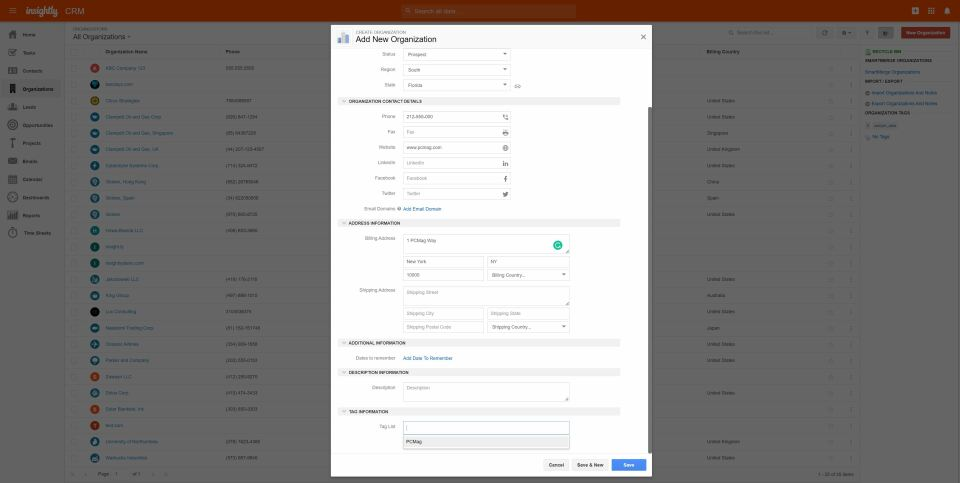
Insightly CRM è un software di gestione delle relazioni con i clienti progettato per aiutare le aziende a gestire le interazioni con i clienti e tracciare le opportunità di vendita. Offre inoltre funzionalità di project management, come pipeline di progetti, gestione di attività e compiti, tracciamento delle email di progetto, traguardi e diagrammi di Gantt, gestione documentale, collaborazione e note di progetto.
Perché ho scelto Insightly CRM: Una caratteristica unica del database clienti di Insightly CRM è la funzione Relationship Linking. Questa funzione consente agli utenti di stabilire e visualizzare i collegamenti tra contatti, organizzazioni, progetti e altre entità correlate all'interno del sistema CRM. Va oltre la semplice gestione dei contatti, permettendo agli utenti di mappare relazioni e gerarchie complesse.
Con Relationship Linking, gli utenti possono facilmente navigare e comprendere l’interconnessione tra i propri contatti e organizzazioni. Questa funzionalità è particolarmente vantaggiosa per le aziende con reti di stakeholder, partner e clienti. Aiuta a individuare influencer chiave, decisori e collegamenti che possono influenzare le relazioni commerciali e le opportunità.
Caratteristiche e integrazioni principali di Insightly CRM
Le caratteristiche includono un sistema di gestione dei contatti avanzato, una pipeline personalizzabile e capacità efficienti di gestione di attività e progetti. Grazie all’integrazione email, agli strumenti di reportistica e analisi e all’accessibilità mobile, le aziende possono tracciare efficacemente le interazioni con i clienti, prevedere i ricavi, automatizzare flussi di lavoro e collaborare sulle attività legate ai progetti.
Le integrazioni includono Xero, Active Campaign, Adobe Sign, Airtable, Bamboo HR, Workday, Gusto, NetSuite, Magento, BigCommerce e altre soluzioni software.
Pros and Cons
Pros:
- Interfaccia intuitiva
- App mobile disponibile
- Buone funzionalità di automazione e workflow
Cons:
- Opzioni di reportistica limitate
- Mancano analisi avanzate

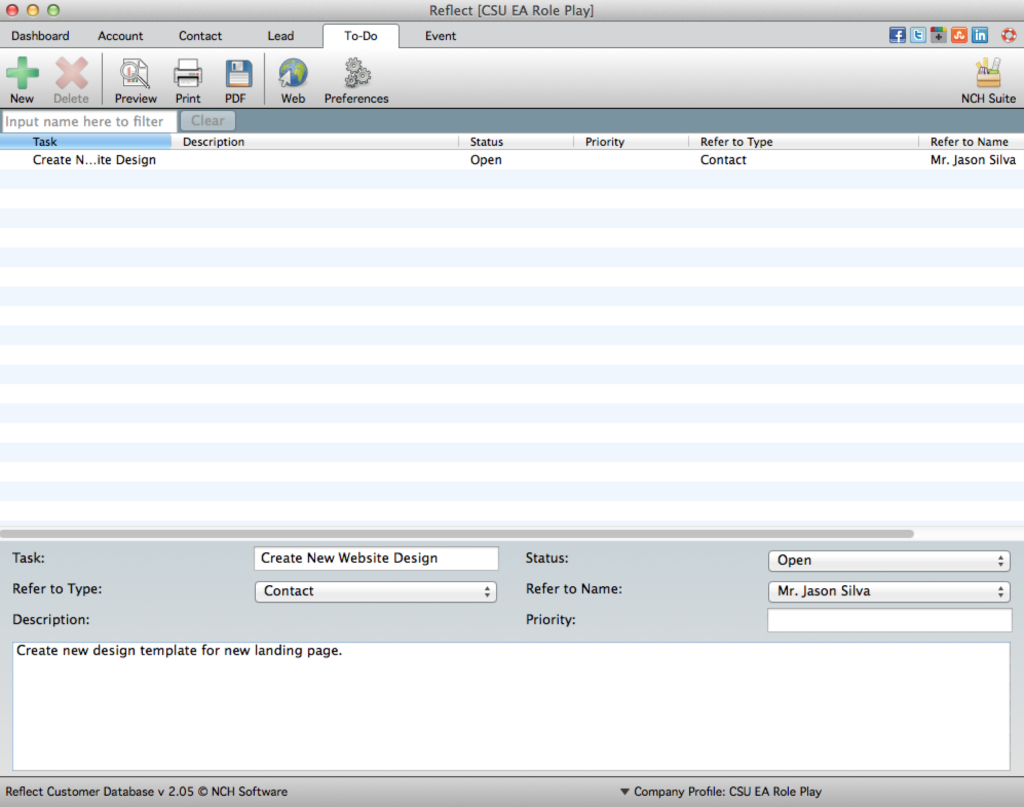
Reflect CRM è un software di database clienti on-premise che offre alle aziende una piattaforma solida per gestire e organizzare le informazioni sui clienti. Dispone di una gamma di funzionalità, tra cui gestione dei contatti, monitoraggio delle vendite, gestione delle attività, integrazione con l'email, reportistica e analisi.
Perché ho scelto Reflect CRM: Reflect CRM si distingue come il miglior software di database clienti on-premise grazie alla sua capacità di offrire alle aziende il pieno controllo e la massima sicurezza sui dati dei clienti. Mantenendo il database on-premise, le aziende possono garantire la privacy dei dati, rispettare le normative di settore e accedere direttamente alle informazioni sui clienti senza dover dipendere da server esterni o sistemi basati su cloud.
Questo livello di controllo e sicurezza rende Reflect CRM la scelta ideale per le aziende che danno priorità alla sovranità dei dati e desiderano una piena proprietà del proprio database clienti.
Funzionalità e integrazioni di spicco di Reflect CRM:
Le funzionalità includono la gestione dei contatti, la gestione delle attività e il monitoraggio delle vendite. Con Reflect CRM, le aziende possono facilmente archiviare e organizzare le informazioni dei clienti, gestire attività e promemoria, e monitorare le attività di vendita per aumentare il coinvolgimento dei clienti e favorire la crescita delle vendite.
Pros and Cons
Pros:
- Controllo dei dati on-premise
- Opzioni di importazione o esportazione dei dati
- Configurazione rapida
Cons:
- Funzionalità avanzate limitate
- Nessuna implementazione in cloud
Altri software per database clienti
Ecco alcune altre opzioni di software per database clienti che non sono entrate nella mia shortlist, ma che meritano comunque di essere considerate:
- Scoro
Il miglior software per database clienti per il consolidamento dei dati dei clienti
- People.ai
Ideale per vendite e marketing basati sui dati
- Thryv
Ideale per la gestione di piccole imprese
- Maximizer CRM
Il miglior software di database clienti per analisi avanzate
- AllClients
Il miglior software di database clienti per utenti non tecnici
- Creatio CRM
Il miglior software per database clienti per imprese e grandi organizzazioni
- Nextiva
Ideale per tracciare la cronologia e il sentiment delle comunicazioni con i clienti
- Copper
Il miglior software di gestione database clienti per gli utenti di Google Workspace
- Zendesk
Ideale per gestire richieste clienti multicanale
- Accelo
Miglior database clienti per aziende di servizi
- Velaris
Ideale per monitorare nel dettaglio la salute dei clienti


Come valuto il software per database clienti
Divido la mia valutazione in due livelli: i requisiti di base che uno strumento deve soddisfare per qualificarsi—come record unificati, deduplicazione e sincronizzazione con CRM—e i fattori di differenziazione che distinguono le migliori opzioni per RevOps.
Funzionalità di base (Requisiti minimi per questa lista)
Quando seleziono gli strumenti per la mia lista, valuto ciascuno su una scala da 0 (non offre la funzionalità) a 5 (eccelle in quest'area) per ogni funzionalità di base elencata di seguito. Poi, calcolo il punteggio totale dello strumento in percentuale. Ogni strumento deve raggiungere un punteggio totale minimo del 65% per essere preso in considerazione.
- Record clienti centralizzati: Cerco un database unificato in cui contatti e account siano collegati, così i team di vendita e customer success non lavorano da elenchi disconnessi.
- Campi personalizzati e modelli di dati: Ogni team commerciale traccia attributi diversi. Verifico se puoi creare oggetti e campi personalizzati per adattarli al tuo modello dati GTM.
- Importazione dati e integrazioni: Valuto le integrazioni native con CRM e tool di marketing, l’accesso API e l’importazione/esportazione CSV per capire quanto bene lo strumento si integra nella struttura tecnologica reale.
- Segmentazione e filtri: Costruire liste dinamiche è importante per la revisione delle pipeline e il targeting delle campagne. Cerco filtri su più attributi e viste salvate condivisibili tra i team.
- Tracciamento delle interazioni e delle attività: Lo strumento dovrebbe registrare email, chiamate e riunioni sui record dei clienti. Controllo se questo avviene automaticamente o richiede inserimento manuale.
- Qualità dei dati e deduplicazione: I record duplicati compromettono la precisione delle previsioni. Valuto come ogni piattaforma rileva, segnala e unisce duplicati tra i dati importati e sincronizzati.
Quando ho una lista di strumenti che soddisfano questi criteri, considero cosa distingue ciascuna piattaforma.
Fattori di differenziazione (Cosa distingue i fornitori)
Ecco come confronto e metto a confronto i diversi fornitori:
Caratteristiche distintive
L’arricchimento dei dati è un aspetto importante—verifico se una piattaforma può aggiungere in automatico dettagli firmografici o tecnologici ai record, evitando così che il tuo team debba reperire manualmente queste informazioni. Valuto anche le capacità di reverse ETL, perché inviare dati cliente puliti nuovamente nel CRM o sulle piattaforme pubblicitarie è il modo in cui un database inizia a generare vero valore GTM. Anche i report integrati sono importanti. Se puoi ottenere dashboard di pipeline o ciclo di vita direttamente dal database, è uno strumento di BI in meno che il team RevOps dovrà mantenere.
Oltre alle funzionalità
Qui l’ampiezza delle integrazioni conta molto. Controllo se una piattaforma si connette nativamente con Salesforce, HubSpot o CRM simili—e se queste sincronizzazioni sono bidirezionali, non solo push unidirezionali. Il costo totale di proprietà è un altro fattore che considero con attenzione, soprattutto in relazione a come il prezzo cresce all’aumentare dei record. Uno strumento economico per 50.000 record ma molto costoso per 500.000 può creare problemi rapidamente. Valuto anche la velocità di implementazione, perché un database che richiede mesi di lavoro ingegneristico per essere avviato ritarda il valore RevOps che cerchi di ottenere.
Come scegliere un software per database clienti
È facile perdersi tra lunghi elenchi di funzionalità e strutture di prezzo complesse. Per aiutarti a restare concentrato nel processo di selezione software più adatto, ecco una lista di fattori da considerare:
| Fattore | Cosa considerare |
|---|---|
| Scalabilità | Il software crescerà con la tua azienda? Valuta se può gestire un numero crescente di utenti e di dati senza perdere in prestazioni. |
| Integrazioni | Si collega ai tuoi strumenti esistenti? Verifica che supporti integrazioni con i sistemi già in uso come email, CRM e piattaforme di marketing. |
| Personalizzazione | Puoi adattare il software alle tue necessità? Cerca soluzioni che permettano di personalizzare campi, viste e flussi di lavoro in base ai tuoi processi. |
| Facilità d’uso | Il software è intuitivo per il tuo team? Valuta interfaccia e navigazione per assicurarti che non richieda una formazione approfondita per essere utilizzato efficacemente. |
| Implementazione e onboarding | Quanto tempo occorre per essere operativi? Analizza tempi e risorse necessarie per configurazione, migrazione dati e formazione del team. |
| Costo | Il prezzo è in linea con il tuo budget? Confronta il costo con le funzionalità offerte e verifica eventuali costi aggiuntivi o vincoli contrattuali a lungo termine. |
| Sicurezza dei dati | Come viene protetti i tuoi dati dal software? Controlla gli standard di crittografia, il backup dei dati e la conformità alle normative di sicurezza rilevanti. |
| Disponibilità del supporto | C’è assistenza quando serve? Considera disponibilità, canali e tempi di risposta del supporto clienti. |
Tendenze nei software per database clienti per 2026
Le aziende cercano sempre più soluzioni software per database clienti che non solo gestiscano i dati dei clienti in modo efficiente ma che forniscano anche approfondimenti utili, aumentino il coinvolgimento del cliente e semplifichino le operazioni sui ricavi. Ecco una panoramica delle tendenze attuali nei software per database clienti:
Integrazione e interoperabilità:
- Integrazione fluida con altri sistemi aziendali: C'è una crescente domanda di software per database clienti che si integri facilmente con piattaforme di vendita, marketing e servizio, offrendo una visione unificata delle interazioni con i clienti su diversi punti di contatto.
- Architettura API-First: La tendenza verso un'architettura API-first indica che il software per database clienti sta diventando più adattabile e capace di integrarsi con vari componenti dell'ecosistema.
Decisioni guidate dai dati:
- Analisi avanzata e reportistica: I software moderni per database clienti incorporano strumenti di analisi sofisticata per trasformare i dati in approfondimenti, permettendo alle aziende di prendere decisioni strategiche informate.
- Analisi predittiva: L'utilizzo di AI e machine learning per prevedere il comportamento dei clienti e le tendenze di vendita sta diventando una caratteristica standard, aiutando le aziende nelle decisioni proattive.
Funzionalità innovative:
- Capacità di AI e Machine Learning: L'integrazione dell'AI per automatizzare l'inserimento dei dati, i processi di pulizia e persino prevedere le necessità dei clienti è sempre più diffusa, fissando nuovi standard per le funzionalità del software.
- Elaborazione dati in tempo reale: La possibilità di elaborare e analizzare i dati in tempo reale è sempre più importante, permettendo alle aziende di rispondere rapidamente alle tendenze emergenti e alle esigenze dei clienti.
Cambiamento di focus:
- Da archiviazione ad attivazione dei dati: L'attenzione si sta spostando dal semplice immagazzinamento dei dati dei clienti verso la loro attivazione tramite strumenti di coinvolgimento, creazione di community ed esperienze personalizzate.
- Declino delle soluzioni on-premises: Le soluzioni cloud stanno diventando lo standard, mentre i sistemi on-premises sono considerati meno flessibili e più difficili da mantenere e scalare.
Le aziende dovrebbero scegliere un software per database clienti che non solo risponda alle esigenze attuali, ma che sia anche scalabile e proiettato verso il futuro, integrando capacità di AI e gestione dati in tempo reale per restare competitivi nel panorama digitale in continua evoluzione.
Cos'è un software per database clienti?
Il software per database clienti è uno strumento che ti aiuta a salvare e organizzare tutte le informazioni sui tuoi clienti in un unico posto. I team di vendita, i marketer e gli operatori di supporto lo usano per tracciare i dettagli di contatto, la cronologia degli acquisti e le conversazioni, così da non perdere informazioni importanti o lasciar sfuggire potenziali clienti. Rende la ricerca dei dati dei clienti rapida e semplice, aiutandoti a offrire un servizio più veloce e personalizzato.
Funzionalità
Nella scelta del software per database clienti, tieni d'occhio le seguenti funzionalità chiave:
- Gestione dei contatti: Organizza tutte le informazioni dei clienti in un unico posto, rendendo semplice l'accesso e l'aggiornamento.
- Tracciamento della pipeline di vendita: Visualizza le fasi di vendita, aiutando i team a gestire e dare priorità alle trattative in modo efficace.
- Strumenti di automazione: Automatizza attività ripetitive come i follow-up, facendo risparmiare tempo e riducendo gli errori.
- Campi personalizzabili: Ti consente di adattare il software ai processi e alle esigenze specifiche della tua azienda.
- Capacità di integrazione: Si collega ad altri strumenti, garantendo un flusso di dati senza interruzioni tra i sistemi.
- Reportistica e analisi: Fornisce approfondimenti sulle prestazioni di vendita e sulle interazioni con i clienti, facilitando decisioni basate sui dati.
- Accesso da mobile: Permette ai membri del team di accedere ai dati dei clienti anche in movimento, garantendo produttività ovunque.
- Misure di sicurezza: Protegge i dati dei clienti grazie a crittografia e conformità agli standard di sicurezza.
- Interfaccia intuitiva: Assicura facilità d'uso con una navigazione e un design intuitivi.
- Notifiche in tempo reale: Ti tiene aggiornato con comunicazioni tempestive su modifiche e aggiornamenti importanti, permettendo un'azione rapida.
Vantaggi
Implementare un software per database clienti offre diversi vantaggi per il tuo team e la tua azienda. Ecco alcuni dei benefici a cui puoi aspirare:
- Migliore organizzazione: Centralizza i dati dei clienti, rendendo più facile la gestione e il recupero delle informazioni quando necessario.
- Produttività aumentata: Automatizza le attività di routine, liberando tempo per il tuo team da dedicare ad attività più strategiche.
- Migliore processo decisionale: Offre strumenti di reportistica e analisi che forniscono informazioni sul comportamento dei clienti e sulle tendenze di vendita.
- Maggiore efficienza nelle vendite: Tiene traccia delle pipeline di vendita, aiutando il tuo team a dare priorità alle trattative e a concluderle più rapidamente.
- Relazioni più forti con i clienti: Favorisce un miglior tracciamento delle interazioni, assicurando che tutte le comunicazioni con i clienti siano coerenti e informate.
- Scalabilità: Si adatta alle crescenti esigenze della tua azienda, supportando un volume crescente di dati e utenti.
- Sicurezza dei dati: Protegge le informazioni sensibili dei clienti con una forte crittografia e conformità agli standard di settore.
Costi e prezzi
La scelta di un software di database clienti richiede la comprensione dei vari modelli e piani tariffari disponibili. I costi variano in base alle funzionalità, alla dimensione del team, agli add-on e altro ancora. La tabella seguente riassume i piani più comuni, i loro prezzi medi e le funzionalità tipiche incluse nelle soluzioni di software per database clienti:
Tabella di confronto dei piani per i software di database clienti
| Tipo di piano | Prezzo medio | Funzionalità comuni |
|---|---|---|
| Piano gratuito | $0 | Gestione contatti di base, spazio di archiviazione limitato e supporto email. |
| Piano personale | $5-$25/user/month | Gestione avanzata dei contatti, reportistica di base, integrazione email e accesso mobile. |
| Piano business | $30-$60/user/month | Reportistica avanzata, strumenti di automazione, campi personalizzati, integrazioni multiple e funzionalità di collaborazione. |
| Piano enterprise | $70-$150/user/month | Dashboard personalizzabili, sicurezza avanzata, supporto dedicato, spazio di archiviazione illimitato e analisi complete. |
Domande frequenti sul software di database clienti
Ecco alcune risposte alle domande più comuni sul software di database clienti:
Quali sono i tipi di software di database clienti?
Il software di database clienti è fondamentale per le organizzazioni di tutti i settori per gestire e analizzare in modo efficiente le informazioni sui clienti, favorendo relazioni migliori e guidando decisioni strategiche. Esistono diversi tipi di software di database clienti disponibili, ciascuno adatto a diverse esigenze e scale operative:
- Software di gestione contatti: Si concentra principalmente sull’archiviazione delle informazioni di contatto di base dei clienti. È ideale per piccole imprese o imprenditori individuali che devono gestire efficacemente i propri contatti senza richiedere funzionalità CRM avanzate.
- Software CRM (Customer Relationship Management): Offre strumenti completi oltre la semplice gestione dei contatti, compresi interazioni di vendita, marketing e servizio clienti. È pensato per aziende di tutte le dimensioni che puntano a coltivare in modo completo le relazioni con i clienti.
- Software CRM per piccole imprese: Progettato per realtà di dimensioni ridotte, questo software fornisce le funzionalità essenziali di CRM come la gestione dei contatti, il tracciamento delle interazioni e una semplice analisi, il tutto in un pacchetto facile da usare e senza funzionalità troppo complesse.
- Software CRM per grandi aziende: Dotato di funzionalità avanzate e integrazioni, questo tipo è destinato a grandi organizzazioni con esigenze di gestione clienti più estese. Spesso include analisi sofisticate, automazione e capacità di personalizzazione per supportare processi aziendali complessi.
- Software CRM verticale: Progettato specificamente per determinati settori (ad esempio, immobiliare, finanza, sanità), offre funzioni personalizzate che rispondono alle sfide e ai flussi di lavoro unici di ciascun comparto.
- Software CRM operativo: Si concentra sulla semplificazione delle operazioni quotidiane che implicano interazioni con i clienti. Include l’automazione dei processi di marketing, vendite e servizi, garantendo efficienza nel flusso operativo.
- Software CRM analitico: Punta sulla raccolta, analisi e valorizzazione dei dati dei clienti per prendere decisioni informate. Aiuta le aziende a comprendere i comportamenti, le preferenze e le tendenze dei clienti.
- Software CRM collaborativo: Mira a migliorare la comunicazione e la collaborazione tra i team interni e con gli stakeholder esterni. Assicura esperienze clienti coerenti su vari punti di contatto condividendo le informazioni tra diversi reparti.
Comprendere le esigenze e gli obiettivi specifici della propria azienda è fondamentale quando si sceglie il software di database clienti più adatto. Ogni tipologia offre caratteristiche e funzionalità diverse, quindi è importante sceglierne uno che si allinei con gli obiettivi aziendali e le necessità operative per massimizzare i benefici dell’investimento.
Come si mantiene accurata e coerente una base dati clienti?
Per mantenere i dati accurati, stabilisci standard chiari di inserimento dati ed esegui controlli regolari. Incoraggia il team a verificare le informazioni prima di inserirle nel sistema. Usa strumenti integrati o script per rilevare duplicati e record incompleti, così il database rimane affidabile nel tempo.
Ogni quanto andrebbero revisionati o aggiornati i dati dei clienti?
Controlla il tuo database almeno ogni trimestre per correggere errori e rimuovere contatti inattivi. Imposta promemoria o workflow automatici per aggiornare i dati dopo interazioni importanti. Mantenere i dati aggiornati migliora la precisione delle comunicazioni e la qualità dei report.
Prossimi passi:
Se stai cercando un software di database clienti, contatta gratuitamente un consulente SoftwareSelect per ricevere suggerimenti personalizzati.
Compila un modulo e fai una breve chiamata durante la quale vengono analizzate le tue esigenze specifiche. Riceverai così una lista breve di software da valutare. Ti supporteranno anche durante tutto il processo di acquisto, incluse le trattative sui prezzi.