

Un database di contatti B2B è una piattaforma software che fornisce accesso a contatti aziendali verificati e informazioni sulle aziende per i team di vendita, marketing e gestione dei ricavi. Se stai cercando il miglior database di contatti B2B, probabilmente vuoi migliorare la qualità dei potenziali clienti, arricchire il tuo CRM e supportare la tua strategia di ingresso sul mercato con dati accurati e aggiornati. Questo elenco ti aiuterà a confrontare i migliori strumenti per il 2026, a capire cosa distingue ciascuno di essi e a scegliere la soluzione giusta per supportare le attività di ricerca di potenziali clienti, contatto e gli obiettivi di ricavi del tuo team.
Perché fidarsi dei nostri consigli sui software
6,700+
Reviews
20
Industry experts
16+
Evaluation factors
14
Years
Le nostre recensioni riflettono il nostro giudizio indipendente, non un discorso di vendita. Scopri come manteniamo la trasparenza.
Per questa guida, abbiamo valutato gli strumenti attraverso test pratici e ricerche indipendenti, assegnando un punteggio agli strumenti in base ai nostri criteri di selezione.
Le nostre recensioni riflettono il nostro giudizio editoriale umano, non un discorso di vendita.
Tabella di confronto degli strumenti per database di contatti B2B
Questa tabella di confronto riassume i dettagli sui prezzi delle mie migliori selezioni di strumenti per database di contatti B2B:
| Tool | Best For | Trial Info | Price | ||
|---|---|---|---|---|---|
| 1 | Ideale per la verifica delle email in tempo reale | Prova gratuita di 7 giorni + demo gratuita disponibile | A partire da $74/mese (con fatturazione annuale) | Website | |
| 2 | Ideale per l'approvvigionamento di dati conformi al GDPR | Demo gratuita disponibile | Prezzi su richiesta | Website | |
| 3 | Ideale per informazioni aziendali avanzate | Prova gratuita disponibile | Prezzi su richiesta | Website | |
| 4 | Ideale per la ricerca di contatti su più canali | Piano gratuito disponibile | A partire da 27 $/mese (con fatturazione annuale) | Website | |
| 5 | Ideale per l'accuratezza dei contatti verificati da persone | Prova gratuita disponibile | Prezzi su richiesta | Website | |
| 6 | Ideale per un rapido arricchimento dei contatti | Piano gratuito disponibile | A partire da $37.45/mese (con fatturazione annuale) | Website | |
| 7 | Ideale per il coinvolgimento commerciale integrato | Prova gratuita di 14 giorni + piano gratuito disponibile | A partire da $49/utente/mese (con fatturazione annuale) | Website | |
| 8 | Ideale per la ricerca di contatti in tempo reale su larga scala | Piano gratuito disponibile | Prezzi su richiesta | Website | |
| 9 | Ideale con gli strumenti di ricerca dei potenziali clienti su LinkedIn | Piano gratuito disponibile | A partire da $15/mese | Website | |
| 10 | Ideale per l'acquisizione di lead tramite browser | Piano gratuito + demo gratuita disponibili | A partire da $65/utente/mese | Website |


Recensioni dei migliori strumenti per database di contatti B2B
Di seguito trovi le mie sintesi dettagliate dei migliori strumenti per database di contatti B2B inclusi nel mio elenco. Le mie recensioni offrono un’analisi approfondita delle funzionalità, dei migliori casi d’uso e delle integrazioni di ciascuna piattaforma, per aiutarti a trovare quella più adatta al tuo team.
 Ideale per la verifica delle email in tempo reale
- Prova gratuita di 7 giorni + demo gratuita disponibile
- A partire da $74/mese (con fatturazione annuale)
Visit WebsiteCustomer Rating:4.7/5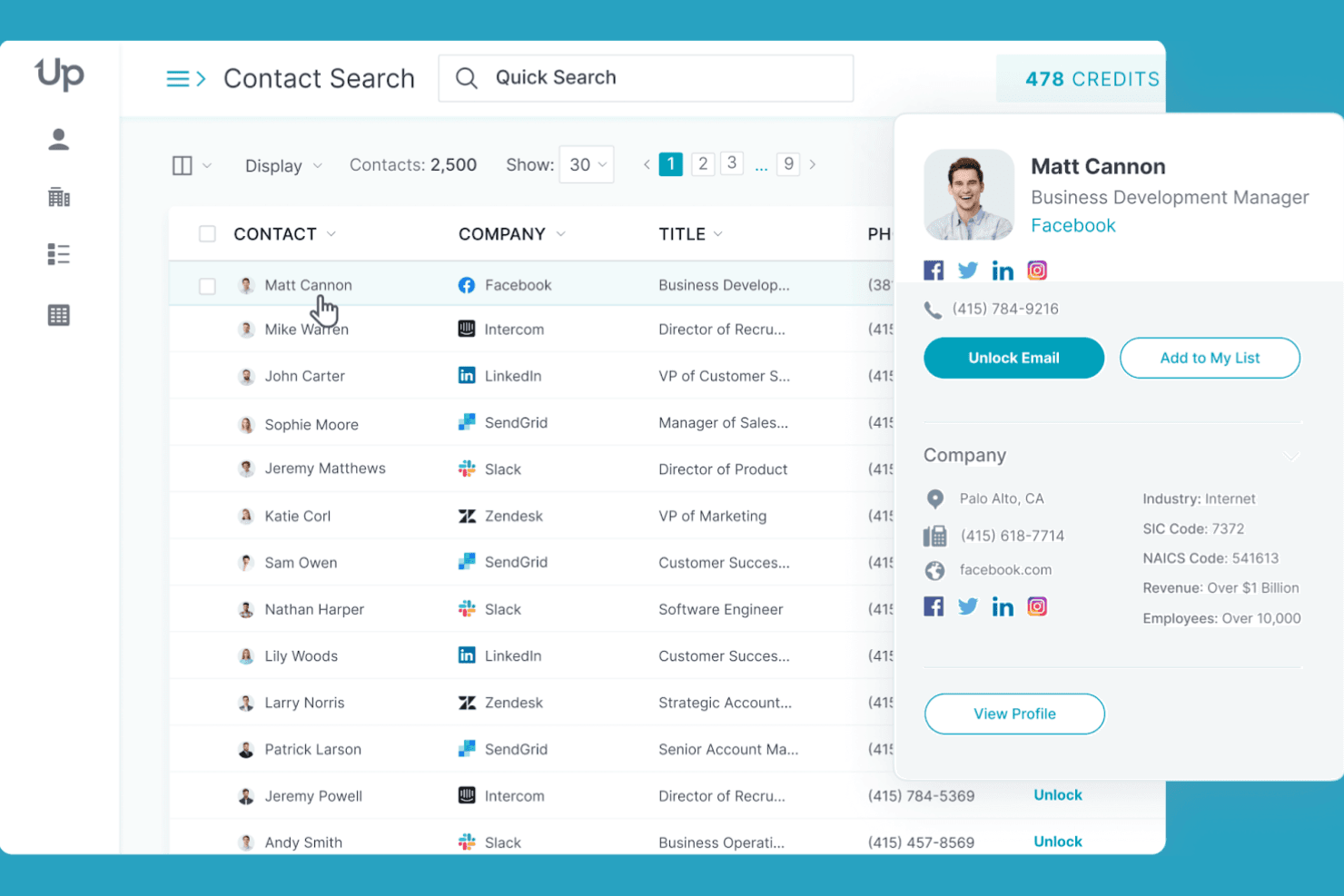
UpLead consente agli utenti di cercare e visualizzare in anteprima profili di contatto dettagliati su larga scala. UpLead è una piattaforma di database di contatti B2B che offre accesso a oltre 200 milioni di contatti verificati, con verifica delle email in tempo reale, filtri firmografici e tecnografici, arricchimento del CRM e un'API con più endpoint per flussi di prospezione e aggiunta di dati.
Per chi è più adatto UpLead?
UpLead è particolarmente adatto ai team commerciali e RevOps che danno priorità alla recapitabilità delle email e hanno bisogno di dati di contatto verificati prima di inserire i record nelle sequenze di contatto o nel CRM.
Perché ho scelto UpLead
Ho scelto UpLead come una delle soluzioni migliori perché la verifica delle email in tempo reale lo distingue da quasi tutti gli altri database di contatti B2B che ho valutato. A differenza degli strumenti che verificano le email al momento dell'acquisizione e considerano concluso il processo, UpLead le verifica nuovamente al momento dell'esportazione, ed è proprio questo che mantiene sotto controllo i tassi di rimbalzo. Ho visto team ridurre i tassi di rimbalzo dal 25% al 3–5% dopo il passaggio a questo strumento. La politica di rimborso dei «Crediti amichevoli» lo dimostra: se un contatto genera un rimbalzo, si ottiene nuovamente il credito.
Funzionalità principali di UpLead
- Filtri tecnografici: cerca e filtra i prospect in base alle tecnologie specifiche che utilizzano, attingendo a una libreria di oltre 16.000 strumenti e piattaforme monitorati.
- Caricamento di liste di esclusione: carica gli elenchi di contatti esistenti per escludere i record già in tuo possesso, così da recuperare solo prospect completamente nuovi.
- Estensione Chrome: visualizza dati di contatto verificati e informazioni tecnografiche direttamente sui profili LinkedIn e sui siti web aziendali durante la navigazione.
- API di arricchimento con più endpoint: aggiungi dati di contatti e aziende su larga scala tramite endpoint API dedicati per ricerche di persone, aziende e ricerche combinate.
Integrazioni di UpLead
UpLead offre 15 integrazioni native, tra cui Salesforce, HubSpot, Zoho CRM, Pipedrive, Microsoft Dynamics 365, Outreach, Salesloft, Reply.io, Lemlist e Close. Supporta inoltre flussi di lavoro personalizzati tramite la sua API e Zapier.
Pros and Cons
Pros:
- La verifica delle email in tempo reale riduce i tassi di rimbalzo
- I filtri tecnografici consentono di creare elenchi di prospect mirati
- Rimborsa i crediti per le email non valide o respinte
Cons:
- La precisione dei numeri di telefono non è garantita
- Dati limitati per le piccole aziende internazionali
Learn more about UpLead: Ideale per l'approvvigionamento di dati conformi al GDPR
- Demo gratuita disponibile
- Prezzi su richiesta
Visit WebsiteCustomer Rating:4.6/5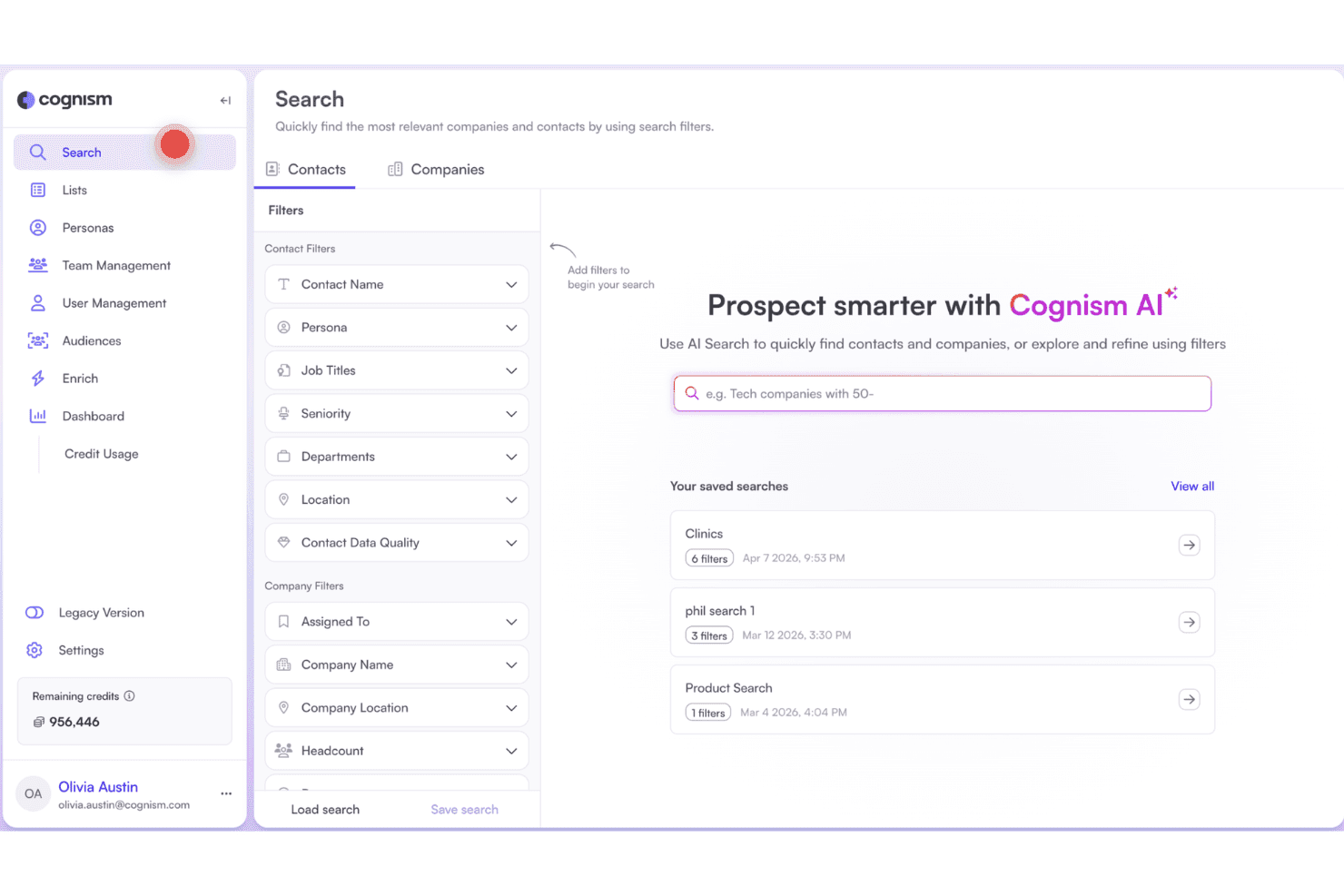
Cognism consente agli utenti di cercare e filtrare i contatti utilizzando la prospezione basata sull'IA. Cognism è una banca dati di contatti B2B e una piattaforma di intelligence commerciale che combina una banca dati globale di contatti e aziende con dati mobili verificati telefonicamente, filtri firmografici e tecnografici, segnali di intenzione d'acquisto e strumenti di prospezione assistiti dall'IA.
Per chi è più adatto Cognism?
Cognism è particolarmente adatto ai team GTM che svolgono attività di vendita in uscita nei mercati europei e necessitano di dati di contatto verificati telefonicamente, in grado di superare il vaglio del GDPR.
Perché ho scelto Cognism
Cognism si guadagna un posto nella mia rosa ristretta perché nessun'altra banca dati di contatti B2B prende la conformità al GDPR così seriamente a livello di dati. Sono particolarmente colpito da Diamond Data, con cui il team di Cognism chiama manualmente i numeri di cellulare per verificare che corrispondano alla persona giusta, per poi riverificarli ogni 18 mesi. Inoltre, ogni numero di telefono viene verificato rispetto a 16 registri DNC globali, incluse liste specifiche per paese nel Regno Unito, in Francia, Germania e Australia, così le attività di contatto commerciale nei mercati europei restano conformi per impostazione predefinita.
Funzionalità principali di Cognism
- Database mobile Diamond Data®: Un insieme selezionato di oltre 10 milioni di numeri di cellulare verificati telefonicamente, ciascuno confermato manualmente per garantire che raggiunga il contatto giusto e riverificato ogni 18 mesi.
- Integrazione dei dati di intenzione Bombora: Filtra gli account in base al comportamento di mercato attivo su un massimo di 12 argomenti, utilizzando i segnali Company Surge® di Bombora, disponibili nel piano Pro.
- Profili intelligenti: Una funzionalità di IA che genera profili strutturati degli acquirenti, inclusi titoli, livello di anzianità, reparto e area geografica consigliati, direttamente nell'interfaccia di ricerca e nell'estensione per Chrome.
- Dati come servizio (DaaS): Consegna tramite API e file semplici in blocco dei dati Cognism a contenitori S3 o destinazioni personalizzate, progettata per pipeline di arricchimento RevOps, modelli di scoring predittivo e analisi del TAM.
Integrazioni di Cognism
Cognism offre sette integrazioni native, tra cui Salesforce, HubSpot, Pipedrive, Microsoft Dynamics, Bullhorn, Outreach e Salesloft. Supporta inoltre integrazioni personalizzate basate su API e Zapier.
Pros and Cons
Pros:
- La più ampia copertura di conformità al GDPR per i dati B2B
- Contatti verificati manualmente telefonicamente per una maggiore accuratezza
- La maggiore profondità dei dati sui mercati europei
Cons:
- La qualità dei dati statunitensi è inferiore a quella dei concorrenti
- I contratti annuali richiedono un preavviso di cancellazione
Learn more about Cognism: Ideale per informazioni aziendali avanzate
- Prova gratuita disponibile
- Prezzi su richiesta
Visit WebsiteCustomer Rating:4.4/5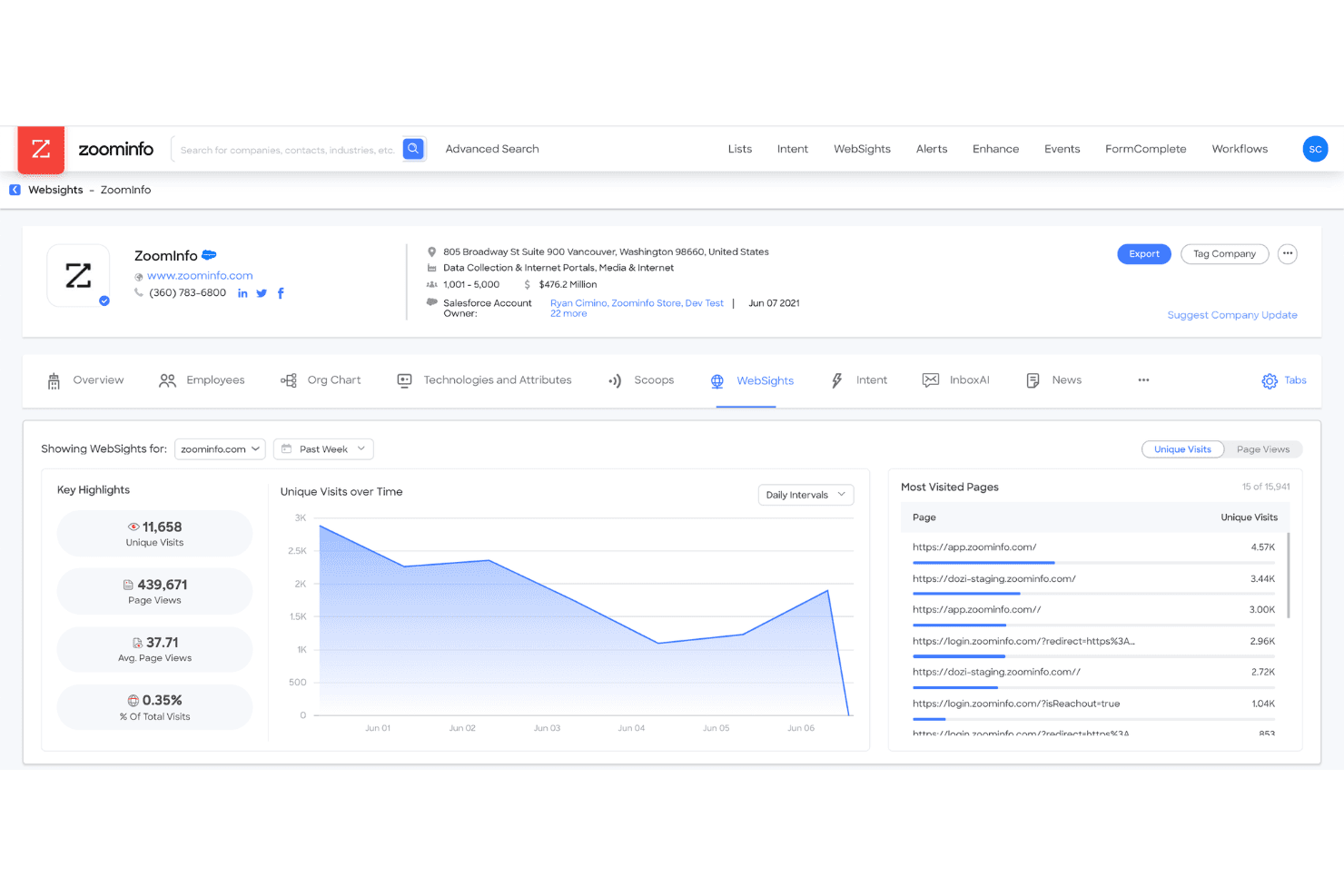
ZoomInfo monitora il comportamento dei visitatori del sito web con l'analisi di WebSights. ZoomInfo è una piattaforma di database di contatti B2B che combina un database di oltre 500 milioni di contatti con dati firmografici e tecnografici, segnali di intento degli acquirenti, organigrammi e arricchimento del CRM per supportare la ricerca di prospect, la pianificazione territoriale e i flussi di lavoro della pipeline.
Per chi è più adatto ZoomInfo?
ZoomInfo è particolarmente adatto ai team commerciali e di generazione dei ricavi delle aziende del mercato intermedio e delle imprese che necessitano di informazioni approfondite sulle aziende—organigrammi, segnali di intento e dati tecnografici—per dare priorità agli account e coordinare attività di contatto con più interlocutori.
Perché ho scelto ZoomInfo
ZoomInfo è entrato nella mia selezione perché la profondità delle informazioni sulle aziende che mette a disposizione va ben oltre i dati firmografici standard. Sono particolarmente colpito dal suo grafico di contesto GTM, che riunisce organigrammi, segnali di intento degli acquirenti e dati tecnografici in un'unica visualizzazione dell'account—così il mio team può identificare non solo chi contattare, ma anche quando sta effettuando attivamente ricerche. L'intento a livello di persona porta questo approccio oltre, individuando specifici stakeholder all'interno di un account interessato, non solo l'azienda.
Funzionalità principali di ZoomInfo
- Database di oltre 500 milioni di contatti: Accedi a profili verificati di oltre 500 milioni di professionisti B2B in tutto il mondo, filtrabili in base a oltre 300 attributi, tra cui qualifica professionale, livello di anzianità, settore e insieme di tecnologie utilizzate.
- Automazione dell'arricchimento del CRM: Aggiorna automaticamente i record di Salesforce, HubSpot e Dynamics 365 alla creazione o secondo una frequenza pianificata, utilizzando connettori nativi bidirezionali.
- Identificazione dei visitatori con WebSights: Rendi identificabile il traffico anonimo del sito web associando gli indirizzi IP ai record di aziende e contatti, facendo emergere l'interesse in entrata come potenziali clienti attivabili.
- API per la conformità: Gestisci programmaticamente i flussi di lavoro sulla privacy e le richieste di opposizione per supportare gli obblighi previsti da GDPR e CCPA nel tuo database di contatti.
Integrazioni di ZoomInfo
ZoomInfo offre oltre 70 integrazioni native, tra cui Salesforce, HubSpot, Microsoft Dynamics 365, Outreach, Salesloft, Marketo Engage, Slack e Microsoft Teams. Supporta inoltre integrazioni personalizzate tramite le API Standard, Scaling, WebSights e Compliance, oltre a Zapier.
Pros and Cons
Pros:
- Il più grande database globale di contatti disponibile
- Rilevamento dell'intento degli acquirenti a livello di persona
- Automazione continua dell'arricchimento dei record CRM
Cons:
- Prezzi poco trasparenti e contratti vincolanti
- Accuratezza dei dati inferiore al di fuori del Nord America
Learn more about ZoomInfo: Ideale per la ricerca di contatti su più canali
- Piano gratuito disponibile
- A partire da 27 $/mese (con fatturazione annuale)
Visit WebsiteCustomer Rating:4.3/5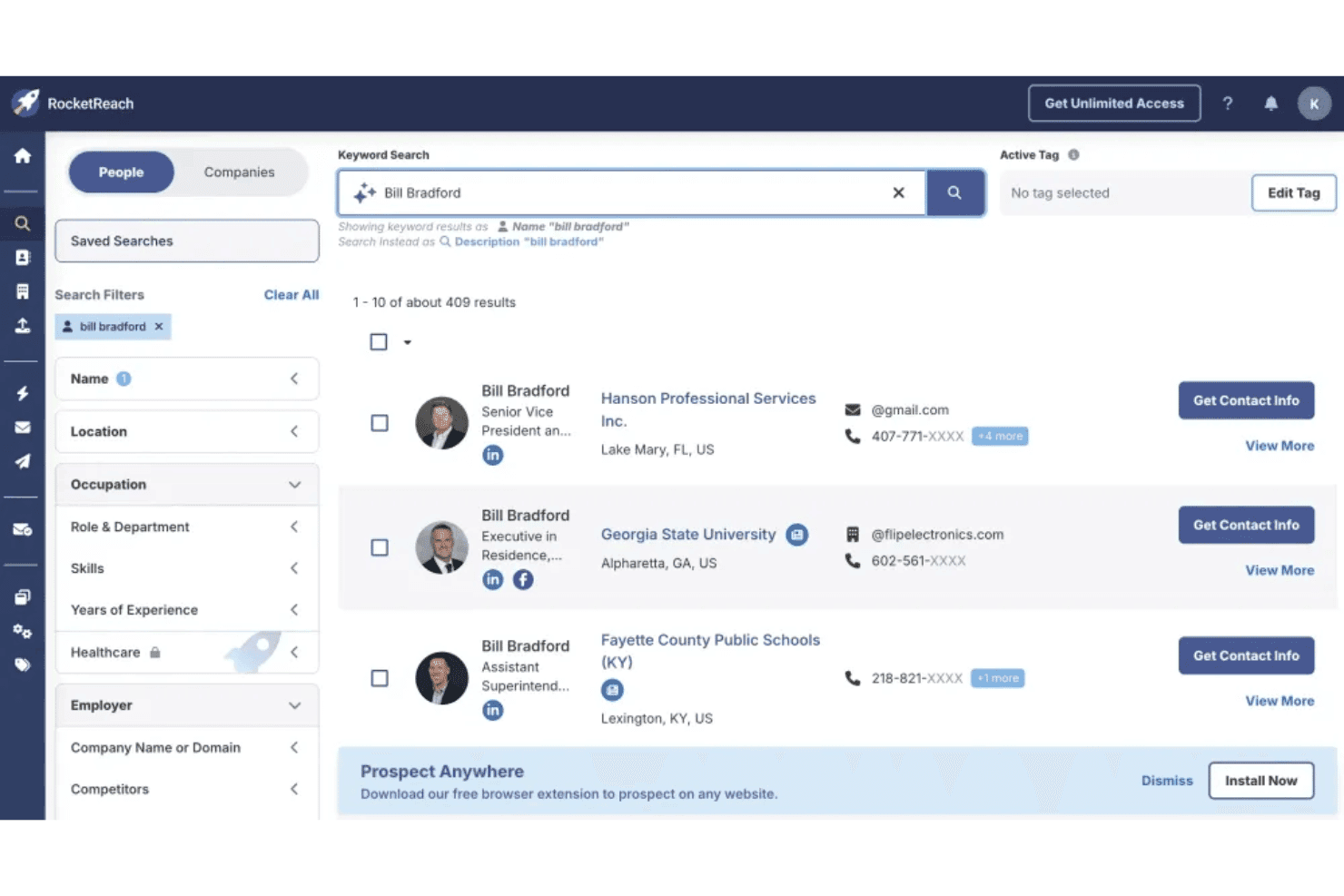
RocketReach consente agli utenti di cercare e filtrare i contatti per nome, ruolo e datore di lavoro. RocketReach è una piattaforma di database di contatti B2B con un database di oltre 700 milioni di profili, che offre ricerca verificata di email e numeri di telefono, filtri di ricerca avanzati, dati sulle intenzioni di acquisto e automazione integrata delle attività di contatto.
Per chi è più indicato RocketReach?
RocketReach è particolarmente adatto ai team di vendita in uscita e RevOps che necessitano di un'ampia copertura globale dei contatti tramite email, telefono e segnali sulle intenzioni di acquisto, tutto in un'unica piattaforma.
Perché ho scelto RocketReach
RocketReach si è guadagnato un posto nella mia lista ristretta perché nessun altro strumento di questa categoria eguaglia la sua ampiezza in termini di email, telefono e segnali sulle intenzioni di acquisto in un'unica piattaforma. Apprezzo il fatto che il database di oltre 700 milioni di profili sia direttamente abbinato a più di 35.000 argomenti sulle intenzioni di acquisto tramite Intentsify, così posso filtrare le aziende che mostrano già comportamenti d'acquisto invece di inviare messaggi indiscriminatamente a un elenco di contatti freddi. La funzionalità Autopilot fa un ulteriore passo avanti, consentendomi di automatizzare l'intera sequenza dalla ricerca al contatto, compresi i solleciti via email in più fasi, senza dover uscire dalla piattaforma.
Funzionalità principali di RocketReach
- Filtri di ricerca avanzati: Cerca tra oltre 700 milioni di profili utilizzando filtri per livello gerarchico, reparto, tecnologie utilizzate, competenze e cambiamenti recenti di ruolo, con logica booleana e modificatori per corrispondenza esatta o per esclusione.
- Ricerche dinamiche salvate: Crea ricerche che si aggiornano automaticamente quando nuovi profili corrispondenti vengono aggiunti al database, mantenendo aggiornati i tuoi elenchi di potenziali clienti senza aggiornamenti manuali.
- Estensione per il browser Chrome: Cerca email e numeri di telefono verificati direttamente mentre navighi su LinkedIn, Crunchbase o AngelList, senza passare da una scheda all'altra.
- API REST con arricchimento in blocco: Accedi a 4,5 miliardi di record tramite endpoint API strutturati per persone, aziende, ricerca di email e dati aziendali, per alimentare su larga scala i flussi di lavoro di arricchimento del CRM.
Integrazioni di RocketReach
RocketReach offre integrazioni native con Salesforce, HubSpot, Outreach, Salesloft e Bullhorn. Supporta inoltre integrazioni personalizzate tramite la sua API REST e Zapier.
Pros and Cons
Pros:
- Enorme database globale con settori verticali di nicchia
- Elevati tassi di recapito per le email verificate
- Automazione integrata della ricerca di potenziali clienti e delle attività di contatto
Cons:
- Le lamentele relative a fatturazione e cancellazione sono frequenti
- I dati sulle intenzioni di acquisto sono riservati ai piani di livello più elevato
Learn more about RocketReach: Ideale per l'accuratezza dei contatti verificati da persone
- Prova gratuita disponibile
- Prezzi su richiesta
Visit WebsiteCustomer Rating:4.3/5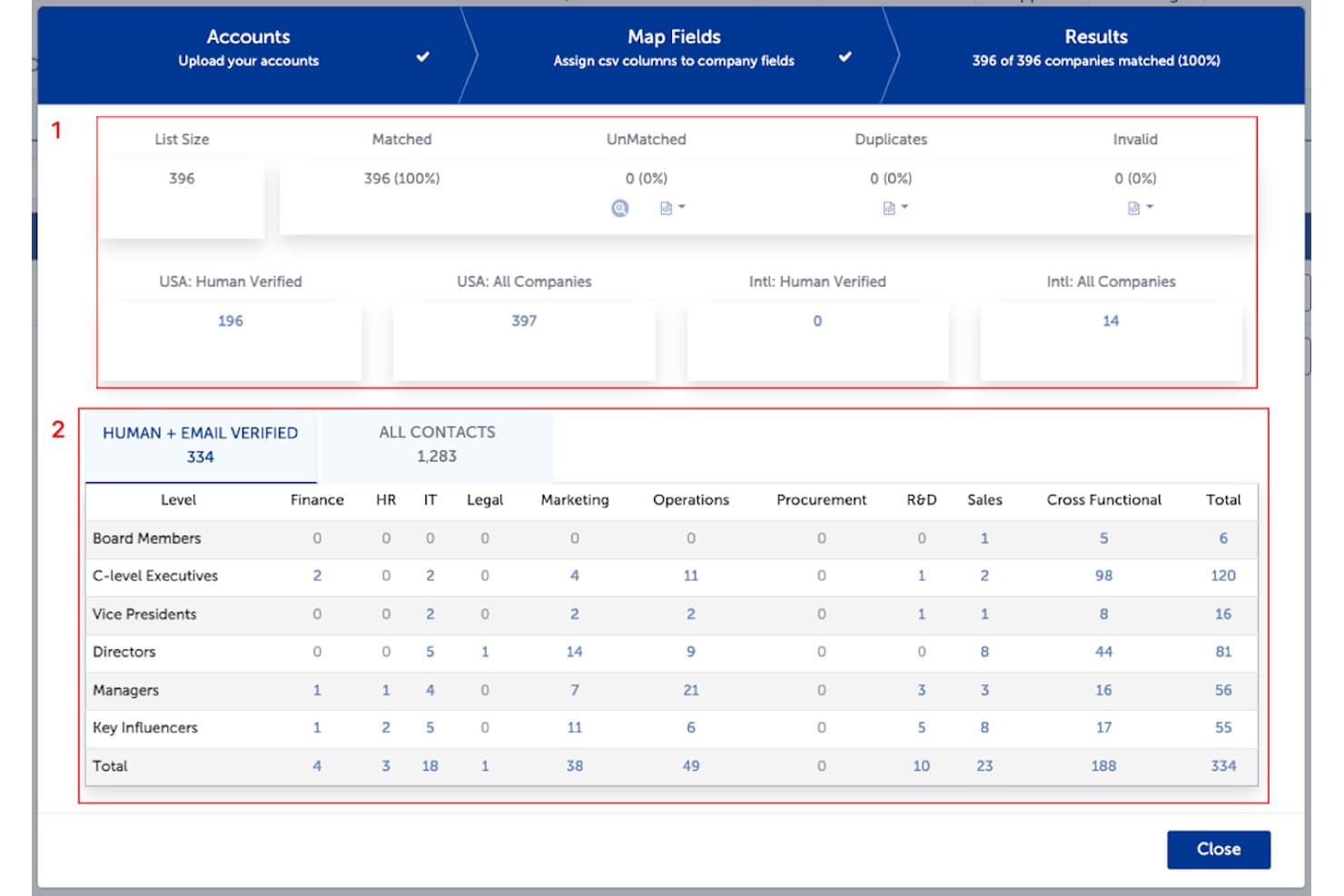
SalesIntel abbina gli account caricati e segmenta i contatti verificati per ruolo. SalesIntel è una piattaforma di database di contatti B2B che combina dati di contatto verificati da persone, informazioni firmografiche e tecnografiche, segnali di intenzione d'acquisto e arricchimento del CRM in un unico strumento per la prospezione e la ricerca sugli account.
Per chi è più adatto SalesIntel?
SalesIntel è particolarmente adatto ai team che si occupano di ricavi, che danno priorità all'accuratezza dei dati rispetto alle dimensioni del database e hanno bisogno di record di contatto verificati su cui poter fare affidamento prima di contattare i prospect.
Perché ho scelto SalesIntel
SalesIntel si è guadagnato un posto nella mia selezione perché nessun'altra piattaforma di questa categoria sostiene i propri dati di contatto con oltre 2.000 ricercatori umani che verificano nuovamente ogni record con un ciclo di 90 giorni. Mi piace il fatto che, se un contatto non è già presente nel database, Research on Demand mi permetta di inviare una richiesta e ricevere risultati verificati entro 24 ore. Spiccano anche gli oltre 54 milioni di numeri di cellulare verificati, con tassi di connessione telefonica documentati che superano ampiamente quelli dei concorrenti più grandi.
Caratteristiche principali di SalesIntel
- Mappatura del comitato d'acquisto: identifica e mappa gli acquirenti economici, i valutatori tecnici, i sostenitori e gli influencer all'interno degli account target per supportare attività di contatto rivolte a più stakeholder.
- Generatore di flussi di lavoro GTMCanvas: uno strumento senza codice con funzionalità di trascinamento per creare attività GTM automatizzate attivate da categorie di segnali, con messaggi generati dall'AI e adattati al ruolo di ciascun stakeholder.
- VisitorIntel: de-anonimizza il traffico anonimo del sito web a livello di azienda e di contatto, mostrando quali account stanno effettuando attivamente ricerche sul tuo prodotto.
- Valutazione ICPIntel: analizza oltre 100.000 punti dati per account per generare punteggi di aderenza al profilo del cliente ideale, aiutandoti a filtrare e dare priorità agli account che corrispondono al tuo profilo cliente ideale.
Integrazioni di SalesIntel
SalesIntel pubblicizza oltre 50 integrazioni, tra cui connessioni native con Salesforce, HubSpot, Microsoft Dynamics, Zoho CRM, Marketo, Outreach e Salesloft. La sua API RESTful, i webhook e le esportazioni CSV supportano flussi di lavoro dati personalizzati.
Pros and Cons
Pros:
- Contatti verificati da persone con accuratezza dichiarata del 95%
- Esportazioni di dati illimitate su tutti i piani
- Ricerca rapida su richiesta per i contatti mancanti
Cons:
- I dati per i settori di nicchia sono talvolta obsoleti
- Le funzionalità avanzate richiedono componenti aggiuntivi a pagamento
Learn more about SalesIntel: Ideale per un rapido arricchimento dei contatti
- Piano gratuito disponibile
- A partire da $37.45/mese (con fatturazione annuale)
Visit WebsiteCustomer Rating:4.2/5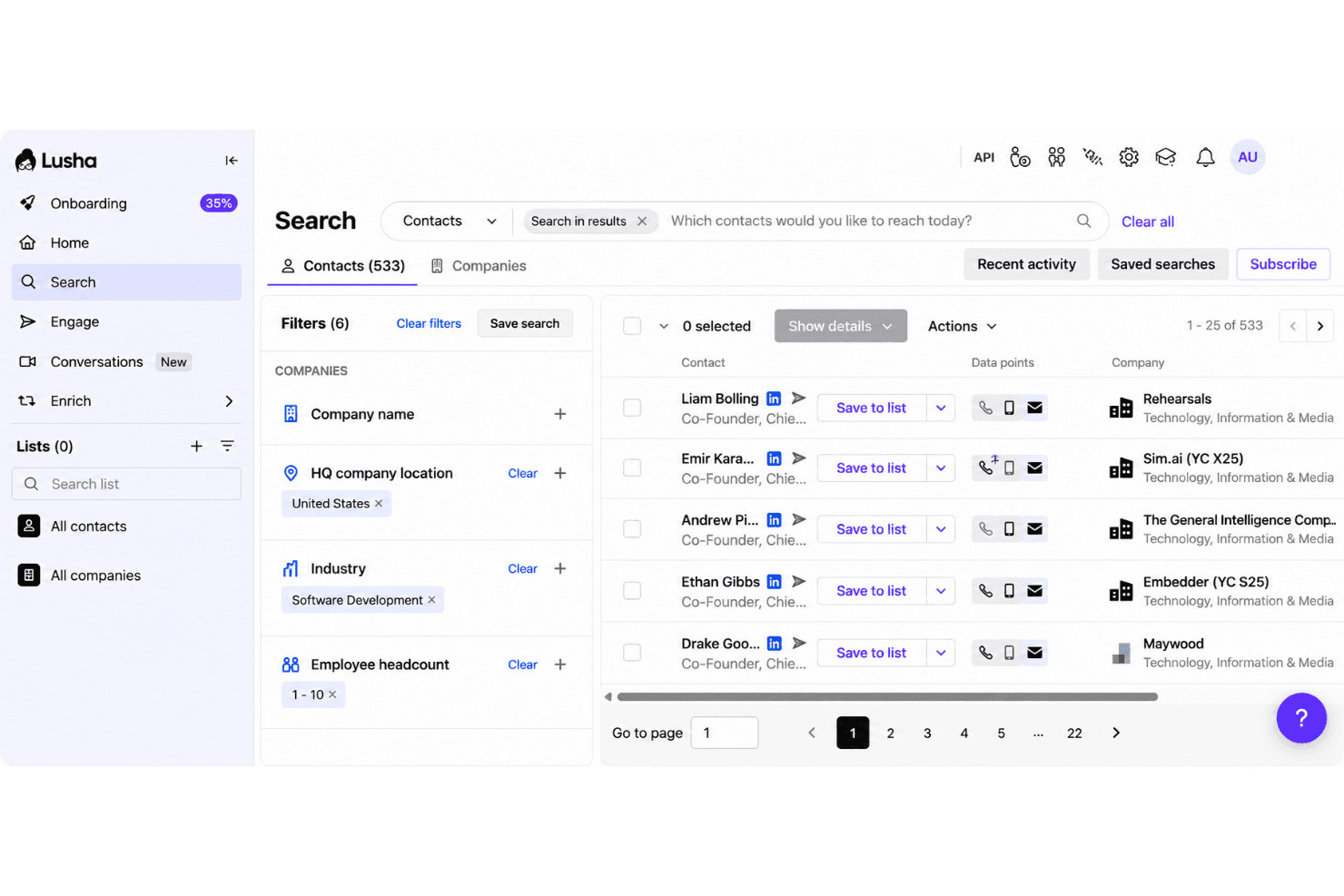
Lusha fornisce numeri di telefono diretti per contattare più rapidamente i potenziali clienti. Lusha è un database di contatti B2B e una piattaforma di intelligence sulle vendite che offre accesso a oltre 290M di contatti verificati, numeri diretti, dati firmografici, tecnografici e segnali di acquisto basati sugli eventi.
Per chi è più adatto Lusha?
Lusha è una soluzione ideale per i team di vendita e RevOps che necessitano di dati di contatto rapidi e affidabili senza un lungo processo di avvio.
Perché ho scelto Lusha
Lusha è entrato nella mia rosa di strumenti preferiti perché la sola estensione di Chrome lo rende uno dei modi più rapidi per acquisire dati di contatto verificati nella categoria: basta aprire un profilo LinkedIn per ottenere un numero diretto e un indirizzo e-mail aziendale senza mai uscire dal browser. Mi piace anche l'Hub ICP, che assegna un punteggio e classifica gli account come Tiepidi, Caldi o Molto caldi utilizzando sette modelli predittivi, così il mio team non si limita a raccogliere contatti, ma li assegna in base alla priorità. L'accuratezza del 98% delle e-mail e dell'86% dei numeri di telefono è supportata da una verifica continua, che si dimostra efficace nella pratica.
Funzionalità principali di Lusha
- Segnali di acquisto: monitora 26 segnali basati sugli eventi, tra cui operazioni di finanziamento, aumenti delle assunzioni e cambiamenti nella leadership, aggiornati ogni settimana per individuare opportunità tempestive di contatto.
- Identificazione dei visitatori tramite WebSights: associa i visitatori anonimi del sito web ai profili aziendali e mostra i dati di contatto verificati delle organizzazioni visitatrici.
- Suite API REST: offre endpoint per l'arricchimento, la ricerca, i segnali, le aziende simili e le aziende, per la creazione programmatica di elenchi, l'arricchimento in tempo reale e l'automazione del CRM.
- Conversazioni Lusha: registra e trascrive le riunioni di vendita, quindi genera riepiloghi tramite AI, attività da svolgere e metriche di coinvolgimento che si sincronizzano direttamente con il CRM.
Integrazioni di Lusha
Lusha offre oltre 27 integrazioni disponibili, tra cui Salesforce, HubSpot, Zoho CRM, Pipedrive, monday CRM, Bullhorn, Outreach, Salesloft, Clay e Zapier. La sua suite API REST supporta l'arricchimento personalizzato del CRM, la creazione di elenchi, i segnali, la ricerca di aziende simili e i flussi di lavoro relativi ai dati aziendali.
Pros and Cons
Pros:
- L'estensione di Chrome mostra istantaneamente le informazioni di contatto
- Il database dispone di statistiche dettagliate sulla copertura regionale
- Punteggio ICP e ricerca di aziende simili basati sull'AI
Cons:
- Il modello basato sui crediti limita gli utenti ad alto volume
- Nessun organigramma visivo o mappatura del comitato decisionale
Learn more about Lusha: Ideale per il coinvolgimento commerciale integrato
- Prova gratuita di 14 giorni + piano gratuito disponibile
- A partire da $49/utente/mese (con fatturazione annuale)
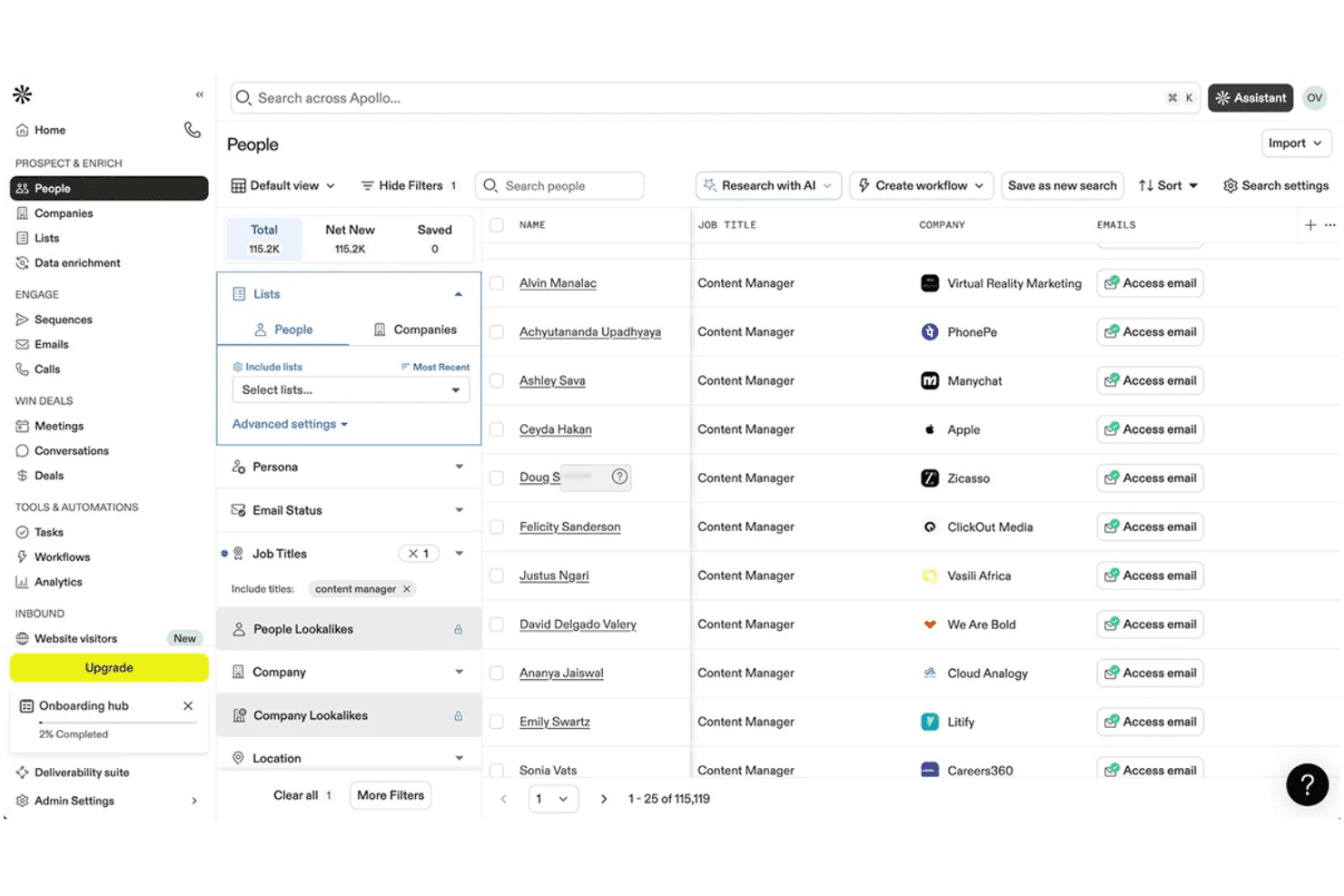
Apollo.io consente agli utenti di filtrare e cercare potenziali clienti per titolo professionale su larga scala. Apollo.io è un database di contatti B2B e una piattaforma di coinvolgimento delle vendite che combina un database di oltre 240 milioni di contatti con sequenze integrate, filtri per la ricerca di potenziali clienti, arricchimento del CRM e creazione di liste assistita dall'IA.
Per chi è più adatto Apollo.io?
Apollo.io è adatto ai team che si occupano delle operazioni sui ricavi e delle vendite e che desiderano un'unica piattaforma per la ricerca di potenziali clienti, l'arricchimento dei contatti e il coinvolgimento commerciale in uscita, senza dover collegare strumenti separati per database e sequenze.
Perché ho scelto Apollo.io
Apollo.io è entrato nella mia lista ristretta perché è l'unico database di contatti B2B che riunisce un database di oltre 240 milioni di contatti, sequenze native, un sistema di chiamata integrato e test A/B in un'unica piattaforma. Mi piace il fatto che non serva uno strumento separato per il coinvolgimento delle vendite: puoi creare una lista utilizzando oltre 65 filtri, definire un profilo per il tuo ICP e avviare una sequenza senza mai uscire da Apollo. La funzionalità di arricchimento a cascata, che passa attraverso oltre 20 fornitori di dati per colmare le lacune, è ciò che distingue la qualità dei dati dalle alternative basate su un'unica fonte.
Funzionalità principali di Apollo.io
- Filtraggio dell'intento di acquisto: individua gli account che stanno effettuando ricerche attive su argomenti rilevanti utilizzando i dati sull'intento forniti da Bombora, disponibili nei piani Professional e Organization.
- Centro di integrità dei dati: monitora la qualità dei record del CRM e mette in evidenza informazioni sul mercato totale indirizzabile per supportare la pianificazione dei territori e l'analisi della pipeline.
- Ricerche e avvisi salvati: consente di salvare i criteri di ricerca dei potenziali clienti e ricevere notifiche via email quando nuovi contatti corrispondono ai filtri ICP definiti.
- Arricchimento CSV: accetta elenchi di contatti esterni e li arricchisce confrontandoli con il database di Apollo, completando automaticamente i campi mancanti relativi all'azienda e ai contatti.
Integrazioni di Apollo.io
Apollo.io offre oltre 200 integrazioni, incluse connessioni native con Salesforce, HubSpot, Pipedrive, Outreach, Salesloft, Marketo, SendGrid e Chili Piper. Offre inoltre l'accesso all'API REST, Apollo CLI, Apollo MCP e Zapier per integrazioni personalizzate.
Pros and Cons
Pros:
- Combina database, sequenze e sistema di chiamata in un'unica soluzione
- L'arricchimento a cascata migliora i tassi di completamento dei dati
- L'assistente IA aumenta le probabilità di prenotare riunioni
Cons:
- La precisione delle email nel mondo reale è incostante
- I crediti scadono ogni mese senza possibilità di trasferimento
Learn more about Apollo.io: Ideale per la ricerca di contatti in tempo reale su larga scala
- Piano gratuito disponibile
- Prezzi su richiesta
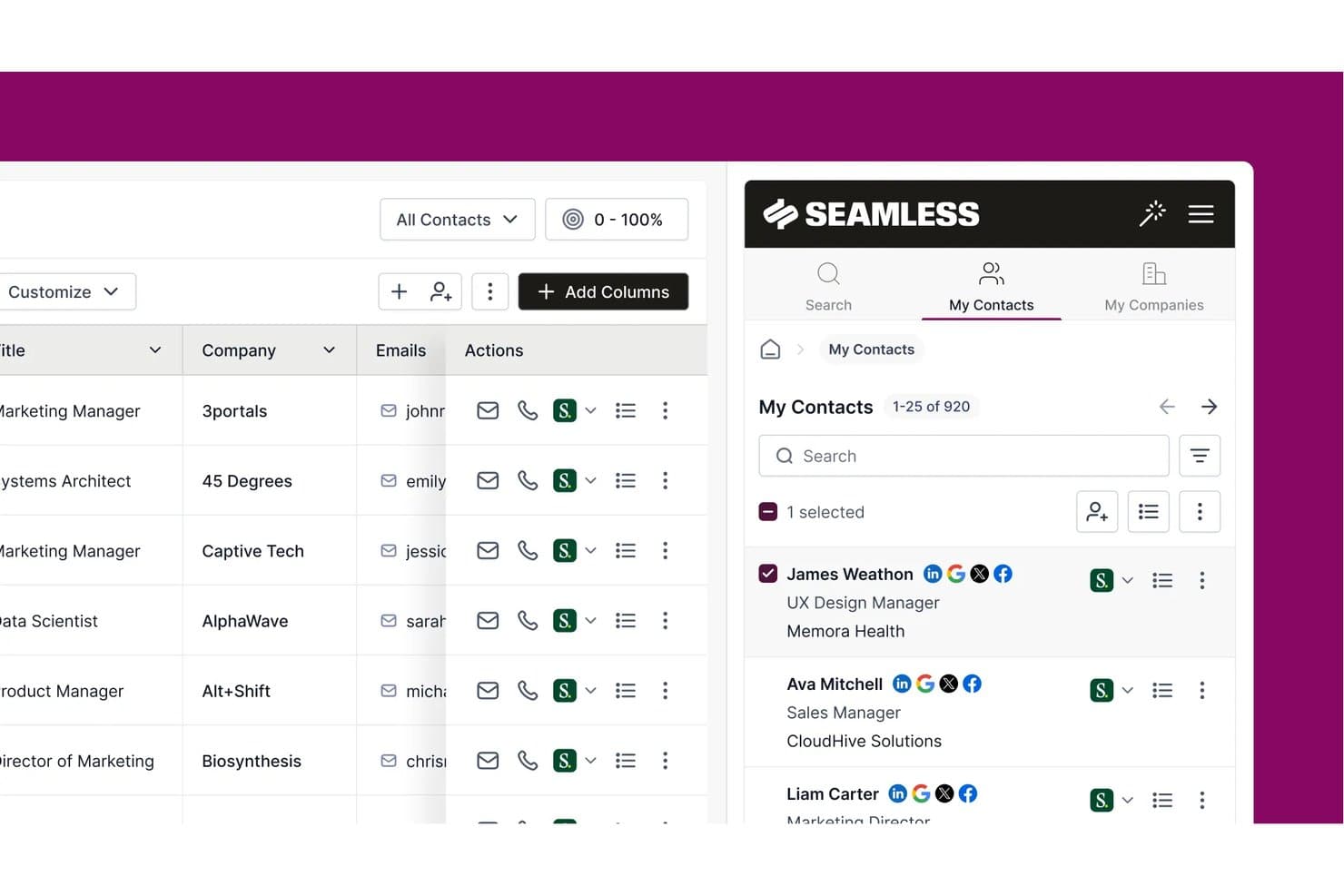
Seamless.AI consente agli utenti di gestire e consultare i contatti B2B salvati in un unico luogo. Seamless.AI è un motore di ricerca di contatti B2B in tempo reale che combina un database di oltre 1,3 miliardi di contatti verificati con attività di prospezione basate sull'IA, arricchimento del CRM, segnali di intenzione d'acquisto e strumenti integrati per l'interazione commerciale.
Per chi è più indicato Seamless.AI?
Seamless.AI è particolarmente adatto ai team commerciali e ai team responsabili dei ricavi che devono creare rapidamente grandi liste di potenziali clienti per attività di prospezione in uscita, senza il prezzo tipico degli strumenti aziendali come ZoomInfo.
Perché ho scelto Seamless.AI
Seamless.AI si è guadagnato un posto nella mia selezione ristretta per il modo in cui gestisce la scoperta dei contatti su larga scala: invece di attingere da un database statico, cerca e verifica i dati in tempo reale, evitando così di lavorare con dati che erano accurati sei mesi fa. Apprezzo in particolare l'individuazione di profili cliente ideale (ICP) simili dello strumento di prospezione, che identifica nuovi account corrispondenti ai tuoi clienti migliori senza dover creare manualmente le liste. Anche il prodotto di arricchimento CRM controlla continuamente i dati esistenti e aggiorna automaticamente i campi obsoleti, mantenendo aggiornati i dati del flusso commerciale senza dover avviare un progetto di pulizia.
Funzionalità principali di Seamless.AI
- Segnali di intenzione d'acquisto: Individua gli account prossimi all'acquisto monitorando 16,4 miliardi di interazioni mensili su oltre 5.000 siti, utilizzando l'elaborazione del linguaggio naturale (NLP) con oltre 12.000 categorie di settore.
- Monitoraggio dei cambiamenti professionali: Rileva quando i contatti cambiano ruolo, ricevono promozioni o cambiano azienda, con filtri per data che coprono fino a un anno.
- Accesso all'API REST: Fornisce punti di accesso per operazioni in massa e singole per la ricerca e l'arricchimento programmatici dei contatti, disponibili in tutti i livelli di piano, incluso quello gratuito.
- Centro integrato per l'interazione commerciale: Consente di inviare e-mail, effettuare chiamate tramite un sistema integrato di composizione automatica e gestire direttamente nella piattaforma le attività successive.
Integrazioni di Seamless.AI
Seamless.AI offre integrazioni native con Salesforce, HubSpot, Microsoft Dynamics 365, Zoho CRM, Pipedrive, Outreach e Salesloft. Supporta inoltre integrazioni tramite n8n e Zapier, oltre all'accesso all'API REST per flussi di lavoro personalizzati con CRM e dati.
Pros and Cons
Pros:
- Verifica dei contatti in tempo reale al momento della ricerca
- Arricchimento CRM automatizzato con aggiornamento continuo dei dati
- Segnali di intenzione d'acquisto da una rete cooperativa basata sul consenso
Cons:
- Accuratezza delle e-mail e dei numeri di telefono inferiore a quanto dichiarato
- Il processo di annullamento dell'abbonamento causa spesso controversie
Learn more about Seamless.AI: Ideale con gli strumenti di ricerca dei potenziali clienti su LinkedIn
- Piano gratuito disponibile
- A partire da $15/mese
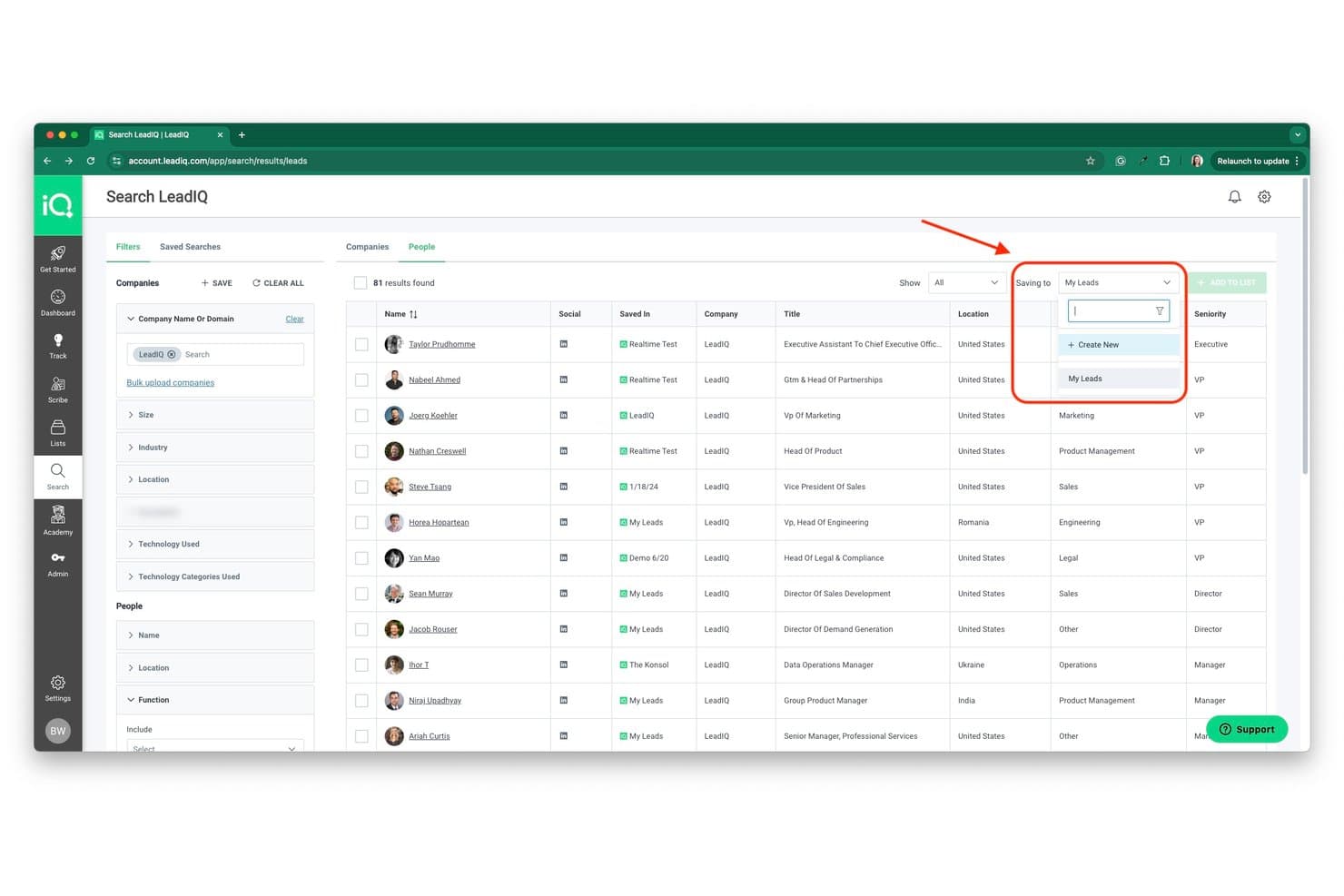
LeadIQ consente agli utenti di salvare i contatti direttamente in elenchi denominati dai risultati di ricerca. LeadIQ è un database di contatti B2B e una piattaforma di ricerca di potenziali clienti basata su un database di oltre 750 milioni di profili, che offre dati verificati su email e numeri di telefono, arricchimento del CRM, monitoraggio dei promotori e strumenti di contatto basati sull'intelligenza artificiale.
Per chi è più adatto LeadIQ?
LeadIQ è particolarmente adatto ai team di vendita che ricavano la maggior parte della propria pipeline direttamente da LinkedIn e hanno bisogno di dati di contatto verificati sincronizzati con il CRM con un solo clic.
Perché ho scelto LeadIQ
LeadIQ è entrato nella mia rosa dei preferiti perché la sua estensione per Chrome trasforma LinkedIn e Sales Navigator in un livello di ricerca dei potenziali clienti in tempo reale, consentendo di acquisire con un solo clic indirizzi email verificati, numeri di cellulare e dati sulle aziende, per poi trasferirli direttamente nel CRM. Apprezzo soprattutto l'acquisizione in blocco dai risultati di ricerca di Sales Navigator, che evita di dover aprire i profili uno alla volta. Il monitoraggio dei promotori aggiunge un altro livello che trovo davvero utile: quando un contatto salvato cambia lavoro, LeadIQ lo segnala con informazioni di contatto aggiornate, evitando che una pipeline basata su relazioni già avviate si raffreddi.
Funzionalità principali di LeadIQ
- Scrittore di email Scribe AI: genera tre bozze di email personalizzate per ogni destinatario utilizzando i dati di contatto di LeadIQ, le definizioni delle personas e i casi di studio, con supporto per cinque lingue.
- Feed dei segnali: mette in evidenza segnali di acquisto, tra cui documenti 10-K, attività di assunzione e menzioni nei podcast, per aiutarti a scegliere il momento giusto per contattare gli account chiave.
- Pacchetto gestito per Salesforce: un'integrazione nativa e bidirezionale con Salesforce che supporta il rilevamento dei duplicati, la mappatura dei campi personalizzati e l'arricchimento di oltre 40 campi relativi alle aziende.
- Accesso all'API REST: disponibile in ogni piano, incluso quello gratuito, consente di creare pipeline di dati personalizzate e flussi di lavoro di automazione RevOps.
Integrazioni di LeadIQ
LeadIQ offre un pacchetto gestito nativo per Salesforce oltre a connessioni a HubSpot tramite Workato, Pipedrive, Outreach, Salesloft, Groove, Gong, Clay, Chili Piper e Nooks. Fornisce inoltre un'API REST a partire dal piano gratuito e supporta Zapier.
Pros and Cons
Pros:
- Migliore acquisizione con un clic da LinkedIn al CRM
- Tassi di recapito delle email verificate ai vertici del settore
- Monitoraggio in tempo reale dei cambi di lavoro per la pipeline basata su relazioni già avviate
Cons:
- I dati telefonici sono talvolta obsoleti o mancanti
- Segnali avanzati di intenzione di acquisto limitati
Learn more about LeadIQ: 10Ideale per l'acquisizione di lead tramite browser
Kaspr
- Piano gratuito + demo gratuita disponibili
- A partire da $65/utente/mese
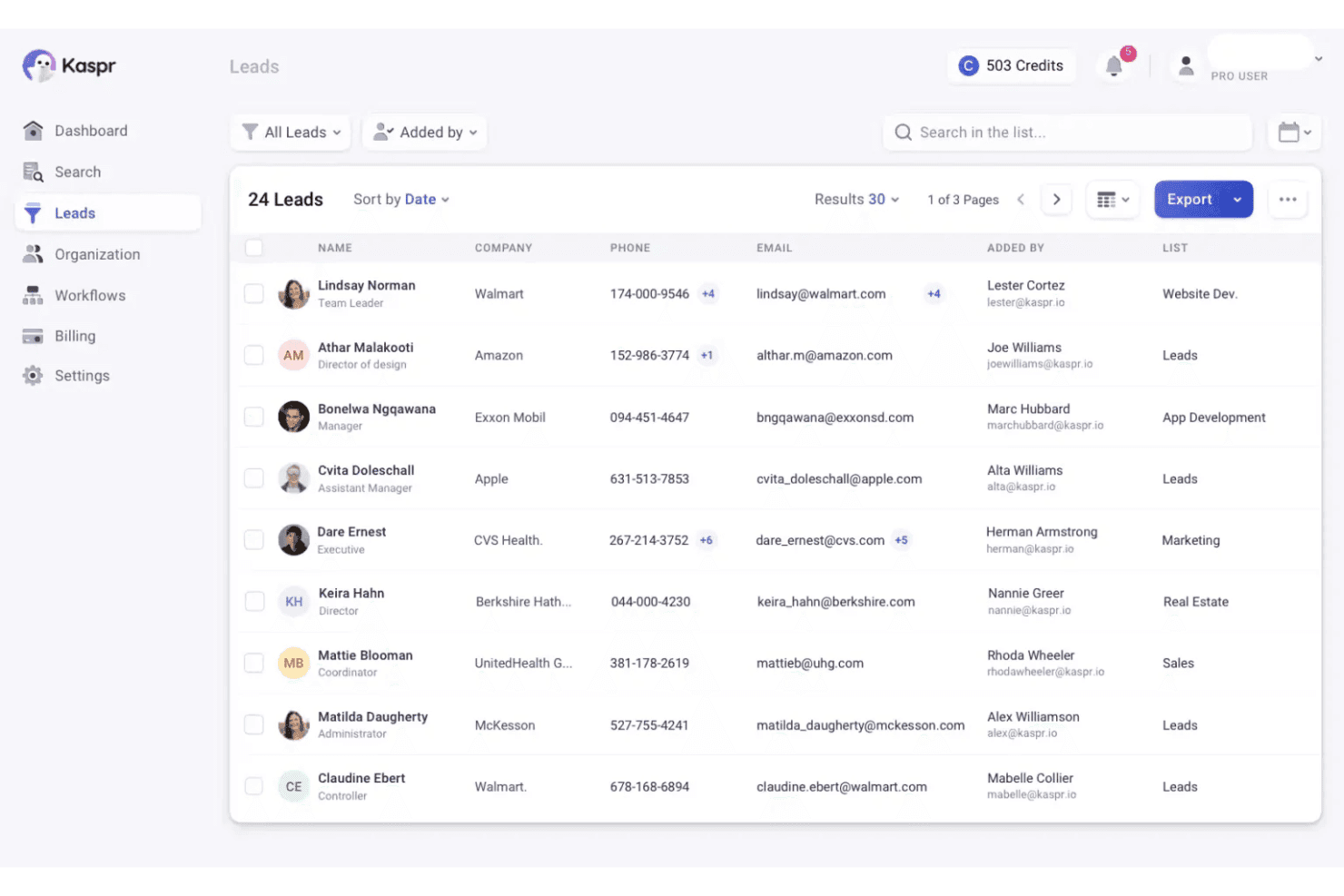
Kaspr organizza e visualizza i dettagli di contatto dei lead in una visualizzazione centralizzata a elenco. Kaspr è uno strumento per database di contatti B2B basato su un'estensione Chrome per LinkedIn che consente di acquisire email e numeri di telefono verificati direttamente dai profili LinkedIn, dai risultati di ricerca, da Sales Navigator e da Recruiter Lite.
Per chi è più adatto Kaspr?
Kaspr è particolarmente adatto agli SDR e ai venditori individuali che svolgono la maggior parte delle attività di prospecting direttamente su LinkedIn, soprattutto per chi si rivolge ai mercati europei.
Perché ho scelto Kaspr
Kaspr è entrato nella mia rosa dei preferiti grazie alla naturalezza con cui si integra in un flusso di prospecting incentrato su LinkedIn. Mi piace il fatto che l'estensione Chrome si sovrapponga direttamente ai profili LinkedIn, a Sales Navigator e persino agli eventi LinkedIn, consentendo di verificare se un contatto dispone di un numero di cellulare o di una linea fissa prima di spendere anche un solo credito. Questa funzione di anteprima dei crediti, da sola, fa risparmiare molto tempo. Kaspr si distingue anche per i dati B2B europei, con oltre 200 milioni di contatti europei verificati e riconvalidati ogni due mesi.
Funzionalità principali di Kaspr
- Arricchimento massivo da LinkedIn: estrai e arricchisci gli elenchi di contatti dai risultati di ricerca di LinkedIn, da Sales Navigator o dagli eventi LinkedIn con un'unica azione batch.
- Caricamento di file CSV per l'arricchimento: carica un file CSV contenente gli URL dei profili LinkedIn per arricchire più contatti con dati verificati relativi a email e numeri di telefono al di fuori dell'estensione Chrome.
- Invio nativo al CRM: invia i dati dei contatti direttamente a Salesforce, HubSpot, Pipedrive o Zoho CRM dalla dashboard di Kaspr o dall'estensione Chrome, senza esportazioni manuali.
- Sequenze LinkedIn: crea ed esegui sequenze automatizzate di contatto su LinkedIn direttamente dalla dashboard di Kaspr, disponibili con tutti i piani a pagamento.
Integrazioni di Kaspr
Kaspr offre otto integrazioni native, tra cui Salesforce, HubSpot, Pipedrive, Zoho CRM, Lemlist, Brevo, Aircall e Ringover. Fornisce inoltre un'API di arricchimento per integrazioni personalizzate e Zapier a partire dal piano Starter.
Pros and Cons
Pros:
- Eccelle nei dati di contatto B2B europei verificati
- Email B2B illimitate incluse in tutti i piani
- L'estensione Chrome mostra in anteprima il tipo di numero di telefono prima della visualizzazione
Cons:
- Nessun dato firmografico o tecnografico avanzato
- Dipende da LinkedIn per la creazione degli elenchi
Learn more about Kaspr:
Altri strumenti per database di contatti B2B
Ecco alcune ulteriori opzioni di database di contatti B2B che non sono state incluse nel mio elenco, ma che vale comunque la pena valutare:
Come Valuto i Database di Contatti B2B
Valuto i database di contatti B2B su due livelli: i requisiti fondamentali che uno strumento deve soddisfare—dati verificati, sincronizzazione con il CRM, profondità dei filtri—e i fattori differenzianti che determinano quale strumento si adatti meglio alla tua strategia GTM.
Funzionalità Principali (Requisiti Minimi per Questa Lista)
Quando seleziono gli strumenti per la mia lista, valuto ciascuno su una scala da 0 (non offre la funzionalità) a 5 (eccelle in quest'area) per ogni funzionalità principale elencata sotto. Poi, calcolo il punteggio totale dello strumento convertendolo in percentuale. Ogni strumento deve raggiungere un punteggio totale minimo del 65% per essere preso in considerazione.
- Dimensione & Copertura del Database di Contatti: Cerco piattaforme con un’ampia copertura globale tra settori, livelli di seniority e dimensioni aziendali—non solo copertura profonda in una regione o verticale specifica.
- Dati Firmografici & Tecnografici: Ogni strumento deve fornire attributi a livello aziendale come numero di dipendenti, fascia di fatturato e stack tecnologico, così posso segmentare i target secondo i criteri ICP durante la costruzione delle liste.
- Email & Numeri di Telefono Verificati: Verifico che la piattaforma fornisca email aziendali validate e numeri diretti, poiché dati errati compromettono la deliverability e fanno perdere tempo ai commerciali su numeri inattivi.
- Ricerca & Profondità dei Filtri: I filtri devono andare oltre titolo e località—valuto se posso stratificare criteri come seniority, funzione dipartimentale e tecnografica aziendale per creare liste di prospect precise.
- Integrazioni con CRM & Strumenti di Vendita: Analizzo come ogni strumento si sincronizza con CRM come Salesforce e HubSpot, inclusa la possibilità di sincronizzazione bidirezionale, mapping dei campi e gestione dei duplicati in fase di import.
- Esportazione Dati & API di Arricchimento: I team RevOps hanno bisogno di esportazione bulk e accesso API per alimentare flussi di lavoro di arricchimento, quindi valuto la copertura API e se la piattaforma supporta casi d’uso come l’arricchimento CRM su larga scala.
Una volta che dispongo di una lista di strumenti che soddisfano i criteri, considero ciò che distingue ciascuna piattaforma.
Fattori Differenzianti (Cosa Distingue i Fornitori)
Ecco come confronto e metto a confronto i vari fornitori:
Caratteristiche Distintive
I segnali di intenti d’acquisto rappresentano un grande elemento di differenziazione—cerco piattaforme che identifichino account in fase di acquisto così che i commerciali si concentrino su prospect attivamente interessati, non solo su liste fredde. Il monitoraggio della qualità dei dati è altrettanto importante, specialmente per i team RevOps che gestiscono grandi CRM dove i dati decadono rapidamente. Valuto anche se uno strumento offre organigrammi o mapping delle relazioni, che aiutano i venditori a identificare i buying committee e ad approcciare più contatti all’interno degli account enterprise invece di affidarsi a un unico interlocutore.
Oltre le Funzionalità
L’accuratezza dei dati è la prima cosa che valuto oltre le funzionalità—controllo se un fornitore pubblica i tassi di accuratezza e quanto spesso riverifica i dati, poiché informazioni obsolete riducono rapidamente la fiducia nel CRM. Anche la compliance è fondamentale; cerco la certificazione SOC 2 Type II e una chiara gestione GDPR, soprattutto per team che fanno prospecting su più regioni. La struttura dei prezzi è un altro aspetto chiave, perché i modelli a credito possono diventare costosi rapidamente se il team RevOps esegue arricchimenti su grandi volumi o supporta più commerciali outbound che generano liste ogni giorno.
Come scegliere uno strumento per database di contatti B2B
È facile perdersi in lunghi elenchi di funzionalità e strutture tariffarie complesse. Per aiutarti a rimanere concentrato mentre affronti il tuo specifico processo di selezione del software, ecco una lista di controllo dei fattori da tenere presenti:
| Fattore | Cosa considerare |
|---|---|
| FattoreScalabilità | Cosa considerareIl database supporterà la crescita del tuo team e le esigenze in evoluzione di ricerca di potenziali clienti nel tempo? Verifica i limiti degli utenti, i limiti sui dati e i percorsi di aggiornamento. |
| FattoreIntegrazioni | Cosa considerareLo strumento si connette nativamente al tuo CRM, alle piattaforme di coinvolgimento delle vendite o di automazione del marketing? Conferma la compatibilità con il tuo insieme di strumenti esistente. |
| FattorePersonalizzazione | Cosa considerarePuoi adattare i campi, i filtri e le esportazioni per rispecchiare i flussi di lavoro e le esigenze di reportistica del tuo team? Evita sistemi rigidi che obbligano a ricorrere a soluzioni alternative. |
| FattoreFacilità d'uso | Cosa considerareQuanto rapidamente i nuovi utenti possono iniziare a trovare ed esportare i contatti? Cerca una navigazione chiara e requisiti minimi di formazione. |
| FattoreImplementazione e avvio | Cosa considerareQuali risorse sono necessarie per iniziare a lavorare? Considera la migrazione dei dati, la formazione degli utenti e la disponibilità di assistenza per l'avvio. |
| FattoreCosto | Cosa considerareI livelli tariffari sono in linea con il tuo utilizzo e le dimensioni del team? Fai attenzione ai costi nascosti, ai sistemi basati sui crediti o ai componenti aggiuntivi obbligatori che potrebbero far aumentare i costi. |
| FattoreMisure di sicurezza | Cosa considerareIl fornitore offre crittografia, controlli degli accessi e conformità alle leggi sulla privacy dei dati? Informati su GDPR, CCPA e registri di controllo. |
| FattoreDisponibilità dell'assistenza | Cosa considerareQuali canali di assistenza sono disponibili e in quali orari? Valuta se hai bisogno di assistenza 24 ore su 24, 7 giorni su 7, o di un responsabile di account dedicato per i problemi urgenti. |
Che cos'è uno strumento per database di contatti B2B?
Un database di contatti B2B è una piattaforma software che archivia, organizza e consente di accedere a informazioni di contatto aziendali come nomi, ruoli lavorativi, indirizzi email, numeri di telefono e dettagli sulle aziende. Questi database di lead aiutano i team di vendita e marketing a identificare potenziali clienti, definire il proprio ICP e connettersi con le persone giuste per attività di contatto come le email a freddo e le campagne email B2B. Molti fornitori di database di contatti B2B fungono da fornitori di dati, offrendo profili aziendali arricchiti, informazioni sullo stack tecnologico di un potenziale cliente e strumenti per l'intelligence di vendita. Concentrandosi sulla qualità e sulla segmentazione dei dati, queste piattaforme supportano strategie di marketing B2B più efficaci e spesso offrono prezzi personalizzati in base all'utilizzo e alle esigenze di accesso ai dati.
Funzionalità
Quando selezioni un database di contatti B2B, presta attenzione alle seguenti funzionalità chiave:
- Ricerca e filtri avanzati: Individua i contatti utilizzando criteri come dimensioni dell'azienda, settore, posizione o ruolo lavorativo per creare elenchi mirati per le attività di contatto.
- Opzioni di esportazione in blocco: Scarica grandi quantità di dati sui contatti in formati come CSV oppure inviali direttamente al tuo CRM per l'esecuzione delle campagne.
- Arricchimento dei dati: Aggiungi dettagli mancanti come fatturato aziendale, numero di dipendenti o profili social ai record esistenti per ottenere una visione più completa dei contatti.
- Segmentazione dei contatti: Organizza i contatti in gruppi in base ad attributi o comportamenti per supportare attività di marketing e vendita personalizzate.
- Aggiornamenti dei dati in tempo reale: Assicurati che le informazioni sui contatti rimangano aggiornate rinnovando automaticamente i record quando le persone cambiano ruolo o azienda.
- Integrazione con il CRM: Sincronizza i dati dei contatti direttamente con le tue piattaforme di vendita o marketing per mantenere un'unica fonte attendibile e ridurre l'inserimento manuale.
- Gestione della conformità: Supporto per GDPR, CCPA e altre normative sulla privacy dei dati per aiutare il tuo team a gestire responsabilmente i dati dei contatti.
- Controlli degli accessi degli utenti: Imposta autorizzazioni e ruoli per gestire chi può visualizzare, modificare o esportare i dati dei contatti all'interno della tua organizzazione.
- Monitoraggio delle attività: Controlla quando i contatti vengono aggiunti, aggiornati o esportati per mantenere l'integrità dei dati e le tracce di audit.
Funzionalità comuni dell'IA
Oltre alle funzionalità standard dei database di contatti B2B elencate sopra, molte di queste soluzioni stanno integrando l'IA con funzionalità come:
- Assegnazione predittiva dei punteggi ai lead: L'IA analizza i dati storici relativi al coinvolgimento e i dati firmografici per classificare automaticamente i contatti in base alla loro probabilità di conversione, aiutando i team a dare priorità alle attività di contatto.
- Pulizia automatizzata dei dati: L'IA rileva e rimuove i record di contatti obsoleti, duplicati o inaccurati, mantenendo un database più ordinato e affidabile con un intervento manuale minimo.
- Rilevamento dei segnali di intenzione: L'IA monitora i comportamenti digitali e l'attività online per identificare contatti o aziende che mostrano un'intenzione di acquisto, mettendo in evidenza i potenziali clienti che stanno cercando attivamente soluzioni.
- Raccomandazioni intelligenti sui contatti: L'IA suggerisce nuovi contatti o account che corrispondono al tuo profilo cliente ideale sulla base degli schemi presenti nei dati esistenti e nelle trattative concluse con successo.
- Ricerca in linguaggio naturale: L'IA consente agli utenti di trovare contatti o aziende utilizzando query conversazionali, rendendo più semplice individuare i record pertinenti senza filtri complessi.
Vantaggi
L'implementazione di un database di contatti B2B offre diversi vantaggi al tuo team e alla tua azienda. Eccone alcuni di cui potrai beneficiare:
- Prospezione più rapida: La ricerca avanzata, i filtri e le raccomandazioni dell'IA aiutano il tuo team a identificare e stabilire rapidamente la priorità dei lead ad alto potenziale.
- Maggiore accuratezza dei dati: Gli aggiornamenti in tempo reale, la pulizia automatizzata e le funzionalità di arricchimento mantengono le informazioni sui contatti aggiornate e affidabili.
- Segmentazione migliore: Il raggruppamento dei contatti e i filtri dettagliati consentono attività di contatto più mirate e campagne personalizzate.
- Flussi di lavoro semplificati: Le integrazioni con il CRM e le opzioni di esportazione in blocco riducono l'inserimento manuale dei dati e supportano un'esecuzione efficiente delle campagne.
- Maggiore conformità: I controlli della privacy integrati e le funzionalità di gestione della conformità aiutano il tuo team a gestire responsabilmente i dati sensibili.
- Maggiore visibilità: Le funzionalità di monitoraggio delle attività e reportistica forniscono informazioni sulle attività di prospezione e sull'utilizzo dei dati all'interno del team.
- Crescita scalabile: I controlli flessibili degli accessi degli utenti e i limiti dei dati scalabili assicurano che il database possa crescere insieme alle esigenze della tua azienda.
Costi e prezzi
La selezione di un database di contatti B2B richiede la comprensione dei vari modelli e piani tariffari disponibili. I costi variano in base alle funzionalità, alle dimensioni del team, agli elementi aggiuntivi e ad altro ancora. La tabella seguente riassume i piani comuni, i relativi prezzi medi e le funzionalità tipicamente incluse nelle soluzioni di database di contatti B2B:
Tabella di confronto dei piani
| Tipo di piano | Prezzo medio | Caratteristiche comuni |
|---|---|---|
| Tipo di pianoPiano gratuito | Prezzo medio$0 | Caratteristiche comuniRicerche di contatti limitate, filtri di base, esportazioni limitate e accesso a un piccolo campione di dati. |
| Tipo di pianoPiano personale | Prezzo medio$25–$50/utente/mese | Caratteristiche comuniFiltri di ricerca ampliati, limiti moderati alle esportazioni, integrazione CRM di base e assistenza via e-mail. |
| Tipo di pianoPiano aziendale | Prezzo medio$50–$100/utente/mese | Caratteristiche comuniEsportazioni in blocco, segmentazione avanzata, aggiornamenti dei dati in tempo reale, collaborazione del team e strumenti per la conformità. |
| Tipo di pianoPiano aziendale | Prezzo medio$100–$200+/utente/mese | Caratteristiche comuniEsportazioni illimitate, integrazioni personalizzate, gestione dedicata dell'account, sicurezza avanzata e SLA. |
Domande frequenti sui database di contatti B2B
Ecco alcune risposte alle domande comuni sui database di contatti B2B:
In che modo i database di contatti B2B mantengono accurati i propri dati?
La maggior parte dei database di contatti B2B utilizza una combinazione di convalida automatizzata dei dati, verifica manuale e aggiornamenti regolari provenienti da fonti pubbliche e proprietarie. Chiedi ai fornitori con quale frequenza aggiornano i dati e quali processi utilizzano per rimuovere le informazioni obsolete o errate.
Posso integrare un database di contatti B2B con il mio CRM?
Sì, la maggior parte dei database di contatti B2B offre integrazioni con le piattaforme CRM più diffuse. Verifica se il database supporta la sincronizzazione diretta, la mappatura dei campi personalizzati e gli aggiornamenti automatici per garantire un flusso di lavoro efficiente per il tuo team.
Cosa devo considerare per la conformità al GDPR e alla privacy dei dati?
Dovresti verificare che il fornitore del database rispetti il GDPR, il CCPA e le altre normative pertinenti. Cerca funzionalità come il monitoraggio del consenso, le richieste di rimozione dei dati e una documentazione chiara sulle modalità di raccolta e trattamento dei dati personali.
Ci sono limiti al numero di contatti che posso esportare?
Sì, la maggior parte dei piani stabilisce limiti al numero di contatti che puoi esportare al mese o per utente. I piani di livello superiore offrono solitamente quote di esportazione più ampie o illimitate, quindi esamina i dettagli del piano per adattarli al volume di ricerca di potenziali clienti del tuo team.
Quali opzioni di assistenza sono disponibili se riscontro dei problemi?
Le opzioni di assistenza variano in base al fornitore e al piano. I canali comuni includono chat dal vivo, e-mail, telefono e basi di conoscenza. Alcuni piani aziendali offrono responsabili dedicati della gestione dell’account o assistenza prioritaria per i problemi urgenti.