
29 Best Sales Training Software Reviewed For 2026

10 Best Sales Training Software Shortlist
Here's my pick of the 10 best software from the 30 tools reviewed.


Sales training software helps you deliver effective, engaging training to your sales team with the right mix of features and hands-on tools. The right platform will boost your reps’ skills, improve onboarding, and support stronger sales results—without the headache of endless trial and error.
I’ve test-driven dozens of sales training tools across different teams, so in this article, I’ll break down the best sales training software to help you confidently choose the one that fits your needs.
Why Trust Our Software Reviews
We’ve been testing and reviewing RevOps software since 2022. As RevOps leaders ourselves, we know how critical and difficult it is to make the right decision when selecting software.
We invest in deep research to help our audience make better software purchasing decisions. We’ve tested more than 2,000 tools for different RevOps use cases and written over 1,000 comprehensive software reviews. Learn how we stay transparent & our software review methodology.
| Tool | Best For | Trial Info | Price | ||
|---|---|---|---|---|---|
| 1 | Best for personalized AI roleplays | Free trial available | Pricing upon request | Website | |
| 2 | Best for AI roleplay coaching | 14-day free trial | From $79/month or $2/users (minimum 40 users) | Website | |
| 3 | Best for efficient employee onboarding | Free 14-day trial + free demo available | Pricing upon request | Website | |
| 4 | Best for customizable sales management | Free trial available | From $12/seat/month (billed annually) | Website | |
| 5 | Best for corporate eLearning scalability | 30-day free trial available | From $3.97/user/month | Website | |
| 6 | Best for structured sales role onboarding | Free trial + free plan + free demo available | From $119/month (billed annually) | Website | |
| 7 | Best for learner engagement & agility | Free trial + free demo available | Pricing upon request | Website | |
| 8 | Best for real-time sales coaching | Not available | Pricing upon request | Website | |
| 9 | Best sales training program with pre-built learning templates | Free demo available | Pricing upon request | Website | |
| 10 | Best for creating training videos with AI | Free 7-day trial + free plan + free demo available | From $18/creator/month (billed annually) | Website |


-

Pipedrive CRM
Visit WebsiteThis is an aggregated rating for this tool including ratings from Crozdesk users and ratings from other sites.4.3 -
Creatio CRM
Visit WebsiteThis is an aggregated rating for this tool including ratings from Crozdesk users and ratings from other sites.4.7 -
monday CRM
Visit WebsiteThis is an aggregated rating for this tool including ratings from Crozdesk users and ratings from other sites.4.6




Best Sales Training Software Reviews
Now it’s time to dive into my assessment of each sales training software and what I think it does best. I’ve included pricing and a screenshot to help you pick the right fit.

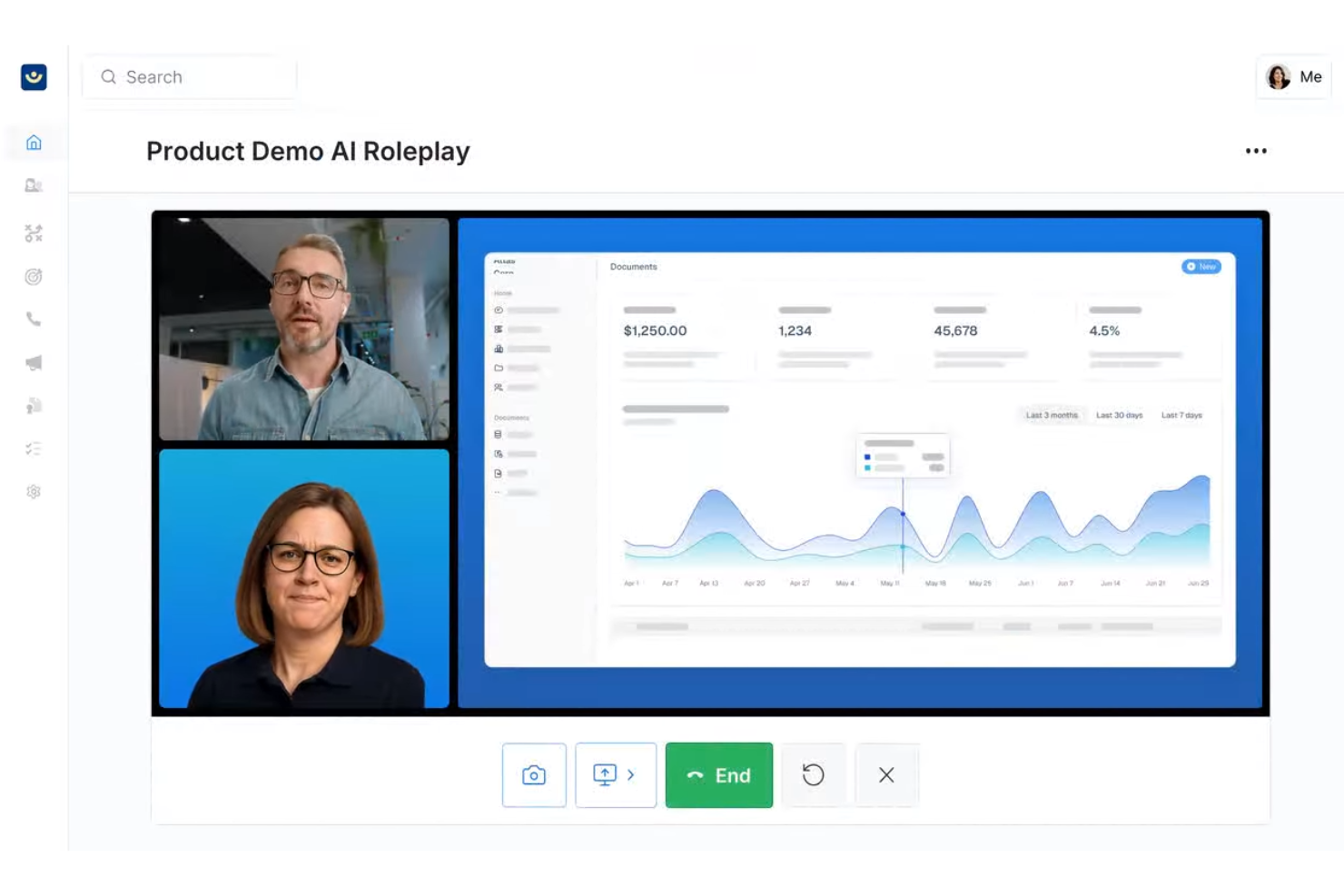
Exec is an AI-driven training platform designed to elevate your team's skills in high-stakes conversations. It appeals to sales professionals and organizational leaders seeking to bridge skill gaps and foster continuous feedback. By focusing on personalized practice and measurable improvement, Exec addresses challenges like skill development and performance tracking in a straightforward and impactful manner.
Why I Picked Exec
I picked Exec for its unique approach to sales training, particularly its use of personalized AI roleplays. This feature allows your team to engage in realistic simulations, enhancing their conversational skills without the pressure of live interactions. Additionally, Exec's real-time interaction analysis provides immediate insights, helping you identify areas for improvement. With its focus on measurable improvement tracking, Exec ensures that your team not only learns but also demonstrates tangible progress.
Exec Key Features
In addition to its standout features, you’ll find several others that enhance its value as a sales training tool:
- Custom Coaching Programs: Tailor your team's training experience with programs designed to meet specific sales goals and challenges.
- Real-Time Performance Tracking: Gain insights into your team's progress and identify areas for further development with up-to-the-minute data.
- Advanced User Provisioning: Manage and organize your team effectively, ensuring everyone has access to the right training resources.
- Call Scoring: The platform can connect to real call recordings and score them against your methodology so you link practice to performance.
Exec Integrations
Integrations include integration with LMS systems, CMS platforms, HRIS tools, and LXP platforms — and an API is available for custom integrations.
Pros and Cons
Pros:
- Custom coaching programs tailor training to specific needs
- Real-time feedback helps track and improve performance
- AI roleplays offer realistic sales conversation practice
Cons:
- Primarily optimized for English-speaking organizations, limiting global reach.
- Initial setup and scenario design can be complex and time-consuming.
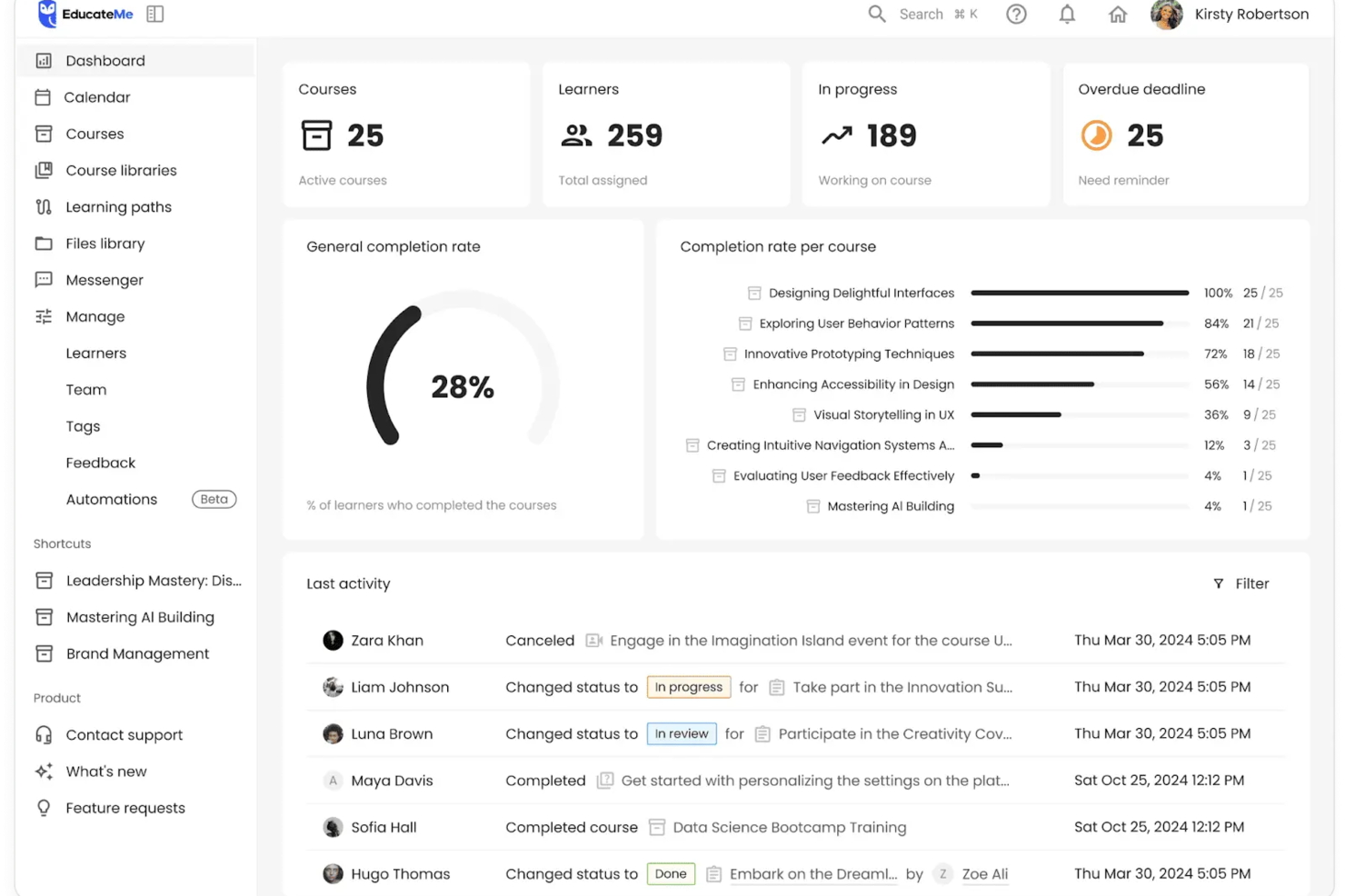
EducateMe LMS is an AI-driven platform designed to revolutionize how your sales team learns and grows. Tailored for corporations, academies, and training agencies, this versatile tool tackles the challenges of employee training, onboarding, and compliance with innovative features like AI roleplay coaching and seamless integrations. By offering customizable learning paths and interactive simulations, EducateMe LMS empowers your team to enhance their skills and drive real performance improvements.
Why I Picked EducateMe LMS
I picked EducateMe LMS for its ability to transform sales training through AI roleplay coaching, which allows your team to engage in realistic sales scenarios and refine their skills in a risk-free environment. This feature, combined with its interactive simulations, provides an immersive learning experience that can significantly improve sales techniques. Additionally, the platform's seamless CRM integration ensures that all sales data and training progress are centralized, making it easier for your team to stay informed and aligned with organizational goals.
EducateMe LMS Key Features
In addition to its AI-driven capabilities, EducateMe LMS offers several other valuable features:
- Interactive Program Builder: This tool allows you to create engaging and dynamic training programs tailored to your team's needs.
- Live Event Hosting with Zoom Integration: You can run live training sessions, manage participants, and record sessions automatically.
- Centralized Knowledge Hub: This feature provides easy access to a wealth of resources, ensuring your team can find the information they need when they need it.
- SCORM Compatibility: This allows for easy integration of various media types and ensures that your training materials are always up-to-date and accessible.
EducateMe LMS Integrations
Integrations include Zoom, Salesforce, HubSpot, Slack, Microsoft Teams, Google Workspace, Dropbox, LinkedIn Learning, Asana, and Trello.
Pros and Cons
Pros:
- Customizable learning paths align training with sales roles
- Real-time analytics track onboarding progress and performance gaps
- AI roleplay simulations support practical sales skill development
Cons:
- Advanced configuration may require initial setup time
- Pricing may be steep for some


SkyPrep offers a unique selling point in its ability to efficiently track and analyze employee interactions with the platform, providing valuable insights into onboarding metrics such as visitor numbers, bounce rates, and traffic sources.
Why I picked SkyPrep: I chose SkyPrep due to its reputation for a user-friendly interface and the ability to customize content to fit the specific needs of a sales team. Its robust reporting and analytics features also provide valuable insights into the effectiveness of the training programs. SkyPrep stands out because it supports automation of training processes and distance learning, which can significantly improve employee productivity.
Skyprep Standout Features & Integrations
Features that stand out are the course creation tool and automated training. The course builder is really intuitive and lets you create engaging courses with ease. You can add videos, quizzes, and interactive content to make your courses more engaging. Plus, it has a great tracking feature that lets you monitor your employees' progress and performance. This is super helpful for identifying areas where your employees might need additional training.
The automated training feature helps you set up automated training paths for your employees, which can save you a ton of time. Once you set it up, SkyPrep will automatically assign courses to your employees based on their role, department, or any other criteria you set. It's a great way to ensure that your employees are getting the training they need without having to manually assign courses.
Integrations include Okta, SAML, onelogin, Stripe, PayPal, Shopify, ADP, Workday, Salesforce, HubSpot, Zoom, GoTo, Webex, G Suite, Office 365, Twilio, iorad, UKG, and more.
Pros and Cons
Pros:
- Integrated webinar posts
- Ecommerce tools to monetize courses
- Keeps your content as you upgrade plans
Cons:
- No certificate auto generation
- Cannot save progress with certain types of documents


Monday sales CRM is a digital platform designed to centralize client interactions, automate sales workflows, and offer comprehensive visibility into sales deals. It distinguishes itself with a focus on customization, allowing users to tailor the system to their specific sales management needs through account management, CRM integrations, lead management, and email tracking capabilities.
Why I Picked monday sales CRM: "I chose Monday sales CRM for sales training software because of its high customizability and intuitive design, which allows for managing all sales-related activities in one centralized location. What makes it stand out is its extensive automation capabilities and comprehensive data visualization options, which provide clear insights into deal progress, expected revenue, and team performance. I believe Monday sales CRM is best for customizable sales management due to its ability to adapt to various sales processes, and its integration with email for streamlined client communication.
monday sales CRM Standout Features & Integrations
Features include lead and contact management, customizable pipelines, sales automation, performance tracking, integration with various tools, advanced reporting and analytics, email tracking and synchronization, task and project management, mobile app support, and customizable templates and forms.
Integrations include Slack, Google Drive, Gmail, Google Calendar, Jira, GitHub, Trello, Dropbox, Typeform and many more, accessible through a paid plan with Zapier.
Pros and Cons
Pros:
- Advanced reporting and analytics
- Robust integration capabilities
- High customizability & automation-friendly
Cons:
- Slight learning curve
- Limited native email marketing features
New Product Updates from monday CRM

monday CRM Introduces Activity Tracker Widget
monday CRM introduces an Activity Tracker widget for real-time visibility into activities. This update helps users monitor performance and prioritize work more effectively. For more information, visit monday CRM's official site.


iSpring LMS is a cloud-based learning management system (LMS) designed to facilitate corporate training and eLearning initiatives. It provides a platform for creating, delivering, and tracking online courses, quizzes, and interactive learning experiences.
Why I picked iSpring LMS: iSpring LMS is designed to support sales teams by offering impactful training that can be accessed anytime, anywhere. The platform includes eLearning authoring tools that are suitable for onboarding new sales representatives and delivering compliance training, product training, and sales training. iSpring Learn also provides reports to track and analyze the effectiveness of training.
iSpring LMS Standout Features and Integrations
Standout features include tailored training solutions for industries such as healthcare, manufacturing, and finance, smart training management to automate routine tasks, 360-degree performance appraisal, and employee engagement tools.
Integrations include Microsoft Teams, Zoom, Salesforce, Outlook Calendar, Shopify, ProctorEdu, OrangeHRM, BambooHR, and PowerBI.
Pros and Cons
Pros:
- Provides native iOS & Android apps for offline access
- Great value for money
- Easy to use with friendly features
Cons:
- Lacks gamification elements
- Limited custom user profile fields
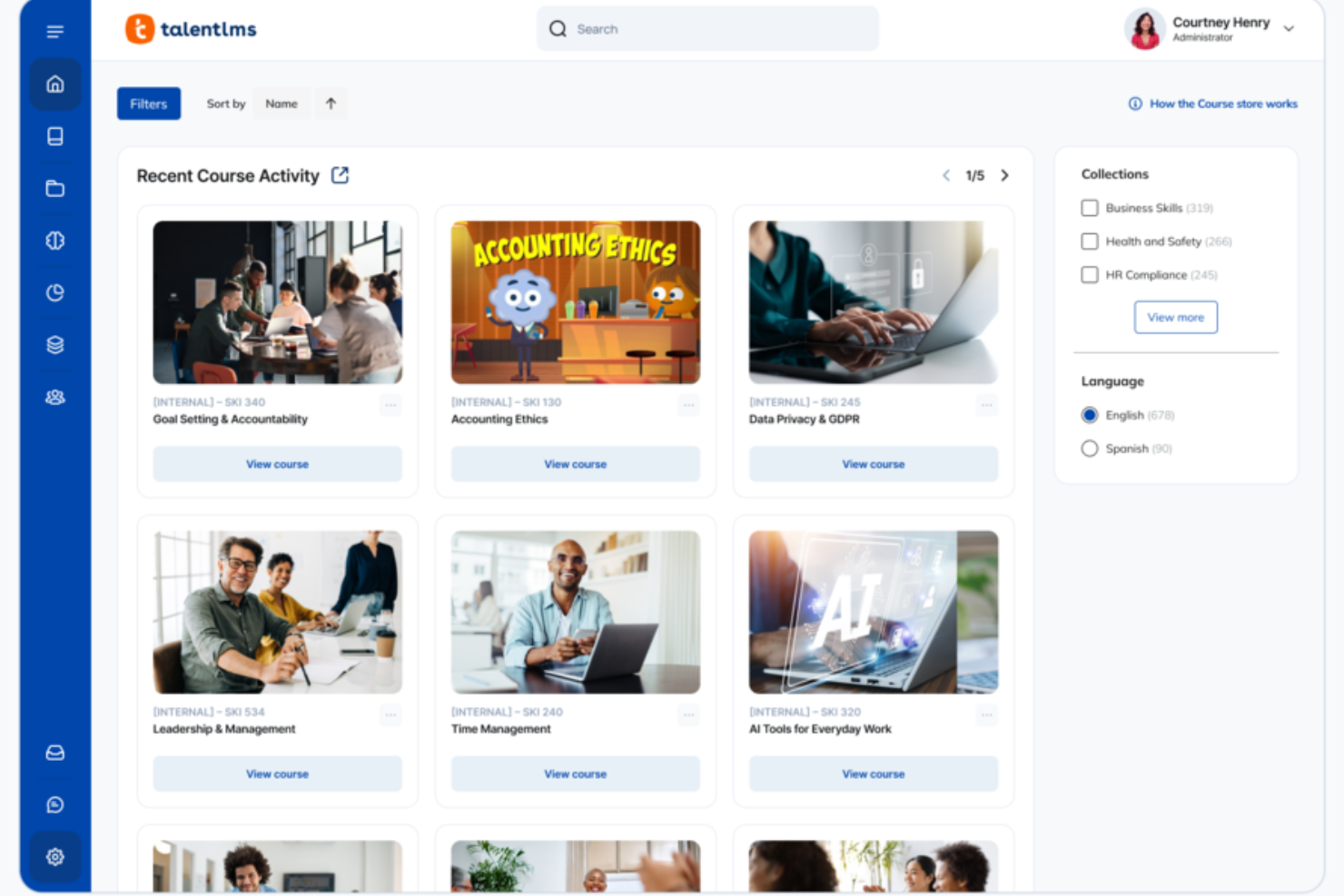
When your sales team needs training that keeps pace with shifting products, positioning, and customer expectations, TalentLMS gives you a flexible way to build and deliver learning that reps actually want to complete. You get a platform that helps you turn product updates, selling frameworks, and role-plays into structured training that supports both new hires and seasoned sellers. It’s designed to help you keep every rep aligned, confident, and ready to perform in fast-moving sales cycles.
Why I Picked TalentLMS
I picked TalentLMS because it makes scaling sales training easy through tools that support structured learning paths, automated onboarding, and targeted content delivery to different sales roles. You can create courses with multimedia demos, playbooks, product walkthroughs, and SCORM packages, and then connect them in guided paths that map directly to SDR, AE, or sales engineer responsibilities. I also appreciate the AI content and test creation tools, which help you turn sales messaging, objection-handling scripts, and competitive insights into polished modules and assessments quickly. And with automation rules and real-time reporting, you immediately see who’s ready to pitch, who needs coaching, and where knowledge gaps could impact revenue performance.
TalentLMS Key Features
In addition to the structured paths and AI-powered course building tools that support sales teams well, you get several features that make repeatable sales training easier for your whole organization:
- Gamification: Engaging elements like leaderboards and badges motivate your team to complete training modules and achieve their goals.
- Mobile Accessibility: Your team can access training materials anytime, anywhere, making it convenient for on-the-go learning.
- TalentLibrary™: Offers over 1,000 courses focused on essential sales skills, providing a comprehensive resource for continuous learning.
- Skills Management: Lets you organize and track training by specific sales skills—like prospecting, product knowledge, negotiation, or demo certification.
TalentLMS Integrations
Integrations include Salesforce, Zoom, Slack, Shopify, WordPress, GoToMeeting, Mailchimp, LinkedIn Learning, Google Analytics, and BambooHR.
Pros and Cons
Pros:
- Gamification boosts engagement for competitive sales teams.
- Role-based groups deliver tailored sales training by segment.
- AI tools speed up creating product and sales skills content.
Cons:
- Large multimedia files may require external hosting solutions.
- Video practice and role-play tools aren’t built in natively.
New Product Updates from TalentLMS
TalentLMS Introduces Save Course Feature
TalentLMS now lets learners bookmark their courses so they can easily revisit them at any time. For more information, visit TalentLMS's official site.


Absorb LMS is a comprehensive learning management system designed to accelerate learning and drive results, with a focus on all learning and development needs in one place. The tool is best for learner engagement and agility, as it offers features such as compliance training, learner motivation, upskilling and reskilling, productivity, social learning, and mobile learning, catering to a wide range of learning needs and ensuring high engagement and agility for learners.
Why I picked Absorb: I chose Absorb LMS after comparing its comprehensive features and use cases, which make it a versatile and comprehensive option for training sales teams. What makes Absorb LMS stand out is its focus on learner engagement and agility, which are critical for the fast-paced nature of sales environments. I believe Absorb LMS is the best tool for learner engagement and agility because it enhances the learner experience and caters specifically to the needs of sales training.
Absorb LMS Standout Features and Integrations
Features include content creation, user administration, AI-driven recommendations, eCommerce, analytics, instructor-led training, and performance tracking.
Integrations are available natively with multiple apps, including BambooHR, Ceridian Dayforce, Cisco Webex, Namely, Oracle Peoplesoft, Salesforce, Workday, and Zoom.
Pros and Cons
Pros:
- Offline and online learning
- Great customization and localization options
- Responsive customer support
Cons:
- Search filters are not very specific
- System has a learning curve
New Product Updates from Absorb LMS
Absorb LMS Improves Analyze Performance With Faster Sync and Data Model Updates
Absorb LMS introduces improved sync frequency in Analyze Essentials and a streamlined Analyze BI/Direct data model. These updates enhance reporting speed, improve data reliability, and strengthen overall analytics performance. For more information, visit Absorb LMS's official site.
 .
.

Attention is a sales conversational platform that leverages generative AI to enhance sales processes and performance. The tool provides real-time coaching, automates CRM data entry, and drafts intelligent follow-up emails based on conversations.
Why I picked Attention: I like the fact that Attention offers real-time sales coaching capabilities. Unlike traditional post-call reviews, Attention provides actionable intelligence during the call itself, allowing sales reps to adjust their strategies on the fly. This immediate feedback is crucial for developing effective sales reflexes and improving the overall quality of sales interactions. Additionally, the software includes real-time battlecards and live talktracks, which guide sales reps on what to say and how to engage prospects more effectively.
Attention Standout Features and Integrations
Standout features include insights from customer conversations, KPI tracking, automated CRM updates, follow-up email automation, cross-call insights, deal analysis, sales messaging, and custom triggers so that Attention's AI listens to what matters most to you.
Integrations include Zoom, Meets, Teams, Salesforce, HubSpot, Gmail, Outlook, Slack, and Zapier.
Pros and Cons
Pros:
- Personalized follow-up emails
- Real-time sales coaching using AI
- Provides actionable insights
Cons:
- Custom integrations may require additional assistance
- The tool's heavy reliance on AI may not suit all users

Trainual
Best sales training program with pre-built learning templates

This online training content is an app that strives to make it easier to build training manuals for every aspect of your organization, including salespeople, customers, interns, contractors, and partners. You can use this tool to organize operational knowledge, standardize operating procedures, create scalable, repeatable processes, and assign sales courses with built-in accountability.
Why I picked Trainual: I’ve included Trainual’s online courses on this list because of their massive library of free templates. You can build a new course on-demand, based on templates for categories like processes, policies, people, and company to save time when authoring new training protocols for the real world.
Trainual Standout Features and Integrations
Standout features include built-in AI capabilities that can write training content for you; collection-based organization for departments, teams, and locations; and plenty of support with guides and podcasts, as well as assistance from a robust community of certified consultants.
Integrations include Asana, Basecamp, DropBox Business, Gmail, Google Docs, Google Drive, Rippling, Salesforce, Slack, and WordPress. Trainual connects with Zapier for over 1,000 integrations.
Pros and Cons
Pros:
- Personalized dashboard for sales representatives
- Easy to search course history
- AI-assisted course and lesson writing
Cons:
- Formatting in course creation can be complex
- Frequent updates to admin navigation


Guidde is a generative AI platform for your team to create sales training videos and how-to guides efficiently. By automating the capture, editing, and distribution of training videos, it generates step-by-step guides in multiple formats that customers and new hires will understand. It is as easy to use as editing presentation slides.
Why I Picked Guidde: Guidde's AI-powered video documentation capabilities make it a valuable tool for sales training. Its browser extension and desktop app allow your team to capture workflows, and the AI engine automatically translates these actions into detailed step-by-step guides. As a result, your sales team can access up-to-date, consistent training content that enhances their skills and knowledge.
Additionally, Guidde offers intuitive editing tools that let you enhance video content with annotations, voiceovers, text-to-voice, multiple calls to action (CTAs), and other elements to improve clarity and engagement. The platform supports instant sharing of created content through various formats, including links, MP4, PDF, and embeddable HTML, making it easy to distribute training materials to your team.
Guidde Standout Features & Integrations
Features include customizable branding options that allow you to incorporate your company's logos, colors, and brand elements into video guides and documentation, ensuring consistency across all training materials. The platform also offers AI-generated voiceovers in 100+ languages and accents, enabling professional narration without the need for human intervention. Furthermore, Guidde provides real-time analytics and reporting, giving you insights into how your team engages with the training content and identifying areas for improvement.
Integrations include Salesforce, Google Drive, Microsoft OneDrive, Slack, Zoom, Zendesk, ServiceNow, Chrome, Confluence and more.
Pros and Cons
Pros:
- Multilanguage support
- Includes interactive elements and professional voiceovers
- Utilizes AI for automatic storyline creation
Cons:
- Some users may find the editing features slightly restrictive
- Could offer more integrations
Other Sales Training Software
While I created a pretty comprehensive shortlist of the top tools above, there are a few other options that may be worth checking out. Here is my brief assessment of what they can do for you.
- Continu
For deep integrations with your current tech stack
- MindTickle
For data-driven sales readiness to close deals
- 360Learning
For building a culture of collaborative learning
- SmartWinnr
For sales team engagement through gamification
- Guru
For AI-driven knowledge sharing
- Lessonly by Seismic
For improving lessons based on learner engagement and feedback
- Allego
For collaborating virtually across time zones
- Second Nature AI
For AI-driven training sessions and coaching
- SalesHood
For improving team productivity and engagement for large organizations
- Wonderway
For training suggestions based on your employee skills
- Deel HR
For tailored automated sales training
- Coassemble
Sales training software for onboarding remote sales reps
- Spekit
For learning how to use Salesforce with integration-specific topics
- Auzmor Learn
Global LMS and training platform available in over 30 languages
- Workramp
All-in-one LMS for employee and customer learning
- LearnUpon LMS
For putting learners first for a personalized training experience
- Gradual
For replacing boring training with personalized microlearning
- Master-O
Sales training software for frontline workforce readiness
- Zenarate AI Coach
Online sales training through AI simulation courses
- Bites
For industry specific training courses, including food, beverage, and retail


Related Sales Training Software Reviews
If you still haven't found what you're looking for here, check out these tools closely related to sales training software that we've tested and evaluated.
- CRM Software
- Sales Software
- Lead Management Software
- Business Intelligence Software
- Contract Management Software
- Revenue Management System
Selection Criteria For Sales Training Software
Through meticulous research and personal testing, I've pinpointed essential functionalities and use cases that are critical when choosing a sales training platform. These elements ensure the software not only addresses immediate learning needs but also fosters long-term sales success.
Core Sales Training Software Functionality - 25% of total weighting score
To be considered for inclusion on my list of the best sales training software, the solution had to support the ability to fulfill common use cases:
- Providing an engaging and interactive learning experience for sales personnel.
- Tracking individual progress and identifying areas for improvement.
- Offering certification or accreditation to validate training completion and competency.
- Integrating seamlessly with other key business systems to enhance learning application and relevance.
- Adapting training content to align with specific sales roles, products, or market contexts.
Additional Standout Features - 25% of total weighting score
- AI-driven personalization that tailors training paths based on individual performance and needs.
- Advanced analytics to provide deep insights into training effectiveness and ROI.
- Social learning features that encourage collaboration and knowledge sharing among peers.
- Gamification elements to boost engagement and motivation.
- Robust content libraries with industry-specific resources or the ability to import external content.
Usability - 10% of total weighting score
- Intuitive design that facilitates easy navigation and quick access to key features.
- Clean, user-friendly interfaces that enhance the learning experience without overwhelming users.
- Responsive design ensuring compatibility across various devices and platforms.
Onboarding - 10% of total weighting score
- Comprehensive onboarding resources to help users maximize the software's value from day one.
- Interactive tutorials or demos that highlight essential features and functionalities.
- Accessible support during initial setup and deployment to ensure smooth integration into daily operations.
Customer Support - 10% of total weighting score
- Responsive support team available through multiple channels.
- Proactive assistance and resources, including FAQs, forums, or knowledge bases.
- Commitment to customer success, evident in timely and helpful support interactions.
Value For Money - 10% of total weighting score
- Competitive pricing that reflects the software's features and market position.
- Clear pricing tiers that cater to different organizational sizes and needs.
- Positive cost-benefit ratio, ensuring a worthwhile investment for your training objectives.
Customer Reviews - 10% of total weighting score
- Analysis of diverse user feedback to gauge overall satisfaction and effectiveness.
- Attention to comments on specific features, usability, and customer support.
- Consideration of how well the software meets users' training and development goals.
In choosing sales training software, focus on solutions that provide engaging, relevant, and measurable training experiences. A platform that aligns with these criteria will not only enhance your team's skills but also contribute significantly to your organization's sales success and revenue growth.
How To Choose Sales Training Software
With so many different sales training software solutions available, it can be challenging to make decisions on what tool is going to be the best fit for your needs.
As you're shortlisting, trialing, and selecting sales training software, consider the following:
- What problem are you trying to solve - Start by identifying the sales training software feature gap you're trying to fill to clarify the features and functionality the tool needs to provide.
- Who will need to use it - To evaluate cost and requirements, consider who'll be using the software and how many licenses you'll need. You'll need to evaluate if it'll just be the revenue operation leaders or the whole organization that will require access. When that's clear, it's worth considering if you're prioritizing ease of use for all or speed for your sales training software power users.
- What other tools it needs to work with - Clarify what tools you're replacing, what tools are staying, and the tools you'll need to integrate with, such as accounting, CRM, or HR software. You'll need to decide if the tools will need to integrate together or if you can replace multiple tools with one consolidated sales training software.
- What outcomes are important - Consider the result that the software needs to deliver to be considered a success. Consider what capability you want to gain or what you want to improve, and how you will be measuring success. For example, an outcome could be the ability to get greater visibility into performance. You could compare sales training software features until you’re blue in the face but if you aren’t thinking about the outcomes you want to drive, you could be wasting a lot of valuable time.
- How it would work within your organization - Consider the software selection alongside your workflows and delivery methodology. Evaluate what's working well and the areas that are causing issues that need to be addressed. Remember every business is different — don’t assume that because a tool is popular that it'll work in your organization.
Trends In Sales Training Software For 2026
Sales training software is rapidly transforming, reflecting broader shifts in technology, learning methodologies, and sales strategies. These changes are driven by the need to optimize sales performance and revenue operations in an increasingly complex and competitive market. Below are key trends and developments shaping the future of sales training software:
Integration with Cutting-Edge Technologies:
- Enhanced utilization of AI for personalized learning experiences, adapting content and pacing to individual learner needs and progress.
- Increased incorporation of VR and AR to simulate real-world sales scenarios, offering immersive, hands-on training environments.
Evolving Features:
- Growth in adaptive learning systems that dynamically adjust to learners' performance, providing tailored content for more effective skill development.
- Expansion of social learning features, facilitating peer-to-peer knowledge exchange and collaborative learning within sales teams.
Novel and Unusual Functionality:
- Emergence of real-time feedback and coaching through AI, offering instant analysis and advice during training exercises.
- Development of predictive analytics within training platforms to identify future learning paths and potential skill gaps based on evolving sales trends.
Most Important and In Demand Features:
- Comprehensive analytics and reporting capabilities, enabling organizations to measure training impact on sales performance and ROI effectively.
- Mobile-first design, ensuring sales personnel can access training materials and engage with learning modules from any device, aligning with modern workstyles.
Declining Features:
- Traditional, linear training modules are being overshadowed by more interactive, engaging, and contextually relevant learning experiences.
- Less emphasis on purely informational content, with a shift towards practical, application-focused training that directly correlates with sales outcomes.
Sales training software is increasingly focused on delivering personalized, immersive, and practical learning experiences that cater to the evolving needs of sales professionals and the dynamics of modern sales environments. For revenue operation leaders, staying abreast of these trends and selecting software that embodies them is crucial to nurturing a proficient, adaptable, and high-performing sales team.
What Is Sales Training Software?
Sales training software is a tool that helps you build, deliver, and track lessons and practice for your sales team. Sales managers and trainers use it to teach new hires or keep experienced reps sharp, whether it’s about overcoming objections, mastering your products, or learning CRM basics. It gives salespeople a way to practice real scenarios, get feedback, and pick up skills fast, so they’re always ready to sell and hit their goals.
Features Of Sales Training Software
Sales training software can dramatically enhance the efficiency and effectiveness of your sales force, directly influencing your organization's bottom line. Here are the most important features to look for in sales training software to optimize your revenue operations:
- Interactive Learning Modules: Engage users and enhance retention of sales techniques and information. Interactive modules ensure that training is not only more engaging but also more effective in instilling vital sales skills.
- Customizable Content: Tailor training materials to your specific products, services, and sales strategies. Customizable content ensures relevance, which is crucial for effective learning and application in real-world scenarios.
- Analytics and Reporting: Track progress and measure the impact of training on sales performance. Insightful analytics help identify successful modules and areas needing improvement, aligning training efforts with revenue goals.
- Mobile Accessibility: Allow team members to access training anywhere, anytime. Mobile access caters to modern workstyles and increases the likelihood that sales personnel will engage with training materials.
- Integration Capabilities: Seamlessly connect with your CRM or other business systems. Integration ensures that training insights are incorporated into broader sales strategies and operations.
- Collaborative Tools: Enable sharing of best practices and foster a learning community. Collaboration boosts motivation and enhances the learning experience, leveraging collective knowledge.
- Scalability: Adapt to your team's size and evolving needs. A scalable solution grows with your organization, providing consistent training value over time.
- User-Friendly Interface: Ensure ease of use to encourage widespread adoption. A straightforward, intuitive platform minimizes learning curves and maximizes engagement.
- Certification and Badging: Offer recognition for completed training and achieved competencies. Certification motivates sales personnel and provides clear benchmarks for skill development.
- Continuous Learning Support: Provide resources for ongoing skill enhancement and updates. Continuous learning support ensures that your sales team remains adept in an ever-evolving sales landscape.
Selecting sales training software with these features will significantly bolster your sales team's capabilities and directly contribute to improved revenue operations. By investing in comprehensive, user-friendly, and integrated training solutions, you can ensure your sales force is equipped to meet and exceed sales targets effectively.
Benefits Of Sales Training Software
By offering structured, accessible, and comprehensive training, sales training software plays a crucial role in developing a skilled, knowledgeable, and motivated sales force. Here are five primary benefits that sales training software provides to users and organizations:
- Enhanced Skill Development: Facilitates targeted skill-building within the sales team. Sales training software helps users systematically acquire the competencies needed to excel in their roles, directly impacting their performance and productivity.
- Consistent Training Experience: Delivers uniform content across the organization. By standardizing the training process, the software ensures that all team members receive the same high-quality instruction, fostering a cohesive and informed sales force.
- Measurable Impact on Performance: Enables the tracking of training progress and its correlation with sales outcomes. This feature allows organizations to quantify the effectiveness of their training programs and make data-driven decisions to optimize them.
- Flexible and Accessible Learning: Offers training that is accessible anytime and anywhere, accommodating diverse schedules and learning preferences. This flexibility ensures that all team members can engage with the training material at their convenience, leading to higher completion rates and more consistent learning outcomes.
- Continuous Learning and Improvement: Supports ongoing education and skill refinement. Sales training software provides resources for continual learning, allowing sales personnel to stay updated with the latest strategies, market trends, and product knowledge.
Costs & Pricing For Sales Training Software
Selecting the right sales training software is a critical decision that can significantly influence the effectiveness and efficiency of your sales team's development. With a variety of plan options available, understanding the features and pricing that best align with your organization's needs is essential. Here is an overview of common plan options you might encounter in the sales training software market:
Plan Comparison Table For Sales Training Software
| Plan Type | Average Price | Common Features Included |
|---|---|---|
| Basic | $10 - $30 per user/month | Access to standard training modules, progress tracking |
| Professional | $30 - $70 per user/month | Advanced analytics, additional modules, customization options |
| Enterprise | $70 - $150+ per user/month | Full feature access, dedicated support, enterprise integration |
| Free | $0 | Limited access to training content, basic tracking features |
When choosing a sales training software plan, consider the specific training needs of your sales team and the scalability of the solution. Opt for a plan that not only fits your current size and budget but also aligns with your long-term training objectives, ensuring a valuable investment in your team's development and success.
Sales Training Software Frequently Asked Questions
If you’re still trying to wrap your head around sales training software and how it might help your sales process, check out the frequently asked questions below.
What are the 4 types of sales training?
Are there analytics features to measure training effectiveness?
How does sales training software integrate with existing sales tools?
How does sales training software track individual progress?
Why should I use sales training software?
What are five types of sales training software?
Additional Revenue Operations Software
Training your team shouldn’t feel like a chore, so here are a few articles to provide you with unique insights into this part of your operations. You’ll also find that we have comprehensive reviews of other essential sales tools, including:
- Sales Acceleration Software
- Sales Engagement Software
- Sales Automation Software
- Field Sales Software
- Sales Automation Software
What’s Next:
If you're in the process of researching sales training software, connect with a SoftwareSelect advisor for free recommendations.
You fill out a form and have a quick chat where they get into the specifics of your needs. Then you'll get a shortlist of software to review. They'll even support you through the entire buying process, including price negotiations.