

10 Best Sales Engagement Software Reviewed For 2026

10 Best Sales Engagement Software Shortlist


With so many different sales engagement software available, figuring out which is right for you is tough. You know you want your sales teams to engage with leads and customers in a more organized and strategic way but need to figure out which tool is best. I've got you! In this post I'll help make your choice easy, sharing my personal experiences using dozens of different sales engagement tools with various teams and accounts, with my picks of the best sales engagement software.
Why Trust Our Software Recommendations
Our reviews reflect our independent judgment—not a sales pitch. Learn how we stay transparent.
For this guide, we evaluated tools using hands-on testing and independent research, scoring tools using our selection criteria.
Our reviews reflect our human editorial judgment, not a sales pitch.
| Tool | Best For | Trial Info | Price | ||
|---|---|---|---|---|---|
| 1 | Best for unified B2B data and engagement | Free plan + 14-day free trial + free demo available | From $49/user/month (billed annually) | Website | |
| 2 | Best for customizable automations for your sales pipeline | 14-day free trial + free demo available | From $12/seat/month (billed annually) | Website | |
| 3 | Best for personalized engagement strategies | 14-day free trial | From $40/user/month (billed annually) | Website | |
| 4 | Best for providing engagement analytics | Free plan + free demo available | From $350/month (billed annually) | Website | |
| 5 | Best for Salesforce-native sales engagement | 14-day free trial | From $49/month | Website | |
| 6 | Best modular sales engagement platform | Free demo available | Pricing upon request | Website | |
| 7 | Best with automated lead nurturing | Not available | Pricing upon request | Website | |
| 8 | Best for cold email automation | Free 7-day trial available | From $25/month | Website | |
| 9 | Best for field sales teams | Free plan + free demo available | From $9/user/month | Website | |
| 10 | Best for AI-driven knowledge management | Free demo available | Pricing upon request | Website |


Best Sales Engagement Software Reviews
Here, you can find a detailed overview of each of the best sales engagement software that made it to my short list. I’ve added details on their best use cases and standout features and included a screenshot of the user interface to give you a sense of each platform.

Best for unified B2B data and engagement
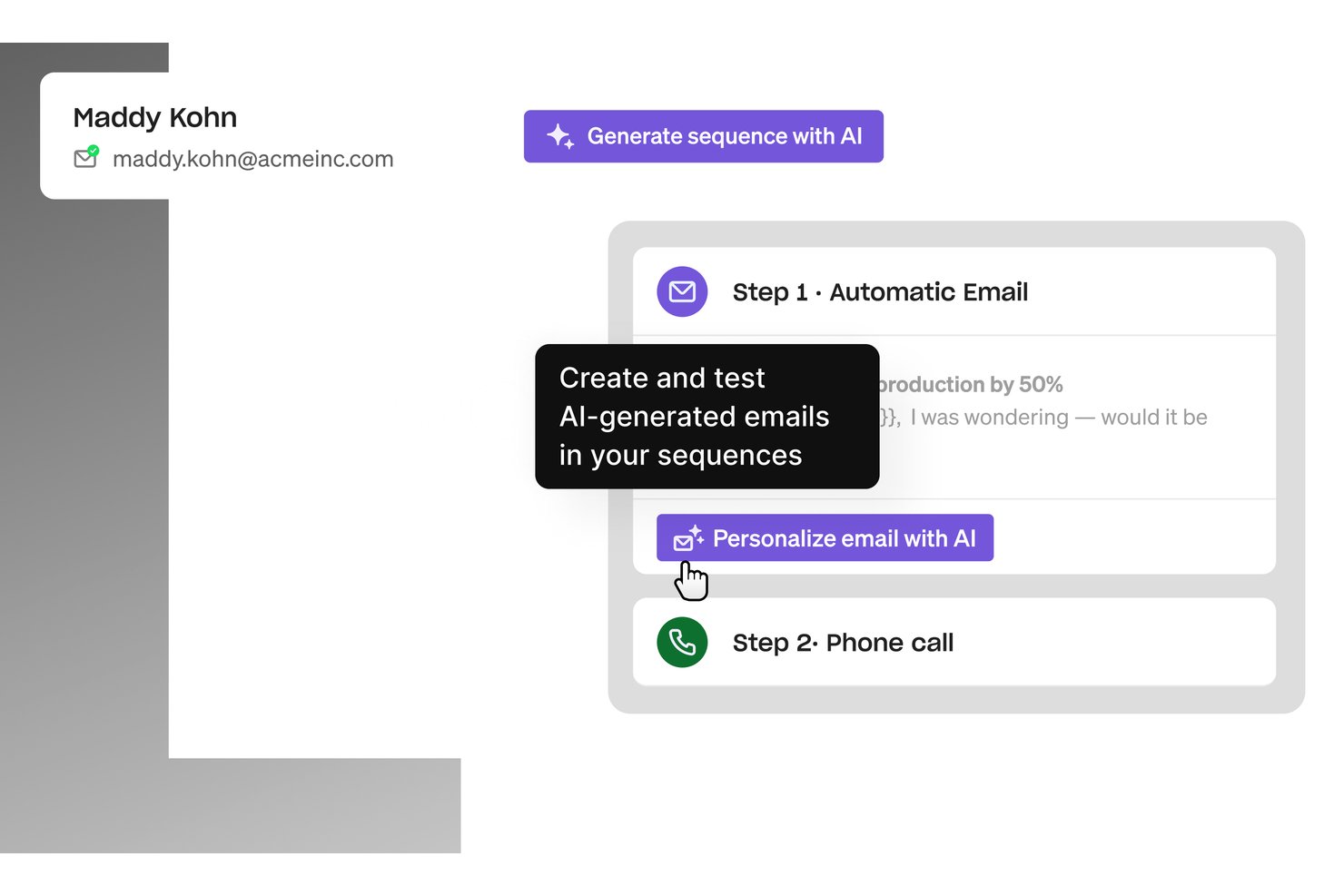
Apollo.io is a sales engagement platform that pairs a 210M+ contact B2B database with multichannel sequencing, a built-in dialer, and AI-assisted email outreach—all from a single interface.
Who Is Apollo.io Best For?
Apollo.io suits small to midsize B2B sales teams—particularly SDR-heavy orgs—looking to consolidate prospecting data and outreach tooling into one platform instead of managing multiple vendors.
Why I Picked Apollo.io
Apollo.io earns its spot on my shortlist because it collapses two tools into one: a 210M+ contact database and a full sales engagement suite. I like that my team can pull a verified contact, drop them into a multichannel sequence, and dial them directly from the same interface, with no CSV exports or tab-switching required. The Parallel Dialer is particularly impressive. My team can queue and connect with 100+ prospects per hour while Apollo auto-logs every call to the CRM.
Apollo.io Key Features
- AI-powered email drafting: Generate and personalize outreach emails with real-time AI recommendations and message analysis.
- Chrome extension for LinkedIn prospecting: Source verified contact data directly from LinkedIn and sync leads with CRM records instantly.
- Intent and website visitor data: Surface in-market prospects using Bombora-powered intent signals and identify anonymous website visitors.
- Role and permission management: Assign user roles, manage access levels, and monitor activity with audit logs for structured governance.
Apollo.io Integrations
Apollo.io offers native integrations with Salesforce, HubSpot, Microsoft Dynamics 365, Outreach, Marketo, and Slack. It also connects with Zapier and provides an API for custom integrations.
Pros and Cons
Pros:
- AI email writing speeds up outreach creation
- Parallel dialer connects 100+ prospects per hour
- Built-in B2B database eliminates separate data tools
Cons:
- Email deliverability issues reported at high volumes
- Data accuracy inconsistent outside North America

Best for customizable automations for your sales pipeline

Monday sales CRM is a fully customizable tool that centralizes client communication, automates sales processes, and provides a full overview of each deal.
Why I Picked monday sales CRM: monday sales CRM offers high customizability and user-friendly interface, which allows sales teams to centralize all their activities in one place. What makes it different is its extensive automation capabilities and customizable dashboards, which provide a comprehensive overview of sales processes without the need for extensive technical knowledge.
Monday sales CRM is best for customizable sales automation because it empowers teams to tailor the platform to their specific sales cycle needs. Its low-code/no-code framework means that even those without development skills can easily automate repetitive tasks and visualize data in a way that makes sense for their business, making it a versatile tool for managing sales engagements.
monday sales CRM Standout Features & Integrations
Features include lead and contact management, customizable pipelines, sales automation, performance tracking, integration with various tools, advanced reporting and analytics, email tracking and synchronization, task and project management, mobile app support, and customizable templates and forms.
Integrations include Slack, Google Drive, Gmail, Google Calendar, Jira, GitHub, Trello, Dropbox, Typeform and many more, accessible through a paid plan with Zapier.
Pros and Cons
Pros:
- Advanced reporting and analytics
- Robust integration capabilities
- High customizability & automation-friendly
Cons:
- Slight learning curve
- Limited native email marketing features
New Product Updates from monday CRM

monday CRM Adds Meta Conversions API Integration
monday CRM now lets you connect Meta Conversions API and sync lead status back to Meta, improving targeting and conversions via a new Meta integration automation recipe. For more information, visit monday CRM's official site.

Best for personalized engagement strategies

CRM Creatio is a no-code platform designed to automate business processes across marketing, sales, and service functions. It is intended for businesses seeking to enhance their customer relationship management capabilities with tools that offer visibility into customer interactions and sales processes.
Why I picked CRM Creatio: It offers no-code customization, which allows you and your team to tailor workflows without needing technical skills. You can easily set up automated tasks, manage pipelines, and organize customer interactions to suit different stages of the sales cycle. Furthermore, CRM Creatio’s 360-degree customer view ensures all relevant data, such as past interactions, purchase history, and relationship status, is at your fingertips, so you can create more personalized engagement strategies.
Another key feature is CRM Creatio’s customizable dashboards, which give you immediate access to data on customer behaviors, sales trends, and team performance metrics. This helps you keep an eye on what’s working and adjust strategies as needed. The platform's focus on user-defined workflows also means you can quickly adapt it to meet shifting business needs without the hassle of coding.
CRM Creatio Standout Features and Integrations
Features include sales forecasting, contact management, KPI monitoring tools, collaboration tools, reporting and analytics, lead and opportunity management, marketing automation, and order management.
Integrations include Accelo, Act!, ActiveCampaign, Acumatica, Adobe Analytics, Asana, Microsoft Exchange, Excel, Mailchimp, HubSpot Marketing Hub, Google Calendar, and Tableau.
Pros and Cons
Pros:
- No-code platform
- Good comprehensive view of customers
- Scalable for businesses of different sizes
Cons:
- Customization can be time-consuming
- Data migration may be complex

Dock
Best for providing engagement analytics

Dock is an all-in-one platform designed to enhance various aspects of business operations, with a strong focus on sales and customer onboarding.
Why I picked Dock: As a sales engagement software, Dock stands out with its digital sales room and engagement analytics features. The digital sales room provides interactive, customized spaces that allow sales and revenue teams to engage with leads and nurture the customer journey. It offers personalized content, document sharing, embedded videos, and more.
Dock also offers engagement analytics that provide detailed insights into how potential buyers are interacting in your sales room. This helps teams improve deal forecasting and target leads that are more likely to close. Furthermore, once you close a deal, Dock offers a comprehensive onboarding feature with mutual success plan capabilities to keep your customer involved in the process, which can lead to better retention.
Dock Standout Features and Integrations
Features include customizable templates for standardized processes, custom branding, pricing and order forms, buying signals, dynamic action plans, a flexible workspace editor, secure sharing, and digital signature collection capabilities.
Integrations include irtable, Pandadoc, Typeform, HubSpot, Salesforce, Slack, Zoom, and more.
Pros and Cons
Pros:
- Onboarding success plans for better retention
- Standardized templates that are customizable to your needs
- Insights into engagement within sales rooms
Cons:
- HubSpot and Salesforce integration only available on higher-tier plans
- Learning curve for users unfamiliar with sales rooms
Groove
Best for Salesforce-native sales engagement

Groove is purpose-built for Salesforce users who want deeper visibility into sales activities without leaving their existing CRM ecosystem. It gives sales teams the tools to manage communication, automate workflows, and analyze pipeline activity. With AI-driven insights layered into these workflows, teams can make smarter decisions based on real behavior and outcomes.
Why I Picked Groove
I picked Groove because it acts as an extension of Salesforce rather than a standalone system. All contact data flows two ways, letting your team work in Groove while keeping Salesforce as your single source of truth. You can record and transcribe calls, build automated multi-channel sequences, and track how each deal progresses through the pipeline. Groove also includes revenue intelligence features that highlight risks and opportunities. With integrations like Highspot, you can access AI-driven content recommendations while working deals, helping reps stay efficient and informed.
Groove Key Features
- Call recording & transcription: Capture, review, and analyze conversations.
- Multi-channel workflows: Automate outreach across email, calls, and SMS.
- Pipeline management: Track deals and engagement metrics in one place.
- Automated lead capture: Bring qualified leads directly into your workflows.
- Conversational intelligence: Analyze call patterns to coach and improve rep performance.
Groove Integrations
Integrations include Salesforce, LinkedIn, Google Workspace, Microsoft 365, LinkedIn Sales Navigator, Clari, Highspot, Seismic, Slalom, RevShoppe, and Sendoso.
Pros and Cons
Pros:
- On-demand training
- Vast knowledge base
- Friendly user interface
Cons:
- Steep learning curve
- Not ideal for teams not using Salesforce

Best modular sales engagement platform

Revenue.io is a modular sales engagement software with dialer, conversation guidance, revenue intelligence, and calendar management capabilities.
Why I picked Revenue.io: The platform is divided into various products supporting different functions, with its core functionality being the dialer. The software provides a prioritized list of actions to take for every deal in the sales pipeline. As agents make sales calls, they’re provided with guidance for their conversations. Pre-built templates are available in the platform to guide sales calls, and unique information can be viewed for every prospect.
Users looking for more advanced feature sets can choose from increasing product tiers that include additional modules. AI-powered conversation coaching becomes available, as does multi-channel sales workflows. Among the most advanced features are detailed analytics and revenue intelligence.
Revenue.io Standout Features and Integrations
Features include lead prioritization, activity data capture, high-velocity dialing, real-time conversation guidance, call guidance templates, and action recommendations.
Integrations include ActiveCampaign, Five9, Google Suite, HubSpot, Marketo, Microsoft Teams, Nylas, Outlook, Salesforce, Twilio, Zoom, and 6sense.
Pros and Cons
Pros:
- Friendly interface, easy to learn
- Plenty of how-to videos available
- Great for call-focused sales teams
Cons:
- Analytics only available for advanced plans
- Set pricing tiers, can’t mix and match modules

Best with automated lead nurturing

Salesloft is a sales engagement platform that streamlines sales processes and enhances revenue outcomes for GTM and sales teams. It combines AI-driven insights, workflow automation, and pipeline management to help teams execute more effectively, forecast accurately, and maintain consistent engagement across the buyer journey.
Why I picked Salesloft: Salesloft stands out for its end-to-end approach to sales engagement—bridging activity management, analytics, and deal execution within one platform. The combination of automation (“Cadence”) and insight-driven tools (“Conversations” and “Deals”) enables CROs and RevOps leaders to turn activity data into action, improving predictability and coordination across revenue teams. Its recent merger with Clari further strengthens its forecasting and revenue intelligence capabilities.
Standout features & integrations:
Features include cadence for automating and scheduling sales tasks, rhythm for prioritizing daily sales activities, conversations for analyzing buyer interactions, deals for real-time visibility into opportunities, and analytics for data-driven decision-making.
Integrations include Salesforce, HubSpot, Microsoft Dynamics 365, LinkedIn Sales Navigator, Slack, Gmail, Outlook, Seismic, and Highspot, with an open API for custom workflows.
Pros and Cons
Pros:
- The “Conversations” tool delivers valuable analytics on buyer interactions, helping refine engagement strategies.
- The “Cadence” feature automates and schedules follow-ups, ensuring no lead is neglected.
- AI-driven insights significantly enhance the efficiency of sales teams by providing actionable recommendations.
Cons:
- The platform has a learning curve that may require additional training for new users.
- Some users report lag and missed call logs, which can hinder productivity.
Best for cold email automation

SalesHandy is a cold email automation software that helps you personalize your outreach messaging and improve deliverability.
Why I picked SalesHandy: Sales teams can centralize their email communications in the software’s shared inbox. Users can search and filter through emails to quickly find the thread they’re looking for. The software has an email sequence builder that allows users to create email templates with personalization fields and create up to 26 email test versions with their ‘A/Z testing’ feature.
Prospecting and list-building can be conducted using the software’s Chrome extension, which pulls email addresses from LinkedIn into your database. Various deliverability features can help you reduce bounce rates, including an AI scanner for spammy words and a tool that ramps up your email send limits.
SalesHandy Standout Features and Integrations
Features include email sequence builder, custom email templates, custom personalization fields, sender rotation, Chrome extension, email verification, AI text scanner, and email tracking.
Integration information is not currently available.
Pros and Cons
Pros:
- Private community for cold email best practices
- Large bank of video tutorials on YouTube
- All plans support unlimited email accounts
Cons:
- Limited quantity of pre-built email templates
- Newer product, some features are still being developed

Best for field sales teams

Assistive is a sales CRM software that’s designed to support field-based sales reps and teams.
Why I picked Assistive: The CRM stores contact data, has pipeline management capabilities, and provides analytics and reports. It’s also highly customizable and teams can create unique activities and develop custom workflows with the software. The platform provides team members with recommended tasks in a prioritized list, helping to support productivity.
This software’s field-first mobile app provides team members with a map that can be used to plan their route. Field reps can also log their attendance, track expenses, and generate activity reports through the software. And they have access to all their contact data and activity information while they’re on the move.
Assistive Standout Features and Integrations
Features include mobile app, map view, expense management, leave management, employee attendance, customizable workflows, task prioritization, and drag-and-drop reporting.
Integration information is not currently available.
Pros and Cons
Pros:
- Map view helps field reps plan their routes
- Friendly mobile app user interface
- Affordable pricing tiers for small businesses
Cons:
- May not be suited to in-office teams
- Advanced analytics only available with premium plans
Guru
Best for AI-driven knowledge management

Guru is a knowledge management and collaboration tool that provides organizations with a platform to capture, store, and retrieve collective knowledge. It serves as a dynamic repository where information can be organized, updated, and shared among team members.
Why I picked Guru: Guru assists sales engagement software by acting as a repository for sales collateral, processes, and best practices, which can be easily accessed by sales teams through AI-driven search capabilities. The tool also allows for the creation of a customizable hub for employee engagement and an automated knowledge base to store and share information.
Moreover, Guru integrates with existing workflows and tools to ensure that knowledge is available where teams work. It aims to reduce redundancy and support teams by providing a trusted and efficient source of truth. For example, the tool integrates with sales engagement platforms to provide real-time information and resources directly within the sales workflow, enabling sales representatives to answer customer questions, overcome objections, and share accurate content without leaving their engagement tools.
Guru Standout Features and Integrations
Features include knowledge triggers, AI suggest, information verification tools, knowledge alerts, collections to organize information, analytics to track how the knowledge base is being used, knowledge sync, and a browser extension.
Integrations include Microsoft Teams, Gmail, Outlook, Zendesk, Salesforce, Slack, and Confluence.
Pros and Cons
Pros:
- Intuitive interface
- Provides a Chrome plug-in for easy access
- Effectively organizes sales material
Cons:
- Challenges in editing existing cards
- Content is sometimes out-of-date
Other Sales Engagement Software
Beyond the top 10 sales engagement software outlined above, here are some other options worth checking out:
- Salesforce Sales Cloud
For customizable dashboards
- Apollo
For B2B SaaS sales teams
- Customers.ai
For outbound B2C sales
- Mailshake
With built-in lead intelligence
- GetAccept
Virtual sales room
- Upscale
For team-based task management
- Revenue Grid
For seamless communication tools
- Autobound
AI-generated outreach messaging
- ZoomInfo SalesOS
For buyer intent tracking
- Bigin by Zoho CRM
For pipeline management
- Reply
For B2B contact data sourcing
- Mixmax
For simplified meeting scheduling


Related Sales Engagement Software Reviews
If you still haven't found what you're looking for here, check out these tools closely related to sales engagement software that we've tested and evaluated.
- Sales Software
- Lead Management Software
- Business Intelligence Software
- Contract Management Software
- Revenue Management System
- CPQ Software
How I Evaluate Sales Engagement Software
I split my evaluation into two layers: the non-negotiables every tool must cover—multi-channel sequencing, a dialer, CRM sync—and the differentiators that set the best options apart.
Core Functionality (Table Stakes For This List)
When I'm selecting tools for my list, I rank each one on a scale from 0 (does not offer the functionality) to 5 (excels in this area) for each core functionality listed below. Then, I calculate the tool's total score into a percentage. Each tool needs to achieve a minimum total score of 65% to be considered for inclusion.
- Multi-Channel Sequencing: I evaluate whether a platform can orchestrate email, phone, LinkedIn, and SMS steps in a single cadence with conditional branching based on prospect behavior.
- CRM Integration: Bi-directional sync matters here. I check whether activity data flows back into Salesforce, HubSpot, or Dynamics in real time with custom field mapping.
- Email Automation & Tracking: Personalization tokens, A/B testing, and granular engagement tracking at the contact level all factor into how I score a tool's email capabilities.
- Integrated Dialer: I look for a built-in dialer with call recording, voicemail drop, and local presence dialing so reps can execute phone steps without leaving the platform.
- Engagement Analytics & Reporting: Dashboards should surface sequence performance, rep activity metrics, and prospect-level engagement data that RevOps teams can act on.
- AI-Assisted Workflows: Tools like Salesloft and Outreach have pushed AI into the mainstream here. I evaluate AI email drafting, reply classification, and send-time optimization.
Once I have a list of tools that meet this criteria, I consider what sets each platform apart.
Differentiating Factors (What Sets Vendors Apart)
Here's how I compare and contrast different vendors:
Standout Features
Conversation intelligence is a major differentiator. I look for native call transcription with keyword tracking and coaching insights so managers can spot patterns without sitting in on every call. Deliverability tools matter just as much. Built-in inbox warmup and domain health monitoring protect sender reputation as teams scale outreach volume. I also evaluate whether a platform can ingest buyer intent signals from providers like Bombora or 6sense to auto-enroll high-intent prospects into sequences.
Beyond Features
Tech stack connectivity is one of the first things I check. A sales engagement platform needs native connectors to tools like ZoomInfo, LinkedIn Sales Navigator, and Clay so reps aren't manually importing prospect lists. Pricing transparency matters too—I evaluate whether per-seat costs clearly outline dialer minutes and AI credit limits, and whether tiered plans scale from a small SDR team to a global org. Admin governance rounds out my evaluation: centralized template libraries, role-based permissions, and audit logs that let RevOps enforce process consistency across business units.
How To Choose Sales Engagement Software
With so many different sales engagement software available, it can be challenging to make decisions on what tool is going to be the best fit for your needs.
As you're shortlisting, trialing, and selecting sales engagement software, consider the following:
- What problem are you trying to solve - Start by identifying the sales engagement software feature gap you're trying to fill to clarify the features and functionality the tool needs to provide.
- Who will need to use it - To evaluate cost and requirements, consider who'll be using the software and how many licenses you'll need. You'll need to evaluate if it'll just be the revenue operation leaders or the whole organization that will require access. When that's clear, it's worth considering if you're prioritizing ease of use for all or speed for your sales engagement software power users.
- What other tools it needs to work with - Clarify what tools you're replacing, what tools are staying, and the tools you'll need to integrate with, such as accounting, CRM, or HR software. You'll need to decide if the tools will need to integrate together or if you can replace multiple tools with one consolidated sales engagement software.
- What outcomes are important - Consider the result that the software needs to deliver to be considered a success. Consider what capability you want to gain or what you want to improve, and how you will be measuring success. For example, an outcome could be the ability to get greater visibility into performance. You could compare sales engagement software features until you’re blue in the face but if you aren’t thinking about the outcomes you want to drive, you could be wasting a lot of valuable time.
- How it would work within your organization - Consider the software selection alongside your workflows and delivery methodology. Evaluate what's working well and the areas that are causing issues that need to be addressed. Remember every business is different — don’t assume that because a tool is popular that it'll work in your organization.
Trends In Sales Engagement Software For 2026
The ongoing innovations and updates in sales engagement software reflect a deeper understanding of user needs and an increasing demand for automation, personalization, and integration. These changes are not just enhancing the efficiency of sales teams but also providing richer, data-driven insights for strategic decision-making in revenue operations. Here's a detailed look at the prevailing trends:
- Integration and Automation:
- Enhanced CRM integrations ensure seamless data flow and context sharing across platforms, minimizing data silos and manual data entry.
- Advanced automation capabilities are evolving to cover more complex and nuanced sales processes, reducing repetitive tasks and enabling sales teams to focus on engagement and relationship building.
- AI-Driven Insights and Personalization:
- AI and machine learning are increasingly used to analyze customer interactions and provide actionable insights, enabling more personalized and effective engagement strategies.
- Novel AI applications in sales engagement software include predictive analytics for lead scoring and next-best-action recommendations, helping sales teams to prioritize their efforts intelligently.
- Collaboration Features:
- Enhanced collaboration tools within sales engagement platforms facilitate better teamwork, especially important in remote and hybrid working environments, ensuring all team members are aligned and informed.
- Real-time communication and document sharing within the platform are becoming standard features, streamlining the sales process and improving team synergy.
- Declining Features:
- Basic email tracking and templated responses are becoming commoditized; their importance is diminishing as users expect these as standard features, not differentiators.
- Overly complex and feature-dense interfaces are being streamlined, as user preference shifts towards simplicity, ease of use, and task-focused design.
These trends indicate that sales engagement software is moving towards more intelligent, integrated, and user-centric solutions. For revenue operation leaders, selecting software that aligns with these trends will be key to staying competitive and maximizing the efficiency and effectiveness of their sales teams.
What Is Sales Engagement Software?
Sales engagement software is a tool that assists sales teams in managing and improving interactions with customers and prospects. It encompasses functionalities for automating and organizing communication, managing sales content, tracking leads, and providing analytics on sales activities. This software supports various communication channels and integrates with CRM systems to centralize customer interactions.
The benefits of sales engagement software include increased efficiency in the sales process, enabling sales teams to focus on more strategic tasks rather than manual, repetitive activities. It enhances the quality of customer engagement, providing insights that lead to more effective communication and better relationship management. The software also aids in consistent and personalized outreach, improving lead tracking and conversion rates. Overall, it supports sales teams in achieving their goals more effectively and aligning their activities with broader sales strategies.
Features of Sales Engagement Software
When selecting sales engagement software, keep an eye out for the following key features:
- Multichannel outreach: A great platform lets you communicate with prospects through various channels like email, phone, social media, and SMS—all from one dashboard. You can connect with people where they’re most likely to engage, without juggling multiple tools or tabs.
- Automated sequencing: Map out and automate your outreach steps so you never miss a follow-up. This helps you stay persistent without being pushy, and gives you time back in your day to focus on the actual conversations instead of the admin work.
- CRM integration: Sync your sales engagement software with your CRM to keep contact information, deal stages, and activity logs updated automatically. You avoid manual data entry and ensure everyone on your team has the most current info.
- Template management: Organize email and call templates you can personalize at scale. Good templates up your response rate, and you can quickly adjust them based on what’s actually working.
- Engagement analytics: See open rates, clicks, replies, and call outcomes in real time. This data helps you spot what’s resonating (and what isn’t), so you can tweak your approach and book more meetings.
- Task management: Receive prioritized daily to-dos and reminders, so you always know who to contact next and what action to take. It’s like a built-in coach that keeps you on track.
- Call dialing capabilities: Make calls directly from the platform, with features like click-to-dial, recording, and logging. This saves you time and ensures your outreach activity is all in one place.
- Personalization tools: Use features like dynamic fields or suggested talking points that let you tailor every message. People can tell when you’re not just sending another generic outreach—and they’re more likely to respond.
Common Sales Engagement Software AI Features
Beyond the standard sales engagement software features listed above, many of these solutions are incorporating AI with features like:
- Smart scheduling: Let AI suggest optimal meeting times or automatically handle booking and confirmations, making it easier for you and your prospects to connect without the back-and-forth.
- AI-powered lead scoring: Automatically rank your leads based on past engagement, demographic data, and likelihood to convert. This helps you focus your effort where it’s most likely to pay off.
- Automated content suggestions: Receive real-time recommendations for email copy or responses tailored to the prospect’s tone and preferences. You get message ideas that are more likely to engage and convert.
- Conversation intelligence: Analyze your calls and emails using AI to surface insights, such as which phrases work best or when to schedule follow-ups. This boosts coaching and sharpens your team’s sales approach.
- Predictive analytics: Get forecasts on which prospects are most likely to close, based on historical patterns and current engagement signals. This helps you plan ahead and hit your targets more confidently.
Benefits Of Sales Engagement Software
By integrating various tools that streamline and optimize every stage of the sales process, sales engagement software plays a pivotal role in driving sales performance and revenue growth. Here are five primary benefits of leveraging sales engagement software for users and organizations:
- Enhanced Productivity: Automates routine tasks and streamlines sales workflows. By reducing the time spent on administrative tasks, sales professionals can focus more on engaging with prospects and closing deals, thereby boosting their productivity.
- Improved Communication: Facilitates consistent and effective communication with prospects. Sales engagement software ensures that all touchpoints with prospects are meaningful and timely, which can significantly improve relationship building and sales outcomes.
- Data-Driven Insights: Provides valuable analytics and metrics on sales activities. Access to in-depth insights allows sales teams and managers to make informed decisions, refine strategies, and better understand what resonates with their target audience.
- Increased Sales Velocity: Speeds up the sales cycle from initial contact to close. By automating follow-ups and providing tools for immediate response to prospect queries, sales engagement software helps move leads through the pipeline more swiftly.
- Scalability: Adapts to the growing needs of a business. As organizations expand, sales engagement software can scale accordingly, supporting larger sales teams and adapting to more complex sales processes without sacrificing performance or efficiency.
Costs & Pricing For Sales Engagement Software
Sales engagement software comes with various pricing and plan options, each designed to meet different business needs and scales. Understanding these plans and what they offer is key to selecting a software package that aligns with your organization's goals and budget. Here's a snapshot of typical plan options you might encounter:
Plan Comparison Table For Sales Engagement Software
| Plan Type | Average Price | Common Features Included |
|---|---|---|
| Starter | $30 - $75 per user/month | Basic email tracking, limited automation, CRM integration |
| Professional | $75 - $150 per user/month | Advanced analytics, increased automation, CRM integration, enhanced support |
| Enterprise | Custom pricing | Full feature access, custom integrations, dedicated support, unlimited scalability |
| Free | $0 | Basic functionality, limited analytics, no automation features |
When selecting a plan, consider the size of your sales team, the complexity of your sales processes, and the level of support you anticipate needing. Keep in mind that the right software should not only fit your current needs but also grow with your organization. Balancing functionality with cost will ensure you receive value from your investment and support your business's sales objectives effectively.
Sales Engagement Software Frequently Asked Questions
The most frequently asked questions about sales engagement software, answered.
What are the types of sales engagement software?
Sales engagement software integrates various functionalities to cover different aspects of the sales process, providing comprehensive support to sales professionals. Here are some primary types of sales engagement software:
- Email Engagement Platforms: These tools focus on managing and optimizing email communications, offering features like email tracking, template creation, automated follow-ups, and analytics to gauge recipient engagement levels. They help sales teams to tailor their communication strategies based on data-driven insights.
- Calling and Dialer Systems: Designed to streamline phone outreach, these platforms offer functionalities like click-to-dial, call logging, call recording, and analytics. They enable sales teams to conduct more calls in less time while ensuring all interactions are tracked and analyzed for continuous improvement.
- Sales Automation Platforms: Automating repetitive tasks and processes, these tools help sales teams focus on high-value activities. Features might include automated email sequences, lead prioritization, and task reminders, all aimed at increasing sales productivity and effectiveness.
- Meeting Scheduling Tools: By simplifying the process of scheduling meetings with prospects, these platforms minimize the back-and-forth communication often required. Integration with calendars, automated reminders, and time zone considerations are common features that enhance convenience for both sales professionals and their prospects.
- Content Engagement Platforms: These tools help sales teams to share relevant content with prospects and track engagement. Features may include content libraries, document tracking, and analytics to understand how content influences the sales process and to identify the most impactful materials.
- Social Selling Tools: Leveraging social media platforms, these tools enable sales professionals to engage with prospects, share relevant content, and build relationships. They provide features to monitor social interactions, track engagement, and integrate social activities into the broader sales strategy.
- Sales Intelligence Software: While not exclusive to engagement, sales intelligence tools complement sales engagement platforms by providing key data and insights about prospects. This information can inform engagement strategies, ensuring that communications are personalized and relevant.
- Multi-Channel Engagement Platforms: These comprehensive tools combine several of the above functionalities, allowing sales teams to engage with prospects across multiple channels—email, phone, social media, and content—from a single platform. This integrated approach ensures a cohesive and coordinated engagement strategy.
When selecting sales engagement software, it’s essential to consider the specific needs of your sales team, the nature of your sales process, and your overall business objectives. The right software should not only facilitate more effective sales engagements but also integrate seamlessly with your existing sales tech stack and workflows.
What’s the difference between sales engagement software and CRM software?
There’s plenty of overlap between sales engagement software and customer relationship management (CRM) software. In fact, many are one and the same. What makes a software qualify under the category of sales engagement is that it offers specific features and functionalities for sales management purposes. CRM platforms, on the other hand, are primarily focused on keeping customer data organized and accounted for. Most sales engagement platforms that don’t have a built-in CRM system will offer CRM integrations with commonly used CRMs like HubSpot and Salesforce.
Can sales engagement software automate cross-platform communications?
Yes, sales engagement software can automate cross-platform communications by integrating various communication channels like email, social media, phone, and messaging apps into a single platform. This enables consistent and timely interactions with prospects across different touchpoints, enhancing the efficiency and effectiveness of sales campaigns.
Can sales engagement software personalize customer interactions?
Sales engagement platforms excel in personalizing customer interactions by leveraging data analytics and AI. They can tailor communications based on customer behavior, preferences, and previous interactions, ensuring messages resonate more effectively with each prospect or customer.
Are there analytics for measuring engagement effectiveness?
These software solutions offer robust analytics features to measure engagement effectiveness, tracking metrics like response rates, engagement levels, and conversion rates. This data helps sales teams optimize strategies and improve engagement with prospects and customers over time.
Additional Sales Management Software Reviews
Here are a few other tools that may pique your interest.
What’s Next:
If you're in the process of researching sales engagement software, connect with a SoftwareSelect advisor for free recommendations.
You fill out a form and have a quick chat where they get into the specifics of your needs. Then you'll get a shortlist of software to review. They'll even support you through the entire buying process, including price negotiations.