

10 Best Sales Acceleration Software Of 2026

Best Sales Acceleration Software Shortlist


With so many different sales acceleration software available, figuring out which is right for you is tough. You know you want to reduce the time it takes to convert leads into customers but need to figure out which tool is best. I've got you!
In this post I'll help make your choice easy, sharing my personal experiences using dozens of different sales acceleration tools with various teams and accounts, with my picks of the best sales acceleration software.
Why Trust Our Software Reviews
We’ve been testing and reviewing RevOps software since 2022. As RevOps leaders ourselves, we know how critical and difficult it is to make the right decision when selecting software.
We invest in deep research to help our audience make better software purchasing decisions. We’ve tested more than 2,000 tools for different RevOps use cases and written over 1,000 comprehensive software reviews. Learn how we stay transparent & our software review methodology.
Best Sales Acceleration Software Summary
This comparison chart summarizes pricing details for my top sales acceleration software selections to help you find the best one for your budget and business needs.
| Tool | Best For | Trial Info | Price | ||
|---|---|---|---|---|---|
| 1 | Best for accurate B2B contact data quality | Free plan available; 14-day free trial | From $49/user/month (billed annually) | Website | |
| 2 | Best for small and medium-sized businesses | 30-day free trial + free demo available | From $29/user/month (billed annually) | Website | |
| 3 | Best for automated call summaries | 14-day free trial + free demo available | From $25/user/month (billed annually) | Website | |
| 4 | Best for Clari-connected revenue execution | Free demo available | Pricing upon request | Website | |
| 5 | Best for Salesforce-native real-time call coaching | Free demo available | Pricing upon request | Website | |
| 6 | Best for revenue intelligence | Free demo available | Pricing upon request | Website | |
| 7 | Best for training reps with live call coaching | Not available | Pricing upon request | Website | |
| 8 | Best sales execution tool | Free demo available | Pricing upon request | Website | |
| 9 | Best all-in-one CRM for multiple departments | 30-day free trial + free demo available | From $25/user/month | Website | |
| 10 | Best for enterprise revenue forecasting | Free demo available | Pricing upon request | Website |

Best Sales Acceleration Software Review
Below are my detailed summaries of the best sales acceleration software that made it onto my shortlist. My reviews offer a detailed look at the key features, pros & cons, integrations, and ideal use cases of each tool to help you find the best one for you.

Best for accurate B2B contact data quality
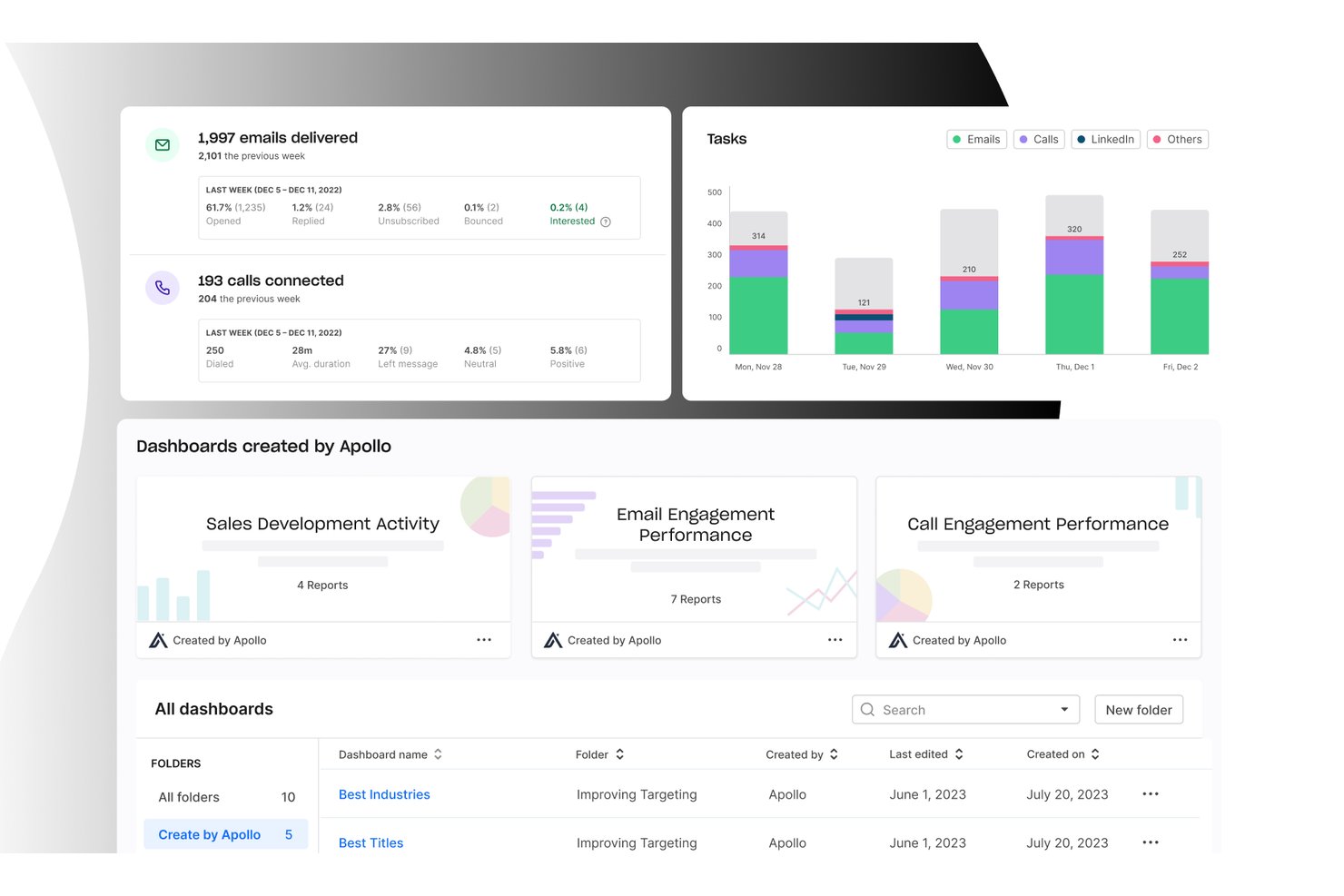
Apollo.io is an all-in-one GTM platform that combines a B2B contact database, sales engagement sequencing, workflow automation, dialer, deal management, and AI-powered lead scoring in a single tool.
Who Is Apollo.io Best For?
Apollo.io is a strong fit for SDR teams and outbound-focused sales organizations that want to consolidate prospecting, sequencing, and data enrichment without managing multiple tools.
Why I Picked Apollo.io
Apollo.io earns its spot as one of the best on my shortlist because of how its 7-step email verification process handles contact data quality at scale. When my team pulls a contact from the 210M+ database, the email is already validated before it hits our sequence, keeping bounce rates low without needing a separate verification tool. The AI-generated lead scoring on top means we're not just getting clean data, we're getting data prioritized by buying intent signals.
Apollo.io Key Features
- Sales engagement sequences: Build multi-channel cadences combining email, phone, and LinkedIn tasks with A/B testing and analytics.
- CRM integrations: Sync activities, contacts, and pipeline updates bi-directionally with Salesforce and HubSpot.
- Workflow automation: Automate repetitive sales tasks like lead routing, follow-ups, and data enrichment.
- Chrome extension: Source new leads directly from LinkedIn and add them to campaigns without switching tabs.
Apollo.io Integrations
Apollo.io offers native integrations with Salesforce, HubSpot, Outreach, Salesloft, Pipedrive, Zoho CRM, and Slack, and it connects with Zapier. An API is available for custom integrations.
Pros and Cons
Pros:
- AI lead scoring uses real intent signals
- Built-in multi-channel sequencing and A/B testing
- Large verified B2B contact database included
Cons:
- Reporting dashboards lack deep customization options
- Data accuracy drops outside North America

Best for small and medium-sized businesses

Salesflare is an intelligent tool that helps small and medium-sized businesses sell more.
Why I picked Salesflare: If you’re operating a small or medium-sized B2B business, you can use Salesflare to help increase sales with less effort. It’s a smart platform that can automatically fill out your address book and keep records of all interactions your sales reps have with contacts. Salesflare will collect data from multiple sources, such as social media, emails, and company databases, and hand it to your teams via automated customer timelines that tell your reps everything they need to know.
Salesflare is a robust CRM for businesses that need a solution to build better relationships and increase sales. The workflow feature work in a Kanban card view with a drag-and-drop tool that allows you to move cards along your pipeline. This enables your teams to see where there are follow-up opportunities that have the possibility of converting to paid customers.
Salesflare Standout Features and Integrations
Features include document storage, lead scoring, email marketing, call logging, calendar and reminder systems, task management, audience segmentation, contact databases, customer pipelines, appointment management, and prospecting tools.
Integrations include ActiveCampaign, Asana, Calednly, ClickUp, Google Contacts, Google Sheets, Intercom, Mailchimp, Quickbooks Online, RingCentral, Slack, Todoist, Typeform, Unbounce, Zapier, and other software options.
Pros and Cons
Pros:
- It works on multiple devices.
- Simple to set up and use.
- It makes follow-ups nearly effortless.
Cons:
- Some features require third-party integrations to work.
- Not as many features as other options.

Best for automated call summaries
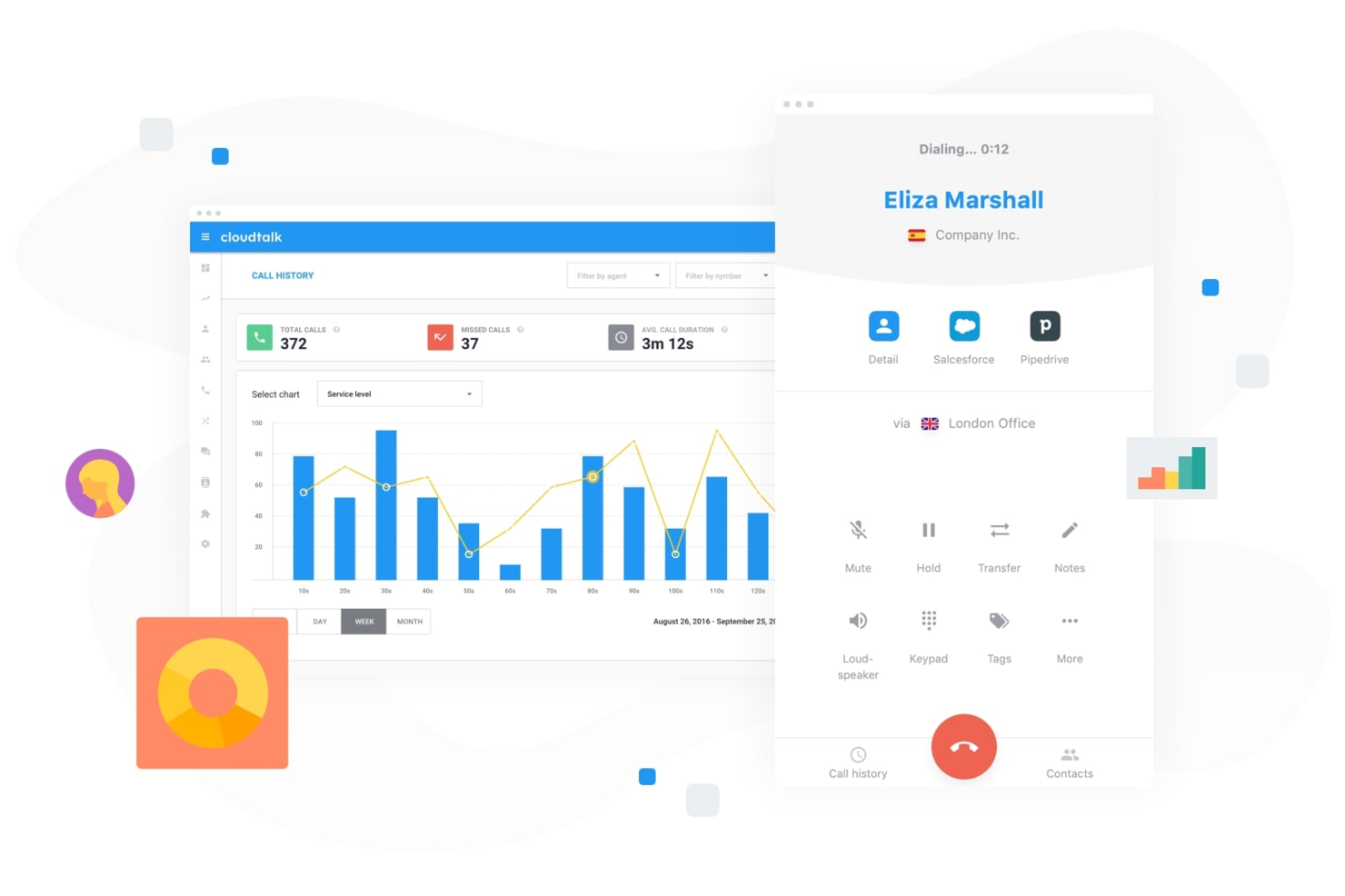
CloudTalk is a cloud-based calling platform built for teams that rely on high-volume outreach and customer conversations. As sales acceleration software, it helps you manage inbound and outbound calls, automate dialing workflows, and analyze performance data from a single dashboard. It is particularly suited to sales and support teams that need structured call processes and visibility into rep performance.
Why I Picked CloudTalk
I picked CloudTalk because its AI Conversation Intelligence gives you automated call summaries and sentiment analysis, so you can quickly understand what happened on each call without reviewing full recordings. I also like its AI Dialer with power and parallel dialing modes, which can help you increase call volume while reducing manual tasks. If you are evaluating sales acceleration software, these features directly support faster outreach and more data-driven coaching for your team.
CloudTalk Key Features
In addition to its AI-driven capabilities, CloudTalk offers a range of features to support your sales acceleration needs:
- Real-Time Monitoring: Enables live call listening and performance analytics, helping you track and improve team efficiency.
- Number Management: Provides local numbers in over 160 countries, enhancing your global reach and caller recognition.
- Call Transcription: Offers multi-lingual transcripts for customer calls, allowing you to review and analyze interactions easily.
- Workflow Automation: Automates call processes and integrates seamlessly with your existing systems to save time and reduce manual tasks.
CloudTalk Integrations
Integrations include Salesforce, HubSpot, Pipedrive, Zoho CRM, Zendesk, Intercom, Freshdesk, Slack, Microsoft Teams, and Aircall.
Pros and Cons
Pros:
- Real-time call monitoring tools
- Power and parallel dialers
- AI-powered call summaries
Cons:
- Higher tiers unlock AI features
- Setup can take time
Groove
Best for Clari-connected revenue execution
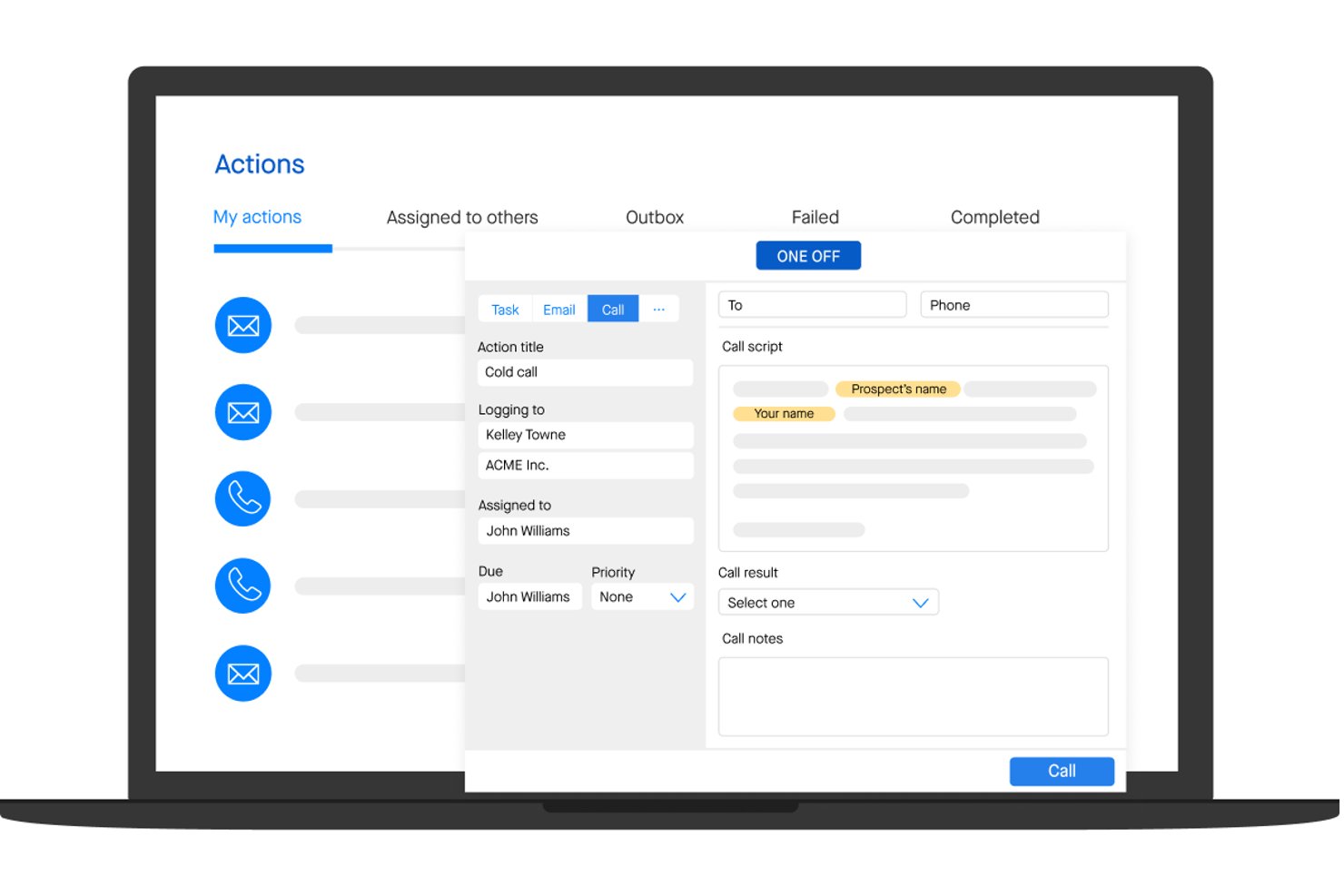
Groove is a Salesforce-native sales engagement platform that combines multi-channel cadences, automated activity capture, pipeline analytics, and AI-assisted outreach into a single revenue execution environment.
Who Is Groove Best For?
Groove is a strong fit for enterprise sales teams that run on Salesforce and want their engagement data feeding directly into Clari's revenue intelligence platform.
Why I Picked Groove
Groove earns its spot on my shortlist because it's built to feed directly into Clari's revenue intelligence engine, turning rep activity into forecast-grade pipeline data. I love how Groove Flows let reps run multi-channel cadences with AI-generated email content from within Gmail or Outlook, while every touch auto-logs to Salesforce in real time. Groove Spaces then surfaces an effort-vs-engagement score across accounts, so I can see exactly where attention is being paid and where deals are stalling.
Groove Key Features
- Groove OmniDialer: A built-in dialer with click-to-call, local presence numbers, voicemail drops by persona, and automatic call logging to Salesforce.
- Groove Spaces: A shared account workspace where SDRs, AEs, CSMs, and SEs can collaborate with shared activity history, tasks, and engagement scores.
- Groove Conversations: Native call recording and transcription that integrates with Clari Copilot for post-call AI summaries and in-call battlecards.
- Groove Scheduler: A meeting scheduling tool that supports custom meeting types and pulls custom Salesforce field data directly into the booking flow.
Groove Integrations
Groove is Salesforce-native and integrates with Gmail, Microsoft Outlook, ZoomInfo, LinkedIn Sales Navigator, Slack, Microsoft Teams, Zoom, Seismic, and Highspot. It connects with Clari products and offers a public API for custom integrations.
Pros and Cons
Pros:
- Automates sales activity capture reliably
- Multi-role sales collaboration workspace
- AI-generated emails and call summaries
Cons:
- Sequencing logic can feel restrictive
- No native buyer intent data included

Best for Salesforce-native real-time call coaching
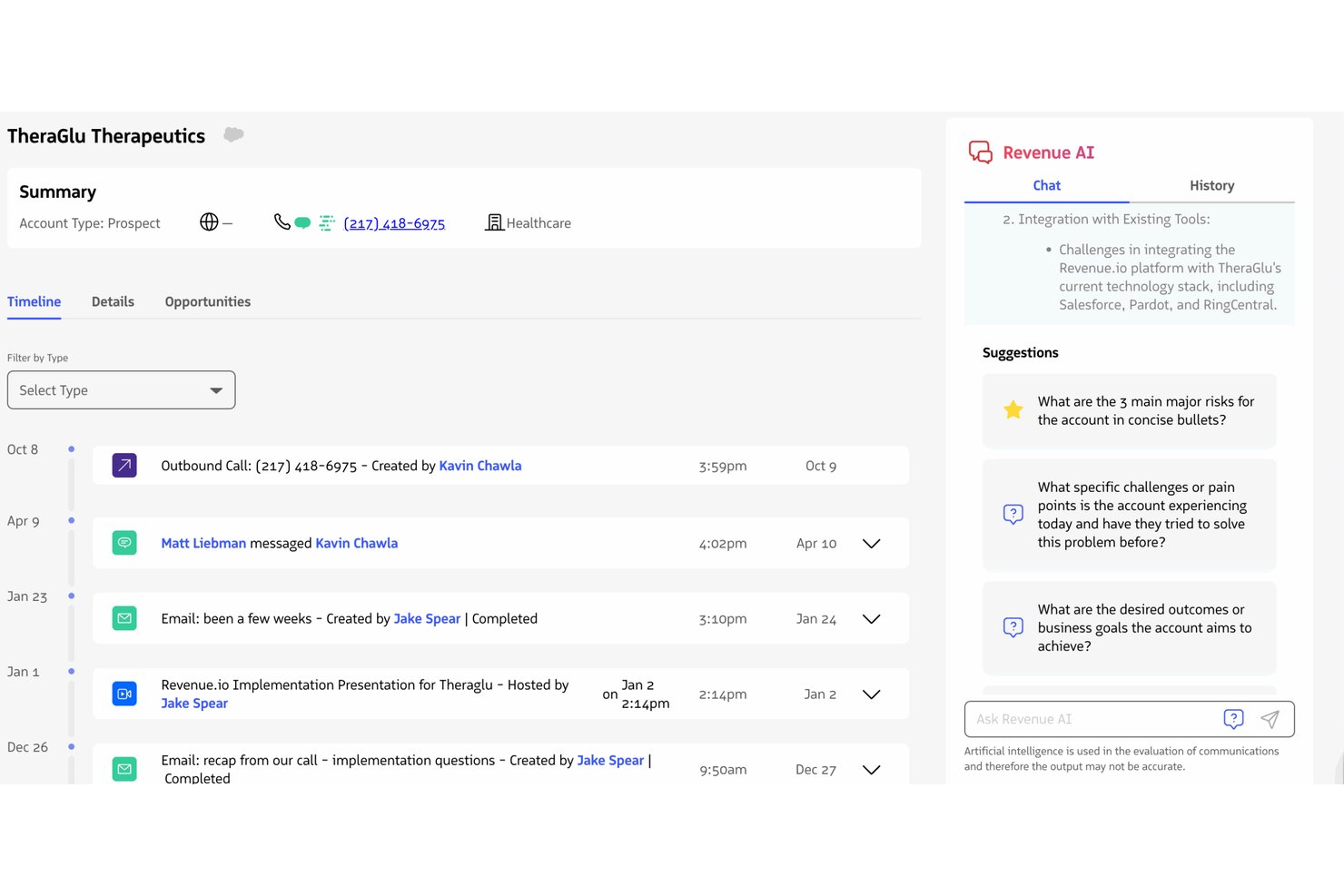
Revenue.io is a Salesforce-native sales acceleration platform that combines a built-in dialer, multi-channel sales engagement cadences, real-time call coaching, conversation intelligence, and AI-driven pipeline analytics.
Who Is Revenue.io Best For?
Revenue.io is a strong fit for mid-market and enterprise sales teams running on Salesforce who rely heavily on phone-based or hybrid outreach.
Why I Picked Revenue.io
Revenue.io earns its spot on my shortlist because of Moments™, its real-time in-call coaching engine that surfaces battlecards, objection responses, and talk tracks the instant a competitor name or key topic is detected during a live call. I picked it specifically for Salesforce teams because it's built entirely inside Salesforce, so every call, SMS, and email auto-logs to the right record with zero sync lag. The AI Sales Roleplay feature also lets reps practice against simulated objections before going live, which I think meaningfully shortens ramp time.
Revenue.io Key Features
- Guided Selling cadences: Multi-channel outreach sequences across calls, email, and SMS that automatically enroll and remove prospects based on activity triggers and outcomes.
- Ask Revenue™ AI: A natural language query tool that lets reps and managers ask questions about deals, calls, and accounts directly within Salesforce.
- Local presence dialing: Outbound calls display a local number in 40+ countries, which the vendor reports lifts connect rates by 30–50%.
- AI Methodology Coaching: Real-time call scoring against established frameworks like MEDDIC, SPIN, and Challenger, surfaced during live conversations.
Revenue.io Integrations
Revenue.io runs natively in Salesforce and integrates with Zoom, Microsoft Teams, Google Meet, Gmail, Microsoft Outlook, Marketo, 6sense, ActiveCampaign, and Five9. Salesforce’s API and automation capabilities support custom integrations.
Pros and Cons
Pros:
- Multilingual conversation analysis for Teams and Zoom
- All activities auto-log directly in Salesforce
- Real-time in-call coaching for reps
Cons:
- No built-in buyer intent data
- Requires Salesforce as the CRM platform

Gong
Best for revenue intelligence
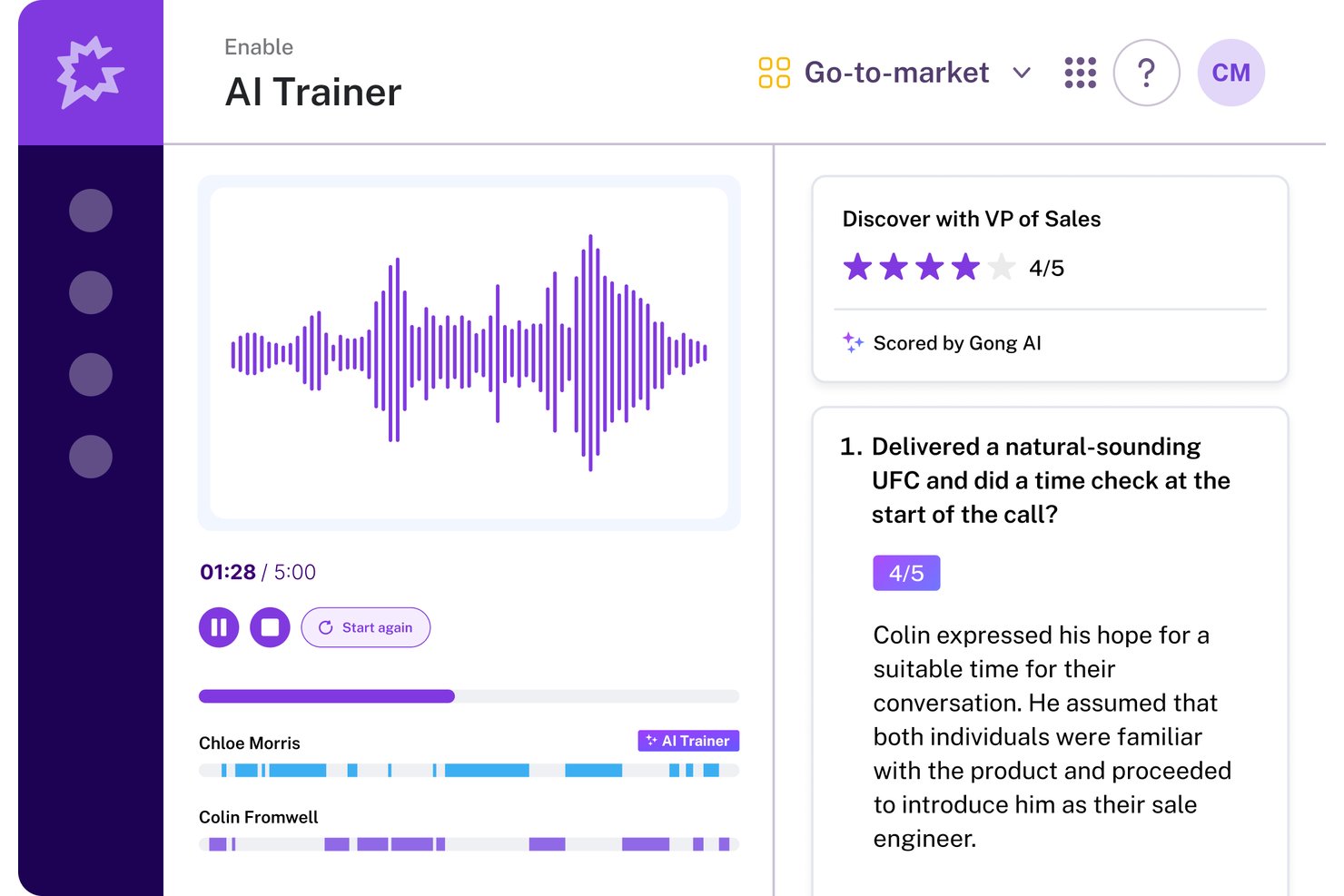
Gong is a revenue AI platform that combines conversation intelligence, sales engagement, enablement, and forecasting into a single operating system for revenue teams.
Who Is Gong Best For?
Gong is a strong fit for mid-market and enterprise revenue teams that want conversation intelligence and forecasting built into a single platform.
Why I Picked Gong
Gong earns its spot on my shortlist because its revenue intelligence capabilities go deeper than any other tool I've evaluated. I love how the AI Revenue Predictor pulls from 300+ signals across real customer conversations to generate forecasts, with customers like Upwork reporting 95%+ accuracy. The AI Deal Monitor actively flags risks like competitor mentions or stalled momentum before deals slip, which means I'm working from real interaction data rather than gut feel.
Gong Key Features
- AI Composer: Drafts personalized outreach emails by pulling context from past customer conversations to improve response rates.
- Gong Enable: A dedicated enablement module with learning paths, AI call scoring, coaching workflows, and AI-powered simulations for rep training.
- Engage Flows: Multi-channel sequences covering email, calls, LinkedIn, and tasks, with automation rules that auto-enroll contacts based on CRM events.
- Smart Trackers: User-trainable, context-aware topic trackers that detect patterns across recorded conversations to surface coaching and deal insights.
Gong Integrations
Gong offers native bi-directional integrations with Salesforce, HubSpot, and Microsoft Dynamics 365, plus 300+ marketplace integrations through Gong Collective, including Zoom, Slack, 6sense, G2, and Calendly. An open API, webhooks, and MCP support custom connections.
Pros and Cons
Pros:
- Automates CRM data entry for sales teams
- Conversation intelligence surfaces actionable coaching insights
- AI predicts deal outcomes with high accuracy
Cons:
- Requires a demo request for pricing details
- Sequence branching less advanced than key competitors

Best for training reps with live call coaching

Salesloft provides tools businesses can use to help train new sales reps.
Why I picked Salesloft: If your team is growing, you can use Salesloft to help your team lead new hires by example. Salesloft provides features that allow the system to record conversations your top sales reps are having with prospects. You can use these recordings as a teachable moment for new hires to help them see what works when closing sales or enhance your current team’s close rates.
Salesloft is suitable for any sized business that needs a solution to optimize interactions. It’s a highly effective platform for enhancing the processes that lead to conversion across email, phone, and social media interactions. Salesloft will help accelerate your sales teams through its ability to build, share, and execute sales processes.
Salesloft Standout Features and Integrations
Features include call list management, lead distribution, data management, lead capture, lead scoring, data dashboards, call recording, contact management, performance management, collaboration tool, reporting and analytics, and lead management.
Integrations include Aircall, Chili Piper, Clari, DealSignal, Desktop.com, Gong, HubSpot CRM, Opensense, Outgrow, Salesforce, Shift, Slack, Sugar Sell, Wingman, Zoom, and other software options.
Pros and Cons
Pros:
- The platform is user-friendly.
- It’s easy to add contacts to cadences.
- It provides a live engagement feed.
Cons:
- There are automation limitations.
- The tool freezes when making extensive changes.

Outreach
Best sales execution tool

Outreach helps businesses enhance their sales execution by combining sales engagement, conversation intelligence, and revenue intelligence in one tool.
Why I picked Outreach: The platform is one of the largest sales execution tools that will help your company increase revenue, engage with customers, and increase your sales rep’s productivity. Outreach can help your sales reps engage with leads through personalized interactions throughout the sales cycle. The software’s deal health score feature will help your reps speed up sales with predictions and recommendations on how to keep things on track - helping them focus on the leads that are likely to close.
Outreach works well for sales management and leadership teams who are looking for tools that will help their teams close more deals. The platform’s capabilities will help them give their sales reps a way to personalize, prioritize, and analyze sales activities. Outreach can help your sales teams create pipelines and optimize sales workflows to ensure they can help the organization reach sales targets.
Outreach Standout Features and Integrations
Features include sentiment analysis, A/B testing, automated speech recognition, forecast simulation, deal health scores, deal management, sales rep coaching, conversation intelligence, mutual action plans, deal insights, and pipeline management.
Integrations include 6sense, Aircall, Alyce, Avoma, BigPicture, BombBomb, Chili Piper, Clari, Dark Sky, DataGrail, Dialpad, Gong, Highspot, HubSpot, RingCentral, Salesforce, and other software options.
Pros and Cons
Pros:
- The analytics provide beneficial insights.
- It simplifies and automates daily tasks.
- Top-notch support team.
Cons:
- Tracking which emails customers receive is complex.
- There’s a steep learning curve.

Salesforce Sales Cloud provides a CRM tool that will help businesses improve interactions between customers and other operational departments.
Why I picked Salesforce Sales Cloud: The platform is a widely used CRM platform that allows you to store almost any piece of customer information you have in one place. Salesforce Sales Cloud enables you to track all customers across every stage of your sales cycle, from discovery to closing the deal. Multiple departments can use Salesforce Sales Cloud to forecast revenues and track leads, and collaborate through Salesforce’s other applications.
Salesforce Sales Cloud allows businesses of any size and operating in any industry to accelerate growth by using automation. You can accelerate sales growth through the platform’s Process Builder tool, which provides a simple point-and-click interface that will help you automate processes. Salesforce Sales Cloud can help you create the most complex sales processes that will guide your reps through qualification conversations and recommend when to move to the next steps of the sales cycle.
Salesforce Sales Cloud Standout Features and Integrations
Features include email marketing, lead scoring, audience segmentation, call logging, calendar and reminder tools, task management, contact history, lead management, sales pipeline management, lead nurturing, content management, and document management.
Integrations include 3CX, Bynder, CallTrackingMetrics, CloudTalk, DealRoom, Freshbooks, Freshservice, GetResponse, HoneyBook, monday.com, Outgrow, PandaDoc, Slack, Twilio, Wrike, and other software options.
Pros and Cons
Pros:
- Top-down pipeline monitoring capabilities.
- It creates excellent reports.
- It integrates with a significant number of applications.
Cons:
- There’s a steep learning curve.
- Users can feel lost with all the features available.

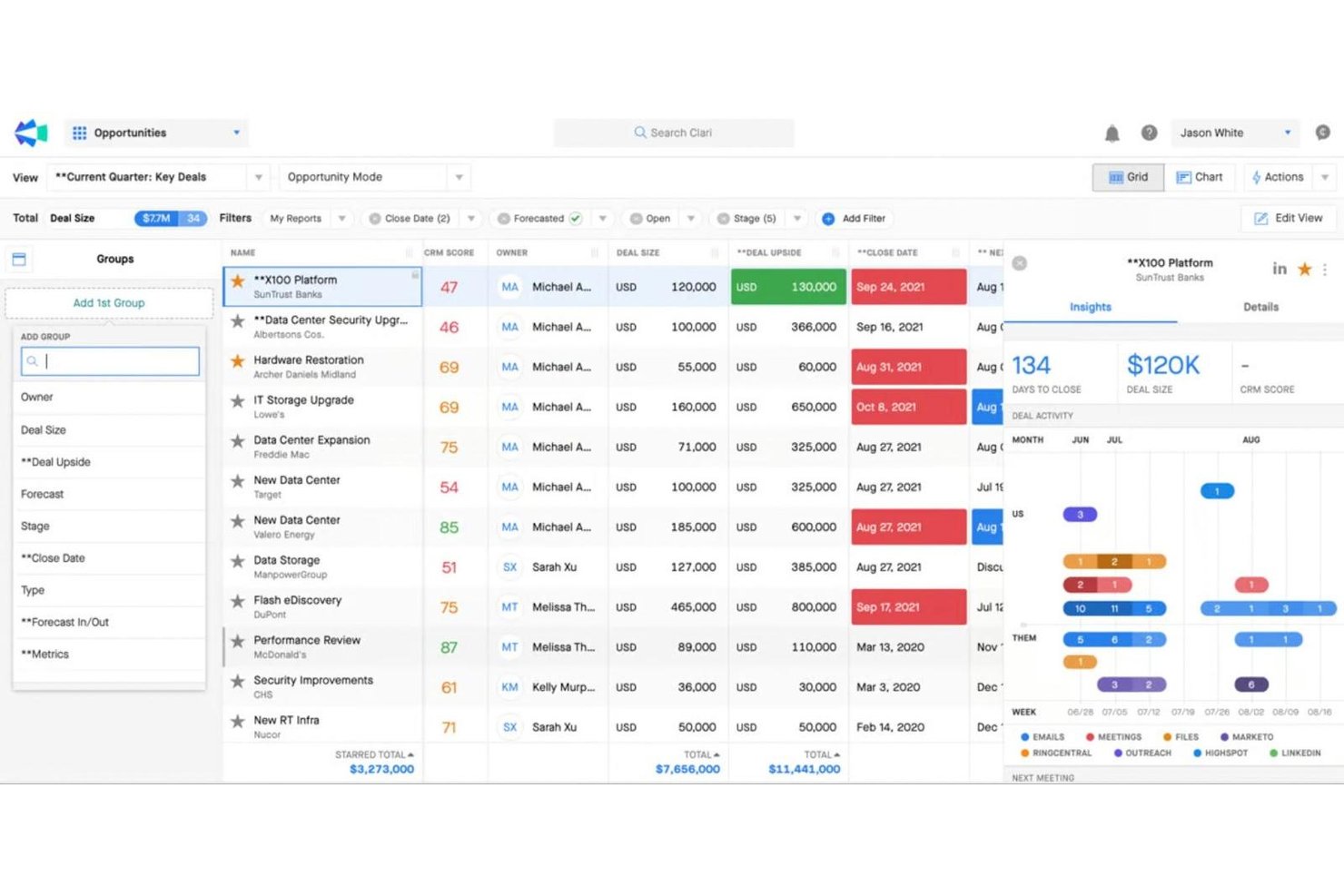
Clari is a revenue intelligence platform that combines sales engagement cadences, pipeline inspection, conversation intelligence, AI-driven forecasting, and mutual action plans across one connected suite.
Who Is Clari Best For?
Clari is built for enterprise revenue teams—particularly RevOps managers and CROs—who need board-ready forecast accuracy across complex, multi-threaded sales cycles.
Why I Picked Clari
Clari earns its spot on my shortlist because no other platform comes close to its enterprise revenue forecasting depth. I'm particularly impressed by Clari Forecast, which rolls up projections from individual reps all the way to the C-suite with AI-driven scenario modeling that boards actually trust. Paired with Inspect's deal health scoring and real-time pipeline risk signals, my team can catch slipping deals before they fall out of the quarter entirely.
Clari Key Features
- Groove Flows: Multi-channel outreach sequences that automate email, phone, SMS, LinkedIn, and direct mail steps within a single cadence.
- Copilot Battlecards: Live in-call cue cards that surface automatically during sales conversations to help reps handle objections in real time.
- Capture: Automatic activity logging that syncs emails, calls, and calendar events directly to Salesforce without manual CRM entry.
- Revenue AI Agents: A library of AI agents that surface deal alerts, recommend next-best actions, and guide pipeline inspection workflows.
Clari Integrations
Clari offers a deep native Salesforce integration, plus integrations with HubSpot, Pipedrive, Gainsight, Slack, Zoom, Microsoft Teams, and LinkedIn Sales Navigator. Public REST APIs and custom data ingestion support connections with Snowflake, BigQuery, and Databricks.
Pros and Cons
Pros:
- Multichannel outreach in a single cadence
- Real-time conversation intelligence during live calls
- Forecasting accuracy trusted at board level
Cons:
- Requires strong Salesforce data hygiene
- No native buyer intent data included
Other Sales Acceleration Software
Here are some additional sales acceleration software options that didn’t make it onto my shortlist, but are still worth checking out:
- PitchMonster
For accelerating rep onboarding
- Mixmax
For Gmail-native sales acceleration
- Koncert
For high-volume parallel dialing teams
- Zoho CRM
AI sales assistant
- Outplay
For AI-native multi-channel outreach at SMB scale
- 6sense
For account-level buyer intent and AI outreach
- HubSpot Sales Hub
For intelligent lead routing and scoring
- Reply.io
For AI-driven multichannel outbound sequences
- ZoomInfo SalesOS
For account and person-level intent data


How I Evaluate Sales Acceleration Software
I split my evaluation into two layers: baseline criteria every tool must meet—like CRM sync and multi-channel cadences—and the differentiators that separate the best options from the rest.
Core Functionality (Table Stakes For This List)
When I'm selecting tools for my list, I rank each one on a scale from 0 (does not offer the functionality) to 5 (excels in this area) for each core functionality listed below. Then, I calculate the tool's total score into a percentage. Each tool needs to achieve a minimum total score of 75% to be considered for inclusion.
- Multi-Channel Sales Cadences: I check whether the platform supports sequenced outreach across email, phone, LinkedIn, and SMS—and whether reps can build branching logic based on prospect behavior.
- CRM Integration & Data Sync: Real-time, bi-directional sync with CRMs like Salesforce and HubSpot matters here, especially for keeping activity logs and contact records accurate across systems.
- Sales Task Automation: I evaluate how well the tool automates repetitive work like lead routing, follow-up triggers, and data entry so reps spend more time in actual selling conversations.
- Pipeline & Activity Reporting: Good platforms let you track cadence performance, rep activity volume, and stage-by-stage conversion rates in dashboards your ops team can actually customize.
- Lead Prioritization & Scoring: I look for scoring models that combine engagement signals and firmographic data to help reps focus on accounts most likely to convert.
- Sales Content & Playbooks: I consider whether the tool offers a centralized library for templates, snippets, and guided playbooks that reps can access mid-cadence or during live conversations.
Once I have a list of tools that meet this criteria, I consider what sets each platform apart.
Differentiating Factors (What Sets Vendors Apart)
Here's how I compare and contrast different vendors:
Standout Features
Conversation intelligence is a major differentiator—platforms like Gong and Salesloft can record, transcribe, and analyze sales calls to flag objection patterns and coaching moments. I also evaluate whether a tool includes a built-in dialer with local presence, which saves reps from toggling between apps mid-cadence. AI email generation matters when it pulls from prospect data to draft contextual follow-ups rather than generic templates. Buyer intent data is worth checking too, especially for outbound teams prioritizing in-market accounts.
Beyond Features
I consider how well each tool fits a team's GTM motion—a platform built for high-velocity outbound SDR teams won't suit an enterprise AE org running multi-threaded deals. Tech stack compatibility matters just as much; I check for native connectors to tools like ZoomInfo, LinkedIn Sales Navigator, and data warehouses where your RevOps team consolidates reporting. Pricing structure is another factor I weigh, especially whether vendors offer modular add-ons for dialers or intent data so you can scale without paying for features your team doesn't need yet.
How to Choose Sales Acceleration Software
It’s easy to get bogged down in long feature lists and complex pricing structures. To help you stay focused as you work through your unique software selection process, here’s a checklist of factors to keep in mind:
| Factor | What to Consider |
|---|---|
| Scalability | Will the software grow with your team? Consider future expansion. Look for solutions that can handle increased data volume and user counts without performance issues. |
| Integrations | Does it connect with your existing tools? Check for CRM, email, and other essential integrations to maintain workflow efficiency. |
| Customizability | Can you tailor the software to suit your processes? Ensure it offers customization options for dashboards and reports to match your specific needs. |
| Ease of Use | Is the interface intuitive for your team? A simple design reduces training time and increases adoption rates. Test the interface for user-friendliness. |
| Cost | Does the pricing fit your budget? Compare plans, watch for hidden fees, and ensure the features you need are included in the price. |
| Security Safeguards | How does it protect your data? Confirm it complies with industry standards and offers encryption, access controls, and regular security updates. |
| Support Availability | When can you reach support? Ensure the vendor offers reliable customer service through various channels like live chat, email, or phone, especially during critical times. |
What is Sales Acceleration Software?
Sales acceleration software is a tool that helps sales teams expedite the sales process. It integrates various functionalities like automated lead generation, lead scoring, efficient communication tools, and detailed analytics into one platform.
This software streamlines the sales cycle, from lead capture to deal closure, by automating repetitive tasks and providing sales representatives with crucial data and resources.
Features of Sales Acceleration Software
When selecting sales acceleration software, keep an eye out for the following key features:
- Lead management: Organize, prioritize, and track leads as they move through your pipeline. Good lead management helps you zero in on your best prospects and follow up efficiently, so nothing (and no one) slips through the cracks.
- Sales automation: Automate repetitive tasks like sending follow-up emails or scheduling calls. This gives you more time to focus on building relationships and closing deals, instead of getting bogged down by admin work.
- Pipeline visibility: Get a clear, real-time look at your sales pipeline from start to close. With better visibility, you can spot bottlenecks, track progress, and adjust your strategy on the fly.
- Email tracking and templates: Track when prospects open your emails or click links, and use ready-made templates for fast, consistent outreach. This way, you know what’s working and can keep your messaging sharp.
- Integration capabilities: Connect seamlessly with your existing CRM, marketing platforms, and communication tools. Integration means your sales data flows smoothly across systems, saving you from data entry headaches.
- Analytics and reporting: Access dashboards and detailed reports on your sales activity, pipeline health, and reps’ performance. These insights help you make smarter decisions based on what’s actually happening, not just a hunch.
- Dialer functionality: Make outbound calls directly from the platform, log calls automatically, and record conversations for training. This feature keeps you moving quickly and gives you more coaching opportunities.
- Document management: Store, share, and track sales documents like proposals and contracts. You always have the right files at your fingertips and can see when prospects are reviewing your materials.
- Scheduling tools: Let prospects book meetings on your calendar at convenient times, without the back-and-forth. You close gaps in communication and keep momentum in your deals.
Common Sales Acceleration Software AI Features
Beyond the standard sales acceleration software features listed above, many of these solutions are incorporating AI with features like:
- Predictive lead scoring: AI analyzes historical data and current interactions to rank leads by their likelihood to convert, so you can prioritize your outreach where it matters most.
- Automated email personalization: AI crafts personalized email content for each prospect by drawing on their behavior, preferences, and prior conversations, saving you tons of prep time and boosting engagement.
- Sales forecasting: AI examines your pipeline, historical trends, and ongoing activities to project future sales outcomes, helping you set realistic goals and spot potential pitfalls early.
- Conversation intelligence: AI listens to your calls and analyzes conversations to identify key topics, sentiment shifts, and objections, offering targeted coaching tips and next-step suggestions.
- Churn prediction: AI spots early red flags in your sales process that can signal a potential lost deal, so you can act fast to prevent drop-offs and retain more clients.
Benefits of Sales Acceleration Software
Implementing sales acceleration software provides several benefits for your team and your business. Here are a few you can look forward to:
- Increased productivity: Automated email campaigns and lead prioritization free up time, allowing your team to focus on closing deals.
- Improved decision-making: Analytics and reporting provide insights, helping you make informed choices about sales strategies.
- Enhanced collaboration: CRM integration ensures everyone has access to the same data, promoting teamwork and consistency.
- Proactive sales strategies: AI-driven insights offer predictive analysis, enabling your team to anticipate customer needs.
- Broadened reach: Social media engagement tools help connect with prospects on various platforms, expanding your audience.
- Custom user experience: Customizable dashboards let users focus on relevant metrics, improving their workflow and efficiency.
- Data security: Security safeguards protect sensitive information, ensuring compliance and building trust with clients.
Costs and Pricing of Sales Acceleration Software
Selecting sales acceleration software requires an understanding of the various pricing models and plans available. Costs vary based on features, team size, add-ons, and more. The table below summarizes common plans, their average prices, and typical features included in sales acceleration software solutions:
Plan Comparison Table for Sales Acceleration Software
| Plan Type | Average Price | Common Features |
|---|---|---|
| Free Plan | $0 | Basic lead management, limited email campaigns, and basic analytics. |
| Personal Plan | $5-$25/user/month | Advanced email campaigns, CRM integration, and basic reporting tools. |
| Business Plan | $30-$75/user/month | Comprehensive analytics, AI-driven insights, social media tools, and customizable dashboards. |
| Enterprise Plan | $100+/user/month | Full suite of features, advanced security safeguards, dedicated support, and extensive integrations. |
Sales Acceleration Software FAQs
Here are some popular questions that people ask when searching for new sales acceleration software.
What is the difference between CRM and sales acceleration software?
Sales acceleration software focuses on speeding up the sales process, while CRM systems manage customer relationships. You might use sales acceleration tools for lead prioritization or automated emails, whereas CRM systems store customer data and track interactions. Both can integrate to improve overall sales efficiency.
Who uses sales acceleration software?
Sales acceleration software can benefit many users, including:
- Sales Reps: These platforms can enable sales reps to automate repetitive processes and access customer data which helps them work more effectively.
- Marketing Teams: Your marketing teams can use sales acceleration tools to better understand customer preferences and target leads through tailored messaging.
- Executives: Automating specific processes with sales acceleration software will help executive teams save time from administrative tasks and focus on crucial objectives.
- Customer Service Teams: Having quick access to customer data can help customer service teams respond to customers fast with relevant details.
- Data Analysts: Sales acceleration solutions enable data analysts to process significant amounts of data quickly and accurately to get actionable business performance insights.
- Product Managers: Sales acceleration software can help product managers identify product usage trends and make necessary changes to maximize revenue potential.
What are the different types of sales acceleration software?
As the name suggests, the main function of sales acceleration software is to increase sales speed. It can help your company increase sales funnel efficiency. There are various types of sales acceleration platforms that you can use for enhancing sales processes, including:
- Customer Relationship Management (CRM): These tools can help businesses effectively aggregate and manage contact information. CRM can help sales teams identify high-value leads, manage interactions, and tailor experiences for contacts, thanks to improved data accessibility.
- Prospecting and Qualification: As much as 33% of sales calls can be a waste of time because reps are having conversations with unqualified leads who won’t convert. This makes having systems for lead prospecting and qualification a necessity for sales teams.
- Quote-To-Cash: This can help you manage sales processes and revenues and help sales reps quickly create quotes and effectively manage orders. These tools can accelerate sales by simplifying account and revenue tracking.
- Customer Support: Live chat and ticket management tools are essential platforms in the sales acceleration strategy. They give sales reps a chance to identify customers’ needs and provide effective solutions to fill gaps between products and services and the customers’ expectations.
Can sales acceleration software integrate with my existing tools?
Yes, most sales acceleration software offers integrations with popular tools like CRMs, email platforms, and social media. Check the compatibility with your current systems to ensure smooth data flow. Integration helps maintain workflow efficiency and reduces the need for manual data entry.
How do I know if my team needs sales acceleration software?
If your team struggles with managing leads, slow response times, or inefficient sales processes, sales acceleration software could help. Evaluate your current challenges and consider if features like automated emails or lead scoring could address them. A trial period can also help assess its impact on your workflow.
Is sales acceleration software suitable for small businesses?
Yes, sales acceleration software can benefit small businesses by automating tasks and improving lead management. Look for scalable options with pricing plans that fit your budget. Smaller teams can leverage these tools to enhance productivity and focus on high-priority sales activities.
What's Next?
If you're in the process of researching sales acceleration software, connect with a SoftwareSelect advisor for free recommendations.
You fill out a form and have a quick chat where they get into the specifics of your needs. Then you'll get a shortlist of software to review. They'll even support you through the entire buying process, including price negotiations.