

10 Best Sales Productivity Tools for 2026

Best Sales Productivity Tools Shortlist


Sales productivity tools are software platforms that help your sales team manage leads, automate outreach, and track deals to close more business with less manual effort. If you’re searching for ways to boost productivity, improve sales results, and give your team better visibility into the pipeline, the right tools can make a measurable difference.
This list will help you compare leading sales productivity solutions, so you can find the best fit for your team’s workflows, data needs, and growth goals.
Why Trust Our Software Reviews
We’ve been testing and reviewing RevOps software since 2022. As RevOps leaders ourselves, we know how critical and difficult it is to make the right decision when selecting software.
We invest in deep research to help our audience make better software purchasing decisions. We’ve tested more than 2,000 tools for different RevOps use cases and written over 1,000 comprehensive software reviews. Learn how we stay transparent & our software review methodology.
Best Sales Productivity Tools Summary
This comparison chart summarizes pricing details for my top sales productivity tools selections to help you find the best software for your budget and business needs.
| Tool | Best For | Trial Info | Price | ||
|---|---|---|---|---|---|
| 1 | Best for conversation analytics insights | Free demo available | Pricing upon request | Website | |
| 2 | Best for email address verification accuracy | Free plan available | From $34/month (billed annually) | Website | |
| 3 | Best for integrated support and sales data | 14-day free trial | From $19/user/month (billed annually) | Website | |
| 4 | Best for enriched B2B contact intelligence | Free trial available | Pricing upon request | Website | |
| 5 | Best for content management in sales enablement | Free demo available | Pricing upon request | Website | |
| 6 | Best for lead capture from digital channels | Free demo available | Pricing upon request | Website | |
| 7 | Best for pipeline and marketing alignment | 14-day free trial | From $7/user/month (billed annually) | Website | |
| 8 | Best for automated sales engagement sequences | Free demo available | Pricing upon request | Website | |
| 9 | Best for visual deal tracking workflows | 14-day free trial available | From $14/user/month (billed annually) | Website | |
| 10 | Best with advanced enterprise customization | 30-day free trial + free demo available | From $25/user/month | Website |
Best Sales Productivity Tools Reviews
Below are my detailed summaries of sales productivity tools that made it onto my shortlist. My reviews offer a detailed look at the features, best use cases, and integrations of each platform to help you find the best one for your team.

Gong
Best for conversation analytics insights
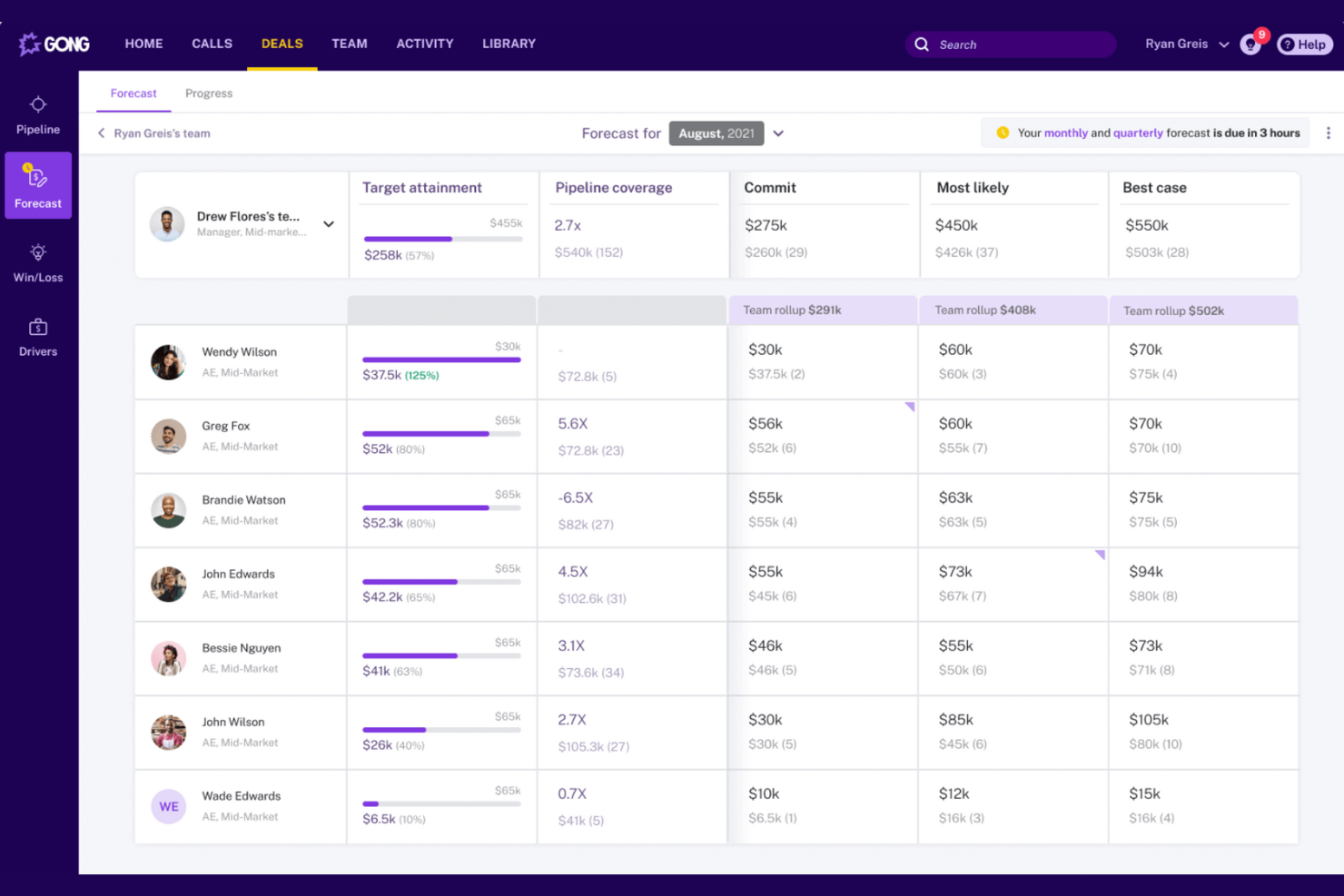
Gong is a conversation intelligence platform that gives revenue teams a way to analyze sales calls and meetings for actionable insights. It’s especially useful for sales leaders and enablement teams who want to understand what’s actually happening in conversations and coach reps based on real data. With Gong, you can spot deal risks, identify winning behaviors, and turn every call into a source of learning.
Why I Picked Gong
Unlike most sales tools, Gong focuses on conversation analytics to help teams understand what’s actually happening in their sales calls. I picked Gong because it provides data-driven insights by recording, transcribing, and analyzing calls to surface patterns that drive better coaching and deal execution. The platform highlights talk ratios, topics discussed, and even competitor mentions, giving sales leaders a clear view into what top performers do differently. This level of insight helps teams identify risks early and replicate winning behaviors across the entire sales organization.
Gong Key Features
Some other features in Gong that support sales productivity include:
- Deal Boards: Visualize deal progress and pipeline health in a single view.
- Automated Follow-Up Reminders: Get reminders to follow up on action items discussed in meetings.
- Integration with CRM data: Sync call data and insights directly with Salesforce and HubSpot.
- Customizable Call Scorecards: Create scorecards to evaluate calls based on your team’s specific criteria.
Gong Integrations
Integrations include Salesforce, HubSpot, Slack, Zoom, Microsoft Teams, LinkedIn Sales Navigator, Snowflake, Gainsight, Chili Piper, and ZoomInfo.
Pros and Cons
Pros:
- Searchable call library supports onboarding and training
- AI-driven call summaries save manual note-taking
- AI highlights deal risks automatically
Cons:
- Limited support for non-English languages
- Call transcription accuracy varies by accent

Hunter
Best for email address verification accuracy
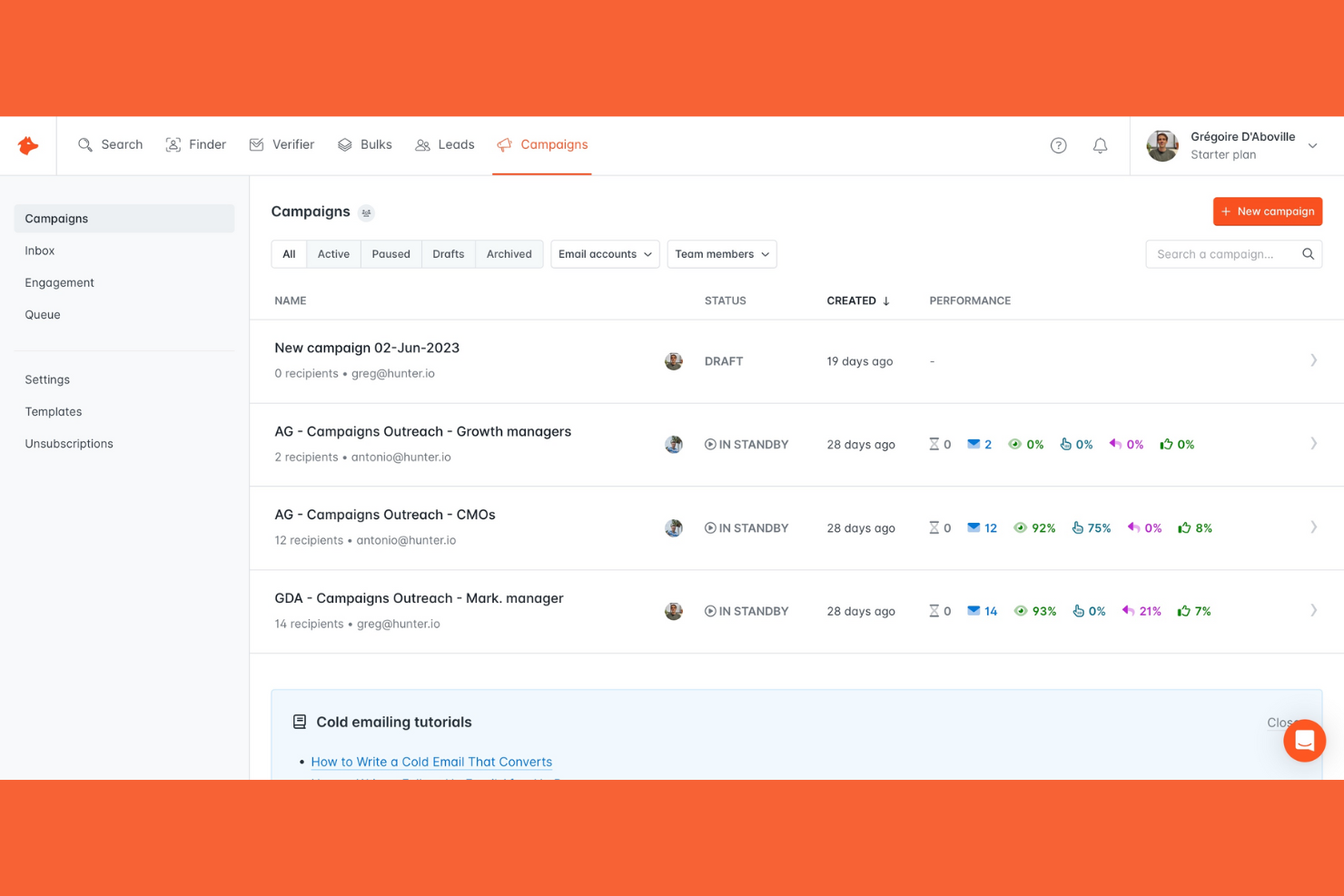
If your team needs to verify email addresses with high accuracy before launching outreach campaigns, Hunter is built for that purpose. It’s especially useful for sales and marketing professionals who want to reduce bounce rates and improve deliverability. Hunter helps you spend less time on manual checks by quickly validating large lists and finding verified contact information for targeted prospecting.
Why I Picked Hunter
Hunter stands out for its focus on delivering highly accurate email address verification, which is a key need for sales teams looking to improve outreach results. I picked Hunter because it checks deliverability in real time and flags risky or invalid addresses before you send, helping you avoid wasted effort and high bounce rates. The bulk email verifier lets you upload large lists and get instant results, making it practical for teams working with high-volume prospecting. These features make Hunter a strong fit for anyone who wants to keep their sales pipeline clean and their campaigns reaching real inboxes.
Hunter Key Features
Some other features in Hunter that support sales productivity include:
- Domain Search: Find all publicly available email addresses associated with a specific domain.
- Email Finder: Locate verified email addresses for specific professionals using their name and company.
- Campaigns Tool: Send personalized cold email campaigns directly from Hunter’s platform.
- Chrome Extension: Access email finding and verification features while browsing LinkedIn or company websites.
Hunter Integrations
Integrations include HubSpot, Salesforce, Pipedrive, Zoho CRM, Gmail, Outlook, Google Sheets, Clay, Make, and more.
Pros and Cons
Pros:
- Chrome extension finds emails on LinkedIn pages
- Domain search reveals company-wide contact patterns
- Bulk email verification processes thousands of addresses
Cons:
- Credits expire monthly and do not roll over
- No phone number or social profile enrichment
Best for integrated support and sales data
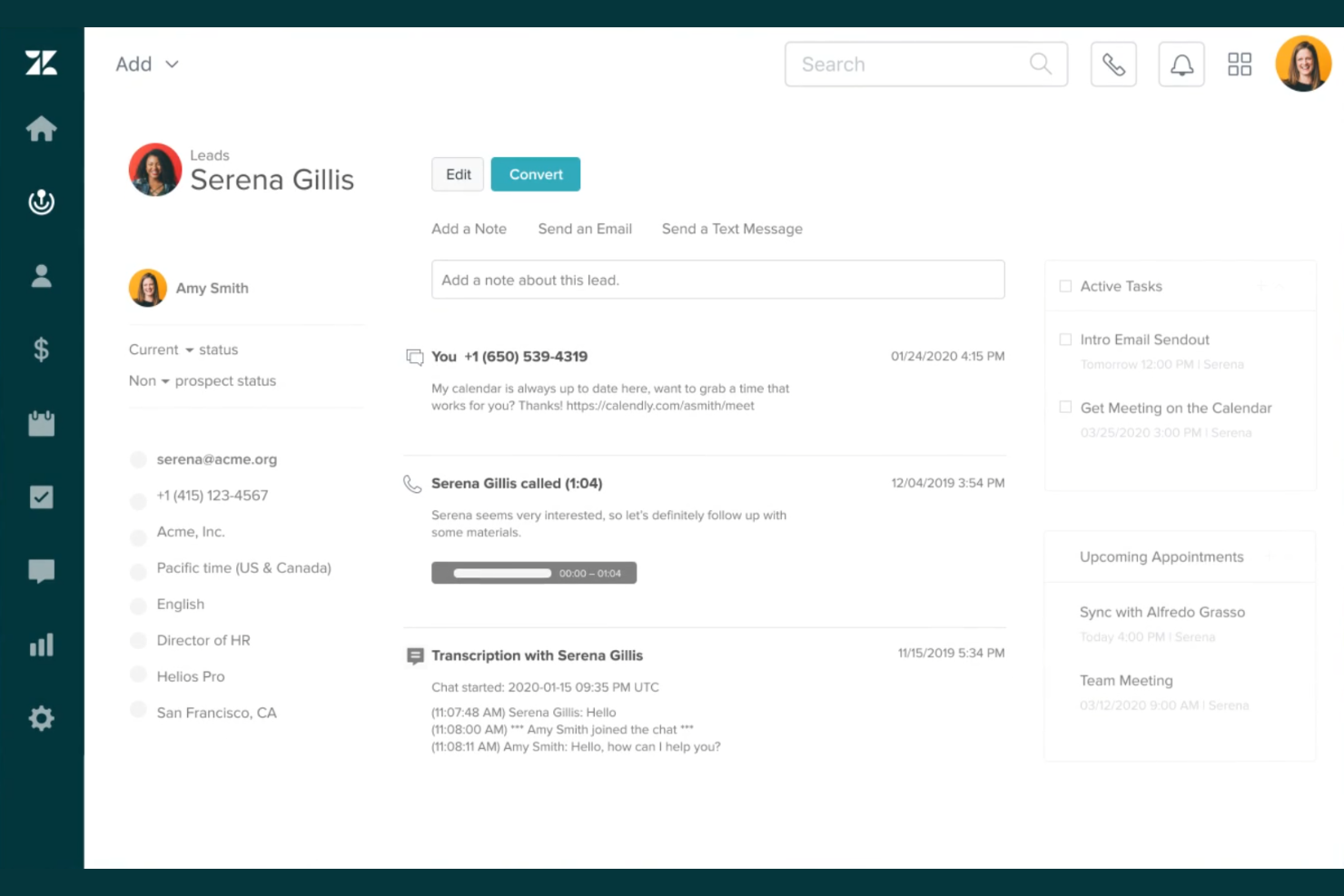
If your team needs to connect sales and support data in one place, Zendesk Sell is designed for that purpose. This platform is a strong fit for businesses that want to unify customer interactions across sales and service, giving reps a complete view of every account. Zendesk Sell helps sales teams act on real-time support insights and manage deals with context from every customer touchpoint.
Why I Picked Zendesk Sell
What sets Zendesk Sell apart is its ability to bring sales and support data together in a single platform. I picked Zendesk Sell because it lets sales reps see support tickets, customer history, and ongoing issues right alongside deal information. This integration helps teams prioritize leads based on support activity and tailor outreach with up-to-date context. For businesses where customer experience and sales are closely linked, these features make Zendesk Sell a strong choice for driving productivity.
Zendesk Sell Key Features
Some other features that make Zendesk Sell useful for sales teams include:
- Built-In Dialer: Make and log sales calls directly from the platform.
- Email Automation: Send, track, and schedule emails within the sales workflow.
- Customizable Sales Pipelines: Design and manage multiple pipelines to match your sales process.
- Mobile App: Access deals, contacts, and tasks on the go.
Zendesk Sell Integrations
Integrations include Zendesk Support, Zendesk Chat, Mailchimp, PandaDoc, HubSpot, Dropbox, Google, Google Drive, Microsoft 365, and Harvest.
Pros and Cons
Pros:
- Pipeline stages are fully customizable
- Email tracking shows open and click rates
- Unified view of sales and support data
Cons:
- Bulk data import process can be slow
- No built-in lead scoring functionality

ZoomInfo
Best for enriched B2B contact intelligence
When your sales team needs accurate, up-to-date B2B contact data, ZoomInfo delivers deep company and contact intelligence. It’s especially useful for revenue operations and sales professionals who rely on targeted outreach and account-based strategies. ZoomInfo helps you identify decision-makers, enrich CRM records, and prioritize leads with real-time data signals.
Why I Picked ZoomInfo
ZoomInfo stands out for its ability to provide enriched B2B contact intelligence that goes far beyond basic lead lists. I picked ZoomInfo because it offers detailed company profiles, direct contact information, and intent data that help sales teams identify and prioritize high-value prospects. The platform’s real-time data enrichment keeps CRM records accurate and actionable, which is essential for sales productivity. With advanced filtering and segmentation, your team can quickly zero in on the right decision-makers and tailor outreach for better results.
ZoomInfo Key Features
Some other features in ZoomInfo that support sales productivity include:
- Chrome Extension: Access company and contact data directly from your browser while browsing LinkedIn or company websites.
- Automated List Building: Set criteria to automatically generate and update prospect lists as new data becomes available.
- Engagement Tracking: Monitor email opens, clicks, and responses to gauge prospect interest.
- Data Export Tools: Export selected contacts and companies directly into your CRM or sales engagement platform.
ZoomInfo Integrations
Integrations include Salesforce, HubSpot, Microsoft Dynamics 365, Gmail, Snowflake, Zoom, Outreach, Marketo, Bullhorn, and Pardot.
Pros and Cons
Pros:
- Direct organizational hierarchy map exports
- Automated contact data enrichment accuracy
- Real-time intent-based buyer signal tracking
Cons:
- Complex credit-based usage tracking system
- High entry-level annual contract pricing

Highspot
Best for content management in sales enablement
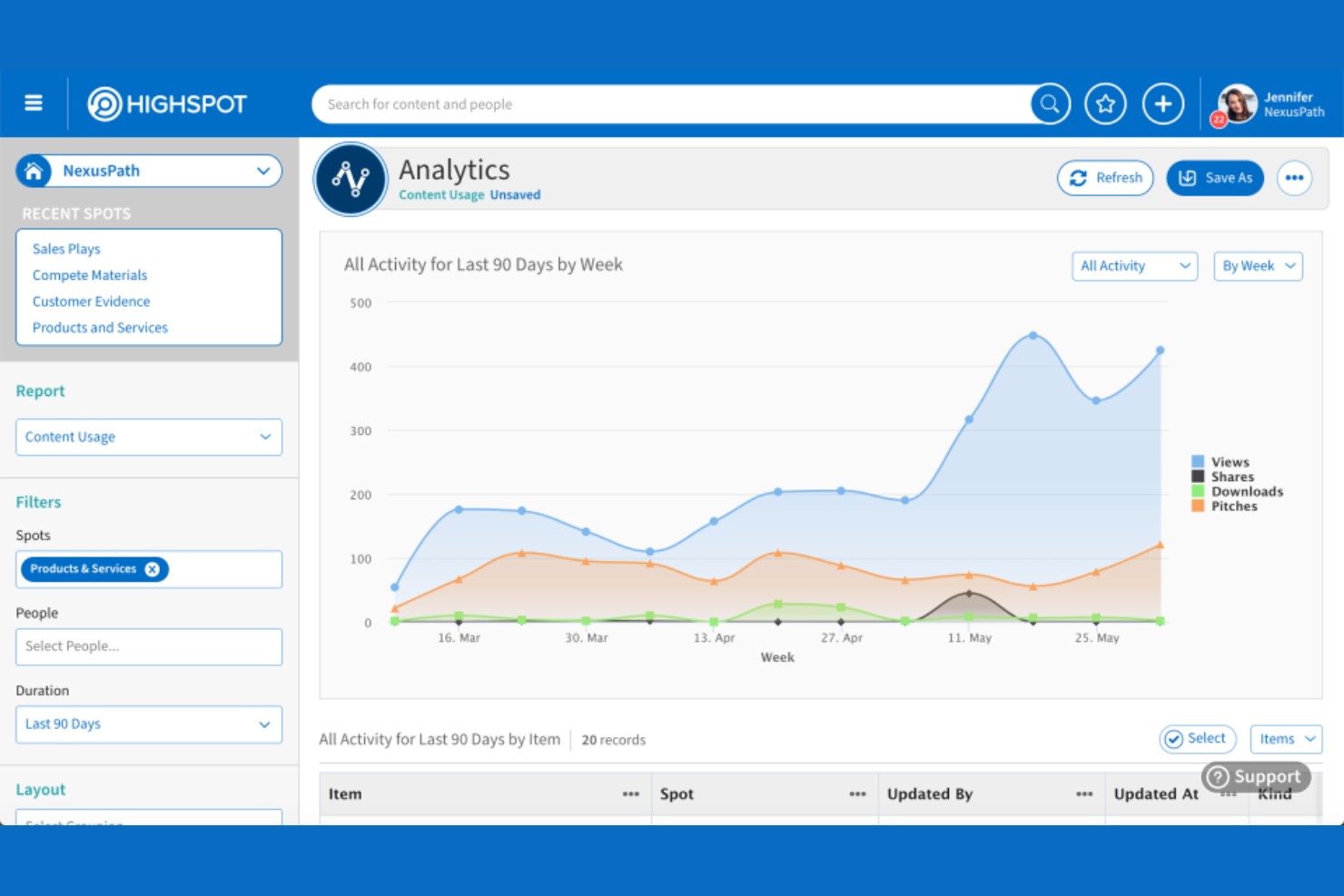
Sales enablement teams looking to organize, distribute, and measure sales content at scale often turn to Highspot. The platform is built for businesses that need to centralize collateral, track usage, and ensure sellers always have the right materials for every stage of the deal. Highspot helps revenue teams close content gaps and deliver consistent messaging across the entire sales process.
Why I Picked Highspot
When sales teams need a single source of truth for all their sales content, Highspot delivers with its advanced content management capabilities. I picked Highspot because it lets you organize collateral into structured, searchable libraries and control access based on roles or regions. The platform also tracks how content is used and shared, so you can see what resonates with buyers and optimize your materials. For sales enablement leaders, these features help ensure that sellers always have the most relevant, up-to-date resources at their fingertips.
Highspot Key Features
Some other features that make Highspot useful for sales teams include:
- Pitch Tracking: Monitor how prospects engage with shared content and presentations.
- Guided Selling: Provide sellers with step-by-step playbooks and recommended actions for each deal stage.
- Content Governance: Set permissions and expiration dates to control who can access or share specific materials.
- Analytics Dashboard: Visualize content performance and seller engagement through customizable reports.
Highspot Integrations
Integrations include Salesforce, Microsoft Dynamics 365, Microsoft Teams, Microsoft Outlook, Microsoft SharePoint, Google Workspace, Slack, Salesloft, Gmail, and Copilot.
Pros and Cons
Pros:
- Version control prevents outdated collateral use
- Pitch tracking reveals prospect content interactions
- Guided selling playbooks support deal progression
Cons:
- Limited offline access for mobile users
- No built-in contract or e-signature tools

Best for lead capture from digital channels
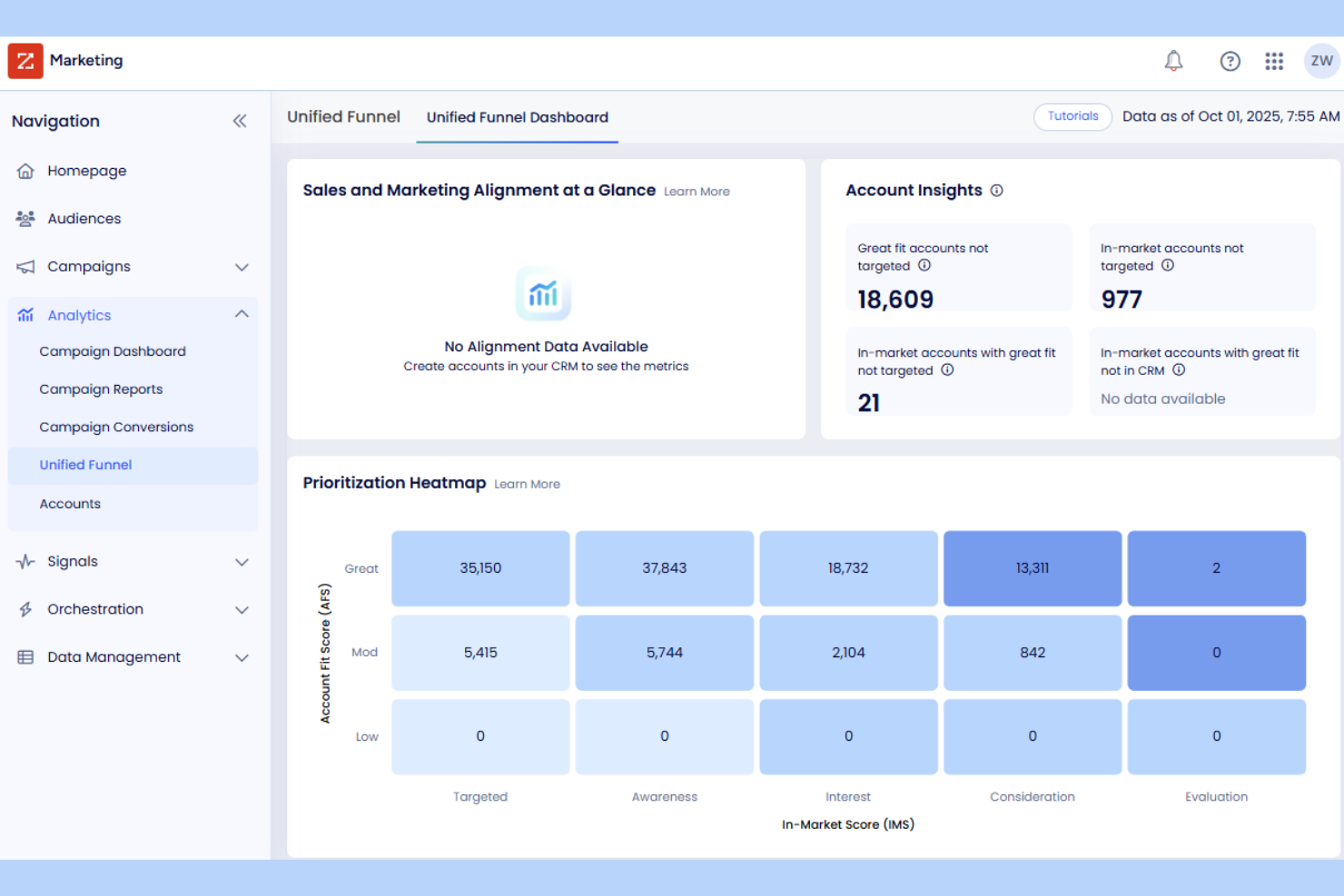
LeadSquared is built for teams that need to capture leads and apply sales intelligence across a wide range of digital channels. It’s especially useful for businesses that rely on web forms, landing pages, chat, and social media to drive their sales pipeline. With LeadSquared, you can centralize lead capture and automate follow-ups, helping your team respond quickly and keep prospects engaged.
Why I Picked LeadSquared
LeadSquared stands out for its ability to capture leads from nearly any digital touchpoint. I picked LeadSquared because it offers built-in tools for collecting leads from web forms, landing pages, chatbots, and social media campaigns. The platform also lets you automate lead assignment and scoring, so your team can prioritize outreach based on real-time engagement. For businesses that depend on digital channels to fill their pipeline, these features make LeadSquared a strong fit for sales productivity.
LeadSquared Key Features
Some other features that make LeadSquared valuable for sales teams include:
- Sales Automation Workflows: Set up automated sequences for follow-ups, reminders, and task assignments.
- Customizable Dashboards: Build dashboards to track sales activities, conversion rates, and team performance.
- Lead Nurturing Campaigns: Create multi-step email and SMS campaigns to engage prospects over time.
- Mobile CRM App: Manage leads, tasks, and communication from your mobile device.
LeadSquared Integrations
Integrations include Microsoft Teams, Zoom, Twilio, Mailchimp, Google Ads, WhatsApp, Shopify, Razorpay, and more.
Pros and Cons
Pros:
- Customizable dashboards for sales activity monitoring
- Built-in SMS and email campaign tools
- Captures leads from chat, web, and ads
Cons:
- Limited native integrations with accounting platforms
- No built-in predictive analytics for leads
Best for pipeline and marketing alignment
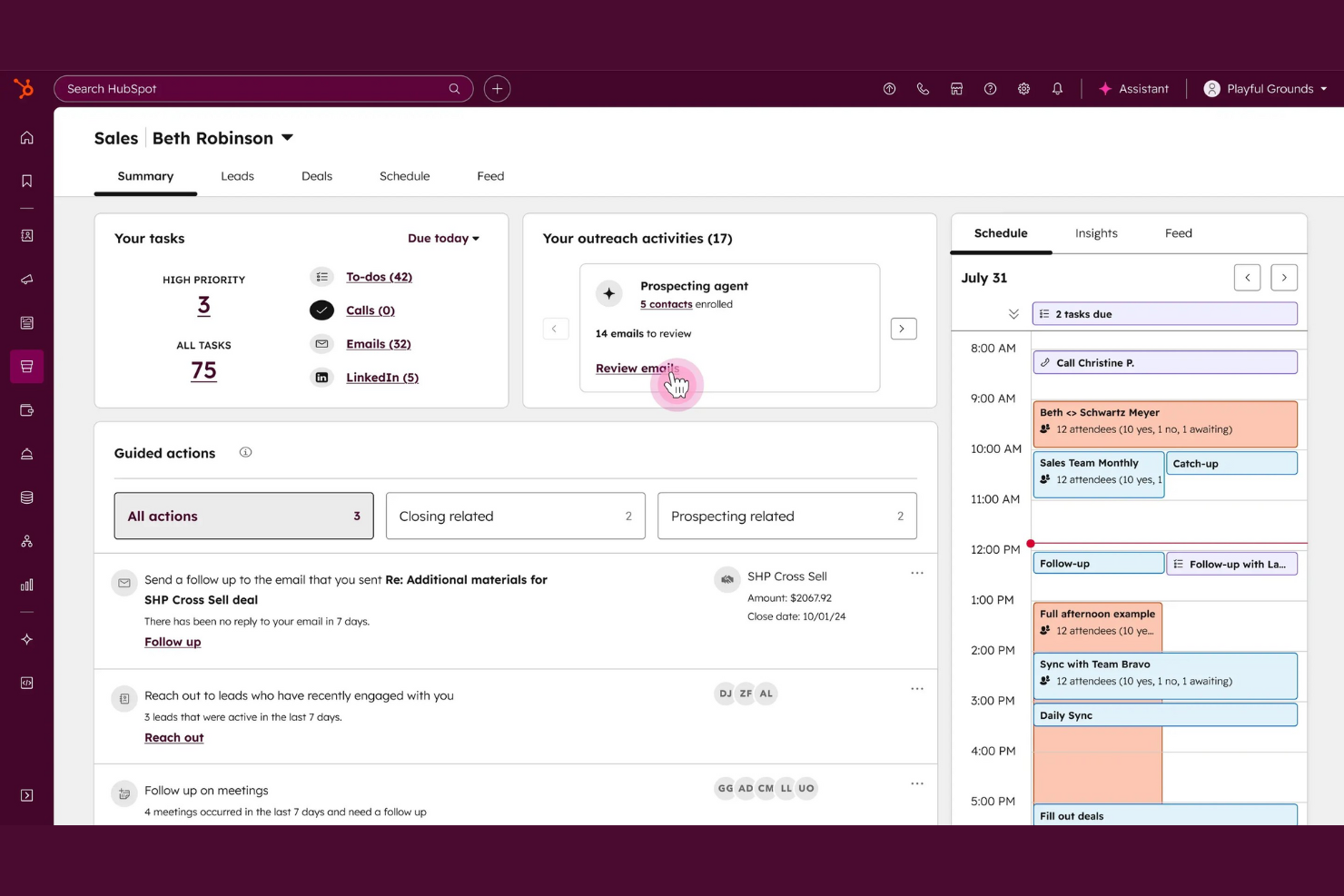
If you’re looking for a sales platform that brings your pipeline and marketing activities together, HubSpot Sales Hub is worth considering. This tool suits teams that want a single workspace for tracking deals, automating outreach, and aligning sales with marketing. HubSpot stands out for its unified approach, making it easier to manage contacts, communications, and reporting in one place.
Why I Picked HubSpot Sales Hub
I picked HubSpot Sales Hub because it’s designed to unify your sales pipeline with marketing activities, which is a challenge for many revenue teams. The platform connects deal tracking, email automation, and lead management in a single workspace, so sales and marketing can work from the same data and processes. I like that HubSpot’s shared dashboards and contact timelines help teams avoid duplicate outreach and keep everyone aligned on deal progress. This unified approach supports better handoffs, clearer reporting, and more consistent customer experiences.
HubSpot Sales Hub Key Features
Some other features in HubSpot Sales Hub that help sales teams work more productively include:
- Sales Playbooks: Build and share standardized sales processes and best practices directly inside the platform.
- Meeting Scheduler: Let prospects book meetings with your team using a personalized scheduling link that syncs with your calendar.
- Document Tracking: Upload, share, and track sales documents to see when prospects engage with your content.
- Quote Generation: Create, customize, and send professional sales quotes directly from the deal record.
HubSpot Sales Hub Integrations
Integrations include Salesforce, Gmail, Outlook, Slack, Zoom, Mailchimp, Shopify, Microsoft Teams, Calendly, and Google Calendar.
Pros and Cons
Pros:
- AI tools for prospecting and forecasting
- Real-time email and document tracking
- Built-in sales and marketing automation
Cons:
- Contact and email limits on entry plans
- Advanced features require higher-tier plans

Outreach
Best for automated sales engagement sequences
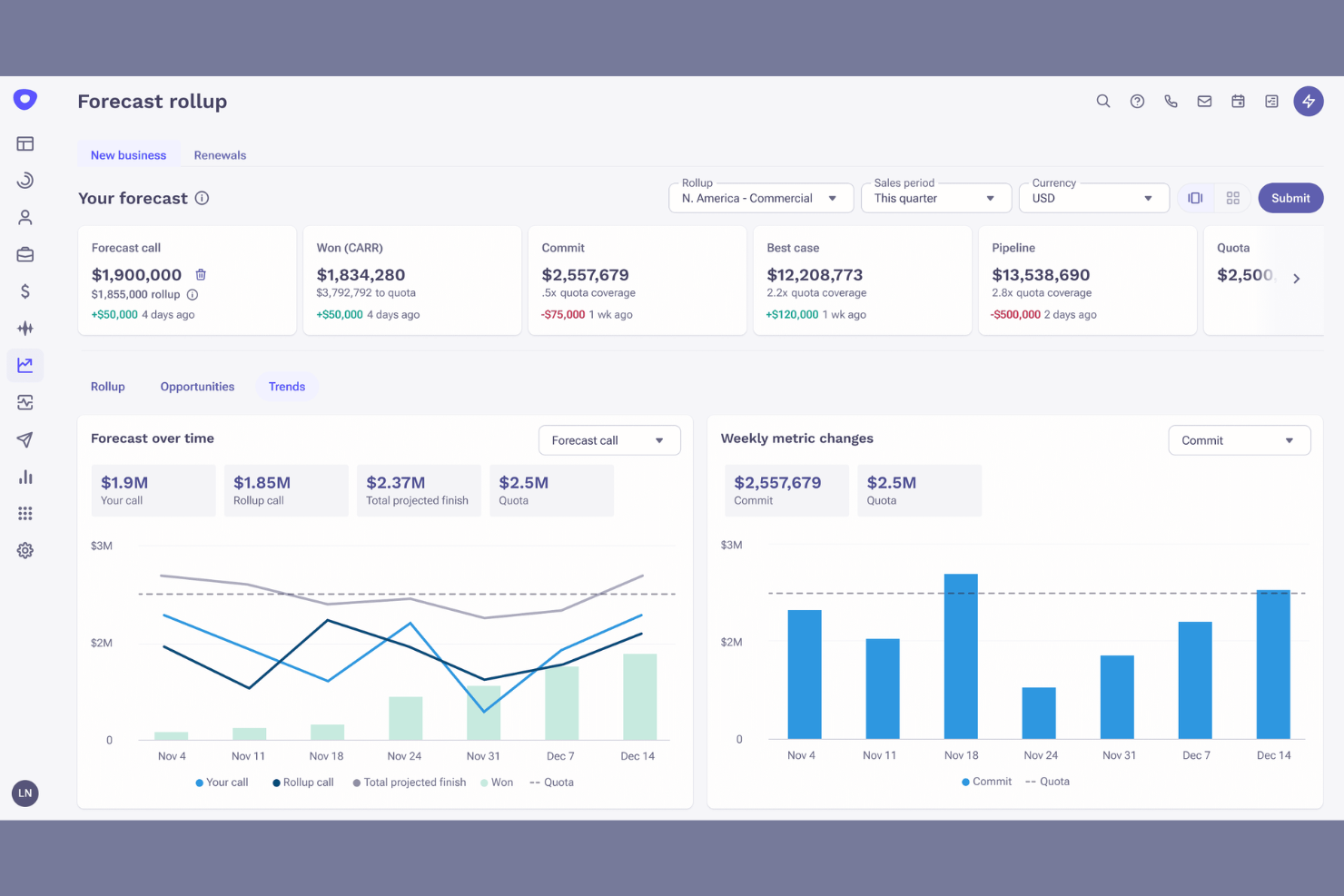
Outreach is designed for sales teams that want to automate and optimize their engagement workflows. It’s a strong fit for revenue operations leaders and sales managers who need to coordinate multi-step sequences across email, calls, and social channels. Outreach helps your team keep prospects moving through the pipeline with consistent, personalized outreach at scale.
Why I Picked Outreach
What sets Outreach apart is its focus on automating complex sales engagement sequences, which is essential for teams managing high volumes of outreach. I picked Outreach because it lets you build multi-step sequences that combine email, calls, and social touches, all scheduled and tracked in one place. The platform’s sequence analytics show you which steps and channels are driving the most lead generation, so you can refine your approach over time. This makes Outreach a strong choice for sales teams that want to scale personalized outreach without losing visibility or control.
Outreach Key Features
Some other features in Outreach that support sales productivity include:
- Automated Task Prioritization: Organize daily sales tasks based on urgency and impact.
- AI-Powered Email Writing Assistant: Generate and refine email copy using built-in AI suggestions.
- Meeting Scheduler: Allow prospects to book meetings directly from outreach emails.
- Call Recording and Logging: Record and log sales calls automatically for future reference and coaching.
Outreach Integrations
Integrations include Salesforce, HubSpot, Microsoft Dynamics 365 Sales, Gmail, Outlook, Highspot, Zoom, LinkedIn Sales Navigator, Slack, and more.
Pros and Cons
Pros:
- AI email assistant suggests subject lines and copy
- Automated task lists update as prospects respond
- Sequence analytics track engagement by channel
Cons:
- Email deliverability tools lack granular controls
- Sequence branching requires manual logic setup

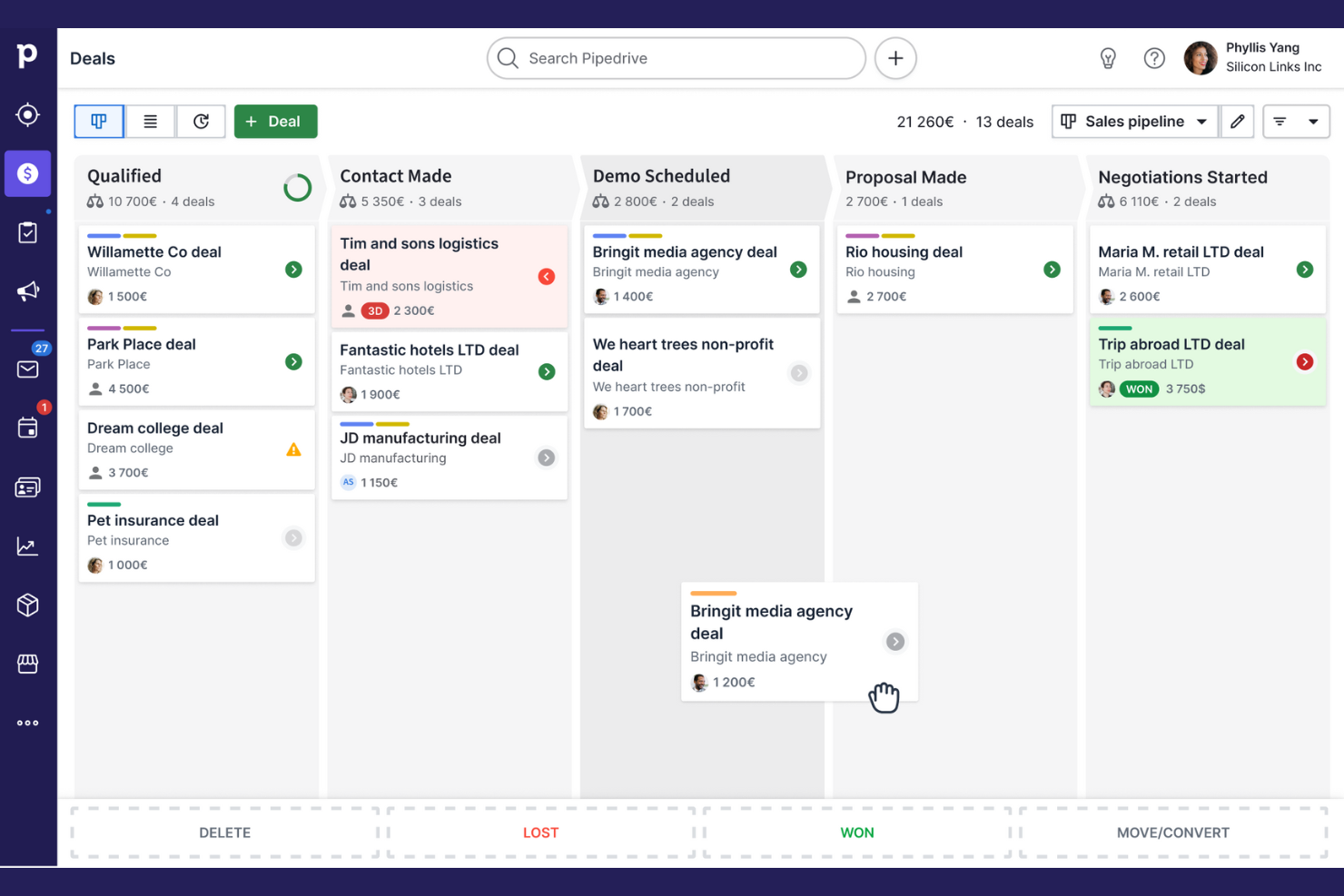
If your team needs a clear, visual way to manage deals, Pipedrive is designed for you. Its drag-and-drop pipeline view appeals to sales teams that want to track progress and spot bottlenecks at a glance. Pipedrive helps small and midsize businesses use real-time notifications to keep sales activities organized and focused on moving deals forward.
Why I Picked Pipedrive
What sets Pipedrive apart is its highly visual approach to deal tracking, which makes it easy for all team members to see exactly where every opportunity stands. The customizable pipeline view lets you drag and drop deals between stages, so you can quickly update progress and spot stalled deals. I picked Pipedrive because its activity-based selling framework encourages teams to focus on the next actionable step for each deal. This visual workflow helps sales professionals prioritize tasks and maintain momentum throughout the sales process.
Pipedrive Key Features
Some other features in Pipedrive that support sales productivity include:
- Email Integration: Connect your email account to send, receive, and track messages directly within Pipedrive.
- Sales Reporting: Access customizable reports to analyze sales performance and pipeline metrics.
- Workflow Automation: Set up automated actions for repetitive tasks like assigning leads or sending follow-up emails.
- Lead Capture Forms: Create web forms to capture leads and automatically add them to your pipeline.
Pipedrive Integrations
Integrations include PandaDoc, Leadfeeder, JustCall, LinkPort, Outfunnel, Slack, QuickBooks, Trello, Zoom, and Gmail.
Pros and Cons
Pros:
- Simple custom pipeline stage creation
- Automatic activity reminders for reps
- Visual drag-and-drop deal management
Cons:
- Limited support for multi-currency pipelines
- No built-in phone dialer for calls
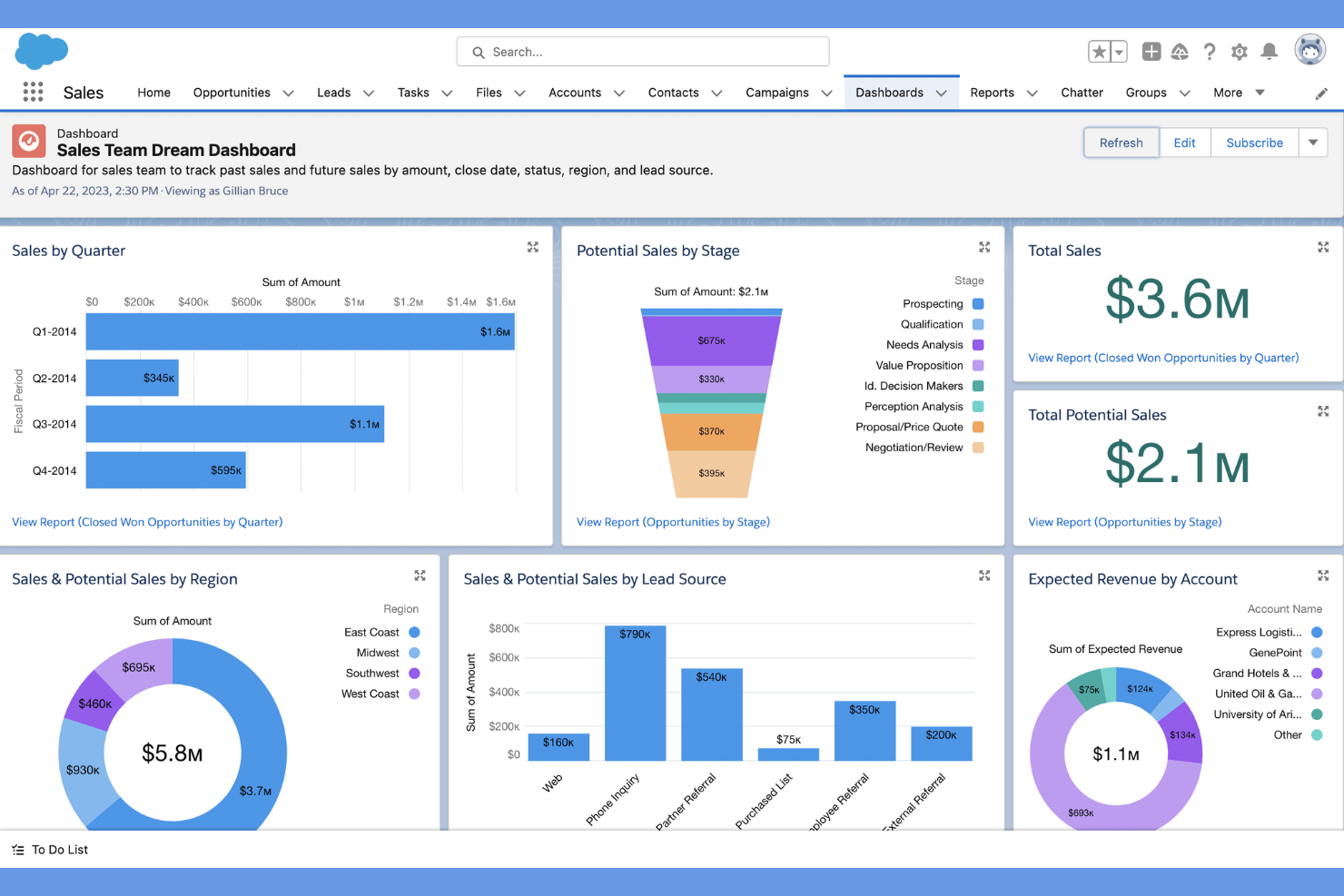
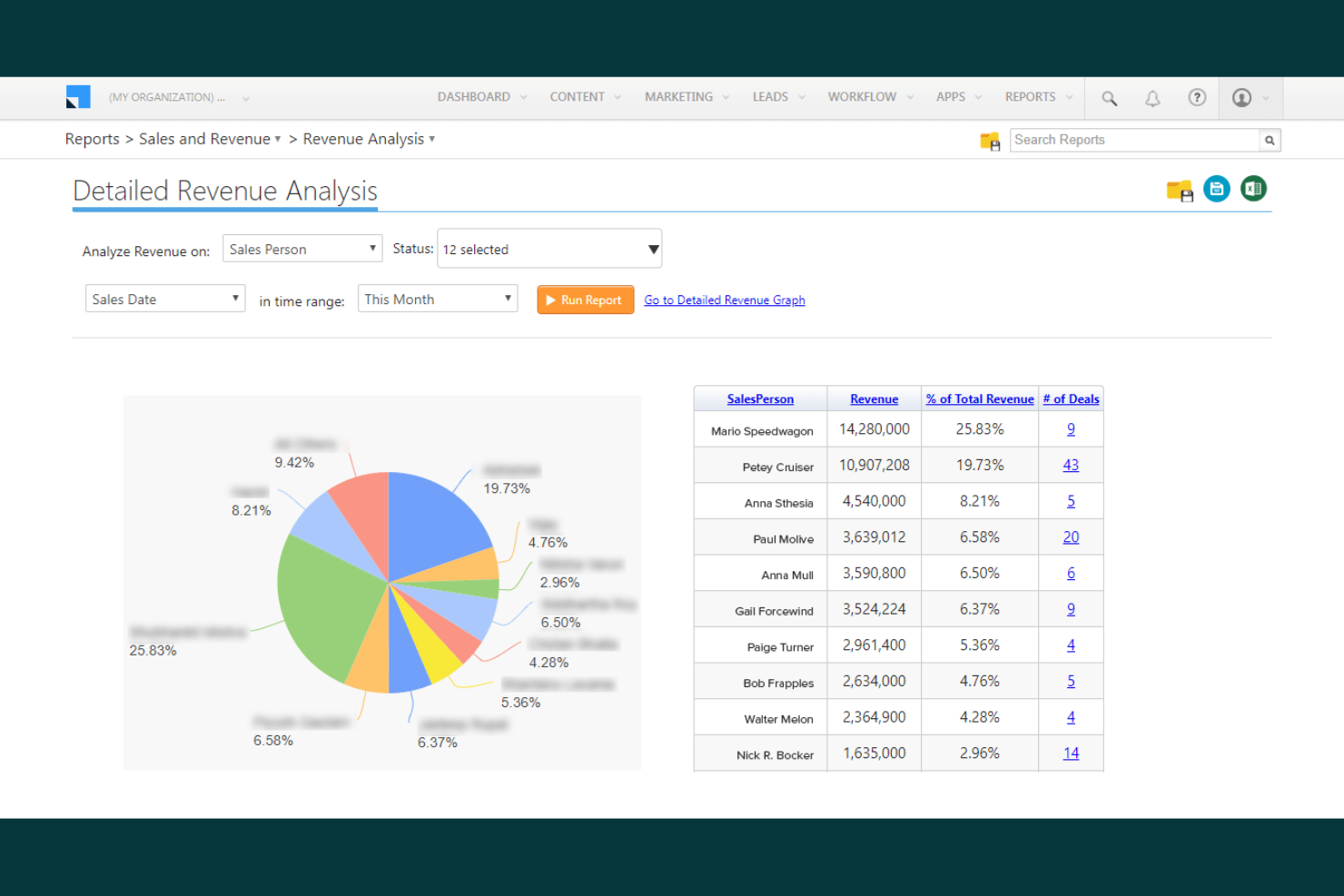
Salesforce Sales Cloud is an all-in-one sales productivity software, built for organizations that need deep customization and control over their sales processes. It’s a strong fit for large enterprises or teams with complex workflows, multiple business units, or unique reporting needs. With its flexible architecture, Salesforce lets you tailor everything from pipeline stages to automation rules, supporting even the most specialized sales operations.
Why I Picked Salesforce Sales Cloud
For teams that need advanced customization, Salesforce Sales Cloud stands out as a sales productivity tool that can adapt to nearly any sales process. You can configure custom objects, fields, and workflows to match your organization’s unique requirements, which is especially valuable for complex or highly regulated industries. I picked Salesforce because its automation builder and process designer let you create tailored sales journeys and approval flows that go far beyond standard pipeline management. This level of flexibility supports organizations with layered sales structures, multiple product lines, or specialized reporting needs.
Salesforce Sales Cloud Key Features
Some other features in Salesforce Sales Cloud that help sales teams manage productivity include:
- Opportunity Scoring: Use AI-driven insights to prioritize deals based on likelihood to close.
- Sales Forecasting: Generate real-time forecasts with customizable dashboards and pipeline views.
- Territory Management: Assign and manage sales territories with flexible rules and mapping tools.
- Mobile App: Access sales data, update records, and manage tasks from anywhere using the Salesforce mobile app.
Salesforce Sales Cloud Integrations
Integrations include Slack, Outlook, Gmail, QuickBooks, Mailchimp, Zoom, HubSpot, Docusign, and Google Drive.
Pros and Cons
Pros:
- Highly configurable dashboards and reporting tools
- Advanced territory management for large teams
- Custom objects support unique sales processes
Cons:
- Data storage limits can increase costs
- Initial setup requires technical resources
Other Sales Productivity Tools
Here are some additional sales productivity tools options that didn’t make it onto my shortlist, but are still worth checking out:
- Apollo
For integrated prospecting and outreach
- Superhuman
For high-speed email workflow optimization
- Zoho CRM
For multi-channel communication management
- Salesloft
For guided selling playbooks
- Salesmate
With built-in calling and texting


How I Evaluate Sales Productivity Tools
I split my evaluation into two layers: baseline functionality a tool must have—CRM sync, cadences, activity capture—and what sets it apart for RevOps teams with complex sales processes.
Core Functionality (Table Stakes For This List)
When I'm selecting tools for my list, I rank each one on a scale from 0 (does not offer the functionality) to 5 (excels in this area) for each core functionality listed below. Then, I calculate the tool's total score into a percentage. Each tool needs to achieve a minimum total score of 75% to be considered for inclusion.
- Sales Workflow Automation: I look for tools that automate admin-heavy tasks like logging activities, creating follow-up reminders, and updating deal stages so reps stay focused on selling.
- CRM Integration & Sync: Real-time, bi-directional sync with major CRMs like Salesforce and HubSpot matters here, especially custom field mapping and automatic contact creation.
- Multi-Channel Outreach: I evaluate whether reps can run sequenced touches across email, phone, and LinkedIn from one workspace rather than toggling between disconnected tools.
- Email & Calendar Productivity: Templates, open tracking, and one-click scheduling links are table stakes—I check how well each tool reduces the friction of booking meetings.
- Sales Activity Analytics: Dashboards that surface rep-level KPIs like calls made, emails sent, and reply rates give RevOps leaders the data they need for coaching and forecasting.
- Task & Cadence Management: I look at how each tool structures a rep's day—whether it uses prioritized task queues, step-based cadences, or playbooks to guide daily workflows.
Once I have a list of tools that meet the criteria, I consider what sets each platform apart.
Differentiating Factors (What Sets Vendors Apart)
Here's how I compare and contrast different vendors:
Standout Features
Automatic activity capture is a big one for me—tools that passively log emails, calls, and meetings to CRM without rep input keep pipeline data clean for RevOps reporting. I also evaluate AI-powered insights, especially features that flag at-risk deals or suggest next steps based on engagement patterns. Conversation intelligence adds another layer, giving managers coachable moments pulled directly from recorded sales calls.
Beyond Features
Tech stack fit matters a lot—I check whether a tool offers native integrations with platforms like Gong, ZoomInfo, and LinkedIn Sales Navigator, plus open API access for custom RevOps workflows. Scalability is another factor I evaluate, particularly how well a platform handles multiple sales orgs, territories, and growing headcounts. Implementation speed also plays a role; prebuilt CRM templates and dedicated onboarding resources can cut weeks off a rollout and drive faster rep adoption.
How to Choose Sales Productivity Tools
It’s easy to get bogged down in long feature lists and complex pricing structures. To help you stay focused as you work through your unique software selection process, here’s a checklist of factors to keep in mind:
| Factor | What to Consider |
|---|---|
| Scalability | Will the tool support your team as you grow? Check user limits, data caps, and pricing for larger teams. |
| Integrations | Does the tool connect natively with your CRM, marketing automation, and communication platforms? Avoid tools that require workarounds for core systems. |
| Customizability | Can you adapt workflows, fields, and dashboards to match your sales process? Rigid tools may slow adoption or force process changes. |
| Ease of use | How quickly can new users become productive? Look for clear navigation, minimal training requirements, and logical workflows. |
| Implementation and onboarding | What resources are needed to get started? Consider migration support, training materials, and the time required to go live. |
| Cost | Are pricing tiers transparent and predictable as your needs change? Watch for hidden fees, add-on costs, or required upgrades. |
| Security safeguards | Does the tool offer role-based access, data encryption, and audit logs? Confirm compliance with your company’s security policies. |
| Support availability | What support channels are offered and during what hours? Consider if you need 24/7 help or a dedicated account manager for urgent issues. |
What Are Sales Productivity Tools?
Sales productivity tools are software solutions designed to help sales teams manage leads, automate routine tasks, and track sales activities in one place. These tools centralize communication, support follow-up processes, and provide reporting to monitor performance. By organizing workflows and reducing manual work, sales productivity tools help teams focus on building relationships and closing deals more efficiently.
Features of Sales Productivity Tools
When selecting sales productivity tools, keep an eye out for the following key features:
- Lead management: Centralizes all lead information within your tech stack, tracks interactions, and helps teams organize prospects throughout the sales cycle.
- Task and activity tracking: Allows users to schedule, assign, and monitor sales tasks, meetings, and follow-ups to ensure nothing falls through the cracks.
- Pipeline management: Visualizes sales opportunities at each stage, making it easier to forecast revenue and identify bottlenecks.
- Contact management: Stores detailed records of contacts, including communication history, notes, and relationship status for easy reference.
- Email and SMS integration: Enables sending, receiving, and logging messages directly within the platform, keeping all communication in one place.
- Calendar integration: Syncs with external calendars to manage appointments, reminders, and deadlines without switching tools.
- Reporting and analytics: Provides dashboards and customizable reports to track sales performance, conversion rates, and team productivity.
- Workflow automation: Automates repetitive tasks such as lead assignment, follow-up reminders, and status updates to save time and reduce manual errors.
- Mobile access: Offers mobile apps or responsive web interfaces so sales teams can manage activities and access information on the go.
Common Sales Productivity Tools AI Features
Beyond the standard sales productivity tools features listed above, many of these solutions are incorporating AI with features like:
- Predictive lead scoring: Uses AI algorithms to analyze historical data and identify qualified, helping teams prioritize outreach.
- Automated conversation insights: Transcribes and analyzes sales calls or emails to surface key topics, sentiment, and next steps, supporting more informed follow-ups.
- Sales forecasting: Leverages AI to predict future sales outcomes based on current pipeline data, trends, and historical performance, improving forecast accuracy.
- Intelligent task recommendations: Suggests the next best actions at the right time by analyzing deal progress and engagement signals.
- Email content optimization: Uses AI to recommend subject lines, messaging, and send times that are most likely to engage prospects and increase response rates.
Benefits of Sales Productivity Tools
Implementing sales productivity tools provides several benefits for your team and your business. Here are a few you can look forward to:
- Faster lead response times: Automated lead capture and follow-up features help your team engage prospects quickly and consistently.
- Improved sales forecasting: Built-in analytics and AI-powered forecasting tools provide more accurate pipeline visibility and revenue predictions.
- Centralized communication: Integrated email, SMS, and calendar tools keep all sales conversations and appointments in one place for easy access.
- Reduced manual work: Workflow automation and task tracking eliminate repetitive data entry and administrative tasks for your team.
- Better sales process visibility: Customizable dashboards and pipeline management features let you monitor deal progress and team activity in real time.
- Enhanced team collaboration: Shared contact records, notes, and activity logs ensure everyone stays aligned and informed throughout the sales cycle.
- Increased data accuracy: Lead management and deduplication features help maintain clean, reliable sales data for reporting and decision-making.
Costs and Pricing of Sales Productivity Tools
Selecting sales productivity tools requires an understanding of the various pricing models and plans available. Costs vary based on features, team size, add-ons, and more. The table below summarizes common plans, their average prices, and typical features included in sales productivity tools solutions:
Plan Comparison Table for Sales Productivity Tools
| Plan Type | Average Price | Common Features |
|---|---|---|
| Free Plan | $0/user/month | Basic lead and contact management, limited task tracking, email integration, and basic reporting. |
| Personal Plan | $10-$25/user/month | Advanced task tracking, calendar sync, customizable pipelines, and simple workflow automation. |
| Business Plan | $30-$60/user/month | Team collaboration tools, advanced reporting, integrations with CRM and marketing platforms, and workflow automation. |
| Enterprise Plan | $70-$150/user/month | Custom roles and permissions, advanced security, dedicated support, API access, and advanced analytics. |
Sales Productivity Tools FAQs
Here are some answers to common questions about sales productivity tools:
How do sales productivity tools help with lead management?
Sales productivity tools centralize lead information, track every interaction, and automate follow-up reminders. This helps your team prioritize leads, avoid missed opportunities, and maintain a consistent outreach process.
Can sales productivity tools integrate with my existing CRM?
Yes, most sales productivity tools offer native integrations with popular customer relationship management platforms. Before choosing a tool, check for compatibility with your current systems to ensure smooth data flow and avoid manual data entry.
What should I consider when migrating to a new sales productivity tool?
Plan for data migration, user training, and process mapping. Look for tools that offer onboarding support, import templates, and clear documentation to minimize disruption and help your team get up to speed quickly.
Are there security risks with using sales productivity tools?
Any cloud-based tool can pose security risks if not properly managed. Choose solutions with role-based access, data encryption, and compliance certifications that align with your company’s security policies.
How do I know if my team needs a sales productivity tool?
If your team struggles with spreadsheets, manual data entry, or scattered communication, a sales productivity tool can help centralize workflows and improve visibility across the sales process.