

10 Best Enterprise Sales Software Reviewed In 2026

10 Best Enterprise Sales Software Shortlist


Managing the intricate demands of enterprise-level sales—coordinating complex pipelines, aligning cross-functional teams, and optimizing revenue strategies—requires more than just effort; it demands the right technology.
That’s where enterprise sales software steps in—a solution designed to support sales workflows, enhance collaboration, and deliver the actionable insights your team needs to outperform the competition. However, not all tools are created equal. As RevOps specialists, we understand the stakes are high, and the tools you choose can directly impact your organization’s success.
In this guide, we’ll help you identify the best enterprise sales software for your needs. Whether you’re looking for a tool that fits your budget, offers better deal tracking, or includes specific features for your business, we’ll walk you through what to look for and how to make the right choice.
Why Trust Our Software Reviews
We’ve been testing and reviewing RevOps software since 2022. As RevOps leaders ourselves, we know how critical and difficult it is to make the right decision when selecting software.
We invest in deep research to help our audience make better software purchasing decisions. We’ve tested more than 2,000 tools for different RevOps use cases and written over 1,000 comprehensive software reviews. Learn how we stay transparent & our software review methodology.
Best Enterprise Sales Software Summary
This comparison chart summarizes pricing details for my top enterprise sales software selections to help you find the best one for your budget and business needs.
| Tool | Best For | Trial Info | Price | ||
|---|---|---|---|---|---|
| 1 | Best for field territory and route optimization | Free demo available | Pricing upon request | Website | |
| 2 | Best for AI-powered sales role-play training | Free demo available | Pricing upon request | Website | |
| 3 | Best for lead management | Free demo available | From $40/month (5 users) | Website | |
| 4 | Best for unified CPQ and contract management | Free demo available | Pricing upon request | Website | |
| 5 | Best for AI-driven sales insights | 14-day free trial | From $25/user/month (billed annually) | Website | |
| 6 | Best for AI-driven enterprise sales automation | 15-day free trial + free plan available | From $14/user/month (billed annually) | Website | |
| 7 | Best for sales engagement | Free demo available | Pricing upon request | Website | |
| 8 | Best for customer support integration | Free demo available | From $19/user/month | Website | |
| 9 | Best for intent data insights | Free demo available | Pricing upon request | Website | |
| 10 | Best for small businesses | 14-day free trial + free demo available | From $30/user/month (billed annually) | Website |
-

Pipedrive CRM
Visit WebsiteThis is an aggregated rating for this tool including ratings from Crozdesk users and ratings from other sites.4.5 -
Creatio CRM
Visit WebsiteThis is an aggregated rating for this tool including ratings from Crozdesk users and ratings from other sites.4.7 -
monday CRM
Visit WebsiteThis is an aggregated rating for this tool including ratings from Crozdesk users and ratings from other sites.4.6



Best Enterprise Sales Software Reviews
Below are my detailed summaries of my shortlist’s best enterprise sales software. My reviews look at each tool’s key features, pros and cons, integrations, and ideal use cases to help you find the best one.

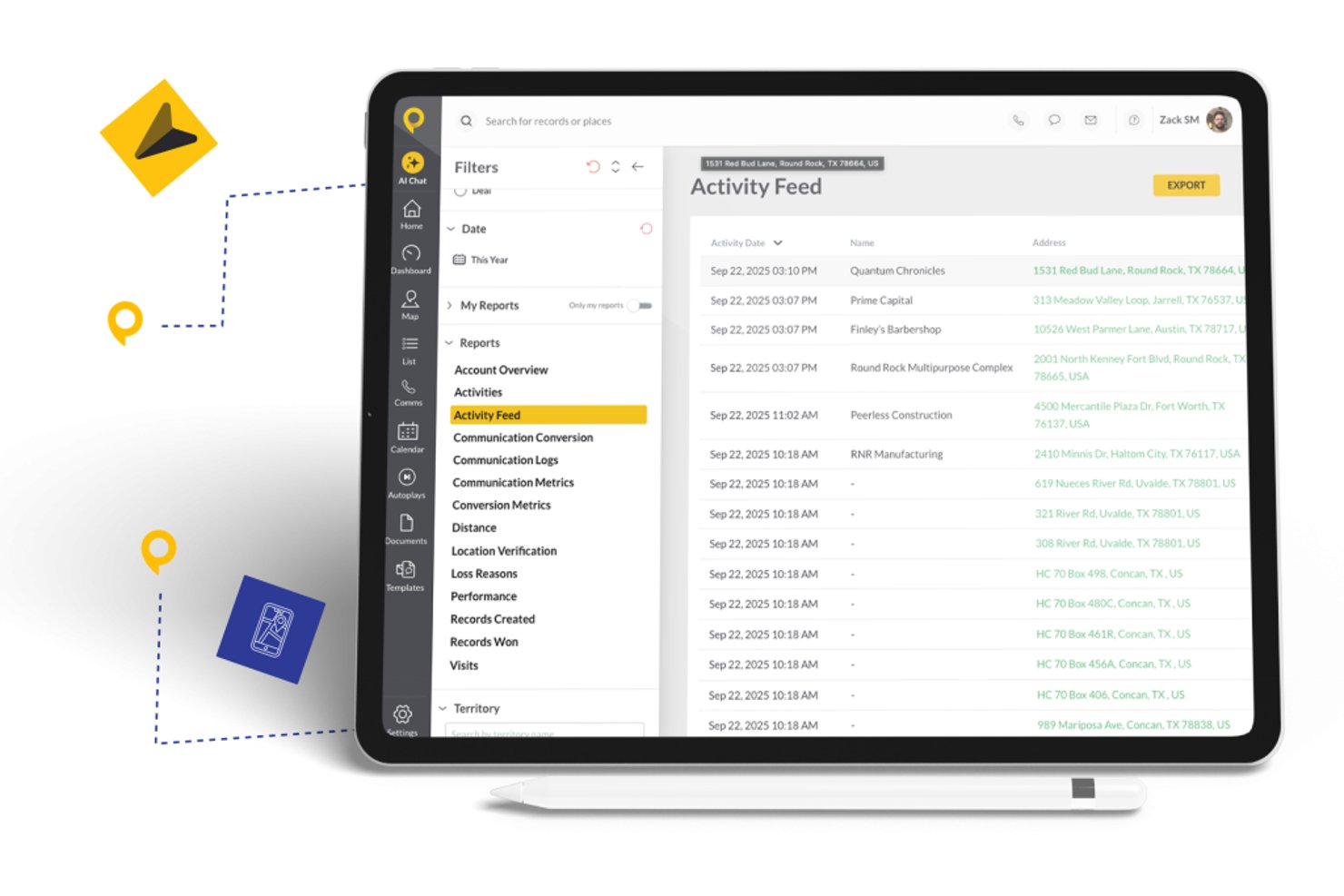
SPOTIO is a mobile-first field sales platform that combines territory management, route optimization, lead tracking, activity capture, and AI-powered rep guidance for outside sales teams.
Who Is SPOTIO Best For?
SPOTIO fits mid-market to enterprise outside sales teams in industries like telecom, solar, roofing, and home services where reps work in the field daily.
Why I Picked SPOTIO
SPOTIO earns its spot on my shortlist because of how deeply it handles territory and route management for field sales teams operating at scale. I like that managers can build territory boundaries by zip code, county, or custom map shapes, assign them with hierarchical permissions, and layer in 200+ demographic data overlays to prioritize where reps spend their time. In practice, that means a regional sales director running 50 reps across multiple markets can slice territories by lead density, assign them dynamically, and track exactly where each rep is working in real time.
SPOTIO Key Features
- DASH AI co-pilot: Uses AI to prep reps for visits, capture notes, scan business cards, and generate follow-up messages from the field.
- Next best action engine: Surfaces predictive recommendations for which accounts or leads reps should prioritize throughout the day.
- Performance analytics dashboards: Visualizes territory and rep activity with charts, drill-downs, and conversion tracking across multiple field teams.
- Native CRM integrations: Syncs activity data bidirectionally with Salesforce, HubSpot, and Microsoft Dynamics 365 for consistent enterprise reporting.
SPOTIO Integrations
SPOTIO offers native integrations with Salesforce, HubSpot, Microsoft Dynamics 365, and Pipedrive. Integrations with Zoho are available through Zapier, and an API is available for custom integrations.
Pros and Cons
Pros:
- AI-driven visit prep for field reps
- Real-time rep location tracking at enterprise scale
- Detailed territory building with demographic data overlays
Cons:
- Field-only focus limits inside sales team coverage
- Limited forecasting depth for inside sales teams

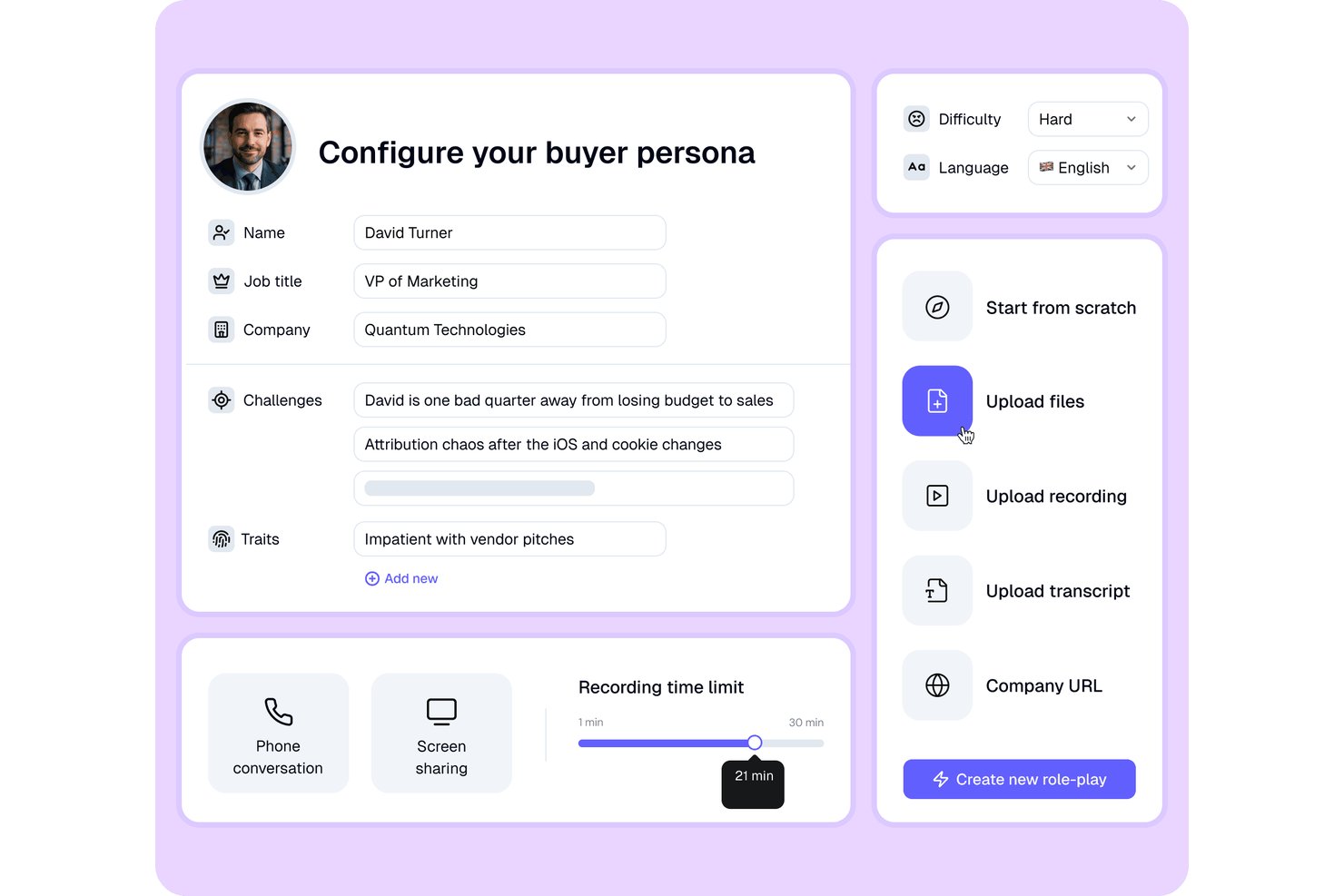
PitchMonster is an AI sales role-play and coaching platform that lets sales teams practice live buyer conversations, receive automated performance scoring, and run call analysis across onboarding and ongoing training programs.
Who Is PitchMonster Best For?
PitchMonster is a strong fit for enterprise sales enablement leaders managing large, distributed sales teams that need to scale rep coaching without relying on manager bandwidth.
Why I Picked PitchMonster
PitchMonster earns its spot on my shortlist because the AI buyer persona builder is genuinely impressive. Paste a prospect's URL and within two minutes you get a realistic persona with objections, context, and difficulty settings. I also like the self-coaching debrief mode, where the AI asks reps what they noticed and what they'd change, because reps who work through that reflection improve faster than those who just receive scores.
PitchMonster Key Features
- AI-powered scenario generation: Instantly creates new role-play scenarios based on uploaded recordings or sales materials.
- Multi-language support: Empowers teams to run simulations and training in over 27 languages.
- Gamified leaderboards: Provides in-platform ranking for reps to encourage friendly competition and engagement.
- CRM and Gong integration: Connects with Salesforce, HubSpot, and Gong to pull data for creating highly relevant practice sessions.
PitchMonster Integrations
PitchMonster offers native integrations with Salesforce, HubSpot, and Gong. An API is also available for custom integrations.
Pros and Cons
Pros:
- Works for global teams in 27+ languages
- Automated scoring and feedback after role-plays
- AI-generated buyer personas for practice scenarios
Cons:
- Lacks advanced deal management capabilities
- No pipeline or forecasting features
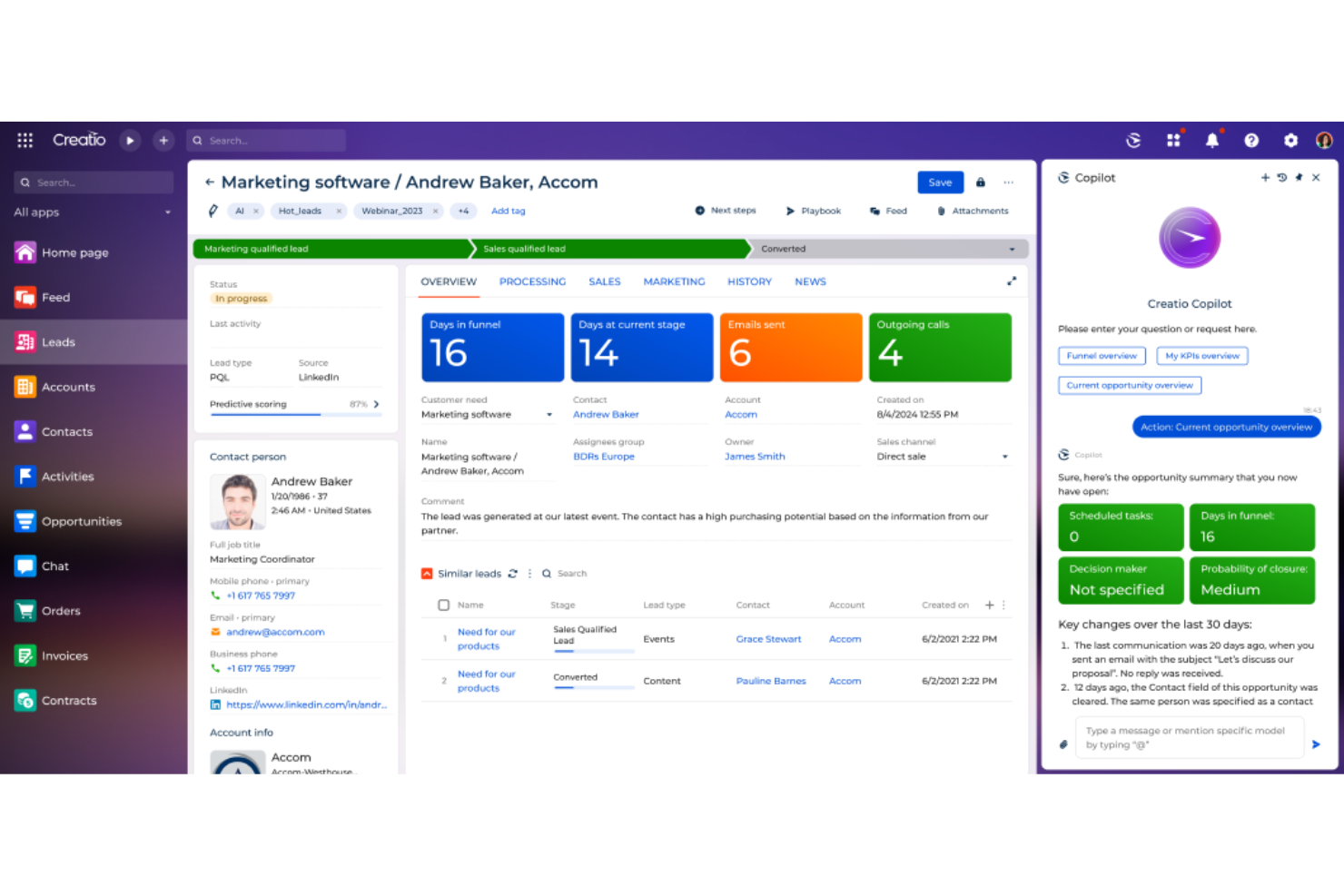
CRM Creatio is a no-code CRM and sales management platform designed to accelerate sales processes of any complexity. It consolidates your customer data, automates lead and opportunity workflows, and enhances sales collaboration.
Why I picked CRM Creatio: One reason I chose CRM Creatio is its comprehensive lead and opportunity management capabilities. It automates the entire lead management cycle, from capturing leads to closing deals, ensuring no opportunity is overlooked. Another standout aspect is its robust sales forecasting tools. By analyzing historical data and current trends, CRM Creatio provides accurate sales forecasts that inform your strategic planning. Furthermore, I like that the platform is fully customizable without needing any coding knowledge, which is perfect for tailoring your sales processes to your unique needs.
Standout features & integrations:
Features include 360-degree customer views for customer relationship management and order and contract management, which streamlines the creation and tracking of sales documents. Additionally, the platform offers sales productivity tools that help your team manage tasks, appointments, and communications efficiently, ensuring they stay organized and responsive to client needs.
Integrations include Accelo, Act!, ActiveCampaign, Acumatica, Adobe Analytics, Asana, Microsoft Exchange, Excel, Mailchimp, HubSpot Marketing Hub, Google Calendar, and Tableau.
Pros and Cons
Pros:
- Supports scaling businesses
- No-code platform
- Extensive customization options
Cons:
- Data migration may be complex
- Customization can be time-consuming
New Product Updates from Creatio CRM

Creatio CRM Expands AI Across Marketing and Collaboration
Creatio CRM introduces AI-assisted landing page generation, template-based email generation, RAG-enabled knowledge governance, a Microsoft Teams personal tab, and AI meeting summaries. These updates help teams create content faster and streamline AI-powered workflows. For more information, visit Creatio’s official site.
 .
.
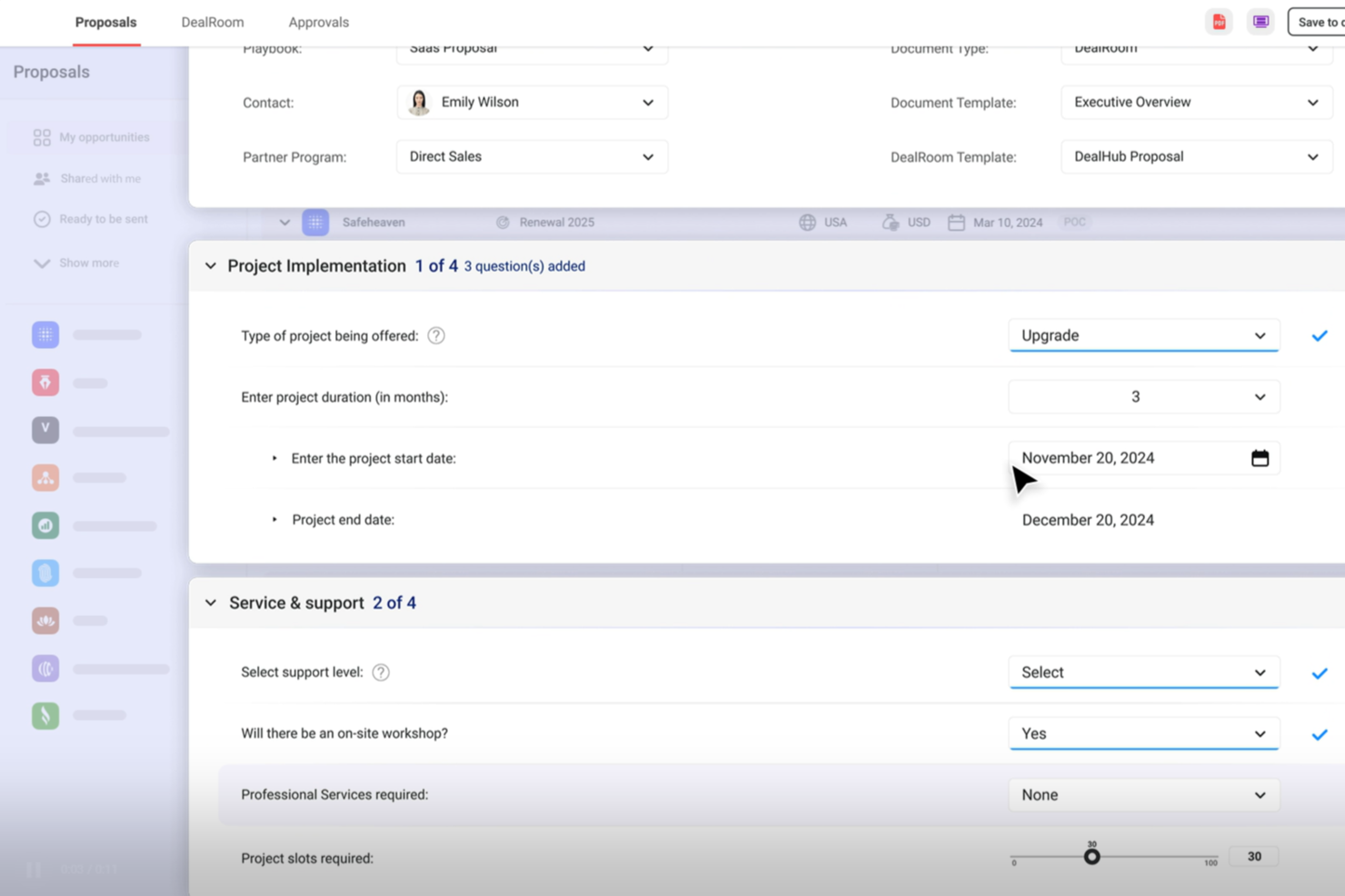
DealHub AI is a quote-to-revenue platform that brings together CPQ, contract lifecycle management, digital sales rooms, subscription billing, and deal desk workflows into a single connected system.
Who Is DealHub AI Best For?
DealHub AI is well-suited for mid-market and enterprise sales teams that manage high-volume, complex deals with multiple stakeholders, approval layers, and contract negotiations.
Why I Picked DealHub AI
I picked DealHub AI as one of the best because the CPQ and CLM modules share a single data model, meaning the pricing terms your rep configures in a quote flow directly into the contract without any manual re-entry. I love how the pre-approved clause library lets legal pre-load compliant language for specific deal types, so contracts don't stall while waiting for legal to draft from scratch. The redlining and version comparison tools keep every negotiation in one place, which eliminates the "which version is final?" problem I've seen derail more deals than I can count.
DealHub AI Key Features
- DealRoom digital sales room: Create a shared, interactive buyer portal where reps present quotes, collect signatures, and track prospect engagement in real time.
- Guided selling playbooks: Build rule-based selling flows that prompt reps with the right product configurations and pricing options based on deal criteria.
- Parallel approval workflows: Route deals through multi-stakeholder approval chains at the same time, using role-based permissions and automatic escalation triggers.
- Subscription and billing management: Configure recurring billing terms, usage-based pricing, and renewal schedules within the quoting layer.
DealHub AI Integrations
DealHub AI offers native integrations with Salesforce, Microsoft Dynamics 365, HubSpot, Gong, Slack, NetSuite, Stripe, and Avalara.
Pros and Cons
Pros:
- Supports various pricing structures
- Handles line-item approvals
- Offers no-code CPQ configuration
Cons:
- Slow loading with large deal volumes
- Product documentation has notable gaps
New Product Updates from DealHub AI

DealHub Adds Automatic Playbook Selection From CRM
DealHub now supports automatic playbook selection based on CRM data, streamlining the quoting process. For more information, visit DealHub AI's official site.
 .
.
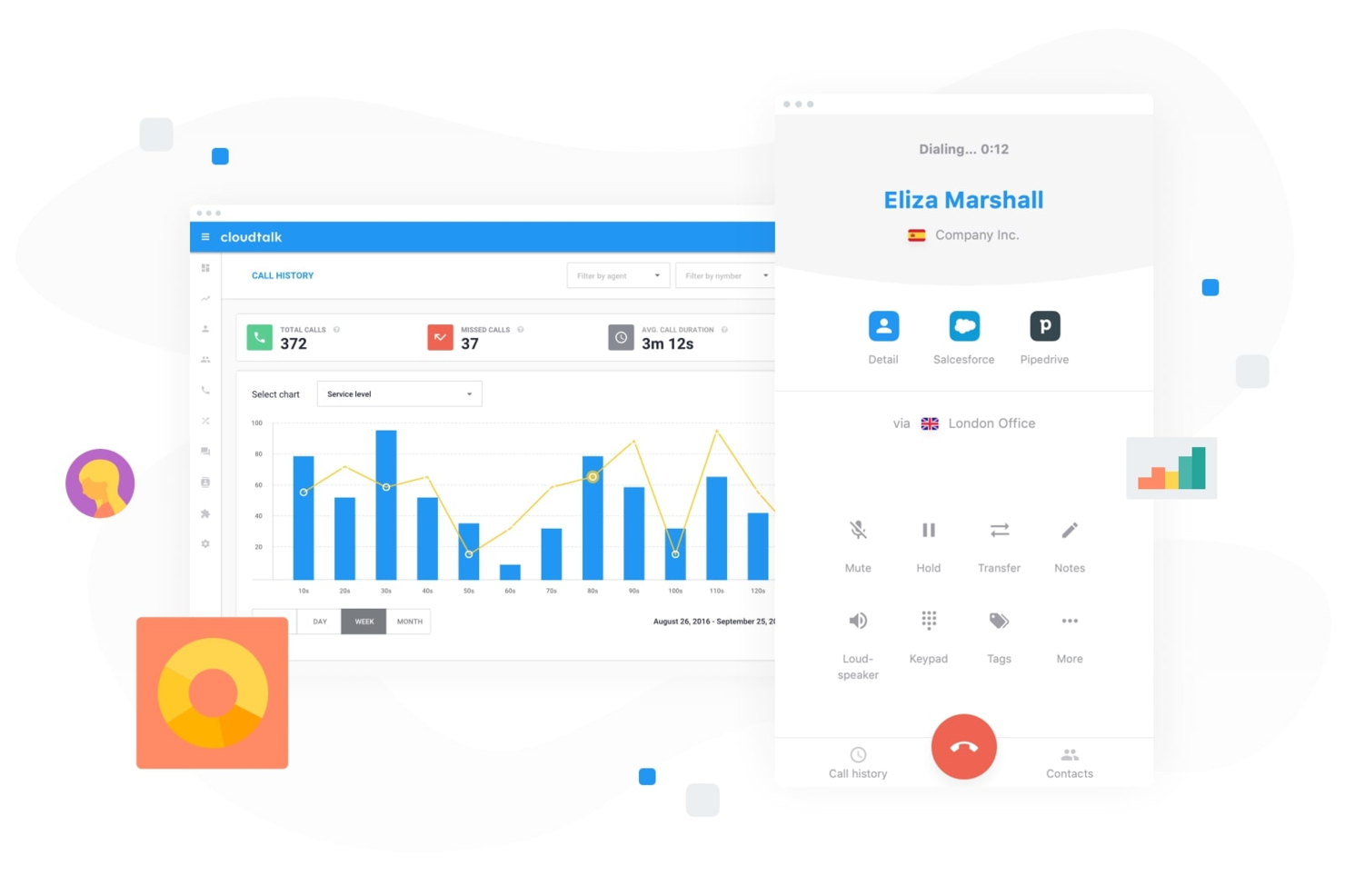
In enterprise sales environments, CloudTalk is a call center software solution built to support high-volume outreach and structured sales operations. It combines AI-powered automation with CRM integrations to help teams manage conversations at scale while keeping customer data aligned. For enterprises handling large pipelines and distributed sales teams, CloudTalk can help centralize communication and reduce manual admin work.
Why I Picked CloudTalk
I picked CloudTalk because its AI-driven dialing and conversation tools directly support enterprise sales productivity. The AI Dialer offers multiple dialing modes and voicemail drop, which can help your team reduce idle time and focus on live conversations. I also like its AI Conversation Intelligence, which provides automatic call summaries and sentiment analysis so you can review performance trends and coach more effectively. For enterprise teams managing high call volumes, these features can support more consistent outreach and data-backed sales decisions.
CloudTalk Key Features
In addition to the features mentioned earlier, CloudTalk offers several other functionalities that enhance its value as an enterprise sales software:
- Local Numbers: You can access local numbers in over 160 countries, facilitating a global sales reach.
- Number Porting: This feature allows you to transfer existing numbers to CloudTalk, ensuring continuity and brand consistency.
- Branded Caller ID: Customize your caller ID with your company name and logo, enhancing brand recognition.
- Real-Time Monitoring: This feature provides live call listening and performance analytics, helping you monitor and improve team performance.
CloudTalk Integrations
Integrations include HubSpot, Salesforce, Zoho, MS Dynamics, Zendesk, Intercom, Odoo, Shopify, and more. CloudTalk also offers an API for custom integrations, ensuring seamless connection with your existing tools.
Pros and Cons
Pros:
- Real-time call monitoring tools
- Power and parallel dialers
- AI-powered call summaries
Cons:
- Higher tiers unlock AI features
- Setup can take time
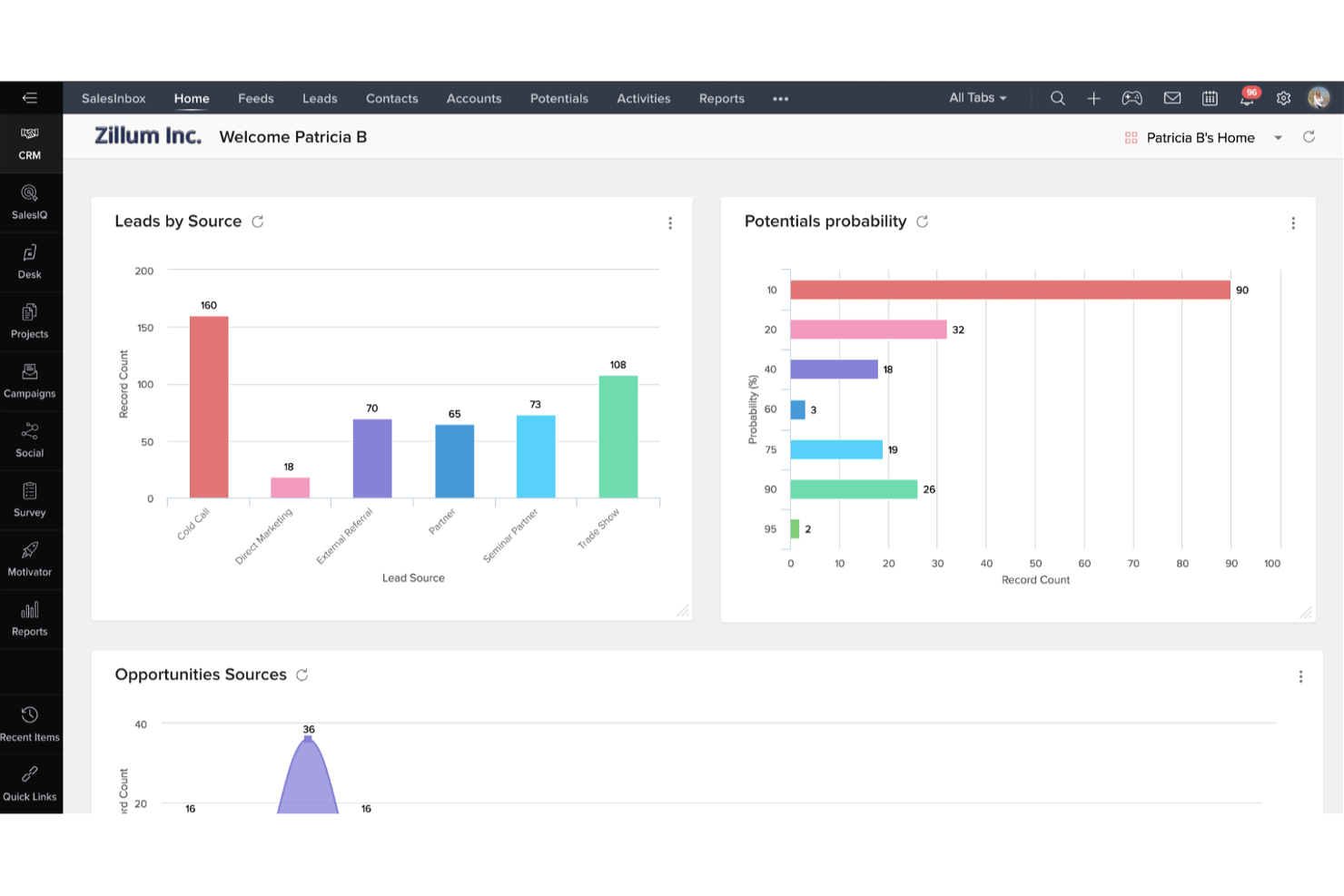
Zoho CRM is a versatile sales software solution tailored for enterprises looking to enhance their sales processes. It offers a comprehensive suite of features designed to manage customer relationships and improve sales performance across various industries.
Why I Picked Zoho CRM: Zoho CRM stands out for its AI-driven tools that automate data enrichment, forecasting, and lead management, letting teams focus on strategy instead of admin work. Its sales force automation streamlines repetitive tasks, while robust customization options—including pipeline and territory management and omni-channel communication—make it adaptable to complex enterprise workflows.
Standout features & integrations:
Features include low-code development for building custom apps without extensive coding, business intelligence tools for sales and customer insights, and strong compliance with GDPR and HIPAA to protect user data.
Integrations include Microsoft Office 365, Google Workspace, Slack, Dropbox, Mailchimp, LinkedIn, Twitter, Facebook, Zoho Desk, Zoho Projects, QuickBooks, and Shopify.
Pros and Cons
Pros:
- Mobile app to improve communication with customers
- Zia (AI) helps identify prospects your team can convert
- Great for hybrid and remote teams
Cons:
- Advanced features gated behind top-tier subscriptions
- Pricey compared to other tools
New Product Updates from Zoho CRM

Zoho CRM Adds Zia Email Summaries and ABM Updates
Zoho CRM adds Zia Email Summaries for AI-powered email insights and Account-Based Marketing enhancements for improved account targeting and engagement. These updates help teams understand customer interactions faster, manage segments, and optimize marketing workflows. For more information, visit Zoho CRM’s official site.
 .
.
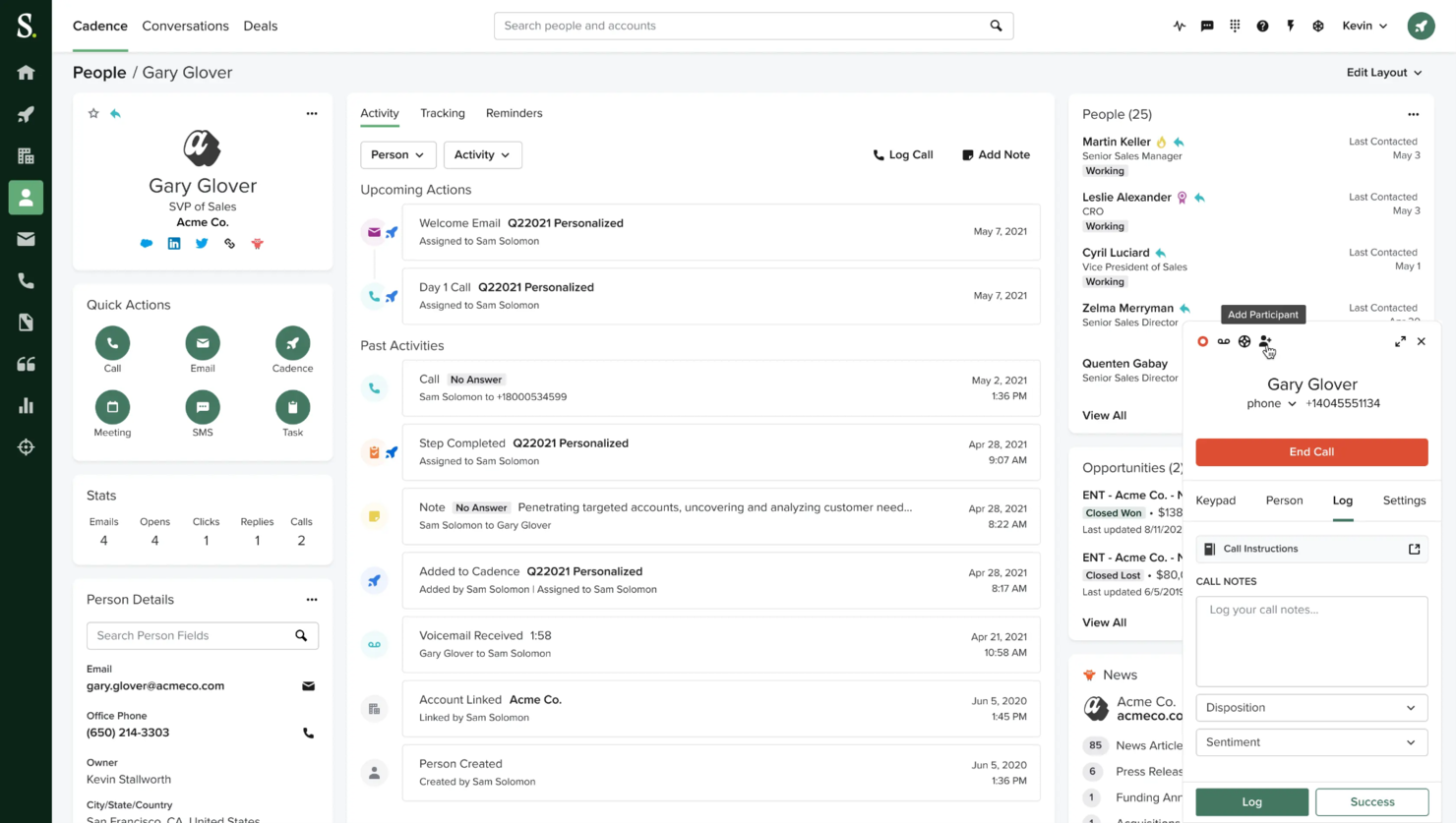
Salesloft enables sales teams to manage multi-channel outreach from one platform, including email, calls, and social touches. It empowers teams to engage prospects more effectively and close deals faster with personalized engagement.
Why I picked Salesloft: Salesloft offers call tracking, email templates, and scheduling tools to make connecting with prospects easier and more efficient and for insights into customer interactions. The tool focuses on tracking sales activity to know what’s working and where to improve and dynamic task management to keep the team focused on the right priorities.
Standout features & integrations:
Features include cadence automation, which helps you set up and manage sales workflows. The analytics dashboard provides insights into your team's performance, helping you identify areas for improvement. Salesloft also offers call recording, allowing you to review and refine consultative communication strategies.
Integrations include Salesforce, Microsoft Dynamics 365, LinkedIn Sales Navigator, Zoom, Slack, Chorus, Gong, Vidyard, Outlook, and Gmail.
Pros and Cons
Pros:
- Real-time activity tracking
- Integrated call tracking
- Dynamic task management
Cons:
- Restricted pipeline visibility
- Complex customization options
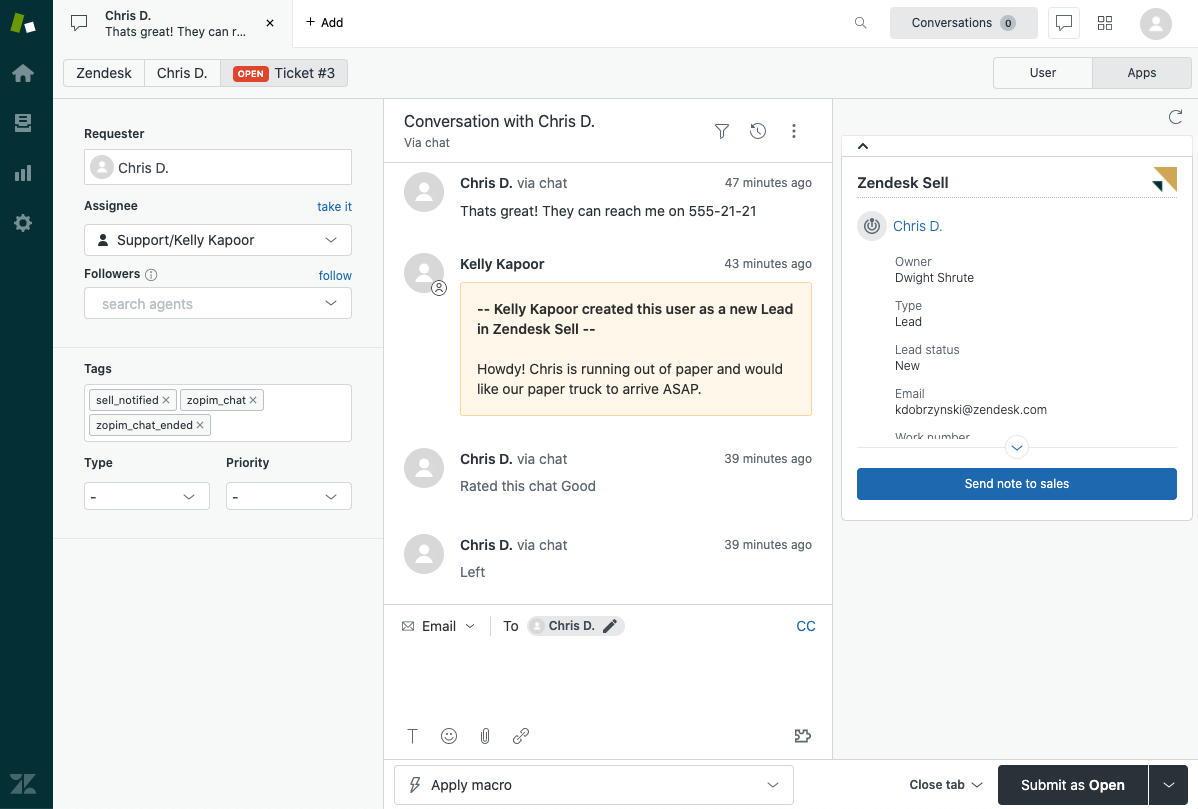
Zendesk Sell integrates sales and customer support for a unified customer experience. It enables sales teams to access customer interactions, support tickets, and history within the platform, aligning sales and support teams in one tool.
Why I picked Zendesk Sell: Zendesk Sell offers a complete historic view of customer interactions, allowing your team to manage leads and deals effectively and provide consistent customer experience. It has lead prioritization, activity tracking, and detailed deal management to help you stay on top of your pipeline. The platform also has reporting and customizable dashboards and automation for repetitive tasks.
Standout features & integrations:
Features include automated lead scoring, which helps prioritize prospects based on engagement. The email tracking feature lets you know when emails are opened and read, providing insights into customer interest. Zendesk also offers sales forecasting, allowing for future sales prediction enablement for you and your team.
Integrations include Mailchimp, Slack, QuickBooks, HubSpot, Google Workspace, Microsoft Outlook, Shopify, Salesforce, Xero, and Dropbox.
Pros and Cons
Pros:
- Customizable reporting tools
- Customizable sales pipelines
- Strong sales and support integration
Cons:
- No advanced automation
- Limited forecasting tools

Bombora helps enterprise sales teams identify businesses actively researching their products or services. It consolidates data points to deliver high-precision insights, enabling sales professionals to prioritize leads and tailor outreach strategies
Why I picked Bombora: Bombora provides deep insights into potential customer behaviors, allowing you to focus on leads researching topics related to your products or services. It offers identity enrichment, digital audience targeting, and topic tracking for tailored marketing efforts. With these insights, you can create more targeted pitches and close deals faster.
Standout features & integrations:
Features include identity enrichment, which helps refine customer data for better targeting. The digital audience targeting feature allows you to engage the right audience effectively. The planning and measurement suite helps assess the impact of your campaigns.
Integrations include HubSpot, LinkedIn, Salesforce, Marketo, Eloqua, Demandbase, Microsoft Dynamics 365, Pardot, Outreach, and Drift.
Pros and Cons
Pros:
- Supports ABM strategies
- Customizable reporting tools
- Consent-based data collection
Cons:
- No built-in sales automation
- No direct lead contacts
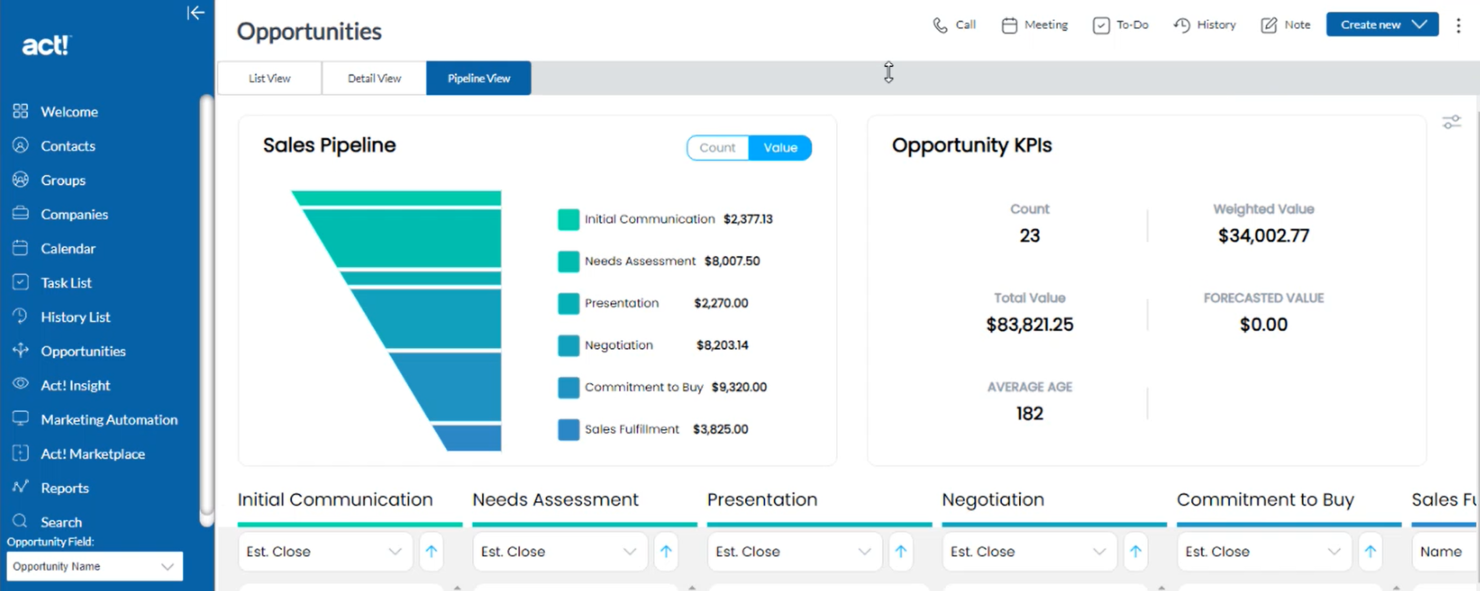
Act! provides small businesses with easy-to-use features for contact management, lead tracking, and sales pipeline visualization. It is cost-effective and scalable, making it accessible for businesses with limited resources while offering room for expansion.
Why I picked Act!: Act! offers an easy way to manage contacts, organize leads, and track deal progress in one place. It has customizable dashboards for prioritizing tasks and viewing key metrics at one glance and a contact management system to track customer interactions and history. It also includes email templates, activity tracking, and marketing automation tools to support targeted campaigns.
Standout features & integrations:
Features include a marketing automation tool that helps you create and send email campaigns with ease. The sales pipeline management feature allows you to track deals from start to finish. Act! also offers customizable dashboards to display key metrics and insights relevant to your business.
Integrations include Microsoft Outlook, Google Workspace, Mailchimp, QuickBooks, Zapier, Dropbox, LinkedIn, Slack, Xero, and Shopify.
Pros and Cons
Pros:
- Advanced reporting features
- Comprehensive contact management
- Detailed opportunity tracking
Cons:
- Limited mobile app functionalities
- Minimal AI and predictive sales analytics features
Other Enterprise Sales Software
Here are some additional enterprise sales software options that didn’t make it onto my shortlist, but are still worth checking out:
- Pipedrive CRM
For pipeline visualization
- Infor CRM
For manufacturing sectors
- Close
For inside sales teams
- Insightly
For project management
- Bitrix24
For team collaboration
- Freshsales
For AI-driven engagement
- Salesforce CRM
For app integrations
- SugarAI
For high customization
- Copper
For Google Workspace users
- Streak
For Gmail integration
- Fullstory
For user experience insights
- Gong
For conversation analytics
- Dock
For client collaboration
- Attention
For real-time sales coaching
- monday CRM
For visual project management


How I Evaluate Enterprise Sales Software
I look at enterprise sales tools in two layers: baseline capabilities like multi-stage forecasting and deal intelligence, then the differentiators that matter for a specific RevOps team.
Core Functionality (Table Stakes For This List)
When I'm selecting tools for my list, I rank each one on a scale from 0 (does not offer the functionality) to 5 (excels in this area) for each core functionality listed below. Then, I calculate the tool's total score into a percentage. Each tool needs to achieve a minimum total score of 65% to be considered for inclusion.
- Enterprise CRM Integration: I check whether a tool syncs bi-directionally with major CRMs like Salesforce or Microsoft Dynamics, including custom objects and field mapping.
- Pipeline & Forecasting: Multi-stage pipeline views and forecast models matter here, especially support for weighted categories like commit, best case, and upside.
- Deal & Opportunity Management: I look for buying committee mapping, deal health scoring, and stakeholder tracking that reflect how enterprise deals actually move through orgs.
- Sales Workflow Automation: Approval chains, task routing, and sequencing should handle the complexity of enterprise cycles, such as multi-level discount approvals or legal review triggers.
- Revenue Analytics & Reporting: Dashboards should go beyond vanity metrics. I evaluate whether teams can drill into conversion rates, cycle times, and pipeline velocity by segment or region.
- Enterprise Security & Scale: SSO, role-based access controls, SOC 2 compliance, and multi-region deployment support are what I look for to confirm a tool can operate at enterprise scale.
Once I have a list of tools that meet this criteria, I consider what sets each platform apart.
Differentiating Factors (What Sets Vendors Apart)
Here's how I compare and contrast different vendors:
Standout Features
AI deal intelligence is a major differentiator. I evaluate whether a platform can score deal risk and predict win probability from actual pipeline history rather than rep intuition alone. Conversation intelligence adds another layer—some tools analyze call recordings to surface objections and coaching moments that reps might overlook mid-cycle. Buyer engagement portals also matter for complex deals. When a buying committee spans ten stakeholders, a shared digital sales room keeps everyone aligned on next steps, content, and timelines.
Beyond Features
Tech stack integration depth is one of the first things I check. An enterprise sales tool needs to connect with your marketing automation, CS platform, and data warehouse—not just your CRM. Implementation support also weighs heavily. Rolling out a new platform to a 200-person sales org without dedicated onboarding resources and change management guidance can stall adoption for months. I also evaluate compliance posture, including SOC 2 Type II certification and data residency options, since enterprise procurement teams will flag gaps before a deal closes.
How to Choose Enterprise Sales Software
It’s easy to get bogged down in long feature lists and complex pricing structures. To help decision-makers stay focused as you work through your unique software selection process, here’s a checklist of factors to keep in mind:
| Factor | What to Consider |
| Scalability | Ensure the software grows with your team. Consider if it can handle increased users and data without a hitch. |
| Integrations | Look for functionality-enhancing tools that connect with your existing systems and tech stack like CRM or marketing platforms. |
| Customizability | Check if the software allows you to tailor features to your team's specific workflows and industry needs. |
| Ease of Use | The software should be intuitive. Your team shouldn't need extensive training to get started. |
| Budget | Align the tool's cost with your financial plan. Factor in subscription fees, implementation costs, and potential upgrades. |
| Security Safeguards | Prioritize software with strong security measures. Data encryption and compliance with regulations like GDPR are essential. |
Trends in Enterprise Sales Software
In my research, I sourced countless product updates, press releases, and release logs from different enterprise sales software vendors. Here are some of the emerging trends I’m keeping an eye on:
- AI-driven personalization: Tools now offer AI features that personalize customer interactions based on data analysis. This helps sales teams tailor their pitches and engagement strategies, enhancing customer experience.
- Voice and conversation analytics: More software incorporates features to analyze sales calls and extract insights. This helps teams understand customer sentiments and improve their communication tactics.
- Predictive sales forecasting: Predictive analytics is helping businesses anticipate sales trends and customer behaviors. This trend is gaining traction as companies look to make more informed decisions and set sales targets with a data-backed approach.
- Customer journey mapping: Vendors are focusing on providing tools that map out the customer journey from first contact to closing. This helps sales teams understand and optimize each touchpoint in the sales process, ensuring a more cohesive customer experience.
- Data privacy and compliance: With increasing data regulations, sales software emphasizes features that ensure compliance with laws like GDPR. This trend is crucial as businesses must protect customer information and adhere to legal standards, which helps build client trust.
What is Enterprise Sales Software?
Enterprise sales software is designed to help large organizations manage their sales processes and customer relationships. These tools are used by sales, professionals, managers, and marketing teams to improve efficiency and drive sales growth.
It includes features like AI-driven personalization, predictive sales forecasting, and customer journey mapping to help target the right customers and optimize the sales process. Overall, these tools provide businesses with the insights and capabilities to enhance sales performance and customer satisfaction.
Features of Enterprise Sales Software
When selecting enterprise sales software, keep an eye out for the following key features:
- Mobile accessibility: Ensures sales teams can access and manage data from anywhere using mobile devices.:
- Advanced reporting and analytics: Provides detailed insights into sales performance, enabling data-driven decision-making.
- Customizable workflows: Allows users to tailor processes to align with their unique sales methodologies.
- AI-driven forecasting: Uses artificial intelligence to predict future sales trends with high accuracy.
- Territory management: Helps organize and allocate sales regions for optimal team productivity.
- Strong CRM integration: Connects with customer relationship management systems to streamline customer interactions.
- Multi-channel communication: Supports communication across email, phone, and social media in a unified platform.
- Automated lead scoring: Ranks leads based on potential, ensuring sales teams focus on high-value opportunities.
- Dynamic pricing tools: Enables real-time adjustments to pricing strategies based on market data.
- Document and contract management: Simplifies creating, sending, and tracking sales documents and contracts.
Benefits of Enterprise Sales Software
Implementing enterprise sales software provides several benefits for your team and your business. Here are a few you can look forward to:
- Improved decision-making: Predictive sales forecasting and analytics provide data-driven insights that help your team make informed decisions.
- Enhanced customer engagement: AI-driven personalization and automated lead scoring ensure interactions are timely and relevant, boosting customer satisfaction.
- Fluid sales processes: Sales pipeline management and integration capabilities allow for smoother operations and better coordination among team members.
- Increased productivity: Automation of repetitive tasks frees up your team's time, letting them focus on high-value activities like closing deals.
- Better communication: Voice and conversation analytics help refine communication strategies, leading to more effective prospect interactions.
- Compliance assurance: Data privacy features ensure your business meets regulatory requirements, protects customer information and maintains trust.
Costs and Pricing of Enterprise Sales Software
Selecting enterprise sales software requires understanding the various pricing models and plans available. Costs vary based on features, team size, add-ons, and more. The table below summarizes common plans, their average prices, and typical features included in enterprise sales software solutions:
Plan Comparison Table for Enterprise Sales Software
| Plan Type | Average Price | Common Features |
| Free Plan | $0 | Basic contact management, limited support, and access to essential features. |
| Personal Plan | $5-$25/user/month | Contact management, email integration, task automation, and basic reporting tools. |
| Business Plan | $30-$75/user/month | Advanced reporting, sales forecasting, customization options, and priority customer support. |
| Enterprise Plan | $80-$150/user/month | Full customization, AI-driven insights, dedicated account management, and advanced analytics. |
Enterprise Sales Software FAQs
Here are some answers to common questions about enterprise sales software:
How does enterprise system software differ from other system software?
Enterprise system software can handle large amounts of complex data and automate the processes that use this data. It’s designed for large organizations needing solutions that can scale with their operations. Unlike regular business software, enterprise solutions offer advanced features that support various departments.
Is enterprise sales worth it?
Enterprise sales can be very rewarding, offering consistent revenue and enhancing brand reputation. It allows you to build long-term relationships with customers, which can lead to repeat business. These sales often involve higher-value deals, making them worth investing in time and resources.
How can enterprise sales software improve my team's performance?
Enterprise sales software can automate repetitive tasks, freeing time for your team to focus on selling. It provides insights into customer behaviors and sales trends, helping you make informed decisions. The software also enhances collaboration among team members, leading to more efficient sales processes.
What are the challenges of implementing enterprise sales software?
Implementing enterprise sales software can be complex and requires careful planning. You may face challenges like data migration, user training, and integration with existing systems. Have a clear implementation plan and provide adequate support to your team during the transition.
What are the security considerations when implementing enterprise sales software?
When implementing enterprise sales software, ensure the solution complies with industry security standards and offers features like data encryption, user access controls, and regular security updates. This helps protect sensitive customer and sales data from unauthorized access.
What’s Next:
If you're in the process of researching enterprise sales software, connect with a SoftwareSelect advisor for free recommendations.
You fill out a form and have a quick chat where they get into the specifics of your needs. Then you'll get a shortlist of software to review. They'll even support you through the entire buying process, including price negotiations.