

I 10 migliori software di gestione delle vendite per piccole imprese 2026

Elenco dei migliori software di gestione delle vendite per piccole imprese


Il software di gestione delle vendite aiuta ad aumentare l'efficienza delle vendite, organizzare i dati dei clienti e semplificare la pipeline di vendita, tutto in un unico posto. Per le piccole imprese, è essenziale per gestire la crescita, monitorare i lead e risparmiare tempo.
Dopo aver testato personalmente i principali software di gestione delle vendite, ho confrontato le migliori opzioni e spiegato ciò che devi sapere, così potrai scegliere con sicurezza la soluzione più adatta alla tua impresa.
Perché fidarsi dei nostri consigli sui software
Le nostre recensioni riflettono il nostro giudizio indipendente, non un discorso di vendita. Scopri come manteniamo la trasparenza.
Per questa guida, abbiamo valutato gli strumenti attraverso test pratici e ricerche indipendenti, assegnando un punteggio agli strumenti in base ai nostri criteri di selezione.
Le nostre recensioni riflettono il nostro giudizio editoriale umano, non un discorso di vendita.
Riepilogo dei migliori software di gestione delle vendite per piccole imprese
Questa tabella comparativa riassume i dettagli sui prezzi delle mie migliori selezioni di software di gestione delle vendite per piccole imprese, per aiutarti a trovare quello più adatto al tuo budget e alle tue esigenze aziendali.
| Tool | Best For | Trial Info | Price | ||
|---|---|---|---|---|---|
| 1 | Ideale per piccoli team B2B | Prova gratuita di 30 giorni + demo gratuita disponibile | Da $29/utente/mese (fatturato annualmente) | Website | |
| 2 | Ideale per il monitoraggio multicanale della pipeline di vendita | Piano gratuito disponibile e prova gratuita di 15 giorni | A partire da $7/utente/mese (fatturazione annuale) | Website | |
| 3 | Ideale per la gestione ordini B2B | Prova gratuita di 60 giorni disponibile | Prezzo su richiesta | Website | |
| 4 | Ideale per chi cerca semplicità nelle attività | Prova gratuita di 21 giorni + demo gratuita disponibile | A partire da $9.95/utente/mese | Website | |
| 5 | Ideale per team di vendita remoti | Prova gratuita di 14 giorni | Da $35/utente/mese (fatturazione annuale) | Website | |
| 6 | Ideale per approfondimenti guidati dall'IA | Piano gratuito disponibile | A partire da $9/utente/mese (fatturazione annuale) | Website | |
| 7 | Ideale per gli utenti di Google Workspace | Demo gratuita + prova gratuita di 14 giorni disponibile | A partire da $9/utente/mese (fatturato annualmente) | Website | |
| 8 | Ideale per il focus sulla conversione dei lead | Demo gratuita disponibile | Da $60/utente/mese | Website | |
| 9 | Ideale per le capacità di integrazione | Prova gratuita di 14 giorni | Da $15/utente/mese (fatturazione annuale) | Website | |
| 10 | Ideale per piccoli team che necessitano di personalizzazione | Demo gratuita disponibile | Da $30/utente/mese (fatturazione annuale) | Website |
Recensioni dei migliori software di gestione delle vendite per piccole imprese
Di seguito trovi i miei riepiloghi dettagliati dei migliori software di gestione delle vendite per piccole imprese inclusi nel mio elenco. Le mie recensioni offrono uno sguardo approfondito alle funzionalità principali, ai vantaggi & svantaggi, alle integrazioni e ai casi d’uso ideali di ogni strumento, per aiutarti a trovare quello più adatto a te.

Ideale per piccoli team B2B
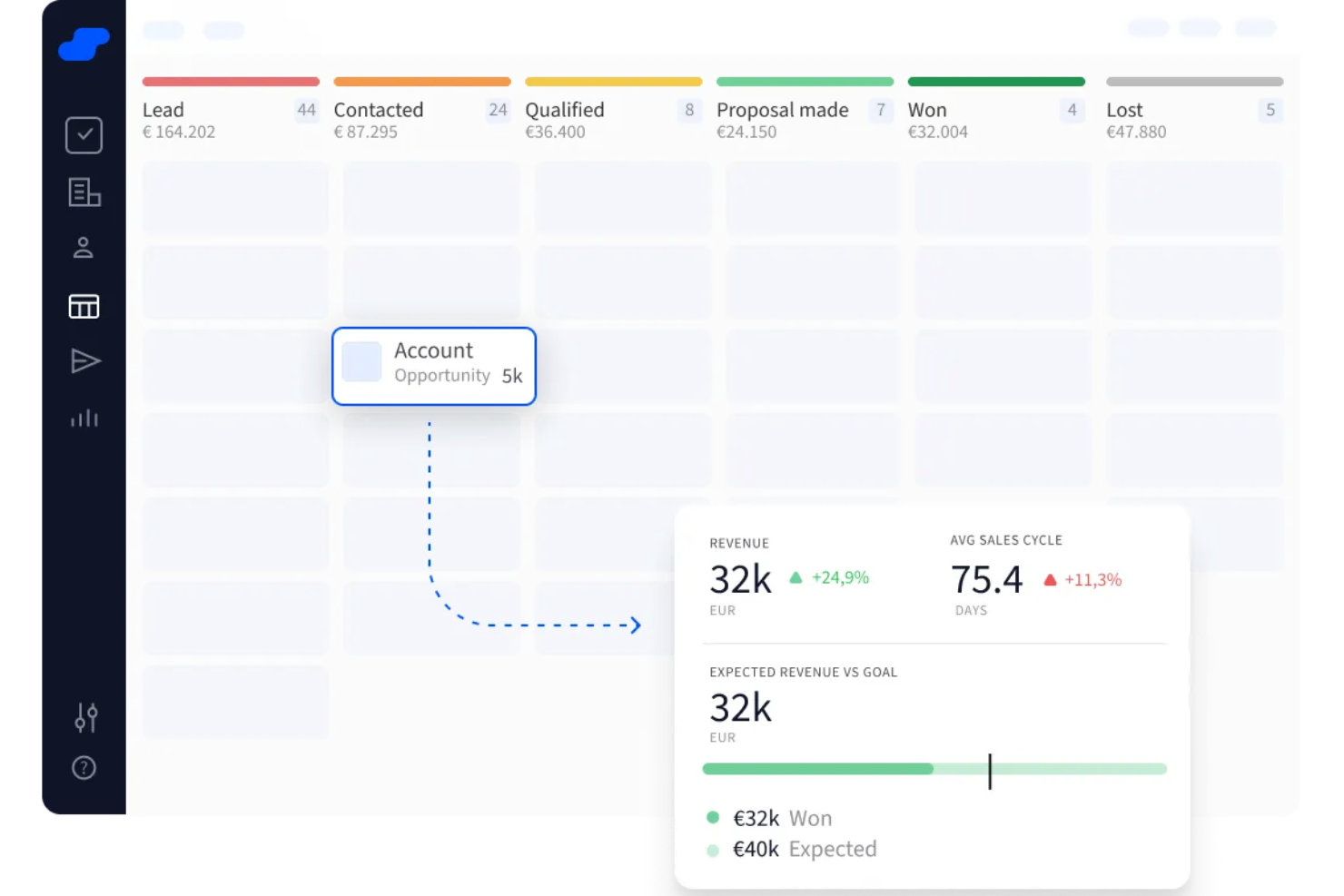
Salesflare è un CRM progettato per piccoli team B2B che ti aiuta a tenere traccia automaticamente di lead, trattative e contatti. Recupera informazioni da email, calendario e fonti pubbliche così non devi inserire i dati manualmente.
Perché ho scelto Salesflare: Ho scelto Salesflare per il suo arricchimento automatico. Non è necessario inserire manualmente contatti o aziende—Salesflare li suggerisce e li popola in base alle tue interazioni, facendoti risparmiare tempo e fatica. Compila dettagli come firme email e profili web, mantenendo i dati dei tuoi contatti sempre aggiornati senza sforzi aggiuntivi. Mi piace anche la pipeline visiva combinata con i promemoria di follow-up. Con pipeline drag-and-drop puoi spostare facilmente le trattative tra le fasi e il sistema ti avvisa quando è il momento di ricontattare o rispondere.
Funzionalità e integrazioni principali:
Le funzionalità includono suggerimenti intelligenti di lead che ti aiutano a individuare contatti e account con cui stai già interagendo per non perdere nessuno, lead scoring che ti avvisa quando un potenziale cliente mostra interesse sulla base delle sue attività, e monitoraggio in tempo reale di email e comportamento sul sito per sapere esattamente quando qualcuno si attiva.
Le integrazioni includono Google Workspace, Intercom, MailChimp, QuickBooks Online, Slack, Stripe, Shopify e Calendly.
Pros and Cons
Pros:
- Le timeline dei contatti mostrano tutta la cronologia delle comunicazioni
- I promemoria di follow-up riducono la perdita di lead
- Compilazione automatica dei dati di contatto dalle email
Cons:
- Il costruttore di workflow per email può sembrare disordinato
- Opzioni limitate per la modifica in blocco dei record
Ideale per il monitoraggio multicanale della pipeline di vendita
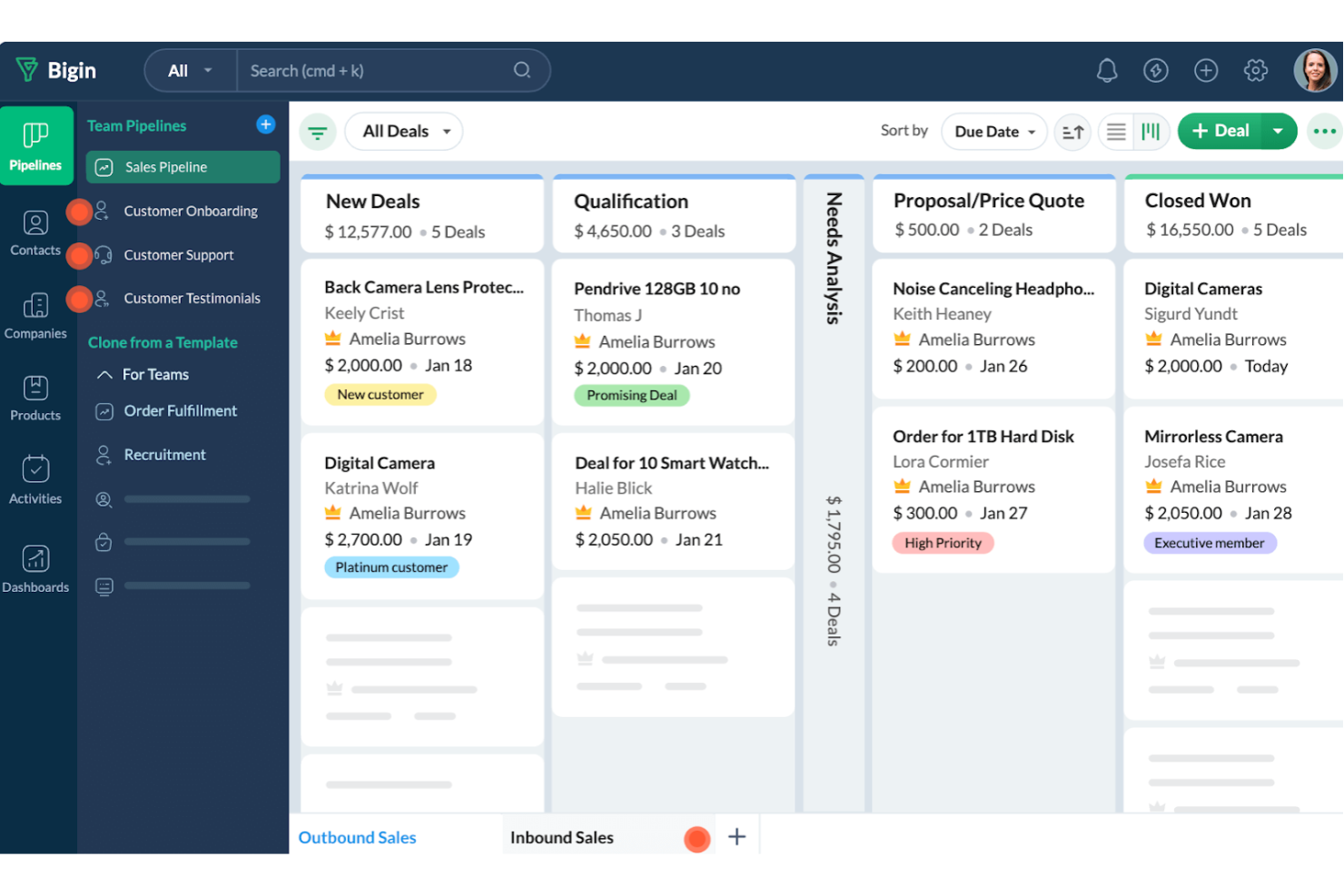
Bigin di Zoho CRM è uno strumento di gestione delle relazioni con i clienti progettato specificamente per le piccole imprese. Offre una gamma di funzionalità che aiutano a gestire i processi di vendita e le interazioni con i clienti in modo organizzato ed efficace.
Perché ho scelto Bigin di Zoho CRM: Ho scelto Bigin di Zoho CRM perché offre una visione chiara della pipeline di vendita e consente di impostare regole di avanzamento per mantenere i processi attivi senza colli di bottiglia. Puoi gestire tutte le interazioni con i clienti in un unico posto e comunicare tramite email, telefono o WhatsApp senza uscire dal CRM. Apprezzo anche come l'automazione gestisca le attività ripetitive, permettendoti di concentrarti maggiormente sulla chiusura delle trattative e sulla costruzione di rapporti solidi con i clienti.
Funzionalità e integrazioni principali:
Le funzionalità includono strumenti di collaborazione che permettono di lavorare a stretto contatto con i colleghi condividendo dati e approfondimenti, migliorando così le prestazioni complessive del team. Bigin offre anche opzioni di personalizzazione, consentendoti di adattare il CRM alle esigenze specifiche della tua attività con campi e moduli personalizzati. Inoltre, le funzionalità di analisi e reportistica forniscono preziose informazioni sulle performance di vendita, aiutandoti a prendere decisioni informate per favorire la crescita.
Le integrazioni includono Zoho Mail, Zoho Desk, Zapier, Google Workspace, Microsoft 365, Mailchimp, Calendar, Slack, Zoom e Docusign.
Pros and Cons
Pros:
- Offre moduli personalizzati per la raccolta dati
- Consente di monitorare facilmente più pipeline
- Semplice da configurare per un utilizzo immediato
Cons:
- Mancano funzionalità di mappatura per l'instradamento dei contatti
- Flessibilità limitata nella creazione di report personalizzati
New Product Updates from Bigin by Zoho CRM

Bigin iOS Adds Interactive WhatsApp Templates and Quick Replies
Bigin’s iOS app now supports interactive WhatsApp templates and Quick Replies, making it easier to preview and send instant messages to customers. For more information, visit Bigin by Zoho CRM's official site.
 .
.
Ideale per la gestione ordini B2B

Per le piccole imprese nei settori della distribuzione e del retail, SimplyDepo offre una soluzione su misura per migliorare i processi di gestione delle vendite. Come piattaforma completa, non solo potenzia i team di vendita sul campo, ma rafforza anche le relazioni con i clienti grazie a funzionalità CRM efficienti. Affrontando sfide come la gestione degli ordini e la pianificazione dei percorsi, SimplyDepo aiuta la tua azienda a crescere senza intoppi migliorando l’efficienza del flusso di lavoro e aumentando la crescita delle vendite.
Perché ho scelto SimplyDepo
Ho scelto SimplyDepo perché eccelle nell’affrontare le principali sfide delle piccole imprese nella gestione delle vendite. Una caratteristica che spicca è il suo sistema di gestione ordini B2B, che semplifica e velocizza il processo d’ordine, consentendo al tuo team di concentrarsi maggiormente sull’interazione con i clienti. Inoltre, l’ottimizzazione della pianificazione dei percorsi è fondamentale per le piccole imprese che vogliono risparmiare tempo e risorse garantendo percorsi di consegna efficienti. Queste funzionalità, unite alle capacità CRM, rendono SimplyDepo una scelta pratica per le aziende che desiderano migliorare le proprie operazioni di vendita.
Caratteristiche principali di SimplyDepo
Oltre alle sue funzionalità distintive, SimplyDepo offre anche numerosi altri strumenti preziosi per le piccole imprese:
- CRM da campo: Fornisce strumenti per gestire e rafforzare le relazioni con i clienti direttamente dal campo.
- Accesso mobile: Permette al tuo team di accedere alla piattaforma e gestire le attività in mobilità, assicurando flessibilità e rapidità di risposta.
- Supporto personalizzato: Offre assistenza personalizzata per aiutare il tuo team a massimizzare i benefici del software.
- Onboarding facilitato: Semplifica il processo di avvio, consentendo al team di adattarsi rapidamente e utilizzare la piattaforma in modo efficace.
Integrazioni di SimplyDepo
Le integrazioni includono Stripe, Twilio SendGrid, ShipStation e QuickBooks.
Pros and Cons
Pros:
- Sistema di gestione ordini B2B integrato
- CRM integrato per il tracciamento degli account
- Pianificazione dei percorsi e mappatura dei territori
Cons:
- Personalizzazione avanzata dei report limitata
- Nessuna documentazione API trasparente
Ideale per chi cerca semplicità nelle attività
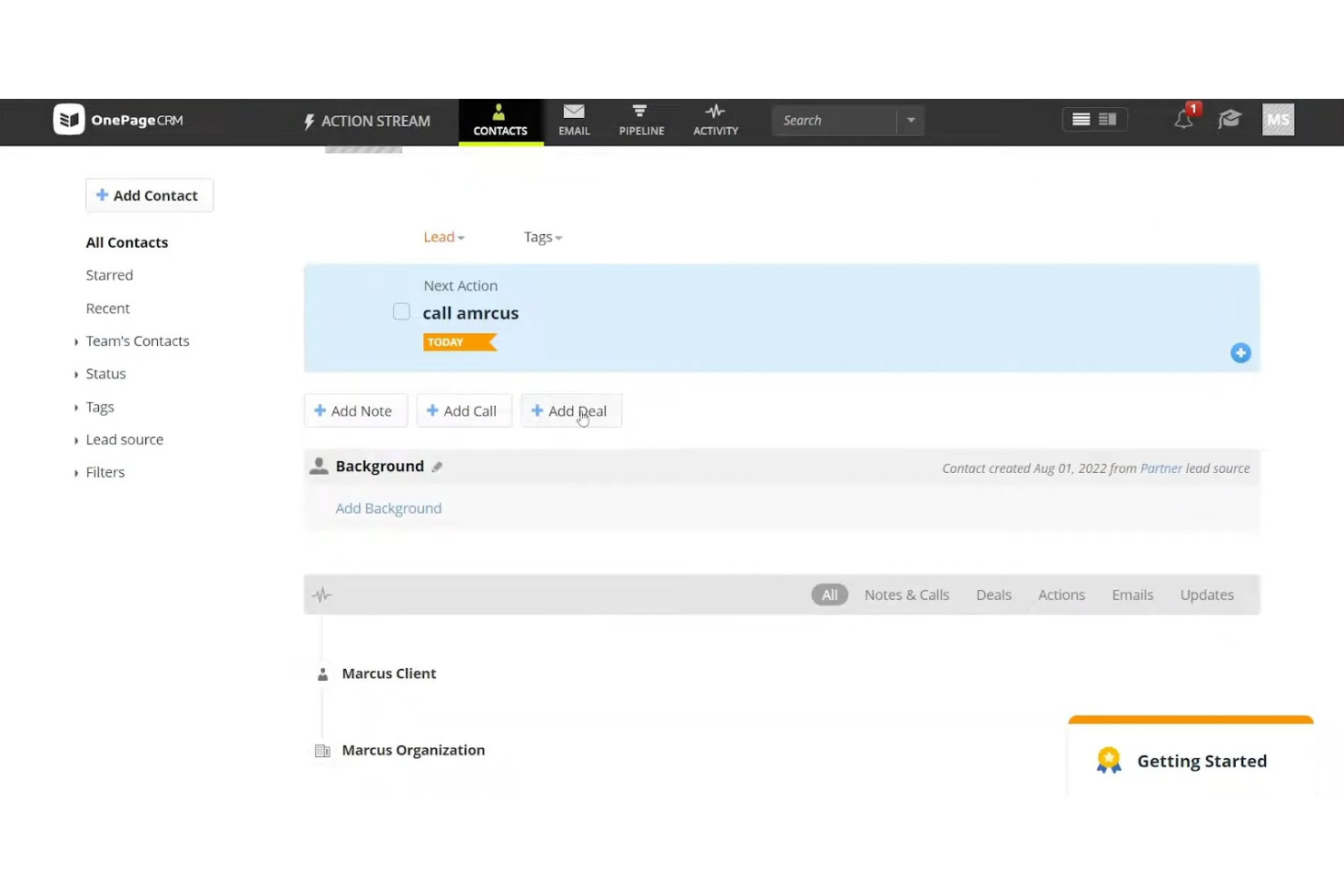
OnePageCRM è uno strumento di gestione delle vendite progettato per le piccole imprese che vogliono ottimizzare i processi di vendita. Semplifica la gestione delle attività e aiuta il tuo team a dare priorità alle azioni di vendita quotidiane in modo efficace.
Perché ho scelto OnePageCRM: L’approccio unico di OnePageCRM alla gestione delle attività garantisce che il tuo team rimanga concentrato sul prossimo passo concreto da compiere. Trasforma la tua pipeline di vendita in una lista di cose da fare, facilitando la gestione delle attività senza sentirsi sopraffatti. Questa semplicità è perfetta per i piccoli team che hanno bisogno di mantenere chiarezza e concentrazione. L’enfasi dello strumento sulle azioni da intraprendere aiuta a non far sfuggire nessun contatto.
Funzionalità e integrazioni principali:
Le funzionalità includono un sistema di gestione dei contatti che mantiene tutte le informazioni sui clienti organizzate e accessibili. La funzione per note e registrazione delle chiamate consente al tuo team di tracciare facilmente ogni interazione con i clienti. Inoltre, gli strumenti di reportistica sulle vendite offrono informazioni sulle prestazioni del team e sulle tendenze di vendita.
Le integrazioni includono Google Workspace, Mailchimp, Xero, QuickBooks, Zapier, Outlook, Dropbox, Evernote, Skype e HubSpot.
Pros and Cons
Pros:
- Approccio alla vendita focalizzato sulle attività
- Pipeline chiaro basato sulle azioni
- Gestione efficace dei contatti
Cons:
- Funzionalità avanzate limitate
- Nessuna gestione progetti integrata

Ideale per team di vendita remoti
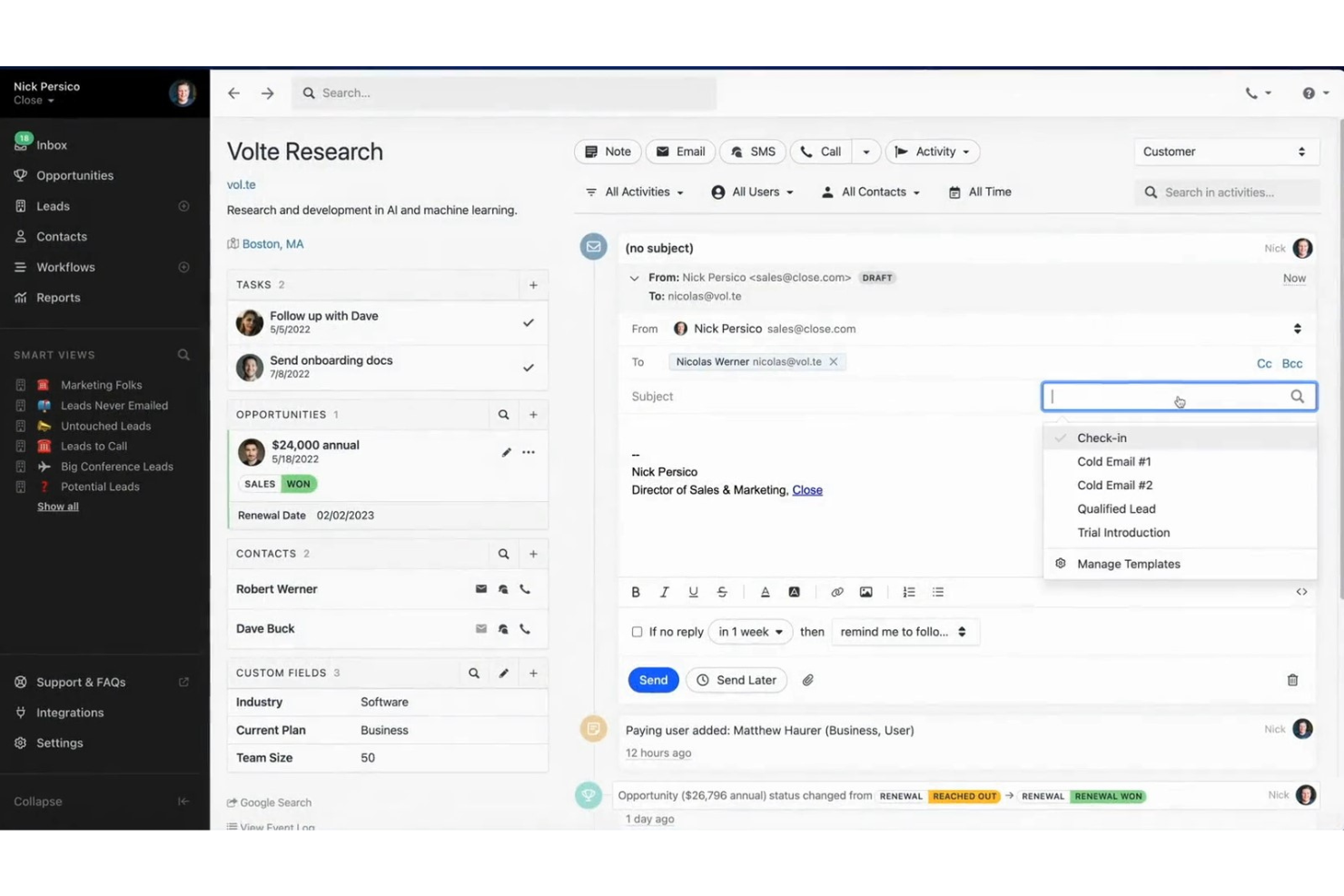
Close CRM è un software di gestione delle vendite progettato per team di vendita remoti di piccole e medie dimensioni. Si concentra sul miglioramento della comunicazione e dei processi di vendita grazie a funzionalità integrate di chiamata ed email.
Perché ho scelto Close CRM: Close CRM offre una combinazione unica di funzionalità integrate di chiamata ed email pensate per i team remoti. Queste caratteristiche permettono al tuo team di comunicare con i clienti direttamente dal CRM, riducendo la necessità di strumenti esterni. La piattaforma supporta la collaborazione a distanza con aggiornamenti sulle vendite in tempo reale, assicurando che tutti restino informati. Il dashboard intuitivo aiuta il tuo team a monitorare e gestire i lead in modo efficace.
Funzionalità principali & integrazioni:
Le funzionalità includono una pipeline di vendita personalizzabile che consente al tuo team di modificare le fasi in base al vostro processo di vendita. La funzione smart views offre una panoramica chiara dei tuoi lead, aiutando a dare priorità ai follow-up. Inoltre, il compositore predittivo velocizza il processo di chiamata, facendo risparmiare tempo ai tuoi venditori.
Le integrazioni includono Zapier, Slack, Mailchimp, Zendesk, HubSpot, QuickBooks, Docusign, Pipedrive, Intercom e Trello.
Cosa è gratuito? Close CRM offre una prova gratuita di 14 giorni, che consente l'accesso completo alle funzionalità premium.
Pros and Cons
Pros:
- Strumenti di comunicazione integrati
- Collaborazione remota facilitata
- Aggiornamenti sulle vendite in tempo reale
Cons:
- Complessità nella configurazione delle integrazioni
- Funzionalità di reportistica basilari
Ideale per approfondimenti guidati dall'IA
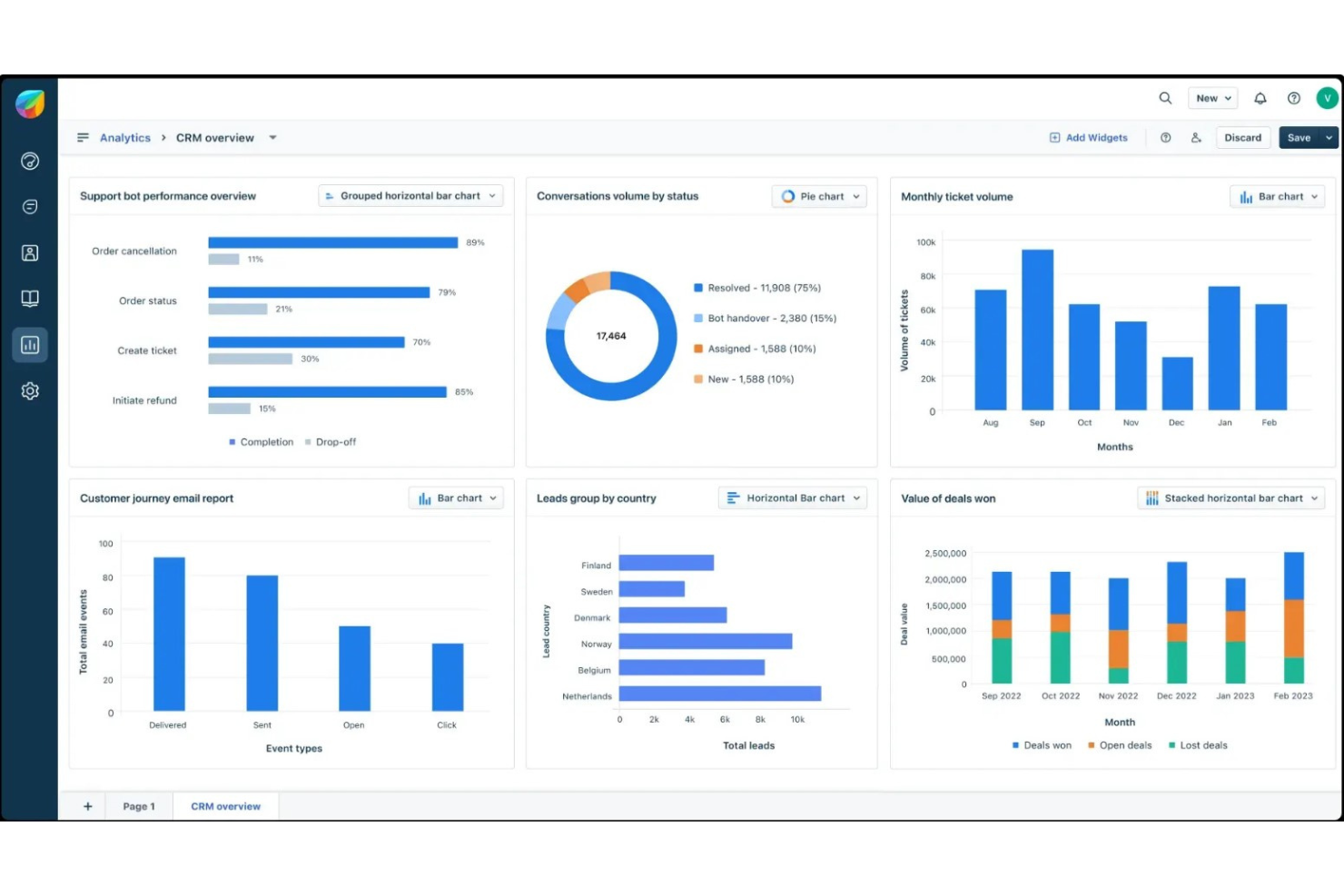
Freshsales è uno strumento di gestione delle relazioni con i clienti basato su cloud, progettato per i team di vendita per migliorare la gestione dei lead e automatizzare i processi di vendita. Si rivolge a piccole e medie imprese che desiderano ottimizzare il processo di vendita e potenziare il coinvolgimento dei clienti.
Perché ho scelto Freshsales: Freshsales si distingue grazie agli approfondimenti guidati dall'intelligenza artificiale, che aiutano il tuo team a prendere decisioni basate sui dati. Il software offre funzionalità come Freddy AI, che assiste nello scoring dei lead e nella previsione delle vendite. Questo garantisce di concentrarsi sui lead con le maggiori probabilità di conversione. Inoltre, la sua interfaccia intuitiva consente al team di gestire in modo efficiente i pipeline di vendita, rendendolo ideale per le aziende che vogliono ottimizzare le attività commerciali.
Funzionalità e integrazioni principali:
Le funzionalità includono un ampio sistema di gestione dei contatti, che consente al team di monitorare facilmente le interazioni e le conversazioni con i clienti. Il sistema telefonico integrato permette di effettuare chiamate direttamente dal CRM, risparmiando tempo e fatica. Inoltre, è possibile automatizzare attività ricorrenti come l'invio di email di follow-up, liberando il team per concentrarsi sulla chiusura delle trattative.
Le integrazioni includono Google Workspace, Microsoft Office 365, Mailchimp, Zapier, QuickBooks, Slack, Shopify, Docusign, Twilio e Xero.
Pros and Cons
Pros:
- Lead scoring basato sull'IA
- Pipeline di vendita personalizzabili
- Sequenze di email automatizzate
Cons:
- Curva di apprendimento per i nuovi utenti
- Funzioni di reportistica di base
Ideale per gli utenti di Google Workspace
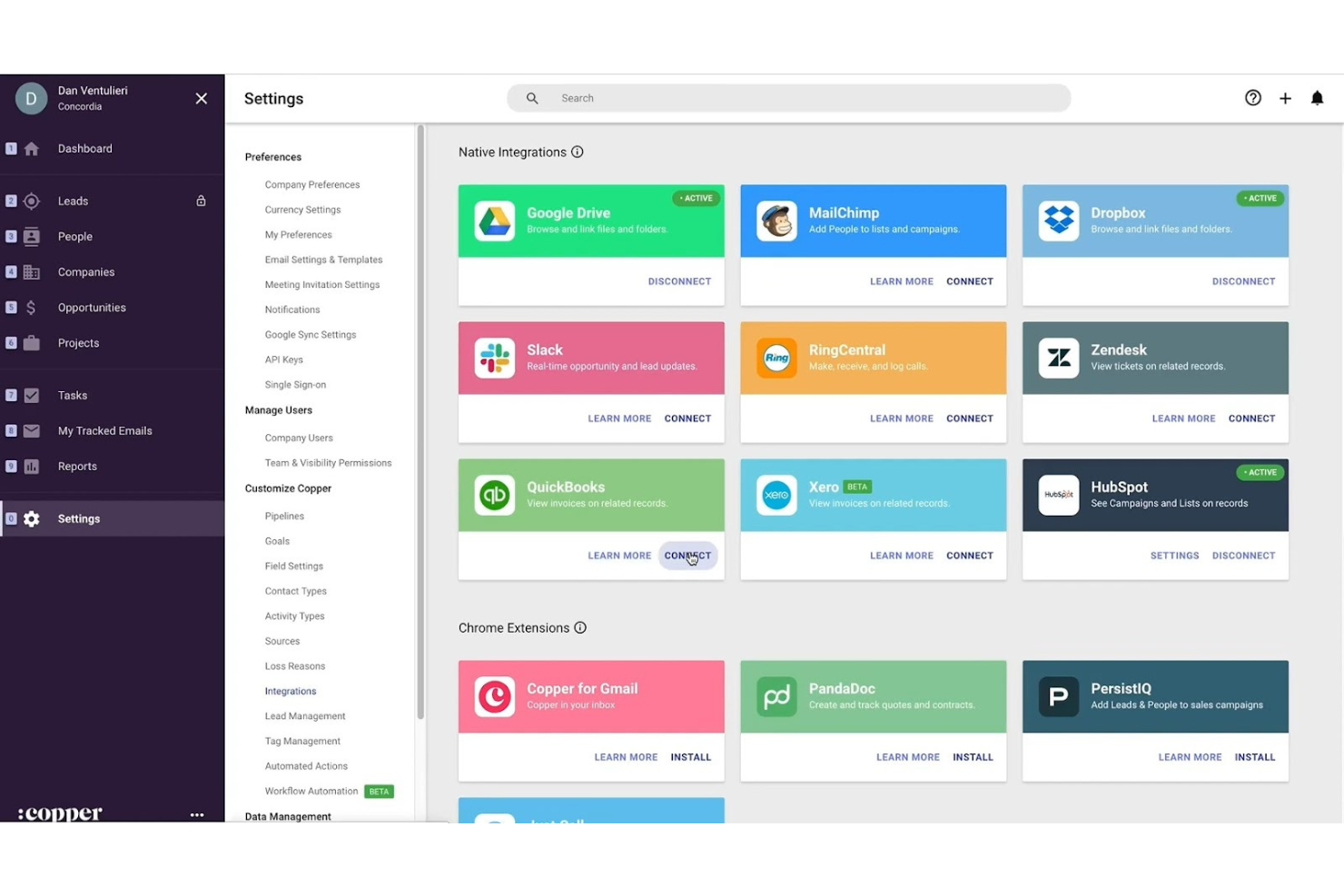
Copper CRM è uno strumento di gestione delle relazioni con i clienti pensato per le piccole e medie imprese, in particolare per quelle che utilizzano Google Workspace. Si integra perfettamente con le app di Google per gestire i contatti potenziali e automatizzare i flussi di lavoro in modo efficiente.
Perché ho scelto Copper CRM: Copper CRM è progettato specificamente per gli utenti che si affidano molto a Google Workspace, il che lo rende una scelta naturale per i team che utilizzano Gmail e Google Calendar. Registra automaticamente email ed eventi, assicurandoti di non perdere mai interazioni importanti con i clienti. L'interfaccia utente semplice consente al tuo team di concentrarsi sulla costruzione delle relazioni anziché sulla gestione dei dati. La sua profonda integrazione con i prodotti Google è un elemento distintivo fondamentale e offre un'esperienza coesa agli utenti di Google Workspace.
Funzionalità e integrazioni distintive:
Le funzionalità includono un sistema di gestione della pipeline di vendita che aiuta il tuo team a monitorare le trattative attraverso le varie fasi. L'inserimento automatizzato dei dati riduce il lavoro manuale, permettendoti di concentrarti sulle attività di vendita. Inoltre, i cruscotti personalizzabili offrono informazioni sulle tendenze delle vendite e sulle prestazioni, aiutando il tuo team a prendere decisioni informate.
Le integrazioni includono Google Workspace, Slack, Mailchimp, QuickBooks, RingCentral, Docusign, Zendesk, Zapier, HubSpot e Xero.
Pros and Cons
Pros:
- Integrazione con Google Workspace
- Inserimento automatizzato dei dati
- Funzionalità di collaborazione in tempo reale
Cons:
- Strumenti di reportistica di base
- Opzioni di personalizzazione limitate

Ideale per il focus sulla conversione dei lead

LeadSquared è una piattaforma di esecuzione delle vendite e automazione del marketing progettata per le aziende che vogliono migliorare la conversione dei lead. Aiuta i team di vendita a monitorare e gestire i lead in modo efficiente, riducendo al minimo le opportunità perse.
Perché ho scelto LeadSquared: LeadSquared eccelle nel migliorare la conversione dei lead grazie alle sue funzionalità specializzate. Il tuo team può assegnare punteggi e dare priorità ai lead in base a criteri predefiniti, assicurando l’attenzione sui potenziali clienti più promettenti. Le funzionalità di nutrimento dei lead aiutano a mantenere il coinvolgimento con i potenziali clienti fino a quando non sono pronti a convertire. Le automazioni velocizzano le attività ripetitive, permettendo al tuo team di concentrarsi sulla chiusura delle trattative.
Caratteristiche principali e integrazioni:
Le funzionalità includono pipeline di vendita visuali che aiutano il tuo team a monitorare le trattative tra le diverse fasi. Il tracciamento delle attività in tempo reale offre suggerimenti sui comportamenti dei clienti, consentendoti di personalizzare l’approccio. Inoltre, gli strumenti di reportistica forniscono analisi dettagliate sulle prestazioni di vendita e sull’efficacia delle attività di marketing.
Le integrazioni includono Salesforce, Zapier, Mailchimp, Microsoft Dynamics 365, Google Workspace, Outlook, QuickBooks, Shopify, Zoho CRM e Facebook.
Pros and Cons
Pros:
- Focus sulla conversione dei lead
- Sistema efficiente di scoring dei lead
- Strumenti di automazione che fanno risparmiare tempo
Cons:
- Configurazione iniziale complessa
- Applicazione mobile basilare
Ideale per le capacità di integrazione
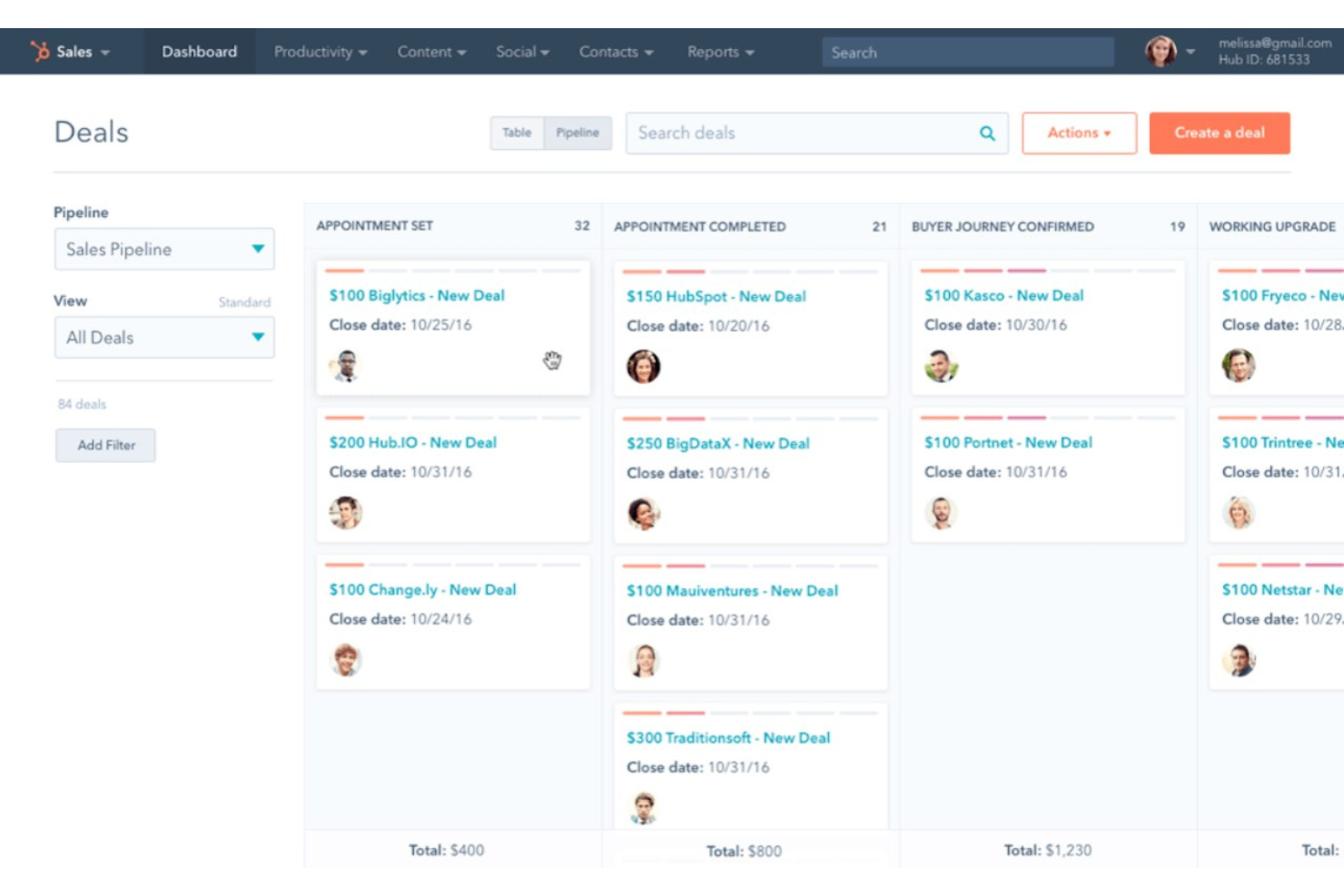
HubSpot Sales Hub è una piattaforma di gestione delle vendite progettata per piccole e medie imprese che desiderano migliorare i propri processi commerciali. Offre strumenti per il tracciamento dei lead, l'automazione delle vendite e la gestione delle relazioni con i clienti.
Perché ho scelto HubSpot Sales Hub: HubSpot Sales Hub offre ampie capacità di integrazione, rendendolo una scelta ideale per le aziende che hanno bisogno di collegare vari strumenti. Il tuo team può gestire e automatizzare le attività di vendita in modo efficiente grazie a funzionalità come il tracciamento delle email e la gestione della pipeline. L'integrazione della piattaforma con altri servizi HubSpot permette un approccio centralizzato al marketing e alle vendite. Questa connettività garantisce di poter ottimizzare le operazioni senza dover passare tra diversi software.
Funzionalità principali & integrazioni:
Le funzionalità includono dashboard personalizzabili che offrono informazioni in tempo reale sulle performance di vendita. La funzione di tracciamento delle email ti assicura di sapere quando i lead aprono le tue email, aiutandoti a effettuare il follow-up al momento giusto. Inoltre, lo strumento di pianificazione degli incontri semplifica la fissazione degli appuntamenti integrandosi direttamente con il tuo calendario.
Le integrazioni includono Google Workspace, Microsoft Office 365, Mailchimp, Slack, Zapier, QuickBooks, Salesforce, Shopify, WordPress e LinkedIn.
Pros and Cons
Pros:
- Numerose opzioni di integrazione
- Dashboard personalizzabili
- Tracciamento efficace delle email
- Vendite e marketing centralizzati
- Pianificazione facile degli incontri
Cons:
- Curva di apprendimento per i principianti
- Funzionalità offline limitata
- Setup complesso per nuovi utenti
- Limitazioni occasionali delle funzionalità
- Richiede conoscenze tecniche

Vtiger CRM
Ideale per piccoli team che necessitano di personalizzazione
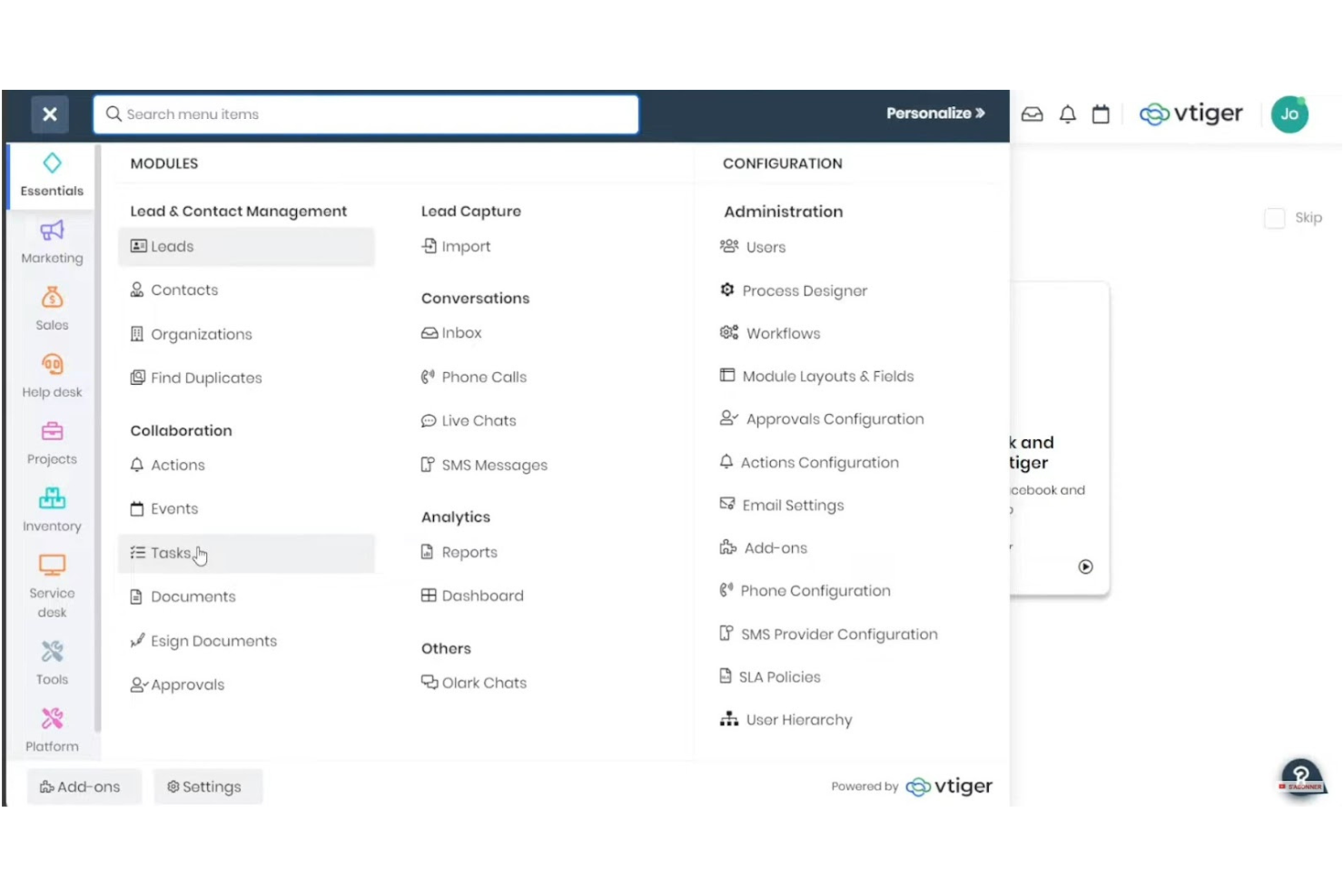
Vtiger CRM è uno strumento versatile progettato per le piccole e medie imprese che cercano una soluzione CRM personalizzabile. Offre funzioni chiave come automazione delle vendite, assistenza clienti e gestione progetti, tutto in un'unica piattaforma.
Perché ho scelto Vtiger CRM: Vtiger CRM offre un elevato livello di personalizzazione, consentendo al tuo team di adattare il sistema alle esigenze specifiche dell'azienda. È possibile modificare campi, flussi di lavoro e report per allinearli ai propri processi. Questa flessibilità è ideale per i piccoli team che richiedono un approccio personalizzato al CRM. Inoltre, il set di funzionalità completo, dalla gestione dei contatti all'assistenza helpdesk, consente di consolidare diverse funzioni aziendali in un unico posto.
Funzionalità e integrazioni principali:
Le funzionalità includono uno strumento di email marketing integrato che aiuta il tuo team a coinvolgere efficacemente i potenziali clienti. L'insight sulle vendite offre analisi e previsioni per guidare le strategie di vendita. Inoltre, il modulo di gestione progetti aiuta a organizzare e monitorare l'avanzamento dei progetti senza difficoltà.
Le integrazioni includono Google Workspace, Microsoft Office 365, Mailchimp, QuickBooks, Zapier, Xero, Twilio, Docusign, Dropbox e Slack.
Pros and Cons
Pros:
- Interfaccia altamente personalizzabile
- Set di funzionalità completo
- Email marketing integrato
- Approfondimenti sulle vendite efficaci
- Gestione progetti integrata
Cons:
- Complessità nell'impostazione iniziale
- A volte troppe funzionalità
- Applicazione mobile basica
- Reportistica avanzata limitata
- La configurazione richiede un periodo di apprendimento
Altri software di gestione delle vendite per piccole imprese
Ecco alcune opzioni aggiuntive di software di gestione delle vendite per piccole imprese che non sono state incluse nel mio elenco, ma che vale comunque la pena prendere in considerazione:
- Agile CRM
Ideale per funzionalità tutto-in-uno
- Insightly
Ideale per l'integrazione della gestione progetti
- Nutshell CRM
Ideale per una collaborazione di squadra semplice
- Apptivo
Ideale per funzionalità convenienti
- SugarAI
Ideale per la conformità alla privacy dei dati
- Clarify
Ideale per agenti autonomi di vendita basati sull'IA


Come Valuto i Software di Gestione delle Vendite per Piccole Imprese
Valuto ogni strumento attraverso due prospettive: la funzionalità di base di cui una squadra commerciale snella non può fare a meno e i fattori distintivi che rendono migliori le soluzioni proposte.
Funzionalità di Base (Requisiti Fondamentali per Questa Lista)
Quando seleziono gli strumenti per la mia lista, classifico ciascuno su una scala da 0 (la funzionalità non è presente) a 5 (eccelle in questo ambito) per ogni funzionalità di base elencata qui sotto. Poi, calcolo il punteggio totale dello strumento in percentuale. Ogni strumento deve ottenere un punteggio minimo totale del 65% per essere preso in considerazione.
- Gestione Pipeline: Verifico che ogni strumento offra fasi visive e personalizzabili delle trattative che riflettano come vendono davvero le piccole squadre—come ad esempio una pipeline a tre fasi per una società di consulenza rispetto a un ciclo più lungo per un SaaS B2B.
- Gestione di Contatti & Lead: Ogni software dovrebbe centralizzare contatti, aziende e lead in un unico posto, così i commerciali non devono alternarsi tra fogli di calcolo ed email per recuperare la cronologia di un potenziale cliente.
- Previsioni e Report sulle Vendite: Valuto se la piattaforma fornisce a RevOps report chiari sulla pipeline e previsioni di ricavi, e non solo elenchi di dati grezzi che richiedono un tool BI separato per essere interpretati.
- Tracciamento Attività & Compiti: I commerciali nelle piccole squadre ricoprono molti ruoli, quindi cerco strumenti che registrano chiamate, email e follow-up associati a trattative specifiche e facilitano la visibilità immediata sulle attività scadute.
- Monitoraggio delle Performance del Team Vendite: Guardo se i responsabili possono vedere il raggiungimento dei target e le metriche di attività dei commerciali da un’unica dashboard, senza dover estrarre report manualmente ogni settimana.
- Automazione dei Flussi di Lavoro Commerciali: Qui le piccole squadre hanno i maggiori benefici, quindi valuto se lo strumento automatizza passaggi ripetitivi come le sequenze di follow-up e le transizioni di fase delle trattative senza bisogno di impostazioni complesse.
Dopo aver individuato gli strumenti che rispettano questi criteri, valuto ciò che distingue ogni piattaforma.
Fattori Differenzianti (Cosa Distingue i Fornitori)
Ecco come confronto le diverse soluzioni:
Funzionalità Distintive
Gli strumenti di comunicazione integrati sono cruciali per le piccole squadre. Quando i commerciali possono chiamare, inviare email e messaggi dal CRM, ogni interazione viene registrata automaticamente senza inserimento manuale dei dati. Cerco anche informazioni sulle trattative basate su intelligenza artificiale che individuano opportunità in stallo prima che si perdano. Per i team guidati dai fondatori che vendono spesso fuori ufficio, un’app mobile completa fa la differenza—permette di aggiornare una trattativa subito dopo un incontro invece che aspettare di tornare alla scrivania.
Oltre le Funzionalità
La trasparenza nei prezzi è molto importante per le piccole imprese, quindi verifico se i fornitori propongono costi chiari a utente e la possibilità di prova gratuita o un piano base gratuito. Il tempo per ottenere valore è altrettanto fondamentale—un team di cinque persone non dovrebbe aver bisogno di un consulente per iniziare. Valuto anche l’ecosistema di integrazione di ogni strumento, in particolare le connessioni native con Google Workspace, Microsoft 365, QuickBooks e piattaforme di marketing come Mailchimp o HubSpot, dato che RevOps necessita di dati che fluiscano senza intoppi tra i sistemi.
Come scegliere un software di gestione delle vendite per una piccola impresa
È facile perdersi in lunghi elenchi di funzionalità e strutture tariffarie complesse. Per aiutarti a rimanere concentrato mentre affronti il tuo processo di selezione del software, ecco un elenco di fattori da tenere a mente:
| Fattore | Cosa considerare |
| Scalabilità | Il software crescerà insieme alla tua impresa? |
| Integrazioni | Si collega agli strumenti che il tuo team utilizza già? |
| Personalizzazione | Puoi adattarlo alle tue esigenze specifiche? |
| Facilità d'uso | Il software è intuitivo da usare per il tuo team? |
| Budget | Rientra nei tuoi vincoli finanziari? |
| Misure di sicurezza | Soddisfa i requisiti di sicurezza della tua azienda? |
| Supporto | È disponibile un'assistenza clienti affidabile quando serve? |
| Accesso da dispositivi mobili | Il tuo team può accedervi facilmente dai dispositivi mobili? |
Tendenze nei software di gestione delle vendite per piccole imprese
Durante la mia ricerca, ho analizzato innumerevoli aggiornamenti dei prodotti, comunicati stampa e registri delle versioni di diversi fornitori di software di gestione delle vendite per piccole imprese. Ecco alcune delle tendenze emergenti che sto monitorando:
- Analisi basata sull'intelligenza artificiale: Un numero sempre maggiore di strumenti utilizza l'intelligenza artificiale per analizzare i dati sulle vendite e prevedere le tendenze. Questo aiuta le piccole imprese a prendere decisioni informate. Ad esempio, Freshsales utilizza l'intelligenza artificiale per assegnare un punteggio ai potenziali clienti in base alla loro probabilità di conversione.
- Tecnologia di riconoscimento vocale: Alcuni fornitori stanno integrando i comandi vocali per facilitare il funzionamento a mani libere. Questo può accelerare l'inserimento dei dati e la gestione delle attività. HubSpot Sales Hub sta sperimentando funzionalità attivate dalla voce per migliorare l'esperienza dell'utente.
- Flussi di lavoro automatizzati personalizzabili: Invece di un'automazione uguale per tutti, oggi le aziende possono adattare i flussi di lavoro alle esigenze specifiche. Questo consente ai team di automatizzare le attività più adatte ai propri processi. Pipedrive offre un'automazione personalizzabile che si adatta ai diversi cicli di vendita.
- Visualizzazione avanzata dei dati: Gli strumenti offrono opzioni di visualizzazione dei dati sempre più sofisticate per aiutare i team a interpretare rapidamente i dati sulle vendite. Questa funzionalità trasforma dati complessi in rappresentazioni visive facili da comprendere. Zoho CRM ha introdotto nuovi elementi per i pannelli di controllo che migliorano la presentazione dei dati.
- Funzionalità di sicurezza avanzate: Con l'aumento delle violazioni dei dati, la sicurezza è una preoccupazione sempre più importante. I fornitori stanno implementando protocolli di sicurezza più solidi per proteggere le informazioni sensibili. Salesforce Starter Suite pone l'accento sulla sicurezza dei dati con funzionalità avanzate di crittografia e conformità.
Che cos'è il software di gestione delle vendite per le piccole imprese?
Il software di gestione delle vendite è uno strumento che aiuta a organizzare le attività di vendita, monitorare i potenziali clienti e gestire le informazioni sui clienti in un unico luogo. I rappresentanti commerciali, i responsabili e i proprietari di piccole imprese lo utilizzano per tenere sotto controllo ogni trattativa, ricontattare i potenziali clienti e gestire le attività quotidiane. Consente di visualizzare chiaramente il processo di vendita, automatizzare il lavoro di routine e avere più tempo da dedicare alle vendite invece che alle pratiche amministrative.
Funzionalità del software di gestione delle vendite per le piccole imprese
Quando scegli il software di gestione delle vendite per la tua piccola impresa, cerca funzionalità che aumentino la produttività, semplifichino i flussi di lavoro e migliorino le interazioni con i clienti. Molte di queste funzionalità sono presenti anche nelle piattaforme software aziendali per le vendite. Ecco gli elementi principali da considerare:
- Monitoraggio dei potenziali clienti: Monitora i potenziali clienti lungo tutto l'imbuto di vendita, assicurandoti che nessuna opportunità venga trascurata. Grazie alla segmentazione integrata, i team possono dare priorità ai potenziali clienti in modo più efficace sulla base di metriche chiave.
- Gestione dei contatti: Organizza le informazioni sui clienti in una banca dati centralizzata per facilitarne l'accesso, consentendo interazioni organizzate con i clienti e favorendo una migliore esperienza del cliente.
- Automazione delle vendite: Automatizza le attività ripetitive, come i ricontatti e l'inserimento dei dati, permettendo ai rappresentanti commerciali di concentrarsi sulla generazione di potenziali clienti e sulla chiusura delle trattative.
- Monitoraggio delle email e notifiche: Ricevi una notifica quando le email vengono aperte, consentendo ai team di pianificare strategicamente i tempi di risposta e aumentare l'impatto delle campagne email.
- Processi di vendita personalizzabili: Adatta i processi di vendita alle esigenze specifiche della tua azienda. Questa flessibilità è particolarmente preziosa per le nuove imprese e le piccole imprese che intendono crescere.
- Report e analisi delle vendite: Ottieni informazioni sulle prestazioni di vendita attraverso dati visualizzati, fornendo ai team informazioni utili per prendere decisioni e migliorare continuamente.
- Funzionalità di integrazione: Connettiti a fogli di calcolo, piattaforme CRM e altri strumenti di vendita per creare un flusso di lavoro unificato.
- Accesso da dispositivi mobili: Gestisci le attività di vendita ovunque ti trovi, garantendo la produttività dei venditori e dei team che lavorano in ambienti dinamici.
- Funzionalità di sicurezza: Proteggi i dati sensibili dei clienti con misure di crittografia e conformità, salvaguardando la tua azienda e mantenendo la fiducia dei clienti.
- Gestione delle attività: Dai priorità alle attività quotidiane di vendita e organizzale, rendendo più gestibili le attività che richiedono molto tempo e aumentando l'efficienza complessiva.
Vantaggi del software di gestione delle vendite per le piccole imprese
L'implementazione di un software di gestione delle vendite per le piccole imprese offre numerosi vantaggi al tuo team e alla tua azienda. Ecco alcuni dei vantaggi che puoi aspettarti:
- Organizzazione migliorata: Centralizza tutte le informazioni sui clienti e sui potenziali clienti, rendendole facili da consultare e gestire.
- Maggiore efficienza: Automatizza attività di routine come i follow-up e l'inserimento dei dati, liberando tempo per attività di vendita più importanti.
- Migliore processo decisionale: Fornisce informazioni utili attraverso report e analisi, aiutando i team a prendere decisioni consapevoli.
- Comunicazione migliorata: Tiene traccia delle interazioni con i potenziali clienti e i clienti, garantendo follow-up coerenti e tempestivi.
- Opzioni di personalizzazione: Si adatta ai processi di vendita specifici della tua azienda grazie a funzionalità e flussi di lavoro personalizzabili.
- Sicurezza dei dati: Protegge le informazioni sensibili con funzionalità di sicurezza avanzate e conformità alle normative.
- Produttività mobile: Consente ai team di vendita di accedere a strumenti e informazioni anche fuori ufficio, mantenendo la produttività al di fuori dell'ufficio.
Costi e prezzi del software di gestione delle vendite per le piccole imprese
La scelta di un software di gestione delle vendite per una piccola impresa richiede la comprensione dei vari modelli di prezzo e dei piani disponibili. I prezzi vanno dalle opzioni gratuite di gestione delle vendite ai piani a pagamento, con costi variabili in base alle funzionalità, alle dimensioni del team, ai componenti aggiuntivi e ad altro ancora. La tabella seguente riassume i piani più comuni, i relativi prezzi medi e le funzionalità tipicamente incluse nelle soluzioni software di gestione delle vendite per piccole imprese:
Tabella di confronto dei piani per il software di gestione delle vendite per le piccole imprese
| Tipo di piano | Prezzo medio | Funzionalità comuni |
| Piano gratuito | $0/utente/mese | Gestione di base dei contatti, spazio di archiviazione limitato e report di base. |
| Piano personale | $5-$25/utente/mese | Gestione dei contatti, monitoraggio delle e-mail e gestione delle attività. |
| Piano aziendale | $30-$60/utente/mese | Report avanzati, automazione delle vendite e pipeline personalizzabili. |
| Piano aziendale avanzato | $70-$150/utente/mese | Sicurezza avanzata, analisi avanzate e assistenza dedicata. |
Domande frequenti sul software di gestione delle vendite per piccole imprese
Ecco alcune risposte alle domande comuni sul software di gestione delle vendite per le piccole imprese:
In che modo il software di gestione delle vendite può migliorare la produttività del mio team?
Il software di gestione delle vendite può aumentare la produttività del tuo team automatizzando attività ripetitive come l’inserimento dei dati e le attività di ricontatto. Aiuta a organizzare le informazioni sui clienti, rendendo più semplice per il tuo team accedere ai contatti potenziali e gestirli. Grazie a funzionalità come la gestione delle attività e il monitoraggio della posta elettronica, il tuo team può stabilire le priorità e concentrarsi sulla chiusura degli affari in modo più efficiente.
È necessario formare il mio team sull'utilizzo del software di gestione delle vendite?
Formare il tuo team è importante per assicurarti che possa sfruttare al meglio il software. Sebbene molti strumenti siano facili da usare, una breve sessione di formazione può aiutare il tuo team a comprendere le funzionalità specifiche e a integrarle nei propri flussi di lavoro. Alcuni fornitori offrono tutorial, seminari online e assistenza per agevolare questo processo.
Cosa devo considerare nella scelta di un software di gestione delle vendite per la mia piccola impresa?
Nella scelta di un software di gestione delle vendite, considera le esigenze specifiche della tua impresa, come il monitoraggio dei contatti potenziali, le funzionalità di automazione e di reportistica. Valuta la facilità d’uso del software e il livello di integrazione con gli altri strumenti utilizzati dal tuo team. Considera anche il tuo budget e il valore che il software apporta al tuo processo di vendita.
Quanto è personalizzabile il software di gestione delle vendite?
La maggior parte dei software di gestione delle vendite offre un certo livello di personalizzazione, consentendoti di adattarlo ai processi specifici della tua impresa. Spesso puoi personalizzare i processi di vendita, i report e i flussi di lavoro in base alle esigenze del tuo team. Tuttavia, il livello di personalizzazione varia a seconda del fornitore, quindi è importante sceglierne uno in linea con i tuoi requisiti.
Il software di gestione delle vendite può integrarsi con gli altri strumenti utilizzati dal mio team?
Sì, molte soluzioni software per la gestione delle vendite offrono integrazioni con strumenti diffusi come client di posta elettronica, calendari e software di contabilità. Questa integrazione contribuisce a creare un ecosistema uniforme in cui tutti gli strumenti funzionano insieme, riducendo la necessità di inserire manualmente i dati. Verifica le funzionalità di integrazione del fornitore per assicurarti che siano compatibili con gli strumenti che già utilizzi.
Che tipo di assistenza posso aspettarmi dai fornitori di software per la gestione delle vendite?
L’assistenza varia a seconda del fornitore, ma la maggior parte offre risorse come domande frequenti, basi di conoscenza e assistenza clienti. Alcuni forniscono supporto 24 ore su 24, 7 giorni su 7 tramite chat, email o telefono, mentre altri possono mettere a disposizione responsabili di account dedicati per un’assistenza più personalizzata. È una buona idea valutare il livello di assistenza di cui potresti avere bisogno e scegliere un fornitore in grado di soddisfare tali aspettative.
Qual è il prossimo passo?
Vuoi portare le tue attività di RevOps a un livello superiore? Iscriviti alla newsletter di The CRO Club per ricevere consigli di esperti, recensioni di software e altre risorse che ti aiuteranno a garantire una crescita prevedibile su larga scala.