

Le 10 Migliori Soluzioni Software per le Vendite sul Campo Recensite per il 2026

Migliori software per la vendita sul campo - Shortlist


Il software per la vendita sul campo ti aiuta a gestire le attività della tua squadra di venditori, tracciare le prestazioni e semplificare le operazioni mentre i tuoi agenti sono sul territorio. Scegliere lo strumento giusto ti permette di concludere più affari, mantenere il team organizzato e risparmiare ore di lavoro manuale.
Dopo aver testato decine di piattaforme in contesti di vendita reali, ti guiderò nella scelta dei migliori software per la vendita sul campo, così potrai trovare quello più adatto alle tue esigenze.
Perché fidarsi dei nostri consigli sui software
Le nostre recensioni riflettono il nostro giudizio indipendente, non un discorso di vendita. Scopri come manteniamo la trasparenza.
Per questa guida, abbiamo valutato gli strumenti attraverso test pratici e ricerche indipendenti, assegnando un punteggio agli strumenti in base ai nostri criteri di selezione.
Le nostre recensioni riflettono il nostro giudizio editoriale umano, non un discorso di vendita.
Riepilogo dei migliori software per la vendita sul campo
Questa tabella comparativa riassume i dettagli sui prezzi delle mie migliori selezioni di software per la vendita sul campo per aiutarti a trovare quello più adatto al tuo budget e alle esigenze della tua azienda.
| Tool | Best For | Trial Info | Price | ||
|---|---|---|---|---|---|
| 1 | Il migliore per la gestione gerarchica dei territori | Demo gratuita disponibile | Prezzo su richiesta | Website | |
| 2 | Ideale per accessibilità mobile a livello aziendale | Dimostrazione gratuita disponibile | Da $40/mese (5 utenti) | Website | |
| 3 | Ideale per acquisizione ordini B2B offline | Prova gratuita di 60 giorni disponibile | Prezzo su richiesta | Website | |
| 4 | Migliore applicazione per la rilevazione delle ore lavorate sul campo | Prova gratuita di 14 giorni | Da $3/mese per utente (più tariffa base di $20/mese) | Website | |
| 5 | Il miglior software per servizi sul campo per appaltatori | Prova gratuita di 7 giorni disponibile senza carta di credito | A partire da $59 per il prezzo base e $30 per ogni utente aggiuntivo | Website | |
| 6 | Miglior pianificatore di percorsi per vendite sul campo | Prova gratuita di 7 giorni disponibile per il piano Business senza necessità di carta di credito. | Da $49 per utente/mese | Website | |
| 7 | Ideale per appaltatori di servizi commerciali | Demo gratuita disponibile | A partire da $79 per utente al mese e minimo 5 tecnici | Website | |
| 8 | Ideale per gestire l'esecuzione sul campo | Demo gratuita disponibile | Prezzo su richiesta | Website | |
| 9 | Ideale per configurazioni altamente personalizzabili | Prova gratuita di 15 giorni senza carta di credito | Prezzo su richiesta | Website | |
| 10 | Ideale per la gestione dei tecnici sul campo | Demo gratuita disponibile | Prezzi su richiesta | Website |

Recensioni dei migliori software per la vendita sul campo
Ecco una breve descrizione di ciascun software per la vendita sul campo, con i migliori casi d’uso, alcune funzionalità degne di nota e i prezzi.

SPOTIO
Il migliore per la gestione gerarchica dei territori
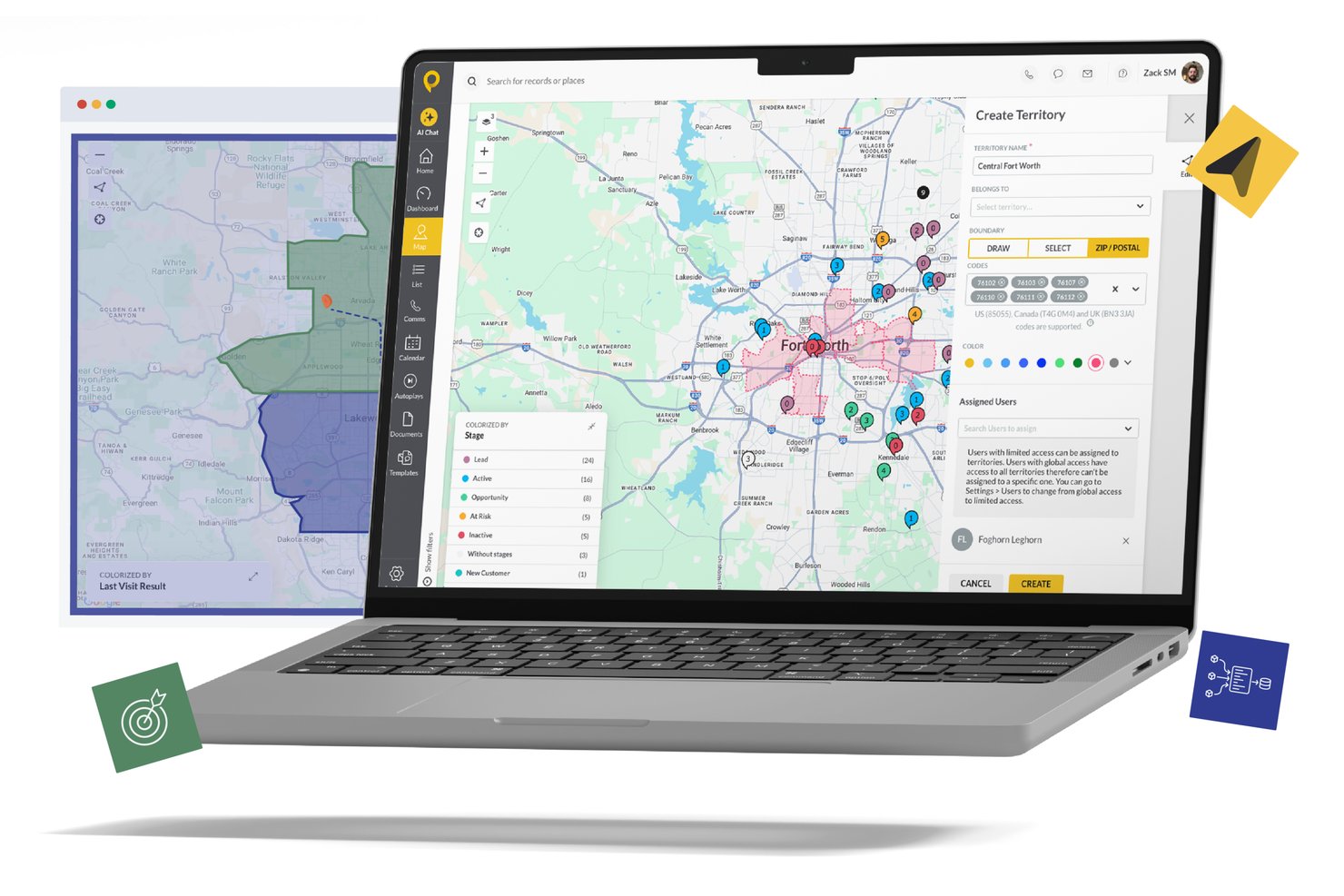
SPOTIO è una piattaforma di vendita sul campo orientata al mobile che combina la gestione dei territori, l'ottimizzazione dei percorsi, il tracciamento dei lead, la registrazione delle visite con verifica GPS e l'integrazione CRM per i team di vendita esterni.
Per chi è più adatto SPOTIO?
SPOTIO è particolarmente indicato per team di vendita esterni di medie e grandi dimensioni che operano in settori come solare, coperture, telecomunicazioni e dispositivi medici con almeno 5 agenti sul campo.
Perché ho scelto SPOTIO
Ho incluso SPOTIO nella mia selezione per la sua gestione avanzata della struttura territoriale. Posso definire i territori per codice postale, contea o limiti personalizzati, stratificare gerarchie e permessi in modo che ogni manager veda e gestisca solo ciò che gli compete. In pratica, questo permette a un direttore regionale che coordina 12 agenti su tre mercati di suddividere la copertura senza sovrapposizioni o confusione. Gli strumenti di colorazione e filtraggio rendono facile individuare le aree scoperte a colpo d'occhio.
Funzionalità principali di SPOTIO
- App mobile per il campo: Permette agli agenti di accedere a orari, registrare visite e raccogliere dati offline tramite dispositivi iOS o Android.
- Pianificazione e ottimizzazione dei percorsi: Genera automaticamente percorsi con più tappe in base a posizione, priorità e orario.
- Tracciamento dell'attività di vendita: Registra check-in verificati tramite GPS e il tempo trascorso in sito per ogni visita.
- Integrazione CRM: Sincronizza dati di account, contatti e attività bidirezionalmente con Salesforce, HubSpot e Microsoft Dynamics.
Integrazioni di SPOTIO
SPOTIO offre integrazioni native con Salesforce, HubSpot, Microsoft Dynamics 365, NetSuite e Pipedrive, e si collega con Zapier. È disponibile anche un'API aperta per integrazioni personalizzate.
Pros and Cons
Pros:
- Controlli granulari e gerarchici dei territori per i manager
- App mobile offline funziona in aree a bassa connettività
- Verifica delle visite tramite GPS con check-in geofencing
Cons:
- Personalizzazione dei report limitata nei piani inferiori
- Profondità limitata nelle previsioni per team di vendita interna

Ideale per accessibilità mobile a livello aziendale
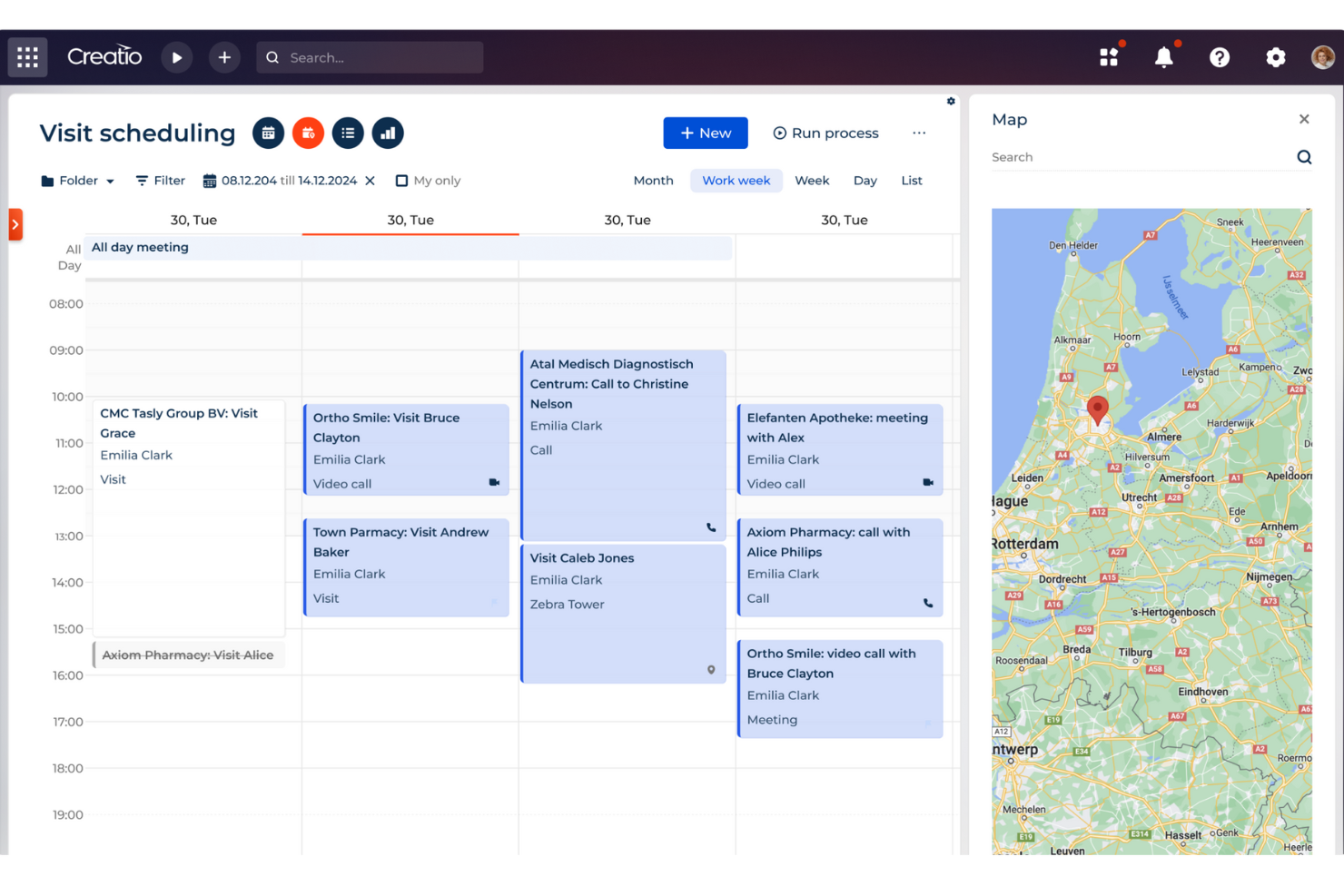
Creatio CRM è una piattaforma completa senza codice progettata per automatizzare e ottimizzare i processi di gestione delle relazioni con i clienti in diverse funzioni aziendali. Offre uno spazio di lavoro unificato che integra le funzionalità di marketing, vendite e servizio clienti.
Una delle caratteristiche più rilevanti è il suo sistema di gestione centralizzato, che consente la pianificazione delle visite e il tracciamento delle posizioni tramite geo-tag. Questa funzione è particolarmente utile per i rappresentanti di vendita che devono gestire in modo efficiente il loro tempo e i loro percorsi.
Un'altra caratteristica significativa di Creatio CRM è la sua app mobile, che permette ai rappresentanti di vendita di gestire le visite, registrare dettagli delle riunioni, condurre presentazioni, monitorare l'inventario e inserire ordini direttamente dai loro dispositivi mobili. Questa funzionalità mobile è fondamentale per i team di vendita sul campo che spesso lavorano in ambienti dove l'accesso a un computer desktop non è possibile.
Ideale per acquisizione ordini B2B offline
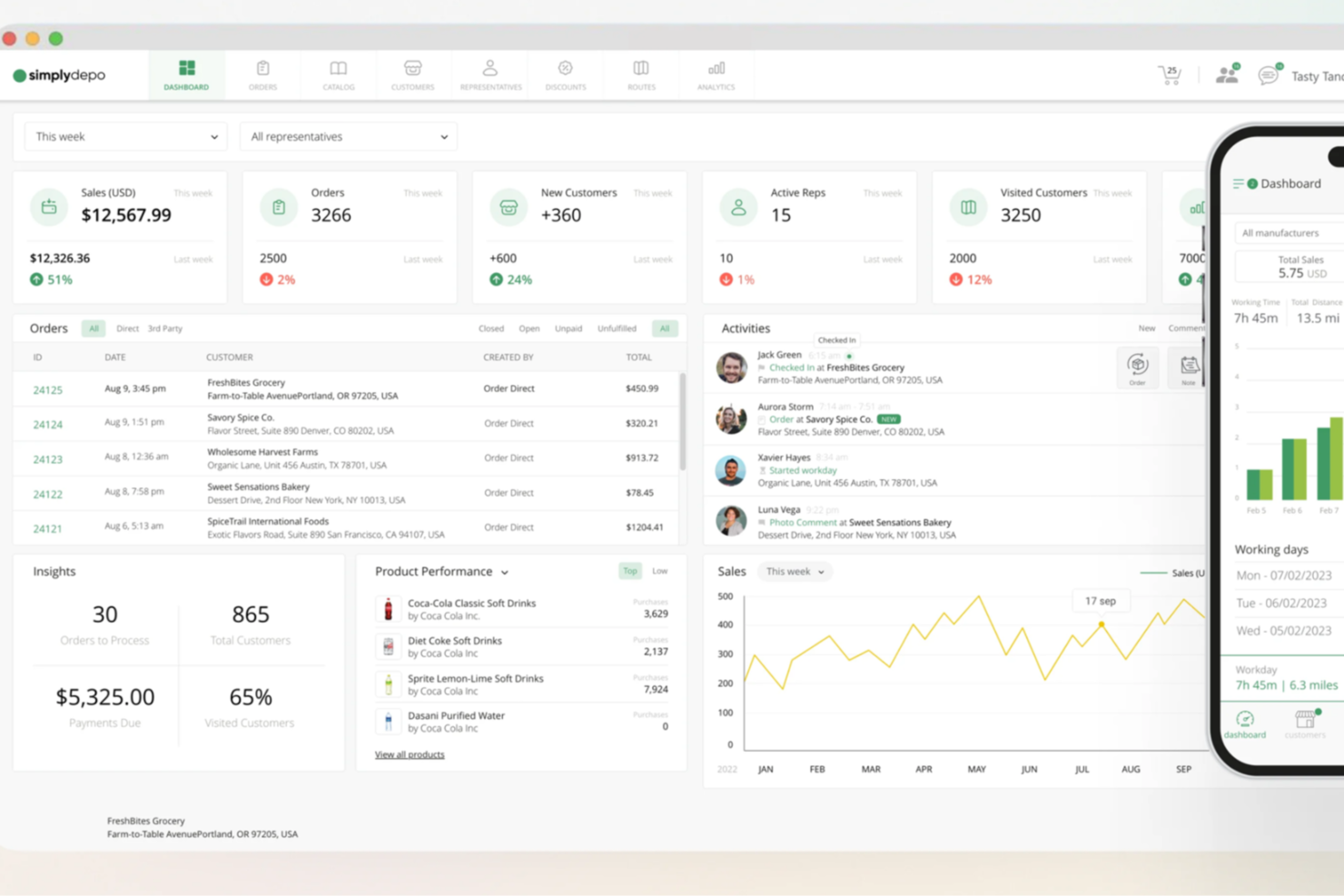
Per le aziende che affrontano le complessità delle vendite sul campo, SimplyDepo offre una soluzione su misura che aumenta l'efficienza del tuo team e migliora le relazioni con i clienti. Che tu sia un distributore, un brand o faccia parte di un team di esecuzione retail, SimplyDepo risponde alle sfide della gestione delle vendite mobili, semplifica le operazioni e ottimizza le attività quotidiane. La sua suite di funzionalità complete ti consente di concentrarti sulla crescita e sulla soddisfazione del cliente senza perdere tempo a causa di inefficienze nella gestione degli ordini o nella pianificazione dei percorsi.
Perché ho scelto SimplyDepo
Ho scelto SimplyDepo per la sua capacità unica di potenziare le operazioni di vendita sul campo grazie alla sua app dedicata per gli agenti e alle funzionalità di rendicontazione dei percorsi. L'app per agenti di vendita è uno strumento fondamentale per raccogliere ordini e gestire le interazioni con i clienti in tempo reale, anche offline, assicurando che il tuo team non perda mai un'opportunità di vendita. Inoltre, la funzione di rendicontazione dei percorsi aiuta a ottimizzare le rotte di vendita e a migliorare la copertura dei territori, riducendo i tempi di spostamento e massimizzando il potenziale di vendita. Queste caratteristiche rispondono direttamente alle sfide operative affrontate dai team di vendita sul campo, rendendo SimplyDepo una scelta ideale per chi vuole aumentare la produttività e il coinvolgimento dei clienti.
Funzionalità principali di SimplyDepo
Oltre alle sue funzionalità distintive, SimplyDepo offre molte altre possibilità vantaggiose per il tuo team:
- B2B CRM: Questa funzionalità ti aiuta a gestire e coltivare le relazioni con i clienti mantenendo tutti i dati e le interazioni in un'unica piattaforma centralizzata.
- Portale Ordini: Fornisce uno spazio dedicato alla gestione degli ordini, permettendo un'elaborazione più fluida e riducendo gli errori nell'inserimento.
- Gestione Distribuzione: Consente di supervisionare e gestire efficacemente i canali distributivi, garantendo che i prodotti arrivino tempestivamente a destinazione.
- Esecuzione Retail: Supporta il tuo team nell'attuazione delle strategie di vendita al dettaglio sul campo, dal monitoraggio delle esposizioni sugli scaffali alla gestione delle attività promozionali.
Integrazioni SimplyDepo
Le integrazioni includono Stripe, Twilio SendGrid, ShipStation e QuickBooks.
Pros and Cons
Pros:
- Sistema integrato di gestione ordini B2B
- CRM integrato per il monitoraggio account
- Pianificazione dei percorsi e mappatura dei territori
Cons:
- Personalizzazione limitata dei report avanzati
- Nessuna documentazione API trasparente

Migliore applicazione per la rilevazione delle ore lavorate sul campo
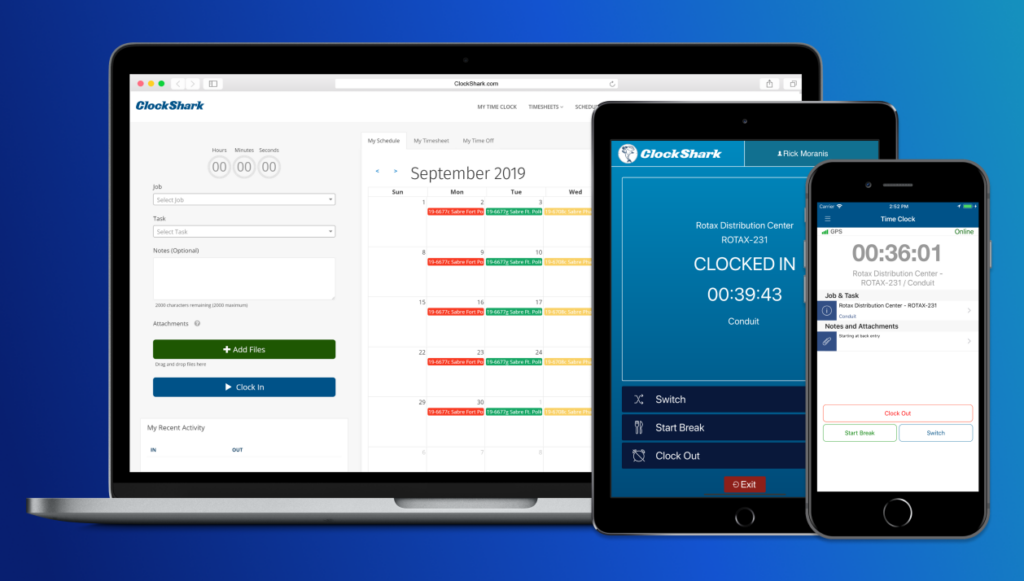
ClockShark è un'app per i timesheet sul campo che semplifica il processo di completamento dei lavori e di ottenimento del pagamento. Oltre alla creazione dei timesheet, la soluzione è dotata di strumenti per gestire le paghe, generare report organizzati, semplificare la programmazione e fornire una dettagliata analisi dei costi dei lavori.
ClockShark offre una varietà di integrazioni per automatizzare le attività amministrative come l'inserimento delle paghe e dei costi di lavoro. Questo include piattaforme come QuickBooks, Sage 100 Contractor, Xero, ADP, Paychex e altre ancora.
Il piano Basic parte da $3/mese per utente (più una tariffa base di $20/mese), il piano Standard costa $6/mese per utente (più una tariffa base di $30/mese), il piano Pro è offerto a $8/mese per utente (più una tariffa base di $50/mese), mentre per il piano Enterprise è necessario richiedere un preventivo. È inoltre disponibile una prova gratuita di 14 giorni.

Il miglior software per servizi sul campo per appaltatori
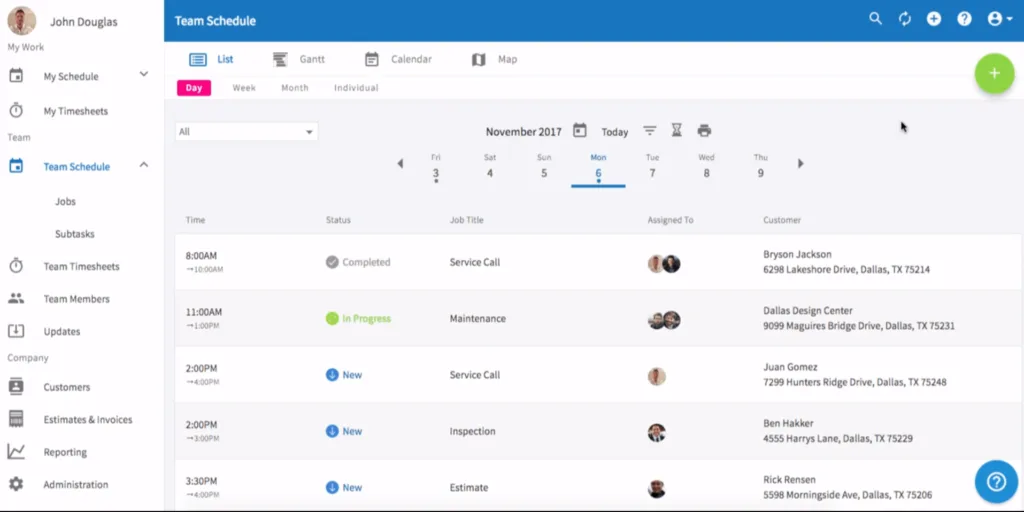
FieldPulse è una soluzione per servizi di appaltatori che offre automazione e strumenti di vendita per aiutare ad aumentare le vendite, incrementare i margini, superare le aspettative dei clienti e stimolare la crescita.
La Sales Suite è una piattaforma facile da usare che aiuta ad accelerare i processi di vendita, costruire fiducia con i clienti e valutare i lavori in modo efficace.
È disponibile una prova gratuita di 7 giorni senza necessità di carta di credito. I piani a pagamento partono da $59 per il prezzo base e $30 per utente aggiuntivo.

Miglior pianificatore di percorsi per vendite sul campo
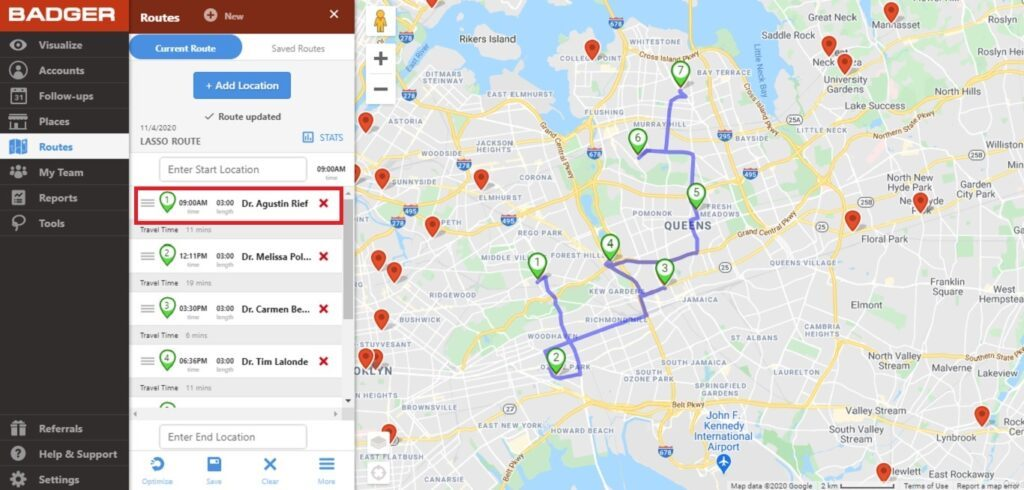
Badger Maps è una potente soluzione per la pianificazione dei percorsi e la programmazione delle attività per le vendite sul campo. Gli utenti possono facilmente creare itinerari semplicemente cerchiando un insieme di punti e il software fornirà automaticamente un percorso completamente ottimizzato. Inoltre, il sistema facilita report di check-in dettagliati e personalizzati, la possibilità di riassegnare istantaneamente gli account e promemoria per i follow-up.
È anche possibile integrare Badger Maps con il proprio CRM per una sincronizzazione bidirezionale. Anche in caso di configurazioni personalizzate, il loro team può organizzare una sincronizzazione ftp notturna con il vostro team IT.
Il piano Business parte da $49 per utente/mese e il piano Enterprise da $95 per utente/mese (entrambi con fatturazione annuale). È anche disponibile una prova gratuita di 7 giorni per il piano Business senza necessità di carta di credito.
Ideale per appaltatori di servizi commerciali

ServiceTrade è una potente applicazione di assistenza clienti per appaltatori di servizi commerciali. La soluzione aiuta le aziende ad aumentare la produttività dei tecnici generando percorsi efficienti e fornendo aggiornamenti in tempo reale ai clienti. È accessibile su tutti i dispositivi mobili, rendendo semplice la pianificazione e la priorizzazione dei lavori arretrati, dello stato delle lavorazioni, delle opportunità di riparazione e dello stato dei preventivi.
Il piano Select ha un prezzo di $79 per utente al mese e parte da 5 tecnici, il piano Premium costa $119 per utente al mese ed è ideale per 10-20 tecnici, mentre il piano Enterprise costa $159 per utente al mese ed è consigliato per oltre 20 tecnici. Gli utenti office sono gratuiti, quindi il prezzo si basa esclusivamente sul numero di tecnici.

Repsly
Ideale per gestire l'esecuzione sul campo
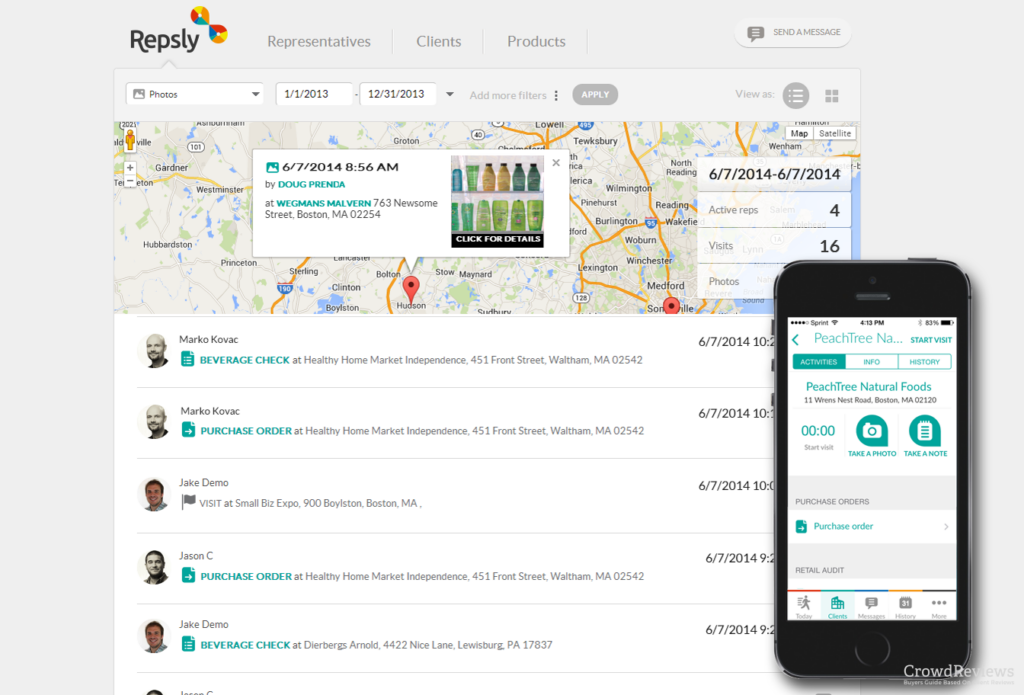
Repsly è un software di esecuzione retail che offre approfondimenti in tempo reale sulle prestazioni di vendita. La soluzione facilita il merchandising e la promozione intelligente tramite dashboard di analisi retail, oltre a funzionalità di gestione dei team sul campo e di esecuzione in negozio.
Repsly offre diverse possibilità di integrazione con grandi piattaforme CRM, ERP, BI e HR per connetterti con i tuoi flussi di lavoro per aggiornare i dati dei clienti, tracciare gli ordini e altro ancora.
Per ottenere un preventivo sui prezzi è necessario contattare il team di vendita di Repsly, che offre anche la possibilità di programmare una demo.

Ideale per configurazioni altamente personalizzabili
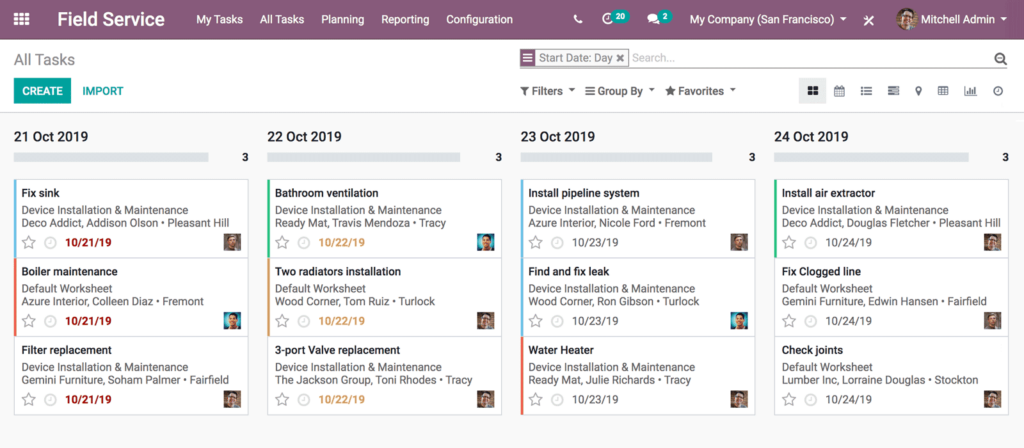
Odoo Field Service è uno strumento potente e mobile che consente agli utenti di programmare appuntamenti, assegnare compiti ai dipendenti, pianificare percorsi, registrare il tempo di lavoro, vendere prodotti, creare schede di lavoro personalizzate, fatturare i servizi, firmare digitalmente i report e fornire preventivi.
La soluzione semplifica la connettività sul campo e può essere utilizzata da qualsiasi dispositivo connesso a Internet, semplicemente tramite un browser web e senza la necessità di alcun download.
La soluzione Odoo Field Service è completamente integrata con le altre App Odoo, il che significa che puoi sincronizzare le informazioni sulle vendite sul campo con diverse piattaforme operative.
Include una prova gratuita di 15 giorni senza necessità di inserire una carta di credito. Per il prezzo completo, è necessario richiedere un preventivo.

FieldEdge
Ideale per la gestione dei tecnici sul campo
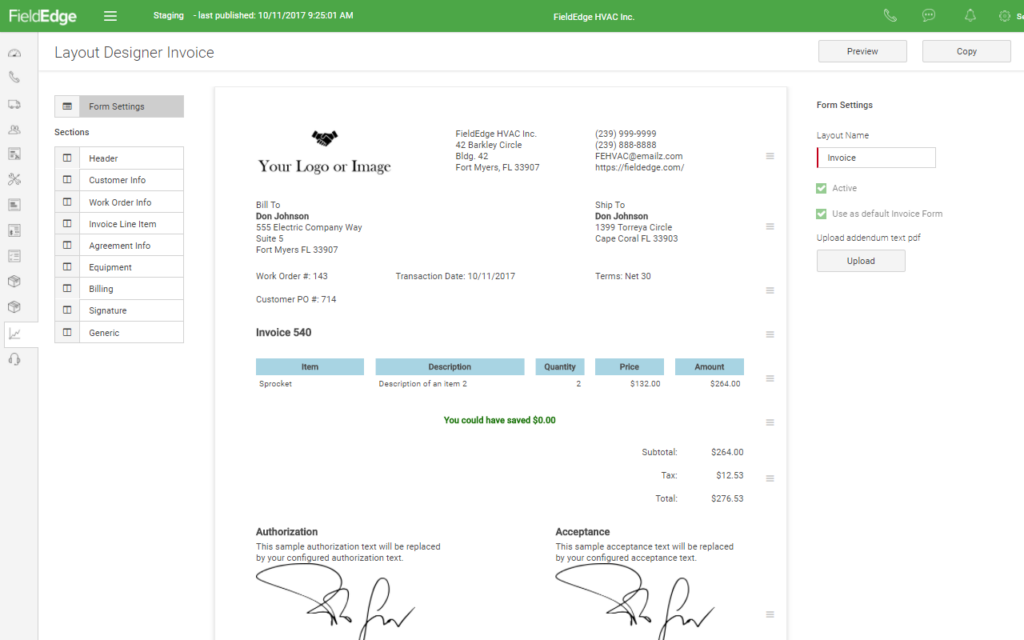
FieldEdge è un'app per servizi sul campo che aiuta gli utenti a completare più lavori più velocemente, ottimizzare le operazioni e aumentare la redditività. La soluzione è comunemente utilizzata nei settori HVAC, idraulica, elettricisti, fabbri e riparazione elettrodomestici.
È possibile anche integrare FieldEdge con QuickBooks e visualizzare in tempo reale tutti i dati finanziari per garantire l'assenza di incongruenze.
Per i prezzi è necessario richiedere un preventivo. C'è anche la possibilità di richiedere una demo.
Altri software per la vendita sul campo
Ecco alcune ulteriori soluzioni di software per la vendita sul campo che non sono entrate nella mia shortlist, ma che vale comunque la pena valutare:
- InSitu Sales
Ideale per inventario in tempo reale e fatturazione mobile
- Jobber
Il miglior software per la pianificazione dei servizi
- Housecall Pro
Ideale per le imprese di servizi domestici


Come Valuto il Software per la Vendita sul Campo
Valuto gli strumenti per la vendita sul campo su due livelli: le funzionalità di base imprescindibili—ottimizzazione dei percorsi, tracciamento GPS delle visite, sincronizzazione con il CRM—e i fattori differenzianti che determinano l'idoneità per un team specifico.
Funzionalità di Base (Requisiti Fondamentali per Questa Lista)
Quando seleziono gli strumenti per la mia lista, valuto ciascuno su una scala da 0 (non offre la funzionalità) a 5 (eccelle in quest'area) per ciascuna delle funzionalità di base elencate di seguito. Calcolo quindi il punteggio totale dello strumento trasformandolo in una percentuale. Ogni strumento deve raggiungere un punteggio totale minimo del 65% per essere considerato per l'inclusione.
- App Mobile per il Campo: Verifico se i rappresentanti possono accedere ai dettagli dell'account, registrare visite e acquisire firme su un'app nativa—soprattutto offline, poiché rotte rurali e grandi magazzini causano spesso perdita di connettività.
- Gestione dei Territori: L'assegnazione dei territori basata su mappa è fondamentale, quindi cerco strumenti che permettano ai team operativi di segmentare gli account per area geografica, capacità dei rappresentanti o livello cliente e di ribilanciare senza dover ricostruire tutto da zero.
- Pianificazione e Ottimizzazione dei Percorsi: Un rappresentante con otto fermate in un'area metropolitana ha bisogno di una sequenza intelligente, quindi valuto se lo strumento genera percorsi ottimizzati in base a posizione, priorità ed tempo di viaggio stimato.
- Tracciamento Visite e Check-In: I check-in verificati tramite GPS offrono al RevOps una reale prova dell'attività sul campo. Esamino se lo strumento acquisisce orari, ingressi delimitati geograficamente e dati sul tempo trascorso in sede collegati a ciascun account.
- Integrazione con il CRM: Qui valuto la sincronizzazione bidirezionale con i principali CRM come Salesforce, HubSpot o Dynamics—i dati raccolti sul campo devono fluire nel pipeline senza reinserimenti manuali da parte di rappresentanti o operatori.
- Reportistica sulle Attività sul Campo: Cerco dashboard che evidenzino la frequenza delle visite, la copertura dei territori e il contributo al pipeline, così che manager e responsabili RevOps possano collegare gli sforzi sul campo direttamente ai risultati di fatturato.
Una volta che ho un elenco di strumenti che soddisfano questi criteri, considero cosa differenzia ogni piattaforma.
Fattori Differenzianti (Cosa Distingue i Fornitori)
Ecco come confronto i diversi fornitori:
Caratteristiche Distintive
La mappatura per la generazione di lead è un importante fattore distintivo: cerco strumenti che evidenzino sulla mappa account inutilizzati nelle vicinanze, così che i rappresentanti possano colmare i vuoti tra le visite programmate invece di perdere opportunità durante gli spostamenti. Anche la gestione ordini direttamente sul campo è importante quando i rappresentanti devono creare preventivi e raccogliere ordini sul punto vendita senza cambiare app. La registrazione vocale nel CRM è pure da valutare, dato che i rappresentanti in viaggio tra le varie fermate possono dettare note a mani libere e sincronizzare automaticamente dati strutturati.
Oltre le Caratteristiche
Per me, l'affidabilità mobile e le prestazioni offline sono fondamentali, dal momento che i rappresentanti passano giornate intere in viaggio e uno strumento che consuma la batteria o si blocca senza segnale è un rischio. Valuto anche le integrazioni con altri sistemi oltre il CRM—le connessioni con ERP o sistemi di magazzino consentono ai rappresentanti di avere prezzi e disponibilità in tempo reale direttamente sul punto vendita. La flessibilità del modello di prezzo conta molto, soprattutto per team che aumentano le risorse con rappresentanti stagionali o esterni e hanno bisogno di licenze che si adeguano senza essere vincolati a minimi aziendali rigidi.
Come scegliere il software per la vendita sul campo più adatto alla tua azienda
È facile perdersi in lunghe liste di funzionalità e strutture di prezzo complesse. Per aiutarti a mantenere la concentrazione durante il tuo processo di selezione software, ecco una checklist di fattori da considerare:
| Fattore | Cosa considerare |
|---|---|
| Scalabilità | Il software può crescere con la tua azienda? Verifica se supporta più utenti o funzionalità man mano che il tuo team si espande. |
| Integrazioni | Si connette agli strumenti che già usi? Controlla la compatibilità con CRM, e-mail e altri sistemi già in uso. |
| Personalizzazione | Può essere adattato ai tuoi flussi di lavoro? Assicurati che sia possibile modificare impostazioni, campi e report in base ai processi del team. |
| Facilità d'uso | È intuitivo? Preferisci software con interfacce chiare e navigazione semplice, così il team lo adotta facilmente. |
| Implementazione e Onboarding | Quanto tempo serve per avviarlo? Valuta le risorse e il tempo necessari per partire, inclusa formazione e assistenza. |
| Costo | Rientra nel tuo budget? Confronta i piani tariffari e fai attenzione a costi nascosti o per funzionalità aggiuntive. |
| Tutela della sicurezza | Come protegge i tuoi dati? Controlla crittografia, autenticazione e conformità alle normative sulla protezione dei dati. |
Che cos'è il software per la vendita sul campo?
Il software per le vendite sul campo è uno strumento che aiuta i rappresentanti commerciali a lavorare in modo efficiente mentre sono fuori a incontrare i clienti. Viene utilizzato principalmente da team di vendita che trascorrono la maggior parte del tempo in viaggio, non in ufficio. Con funzionalità come la pianificazione dei percorsi, l'elaborazione degli ordini e le informazioni sui clienti in tempo reale, questo software consente ai rappresentanti di passare meno tempo sulla burocrazia e più tempo a connettersi con i clienti. Gestire orari, aggiornare i registri e occuparsi delle attività di vendita diventa possibile da qualsiasi luogo, così ci si può concentrare sulle vendite—senza rimanere impantanati nelle attività amministrative.
Funzionalità del software per le vendite sul campo
Quando scegli un software per le vendite sul campo, fai attenzione alle seguenti funzionalità chiave:
- Accessibilità mobile: Accedi a tutti gli strumenti e ai dati di vendita essenziali tramite smartphone o tablet. Questo ti permette di consultare le informazioni sui clienti, aggiornare note o registrare attività direttamente dal campo—niente più messaggi frettolosi all’ufficio o appunti scritti sul retro di una ricevuta.
- Gestione dei territori: Organizza e assegna le aree geografiche ai rappresentanti commerciali in modo efficiente. Grazie alla gestione dei territori, puoi assicurarti che ogni area riceva l’attenzione necessaria, evitando sovrapposizioni e opportunità perse.
- Ottimizzazione dei percorsi: Massimizza il tempo trascorso sulla strada con pianificazione e mappatura intelligente. Questa funzione calcola il percorso più efficiente per tutti i tuoi appuntamenti, facendoti risparmiare ore che preferiresti non passare nel traffico o tornando sui tuoi passi.
- Monitoraggio lead e opportunità: Tieni traccia di ogni potenziale vendita nel tuo funnel. Ottieni una visione chiara di chi è sotto osservazione e quali trattative stanno prendendo piede—niente più post-it sparsi.
- Reportistica in tempo reale: Genera rapporti aggiornati sulle performance di vendita, spese e log attività istantaneamente. Questo significa che puoi mostrare al tuo responsabile esattamente cosa succede sul campo—senza attendere i fogli Excel a fine settimana.
- Integrazione CRM: Sincronizza i dati di potenziali clienti e clienti effettivi tra il software di vendite sul campo e il tuo CRM principale. Tutto rimane aggiornato automaticamente, così puoi agire sulle ultime informazioni senza doppie immissioni.
- Gestione ordini: Crea, modifica e invia ordini direttamente durante l’incontro con i clienti. Non dovrai aspettare di essere tornato in ufficio, con clienti più soddisfatti e meno vendite perse.
- Funzionalità offline: Lavora senza connessione Internet e sincronizza i dati appena torni online. Così puoi restare produttivo anche quando vendi da un bar di campagna o dal magazzino di un cliente con Wi-Fi scarso.
- Gestione delle attività e del calendario: Imposta promemoria, pianifica riunioni e tieni traccia dei tuoi impegni giornalieri tutto in un unico posto. Puoi rimanere organizzato (ed evitare di dimenticare quell’importante chiamata di follow-up perché non ricordi su quale post-it l’hai scritta).
Funzionalità AI più comuni nel software per le vendite sul campo
Oltre alle funzionalità standard elencate sopra, molte di queste soluzioni stanno integrando l’intelligenza artificiale con opzioni come:
- Analisi predittive: Utilizza l’AI per prevedere quali lead hanno maggiori probabilità di convertirsi, basandosi su dati storici e modelli comportamentali. Questo ti aiuta a dedicare tempo alle opportunità più rilevanti.
- Inserimento dati automatico: L’AI registra e sincronizza note, registri chiamate e dettagli degli incontri, così non dovrai inserirli manualmente dopo. Meno burocrazia, più tempo per vendere.
- Pianificazione intelligente: L’AI analizza tempi di viaggio, cronologia appuntamenti e disponibilità dei clienti per suggerire gli orari migliori per gli incontri. Niente più incastri impossibili in agenda—solo giornate efficienti e ben organizzate.
- Consigli di coaching per le vendite: Ricevi suggerimenti personalizzati e feedback azionabili generati dall’AI in base a chiamate, email e andamento delle trattative. È come avere un assistente allenatore sempre a fianco, senza discorsi motivazionali imbarazzanti.
- Punteggio dinamico dei lead: L’AI valuta i lead in tempo reale, modificandone la priorità in base ai segnali del cliente e ai comportamenti di vendita. Vedrai sempre su quali prospect conviene puntare in questo momento.
Vantaggi del software per le vendite sul campo
Implementare un software per le vendite sul campo apporta diversi vantaggi al tuo team e alla tua azienda. Ecco alcuni benefici a cui puoi guardare con fiducia:
- Maggiore efficienza: Automatizza compiti routinari come la pianificazione degli appuntamenti e dei percorsi, liberando più tempo da dedicare alle vendite.
- Migliori relazioni con i clienti: Centralizza le interazioni, rendendo più semplice gestire e tracciare le comunicazioni con i clienti.
- Miglioramento delle performance di vendita: Offre report e monitoraggio delle attività di vendita per individuare facilmente le aree da ottimizzare.
- Maggiore mobilità: Fornisce accesso mobile, consentendo ai rappresentanti di lavorare efficacemente ovunque si trovino.
- Decisioni più consapevoli: La sincronizzazione dei dati in tempo reale assicura che tutti dispongano delle ultime informazioni per scelte informate.
- Gestione efficace dei territori: Aiuta a bilanciare i carichi di lavoro e massimizzare la copertura grazie agli strumenti di gestione dei territori.
Costi e Prezzi dei software per la forza vendita sul campo
La scelta di un software per la forza vendita sul campo richiede la comprensione dei vari modelli di prezzo e delle tipologie di abbonamento disponibili. I costi variano a seconda delle funzionalità, della dimensione del team, degli add-on e molto altro. La tabella sottostante riassume le offerte più comuni, i prezzi medi e le caratteristiche tipiche incluse nelle soluzioni di software per la forza vendita sul campo:
Tabella di Confronto dei Piani per il Software di Forza Vendita sul Campo
| Tipo di Piano | Prezzo Medio | Funzionalità Comuni |
|---|---|---|
| Piano Gratuito | $0 | Gestione base delle interazioni con i clienti, monitoraggio limitato delle attività di vendita e accesso mobile. |
| Piano Personale | $5-$25/user/month | Pianificazione avanzata, capacità di integrazione di base e dashboard personalizzabili. |
| Piano Business | $30-$60/user/month | Report avanzati, ottimizzazione dei percorsi e sincronizzazione dati in tempo reale. |
| Piano Enterprise | $70-$120/user/month | Gestione territoriale completa, integrazione CRM totale e avanzate misure di sicurezza. |
FAQ sul Software per la Forza Vendita sul Campo
Ecco alcune risposte alle domande più comuni sul software per la forza vendita sul campo:
Come faccio a sapere se il mio team ha bisogno di un software per la forza vendita sul campo?
Se il tuo team trascorre molto tempo sul campo e ha difficoltà a gestire appuntamenti, monitorare le attività di vendita e accedere ai dati in mobilità, allora un software per la forza vendita sul campo può essere utile. Aiuta a organizzare queste attività e garantisce che tutti dispongano delle informazioni più recenti, favorendo così una migliore produttività e risultati nelle vendite.
Il software per la forza vendita sul campo può integrarsi con il mio attuale CRM?
Sì, la maggior parte delle soluzioni di software per la forza vendita sul campo offre capacità di integrazione con i principali sistemi CRM. Verifica che il software supporti il tuo CRM specifico per garantire un flusso di dati senza interruzioni. L’integrazione può aiutare il team a evitare l’inserimento manuale dei dati e mantenere tutte le informazioni sui clienti aggiornate su tutte le piattaforme.
È necessaria una formazione per utilizzare il software per la forza vendita sul campo?
Sì, solitamente è necessaria una formazione, ma molte soluzioni sono pensate per essere intuitive. Scegli software che offrano risorse complete per l’onboarding, come video formativi, tour interattivi e webinar. Queste risorse possono aiutare il tuo team a imparare rapidamente ad usare il sistema e ad essere subito operativo.
Come posso valutare la sicurezza di un software per la forza vendita sul campo?
Valuta le funzionalità di sicurezza del software verificando la presenza di crittografia dei dati, protocolli di autenticazione e conformità alle normative sulla protezione dei dati come il GDPR. Chiedi al fornitore quali sono le misure di sicurezza adottate e se possiedono certificazioni o audit effettuati, per assicurarti che i tuoi dati siano al sicuro.
Il software per la forza vendita sul campo funziona offline?
Sì, la maggior parte dei moderni strumenti per la forza vendita sul campo include funzionalità offline che consentono agli agenti di registrare attività e aggiornare i dati anche senza connessione internet, sincronizzando automaticamente tutto al ripristino della connessione.
Il software per la forza vendita sul campo è facile da usare su dispositivi mobili?
Sì, la maggior parte delle soluzioni sono mobile-first oppure dispone di app dedicate che permettono agli agenti di campo di inserire dati, accedere ai dettagli dei clienti e gestire compiti direttamente da smartphone o tablet.
Cosa succede ora:
Se sei nella fase di ricerca di un software per la forza vendita sul campo, collegati gratuitamente con un consulente di SoftwareSelect per ricevere consigli personalizzati.
Compili un modulo e fai una breve chiacchierata in cui spiegano le tue esigenze specifiche. Riceverai così una lista ristretta di software da valutare. Sarai supportato in tutto il processo di acquisto, incluse le trattative sui prezzi.