

Gli strumenti di vendita AI sono piattaforme software che utilizzano l'intelligenza artificiale per automatizzare, analizzare e ottimizzare i processi di vendita nei vari team responsabili dei ricavi. Se stai cercando i migliori strumenti di vendita AI, probabilmente vuoi migliorare la visibilità della pipeline, ridurre le attività manuali e aiutare il tuo team a concentrarsi sulle attività di vendita ad alto valore. Molti strumenti includono la valutazione predittiva dei lead, copiloti AI per gli SDR e funzionalità che aiutano a identificare i lead qualificati, così il tuo team può agire più rapidamente e concludere più affari. Con così tante opzioni disponibili, è difficile sapere quali strumenti forniscano effettivamente dati affidabili, informazioni utili e miglioramenti concreti ai flussi di lavoro. Questa guida ti aiuterà a confrontare rapidamente i principali strumenti di vendita AI, a comprenderne le funzionalità principali e a scegliere soluzioni adatte alle tue attività di vendita e agli obiettivi di crescita.
Perché fidarsi dei nostri consigli sui software
6,700+
Reviews
20
Industry experts
16+
Evaluation factors
14
Years
Le nostre recensioni riflettono il nostro giudizio indipendente, non un discorso di vendita. Scopri come manteniamo la trasparenza.
Per questa guida, abbiamo valutato gli strumenti attraverso test pratici e ricerche indipendenti, assegnando un punteggio agli strumenti in base ai nostri criteri di selezione.
Le nostre recensioni riflettono il nostro giudizio editoriale umano, non un discorso di vendita.
Tabella comparativa degli strumenti di vendita AI
Questa tabella comparativa riassume i dettagli dei prezzi delle mie migliori selezioni di strumenti di vendita AI:
| Tool | Best For | Trial Info | Price | ||
|---|---|---|---|---|---|
| 1 | Ideale per vendite sul campo e gestione dei territori | Demo gratuita disponibile | Prezzi su richiesta | Website | |
| 2 | Ideale per flussi di lavoro CRM basati su agenti senza codice | Prova gratuita di 14 giorni | A partire da $40/utente/mese (con fatturazione annuale) | Website | |
| 3 | Ideale per agenti vocali basati sull'IA | Prova gratuita di 14 giorni + demo gratuita disponibile | A partire da $25/utente/mese (fatturati annualmente) | Website | |
| 4 | Ideale per insight sulle conversazioni di vendita | Demo gratuita disponibile | Prezzo su richiesta | Website | |
| 5 | Ideale per prospecting e arricchimento AI nelle vendite | Demo gratuita disponibile | Prezzo su richiesta | Website | |
| 6 | Ideale per sale vendita digitali e tracciamento | Prova gratuita + demo gratuita disponibile | From $25/user/month | Website | |
| 7 | Ideale per sales intelligence e dati di contatto | Prova gratuita disponibile | Prezzo su richiesta | Website | |
| 8 | Ideale per sales enablement e gestione dei contenuti | Demo gratuita disponibile | Prezzo su richiesta | Website | |
| 9 | Ideale per le trascrizioni IA delle riunioni | Piano gratuito + demo gratuita disponibile | Da $10/postazione/mese (fatturato annualmente) | Website | |
| 10 | Ideale per la qualificazione automatizzata dei potenziali clienti | Piano gratuito + dimostrazione gratuita disponibile | A partire da $29/mese | Website |


Recensioni degli strumenti di vendita AI
Di seguito trovi le mie sintesi dettagliate dei migliori strumenti di vendita AI inclusi nella mia selezione. Le mie recensioni offrono un’analisi approfondita delle funzionalità, delle capacità e delle integrazioni di ciascuna piattaforma, per aiutarti a trovare quella più adatta a te.
 Ideale per vendite sul campo e gestione dei territori
- Demo gratuita disponibile
- Prezzi su richiesta
Visit WebsiteCustomer Rating:4.3/5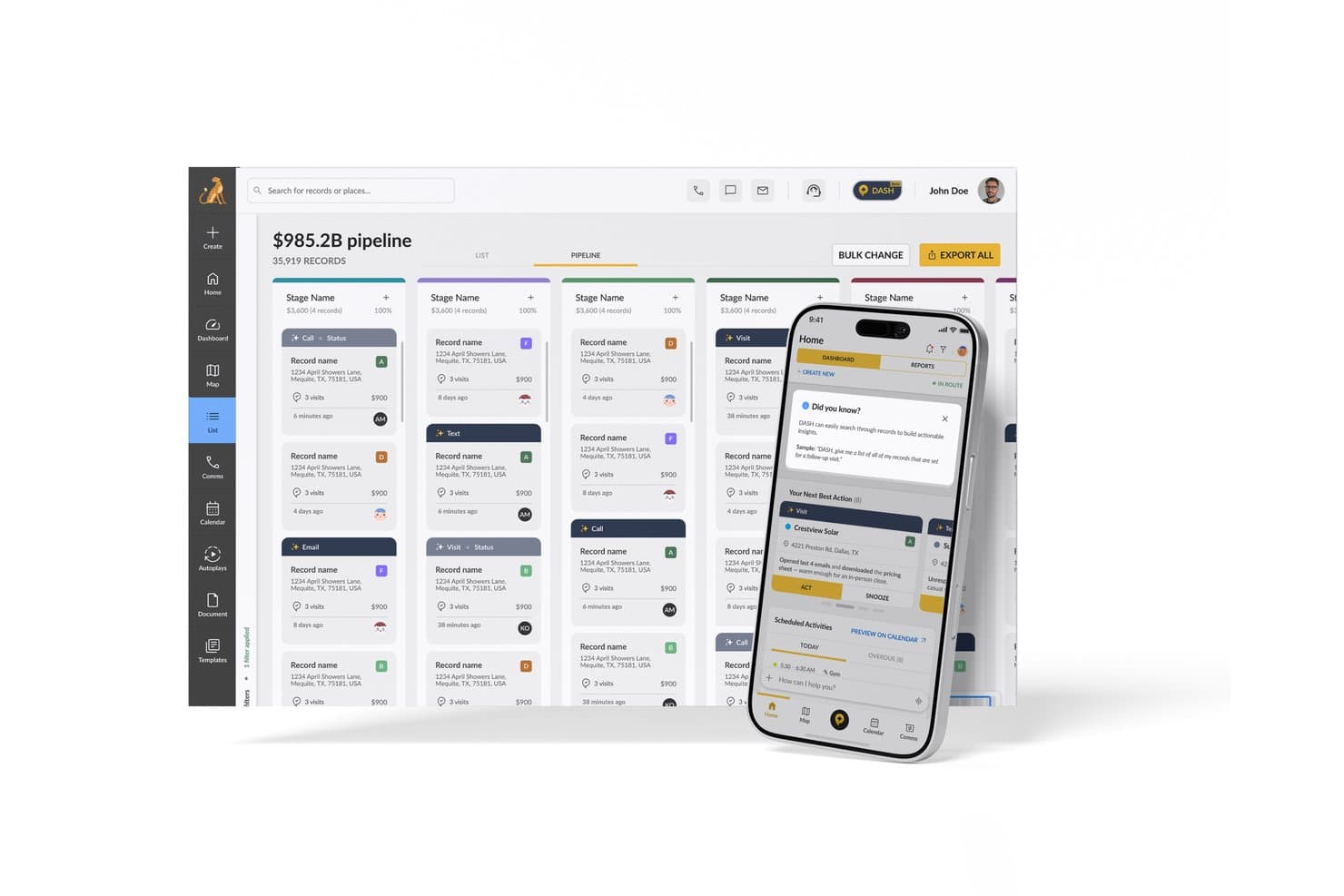
SPOTIO offre una funzionalità AI Next Best Action nella sua app mobile insieme a una dashboard di gestione pipeline per i team di vendita. SPOTIO è una piattaforma di vendita sul campo alimentata dall'IA che combina mappatura dei territori, ottimizzazione dei percorsi, gestione dei lead e raccomandazioni predittive sulle prossime migliori azioni per i team di vendita esterna.
Per chi è ideale SPOTIO?
SPOTIO è particolarmente indicato per i team di vendita esterna in settori come solare, coperture, telecomunicazioni e servizi per la casa che si affidano alla vendita porta a porta o per territorio.
Perché ho scelto SPOTIO
SPOTIO si è guadagnato un posto nella mia lista perché nessun altro strumento in questa categoria combina gestione dei territori di vendita sul campo e prioritizzazione guidata dall'IA in modo così integrato. Mi piace in particolare come il motore NBA (Next Best Action) attribuisca un punteggio di valore predittivo a ogni record, aggiornato più volte al giorno, così i rappresentanti sanno sempre a quale porta bussare successivamente. Anche il DASH AI Co-Pilot è impressionante, consentendo ai rappresentanti di registrare note di visita tramite voce o foto sul momento, senza dover digitare tra un appuntamento e l'altro.
Funzionalità principali di SPOTIO
- CRM mobile con modalità offline: I rappresentanti possono accedere ai record, registrare attività e aggiornare trattative anche senza connessione internet.
- Tracciamento attività con verifica della posizione: Tutte le visite e le attività vengono registrate con dati GPS per garantire un tracciamento accurato delle attività sul campo.
- Controlli di gestione dei territori: I responsabili definiscono, assegnano e modificano i territori utilizzando confini geografici personalizzati e permessi multilivello.
- Dashboard di analisi della pipeline di vendita: Gli utenti visualizzano in tempo reale metriche della vendita sul campo, trend delle prestazioni dei rappresentanti e monitoraggio delle conversioni in un'unica interfaccia.
Integrazioni SPOTIO
SPOTIO offre integrazioni native con Salesforce, Microsoft Dynamics 365, HubSpot e altro ancora. È inoltre disponibile un'API per integrazioni personalizzate.
Pros and Cons
Pros:
- Punteggi AI dei lead aggiornati più volte al giorno per i rappresentanti sul campo
- La registrazione visite con GPS mantiene i dati precisi
- La registrazione note vocali velocizza i flussi di lavoro sul campo
Cons:
- Funzionalità AI fortemente orientate alla vendita sul campo
- Intelligenza conversazionale limitata per team di vendita interna
Learn more about SPOTIO: Ideale per flussi di lavoro CRM basati su agenti senza codice
- Prova gratuita di 14 giorni
- A partire da $40/utente/mese (con fatturazione annuale)
Visit WebsiteCustomer Rating:4.7/5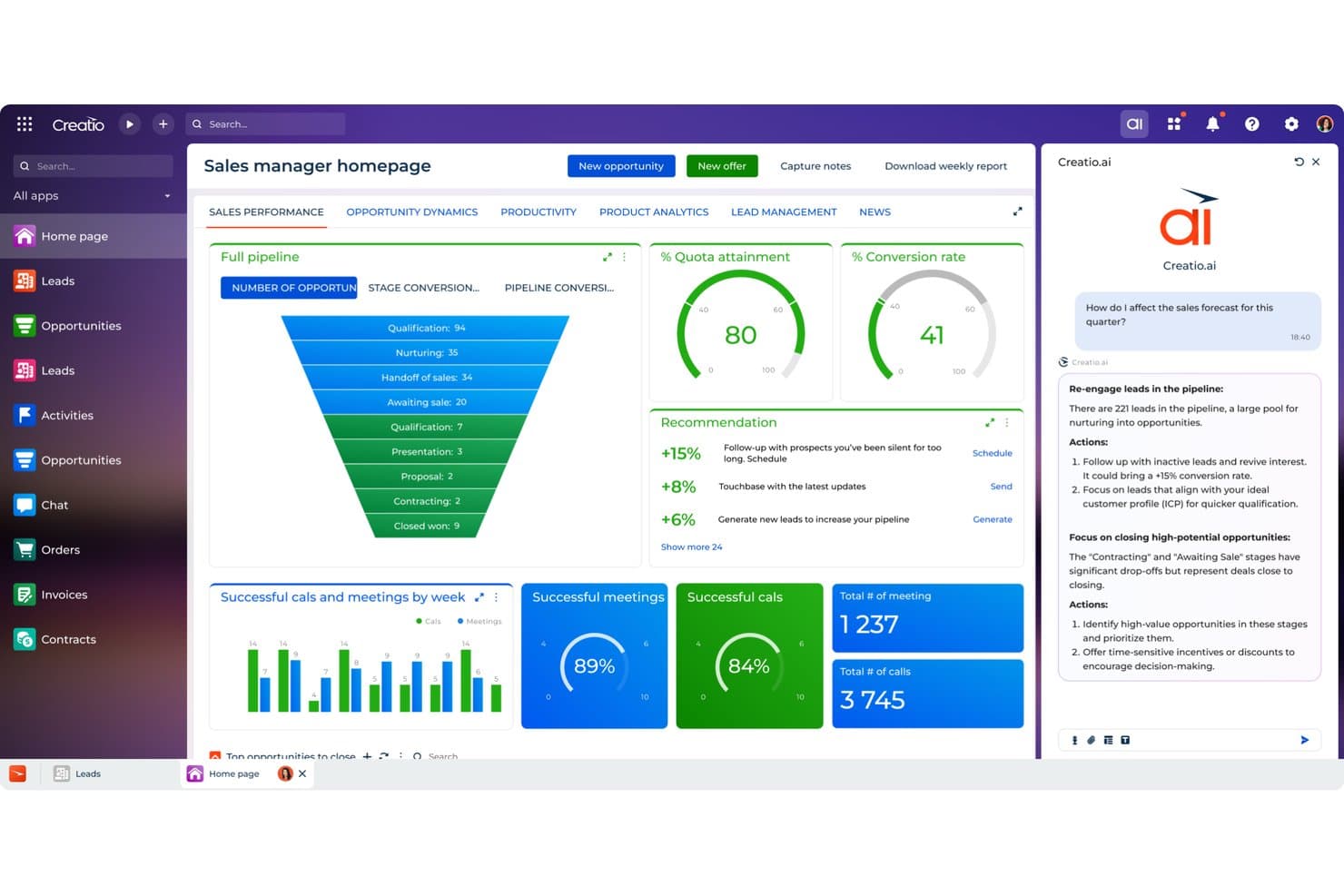
Creatio CRM utilizza l'IA per consigliare azioni di vendita e migliorare le previsioni. Creatio CRM è un CRM senza codice e una piattaforma per i flussi di lavoro che combina agenti IA, assegnazione predittiva dei lead e delle opportunità, previsioni della pipeline, arricchimento CRM automatizzato e assistenza con IA generativa durante l'intero ciclo di vendita.
A chi è più adatto Creatio CRM?
Creatio CRM è particolarmente adatto ai team delle operazioni commerciali e ai responsabili delle entrate (CRO) che vogliono sostituire completamente il proprio CRM con una piattaforma senza codice che esegue agenti IA autonomi per previsioni, arricchimento e gestione della pipeline.
Perché ho scelto Creatio CRM
Ho incluso Creatio CRM tra le mie scelte principali perché è una delle poche piattaforme basate su agenti IA autonomi anziché su funzionalità IA aggiunte successivamente. L'agente di ricerca degli account compila automaticamente i record e mappa gli stakeholder in pochi secondi, mentre l'agente per le previsioni e la pipeline segnala le trattative bloccate, riassume i rischi ed esegue revisioni settimanali automatizzate delle previsioni per i responsabili delle entrate. Ciò che apprezzo particolarmente è la possibilità di creare ed estendere questi agenti senza scrivere una sola riga di codice.
Caratteristiche principali di Creatio CRM
- Assegnazione predittiva dei lead e delle opportunità: l'assegnazione basata sull'apprendimento automatico classifica lead e opportunità su una scala da 1 a 100, tenendo conto dei dati dei clienti, della cronologia dell'assistenza e delle vendite passate.
- Agente per la gestione dei territori: bilancia automaticamente i territori e porta alla luce gli account non sfruttati per aiutare i rappresentanti e i team operativi a individuare gli spazi di crescita.
- Agente per la generazione dei preventivi: suggerisce pacchetti di prodotti e prezzi in base al contesto della trattativa, quindi prepara le proposte senza input manuale.
- Creazione di modelli personalizzati senza codice: consente di creare modelli di assegnazione, ricerca e previsione numerica direttamente nella piattaforma senza scrivere codice.
Integrazioni di Creatio CRM
Creatio CRM dispone di integrazioni documentate con Microsoft Teams, Outlook, Zoom, OpenAI, posta elettronica e calendari. Supporta inoltre API, integrazioni del Marketplace e Zapier.
Pros and Cons
Pros:
- Gli agenti autonomi coprono previsioni e arricchimento
- I modelli senza codice adattano i flussi di lavoro per l'assegnazione
- Gli agenti per i territori portano alla luce gli account non sfruttati
Cons:
- L'intelligence delle conversazioni non rileva il sentiment e le obiezioni
- Le lacune nella reportistica limitano la visibilità delle operazioni sui ricavi
Learn more about Creatio CRM: Ideale per agenti vocali basati sull'IA
- Prova gratuita di 14 giorni + demo gratuita disponibile
- A partire da $25/utente/mese (fatturati annualmente)
Visit WebsiteCustomer Rating:4.4/5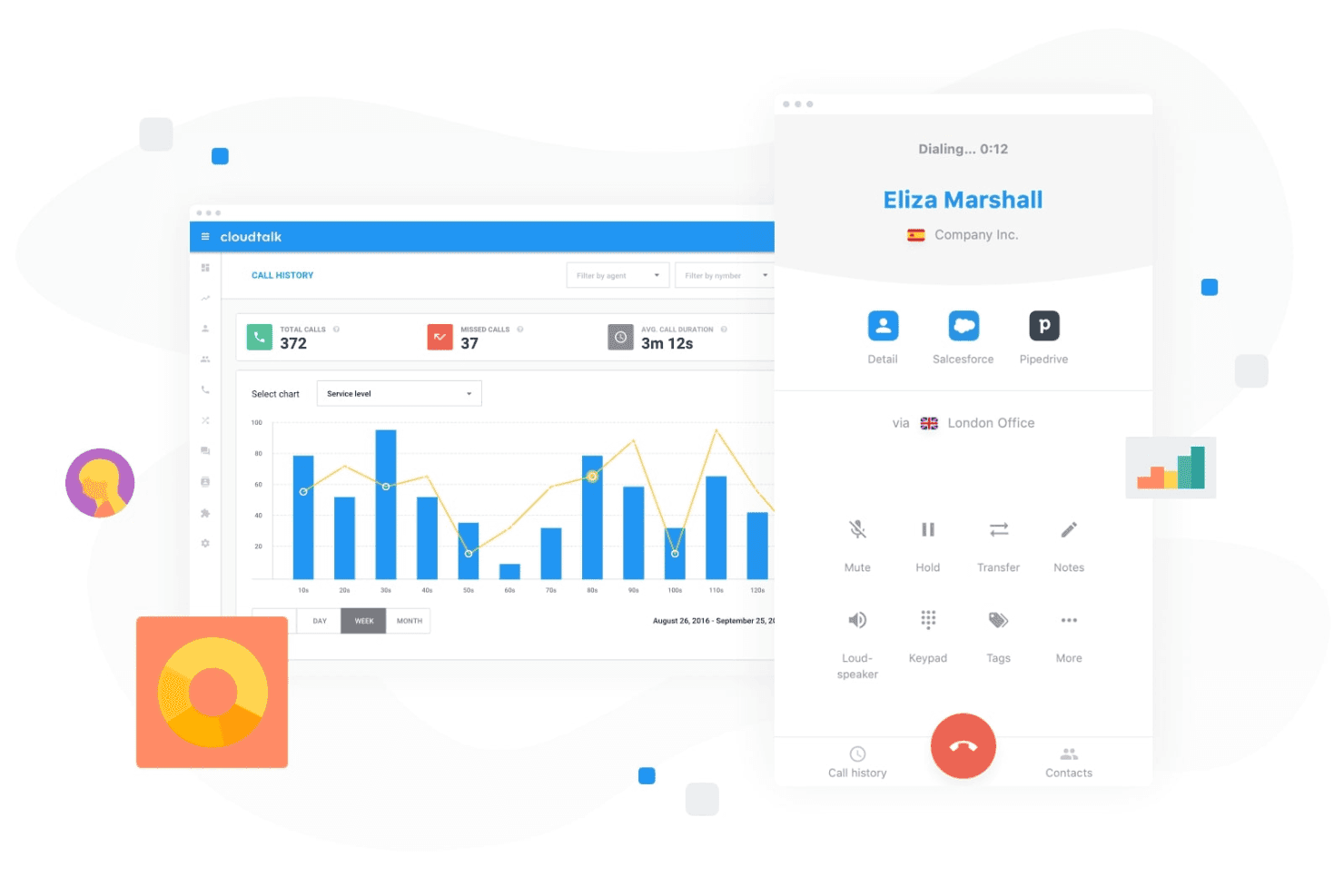
CloudTalk consente ai team di gestire le chiamate dei clienti monitorando l'attività e le prestazioni delle chiamate da un cruscotto centralizzato. CloudTalk è una piattaforma di chiamate basata sull'IA che combina agenti vocali IA, analisi delle conversazioni e sistemi di composizione per le vendite con integrazioni profonde con i CRM per i team di vendita e assistenza.
Per chi è più adatto CloudTalk?
CloudTalk è particolarmente adatto ai team di vendita delle PMI che gestiscono volumi elevati di chiamate e hanno bisogno di chiamate assistite dall'IA integrate nel proprio sistema telefonico.
Perché ho scelto CloudTalk
CloudTalk si è guadagnato un posto nella mia lista ristretta perché i suoi agenti vocali IA gestiscono le chiamate in uscita di routine, come la qualificazione delle registrazioni alle versioni di prova e la programmazione degli appuntamenti, senza che un rappresentante debba mai rispondere al telefono. Apprezzo il fatto che il centralinista IA sia attivo 24 ore su 24, 7 giorni su 7, in oltre 60 lingue, colmando automaticamente le lacune al di fuori dell'orario lavorativo. Il sistema di composizione parallela, che chiama fino a 10 linee contemporaneamente e abbandona automaticamente i messaggi vocali, consente ai rappresentanti in linea di concentrarsi sulle conversazioni effettive.
Funzionalità principali di CloudTalk
- Analisi delle conversazioni basata sull'IA: Genera automaticamente riepiloghi delle chiamate, trascrizioni, analisi del sentiment e rapporti tra tempo di conversazione e ascolto.
- Sistema di composizione intelligente per le vendite: Combina le modalità di composizione in anteprima, automatica e parallela per semplificare le attività di chiamata in uscita.
- Automazione dei flussi di lavoro: Automatizza l'instradamento delle chiamate, gli IVR, la copertura al di fuori dell'orario lavorativo e le attività di comunicazione ripetitive.
- Sincronizzazione bidirezionale con il CRM: Le integrazioni native con Salesforce, HubSpot e Pipedrive mantengono automaticamente sincronizzati i registri e le note delle chiamate.
Integrazioni di CloudTalk
CloudTalk offre integrazioni native con Salesforce, HubSpot, Pipedrive, Zendesk, Zoho CRM, Freshdesk, Intercom e Slack. È disponibile un'API per le integrazioni personalizzate.
Pros and Cons
Pros:
- Gli agenti vocali IA automatizzano le chiamate in uscita di routine
- Il sistema di composizione parallela aumenta notevolmente il volume giornaliero delle chiamate
- L'analisi del sentiment in tempo reale segnala le opportunità di formazione
Cons:
- Nessuna pipeline nativa o assegnazione di punteggi alle trattative
- Le funzionalità IA sono limitate al solo canale vocale
Learn more about CloudTalk: 4Ideale per insight sulle conversazioni di vendita
Gong
- Demo gratuita disponibile
- Prezzo su richiesta
Visit WebsiteCustomer Rating:4.7/5
Gong analizza chiamate di vendita ed email per identificare insight sulle trattative tramite IA. Gong utilizza l’IA per analizzare le conversazioni di vendita e fornire insight attuabili per i team di revenue. È progettato per responsabili e rappresentanti delle vendite che vogliono comprendere i rischi delle trattative, formare i team e aumentare il tasso di chiusura sfruttando interazioni reali con i clienti. Se hai bisogno di visibilità su ciò che succede realmente nella pipeline, Gong ti aiuta a trasformare i dati delle chiamate in indicazioni strategiche.
Per chi è ideale Gong?
Gong è particolarmente adatto a team di vendita di medie e grandi dimensioni che vogliono ottenere insight guidati dall’IA dalle conversazioni con i clienti, per migliorare il coaching e la gestione delle trattative.
Perché ho scelto Gong
Ho scelto Gong per questa lista perché la sua revenue intelligence basata sull’IA e l’analisi delle conversazioni lo distinguono dagli altri strumenti di vendita. Gong registra e analizza automaticamente chiamate di vendita, email e meeting evidenziando rischi nelle trattative e opportunità di coaching che sarebbe facile perdere manualmente. Trovo le sue analisi delle conversazioni particolarmente utili per individuare schemi nei deal vinti e per evidenziare dove i rappresentanti possono necessitare supporto. Per i team che vogliono sfruttare l’IA per trasformare vere interazioni con i clienti in insight pratici, Gong offre una soluzione mirata ed efficace.
Funzionalità principali di Gong
Altre funzionalità di Gong particolarmente utili per i team di vendita includono:
- Bacheche delle trattative: Visualizza e monitora lo stato di ogni trattativa nella pipeline con bacheche personalizzabili.
- Tracker intelligenti: Monitora automaticamente parole chiave, argomenti e citazioni dei concorrenti in tutte le conversazioni di vendita.
- Trascrizione delle chiamate: Genera trascrizioni ricercabili e basate su IA per ogni chiamata e meeting registrati.
- Integrazione con sistemi CRM: Sincronizza dati e insight delle chiamate direttamente con Salesforce, HubSpot e altri CRM leader.
Integrazioni di Gong
Le integrazioni includono Slack, HubSpot CRM, Chili Piper, Gainsight, G2, AWS, Snowflake, ZoomInfo, Zapier, Vidyard, Salesforce, Zoom, Rippling e altri.
Pros and Cons
Pros:
- L’IA analizza le chiamate per segnali di rischio nelle trattative
- L’intelligenza conversazionale evidenzia opportunità di coaching
- Traccia in tempo reale le menzioni dei concorrenti
Cons:
- Richiede il consenso alla registrazione delle chiamate per la conformità
- Può generare troppe notifiche per gli utenti
Learn more about Gong: Ideale per prospecting e arricchimento AI nelle vendite
- Demo gratuita disponibile
- Prezzo su richiesta
Visit WebsiteCustomer Rating:4.6/5
Cognism arricchisce i lead con dati AI e prospecting conformi. Cognism offre attività di prospecting guidate dall’IA per i team di vendita che necessitano di dati di contatto accurati e conformi. È particolarmente adatto alle organizzazioni B2B che desiderano automatizzare la generazione di lead e arricchire il proprio CRM con informazioni aggiornate. Se il tuo team fatica con la ricerca manuale o con elenchi di contatti obsoleti, Cognism risolve queste problematiche grazie a reperimento e arricchimento dati automatizzati, oltre a funzionalità come assistente AI, segnali di intenzione all’acquisto e supporto per attività di outreach mirato, come campagne di email a freddo.
Per chi è più indicata Cognism?
Cognism è indicata per team di vendita B2B che operano in settori regolamentati e che richiedono dati di contatto accurati e conformi per attività di prospecting outbound.
Perché ho scelto Cognism
Ho scelto Cognism per questa lista perché le sue capacità di sales prospecting e arricchimento dei lead, basate su IA, affrontano una sfida fondamentale per i team di revenue: trovare dati di contatto accurati e conformi su larga scala. La piattaforma utilizza l’intelligenza artificiale per reperire, verificare e arricchire automaticamente i lead, riducendo il tempo dedicato dal team a ricerche manuali. Apprezzo anche il fatto che Cognism dia priorità alla conformità normativa sui dati, fattore particolarmente importante per i team che operano in regioni con regolamentazioni sulla privacy rigorose. Le funzioni di arricchimento aiutano a mantenere freschi i dati del CRM, così che le attività di outreach siano sempre basate sulle informazioni più aggiornate disponibili.
Funzionalità principali di Cognism
Altre funzionalità di Cognism particolarmente utili per i team di vendita includono:
- Estensione Chrome: Cattura e arricchisci lead direttamente da LinkedIn e dai siti web aziendali senza lasciare il browser.
- Screening di conformità e registro delle chiamate indesiderate: Identifica automaticamente i contatti presenti nelle liste globali di chi non desidera essere chiamato e valuta la conformità normativa.
- Integrazione con dati di intenzione: Segnala lead che mostrano segnali di interesse all’acquisto tramite l’integrazione di dati di intenzione nel flusso di prospecting.
- Creazione automatizzata di elenchi: Crea liste di lead mirate utilizzando filtri avanzati per settore, dimensioni dell’azienda, località e altro ancora.
Integrazioni Cognism
Le integrazioni includono Salesforce, HubSpot, Outreach, Salesloft, Microsoft Dynamics 365, Pipedrive, Bullhorn, Zapier e altro ancora.
Pros and Cons
Pros:
- Dati di contatto B2B accurati per mercati globali
- Controlli integrati sulla conformità a GDPR e CCPA
- I dati di intenzione evidenziano i prospect pronti all’acquisto
Cons:
- Copertura dei dati sporadica nei mercati più piccoli
- Nessun strumento integrato di sequenza e invio email
Learn more about Cognism: Ideale per sale vendita digitali e tracciamento
- Prova gratuita + demo gratuita disponibile
- From $25/user/month
Visit WebsiteCustomer Rating:4.6/5
Monitora la performance di vendita, le trattative, i tassi di successo e le metriche dei migliori venditori. I team di vendita che desiderano modernizzare la gestione delle trattative spesso si rivolgono a GetAccept. La piattaforma combina sale vendita digitali, tracciamento dei documenti e firma elettronica in un unico spazio di lavoro, rendendola particolarmente utile per i cicli di vendita B2B con più stakeholder. È una scelta solida per i team che desiderano personalizzare le esperienze di acquisto e far avanzare le trattative grazie ai dati in tempo reale sull’engagement.
Per chi è più indicato GetAccept?
GetAccept è particolarmente adatto ai team di vendita B2B di aziende di medie dimensioni che gestiscono trattative complesse che coinvolgono più stakeholder e documenti.
Perché ho scelto GetAccept
Ciò che mi ha colpito di GetAccept è il suo focus sulla creazione di una sala vendita digitale che riunisce il tracciamento dei documenti e la firma elettronica in un unico luogo. Per i team che gestiscono trattative B2B complesse, reputo particolarmente preziosa la possibilità di monitorare in tempo reale l’engagement degli acquirenti sui documenti di vendita. La funzione di firma elettronica integrata semplifica la chiusura, mentre lo spazio di lavoro digitale aiuta i rappresentanti a personalizzare l’esperienza di acquisto e mantenere allineati tutti gli stakeholder. Queste funzionalità rendono GetAccept una scelta valida per chi cerca uno strumento di vendita AI che supporti cicli di trattativa articolati e ad alta interazione.
Funzionalità principali di GetAccept
Altre caratteristiche che rendono GetAccept utile per i team di vendita includono:
- Promemoria automatici: Invia notifiche programmate a prospect e membri interni del team per mantenere le trattative in movimento.
- Video messaggi: Consente ai venditori di registrare e inserire video personalizzati direttamente nei documenti di vendita per offrire un’esperienza d’acquisto più coinvolgente.
- Modelli di contratto: Fornisce modelli personalizzabili per gli accordi più utilizzati, riducendo il tempo di creazione manuale dei documenti.
- Dashboard di analisi delle trattative: Offre dati in tempo reale su visualizzazioni dei documenti, tempo trascorso e coinvolgimento degli stakeholder su tutte le trattative attive.
Integrazioni GetAccept
Le integrazioni includono Salesforce, HubSpot, Microsoft Dynamics, Pipedrive, SuperOffice, Lime CRM, UpSales, Gong, Slack e altro ancora.
Pros and Cons
Pros:
- Tracciamento dei documenti in tempo reale per l’engagement di vendita
- Video messaggistica integrata per contatti personalizzati
- Promemoria automatici per ridurre ritardi nelle trattative
Cons:
- Funzionalità limitate di previsione guidata dall’AI
- Ritardi occasionali nelle notifiche di consegna dei documenti
Learn more about GetAccept: Ideale per sales intelligence e dati di contatto
- Prova gratuita disponibile
- Prezzo su richiesta
Visit WebsiteCustomer Rating:4.4/5
ZoomInfo offre uno strumento di vendita con intelligenza artificiale dotato di automazione delle email e funzionalità per l’engagement dei potenziali clienti. I team di vendita che cercano dati accurati su contatti e aziende B2B spesso si affidano a ZoomInfo. La piattaforma è progettata per i professionisti che hanno bisogno di identificare, ricercare e connettersi rapidamente con i decision maker. Il suo approccio basato sui dati aiuta gli utenti a costruire liste di potenziali clienti mirate e a migliorare la precisione delle attività di contatto.
Per chi è più indicata ZoomInfo?
ZoomInfo è particolarmente adatta ai team di vendita e marketing B2B in aziende di medie e grandi dimensioni che necessitano di dati accurati su contatti e aziende per attività di outreach mirate.
Perché ho scelto ZoomInfo
Ciò che distingue ZoomInfo, secondo me, è la profondità e l’accuratezza dei dati su contatti e aziende B2B, fondamentali per attività di vendita mirate. Gli strumenti di ricerca e filtro alimentati dall’IA aiutano l’utente a individuare rapidamente i decision maker giusti all’interno di settori o aziende specifici. Apprezzo inoltre l’arricchimento dei dati in tempo reale, che mantiene aggiornate e operative le informazioni sui potenziali clienti per i team di vendita. Per chi cerca uno strumento di vendita con intelligenza artificiale che dia priorità alla qualità dei dati e alla precisione del targeting, ZoomInfo è un’opzione molto valida.
Funzionalità principali di ZoomInfo
Altre funzionalità che rendono ZoomInfo preziosa per i team di vendita includono:
- Tracciamento dei dati di intento: Evidenzia le aziende che stanno attivamente ricercando argomenti rilevanti per la tua soluzione, così puoi dare priorità alle attività di outreach.
- Flussi di lavoro automatizzati: Permette di attivare azioni come creazione di liste, segnalazioni o aggiornamenti CRM in base ai cambiamenti di dati o attività dei potenziali clienti.
- Monitoraggio dell’engagement: Monitora aperture di email, clic e risposte per aiutarti a valutare l’interesse dei potenziali clienti e perfezionare i messaggi.
- Estensione Chrome: Consente di accedere ai dati di contatto e aziendali direttamente da LinkedIn o dai siti web aziendali senza uscire dal browser.
Integrazioni ZoomInfo
Le integrazioni includono Salesforce, HubSpot, Microsoft Dynamics 365, Snowflake, Gmail, Zoom, Aircall e altre ancora.
Pros and Cons
Pros:
- Database ampio di contatti e aziende B2B
- Intent data alimentati dall’IA per il prospecting
- Arricchimento dati in tempo reale per i record CRM
Cons:
- Dati di contatto a volte obsoleti o imprecisi
- Supporto limitato ai mercati internazionali
Learn more about ZoomInfo: Ideale per sales enablement e gestione dei contenuti
- Demo gratuita disponibile
- Prezzo su richiesta
Visit WebsiteCustomer Rating:4.6/5
Highspot traccia l'utilizzo dei contenuti e le analisi di coinvolgimento nelle vendite. I team di sales enablement che cercano di unificare contenuti, formazione e analisi spesso si affidano a Highspot. La piattaforma è pensata per le organizzazioni che desiderano fornire ai propri commerciali i materiali e le indicazioni giuste in ogni fase del percorso d’acquisto. Highspot si distingue per l’attenzione nel mettere in evidenza contenuti rilevanti e insight azionabili direttamente nei flussi di lavoro dei venditori.
Per chi è ideale Highspot?
Highspot è particolarmente indicato per team di vendita e sales enablement di medie e grandi dimensioni nei settori B2B che necessitano di una gestione centralizzata dei contenuti e di una vendita guidata.
Perché ho scelto Highspot
Ciò che mi colpisce di Highspot è l’attenzione all’enablement delle vendite basato sull’intelligenza artificiale, che integra gestione dei contenuti e vendita guidata. Ho scelto Highspot perché utilizza l’IA per raccomandare ai commerciali i contenuti e i playbook di vendita più pertinenti in base alla fase della trattativa e al coinvolgimento del potenziale cliente. Le funzionalità di vendita guidata della piattaforma aiutano i team a mantenere una comunicazione e una formazione coerenti, mentre le analisi offrono visibilità su quali contenuti effettivamente generano risultati. Per chi cerca uno strumento di vendita con IA che colleghi enablement, contenuti e insight azionabili, Highspot propone un approccio unificato.
Funzionalità principali di Highspot
Altre funzionalità che rendono Highspot prezioso per i team di sales enablement includono:
- Tracciamento dei pitch: Monitora quando i potenziali clienti aprono, visualizzano e interagiscono con i contenuti di vendita condivisi.
- Governance dei contenuti: Consente agli amministratori di controllare accesso ai contenuti, versionamento e conformità su team distribuiti.
- Moduli di formazione e onboarding: Fornisce strumenti integrati per offrire formazione commerciale, onboarding e programmi di certificazione.
- Integrazione CRM: Si collega a piattaforme come Salesforce e Microsoft Dynamics per sincronizzare attività di vendita e dati sull’utilizzo dei contenuti.
Integrazioni di Highspot
Le integrazioni includono Salesforce, Microsoft Dynamics 365, Microsoft Teams, Outlook, SharePoint, Slack, Google Workspace, Gmail, Salesloft e altri ancora.
Pros and Cons
Pros:
- L’IA raccomanda i contenuti in base alla fase della trattativa
- Playbook di vendita guidata per una comunicazione coerente
- Analisi approfondite sull’engagement dei pitch
Cons:
- Automazione del flusso di lavoro limitata rispetto ai concorrenti
- Privo di funzionalità native di previsione predittiva
Learn more about Highspot: Ideale per le trascrizioni IA delle riunioni
- Piano gratuito + demo gratuita disponibile
- Da $10/postazione/mese (fatturato annualmente)
Visit WebsiteCustomer Rating:4.3/5
Fireflies.ai analizza le conversazioni delle riunioni e monitora le metriche di performance del team. I team di vendita che desiderano catturare, trascrivere e analizzare le chiamate potrebbero trovare Fireflies.ai particolarmente utile. La piattaforma utilizza l'IA per automatizzare le note delle riunioni e mettere in evidenza i principali spunti emersi dalle conversazioni di vendita. È una soluzione ideale per i professionisti delle operazioni di ricavo che vogliono registri ricercabili e dati utili da ogni interazione con i clienti.
Per chi è Fireflies.ai?
Fireflies.ai è una scelta solida per i team di vendita e ricavo che necessitano di trascrizione automatica delle chiamate e registri delle riunioni facilmente ricercabili.
Perché ho scelto Fireflies.ai
Ho scelto Fireflies.ai perché il suo assistente alle riunioni basato su IA affronta direttamente la sfida di catturare e organizzare i dati delle chiamate di vendita. Lo strumento registra, trascrive e riassume automaticamente le riunioni di vendita, rendendo facile rivedere i momenti chiave e le attività da svolgere. Apprezzo anche il fatto che Fireflies.ai permetta di cercare tra le trascrizioni e mettere in evidenza gli argomenti più importanti, aiutando i team di vendita a trovare rapidamente spunti rilevanti dalle loro conversazioni. Per chiunque desideri automatizzare la documentazione e l’analisi delle chiamate di vendita, l’attenzione di Fireflies.ai sulla trascrizione accurata e ricercabile spicca davvero.
Funzionalità principali di Fireflies.ai
Altre funzionalità che rendono Fireflies.ai prezioso per i team di vendita includono:
- Rilevamento argomenti tramite IA: identifica e tagga automaticamente i principali argomenti discussi durante le chiamate di vendita rendendo più facile la revisione.
- Strumenti di collaborazione: consente ai membri del team di aggiungere commenti, reazioni ed evidenziazioni direttamente all’interno delle trascrizioni delle chiamate.
- Registrazione automatica nel CRM: sincronizza note e riassunti delle chiamate sulle piattaforme CRM collegate senza bisogno di inserimenti manuali.
- Vocabolario personalizzato: permette agli utenti di aggiungere termini specifici del settore per migliorare la precisione delle trascrizioni.
Integrazioni Fireflies.ai
Le integrazioni includono Salesforce, HubSpot, Slack, Google Meet, Microsoft Teams, Zoom, Dropbox e altro.
Pros and Cons
Pros:
- Trascrizione IA precisa per le chiamate di vendita
- Registri delle riunioni ricercabili per un rapido riferimento
- Sincronizzazione automatica delle note CRM dopo le chiamate
Cons:
- Nessun coaching in tempo reale durante le chiamate live
- La configurazione del vocabolario personalizzato può richiedere tempo
Learn more about Fireflies.ai: 10Ideale per la qualificazione automatizzata dei potenziali clienti
Origami
- Piano gratuito + dimostrazione gratuita disponibile
- A partire da $29/mese
Visit WebsiteCustomer Rating:4.2/5
Origami trova e valuta i potenziali clienti utilizzando dati di contatto verificati per le attività di contatto. Origami offre un agente commerciale basato sull'IA, progettato per automatizzare la prospezione commerciale in uscita per le squadre B2B. È particolarmente adatto ai professionisti delle vendite e ai responsabili delle operazioni sui ricavi che desiderano ampliare le attività di contatto senza aumentare il personale. Gestendo la ricerca, la messaggistica e i ricontatti, Origami aiuta le squadre a concentrarsi sulle attività di vendita a maggior valore.
Per chi è più adatto Origami?
Origami è particolarmente adatto alle squadre di vendita B2B delle aziende in fase di crescita che desiderano automatizzare e ampliare la prospezione commerciale in uscita.
Perché ho scelto Origami
Ciò che distingue Origami, secondo me, è il suo focus sulla fornitura di un agente commerciale basato sull'IA che automatizza completamente la prospezione commerciale in uscita. La piattaforma gestisce tutto, dalla ricerca dei potenziali clienti alla creazione di messaggi di contatto personalizzati e ai ricontatti, un aspetto particolarmente utile per le squadre che desiderano crescere senza aumentare il personale. Mi piace il fatto che l'IA di Origami possa adattare i messaggi in base alle risposte dei potenziali clienti, rendendo il contatto più umano e pertinente. Per chi cerca uno strumento di vendita basato sull'IA che vada oltre la semplice automazione e gestisca effettivamente l'intero processo commerciale in uscita, Origami è un'opzione molto valida.
Funzionalità principali di Origami
Tra le altre funzionalità che rendono Origami utile per le squadre di vendita troviamo:
- Acquisizione automatizzata dei potenziali clienti: La piattaforma identifica e importa nuovi potenziali clienti in base ai criteri definiti.
- Sequenze di contatto su più canali: Origami supporta i contatti tramite e-mail, LinkedIn e altri canali all'interno di sequenze coordinate.
- Pannello di monitoraggio delle conversazioni: Gli utenti possono monitorare in un unico luogo tutte le conversazioni in corso con i potenziali clienti e il loro coinvolgimento.
- Strumenti per la collaborazione della squadra: Più membri della squadra possono condividere note, assegnare potenziali clienti e coordinare le attività di contatto all'interno della piattaforma.
Integrazioni di Origami
Al momento non sono elencate integrazioni native.
Pros and Cons
Pros:
- Generazione e arricchimento rapidi degli elenchi di potenziali clienti
- Contatti su più canali da un'unica piattaforma
- Raccolta e ricerca dei dati basate sull'IA
Cons:
- Alcune funzionalità sono ancora in fase di sviluppo o in versione beta
- Nessuna funzionalità integrata per effettuare chiamate telefoniche
Learn more about Origami:
Altri strumenti di vendita AI
Ecco alcune opzioni aggiuntive di strumenti di vendita AI che non sono entrate nella mia selezione, ma che vale comunque la pena esaminare:
- 11OverloopIdeale per l'outreach di vendita multicanale
- 12PitchMonsterIdeale per simulazioni di ruolo nelle vendite basate sull'IA
- 13Persana AIIdeale per ricerche e insight di vendita con IA
- 14Agentforce SalesIdeale per l'automazione delle vendite guidata dall'IA
- 15HeyReachIdeale per l’automazione dell’outreach su LinkedIn
- 16SmartReach AIIdeale per l’email outreach automatizzata con IA
- 17BenchmarkONEIdeale per l'automazione e il CRM delle piccole imprese
Come Valuto gli Strumenti di Vendita AI
Ogni strumento qui deve avere un’IA che cambi realmente il modo in cui si concludono le trattative e si fanno le previsioni, non solo un’etichetta aggiunta a funzionalità datate. Valuto su due livelli: la funzionalità di base necessaria per entrare nella lista, e i fattori di differenziazione che distinguono i fornitori.
Funzionalità di Base (Requisiti Fondamentali per Questa Lista)
Quando seleziono gli strumenti per la mia lista, valuto ciascuno su una scala da 0 (la funzionalità non è offerta) a 5 (eccelle in quest’area) per ogni funzionalità di base elencata qui sotto. Poi calcolo il punteggio totale dello strumento in percentuale. Ogni strumento deve raggiungere un punteggio minimo totale del 65% per essere incluso.
- Punteggio AI Lead & Opportunità: Cerco una valutazione guidata dal ML che vada oltre regole statiche—gli strumenti devono indicare perché una trattativa o un lead ha ricevuto quel punteggio, ad esempio evidenziando un coinvolgimento fermo o stakeholder mancanti.
- Intelligenza sulle Conversazioni: Ogni strumento deve analizzare chiamate ed email tramite NLP, evidenziando segnali come menzioni di concorrenti, obiezioni e cambi di sentimento su cui i commerciali possono agire.
- AI per Previsioni & Analisi della Pipeline: Valuto se lo strumento genera previsioni proprie e segnala rischi delle trattative, invece di limitarsi a sommare i numeri inseriti dai commerciali in una dashboard.
- Cattura Automatica delle Attività & Arricchimento CRM: Gli strumenti devono registrare email, riunioni e contatti nel CRM senza sforzo da parte del commerciale, e verifico se l’arricchimento colma lacune come titoli di lavoro o organigrammi.
- Assistenza AI Generativa: Valuto come lo strumento usa la GenAI nel contesto: scrivere email di follow-up dopo una chiamata registrata, riassumere lo stato di una trattativa o personalizzare i messaggi basandosi sui dati CRM.
- Raccomandazioni Sulle Prossime Azioni Migliori: Lo strumento deve suggerire azioni specifiche legate al contesto della trattativa, come raccomandare un approccio multi-thread quando solo un contatto è coinvolto in un’opportunità avanzata.
Dopo aver compilato una lista di strumenti che soddisfano questi criteri, considero cosa distingue ogni piattaforma.
Fattori di Differenziazione (Cosa Distingue i Fornitori)
Ecco come confronto e metto a confronto i diversi fornitori:
Caratteristiche Distintive
I segnali di intenzione di acquisto sono una grande differenza—cerco strumenti che integrano dati di intenzione di terze parti nei modelli di punteggio, così i commerciali possono focalizzarsi su account che stanno attivamente cercando soluzioni. Il coaching AI per le vendite si distingue anche quando confronta i commerciali con i migliori performer e suggerisce miglioramenti specifici. Presto molta attenzione agli agenti AI autonomi che gestiscono attività complesse come ricerca dei potenziali clienti e preparazione delle riunioni senza intervento manuale.
Oltre le Caratteristiche
L’integrazione profonda con il CRM è molto importante—controllo se uno strumento offre sincronizzazione nativa e bidirezionale con piattaforme come Salesforce o HubSpot, poiché una sincronizzazione fallita crea subito punti ciechi nella pipeline. Accuratezza ed interpretabiltà dell’AI sono anch’esse determinanti; cerco fornitori che mostrino perché una previsione o un punteggio si è attestato su certi valori. Anche il time-to-value è un fattore chiave. Gli strumenti con modelli preimpostati e onboarding dedicato portano informazioni utili ai team in settimane, non trimestri.
Come scegliere gli strumenti di vendita AI
È facile perdersi in lunghi elenchi di funzionalità e strutture tariffarie complesse. Per aiutarti a rimanere concentrato mentre affronti il tuo particolare processo di selezione del software, ecco una lista di fattori da tenere a mente:
| Fattore | Cosa considerare |
|---|---|
| FattoreScalabilità | Cosa considerareLo strumento sarà in grado di supportare il tuo team durante la crescita? Verifica i limiti degli utenti, i limiti relativi ai dati e gli aumenti di prezzo per team o volumi più grandi. |
| FattoreIntegrazioni | Cosa considerareLo strumento si collega nativamente al tuo CRM, alla posta elettronica e alle piattaforme di comunicazione? Verifica la compatibilità con il tuo stack esistente. |
| FattorePersonalizzazione | Cosa considerarePuoi adattare i flussi di lavoro, i modelli di valutazione o i dashboard al tuo processo di vendita? Evita gli strumenti rigidi che ti costringono ad adattare il tuo processo. |
| FattoreFacilità d'uso | Cosa considerareCon quale rapidità rappresentanti e responsabili possono imparare a utilizzare il sistema? Cerca una navigazione chiara, requisiti minimi di formazione e feedback degli utenti sull'adozione. |
| FattoreImplementazione e onboarding | Cosa considerareQuali risorse sono necessarie per iniziare a lavorare? Valuta il supporto per la migrazione, i materiali di formazione e il tempo tipico necessario per ottenere valore per team simili. |
| FattoreCosto | Cosa considerareTutti i costi sono trasparenti, inclusi i componenti aggiuntivi e le tariffe basate sull'utilizzo? Confronta il costo totale di proprietà, non solo il prezzo di listino. |
| FattoreMisure di sicurezza | Cosa considerareLo strumento soddisfa i tuoi standard di sicurezza dei dati? Informati sulla crittografia, sui controlli degli accessi e sulla conformità a normative come il GDPR. |
| FattoreDisponibilità dell'assistenza | Cosa considerareQuali canali di assistenza vengono offerti e in quali orari? Valuta se hai bisogno di supporto 24 ore su 24, 7 giorni su 7, o di una gestione dedicata dell'account per il tuo team. |
Cosa sono gli strumenti di vendita AI?
Gli strumenti di vendita basati sull'IA sono piattaforme software che utilizzano l'intelligenza artificiale per automatizzare, ottimizzare e analizzare i processi di vendita. Questi strumenti aiutano i venditori a dare priorità ai lead, suggerire i passaggi successivi, personalizzare le comunicazioni e ottenere informazioni dai dati. Grazie a funzionalità avanzate di IA come gli agenti IA e i suggerimenti o i contenuti generati dall'IA, i team possono migliorare il coinvolgimento dei clienti, aumentare i tassi di conversione e migliorare l'accuratezza delle previsioni. Sfruttando l'automazione, questi strumenti aiutano i team a ottenere di più in meno tempo, risultando particolarmente preziosi per le startup e le aziende in crescita che stanno creando il proprio stack tecnologico. Molte piattaforme offrono funzionalità tutto-in-uno che supportano decisioni migliori grazie a informazioni di alta qualità lungo l'intero ciclo di vendita.
Funzionalità degli strumenti di vendita basati sull'IA
Quando selezioni gli strumenti di vendita basati sull'IA, presta attenzione alle seguenti funzionalità chiave:
- Attribuzione di punteggi ai lead: utilizza algoritmi di IA per valutare e classificare i lead in base alla probabilità che effettuino una conversione, aiutando i team di vendita a concentrarsi sulle opportunità più promettenti.
- Previsioni predittive: analizza i dati storici delle vendite e l'attività attuale della pipeline per prevedere i risultati futuri delle vendite e identificare potenziali rischi o lacune.
- Comunicazioni automatizzate: invia email, messaggi o promemoria personalizzati ai potenziali clienti nei momenti ottimali, riducendo il lavoro manuale e aumentando i tassi di coinvolgimento.
- Analisi delle conversazioni: registra, trascrive e analizza le chiamate o le riunioni di vendita per far emergere informazioni utili, evidenziare gli argomenti chiave e suggerire miglioramenti ai rappresentanti.
- Suggerimenti sui contenuti: suggerisce materiali di supporto alle vendite, casi di studio o presentazioni pertinenti in base alla fase della trattativa, al profilo del cliente ideale o alle interazioni precedenti.
- Indicazioni sulla migliore azione successiva: fornisce ai rappresentanti indicazioni o suggerimenti in tempo reale sui passaggi successivi da compiere nel processo di vendita, basandosi sull'analisi IA dell'avanzamento della trattativa.
- Analisi della pipeline: offre pannelli di controllo e report che visualizzano le fasi delle trattative, i tassi di chiusura e i colli di bottiglia, consentendo una gestione e previsioni migliori della pipeline.
- Integrazione con il CRM: si collega direttamente al CRM esistente per sincronizzare i dati, monitorare le attività e garantire una visione unificata delle interazioni con i clienti.
- Monitoraggio delle attività di vendita: monitora email, chiamate, riunioni e altri punti di contatto per offrire un quadro completo della produttività dei rappresentanti e del coinvolgimento degli acquirenti.
- Moduli di formazione e coaching: fornisce contenuti formativi basati sull'IA, percorsi di inserimento e feedback sulle prestazioni per aiutare i rappresentanti a migliorare le proprie competenze e raggiungere più rapidamente la piena operatività.
Vantaggi degli strumenti di vendita basati sull'IA
L'implementazione di strumenti di vendita basati sull'IA offre diversi vantaggi al tuo team e alla tua azienda. Ecco alcuni dei vantaggi che puoi aspettarti:
- Migliore definizione delle priorità dei lead: l'attribuzione di punteggi ai lead basata sull'IA aiuta il tuo team a concentrarsi sui potenziali clienti con maggiori probabilità di conversione, aumentando i tassi di chiusura e l'efficienza delle vendite.
- Cicli di vendita più rapidi: le comunicazioni automatizzate e le indicazioni sulla migliore azione successiva fornite da un assistente alle vendite basato sull'IA possono ridurre le attività manuali e mantenere le trattative in avanzamento senza ritardi inutili.
- Previsioni più accurate: l'analisi predittiva e le informazioni sulla pipeline consentono una pianificazione migliore dei ricavi e aiutano a identificare i rischi prima che influiscano sui risultati.
- Coinvolgimento personalizzato degli acquirenti: i suggerimenti sui contenuti e l'analisi delle conversazioni consentono ai rappresentanti di adattare il proprio approccio a ogni potenziale cliente, migliorando il coinvolgimento e la fiducia.
- Miglioramento del coaching e dell'inserimento: i moduli di formazione basati sull'IA e il feedback sulle prestazioni accelerano il raggiungimento della piena operatività da parte dei nuovi rappresentanti e supportano lo sviluppo continuo delle competenze.
- Dati e flussi di lavoro unificati: l'integrazione con il CRM e il monitoraggio delle attività di vendita garantiscono la centralizzazione di tutti i dati di vendita, facilitando la gestione e l'analisi delle prestazioni del team.
- Maggiore visibilità per la dirigenza: pannelli di controllo e analisi in tempo reale forniscono ai responsabili informazioni utili e concrete sulla salute della pipeline, sulla produttività dei rappresentanti e sull'efficacia complessiva delle vendite.
Costi e prezzi degli strumenti di vendita basati sull'IA
La selezione degli strumenti di vendita basati sull'IA richiede la comprensione dei vari modelli di prezzo e dei piani disponibili. I costi variano in base alle funzionalità, alle dimensioni del team, ai componenti aggiuntivi e ad altri fattori. La tabella seguente riassume i piani comuni, i relativi prezzi medi e le funzionalità tipicamente incluse nelle soluzioni di strumenti di vendita basati sull'IA:
Tabella di confronto dei piani per gli strumenti di vendita basati sull'IA
| Tipo di piano | Prezzo medio | Funzionalità comuni |
|---|---|---|
| Tipo di pianoPiano gratuito | Prezzo medio$0 | Funzionalità comuniMonitoraggio di base dei lead, raccomandazioni IA limitate, integrazione e-mail e reportistica semplice. |
| Tipo di pianoPiano personale | Prezzo medio$15-$40/utente/mese | Funzionalità comuniValutazione dei lead, contatti automatizzati, integrazione CRM, monitoraggio delle attività e analisi di base. |
| Tipo di pianoPiano aziendale | Prezzo medio$40-$90/utente/mese | Funzionalità comuniPrevisioni predittive, analisi avanzate, raccomandazioni sui contenuti, automazione dei flussi di lavoro e collaborazione del team. |
| Tipo di pianoPiano per grandi aziende | Prezzo medio$90-$150/utente/mese | Funzionalità comuniIntegrazioni personalizzate, analisi delle conversazioni, sicurezza avanzata, assistenza dedicata e funzionalità per la conformità. |
Domande frequenti sugli strumenti di vendita basati sull'IA
Ecco alcune risposte alle domande più comuni sugli strumenti di vendita basati sull’IA:
In che modo gli strumenti di vendita basati sull'IA migliorano la produttività del team di vendita?
Gli strumenti di vendita basati sull’IA automatizzano attività ripetitive come la valutazione dei lead, i follow-up e l’inserimento dei dati. In questo modo i rappresentanti possono concentrarsi sulla costruzione delle relazioni e sulla conclusione degli affari, ottenendo al contempo informazioni utili per dare priorità alle attività in modo più efficace.
Gli strumenti di vendita basati sull'IA possono integrarsi con il mio CRM esistente?
Sì, la maggior parte degli strumenti di vendita basati sull’IA offre integrazioni native con i CRM più diffusi. Prima di scegliere uno strumento, verifica che supporti il tuo CRM e controlla se l’integrazione sincronizza i dati in tempo reale o richiede aggiornamenti manuali.
Quali aspetti relativi alla sicurezza dei dati dovrei considerare?
Cerca strumenti che offrano crittografia, controlli degli accessi e conformità a standard come il GDPR. Chiedi ai fornitori informazioni sulle loro pratiche di archiviazione dei dati e su come gestiscono le informazioni sensibili dei clienti, per assicurarti che i tuoi dati rimangano protetti.
Quanto tempo occorre per implementare uno strumento di vendita basato sull'IA?
I tempi di implementazione variano in base allo strumento e alle dimensioni del team. Molte piattaforme offrono risorse per l’onboarding, come tour del prodotto e modelli, ma le configurazioni complesse o le integrazioni personalizzate possono richiedere diverse settimane. Prevedi la formazione e la migrazione dei dati nell’ambito del lancio.
Gli strumenti di vendita basati sull'IA sono adatti alle piccole imprese?
Sì, molti strumenti di vendita basati sull’IA offrono piani e funzionalità progettati per i piccoli team. Cerca soluzioni con prezzi flessibili, configurazione semplice e requisiti IT minimi, per assicurarti che siano adatte alle dimensioni e alle risorse della tua azienda.