

10 Best Sales Coaching Software Reviewed For 2026

10 Best Sales Coaching Software Shortlist


Sales coaching software helps you boost your sales team's skills, track performance, and make coaching easier, all in one place. It takes the guesswork out of improving your reps by offering structured feedback, analytics, and actionable insights.
After using dozens of these tools across different sales teams, I’ll show you my top picks for the best sales coaching software so you can confidently choose the right one for your needs.
Why Trust Our Sales Coaching Software Reviews?
We’ve been testing and reviewing sales coaching software since 2022. As revenue operation leaders ourselves, we know how critical and difficult it is to make the right decision when selecting software.
We invest in deep research to help our audience make better software purchasing decisions. We’ve tested more than 2,000 tools for different RevOps use cases and written over 1,000 comprehensive software reviews. Learn how we stay transparent & our sales coaching software review methodology.
| Tool | Best For | Trial Info | Price | ||
|---|---|---|---|---|---|
| 1 | Best for following sales methodologies and handling objections | Not available | Pricing upon request | Website | |
| 2 | Best for AI-driven sales insights | Free demo available | Pricing upon request | Website | |
| 3 | Best for gamification of sales coaching and training | Free demo available | Custom pricing upon request | Website | |
| 4 | Best for custom coaching that targets management, teams, and individuals | Free demo available | Pricing upon request | Website | |
| 5 | Best for field and video | Free demo available | Custom pricing upon request | Website | |
| 6 | Best for AI-driven conversational insights from every customer interaction | Free demo available | From $20/user/month (billed annually) | Website | |
| 7 | Best for AI-driven coaching insights | Free demo available | Pricing upon request | Website | |
| 8 | Best for driving company-wide behavioral changes for call centers | Free demo available | Pricing upon request | Website | |
| 9 | Best for Salesforce-native sales coaching | Not available | From $39/user/month | Website | |
| 10 | Best for skill gap identification | Free demo available | From $200/month (billed annually) | Website |
-

Pipedrive CRM
Visit WebsiteThis is an aggregated rating for this tool including ratings from Crozdesk users and ratings from other sites.4.5 -
Creatio CRM
Visit WebsiteThis is an aggregated rating for this tool including ratings from Crozdesk users and ratings from other sites.4.7 -
monday CRM
Visit WebsiteThis is an aggregated rating for this tool including ratings from Crozdesk users and ratings from other sites.4.6





Best Sales Coaching Software Reviews
Now it’s time to dive into my assessment of the top 10 sales coaching software options. Read each section for a summary of the platform, why it caught my eye, and a glimpse of the inner workings with a screenshot of the user interface. You’ll also see a pricing breakdown, as well as some pros and cons for each tool.

Best for following sales methodologies and handling objections
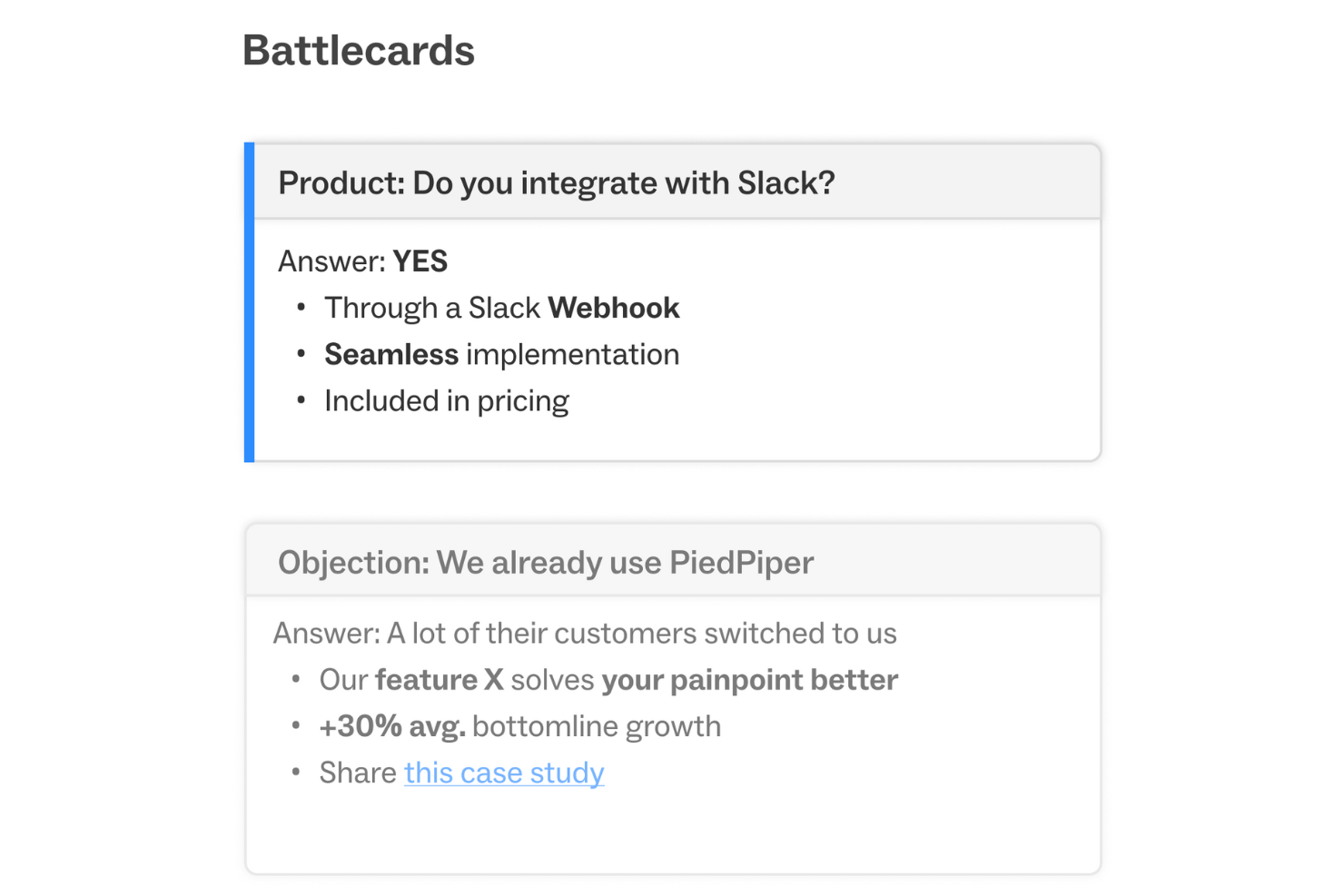
Attention is an AI-powered sales conversational platform designed to enhance the efficiency and effectiveness of sales teams. The tool provides real-time actionable intelligence during customer conversations, automates CRM data entry, and generates follow-up emails based on the conversation's context.
Why I picked Attention: Its real-time coaching feature provides sales representatives with live guidance during calls, ensuring they adhere to the company's sales methodology and effectively handle objections. This immediate feedback mechanism not only accelerates the onboarding process for new reps but also ensures consistent messaging across the team, which is crucial for maintaining a unified sales strategy/
Attention Standout Features and Integrations
Standout features include AI capabilities that automate CRM updates and follow-up emails, reducing administrative tasks for sales reps. Additionally, the cross-call insights feature allows sales teams to understand customer sentiments and performance metrics without manually reviewing multiple calls, making it easier to identify trends and areas for improvement.
Integrations include Zoom, Meets, Teams, Salesforce, HubSpot, Gmail, Outlook, Slack, and Zapier.
Pros and Cons
Pros:
- Real-time sales coaching on calls
- Personalized follow-up emails
- Provides actionable insights by analyzing conversations
Cons:
- Reliance on AI may not suit all users
- Custom integrations may require additional assistance

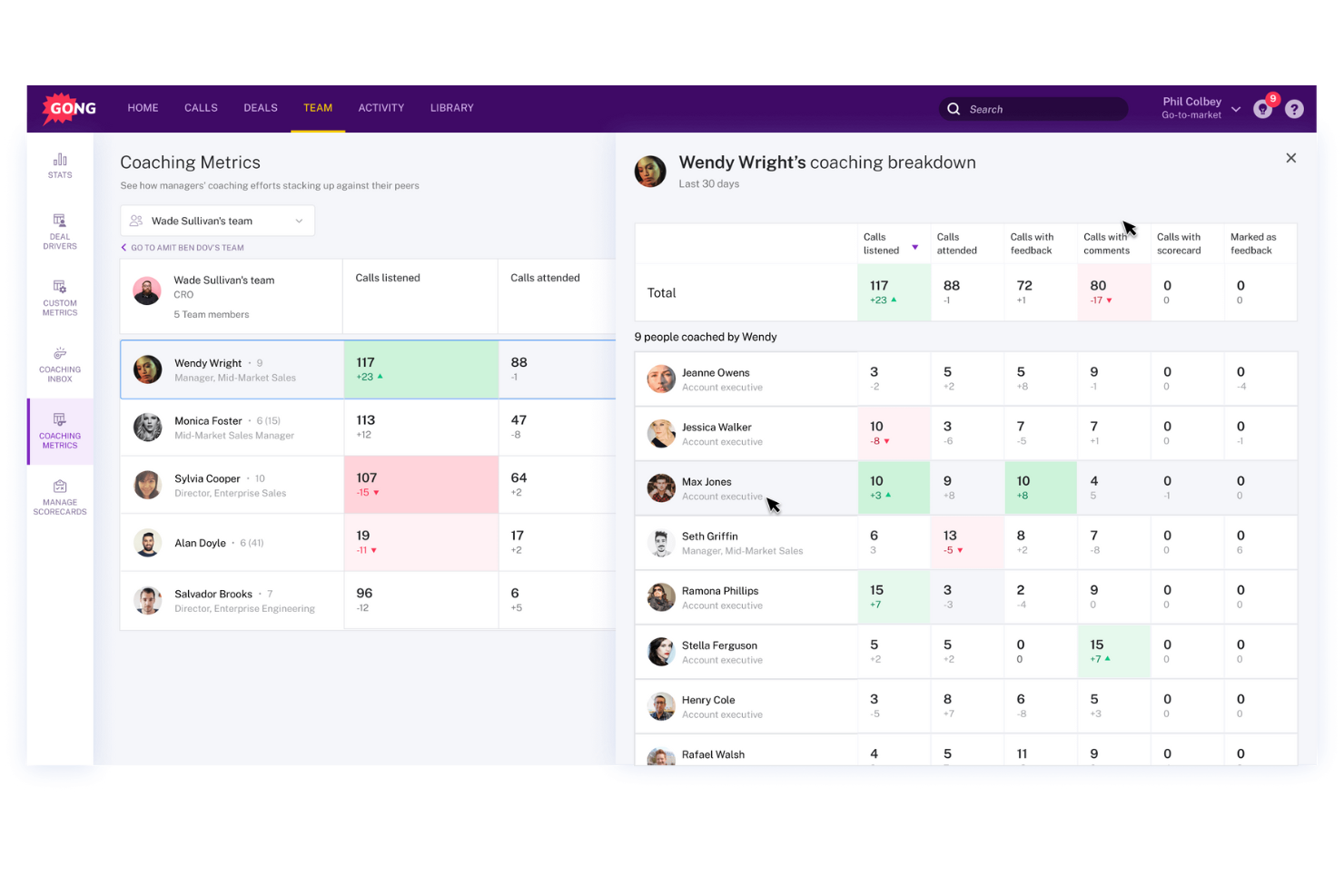
Gong is a sales coaching platform that delivers AI-driven insights to help revenue teams improve performance and close more deals. It captures and analyzes customer interactions across calls, emails, and meetings, transforming raw conversation data into actionable guidance for managers and reps alike.
Why I picked Gong: Gong stands out for its ability to turn everyday sales conversations into powerful learning tools. Its automatic call recording and transcription provide a clear view of what’s working—and what’s not—without requiring manual tracking. Personalized coaching recommendations, paired with detailed performance metrics, make it easier for managers to scale effective coaching across their teams.
Standout features & integrations:
Features include Gong Engage, Gong Forecast, Gong Agents, Gong Data Engine, Gong Collective, automated call recording and analysis, conversation intelligence, deal intelligence, and pipeline management—helping teams identify opportunities, refine messaging, and improve forecast accuracy.
Integrations include Salesforce, HubSpot, Microsoft Dynamics, Slack, Zoom, Google Workspace, Outreach, SalesLoft, LinkedIn, and Zendesk.
Pros and Cons
Pros:
- Customizable trackers help teams monitor key topics and refine sales strategies.
- Automatic recording and transcription save time and reduce manual note-taking.
- Gong’s AI-driven call analysis provides actionable insights that enhance coaching effectiveness.
Cons:
- Some users note a need for more customizable analysis tailored to specific business needs.
- Pricing is considered high for smaller teams and startups.

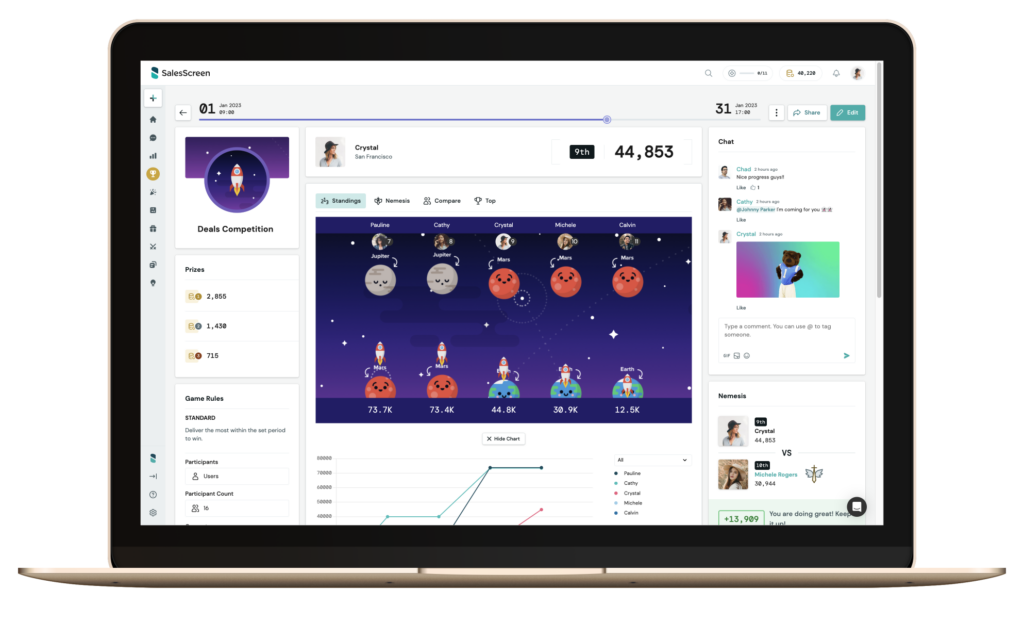
SalesScreen helps sales teams stay motivated by combining gamification, coaching, and performance visibility in one place. It uses visual scorecards, competitions, and analytics to make ongoing development feel engaging rather than routine. The platform suits organizations looking to strengthen sales culture, improve recognition, and reduce turnover.
Why I Picked SalesScreen
I picked SalesScreen because it merges coaching and motivation into a single, visually intuitive experience. You can build tailored coaching programs that target the exact skills your reps need to strengthen. Color-coded metrics make performance insights easier to understand and act on. Reps also gain access to curated training content that supports continuous improvement. The mix of analytics, visualization, and motivation tools helps teams maintain momentum week after week.
SalesScreen Key Features
- Psychological categorizations: Identify motivation styles to tailor coaching.
- Pre-built competition formats: Run leaderboards, tournaments, blitzes, and lotteries.
- Visual performance scorecards: Color-coded views of KPIs and progress.
- Custom coaching programs: Guide reps through skill-building paths.
- Recognition tools: Celebrate achievements and reinforce positive behaviors.
SalesScreen Integrations
Integrations include 27SevenOffice, CallMaker, HubSpot CRM, Pipedrive, Podio, Salesforce Sales Cloud, SalesLoft, SugarCRM, Zapier, and Zoho CRM.
Pros and Cons
Pros:
- Accessible on television, phones, desktop, and tablets
- Great customer service support
- Easy to use and manage
Cons:
- Integrating CRMs takes time
- Large changes in app setup are complicated

Best for custom coaching that targets management, teams, and individuals
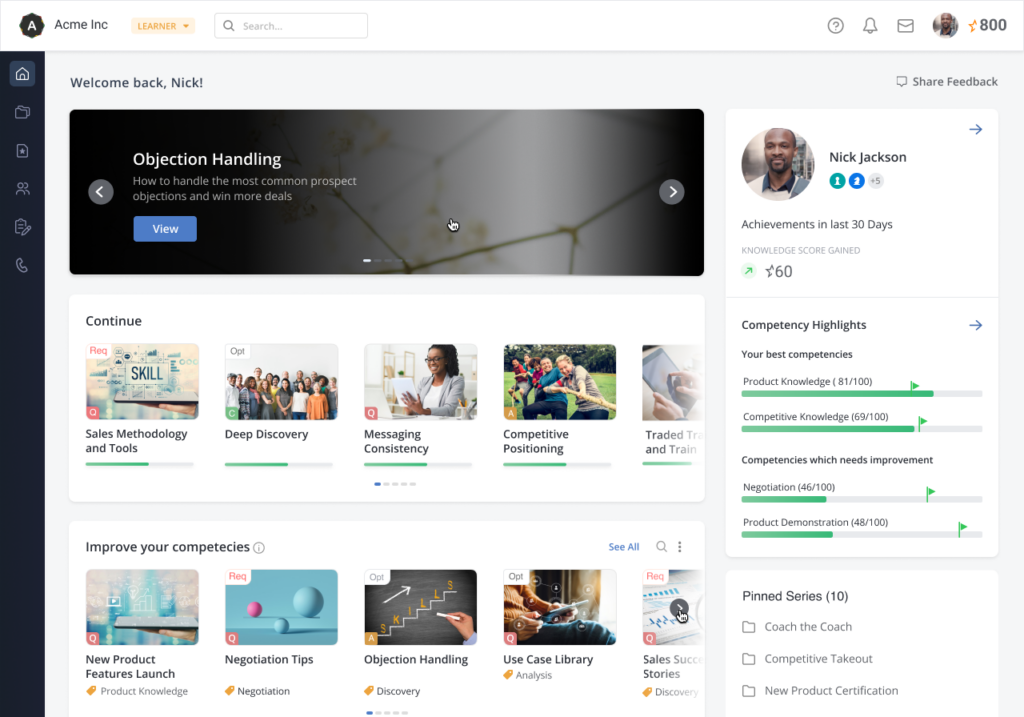
This customizable sales coaching tool is designed to track everything your users need, including updated careers, key learning skills, and analytics for the most up-to-date content generation and training techniques. Use Mindtickle to generate reports to find areas of improvement, track learning progress, and get feedback on content interactions from your team.
Why I picked Mindtickle: The reason this platform made my list was because it helps you integrate with other online learning tools, including Khan Academy, Slideshare, and YouTube. With access to engaging content from these integrations, you can develop a comprehensive learning platform that encourages your team to actively participate in their own skill enhancement.
Mindtickle Standout Features and Integrations
Standout features include customized sales coaching forms and scorecards, coach and manager training on how to mentor sales reps, and AI-based trackers to identify coachable moments.
Integrations include Aircall, Google, IBM Cloud, Microsoft Active Directory, Okta, Ping, Salesforce Sales Cloud, Seismic, and Veeva. This platform can integrate with any Identity Provider that supports Google, SAML 2.0, JWT, or OpenId protocol.
Pros and Cons
Pros:
- Unique templates for modules and lessons
- Constant updates and platform improvements
- Very user friendly interface
Cons:
- Bulk actions slow app functionality
- Out of date help articles

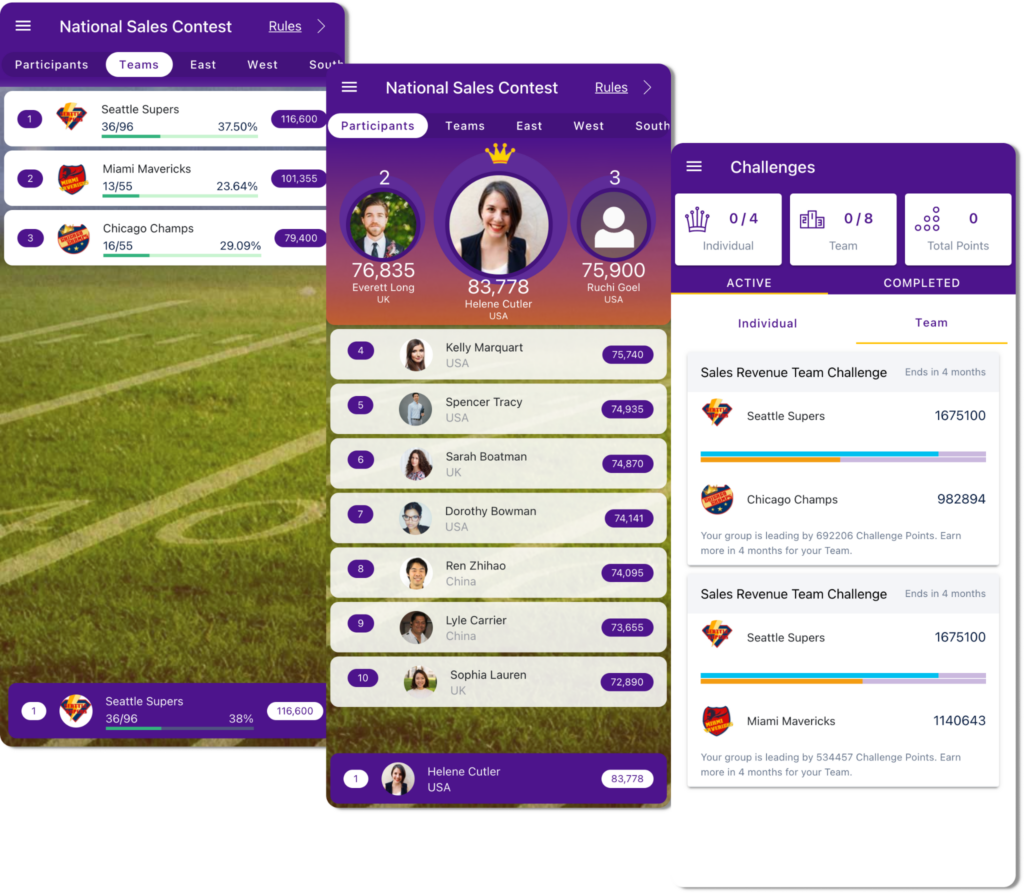
As a web-based training platform, SmartWinnr strives to ensure you can create uniform messaging throughout your organization whenever your team is interacting with customers. You can also use the coaching tools to keep your salespeople updated about product knowledge, new sales tactics, and customized scripts.
Why I picked SmartWinnr: This tool made my list because of its focus on field and video coaching. With this feature, you can get in touch with anyone on your team for roleplay, video recordings, and providing feedback in a supportive environment. You can also share your videos with everyone on the team to showcase best practices and great examples.
SmartWinnr Standout Features and Integrations
Standout features include coaching record management and maintenance, flexible and digitized coaching with video calls and recordings, and gamification with leaderboards and contests.
Integrations include HubSpot CRM, Microsoft Dynamics, and Salesforce Sales Cloud.
Pros and Cons
Pros:
- Language capabilities in most European languages
- Very knowledgeable customer support team
- Flexible platform that’s easy to customize
Cons:
- Advanced features require additional training
- Requires customer service for complex report creation

Jiminny
Best for AI-driven conversational insights from every customer interaction
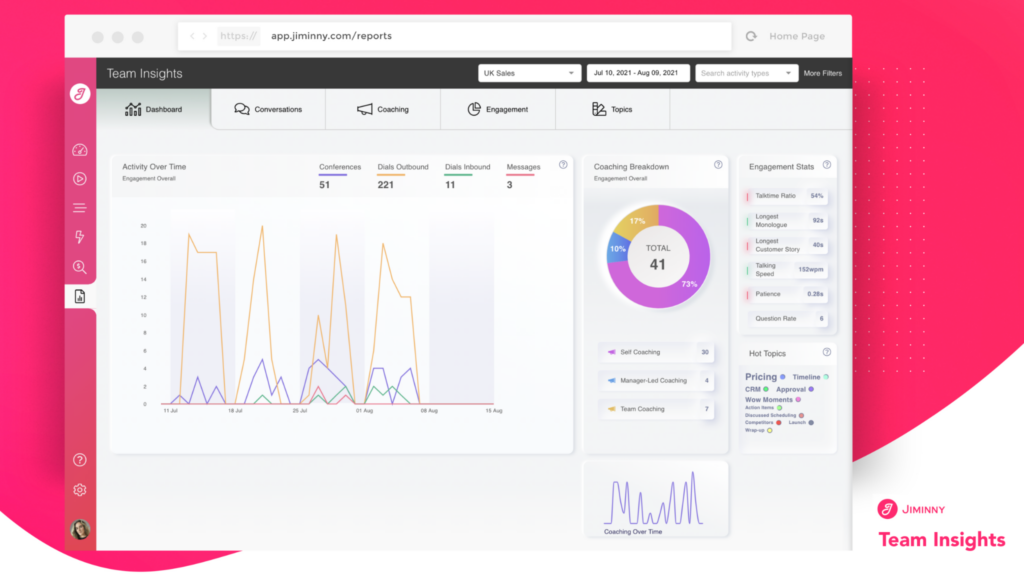
Designed for commercial teams, Jiminny focuses on helping you maximize your revenue through conversational intelligence insights. By transcribing, recording, and analyzing every conversation to provide more visibility into everyone’s performance, Jiminny can turn great sales leaders into great sales coaches to drive change across the entire organization.
Why I picked Jiminny: I like the tools this platform provides, including automatic scoring of every customer conversation through AI. With all this extra data, you can track benchmark performance and empower data-driven coaching that ensures trackable development plans for every salesperson.
Jiminny Standout Features and Integrations
Standout features include conversation intelligence to record and analyze every voice, video, and email interaction and the Sidekick Chrome extension to automatically log calls and meetings into your CRM.
Integrations include 8x8, Aircall, Bullhorn, Copper, Demodesk, Google Meet, HubSpot CRM, Outreach, Pipedrive, Slack, and Talkdesk.
Pros and Cons
Pros:
- AI provides objective, impartial feedback
- Streamlines team communication
- Easy to implement and manage
Cons:
- Navigation isn’t as intuitive as it could be
- Audio quality can lag, affecting transcription

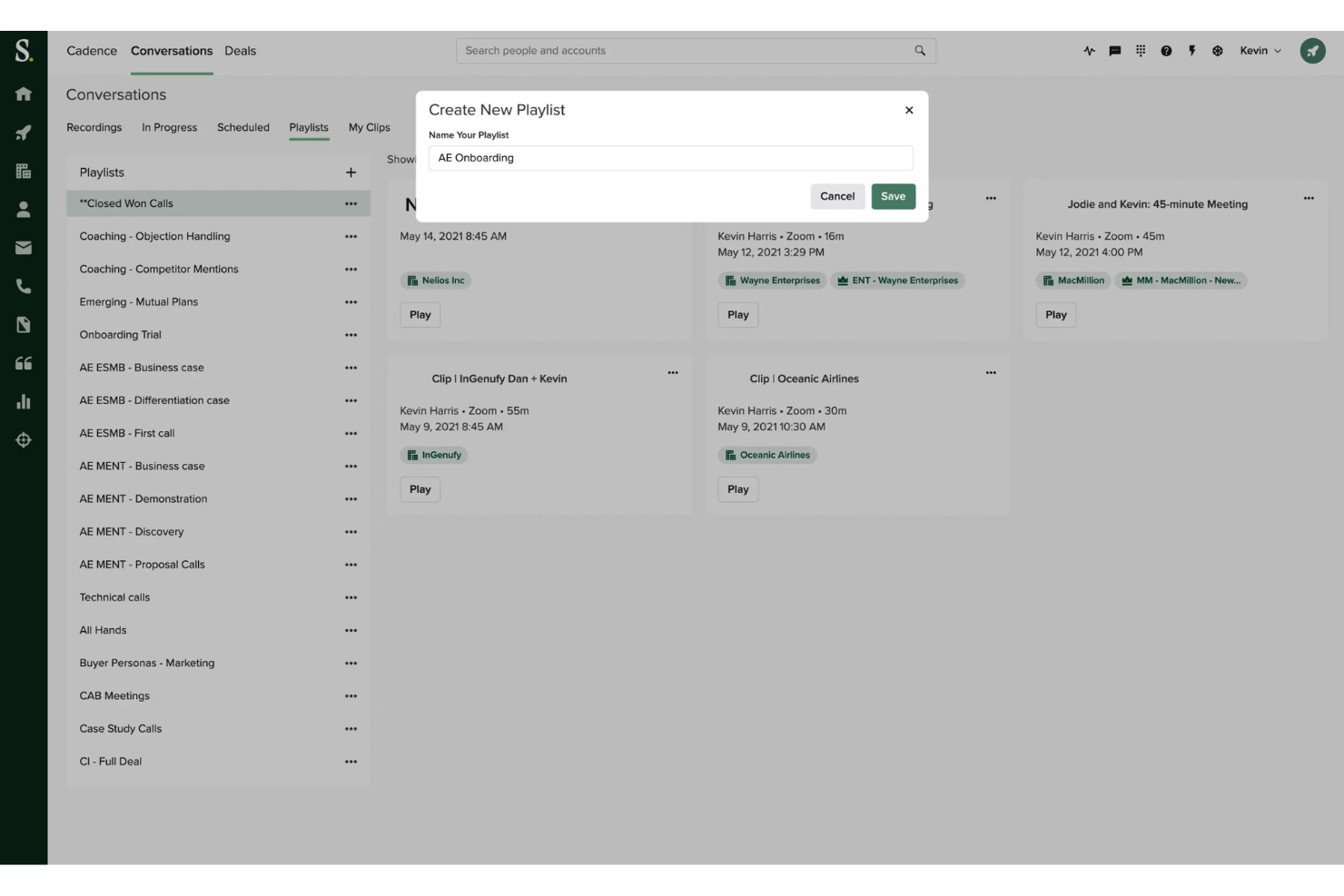
Salesloft is a sales coaching platform that enhances team performance through AI-driven insights and data-informed decision-making. It covers sales engagement, forecasting, analytics, and performance tracking—helping teams improve productivity, consistency, and conversion rates.
Why I picked Salesloft: Salesloft stands out for its ability to turn sales data into actionable coaching moments. Its AI-driven scorecards and Conversation Intelligence identify where reps can improve, while Cadence and Rhythm ensure teams engage prospects at the right time. Together, these tools give CROs and RevOps leaders a clear path to aligning seller behavior with revenue goals—without adding administrative burden.
Standout features & integrations:
Features include AI-powered scorecards, Conversation Intelligence, Cadence, Rhythm, Deals, Analytics, and Forecast—helping teams coach effectively, manage pipelines, and forecast with confidence.
Integrations include Salesforce, Microsoft Dynamics 365, HubSpot, LinkedIn Sales Navigator, Gmail, Outlook, Slack, Zoom, Google Calendar, and Microsoft Teams.
Pros and Cons
Pros:
- The platform integrates seamlessly with major CRMs like Salesforce and Microsoft Dynamics 365 to streamline workflows.
- Conversation Intelligence provides real-time call analysis, offering actionable insights to improve customer understanding.
- Salesloft’s AI-driven insights and scorecards help identify key coaching moments that enhance team performance.
Cons:
- Salesloft’s pricing can be high for smaller businesses or startups with limited budgets.
- Some users report limited customer support after onboarding, leading to unresolved issues.
Balto
Best for driving company-wide behavioral changes for call centers
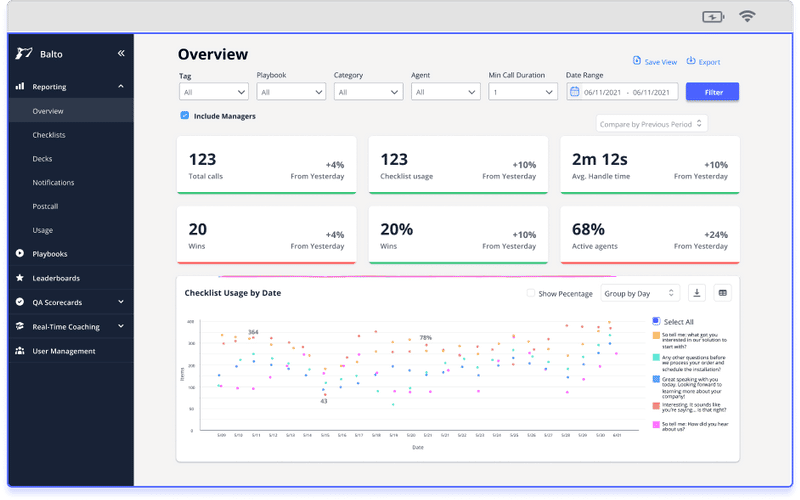
As a cloud-based solution for call centers, Balto is a coaching program that integrates with your existing phone system to provide guidance and support for your reps through artificial intelligence, speech recognition technology, and live monitoring for every conversation. As the tool interprets dialogue, it provides reps instant feedback and recommendations.
Why I picked Balto: The reason this tool caught my eye is because Balto AI can listen for custom conversational milestones with manager-created checklists to visually mark them off a sales reps’ list as they’re talking. Balto also provides intervention as needed, tapering off as your salespeople become more skilled.
Balto Standout Features and Integrations
Standout features include real-time quality assurance that scores 100% of calls to spot issues before they become habits; real-time note-taker to automatically record, transcribe, and summarize every single call; and automatic crowdsourcing of top performer habits to scale their behavior out to the entire organization.
Integrations include 8x8, Amazon Connect, Avaya, Call Tracking Metrics, Cisco, Five9, Genesys, RingCentral, TalkDesk, and Zoom.
Pros and Cons
Pros:
- Consistency across all customer interactions
- Simple functionality and intuitive navigation
- User friendly interface that’s easy to learn
Cons:
- Call recording through transcription isn’t 100% accurate
- Scripts can be a little inflexible

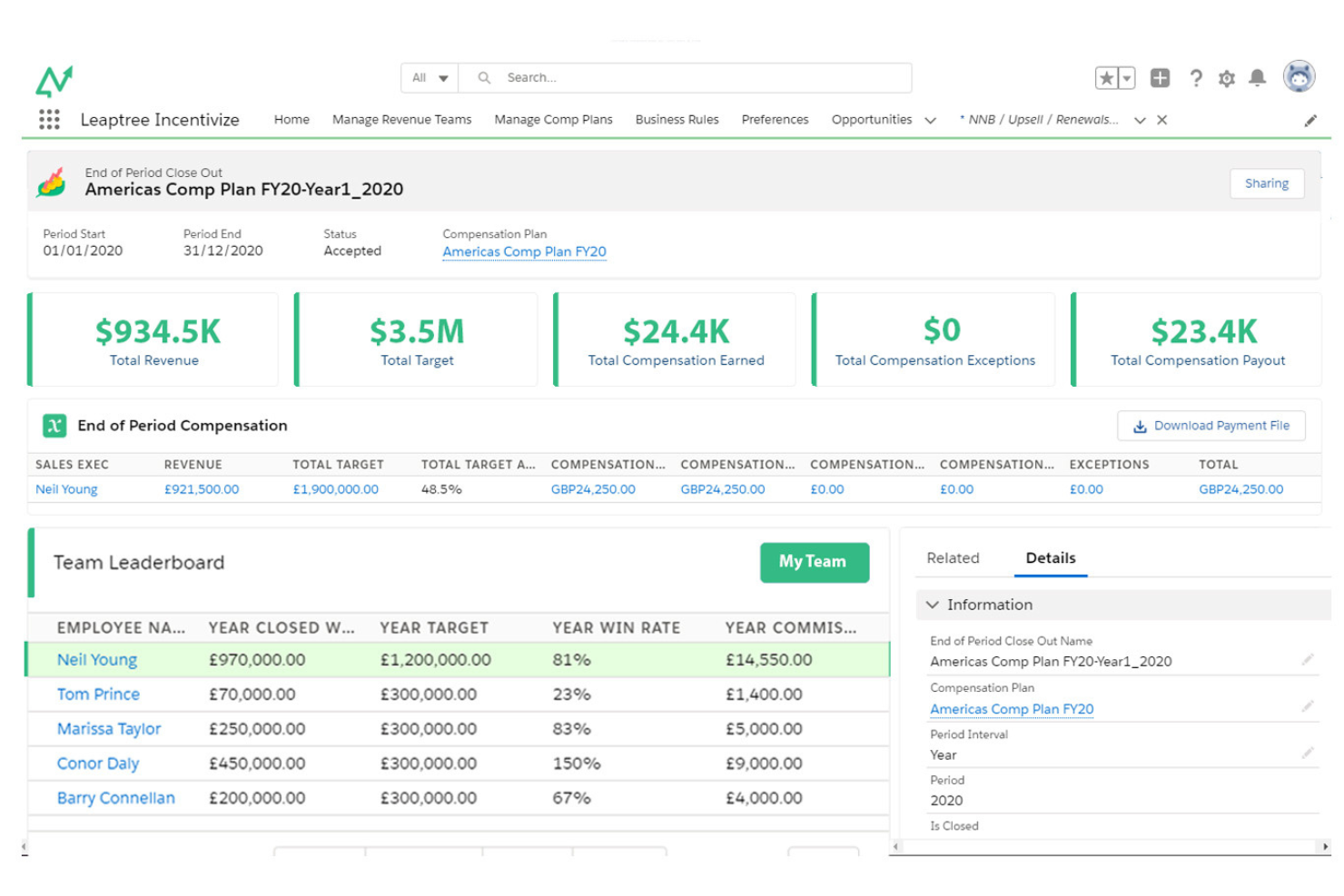
Leaptree is a revenue performance platform that offers tools for sales commissions, sales coaching, and CX quality assurance, with a focus on Salesforce-native sales coaching. The tool's USP lies in its ability to provide Salesforce-native sales coaching, which can lead to up to 28% higher win rates for sales teams.
Why I picked Leaptree: I chose to include Leaptree as a great option for potential or current Salesforce users. As a sales coaching software, Leaptree stands out for its Salesforce-native capabilities and its focus on improving win rates and coaching effectiveness. Leaptree is able to manage complex sales incentive plans and provide real-time insights through personalized dashboards. This feature is particularly beneficial for sales teams that rely heavily on data-driven decision-making.
Leaptree Standout Features and Integrations
Standout features include sales commissions, sales coaching, and CX quality assurance. The sales commissions feature allows businesses to design and manage complex sales incentive plans, providing data-driven insights and real-time dashboards for transparency. The sales coaching feature, known as Leaptree Maximize, claims to achieve up to 28% higher win rates by proactively coaching sales team members. The CX quality assurance feature accelerates quality assessment with dynamic QA scorecards and real-time insights into customer engagement quality. Leaptree is native to Salesforce, ensuring ease of use and integration but also requiring a Salesforce subscription.
Integrations include Salesforce, Quickbooks, Natterbox, Zapier, Oracle, RingCentral, NetSuite, ServiceNow, Twilio, Xero, SAP, Avaya, Sage, Five9, FinancialForce, Verint, Genesys, Talkdesk, and Vonage.
Pros and Cons
Pros:
- Self-service scorecard capabilities
- Targeted focus features for feedback and coaching
- User-Friendly Interface
Cons:
- Requires Salesforce integration
- lLmited customization options

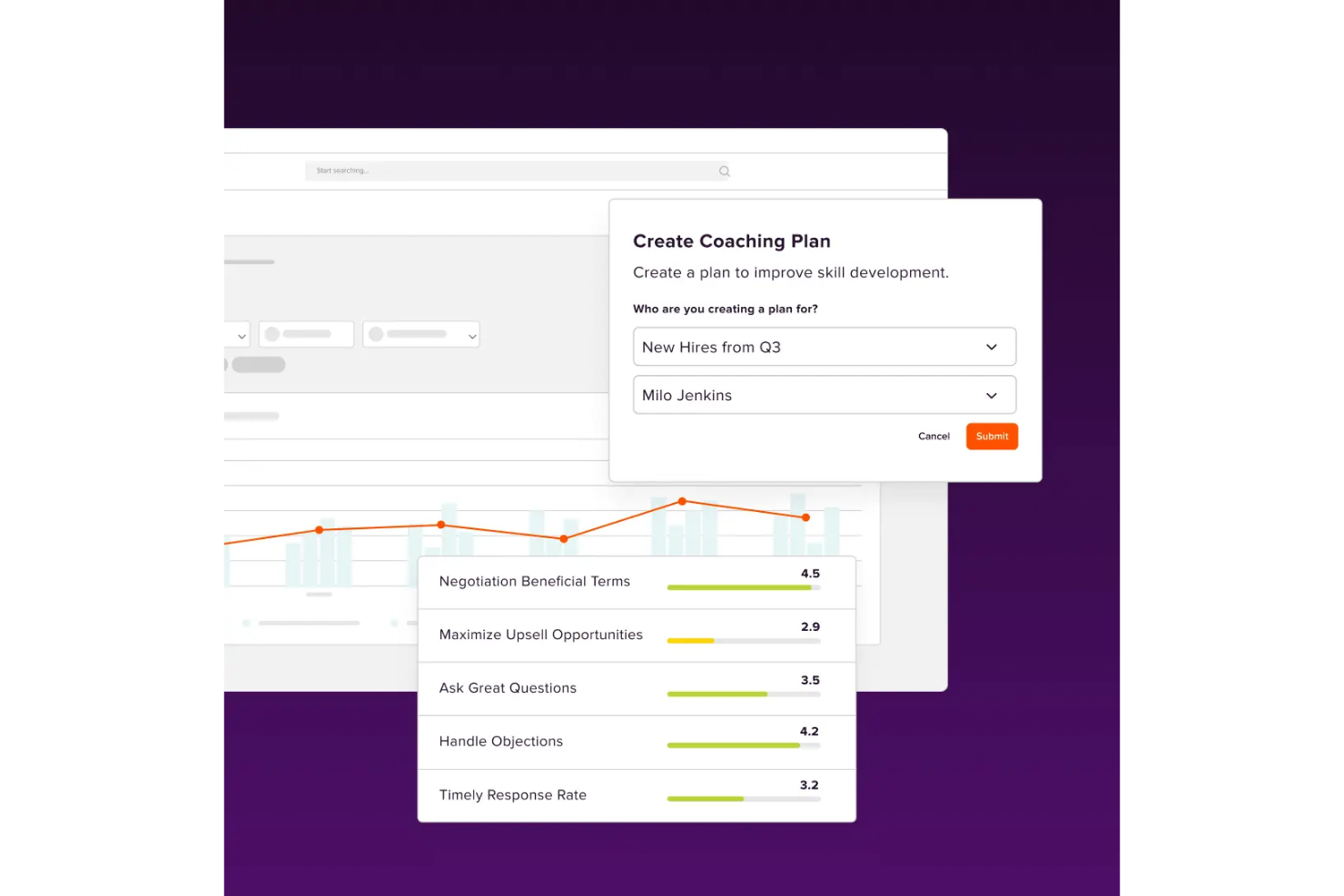
Lessonly by Seismic is a sales coaching platform that enhances team performance through personalized learning and AI-driven coaching. It combines content management, meeting intelligence, and skill development tools to help revenue teams close knowledge gaps and improve client interactions.
Why I picked Lessonly by Seismic: It’s purpose-built for sales enablement leaders who want scalable, data-driven coaching that translates directly into better selling outcomes. Lessonly’s AI guidance, combined with Seismic’s enablement ecosystem, allows teams to train faster, reinforce key behaviors, and align learning with performance goals—all in one platform.
Standout features & integrations:
Features include personalized learning, AI-guided coaching, content management, digital sales rooms, interactive courses, and data-driven insights that track and improve skill development.
Integrations include Salesforce, Slack, LMS systems, and other CRM tools to keep training connected to daily workflows.
Pros and Cons
Pros:
- AI-driven coaching helps identify and close specific skill gaps, improving team performance.
- Integration with tools like Salesforce and Slack streamlines workflows and training access.
- The platform’s intuitive interface makes it easy for teams to navigate and use effectively.
Cons:
- Some users report challenges updating the admin panel, slowing content management.
- Limited search functionality can make it difficult to locate specific lessons or materials.
Other Sales Coaching Software
Even though my list above seems pretty comprehensive, there are so many great tools out there that I had to mentioning these extra few options. Check out what these bonus selections can do for you.
- Clari Copilot
For conversational intelligence that enhances sales conversations
- Allego
For personalized training modules
- Revenue.io
For minimizing guesswork through guided selling
- Avoma
Single tool for the entire meeting lifecycle
- Kixie Powercall
For coaching through live call whispering and monitoring
- Ambition
For driving personalized development for individual team members
- Second Nature AI
For scaling up your coaching with an AI assistant
- SalesHood
For replicating the behaviors of your top performers
- Sybill
For real-time insights and performance tracking
- Abstrakt Software
For real-time objection handling
- Chorus by ZoomInfo
For capturing performance across calls, emails, and meetings


Related Sales Coaching Software Reviews
If you still haven't found what you're looking for here, check out these tools closely related to sales coaching software that we've tested and evaluated.
- Sales Software
- Lead Management Software
- Business Intelligence Software
- Contract Management Software
- Revenue Management System
- CPQ Software
Selection Criteria For Sales Coaching Software
Sales coaching software is designed to enhance the coaching process by providing structured frameworks, actionable insights, and consistent feedback mechanisms. I have personally evaluated various sales coaching software solutions, focusing on their capabilities to address specific use cases and deliver value to users and organizations.
Core Sales Coaching Software Functionality - 25% of total weighting score
To be considered for inclusion on my list of the best sales coaching software, the solution had to support the ability to fulfill common use cases:
- Facilitating regular, structured coaching sessions that are easy to schedule and track.
- Enabling goal setting and progress tracking to measure improvement over time.
- Providing a platform for sharing coaching materials and resources.
- Offering tools for interactive role-play and scenario-based training.
- Delivering analytics and insights to assess coaching effectiveness and sales performance impact.
Additional Standout Features - 25% of total weighting score
- AI-driven insights that offer personalized coaching recommendations based on individual performance data.
- Mobile accessibility, allowing coaches and sales reps to engage in training and feedback sessions from anywhere.
- Advanced integration capabilities with CRMs and other sales tools to leverage existing data.
- Gamification features that encourage participation and engagement in coaching activities.
- Customization options that allow the software to be tailored to specific sales processes and methodologies.
Usability - 10% of total weighting score
- Intuitive interface design that minimizes the learning curve for both coaches and sales reps.
- Streamlined navigation and easy access to key features and functionalities.
- Responsive design that ensures a seamless experience across various devices and platforms.
Onboarding - 10% of total weighting score
- Comprehensive support materials and training resources to facilitate quick adoption.
- Interactive guides or product tours that introduce key features and best practices.
- Availability of customer support to assist with setup, customization, and troubleshooting.
Customer Support - 10% of total weighting score
- Timely and helpful customer service, available through multiple channels.
- Proactive support that addresses potential issues and provides regular updates.
- Access to a community or knowledge base for additional resources and peer advice.
Value For Money - 10% of total weighting score
- Transparent pricing that aligns with the software's features and the value it delivers.
- Flexible plans that cater to the needs of different organization sizes and budgets.
- Positive feedback from current users regarding the software's ROI.
Customer Reviews - 10% of total weighting score
- Consistently positive user feedback that attests to the software's impact on sales performance and coaching quality.
- Specific mentions of how the software has improved coaching efficiency and sales rep engagement.
- Reports of a positive user experience, focusing on ease of use, feature set, and customer support quality.
In selecting sales coaching software, it's crucial to choose a solution that not only aligns with your current coaching practices but also has the flexibility to adapt as your sales processes evolve. The right software will provide a strong foundation for your coaching program, enhancing its effectiveness and contributing to your overall revenue operations success.
How To Choose Sales Coaching Software
With so many different sales coaching software solutions available, it can be challenging to make decisions on what tool is going to be the best fit for your needs.
As you're shortlisting, trialing, and selecting sales coaching software, consider the following:
- What problem are you trying to solve - Start by identifying the sales coaching software feature gap you're trying to fill to clarify the features and functionality the tool needs to provide.
- Who will need to use it - To evaluate cost and requirements, consider who'll be using the software and how many licenses you'll need. You'll need to evaluate if it'll just be the revenue operation leaders or the whole organization that will require access. When that's clear, it's worth considering if you're prioritizing ease of use for all or speed for your sales coaching software power users.
- What other tools it needs to work with - Clarify what tools you're replacing, what tools are staying, and the tools you'll need to integrate with, such as accounting, CRM, or HR software. You'll need to decide if the tools will need to integrate together or if you can replace multiple tools with one consolidated sales coaching software.
- What outcomes are important - Consider the result that the software needs to deliver to be considered a success. Consider what capability you want to gain or what you want to improve, and how you will be measuring success. For example, an outcome could be the ability to get greater visibility into performance. You could compare sales coaching software features until you’re blue in the face but if you aren’t thinking about the outcomes you want to drive, you could be wasting a lot of valuable time.
- How it would work within your organization - Consider the software selection alongside your workflows and delivery methodology. Evaluate what's working well and the areas that are causing issues that need to be addressed. Remember every business is different — don’t assume that because a tool is popular that it'll work in your organization.
Trends In Sales Coaching Software For 2026
Sales coaching software is rapidly evolving, reflecting broader shifts in technology, learning methodologies, and organizational priorities. These changes are being driven by the need for more effective, efficient, and personalized sales coaching processes that directly impact revenue operations. Here's an overview of the current trends shaping sales coaching software:
Data-Driven Insights and Analytics:
- Advanced analytics features becoming standard, offering deeper insights into individual and team performance, coaching effectiveness, and areas for development.
- Real-time feedback mechanisms that provide immediate guidance and reinforcement to sales reps, based on their actions and results.
Integration and Ecosystem Compatibility:
- Enhanced integration capabilities with CRM systems, communication platforms, and other sales enablement tools, ensuring that coaching insights are seamlessly incorporated into the broader sales workflow.
- Movement towards more open and flexible software ecosystems, allowing organizations to tailor their sales coaching tools to fit within their existing technology stacks.
Evolving User Expectations and Demands:
- Increased demand for mobile accessibility, reflecting the need for sales reps and coaches to access coaching tools and resources on the go.
- A shift towards more user-friendly and intuitive software interfaces, reducing the learning curve and encouraging wider adoption across sales teams.
Declining Features:
- Less emphasis on one-size-fits-all coaching content, moving towards more customized and role-specific resources.
- Decrease in standalone sales coaching platforms in favor of integrated solutions that offer comprehensive sales enablement and performance improvement functionalities.
For revenue operation leaders, staying on top of these trends is crucial to selecting software that not only addresses immediate coaching needs but also aligns with future strategic goals and technological advancements.
What Is Sales Coaching Software?
Sales coaching software is a tool that helps you train, develop, and support your sales team with things like performance tracking, feedback, and custom learning modules. Sales managers and coaches use it to personalize training, check progress, and build new skills in their reps. It makes it easier for you to give targeted coaching, track results, and focus on growing each team member’s strengths.
Features of Sales Coaching Software
When selecting sales coaching software, keep an eye out for the following key features:
- Performance tracking: Get a clear view of how your sales team is doing. This lets you monitor individual and team progress, spot trends, and quickly address underperformance or celebrate wins.
- Customizable coaching plans: Tailor coaching programs to fit each rep’s strengths and growth areas. This ensures you can deliver hands-on support that’s relevant and meaningful, not just one-size-fits-all.
- Skill assessment tools: Use built-in assessments to pinpoint exactly where your reps excel and where they might need a boost. This helps you focus your coaching energy where it makes the biggest impact.
- Call recording and analysis: Listen to real sales calls and get detailed feedback. Reviewing actual conversations makes it easier for you to show what works (and what doesn’t) instead of relying on theory.
- Feedback and collaboration portals: Connect with your team through built-in messaging, comments, or peer reviews. This encourages an ongoing feedback loop so growth isn’t limited to one-time meetings.
- Goal setting and tracking: Set clear sales goals and track progress in one place. You can help reps stay focused and motivated, and it becomes easy to spot achievers and those who might need extra support.
- Content management: Store scripts, training videos, and other resources for quick access during coaching sessions. Having everything organized and within reach means less time searching and more time learning.
- Integration with CRM: Seamlessly connect with your existing customer relationship management tools. This ensures you have all your sales data in one place for easier reference during coaching.
Common Sales Coaching Software AI Features
Beyond the standard sales coaching software features listed above, many of these solutions are incorporating AI with features like:
- Speech and sentiment analysis: AI dissects tone, confidence, and word choice in calls, helping you understand not just what your reps say, but how they say it—and why it matters for closing deals.
- Automated performance insights: AI identifies patterns and outliers in your sales team’s activity. This lets you quickly spot coaching opportunities—or issues—before they snowball.
- Smart feedback generation: AI reviews calls or emails and suggests specific, actionable feedback so you don’t have to watch or read every single interaction yourself.
- Personalized learning recommendations: AI tracks individual learning styles and progress, then recommends exactly what training content or exercises each rep should tackle next.
- Real-time conversation analysis: AI listens to sales calls as they happen and delivers instant feedback or prompts, helping reps adjust on the spot for better outcomes.
- Predictive sales coaching: AI forecasts which reps are likely to hit their targets or where they might fall short, so you can intervene proactively with coaching.
Benefits Of Sales Coaching Software
Selecting the right sales coaching software can significantly empower sales teams, enhance coaching efficiency, and contribute to the organization's revenue success. By focusing on these key benefits, potential buyers can make informed decisions that align with their strategic goals and operational needs. Here are five primary benefits of utilizing sales coaching software:
- Enhanced Sales Performance: Boosts individual and team sales results through targeted coaching. Sales coaching software identifies areas for improvement and provides actionable feedback, leading to enhanced performance and increased revenue.
- Personalized Coaching Experience: Offers customized coaching plans tailored to the unique needs of each sales representative. This personalization ensures that each team member receives relevant, impactful coaching, accelerating their development and contribution to revenue goals.
- Consistent Coaching Methodology: Standardizes the coaching approach across the organization, ensuring every sales rep benefits from best practices and a unified coaching strategy. Consistency helps in aligning coaching efforts with overall business objectives, driving cohesive team advancement.
- Data-Driven Insights: Provides valuable analytics and performance metrics to guide coaching decisions. By leveraging data, sales coaching software enables managers to make informed choices about coaching priorities and strategies, optimizing the impact of coaching interventions.
- Scalability: Adapts to the needs of growing organizations, supporting the development of sales teams regardless of size. As businesses expand, sales coaching software can scale to accommodate additional users, maintaining its effectiveness and utility.
Costs & Pricing For Sales Coaching Software
Selecting the right sales coaching software is important for businesses aiming to enhance their sales team's performance and, by extension, their revenue operations. With a variety of options available in the market, understanding the pricing and plan features is key to making an informed decision that aligns with your organization's needs and budget. Here's a simplified breakdown of typical plan options and their pricing for sales coaching software:
Plan Comparison Table For Sales Coaching Software
| Plan Type | Average Price | Common Features Included |
|---|---|---|
| Starter | $10 - $50 per user/month | Basic coaching tools, limited user access, essential analytics |
| Professional | $50 - $150 per user/month | Advanced coaching modules, more user access, enhanced analytics |
| Enterprise | Custom pricing | Customized features, unlimited access, dedicated support |
| Free | $0 | Very basic features, limited access, minimal support |
When choosing a sales coaching software plan, consider the size of your sales team, the depth of coaching you wish to provide, and the scalability you need. Ensure the plan you select offers the best combination of features, support, and pricing to align with your business goals and coaching objectives.
Sales Coaching Software Frequently Asked Questions
Looking for a few more details on the right sales coaching software for your needs? Check out these most frequently asked questions below.
What are the types of sales coaching software?
Sales coaching software comes in various types, each designed to cater to different aspects of sales training and development. Understanding these variations can help you select a solution that best fits your organization’s specific needs. Here are the primary types of sales coaching software available:
- Interactive Coaching Tools: These platforms offer interactive training sessions, often including role-playing scenarios, video-based practice, and real-time feedback mechanisms. They are designed to engage users actively and simulate real-world selling situations for more effective learning.
- Performance Analytics Software: This type of software focuses on analyzing sales performance data to identify coaching needs and opportunities. It tracks various metrics and KPIs, providing insights that guide personalized coaching agendas and help in measuring coaching impact.
- CRM-Integrated Coaching Solutions: Some sales coaching tools are integrated directly into CRM systems, allowing for seamless access to sales data and interactions. These solutions leverage existing CRM information to tailor coaching recommendations and activities based on actual sales performance and customer engagement.
- Content Management Systems for Coaching: These tools focus on organizing and delivering coaching content and resources. They allow managers to create, curate, and distribute training materials, guidelines, and best practices within an easily accessible platform.
- Mobile Coaching Apps: With the increasing need for flexibility and access on-the-go, mobile coaching apps provide sales teams the ability to engage with training materials, receive feedback, and track their progress directly from their smartphones or tablets.
- AI-Powered Coaching Platforms: Leveraging artificial intelligence, these sophisticated systems offer personalized coaching insights and recommendations. They can analyze vast amounts of data to identify patterns and provide targeted advice, predictive insights, and automated coaching actions.
- Peer Coaching Platforms: Fostering a collaborative environment, peer coaching software enables sales team members to coach each other through shared experiences, feedback, and advice. This type fosters a community of continuous learning and mutual support.
By understanding the specific functionalities and benefits of each type of sales coaching software, organizations can make an informed decision that aligns with their strategic objectives, team structure, and desired outcomes in enhancing sales performance.
Can sales coaching software integrate with CRM platforms?
Yes, many sales coaching software solutions offer integration capabilities with CRM platforms. This integration allows for seamless data transfer, enabling coaches to access real-time sales performance data and tailor coaching sessions based on specific CRM insights.
Does sales coaching software provide role-specific coaching content?
Sales coaching software often includes role-specific content to address the unique needs of different sales positions. This targeted approach ensures that the coaching is relevant and effective, helping sales representatives develop the skills necessary for their particular role.
How customizable are the coaching modules?
The coaching modules in sales coaching software are typically customizable to align with a company’s specific sales processes, goals, and challenges. This customization allows organizations to tailor coaching programs to their sales team’s needs, ensuring more relevant and impactful learning experiences.
Who uses sales coaching software?
Both managers and sales team members will need to use this software. Managers to create training modules and track individual progress, and team members to complete sales training and find resources to enhance their communications. Sales department heads may also use this software to report to the board (if you have one) or make company-wide, data-driven decisions.
What is an example of sales coaching?
Since sales coaching is designed to inspire sales representatives to work better and more efficiently, you want to encourage self-improvement and personalized support. Here are some examples of sales coaching that targets these needs:
- Supervising a sales call and discussing strengths and weaknesses after
- Providing periodic reviews of common tools and systems sales teams use regularly
- Scheduling weekly or monthly check-ins with everyone on your sales team
- Shadowing representatives and providing tips and advice
- Providing automated response recommendations for common concerns during a call
Additional Revenue Operations Software
Are you looking for even more sales enablement tools to enhance your tech stack and round out your essentials? Explore similar breakdowns of other sales performance software options below.
- Sales Training Software
- Inside Sales Software
- Revenue Intelligence Platforms
- Sales Funnel Software
- Sales Performance Management Software
- Sales Enablement Software
- B2B Sales Software
Conclusion
Whether you’re looking to implement sales coaching or you’re hoping to evolve your training techniques, I think my list can help you narrow down the best sales coaching platform to ensure the most effective sales training and more positive customer interactions.
For even more insights about sales coaching or conversation intelligence platforms, subscribe to the RevOps Newsletter for weekly tips from the experts that arrive straight to your inbox.