

10 Best Sales Funnel Software Reviewed For 2026

10 Best Sales Funnel Software Shortlist


Navigating the complexities of revenue operations can be daunting. If you're like many, you're grappling with disjointed processes and inefficiencies that hinder your team's performance. Sales funnel software offers a solution by organizing and optimizing your sales process, making it easier for you to convert leads into customers.
I test and review software independently, aiming to provide you with unbiased insights. My expertise in Revenue Operations ensures that you're getting a well-researched review. In this article, I'll guide you through the best sales funnel software options available, highlighting features that can address your specific needs.
Stick around to discover which tools can enhance your team's productivity and help you achieve your sales goals.
Why Trust Our Software Recommendations
Our reviews reflect our independent judgment—not a sales pitch. Learn how we stay transparent.
For this guide, we evaluated tools using hands-on testing and independent research, scoring tools using our selection criteria.
Our reviews reflect our human editorial judgment, not a sales pitch.
Best Sales Funnel Software Summary
This comparison chart summarizes pricing details for my top sales funnel software selections to help you find the best one for your budget and business needs.
| Tool | Best For | Trial Info | Price | ||
|---|---|---|---|---|---|
| 1 | Best for scalable B2B contact enrichment | Free plan + 14-day free trial + free demo available | From $49/user/month (billed annually) | Website | |
| 2 | Best for customizable dashboards | 14-day free trial + free demo available | From $12/seat/month (billed annually) | Website | |
| 3 | Best AI-powered sales tool | 30-day free trial | From $25/user/month | Website | |
| 4 | Best for no-code, end-to-end customization | 14-day free trial | From $40/user/month (billed annually) | Website | |
| 5 | Best for relationship-driven selling strategies | 30-day free trial + free demo available | From $29/user/month (billed annually) | Website | |
| 6 | Best for lead scoring | Free plan available; 15-day free trial | From $14/user/month (billed annually) | Website | |
| 7 | Best landing page builder | 14-day free trial available | From $81/month (billed annually) | Website | |
| 8 | Best for lead nurturing | Free plan available | From $39/month | Website | |
| 9 | Best for coaching capabilities | Not available | Pricing upon request | Website | |
| 10 | Best for increasing conversions | 14-day free trial | From $79/month (billed annually) | Website |


Best Sales Funnel Software Reviews
Here I’ll be discussing the best sales funnel software available on the market right now. I’ll show why I picked each one for this list, provide a screenshot of each platform, list each tool’s pricing, and discuss the pros and cons of each.

Best for scalable B2B contact enrichment
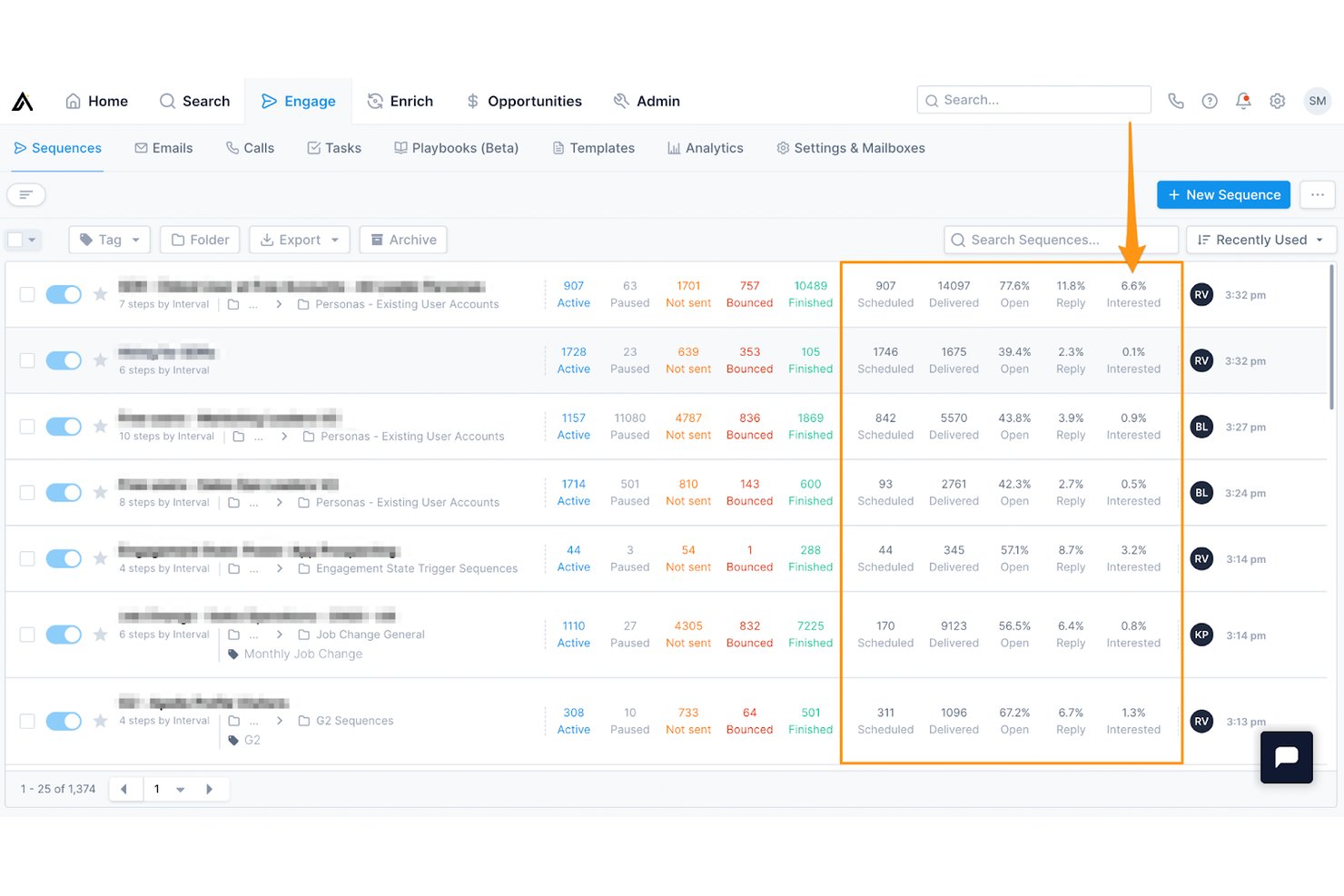
Apollo.io is a sales intelligence and engagement platform that combines a 210M+ contact database, outreach sequencing, lead scoring, and pipeline analytics to power outbound-driven sales funnels.
Who Is Apollo.io Best For?
Apollo.io suits SDR-heavy B2B sales teams at startups and SMBs that run outbound prospecting and need a single platform to find, enrich, and engage leads.
Why I Picked Apollo.io
I picked Apollo.io as one of the best because its contact enrichment capabilities genuinely power the top of the funnel at scale. I use Apollo's buying intent data to identify companies already researching relevant topics, then build targeted lists in seconds using AI prompts rather than manual filters. The Chrome extension pulls verified contact data directly from LinkedIn, so my team moves from prospecting to sequenced outreach without ever leaving the platform.
Apollo.io Key Features
- Custom sequence builder: Design automated multistep outreach flows for emails, calls, and tasks within one interface.
- Real-time Chrome extension: Instantly enrich and export leads from LinkedIn or web browsing directly into Apollo.
- Sales pipeline kanban view: Track deals and opportunities visually through stages with simple drag-and-drop updates.
- Integrated email and call tracking: Log all outbound interactions, including opens, clicks, call recordings, and engagement metrics.
Apollo.io Integrations
Apollo.io offers native integrations with Salesforce, HubSpot, Outreach, Airtable, Amplitude, Asana, and Gmail, and provides an API for custom integrations.
Pros and Cons
Pros:
- Outreach sequences automate full funnel follow-up
- Built-in intent data surfaces ready-to-buy accounts
- Large verified B2B database powers top-of-funnel
Cons:
- Reporting lacks deep stage conversion analytics
- Pipeline management is shallow vs. dedicated CRMs

Best for customizable dashboards

monday sales CRM helps increase visibility for revenue teams by providing customizable dashboard capabilities.
Why I picked monday sales CRM: When managing a sales funnel, having complete access to metrics such as sales figures, deal progress, and team performance is essential. With monday sales CRM, I noticed that you would receive a highly customizable data dashboard that allows you to focus on the metrics that matter to you. The dashboard can also help you track and manage sales activity, such as calls, meetings, notes, and more, so you always understand communication progress.
monday sales CRM Standout Features and Integrations
Features include the ability to manage team quota attainment and view the goals for specific members or your entire team. You can also use Monday sales CRM to capture leads by connecting the platform with your current systems, adding forms to your website, or adding the leads manually.
Integrations are available to help you place all of your team’s work in a centralized place, including Aircall, Copper, Dropbox, Google Drive, Mailchimp, Microsoft Teams, Pipedrive, Salesforce, Slack, Zendesk, and other software options. If you have a paid Zapier account, you can create custom connections with your tech stack. You can also use the vendor’s API.
Pros and Cons
Pros:
- Straightforward, organized layout.
- Expedites the entire sales funnel.
- Simple pipeline management capabilities.
Cons:
- Automations are complex to establish.
- Advanced features cost more.
New Product Updates from monday CRM

monday CRM Adds Meta Conversions API Integration
monday CRM now lets you connect Meta Conversions API and sync lead status back to Meta, improving targeting and conversions via a new Meta integration automation recipe. For more information, visit monday CRM's official site.
Best AI-powered sales tool

Salesforce CRM provides a sales AI tool that will help guide revenue teams throughout their sales funnels with conversational intelligence.
Why I picked Salesforce CRM: It’s always best for leads to move across your sales funnel as quickly as possible so they don’t decide to go with your competition. I added Salesforce CRM because the platform provides an AI called Einstein that will provide in-depth insights you can use to move deals forward to conversion. Every detail you receive from Einstein AI will provide you with the information you need to focus on the right lead at the right time.
Salesforce CRM Standout Features and Integrations
Features available from Salesforce CRM that will help you develop effective sales funnels include its pipeline and forecasting management capabilities. You can also use the data from the Einstein AI to build sales forecasts using relevant metrics, track real-time results, and quickly make adjustments. With these features, you will receive a complete overview of your sales funnel, which will guide your team to focus on the most promising deals.
Integrations are available when using the Salesforce CRM platform, including CloudTalk, GetResponse, HoneyBook, Improvdo, Mailchimp, Monday.com, Rambox, Slack, Twilio, Wrike, and other software options. You can also create custom integrations with a paid Zapier account or Salesforce CRM’s API.
Pros and Cons
Pros:
- Robust analytics and reporting.
- Quick setup.
- Comprehensive funnel management.
Cons:
- Kanban view shows small number of deals.
- Customization is challenging.
New Product Updates from Salesforce CRM

Salesforce CRM Adds Automated CMS Access Expiration
Salesforce CRM adds automated access expiration and a new view-only support role for Point of Sale CMS users. These controls reduce manual access cleanup and help teams limit unnecessary permissions. For more information, visit Salesforce CRM’s official site.
 .
.
Best for no-code, end-to-end customization
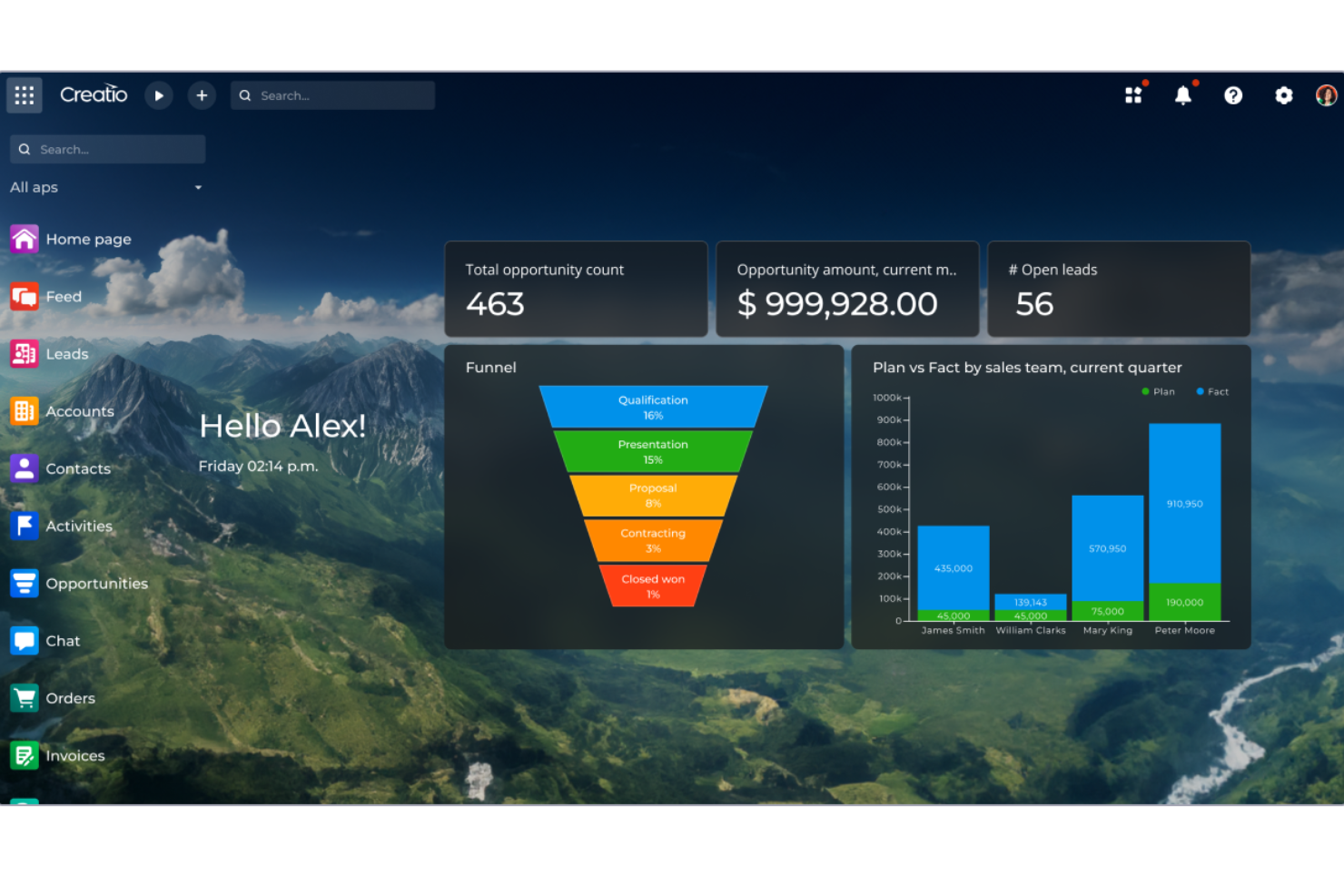
CRM Creatio is a versatile customer relationship management tool with robust sales funnel capabilities, including lead management, marketing automation, and analytics.
Why I picked CRM Creatio: CRM Creatio uses a no-code platform that allows users of all levels of technical expertise to customize their tools and workflows. This includes end-to-end workflows and processes, such as lead capturing, sales performance planning, and omnichannel order processing, all of which can be customized without requiring specialized technical knowledge.
CRM Creatio Standout Features and Integrations
Features include workflow automation, customizable dashboards, real-time analytics, AI-assisted app development, contact and account management, lead and opportunity management, task management, and performance management.
Integrations include Accelo, Act!, ActiveCampaign, Acumatica, Adobe Analytics, Asana, Microsoft Exchange, Excel, Mailchimp, HubSpot Marketing Hub, Google Calendar, and Tableau.
Pros and Cons
Pros:
- Consolidated sales and customer information
- No-code platform
- Highly customizable workflows
Cons:
- Learning curve for new users
- Customization can be time-consuming

Best for relationship-driven selling strategies

Salesflare is a sales funnel software built to help small and medium-sized B2B businesses keep track of leads, nurture customer relationships, and close deals more effectively. It automates much of the work involved in capturing, updating, and following up on prospects so your team can stay focused on selling.
Why I picked Salesflare: I picked Salesflare as a good sales funnel software because its visual pipelines let you drag and drop leads through each stage, giving you a clear picture of progress and helping you act quickly on stuck deals. On top of that, its relationship intelligence shows who on your team is best connected to a lead, so you can approach prospects strategically and build stronger business relationships.
Salesflare Standout Features and Integrations
Features include automated email sequences that let you engage leads in a personal way at scale, ensuring no prospect slips through the cracks. The lead finder also gives you the ability to discover quality prospects without juggling separate tools or files.
Integrations include Better Proposals, Emailable, Leadinfo, StoryChief, Intercom, MailChimp, QuickBooks Online, Slack, Typeform, Google Contacts, Bubble, SyncPenguin, and Voxloud.
Pros and Cons
Pros:
- Automates data entry from emails and calendars
- Strong relationship intelligence for warm introductions
- Automated reminders help prevent missed follow-ups
Cons:
- Fewer third-party integrations than competitors
- May not suit very large enterprises
Zoho CRM
Best for lead scoring

Zoho CRM helps revenue teams determine which leads should get the most attention. It uses scoring rules to help teams prioritize leads to quickly ensure conversions.
Why I picked Zoho CRM: I understand there are some revenue teams that don’t have complaints about the quality of leads they receive, but I wanted to add Zoho CRM for the other organizations that would benefit from lead scoring rules. Zoho CRM can set lead score rules based on demographics and behavior to rank them and show you which are more likely to close. However, what I believe is most beneficial is the negative scoring feature which takes points away if a lead behaves negatively towards your brand, so you can pass on them.
Zoho CRM Standout Features and Integrations
Features include Zoho CRM’s workflow automation capabilities that help your revenue teams be more productive by finishing their mundane tasks for them. You can establish workflow rules to help your teams get work completed by triggering specific actions when they meet your specified conditions.
Integrations include native connections that will help your teams spend less time managing multiple systems. Many integrations are available from Zoho CRM, such as ActiveCampaign, Dropbox, Front, GetResponse, GoTo Meeting, Mailchimp, Proposify, QuickBooks, RingCentral, Slack, and other software options. You can also use a paid Zapier account or Zoho CRM’s API to create custom integrations.
Pros and Cons
Pros:
- Cost-effective pricing structure.
- Highly scalable platform.
- Comprehensive Zoho application suite.
Cons:
- Unintuitive user interface.
- Steep learning curve.
New Product Updates from Zoho CRM

Zoho CRM Adds Reusable Canvas Templates for Forms
Zoho CRM now supports Canvas templates in the Forms view, so you can design a form layout once and reuse it across records for a consistent, faster experience. For more information, visit Zoho CRM's official site.
 .
.
Best landing page builder

ClickFunnels helps businesses quickly create sales funnels with a drag-and-drop tool that allows teams to create completely customized landing pages.
Why I picked ClickFunnels: The platform is a simple drag-and-drop landing page builder that will help your business create high-converting landing pages without the use of any coding. You can customize ClickFunnels from start to finish and optimize every part of your sales funnel, such as the initial opt-in page to the upsell and thank you pages. ClickFunnels also provides A/B testing functionality that allows you to split-test your landing pages to identify which page converts more visitors into customers.
ClickFunnels Standout Features and Integrations
Features that make ClickFunnels an excellent choice include its extensive template library that will help you immediately build converting sales funnels. To get started, all you have to do is decide which sales funnel you want to build; the platform will help you decide and edit some text, place graphics, and get ready to sell.
Integrations include most of the top third-party applications that are common with revenue teams, such as ActiveCampaign, GetResponse, HoneyBook, Keap, Mailchimp, Salesforce, Shift, Stripe, Thryv, Twilio, and other software options. Those with paid Zapier accounts can create custom integrations with their current systems.
Pros and Cons
Pros:
- Excellent customer support.
- Simple user interface.
- Extensive training.
Cons:
- No free plan.
- Expensive pricing.

Snovio
Best for lead nurturing

Snov.io provides various tools that help revenue teams close more deals after effectively nurturing leads throughout the sales funnel.
Why I picked Snov.io: Following up with leads throughout your sales cycle can significantly increase reply rates, which is the main reason I added Snov.io to this article. You can automate this process by using Snov.io to create automated follow-up sequences. Snov.io allows you to create perpetual drip campaigns that you launch once, and after adding leads, they go through your custom sales funnel that caters to your leads’ needs and behaviors. The platform uses precise warm-up strategies and AI-powered conversations that are lifelike and will increase engagement.
Snov.io Standout Features and Integrations
Features available from Snov.io include tools that will help you collect leads so they can go through your sales funnel. You can find leads individually or in bulk on LinkedIn, blogs, Google search results, blogs, and anywhere on the internet.
Integrations include over 5,000 native connections with popular systems that many revenue teams use, such as Airtable, Asana, HubSpot, Phantombuster, Pipedrive, Salesforce, Slack, Todoist, Trello, Zoho CRM, and other software options. You can also use the API from Snov.io or a paid Zapier account to create custom integrations with your current systems.
Pros and Cons
Pros:
- Excellent customer support team.
- User-friendly interface.
- Powerful email verification features.
Cons:
- Not many email templates available.
- Database has some outdated information.

Best for coaching capabilities

SalesLoft is the one place revenue team leaders can get the coaching insights they need to help their reps close more deals after customers go through the business’s sales funnel.
Why I picked SalesLoft: It’s common for revenue team managers to not have the proper visibility into specific sales funnel stages where their reps need help. So, I added SalesLoft because the Coach to Close workflow within the platform can help your managers assist reps so they can close an extra one or two deals. The coaching tool shows your team leaders the conversion rates for every stage of your sales funnel, so they can identify deals that their reps are at risk of losing and coach them throughout each problem stage.
SalesLoft Standout Features and Integrations
Features are available that help SalesLoft stand out from the competition, including its forecasting tool that provides real-time sales funnel visibility that helps your teams understand deal health and immediately identify risks. The data it provides is collected from Cadence, Conversations, and your CRM, which will provide a complete pipeline health analysis.
Integrations include over 160 native connections to help you improve productivity, including Aircall, Chili Piper, Gong.io, HubSpot, LeadIQ, Microsoft Dynamics, Salesforce, Seismic Enablement Cloud, Slack, SugarCRM, and other software options. SalesLoft also provides an API that allows you to create custom integrations with your tech stack.
Pros and Cons
Pros:
- Excellent contact interaction management.
- New features are added regularly.
- Robust, user-friendly platform.
Cons:
- No phone dialer features.
- Freezes during extensive changes.

Instapage
Best for increasing conversions

Instapage provides an advanced solution that helps businesses build effective landing pages that increase conversions and ROI.
Why I picked Instapage: The primary focus of Instapage is to help businesses increase sales conversions through their landing pages. To do this, Instapage provides sophisticated, conversion-focused landing page templates and advanced testing features. Instapage also helps you improve your landing page’s performance even more, thanks to its heatmaps and conversion analytics capabilities.
Instapage Standout Features and Integrations
Features that can help you build effective landing pages to start your sales funnel include Instapage’s AI content generation tool. The AI Content Generation tool allows you to create headline, page text, and CTA button variations from the builder. This will accelerate your landing page development by generating audience-focused content.
Integrations include over 120 connections, such as ActiveCampaign, CallRail, Google Analytics, Heap, HubSpot, Kissmetrics, LiveChat, Mailchimp, Salesforce, Zoho CRM, and other software options. You can also use a paid Zapier account to create custom integrations.
Pros and Cons
Pros:
- Excellent customer support.
- Simple landing page builder.
- Hosts unlimited domains
Cons:
- Mobile editor needs improvement.
- High price point.
Other Sales Funnel Software
Here are some additional sales funnel software options that didn’t make it onto my shortlist, but are still worth checking out:
- Zendesk Sell
For pipeline analysis
- Outreach
For sales funnel inspection
- Freshsales
For sales pipeline visibility
- Pipedrive
Sales funnel management tool
- GetResponse
Email marketing automation tool
- ActiveCampaign
For automating conversations
- Systeme.io
All-in-one sales funnel software
- Wishpond
For large enterprises
- ConverKit
For beginners
- OptimizePress
For WordPress websites
- Flodesk Checkout
For digital content creators


How I Evaluate Sales Funnel Software
I look for two things in every tool: baseline funnel-stage visibility and conversion tracking that a RevOps team can actually build a forecast on, and differentiators that set the best options apart.
Core Functionality (Table Stakes For This List)
When I'm selecting tools for my list, I rank each one on a scale from 0 (does not offer the functionality) to 5 (excels in this area) for each core functionality listed below. Then, I calculate the tool's total score into a percentage. Each tool needs to achieve a minimum total score of 65% to be considered for inclusion.
- Funnel Stage Management: I check whether you can build multiple pipelines with custom stages that reflect real buyer journeys, like separating inbound demo requests from outbound prospecting.
- Pipeline Visualization & Analytics: A clear visual funnel or Kanban view with stage-level metrics matters here, especially the ability to drill into deal flow by rep, segment, or region.
- Lead Capture & Routing: I evaluate how leads enter the funnel and get assigned, looking for rule-based routing options like territory matching or round-robin across SDR teams.
- Conversion Tracking & Reporting: Stage-to-stage conversion rates and velocity metrics are what I look for, particularly the ability to spot where deals stall between, say, discovery and proposal.
- Revenue Forecasting: Each tool should generate pipeline-weighted forecasts that go beyond simple stage probability, ideally incorporating historical close rates and deal aging data.
- Workflow Automation: I look at what actions the tool can trigger automatically at each stage, such as creating follow-up tasks when a deal enters negotiation or notifying a CS lead at closed-won.
Once I have a list of tools that meet this criteria, I consider what sets each platform apart.
Differentiating Factors (What Sets Vendors Apart)
Here's how I compare and contrast different vendors:
Standout Features
AI-powered deal insights make a real difference when you're managing a pipeline with hundreds of open opportunities—I look for tools that flag at-risk deals and suggest next steps based on funnel behavior. Revenue attribution modeling is another factor I weigh, especially for teams that need to connect funnel conversions back to specific campaigns or channels. Buyer intent signals matter too; tools that pull in third-party intent data help prioritize accounts showing active buying behavior before they even hit a demo request form.
Beyond Features
Integrations matter a lot here—I check whether the tool connects natively to CRMs like Salesforce or HubSpot and supports bidirectional sync so funnel data stays consistent across your RevOps stack. Reporting flexibility is another area I evaluate closely, especially whether dashboards can serve sales, marketing, and leadership from a single source of truth during QBRs. I also consider scalability, like whether the platform supports multi-team pipelines with role-based permissions as your org grows from one region to several.
How to Choose Sales Funnel Software
It’s easy to get bogged down in long feature lists and complex pricing structures. To help you stay focused as you work through your unique software selection process, here’s a checklist of factors to keep in mind:
| Factor | What to Consider |
|---|---|
| Scalability | Will the software grow with your business? Consider if it can handle more users or increased data without extra costs. Look for flexible plans that accommodate your growth without sudden price hikes. |
| Integrations | Does it connect with your existing tools? Check compatibility with your CRM, email marketing, and other systems. Avoid tools that require extensive workarounds to sync with your current setup. |
| Customizability | Can you tailor it to fit your processes? Look for tools that let you tweak pipelines, fields, and reports. Avoid solutions that force rigid workflows that don’t match your team's style. |
| Ease of use | Is it intuitive for your team? Test the interface and navigation. Simple design reduces training time and errors. Avoid complex systems that require extensive training to get started. |
| Implementation and onboarding | How quickly can you get started? Evaluate the setup time and support available. Look for options offering guided onboarding and resources like tutorials or webinars. Avoid long, drawn-out implementation phases. |
| Cost | Does it fit your budget? Compare the total cost of ownership, including hidden fees and future price increases. Choose software with transparent pricing and clear terms. |
| Security safeguards | Is your data protected? Verify encryption standards, data backup policies, and compliance with regulations like GDPR. Avoid tools with vague security policies or past breaches. |
| Support availability | How accessible is help when needed? Look for 24/7 support, multiple contact methods, and responsive service. Avoid vendors with limited support hours or slow response times. |
Trends
The latest product updates, press releases, and release logs from leading tools reveal key trends that are shaping the future of sales funnel software, highlighting functionalities that are becoming essential for managing revenue operations effectively. Below are the prominent trends and their implications for businesses:
- Integration and Automation:
- Enhanced integration capabilities with other sales and marketing tools, ensuring a seamless flow of data across platforms and reducing manual data entry.
- Increased automation of routine tasks within the sales funnel, such as lead scoring and follow-up scheduling, allowing sales teams to focus on high-value activities.
- AI and Machine Learning:
- Advanced AI algorithms providing predictive analytics to forecast sales trends and identify potential bottlenecks in the sales process.
- Machine learning being used to refine lead scoring models over time, improving the accuracy of lead qualification and prioritization.
- Data Visualization and Analytics:
- Sophisticated data visualization tools making it easier to interpret complex data and gain actionable insights.
- Real-time analytics features helping businesses monitor their sales funnel performance continuously and make data-driven decisions quickly.
- Declining Features:
- Basic email integration and notification features are becoming standard and not considered differentiators anymore.
- Overly complex customization options that require significant time and resources to implement are being overshadowed by more user-friendly, adaptable solutions.
The current trends in sales funnel software underscore the importance of automation, integration, AI, and data-driven decision-making in optimizing sales processes. As these tools become more advanced, businesses are better equipped to manage their revenue operations efficiently, respond to market changes proactively, and drive sustainable growth. For revenue operation leaders, selecting software that aligns with these trends will be crucial to staying competitive and maximizing sales effectiveness.
What is Sales Funnel Software?
Sales funnel software is a tool that tracks how potential customers move from first contact to purchase. Sales and marketing teams use it to capture leads, organize follow-ups, and see where people drop off along the way. It helps you spot what’s working, automate routine tasks, and make smarter decisions so you can close more deals with less hassle.
Features
When selecting sales funnel software, keep an eye out for the following key features:
- Lead capturing: Automates the process of gathering information from potential customers, making it easier to manage and follow up on leads.
- Sales pipeline management: Allows you to visualize and track the progress of deals through various stages, helping to prioritize actions and close deals efficiently.
- Conversion analytics: Provides insights into conversion rates and customer behavior, aiding in the refinement of sales strategies.
- Automated follow-ups: Sends timely and personalized messages to leads, ensuring consistent communication without manual effort.
- Reporting and analytics: Offers detailed reports on sales activities and outcomes, enabling data-driven decision-making.
- Integration capabilities: Seamlessly connects with existing tools like CRM and email marketing platforms to ensure smooth data flow and collaboration.
- Customizable dashboards: Lets you tailor views and reports to focus on the metrics that matter most to your team.
- Mobile accessibility: Provides access to sales funnel data on-the-go, allowing for real-time updates and actions.
- Security safeguards: Ensures data protection through encryption and compliance with regulations, safeguarding sensitive customer information.
- User-friendly interface: Features an intuitive design that reduces the learning curve and increases user adoption across teams.
Benefits
Implementing sales funnel software provides several benefits for your team and your business. Here are a few you can look forward to:
- Improved lead management: Automates lead capturing and tracking, making it easier to organize and prioritize potential customers.
- Enhanced decision-making: Provides conversion analytics and detailed reporting, enabling teams to make informed decisions based on real data.
- Increased efficiency: Automates follow-ups and other routine tasks, freeing up time for your team to focus on closing deals.
- Better collaboration: Integration capabilities allow seamless data sharing across tools, enhancing teamwork and communication.
- Scalability: Accommodates business growth with flexible features and pricing, ensuring the software grows with your needs.
- Greater visibility: Sales pipeline management offers a clear view of each deal's status, helping teams to focus their efforts effectively.
- Data security: Ensures that customer information is protected through strong security safeguards, building trust with clients.
Costs & Pricing
Selecting sales funnel software requires an understanding of the various pricing models and plans available. Costs vary based on features, team size, add-ons, and more. The table below summarizes common plans, their average prices, and typical features included in sales funnel software solutions:
Plan Comparison Table for Sales Funnel Software
| Plan Type | Average Price | Common Features |
|---|---|---|
| Free Plan | $0 | Basic lead capturing, limited reporting, and simple pipeline management. |
| Personal Plan | $10-$30/user/month | Enhanced analytics, customizable dashboards, and email integrations. |
| Business Plan | $50-$100/user/month | Advanced reporting, multi-user support, and CRM integrations. |
| Enterprise Plan | $150+/user/month | Full customization, dedicated support, and comprehensive security features. |
Sales Funnel Software FAQs
Here are some answers to common questions about sales funnel software:
Who uses sales funnel software?
Various organizations and industries use sales funnels to take complete control of their customer’s buying experience. Small businesses, enterprise organizations, and everything in between use sales funnel software because they need some level of control over the buying experience to ensure their customers continue the relationship. Typically, these businesses understand that having long or complicated buying processes means their customers are more likely to try the competition next time.
What are they types of sales funnel software?
Sales funnel software comes in various types, each designed to cater to different aspects of the sales and marketing process. Understanding these types can help organizations select the software that best aligns with their specific needs and goals. Here are the main types of sales funnel software:
- Lead Capture Software: Focuses on gathering information from potential customers through various channels like web forms, landing pages, and social media platforms. This software is essential for building the top of the sales funnel by accumulating a broad base of leads to engage and nurture.
- Email Marketing Software: Specializes in engaging leads through targeted email campaigns. It allows for the automation of email sequences, tracking of open and click-through rates, and segmentation of contacts based on their interaction, guiding leads further down the funnel.
- CRM Software: While broader in scope, CRM systems often include sales funnel management features, providing a holistic view of customer interactions and progress through the sales pipeline. These systems help in tracking sales activities, forecasting, and analyzing customer data to enhance sales strategies.
- Marketing Automation Software: Automates repetitive tasks and streamlines marketing workflows, facilitating lead nurturing and movement through the sales funnel. Features include campaign management, lead scoring, and multi-channel marketing coordination.
- Analytics and Reporting Software: Offers deep insights into the performance of various stages of the sales funnel. It helps businesses understand conversion rates, identify bottlenecks, and optimize their sales processes based on data-driven findings.
- Sales Pipeline Software: Provides a visual representation of where prospects are in the sales process, helping teams to prioritize their efforts, forecast revenue, and close deals more efficiently.
- All-in-One Sales Funnel Platforms: Combine the functionalities of the above types, offering a comprehensive suite of tools to manage the entire sales funnel from lead capture to closing. These platforms are ideal for businesses looking for an integrated approach to sales funnel management.
By choosing the type of sales funnel software that best fits their unique sales process and objectives, organizations can more effectively attract, engage, and convert leads, ultimately driving revenue growth and business success.
What is the difference between sales funnel software and landing page builders?
Sales funnel software and landing page builders are tools that you can use to create marketing and sales materials. Sales funnel platforms are more comprehensive and help you create complete sales funnels, from first contact with leads to the final sale. However, landing page builders focus on creating single pages, such as squeeze pages or sales pages.
What’s Next:
If you're in the process of researching sales funnel software, connect with a SoftwareSelect advisor for free recommendations.
You fill out a form and have a quick chat where they get into the specifics of your needs. Then you'll get a shortlist of software to review. They'll even support you through the entire buying process, including price negotiations.