

10 Best Sales Enablement Software Reviewed For 2026

10 Best Sales Enablement Software Shortlist


Unleash the full potential of your sales force with the best sales enablement software. We've analyzed top contenders, considering features, user satisfaction, and budget to help you find the perfect fit to streamline workflows, elevate content, and drive sales success.
Why Trust Our Software Recommendations
Our reviews reflect our independent judgment—not a sales pitch. Learn how we stay transparent.
For this guide, we evaluated tools using hands-on testing and independent research, scoring tools using our selection criteria.
Our reviews reflect our human editorial judgment, not a sales pitch.
| Tool | Best For | Trial Info | Price | ||
|---|---|---|---|---|---|
| 1 | Best for sales training | Free trial available | From $6.91/user/month (billed annually) | Website | |
| 2 | Best for AI-powered outbound sales teams | Free demo available | From $25/user/month | Website | |
| 3 | Best for AI-driven predictive analysis | Free plan available; 15-day free trial | From $14/user/month (billed annually) | Website | |
| 4 | Best for real-time AI sales call coaching | Free demo available | Pricing upon request | Website | |
| 5 | Best for standardizing the sales process | Free plan + free demo available | From $350/month (billed annually) | Website | |
| 6 | Best for sales forecasting | Free demo available | Pricing upon request | Website | |
| 7 | Best for targeted content | Free demo available | Pricing upon request | Website | |
| 8 | Best for visual sales management | 14-day free trial | From $14/user/month (billed annually) | Website | |
| 9 | Best sales enablement software for video coaching | Free demo available | Pricing upon request | Website | |
| 10 | Best for remote teams | Free demo available | Pricing upon request | Website |

Best Sales Enablement Software Reviews
In this section you’ll discover my assessments of some of the best sales enablement software tools out there. These sales enablement solutions offer crucial features like content management and reporting to help your team collaborate and knowledge-share more effectively.
For each tool, I’ve outlined the key benefits and drawbacks and included relevant screenshots of its user interface.

Best for sales training
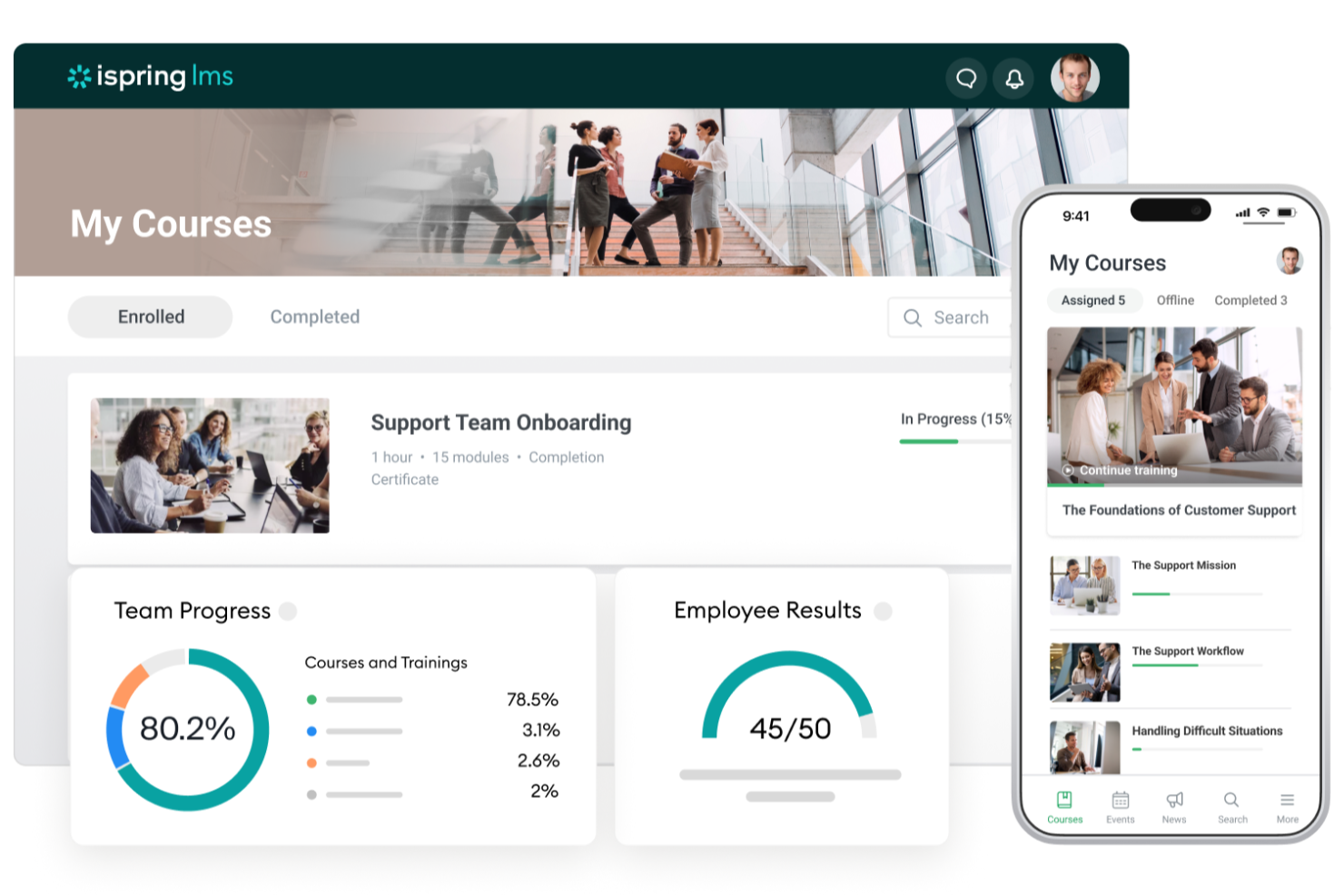
iSpring LMS is an intuitive learning management system built for companies that need to upskill and onboard sales teams efficiently. It combines interactive content, progress tracking, and gamification to make sales training measurable and engaging.
Who is iSpring LMS Best For?
Training and HR teams at small to mid-sized organizations that deliver interactive sales training modules, particularly companies with structured onboarding and ongoing certification needs.
Why I Picked iSpring LMS
I picked iSpring LMS because it delivers real results in team development through structured learning paths and rich content options. You can build quizzes, simulations, and certification programs tailored to your team’s sales process. Its analytics dashboards help managers spot knowledge gaps quickly, while gamification keeps learners engaged. With flexible integrations, it connects training directly to performance outcomes in your CRM.
iSpring LMS Key Features
- Custom learning paths: Build tailored training tracks for reps.
- Gamification: Reward progress with points, badges, and leaderboards.
- Compliance tracking: Monitor certification and regulatory progress.
- Advanced analytics: View learner performance and completion data.
iSpring LMS Integrations
Integrations include Salesforce, HubSpot, Zoho CRM, Microsoft Dynamics 365, Slack, Zoom, Microsoft Teams, Google Workspace, and LinkedIn Learning.
Pros and Cons
Pros:
- Ability to set up multiple learning paths
- Good content management capabilities
- Mobile app access for on-the-go training
Cons:
- Reports have limited customization options
- Limitations with API functionality
New Product Updates from iSpring LMS

iSpring LMS Adds Multiple Observations to OJT Sessions
iSpring LMS now lets managers log multiple observations within one OJT session, grouping visits and auto-generating summary stats like averages, criterion results, and comparisons. For more information, visit iSpring LMS's official site.

Best for AI-powered outbound sales teams

Squaretalk is a contact center and sales enablement platform built for outbound teams that rely heavily on calling and messaging. It unifies lead management, predictive dialing, and AI-driven analytics so reps can connect with more prospects while maintaining quality conversations.
Who is Squaretalk Best For?
Outbound sales leaders at small to mid-sized organizations that operate AI-supported calling teams, particularly those managing high-volume prospecting across regional markets.
Why I Picked Squaretalk
I picked Squaretalk because it helps outbound teams manage multi-channel communication—voice, SMS, WhatsApp, and more—without switching tools. Its AI-powered call summaries and sentiment tagging make every conversation more actionable. Predictive dialing ensures that agents connect with the right leads at the right time, while detailed analytics track call outcomes and agent performance. This tool is ideal for distributed or fast-paced teams that prioritize volume and personalization.
Squaretalk Key Features
- Predictive dialing: Automates outbound calling for higher connection rates.
- AI call insights: Summarizes conversations and identifies sentiment.
- Smart workflows: Automate follow-ups and reminders from call data.
- Multi-channel communication: Manage calls, SMS, and messaging in one platform.
Squaretalk Integrations
Integrations include Zendesk, Salesforce, HubSpot, Freshdesk, Zoho, Mailchimp, Microsoft Teams, and Telegram.
Pros and Cons
Pros:
- No built‑in CRM
- Advanced features cost extra
- ISO‑certified security
- Multi‑channel communications
- AI‑powered insights
New Product Updates from Squaretalk
Squaretalk Adds TradeCore Integration for Brokerage Workflows
Squaretalk adds a TradeCore integration that connects customer conversations with BrokerIQ CRM workflows. This helps brokerage teams trigger AI-driven follow-ups, tasks, and other actions from calls and messages. For more information, visit Squaretalk’s official site.
 .
.
Zoho CRM
Best for AI-driven predictive analysis

Zoho CRM offers a unified platform for managing leads, automating workflows, and predicting sales outcomes. It leverages its AI assistant, Zia, to help teams forecast revenue, prioritize opportunities, and make informed decisions based on data-driven insights.
Who is Zoho CRM Best For?
Sales and business operations teams at small to mid-sized companies that use AI-driven predictive analysis, particularly organizations standardizing CRM processes across functions.
Why I Picked Zoho CRM
I picked Zoho CRM because it combines affordability, scalability, and AI depth in one package. Zia, its AI engine, analyzes historical data to predict deal outcomes and suggest next steps, helping teams act strategically. Its real-time notifications ensure timely engagement, and the platform’s customizability makes it suitable for organizations of any size. The balance between automation and insight-driven decision-making is where Zoho CRM really stands out.
Zoho CRM Key Features
- Zia AI Assistant: Predicts trends, scores leads, and suggests next actions.
- SalesSignals: Delivers real-time alerts for customer interactions.
- Advanced reporting: Custom dashboards with pipeline forecasting.
- Workflow automation: Simplifies repetitive sales tasks.
Zoho CRM Integrations
Integrations include Slack, Microsoft 365, Google Workspace, Mailchimp, LinkedIn, QuickBooks, Trello, Zendesk, DocuSign, and Shopify.
Pros and Cons
Pros:
- Insights into sales performance and predictions
- Customizable to your specific needs
- Detailed report generation
Cons:
- Set up may be time consuming
- The interface can be complicated to navigate
New Product Updates from Zoho CRM

Zoho CRM Adds Reusable Canvas Templates for Forms
Zoho CRM now supports Canvas templates in the Forms view, so you can design a form layout once and reuse it across records for a consistent, faster experience. For more information, visit Zoho CRM's official site.
 .
.
Best for real-time AI sales call coaching

Attention provides real-time AI coaching to improve every sales call. It listens to conversations as they happen, giving reps live feedback and guidance so they can handle objections, stay compliant, and improve win rates instantly
Who is Attention Best For?
Sales managers and revenue leaders at growth-stage and enterprise companies that require real-time AI coaching during customer calls, especially teams focused on improving call quality and consistency.
Why I Picked Attention
I picked Attention because it brings coaching into the moment, not after the call. Its AI engine identifies key conversational cues—like objection handling and talk ratios—and delivers prompts in real time. It can also generate post-call summaries and personalized follow-up emails, reducing admin work. This makes it an excellent fit for fast-moving teams that want to accelerate onboarding and maintain consistent sales messaging.
Attention Key Features
- Live call feedback: Get coaching prompts while speaking with prospects.
- Conversational analytics: Identify win themes and common objections.
- CRM automation: Update fields and create follow-up tasks automatically.
- Email generation: Draft personalized outreach based on call data.
Attention Integrations
Integrations include Zoom, Google Meet, Microsoft Teams, Salesforce, HubSpot, Gmail, Outlook, Slack, and Zapier.
Pros and Cons
Pros:
- Real-time sales coaching on calls
- Personalized follow-up emails
- Actionable insights with AI
Cons:
- Reliance on AI may not suit all users
- Some integrations may require additional assistance

Dock
Best for standardizing the sales process

Dock provides digital sales rooms that centralize content, proposals, and action plans in one collaborative space. It helps sales teams standardize buyer journeys while personalizing each client experience through branded, trackable workspaces.
Who is Dock Best For?
Revenue operations and sales leaders at early-stage to mid-market B2B companies that aim to standardize the sales process, particularly teams aligning internal stakeholders and buyers.
Why I Picked Dock
I picked Dock because it helps teams deliver consistency without sacrificing personalization. Its digital workspaces make follow-ups predictable and repeatable, using templates that guide both reps and buyers through the deal process. Analytics show which content prospects engage with most, helping sellers anticipate needs. Dock simplifies deal collaboration, onboarding, and renewal management—all under one platform.
Dock Key Features
- Digital sales rooms: Centralize all client-facing documents and deliverables.
- Custom templates: Create reusable follow-up and proposal templates.
- Engagement analytics: Track content usage and buyer activity.
- Collaborative workspaces: Enable clients to interact with materials directly.
Dock Integrations
Integrations include HubSpot, Salesforce, PandaDoc, Typeform, Vidyard, Loom, Dropbox, Vimeo, and Google Slides.
Pros and Cons
Pros:
- Analytics for buyer engagement insights
- Templates to help standardize sales processes
- Manage all your client-facing documents in one place
Cons:
- Potential learning curve for new users
- Hubspot and Salesforce integrations are only available on higher tier plans

Gong
Best for sales forecasting

Gong uses AI to analyze customer conversations and turn them into predictive revenue intelligence. It helps leaders see which deals are healthy, which are at risk, and what behaviors lead to closed business.
Who is Gong Best For?
Revenue leadership and operations teams at mid-market and enterprise B2B companies that prioritize accurate sales forecasting, especially organizations with complex, multi-stage pipelines.
Why I Picked Gong
I picked Gong because it gives revenue teams a data-driven view of every interaction, not just CRM notes. Its AI engine captures calls, emails, and meetings to detect engagement patterns, forecast outcomes, and coach reps. I also appreciate how Gong connects conversation data to deal progression—making forecasts more accurate and coaching more precise. It’s a true intelligence layer for modern sales operations.
Gong Key Features
- Revenue intelligence: Track and analyze every customer touchpoint.
- Deal health scoring: Identify at-risk opportunities before they stall.
- Coaching insights: Benchmark rep performance by conversation data.
- Pipeline forecasting: Predict outcomes based on engagement signals.
Gong Integrations
Integrations include Salesforce, HubSpot, Zoom, Slack, Microsoft Dynamics 365, Marketo, LinkedIn, Outreach, Eloqua, and SalesLoft.
Pros and Cons
Pros:
- User-friendly interface
- AI-powered conversation analytics
- Improved forecasting accuracy
Cons:
- Not a complete sales solution
- Limited pricing transparency

Best for targeted content

MindTickle combines sales readiness, coaching, and analytics into one training platform. It focuses on continuous learning and performance improvement, ensuring every rep has the right skills and knowledge before stepping into a deal.
Who is MindTickle Best For?
Sales enablement and training leaders at mid-sized and enterprise companies that require targeted content delivery, particularly organizations supporting global sales teams.
Why I Picked MindTickle
I picked MindTickle because it transforms sales training into an ongoing, data-backed process. Managers can create targeted coaching modules based on real-world performance data, while AI-driven insights pinpoint skill gaps. Interactive simulations and quizzes keep learning engaging and measurable. For organizations focused on readiness, MindTickle bridges the gap between knowledge and field execution.
MindTickle Key Features
- Targeted coaching: Build personalized learning tracks for each rep.
- AI insights: Identify skill gaps and training priorities.
- On-demand learning: Access simulations and modules anytime.
- Performance analytics: Link training outcomes to sales metrics.
MindTickle Integrations
Integrations include Salesforce, HubSpot, Marketo, Cornerstone, Slack, SAP SuccessFactors, Box, SharePoint, and Zoom.
Pros and Cons
Pros:
- Automatic transcription of sales calls
- Advanced speech recognition technology and deep learning models
- Real-time conversation analysis and insights
Cons:
- Not well-suited for smaller sales teams
- May be difficult to set up and integrate with existing workflows

Best for visual sales management

Pipedrive CRM turns complex sales pipelines into clear, visual dashboards that help teams stay focused on the deals that matter most. It’s a user-friendly choice for organizations that want visibility, automation, and control without the clutter of enterprise CRMs.
Who is Pipedrive CRM Best For?
Sales managers and account executives at small to mid-sized businesses that prefer visual pipeline management, especially teams seeking structured deal tracking across territories.
Why I Picked Pipedrive CRM
I included Pipedrive CRM for its simple, activity-based sales philosophy and visual pipeline interface. You can drag, drop, and automate deal progress, while AI-powered recommendations guide next actions. Its real-time dashboards give instant visibility into team performance, and Pipedrive’s learning resources—like the Academy and community forums—make it accessible for new users. The platform balances ease of use with flexibility for growing sales teams.
Pipedrive CRM Key Features
- Visual pipeline: Manage deals with drag-and-drop simplicity.
- AI Sales Assistant: Suggests next actions and optimizes workflows.
- Email automation: Build and track outreach campaigns directly in-app.
- Mobile CRM: Access pipelines and deal updates anywhere.
Pipedrive CRM Integrations
Integrations include HubSpot, Asana, QuickBooks, DocuSign, Stripe, Google Meet, Mailchimp, Jotform, Surfe, and Zapier.
Pros and Cons
Pros:
- Visual pipeline feature makes tracking deal progress easy
- Machine learning-powered sales assistant is included in all plans
- Intuitive and easy to set up and operate
Cons:
- Learning curve for beginners
- More customization options in sales reports would be helpful

Allego
Best sales enablement software for video coaching

Allego combines video-based training, content sharing, and AI-powered feedback to make learning more interactive. It’s especially effective for distributed or growing teams that depend on video for onboarding, coaching, and peer-to-peer learning.
Who is Allego Best For?
Sales enablement and frontline managers at mid-sized and enterprise companies that use video-based coaching, particularly distributed teams requiring consistent skills development.
Why I Picked Allego
I picked Allego because it bridges traditional learning with real-time video feedback. Reps can record pitches or demos, share them for review, and receive AI-assisted coaching suggestions. The mobile-first interface ensures teams can train anywhere, while customizable feedback forms align each session with coaching objectives. For organizations prioritizing skill growth and sales presentation quality, Allego is a strong choice.
Allego Key Features
- Video-based feedback: Reps record and receive time-stamped comments.
- AI analysis: Evaluates tone, pacing, and presentation quality.
- Mobile-first design: Access training and playback from any device.
- Content library: Store and search video lessons or examples.
Allego Integrations
Integrations include Salesforce, HubSpot, Cornerstone, SumTotal, and Zoom.
Pros and Cons
Pros:
- AI-powered feedback tools
- Mobile-first design
- Extensive video library
Cons:
- Limited pricing transparency
- Limited integrations

Bloomfire
Best for remote teams

Bloomfire provides a centralized knowledge hub that makes it easy for remote and hybrid teams to share information and collaborate. It combines powerful AI search, social engagement tools, and content organization to keep distributed teams aligned.
Who is Bloomfire Best For?
Internal communications and knowledge management teams at mid-sized and enterprise organizations that support remote collaboration, especially companies with distributed workforces.
Why I Picked Bloomfire
I picked Bloomfire because it empowers remote sales teams to find and share knowledge instantly, no matter where they work. Its AI-powered search returns precise answers by scanning text, video, and audio content, reducing time spent digging through files. Features like commenting and content feedback foster collaboration and keep knowledge current. For teams operating across multiple locations or time zones, Bloomfire keeps everyone on the same page.
Bloomfire Key Features
- AI-powered search: Surfaces answers across all content formats.
- Knowledge sharing: Enable Q&A, comments, and team discussion.
- Content management: Organize and tag knowledge assets by topic.
- Mobile accessibility: Access insights anywhere, anytime.
Bloomfire Integrations
Integrations include Salesforce, Google Drive, Dropbox, Microsoft Teams, Slack, Zoom, Okta, Jira, Asana, and OneDrive.
Pros and Cons
Pros:
- Mobile app
- Multi-language support
- AI-powered search functionality that provides accurate and relevant search results
Cons:
- No automated workflow features
- Limited pricing transparency
Other Sales Enablement Software
Here are a few more worthwhile options that are worth checking out:
- Chorus.ai
For real-time insights
- Lead411
For small businesses
- Highspot
For large teams
- DIGIDECK
For automated, custom presentations
- Guru
Sales enablement software for distributed teams
- Seismic
For risk management
- Brainshark
For growing teams
- Showpad Content
For AI recommendations
- ClearSlide
For enterprises
- Creatio CRM
For customizable workflow automation
- Continu
With multilingual learning capabilities
- Exec
For AI roleplays
- Paperflite
For content tracking analytics
- 360Learning
For collaborative team training
- Klue
For competitor intelligence insights
- DealHub
For integrated CPQ functionality
- KnowledgeNet.ai
For AI-driven knowledge discovery


Related Sales Enablement Software Reviews
If you still haven't found what you're looking for here, check out these tools closely related to sales enablement software that we've tested and evaluated.
- Sales Software
- Lead Management Software
- Business Intelligence Software
- Contract Management Software
- Revenue Management System
- CPQ Software
How I Evaluate Sales Enablement Software
I evaluate these tools in two layers: core requirements—like CRM sync, content libraries, and coaching tools—and the differentiators, like AI role-play or digital sales rooms, that define best fit.
Core Functionality (Table Stakes For This List)
When I'm selecting tools for my list, I rank each one on a scale from 0 (does not offer the functionality) to 5 (excels in this area) for each core functionality listed below. Then, I calculate the tool's total score into a percentage. Each tool needs to achieve a minimum total score of 75% to be considered for inclusion.
- Sales Content Management Hub: I look for a centralized library where teams can organize, tag, and version-control assets—and I check whether reps can surface the right case study or one-pager directly from within a deal workflow.
- Seller Training & Onboarding: Structured learning paths with quizzes and certifications matter here, especially for orgs ramping new reps quarterly and needing role-specific curricula beyond static PDF uploads.
- Sales Coaching Capabilities: I evaluate whether the platform offers conversation recording with scorecards or topic tracking, so managers can review calls and coach reps on specific moments rather than relying on gut feel.
- Buyer Engagement Tracking: Trackable content sharing is a big one—I check whether reps can send a proposal or deck and see exactly which pages a prospect viewed, how long they spent, and who they forwarded it to.
- CRM & Sales Stack Integration: I look for native, bidirectional sync with CRMs like Salesforce, HubSpot, or Microsoft Dynamics so enablement data flows into pipeline records without manual entry or middleware workarounds.
- Enablement Analytics & Reporting: Dashboards that connect content usage and training completion to pipeline outcomes are what I evaluate here—not just activity logs, but reporting that helps RevOps tie enablement efforts to revenue.
Once I have a list of tools that meet this criteria, I consider what sets each platform apart.
Differentiating Factors (What Sets Vendors Apart)
Here's how I compare and contrast different vendors:
Standout Features
Digital sales rooms are a major differentiator—I look for platforms where reps can build branded buyer microsites with mutual action plans, so every stakeholder stays aligned without endless email threads. AI role-play simulations matter a lot too, especially for teams onboarding reps at scale. The best implementations let sellers practice objection handling against realistic buyer personas and receive scored feedback. Predictive deal insights round things out, where the platform flags stalled opportunities or recommends next actions based on engagement patterns.
Beyond Features
Integration depth with the broader RevOps stack is one of the first things I evaluate. A platform that syncs with your CRM but can't connect to Outreach, Salesloft, or Gong creates blind spots in your pipeline data. Scalability matters just as much—I check whether a tool supports multi-region permissioning and tiered governance, since a 50-person sales team and a 500-person org need very different admin structures. Pricing transparency also weighs heavily. I look for clear seat-based models where you can start with one module and expand without surprise fees.
How To Choose Sales Enablement Software
With so many different sales enablement software solutions available, it can be challenging to make decisions on what tool is going to be the best fit for your needs.
As you're shortlisting, trialing, and selecting sales enablement software, consider the following:
- What problem are you trying to solve - Start by identifying the sales enablement software feature gap you're trying to fill to clarify the features and functionality the tool needs to provide.
- Who will need to use it - To evaluate cost and requirements, consider who'll be using the software and how many licenses you'll need. You'll need to evaluate if it'll just be the revenue operation leaders or the whole organization that will require access. When that's clear, it's worth considering if you're prioritizing ease of use for all or speed for your sales enablement software power users.
- What other tools it needs to work with - Clarify what tools you're replacing, what tools are staying, and the tools you'll need to integrate with, such as accounting, CRM, or HR software. You'll need to decide if the tools will need to integrate together or if you can replace multiple tools with one consolidated sales enablement software.
- What outcomes are important - Consider the result that the software needs to deliver to be considered a success. Consider what capability you want to gain or what you want to improve, and how you will be measuring success. For example, an outcome could be the ability to get greater visibility into performance. You could compare sales enablement software features until you’re blue in the face but if you aren’t thinking about the outcomes you want to drive, you could be wasting a lot of valuable time.
- How it would work within your organization - Consider the software selection alongside your workflows and delivery methodology. Evaluate what's working well and the areas that are causing issues that need to be addressed. Remember every business is different — don’t assume that because a tool is popular that it'll work in your organization.
Top 5 Emerging Trends in Sales Enablement Software
If you're leading a high-growth SaaS startup, you know that every tool in your stack needs to drive efficiency and results. Sales enablement software is evolving rapidly to meet the complex needs of scaling teams. Here are five key trends shaping the space:
1. AI-Powered Personalization at Scale
Today’s sales enablement platforms are leaning heavily into AI to personalize outreach and content recommendations. Advanced AI models analyze buyer intent signals, CRM data, and past interactions to surface the right content for reps to share at the perfect time. This means less guesswork for your sales team and more meaningful engagement with prospects.
Why it matters: It helps junior reps ramp faster and senior reps focus on closing, not admin tasks.
2. Integrated Revenue Intelligence
Sales enablement tools are no longer standalone—they’re merging with revenue intelligence features. These platforms now provide real-time deal insights, pipeline health tracking, and call analytics alongside enablement resources. The result? A single source of truth for sales activity and strategic coaching.
Why it matters: Keeps your team aligned with revenue goals and gives leadership better visibility into deal blockers.
3. Content Performance Analytics
Gone are the days of guessing which pitch deck or case study works best. Modern sales enablement platforms now provide granular content performance metrics, showing how prospects engage with assets. Expect heatmaps, view duration reports, and conversion impact insights.
Why it matters: You can optimize content ROI and double down on resources that directly influence the buyer’s journey.
4. Sales Coaching and Onboarding Automation
With fast-growing teams, onboarding and upskilling are critical challenges. Leading platforms now include automated learning paths, interactive simulations, and AI-driven feedback for reps. Gamification is another trend, keeping learning engaging and competitive.
Why it matters: Reduces ramp time and creates a more consistent, high-performing sales team.
5. Seamless Integration with PLG and Hybrid Sales Models
For SaaS startups blending product-led growth (PLG) with traditional sales, enablement tools are evolving to support hybrid strategies. This includes better integration with self-serve analytics, trial-to-paid flows, and product usage insights.
Why it matters: Empowers sales teams to prioritize high-intent users while enabling smoother handoffs between PLG and sales-led teams.
Sales enablement software is no longer a "nice-to-have" for scaling SaaS startups—it’s a strategic lever for predictable revenue growth. By embracing these trends, you can equip your team to close more deals faster while staying agile in a competitive market.
What Is Sales Enablement Software?
Sales enablement software is a powerful tool designed to empower sales teams by providing them with the necessary resources, content, and technology to enhance their sales processes and improve overall performance. The core objective of this software is to ensure that sales representatives have immediate access to the most up-to-date and relevant information, materials, and insights they need to engage prospects effectively, advance deals through the sales pipeline, and close sales more efficiently.
By implementing sales enablement software, organizations aim to enhance the efficiency and effectiveness of their sales teams, align sales and marketing efforts, and ultimately drive better sales outcomes and revenue growth. The software not only supports sales reps in their day-to-day activities but also provides sales leaders with the visibility and insights they need to manage and optimize their teams' performance.
Features of Sales Enablement Software
When selecting sales enablement software, keep an eye out for the following key features:
- Content management: A hub that allows you to store, organize, and share sales materials so your team can grab the right assets just when they need them. No more hunting through endless folders—everything is right where you expect it.
- Training and onboarding: Built-in tools for creating learning modules or training paths so new hires can ramp up quickly, and your veterans can keep leveling up. Think of it as your on-demand sales coach.
- Analytics and reporting: Dashboards and detailed reports show you which sales assets are getting the most traction and how your team is performing. Easily spot what’s working, what’s not, and where you can jump in to help.
- CRM integration: A direct connection to your CRM lets you sync contacts, track engagement, and ensure you’re not juggling data in two places. It’s all about making life easier for you and your team.
- Sales playbooks: Ready-made guides and best practices, right there in the platform, give everyone a clear game plan for different sales scenarios. Nobody’s left guessing about next steps.
- Collaboration tools: Shared workspaces, notes, and messaging features let your team work together smoothly, whether they’re desk neighbors or on opposite sides of the country.
- Personalization capabilities: The ability to tailor pitch decks, proposals, and other sales assets to individual prospects so every interaction feels on-point and relevant.
- Document tracking: Real-time notifications show when a prospect opens, reads, or shares your materials. Now you know exactly when to follow up, not just hope for a reply.
Common Sales Enablement Software AI Features
Beyond the standard sales enablement software features listed above, many of these solutions are incorporating AI with features like:
- Conversation intelligence: AI listens in on your sales calls and identifies key topics, questions, and objections, helping you fine-tune your approach for future conversations.
- Predictive content recommendations: AI analyzes prospect behavior to suggest the most effective content for every sales conversation, taking the guesswork out of what to send next.
- Automated meeting insights: After your calls, AI-generated summaries and action items land in your inbox, keeping you organized without scribbling furious notes mid-meeting.
- Lead scoring and prioritization: Machine learning models sift through your leads and flag the hottest opportunities, so you’re focused where it counts.
- Intelligent coaching: AI reviews sales calls or emails, then gives you feedback and tips designed to help you improve your pitch and close deals faster.
Benefits Of Sales Enablement Software
By providing comprehensive resources, insights, and collaborative features, sales enablement software bridges the gap between potential and performance, facilitating a more strategic and effective sales approach. Below are five primary benefits that sales enablement software offers to its users and organizations:
- Streamlined Sales Processes: This software automates and optimizes various sales tasks and workflows, enabling sales teams to focus more on selling and less on administrative duties. The benefit here is clear: by reducing the time spent on non-selling activities, teams can increase their productivity and close more deals.
- Enhanced Sales Training and Onboarding: Sales enablement platforms often include training modules and coaching tools that help new hires ramp up quickly and enable continuous learning for all team members. These features ensure that every salesperson is equipped with the knowledge and skills necessary to succeed, directly benefiting the organization through improved performance and reduced turnover.
- Centralized Content Management: Having a single repository for all sales materials ensures that sales reps can easily find and utilize the most up-to-date and effective content. This centralization improves message consistency and reduces the time reps spend searching for the right materials, thereby enhancing their efficiency and effectiveness in engaging with prospects.
- Data-Driven Insights and Analytics: By providing detailed analytics on sales activities, content usage, and customer engagement, sales enablement software delivers valuable insights that help organizations optimize their sales strategies. These insights enable sales leaders to make informed decisions that drive revenue growth and operational efficiency.
- Improved Collaboration and Alignment: Sales enablement software fosters better communication and collaboration within the sales team and between sales and marketing departments. This alignment ensures that strategies are cohesive and that all team members are working toward common goals, ultimately leading to more successful and unified revenue operations.
Costs & Pricing For Sales Enablement Software
Sales enablement software offers various plans and pricing options to cater to different business sizes, needs, and budgets. Understanding the features and benefits of each plan is essential for making an informed decision that aligns with your organization's objectives and resources. Below is a breakdown of typical plan options and their pricing for sales enablement software:
Plan Comparison Table For Sales Enablement Software
| Plan Type | Average Price | Common Features Included | Best For |
|---|---|---|---|
| Basic | $10 - $30/user/month | - Content management - Basic analytics - Email integration - Access to standard training resources | Startups & Small Teams |
| Professional | $30 - $70/user/month | - Advanced content management - Enhanced analytics and reporting - CRM integration - Custom branding options - More extensive training and support | Growing Businesses |
| Enterprise | $70 - $150/user/month | - All Professional features - Team collaboration tools - Advanced customization - API access and integrations - Dedicated support and training - Advanced security features | Large Organizations & Complex Sales Processes |
| Free | $0 | - Limited content management - Basic analytics - Access to community support | Individual Users & Budget-Conscious Teams |
When choosing a sales enablement software plan, consider the size of your sales team, the complexity of your sales processes, and the level of support and customization you need. Opt for a plan that provides the essential features your team requires to be effective, with the flexibility to scale as your business grows. Selecting the right plan can empower your sales team, streamline your operations, and enhance your overall sales strategy.5
Conclusion
Don't miss out on the latest insights and trends in sales enablement. Sign up for our newsletter and stay up-to-date with sales best practices and strategies. Join our community of industry professionals and receive exclusive content, tips, and resources delivered straight to your inbox.