

10 Best Conversation Intelligence Software In 2026

10 Best Conversation Intelligence Software Shortlist


With so many different conversation intelligence software available, figuring out which is right for you is tough. You know you want to streamline and enhance your communication strategies based on feedback from real customer interactions but need to figure out which tool is best. I've got you! In this post I'll help make your choice easy, sharing my personal experiences using dozens of different conversation intelligence tools with various teams and accounts, with my picks of the best conversation intelligence software.
Why Trust Our Software Recommendations
Our reviews reflect our independent judgment—not a sales pitch. Learn how we stay transparent.
For this guide, we evaluated tools using hands-on testing and independent research, scoring tools using our selection criteria.
Our reviews reflect our human editorial judgment, not a sales pitch.
| Tool | Best For | Trial Info | Price | ||
|---|---|---|---|---|---|
| 1 | Best for AI-powered customer chat | Free plan available; 7-day free trial | From $24.17/month (billed annually) | Website | |
| 2 | Best for merging live coaching with AI insights | 14-day free trial | From $25/user/month (billed annually) | Website | |
| 3 | Best for trend analysis in sales calls | Free demo available | Pricing upon request | Website | |
| 4 | Best for training your own AI | Free demo available | Pricing upon request | Website | |
| 5 | Best for spreading winning behaviors to improve team performance | Free demo available | Pricing upon request | Website | |
| 6 | Best for identifying and resolving human performance problems | Free demo available | Pricing upon request | Website | |
| 7 | Best for accurate sentiment analysis | 14-day free trial | From $55/month | Website | |
| 8 | Best for providing AI recording and tools for more than just sales teams | Free plan available | From $15/user/month | Website | |
| 9 | Best for comprehensive tracking of business performance | Free plan + free demo available | From $16/user/month (billed annually) | Website | |
| 10 | Best for AI-driven sales insights | 14-day free trial + free plan + free demo available | From $30/user/month (billed annually) | Website |
Best Conversation Intelligence Software Reviews
As you explore my breakdown of the top conversation intelligence platforms, you’ll find a short summary of the platform’s main use case, a highlight of their best features, and a snapshot of the internal workings. I’ve also included an overview of the pricing and any free trial offers, as well as a few pros and cons for a quick determination of whether the tool is right for you.
Tidio
Best for AI-powered customer chat
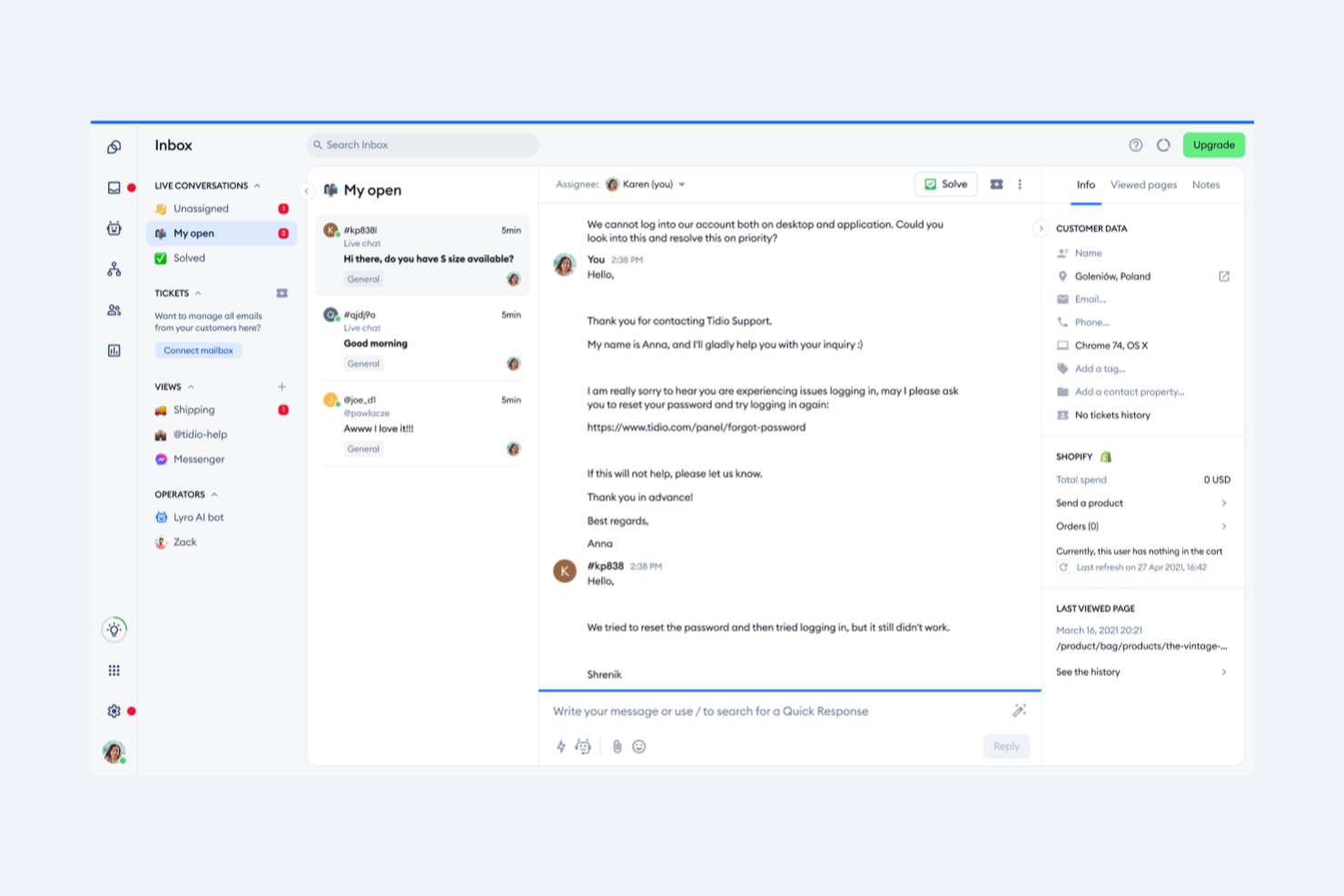
Tidio is a conversation intelligence software that combines AI-driven chatbots and live chat tools to help you manage customer interactions more effectively. The platform can automate responses, provide personalized recommendations, and deliver insights into customer behavior so you can optimize support and engagement across multiple channels.
Why I picked Tidio: I chose Tidio because of its Lyro AI Agent, which uses natural language processing (NLP) to handle routine inquiries, recommend products, and even resolve email-based tickets. This capability reduces the load on your support team and ensures that customers receive fast, accurate responses. I also liked its automation flows, which let you set up engagement strategies for lead capture and customer support without needing to code.
Tidio Standout Features and Integrations
Standout features include real-time visitor tracking to help you identify engagement opportunities, customizable chatbots that can be tailored to your brand’s voice, and analytics that highlight customer behavior trends and support efficiency.
Integrations include Shopify, WordPress, Squarespace, WIX, Adobe Commerce, Shopware, BigCommerce, PrestaShop, Ecwid by Lightspeed, Weebly, WooCommerce, and OpenCart.
Pros and Cons
Pros:
- Real-time visitor tracking
- Multi-channel support capabilities
- Customizable chatbots for branding
Cons:
- Occasional mobile app limitations
- Limited free plan features

Best for merging live coaching with AI insights
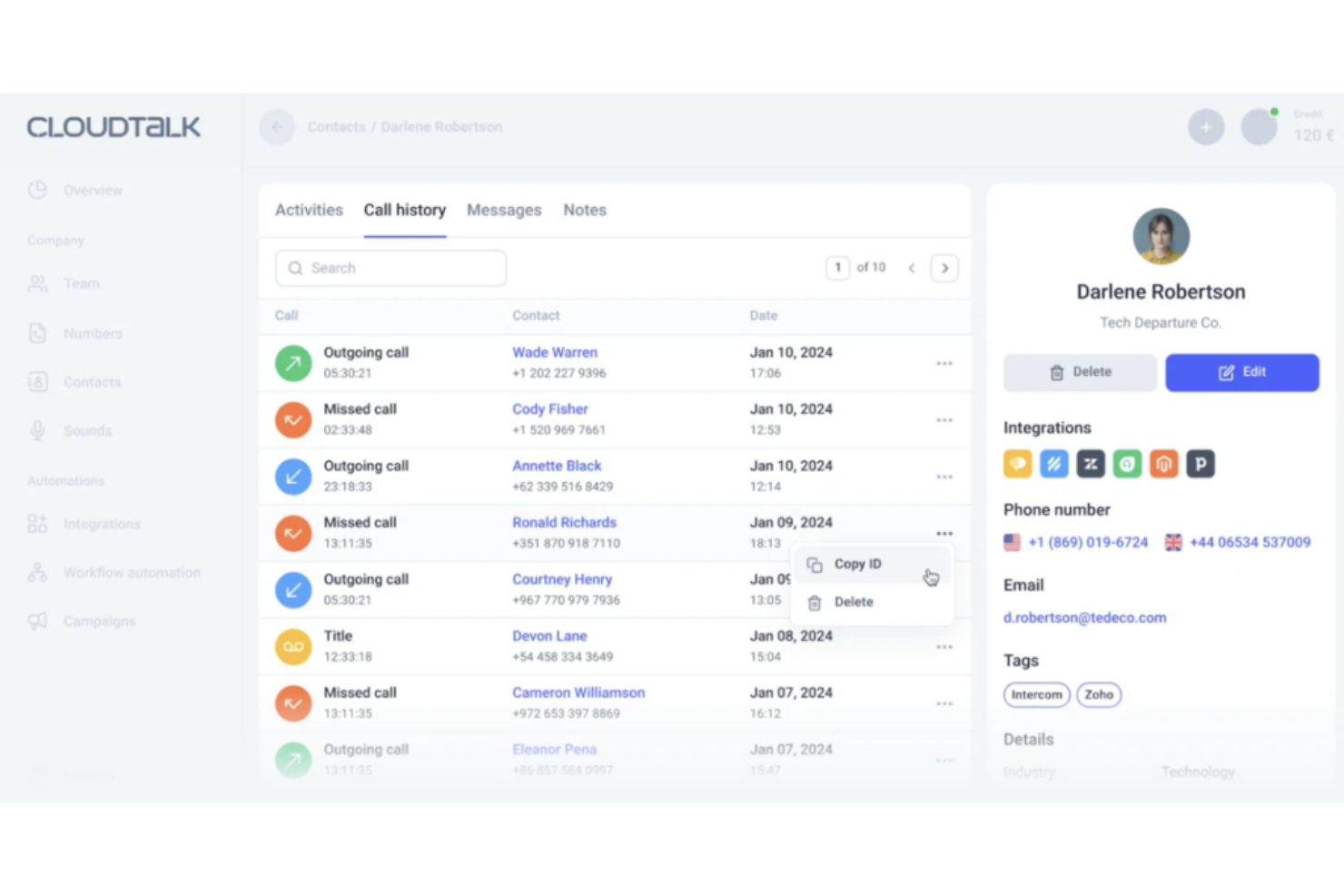
CloudTalk is a calling platform that combines global telephony with built-in AI conversation intelligence to help teams understand what happens on every call.
Why I picked CloudTalk: I picked CloudTalk because its AI tools turn calls into data you can act on. It auto-generates summaries, key topics, sentiment, and notes from each conversation, so your team doesn’t waste time reviewing every recording. Managers can track talk time, listener ratio, and call outcomes through dashboards, helping you see which agents excel and where calls slip. Also, the live coaching tools (listen, whisper, barge) let you step in when a call needs steering, which means you can improve conversations as they happen.
Standout features & integrations:
Features include sentiment analysis, which highlights whether a call tone was positive, neutral, or negative, giving you quick cues about customer satisfaction. Transcript search also lets you find calls by keywords or topics, making it easier to identify patterns or specific issues across your call history.
Integrations include HubSpot, Pipedrive, Zoho CRM, Salesforce, MS Dynamics, OdooCRM, Intercom, Zendesk, Salesloft, Outreach, Bullhorn, and Monday.com.
Pros and Cons
Pros:
- AI summaries reduce manual reporting time
- Live monitoring helps improve team coaching
- Global coverage in 160+ countries
Cons:
- Integration setup can take time
- Voice quality may vary by region

Salesken
Best for trend analysis in sales calls
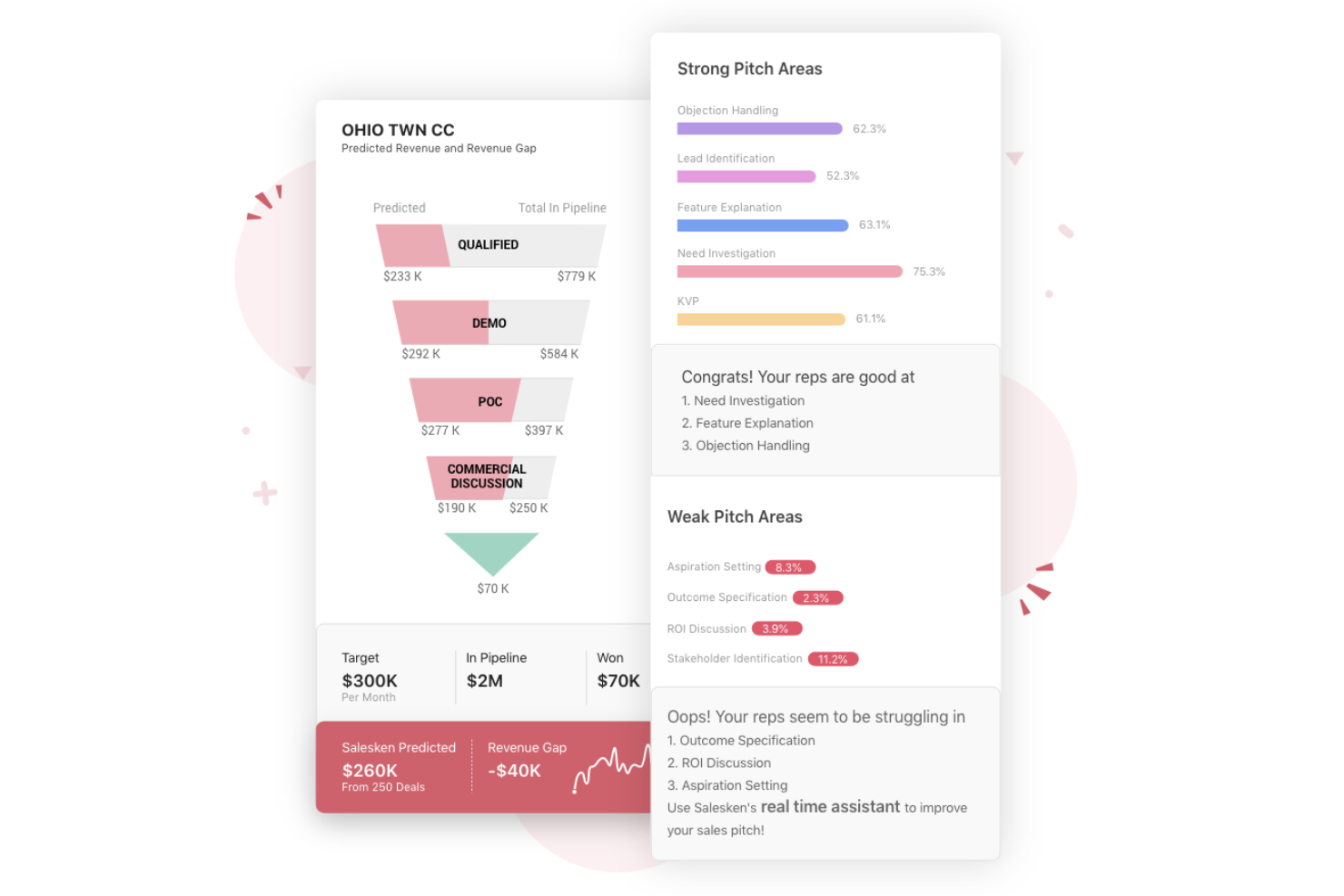
Salesken is an AI-powered conversation intelligence platform that improves sales performance for teams in high-velocity environments. It captures, transcribes, and analyzes sales conversations—helping reps respond smarter, managers coach faster, and leaders gain visibility into what drives revenue.
Why I picked Salesken: Salesken stands out for its ability to deliver real-time coaching during live calls, guiding sales reps through key moments with contextual prompts and suggestions. Its blend of sentiment analysis, AI-driven call reviews, and automated scoring offers a clear path to improve conversion rates and shorten sales cycles—without adding manual oversight or complexity.
Standout features & integrations:
Features include real-time conversation prompts, sentiment and intent analysis, AI-driven call reviews, and CRM-integrated performance tracking—helping teams refine messaging and uncover customer needs in the moment.
Integrations include Salesforce, HubSpot, Zoho CRM, Pipedrive, Freshsales, Microsoft Dynamics 365, Slack, Google Workspace, Microsoft Teams, and Zendesk.
Pros and Cons
Pros:
- Provides valuable insights into effective sales strategies.
- Machine learning to analyze calls and identify areas for improvement.
- Enhances sales team performance through improved call quality and lead generation.
Cons:
- There are limited customization options for normal and video calls.
- Some users have experienced occasional network issues, which were resolved.

Gong
Best for training your own AI

Gong is a revenue intelligence platform that captures all customer interactions across every channel with conversation intelligence in multiple languages. You can use this platform to get more than just call and chat summaries. Gong provides critical insights, including customer pain points, outcomes, and next steps so you can improve win rates throughout your entire organization.
Why I picked Gong: The thing that caught my eye about Gong was that they offer the first user-trainable AI. Customize your AI models to ensure they’re unique to your business with various factors, including your industry, company size, or geography. Gong also features over 40 AI models to help you experiment with the best configuration to get data-driven insights.
Gong Standout Features and Integrations
Standout features include context tracking instead of keyword tracking to measure the success of strategic initiatives and AI-powered deal warnings and forecasting for more accurate predictions.
Integrations include Apollo.io, Cogism, Google Workspaces, HubSpot CRM, LeadiQ, Microsoft Teams, Salesforce Sales Cloud, Slack, Snowflake, and Zoom.
Pros and Cons
Pros:
- Robust performance reporting and metrics tracking
- High engagement from sales reps
- Easy to read the dashboard
Cons:
- Pricing is a little high for smaller businesses
- Onboarding is mostly self-service

Best for spreading winning behaviors to improve team performance

This platform is a learning board with integrated conversation intelligence that helps your sales leaders track key learning skills, provide personalized training for better sales performance, and connect to other training tools. Mindtickle focuses on providing a single place for content, training, and coaching with robust reporting and analytics capabilities.
Why I picked Mindtickle: I chose this platform for my list because of the way it can help you spread winning behaviors at scale. You no longer need to track each customer call individually to identify the best selling behaviors or train every rep personally to ensure these best practices are assimilated. Mindtickle automates tracking and training for you to streamline pain point resolution.
Mindtickle Standout Features and Integrations
Standout features include AI-driven coaching and training that reinforces skills-based learning based on personalized feedback, as well as automated capture, scoring, and analysis of buyer interactions to identify essential deal risks and buying behaviors.
Integrations include ActiveDirectory, BambooHR, Box, Dropbox, Khan Academy, Mediafly, Okta, Salesforce Sales Cloud, YouTube, and Workday.
Pros and Cons
Pros:
- Accessible customer support team and training blogs
- Lots of out of the box templates
- Consistent updates with new features
Cons:
- Limited analytics capabilities on the platform
- Blogs don’t cover advanced training

Best for identifying and resolving human performance problems
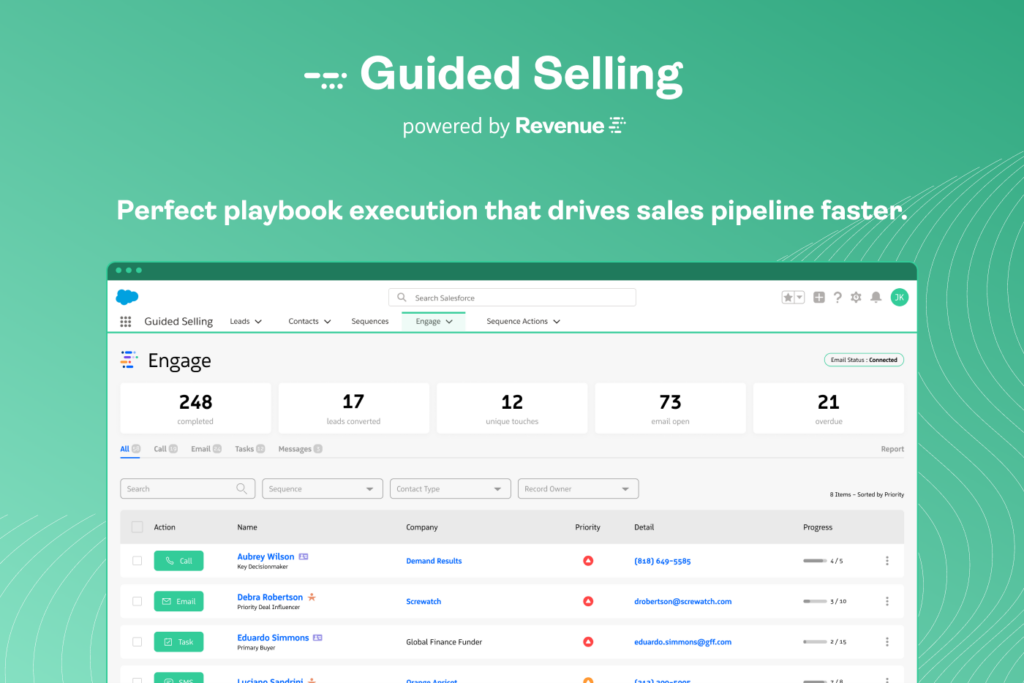
This cloud-based sales engagement solution was designed to help Salesforce users identify revenue channels, manage leads, and analyze performance. With the addition of conversation intelligence, you can use Revenue.io to identify and improve sales rep behavior to ensure more wins and deal closes through real-time recommendations and coaching.
Why I picked Revenue.io: The thing I like about this platform is that it focuses on identifying major breakdowns in your team’s selling behavior, including knowing who to contact and when, how to have effective conversations, wasting time on follow-up emails, taking too long to ramp, and not engaging with new leads fast enough. Revenue.io offers specific tools to address each pain point.
Revenue.io Standout Features and Integrations
Standout features include automated post-conversation email follow-ups written by generative AI and AI sales coaching that helps you scale training with fewer managers.
Integrations include D&B, Five9, Gmail, Google Chrome, Microsoft Outlook, Microsoft Teams, Nylas, Salesforce Sales Cloud, Twilio, and Zoom.
Pros and Cons
Pros:
- Editing workflow on the fly is simple
- Quick to implement
- Extremely easy to customize and configure
Cons:
- Canned reports are not customizable
- Dashboard needs some work
CallRail
Best for accurate sentiment analysis
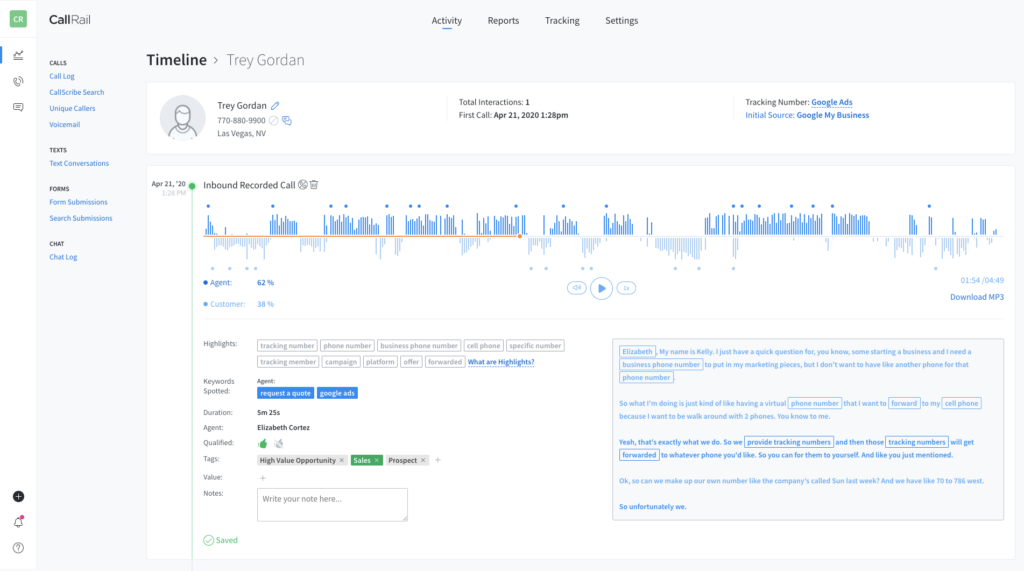
CallRail is a marketing analytics and communication software that’s designed to deliver real-time insights through conversation intelligence and other AI tools. You can use this platform to save at-risk customers, identify training and coaching opportunities, fine-tune marketing strategies, and make more data-driven decisions throughout the customer journey.
Why I picked CallRail: One feature that stood out to me from this platform is the sentiment analysis provided by the Premium Conversation Intelligence. Trained on over 650,000 hours of voice calls and data, this tool can provide an overall sentiment alongside the summary of the conversation and highlight calls that require additional action right away.
CallRail Standout Features and Integrations
Standout features include real-time conversation insights to pinpoint calls and customers that require extra support and call scoring that qualifies leads and tags conversations so your reps know what to do next.
Integrations include ActiveCampaign, Adobe Analytics, AMP, Clio, Constant Contact, DashThis, Domo, Facebook, Google Analytics, and HubSpot CRM.
Pros and Cons
Pros:
- Intuitive navigation and user interface
- Easily scalable for small and large organizations
- The system is very easy to set up
Cons:
- No “whisper” coaching feature available
- Two different mobile apps with unique functionalities

Grain
Best for providing AI recording and tools for more than just sales teams
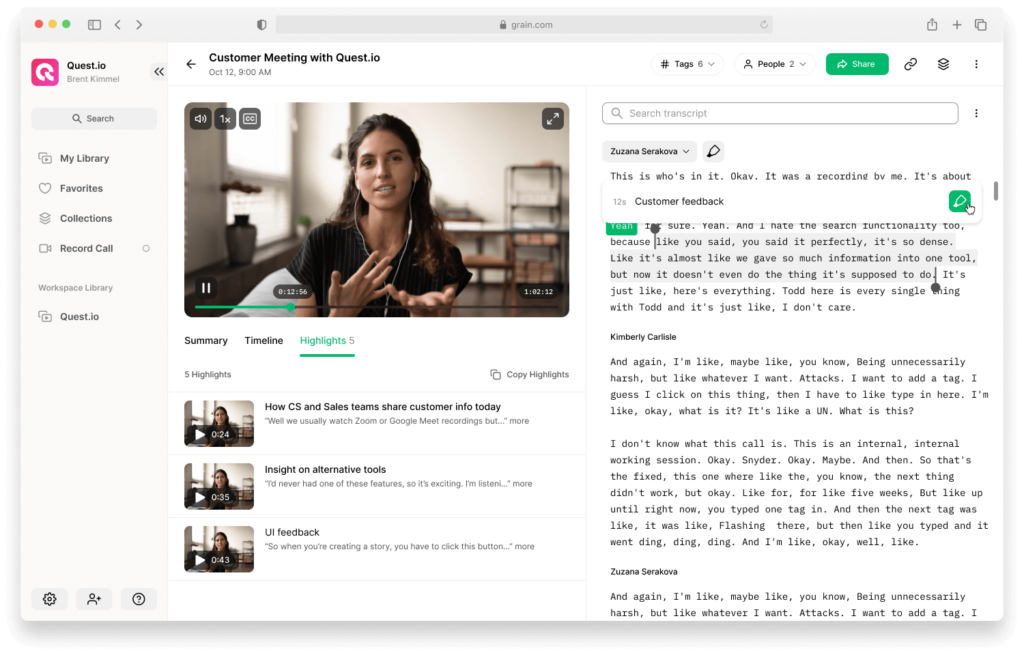
As an AI meeting recording software, Grain focuses on helping every one of your teams have more efficient meetings and follow-ups. This platform can connect with any video conference calling platform to automate record-keeping, note-taking, and insight capture for in-house meetings and client conversations.
Why I picked Grain: This platform snagged a spot on my list due to its accessibility to everyone. While your sales team can use Grain during customer calls, it’s also an essential tool for helping streamline product development, customer success, and user research workflows through automation and AI tools.
Grain Standout Features and Integrations
Standout features include meeting recording that highlights all the key moments from the video call and native integrations with communication apps that make it easier to share clips from calls.
Integrations include Asana, HubSpot, Notion, Productboard, Salesforce Sales Cloud, Slack, and Zapier.
Pros and Cons
Pros:
- Consistently adding new features
- Easy to learn and use
- Simple to set up
Cons:
- Limited filtering while searching calls
- Free plan offers very limited features
Fathom
Best for comprehensive tracking of business performance
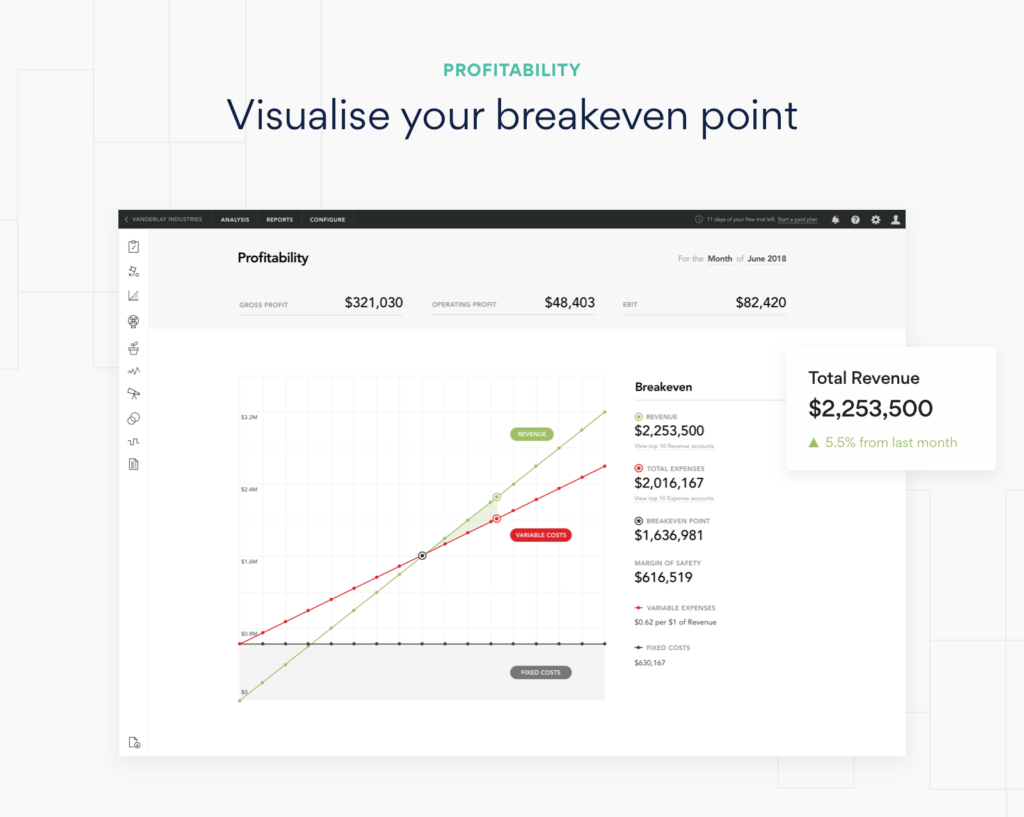
Fathom was built to be much more than a conversation intelligence platform, as it focuses on financial analysis and reporting. With Fathom, you can monitor trends, identify opportunities for growth, and assess overall business performance by importing data directly from your other apps.
Why I picked Fathom: Even though it doesn’t focus exclusively on conversation intelligence, Fathom made my list because it has robust analytics and alerts for every aspect of your organization. Use the KPI builder to customize metrics for your team and set up AI-driven alerts to notify your reps and managers of missed opportunities and achievements.
Fathom Standout Features and Integrations
Standout features include tracking for non-financial KPIs that you can monitor along financial metrics and analytics for any time period with custom metric comparisons.
Integrations include blogtastic, Infoset, Loom, MYOB Business, Microsoft Excel, QuickBooks Online, Xero, Yodek, and Zoom.
Pros and Cons
Pros:
- Financial tools with conversation intelligence
- Automates note-taking and sharing post meeting
- Automated call recording that reminds and notifies you it’s there
Cons:
- Hard to customize
- Heavy focus on financial analysis

Sybill
Best for AI-driven sales insights
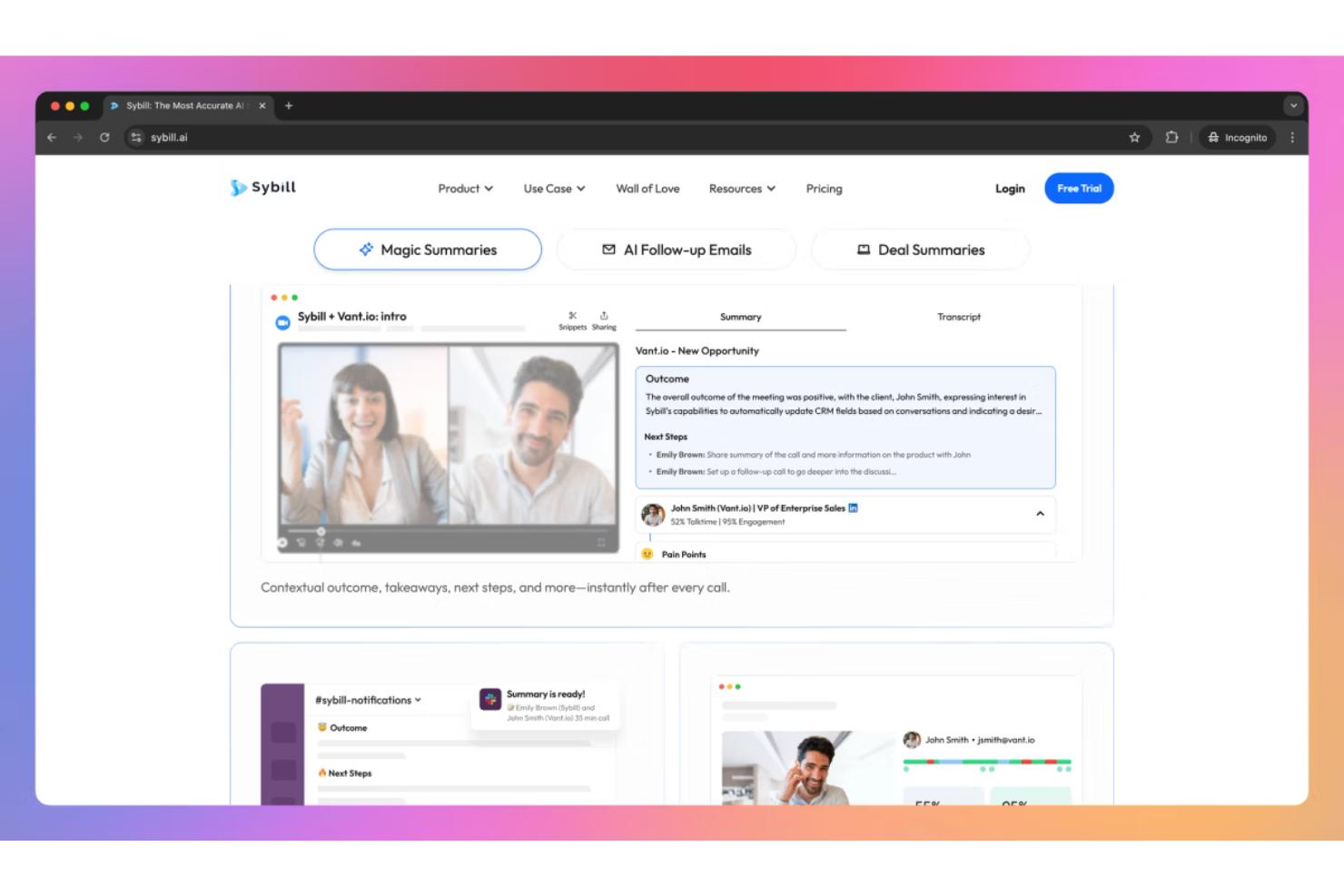
Sybill is an AI-powered conversation intelligence tool that transforms sales calls into actionable insights for revenue teams. It captures, analyzes, and summarizes customer interactions—helping account executives, managers, and customer success teams focus on closing deals instead of handling manual CRM updates.
Why I picked Sybill: Sybill stands out for its ability to convert every sales conversation into a data-backed performance advantage. Its AI sales assistant automatically handles administrative tasks like CRM autofill and email follow-ups while providing real-time deal insights and coaching prompts. This makes it especially useful for teams aiming to scale pipeline management, improve sales productivity, and reduce the risk of deal slippage.
Standout features & integrations:
Features include AI-driven transcription and analysis, automatic meeting summaries, real-time coaching, deal inspection, CRM autofill, and multi-language support for global teams. These capabilities help sales leaders gain complete visibility into team performance and buyer sentiment.
Integrations include HubSpot, Salesforce, Zoho, Zoom, MS Teams, Google Meet, Slack, Gmail, Outlook, and Webex.
Pros and Cons
Pros:
- Performance coaching features that help with team improvement and sales strategy refinement.
- Comprehensive insights into deals and buyer behavior, enhancing decision-making processes.
- Automates administrative tasks, saving sales teams time and allowing them to focus on selling.
Cons:
- Business-tier subscription costs can be prohibitive for smaller businesses or startups.
- The dependence on AI may lead to inaccuracies in understanding the nuances of sales conversations.
Other Conversation Intelligence Software
Even though my list of conversation intelligence software is already pretty comprehensive, I couldn’t complete this blog without a few additional callouts. Check out these runners up to discover a few other options that could be the right fit:
- Jiminny
For fast-tracking team development for new hires and veterans
- Allego
For AI-driven transcription
- Avoma
For AI-powered coaching recommendations
- HubSpot Sales Hub
For AI-powered conversation insights
- Chorus by ZoomInfo
For leveraging proprietary machine learning
- Clari Copilot
For timely actionable alerts from a proactive AI
- Convin.ai
For eliminating manual QA processes with automated call QA
- Meetgeek.ai
For enhancing meeting productivity with AI-generated summaries
- Quidget
For voice-to-text transcription
- Enthu.AI
For evaluation management that rates calls and gives feedback
- Exec
With AI-driven roleplays
- Salesloft
AI-powered workflow revenue platform to guide your go-to-market team in the right direction
- Balto
For real-time guidance that shows agents what to say and measures what's working and what's not
- Abstrakt Software
For AI-driven call scoring, as well as feedback forms for your representatives


Related Conversation Intelligence Software Reviews
If you still haven't found what you're looking for here, check out these tools closely related to conversation intelligence software that we've tested and evaluated.
- Sales Software
- Lead Management Software
- Business Intelligence Software
- Contract Management Software
- Revenue Management System
- CPQ Software
How I Evaluate Conversation Intelligence Software
I evaluate conversation intelligence tools in two layers: the core capabilities a platform must have—like call transcription and AI deal insights—and what separates the best from the rest.
Core Functionality (Table Stakes For This List)
When I'm selecting tools for my list, I rank each one on a scale from 0 (does not offer the functionality) to 5 (excels in this area) for each core functionality listed below. Then, I calculate the tool's total score into a percentage. Each tool needs to achieve a minimum total score of 65% to be considered for inclusion.
- Call Recording & Transcription: I check whether the platform auto-captures calls across channels—video, dialer, and conferencing—and produces accurate, speaker-separated transcripts.
- AI Conversation Analysis: Beyond basic keyword spotting, I look for AI that detects topics, sentiment shifts, objection patterns, and talk-to-listen ratios across rep conversations.
- Coaching & Performance Insights: Scorecards, call commenting, and rep benchmarking matter here—I evaluate how well a tool helps managers run structured call reviews with their teams.
- Deal & Pipeline Intelligence: Each tool should surface deal risks, engagement gaps, and buyer signals from conversations and roll them up into opportunity-level views.
- CRM & Revenue Stack Integrations: I look at how deeply conversation data syncs with CRMs like Salesforce and HubSpot, including custom field mapping and activity logging.
- Searchable Conversation Library: A good library lets you search transcripts by keyword or topic, clip key moments, and build playlists that new hires can learn from during onboarding.
Once I have a list of tools that meet this criteria, I consider what sets each platform apart.
Differentiating Factors (What Sets Vendors Apart)
Here's how I compare and contrast different vendors:
Standout Features
Real-time call guidance is a big differentiator. I look for tools that surface battle cards and objection prompts while a rep is still mid-conversation. Forecasting and revenue analytics also matter; platforms that feed conversation signals into pipeline models give RevOps leaders data they can't pull from CRM fields alone. I also evaluate whether a tool aggregates voice-of-customer themes across calls, surfacing churn risks and competitive trends for cross-functional teams.
Beyond Features
Security and compliance weigh heavily here because conversation intelligence tools record real customer interactions. I check for SOC 2 Type II certification, PII redaction, and recording consent management. Implementation speed also matters—a platform with pre-built scorecards and trackers gets a RevOps team productive faster than one that requires weeks of custom configuration. Pricing transparency is another factor I evaluate, especially whether vendors publish clear per-seat or tiered models and whether minimum seat requirements fit smaller teams.
How To Choose Conversation Intelligence Software
With so many different conversation intelligence software solutions available, it can be challenging to make decisions on what tool is going to be the best fit for your needs.
As you're shortlisting, trialing, and selecting conversation intelligence software, consider the following:
- What problem are you trying to solve - Start by identifying the conversation intelligence software feature gap you're trying to fill to clarify the features and functionality the tool needs to provide.
- Who will need to use it - To evaluate cost and requirements, consider who'll be using the software and how many licenses you'll need. You'll need to evaluate if it'll just be the revenue operation leaders or the whole organization that will require access. When that's clear, it's worth considering if you're prioritizing ease of use for all or speed for your conversation intelligence software power users.
- What other tools it needs to work with - Clarify what tools you're replacing, what tools are staying, and the tools you'll need to integrate with, such as accounting, CRM, or HR software. You'll need to decide if the tools will need to integrate together or if you can replace multiple tools with one consolidated conversation intelligence software.
- What outcomes are important - Consider the result that the software needs to deliver to be considered a success. Consider what capability you want to gain or what you want to improve, and how you will be measuring success. For example, an outcome could be the ability to get greater visibility into performance. You could compare conversation intelligence software features until you’re blue in the face but if you aren’t thinking about the outcomes you want to drive, you could be wasting a lot of valuable time.
- How it would work within your organization - Consider the software selection alongside your workflows and delivery methodology. Evaluate what's working well and the areas that are causing issues that need to be addressed. Remember every business is different — don’t assume that because a tool is popular that it'll work in your organization.
Trends In Conversation Intelligence Software For 2026
Sales management software continues to evolve rapidly, reflecting broader technological advancements and changing market needs. These developments are shaping how organizations manage their sales processes and revenue operations, pushing towards more integrated, intelligent, and user-centric solutions. Below is a summary of the key trends based on recent product updates, press releases, and release logs from leading sales management software providers:
Integration and Automation:
- Enhanced CRM Integration: Seamless integration with CRM platforms is increasingly sophisticated, ensuring all customer data and interactions are centrally accessible and actionable.
- Advanced Workflow Automation: Sales management software is focusing on automating complex sales processes and workflows, minimizing manual tasks, and enhancing efficiency.
Data-Driven Decision Making:
- Predictive Analytics: There is a significant emphasis on leveraging machine learning and AI for predictive analytics, providing sales teams with foresight into trends, behaviors, and potential outcomes.
- Enhanced Data Visualization: Software is offering more advanced data visualization tools, making it easier for teams to interpret data and gain actionable insights.
Emerging Technologies:
- AI-Powered Insights: Novel features include AI-driven recommendations and insights, automating data analysis to guide sales strategies and decisions.
- Blockchain for Data Security: Some platforms are beginning to incorporate blockchain technology, offering unparalleled data security and transparency in sales transactions.
Key Features in Demand:
- Mobile Accessibility: With sales teams increasingly mobile, robust mobile features are essential, ensuring access to key functionalities anytime, anywhere.
- Omnichannel Capabilities: The ability to manage and analyze sales interactions across various channels is highly sought after, reflecting the omnichannel nature of modern sales.
Declining Features:
- Standalone Tools: There is a decreasing interest in standalone sales management solutions, as integrated systems offering end-to-end management capabilities become the norm.
- Basic Reporting: Simple reporting features are less in demand, with advanced analytics and customized reporting becoming standard expectations.
Sales management software is characterized by a push towards more integrated, intelligent, and user-centric solutions. Sales leaders are looking for software that not only streamlines operations and provides deeper insights but also adapts to the evolving sales environment, enhancing strategic decision-making and driving revenue growth.
What Is Conversation Intelligence Software?
Conversation intelligence software is a technology that analyzes spoken or written communication, particularly in sales and customer service interactions. It records, transcribes, and examines conversations to extract valuable insights, using artificial intelligence and machine learning. This software identifies key phrases, analyzes sentiment, and interprets customer behavior, turning interactions into actionable data for businesses.
The benefits of conversation intelligence software include a deeper understanding of customer needs and preferences, which helps in refining sales strategies and improving customer service. It automates the analysis of conversational data, leading to increased efficiency in customer interaction management. The insights gained enable data-driven decision-making, enhancing the personalization of customer experiences. Additionally, it offers valuable feedback for training sales and customer service teams, ultimately leading to better communication quality and more effective customer engagement.
Features of Conversation Intelligence Software
When selecting conversation intelligence features, keep an eye out for the following key features:
- Call recording and transcription: This feature automatically records and transcribes calls, so you have accurate, searchable records of every conversation. It's a lifesaver when you need to revisit what was said or share call details with your team.
- Real-time conversation analytics: These analytics break down your conversations as they happen, tracking things like talk-to-listen ratios, keyword mentions, and sentiment. You'll spot trends, coach your team, and identify opportunities while the details are still fresh.
- Keyword and topic tracking: You can set up custom keywords or topics to monitor across all your calls. This makes it easy to find relevant conversations and understand which issues or products come up most often—think of it as a shortcut to your customers’ true interests.
- Speaker identification: This feature automatically tags who said what during every call. That means you can quickly see how much each party contributed, making follow-up and coaching much more targeted and meaningful.
- CRM integration: Sync conversation data directly with your CRM platform, so every insight is in context. No more flipping between systems or losing valuable notes—your customer profiles stay up-to-date and action-ready.
- Performance dashboards: These dashboards visualize key metrics like call outcomes, rep performance, and trending topics. It’s a quick way to get the big picture and spot where your team is crushing it (or could use a little help).
- Automated note taking: Stop scrambling to jot down notes during calls. This feature generates concise summaries and action items, so you focus on the conversation and never miss a follow-up task.
Common Conversation Intelligence Features AI Features
Beyond the standard conversation intelligence features listed above, many of these solutions are incorporating AI with features like:
- Automatic topic detection: AI listens for topics in real time, surfacing themes and concerns without you manually tagging or searching. You’ll be the first to know about shifting market needs or common customer objections.
- AI-powered sentiment analysis: This digs into the emotional tone of conversations, highlighting positive or negative cues you might otherwise miss. It’s a shortcut to understanding how your reps are connecting with customers.
- Conversation scoring: AI evaluates each call for key behaviors, engagement quality, and adherence to best practices, making coaching more objective—and a lot less guesswork.
- Automated coaching insights: Instead of plowing through hours of calls, let AI spotlight coaching moments, skill gaps, or best-practice examples your team can use to level up.
- Predictive outcome analysis: By looking at past calls and outcomes, AI models predict which current deals are likely to close or stall. That’s your early warning system to prioritize your efforts and improve forecasting.
Benefits Of Conversation Intelligence Software
By providing a deep understanding of customer conversations, conversation intelligence software enables businesses to optimize their sales strategies, improve training and coaching, and ultimately drive growth. Here are five primary benefits of implementing conversation intelligence software:
- Enhanced Sales Strategy: Provides detailed analytics on customer interactions, helping to refine sales tactics and approaches.
- This benefit allows teams to identify what works best in customer conversations, tailoring their strategies to improve engagement and conversion rates.
- Improved Training and Coaching: Pinpoints specific areas where sales representatives can improve, based on real conversation data.
- Utilizing actual interaction insights for training enables more targeted coaching, helping sales reps enhance their communication skills and overall performance.
- Increased Customer Satisfaction: Identifies trends and patterns in customer feedback, enabling proactive service improvements.
- By understanding customer needs and pain points more clearly, organizations can adapt their offerings and service strategies to increase customer loyalty and satisfaction.
- Data-Driven Decision Making: Transforms conversation data into actionable intelligence, informing strategic decisions across the organization.
- Access to comprehensive conversation analytics supports informed decision-making, helping to align sales and service efforts with customer expectations and market trends.
- Operational Efficiency: Automates the process of gathering and analyzing customer interaction data, saving time and resources.
- Automation not only reduces the manual effort required to review conversations but also speeds up the process of extracting valuable insights, enhancing overall operational efficiency.
Costs & Pricing For Conversation Intelligence Software
Conversation intelligence software offers valuable insights that can enhance sales strategies, improve customer engagement, and drive business growth. Here's an overview of typical plan options and their pricing for conversation intelligence software:
Plan Comparison Table For Conversation Intelligence Software
| Plan Type | Average Price | Common Features Included |
|---|---|---|
| Starter | $50 - $200 per user/month | Basic transcription, keyword tracking, limited analytics |
| Professional | $200 - $500 per user/month | Advanced analytics, CRM integration, extended data storage |
| Enterprise | Custom pricing | Custom integrations, dedicated support, advanced features |
| Free | $0 | Limited features, capped usage, community support |
When considering conversation intelligence software, it's essential to assess which features are most relevant to your business needs and ensure the plan you choose aligns with your strategic goals. Look for a solution that offers scalability, integrates seamlessly with your existing tech stack, and provides actionable insights that can drive your business forward.
Conversation Intelligence Software Frequently Asked Questions
Looking for even more information about conversational AI before making a final decision? Explore some answers to the most frequently asked questions to gain a more comprehensive understanding of these tools.
What are the types of conversation intelligence software?
Conversation intelligence software can be categorized based on its core functionalities and the specific needs it serves within an organization. While these tools generally aim to analyze and derive insights from conversations, their applications can vary significantly. Here are the main types of conversation intelligence software:
Sales Conversation Intelligence: This type of software is designed to analyze sales calls or meetings to improve sales strategies, providing insights into what works well in customer interactions and identifying areas for improvement. It helps sales teams increase their effectiveness and close more deals by offering features like deal tracking, sentiment analysis, and success predictors.
Customer Support Intelligence: Focused on analyzing customer support calls or interactions, this software helps identify common customer issues, assess agent performance, and improve customer satisfaction. It provides valuable insights to enhance support strategies, streamline issue resolution, and boost customer retention.
Marketing Conversation Intelligence: This variant aids marketing teams by analyzing customer interactions across various touchpoints to gauge campaign effectiveness, customer sentiment, and engagement levels. It helps marketers tailor their messaging and strategies to better resonate with the target audience and improve campaign ROI.
Call Center Intelligence: Specifically designed for call centers, this software analyzes a high volume of calls to extract trends, automate quality assurance, and improve agent training. It can identify best practices, compliance risks, and opportunities to enhance caller experiences.
HR and Recruitment Intelligence: In the HR and recruitment context, conversation intelligence software can analyze interviews and meetings to offer insights on candidate experiences, evaluate interviewer performance, and streamline the recruitment process, ensuring a better match between the company and potential hires.
Compliance Monitoring Intelligence: This software focuses on ensuring that conversations comply with legal and company standards, particularly useful in industries with strict regulatory requirements. It can flag non-compliant behavior or language, mitigate risks, and help maintain high ethical standards.
Each type of conversation intelligence software serves a distinct purpose but shares the common goal of extracting actionable insights from spoken or written conversations to inform strategic decisions, improve processes, and enhance outcomes across various organizational functions.
Who uses conversation intelligence software?
Conversational intelligence tools are most useful for organizations with robust sales teams who have frequent customer conversations, but they can also be useful for companies that use chatbots that assist customers on retail websites or with helpdesk concerns.
Some tools also choose to focus on general meeting conversation intelligence to help product teams, marketing teams, and other internal operations review and remember essential moments in their current projects.
What is an example of conversation intelligence?
I have an incredibly famous conversation intelligence tool to provide you with an example: Siri! Any type of voice assistant uses voice recognition to understand consumer questions and provide them with programmed answers. As Siri answers questions, she uses machine learning and natural language processing to gain more insights about what her users want.
Additional Revenue Operations Software
Even if you already have a conversation intelligence software, there could be something else missing from your tech stack. Check out a few other revenue operations essentials that could round out your digital tools:
- Cold Calling Software
- Outbound Call Tracking Software
- Business Intelligence Platforms
- Sales Call Tracking Software
- Sales Coaching Software
- Auto Dialer Software
- Sales Reporting Software
- Sales Management Software
Conclusion
Many of these platforms offer free trials and demos so you can ensure a more comprehensive understanding of their performance. I would recommend narrowing your list to the top two or three and testing them out to see which ones integrate into your current workflow, excite your sales managers, and deliver what you need.
And if you’re on the hunt for more key insights from industry leaders, subscribe to the RevOps newsletter for weekly updates directly to your inbox.