

I 10 migliori software per il monitoraggio delle chiamate in entrata recensiti nel 2026

Miglior elenco ristretto di software per il monitoraggio delle chiamate in entrata


Se ti occupi di gestione dei ricavi, sai che gestire le chiamate in entrata può essere un problema. Le chiamate perse, i problemi di monitoraggio e i dati poco chiari possono costarti delle vendite. È qui che entra in gioco il software per il monitoraggio delle chiamate in entrata. Ti aiuta a gestire le telefonate in modo efficiente, assicurandoti di non perdere mai un potenziale cliente.
Ho esaminato questi strumenti in modo indipendente e il mio obiettivo è offrirti una panoramica imparziale delle migliori opzioni sul mercato. Queste soluzioni possono aiutare il tuo team a sviluppare una gestione più efficace delle chiamate, ottenere informazioni sull'esperienza dei clienti e trovare modi per migliorare le prestazioni di vendita.
In questo articolo troverai le mie migliori scelte di software per il monitoraggio delle chiamate in entrata. Illustrerò ciò che rende unico ciascuno di essi, così potrai trovare quello più adatto alle tue esigenze.
Perché fidarsi dei nostri consigli sui software
Le nostre recensioni riflettono il nostro giudizio indipendente, non un discorso di vendita. Scopri come manteniamo la trasparenza.
Per questa guida, abbiamo valutato gli strumenti attraverso test pratici e ricerche indipendenti, assegnando un punteggio agli strumenti in base ai nostri criteri di selezione.
Le nostre recensioni riflettono il nostro giudizio editoriale umano, non un discorso di vendita.
Riepilogo dei migliori software per il monitoraggio delle chiamate in entrata
Questa tabella comparativa riassume i dettagli sui prezzi delle mie migliori selezioni di software per il monitoraggio delle chiamate in entrata, per aiutarti a trovare quello più adatto al tuo budget e alle esigenze della tua azienda.
| Tool | Best For | Trial Info | Price | ||
|---|---|---|---|---|---|
| 1 | Ideale per campagne pay-per-call | Demo gratuita disponibile | Prezzo su richiesta | Website | |
| 2 | Ideale per la gestione delle chiamate alimentata dall'intelligenza artificiale | Prova gratuita di 14 giorni | Da $25/utente/mese (fatturazione annuale) | Website | |
| 3 | Ideale per strumenti di comunicazione multicanale | Demo gratuita disponibile | A partire da $15/mese (fatturato annualmente) | Website | |
| 4 | Ideale per la gestione dei lead e l'attribuzione del marketing | Prova gratuita di 14 giorni + demo gratuita disponibile | Da $50/mese (fatturazione annuale) | Website | |
| 5 | Ideale per soluzioni di contact center basate su cloud | Demo gratuita disponibile | Da $18/utente/mese | Website | |
| 6 | Ideale per il tracciamento integrato delle chiamate | Demo gratuita disponibile | Da $65/mese | Website | |
| 7 | Ideale per il tracciamento delle chiamate integrato con il CRM | Prova gratuita di 30 giorni + piano gratuito disponibile | Da $25/utente/mese (fatturazione annuale) | Website | |
| 8 | Ideale per intelligenza conversazionale alimentata da IA | Demo gratuita | Da $1000/mese | Website | |
| 9 | Ideale per analisi delle chiamate integrate basate su AI | Demo gratuita disponibile | Da $85/utente/mese | Website | |
| 10 | Ideale per tracciare e gestire i lead di marketing | Prova gratuita di 14 giorni | A partire da $30/mese (fatturazione annuale) | Website |
Recensioni dei migliori software per il monitoraggio delle chiamate in entrata
Di seguito sono riportati i miei riepiloghi dettagliati dei migliori software per il monitoraggio delle chiamate in entrata inclusi nel mio elenco ristretto. Le mie recensioni offrono un’analisi approfondita delle funzionalità principali, dei pro e dei contro, delle integrazioni e dei casi d’uso ideali di ciascuno strumento, per aiutarti a trovare quello più adatto a te.
Phonexa
Ideale per campagne pay-per-call
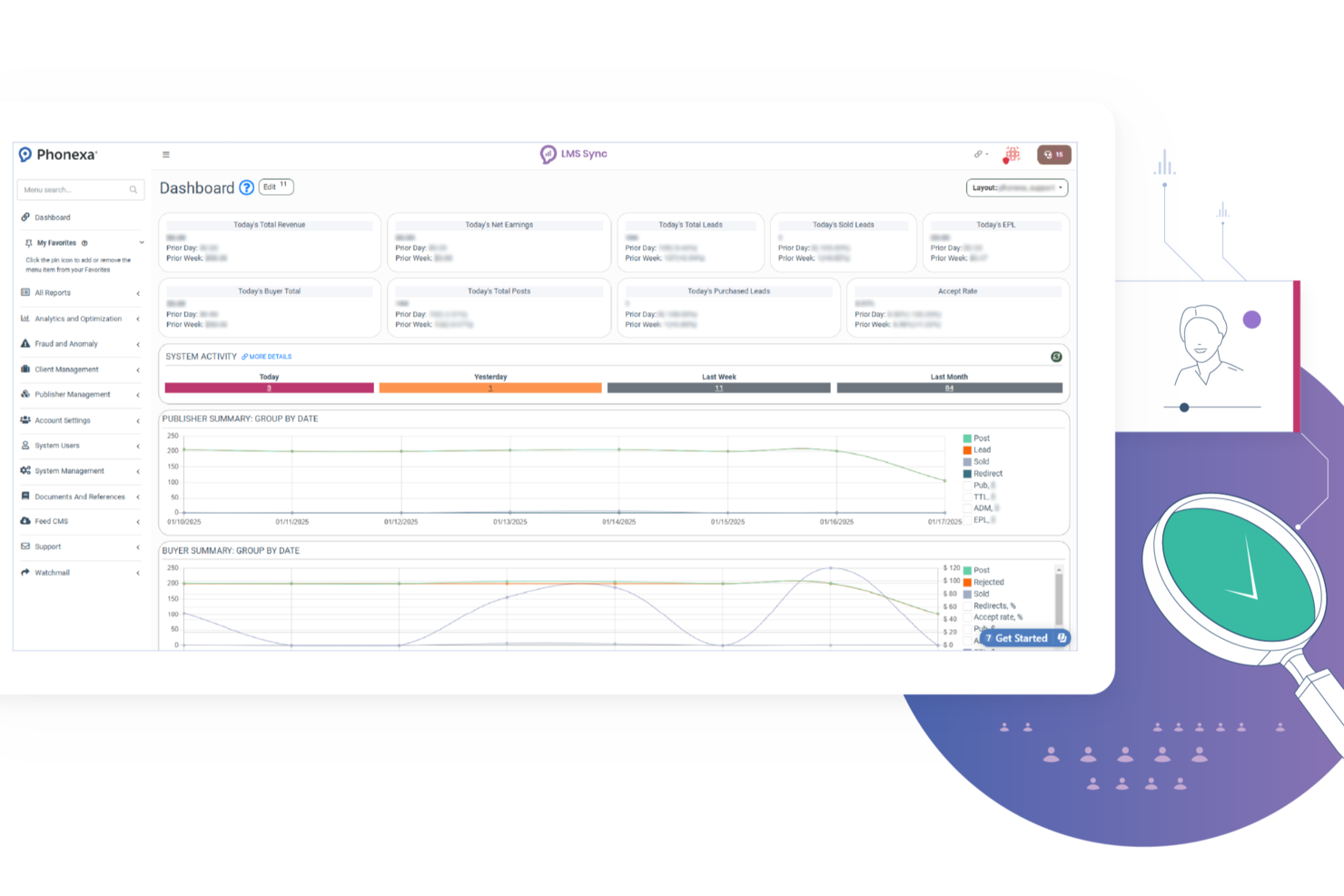
Phonexa è una piattaforma software per il tracciamento delle chiamate in entrata progettata per team di marketing, network di affiliazione e aziende di lead generation che devono tracciare, instradare e gestire grandi volumi di chiamate in entrata. Aiuta a risolvere la sfida di collegare le prestazioni delle chiamate alle campagne, supportando anche la distribuzione dei lead e la gestione dei partner in un unico sistema. La sua combinazione di analisi delle chiamate, flussi di chiamata personalizzabili e strumenti di gestione multi-utente la rende particolarmente adatta a team orientati alle performance.
Per chi è più indicato Phonexa?
Phonexa è ideale per team di marketing e agenzie che necessitano di un tracciamento avanzato delle chiamate e della gestione dei lead per campagne multicanale.
Perché ho scelto Phonexa
Ho scelto Phonexa perché è particolarmente adatto alle campagne pay-per-call. Il tuo team può instradare le chiamate in entrata utilizzando flussi multi-step, menu IVR e regole basate sul tempo tramite il builder di flussi drag-and-drop. Apprezzo anche la possibilità di assegnare le chiamate in base alle competenze degli agenti o alla fonte della campagna, il che aiuta a migliorare la distribuzione dei lead e la gestione delle risposte. Queste funzioni facilitano il controllo su come le chiamate vengono qualificate, instradate e consegnate all'interno delle campagne.
Funzionalità principali di Phonexa
Altre funzionalità di Phonexa sono pensate per i team che vogliono un maggiore controllo sul tracciamento delle chiamate in entrata e sulla gestione dei lead:
- Dashboard di gestione dei lead: Organizza, valuta e instrada i lead provenienti da più canali in un'unica interfaccia.
- Portali partner white label: Fornisci ai partner l'accesso a dashboard personalizzate e dati sulle performance in tempo reale.
- Strumenti di prevenzione delle frodi: Rileva attività sospette sulle chiamate e aiuta a ridurre il traffico fraudolento.
- Report delle fonti delle chiamate: Mostra da dove provengono le chiamate in entrata per supportare l'analisi delle performance.
Integrazioni di Phonexa
Le integrazioni includono Salesforce, HubSpot, Google Analytics, Zoho CRM, Mailchimp, SendGrid, Stripe, PayPal e Twilio. Phonexa elenca anche altre integrazioni native, ma queste sono alcune delle opzioni più chiaramente indicate dai fornitori.
Pros and Cons
Pros:
- Traccia chiamate in entrata, lead e attribuzione in un'unica piattaforma
- Fornisce report in tempo reale per acquirenti, editori e campagne
- Supporta l'instradamento flessibile delle chiamate con controlli di distribuzione ping-post
Cons:
- L'interfaccia risulta confusa a causa della vasta gamma di funzionalità della piattaforma
- Le tariffe di configurazione e i prezzi in base all'utilizzo possono diventare rapidamente onerosi
New Product Updates from Phonexa

Phonexa Expands Automated Traffic and Offer Routing
Phonexa adds tag-based publisher distribution, fallback bidding for Ping Post Calls, and Logic Links for smarter offer routing. These updates reduce manual traffic management and help route leads and calls to better available options. For more information, visit Phonexa’s official site.
 .
.
Ideale per la gestione delle chiamate alimentata dall'intelligenza artificiale
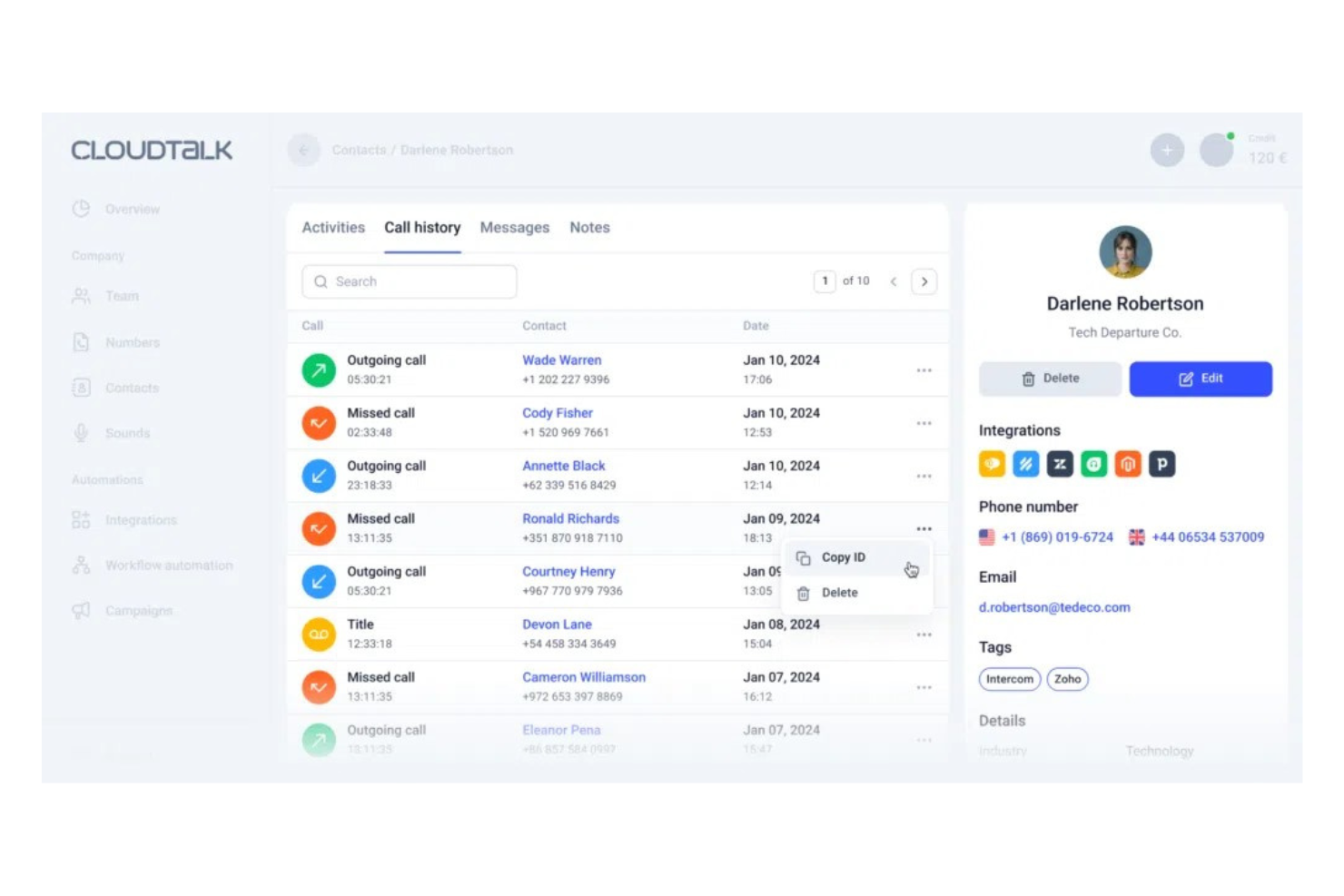
CloudTalk è una piattaforma di gestione delle chiamate pensata per le aziende che desiderano migliorare le proprie capacità di comunicazione. Supporta sia le chiamate in entrata che in uscita, offrendo strumenti per ottimizzare le interazioni con i clienti e le performance di vendita.
Perché ho scelto CloudTalk: Questo strumento sfrutta l'intelligenza artificiale per gestire e analizzare le chiamate, risultando ideale per le aziende che necessitano di una gestione efficiente delle chiamate. La distribuzione automatica delle chiamate è progettata affinché le chiamate raggiungano rapidamente l'agente giusto. Il monitoraggio delle chiamate in tempo reale permette ai supervisori di intervenire quando necessario, mentre l'analisi basata su AI offre approfondimenti sulle prestazioni delle chiamate e sul comportamento dei clienti, aiutando il tuo team a prendere decisioni basate sui dati.
Caratteristiche principali e integrazioni:
Funzionalità includono la gestione delle code per gestire efficacemente grandi volumi di chiamate e la trascrizione delle segreterie telefoniche, che converte i messaggi vocali in testo per far risparmiare tempo al tuo team. La funzione di etichettatura delle chiamate permette di categorizzare le chiamate per una migliore organizzazione e analisi.
Integrazioni includono Salesforce, HubSpot, Pipedrive, Zendesk, Intercom, Freshdesk, Zoho CRM, Shopify, Microsoft Dynamics 365 e altre ancora.
Pros and Cons
Pros:
- Analisi delle chiamate basata su AI
- Distribuzione automatica delle chiamate
- Trascrizione dei messaggi vocali
Cons:
- Può avere una curva di apprendimento ripida
- Assistenza clienti limitata

Ideale per strumenti di comunicazione multicanale
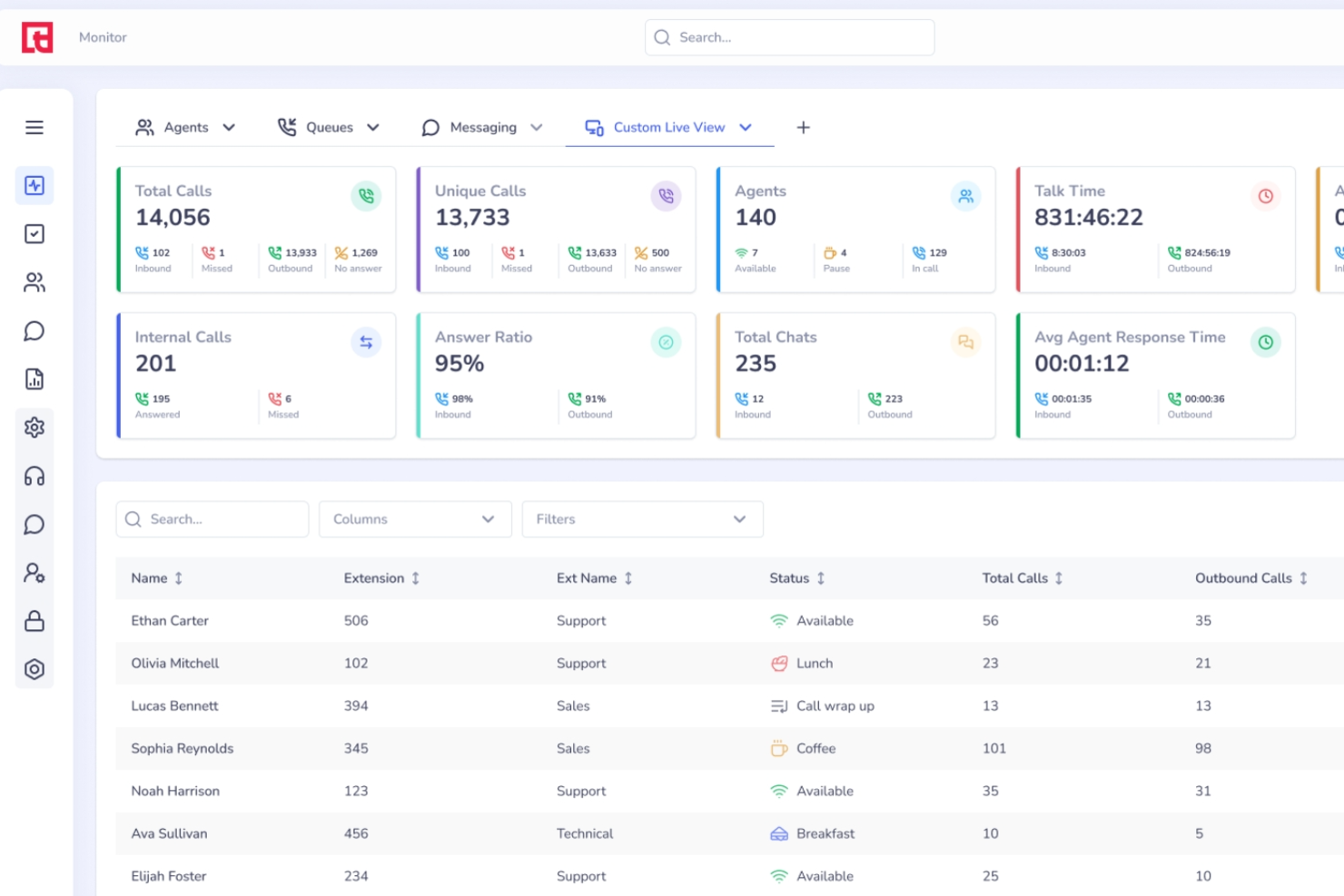
Squaretalk è una piattaforma per contact center basata su cloud che unisce la gestione delle chiamate in entrata e in uscita, messaggistica omnicanale, analisi delle conversazioni potenziate dall'IA e monitoraggio delle prestazioni in tempo reale per i team di vendita e assistenza.
Per chi è Squaretalk?
Squaretalk è ideale per team di vendita e assistenza clienti di medie dimensioni che gestiscono alti volumi di chiamate su più regioni o canali di comunicazione.
Perché ho scelto Squaretalk
Ho incluso Squaretalk tra le mie scelte principali perché copre realmente ogni canale di cui il tuo team ha bisogno da un'unica interfaccia. Le chiamate vocali, gli SMS e la messaggistica WhatsApp sono tutti nello stesso posto, così gli operatori non devono passare da uno strumento all'altro per gestire le diverse richieste in entrata. Apprezzo particolarmente il supporto per i modelli WhatsApp, che permette agli operatori di rispondere ai messaggi in entrata con template pre-approvati senza lasciare la piattaforma. Se a questo aggiungi l'analisi del sentiment tramite IA su interazioni sia vocali che testuali, ottieni una visione unificata di come i clienti interagiscono su ogni canale.
Funzionalità principali di Squaretalk
- Costruttore IVR: Crea menu multistrato di risposta vocale interattiva che instradano le chiamate in entrata all'agente o alla coda giusta in base agli input.
- Distribuzione automatica delle chiamate (ACD): Instrada le chiamate ai vari operatori in base a competenza, disponibilità o regole di priorità che definisci tu.
- Registrazione delle chiamate: Registra e archivia le chiamate in entrata per revisione della qualità, conformità o formazione degli operatori.
- Dashboard di reportistica in tempo reale: Monitora in tempo reale le code delle chiamate, lo stato degli operatori e le metriche di performance su tutti i canali attivi da una sola schermata.
Integrazioni di Squaretalk
Squaretalk offre integrazioni native con Zoho, Salesforce, Freshworks e Pipedrive. Ulteriori integrazioni includono HubSpot, Freshdesk, Zendesk, Slack, monday.com e altro ancora. È disponibile anche un'API personalizzata per l'integrazione della telefonia informatica.
Pros and Cons
Pros:
- Numeri locali in oltre 150 destinazioni globali
- Qualità e chiarezza eccezionali nelle chiamate vocali
- Verifica antispam disponibile per la pulizia dei numeri
Cons:
- L'app mobile non mostra richiamate e chiamate perse
- La reportistica nativa sembra limitata per le dashboard personalizzate
New Product Updates from Squaretalk
Squaretalk Adds TradeCore Integration for Brokerage Workflows
Squaretalk adds a TradeCore integration that connects customer conversations with BrokerIQ CRM workflows. This helps brokerage teams trigger AI-driven follow-ups, tasks, and other actions from calls and messages. For more information, visit Squaretalk’s official site.
 .
.
CallRail
Ideale per la gestione dei lead e l'attribuzione del marketing
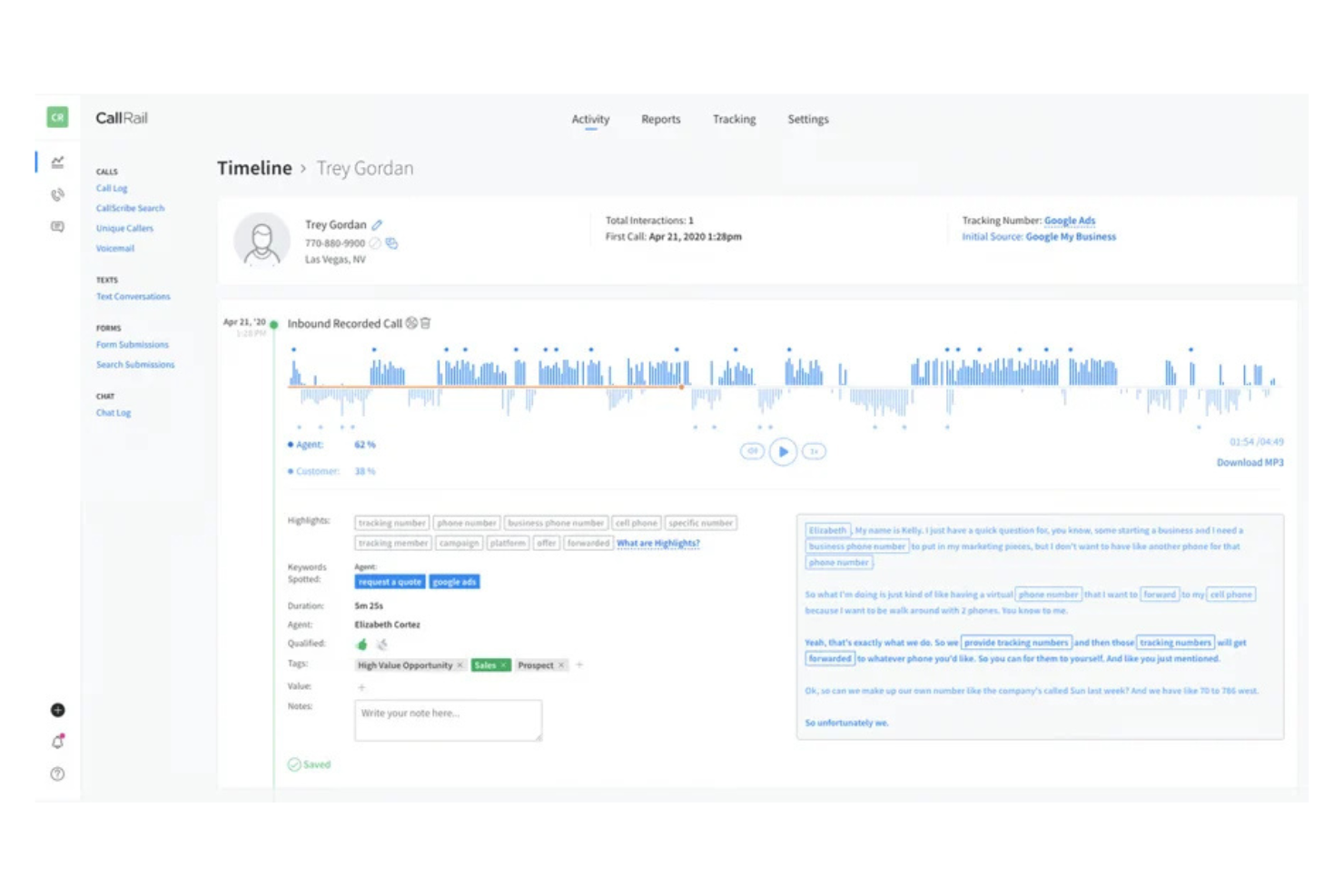
CallRail è una piattaforma di monitoraggio delle chiamate e di analisi progettata per i team di marketing e le aziende che necessitano di approfondimenti dettagliati sulla generazione di lead e sulle attività di marketing. Offre strumenti per tracciare le chiamate, analizzare le fonti dei lead e ottimizzare le strategie di marketing per un ROI migliore.
Perché ho scelto CallRail: Questo strumento offre ampie capacità di intelligence sui lead e attribuzione di marketing, fornendo analisi dettagliate delle chiamate per approfondire la comprensione della qualità dei lead e dei tassi di conversione. La funzione di tracciamento delle parole chiave aiuta a identificare quali iniziative di marketing generano più chiamate. Con l'attribuzione delle chiamate personalizzabile, puoi adattare gli approfondimenti ai tuoi obiettivi di marketing specifici, mentre l'opzione della piattaforma white-label consente di applicare il tuo brand.
Caratteristiche e integrazioni principali:
Funzionalità includono la registrazione delle chiamate, che aiuta il tuo team a rivedere le interazioni telefoniche. Il tracciamento dei moduli cattura le informazioni dei lead provenienti dai moduli online, offrendo una visione completa delle interazioni con i clienti. L'attribuzione multi-touch fornisce approfondimenti sul percorso del cliente attraverso diversi touchpoint.
Integrazioni includono Google Analytics, Salesforce, HubSpot, Marketo, Meta Ads Manager, WordPress, Slack, Zoho CRM, Zapier, Microsoft Ads e altro ancora.
Pros and Cons
Pros:
- Analisi dettagliate delle chiamate
- Attribuzione delle chiamate personalizzabile
- Approfondimenti sull'attribuzione multi-touch
Cons:
- Configurazione dei report complessa
- Assistenza clienti limitata

Ozonetel
Ideale per soluzioni di contact center basate su cloud

Ozonetel è una soluzione per contact center basata su cloud, pensata per le aziende che necessitano di un efficiente tracciamento delle chiamate in entrata. Serve i contact center offrendo strumenti per gestire le chiamate e analizzare le interazioni, aiutandoti a individuare come migliorare il servizio clienti.
Perché ho scelto Ozonetel: Questo strumento offre soluzioni basate su cloud adatte ai contact center che necessitano di un affidabile sistema di tracciamento delle chiamate in entrata. Dispone di una distribuzione automatica delle chiamate per garantire che le chiamate vengano indirizzate agli operatori giusti e la funzione di registrazione delle chiamate fornisce registri dettagliati delle interazioni. Le dashboard dinamiche di Ozonetel permettono al tuo team di monitorare le prestazioni e prendere decisioni basate sui dati.
Caratteristiche principali e integrazioni:
Caratteristiche includono scripting delle chiamate, che aiuta gli operatori a seguire linee guida coerenti durante le telefonate, e il monitoraggio in tempo reale che permette ai supervisori di supervisionare le chiamate e fornire feedback immediato. La funzione di gestione delle code delle chiamate gestisce efficacemente alti volumi di telefonate, assicurando che nessun cliente resti in attesa troppo a lungo.
Integrazioni includono Salesforce, Zoho CRM, Zendesk, Freshdesk, Slack, Microsoft Dynamics, Google Workspace, HubSpot, Shopify, WhatsApp e altro ancora.
Pros and Cons
Pros:
- Capacità omnicanale per supportare il marketing digitale
- Opzioni di automazione basate su IA
- Monitoraggio in tempo reale
Cons:
- La configurazione iniziale può essere complessa
- Potrebbero verificarsi problemi tecnici con un alto volume di chiamate
Ideale per il tracciamento integrato delle chiamate
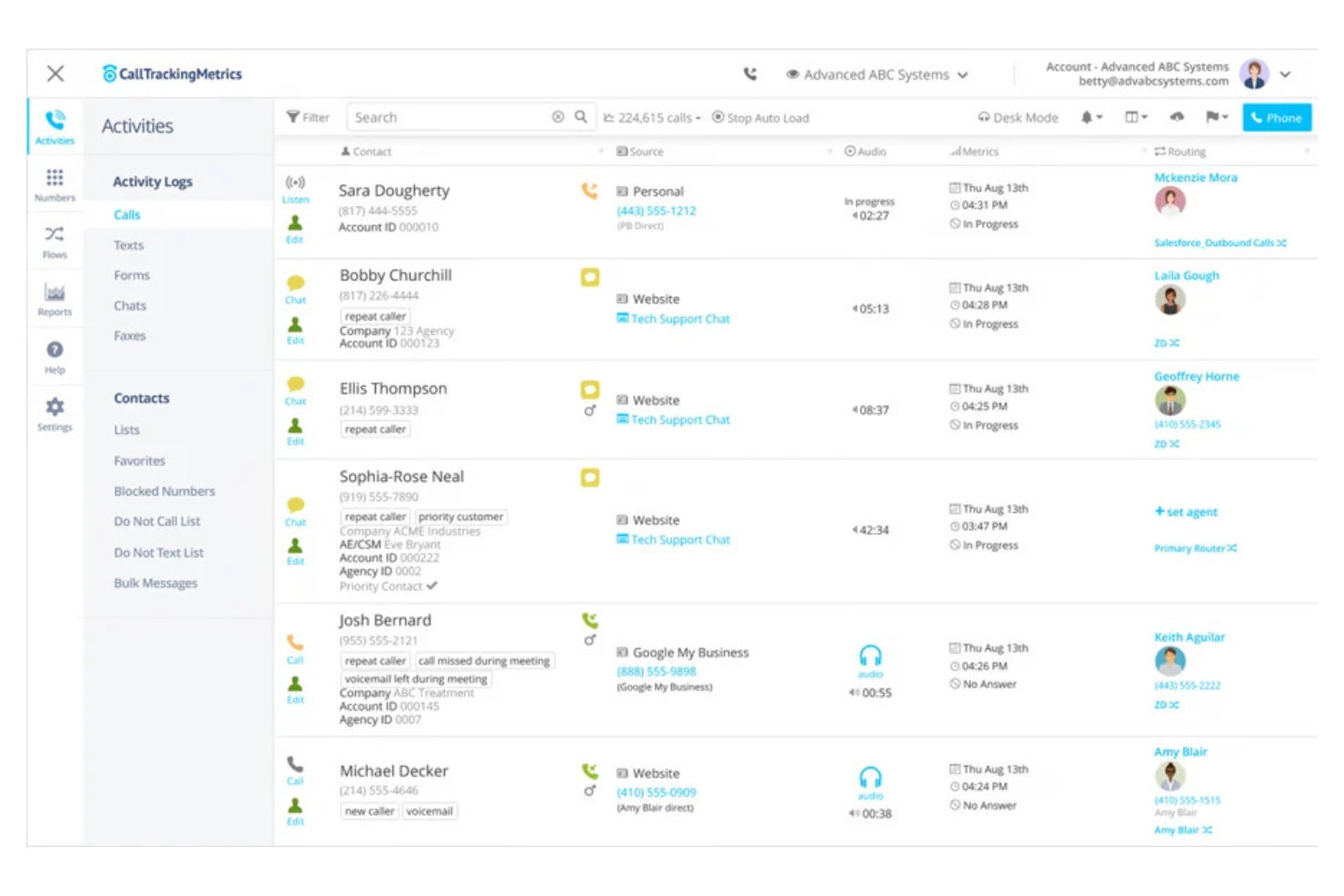
CallTrackingMetrics è un sistema di tracciamento delle chiamate e soluzione telefonica aziendale progettato per le aziende che desiderano ottimizzare le proprie attività di marketing. Aiuta gli utenti a tracciare le fonti delle chiamate e ad analizzare i dati delle conversazioni per promuovere la qualità dei lead.
Perché ho scelto CallTrackingMetrics: Questo strumento integra il tracciamento delle chiamate con il sistema telefonico aziendale, rendendolo ideale per un’analisi di marketing completa. Offre registrazioni e trascrizioni delle chiamate per fornire approfondimenti dettagliati sulle interazioni con i clienti, e l’analisi basata sull’intelligenza artificiale aiuta il tuo team a prendere decisioni rapide basate sui dati. Gli strumenti di reportistica personalizzabili ti consentono di concentrarti sulle metriche chiave importanti per il tuo business.
Caratteristiche principali e integrazioni:
Funzionalità includono l’automazione dei flussi di lavoro per aiutarti a semplificare le attività ripetitive. L’intelligenza conversazionale offre informazioni sulle esigenze e preferenze dei clienti, mentre gli strumenti di reportistica personalizzabili ti permettono di adattare i dati alle tue esigenze aziendali.
Integrazioni includono Google Ads, Salesforce, HubSpot, Microsoft Dynamics 365, Marketo, Facebook, Zoho CRM, Shopify, WordPress, Slack e altro ancora.
Pros and Cons
Pros:
- Analisi dettagliata delle chiamate
- Analisi conversazionale guidata dall’IA
- Automazione dei flussi di lavoro
Cons:
- Assistenza clienti limitata
- Costo più elevato per piccoli team

Ideale per il tracciamento delle chiamate integrato con il CRM
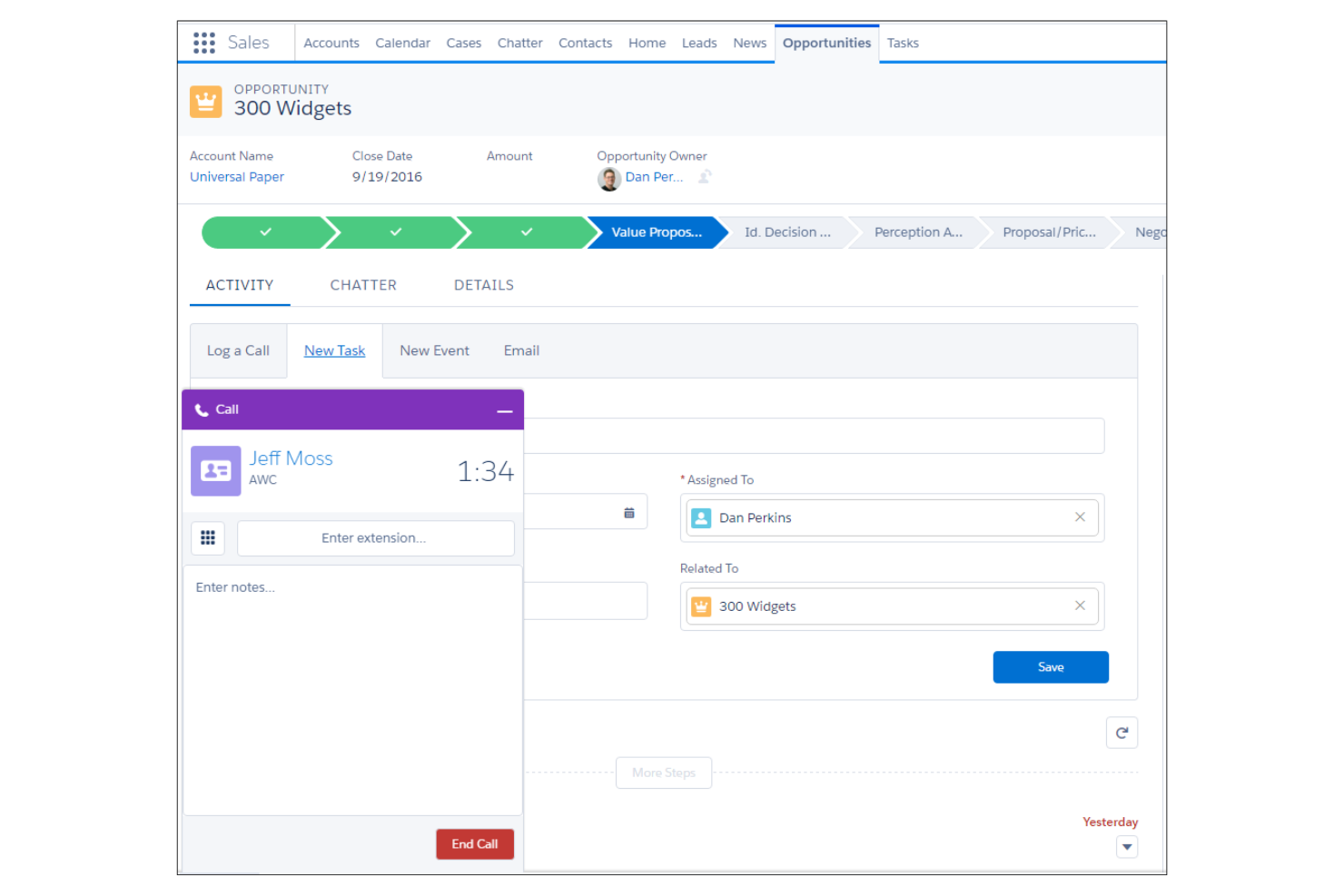
Salesforce offre un software di tracciamento delle chiamate in entrata integrato con il CRM, progettato per team aziendali. Aiuta le aziende a monitorare gli esiti delle chiamate, analizzare i tassi di conversione e integrare i dati delle chiamate con le pipeline di vendita.
Perché ho scelto Salesforce: Salesforce propone una soluzione completa per il tracciamento delle chiamate chiamata Sales Cloud che si integra perfettamente con la sua piattaforma CRM, rendendola ideale per i team aziendali. Tra le sue funzionalità ci sono la registrazione automatica delle chiamate, analisi in tempo reale e approfondimenti basati sull’IA.
Il software supporta la comunicazione multicanale, permettendo ai team di interagire con i lead su varie piattaforme. Questa integrazione fornisce una visione olistica delle interazioni con i clienti, aiutando il tuo team a prendere decisioni informate e massimizzare le opportunità di fatturato.
Caratteristiche distintive e integrazioni:
Funzionalità includono la registrazione automatica delle chiamate, che fa risparmiare tempo e garantisce l’accuratezza dei dati, e analisi in tempo reale per ottenere approfondimenti sulle performance delle chiamate e sui tassi di conversione. Gli approfondimenti basati sull’IA possono aiutare il tuo team a identificare i prospect di maggior valore e ottimizzare le strategie di vendita.
Integrazioni includono Slack, Microsoft Teams, Google Workspace, Outlook, Mailchimp, HubSpot, Zendesk, Dropbox, QuickBooks e altri ancora.
Pros and Cons
Pros:
- Analisi in tempo reale
- Integrazione con Salesforce CRM
- Comunicazione multicanale
Cons:
- Piattaforma complessa con molti altri strumenti
- L'installazione richiede competenze tecniche

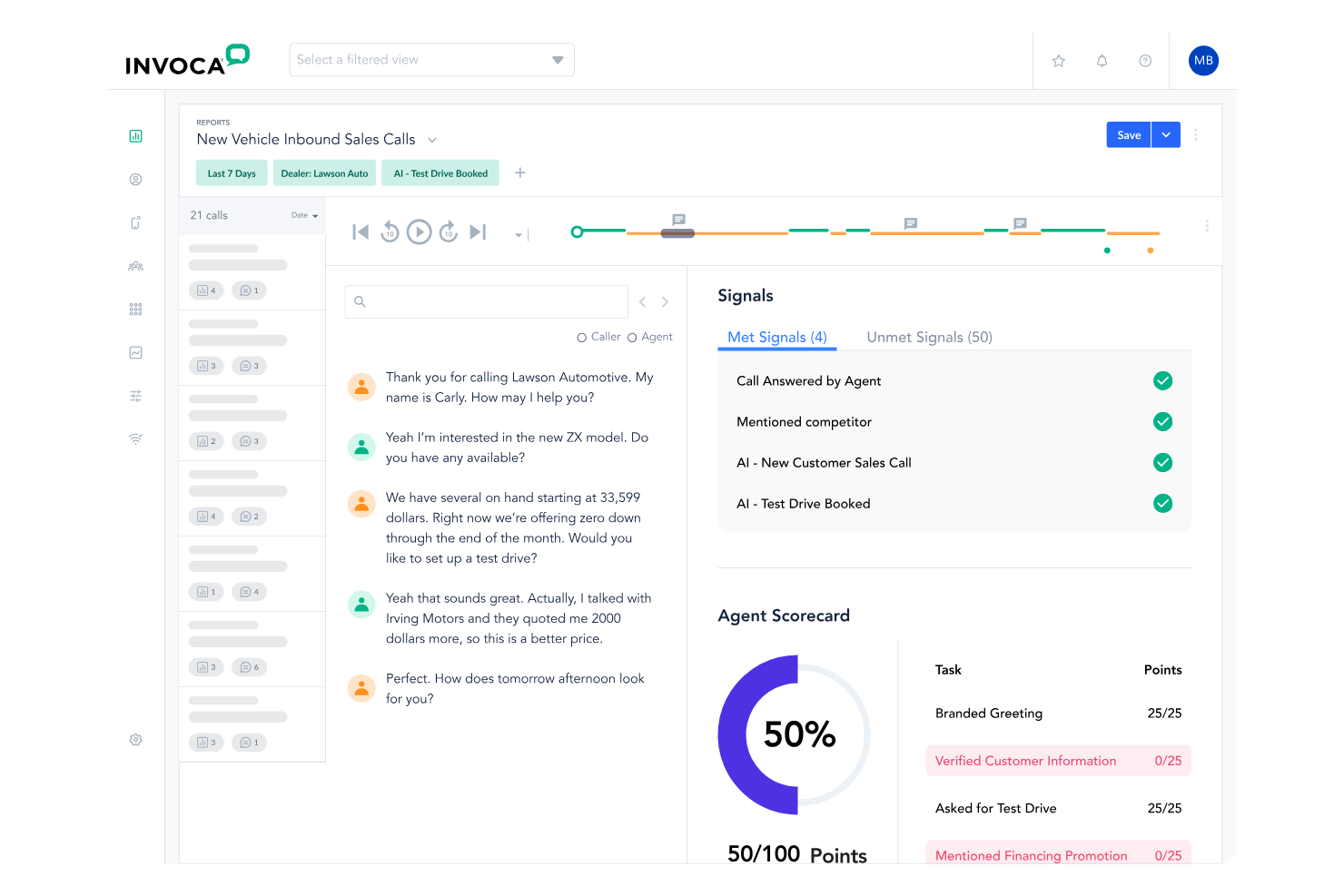
Invoca è una piattaforma di tracciamento delle chiamate progettata per le aziende che necessitano di analisi avanzate e intelligenza conversazionale. Aiuta i team di marketing e vendita ad analizzare i dati delle chiamate per supportare interazioni migliori con i clienti e ottimizzare le strategie di marketing.
Perché ho scelto Invoca: Questo strumento utilizza l'IA per offrire approfondimenti dettagliati sulle conversazioni con i clienti, risultando una scelta ideale per i team focalizzati su decisioni basate sui dati. Offre analisi delle chiamate in tempo reale per aiutarti a capire il comportamento dei clienti e una configurazione rapida della risposta vocale interattiva (IVR) per un instradamento efficiente delle chiamate. La funzione di intelligenza conversazionale cattura e analizza il linguaggio parlato per individuare tendenze e opportunità di follow-up, mentre i report personalizzabili ti permettono di adattare gli approfondimenti alle esigenze specifiche della tua azienda.
Funzionalità principali e integrazioni:
Funzionalità includono attribuzione dettagliata delle chiamate che collega le chiamate agli sforzi di marketing. Avvisi in tempo reale notificano al tuo team eventi importanti delle chiamate. La funzione di valutazione delle chiamate aiuta a valutare la qualità delle interazioni e individuare aree di miglioramento.
Integrazioni includono Salesforce Sales Cloud, Google Ads, Google Analytics, Adobe Experience Cloud, Facebook, HubSpot, Snapchat, Microsoft Advertising, Pinterest, Slack e altre ancora.
Pros and Cons
Pros:
- Intelligenza conversazionale avanzata
- Opzioni di report personalizzabili
- Attribuzione dettagliata delle chiamate
Cons:
- Dettagli sui prezzi non trasparenti
- Processo di configurazione complesso

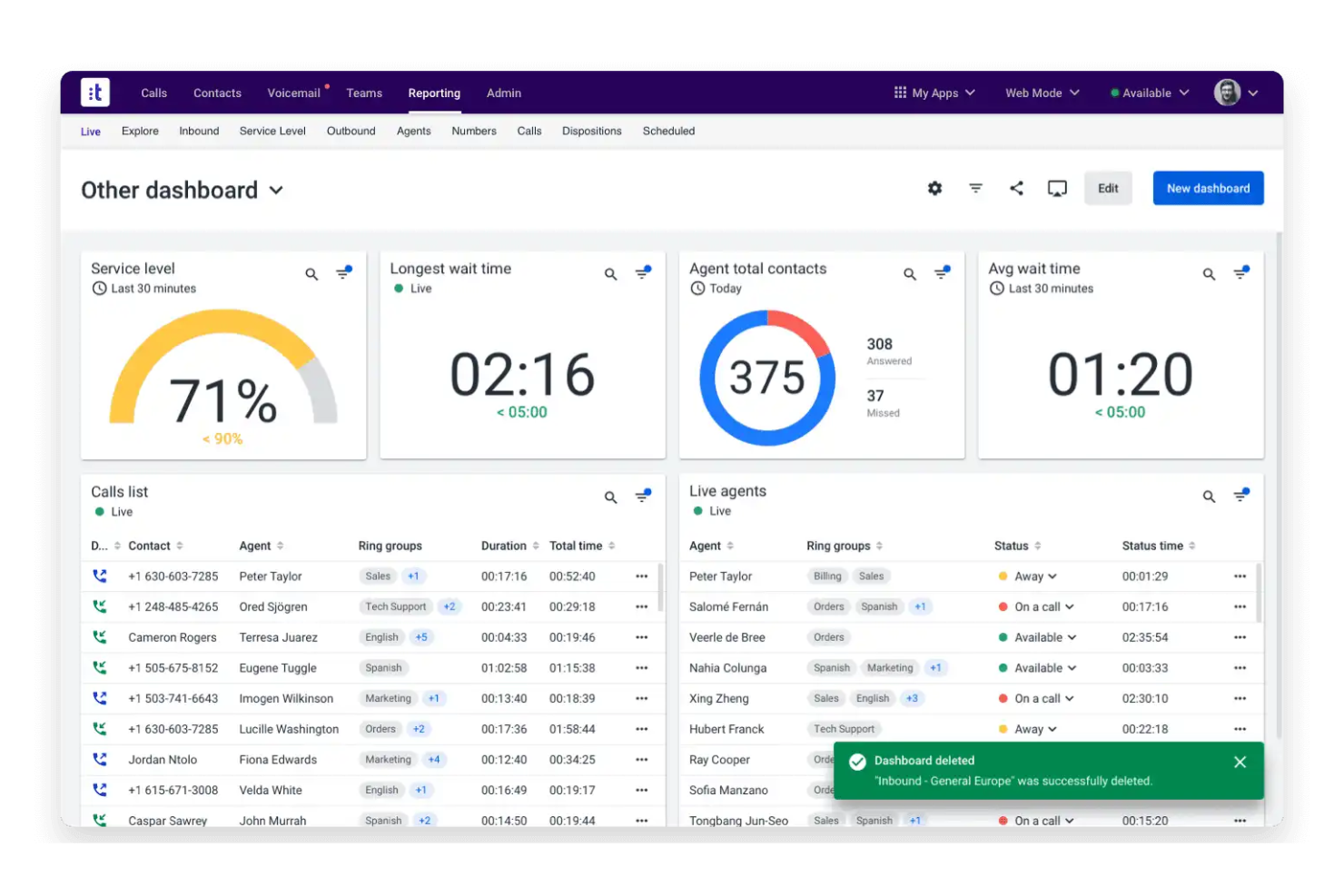
Talkdesk è una soluzione per contact center progettata per le aziende che necessitano di analisi delle chiamate integrate. Supporta i contact center fornendo strumenti per gestire le chiamate e analizzare le interazioni, aiutando le aziende a esplorare modi per migliorare il servizio clienti.
Perché ho scelto Talkdesk: Questo strumento è ideale per i contact center che richiedono analisi approfondite delle chiamate integrate nelle loro operazioni. Offre monitoraggio in tempo reale tramite dashboard personalizzabili, fornendo informazioni sulle metriche di performance e sulla produttività degli agenti. Le funzionalità analitiche di Talkdesk aiutano a prendere decisioni basate sui dati per sviluppare le interazioni con i clienti.
Caratteristiche e integrazioni principali:
Funzionalità includono instradamento avanzato delle chiamate per indirizzarle agli agenti giusti. Le funzionalità di reportistica in tempo reale e analisi del sentiment forniscono informazioni chiave sulle prestazioni del call center, mentre gli strumenti di gestione della qualità permettono di valutare le interazioni degli agenti per la garanzia della qualità.
Integrazioni includono Salesforce, Zendesk, Slack, Microsoft Teams, Google Contacts, HubSpot, Shopify, ServiceNow, Microsoft Dynamics, Zoom e altro ancora.
Pros and Cons
Pros:
- Analisi delle chiamate integrate
- Dashboard personalizzabili
- Strumenti di gestione della qualità
Cons:
- Funzionalità di collaborazione limitate
- La qualità delle chiamate dipende dalla forza della connessione di rete

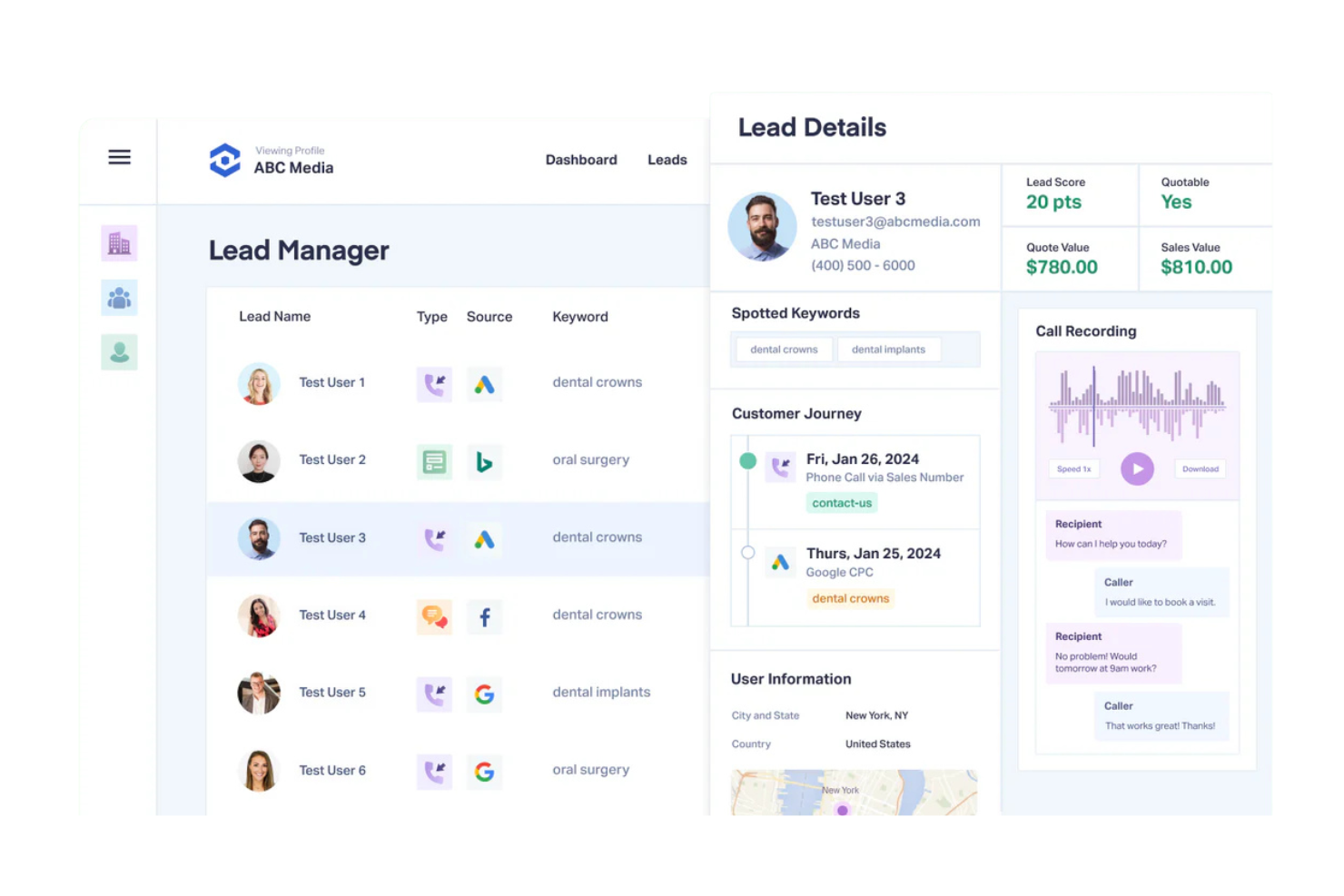
WhatConverts è un software per il monitoraggio dei lead rivolto alle aziende che desiderano catturare e analizzare tutti i contatti di marketing, incluse le chiamate in entrata. Fornisce strumenti per tracciare chiamate, moduli e transazioni, offrendo una visione multifaccettata delle prestazioni di marketing.
Perché ho scelto WhatConverts: Questo strumento offre una piattaforma unificata per tracciare tutti i contatti marketing, offrendo un monitoraggio dettagliato delle chiamate e la gestione dei lead per aiutarti a catturare ogni possibile interazione con i clienti. La funzione di reportistica fornisce informazioni sulla qualità dei lead e sui tassi di conversione. Grazie alle dashboard personalizzabili, puoi adattare il sistema alle tue esigenze specifiche.
Funzionalità e integrazioni principali:
Funzionalità includono report personalizzabili che offrono approfondimenti sulle prestazioni di marketing. La funzione di monitoraggio chiamate alimentata dall’intelligenza artificiale cattura informazioni dettagliate su ogni chiamata, aiutandoti a valutare la qualità dei lead; inoltre, gli strumenti di gestione dei lead ti aiutano a organizzare e dare priorità ai contatti in modo efficace.
Integrazioni includono Google Analytics, Salesforce, HubSpot, BigCommerce, Shopify, Facebook Ads, Google Ads, Bing Ads, Zapier, Weebly e altro ancora.
Pros and Cons
Pros:
- Tracciamento dettagliato dei lead
- Approfondimenti di reportistica basati sull'IA
- Gestione efficace dei lead
Cons:
- Può essere costoso per le piccole aziende
- Curva di apprendimento iniziale per i nuovi utenti
Altri software per il monitoraggio delle chiamate in entrata
Ecco alcune opzioni aggiuntive di software per il monitoraggio delle chiamate in entrata che non sono state incluse nel mio elenco ristretto, ma che vale comunque la pena prendere in considerazione:
- Nimbata
Ideale per reportistica scalabile e chiara sulle chiamate
- Retreaver
Ideale per servizi di attribuzione e instradamento delle chiamate
- CallScaler
Ideale per il tracciamento delle chiamate a basso costo
- Marchex
Ideale per approfondimenti azionabili sull'analisi delle chiamate
- Call Criteria
Ideale per analisi delle chiamate e assicurazione della qualità


Come valuto il software di Call Tracking inbound
Divido la mia valutazione in due livelli: le capacità di base che uno strumento deve avere—come la DNI a livello di sessione e la sincronizzazione dell'attribuzione CRM—e i fattori differenzianti che distinguono i fornitori.
Funzionalità core (requisiti minimi per questa lista)
Quando seleziono gli strumenti per la mia lista, valuto ciascuno su una scala da 0 (non offre la funzionalità) a 5 (eccelle in quest'area) per ogni funzionalità core elencata di seguito. Poi calcolo il punteggio totale dello strumento in percentuale. Ogni strumento deve raggiungere un punteggio minimo totale del 65% per essere preso in considerazione.
- Dynamic Number Insertion: Controllo se la piattaforma scambia i numeri di tracciamento a livello di sessione in base alla fonte di provenienza del visitatore, così puoi collegare un clic Google Ads a una chiamata specifica.
- Attribuzione multi-touch delle chiamate: Ogni strumento dovrebbe collegare le chiamate inbound alle campagne, alle parole chiave e alle landing page su canali a pagamento, organici e offline.
- Registrazione & trascrizione delle chiamate: Valuto se le registrazioni vengono fornite con trascrizione automatica e se le trascrizioni sono ricercabili, poiché i team RevOps hanno bisogno di accesso rapido ai dati delle chiamate.
- Conversational intelligence: Qui sono importanti il rilevamento di parole chiave tramite IA, il riconoscimento dell'intento e il punteggio automatico delle chiamate, soprattutto per qualificare i lead prima che arrivino nel CRM.
- Integrazione CRM & Martech: Cerco connettori nativi per piattaforme come Salesforce, HubSpot, Google Ads e Google Analytics, insieme al supporto per webhook o API.
- Instradamento delle chiamate & pool di tracciamento: Il fornitore dovrebbe offrire pool configurabili di numeri locali e verdi con IVR, geo-routing e regole di schedulazione per adattarsi al tuo flusso di chiamate inbound.
Una volta che ho una lista di strumenti che soddisfano questi criteri, considero ciò che distingue ciascuna piattaforma.
Fattori differenzianti (cosa distingue i fornitori)
Ecco come confronto e metto a confronto i diversi fornitori:
Funzionalità distintive
La sincronizzazione delle conversioni offline è un aspetto importante. Cerco strumenti che rimandano gli esiti qualificati delle chiamate su Google Ads o Meta così i tuoi algoritmi di offerta ottimizzano sui ricavi effettivi, non solo sul volume delle chiamate. Anche la modellazione personalizzata dell'attribuzione conta perché i team RevOps devono pesare i touchpoint in modo diverso a seconda della complessità della trattativa. Oltre alle chiamate, valuto se una piattaforma tiene traccia di compilazioni di form e lead via chat insieme alle conversioni telefoniche per offrirti un quadro attributivo unificato.
Oltre alle funzionalità
La conformità è un importante fattore di distinzione, soprattutto per i team che gestiscono dati sensibili delle chiamate. Controllo il supporto HIPAA e PCI-DSS, incluso l'occultamento dei dati personali nelle trascrizioni, perché una mancanza qui può creare veri rischi di responsabilità. Anche l'integrazione nel sistema di BI e reporting pesa molto nella mia valutazione. I team RevOps in genere hanno bisogno che i dati delle chiamate confluiscano in Snowflake o BigQuery insieme ai dati di pipeline, non rimangano isolati in una dashboard standalone. La trasparenza dei prezzi è importante. Guardo come i fornitori strutturano i costi per numero e per minuto, perché i picchi di volume delle chiamate possono silenziosamente far gonfiare la bolletta.
Come scegliere un software per il monitoraggio delle chiamate in entrata
È facile perdersi in lunghi elenchi di funzionalità e strutture di prezzo complesse. Per aiutarti a mantenere la concentrazione mentre affronti il tuo processo di selezione del software, unico per la tua azienda, ecco un elenco di fattori da tenere a mente:
| Fattore | Cosa considerare |
|---|---|
| Scalabilità | Il software può crescere insieme alla tua azienda? Verifica se è in grado di gestire un volume crescente di chiamate senza compromettere le prestazioni. |
| Integrazioni | Si collega agli strumenti che già utilizzi, come il CRM o le piattaforme di email marketing? Verifica la compatibilità per garantire un flusso di dati continuo tra i sistemi. |
| Possibilità di personalizzazione | Puoi adattare la soluzione ai tuoi flussi di lavoro specifici? Cerca opzioni per modificare le impostazioni e i report in base alle esigenze della tua azienda. |
| Facilità d'uso | Quanto è intuitiva l'interfaccia per il tuo team? Testa l'usabilità del sistema per assicurarti che non richieda una formazione approfondita o competenze tecniche. |
| Implementazione e avvio | Come si svolge il processo di configurazione? Valuta il tempo e le risorse necessari per implementare la soluzione e avviare il team, inclusa l'eventuale formazione o assistenza fornita. |
| Costo | Il prezzo è in linea con il tuo budget? Considera tutti i costi, comprese le commissioni nascoste o gli addebiti per funzionalità aggiuntive, e confrontali con quelli della concorrenza. |
| Misure di sicurezza | In che modo il software protegge i tuoi dati? Verifica la presenza di crittografia, controlli degli accessi e conformità agli standard del settore per proteggere le informazioni sensibili. |
| Disponibilità dell'assistenza | Quali opzioni di assistenza sono disponibili? Assicurati che sia disponibile un supporto adeguato, come l'assistenza 24 ore su 24, 7 giorni su 7, o account manager dedicati, per intervenire quando si verificano problemi. |
Che cos'è un software per il monitoraggio delle chiamate in entrata?
Il software per il monitoraggio delle chiamate in entrata è uno strumento che aiuta le aziende a monitorare e analizzare le chiamate in arrivo per comprendere l'efficacia del marketing e le interazioni con i clienti. In genere, i professionisti del marketing, i team di vendita e gli addetti all'assistenza clienti utilizzano questi strumenti per ottenere informazioni sul comportamento dei clienti e migliorare il coinvolgimento.
Le funzionalità di monitoraggio delle chiamate, analisi e integrazione aiutano a misurare il ROI del marketing, ottimizzare le campagne e garantire un flusso efficiente dei dati. Il valore complessivo risiede nella capacità di migliorare il processo decisionale e aumentare la soddisfazione dei clienti.
Funzionalità
Quando selezioni un software per il monitoraggio delle chiamate in entrata, presta attenzione alle seguenti funzionalità chiave:
- Monitoraggio delle chiamate: monitora le chiamate in entrata per identificarne la provenienza e aiuta a valutare l'efficacia delle campagne di marketing.
- Analisi: fornisce informazioni basate sui dati riguardo alle prestazioni delle chiamate, al comportamento dei clienti e ai tassi di conversione, per prendere decisioni informate.
- Funzionalità di integrazione: si collega agli strumenti esistenti, come le piattaforme CRM e di posta elettronica, per garantire un flusso efficiente dei dati tra i sistemi.
- Report personalizzabili: consentono di adattare i report per concentrarsi sulle metriche specifiche più importanti per la tua azienda.
- Monitoraggio in tempo reale: consente di monitorare le attività delle chiamate in corso per garantire risposte tempestive e una gestione efficiente delle chiamate.
- Registrazione delle chiamate: acquisisce i dettagli delle chiamate per il controllo della qualità e la valutazione delle prestazioni.
- Inserimento dinamico dei numeri: sostituisce i numeri di telefono sul tuo sito web per monitorare quali canali di marketing generano chiamate.
- Rilevamento delle parole chiave: identifica le frasi importanti durante le chiamate per ottenere informazioni sulle esigenze e sulle preferenze dei clienti.
- Strumenti di gestione della qualità: valutano e forniscono indicazioni sulle interazioni degli operatori per mantenere elevati standard di servizio.
Vantaggi
L'implementazione di un software per il monitoraggio delle chiamate in entrata offre diversi vantaggi al tuo team e alla tua azienda. Ecco alcuni dei risultati che puoi aspettarti:
- Migliore ROI del marketing: monitorando la provenienza delle chiamate, puoi identificare quali campagne generano più contatti qualificati e allocare il budget in modo più efficace.
- Informazioni più approfondite sui clienti: le analisi e la registrazione delle chiamate offrono una comprensione più approfondita del comportamento e delle preferenze dei clienti, aiutandoti ad adattare i servizi alle loro esigenze.
- Processo decisionale migliore: il monitoraggio in tempo reale e i report personalizzabili forniscono informazioni basate sui dati, consentendo al tuo team di prendere rapidamente decisioni informate.
- Maggiore efficienza: le funzionalità di integrazione garantiscono un flusso fluido dei dati tra i sistemi, riducendo l'inserimento manuale dei dati e facendo risparmiare tempo al tuo team.
- Standard di servizio più elevati: gli strumenti di gestione della qualità e la valutazione delle chiamate aiutano a mantenere interazioni di alta qualità con i clienti e a migliorare le prestazioni degli operatori.
- Gestione ottimizzata delle chiamate: l'instradamento avanzato delle chiamate aiuta a indirizzarle agli operatori più adatti, migliorando i tempi di risposta e la soddisfazione dei clienti.
Costi e prezzi
La scelta di un software per il monitoraggio delle chiamate in entrata richiede la comprensione dei vari modelli e piani tariffari disponibili. I costi variano in base alle funzionalità, alle dimensioni del team, agli extra e ad altri fattori. La tabella seguente riassume i piani più comuni, i relativi prezzi medi e le funzionalità tipicamente incluse nelle soluzioni software per il monitoraggio delle chiamate in entrata:
Tabella comparativa dei piani per il software di monitoraggio delle chiamate in entrata
| Tipo di piano | Prezzo medio | Funzionalità comuni |
|---|---|---|
| Piano gratuito | $0 | Monitoraggio di base delle chiamate, analisi limitate e report standard. |
| Piano personale | $5-$25/utente/mese | Monitoraggio delle chiamate, registrazione delle chiamate, analisi di base e integrazioni limitate. |
| Piano aziendale | $30-$60/utente/mese | Analisi avanzate, registrazione delle chiamate, report personalizzati e integrazioni CRM. |
| Piano aziendale avanzato | $70-$120/utente/mese | Pacchetto completo di analisi, inserimento dinamico dei numeri, informazioni basate sull'AI e supporto premium. |
Domande frequenti sul software di monitoraggio delle chiamate in entrata
Ecco alcune risposte alle domande più comuni sul software di monitoraggio delle chiamate in entrata:
Come funziona il software di monitoraggio delle chiamate in entrata?
Il software di monitoraggio delle chiamate in entrata funziona assegnando numeri di telefono univoci a diversi canali di marketing. Quando un cliente chiama, il software registra la fonte della chiamata, l’ora e altri dettagli, consentendo di analizzare quali campagne generano il maggior numero di chiamate. Questo aiuta a ottimizzare le attività di marketing sulla base di dati reali. Comprendendo da dove provengono le chiamate, è possibile valutare la spesa pubblicitaria dell’azienda e allocare le risorse in modo più efficace.
Il software di monitoraggio delle chiamate in entrata può integrarsi con gli strumenti che già utilizzo?
Sì, la maggior parte dei software di monitoraggio delle chiamate in entrata può integrarsi con strumenti come CRM, piattaforme di posta elettronica e software di analisi. Prima dell’acquisto, verifica che il software supporti le integrazioni necessarie. L’integrazione consente un flusso fluido di dati tra le piattaforme, facendo risparmiare tempo e riducendo gli errori di inserimento manuale. Questa connettività aiuta a mantenere la coerenza dei dati e migliora la produttività.
Il software di monitoraggio delle chiamate in entrata è sicuro?
Sì, il software di monitoraggio delle chiamate in entrata è generalmente sicuro, ma è essenziale verificare le misure di sicurezza adottate da ciascun fornitore. Cerca funzionalità come la crittografia dei dati, i controlli degli accessi e la conformità agli standard del settore. Queste misure aiutano a proteggere i dati sensibili dei clienti e a mantenere la fiducia. Scegli sempre un fornitore che dia priorità alla sicurezza per proteggere le tue informazioni.
Posso utilizzare il software di monitoraggio delle chiamate in entrata per le chiamate internazionali?
Sì, molte soluzioni di monitoraggio delle chiamate in entrata supportano le chiamate internazionali, ma è fondamentale confermarlo con il fornitore. Verifica se offre numeri internazionali e supporta più valute. Questa funzionalità è utile per le aziende che operano a livello globale, poiché consente loro di monitorare le chiamate provenienti da diverse regioni e di adattare di conseguenza le strategie di marketing.
Cosa succede dopo:
Se stai cercando un software di monitoraggio delle chiamate in entrata, contatta gratuitamente un consulente SoftwareSelect per ricevere consigli.
Compili un modulo e fai una breve conversazione in cui il consulente approfondisce le tue esigenze specifiche. In seguito riceverai una selezione ristretta di software da valutare. Ti assisterà anche durante l'intero processo di acquisto, comprese le negoziazioni sul prezzo.