

10 Mejores Programas de Base de Datos de Clientes Analizados para 2026

10 Mejor Lista de Software de Base de Datos de Clientes


Con tantas opciones de software de base de datos de clientes disponibles, puede ser difícil saber cuál es el adecuado para ti. Sabes que quieres rastrear eficazmente las interacciones con los clientes, personalizar las experiencias y optimizar tus estrategias de comunicación, pero necesitas descubrir cuál es la mejor herramienta. ¡Te ayudo! En este artículo te facilitaré la elección, compartiendo mis experiencias personales usando decenas de herramientas de bases de datos de clientes con diferentes equipos y proyectos, y mis selecciones de los mejores software de bases de datos de clientes.
Por qué confiar en nuestras recomendaciones de software
Nuestras reseñas reflejan nuestro criterio independiente, no un discurso de ventas. Descubra cómo mantenemos la transparencia.
Para esta guía, evaluamos las herramientas mediante pruebas prácticas e investigación independiente, puntuando las herramientas según nuestros criterios de selección.
Nuestras reseñas reflejan nuestro criterio editorial humano, no un discurso de ventas.
Resumen de los Mejores Programas de Base de Datos de Clientes
Esta tabla comparativa resume los detalles de precios de mis principales selecciones de software de base de datos de clientes, para ayudarte a encontrar el mejor para tu presupuesto y necesidades de negocio.
| Tool | Best For | Trial Info | Price | ||
|---|---|---|---|---|---|
| 1 | Ideal para la captura automática de datos de clientes | Prueba gratuita de 30 días + demo gratuita disponible | Desde $29/usuario/mes (facturado anualmente) | Website | |
| 2 | Ideal para bases de datos flexibles | Prueba gratuita de 14 días | Desde $29/usuario/mes (facturado anualmente) | Website | |
| 3 | Ideal para flujos de trabajo personalizables | Prueba gratuita disponible | Desde $12/usuario/mes (facturado anualmente) | Website | |
| 4 | La mejor en integraciones y facilidad de uso | Prueba gratuita de 14 días + plan gratuito disponible | Desde $18/usuario/mes (facturación anual) | Website | |
| 5 | La mejor base de datos de clientes para pequeñas empresas | Plan gratuito disponible y prueba gratis de 15 días | Desde $7/usuario/mes (facturado anualmente) | Website | |
| 6 | Ideal para pequeñas y medianas empresas | Prueba gratuita de 14 días | Desde $39/mes (8 usuarios y 10GB de almacenamiento) | Website | |
| 7 | El mejor software de base de datos de clientes para empresas B2B | Prueba gratuita disponible | Desde $21/usuario/mes | Website | |
| 8 | Ideal para tener una visión de 360 grados de la información del cliente | Plan gratuito + demostración gratuita disponible | Desde $25/usuario/mes | Website | |
| 9 | Mejor para capacidades sólidas de gestión de proyectos | Prueba gratuita disponible | Desde $29/usuario/mes (facturado anualmente) | Website | |
| 10 | Mejor software de base de datos de clientes en las instalaciones | Versión gratuita disponible | Desde $14.99/mes | Website |

Reseñas de los Mejores Programas de Base de Datos de Clientes
A continuación tienes mis resúmenes detallados de los mejores programas de bases de datos de clientes que han entrado en mi lista. Mis reseñas ofrecen un repaso detallado de las funciones clave, pros y contras, integraciones y los usos ideales de cada herramienta para ayudarte a encontrar la mejor opción para ti.

Ideal para la captura automática de datos de clientes
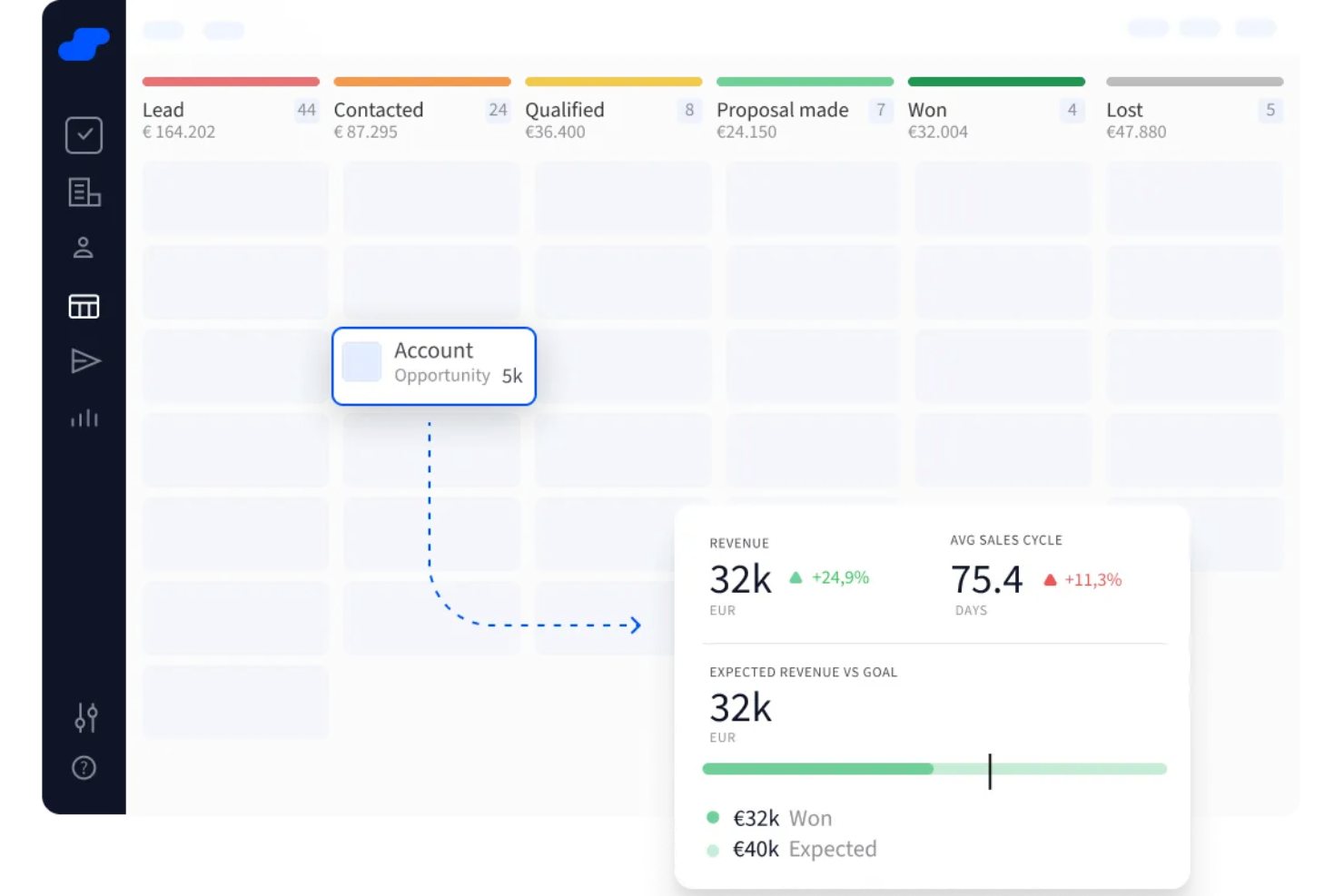
Salesflare es un CRM diseñado para pequeñas y medianas empresas B2B que desean gestionar los datos de clientes sin ahogarse en tareas administrativas. Si tu equipo trabaja en ventas o en funciones de cara al cliente y gestiona múltiples relaciones, esta herramienta elimina el trabajo manual de mantener actualizada la base de datos de clientes.
Por qué elegí Salesflare: Salesflare destaca porque automatiza la creación de tu base de datos de clientes—captura correos electrónicos, reuniones, firmas y actividad web para construir perfiles detallados de contactos y empresas sin esfuerzo manual. Esto significa que no necesitas invertir tiempo en ingresar detalles; la herramienta mantiene silenciosamente tu base de datos actualizada en segundo plano.
Además, te ayuda a gestionar oportunidades con un pipeline de ventas visual, donde puedes arrastrar los tratos a través de las diferentes etapas para ver exactamente cuál es el siguiente paso. Mientras tanto, envía recordatorios de seguimiento, rastrea aperturas de correos y actividad web, e incluso sugiere a quién deberías contactar, por lo que tu base de datos de clientes siempre es útil y está actualizada.
Características y integraciones destacadas de Salesflare
Características incluyen un enriquecimiento inteligente de datos que completa automáticamente la información de contacto y de la empresa a partir de firmas de correo electrónico y datos públicos, manteniendo tu base de datos de clientes detallada sin esfuerzo. También ofrece puntuación de leads que te avisa cuándo es el momento adecuado para contactar, ayudándote a priorizar tu alcance.
Integraciones incluyen Google Workspace, Intercom, MailChimp, QuickBooks Online, Slack, Stripe, Shopify y Calendly.
Pros and Cons
Pros:
- Captura automáticamente datos de clientes de múltiples fuentes
- Ofrece sólido rastreo y notificaciones de correos electrónicos
- Proporciona recordatorios útiles y sugerencias de seguimiento
Cons:
- Carece de funciones avanzadas para la gestión de cuentas
- Opciones limitadas para edición masiva de registros

Attio
Ideal para bases de datos flexibles
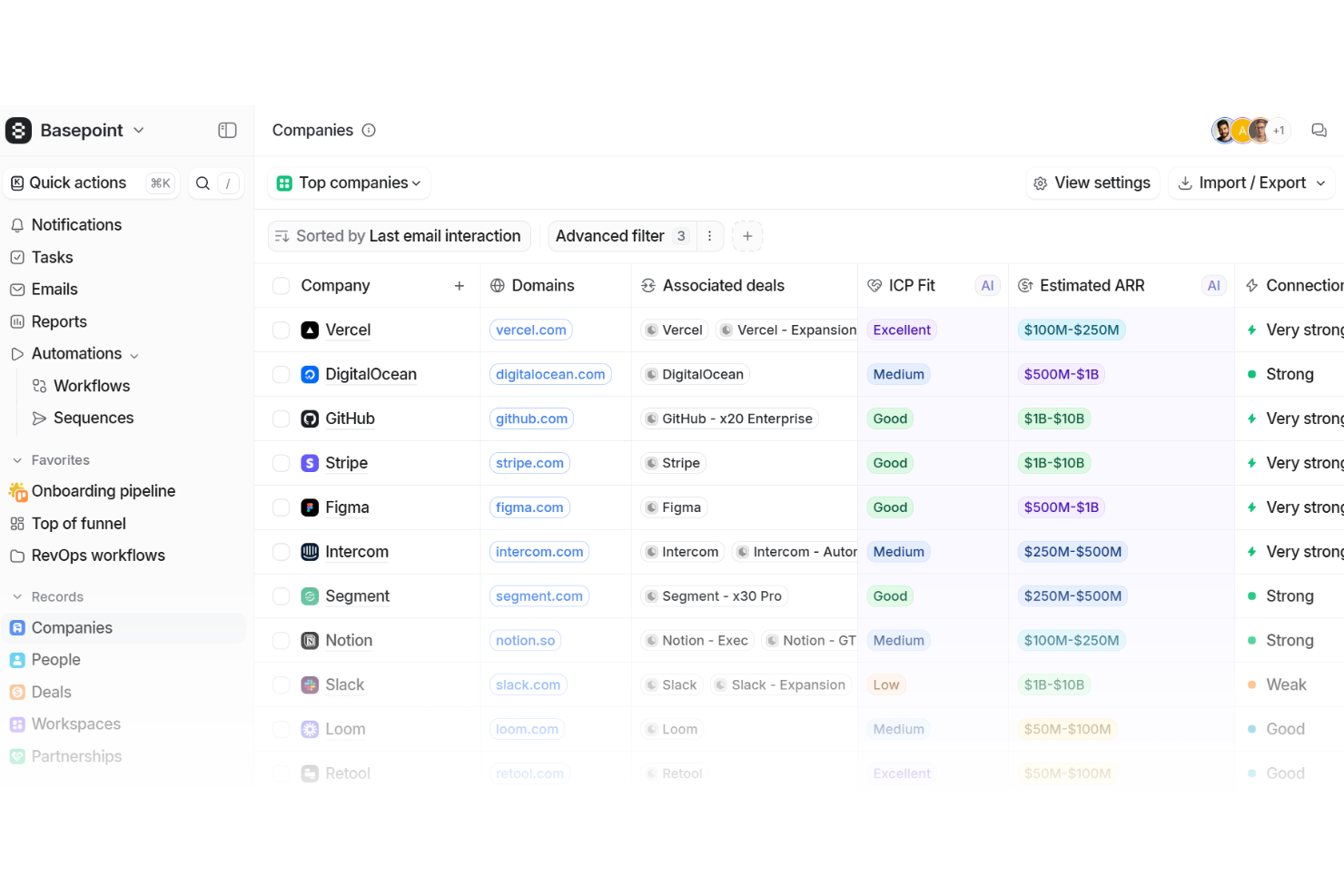
Attio es un software de base de datos de clientes nativo de IA diseñado para ofrecer a tu equipo una única fuente de verdad para cada relación e interacción. Organiza personas, empresas, tratos y registros personalizados en una estructura flexible que refleja el funcionamiento de tu negocio.
Por qué elegí Attio: Elegí Attio porque su modelo de datos adaptable te permite estructurar tu base de datos según las necesidades únicas de tu empresa. En lugar de estar limitado a plantillas rígidas, puedes diseñar objetos personalizados como facturas, proyectos o asociaciones junto a los registros estándar como personas y empresas. Esta flexibilidad permite que tu base de datos evolucione a medida que tu negocio crece, dándote confianza de que no se queda ningún detalle fuera.
También me gusta su capacidad para unificar información dispersa en un solo sistema conectado. Al sincronizar directamente el uso del producto, la facturación y los datos de soporte en los registros de los clientes, puedes ver la historia completa del recorrido de un cliente en un solo lugar.
Características destacadas e integraciones de Attio:
Las características incluyen un motor de automatización que te permite configurar reglas para actualizar registros, enrutar prospectos o marcar cuentas para seguimiento. Su asistente de IA ayuda con tareas como la prospección e identificación de los principales interesados para que puedas mantener tu base de datos enriquecida con un esfuerzo mínimo. Las herramientas de informes también te ofrecen información en tiempo real sobre tu base de clientes, ayudándote a seguir la participación, los ingresos y señales de salud con paneles personalizables.
Las integraciones incluyen Vercel, DigitalOcean, GitHub, Stripe, Figma, Intercom, Segment, Notion, Slack, Loom, Retool y Customer.io.
Pros and Cons
Pros:
- La IA ayuda a enriquecer los registros de clientes
- Objetos de base de datos personalizables se adaptan a las necesidades del negocio
- Centraliza datos de múltiples fuentes
Cons:
- No cuenta con función de llamada telefónica integrada
- La personalización avanzada puede abrumar a los usuarios
New Product Updates from Attio

Attio Improves Ask Attio With Suggested Actions and Consistent Chat
Attio adds suggested next actions, example prompts, a consistent chat panel, aligned shortcuts, and a minimize option to Ask Attio. These updates make the AI assistant easier to use across different pages. For more information, visit Attio’s official site.
 .
.
Ideal para flujos de trabajo personalizables
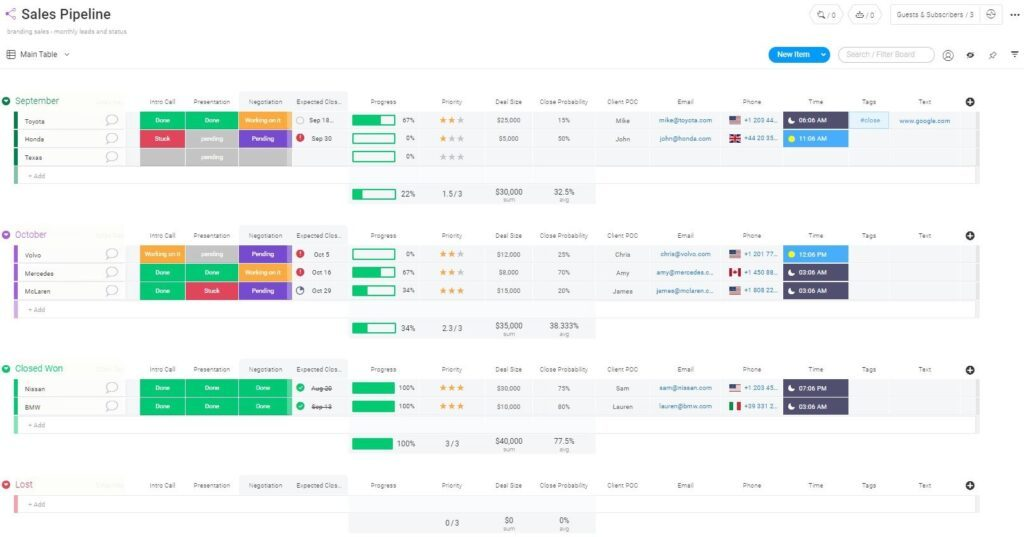
monday Sales CRM es una herramienta totalmente personalizable diseñada para centralizar la comunicación con los clientes, automatizar los procesos de ventas y proporcionar una visión integral de los acuerdos comerciales. Su propuesta de valor única radica en sus amplias capacidades de personalización, incluyendo tipos de columnas flexibles, subelementos detallados y vistas personalizables, lo que permite crear flujos de trabajo adaptados a las necesidades específicas de cada empresa.
Por qué elegí monday Sales CRM: Elegí monday Sales CRM por su alto grado de personalización y su interfaz fácil de usar, que permite una visualización clara de los embudos de ventas y centraliza las interacciones con los clientes. Se distingue por la capacidad de gestionar eficientemente las actividades de ventas desde la preventa hasta la posventa, ofreciendo una completa visualización de datos y un entorno de bajo o nulo código que facilita la personalización de los flujos de trabajo.
Lo que hace que monday Sales CRM destaque es la confianza depositada por una base de más de 180,000 usuarios en todo el mundo y su idoneidad para una amplia variedad de actividades relacionadas con ventas. Considero que monday Sales CRM es la mejor opción para flujos de trabajo personalizables gracias a sus amplias funciones de automatización, vistas personalizables y robustas capacidades de clasificación, que permiten a los usuarios adaptar la plataforma a sus necesidades específicas sin requerir amplios conocimientos técnicos.
Funciones destacadas de monday Sales CRM
Funciones incluyen tecnología intuitiva que apoya el éxito de tu empresa, ya sea desarrollando un panel personalizado para necesidades específicas de comunicación o analizando datos de clientes con herramientas de visualización. Usando las sencillas plantillas de disparadores y acciones dentro de la plataforma, puedes crear rápidamente múltiples automatizaciones que ahorran tiempo. También puedes implementar sistemas de notificación para ayudar a eliminar reuniones innecesarias al alertar a los miembros del equipo cuando una tarea o proyecto está listo para avanzar.
Integraciones incluyen más de 200 aplicaciones de terceros, como Salesforce, Mailchimp, Aircall, Pandadoc y Twilio.
Pros and Cons
Pros:
- Tableros ilimitados para organizar clientes, proyectos y procesos
- Fácil de desarrollar e implementar automatizaciones
- Atención al cliente 24/7
Cons:
- No hay informes personalizables
- Todos los planes requieren un mínimo de tres usuarios
New Product Updates from monday CRM

monday CRM Adds Meta Conversions API Integration
monday CRM now lets you connect Meta Conversions API and sync lead status back to Meta, improving targeting and conversions via a new Meta integration automation recipe. For more information, visit monday CRM's official site.
Capsule
La mejor en integraciones y facilidad de uso
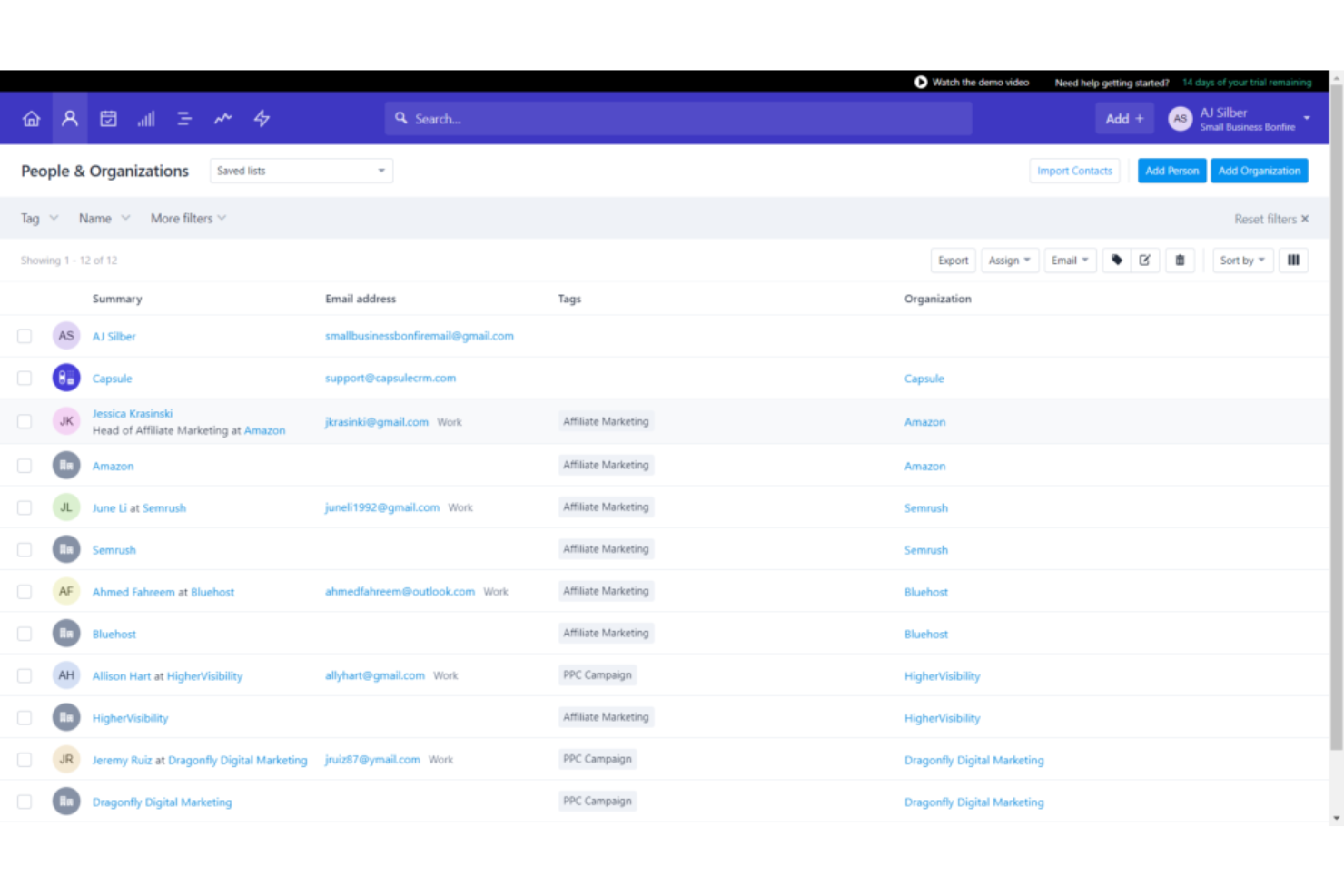
Capsule CRM ofrece un enfoque simplificado para gestionar relaciones con clientes, procesos de ventas y tareas en una sola plataforma intuitiva, facilitando a empresas de todos los tamaños el seguimiento de sus interacciones con clientes y la mejora de sus procesos de ventas.
Por qué elegí Capsule CRM: Como software de base de datos de clientes, Capsule CRM destaca por su diseño fácil de usar, fácil integración con herramientas existentes y por ofrecer una visión completa de las interacciones con los clientes, ayudando a las empresas a comprender mejor a su base de clientes y adaptar sus estrategias de marketing y ventas en consecuencia.
Lo que hace único a Capsule CRM es su sistema integrado de gestión de tareas, que conecta de manera fluida las tareas con oportunidades de ventas, contactos y casos. Esta integración permite a los usuarios gestionar seguimientos, plazos y hitos de proyectos directamente en el contexto de sus actividades CRM. El sistema de gestión de tareas permite la categorización, priorización y programación, lo que facilita la colaboración en equipo y mantener el control de todas las actividades relacionadas con clientes.
Funciones y opciones de integración destacadas de Capsule CRM
Funciones incluye 'Tracks' y 'Tags', que ofrecen un enfoque matizado para gestionar contactos y tareas. Los 'Tracks' son secuencias predefinidas de tareas que guían a los usuarios a través de un proceso, asegurando consistencia y eficiencia en actividades como la incorporación de nuevos clientes o el seguimiento de leads. Los 'Tags' permiten la categorización dinámica de contactos, oportunidades y casos, proporcionando un sistema flexible y fácil de usar para la segmentación que puede adaptarse a las necesidades cambiantes de la empresa.
Integraciones incluyen Google Workspace (Gmail, Docs, Calendar), Microsoft Office 365, Mailchimp, Xero, QuickBooks, Slack, FreshBooks y más a través de Zapier.
Pros and Cons
Pros:
- Intuitivo y fácil de usar
- Gestión integrada de tareas en el calendario
- Enviar y recibir correos electrónicos directamente en Capsule CRM
Cons:
- No permite arrastrar y soltar etiquetas de datos o campos
- Se agradecería una mayor integración con herramientas de marketing digital
New Product Updates from Capsule

Capsule Adds AI Meeting Prep for External Calls
Capsule introduced AI Meeting Prep with relationship summaries, color-coded signals, and CRM context for upcoming external calls. This helps users review key contact details and prepare for meetings without searching through records manually. For more information, visit Capsule’s official site.
 .
.
La mejor base de datos de clientes para pequeñas empresas
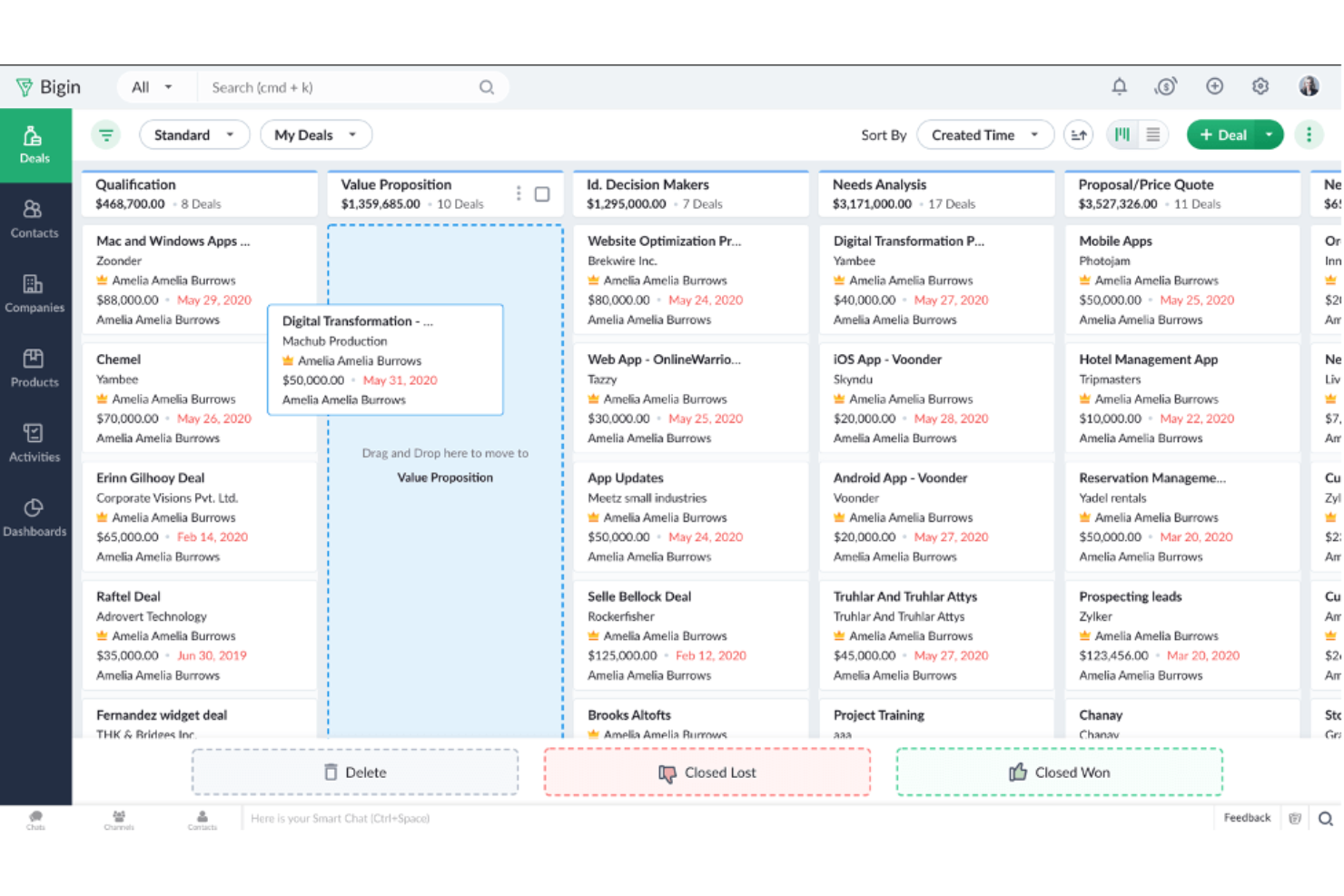
Bigin by Zoho CRM es una plataforma de gestión de relaciones con clientes diseñada para pequeñas empresas. Reduce la versión completa de Zoho CRM a una versión más simple para que tu equipo pueda centrarse en las herramientas que realmente va a usar. Puedes mantener todos los registros de tus clientes en un solo lugar, gestionar las comunicaciones y configurar un embudo de ventas sencillo sin la complejidad adicional.
Por qué elegí Bigin by Zoho CRM:
Obtienes una base de datos central que se adapta a la forma en que funciona tu negocio, con campos y módulos personalizados según tus necesidades. Puedes importar tus datos desde hojas de cálculo o capturar nuevos datos mediante formularios personalizados, y luego exportarlos cuando sea necesario. Las herramientas de comunicación multicanal te permiten gestionar el correo electrónico, teléfono y redes sociales en un solo lugar. También puedes crear un embudo de ventas que sigue cada oportunidad paso a paso y usa disparadores para mover automáticamente a las personas entre etapas. Un panel de informes personalizado te mantiene al tanto del rendimiento de tu equipo.
Características e integraciones destacadas:
Las características incluyen plantillas de correo electrónico que te ahorran tiempo al contactar clientes, flujos de trabajo que automatizan tareas repetitivas y una vista del embudo que muestra exactamente en qué estado se encuentra cada trato. También cuentas con telefonía integrada para hacer y registrar llamadas directamente desde el sistema.
Integraciones incluyen Zoho Books, Zoho Invoice, Google Workspace, Microsoft 365, Mailchimp, Zapier, Trello, Slack, DocuSign y QuickBooks.
Pros and Cons
Pros:
- Configuración fácil para equipos pequeños
- Campos personalizados que se ajustan a tu proceso
- Vista simple de seguimiento del embudo
Cons:
- Funciones limitadas en comparación con Zoho CRM
- Pocas opciones de automatización avanzada
New Product Updates from Bigin by Zoho CRM

Bigin iOS Adds Interactive WhatsApp Templates and Quick Replies
Bigin’s iOS app now supports interactive WhatsApp templates and Quick Replies, making it easier to preview and send instant messages to customers. For more information, visit Bigin by Zoho CRM's official site.
 .
.
Flowlu
Ideal para pequeñas y medianas empresas
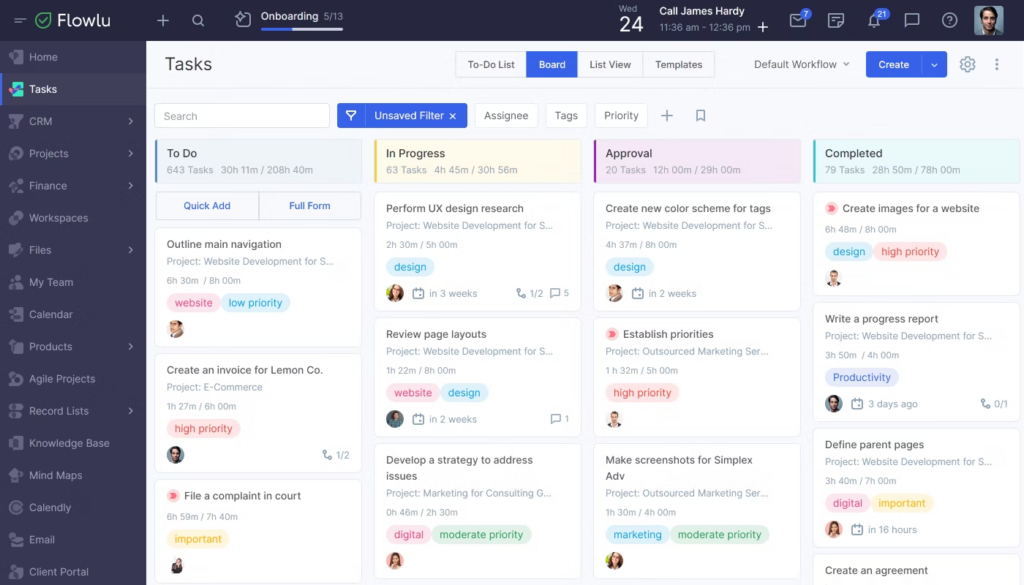
Flowlu es una plataforma de gestión empresarial para pequeñas y medianas empresas de diferentes sectores. Permite a las empresas almacenar y gestionar datos relacionados con los clientes, como información de contacto, historial de comunicaciones, datos de oportunidades y clientes potenciales, y el historial de compras.
Por qué elegí Flowlu: Flowlu es un software de base de datos de clientes que permite la gestión integral de proyectos. Además de las funciones de gestión de contactos, el software permite a los usuarios crear y gestionar proyectos, asignar tareas, establecer plazos, hacer seguimiento del progreso y colaborar con los miembros del equipo. Las herramientas financieras y contables ayudan a manejar la facturación, la emisión de facturas y el seguimiento de gastos.
Flowlu también ofrece capacidades de informes y análisis, lo que permite a las empresas obtener información sobre sus proyectos, ventas y rendimiento financiero.
Características y Integraciones Destacadas de Flowlu
Las características incluyen un portal para clientes, gestión de proyectos, seguimiento de tareas, CRM (gestión de relaciones con clientes), emisión de facturas, herramientas para gestión de ventas, colaboración en equipo y gestión financiera. Estas funciones ofrecen una solución integral para que las empresas gestionen sus proyectos, clientes y finanzas.
Integraciones disponibles con pasarelas de pago online, software de correo electrónico, telefonía, CRM, calendario y otras aplicaciones. Entre estos programas se incluyen PayPal, Stripe, Gmail, Twilio, Mailchimp, JivoChat, Calendly, Google Calendar, Zendesk y Slack.
Pros and Cons
Pros:
- Se integra con Slack
- Interfaz simple e intuitiva visualmente
- Incluye funciones que ahorran tiempo, como facturación automatizada
Cons:
- Integraciones limitadas
- Opciones de personalización limitadas
El mejor software de base de datos de clientes para empresas B2B
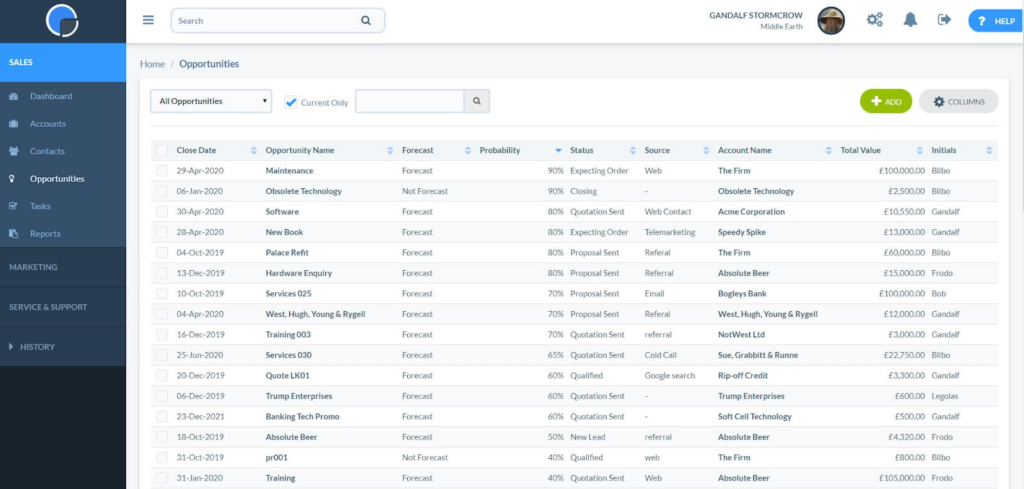
Las empresas B2B a menudo requieren herramientas de gestión de relaciones con clientes que puedan implementarse rápidamente sin necesitar amplios recursos de TI. Really Simple CRM ofrece un proceso de configuración sencillo y una interfaz fácil de usar.
Por qué elegí Really Simple CRM: Elegí Really Simple CRM por sus excepcionales funciones de informes y análisis. El software proporciona una amplia variedad de informes predefinidos que ofrecen información valiosa sobre los datos de los clientes, el embudo de ventas y las tasas de conversión de leads. Además, la capacidad de crear informes personalizados permite a los usuarios centrarse en los indicadores que son más relevantes para su negocio.
Las herramientas de visualización, como gráficos y diagramas, permiten a los usuarios identificar rápidamente tendencias y tomar decisiones basadas en datos. Con estas sólidas capacidades de informes y análisis, Really Simple CRM te permitirá hacer seguimiento del rendimiento, medir el éxito y mejorar continuamente tus estrategias empresariales.
Funciones e integraciones destacadas de Really Simple CRM
Las funciones incluyen gestión de contactos y embudos, cotizaciones, oportunidades, integración de correo electrónico, almacenamiento de documentos, tareas, eventos y calendario.
Las integraciones incluyen Xero, Zapier, Microsoft Azure, OneLogin, Sage Business Cloud y KashFlow. Puedes crear integraciones adicionales con Zapier.
Pros and Cons
Pros:
- Interfaz de usuario sencilla
- Plan gratuito para siempre disponible
- Integración nativa con Zapier
Cons:
- Integraciones limitadas
- Funciones de gestión de leads limitadas
Ideal para tener una visión de 360 grados de la información del cliente
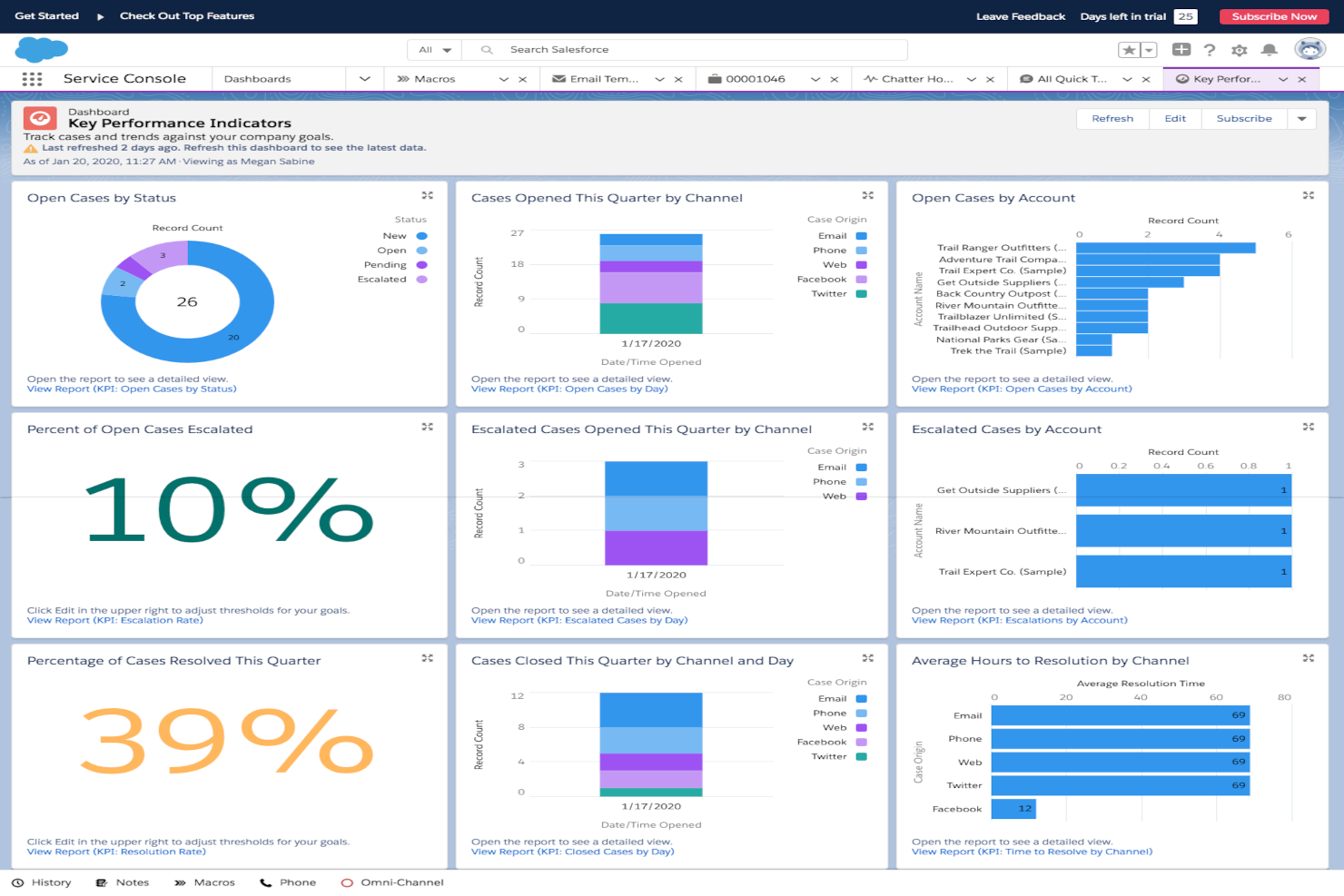
Salesforce Service Cloud es una plataforma de servicio y soporte al cliente que ayuda a tu equipo a rastrear, gestionar y resolver casos de clientes. También almacena los detalles de los clientes en un solo lugar para que puedas ver las interacciones a través de diferentes puntos de contacto y utilizar informes para medir el rendimiento.
Por qué elegí Salesforce Service Cloud:
Obtienes una vista de 360 grados de tus clientes, con datos capturados y almacenados en una sola ubicación. Puedes gestionar tickets de soporte, asignarlos a las personas adecuadas y utilizar la automatización para agilizar tareas repetitivas. La herramienta te ofrece informes personalizados y paneles de control para que puedas analizar la calidad del servicio y detectar áreas de mejora. También puedes conectarlo con aplicaciones de AppExchange para ampliar la utilidad de la herramienta para tu equipo.
Características destacadas e integraciones:
Las características incluyen gestión de la base de conocimientos que ayuda a tu equipo a dar respuestas consistentes, gestión de centro de llamadas para soporte telefónico y seguimiento de casos integrado que mantiene la historia del cliente organizada. También puedes usar macros para tareas repetitivas y procesos de aprobación que mantienen el flujo de trabajo activo.
Las integraciones incluyen Slack, Zoom, DocuSign, Mailchimp, QuickBooks, Google Workspace, Microsoft Teams, Jira, Outlook, Dropbox y WhatsApp.
Pros and Cons
Pros:
- Reglas flexibles para asignación de casos
- Paneles personalizables para gerentes
- Automatización útil para tareas rutinarias
Cons:
- La configuración puede parecer un proceso largo
- Las funciones avanzadas requieren conocimientos técnicos

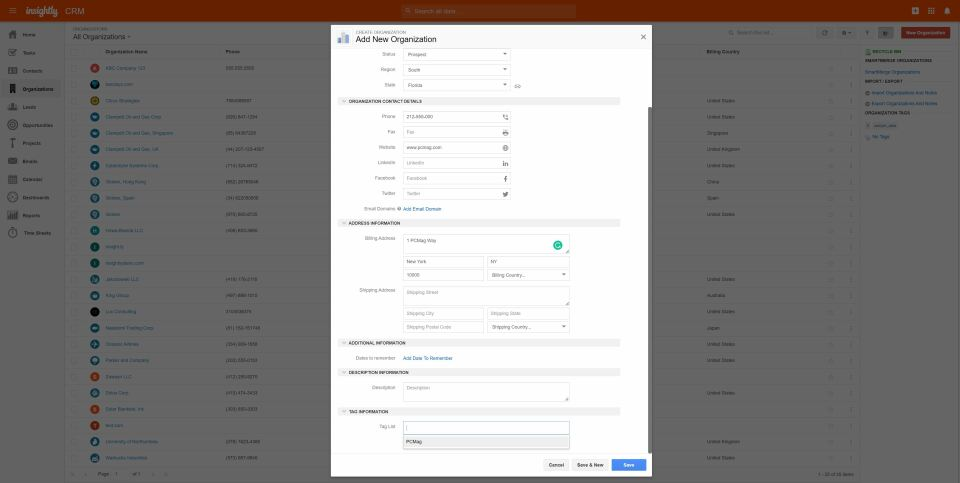
Insightly CRM es un software de gestión de relaciones con clientes diseñado para ayudar a las empresas a gestionar las interacciones con los clientes y realizar el seguimiento de oportunidades de venta. También ofrece funciones de gestión de proyectos como flujos de trabajo de proyectos, gestión de tareas y actividades, seguimiento de correos electrónicos del proyecto, hitos y diagramas de Gantt, gestión de documentos, colaboración y notas de proyecto.
Por qué elegí Insightly CRM: Una característica única de la base de datos de clientes de Insightly CRM es su capacidad de Enlace de Relaciones. Esta función permite a los usuarios establecer y visualizar conexiones entre contactos, organizaciones, proyectos y otras entidades relacionadas dentro del sistema CRM. Va más allá de la gestión básica de contactos al permitir a los usuarios mapear relaciones y jerarquías complejas.
Con el Enlace de Relaciones, los usuarios pueden navegar fácilmente y comprender la interconexión entre sus contactos y organizaciones. Esta función es especialmente beneficiosa para empresas con redes de partes interesadas, socios y clientes. Ayuda a identificar influenciadores clave, responsables de decisiones y conexiones que pueden impactar las relaciones de negocio y las oportunidades.
Características y integraciones destacadas de Insightly CRM
Las características incluyen un sistema robusto de gestión de contactos, administración de flujos de trabajo personalizables y capacidades eficientes de gestión de tareas y proyectos. Con integración de correo electrónico, herramientas de generación de informes y análisis y acceso móvil, las empresas pueden realizar un seguimiento efectivo de las interacciones con los clientes, prever ingresos, automatizar flujos de trabajo y colaborar en tareas relacionadas con proyectos.
Las integraciones incluyen Xero, Active Campaign, Adobe Sign, Airtable, Bamboo HR, Workday, Gusto, NetSuite, Magento, BigCommerce y otras opciones de software.
Pros and Cons
Pros:
- Interfaz fácil de usar
- Aplicación móvil disponible
- Buenas capacidades de automatización y flujos de trabajo
Cons:
- Opciones de informes limitadas
- Carece de análisis avanzados


Reflect CRM es un software de base de datos de clientes en las instalaciones que proporciona a las empresas una plataforma robusta para gestionar y organizar la información de sus clientes. Ofrece una gama de funciones, incluyendo gestión de contactos, seguimiento de ventas, gestión de tareas, integración de correo electrónico, reportes y análisis.
Por qué elegí Reflect CRM: Reflect CRM destaca como el mejor software de base de datos de clientes en las instalaciones debido a su capacidad para ofrecer a las empresas control total y seguridad sobre sus datos de clientes. Al mantener la base de datos en las instalaciones, las empresas pueden garantizar la privacidad de los datos, cumplir con las regulaciones del sector y acceder directamente a su información de clientes sin depender de servidores externos o sistemas en la nube.
Este nivel de control y seguridad convierte a Reflect CRM en la opción preferida para empresas que priorizan la soberanía de los datos y desean la propiedad absoluta de su base de datos de clientes.
Características y integraciones destacadas de Reflect CRM:
Las características incluyen funcionalidades para la gestión de contactos, gestión de tareas y seguimiento de ventas. Con Reflect CRM, las empresas pueden almacenar y organizar fácilmente la información de sus clientes, gestionar tareas y seguimientos, y registrar actividades de ventas para mejorar el compromiso con los clientes e impulsar el crecimiento de las ventas.
Pros and Cons
Pros:
- Control de datos en las instalaciones
- Opciones para importar o exportar datos
- Implementación rápida
Cons:
- Funcionalidades avanzadas limitadas
- Sin implementación en la nube
Otros programas de base de datos de clientes
Aquí tienes otras opciones de software de base de datos de clientes que no han entrado en mi lista, pero que todavía valen la pena revisar:
- Scoro
El mejor software de base de datos de clientes para consolidar datos de clientes
- People.ai
Ideal para ventas y marketing basados en datos
- Thryv
Mejor para la gestión de pequeñas empresas
- Maximizer CRM
Mejor software de base de datos de clientes para analítica avanzada
- AllClients
El mejor software de base de datos de clientes para usuarios no técnicos
- Creatio CRM
El mejor software de base de datos de clientes para empresas y grandes organizaciones
- Nextiva
La mejor opción para hacer seguimiento del historial de comunicación y sentimiento del cliente
- Copper
Mejor software de base de datos de clientes para usuarios de Google Workspace
- Zendesk
Ideal para gestionar consultas de clientes en múltiples canales
- Accelo
Mejor base de datos de clientes para empresas de servicios
- Velaris
Ideal para puntuaciones detalladas de la salud del cliente


Cómo Evalúo el Software de Base de Datos de Clientes
Divido mi evaluación en dos niveles: lo básico que una herramienta debe cumplir para calificar—piensa en registros unificados, eliminación de duplicados y sincronización con CRM—y los diferenciadores que distinguen las mejores opciones para RevOps.
Funcionalidad Esencial (Requisitos Mínimos para Esta Lista)
Cuando selecciono herramientas para mi lista, califico cada una en una escala de 0 (no ofrece la funcionalidad) a 5 (sobresale en esta área) para cada funcionalidad esencial que se menciona a continuación. Luego, calculo la puntuación total de la herramienta y la transformo en un porcentaje. Cada herramienta debe alcanzar una puntuación mínima total del 65% para ser considerada.
- Registros Centralizados de Clientes: Busco una base de datos unificada donde los contactos y las cuentas estén vinculados, para que tus equipos de ventas y CS no trabajen con listas desconectadas.
- Campos Personalizados y Modelos de Datos: Cada equipo de ingresos rastrea diferentes atributos. Reviso si puedes crear objetos y campos personalizados para que coincidan con tu modelo de datos GTM.
- Importación de Datos e Integraciones: Evalúo las integraciones nativas con CRM y herramientas de marketing, el acceso vía API y la importación/exportación de CSV para ver qué tan bien encaja la herramienta en un stack tecnológico real.
- Segmentación y Filtrado: Crear listas dinámicas es crucial para revisiones de pipeline y segmentación de campañas. Busco filtros de múltiples atributos y vistas guardadas que puedas compartir entre equipos.
- Seguimiento de Interacciones y Actividades: La herramienta debe registrar correos electrónicos, llamadas y reuniones en los registros de clientes. Verifico si esto ocurre de manera automática o requiere ingreso manual.
- Calidad de Datos y Eliminación de Duplicados: Los registros duplicados perjudican la precisión de las previsiones. Evalúo cómo cada plataforma detecta, señala y fusiona duplicados entre los datos importados y sincronizados.
Una vez tengo una lista de herramientas que cumplen con estos criterios, considero qué distingue a cada plataforma.
Factores Diferenciadores (Lo Que Distingue a los Proveedores)
Así es como comparo y contrasto los diferentes proveedores:
Características Sobresalientes
El enriquecimiento de datos es clave—verifico si una plataforma puede añadir automáticamente detalles firmográficos o tecnográficos a los registros, lo que ahorra a tu equipo el tener que buscar esa información manualmente. También evalúo las capacidades de ETL inverso, porque devolver datos de clientes depurados a tu CRM o plataformas publicitarias es lo que convierte a una base de datos en una herramienta real de acción GTM. Los informes integrados también son importantes. Si puedes extraer paneles de pipeline o de ciclo de vida directamente desde la base de datos, es una herramienta de BI menos que tu equipo de RevOps necesita mantener.
Más Allá de las Funcionalidades
La profundidad de la integración aquí es crucial. Analizo si una plataforma se conecta de forma nativa con Salesforce, HubSpot u otros CRMs similares—y si esas sincronizaciones son bidireccionales, no solo envíos unidireccionales. El costo total de propiedad es otro factor que considero cuidadosamente, especialmente cómo escala el precio a medida que crece el número de registros. Una herramienta que es asequible con 50,000 registros pero insostenible con 500,000 creará problemas rápidamente. También evalúo la velocidad de implementación, porque una base de datos que requiere meses de trabajo de ingeniería para ser desplegada retrasa el valor de RevOps que estás intentando desbloquear.
Cómo elegir software de base de datos de clientes
Es fácil perderse en largas listas de características y estructuras de precios complicadas. Para ayudarte a mantener el enfoque durante tu proceso de selección de software, aquí tienes una lista de factores a tener en cuenta:
| Factor | Qué considerar |
|---|---|
| Escalabilidad | ¿El software crecerá con tu negocio? Considera si puede manejar un número creciente de usuarios y volumen de datos sin pérdida de rendimiento. |
| Integraciones | ¿Se conecta con tus herramientas existentes? Comprueba si permite la integración con tus sistemas actuales como el correo electrónico, el CRM y las plataformas de marketing. |
| Personalización | ¿Puedes adaptar el software a tus necesidades? Busca opciones que permitan personalizar campos, vistas y flujos de trabajo para que se adapten a tus procesos. |
| Facilidad de uso | ¿Es intuitivo para tu equipo? Evalúa la interfaz y la navegación para asegurarte de que no requiere formación extensa para usarlo eficazmente. |
| Implementación y onboarding | ¿Cuánto tiempo tardarás en ponerlo en marcha? Valora el tiempo y los recursos necesarios para su configuración, migración de datos y formación de tu equipo. |
| Costo | ¿El precio se ajusta a tu presupuesto? Compara el coste con las funciones que ofrece y revisa si existen cargos adicionales o contratos a largo plazo. |
| Protección de seguridad | ¿Cómo protege el software tus datos? Verifica los estándares de cifrado, los procesos de copias de seguridad y el cumplimiento de normativas de seguridad relevantes. |
| Disponibilidad de soporte | ¿Hay ayuda disponible cuando la necesitas? Considera la disponibilidad del soporte al cliente, incluyendo horarios, canales y tiempos de respuesta. |
Tendencias en software de base de datos de clientes para 2026
Las empresas buscan cada vez más soluciones de software de bases de datos de clientes que no solo gestionen los datos de manera eficiente, sino que también proporcionen información procesable, mejoren la interacción con los clientes y optimicen las operaciones de ingresos. Aquí tienes un resumen de las tendencias actuales en software de bases de datos de clientes:
Integración e interoperabilidad:
- Integración fluida con otros sistemas empresariales: Existe una demanda creciente de software de bases de datos de clientes que se integre sin esfuerzo con plataformas de ventas, marketing y servicio, proporcionando una visión unificada de las interacciones con los clientes a través de diferentes puntos de contacto.
- Diseño priorizando APIs: La tendencia hacia una arquitectura centrada en las APIs indica que el software de bases de datos de clientes es cada vez más adaptable y capaz de integrarse con una gran variedad de componentes del ecosistema.
Toma de decisiones basada en datos:
- Analítica y reportes avanzados: El software moderno de bases de datos de clientes está incorporando herramientas analíticas sofisticadas para transformar los datos en información, permitiendo que las empresas tomen decisiones estratégicas fundamentadas.
- Analítica predictiva: Utilizar IA y aprendizaje automático para prever el comportamiento de los clientes y las tendencias de ventas se está convirtiendo en una característica estándar, ayudando a las empresas a tomar decisiones proactivas.
Funciones innovadoras:
- Capacidades de IA y aprendizaje automático: La integración de la IA para automatizar la entrada de datos, la limpieza de información e incluso predecir necesidades de los clientes es cada vez más frecuente, estableciendo nuevos estándares para la funcionalidad del software.
- Procesamiento de datos en tiempo real: La capacidad para procesar y analizar datos en tiempo real es cada vez más importante, permitiendo a las empresas responder rápidamente a tendencias emergentes y necesidades de los clientes.
Cambio de enfoque:
- De almacenamiento de datos a activación de datos: El enfoque está pasando de simplemente almacenar datos de clientes a activarlos mediante herramientas de interacción, creación de comunidad y experiencias personalizadas.
- Disminución de las soluciones locales (on-premises): Las soluciones en la nube se están convirtiendo en la norma, mientras que los sistemas locales se perciben como menos flexibles y más difíciles de mantener y escalar.
Las empresas deben elegir software de bases de datos de clientes que no solo responda a sus necesidades actuales, sino que también sea escalable y orientado al futuro, incorporando capacidades de IA y datos en tiempo real para seguir siendo competitivas en el cambiante panorama digital.
¿Qué es el software de base de datos de clientes?
El software de base de datos de clientes es una herramienta que te ayuda a almacenar y organizar toda la información de tus clientes en un solo lugar. Los equipos de ventas, marketing y soporte lo usan para hacer seguimiento de los datos de contacto, historial de compras y conversaciones, para no perder información importante ni dejar escapar oportunidades. Facilita encontrar rápidamente los datos de los clientes, lo que te ayuda a ofrecer un servicio más rápido y personalizado.
Funciones
Al seleccionar un software de base de datos de clientes, ten en cuenta las siguientes características clave:
- Gestión de contactos: Organiza toda la información de los clientes en un solo sitio, facilitando el acceso y actualización.
- Seguimiento del embudo de ventas: Visualiza las etapas de venta, ayudando a los equipos a gestionar y priorizar oportunidades de manera efectiva.
- Herramientas de automatización: Automatiza tareas repetitivas como seguimientos, ahorrando tiempo y reduciendo errores.
- Campos personalizables: Permite adaptar el software a los procesos y necesidades específicas de tu negocio.
- Capacidades de integración: Se conecta con otras herramientas, asegurando un flujo de datos sin interrupciones entre sistemas.
- Reportes y analítica: Brinda información sobre el rendimiento de ventas y las interacciones con los clientes, ayudando en la toma de decisiones basada en datos.
- Acceso móvil: Permite a los miembros del equipo acceder a los datos de clientes en cualquier lugar, asegurando la productividad desde cualquier sitio.
- Medidas de seguridad: Protege los datos de los clientes mediante cifrado y cumplimiento de estándares de seguridad.
- Interfaz fácil de usar: Garantiza facilidad de uso con navegación y diseño intuitivos.
- Alertas en tiempo real: Te mantiene informado de actualizaciones y cambios importantes, permitiendo acciones rápidas.
Beneficios
Implementar un software de base de datos de clientes proporciona varios beneficios para tu equipo y tu negocio. Aquí tienes algunos a los que puedes aspirar:
- Mejor organización: Centraliza los datos de los clientes, facilitando la gestión y recuperación de la información cuando sea necesario.
- Mayor productividad: Automatiza tareas rutinarias, liberando tiempo para que tu equipo se concentre en actividades más estratégicas.
- Mejor toma de decisiones: Ofrece herramientas de informes y análisis que proporcionan información sobre el comportamiento del cliente y tendencias de ventas.
- Mayor eficiencia en ventas: Rastrea los embudos de ventas, ayudando a tu equipo a priorizar oportunidades y cerrarlas más rápido.
- Relaciones más sólidas con los clientes: Facilita un mejor seguimiento de las interacciones, asegurando que todas las comunicaciones con los clientes sean consistentes y bien informadas.
- Escalabilidad: Se adapta a las crecientes necesidades de tu empresa, soportando un mayor volumen de datos y usuarios.
- Seguridad de datos: Protege la información sensible de los clientes mediante cifrado robusto y cumplimiento de los estándares de la industria.
Costos y Precios
Seleccionar un software de base de datos de clientes requiere comprender los diferentes modelos y planes de precios disponibles. Los costos varían según las funciones, el tamaño del equipo, complementos y más. La siguiente tabla resume los planes comunes, sus precios promedio y las características típicas incluidas en las soluciones de software de bases de datos de clientes:
Tabla comparativa de planes para software de base de datos de clientes
| Tipo de Plan | Precio Promedio | Características Comunes |
|---|---|---|
| Plan Gratuito | $0 | Gestión básica de contactos, almacenamiento limitado y soporte por correo electrónico. |
| Plan Personal | $5-$25/usuario/mes | Gestión de contactos mejorada, informes básicos, integración de correo electrónico y acceso móvil. |
| Plan Empresarial | $30-$60/usuario/mes | Informes avanzados, herramientas de automatización, campos personalizados, múltiples integraciones y funciones de colaboración. |
| Plan Corporativo | $70-$150/usuario/mes | Paneles de control personalizables, seguridad avanzada, soporte dedicado, almacenamiento ilimitado y análisis exhaustivos. |
Preguntas frecuentes sobre software de base de datos de clientes
Aquí tienes respuestas a preguntas comunes sobre el software de base de datos de clientes:
¿Cuáles son los tipos de software de base de datos de clientes?
El software de base de datos de clientes es fundamental para que las organizaciones de todos los sectores gestionen y analicen de manera eficiente la información de los clientes, fomenten mejores relaciones y tomen decisiones estratégicas. Existen varios tipos de software de base de datos de clientes disponibles, cada uno orientado a diferentes necesidades y escalas operativas:
- Software de gestión de contactos: Se centra principalmente en almacenar información de contacto básica de los clientes. Es ideal para pequeñas empresas o emprendedores individuales que necesitan gestionar sus contactos de manera efectiva sin requerir funciones avanzadas de CRM.
- Software CRM (Gestión de Relaciones con Clientes): Ofrece herramientas integrales más allá de la gestión de contactos, incluyendo ventas, marketing y atención al cliente. Está diseñado para empresas de todos los tamaños que buscan fortalecer de forma integral la relación con sus clientes.
- Software CRM para pequeñas empresas: Adaptado a operaciones de menor escala, este software proporciona las funciones clave del CRM como la gestión de contactos, el seguimiento de interacciones y análisis básicos en un paquete fácil de usar, sin abrumar a los usuarios con características complejas.
- Software CRM empresarial: Dotado de funciones avanzadas e integraciones, este tipo está orientado a grandes organizaciones con amplias necesidades de gestión de clientes. A menudo incluye análisis sofisticados, automatización y capacidades de personalización para respaldar procesos de negocio complejos.
- Software CRM vertical: Especialmente diseñado para ciertos sectores (por ejemplo, inmobiliario, finanzas, salud), ofrece características personalizadas que abordan los desafíos y flujos de trabajo únicos de sectores concretos.
- Software CRM operativo: Centrado en optimizar las operaciones diarias relacionadas con la interacción con los clientes. Incluye automatización de procesos de marketing, ventas y servicios, garantizando flujos de trabajo eficientes.
- Software CRM analítico: Enfatiza la recopilación, el análisis y el aprovechamiento de los datos de clientes para tomar decisiones empresariales informadas. Ayuda a las empresas a comprender los comportamientos, preferencias y tendencias de sus clientes.
- Software CRM colaborativo: Su objetivo es mejorar la comunicación y la colaboración entre equipos internos y también con partes externas. Asegura experiencias consistentes del cliente en diversos puntos de contacto al compartir la información entre departamentos.
Comprender las necesidades y objetivos específicos de tu empresa es fundamental al elegir el tipo correcto de software de base de datos de clientes. Cada tipo ofrece características y funciones distintas, por lo que es importante escoger uno que se alinee con las metas y requerimientos operativos para maximizar los beneficios de tu inversión.
¿Cómo se mantiene la precisión y consistencia de los datos de clientes?
Para mantener tus datos precisos, establece estándares claros de entrada de datos y realiza auditorías periódicas. Motiva a tu equipo a verificar la información antes de añadirla al sistema. Utiliza herramientas o scripts integrados para detectar duplicados y registros incompletos, de modo que tu base de datos siga siendo confiable con el tiempo.
¿Con qué frecuencia se debe revisar o actualizar la información de los clientes?
Revisa tu base de datos al menos de forma trimestral para corregir errores y eliminar contactos inactivos. Configura recordatorios automáticos o flujos de trabajo para solicitar actualizaciones después de interacciones importantes. Mantener los datos actualizados mejora la precisión de la comunicación y la calidad de los informes.
¿Qué sigue?
Si estás investigando opciones de software de base de datos de clientes, conéctate con un asesor de SoftwareSelect para recibir recomendaciones gratuitas.
Solo tienes que completar un formulario y tener una breve charla donde obtendrán detalles específicos sobre tus necesidades. Luego, recibirás una lista corta de software para revisar. Incluso te apoyarán durante todo el proceso de compra, incluidas las negociaciones de precios.