
Piyasadaki tüm CRM seçenekleri karşısında bunaldınız mı? Yalnız değilsiniz. Satış sürecinizi “devrim niteliğinde değiştireceğini” vaat eden bu kadar çok platform varken analiz felcine kapılmak kolaydır. Yanlış bir hamle yaptığınızda, kimsenin kullanmak istemediği hantal bir yazılımla baş başa kalırsınız.
Büyüme hedeflerini, satış hattı görünürlüğünü ve ölçeklenirken farklı ekipler arası uyumu aynı anda yönetmenin nasıl bir şey olduğunu biliyorum. İhtiyacınız olan son şey, netlikten çok karmaşıklık ekleyen başka bir araçtır. Bu nedenle ağır işi sizin için biz yaptık.
Sayısız CRM'i değerlendirdikten sonra seçenekleri 2026 yılının en iyi 26 CRM yazılımına indirdik. İster müşteri verilerini düzenlemek, ister anlaşmaları takip etmek veya gelir motorunuzu güçlendirmek isteyin, burada büyümenin her aşamasına uygun bir seçenek var. Size en uygun seçeneği bulalım.
Why Trust Our Software Recommendations
6,700+
Reviews
20
Industry experts
16+
Evaluation factors
14
Years
Our reviews reflect our independent judgment—not a sales pitch. Learn how we stay transparent.
For this guide, we evaluated tools using hands-on testing and independent research, scoring tools using our selection criteria.
Our reviews reflect our human editorial judgment, not a sales pitch.
Karşılaştırma Tablosu: CRM Yazılımları
Bu karşılaştırma tablosu, en iyi CRM yazılımı seçimlerimle ilgili fiyatlandırma ayrıntılarını özetler.
Score legend (out of 5)
- Excellent4.5–5
- Good4–4.4
- Average3–3.9
- Below average2–2.9
- Poor1–1.9
Sorted by: Default
| Tool | Starting Price | Website | |||||||
|---|---|---|---|---|---|---|---|---|---|
Best for marketing-focused CRM workflows | Not rated | 3 | 2 | Not rated | 4 | Not rated | 3 | $10.70/month Free plan available | Book Demo |
Best for managing your entire sales cycle | 3.8 out of 5 | 3 | 4 | 4 | 4 | 4 | 4 | $12/user/month 14-day free trial + free demo available | Book Demo |
Best for AI-native CRM with zero data entry | 3.3 out of 5 | 3 | 2 | 3 | 4 | 4 | 4 | $40/month 14-day free trial available | Website |
Best for enterprise AI CRM capabilities | 4.0 out of 5 | 4 | 4 | 4 | 4 | 4 | 4 | $40/user/month Not available | Book Demo |
Best for modeling nonstandard relationships | 3.8 out of 5 | 4 | 3 | 4 | 5 | 3 | 4 | $44/user/month Free plan + 14-day trial + demo available | Website |
Best for forecasting by sales hierarchy | 3.7 out of 5 | 3 | 4 | 4 | 4 | 3 | 4 | $8/user/month 30-day free trial available | Website |
Best for sales pipeline visualization | 3.8 out of 5 | 4 | 3 | 4 | 4 | 4 | 4 | $14/user/month 14-day free trial | Website |
Best for controlled CRM change management | 4.0 out of 5 | 4 | 3 | 4 | 5 | 4 | 4 | $20/user/month Free plan + 14-day free trial + demo available | Website |
Best for coordinating sales and service teams | 4.2 out of 5 | 4 | 4 | 4 | 4 | 4 | 5 | $25/user/month 30-day free trial | Website |
Best for automated lead tracking | 3.5 out of 5 | 3 | 3 | 4 | 3 | 4 | 4 | $39/user/month 30-day free trial + free demo available | Website |
Best for small manufacturers | 2.5 out of 5 | 2 | 3 | 2 | 3 | 2 | 3 | $49/user/month 15 + 15-day free trial available | Website |
Best for smart, simple CRM solutions | 3.8 out of 5 | 3 | 4 | 4 | 4 | 4 | 4 | $22/user/month Free plan + 14-day free trial available | Website |
Best for remote and hybrid teams | 4.0 out of 5 | 4 | 4 | 4 | 4 | 4 | 4 | $14/user/month Free plan + 15-day free trial+ free demo available | Website |
Best for B2B order management | 2.7 out of 5 | 2 | 3 | 1 | 3 | 3 | 4 | $69/rep/month Free trial available | Website |
Best for modeling rule-based sales workflows | 4.0 out of 5 | 4 | 4 | 4 | 4 | 4 | 4 | $15/user/month Not available | Website |


En İyi CRM Yazılımı İncelemeleri
Her CRM yazılımının en iyi kullanım alanını, öne çıkan özelliklerini ve bazı artılarını ve eksilerini gösteren kısa bir açıklamasını burada bulabilirsiniz. Ayrıca kullanıcı arayüzlerinin genel görünümünü sunmak için ekran görüntüleri de ekledim.
 Best for marketing-focused CRM workflows
- Free plan available
- From $10.70/month (billed annually)
Visit WebsiteCustomer Rating:4.5/5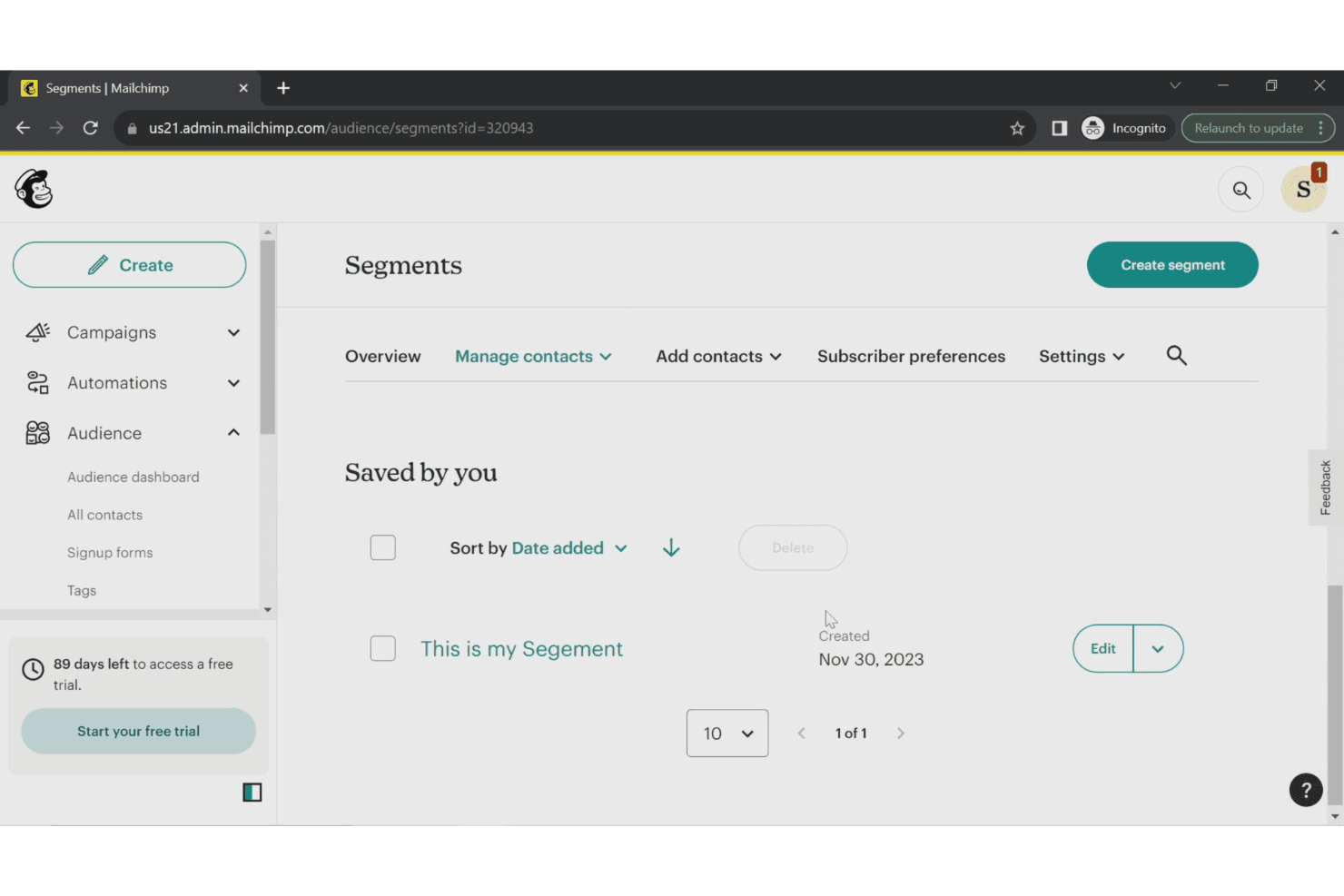
Mailchimp lets users organize contacts into saved audience segments. Mailchimp is a marketing platform that combines contact management, audience segmentation, email marketing, and automation tools in one place.
Who Is Mailchimp Best For?
Mailchimp is a strong fit for small to mid-sized businesses that run most of their customer engagement through email and digital marketing channels.
Why I Picked Mailchimp
Mailchimp earns its spot on my shortlist because its marketing automation flows go well beyond basic drip emails. I use the customer journey builder to trigger actions based on actual purchase behavior—like sending a win-back campaign when a contact goes quiet or a follow-up offer after a completed order. I also like that automation flows extend across email, SMS, and social from one place, so my team isn't stitching together separate tools just to run a multichannel campaign.
Mailchimp Key Features
- Audience dashboard: View all your contact data, tags, segments, and groups in a single profile-based interface.
- Predictive analytics: Scores contacts by purchase likelihood and estimated customer lifetime value to help you prioritize outreach.
- A/B testing: Test subject lines, send times, and content variations across email campaigns to identify top performers.
- Campaign reports: Track open rates, click maps, revenue, and unsubscribe data at the individual campaign level.
Mailchimp Integrations
Mailchimp offers 300+ integrations through its Integrations and App Directory, including Shopify, WooCommerce, Salesforce, and more. It also connects with Zapier, and an API is available for custom integrations.
Pros and Cons
Pros:
- Pre-built audience segments save setup time
- Behavioral targeting triggers personalized campaigns
- AI-generated content and subject line suggestions
Cons:
- No sales pipeline or deal tracking tools
- Duplicate contacts across audiences count twice
Learn more about Mailchimp : Best for managing your entire sales cycle
- 14-day free trial + free demo available
- From $12/user/month (billed annually)
Visit WebsiteCustomer Rating:4.6/5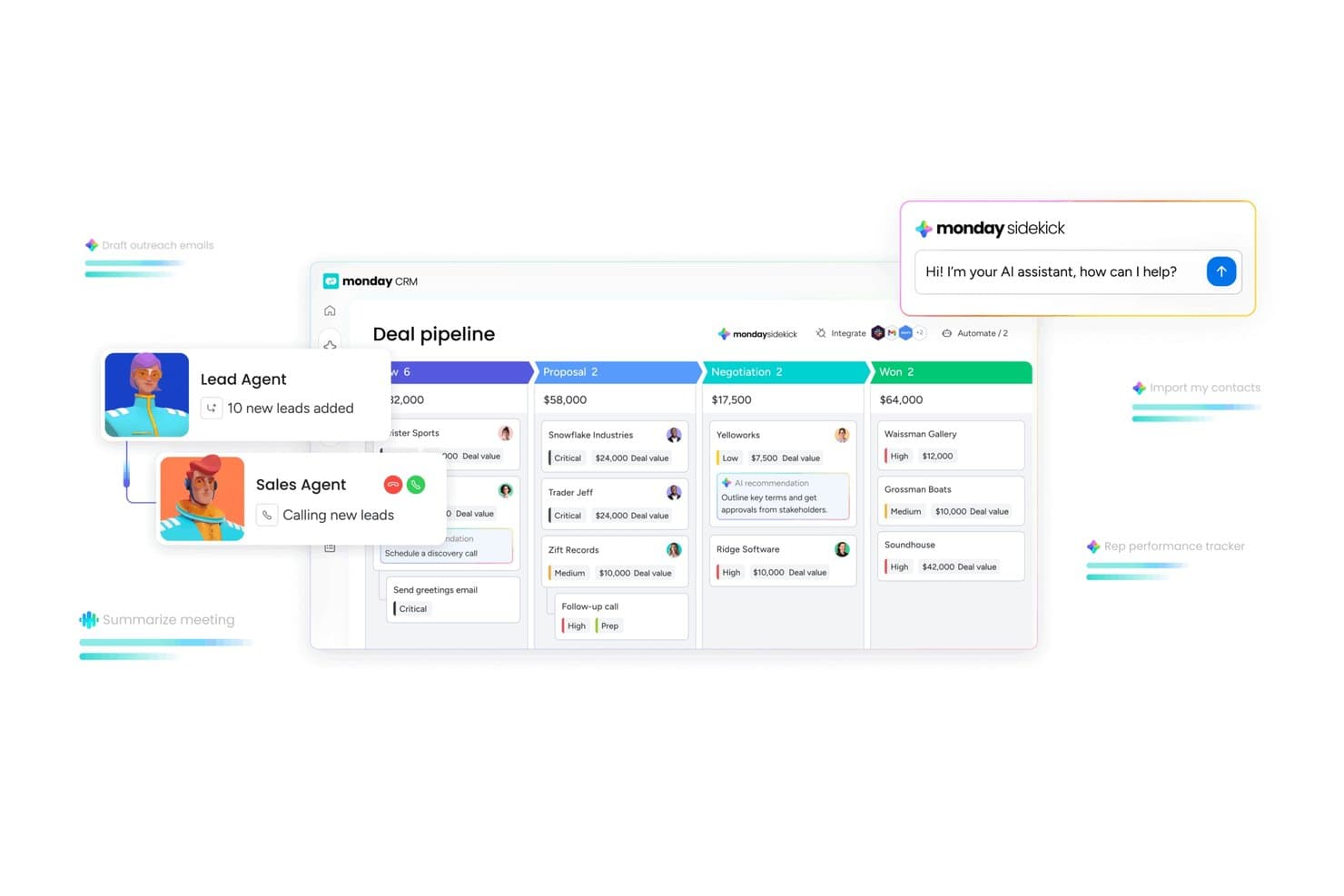
monday CRM visualizes deal pipelines with AI-driven sales agent automation. monday CRM gives sales teams and growing businesses a customizable platform to organize contacts, automate workflows, and track deals from first touch to close, making it easier to manage complex sales processes in one place.
Who Is monday CRM Best For?
monday CRM is a strong fit for small to mid-sized sales teams that need a flexible, visual way to manage pipelines without the complexity of enterprise CRM platforms.
Why I Picked monday CRM
monday CRM earns its spot on my shortlist because it genuinely covers the full sales cycle in one place, from lead capture to post-sale client management. I like that you can customize pipeline stages without touching a line of code, and drag deals between stages as they progress. AI-powered task generation stands out: it converts meeting notes or call transcripts into next steps, preventing tasks from falling through the cracks between stages. The post-sales management module is something I don't see in many CRMs at this level, letting my team track client projects and collections without switching tools.
monday CRM Key Features
- Lead scoring: Automatically score incoming leads based on custom criteria to help your team prioritize the most promising opportunities.
- Personalized email sequences: Build and send targeted email sequences to contacts at specific pipeline stages, with open tracking built in.
- One-click automations: Set up trigger-based automations to assign leads, send reminders, and notify reps when contacts engage, with no coding required.
- Sales performance dashboards: Build real-time dashboards that surface deal status, expected revenue, and individual rep performance in one view.
monday CRM Integrations
Integrations include Salesforce, QuickBooks, HubSpot, Zendesk, Slack, Gmail, Google Calendar, Outlook, Microsoft Teams, and Mailchimp.
Pros and Cons
Pros:
- 24/7 customer support.
- Easy to develop and implement automations.
- Unlimited boards to organize clients, projects, and processes.
Cons:
- All plans have a three-user minimum.
- No customizable reports.
 Best for AI-native CRM with zero data entry
- 14-day free trial available
- From $40/month (billed annually)
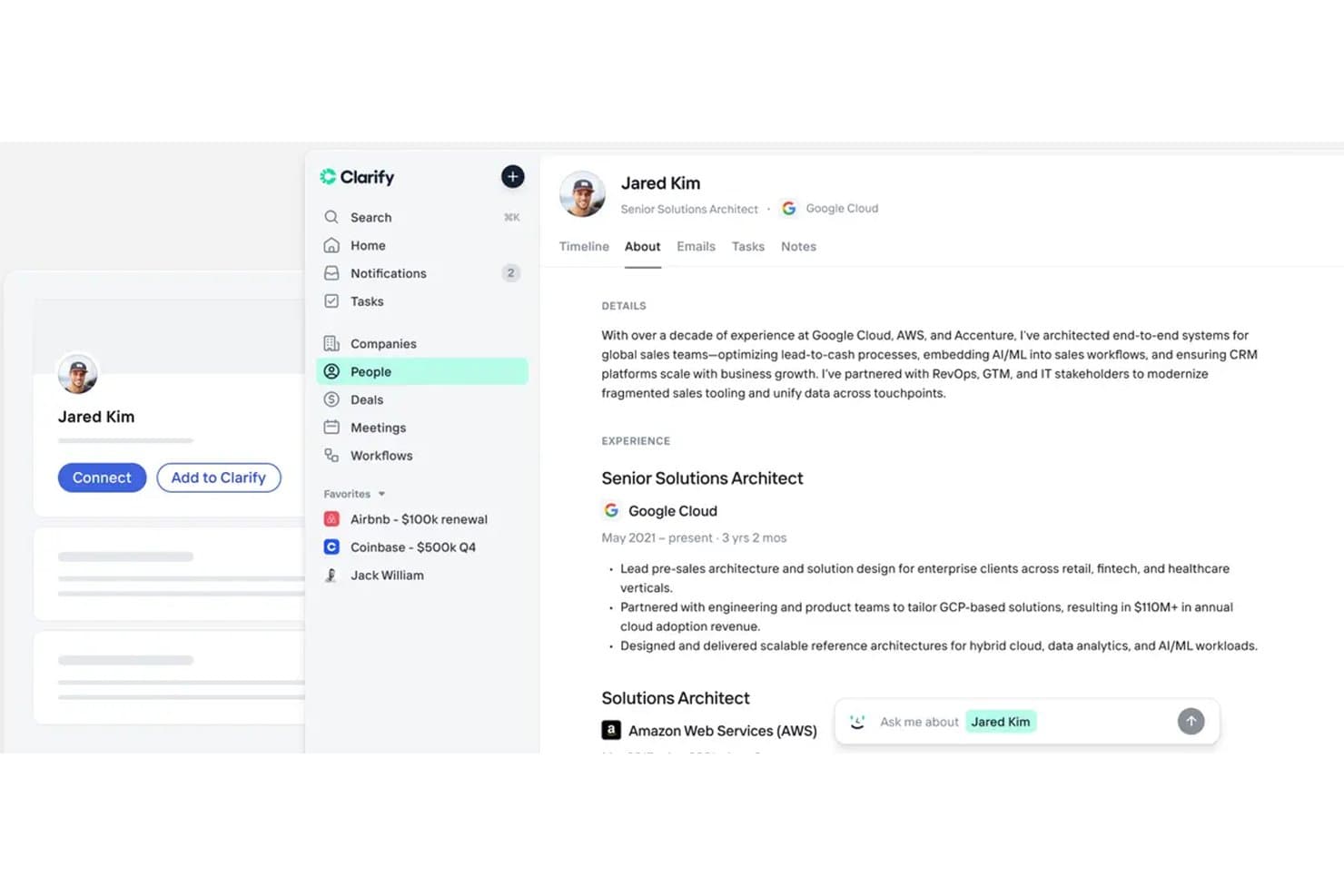
Clarify offers a detailed contact profile view with experience history, AI-powered insights, and navigation tabs for emails, tasks, and notes. Clarify is an AI-native CRM that automatically syncs email and calendar activity, detects and updates deals, and runs an AI sales agent to handle meeting prep, follow-ups, and pipeline management.
Who Is Clarify Best For?
Clarify suits early-stage and growth-phase sales teams that want AI to handle pipeline hygiene and follow-ups automatically, without the overhead of a traditional CRM.
Why I Picked Clarify
I picked Clarify as one of the best because its AI sales agent, Rep, does the kind of work that usually falls through the cracks: writing follow-ups, preparing meeting briefs, and updating deal stages automatically based on real email and calendar activity. I love that deal detection runs continuously in the background, so when a prospect replies to a campaign, Clarify creates or advances the deal without anyone touching the CRM. That end-to-end automation, from first touch to closed deal, is where Clarify genuinely separates itself.
Clarify Key Features
- Automatic sync with email and calendar: Keeps every lead, meeting, and deal updated in one place without manual entry.
- Self-configuring CRM fields: Lets you add custom fields by just naming them, and the AI sets up the rest automatically.
- Broad third-party integrations: Connects natively with workspace, scheduling, payment, analytics, and support tools, plus Zapier for 7,000+ app connections.
- SOC 2 Type 2, HIPAA, and GDPR compliance: Built-in security and compliance certifications help teams meet strict data privacy standards.
Clarify Integrations
Clarify offers native integrations with Apollo, Lemlist, Zoom, Google Workspace, Microsoft 365, Notion, Slack, Stripe, and Segment, and connects with Zapier. An API is available for custom integrations.
Pros and Cons
Pros:
- Unlimited seats on every plan
- No manual data entry for meetings or follow-ups
- AI agent auto-updates deals from real email activity
Cons:
- Only one pipeline supported per workspace
- Reporting dashboards are rigid and underdeveloped
Learn more about Clarify: Best for enterprise AI CRM capabilities
- Not available
- From $40/user/month
Visit WebsiteCustomer Rating:4.7/5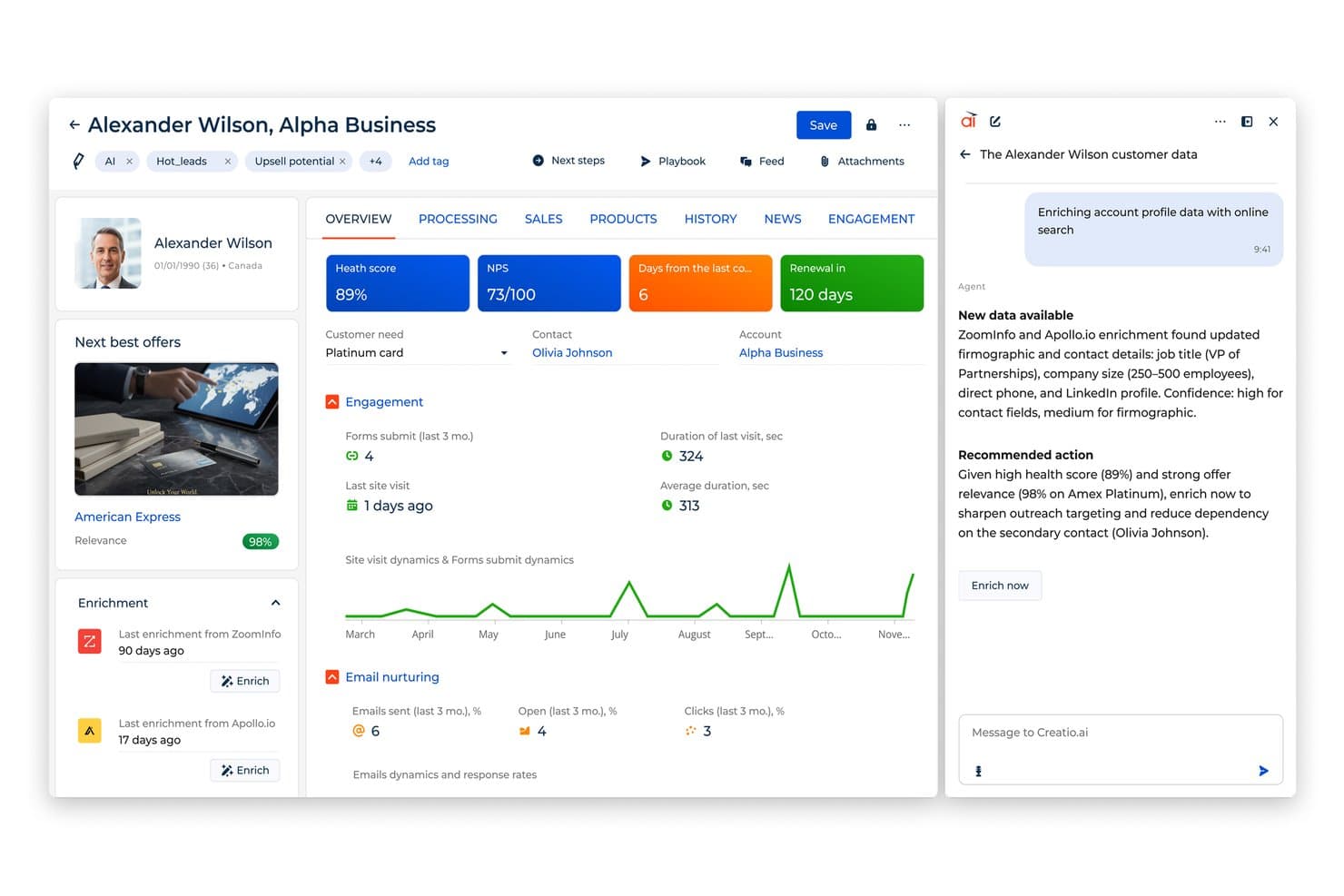
Creatio AI enriches CRM profiles with real-time firmographic data. Creatio AI CRM gives sales, marketing, and service teams in mid-sized and large businesses a unified platform to manage customer relationships, automate processes, and adapt workflows to fit changing business needs at scale.
Who Is Creatio AI CRM Best For?
Creatio AI CRM is a strong fit for mid-sized to enterprise businesses, especially within financial services, manufacturing, and tech, that need a customizable CRM without relying on developers to build or modify workflows.
Why I Picked Creatio AI CRM
Creatio AI CRM earns its spot on my shortlist because it combines AI agents, AI coding agents, and no-code automation. Most CRMs let you tweak a field or set up a basic email trigger. With Creatio, I can redesign entire workflows, rebuild data models, and create custom pages without writing a single line of code—within one visual workspace. The no-code process designer handles both structured workflows and dynamic case management, so my team can automate something as predictable as a lead nurture sequence or as fluid as a multi-step service escalation. Built-in AI agents work autonomously alongside people, handling account research, lead scoring, case routing, and more without human intervention at every step. I also like that Creatio ships with pre-built workflow templates for 20 industries, which means you're not starting from scratch when you need to automate something specific to your vertical.
Creatio AI CRM Key Features
- AI agent library: Creatio ships with role-specific AI agents for sales, marketing, and service—covering tasks like account research, quote generation, lead scoring, case routing, and running autonomously 24/7.
- AI coding agents: Build and customize CRM applications and workflows using natural-language prompts.
- 360-degree contact and account management: View a complete history of customer interactions, preferences, and account details in a single, unified profile.
- Multichannel marketing automation: Build, execute, and track campaigns across email, digital ads, and social channels with built-in audience segmentation and micro-targeting tools.
- Omnichannel service management: Handle support cases across email, phone, chat, and social from one agent desktop, with SLA tracking and automated case escalation.
Creatio AI CRM Integrations
Integrations include Salesforce, Microsoft Dynamics 365, Zendesk, HubSpot, Zoho, Pega, LinkedIn, Google Workspace, Mailchimp, and DocuSign.
Pros and Cons
Pros:
- Deep no-code customization without developer dependency
- Unlimited users, agents, and workflows
- Detailed reporting and analytics with real-time dashboards
Cons:
- Limited native social media network integrations
- Learning curve for new users
Learn more about Creatio AI CRM: Best for modeling nonstandard relationships
- Free plan + 14-day trial + demo available
- From $44/user/month
Visit WebsiteCustomer Rating:4.5/5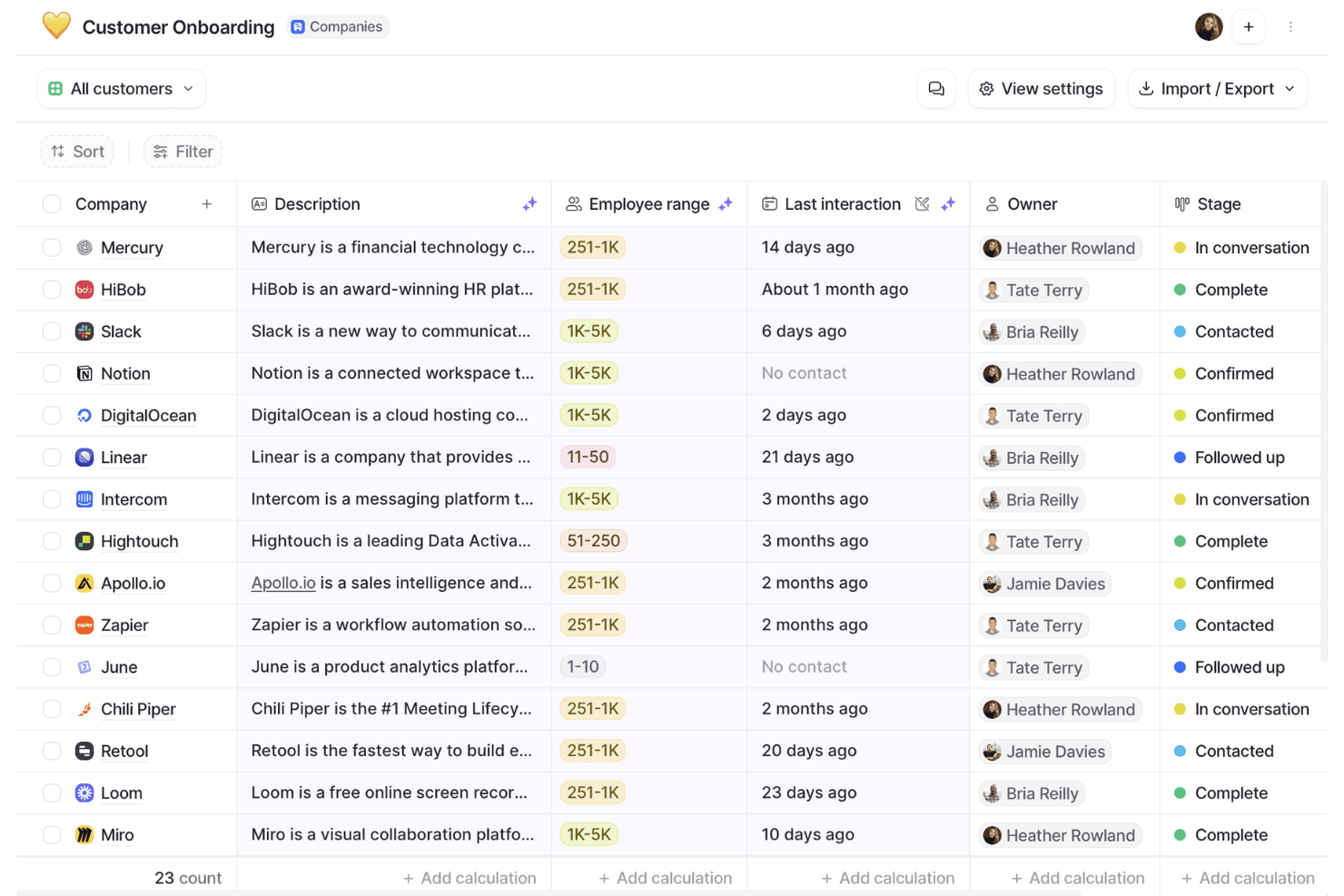
Attio organizes customer onboarding pipelines with stage tracking. Attio is a modern CRM platform for teams building flexible, collaborative workspaces that adapt to their unique sales, marketing, and relationship management needs.
Who Is Attio Best For?
Attio is a strong fit for fast-growing startups and scale-ups that need a CRM they can shape around their own data models and go-to-market processes.
Why I Picked Attio
Attio is one of my top picks because I love how far you can push its data model without needing a developer. I can create custom objects for things like partnerships or investor relationships, define my own attributes, and link records together using a graph model that actually reflects how my business operates. In practice, that means my team isn't forced into a rigid contact-company-deal structure. The visual workflow builder layers on top of that flexibility nicely, letting me automate GTM processes based on those custom objects and attributes rather than just standard pipeline triggers.
Attio Key Features
- Real-time reporting dashboards: Build custom dashboards with line charts, bar graphs, and geospatial maps that pull live data across your entire GTM pipeline.
- Email sequences: Enroll contacts based on behavioral signals and send automated, personalized email sequences with auto-assigned senders.
- Activity timelines: View a full interaction history for every record, including emails, meetings, and notes, all in one place.
- Automatic data enrichment: Pull in firmographic data like revenue, employee count, and location from hundreds of sources directly into contact and company records.
Attio Integrations
Integrations include Gmail, Outlook, Segment, Mailchimp, Slack, Outreach, Mixmax, and Typeform.
Pros and Cons
Pros:
- Good collaboration features
- Automatically enriches contact data
- Highly customizable CRM
Cons:
- Mobile app lacks some functionalities
- Lacks some advanced email features
Learn more about Attio: Best for forecasting by sales hierarchy
- 30-day free trial available
- From $8/user/month (billed annually)
Visit WebsiteCustomer Rating:4.6/5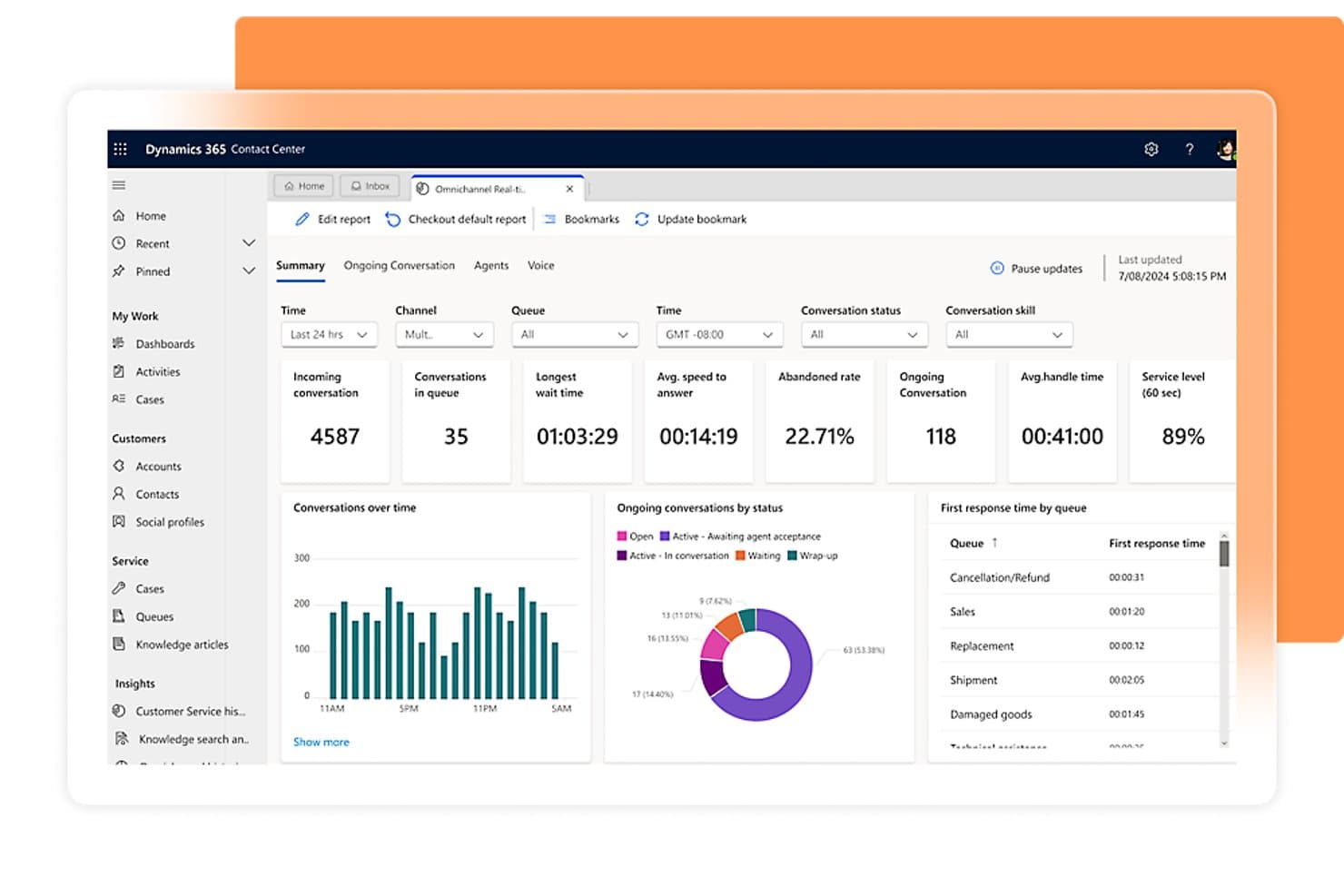
Microsoft Dynamics 365 tracks real-time omnichannel contact center metrics. Microsoft Dynamics 365 is an enterprise CRM platform built by Microsoft that covers lead and opportunity management, sales forecasting with hierarchy rollups, pipeline tracking, conversation intelligence, and AI-powered lead scoring.
Who Is Microsoft Dynamics 365 Best For?
Microsoft Dynamics 365 Sales is a strong fit for sales operations teams and sales managers at mid-size to enterprise organizations that need structured forecasting with hierarchy rollups and deep Microsoft ecosystem connectivity.
Why I Picked Microsoft Dynamics 365
I picked Microsoft Dynamics 365 Sales as one of the best because its forecasting by sales hierarchy is genuinely hard to replicate at this level of depth. Forecast rollups follow your actual Manager-field hierarchy, so a regional VP sees their managers' numbers stacked cleanly without manual consolidation. Columns for quota, committed, best case, and pipeline give sales ops a full snapshot in one view, and territory-based hierarchy forecasts let you cut the same data by territory structure when you need it.
Microsoft Dynamics 365 Key Features
- Predictive lead scoring: A machine-learning model trained on your historical lead data scores and ranks leads so sellers know where to focus first.
- Assignment rules: Automatically route new leads and opportunities to sellers, teams, or queues using round-robin or workload-based distribution.
- Conversation intelligence: Records and analyzes sales calls to surface transcriptions, keyword trends, seller behavior patterns, and coaching insights.
- Dataverse auditing: Logs changes to customer records at the environment, table, or column level, capturing who changed what and when.
Microsoft Dynamics 365 Integrations
Microsoft Dynamics 365 offers native integrations across the Microsoft ecosystem, including Microsoft 365, Outlook, Teams, Power BI, Power Apps, Power Automate, Power Pages, and LinkedIn Sales Navigator. Its Dataverse RESTful Web API with OData v4 and .NET SDK supports custom integrations.
Pros and Cons
Pros:
- Automated routing reduces manual follow-up work
- Hierarchy-based forecasts clarify team pipeline
- Customer histories connect activities and opportunities
Cons:
- Reporting filters need more flexibility
- Complex configuration can delay implementation
Learn more about Microsoft Dynamics 365: Best for sales pipeline visualization
- 14-day free trial
- From $14/user/month (billed annually)
Visit WebsiteCustomer Rating:4.5/5
Pipedrive CRM provides a clear and interactive overview of the entire sales process, allowing users to track leads and deals as they move through different stages. Pipedrive CRM gives sales teams and small businesses a visual, intuitive way to manage leads, track deals, and organize sales activities so they can focus on closing more business and keeping their pipeline moving.
Who Is Pipedrive CRM Best For?
Pipedrive CRM is a great fit for small to mid-sized sales teams that need a straightforward, deal-focused CRM without the complexity of enterprise platforms.
Why I Picked Pipedrive CRM
Pipedrive CRM earns its spot on my shortlist because its pipeline visualization is genuinely the core of the product, not just a feature bolted on. The primary view is a kanban-style board where I can see every deal by stage at a glance, with color-coded cues that flag deals going cold before they slip through the cracks. I also like that you can build multiple custom pipelines for different teams or sales motions, so a team running both inbound and outbound doesn't have to cram everything into one view. Pipedrive's Insights feature ties directly into the pipeline, surfacing real-time metrics like conversion rates by stage and deal value so you can spot exactly where deals are stalling.
Pipedrive CRM Key Features
- Contact management: Store and organize contact records with a full history of interactions, linked deals, and activity logs in one place.
- Sales automation: Set trigger-based workflows to automatically assign tasks, send emails, or move deals between stages without manual input.
- Email sync and tracking: Connect your inbox to Pipedrive and get real-time notifications when contacts open or click your emails.
- Lead management: Collect and qualify leads in a dedicated leads inbox before promoting them to active deals in your pipeline.
Pipedrive CRM Integrations
Integrations include Google Workspace, Microsoft Outlook, Slack, Trello, Asana, Mailchimp, QuickBooks, Xero, Zapier, and PandaDoc.
Pros and Cons
Pros:
- Can sync multiple email accounts
- Good value for money
- Provides customizable pipelines
Cons:
- Limited functionality for large companies
- Customer support services could be improved
Learn more about Pipedrive CRM: Best for controlled CRM change management
- Free plan + 14-day free trial + demo available
- From $20/user/month
Visit WebsiteCustomer Rating:4.4/5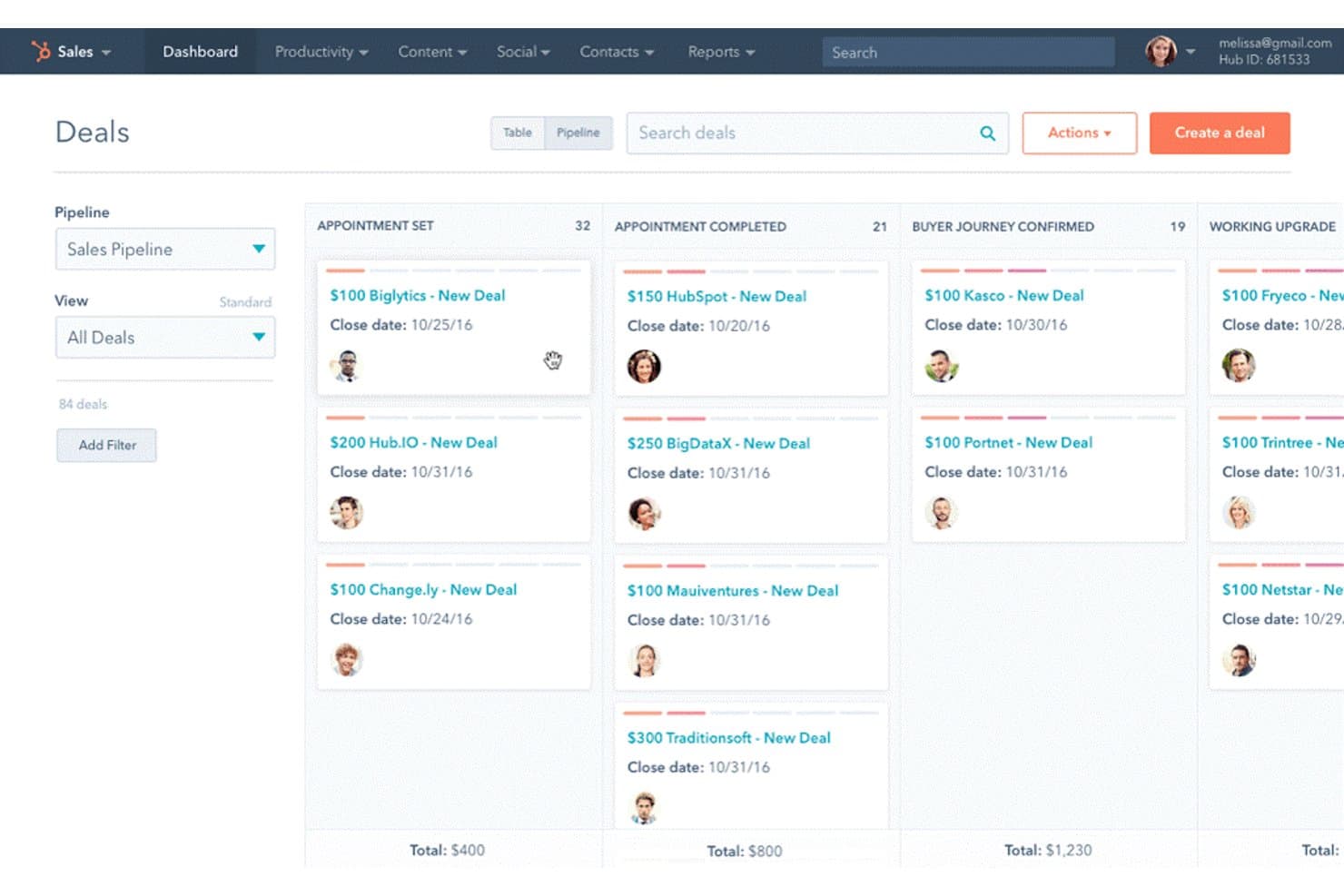
HubSpot organizes deals visually across pipeline stages in a kanban view. HubSpot is an AI-powered CRM platform that centralizes contact, company, and deal data across sales, marketing, and customer success teams, with tools for pipeline management, workflow automation, custom reporting, and a marketplace of over 2,000 app integrations.
Who Is HubSpot Best For?
HubSpot Smart CRM is a strong fit for revenue operations teams that need to test workflow and data changes in a sandbox before pushing them to production.
Why I Picked HubSpot
I picked HubSpot as one of the best because its Enterprise-tier sandbox lets you test workflow changes, data model updates, and CRM configurations against a copy of real production data before anything goes live. I've found the deploy-to-production feature especially valuable when rolling out conditional pipeline stages or calculated properties, where an untested change could corrupt deal data across the entire team. The centralized audit log also tracks every change by person, automation, or integration, so you always know what changed and when.
HubSpot Key Features
- Visual deal pipeline: Organize and track opportunities across customizable stages with probability-weighted deal values visible in board view.
- Workflow automation: Trigger automated tasks and communications based on customer behavior, deal changes, or scheduled intervals.
- Custom reporting and dashboards: Build reports on deal progression, revenue attribution, and sales activity with fully customizable dashboard layouts.
- Data enrichment: Automatically update contact and company records with current information and surface relevant customer context through AI-powered search.
HubSpot Integrations
HubSpot offers over 2,000 marketplace integrations, including Gmail, Google Calendar, Outlook, Slack, Zoom, Microsoft Teams, Google Drive, and DocuSign. Its APIs, webhooks, UI extensions, custom actions, and Zapier support custom connectivity.
Pros and Cons
Pros:
- Sandbox testing reduces risky production changes
- Visual deal stages clarify pipeline progress
- Centralized interaction timelines support follow-up
Cons:
- Forecasting requires separate Sales or Service Hub seats
- Advanced workflows require higher-tier subscriptions
Learn more about HubSpot: Best for coordinating sales and service teams
- 30-day free trial
- From $25/user/month
Visit WebsiteCustomer Rating:4.2/5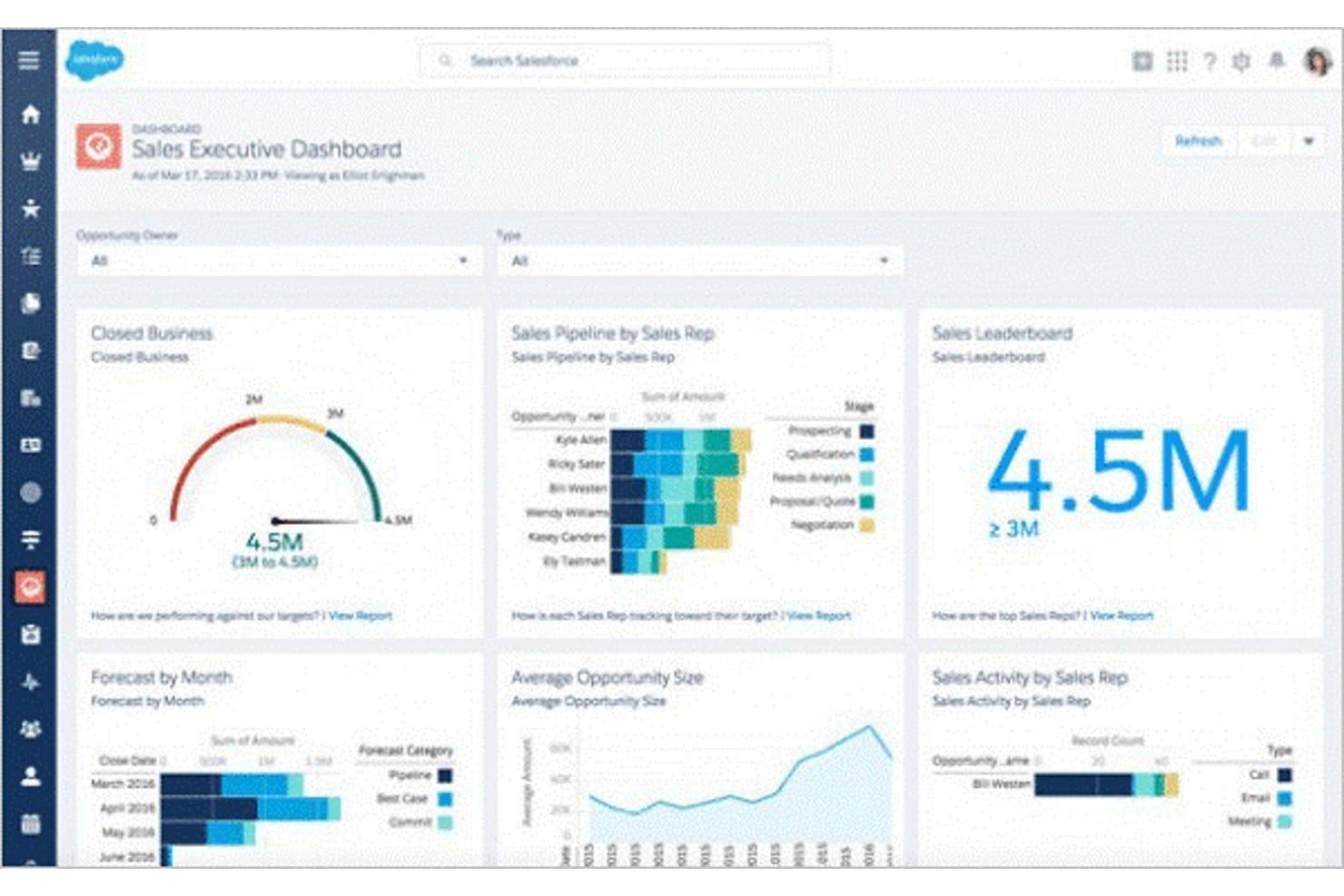
Salesforce CRM centralizes sales metrics across pipeline, forecasts, and rep activity. Salesforce CRM is a cloud-based customer relationship management platform that unifies contact management, pipeline tracking, sales automation, reporting, and cross-channel service and marketing tools in a single system.
Who Is Salesforce CRM Best For?
Salesforce CRM is a strong fit for sales and customer success teams that need pipeline visibility, task tracking, and service coordination in one connected system.
Why I Picked Salesforce CRM
Salesforce CRM earns its spot on my shortlist because of how well it coordinates sales and service teams around a shared customer record. I love that when a service rep resolves a case, the sales rep sees that interaction in the same activity timeline linked to the opportunity, keeping both teams in sync without any manual handoffs. Built-in lead routing and sales flows in the Starter tier mean my team can move leads through the pipeline without toggling between disconnected tools.
Salesforce CRM Key Features
- Contact and account records: Unified customer profiles store contact details, interaction history, notes, and follow-up reminders linked to opportunities and accounts.
- Custom reports and dashboards: Users can build tailored reports and dashboards to view sales performance, customer data, and business metrics in real time.
- Omnichannel service tools: Service teams can access a customer's full history across phone, chat, email, and social media within a single record.
- Workflow automation: Conditional workflows trigger tasks, data updates, and approval processes based on record changes or scheduled intervals.
Salesforce CRM Integrations
Salesforce CRM lists integrations with Mailchimp, Google Workspace, Slack, QuickBooks, DocuSign, Dropbox, Jira, LinkedIn Sales Navigator, and ActiveCampaign. It supports REST, GraphQL, and platform-event APIs; Starter Suite is limited to Slack, while AppExchange access requires Pro Suite.
Pros and Cons
Pros:
- Reports and reminders keep follow-ups visible
- Visual pipeline views clarify lead progression
- Shared customer timelines connect sales and service
Cons:
- Initial setup can demand dedicated admin time
- Starter's automation options narrow as workflows grow
Learn more about Salesforce CRM: Best for automated lead tracking
- 30-day free trial + free demo available
- From $39/user/month
Visit WebsiteCustomer Rating:4.7/5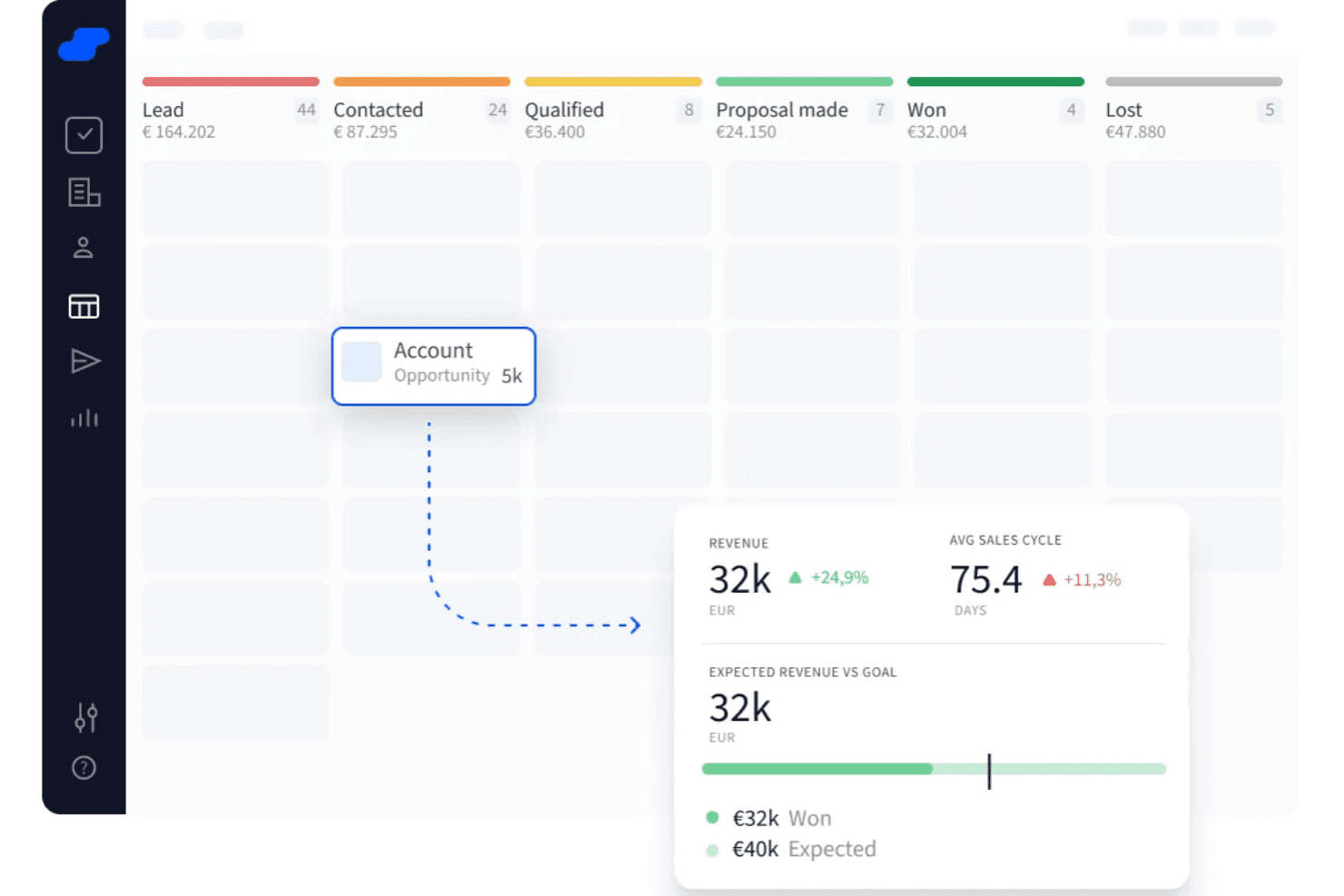
Salesflare visualizes pipeline stages with revenue and sales cycle metrics. Salesflare is a CRM platform designed for small and medium-sized businesses that want to simplify sales processes, automate data entry, and keep their pipelines organized without manual effort.
Who Is Salesflare Best For?
Salesflare is a strong fit for small and medium-sized B2B sales teams that want a low-maintenance CRM with minimal manual data entry.
Why I Picked Salesflare
Salesflare earns its spot as one of the best on my shortlist because of how well it handles automated lead tracking without requiring reps to log every interaction manually. I like that it pulls contact data, email threads, and meeting notes together automatically, so my team's pipeline stays current even on busy days. The timeline view on each contact record gives me a clear picture of where every lead stands without digging through notes. I also rely on the automated follow-up reminders, which flag leads that have gone quiet so nothing slips through.
Salesflare Key Features
- Visual pipeline management: Drag-and-drop sales pipeline boards let you move deals across stages and track progress at a glance.
- Email tracking: Get notifications when a contact opens your email or clicks a link, so you know when to follow up.
- Team collaboration: Share contact records, notes, and deal activity with teammates so everyone stays on the same page.
- Mobile app: Log calls, check pipeline status, and access contact data from your phone while you're on the go.
Salesflare Integrations
Integrations include Google Workspace, Outlook, LinkedIn, Slack, Mailchimp, QuickBooks Online, Stripe, Shopify, Calendly, and Intercom.
Pros and Cons
Pros:
- Mobile CRM app supports on-the-go updates
- AI-driven insights help prioritize leads
- Visual pipelines make deal tracking straightforward
Cons:
- Some integrations require extra setup
- Limited customization options in pipelines
Learn more about Salesflare: 11Best for small manufacturers
MRPeasy
- 15 + 15-day free trial available
- From $49/user/month
Visit WebsiteCustomer Rating:4.5/5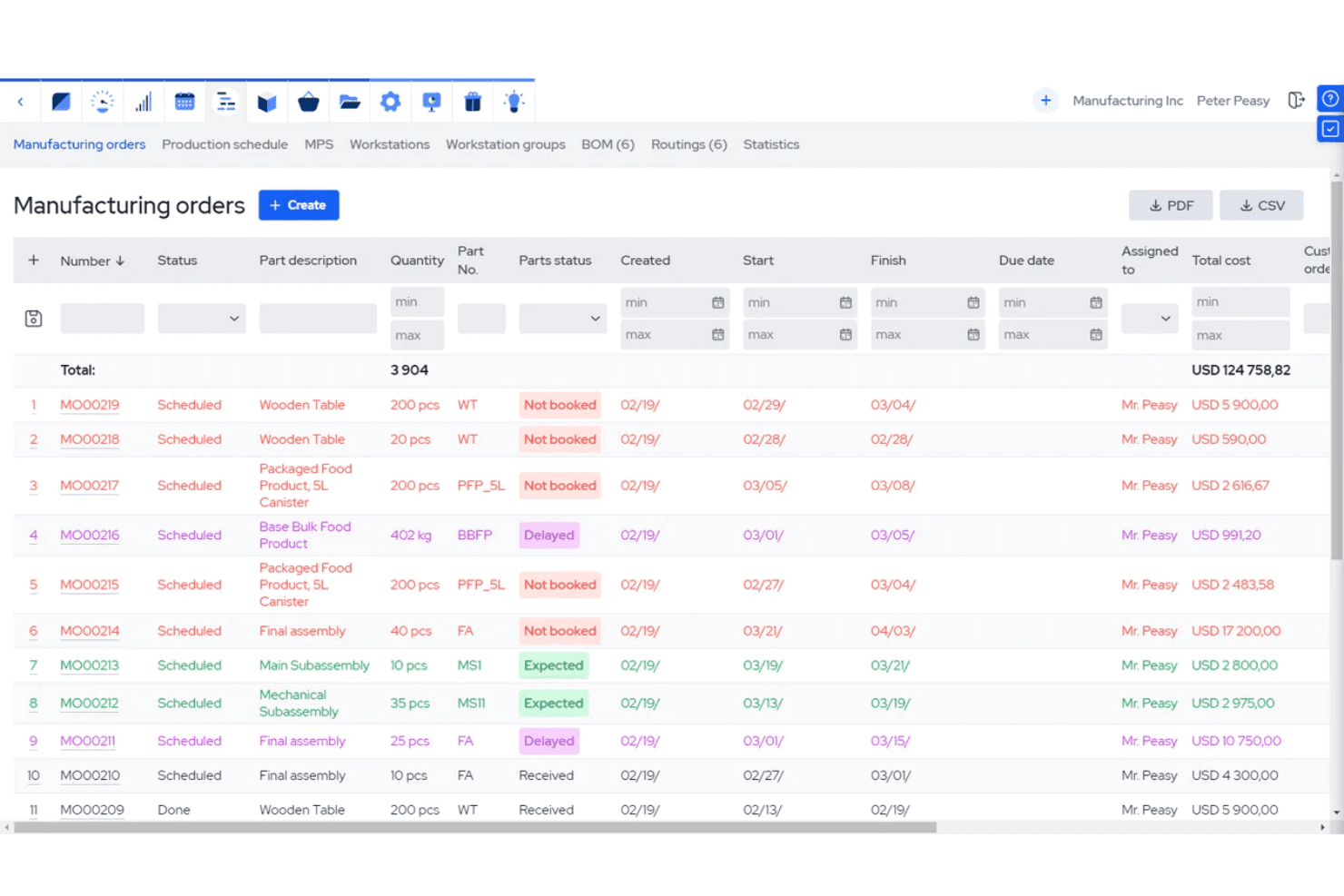
MRPeasy lets users track and manage all manufacturing orders in one view. MRPeasy is a manufacturing-focused platform that gives small manufacturers and distributors basic CRM tools alongside production planning, inventory management, and order tracking to help manage customer relationships within a manufacturing workflow.
Who Is MRPeasy Best For?
MRPeasy is a good fit for small manufacturing and distribution businesses that need to manage customer orders alongside production and inventory in one place.
Why I Picked MRPeasy
I picked MRPeasy as one of the best because it's built specifically for small manufacturers who need customer management tied to production—not bolted on as an afterthought. What I like most is the automatic cost and delivery time estimation: when a customer order comes in, MRPeasy calculates lead times based on real production capacity and material availability. That means my team can quote accurately without manually cross-referencing inventory or the production schedule. The B2B customer portal is another feature I find genuinely useful, letting customers track their own orders without needing to contact your team.
MRPeasy Key Features
- Customer order tracking: Track every customer order from initial quotation through to final delivery in a single view.
- Quoting and invoicing: Generate quotes and invoices within the platform, tied to real inventory and production data.
- Customer and sales reports: Run built-in reports on customer activity and sales performance without needing a separate analytics tool.
- Tiered pricing: Set up different price lists for different customers or order volumes within the sales module.
MRPeasy Integrations
Integrations include QuickBooks Online, Xero, Shopify, Magento, Microsoft Power BI, BigCommerce, WooCommerce, Pipedrive, ShipStation, and HubSpot.
Pros and Cons
Pros:
- Sales funnel management
- Real-time inventory tracking
- Integrates CRM with production
Cons:
- Lack of advanced features due to simple interface
- May lack in technical support
Learn more about MRPeasy: 12Best for smart, simple CRM solutions
Capsule
- Free plan + 14-day free trial available
- From $22/user/month
Visit WebsiteCustomer Rating:4.7/5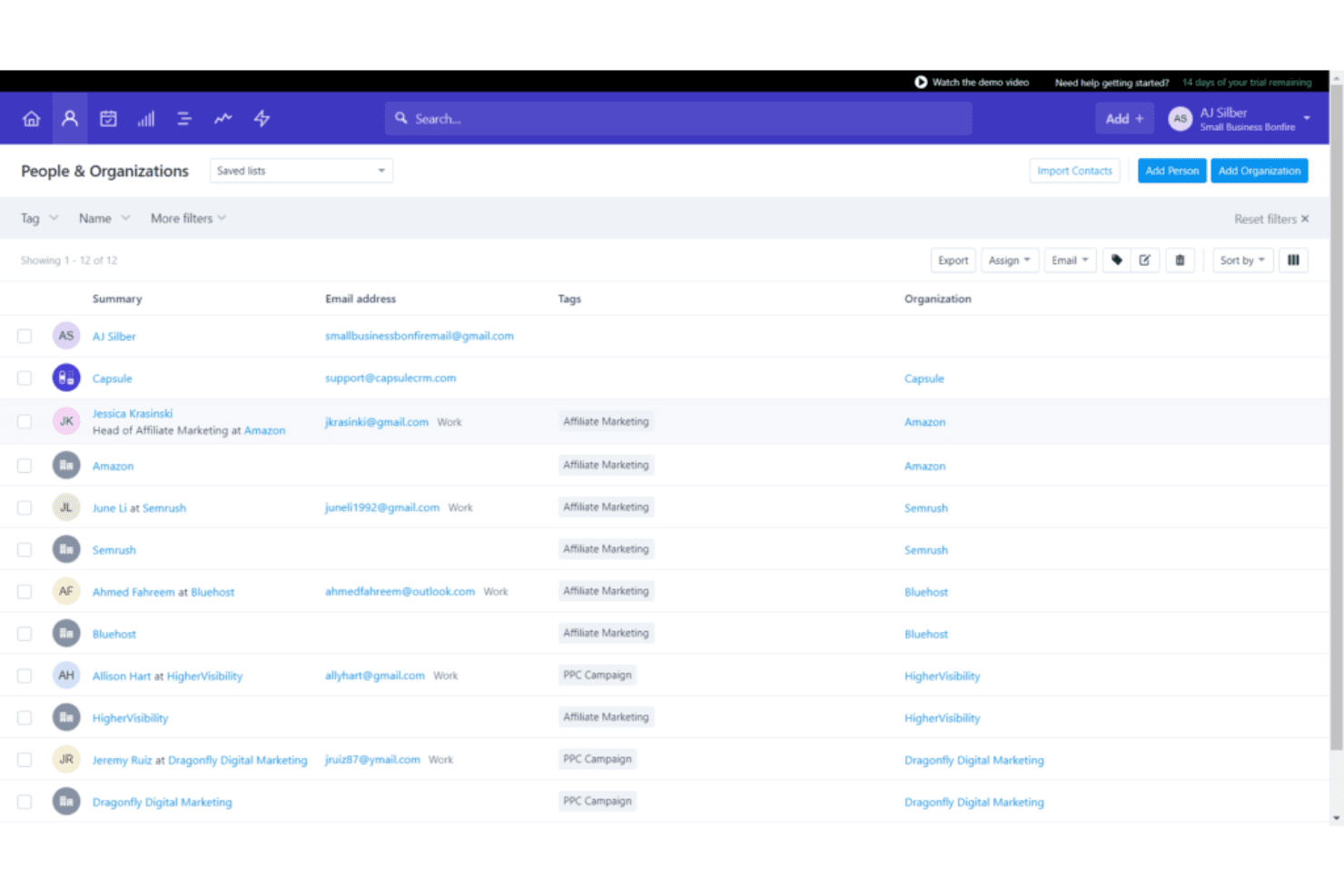
Capsule organizes contacts with tags, emails, and company links. Capsule is a CRM platform for small businesses and sales teams who want to organize contacts, manage sales pipelines, and keep track of customer relationships without the complexity of traditional CRM systems.
Who Is Capsule Best For?
Capsule is a strong fit for small and growing businesses that need a straightforward CRM without a steep learning curve or lengthy setup process.
Why I Picked Capsule
Capsule earns its spot as one of the best on my shortlist because it genuinely delivers on the promise of a smart, simple CRM without cutting corners on functionality. I love the AI Pipeline Generator—you describe your business and sales process, and Capsule builds out a fully staged pipeline for you in seconds. That's a real time-saver when you're setting up from scratch. I also find the AI Summaries feature particularly useful: before a call, it pulls together recent notes, emails, and activity for any contact or opportunity so you walk in prepared. The contact management side is clean and well-structured, with auto-enriched profiles that pull in company data like revenue and headcount. It's a CRM that keeps things focused without feeling stripped down.
Capsule Key Features
- Sales pipeline dashboard: View conversion rates, pipeline milestones, and revenue forecasts in a single dashboard.
- Task automation: Set up sequences of tasks that run in order to keep deals and projects moving.
- Email templates: Create and save reusable email templates that your whole team can access and send directly from Capsule.
- Custom fields and tags: Add custom fields, tags, and lost reasons to tailor Capsule's data structure to your specific sales process.
Capsule Integrations
Integrations include Gmail, Outlook, Xero, QuickBooks, Sage, Slack, Mailchimp, Microsoft 365, Google Workspace, and Zapier.
Pros and Cons
Pros:
- Send and receive emails right in Capsule CRM
- Integrated calendar tasks management
- Intuitive and easy to use
Cons:
- More digital marketing integration welcomed
- Can't drag-and-drop data tags or fields
Learn more about Capsule: 13Best for remote and hybrid teams
Zoho CRM
- Free plan + 15-day free trial+ free demo available
- From $14/user/month (billed annually)
Visit WebsiteCustomer Rating:4.2/5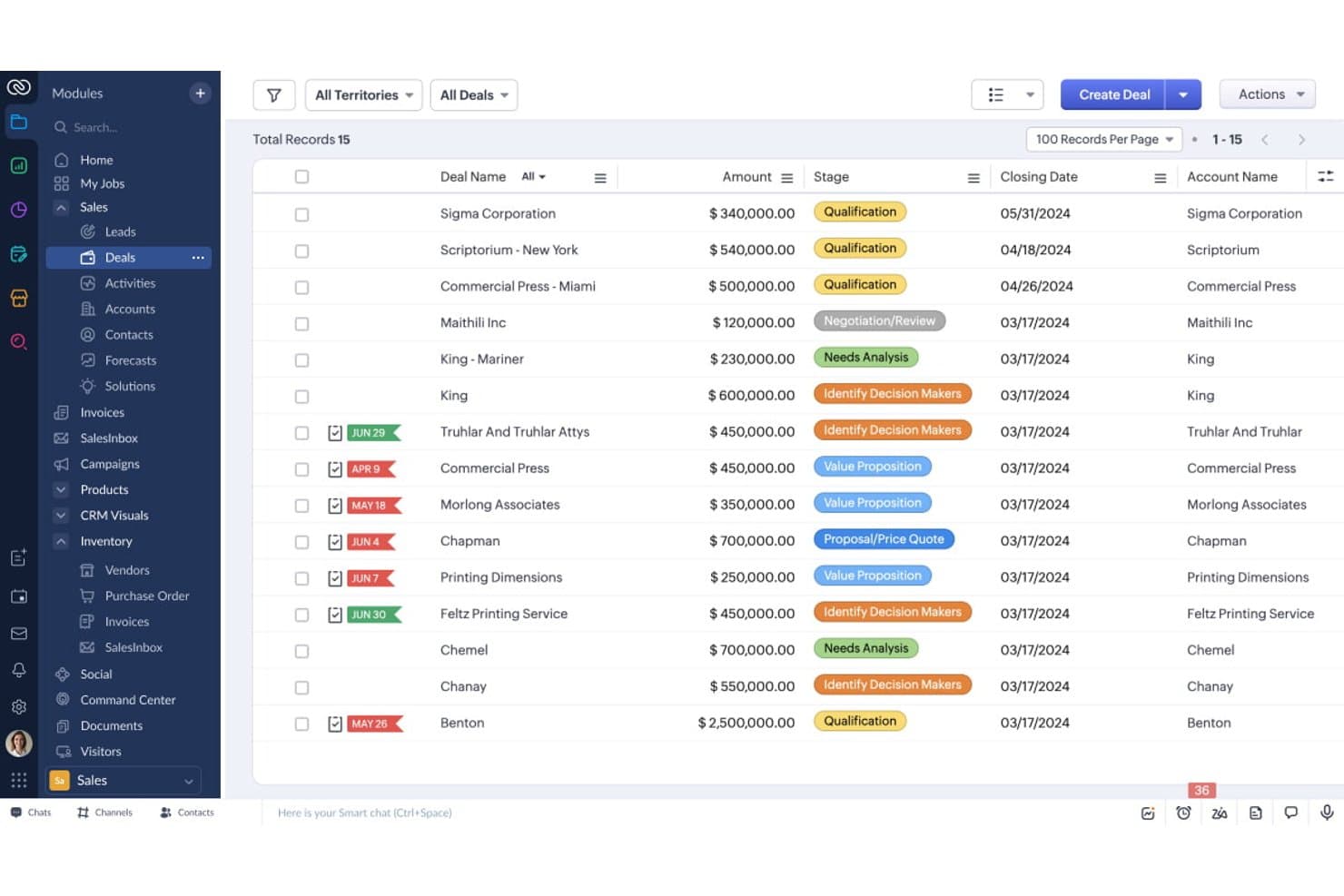
Zoho CRM tracks all active deals with stages, amounts, and closing dates. Zoho CRM gives sales, marketing, and support teams a unified platform to manage leads, automate workflows, and track customer interactions across channels, making it a popular choice for businesses that want customizable CRM tools and strong integration options.
Who Is Zoho CRM Best For?
Zoho CRM is a strong fit for small to mid-sized businesses that need a flexible, affordable CRM with deep customization and a broad ecosystem of integrated tools.
Why I Picked Zoho CRM
I've included Zoho CRM in my top picks because it's one of the few CRM platforms that genuinely addresses how distributed teams actually work. The CRM for Everyone feature lets you create dedicated Teamspaces for each department—sales, marketing, legal, HR—so everyone operates within the same CRM environment without stepping on each other's data. I also like the Requester Modules, which let a sales rep submit a request for a custom pitch deck directly inside the CRM, with both teams able to track progress in real time. That kind of cross-functional visibility matters a lot when your team isn't in the same room.
Zoho CRM Key Features
- Zia AI assistant: An AI layer built into the CRM that detects anomalies, predicts deal outcomes, and suggests next-best actions based on your sales data.
- Blueprint process automation: A visual tool for mapping and enforcing sales processes step by step, with conditional rules that ensure reps follow the right actions at each stage.
- Omnichannel communication: Connects email, phone, live chat, and social media into a single interface so your team can engage customers across channels without switching tools.
- Canvas design studio: A no-code layout editor that lets you redesign CRM record views, rearrange fields, and build custom interfaces.
Zoho CRM Integrations
Integrations include Google Workspace, Microsoft 365, Mailchimp, Slack, QuickBooks, Shopify, Zoom, LinkedIn, Twilio, and DocuSign.
Pros and Cons
Pros:
- Mobile app helps you stay in touch with customers from anywhere.
- Advanced security features.
- 24-hour premium user support.
Cons:
- Advanced features are only available in higher-priced subscriptions.
- Steep learning curve
 Best for B2B order management
- Free trial available
- From $69/rep/month (billed annually)
Visit WebsiteCustomer Rating:4.6/5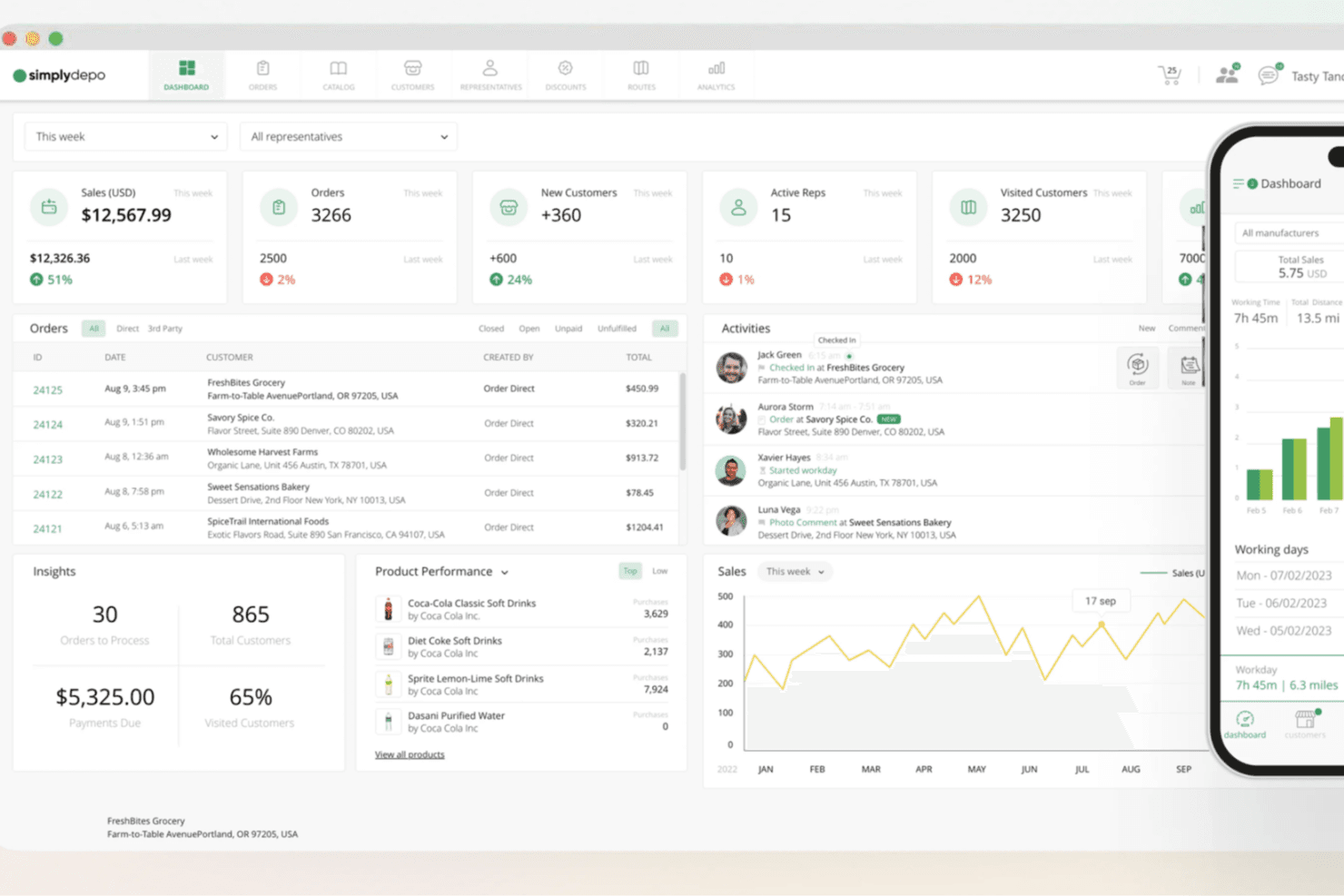
SimplyDepo centralizes sales, orders, and team activity in one dashboard. SimplyDepo is a CRM platform designed for wholesale distributors and B2B sales teams who need to manage customer relationships, streamline order workflows, and track sales performance in one place.
Who Is SimplyDepo Best For?
SimplyDepo is a strong fit for wholesale distributors, consumer goods brands, and field sales teams managing B2B accounts and order workflows.
Why I Picked SimplyDepo
I picked SimplyDepo as one of the best because of how tightly it connects CRM account management with B2B order workflows. Most CRMs track relationships but leave order capture to a separate system—SimplyDepo keeps both in one place. I like that reps can pull up a customer's full order history, pricing agreements, and account activity before placing an order, which cuts down on errors and back-and-forth. The mobile order capture with offline support is also a real differentiator—my team can create and update orders in the field without needing a connection, and everything syncs automatically.
SimplyDepo Key Features
- Order lifecycle management: Track and manage every wholesale order from initial capture through fulfillment and invoicing in a single workflow, with built-in pricing and approval rules.
- Customer activity tracking: View real-time visit activity, order history, communications, and account health across all accounts so reps and managers stay aligned.
- Route intelligence: Monitor route completion, track sales activity by territory, and identify missed visits or coverage gaps across field teams.
- Custom tasks and digital forms: Build store-specific tasks and digital forms to capture structured data and photo proof, replacing paper-based reporting.
SimplyDepo Integrations
Integrations include QuickBooks, Stripe, ShipStation, Shopify, HubSpot, Zapier, Zebra, and Acumatica.
Pros and Cons
Pros:
- Real-time field visibility supports in-store compliance tracking
- B2B ordering reduces manual entry and order errors
- Combines CRM with retail execution and route planning
Cons:
- Dependence on internet connectivity for real-time features
- Native integrations not publicly listed
Learn more about SimplyDepo: 15Best for modeling rule-based sales workflows
Creatio
- Not available
- From $15/user/month
Visit WebsiteCustomer Rating:4.7/5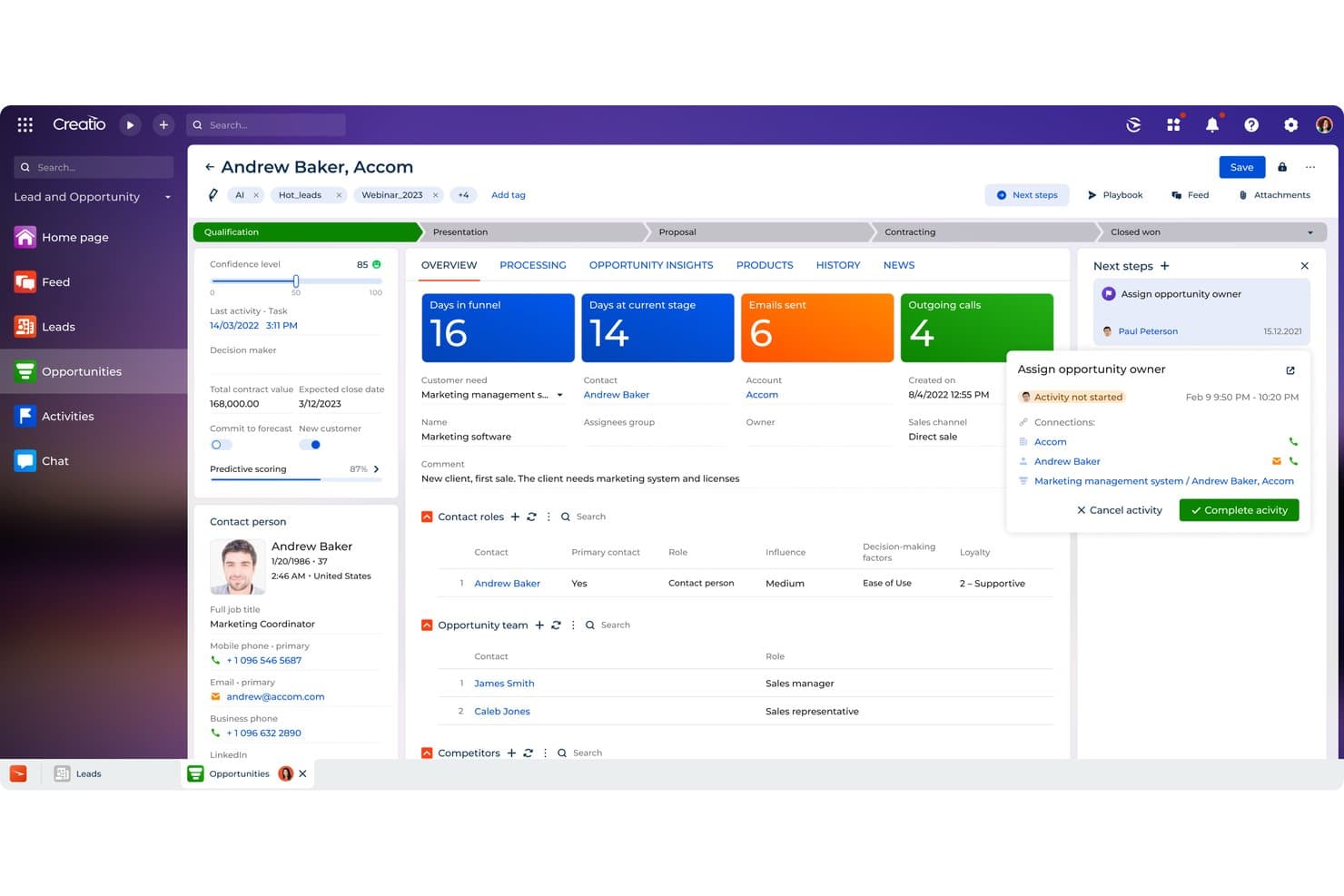
Creatio centralizes opportunity tracking with AI scoring and next steps. Creatio is an agentic CRM platform that combines contact and account management, lead scoring, opportunity pipeline tracking, workflow automation, and AI-driven sales forecasting across the end-to-end sales cycle.
Who Is Creatio Best For?
Creatio Sales is a strong fit for mid-market and enterprise sales teams that need to model, automate, and adapt complex, rule-based sales workflows without heavy developer involvement.
Why I Picked Creatio
I picked Creatio as one of the best because its BPMN 2.0 workflow engine lets sales teams map out multi-step, rule-based processes with conditional flows and logical gates, without needing a developer for every change. I also like that the Lead Scoring Agent assigns 1–100 conversion probability scores and automatically recalibrates them as leads move through nurturing stages. Paired with a Forecast Agent that reads deal signals and historical patterns, Creatio gives ops-focused teams real structural control over how their pipeline runs.
Creatio Key Features
- BPMN 2.0 workflow engine: Build multi-step sales processes using conditional flows, logical gates, and events without writing code.
- Relationship chart mapping: Visualize account and contact relationships as vertical hierarchies or horizontal connections, with configurable formal and informal link types.
- Activity scheduling and reminders: Create tasks, calls, and meetings linked to contacts, accounts, leads, or opportunities, with reminders set for owners and authors.
- AI-orchestrated outreach: Coordinate personalized customer outreach across channels, with timing and messaging managed by an AI agent.
Creatio Integrations
Creatio has Marketplace integrations for Google Calendar, Microsoft Exchange, Power BI Desktop, Apollo.io, and PandaDoc, plus Zapier. It supports REST, OData, and SOAP APIs for custom integrations.
Pros and Cons
Pros:
- Lead scores refresh as nurturing progresses
- Opportunity stages adapt to sales processes
- BPMN workflows automate conditional sales processes
Cons:
- Advanced reports can require spreadsheet exports
- Standard opportunities lack a Kanban board
Learn more about Creatio:
İlgili CRM Yazılımı İncelemeleri
Aradığınızı hâlâ burada bulamadıysanız, test edip değerlendirdiğimiz ve CRM yazılımlarıyla yakından ilişkili olan bu hesap yönetimi yazılımı araçlarına göz atın.
- Satış Yazılımı
- Potansiyel Müşteri Yönetimi Yazılımı
- İş Zekâsı Yazılımı
- Sözleşme Yönetimi Yazılımı
- Gelir Yönetim Sistemi
- CPQ Yazılımı
How I Evaluate CRM Software
I evaluate CRM platforms in two layers: the core capabilities every RevOps team needs—pipeline tracking, forecasting, automation—and the differentiators that determine the right fit.
Core Functionality (Table Stakes For This List)
When I'm selecting tools for my list, I rank each one on a scale from 0 (does not offer the functionality) to 5 (excels in this area) for each core functionality listed below. Then, I calculate the tool's total score into a percentage. Each tool needs to achieve a minimum total score of 75% to be considered for inclusion.
- Contact & Account Management: I check whether the CRM links contacts to accounts with full relationship hierarchies, so RevOps teams can map buying committees and track multi-threaded deals.
- Pipeline & Opportunity Tracking: Multiple customizable pipelines matter here, especially for teams running separate processes for new business, renewals, and expansion revenue.
- Revenue Reporting & Forecasting: I evaluate how each platform handles weighted pipeline forecasts and whether it offers a custom report builder for RevOps-specific metrics like stage conversion rates.
- Workflow Automation: Lead routing, deal stage progression, and cross-functional handoffs between sales and CS are the kinds of automations I look for when evaluating each tool.
- Native Integrations & API: The CRM sits at the center of the revenue stack, so I look at how well each tool connects with marketing automation, sales engagement, CPQ, and data warehouse platforms.
- Custom Objects & Fields: RevOps teams often need to model data beyond standard contacts and deals. I evaluate whether each CRM lets you create custom objects with relationships and validation rules.
Once I have a list of tools that meet the criteria, I consider what sets each platform apart.
Differentiating Factors (What Sets Vendors Apart)
Here's how I compare and contrast different vendors:
Standout Features
AI-driven deal scoring and next-best-action suggestions help RevOps teams spot pipeline risk before it shows up in the forecast. Revenue intelligence adds another layer—I evaluate whether platforms auto-capture calls and emails so ops leaders get engagement visibility without relying on reps to log activities. Territory and quota management is another differentiator I look for, especially for teams running multiple segments where tying territory assignments directly to pipeline records saves hours of manual mapping each quarter.
Beyond Features
Total cost of ownership is a big one—I look at what you actually pay beyond the per-seat price, including add-ons for sandboxes, API limits, and the admin hours needed to maintain the system. Implementation timelines matter just as much, since a CRM migration that drags on for months delays pipeline visibility and stalls revenue reporting. I also evaluate data governance controls like field-level security and audit logs, which RevOps teams need to keep reporting trustworthy across sales, marketing, and CS.
CRM Yazılımı Nasıl Seçilir
Bir CRM seçerken mesele en "popüler" seçeneği belirlemek değil, şirketinizin kendine özgü ihtiyaçlarına en uygun çözümü bulmaktır. CRM seçim sürecinize rehberlik edecek kısa bir kontrol listesi:
1. Çözmeniz Gereken Temel Sorunu Belirleyin
Herhangi bir CRM özelliğine bakmadan önce kendinize şu soruyu sorun: “Çözmeye çalıştığımız bir numaralı zorluk ne?” Örnekler şunları içerebilir:
- Dağınık müşteri verileri — Müşteri etkileşimlerini e-postalar, elektronik tablolar ve notlardan manuel olarak bir araya mı getiriyorsunuz?
- Satış görünürlüğünün olmaması — Gelir hedeflerine ulaşmak için gerçek zamanlı satış hattı takibine mi ihtiyacınız var? Yoksa özel bir B2B CRM'ine mi ihtiyacınız var?
- Zayıf müşteri deneyimi — Takip süreçleri düzensiz olduğu için potansiyel müşteriler gözden mi kaçıyor?
Uzman İpucu: Ekibinizin mevcut süreçlerde karşılaştığı en önemli 3 sorunu yazın. CRM yazılımını değerlendirirken bu sorunları "olmazsa olmaz" filtreleriniz olarak kullanın.
Bu çalışma, proje bütçesini kontrol etmenize, en önemli konulara odaklanmanıza ve işletmeniz için en uygun CRM türünü seçmenize yardımcı olacaktır.

2. CRM'yi Kimin Kullanacağını Belirleyin
CRM'yi kimlerin kullanacağını bilmek kritik öneme sahiptir. Bu durum maliyeti, kullanıcı deneyimini ve işe alıştırma gereksinimlerini etkiler.
- Yalnızca gelir operasyonları ekibiniz mi kullanacak? Öyleyse gelişmiş raporlama ve özelleştirme araçlarına öncelik verin.
- Tüm şirket mi kullanacak? Sezgisel arayüzler ve kendi kendine kullanılabilen işe alıştırma süreçleri arayın.
- Müşteri başarısı veya pazarlama ekipleri de mi kullanacak? Paylaşılan müşteri profilleri ve görev yönetimi gibi, ekipler arası iş birliğini destekleyen özelliklere ihtiyacınız olacaktır. Go Nimbly'de Teslimat Müdürü olan Ryan Tanner'a göre, bu adım sırasında tüm GTM ekibinizi ve etkilenen diğer ekipleri sürece dahil etmeli ve her gereksinim için bir sorumlu veya sponsor belirlemelisiniz.
Uzman İpucu: Bazı CRM'ler kullanıcı başına ücret alır; bu nedenle tüm ekibinizin erişime ihtiyacı varsa lisans maliyetlerini hesaba katın.
3. Temel Entegrasyonları Belirleyin
CRM'niz tek başına çalışmaz. Mevcut teknoloji yığınınızla uyumlu olduğundan emin olmak kritik öneme sahiptir.
- E-posta & Takvim: Google Workspace veya Outlook ile senkronize oluyor mu?
- Satış & Pazarlama Araçları: HubSpot, Salesloft veya Mailchimp gibi araçlarla entegre olacak mı?
- Muhasebe & Faturalandırma: QuickBooks veya Xero ile iletişim kurması gerekiyor mu?
- Özel API Entegrasyonları: Ekibiniz kurum içi araçlara veya özel sistemlere güveniyor mu?
Uzman İpucu: Ekibinizin güvendiği her aracın bir listesini oluşturun, ardından kararınızı kesinleştirmeden önce uyumluluğu kontrol edin.
Öncelikle temel GTM stratejinizi ve sürecinizi haritalandırmanızı öneririm. En önemli şey, CRM de dahil olmak üzere herhangi bir aracı değerlendirmeden önce temelden (iş süreçleri ve alıcı yolculuğu) başlamaktır.

4. Beklenen Sonuçları Netleştirin
CRM uygulamanız için "başarı" neye benziyor? Yalnızca özelliklere odaklanıyorsanız asıl noktayı kaçırıyorsunuz. Sonuçlarla başlayın.
- Gelir Etkisi: Anlaşma sonuçlandırma oranlarını artırmak için satış hattı görünürlüğünün daha iyi olmasını istiyor musunuz?
- Zaman Tasarrufu: Manuel veri girişini azaltmak ve potansiyel müşteri yönlendirmesini otomatikleştirmek mi istiyorsunuz?
- Müşteri Deneyimi: Müşteri taleplerine daha hızlı ve kişiselleştirilmiş yanıtlar sunmaya mı çalışıyorsunuz?
Uzman İpucu: "Eğer / O zaman" testini kullanın: "Bu CRM'yi kullanırsak [X sonucuna] ulaşacağız." Buna yanıt veremiyorsanız en başa dönüp yeniden düşünün.
5. Kurumsal Uyumu Değerlendirin
Her işletme farklı şekilde faaliyet gösterir. Bir CRM'nin popüler olması, sizin için de işe yarayacağını varsaymayın.
- Satış sürecinizi nasıl destekleyecek? Satış ekibinizin potansiyel müşterileri, anlaşmaları ve yenilemeleri takip etme biçimiyle uyumlu mu?
- Sizinle birlikte büyüyebilecek kadar esnek mi? 10 satış temsilcisinden 100'e büyüdüğünüzde de çalışmaya devam edecek mi?
- Mevcut iş akışlarını nasıl etkileyecek? Mevcut süreçleri aksatacak mı, yoksa onları destekleyecek mi?
Uzman İpucu: Sektörünüzde veya büyüme aşamanızda olan diğer şirketlerle görüşerek onlar için nelerin işe yaradığını öğrenin.
Yıllar boyunca gördüğüm en büyük hata şu: kuruluşlar, sonraki büyüme aşamalarında ihtiyaç duyacakları CRM’e yatırım yapmıyor. Bunun sonucunda, ilerleyen yıllarda bir geçiş gerekirse RevOps ekibi için en zorlu ve en büyük projelerden biri ortaya çıkıyor.

Bu beş temel alana odaklanarak, özelliklerle dolu CRM'lerin beraberinde getirdiği "parlak nesne sendromundan" kaçınabilirsiniz. Bunun yerine, anlamlı bir ticari etki yaratan ve şirketinizle birlikte büyüyen bir araç seçersiniz.
2026 İçin CRM Yazılımındaki Trendler
CRM yazılımlarının ortamı, yalnızca müşteri ilişkilerini yönetmekle kalmayıp gelir operasyonlarını doğrudan destekleyen ve geliştiren araçlara yönelik gelir operasyonu liderlerinin artan talepleri doğrultusunda hızla gelişmeye devam ediyor. Önde gelen CRM platformlarının en son ürün güncellemeleri, basın bültenleri ve sürüm günlükleri, uzaktan ve iç satış da dahil olmak üzere CRM teknolojisinin geleceğini şekillendiren temel trendleri ortaya koyuyor. Bu trendler, daha derin içgörüler sağlamayı, karmaşık süreçleri otomatikleştirmeyi ve müşteri etkileşimini iyileştirmeyi amaçlayan daha entegre, akıllı ve kullanıcı odaklı çözümlere doğru sektör değişimini yansıtıyor.
Gelişen Özellikler ve İşlevler
- Yapay Zekâ ve Makine Öğrenimiyle Entegrasyon: CRM platformları, tahmine dayalı analiz, potansiyel müşteri puanlama ve kişiselleştirilmiş müşteri etkileşimi stratejileri için yapay zekâ ve makine öğreniminden giderek daha fazla yararlanıyor. Bu trend, daha proaktif ve akıllı gelir operasyonu stratejilerine geçişi vurguluyor.
- Kanıt: Müşteri davranışını tahmin etmeye ve görev önceliklendirmesini otomatikleştirmeye yönelik geliştirilmiş yapay zekâ algoritmaları.
- Gelişmiş Otomasyon ve İş Akışı Özelleştirme: Tekrarlayan görevlerin otomatikleştirilmesine ve kullanıcılara iş akışlarını özelleştirmek için güçlü araçlar sunulmasına büyük önem veriliyor. Bu sayede gelir operasyonu ekipleri manuel süreçler yerine stratejik faaliyetlere odaklanabiliyor.
- Kanıt: Belirli tetikleyicilere ve koşullara dayalı karmaşık, çok adımlı otomasyona olanak tanıyan yeni iş akışı motorları.
- Geliştirilmiş Veri Analizi ve Görselleştirme: CRM araçları daha gelişmiş analiz özellikleri ve görselleştirme araçları sunarak kullanıcıların verilerinden eyleme dönüştürülebilir içgörüler elde etmesini ve gelir artışını destekleyecek bilinçli kararlar almasını kolaylaştırıyor.
- Kanıt: Satış performansı ve müşteri trendleri hakkında gerçek zamanlı içgörüler sunan dinamik panoların ve raporlama araçlarının kullanıma sunulması.
Yeni ve Talep Gören Özellikler
- İletişim Platformlarıyla Sorunsuz Entegrasyon: Çeşitli iletişim platformlarıyla sorunsuz şekilde entegre olabilme ve ekiplerin CRM sistemi içinden birden fazla kanal üzerinden müşterilerle etkileşim kurabilmesi büyük talep görüyor.
- Kanıt: E-posta, sosyal medya, mesajlaşma uygulamaları ve CRM içindeki mesajlaşma, birleşik müşteri iletişimi için tek bir yerden yönetilebiliyor.
- Kapsamlı Müşteri 360° Görünümleri: CRM sistemleri, birden fazla temas noktasından ve sistemden veri toplayarak müşterinin daha bütünsel bir görünümünü sunacak şekilde gelişiyor; böylece müşteri etkileşimlerinin, tercihlerinin ve geçmişinin eksiksiz bir görünümü sağlanıyor.
- Kanıt: Birleşik bir müşteri profili sunmak için satış, pazarlama ve hizmet etkileşimlerinden müşteri verilerinin toplanması.
Önemi Azalan Unsurlar
- Manuel Veri Girişi ve Yönetimi: Manuel iş yükünü en aza indiren ve hata olasılığını azaltan otomasyon ve veri entegrasyonu özelliklerinin yükselişi sayesinde manuel veri girişi ve yönetimi ihtiyacı giderek daha az önem taşıyor.
- Kanıt: Manuel giriş ihtiyacını azaltan otomatik veri yakalama ve zenginleştirme özellikleri.
Bu trendler, yapay zekâ CRM yazılımını daha akıllı, entegre ve kullanıcı dostu hâle getirmeye yönelik net bir değişime işaret ediyor; gelişmiş içgörüler, otomasyon ve müşteri etkileşimi aracılığıyla gelir operasyonlarını desteklemeye güçlü bir vurgu yapılıyor. CRM teknolojisi gelişmeye devam ederken gelir operasyonu liderleri, kuruluşlarının dijital çağda büyüme ve rekabet etme becerisini en üst düzeye çıkarmak için bu trendlerle uyumlu araçları seçmeye odaklanmalıdır.
CRM Yazılımı Nedir?
CRM (Müşteri İlişkileri Yönetimi) yazılımı, işletmelerin müşteri yaşam döngüsü boyunca müşteri etkileşimlerini ve verilerini yönetmek ve analiz etmek için kullandığı bir araçtır. Müşterilerle iş ilişkilerini geliştirmeye, süreçleri kolaylaştırmaya ve kârlılığı artırmaya hizmet eder. CRM yazılımı müşteri bilgilerini merkezileştirir, etkileşimleri takip eder ve müşteri hesaplarını yönetir; bu da onu satış, pazarlama ve müşteri hizmetleri departmanları için vazgeçilmez bir araç hâline getirir.
CRM yazılımı kullanmanın faydaları arasında, müşteri bağlılığının ve memnuniyetinin artmasını sağlayan gelişmiş müşteri ilişkileri yer alır. Müşteri etkileşimlerine ilişkin kapsamlı bir görünüm sunarak işletmelerin müşteri ihtiyaçlarını daha iyi anlamasına ve bunlara yanıt vermesine yardımcı olur. Bu da daha etkili satış ve pazarlama stratejilerine ve gelişmiş müşteri hizmetlerine yol açabilir. Ayrıca CRM yazılımı, müşteriyle ilgili süreçleri otomatikleştirip düzenleyerek operasyonel verimliliği artırır ve işletmelerin idari görevler yerine stratejik faaliyetlere daha fazla odaklanmasını sağlar.
CRM Yazılımının Özellikleri
CRM yazılımı seçerken aşağıdaki temel özelliklere dikkat edin:
- İletişim yönetimi: Bu özellik, müşterilerinizle ilgili tüm bilgileri (isimler, e-posta adresleri, telefon numaraları ve notlar) tek bir yerde düzenlemenizi sağlar. Etkileşimleri takip etme biçiminizi kolaylaştırır; böylece daha güçlü ilişkiler kurabilir ve müşteri ihtiyaçlarına hızlıca yanıt verebilirsiniz.
- Satış hattı takibi: Satış hattı takibi, her anlaşma satış sürecinizde ilerlerken size görsel bir genel bakış sunar. Darboğazları tespit edebilir, sıcak potansiyel müşterilere öncelik verebilir ve hiçbir fırsatın gözden kaçmamasını sağlayabilirsiniz; tüm bunları yaparken ekibinizin güvenini ve ivmesini artırırsınız.
- Görev ve etkinlik yönetimi: Bu araçla görevler atayabilir, takip işlemlerini planlayabilir ve yapılacaklar listenizi her müşteri veya anlaşmayla uyumlu hâle getirebilirsiniz. Bu, kendinize (ve ekibinize) yerleşik bir sorumluluk ortağı vermek gibidir; böylece hiçbir şey gözden kaçmaz.
- Potansiyel müşteri ve fırsat yönetimi: Bu özellik, potansiyel müşterileri satın almaya hazır hâle gelene kadar toplamanıza, nitelendirmenize ve geliştirmenize yardımcı olur. Fırsatlarınızı net bir şekilde görebilir; kapanma olasılığı en yüksek anlaşmalara odaklanarak kazanma oranınızı en üst düzeye çıkarabilirsiniz.
- Raporlama ve analiz: Raporlama ve analiz, satış performansınızı derinlemesine incelemenize, trendleri tespit etmenize ve neyin işe yaradığını (neyin yaramadığını) ölçmenize olanak tanır. Daha akıllı kararlar almanıza ve elde ettiğiniz başarıları kutlamanıza yardımcı olan özel panolar veya raporlar oluşturabilirsiniz.
- Entegrasyon özellikleri: Entegrasyon, CRM yazılımınızı e-posta, pazarlama araçları, takvimler ve muhasebe platformları gibi kullandığınız diğer sistemlere bağlar. Operasyonlarınızı birleştirir, zamandan tasarruf etmenizi sağlar ve verilerin işletmenizin tamamında sorunsuzca akmasını güvence altına alır.
- Özelleştirme seçenekleri: Hiçbir işletme tamamen aynı şekilde çalışmaz. Özelleştirme; alanları, iş akışlarını ve pano görünümlerini işletme biçiminize uyacak şekilde düzenlemenizi sağlar; CRM'nizin çalışma şeklinize uymasını, sizin CRM'ye uymaya çalışmamanızı sağlar.
- Mobil erişim: Mobil erişim, müşteri bilgilerini veya anlaşmaları doğrudan telefonunuzdan ya da tabletinizden görüntüleyip güncelleyebilmeniz anlamına gelir. Ofis dışında olduğunuz ancak yine de bağlantıda ve yanıt vermeye hazır kalmanız gereken günler için idealdir.
- Güvenlik ve izinler: Güvenlik özellikleri, rol tabanlı erişim ve izinler aracılığıyla hassas verilerinizi korur ve bilgileri yalnızca doğru kişilerin görüntüleyebilmesini veya düzenleyebilmesini sağlar. Bu, müşteri verilerinizi güvende tutar ve sektör standartlarına uyumlu kalmanıza yardımcı olur.
- Müşteri destek araçları: Bilet oluşturma veya vaka yönetimi gibi yerleşik müşteri destek özellikleri, zamanında çözümler sunmanıza ve her müşterinin deneyimini takip etmenize yardımcı olur. Bu araçlar, müşteri hizmetlerini sadakat oluşturmada gizli silahlarınızdan birine dönüştürmenizi kolaylaştırır.
Yaygın CRM Yazılımı Yapay Zekâ Özellikleri
Yukarıda listelenen standart CRM yazılımı özelliklerinin ötesinde, bu çözümlerin çoğu aşağıdaki gibi özelliklerle yapay zekâyı bünyesine katıyor:
- Müşteri kaybı riski analizi: Gelişmiş yapay zekâ modelleri, ayrılma riski taşıyan hesapları belirlemek için müşteri davranışlarını değerlendirir. Ardından bu ilişkilere proaktif bir şekilde müdahale ederek onları yeniden kazanabilir ve müşteri kaybını azaltabilirsiniz.
- Tahmine dayalı potansiyel müşteri puanlaması: Bu yöntem, müşteri verilerini analiz etmek ve hangi potansiyel müşterilerin dönüşüm gerçekleştirme olasılığının en yüksek olduğunu tahmin etmek için yapay zekâyı kullanır. Sonuçsuz çabaların peşinden gitmenizi önler ve enerjinizi gerçekten önemli fırsatlara yatırmanıza yardımcı olur.
- Akıllı iş akışı otomasyonu: Yapay zekâ destekli otomasyon, gerçek zamanlı verilere ve kalıplara göre potansiyel müşterileri yönlendirebilir, görevler atayabilir veya hatırlatıcılar gönderebilir. Böylece ekibinizin zamanını daha stratejik veya yaratıcı çalışmalara ayırmasını sağlar.
- Doğal dil işleme (NLP): NLP, bağlamı, duygu durumunu ve yapılacak işlemleri ortaya çıkarmak için e-postaları, sohbet mesajlarını veya notları analiz etmenize yardımcı olur. Bu da her müşteri etkileşiminin anlaşılmasını ve buna yanıt verilmesini kolaylaştırır.
- Satış tahmini: Yapay zekâ destekli satış tahmini, geçmiş verilerinizi analiz eder, kalıpları belirler ve gelecekteki satışlara ilişkin güvenilir tahminler oluşturur. Önünüzde neler olduğunu net bir şekilde görerek güvenle planlama yapabilirsiniz.
- Müşteri içgörüleri ve önerileri: Yapay zekâ, sonraki adımları veya kişiselleştirilmiş teklifleri önermek için büyük miktardaki müşteri verilerini inceler. Bu, müşterilerinizin ihtiyaç duyduğu şeyi çoğu zaman onlar talep etmeden önce sunmanıza yardımcı olur.
CRM Yazılımının Faydaları
Müşteri İlişkileri Yönetimi (CRM) yazılımı, gelir operasyonlarını kolaylaştırmayı ve müşteri etkileşimini geliştirmeyi amaçlayan işletmeler için temel bir yapı taşıdır. Müşteri bilgilerini merkezileştirip temel satış ve hizmet süreçlerini otomatikleştiren CRM yazılımı, kullanıcılar ve kuruluşlar için önemli faydalar sunar. Bu avantajlar, stratejilerini optimize etmeyi ve işletme büyümesini desteklemeyi amaçlayan gelir operasyonları yönetimi alanındaki kişiler için özellikle önemlidir. CRM yazılımının sunduğu beş temel fayda şunlardır:
- Merkezi Müşteri Bilgileri: Tüm müşteri verilerinin tek bir yerde saklanmasını sağlar. Bu merkezileştirme, ekiplerin müşteri bilgilerine erişmesini ve bunları yönetmesini kolaylaştırarak iletişimin ve müşteri hizmetlerinin iyileşmesini sağlar.
- Geliştirilmiş Müşteri Segmentasyonu: Ayrıntılı müşteri segmentasyonuna olanak tanır. İşletmeler, müşterileri çeşitli kriterlere göre kategorilere ayırarak pazarlama ve satış çalışmalarını daha etkili bir şekilde özelleştirebilir; bunun sonucunda dönüşüm oranları ve müşteri memnuniyeti artar.
- Otomatikleştirilmiş Satış Süreçleri: Rutin satış görevlerini otomatikleştirir. Otomasyon, satış operasyonlarında verimliliği ve tutarlılığı artırarak satış ekiplerinin idari görevlere daha az, stratejiye daha fazla odaklanmasını sağlar.
- Geliştirilmiş Raporlama ve Analiz: İşletme performansına ilişkin kapsamlı içgörüler sunar. Ayrıntılı analizlere erişim, işletmelerin bilinçli kararlar almasına, eğilimleri belirlemesine ve gelir hedeflerine ulaşmak için stratejilerini ayarlamasına yardımcı olur.
- Artan Müşteri Elde Tutma: Proaktif müşteri etkileşimini kolaylaştırır. Kuruluşlar, müşteri ihtiyaçlarını ve davranışlarını anlayarak müşteri sadakatini ve müşteri yaşam boyu değerini artıracak stratejiler geliştirebilir.
CRM Yazılımı Maliyetleri & Fiyatlandırması
Doğru Müşteri İlişkileri Yönetimi (CRM) yazılımını seçmek, müşteri etkileşimlerini optimize etmek ve satış büyümesini desteklemek isteyen işletmeler için kritik bir karardır. CRM yazılımları özellikler, ölçeklenebilirlik ve fiyatlandırma açısından büyük farklılıklar gösterir ve her büyüklükteki ve sektördeki işletmeye hitap eder. Küçük ekipler için tasarlanmış ücretsiz sürümlerden kapsamlı özelliklere sahip gelişmiş kurumsal çözümlere kadar farklı plan seçeneklerini ve bunların fiyatlandırmasını anlamak, işletmenizin ihtiyaçlarına ve bütçe kısıtlarınıza en uygun CRM'yi seçmenin anahtarıdır.
CRM Yazılımı İçin Plan Karşılaştırma Tablosu
| Plan Türü | Ortalama Fiyat | Dahil Edilen Yaygın Özellikler | En Uygun Olduğu Alan |
|---|---|---|---|
| Plan TürüÜcretsiz | Ortalama Fiyat$0 | Dahil Edilen Yaygın Özellikler- Temel kişi yönetimi - Görev yönetimi - Sınırlı e-posta entegrasyonu - Temel raporlama | En Uygun Olduğu AlanYeni girişimler, küçük ekipler, bireyler |
| Plan TürüBaşlangıç | Ortalama Fiyat$10 - $25 kullanıcı/ay başına | Dahil Edilen Yaygın Özellikler- Geliştirilmiş kişi yönetimi - Potansiyel müşteri takibi - E-posta kampanyaları - Temel otomasyon - Kullanıcı panoları | En Uygun Olduğu AlanKüçük ve orta ölçekli işletmeler |
| Plan TürüProfesyonel | Ortalama Fiyat$50 - $100 kullanıcı/ay başına | Dahil Edilen Yaygın Özellikler- Gelişmiş satış otomasyonu - Özelleştirilmiş raporlama - Üçüncü taraf uygulamalarla entegrasyon - Ekip iş birliği araçları | En Uygun Olduğu AlanBüyüyen işletmeler, satış ekipleri |
| Plan TürüKurumsal | Ortalama Fiyat$150+ kullanıcı/ay başına | Dahil Edilen Yaygın Özellikler- Kapsamlı otomasyon - Gelişmiş analiz - Artırılmış özelleştirme - Üstün entegrasyon özellikleri - Özel destek | En Uygun Olduğu AlanBüyük işletmeler, şirketler |
Bir CRM planı seçerken hem mevcut gereksinimlerinizi hem de gelecekteki öngörülen ihtiyaçlarınızı göz önünde bulundurun. Yalnızca mevcut bütçenize uyan değil, aynı zamanda işletmeniz büyüdükçe onu desteklemek için gerekli ölçeklenebilirliği ve özellikleri sunan bir plan seçmek çok önemlidir. Maliyeti her planın sunduğu değerle dengelemek, müşteri yönetiminde ve satış verimliliğinde somut iyileştirmeler sağlayan bir yatırım yapmanızı garanti eder.
CRM Yazılımı Hakkında Sıkça Sorulan Sorular
Ekibiniz bir CRM yazılım platformuyla çalışmayı düşünüyorsa, anlaşmayı imzalamadan önce muhtemelen birkaç sorunuz vardır. CRM yazılımıyla ilgili sık sorulan bazı sorulara göz atalım:
CRM yazılımı ne için kullanılır?
CRM yazılımı veya Müşteri İlişkileri Yönetimi yazılımı, işletmelerin müşteriler ve potansiyel müşterilerle olan etkileşimlerini yönetmek için kullandığı bir araçtır. Müşteri verilerini merkezileştirerek aşağıdaki yollarla düzenli kalmayı ve iletişimi kolaylaştırmayı sağlar:
- Müşteri bilgilerini yönetme: İletişim bilgilerini, iletişim geçmişini ve etkileşimlere ilişkin notları saklar.
- Satış potansiyellerini takip etme: Satış ekiplerinin potansiyel müşterilerle takip iletişimi kurmasına ve anlaşmaların ilerleyişini izlemesine yardımcı olur.
- Müşteri hizmetlerini iyileştirme: Destek ekiplerine müşteri sorunları ve önceki etkileşimler hakkında net bir görünüm sunar.
- Görevleri otomatikleştirme: Takip e-postaları gönderme veya aramaları planlama gibi manuel işleri azaltır.
- İş birliğini geliştirme: Tüm departmanların aynı müşteri verilerine erişmesini sağlar.
CRM yazılımı kullanmaktan hangi işletme türleri fayda sağlar?
Küçük girişimlerden büyük işletmelere kadar farklı sektörlerde CRM kullanan şirketler vardır. Bazı CRM'ler belirli sektörlere uyarlanır. Örneğin finansal hizmet şirketleri; uyumluluk, müşteri portföyü yönetimi ve düzenleyici raporlama gereksinimlerini karşılayan uzmanlaşmış CRM çözümleri kullanır. Yazılım, özellikle işletmelerini büyüten ve müşteri ilişkileri, satış süreçleri ve destek etkileşimleri hakkında daha iyi içgörülere ihtiyaç duyan işletmeler için faydalıdır.
CRM yazılımı türleri nelerdir?
CRM yazılımının üç ana türü vardır: operasyonel, analitik ve iş birlikçi:
- Operasyonel CRM: Bu CRM türü; satış, pazarlama ve destek gibi müşteriyle doğrudan etkileşim içeren süreçleri kolaylaştırmaya odaklanır. İşletmelerin potansiyel müşterileri yönetmesine, anlaşmaları sonuçlandırmasına ve kişi yönetimi ile e-posta pazarlaması gibi araçlar aracılığıyla müşteri hizmeti sunmasına yardımcı olur. Sağlayıcılar: Salesforce, Monday.
- Analitik CRM: Müşteri verilerini analiz etmek üzere tasarlanan bu CRM, veri madenciliği ve çevrimiçi analitik işleme gibi araçlarla işletmelerin müşteri davranışlarını ve eğilimlerini anlamasına, karar alma süreçlerine yön verecek içgörüler elde etmesine yardımcı olur. Sağlayıcılar: Pipedrive, Insightly.
- İş birlikçi CRM: Bu CRM, hem şirket içinde hem de dış ortaklarla iletişimi ve ekip çalışmasını geliştirmeye odaklanır. Müşteri etkileşimlerine yönelik ortak bir yaklaşım sağlamak için belge paylaşımı ve iş akışı otomasyonu gibi özellikleri kullanır. Sağlayıcılar: HubSpot, Zoho.
CRM yazılımının tipik maliyeti nedir?
CRM yazılımı maliyetleri, yazılıma ve kullanıcı sayısına bağlı olarak değişir. Küçük işletmelere yönelik ücretsiz planlardan büyük ekipler için gelişmiş özelliklere sahip daha pahalı çözümlere kadar çeşitli seçenekler bulunur. Abonelik maliyetlerinizi optimize etmek için uzmanlaşmış fiyatlandırma yazılımı kullanmayı düşünebilirsiniz.
Bir CRM sistemini uygulamaya geçirmek ne kadar sürer?
CRM uygulamasının süresi, sistemin karmaşıklığına ve işletmenin büyüklüğüne bağlıdır. Özelleştirme ve veri taşıma gereksinimlerine göre birkaç günden birkaç aya kadar sürebilir.
CRM sistemleri müşteri deneyimini ve sadakatini nasıl geliştirir?
CRM sistemleri, etkileşimleri daha kişiselleştirilmiş ve verimli hâle getirerek müşteri deneyimini iyileştirmede ve sadakat oluşturmada önemli bir rol oynar. CRM'nin şirket içi ekibiniz için sağladığı faydalardan söz etmeye bile gerek yok.
CRM sistemlerinin müşteri deneyimini ve sadakatini geliştirme yolları şunlardır:
- Güven ve sadakat oluşturma: Düzenli kalarak ve birden fazla temas noktasında sorunsuz, olumlu bir deneyim sunarak işletmeler müşterileriyle daha güçlü ve uzun vadeli ilişkiler kurabilir.
- Kişiselleştirilmiş etkileşimler: CRM sistemleri ayrıntılı müşteri bilgilerini depolar; böylece işletmeler iletişimleri ve teklifleri kişisel tercihlere ve geçmiş davranışlara göre uyarlayabilir.
- Daha hızlı yanıt süreleri: Tüm müşteri verileri tek bir yerde bulunduğundan destek ekipleri sorunları çözmek için ihtiyaç duydukları bilgilere hızla erişebilir; bu da daha hızlı ve verimli hizmet sunulmasını sağlar.
- Tutarlı iletişim: CRM sistemleri bir müşteriyle gerçekleştirilen her etkileşimi takip ederek takip işlemleri söz konusu olduğunda hiçbir şeyin gözden kaçmamasını sağlar; böylece müşteriler kendilerine değer verildiğini ve dinlendiklerini hisseder.
- Proaktif etkileşim: İşletmeler davranış kalıplarını analiz ederek, hatırlatıcılar göndererek veya kişiselleştirilmiş öneriler sunarak müşteri ihtiyaçlarını öngörmek için CRM araçlarını kullanabilir.
Alternatif RevOps Kaynakları
- Bir CRM'nin Maliyeti Ne Kadar?
- Küçük İşletmeler İçin En İyi CRM
- En İyi Ücretsiz CRM Yazılımı
- En İyi Müşteri Yönetimi Yazılımı
- CRM ve Pazarlama Otomasyonu: Farklar, Faydalar ve Neden Her İkisine de İhtiyacınız Var
- Müşteri İlişkileri Yönetimi Nedir? Başarılı Büyümenin Anahtarı