

CRM software with texting is a valuable asset for any company. With the right software, teams can improve communication efficiency and manage customer relationships more effectively. However, finding the right CRM software for texting can be challenging, especially with many available options.
Using my experience with business and project management software, I tested and compared several of the top CRM software with texting available. From there, I compiled my results into in-depth reviews to help you find the best software for your unique needs.
Why Trust Our Software Recommendations
6,700+
Reviews
20
Industry experts
16+
Evaluation factors
14
Years
Our reviews reflect our independent judgment—not a sales pitch. Learn how we stay transparent.
For this guide, we evaluated tools using hands-on testing and independent research, scoring tools using our selection criteria.
Our reviews reflect our human editorial judgment, not a sales pitch.
Comparison Table: CRM Software With Texting
| Tool | Best For | Trial Info | Price | ||
|---|---|---|---|---|---|
| 1 | Best for enterprise SMS across sales and marketing | Free trial available | From $65/user/month (billed annually) | Website | |
| 2 | Best for AI-drafted SMS across lifecycle journeys | 14-day free trial + free demo available | From $15/month (billed annually) | Website | |
| 3 | Best for automating SMS client follow-up sequences | 14-day free trial | From $299/month | Website | |
| 4 | Best for multi-cloud SMS automation at scale | 30-day free trial | From $25/user/month | Website | |
| 5 | Best for financial services texting and dialing | Free demo available | Pricing upon request | Website | |
| 6 | Best for pipeline-triggered SMS automation | 15-day free trial | From $23/user/month (billed annually) | Website | |
| 7 | Best for omnichannel lifecycle marketing SMS | Free plan available | From $20/user/month | Website | |
| 8 | Best for marketing agency client texting | 14-day free trial | From $97/month | Website | |
| 9 | Best for outbound SMS and call teams | 14-day free trial + free demo available | From $9/user/month (billed annually) | Website | |
| 10 | Best for property management team texting | Free demo available | From $65/user/month (billed annually) | Website |


Best CRM Software With Texting Reviews
Below are my detailed summaries of the best CRM software with texting that made it onto my shortlist. My reviews thoroughly examine each tool’s essential features, pros and cons, integrations, and ideal use cases to help you find the best one.
 Best for enterprise SMS across sales and marketing
- Free trial available
- From $65/user/month (billed annually)
Visit WebsiteCustomer Rating:4.6/5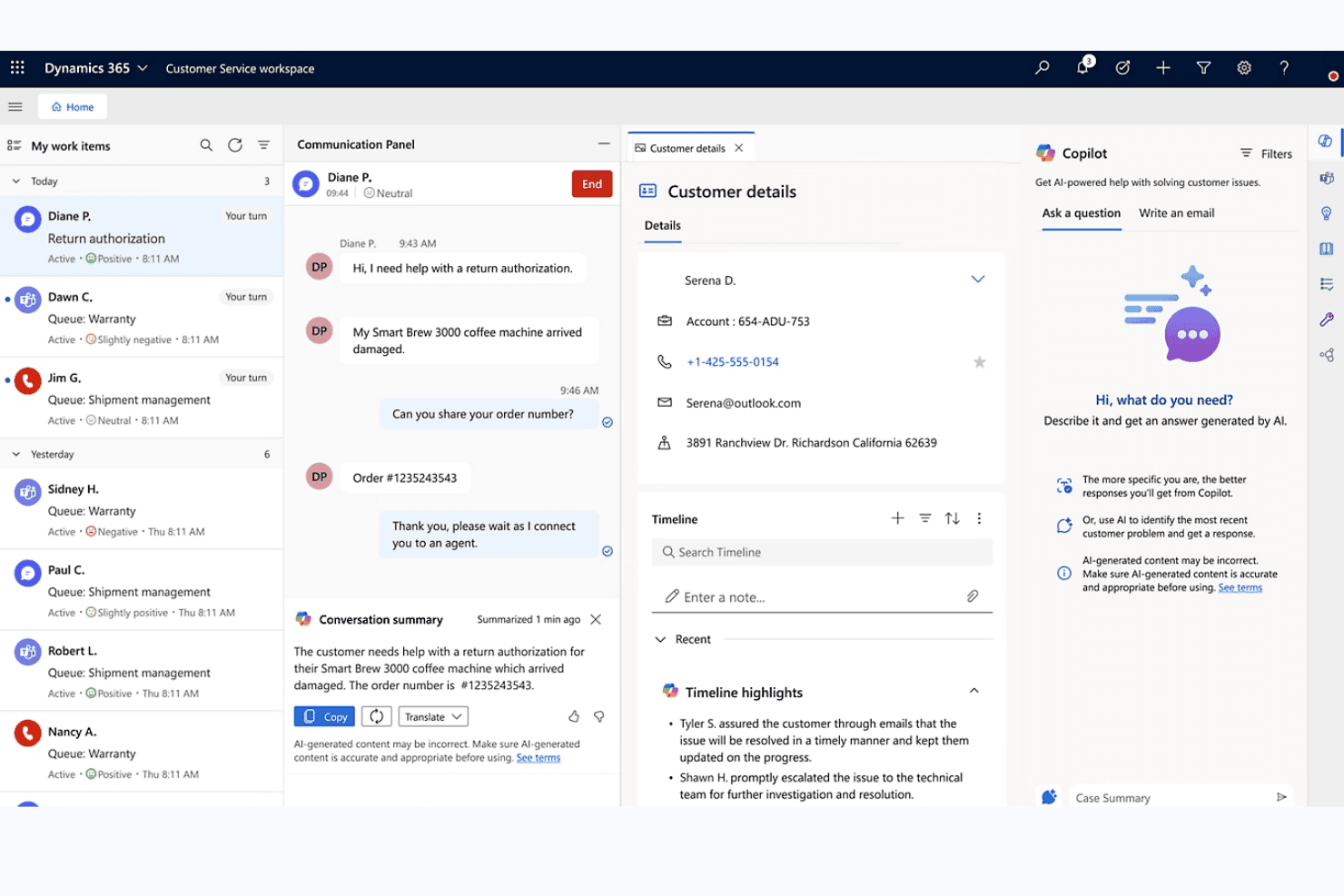
Microsoft Dynamics 365 unifies chat, customer details, and AI Copilot for agents. My Evaluation Score
- Compliance Controls
- Strong
- Native CRM + Texting
- Adequate
- Two-Way SMS Messaging
- Adequate
- Automated Text Workflows
- Excels
- Bulk & Personalized Texting
- Excels
- Conversation Logging & Sync
- Excels
Microsoft Dynamics 365 is an enterprise CRM platform that spans sales, customer service, contact center, and marketing modules, each with native SMS capabilities for two-way messaging, automated text journeys, and conversation logging across contact and pipeline records.
Who Is Microsoft Dynamics 365 Best For?
Microsoft Dynamics 365 is a strong fit for enterprise organizations that need SMS woven across sales, marketing, and service teams within a single, deeply integrated Microsoft ecosystem.
Why I Picked Microsoft Dynamics 365
I picked Microsoft Dynamics 365 because no other platform on this list spans enterprise SMS across sales, marketing, and service with this level of depth. I'm particularly impressed by Customer Insights – Journeys, which lets you build SMS workflows with keyword-triggered branching (think: a contact replies "YES" and immediately enters a different journey path), conditional content logic, and per-contact-point consent enforcement. Paired with Sales sequences that support SMS steps alongside calls and emails, your reps and marketers are working from the same CRM without duplicating pipeline data.
Microsoft Dynamics 365 Key Features
- Compliance profile enforcement: Applies restrictive, nonrestrictive, or disabled consent models per contact point to control who receives SMS messages.
- Power Automate SMS triggers: Fires text messages automatically based on CRM events like form fills, deal stage changes, or case creation.
- Conversation reassignment: Moves SMS threads between record types—such as from an Account to a Contact—directly within the conversation pane.
- A/B testing in journeys: Tests SMS message variants within Customer Insights – Journeys to compare performance across audience segments.
Microsoft Dynamics 365 Integrations
Microsoft Dynamics 365 offers native integrations across the Microsoft ecosystem, including Microsoft 365, Azure Communication Services, Power Automate, Power BI, Teams, Outlook, and LinkedIn Sales Navigator. It also supports Twilio, Infobip, and AppSource marketplace integrations, plus APIs and custom connectors.
Pros and Cons
Pros:
- Unified sales, service, and marketing texting
- Advanced SMS automation in marketing journeys
- Logs SMS to CRM across all record types
Cons:
- No shared team SMS inbox
- SMS requires third-party provider configuration
Learn more about Microsoft Dynamics 365: Best for AI-drafted SMS across lifecycle journeys
- 14-day free trial + free demo available
- From $15/month (billed annually)
Visit WebsiteCustomer Rating:4.4/5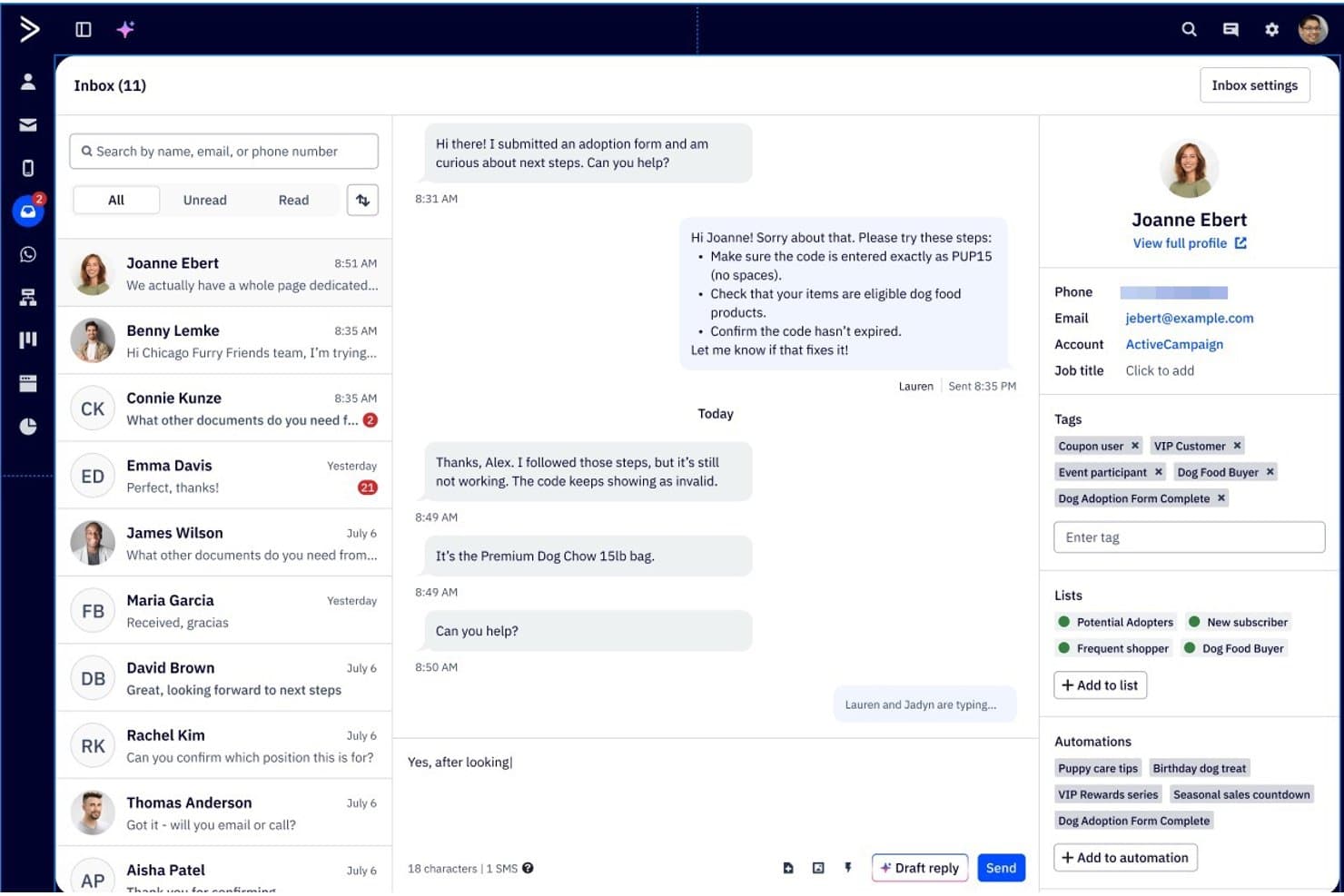
ActiveCampaign lets users manage SMS conversations with full contact details. My Evaluation Score
- Compliance Controls
- Excels
- Native CRM + Texting
- Minimal
- Two-Way SMS Messaging
- Strong
- Automated Text Workflows
- Excels
- Bulk & Personalized Texting
- Strong
- Conversation Logging & Sync
- Adequate
ActiveCampaign is a marketing automation and CRM platform that combines email, SMS, and WhatsApp messaging with a visual automation builder, two-way SMS inbox, AI-assisted message drafting, and lifecycle journey workflows.
Who Is ActiveCampaign Best For?
ActiveCampaign is a strong fit for lifecycle marketing teams that need AI-assisted SMS built into multi-step, cross-channel automation journeys.
Why I Picked ActiveCampaign
ActiveCampaign earns its spot on my shortlist because its Active Intelligence AI layer does something I haven't seen matched elsewhere: it drafts SMS replies based on your brand kit and FAQs, summarizes ongoing conversations, and builds full multi-step lifecycle journeys from a plain-language prompt. I love that SMS reply triggers let automations branch mid-sequence based on what a contact actually responds, keeping lifecycle flows dynamic rather than linear. The two-way SMS inbox also supports team access with group permissions, so multiple people can manage conversations without stepping on each other.
ActiveCampaign Key Features
- Broadcast SMS campaigns: Send bulk SMS messages to segmented contact lists, with merge fields for personalization and link tracking to measure clicks.
- A2P 10DLC registration: Complete in-platform phone number registration for US senders, with automatic opt-out keyword processing and quiet hours controls.
- 950+ automation templates: Pre-built, SMS-enabled workflow templates covering lifecycle stages, with support for branching logic and multi-step sequences.
- Cross-channel journey builder: Build multi-step automations that combine email, SMS, and WhatsApp in a single visual workflow triggered by CRM events.
ActiveCampaign Integrations
ActiveCampaign offers 1,000+ marketplace integrations, including Salesforce, HubSpot, Microsoft Dynamics, Salesmsg, Sakari, and Sinch. It also supports REST API, webhooks, MCP Server, and Zapier for custom connectivity.
Pros and Cons
Pros:
- Shared SMS inbox with team permissions
- Multi-step automations branch on SMS replies
- AI drafts SMS replies and campaign messages
Cons:
- MMS and broadcasts restricted by geography
- SMS and pipelines require paid add-ons
Learn more about ActiveCampaign: 3Best for automating SMS client follow-up sequences
Keap
- 14-day free trial
- From $299/month
Visit WebsiteCustomer Rating:4.2/5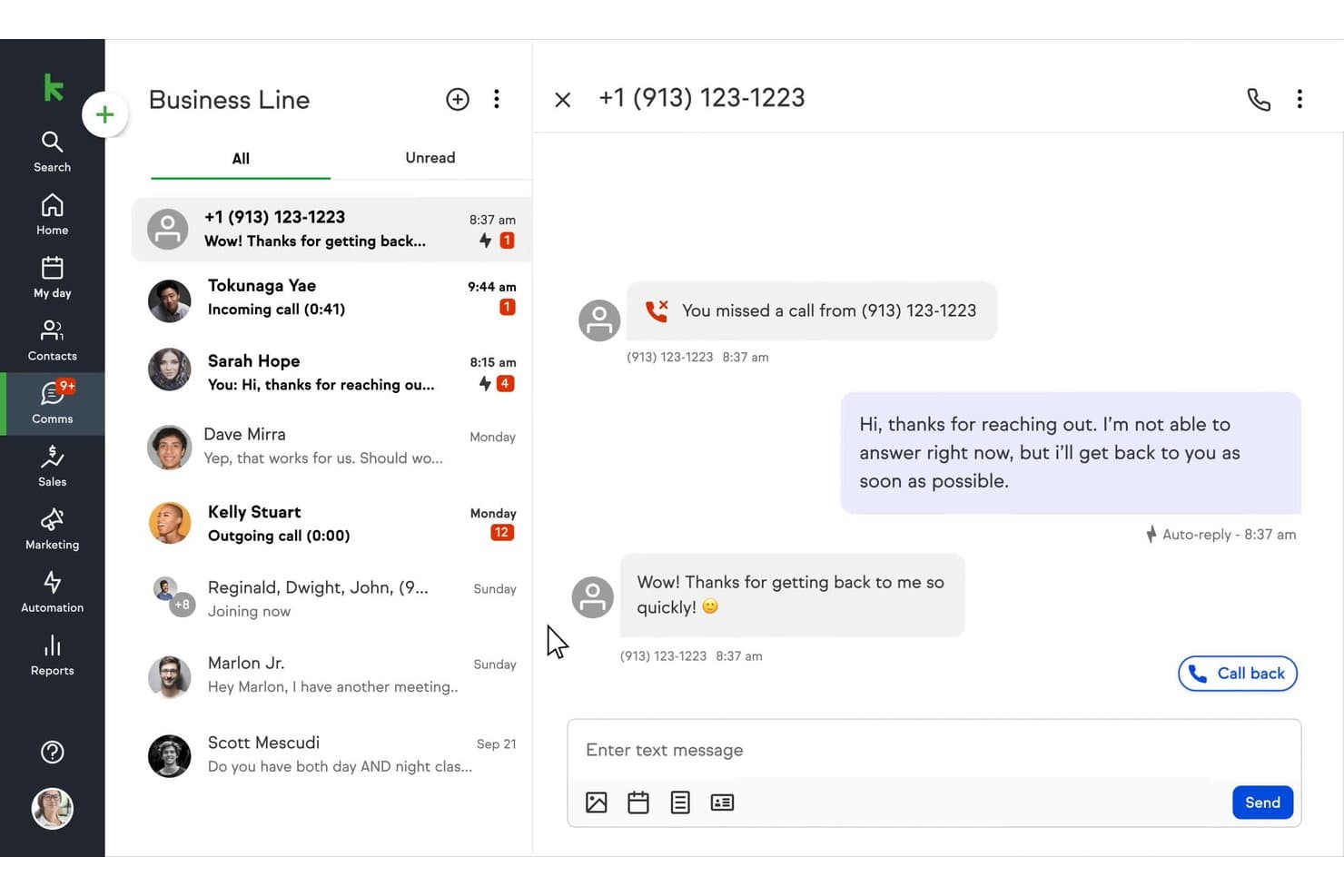
Keap auto-replies to missed calls via SMS on its business line. My Evaluation Score
- Compliance Controls
- Adequate
- Native CRM + Texting
- Strong
- Two-Way SMS Messaging
- Adequate
- Automated Text Workflows
- Excels
- Bulk & Personalized Texting
- Strong
- Conversation Logging & Sync
- Adequate
Keap is a small business CRM and marketing automation platform that combines contact management, sales pipelines, SMS and email marketing, appointment scheduling, invoicing, and payment processing in one system.
Who Is Keap Best For?
Keap is a strong fit for small business owners and lifecycle marketing managers who need to automate multi-step SMS and email follow-up sequences without stitching together separate tools.
Why I Picked Keap
I picked Keap as one of the best because its Campaign Builder makes automating multi-step SMS follow-up sequences genuinely straightforward. I love that you can trigger texts based on pipeline stage changes, purchase completions, or tag applications, then layer in if/then branching logic to personalize the path each contact takes. The AI Automation Assistant lets you build those sequences from a plain-language prompt, which cuts setup time significantly.
Keap Key Features
- Tag-based audience segmentation: Organize contacts into dynamic groups using tags to target broadcast texts and automations at the right people.
- AI Content Assistant: Generate and refine SMS copy directly from a plain-language prompt without leaving the platform.
- Built-in TCPA compliance tools: Manage opt-ins, opt-outs, and STOP keywords automatically, with quiet hours enforced across broadcast texts.
- Keap Business Line: Each user gets a dedicated local business number for one-to-one texting and calls via desktop or mobile app.
Keap Integrations
Native integrations include Google Workspace, Microsoft Outlook, Zoom, QuickBooks, Mailchimp, PayPal, Stripe, Eway, WePay, and Shopify on the Max plan. Keap also offers marketplace integrations, a REST API with webhooks, and Zapier.
Pros and Cons
Pros:
- AI-assisted campaign and SMS creation
- Built-in compliance controls for text marketing
- Advanced automation triggers for SMS follow-ups
Cons:
- SMS and MMS limited to U.S. and Canada
- No shared team SMS inbox available
 Best for multi-cloud SMS automation at scale
- 30-day free trial
- From $25/user/month
Visit WebsiteCustomer Rating:4.4/5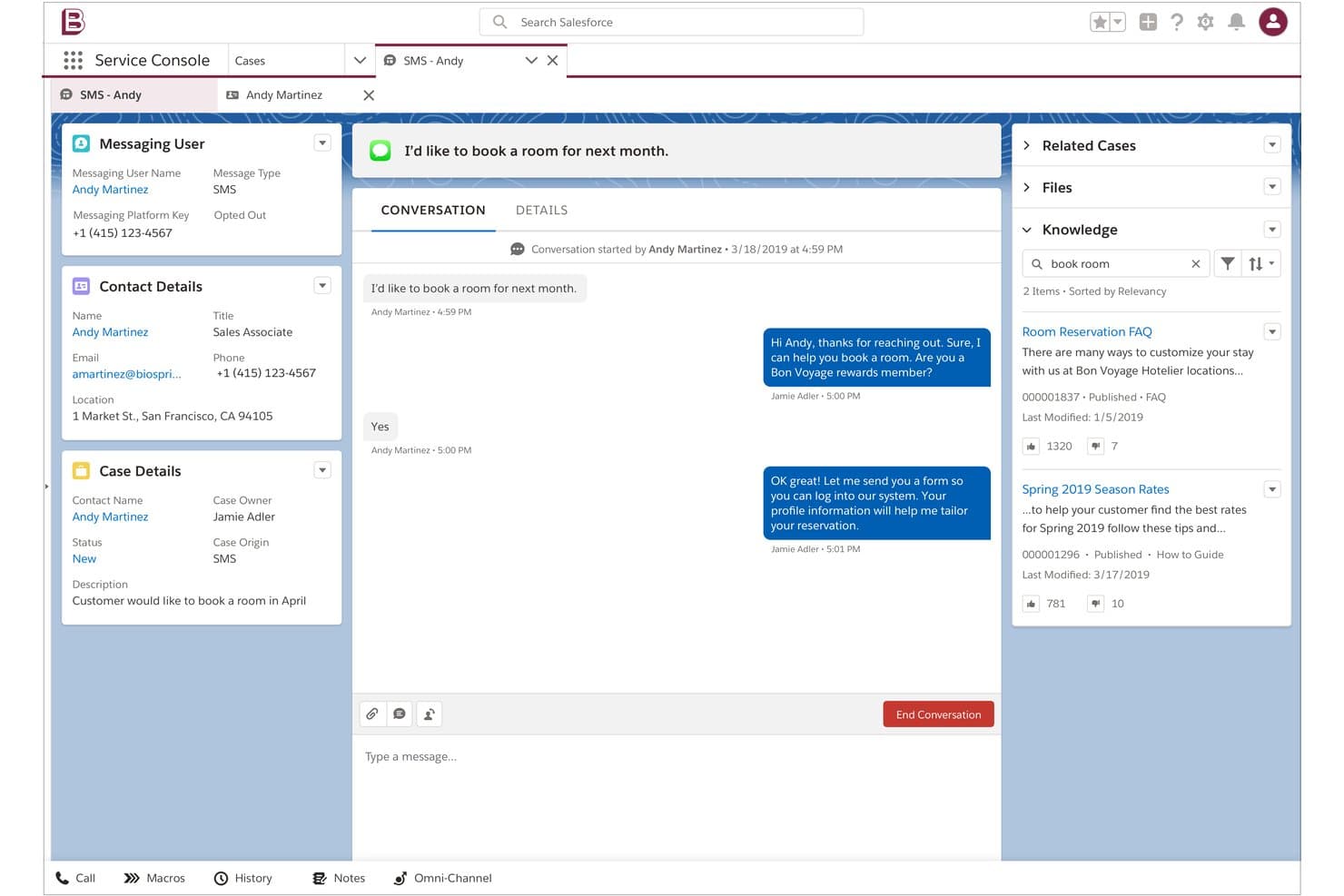
Salesforce lets agents handle SMS conversations alongside knowledge articles. My Evaluation Score
- Compliance Controls
- Excels
- Native CRM + Texting
- Minimal
- Two-Way SMS Messaging
- Strong
- Automated Text Workflows
- Excels
- Bulk & Personalized Texting
- Excels
- Conversation Logging & Sync
- Adequate
Salesforce Sales Cloud is a CRM platform that combines contact and pipeline management with SMS, MMS, and WhatsApp messaging across its Sales, Service, and Marketing Clouds—spanning two-way conversations, bulk campaigns, automated journeys, and AI-powered agent routing.
Who Is Salesforce Sales Cloud Best For?
Salesforce Sales Cloud is the right fit for enterprise teams already running multiple Salesforce clouds who need SMS, MMS, and WhatsApp woven into their existing CRM, service, and marketing workflows.
Why I Picked Salesforce Sales Cloud
I picked Salesforce Sales Cloud as one of the best because no other CRM matches its ability to run SMS across multiple clouds simultaneously: Marketing Cloud Journey Builder handles bulk campaign sends with AI-driven send time optimization, while Digital Engagement routes two-way conversations to agents via omnichannel queues. I love that Agentforce can autonomously handle SMS interactions across service and sales channels without human handoff. That kind of multi-cloud SMS coordination is what makes Salesforce the right call for enterprise teams scaling complex messaging operations.
Salesforce Sales Cloud Key Features
- Digital Engagement add-on: Adds two-way SMS, WhatsApp, and MMS messaging directly inside the Service Cloud console with omnichannel routing to agents or bots.
- Einstein Bot automation: Handles inbound SMS inquiries automatically, qualifying questions and collecting information before handing off to a live agent.
- MobileConnect bulk SMS: Sends mass SMS and MMS campaigns with dynamic merge fields, A/B testing, and segmentation tools inside Marketing Cloud.
- Omnichannel routing: Distributes incoming SMS conversations to available agents based on skill, capacity, and availability alongside other channel workloads.
Salesforce Integrations
Salesforce offers documented integrations with Slack, Tableau, and MuleSoft. Its AppExchange includes 200+ SMS messaging apps, including Twilio for Salesforce, while REST and SOAP APIs support custom connections.
Pros and Cons
Pros:
- Advanced compliance and consent management tools
- Omnichannel routing across SMS and other channels
- Multi-cloud SMS automations for complex workflows
Cons:
- SMS logging varies across different Salesforce clouds
- SMS requires additional products or third-party apps
Learn more about Salesforce : Best for financial services texting and dialing
- Free demo available
- Pricing upon request
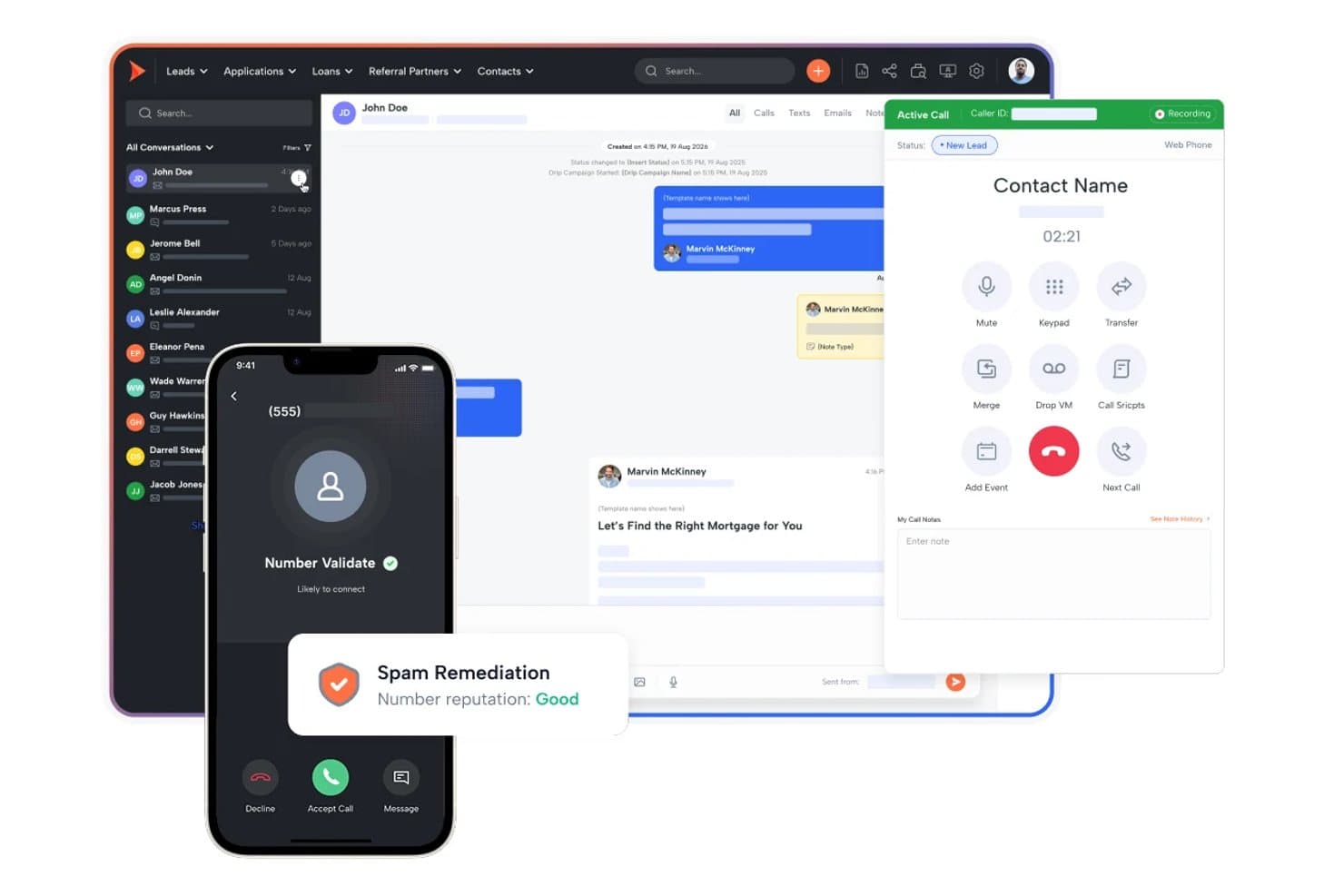
Shape unifies calls, texts, and lead management in one CRM. My Evaluation Score
- Compliance Controls
- Excels
- Native CRM + Texting
- Excels
- Two-Way SMS Messaging
- Excels
- Automated Text Workflows
- Excels
- Bulk & Personalized Texting
- Strong
- Conversation Logging & Sync
- Excels
Shape is an all-in-one CRM built for financial services teams that natively combines pipeline management, two-way SMS/MMS texting, a power dialer, AI lead scoring, and marketing automation in a single platform.
Who Is Shape Best For?
Shape fits financial services teams—mortgage lenders, loan officers, and insurance brokers—that need texting, dialling, and CRM pipeline management in one place.
Why I Picked Shape
Shape earns its spot on my shortlist because it's purpose-built for financial services teams that need texting and dialling in the same place as their CRM pipeline. I particularly like its Local Presence feature, which automatically matches outbound texts and calls to a local area code based on the contact's location, improving response rates without any manual setup. Its IF–THEN trigger logic fires SMS messages directly off pipeline stage changes, so a loan officer's leads get timely follow-ups tied to real deal events.
Shape Key Features
- Shared team inbox: All inbound SMS and MMS replies from leads surface in a single shared inbox visible across your team.
- ShapeIQ AI lead scoring: An ML-driven scoring engine that ranks leads based on behavioural signals and engagement patterns over time.
- A2P 10DLC registration: Brand and campaign registration for A2P 10DLC messaging is managed directly inside the platform.
- Drip campaign builder: Multi-step sequences combine timed SMS and email actions tied to lead lifecycle stages.
Shape Integrations
Shape offers native integrations with Encompass, LendingPad, LendingDox, and DNC.com. It also supports an open API, webhooks, and Zapier.
Pros and Cons
Pros:
- IF–THEN triggers send texts from pipeline changes
- Shared inbox for SMS, MMS, and calls
- Financial services SMS compliance controls built in
Cons:
- Demo required to view full pricing
- Custom field limits restrict advanced workflows
Learn more about Shape: Best for pipeline-triggered SMS automation
- 15-day free trial
- From $23/user/month (billed annually)
Visit WebsiteCustomer Rating:4.7/5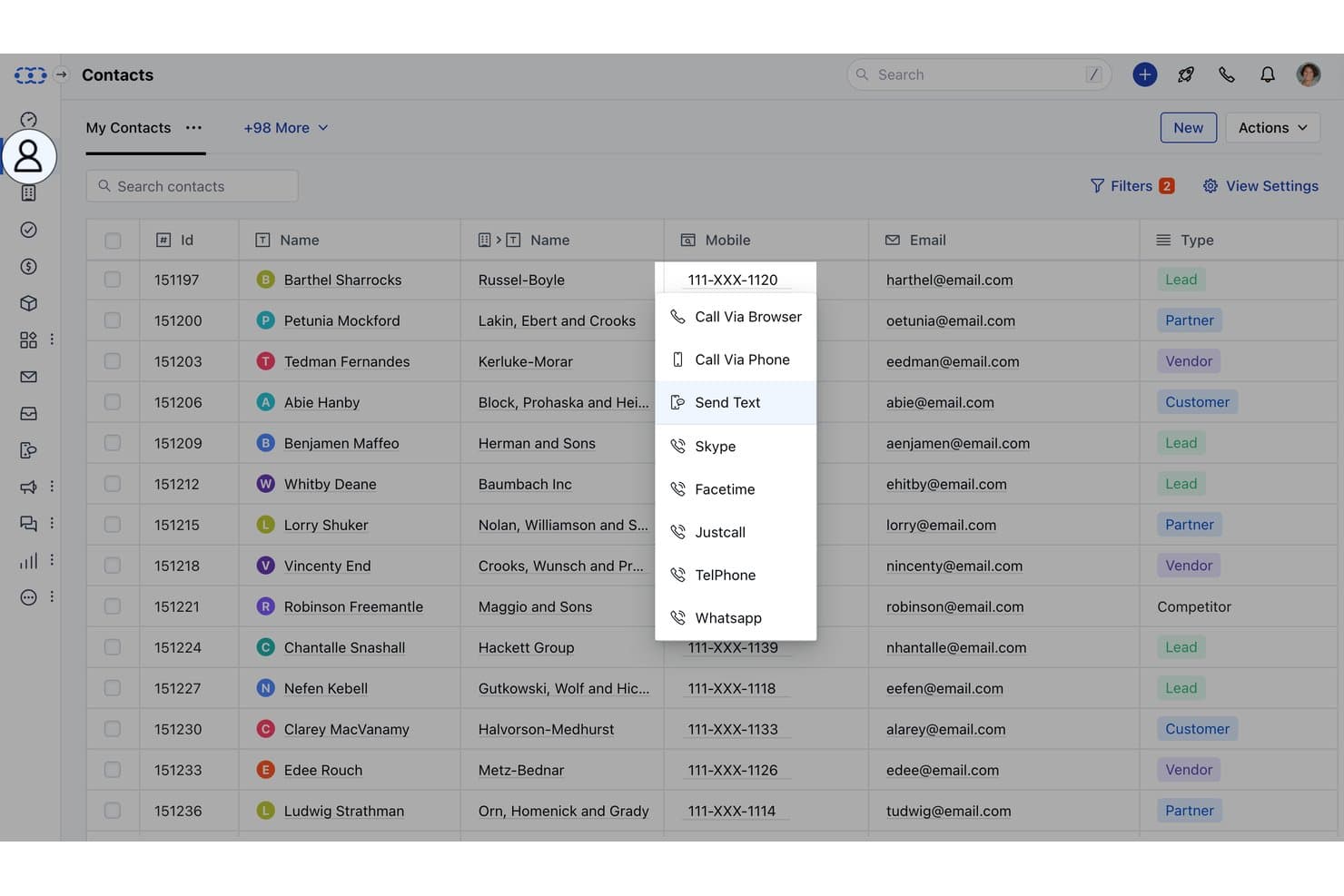
Salesmate lets users text contacts directly from the CRM contact list. My Evaluation Score
- Compliance Controls
- Excels
- Native CRM + Texting
- Excels
- Two-Way SMS Messaging
- Excels
- Automated Text Workflows
- Excels
- Bulk & Personalized Texting
- Strong
- Conversation Logging & Sync
- Excels
Salesmate is a CRM platform with native SMS/MMS texting, two-way messaging, pipeline-event-driven automation via Smart Flows, multi-channel sequences, and AI-assisted conversation tools built directly into contact and deal records.
Who Is Salesmate Best For?
Salesmate is a strong fit for sales teams that want text messaging to trigger automatically as deals move through pipeline stages.
Why I Picked Salesmate
I picked Salesmate as one of the best because its Smart Flows builder lets you trigger SMS actions directly from pipeline events, like sending a text the moment a deal moves to a new stage or a form is submitted. I love that Text Pilot adds local presence routing on top of that, matching the outbound number's area code to the contact's location to improve reply rates. Sequences then let you layer SMS into multi-step cadences alongside email, all from the same CRM record.
Salesmate Key Features
- Bulk SMS with merge tokens: Send personalized text campaigns to segmented contact lists using CRM field data as merge variables, with tag- and list-based targeting.
- Sandy AI conversation summaries: AI assistant that summarizes lengthy text threads, surfacing key points, action items, and deadlines directly within the contact record.
- Team Inbox for inbound SMS: A shared, assignable inbox (Pro plan) where multiple reps can manage and respond to incoming text conversations collaboratively.
- A2P 10DLC in-platform registration: Complete US carrier compliance registration for brand and campaign types directly inside Salesmate via its Regulatory Compliance setup section.
Salesmate Integrations
Salesmate offers native integrations with HubSpot OperationsHub, Mailchimp, ActiveCampaign, Brevo, Shopify, QuickBooks Online, Google Calendar, Microsoft Calendar, Slack, and Zoom. It also supports Make, a RESTful API, webhooks, and Zapier.
Pros and Cons
Pros:
- Text Pilot offers local presence routing
- Opt-out keywords enforced with automatic suppression
- Pipeline stage movement can auto-trigger SMS
Cons:
- Sandy AI and sequences only on higher plans
- SMS and calls require additional usage credits
Learn more about Salesmate: Best for omnichannel lifecycle marketing SMS
- Free plan available
- From $20/user/month
Visit WebsiteCustomer Rating:4.4/5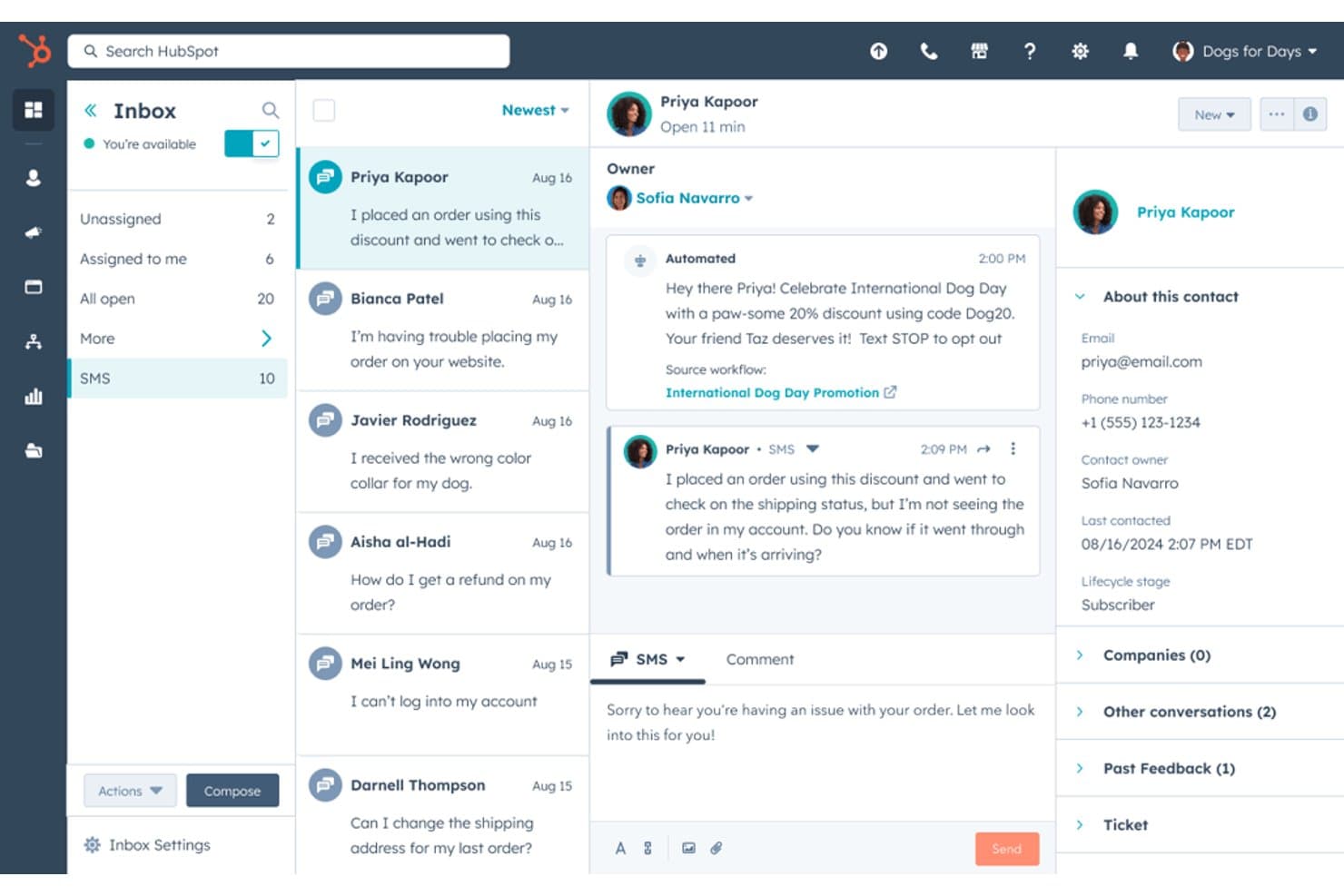
HubSpot lets users manage SMS conversations with customers in one inbox. My Evaluation Score
- Compliance Controls
- Excels
- Native CRM + Texting
- Minimal
- Two-Way SMS Messaging
- Strong
- Automated Text Workflows
- Strong
- Bulk & Personalized Texting
- Excels
- Conversation Logging & Sync
- Adequate
HubSpot is a CRM platform that combines contact management, pipeline tracking, and marketing automation with native SMS campaigns, a shared omnichannel inbox, and workflow-triggered texting across email, SMS, WhatsApp, and chat.
Who Is HubSpot Best For?
HubSpot is a strong fit for marketing teams that need to orchestrate SMS campaigns across a full customer lifecycle within a unified CRM.
Why I Picked HubSpot
HubSpot earns its spot on my shortlist because it's the only CRM here that ties SMS directly into a full omnichannel lifecycle, running alongside email, WhatsApp, and chat in a single workflow. I particularly like how its workflow builder lets you trigger SMS at any contact journey stage, from a form fill to a re-engagement sequence, without stitching together separate tools. Breeze AI inside the SMS composer also lets my team generate and refine message copy on the fly, which speeds up campaign execution considerably.
HubSpot Key Features
- Conversations shared inbox: Consolidates SMS, email, WhatsApp, Facebook Messenger, and live chat into one interface tied to CRM contact records.
- A2P 10DLC compliance registration: Handles brand and campaign registration through Twilio, with automatic opt-out keyword processing and consent timestamping per contact.
- Contact list segmentation: Lets you build active or static lists using CRM properties to target bulk SMS sends at the right audience.
- WhatsApp Business messaging: Includes up to 1,000 WhatsApp messages per month on Professional and Enterprise plans, managed through the same inbox and workflow automation as SMS.
HubSpot Integrations
HubSpot offers native integrations with Salesforce, Slack, Google Workspace, Microsoft 365, LinkedIn Sales Navigator, Stripe, and ZoomInfo, plus 2,000+ marketplace apps including Sakari, Salesmsg, and Twilio. Its open API, webhooks, Zapier, and Make support custom connectivity.
Pros and Cons
Pros:
- AI-assisted message writing for campaigns
- Workflow-triggered texts across multiple channels
- Bulk SMS campaigns with CRM segmentation
Cons:
- SMS only available with marketing-focused plans
- No native sales rep 1-to-1 texting
Learn more about HubSpot:
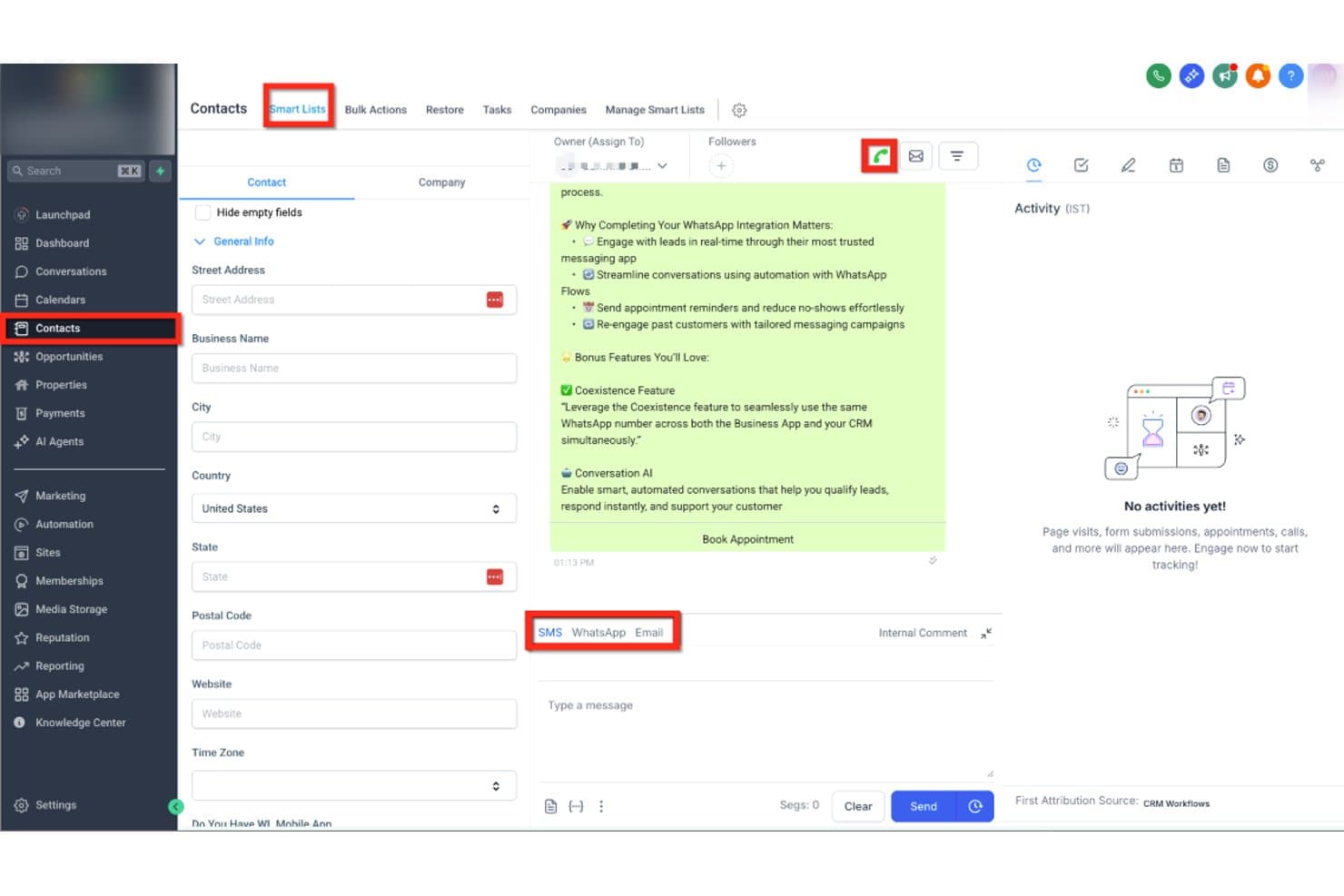
HighLevel lets users text contacts via SMS, WhatsApp, or Email in one place. My Evaluation Score
- Compliance Controls
- Excels
- Native CRM + Texting
- Excels
- Two-Way SMS Messaging
- Excels
- Automated Text Workflows
- Excels
- Bulk & Personalized Texting
- Excels
- Conversation Logging & Sync
- Excels
HighLevel is an all-in-one CRM and marketing platform that combines contact management, pipeline tracking, and native SMS/MMS messaging with multi-channel automation, a shared team inbox, AI-powered conversation handling, and bulk texting tools—all without requiring a third-party texting integration.
Who Is HighLevel Best For?
HighLevel is built for marketing agencies that manage SMS outreach across multiple clients from a single platform.
Why I Picked HighLevel
HighLevel earns its spot on my shortlist because it's purpose-built for marketing agencies running SMS outreach across multiple clients from one platform. I love how the sub-account architecture lets you manage each client's contacts, pipelines, and text conversations completely separately, without switching tools. The Missed Call Text-Back feature automatically converts a missed call into a live SMS conversation, which I've found is a genuine lead-saver in agency client campaigns. Conversation AI can then handle those inbound replies autonomously, qualifying leads and booking appointments around the clock.
HighLevel Key Features
- Bulk SMS broadcasting: Send mass text campaigns to segmented contact lists using Smart Lists and CRM-based filters.
- Text-2-Pay: Send payment links directly through SMS conversations to collect invoices or deposits without leaving the platform.
- Local presence dialling: Automatically display a local area code number matching a contact's location when sending texts or making calls.
- A2P 10DLC Trust Center: Built-in brand and campaign registration tool that guides you through carrier compliance directly inside the platform.
HighLevel Integrations
HighLevel has native integrations with Facebook Messenger, Instagram DMs, WhatsApp, Stripe, PayPal, Google Calendar, and Outlook. It also supports REST API, webhooks, Make, and Zapier for custom connectivity.
Pros and Cons
Pros:
- Bulk texting with CRM-based segmentation
- AI-powered SMS replies and lead qualification
- Missed call text-back saves lost leads
Cons:
- Usage-based texting costs spike with volume
- Complex A2P 10DLC registration frustrates users
Learn more about GoHighLevel: Best for outbound SMS and call teams
- 14-day free trial + free demo available
- From $9/user/month (billed annually)
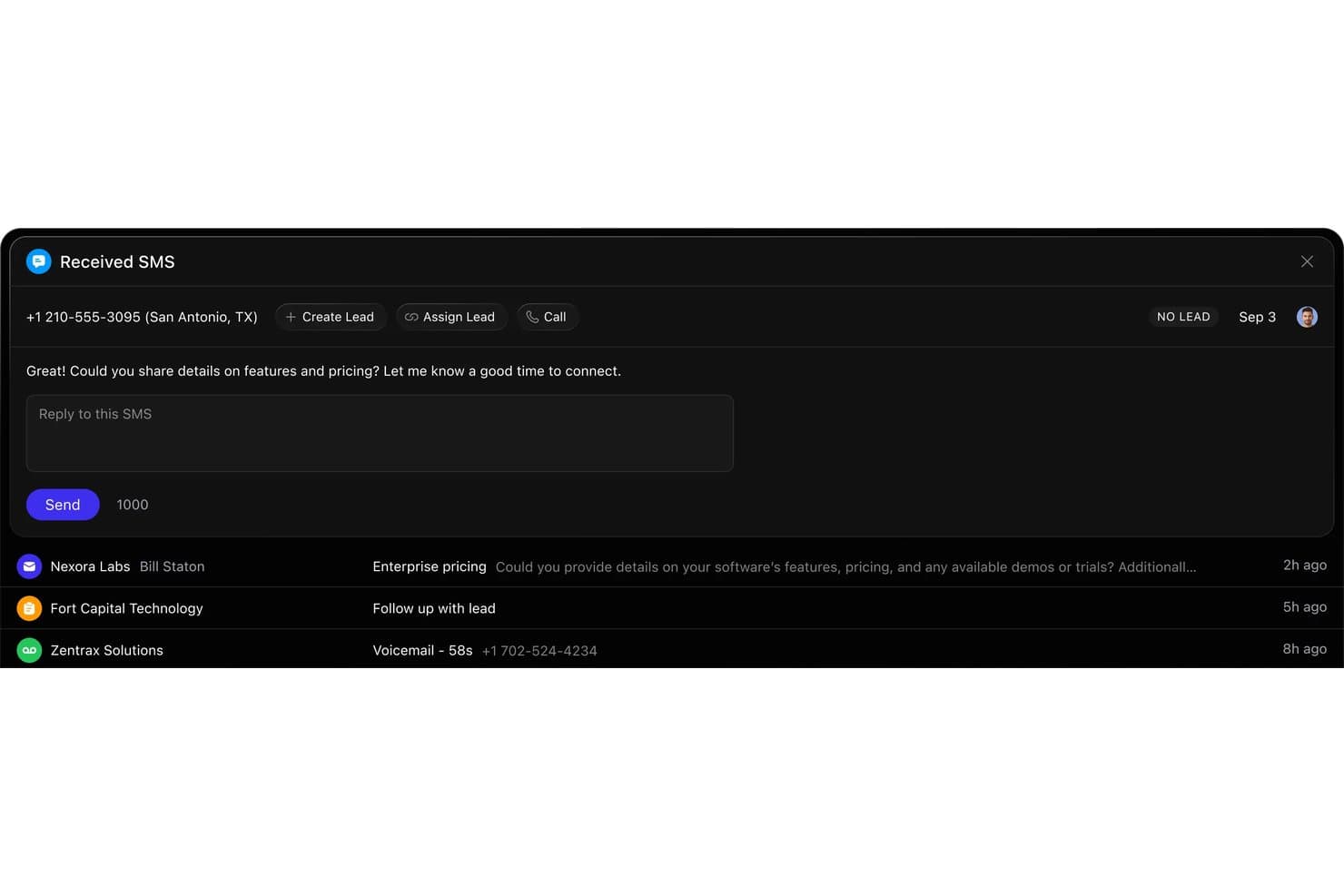
Close lets users reply to inbound SMS leads directly from the CRM. My Evaluation Score
- Compliance Controls
- Excels
- Native CRM + Texting
- Excels
- Two-Way SMS Messaging
- Strong
- Automated Text Workflows
- Strong
- Bulk & Personalized Texting
- Strong
- Conversation Logging & Sync
- Excels
Close is a sales CRM with native SMS/MMS, two-way texting, automated multi-channel sequences, built-in calling, and A2P 10DLC compliance tools—all in one platform.
Who Is Close Best For?
Close is a strong fit for sales teams running high-volume outbound motions who need calling, SMS, and email in one place—without piecing together multiple tools.
Why I Picked Close
Close earns its spot on my shortlist because SMS and calling aren't bolted on—they're core to how the platform works. I love that outbound teams can run multi-step sequences combining SMS, email, and call tasks from a single workflow builder, with Workflow Goals that automatically pause outreach the moment a prospect replies. The in-platform A2P 10DLC registration and AI compliance monitoring also remove a real operational headache, letting teams text at volume without managing compliance through a separate tool.
Close Key Features
- Smart Views bulk SMS: Send personalized text campaigns to dynamically filtered lead segments using CRM merge tokens, without exporting lists or switching tools.
- Power Dialer and Predictive Dialer: Automatically queue and connect outbound calls in sequence, with the Predictive Dialer available on the Scale plan for high-volume teams.
- In-platform A2P 10DLC registration: Register your brand and SMS campaigns directly inside Close via Twilio, including automated opt-out keyword handling.
- Workflow Goals: Automatically pause active multi-step sequences the moment a prospect replies or books a meeting, preventing over-messaging.
Close Integrations
Close offers 100+ native integrations, including Gmail, Microsoft 365, Google Calendar, Zoom, Calendly, Segment, Gong, and Help Scout. It also supports custom integrations through its REST API, webhooks, MCP server, and Zapier.
Pros and Cons
Pros:
- A2P 10DLC compliance tools built in
- Outbound texting automation with workflow goals
- SMS and CRM fully unified in one platform
Cons:
- Workflow SMS automation locked behind higher tiers
- No shared team SMS inbox feature
Learn more about Close: Best for property management team texting
- Free demo available
- From $65/user/month (billed annually)

LeadSimple streamlines real estate operations with lead tracking and automation. My Evaluation Score
- Compliance Controls
- Strong
- Native CRM + Texting
- Strong
- Two-Way SMS Messaging
- Excels
- Automated Text Workflows
- Strong
- Bulk & Personalized Texting
- Minimal
- Conversation Logging & Sync
- Strong
LeadSimple is software designed to help users manage lead tracking, sales, and customer relationships. It is primarily for real estate professionals and offers tools that support property management and lead conversion.
Why I Picked LeadSimple:
It offers specific features that make it a great fit for real estate teams. The built-in pipeline management lets you track deals from start to finish, helping you stay on top of each hiring process stage. Automated follow-ups ensure you never miss a lead; task reminders keep your team organized. With its focus on real estate workflows, it’s well-suited for handling property listings and communication.
Standout Features & Integrations:
Features include automated follow-ups, deal tracking, and task management. You can easily assign tasks to team members and set reminders for important deadlines. The software also provides real-time notifications to help you stay updated on lead progress.
Integrations include Gmail, Outlook, Zapier, Google Calendar, Slack, RingCentral, CallRail, Twilio, HelloSign, and QuickBooks.
Pros and Cons
Pros:
- Strong task automation capabilities
- Highly customizable workflows
- Scalable for growing teams
Cons:
- Limited flexibility outside real estate
- Time-consuming setup process
- Steep learning curve
Learn more about LeadSimple:
Other CRM Software With Texting
Here are some additional CRM software with texting options that didn’t make it onto my shortlist but are still worth checking out.
- 11Bitrix24Best for all-in-one CRM with free collaboration texting
- 12KixieBest for call-outcome SMS automation in your CRM
- 13PodiumBest for local business SMS and reputation growth
- 14Zoho CRMBest for CRM texting via ecosystem add-ons
- 15NutshellBest for omni-channel team SMS inbox
- 16SalesmsgBest for texting layered into HubSpot or Salesforce
- 17TextlineBest for HIPAA-compliant team SMS texting
- 18GoCRMBest for multi-channel drip SMS in one platform
- 19HeymarketBest for AI agent texting on shared inbox
How I Evaluate CRM Software With Texting
I split my evaluation into two layers: the baseline each tool must meet—like two-way SMS logging to deal records—and differentiators like A2P compliance and AI-assisted messaging.
Core Functionality (Table Stakes For This List)
When I'm selecting tools for my list, I rank each one on a scale from 0 (does not offer the functionality) to 5 (excels in this area) for each core functionality listed below. Then, I calculate the tool's total score into a percentage. Each tool needs to achieve a minimum total score of 65% to be considered for inclusion.
- Native CRM + Texting: I check whether the platform combines contact and deal management with built-in texting, rather than requiring a third-party SMS plugin to send a single message.
- Two-Way SMS Messaging: Reps need to hold real conversations with prospects, so I evaluate whether replies land in a CRM inbox with routing and assignment capabilities.
- Conversation Logging & Sync: Every text should auto-attach to the right contact and deal record—I look for full timeline sync so managers can audit rep activity without chasing screenshots.
- Automated Text Workflows: I evaluate whether CRM events like deal stage changes or form fills can trigger SMS sequences with branching logic, delays, and conditional steps.
- Bulk & Personalized Texting: Sending a campaign to a segmented list with merge tokens pulled from CRM fields is table stakes—I look for list targeting and dynamic personalization options.
- Compliance Controls: Opt-in/opt-out handling, consent tracking, and A2P 10DLC registration support all factor into my evaluation, especially for teams running high-volume outreach.
Once I have a list of tools that meet this criteria, I consider what sets each platform apart.
Differentiating Factors (What Sets Vendors Apart)
Here's how I compare and contrast different vendors:
Standout Features
A shared team inbox matters when SDRs hand off leads mid-conversation—I look for assignment rules, internal notes, and visibility into who last messaged a contact. AI message assistance is another differentiator I evaluate, especially tools that draft contextual replies using CRM data like deal stage or recent activity. I also consider conversation intelligence features that surface pipeline signals from text threads, giving RevOps leaders reporting on rep responsiveness and engagement trends.
Beyond Features
Deliverability is a factor I weigh heavily—carrier registration support and reputation monitoring determine whether your messages actually reach prospects. Integration depth also matters, particularly bi-directional sync with marketing automation and revenue intelligence tools already in your RevOps stack. I evaluate pricing structures for transparency, looking at how vendors handle per-message costs and seat scaling as outbound volume grows across your sales team.
How To Choose CRM Software With Texting
It’s easy to get bogged down in long feature lists and complex pricing structures. Here's a checklist of factors to remember to help you stay focused as you work through your unique software selection process.
| Factor | What to Consider |
| Scalability | Will this solution grow with your team’s needs? |
| Integrations | Does it connect with the other tools you’re already using? |
| Customizability | Can you tailor the software to fit your specific workflows? |
| Ease of Use | Is the platform simple enough for your team to adopt quickly? |
| Budget | Does the cost fit within your team’s budget and provide value? |
| Security Safeguards | Are there adequate measures to protect your data? |
| Support | Will you have access to timely and helpful customer support? |
| Mobile Access | Can you access the software on the go from mobile devices? |
Use this checklist to keep your software selection process organized and focused.
Trends In CRM Software With Texting
In my research, I sourced countless product updates, press releases, and release logs from different CRM software with texting vendors. Here are some of the emerging trends I’m keeping an eye on.
- AI-driven message personalization: More tools are using AI to suggest or auto-generate personalized SMS content based on customer data and previous interactions. This helps businesses send more relevant messages without manual effort.
- Omnichannel communication: Vendors are moving towards integrating SMS with other communication channels like email, chat, and social media in one platform. This allows businesses to maintain consistent conversations across multiple touchpoints.
- SMS compliance features: With increasing regulations around text messaging, more vendors are adding built-in tools to ensure compliance with GDPR, TCPA, and other data privacy laws. This trend is significant for businesses operating in regulated industries.
- Advanced SMS analytics: Basic SMS tracking is evolving into more sophisticated analytics, allowing businesses to measure open rates, response times, and customer engagement. This helps teams refine their messaging strategies.
- Voice-to-text integration: Some CRM tools add voice-to-text functionality, making it easier for users to convert spoken communication into text messages. This trend is gaining traction among field service teams and remote workers.
What Is CRM Software With Texting?
CRM software with texting is a tool that helps businesses manage customer relationships while sending and receiving SMS messages directly from the platform. These tools are commonly used by sales teams, customer support, and service-based professionals who must communicate quickly and effectively with clients.
Automated follow-ups, message templates, and SMS tracking help businesses manage customer communication and improve response times. CRM software with texting adds value by making it easier for companies to maintain strong, timely communication with their customers.
Features Of CRM Software With Texting
When selecting CRM software with texting, watch for the following key features.
- Two-Way Texting: Send and receive SMS directly within the platform, maintaining real-time communication with clients or candidates.
- Automated SMS Workflows: Send follow-up messages or reminders based on triggers, saving time and ensuring consistent communication.
- Message Templates: Use pre-built templates for common responses to engage customers quickly while maintaining a professional tone.
- SMS Scheduling: Schedule text messages to be sent at specific times, ensuring messages are delivered at optimal times for engagement.
- Text Tracking and Reporting: Track SMS open rates, response times, and performance to evaluate and refine your messaging strategies.
- Personalized Messaging: Customize texts with client or candidate details to make communication more relevant and improve relationships.
- Group Texting: Send bulk messages to groups of clients simultaneously, making sharing updates or promotional offers easier.
- Compliance Tools: Manage opt-ins, opt-outs, and consent tracking to ensure text messaging complies with regulations like TCPA.
- Mobile Access: Using CRM texting features from a mobile device enables on-the-go communication with clients.
- Text-to-CRM Logging: Automatically log text conversations into client profiles, keeping all communication history in one place.
- User-Friendly Interface: An intuitive and easy-to-navigate platform that minimizes the learning curve for your team.
- Customizable Workflows: You can tailor the software to fit your specific business processes, enhancing compatibility with your team's needs.
- CRM System Integration: Ensure the texting capabilities are integrated seamlessly into your CRM system for efficient communication and data management.
- Task Lists and Subtasks: Organize projects efficiently by creating detailed task lists and breaking down tasks into manageable subtasks.
- Task Assignments and Dependencies: Assign tasks to team members, set dependencies, and streamline workflows to meet project deadlines effectively.
- Due Dates and Milestones: Set and track due dates and milestones to keep your project on schedule.
- Notifications: Get real-time notifications about task updates, deadlines, and team communications.
- File Sharing: Facilitate collaboration by sharing files within the platform, keeping all project resources centralized.
- Integrations with HR and Recruiting Tools: Connect with HR software or applicant tracking systems to streamline team expansion or resource allocation processes.
- Metrics and Analytics: Utilize data-driven insights to monitor project progress and team performance and make informed decisions.
- Artificial Intelligence and Machine Learning: Leverage AI and machine learning features for predictive analytics, intelligent task assignment, or automating routine tasks.
- Collaboration Tools: Enhance team communication with chat features, comment sections, and collaborative documents.
- Automations: Save time on repetitive tasks with automations that streamline routine processes.
- Mobile App Access: The mobile app for iOS and Android devices allows users to access projects and CRM features on the go.
- Scalability: Support for unlimited users or the ability to scale up as your team grows.
- Resource Management: Manage team workloads and availability to optimize productivity and appropriately distribute tasks.
- Scheduling Features: Efficiently schedule meetings, deadlines, and important events within the project timeline.
- Security and Compliance: Protect sensitive data with robust security features and ensure compliance with industry standards, such as TCPA for text messaging.
- Custom Fields: Capture specific information relevant to your projects by adding custom fields to tasks or projects.
- Bulk Text Messaging: Send mass text messages to reach a wide audience, ideal for marketing or urgent updates.
- Business Text Messaging: Use professional business text messaging features to maintain engagement with clients and candidates.
- Multi-Channel Communication: Manage multiple communication channels, including SMS, email, and phone, within a single CRM platform.
- Drip Campaigns: Set up automated drip campaigns to send messages over time, nurturing leads and engaging customers.
- Telephony Integration: Combine texting with telephony features to enable calls and SMS from the same platform, enhancing communication.
- Phone Number Management: Manage dedicated business phone numbers for sending messages and tracking communication effectively.
- SEO and Marketing Platform Integration: Connect the CRM with your marketing platform and optimize your outreach for better engagement and visibility.
- Canada and International SMS Support: Ensure the software can handle international texting, including support for Canadian regulations and compliance.
Benefits Of CRM Software With Texting
Implementing CRM software with texting benefits your team and your business. Here are a few you can look forward to.
- Faster communication: Texting allows your team to reach customers, improving response times and overall communication.
- Better follow-up consistency: Automated SMS workflows help ensure no lead or client falls through the cracks, boosting follow-up rates.
- Higher customer engagement: Personalized messaging makes interactions more relevant, leading to stronger client relationships and higher engagement.
- Improved team efficiency: Pre-built templates and automation reduce the time spent on manual texting, freeing up your team for other tasks.
- Centralized communication history: Text-to-CRM logging keeps all client communication in one place, making it easier to track past conversations.
- Better lead conversion: Timely and effective communication through texting can help convert more leads into paying customers.
- Regulatory compliance: Built-in compliance tools ensure your texting strategy meets legal requirements, reducing the risk of penalties.
Costs & Pricing Of CRM Software With Texting
Selecting CRM software with texting requires understanding the various pricing models and plans. Costs vary based on features, team size, add-ons, and more. The table below summarizes standard plans, average prices, and typical features of CRM software with texting solutions.
Plan Comparison Table for CRM Software With Texting
| Plan Type | Average Price | Common Features |
| Free Plan | $0 | Basic texting, limited contacts, and standard templates. |
| Personal Plan | $10-$25/user/month | Text automation, more contacts, analytics, and customer support. |
| Business Plan | $30-$60/user/month | Unlimited texting, advanced automation, bulk messaging, and integrations. |
| Enterprise Plan | $75-$150/user/month | Custom workflows, API access, compliance tools, and dedicated account support. |
A breakdown of CRM software with texting plan types and their costs and features.
CRM Software With Texting FAQs
Here are some answers to common questions about CRM software with texting.
Can CRM software with texting be used for bulk messaging?
Yes, many CRM platforms with texting allow you to send bulk messages to multiple contacts at once. This feature is useful for marketing campaigns, appointment reminders, or any situation where you need to communicate with a large group of people quickly. However, be mindful of texting regulations to ensure compliance.
How does CRM software with texting help with SMS compliance?
CRM software often includes built-in compliance tools to help you stay within the bounds of SMS marketing regulations like TCPA and GDPR. These tools typically manage opt-ins, opt-outs, and keep records of customer consent. You can also set up automatic compliance messages to keep your communications legal.
With CRM software with texting, is automated texting possible?
Yes, automated texting is one of the core features of CRM software with texting. You can set up workflows that automatically send texts at specific times, such as after a lead fills out a form or when a follow-up reminder is due. This helps keep communication consistent and saves your team time.
Can I track the performance of my messages when using CRM software with texting?
Most CRM platforms with texting provide analytics and reporting tools to track the performance of your SMS campaigns. You can monitor delivery rates, open rates, and response times. These insights help you adjust your strategy to improve engagement with your audience.
Can CRM software with texting log messages automatically?
Yes, many CRM tools automatically log text messages into the client’s profile. This feature helps your team keep a complete record of all interactions, making it easier to follow up or provide customer support. You can review past conversations at any time.
Does CRM software with texting work internationally?
Some CRM platforms with texting support international texting, but this may depend on the provider and country. Be sure to check with your software provider if international communication is essential to your business. Additional fees may apply for sending texts across borders.