

10 Best Enterprise Contract Management Software In 2026

10 Best Enterprise Contract Management Software Shortlist


With so many different enterprise contract management software available, figuring out which is right for you is tough. You know you want to facilitate better control and oversight over all contractual obligations and agreements within your large organization but need to figure out which tool is best.
I've got you! In this post I'll help make your choice easy, sharing my personal experiences using dozens of different enterprise contract management tools with various teams and accounts, with my picks of the best enterprise contract management software.
Why Trust Our Software Reviews
We’ve been testing and reviewing RevOps software since 2022. As RevOps leaders ourselves, we know how critical and difficult it is to make the right decision when selecting software.
We invest in deep research to help our audience make better software purchasing decisions. We’ve tested more than 2,000 tools for different RevOps use cases and written over 1,000 comprehensive software reviews. Learn how we stay transparent & our software review methodology.
Best Enterprise Contract Management Software Summary
This comparison chart summarizes pricing details for my top enterprise contract management software selections to help you find the best one for your budget and business needs.
| Tool | Best For | Trial Info | Price | ||
|---|---|---|---|---|---|
| 1 | Best for AI-driven contract organization | Free trial available | From $450/month (billed annually) | Website | |
| 2 | Best for native Salesforce workflow automation | Free demo available | From $399/month (billed annually) | Website | |
| 3 | Best for vendor-focused contract management | Free demo available | Price upon request | Website | |
| 4 | Best for creating a pleasant customer experience | Free trial available | Pricing upon request | Website | |
| 5 | Best for all your contract tools in one place | Free demo available | From $25/user/month | Website | |
| 6 | Best for crisis management support | Not available | Pricing upon request | Website | |
| 7 | Best for speeding up contract turnaround time with end-to-end efficiency | 7-day free trial OR Free demo available | From $500/month | Website | |
| 8 | Best for having an AI-powered legal assistant | Free demo available | Pricing upon request | Website | |
| 9 | Best for connecting everyone involved in your B2B network | Free demo available | Pricing upon request | Website | |
| 10 | Best for industry leading security practices | Free demo available | Pricing upon request | Website |
Best Enterprise Contract Management Software Review
Below are my detailed summaries of the best enterprise contract management software that made it onto my shortlist. My reviews offer a detailed look at the key features, pros & cons, integrations, and ideal use cases of each tool to help you find the best one for you.

Best for AI-driven contract organization
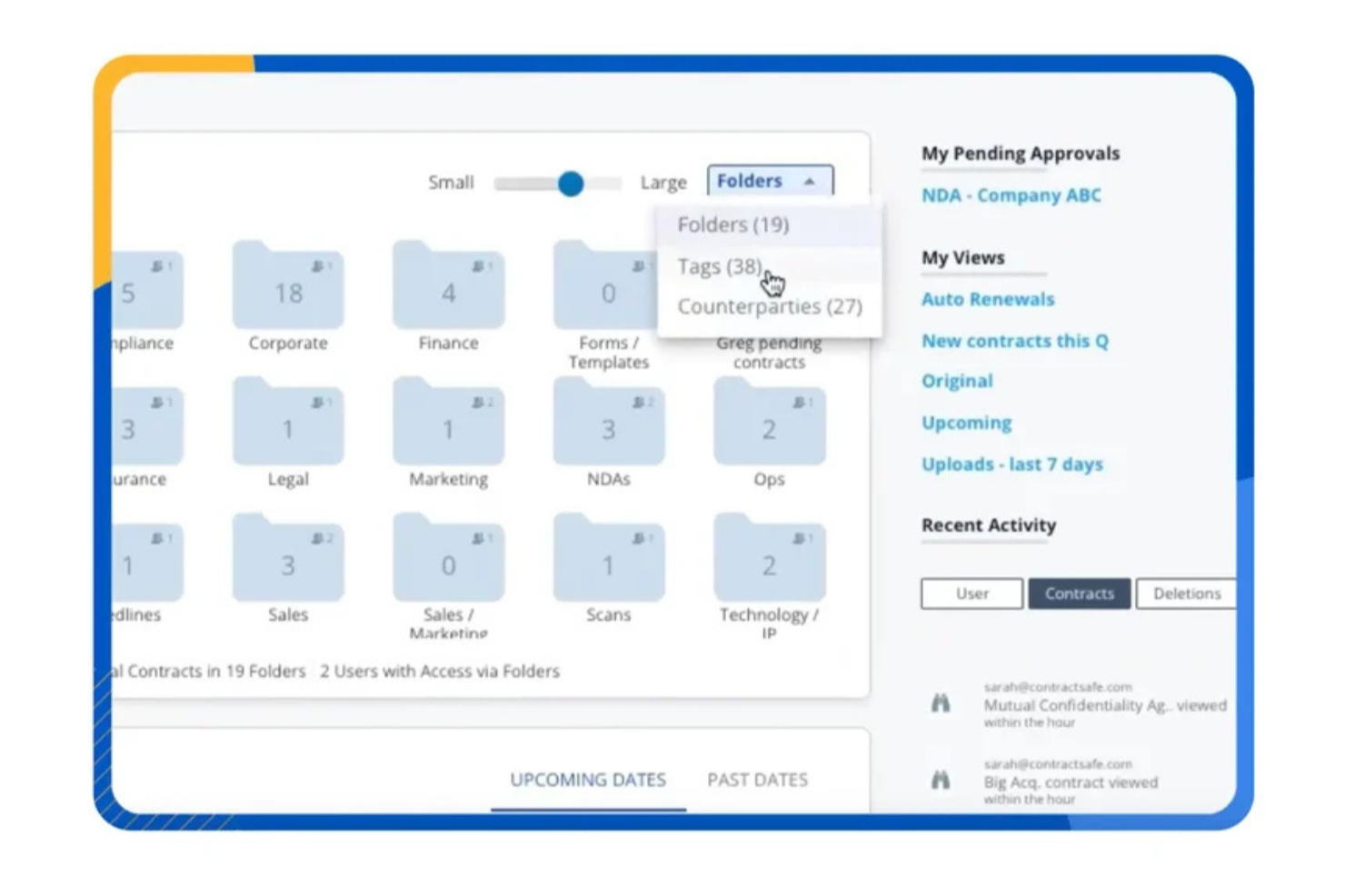
ContractSafe is enterprise contract management software designed to help you centralize, organize, and track your contracts in one secure location. It uses AI-powered tagging and metadata extraction to make contracts searchable and easier to manage at scale. You also get role-based permissions and automated alerts to maintain visibility over key dates and obligations.
Why I Picked ContractSafe
I picked ContractSafe for its AI-driven contract organization, which automatically extracts and categorizes contract data to make large repositories easier to manage. This feature supports enterprise teams that need structured visibility across thousands of agreements without relying on manual data entry. I also like that ContractSafe combines secure cloud storage with advanced search functionality, allowing you to quickly locate specific clauses, terms, or renewal dates. Automated reminders further help reduce the risk of missed deadlines by proactively flagging important milestones.
ContractSafe Key Features
In addition to its AI-driven organization, you will find several other valuable features in ContractSafe:
- Customizable User Roles: This feature allows you to define user permissions, ensuring that only authorized personnel can access sensitive contract information.
- Proactive Date Management Alerts: Automated alerts help your team stay on top of important contract dates, such as renewals and expirations.
- Integration with Contracting Tools: Seamless integration with popular tools like DocuSign enhances the overall usability of the platform.
- Secure Access and Sharing: The platform provides bank-level security measures, including encryption, to protect your contracts during storage and sharing.
ContractSafe Integrations
Integrations include DocuSign, Salesforce, Dropbox, Box, Microsoft OneDrive, Google Drive, and an API is available for custom integrations.
Pros and Cons
Pros:
- Built-in e-signature and approval workflow tools
- Secure centralized repository with granular user permissions
- Automated renewal alerts reduce missed contract deadlines
Cons:
- Limited advanced analytics compared to enterprise CLMs
- Pricing may be steep for some
altaFlow
Best for native Salesforce workflow automation
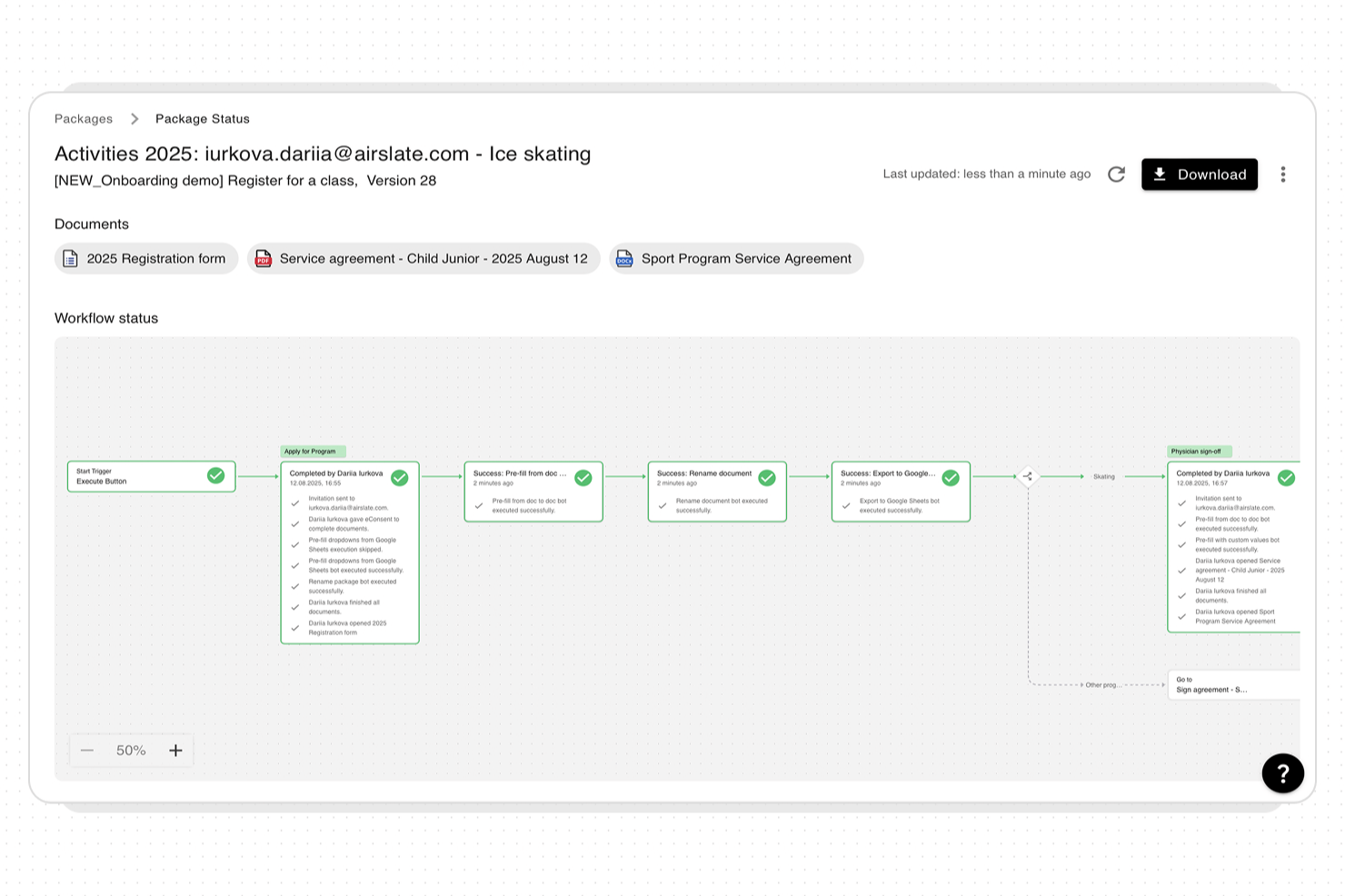
altaFlow is an enterprise contract management platform built natively on Salesforce that offers contract lifecycle management, workflow automation, document generation, and compliance tracking.
Who Is altaFlow Best For?
altaFlow is a good fit for enterprise legal, sales, or procurement teams that manage contracts within Salesforce environments.
Why I Picked altaFlow
I picked altaFlow as one of the best because it’s built natively on Salesforce, letting my team automate contract workflows directly within our CRM. I like that we can trigger contract approvals, renewals, and escalations using Salesforce process automation tools. In practice, that means my team can keep all contract data and actions in one place without switching platforms.
altaFlow Key Features
- No-code document generation: Create and customize contract templates without writing code.
- Clause library: Store, manage, and reuse approved contract clauses across your organization.
- Audit-ready compliance tracking: Maintain detailed logs of contract actions and changes for regulatory requirements.
- E-signature integration: Send contracts for electronic signature directly from within Salesforce.
altaFlow Integrations
altaFlow is built natively on Salesforce and operates entirely within the Salesforce ecosystem. Native integrations beyond Salesforce are not clearly documented. An API is available for custom integrations.
Pros and Cons
Pros:
- Centralized clause library for consistency
- Automated approval workflows with custom rules
- Detailed audit trails for compliance tracking
Cons:
- Fewer marketplace extensions than competitors
- Lacks advanced AI-driven contract analytics

Best for vendor-focused contract management

Gatekeeper is designed to be a simplified, AI-driven cloud contract management solution to track suppliers for supply chain and procurement needs. This platform provides you with central storage for contract data and built-in communication tools that save historical messages to and from suppliers to create a fully searchable audit trail.
Why I picked GateKeeper: I like this platform because of its Kanban Workflow Engine. With this tool, you can cut the time you spend on contract administration by using automation to build business resilience, fully-compliant processes, and scalable operations. This engine is fully customizable, allowing you to automate complex, multi-departmental reviews, as well as simple notifications, negotiations, and approvals.
GateKeeper Standout Features and Integrations
Standout features include dynamic, automated contract renewal notifications and integrated risk and credit profiling.
Integrations include Adobe Acrobat Sign, Box, Dropbox Business, Dynamics 365, Google Drive, Google Workspace, Okta, Salesforce Sales Cloud, Slack, and Xero.
Pros and Cons
Pros:
- Very little needed for initial setup
- No-code native integration options
- One-stop shop for all things vendor related
Cons:
- Limited connections to ERPs
- Pricing is higher than competitors
Best for creating a pleasant customer experience
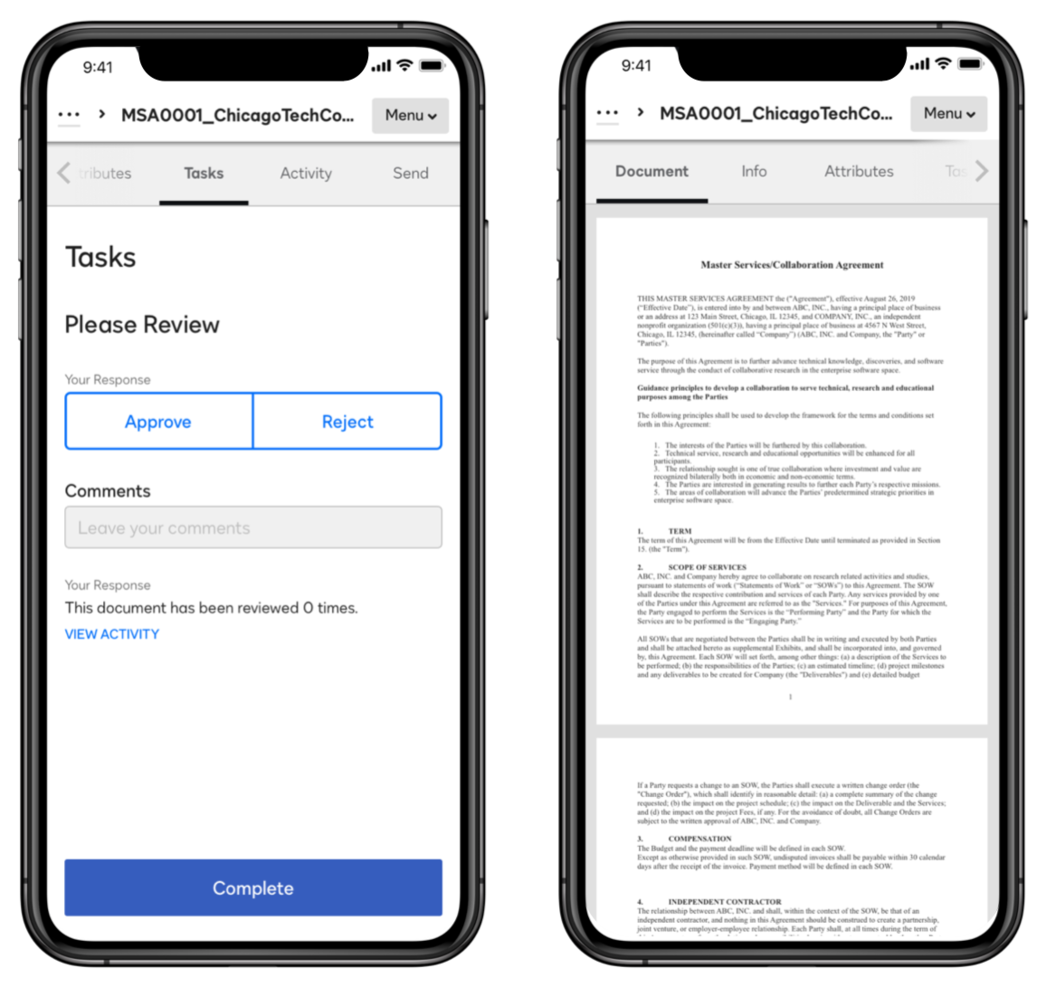
This CLM solution from DocuSign is designed to do more than just provide an esignature service — it also considers the lifecycle before and after you put digital pen to screen. With DocuSign CLM, you can get rid of spreadsheets, email communications, and manual processes with the help of automation tools directly in the app.
Why I picked DocuSign CLM: I like this tool because they prioritize customer-facing interactions with features that include pre filled data, guided forms, digital ID verification, and integrated payments and electronic signatures. Your customers can do it all with a helping hand from DocuSign in real-time.
DocuSign CLM Standout Features and Integrations
Standout features include custom standardized workflow creation to strengthen compliance, and auto-population of details in new agreements from CRM integrations, like Salesforce.
Integrations include Apple, Google, Microsoft, Oracle, Salesforce, SAP, ServiceNow, Stripe, Workday, and Zoom. DocuSign offers over 400 integrations.
Pros and Cons
Pros:
- Mobile app for tablets and smartphones
- User-friendly software for non-technical users
- Responsive and knowledgeable support team
Cons:
- Latency issues when opening multiple documents
- Limited editing for external stakeholders
INHUBBER
Best for all your contract tools in one place
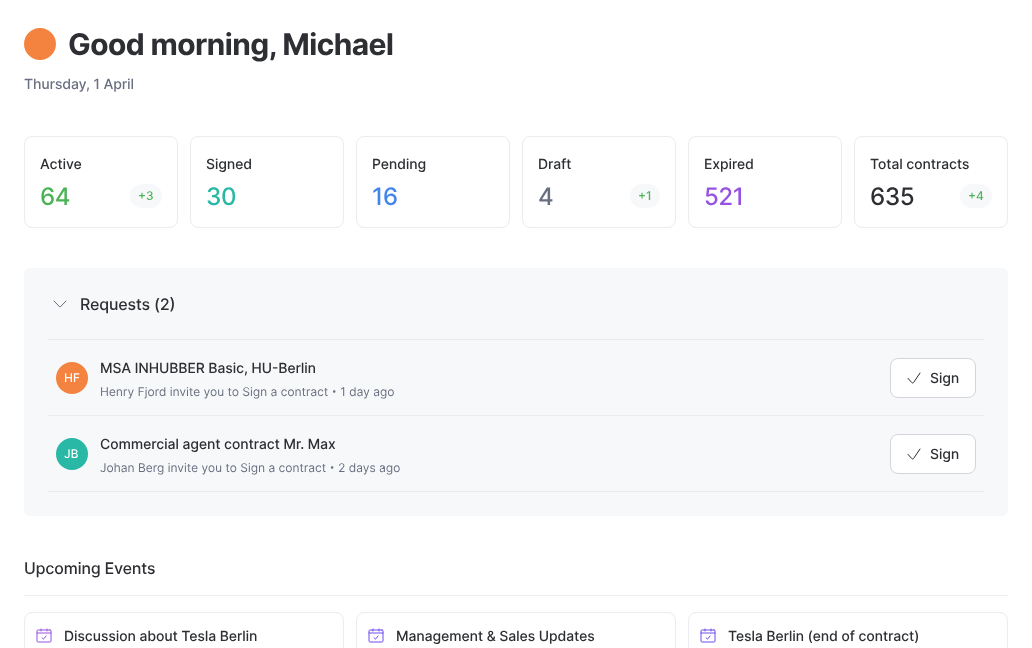
Developed in Germany, INHUBBER is a contract management platform that delivers all of your contract needs in one place. You can manage, sign, track, and secure all of your documents with no added installation or training costs.
Why I picked INHUBBER: I actually added this platform to my list because they offer one very simple feature you don’t find in every solution — a native esignature tool. You don’t have to integrate DocuSign or PandaDoc into this application. Instead, you can sign directly in-app with no other tools required.
INHUBBER Standout Features and Integrations
Standout features include document analysis to help you find relevant information right away and multiple workspaces that encourage collaboration.
Integrations include Microsoft SharePoint.
Pros and Cons
Pros:
- INHUBBER team is open to feedback
- Well-designed and intuitive system
- Quick onboarding and training process
Cons:
- Extra security measures can make signing in a hassle
- Limited integration availability

Best for crisis management support
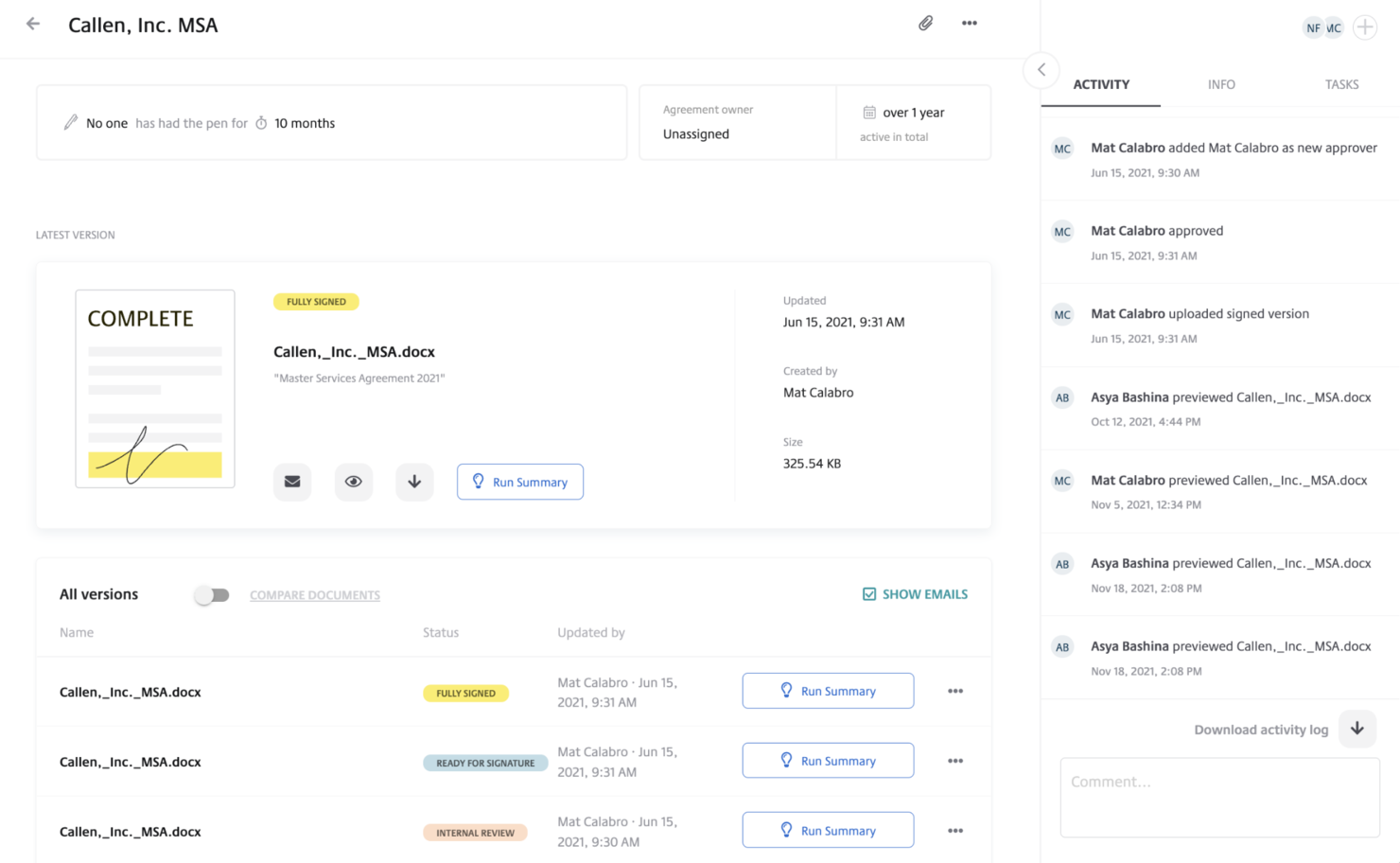
This AI-powered contract lifecycle management platform helps businesses gain deeper insights into their portfolios, integrate with key systems, and accelerate every stage of the contract lifecycle. From pre- and post-signature functionality built for legal teams to contract templates, self-service drafting, and version control, LinkSquares is designed to help you handle it all.
Why I picked LinkSquares: This platform made my list because it has a solution specifically for crisis management that targets information sharing and visibility. You can summarize obligations, prioritize tasks, and build disclosure schedules as needed. This solution also focuses on baking standardized language into templates to monitor risk markers and take action before a crisis happens.
LinkSquares Standout Features and Integrations
Standout features include metadata extraction that identifies and analyzes keywords and custom data in agreements, as well as text search to find keywords and terms in any contract.
Integrations include AdobeSign, Box, DocuSign, Dropbox, Egnyte, Google Drive, Microsoft Word, OneDrive, Salesforce Sales Cloud, and SharePoint.
Pros and Cons
Pros:
- User-friendly and simple to learn
- Responsive and helpful support team
- Offers a very intuitive system
Cons:
- Limited ability to customize system
- Clause library isn’t as visual as it could be

Ironclad
Best for speeding up contract turnaround time with end-to-end efficiency
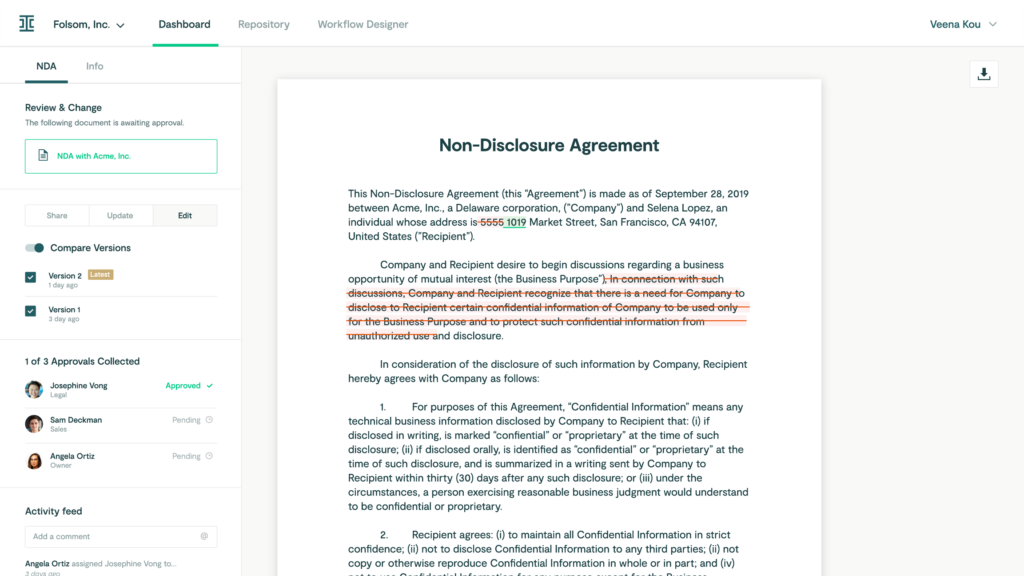
This cloud-based contract management solution is designed for creating, automating, and tracking all types of agreements and contracts. You can customize a plan that includes CLM, repository features, and clickwrap solutions to ensure you have the ideal blend of automation, auditing, and workflow engine to meet your needs.
Why I picked Ironclad: One feature that really stood out to me was the ability to import legacy contracts and other third-party agreements into this platform. With Ironclad, you can use AI to scan and tag documents, adding them to your repository and making them instantly searchable So you don’t have old paper contract hanging around just in case they’re needed.
Ironclad Standout Features and Integrations
Standout features include contract creation that allows you to draft, redline, and edit in either PDF or Microsoft Word and contract operations tracing with a robust activity feed for every document.
Integrations include Brightleaf, DocuSign, Dropbox Sign, Eigen, Google Drive, HubSpot, Salesforce Sales Cloud, Slack, Tray, and Zapier.
Pros and Cons
Pros:
- User-friendly platform and navigation
- Customer service takes feedback seriously
- One of the most customizable options
Cons:
- Clunky for signing of more complex agreements
- Limitations on the repository force some manual reporting
Leah
Best for having an AI-powered legal assistant

ContractPodAi is a corporate legal contract management platform that provides comprehensive visibility, command, and control over the entire contract lifecycle of your business. The platform provides you with tools to handle various use cases across nearly every legal challenge through self-service capabilities for contract authoring, as well as business process automation, smart repository, and an AI assistant.
Why I picked ContractPodAi: This tool caught my interest because of its AI assistant, Leah. With her support, you can automatically detect and analyze any agreement to create a record and spot errors, get insights into customer and vendor contract data, find guidance for redlining, precedents, and playbooks, and translate contracts into other languages.
ContractPodAi Standout Features and Integrations
Standout features include automation for contract approvals, AI assistant for legal needs, and seamless integration with esigning tools for complete contract lifecycle management.
Integrations include Box, Dropbox Business, Gmail, iValua, Microsoft Word, Oracle, Salesforce Sales Cloud, SAP Ariba, Signicat, and Slack.
Pros and Cons
Pros:
- Intuitive user interface and navigation
- Feature-rich, AI-powered tool
- Expansive customization options
Cons:
- Limited searchability in the repository
- Onboarding process is pretty long

Best for connecting everyone involved in your B2B network

This supply chain and e-procurement management solution is focused on streamlining source-to-pay operational processes that ensure your organization can grow from a medium-sized company to an enterprise organization.
SAP Ariba is a comprehensive platform that delivers spend management, sourcing, supplier management, and financial solutions, including contract lifecycle management, supplier risk management, payables automation, and vendor management.
Why I picked SAP Ariba: This platform is an essential on my list because it focuses on supply chain and procurement business contracts, as opposed to the more popular legal-oriented platforms. With this concentration on the supply chain, you get improved collaboration with suppliers, digital transparency across the supply chain, and help streamlining logistics.
SAP Ariba Standout Features and Integrations
Standout features include workforce management to access the talent you need to operate and asset management tools that minimize downtime.
Integrations include Adobe Acrobat Sign, Boomi, Celigo Integrator.io, Checkbox, Citrix Workspace, Neptune DXP, PageDNA, ServiceChannel, SimpleVMS, and Zip.
Pros and Cons
Pros:
- Centralizes all business operations
- Simple and easy to learn
- User interface is intuitive
Cons:
- Time-consuming implementation process
- Requires significant training to get full functionality
Best for industry leading security practices

As a longtime industry leader, Contract Logix focuses on data-driven contract lifecycle management to assist legal, administration, IT, finance, procurement, and sales teams across a variety of industries. With the tools and modules from this platform, your team can securely draft, create, edit, negotiate, approve, execute, and manage all contracts.
Why I picked Contract Logix: One thing that really stands out about this platform is the security protocols and data management, including SOC 2 Type II compliance, FISMA and HIPAA compliance, logical separation of client data, data encryption in transit (TLS 1.2) and at rest (AES 256), vulnerability and penetration testing, and Azure Key Vault with encryption key management.
Contract Logix Standout Features and Integrations
Standout features include contract workflow creation and automation, auto-population for common contract fields, and employee background checks and regulatory training.
Integrations include Adobe Acrobat Sign, Azure Active Directory, DocuSign, Duo, Microsoft Active Directory, Okta, PingFederate, and Sertifi.
Pros and Cons
Pros:
- Consistent updates and new features
- Easy to use and straightforward
- On-premise and web-based options
Cons:
- Limited contract search capabilities
- Mass upload feature is a little buggy
Other Enterprise Contract Management Software
Here are some additional enterprise contract management software options that didn’t make it onto my shortlist, but are still worth checking out:
- Agiloft Contract Management Suite
For code-free customization of your contract workflow
- Icertis Contract Management Software
For harnessing generative AI capabilities
- Lexion
For their continual investment in security
- IntelAgree
For eliminating manual labor for legal teams
- Deel HR
For global employment contracts
- SpotDraft
For automated contract creation with no technical expertise required.
- ContractHero
For CLM security with storage in German ISO 27001 certified data centers.
- Evisort
For fast-growing companies that need AI-supported contract visibility.
- Conga CLM
For enterprise-wide CLM designed to reduce workflow friction.
- Pramata
For a radically simple approach to enterprise contract management.
- Oneflow
For reducing manual contract management administration.
- SirionOne Contract Management Software
For digitizing your contract portfolio.
- Malbek Contrax
For uniting disparate teams at scale with a modern clickwrap solution.


How I Evaluate Enterprise Contract Management Software
I split my evaluation into two layers: the baseline every enterprise CLM must clear—lifecycle automation, CRM sync, redlining—and differentiators that determine fit for RevOps and deal desk teams.
Core Functionality (Table Stakes For This List)
When I'm selecting tools for my list, I rank each one on a scale from 0 (does not offer the functionality) to 5 (excels in this area) for each core functionality listed below. Then, I calculate the tool's total score into a percentage. Each tool needs to achieve a minimum total score of 65% to be considered for inclusion.
- Contract Lifecycle Automation: I evaluate whether the platform handles the full journey from draft to renewal, including automated triggers for stage transitions like moving a contract to legal review once a sales rep submits it.
- Template & Clause Library: Pre-approved clause libraries and version-controlled templates matter here, especially for teams managing high volumes of MSAs, order forms, and NDAs across multiple business units.
- CRM & CPQ Integration: I check for native, bi-directional sync with platforms like Salesforce, HubSpot, or DealHub so contract data flows directly into pipeline records without manual re-entry by deal desk teams.
- eSignature & Approval Workflows: Multi-party approval routing with conditional logic is what I look for, such as auto-escalating contracts above a certain deal size to finance and legal before sending for signature.
- Centralized Repository & Search: A searchable contract repository with OCR and metadata extraction is key, particularly for surfacing renewal dates or obligation details buried across thousands of executed agreements.
- Contract Analytics & Reporting: I evaluate whether the platform offers dashboards that track cycle times, bottleneck stages, and contract values so RevOps teams can tie contract performance back to revenue forecasts.
Once I have a list of tools that meet this criteria, I consider what sets each platform apart.
Differentiating Factors (What Sets Vendors Apart)
Here's how I compare and contrast different vendors:
Standout Features
Self-service contract generation is a big one. When sales reps can build compliant agreements through guided intake forms without waiting on legal, deal velocity improves. I also look for AI-powered redlining that flags clause deviations against your playbook during negotiations. Obligation management rounds this out by tracking post-signature milestones, SLAs, and renewal triggers so RevOps teams can tie contract commitments directly to forecasting models.
Beyond Features
Integration depth matters beyond just CRM connectors. I evaluate whether a platform connects across the full quote-to-cash stack—CPQ, billing, ERP—so contract data doesn't dead-end after signature. Security and compliance certifications like SOC 2 Type II and ISO 27001 are worth checking, especially for teams handling sensitive deal terms. Scalability is another factor I weigh: multi-entity and multi-currency support tells you whether the platform can keep pace as your org expands into new markets or adds business units.
How to Choose Enterprise Contract Management Software
It’s easy to get bogged down in long feature lists and complex pricing structures. To help you stay focused as you work through your unique software selection process, here’s a checklist of factors to keep in mind:
| Factor | What to Consider |
|---|---|
| Scalability | Can the software grow with your business? Evaluate if it supports increasing contract volumes and user numbers. |
| Integrations | Does it work with your current systems? Check compatibility with existing tools like CRM and ERP systems. |
| Customizability | Can you tailor it to fit your workflow? Look for options to customize workflows and templates. |
| Ease of use | Will your team find it user-friendly? Consider the learning curve and user feedback on interface design. |
| Implementation and onboarding | How quickly can you get started? Assess the time and resources needed for setup and initial training. |
| Cost | Does it fit your budget? Compare pricing models and watch for hidden fees or long-term contracts. |
| Security safeguards | Are your contracts secure? Verify data encryption, access controls, and compliance with data regulations. |
| Support availability | What support can you expect? Look for 24/7 support options and responsiveness to inquiries. |
What Is Enterprise Contract Management Software?
Enterprise contract management software is a comprehensive tool used by large organizations to manage their contractual processes and documents. It encompasses the creation, storage, execution, and analysis of contracts, providing an automated, centralized platform for handling all aspects of contract lifecycle management.
This software facilitates the organization and tracking of various contractual agreements, ensuring easy access and consistent management across the enterprise. It also offers centralized access to all contracts, making it easier to retrieve and analyze contractual data.
Features
When selecting enterprise contract management software, keep an eye out for the following key features:
- Automated workflows: Streamlines the contract approval process by routing documents to the right people based on predefined rules.
- Document storage: Provides a centralized repository for storing and organizing contracts, making retrieval and management easier.
- Compliance tracking: Monitors contracts for adherence to legal and regulatory requirements, reducing risk of non-compliance.
- Contract lifecycle management: Manages all stages of a contract's life, from creation to renewal, ensuring nothing falls through the cracks.
- Template library: Offers pre-made templates to speed up contract creation, ensuring consistency and reducing drafting time.
- Integration capabilities: Connects with other software like CRM and ERP systems to ensure seamless data flow across platforms.
- Version control: Tracks changes to contracts over time, allowing users to view and revert to previous versions if needed.
- E-signature support: Facilitates the signing of contracts electronically, speeding up the process and reducing paperwork.
- Customizable dashboards: Allows users to tailor their interface to display relevant information, enhancing productivity.
- Security features: Protects sensitive contract data through encryption and access controls, safeguarding against unauthorized access.
Benefits
Implementing enterprise contract management software provides several benefits for your team and your business. Here are a few you can look forward to:
- Increased efficiency: Automated workflows reduce manual tasks, speeding up the contract approval process.
- Improved compliance: Compliance tracking features help ensure contracts meet legal and regulatory standards, reducing risk.
- Better organization: Centralized document storage keeps all contracts in one place, making management and retrieval easier.
- Enhanced collaboration: Real-time collaboration tools allow multiple users to work on contracts simultaneously, improving teamwork.
- Cost savings: E-signature support reduces the need for paper-based processes, cutting down on materials and mailing costs.
- Reduced errors: Version control tracks changes, minimizing mistakes by allowing users to revert to previous contract versions.
- Informed decision-making: Customizable dashboards provide insights into contract data, aiding strategic planning.
Costs & Pricing
Selecting enterprise contract management software requires an understanding of the various pricing models and plans available. Costs vary based on features, team size, add-ons, and more. The table below summarizes common plans, their average prices, and typical features included in enterprise contract management software solutions:
Plan Comparison Table for Enterprise Contract Management Software
| Plan Type | Average Price | Common Features |
|---|---|---|
| Free Plan | $0 | Basic document storage, limited templates, and basic reporting. |
| Personal Plan | $10-$30/user/month | Document storage, e-signature support, and compliance tracking. |
| Business Plan | $30-$60/user/month | Automated workflows, integration capabilities, and version control. |
| Enterprise Plan | $60-$120/user/month | Advanced analytics, customizable dashboards, and dedicated support. |
Enterprise Contract Management Software FAQs
Here are some answers to common questions about enterprise contract management software:
What is the typical implementation time for enterprise contract management software?
Implementation time varies, but it usually takes a few weeks to a few months. The timeline depends on your company size, existing systems, and the complexity of your contracts. To speed up the process, ensure you have a dedicated team, clear goals, and a structured plan. Communicate with your vendor to set realistic expectations and timelines.
How do I ensure data security with enterprise contract management software?
Choose software that offers encryption, role-based access controls, and regular security audits. Ask vendors about their data protection policies and compliance with regulations like GDPR or CCPA. Regularly update passwords and train your team on security best practices to minimize risks.
Can enterprise contract management software handle international contracts?
Yes, many solutions support international contracts by offering multi-language options and compliance with various international regulations. If your business operates globally, ensure the software can handle different currencies, tax laws, and legal requirements specific to each region.
Why is automation important in enterprise contract management software?
Automation speeds up approvals, tracks obligations, and reduces errors. It helps your team manage contracts faster without extra admin work. It also ensures consistency by applying the same rules and workflows across every contract, reducing compliance risks.
What’s Next:
If you're in the process of researching enterprise contract management software, connect with a SoftwareSelect advisor for free recommendations.
You fill out a form and have a quick chat where they get into the specifics of your needs. Then you'll get a shortlist of software to review. They'll even support you through the entire buying process, including price negotiations.