

10 Best Revenue Operations Software In 2026

10 Best Revenue Operations Software Shortlist


With so many different revenue operations software available, figuring out which is right for you is tough. You know you want to align your sales, marketing, and customer service operations to create a more cohesive approach to revenue growth but need to figure out which tool is best. I've got you! In this post I'll help make your choice easy, sharing my personal experiences using dozens of different revenue operations tools with various teams and departments, with my picks of the best revenue operations software.
Why Trust Our Software Reviews
We’ve been testing and reviewing RevOps software since 2022. As RevOps leaders ourselves, we know how critical and difficult it is to make the right decision when selecting software.
We invest in deep research to help our audience make better software purchasing decisions. We’ve tested more than 2,000 tools for different RevOps use cases and written over 1,000 comprehensive software reviews. Learn how we stay transparent & our software review methodology.
| Tool | Best For | Trial Info | Price | ||
|---|---|---|---|---|---|
| 1 | Best for complex commission plans | Free demo available | Pricing upon request | Website | |
| 2 | Best for GTM alignment & revenue predictability | Free demo available | Pricing upon request | Website | |
| 3 | Best for no-code workflow customization | Free demo available | From $40/month (5 users) | Website | |
| 4 | Best for contract and billing management | Free demo available | Pricing upon request | Website | |
| 5 | Best for guided selling workflows | Free demo available | Pricing upon request | Website | |
| 6 | Best for automating lead routing and scheduling | Free demo available | Pricing upon request | Website | |
| 7 | Best for automated deal tracking | Free plan + free demo available | Pricing upon request | Website | |
| 8 | Best for centralizing revenue data | Not available | Pricing upon request | Website | |
| 9 | Best for predictive pricing strategies | Free demo available | Pricing upon request | Website | |
| 10 | Best for digital sales rooms | Free plan + free demo available | From $350/month (billed annually) | Website |

-

Prisync
Visit WebsiteThis rating combines scores from multiple user review sites to reflect overall customer sentiment about the product.4.7 -
Expedite Commerce
Visit Website -
QuickBooks Online
Visit WebsiteThis rating combines scores from multiple user review sites to reflect overall customer sentiment about the product.4





Best Revenue Operations Software Reviews
Here’s a brief description of each revenue operations software to showcase each tool’s best use case, some noteworthy features, and screenshots to give a snapshot of the user interface.

Qobra
Best for complex commission plans

Qobra is a commission management platform for revenue operations teams that brings together automated commission calculations, customizable compensation plans, real-time dashboards, and mobile access.
Who Is Qobra Best For?
Sales operations and revenue teams at mid-sized to large companies who need to manage complex commission structures across multiple roles and territories.
Why I Picked Qobra
I picked Qobra as one of the best because it lets my team automate even the most complex commission plans without relying on spreadsheets or manual calculations. I can set up multi-tiered rules, handle exceptions, and manage different compensation models for various sales roles. In practice, that means we can quickly adapt to new incentive structures and keep everything accurate as our plans evolve.
Qobra Key Features
- Real-time dashboards: Track commission progress and payouts with up-to-date visual dashboards.
- Approval workflows: Route commission statements for review and sign-off within the platform.
- Audit trail: Access a detailed log of all commission plan changes and user actions.
- CRM integration: Sync sales data directly from your CRM to automate commission calculations.
- QobrAI Agents: Use The Architect, The Analyst, and The Sales Coach to instantly build plans, detect calculation anomalies, and push proactive insights to your sales team.
Qobra Integrations
Qobra offers native integrations with Salesforce, HubSpot, Microsoft Dynamics 365, Workday, and leading data warehouses. It also provides an API for custom integrations.
Pros and Cons
Pros:
- Automated payout calculations
- No-code visual compensation plan builder
- Offers a mobile app
Cons:
- Limited native integrations
- Basic custom reporting options

Xactly
Best for GTM alignment & revenue predictability
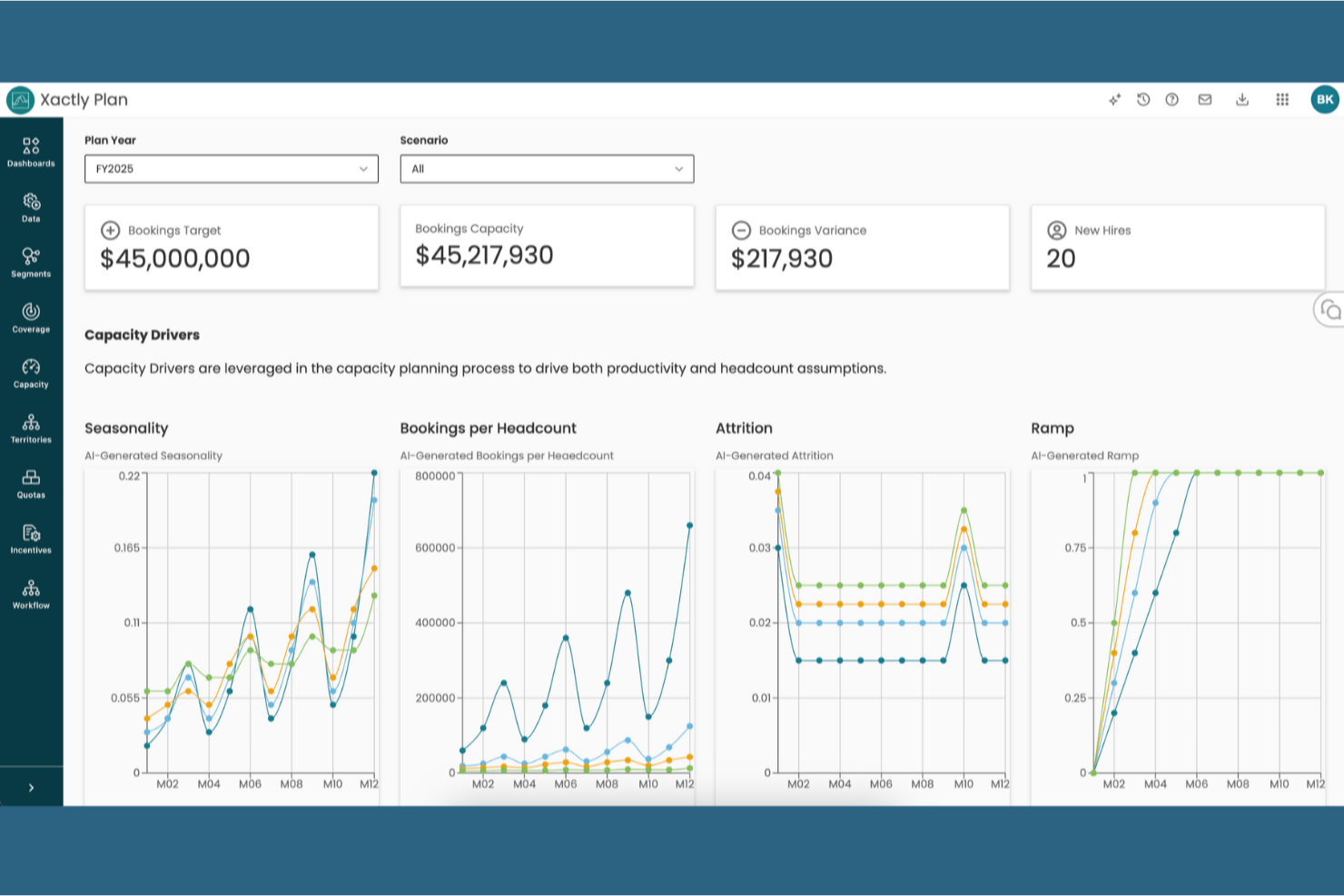
Xactly provides an Intelligent Revenue Platform designed as the command center for modern Revenue Operations. It strategically unifies planning, compensation, and forecasting to break down silos between Sales, Finance, and Operations. By moving compensation management from a back-office function to a strategic lever, Xactly empowers your GTM team to make data-informed decisions that optimize territory coverage, drive the right selling behaviors, and ensure resilient revenue growth.
Why I Picked Xactly
I picked Xactly for its unique ability to combine performance management with predictive analytics, which is essential for successful RevOps. The platform’s strength lies in operationalizing your Go-to-Market (GTM) plans from a single source of truth. This capability eliminates manual reporting and ensures compensation and quota allocations are always aligned with your top-down revenue targets. Xactly leverages extensive sales performance data and AI to give the CRO predictive confidence and the agility to adapt to market changes swiftly and accurately.
Xactly Key Features
In addition to intelligent revenue management, Xactly offers:
- Territory and Quota Management: Operationalize your GTM plans by balancing territory potential and driving ideal quota allocations.
- Pipeline and Sales Forecasting: Unify data to pinpoint at-risk deals in real-time and predict future performance powered by AI.
- Data Integration: Acts as the connective tissue by seamlessly integrating and unifying data from CRM, ERP, and HR systems for superior decision-making.
- Incentive Compensation Management: Streamline compensation management with full automation, ensuring incentives are driving the desired GTM behaviors and maximizing rep performance.
Xactly Integrations
Integrations include Salesforce, NetSuite, Microsoft Dynamics, Oracle, SAP, Workday, ADP, QuickBooks, HubSpot, and BambooHR.
Pros and Cons
Pros:
- Automates revenue processes to reduce manual operational workload
- Strong visibility across pipeline, quotas, territories, and incentives
- Centralized platform unifies forecasting, planning, and performance data
Cons:
- Best results depend on clean, reliable CRM data
- May feel complex for smaller teams with simpler workflows
New Product Updates from Xactly
Xactly and ServiceNow Connect CRM Workflows to Revenue Performance
Xactly has partnered with ServiceNow to connect Xactly’s Intelligent Revenue Platform with ServiceNow CRM, embedding revenue performance intelligence into CRM workflows and surfacing commission and quota impacts in CPQ and Sales CRM. For more information, visit Xactly's official site.
 .
.
Best for no-code workflow customization

CRM Creatio helps RevOps teams tailor processes without engineering help, so you can adapt lead-to-revenue workflows quickly. It centralizes sales tasks, forecasting, and analytics in one place, giving managers visibility while letting non-technical users make changes safely.
Why I Picked CRM Creatio
I picked it because the no-code builder lets you model your exact process—lead capture, opportunity stages, approvals—without tickets to IT. You can automate routine handoffs across teams so reps stay focused on selling. Custom dashboards surface KPIs by role, and forecasting tools reflect your unique pipeline stages. Together, that gives RevOps control to iterate fast as your GTM evolves.
CRM Creatio Key Features
- Workflow automation: Build end-to-end sales processes with rules and triggers.
- Custom dashboards: Track pipeline, activities, and performance in real time.
- Lead & opportunity management: Standardize qualification and progression.
- AI-assisted app development: Speed configuration and governance.
CRM Creatio Integrations
Integrations include Accelo, ActiveCampaign, Acumatica, Asana, Microsoft Exchange, Mailchimp, HubSpot, Google Calendar, Tableau, and Adobe Analytics.
Pros and Cons
Pros:
- Accessible to non-technical users with a no-code platform
- Extensive customization options
- Scalable and flexible platform
Cons:
- Learning curve for new users
- Customization can be time-consuming
New Product Updates from Creatio CRM

Creatio CRM Expands AI Across Marketing and Collaboration
Creatio CRM introduces AI-assisted landing page generation, template-based email generation, RAG-enabled knowledge governance, a Microsoft Teams personal tab, and AI meeting summaries. These updates help teams create content faster and streamline AI-powered workflows. For more information, visit Creatio’s official site.
 .
.
Younium
Best for contract and billing management

Younium is a subscription management and revenue operations platform built for teams that need to manage contracts, automate billing, handle complex invoicing, and align financial operations within one system.
Who Is Younium Best For?
Younium is a strong fit for B2B SaaS companies that need to manage recurring revenue, subscription contracts, and billing operations at scale.
Why I Picked Younium
Younium earns its spot on my shortlist because of how well it handles the full arc of a subscription contract without forcing your team to jump between systems. I particularly like the change versioning and audit trail feature, which automatically tracks every contract modification—upgrades, downgrades, add-ons—so that invoicing, revenue recognition, and metrics all update in sync. My team can also configure billing schedules with non-standard rules like custom proration, delayed billing starts, and alignment settings, which means we're not building manual workarounds for edge-case customers. The deal-to-subscription automation that connects CPQ directly into contract execution is what really keeps contract and billing data in one place from the start.
Younium Key Features
- Subscription terms configuration: Capture termed or evergreen subscription terms with support for one-time fees, recurring charges, usage-based pricing, ramp-ups, milestones, and discounts in a single subscription record.
- Automated bookings: Every subscription event automatically generates a financial booking, tracking metrics like ACV, CMRR, and TCV with classifications for New Business, Expansion, Contraction, and Churn.
- CPQ agent: An AI-powered assistant built into the quoting workflow that lets sales reps build quotes using plain-language prompts, reducing manual product catalog searches and configuration errors.
- Multi-level approval workflows: Define discount thresholds and non-standard deal conditions that trigger automated quote approval routing, giving RevOps full visibility into where each deal sits in the approval process.
Younium Integrations
Younium offers native integrations with Salesforce, HubSpot, Xero, QuickBooks Online, Fortnox, Visma, NetSuite, and Microsoft Dynamics 365. An API is available for custom integrations.
Pros and Cons
Pros:
- Strong usage-based and custom pricing models
- Native integrations with major CRMs and ERPs
- Automated workflows for upsell and contract changes
Cons:
- API coverage not as broad as competitors
- Custom reporting setup can require vendor assistance
Best for guided selling workflows

DealHub AI unifies CPQ, contracts, billing, and buyer collaboration so teams don’t juggle disjointed tools. Guided quoting and a shared DealRoom keep every stakeholder on the same page, speeding approvals and close.
Why I Picked DealHub AI
Its guided quote management simplifies complex pricing and discounting so reps follow policy without slowing down. The digital DealRoom centralizes proposals, comments, and signatures, reducing email back-and-forth. Automated approvals and consumption-based billing support modern pricing models. RevOps also gets revenue analytics to spot friction and improve win rates.
DealHub AI Key Features
- Automated approvals: Route quotes for the right reviews instantly.
- DealRoom collaboration: Share assets, track engagement, and sign in one place.
- Dynamic bundles & discounts: Enforce pricing logic consistently.
- Revenue operations suite: Billing automation and revenue recognition.
DealHub AI Integrations
Integrations include Salesforce, Microsoft Dynamics 365, HubSpot, Freshworks, DocuSign, Gong, Slack, LinkedIn, Optimizely, and SalesLoft.
Pros and Cons
Pros:
- Guided selling simplifies quoting process
- Digital DealRoom enhances collaboration
- Flexible subscription management features
Cons:
- Advanced customization may require support
- Limited integrations for some use cases
New Product Updates from DealHub AI

DealHub Adds CRM-Based Company Name Overrides
DealHub adds CRM-based company name overrides across quotes, DealRoom, signatures, and supported emails. This helps keep customer-facing names aligned with CRM records without manual updates. For more information, visit DealHub’s official site.
 .
.
Default
Best for automating lead routing and scheduling

Default automates how inbound leads get enriched, scored, and assigned—then books meetings without manual back-and-forth. That means faster speed-to-lead and fewer missed opportunities.
Why I Picked Default
You can encode routing logic (territory, score, availability) so the right rep gets the right record every time. Built-in scheduling removes friction from “book a demo” flows on your site and outbound. Real-time alerts keep owners accountable, while reports highlight bottlenecks so you can refine rules. The result is a tighter, more responsive top-of-funnel.
Default Key Features
- Routing engine: Assign leads by geography, score, or rep calendars.
- Form builder: Create conversion-optimized forms that feed your CRM.
- Workflow automation: Trigger tasks, updates, and alerts on events.
- Analytics: Monitor SLA adherence and routing outcomes.
Default Integrations
Integrations include Salesforce, HubSpot, Outreach, Salesloft, Apollo, Google Calendar, Zoom, and Zapier (plus Webhooks).
Pros and Cons
Pros:
- Real-time notifications
- Allows for highly customizable routing logic
- Comprehensive automation features
Cons:
- Setting up and fully integrating Default with existing systems can be time-consuming
- Extensive customization may come with a learning curve
Introw
Best for automated deal tracking

Introw gives partners a branded portal tied to your CRM so registrations, deals, and collateral live in one place. Real-time alerts and shared plans keep everyone aligned from sourced lead to closed-won.
Why I Picked Introw
Automated deal and lead registration removes manual data entry and protects partner credit. Slack/email alerts notify your team when partners engage or deals change, improving response times. You can customize the portal experience and track partner performance with built-in analytics, so channel revenue gets the same rigor as direct sales.
Introw Key Features
- Partner portals: Personalize access to content, forms, and deal views.
- Shared pipelines: Give partners visibility while controlling data.
- Automated onboarding: Standardize enablement and certifications.
- Engagement tracking: See what content and steps drive progress.
Introw Integrations
Integrations include HubSpot, Salesforce, Crossbeam, Zapier, Slack, Loom, YouTube, Google Drive, Calendly, and Typeform.
Pros and Cons
Pros:
- Includes shared pipeline management and mutual action plans
- Allows for personalized workflows and automated updates
- Provides insights and performance tracking
Cons:
- Limited language support
- No mobile app for on-the-go access

Best for centralizing revenue data

Attention analyzes customer conversations and activity to deliver in-the-moment guidance and unified insights across sales, marketing, and success. Teams get one view of funnel health plus coaching to improve outcomes.
Why I Picked Attention
It combines conversation intelligence with operational triggers—so your reps get prompts, your CRM stays updated, and leaders see pipeline risk early. You can define custom cues the AI listens for, then automate follow-ups and data capture. That reduces admin work and turns every call into learnings you can scale.
Attention Key Features
- Real-time coaching: Help reps handle objections and next steps live.
- Automated CRM updates: Log activities and fields from calls.
- Deal analysis: Spot risk patterns across calls and emails.
- Custom triggers: Track topics that matter to your motion.
Attention Integrations
Integrations include Zoom, Google Meet, Microsoft Teams, Salesforce, HubSpot, Gmail, Outlook, Slack, and Zapier.
Pros and Cons
Pros:
- Real-time sales coaching
- Many AI-driven features
- Provides actionable insights
Cons:
- Some users find the email automation feature to be too rigid
- The tool's heavy reliance on AI may not suit all users
Best for predictive pricing strategies

7Learnings uses AI to set profit-optimal prices and connect them to marketing tactics. Retailers (especially fashion/e-commerce) can lift margins while streamlining campaigns and ordering.
Why I Picked 7Learnings
Its predictive pricing helps you model elasticity and margin impacts before you publish changes. Order optimization trims manual work and aligns inventory to demand. Education resources—calculators, case studies, webinars—help teams build confidence and adopt data-driven pricing at scale.
7Learnings Key Features
- Predictive pricing: AI recommendations to maximize profit.
- Order optimization: Automate replenishment decisions.
- Performance marketing alignment: Sync price with promo tactics.
- Profit uplift modeling: Visualize revenue impact.
7Learnings Integrations
Integrations include Tradebyte, Shopify, Commercetools, CMS/DXP, Digital Asset Management, Marketplaces, Order Management, Payment Service Providers, Product Information Management, and Machine Learning & AI systems.
Pros and Cons
Pros:
- Order optimization reduces operational costs
- Performance marketing improves ad efficiency
- AI-driven predictive pricing optimization
Cons:
- Learning curve for AI tools
- Initial setup may be complex

Dock
Best for digital sales rooms

Dock packages proposals, timelines, content, and signatures into a personalized workspace for each deal. Buyers know exactly where to go; sellers get engagement signals that move deals forward.
Why I Picked Dock
Digital sales rooms reduce context switching for both sides and keep momentum high. You can standardize onboarding and success plans with templates while maintaining brand polish. Embedded content and secure sharing make it easy to collaborate without version confusion.
Dock Key Features
- Buyer signals: See who viewed what and when.
- Dynamic action plans: Co-create mutual next steps.
- Pricing & order forms: Capture details inside the room.
- E-signature collection: Close without leaving the workspace.
Dock Integrations
Integrations include Zoom, Airtable, HubSpot, Salesforce, Slack, PandaDoc, and Typeform.
Pros and Cons
Pros:
- Centralized content management of client-facing documents
- Standardized templates for sales processes
- Buyer engagement analytics
Cons:
- HubSpot and Salesforce integration only available on higher-tier plans
- Learning curve for new users
Other Revenue Operations Software
Here are a few more options that didn’t make the best revenue operations software list:
- Gong
For AI-driven insights
- Paddle
For automated subscription management
- 6sense
For account-based marketing
- Outreach
For sales rep efficiency
- Baremetrics
For real-time subscription analytics
- Vistex
For enterprise resource planning
- Fullcast
For GTM strategy management
- Forecastio
For AI-powered sales forecasting
- HubSpot Operations Hub
For connecting, syncing, and automating operations
- fullcast.io
For AI-driven territory planning
- Clari
For pipeline management
- Mediafly
For unifying sales enablement and intelligence
- Coefficient
For live RevOps reporting
- People.ai
For relationship management
- Competera
For setting optimal retail prices with AI
- BoostUp
For AI-driven sales task automation
- Traction Complete
For lead management within Salesforce
- MaxQ ARM
For managing recurring revenue
- CPGvision
For driving accurate predictive analysis with AI
- Trellis
For Amazon revenue operations


Related Revenue Operations Software Reviews
If you still haven't found what you're looking for here, check out these tools closely related to revenue operations software that we've tested and evaluated.
- CRM Software
- Sales Software
- Lead Management Software
- Business Intelligence Software
- Contract Management Software
- Revenue Management System
How I Evaluate Revenue Operations Software
I split my evaluation into two layers: the baseline a tool must clear—like unified pipeline data and cross-functional forecasting—to qualify, and the differentiators that set vendors apart.
Core Functionality (Table Stakes For This List)
When I'm selecting tools for my list, I rank each one on a scale from 0 (does not offer the functionality) to 5 (excels in this area) for each core functionality listed below. Then, I calculate the tool's total score into a percentage. Each tool needs to achieve a minimum total score of 75% to be considered for inclusion.
- Unified Revenue Data: I look at how well the platform centralizes data from CRM, marketing automation, and customer success systems into a single model your team can trust for reporting.
- Pipeline & Forecasting: Whether I'm looking at weighted forecasts or AI-driven predictions, I evaluate how well a tool lets you inspect deals, flag risk, and run scenarios.
- Revenue Analytics & Reporting: The dashboards need to go beyond single-function metrics—I check for full-funnel views covering conversion rates, velocity, and attribution.
- GTM Workflow Automation: I evaluate whether the platform can handle real processes like lead-to-account matching, territory assignment, and routing rules across segments.
- Sales Performance Management: Quota planning, territory design, and commission tracking should live together—I look at how well the tool ties rep performance to revenue outcomes.
- CRM & GTM Stack Integrations: Platforms like Salesforce and HubSpot sit at the center of most GTM stacks, so I check for native, bidirectional sync depth—not just surface connectors.
Once I have a list of tools that meet this criteria, I consider what sets each platform apart.
Differentiating Factors (What Sets Vendors Apart)
Here's how I compare and contrast different vendors:
Standout Features
AI revenue insights are a major differentiator—I evaluate whether a platform can flag at-risk deals mid-cycle and recommend next steps based on historical win patterns. Conversation intelligence adds another layer, enriching pipeline data with signals from actual buyer interactions. I also look closely at how flexible the data model is. A team running a PLG motion needs very different objects and metrics than an enterprise sales team, so the ability to customize revenue hierarchies matters.
Beyond Features
GTM motion fit is one of the first things I evaluate. A platform built for high-volume SMB sales cycles may not suit a team managing six-month enterprise deals with multiple stakeholders. Tech stack interoperability matters just as much—I check whether a tool offers deep, bidirectional sync with data warehouses like Snowflake or Databricks, not just surface-level CRM connectors. Pricing transparency also shapes my assessment, especially how clearly a vendor communicates per-seat costs versus platform fees and what's included at each tier.
How To Choose Revenue Operations Software
With so many different revenue operations software available, it can be challenging to make decisions on what tool is going to be the best fit for your needs.
As you're shortlisting, trialing, and selecting revenue operations software, consider the following:
- What problem are you trying to solve - Start by identifying the revenue operations software feature gap you're trying to fill to clarify the features and functionality the tool needs to provide.
- Who will need to use it - To evaluate cost and requirements, consider who'll be using the software and how many licenses you'll need. You'll need to evaluate if it'll just be the revenue operation leaders or the whole organization that will require access. When that's clear, it's worth considering if you're prioritizing ease of use for all or speed for your revenue operations software power users.
- What other tools it needs to work with - Clarify what tools you're replacing, what tools are staying, and the tools you'll need to integrate with, such as accounting, CRM, or HR software. You'll need to decide if the tools will need to integrate together or if you can replace multiple tools with one consolidated revenue operations software.
- What outcomes are important - Consider the result that the software needs to deliver to be considered a success. Consider what capability you want to gain or what you want to improve, and how you will be measuring success. For example, an outcome could be the ability to get greater visibility into performance. You could compare revenue operations software features until you’re blue in the face but if you aren’t thinking about the outcomes you want to drive, you could be wasting a lot of valuable time.
- How it would work within your organization - Consider the software selection alongside your workflows and delivery methodology. Evaluate what's working well and the areas that are causing issues that need to be addressed. Remember every business is different — don’t assume that because a tool is popular that it'll work in your organization.
Trends In Revenue Operations Software For 2026
The latest product updates, press releases, and release logs from the forefront of revenue operations technology reveal significant trends that are shaping the future of how companies manage their revenue processes. These insights provide a window into the features that are evolving rapidly, those that are emerging as novel solutions to long-standing challenges, and what functionalities are becoming indispensable to revenue operation leaders.
Evolving Features
- Advanced Analytics and AI-driven Insights: The push towards more sophisticated analytics and the use of artificial intelligence to provide predictive insights and forecasting is evident. Tools are increasingly incorporating AI to analyze sales trends, customer behavior, and market dynamics, offering businesses the ability to anticipate changes and adapt strategies proactively.
- Automation of Revenue Processes: Automation is becoming more advanced, covering a broader spectrum of revenue operations. This includes automated billing, subscription management, and revenue recognition. Such features are crucial for reducing manual workload, minimizing errors, and ensuring compliance with accounting standards.
Novel and Unusual Functionality
- Blockchain for Revenue Management: An emerging trend is the integration of blockchain technology for secure and transparent handling of transactions, contracts, and revenue tracking. This novel approach promises enhanced security, reduced fraud, and improved trust between parties.
- Real-time Collaboration Platforms: New functionalities that facilitate real-time collaboration among sales, finance, and operations teams are becoming more common. These platforms are designed to improve communication, streamline decision-making, and increase agility within revenue operations.
Most Important and In Demand Features
- Seamless Integration Capabilities: The demand for revenue operations software that offers seamless integration with existing CRM, ERP, and other business systems is on the rise. Such integration is key to providing a unified view of data across departments, enhancing accuracy, and improving operational efficiency.
- Compliance and Revenue Recognition Features: As regulations continue to evolve, features that support compliance and sophisticated revenue recognition capabilities are increasingly in demand. These are critical for businesses to manage financial reporting accurately and maintain compliance with standards like ASC 606 and IFRS 15.
Features Becoming Less Important
- Manual Data Entry and Reporting: With the rise of automation and AI, the need for manual data entry and static reporting functionalities is diminishing. Businesses are moving towards dynamic, real-time reporting tools and automated data capture to enhance efficiency and reduce the risk of errors.
These trends underscore a broader shift towards more intelligent, integrated, and secure revenue operations software solutions. As businesses continue to navigate the complexities of modern markets, the ability to adapt quickly, anticipate future challenges, and make data-driven decisions has become paramount. Revenue operation leaders are thus seeking software that not only addresses today's needs but is also scalable and flexible enough to meet the demands of tomorrow.
What Is Revenue Operations Software?
Revenue operations software is a tool that integrates and streamlines the processes involved in generating revenue within an organization. It combines functionalities from sales, marketing, and customer service to create a cohesive approach to managing revenue cycles. The software includes features for CRM integration, data analytics, process automation, and performance management, all geared towards enhancing the efficiency of revenue-generating activities.
The benefits of revenue operations software include improved collaboration across sales, marketing, and customer service teams, leading to a more unified strategy in revenue generation. It provides data-driven insights, enabling informed decision-making and accurate revenue forecasting. By automating routine tasks, the software increases operational efficiency across departments. This leads to more effective management of the customer journey, improved customer experiences, and ultimately, increased revenue growth. The software’s holistic approach to revenue management helps organizations align their efforts towards achieving common revenue goals.
Features of Revenue Operations Software
When selecting revenue operations software, keep an eye out for the following key features:
- CRM integration: Connect your sales and customer relationship management tools so your entire team works from the same up-to-date information. With seamless CRM integration, you can avoid double data entry and ensure everyone—from sales to customer success—can easily access valuable customer insights.
- Advanced analytics: Tap into robust reporting features that help you monitor sales performance, forecast revenue, and spot trends early. With these analytics, you can make decisions based on real data rather than gut feelings, which is especially handy when you’re explaining your numbers to the executive team.
- Workflow automation: Say goodbye to repetitive manual tasks. Automation features help you set up rules and triggers for things like follow-up emails, quote approvals, or contract renewals, freeing up your time so you can focus on strategic work instead of firefighting.
- Pipeline management: Visualize and manage every piece of your sales funnel in real time. Strong pipeline management tools let you track deals as they move through each stage, spot bottlenecks, and make adjustments before they turn into missed opportunities.
- Quota and compensation tracking: Easily set, manage, and track quotas or commission plans for your revenue teams. This feature helps you see who’s on pace, who needs a boost, and ensures compensation is both accurate and motivating.
- Forecasting tools: Use clear, predictive models to anticipate future sales and revenue. This equips you to plan inventory, staffing, and marketing campaigns with more confidence and fewer surprises.
- Collaboration tools: Keep your sales, marketing, and finance teams on the same page with built-in collaboration features. Whether it’s shared dashboards, project notes, or cross-functional alerts, you can reduce miscommunication and keep everyone working together smoothly.
Common Revenue Operations Software AI Features
Beyond the standard revenue operations software features listed above, many of these solutions are incorporating AI with features like:
- Automated data enrichment: AI scours public records, social media, and databases to keep your customer and prospect profiles fresh and complete, so you always have the most up-to-date information at your fingertips.
- AI-powered forecasting: Automatically analyze historical sales data, current pipeline, and market signals to predict future revenue with greater accuracy than manual methods. You get insights you might’ve missed and can spot shifts in demand before they happen.
- Lead scoring automation: AI evaluates and scores leads based on their likelihood to convert, giving your team a smarter shortlist so they can focus on contacts most likely to close—no more guessing who’s worth that follow-up call.
- Churn prediction: AI models identify customers at risk of leaving by spotting patterns in engagement and usage data. This means you can reach out proactively and fix problems before they turn into lost revenue.
- Sales coaching insights: AI reviews call transcripts and sales activities, then spotlights where reps excel or struggle. You receive clear, actionable feedback to help your team continuously level up their approach.
Benefits Of Revenue Operations Software
Revenue operations software has become an indispensable tool for companies aiming to optimize their revenue streams and enhance operational efficiency. This type of software integrates sales, marketing, and customer success data, providing a unified platform that drives strategic decision-making and growth. Here are five primary benefits that revenue operations software offers to users and organizations, highlighting its crucial role in modern business management.
- Streamlined Processes Across Departments: Ensures seamless coordination between sales, marketing, and customer success teams. By using this software, businesses can eliminate silos, ensuring that all departments work towards common revenue goals with increased efficiency and less redundancy.
- Enhanced Data Visibility and Analytics: Offers real-time access to critical data and insights. Organizations benefit from having comprehensive analytics at their fingertips, enabling them to make informed decisions that drive revenue growth and operational effectiveness.
- Increased Sales Efficiency and Closure Rates: Automates and optimizes the sales process from lead generation to closure. This software helps sales teams focus on high-value activities by automating routine tasks, thereby improving productivity and increasing the chances of closing deals.
- Improved Financial Accuracy and Compliance: Assists in accurate revenue forecasting, recognition, and compliance with accounting standards. Businesses can safeguard themselves against financial discrepancies and regulatory penalties, ensuring that their financial reporting is both accurate and compliant.
- Scalability and Flexibility: Adapts to the growing and changing needs of a business. Revenue operations software is designed to scale with your business, accommodating new products, markets, and business models, thereby supporting long-term growth and adaptation.
Costs & Pricing For Revenue Operations Software
Selecting revenue operations software is a critical step for businesses looking to streamline their sales, finance, and customer operations. The right software can dramatically improve efficiency, accuracy, and profitability. However, understanding the various plan options and pricing structures can be challenging, especially for buyers new to this type of software. To help navigate these choices, here's a breakdown of common plan options, including pricing and features, that cater to different business needs and sizes.
Plan Comparison Table For Revenue Operations Software
| Plan Type | Average Price | Common Features Included |
|---|---|---|
| Basic | $20 - $100 per month | - Access to core revenue operations functionalities - Basic analytics - Limited user seats - Customer support |
| Professional | $100 - $300 per month | - Advanced analytics - CRM and ERP integrations - Custom reporting - More user seats - Enhanced customer support |
| Enterprise | $300 - $1000+ per month | - All features in Professional - AI capabilities - Unlimited seats - Premium support - Custom integrations |
| Free | $0 | - Basic features - Limited access - Minimal user seats - Community support only |
When considering which plan to choose, think about the current size of your business, your specific needs for integration and analytics, and how much you expect to grow in the near future. Balancing these factors will help you select a plan that not only fits your budget but also supports your business goals effectively.
Revenue Operations Software Frequently Asked Questions
Here are a few commonly asked questions about revenue operations software. I’ll quickly cover the basics for anyone looking for more information.
What are the types of revenue operations software?
Why should I use revenue operations software?
What revenue operations software has the best special features?
Conclusion
The first step to accelerate your company’s revenue is by making the decision to bring RevOps to your business. The second step is to work on RevOps strategies while investing in the best revenue operations software to help implement those strategies. The platforms I provided above are a great place to start and will cover the basics of what your organization needs.
Want to learn more about the latest sales insights and tech from experts in the industry? Sign up for our newsletter.