
21 Best Quote Management Software In 2026

20 Best Quote Management Software Shortlist
Here's my pick of the 20 best software from the 22 tools reviewed.


Quote management software streamlines how you create, send, and track quotes, making it easier for you to manage sales and close deals faster. The right tool saves you time, reduces errors, and brings much-needed order to your sales process.
I’ve tested dozens of options with teams of all sizes—so in this article, I’ll walk you through the best quote management software to help you find the right fit for your business.
Why Trust Our Quote Management Software Reviews?
We’ve been testing and reviewing quote management software since 2022. As revenue operation leaders ourselves, we know how critical and difficult it is to make the right decision when selecting software.
We invest in deep research to help our audience make better software purchasing decisions. We’ve tested more than 2,000 tools for different RevOps use cases and written over 1,000 comprehensive software reviews. Learn how we stay transparent & our quote management software review methodology.
Table of Contents
- Best Software Shortlist
- Why Trust Us?
- Compare Specs
- Reviews
- Other Quote Management Software
- Related Quote Management Software Reviews
- Selection Criteria
- How To Choose Quote Management Software
- Trends In Quote Management Software
- What Is Quote Management Software?
- Features
- Benefits
- Costs and Pricing
- FAQs
| Tool | Best For | Trial Info | Price | ||
|---|---|---|---|---|---|
| 1 | Best with bi-directional CRM and ERP sync | Free demo available | From $399/month (billed annually) | Website | |
| 2 | Best for guided quote configuration | Free demo available | Pricing upon request | Website | |
| 3 | Best for clear, predictable monthly pricing | Free demo available | From $39/user/month | Website | |
| 4 | Best for quote and order templates | Free plan available | From $350/month | Website | |
| 5 | Best proposal automation and quote management for SMBs | 14-day free trial | From $29/user/month (billed annually) | Website | |
| 6 | Best for branded, professional quote creation | Free trial + free demo available | From $45.83/month (billed annually) | Website | |
| 7 | Best quoting tool for ViOP and telecom industry needs | Free demo available | From $149/month (billed annually) | Website | |
| 8 | Best for automated workflows | Free plan + free demo + 14-day free trial available | From $19/user/month (billed annually) | Website | |
| 9 | Best for CPQ capabilities and CRM integration | Free plan + free demo available | From $9/seat/month (billed annually) | Website | |
| 10 | Best for advanced CPQ capabilities | 30-day free trial | From $165/user/month (billed annually) | Website | |
| 11 | Best for enhancing invoicing automation | Free trial available | Contact for pricing | Website | |
| 12 | Best for monetizing innovations through simplified billing processes | Free demo available | Pricing upon request | Website | |
| 13 | Best for managing sales of complex products and services | Free demo available | Pricing upon request | Website | |
| 14 | Best sales quoting software for complex assemblies in manufacturing industries | Free demo | Pricing upon request | Website | |
| 15 | Best for using with Microsoft Dynamics | Free demo available | Pricing upon request | Website | |
| 16 | Best CPQ for B2B ecommerce platforms | Free demo available | Pricing upon request | Website | |
| 17 | Best for customizable approvals | Free demo available | From $49/template/month | Website | |
| 18 | Best quoting platform built specifically for SaaS | Free demo available | Pricing upon request | Website | |
| 19 | Best for quick implementation time to get up and running in a few weeks | Free demo available | Pricing upon request | Website | |
| 20 | Best cloud-based platform for revenue operations and management | Free demo available | Pricing upon request | Website |
-

Pipedrive CRM
Visit WebsiteThis is an aggregated rating for this tool including ratings from Crozdesk users and ratings from other sites.4.3 -
Creatio CRM
Visit WebsiteThis is an aggregated rating for this tool including ratings from Crozdesk users and ratings from other sites.4.7 -
monday CRM
Visit WebsiteThis is an aggregated rating for this tool including ratings from Crozdesk users and ratings from other sites.4.6





Best Quote Management Software Reviews
Now that we’re ready to dive into the specifics of each tool, keep reading for a summary of the named software, a standout feature that caught my eye, pricing information, and a few pros and cons.

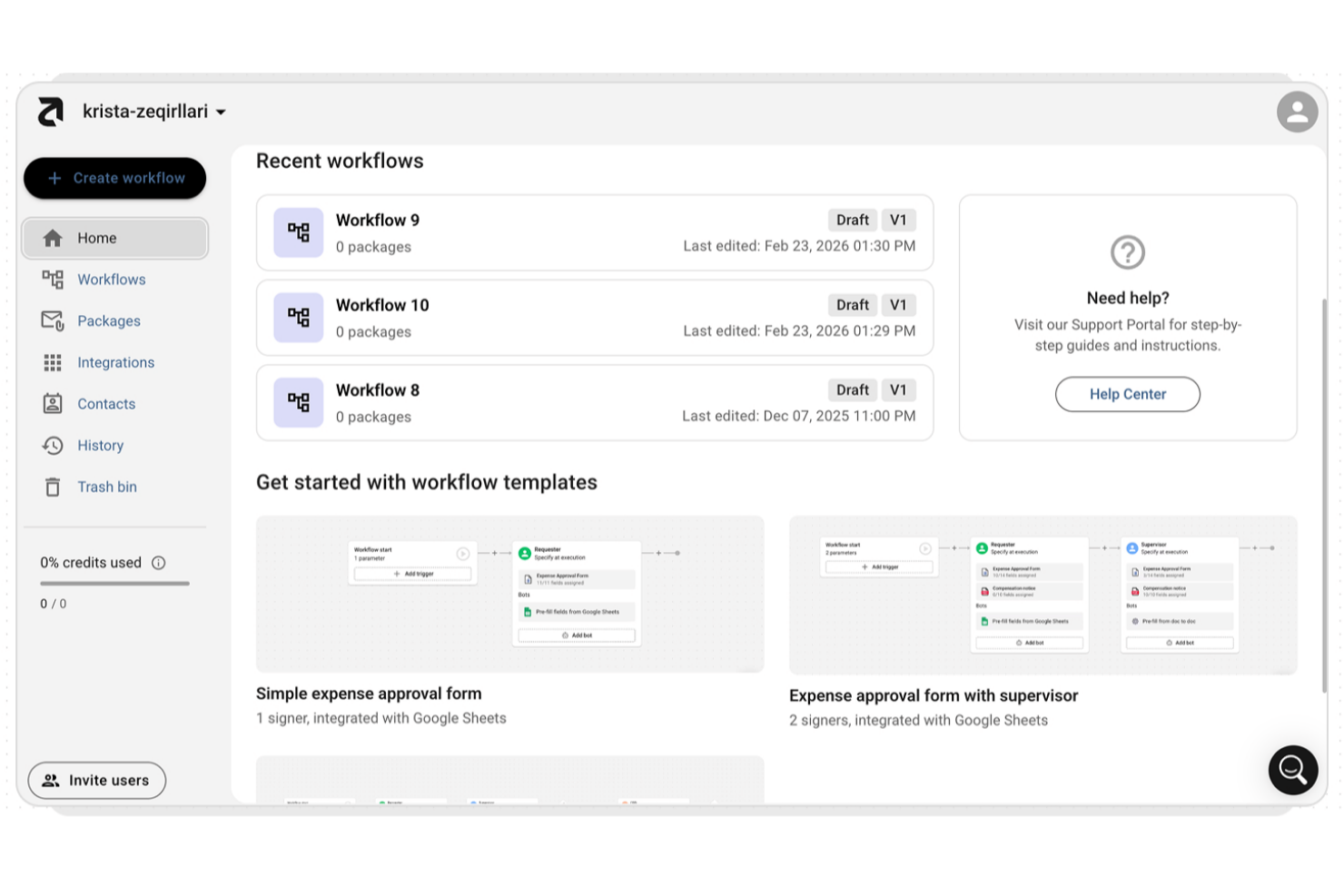
altaFlow is a document automation platform designed to help organizations build and automate complex document-driven workflows across sales and finance. Rather than functioning as a standalone CPQ tool, altaFlow provides building blocks such as document generation, web forms, workflow automation, and eSignatures that teams use to create custom quote-to-cash processes. It supports organizations managing high volumes of quotes, approvals, and cross-system data flows between CRM and ERP platforms while maintaining compliance and operational consistency.
Who Is altaFlow Best For?
altaFlow is best suited for mid-sized to large organizations, particularly Revenue Operations (RevOps) and Sales Operations teams that require tight integration between quoting workflows, CRM systems, and ERP platforms.
Why I Picked altaFlow
For teams that need to keep sales and finance data consistent across systems, I picked altaFlow because of its bi-directional CRM and ERP synchronization capabilities. Using no-code Bots, business users can configure automated data flows that push and pull quote information between systems without relying heavily on IT or custom development. This reduces manual entry, lowers the risk of discrepancies, and helps ensure that quote data reflects the most up-to-date information stored in core systems. Instead of replacing CRM or ERP pricing logic, altaFlow pulls structured data from those systems and applies conditional workflow logic to generate documents within the quote-to-cash process.
altaFlow Key Features
Some features that support quote-to-cash automation include:
- Customizable document templates: Create branded quote templates using dynamic fields and conditional content tied to CRM or ERP data.
- Automated approval workflows: Configure multi-step routing with rule-based logic before quotes are finalized.
- Conditional document logic: Apply rule-based conditions that reference CRM or ERP data to control document outputs within your workflow.
- Audit trail tracking: Monitor document activity, approvals, and workflow steps for visibility and compliance.
altaFlow Integrations
Integrations include Salesforce, NetSuite, SharePoint, and HubSpot.
Pros and Cons
Pros:
- Custom approval workflows for quotes
- Audit trails for all quote activities
- Bi-directional sync with CRM and ERP systems
Cons:
- Some advanced features require higher-tier plans
- Occasional delays in bulk quote processing


DealHub is a quote-to-revenue platform that helps revenue teams create, manage, and track quotes and proposals. It supports various pricing models and sales scenarios, making it adaptable to different business needs.
Why I picked DealHub: I picked DealHub because of its guided quote management experience, which helps with product selection, pricing strategies, and discounting rules. It supports complex pricing models like tiered and usage-based pricing, making it flexible for different sales scenarios. Automated approval workflows enable quick collaboration and one-click sign-offs, while dynamic line-item customization ensures every quote is tailored and precise. These features help reduce manual work, maintain compliance, and speed up the entire quote management process.
DealHub Standout Features and Integrations
Standout features include configurable bundles and discounts, allowing you to create competitive offers that align with your pricing strategies. The partner and channel quoting feature ensures consistency across indirect sales teams by enabling scalable and controlled quoting. Additionally, the deal desk dashboard provides real-time insights into quote progress and approval status.
Integrations include Salesforce, Microsoft Dynamics 365, HubSpot, Freshworks, DocuSign, Gong, Slack, LinkedIn, Google, Facebook, Optimizely, and SalesLoft.
Pros and Cons
Pros:
- Automated quote generation
- Digital DealRoom enhances collaboration with customers
- Accurate pricing through predefined rules
Cons:
- Lacking some niche integrations
- Advanced customization may require support
New Product Updates from DealHub

DealHub Automates Contract Attachments In Deal Won Emails
DealHub now automatically attaches fully signed contracts to Deal Won emails. This update streamlines post-signature communication and ensures stakeholders receive signed documents instantly. For more information, visit DealHub's official site.
 .
.

Also known as IQX, iQuoteXpress offers a CPQ solution for sales professionals that has a proven pricing configurator that can be used in tandem with Shopify as an essential ecommerce tool for B2B organizations that facilitates simplified restocks and purchasing for your existing customers.
Why I picked IQX: This platform made my list because of the way they manage their knowledge repository. Whenever one of your sales reps needs to create a quote, edit a proposal, or configure inventory pricing, everything they need is in one place, including relational product trees, document library, education center, and product data.
IQX Standout Features and Integrations
Standout features include branded, customized proposal templates and quote creation tools, contact management that stores customer data and purchase history, and proposal tracking and reporting that includes sales activity, forecasting, group productivity, proposal status, and expense summary.
Integrations include DocuSign, HubSpot, Microsoft Dynamics, Oracle, Pipedrive, QuickBooks, Salesforce, Xero, Zoho Books, and Zoho CRM.
Pros and Cons
Pros:
- Step by step implementation support
- Responsive and personalized customer support
- Simple user interface with intuitive navigation
Cons:
- No mobile app for access on the go
- Highly customized implementations take much longer


Dock is a sales and onboarding software that features digital sales rooms, centralized content management, and templates to help sales teams standardize their processes while providing customers with personalized experiences.
Why I picked Dock: Dock stands out as a quote management software because of its customizable templates that help save sales teams time from creating documents from scratch. I also like that Dock offers approval workflows for large deals, custom agreements, and discounts, and provides order form analytics to track the status of documents, whether they have been signed, viewed, or require updating.
Dock Standout Features and Integrations
Standout features include mutual success plans for onboarding, signature reminders, secure digital signatures, personalized client portals, engagement analytics, pricing and order forms, and repeatable follow-up processes.
Integrations include HubSpot, Salesforce, Slack, Zoom, Airtable, Pandadoc, Typeform, and more.
Pros and Cons
Pros:
- Centralized sales room for all sales content and important documents
- Approval mechanisms for unique quotes and agreements
- Templates to save time on quote building
Cons:
- Order form features are an add-on
- Integrations with Salesforce and HubSpot are only available on higher-tier plans

As a general proposal and work management tool, Proposify offers an online software that provides more control and visibility at every stage of the sales process. From quote creation to follow-ups with clients, you can create and manage all the most essential sales documents you need and house them in a central space.
Why I picked Proposify: I wanted this platform on my list because it combines two sales steps that often go hand in hand: proposals and quotes. With access to proposal templates, contract details, and quote creation, you can communicate with clients in real time and make edits as needed to close deals faster.
Proposify Standout Features and Integrations
Standout features include quote template creation through drag-and-drop editing from your content library to standardize and automate sales documents and advanced insights into prospect behavior that tracks how they interact with quote documents.
Integrations include Accelo, ActiveCampaign, Copper, Drift, Gong, Harvest, HubSpot, monday.com, Nimble, Salesforce, and Zendesk Sell. Proposify has both native and Zapier-driven integrations.
Pros and Cons
Pros:
- Very responsive customer support team
- Flexible customization for building templates
- Clean, sleek proposal and quote documents
Cons:
- Formatting through copy/paste can be clunky
- Has a bit of a learning curve


As a web-based CPQ software solution, QuoteWerks is designed to enable organizations of all sizes to create, edit, and view quotes and proposals online. Enjoy complete document management capabilities that allows users to edit, create, and open documents on the web. With this platform, you can access and manage quotes on the go from any device with a web browser.
Why I picked QuoteWerks: I liked this software for my list because it places a focus on something that many other platforms only care about tangentially — branding. With QuoteWerks, you can brand quotes, proposals, presentations, and other sales documents (like terms and conditions, contracts, and SOWs) with beautiful, professional layouts.
QuoteWerks Standout Features and Integrations
Standout features include e-sign and accepting legally binding documents directly in the platform, collecting ACH and credit card payments with any one of over 80 payment gateways, and knowing at what stage your quotes are at with tracking and viewing capabilities in real time.
Integrations include ACT!, ConnectWise, Datto Autotask, GoldMine, HubSpot, Maximizer, Microsoft Dynamics, Salesforce, SugarCRM, and Zoho CRM.
Pros and Cons
Pros:
- Intuitive user interface and navigation
- Custom template creation standardizes documents
- Easy to train new staff on the platform
Cons:
- The UI can feel a little outdated
- Limited knowledge of local sales tax

This modern, cloud-based platform is designed to help technology service providers sell better and get paid faster through a simplified, collaborative user experience, customized quote creation, pre-built templates, and drag-and-drop quote editing. Checkable, optional selections and add-ons bring your customers in on the quote building experience.
Why I picked Quoter: I chose this platform for my list of professional quote creation platforms because of the way you can group services, products, and labor into different sections within a quote. Add the sections and items you want for easily readable quotes with visualization for subtotals and breakdowns.
Quoter Standout Features and Integrations
Standout features include drag and drop editing to reorder various sections of a quote to better highlight the scope of work and optional add-on sections that customers can check and uncheck for themselves.
Integrations include ConnectWise, Datto Autotask, Dicker Data, HubSpot, Ingram Micro, Mailchimp, Pipedrive, QuickBooks Online, Salesforce, and Xero.
Pros and Cons
Pros:
- Flexible and intuitive customization options
- Fast, simple, and easy to learn
- Allows editable pre-loaded inventory and product lists
Cons:
- Once created, quotes aren’t editable
- Branding options aren’t as sophisticated

PandaDoc is a quote management tool that automates document creation and streamlines approvals for sales and operations teams. It covers the full quote-to-close process—from document generation and e-signature collection to analytics and payment—helping teams save time, reduce errors, and accelerate deal velocity.
Why I picked PandaDoc: PandaDoc stands out for its ability to automate quote generation using product catalog data, ensuring accuracy and consistency across sales documents. Its smart content rules and collaborative digital spaces simplify deal-making, making it especially effective for distributed sales teams. Executives value the visibility PandaDoc provides through detailed tracking, analytics, and seamless CRM integrations that enhance forecasting accuracy and close rates.
Standout features & integrations:
Features include customizable templates, CPQ configuration tools, workflow automation, smart content adaptation, real-time document tracking, and secure e-signatures. These capabilities eliminate manual quoting errors and shorten cycle times.
Integrations include Salesforce, HubSpot, QuickBooks, Stripe, PayPal, Microsoft Dynamics 365, Zoho CRM, Pipedrive, and Zapier.
Pros and Cons
Pros:
- Offers detailed tracking and analytics for better visibility into quote performance.
- Integrates seamlessly with major CRM and payment systems.
- Automates document workflows to reduce manual errors and save time.
Cons:
- Certain advanced features require upgrading to higher-priced plans.
- Some users report sudden service interruptions and inconsistent support response times.


HubSpot Sales Hub is a quote management and Configure, Price, Quote (CPQ) platform that streamlines how sales teams create, customize, and manage quotes. It covers everything from quote generation and approval workflows to e-signatures and payments—helping teams accelerate deal cycles and reduce administrative friction.
Why I picked HubSpot Sales Hub: HubSpot Sales Hub stands out for its deep CPQ integration within HubSpot’s CRM, making it a natural choice for teams that want quoting, deal management, and customer data in one place. Its AI-assisted quoting, customizable approval workflows, and built-in e-signature and payment tools help sales organizations move faster while maintaining compliance and accuracy.
Standout features & integrations:
Features include AI-powered quote generation, customizable approval workflows, real-time quote tracking, analytics and reporting, and seamless post-sale accounting integration. These capabilities allow revenue teams to deliver accurate quotes quickly, gain visibility into client interactions, and make smarter decisions based on live performance data.
Integrations include Salesforce, Microsoft Dynamics, Google Workspace, Slack, LinkedIn Sales Navigator, Zapier, PandaDoc, QuickBooks, Shopify, and Stripe.
Pros and Cons
Pros:
- Customizable approval workflows ensure compliance and streamline deal reviews.
- Seamless integration with HubSpot CRM unifies sales and quoting workflows.
- AI-powered quoting improves accuracy and reduces manual data entry.
Cons:
- Some users report limited customization options for complex quotes.
- Pricing may be a barrier for smaller or budget-conscious teams.

Salesforce Revenue Cloud is a quote management platform that automates Configure, Price, Quote (CPQ) processes for revenue teams. It supports complex pricing structures, subscription billing, and order-to-cash workflows, helping teams generate accurate quotes faster while maintaining data consistency across sales, finance, and operations.
Why I picked Salesforce Revenue Cloud: Salesforce Revenue Cloud stands out for its end-to-end CPQ and billing automation capabilities that help unify sales and finance functions. By streamlining configuration, pricing, and approval processes, it reduces quoting errors and shortens deal cycles. Its scalability and subscription management make it especially valuable for businesses with recurring revenue models or complex pricing needs.
Standout features & integrations:
Features include automated quote generation, configurable pricing and discount rules, guided selling, order management, automated billing and invoicing, and revenue recognition compliance—all within a centralized, data-driven platform.
Integrations include Salesforce Sales Cloud, Service Cloud, MuleSoft, Tableau, Slack, Pardot, Marketing Cloud, Einstein Analytics, and FinancialForce.
Pros and Cons
Pros:
- Supports advanced subscription and usage-based revenue models for recurring billing.
- Integrates seamlessly with Salesforce CRM, ensuring data alignment across teams.
- Enables quick and accurate sales quotes with automated CPQ and approval workflows.
Cons:
- The platform’s extensive feature set can be complex for new users to navigate.
- Requires significant setup time and customization to fully leverage its capabilities.


BlueSnap Accounts Receivable Automation is a payment automation platform that streamlines invoicing, payment collection, and subscription management for finance teams. It automates the quote-to-cash process—covering billing, reconciliation, and customer payments—so teams can accelerate cash flow and reduce manual workloads.
Why I picked BlueSnap Accounts Receivable Automation: BlueSnap Accounts Receivable Automation stands out for its ability to automate billing and collections across multiple currencies and payment types, improving both cash flow and customer experience. Its ERP and CRM integrations minimize disruption to existing financial operations, while a branded self-service portal simplifies invoice payments and enhances transparency. These capabilities make it a strong fit for organizations seeking to modernize their AR operations without adding unnecessary complexity.
Standout features & integrations:
Features include automated billing workflows, real-time financial reporting, global payment orchestration, compliance tools, and a branded customer portal that supports recurring and subscription payments.
Integrations include leading ERP and CRM systems such as QuickBooks, Microsoft Dynamics, and Salesforce, enabling seamless synchronization across finance and customer data.
Pros and Cons
Pros:
- A branded customer portal enhances customer experience through self-service invoice payments.
- Supports global payment types and currencies, helping businesses serve international customers.
- Seamless integration with ERP and CRM systems enables efficient data synchronization and payment reconciliation.
Cons:
- Lacks built-in quote management features, which may require additional tools or integrations.
- Initial setup and integration can be complex, requiring time and resources.


Designed to enable subscription companies to grow revenue and scale rapidly by bringing new services and products to market without operational constraint, Zuora is a cloud solution that allows you to adopt a variety of creative pricing and packaging methods that ensure you can gain more market share, automate billing, and manage high volume self-service sales.
Why I picked Zuora: One really cool feature from Zuora is their Monetization Suite, which helps you manage a variety of business models on one single platform. Use this tool to launch pricing models, scale billing operations across all subscribers, and enable subscription changes for every channel.
Zuora Standout Features and Integrations
Standout features include a CPQ that allows you to build a quote based on any combination of products, subscriptions, and services for the entire subscriber lifecycle and a payment support system designed to reduce fraud and increase acceptance.
Integrations include AnyPoint Platform, Boomi, Everstage, NetSuite, PayPal, Pipify, QuickBooks, Salesforce, Sisense, and Spiff.
Pros and Cons
Pros:
- Don’t need technical knowledge
- Easy to use with training
- Comprehensive platform to handle all sales needs
Cons:
- More complex implementation require technical experience
- Pricing is about 40% higher than comparable competitors

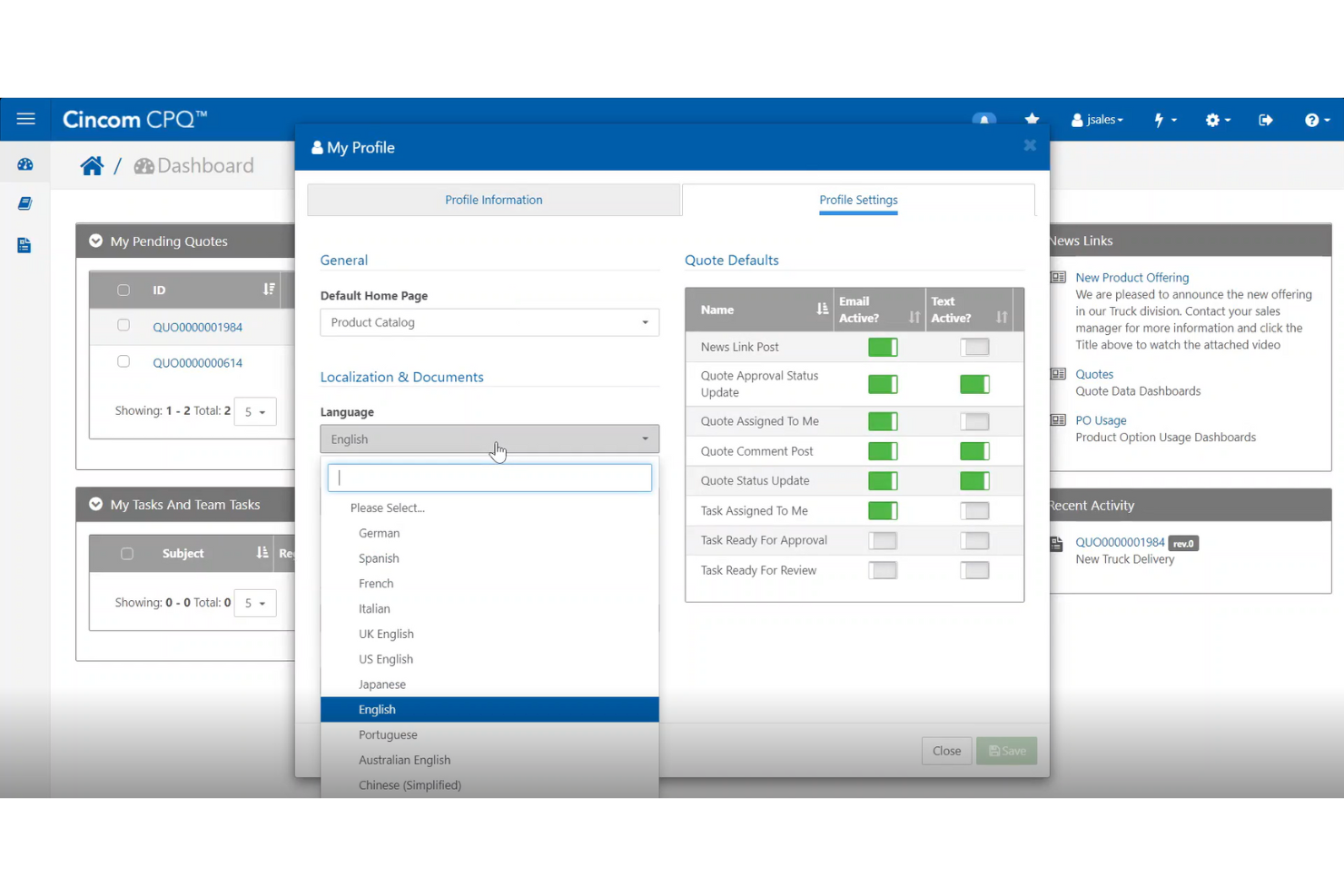
Cincom CPQ is a quote management platform that automates complex product configurations and pricing for sales teams in manufacturing and financial services. It streamlines quoting, integrates with enterprise systems, and supports global operations so teams can deliver accurate, timely, and consistent quotes at scale.
Why I picked Cincom CPQ: Cincom CPQ stands out for its intelligent configuration and smart pricing capabilities—core features that maintain pricing accuracy and reduce administrative burden. By automating key parts of the quoting process, it frees up your team to focus on closing deals and improving customer engagement. Its deep integration with CRM and ERP systems ensures a unified view of product, customer, and pricing data across your organization.
Standout features & integrations:
Features include intelligent configuration, guided selling tools, version control, mobile accessibility, analytics, and a customizable interface that adapts to your business needs.
Integrations include Salesforce, Microsoft Dynamics, Oracle, SAP, CAD, PLM, e-commerce platforms, analytics, e-signature, and marketing tools.
Pros and Cons
Pros:
- Automation reduces manual quoting tasks and accelerates the sales cycle.
- Seamless integration with CRM and ERP systems improves data flow and decision-making.
- Intelligent configuration ensures accurate and consistent pricing across sales channels.
Cons:
- The system’s depth and flexibility may present a learning curve for new users.
- Initial setup and configuration can be time-consuming and may require expert support.

Best sales quoting software for complex assemblies in manufacturing industries

This online quoting software is designed as a quoting and estimating platform to support manufacturing processes, including CNC milling Swiss screw machining, CNC lathe, additive manufacturing, and sheet metal fabrication. It also offers sales, pricing, and revenue generation features with accounting software, online payments, and electronic signatures.
Why I picked Paperless Parts: One of the reasons this platform made my list is because of their BOM building capabilities. Instead of spending days estimating and organizing a bill of materials, you can automatically extract tree structures from CAD files to create and edit assemblies, identify and price subcomponents, and purchase all necessary hardware more quickly.
Paperless Parts Standout Features and Integrations
Standout features include tracking and management of RFQs on one centralized platform for easier viewing, manufacturability warnings to catch issues as early as possible, and a PDF viewing tool to help compare revisions, redact sensitive information, and ensure information is searchable.
Integrations include E2 Shop, Epicor, Fulcrum, JobBOSS, JobBOSS2, HubSpot, Infor® VISUAL, Infor® SyteLine, Made2Manage, and MIE Trak Pro.
Pros and Cons
Pros:
- Collaboration tools for sharing 3D models
- Automatically calculates estimated machine run-time
- Branded, professional quote templates
Cons:
- Web-based app doesn’t work well with Safari
- Not all manufacturing customers are equipped for digital project management


As a quote and order platform, Experlogix can help automate the entire quote-to-order process for professional service firms, manufacturers, publishers, and high-technology companies. Built on Microsoft .NET tech, Experlogix Configurators are available on-demand, on-premise, and off-line to ensure you have the support you need for all CPQ operations.
Why I picked Experlogix: One of the reasons this platform is on my list is because of their guided selling feature, which verifies the accuracy of a quote or order in real time. It instantly delivers the intelligent feedback you need via a color-coded highlight or pop-up message. Use this feature to configure recommendations for add-ons, cross-selling, and upselling.
Experlogix Standout Features and Integrations
Standout features include logic-based discounting and pricing through an intuitive, wizard-driven workbench and 2D/3D visualization that allows clients to see configurations of their products in real time based on the options they’ve selected.
Integrations include Dynamics 365, Dynamics 365 Business Central, Dynamics 365 Sales, NetSuite, and Salesforce.
Pros and Cons
Pros:
- Simple to see and track proposals
- Low and no coding options
- Clear and easy to see all estimated data
Cons:
- Has a bit of a learning curve
- Slightly more technical navigation style


HiveCPQ is a web and mobile friendly quote management and inventory tracking system that provides product configuration, collaborative workflows, visually optimized product details, and real-time product updates by connecting to your other apps. This platform is designed to benefit marketing, sales, engineering, operations, and customer service departments.
Why I picked HiveCPQ: The main reason I chose this quote management software is because of their robust configurator. In addition to having a web and mobile app, this system can load data from anywhere and integrate with every other system you use. It can also solve highly complex configurations while taking user privileges into account.
HiveCPQ Standout Features and Integrations
Standout features include collaborative elements that allow customers to join in on the process, interactive exploded plans of products to help customers order the correct spare parts, and global capabilities that ensure the platform functions in your customer’s currency, time zone, and language.
Integrations include Microsoft Business Central, Microsoft Finance, Microsoft Project Operations, PowerAutomate, Salesforce, and Zoho CRM. You can also build your own integrations with the Hive API.
Pros and Cons
Pros:
- Low barrier to entry with user-friendly navigation
- Flexible and smart configuration options
- Fast and easy to set up
Cons:
- Higher cost platform than others
- Must make requests for feature updates

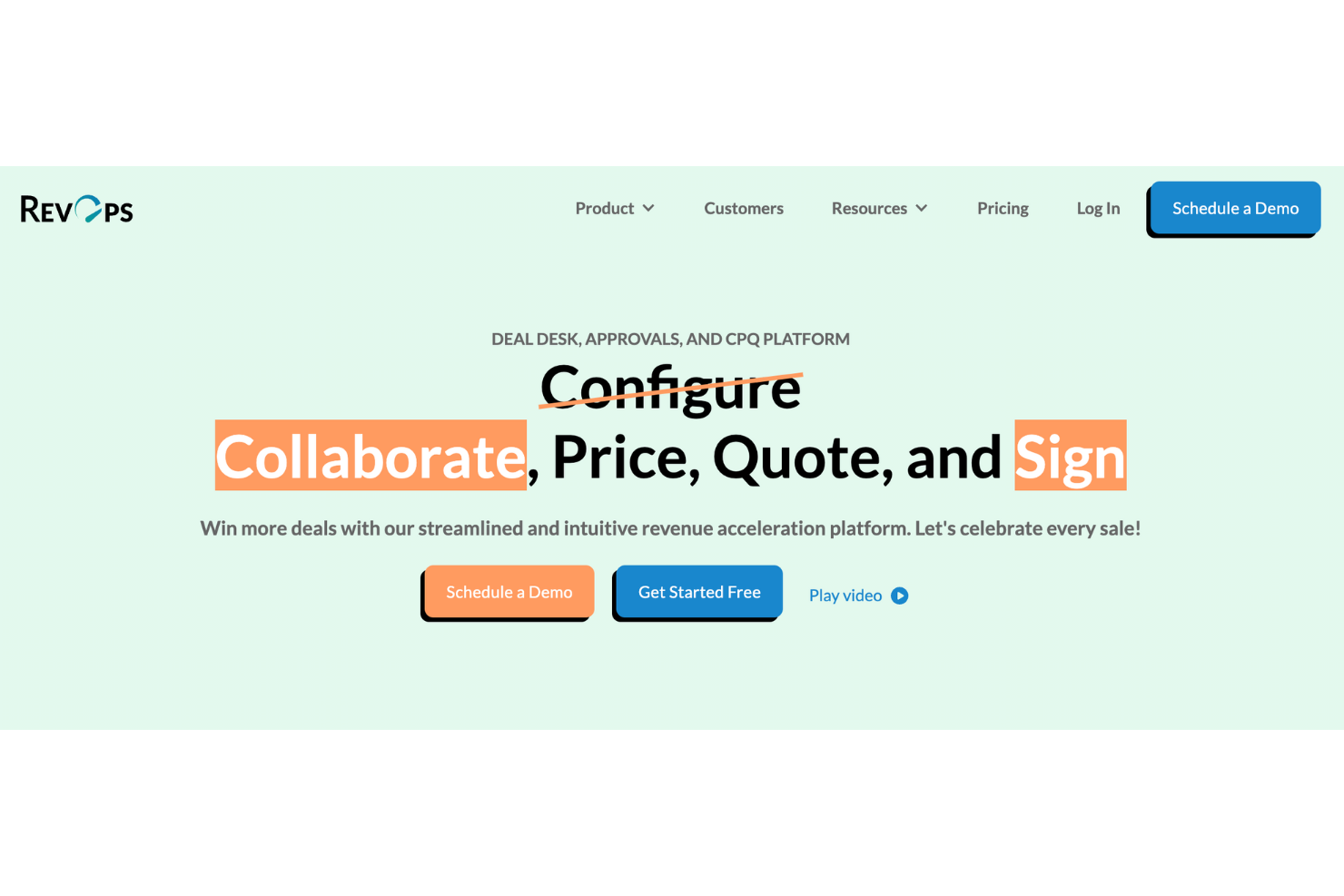
RevOps is a quote management platform that streamlines deal creation, approval, and execution for revenue teams. It centralizes quote building, pricing, and signing workflows—helping sales and operations teams accelerate deal cycles, maintain compliance, and improve accuracy.
Why I picked RevOps: RevOps stands out for its customizable approvals and integrated agreement builder, which allow teams to align deal workflows with company policies and reduce approval bottlenecks. Its native integrations with Salesforce, HubSpot, and DocuSign ensure data consistency from quote to close, while built-in eSignature and pricing automation help sales teams close deals faster and with fewer errors.
Standout features & integrations:
Features include bespoke approvals, an agreement builder, pre-approved terms, automatic pricing adjustments, and a centralized agreement repository—each designed to reduce manual effort and streamline revenue operations.
Integrations include HubSpot, Salesforce, DocuSign, and Google Workspace for unified deal management across the GTM stack.
Pros and Cons
Pros:
- Built-in eSignature capabilities speed up contract finalization and shorten sales cycles.
- The software integrates seamlessly with Salesforce, HubSpot, and DocuSign, improving visibility and accuracy.
- RevOps offers customizable approval workflows that reduce deal bottlenecks and align with business processes.
Cons:
- Pricing may be higher than average, which can be a barrier for smaller organizations.
- Some users report that setup can be complex for teams new to quote management tools.


As a unified quoting, billing, and usage platform, MonetizeNow delivers a streamlined quote-to-cash process to help your organization manage all channels of sale and price models without looking for point solutions in your GTM architecture. With options to control offering types, comprehensive pricing, and real-time pricing updates, MonetizeNow works with your current processes to enhance sales, quotes, and billing.
Why I picked MonetizeNow: This platform made the list because of their customized quote template capabilities. With this tool, you can completely control the data shown in any quote presentation, including the product descriptions and billing schedule. This tool also provides you with the ability to set default net terms, as well as customized terms and conditions.
MonetizeNow Standout Features and Integrations
Standout features include complex and ramp capabilities that allow you to schedule quote changes, make quote changes mid-term, and sync subscription start and end dates. It also comes with approval workflows to ensure consistent pricing decisions across your organization.
Integrations include AWS, Avalara, Azure, Braintree, DocuSign, DropBox, Sage, Salesforce, Stripe, and Xero. All integrations are bi-directional connections.
Pros and Cons
Pros:
- Very user-friendly sales tool
- Continuous improvement of their product with consistent updates
- Dedicated to customer support and satisfaction
Cons:
- Implementation can take a little longer due to personalized service
- Limited custom term library


As an adaptive quoting, revenue, and billing software solution for SaaS companies, Subskribe strives to deliver a totally unified platform with no need for silos or reconciliation from quote to revenue. Utilize innovative deal structures, like mid-term upsells and flexible discounts, to increase growth and ensure a faster time to market.
Why I picked Subskribe: This best quoting software made the list because they claim to get you up and running in just a few weeks — where other professional service providers can take up to six months. Subskribe also says they deliver a tool that requires almost no user training, allowing sales reps to structure deals and create approval workflows with just a few clicks.
Subskribe Standout Features and Integrations
Standout features include a billing system to help finance organizations enable subscription management, as well as usage-based billing and automated revenue recognition to accelerate book closing and eliminate the need for reconciliation.
Integrations include Avalara, DocuSign, HubSpot, Netsuite, PandaDoc, QuickBooks, Salesforce, Slack, and Stipe.
Pros and Cons
Pros:
- Frequent updates that improve the platform
- Flexible customization options for editing quotes
- User-friendly interface with no learning curve
Cons:
- Limited third-party integration support
- Sales rep experience is pretty generic


As a cloud-based platform that’s built specifically for B2B revops, Expedite Commerce provides a dedicated software that has it all, including CPQ, an ecommerce storefront, CLM, revenue billing and forecasting, a digital sales room, and subscription management. This platform also has real-time analytics that result in actionable results.
Why I picked Expedite Commerce: One of the unique features that got this platform on my list was their guided digital selling. With this tool, you can create an interactive quiz that asks the right questions of your clients to find out what they truly need and guides them to the right products.
Expedite Commerce Standout Features and Integrations
Standout features include a digital sales room to collaborate with customers, an ecommerce storefront that offers a B2C-like experience to B2B customers, and flexible billing modules that include recurring billing and subscriptions.
Integrations include Affirm, Avalara, BS PayOne, Digital River, Go Cardless, Klarna, NetSuite, Salesforce, SAP, and TripWorks.
Pros and Cons
Pros:
- Highly customizable system during implementation
- Quick responses to questions and issues
- Comprehensive sales and quote management
Cons:
- Not enough detail during the deployment process
- Limited documentation, training, and guidance
Other Quote Management Software
Because there are so many quoting software options out there, I also included a few that didn’t make the top ten list but still deserve an honorable mention. Check out these tools to see if they’re the right fit for you.


Related Quote Management Software Reviews
If you still haven't found what you're looking for here, check out these tools closely related to quote management software that we've tested and evaluated.
- CRM Software
- Sales Software
- Lead Management Software
- Business Intelligence Software
- Contract Management Software
- Revenue Management System
Selection Criteria For Quote Management Software
Selecting the right quote management software is a critical decision that directly impacts an organization's efficiency in handling quotes, proposals, and ultimately managing revenue operations. Having personally navigated through and evaluated various quote management tools, I've developed a criterion that emphasizes functionality, user experience, and specific use cases. These criteria are essential for software buyers to consider, ensuring they choose a solution that not only addresses their immediate needs but also scales with their business.
Core Quote Management Software Functionality: 25% of total weighting score
To be considered for inclusion on my list of the best quote management software, the solution had to support the ability to fulfill common use cases. These include:
- Automating the quote-to-cash process to reduce manual errors and speed up sales cycles.
- Customizing quotes to meet diverse customer requirements and preferences.
- Managing and tracking quotes to ensure timely follow-ups and closures.
- Integrating with CRM and ERP systems for seamless data flow and improved accuracy.
- Providing analytics and reporting tools for better decision-making and performance tracking.
Additional Standout Features: 25% of total weighting score
To distinguish themselves, tools must offer unique features and functionalities not widely available among competitors. This includes:
- Advanced AI-driven price optimization suggestions.
- Real-time collaboration tools for sales teams and customers.
- Highly customizable and dynamic template designs.
- Automated cross-sell and up-sell recommendations.
- Robust integration capabilities with new and emerging technologies.
Exploring these features requires a hands-on approach, evaluating how they contribute to streamlining the quote management process and enhancing sales efficiency.
Usability: 10% of total weighting score
When evaluating usability, I look for:
- An intuitive user interface that minimizes the learning curve.
- Drag-and-drop functionalities for easy quote customization.
- Clear navigation paths to important features and data.
- Mobile-friendly design for on-the-go quote management.
Onboarding: 10% of total weighting score
Effective onboarding is crucial for realizing the value of the tool quickly. Criteria include:
- Comprehensive training materials such as videos and tutorials.
- Pre-designed templates to jumpstart the quote creation process.
- Interactive product tours and dedicated support for initial setup.
- Community forums or knowledge bases for peer-to-peer assistance.
Customer Support: 10% of total weighting score
I assess customer support by:
- Availability of 24/7 support through various channels (chat, email, phone).
- Responsiveness and expertise of the support team.
- Access to a dedicated account manager for enterprise plans.
- Regular updates and communication regarding new features and improvements.
Value For Money: 10% of total weighting score
Value assessment involves:
- Comparing feature sets against pricing tiers.
- Evaluating the flexibility of pricing plans to suit different business sizes and needs.
- Considering the total cost of ownership, including any setup or additional fees.
Customer Reviews: 10% of total weighting score
Customer feedback is a valuable source of insight, focusing on:
- Overall satisfaction with the software’s performance and reliability.
- How well the tool meets the advertised benefits and use cases.
- User experiences with customer support and issue resolution.
- Feedback on the software’s impact on sales cycle efficiency and revenue growth.
Each of these criteria plays a vital role in selecting a quote management solution that aligns with an organization's specific requirements, pain points, and goals for managing revenue operations efficiently. Buyers should carefully weigh these factors against their unique business needs to choose a tool that offers the best fit and value.
How To Choose Quote Management Software
With so many different quote management software available, it can be challenging to make decisions on what tool is going to be the best fit for your needs.
As you're shortlisting, trialing, and selecting quote management software, consider the following:
- What problem are you trying to solve - Start by identifying the quote management software feature gap you're trying to fill to clarify the features and functionality the tool needs to provide. For instance, if you only need it for your sales team, consider a dedicated sales quoting software.
- Who will need to use it - To evaluate cost and requirements, consider who'll be using the software and how many licenses you'll need. You'll need to evaluate if it'll just be the revenue operation leaders or the whole organization that will require access. When that's clear, it's worth considering if you're prioritizing ease of use for all or speed for your quote management software power users.
- What other tools it needs to work with - Clarify what tools you're replacing, what tools are staying, and the tools you'll need to integrate with, such as accounting, CRM, or HR software. You'll need to decide if the tools will need to integrate together or if you can replace multiple tools with one consolidated quote management software.
- What outcomes are important - Consider the result that the software needs to deliver to be considered a success. Consider what capability you want to gain or what you want to improve, and how you will be measuring success. For example, an outcome could be the ability to get greater visibility into performance. You could compare quote management software features until you’re blue in the face but if you aren’t thinking about the outcomes you want to drive, you could be wasting a lot of valuable time.
- How it would work within your organization - Consider the software selection alongside your workflows and delivery methodology. Evaluate what's working well and the areas that are causing issues that need to be addressed. Remember every business is different — don’t assume that because a tool is popular that it'll work in your organization.
Trends In Quote Management Software For 2026
The software industry is witnessing a paradigm shift in quote management solutions, driven by the need for more agile, intelligent, and integrated revenue operations. Analysis of recent product updates, press releases, and release logs from the forefront of quote management technology reveals significant trends. These trends not only highlight the evolving landscape of features and functionalities but also underscore the changing priorities of businesses as they adapt to the dynamic market demands.
Here, we delve into the specifics of these trends, offering insights into what's rapidly evolving, what's new and unusual, what's becoming essential, and what's losing ground in the realm of quote management software.
Evolving Features and Functionalities
- Enhanced Integration with CRM and ERP Systems: Integration capabilities are expanding, facilitating smoother data exchange and workflow between quote management systems and other core business platforms. This trend reflects the growing need for cohesive ecosystems where information flows seamlessly, optimizing the end-to-end sales process.
- Advanced Customization and Personalization: The ability to tailor quotes extensively and personalize customer interactions is rapidly evolving. Customization features are becoming more sophisticated, allowing businesses to better align their proposals with individual customer needs and preferences.
Novel and Unusual Functionality
- AI-Powered Pricing Optimization: Leveraging artificial intelligence to dynamically adjust pricing based on a multitude of factors marks a significant leap in quote management. This novel application of AI supports businesses in making data-driven pricing decisions, enhancing competitiveness and profitability.
- Real-time Collaboration Tools: The incorporation of tools that enable real-time collaboration within the quote management process is an unusual yet highly beneficial functionality. It allows sales teams to work more efficiently with each other and with clients, streamlining revisions and approvals.
Most Important and In-Demand Features
- Automated Quote to Cash Processes: Automation across the quote to cash cycle is becoming increasingly important. Features that automate quote creation, approval workflows, and follow-ups are in high demand, reflecting the urgency to shorten sales cycles and improve operational efficiency.
- Comprehensive Analytics and Reporting: Deep insights into quote performance, win rates, and customer behavior are essential. Enhanced analytics and reporting capabilities are in demand for their role in strategic decision-making and optimization of sales strategies.
Decreasing Importance
- Manual Data Entry and Simple Templates: As automation and AI take center stage, the reliance on manual data entry and basic templating is diminishing. Businesses are moving towards more dynamic, data-driven approaches, reducing the need for manual intervention.
These trends illustrate a clear movement towards more integrated, intelligent, and customer-centric quote management solutions. As businesses strive to streamline their sales processes and bolster revenue operations, the demand for advanced, automated, and personalized features will continue to shape the future of quote management software. The shift away from manual processes and basic functionalities reflects a broader industry trend towards efficiency, accuracy, and strategic insight.
What Is Quote Management Software?
Quote management software is a tool that lets you create, send, and track sales quotes or proposals all in one place. Sales teams and account managers use it to cut down on manual work, avoid mistakes, and keep pricing up to date. You can pull in products and pricing, manage approvals, and even collect electronic signatures faster, which means less hassle for you and quicker responses for your customers.
Features Of Quote Management Software
When selecting quote management software, keep an eye out for the following key features:
- Quote creation and editing: Quickly generate, modify, and customize professional quotes for your clients. You can add products, adjust quantities, set pricing, and personalize terms to fit each opportunity.
- Product and pricing catalog: Access a centralized catalog where you manage all products, services, pricing tiers, and discounts. This makes it a breeze to maintain consistency and accuracy across every quote.
- Approval workflows: Built-in approval processes help you route quotes for necessary reviews before sending them off. This keeps everyone in the loop and reduces bottlenecks (and that dreaded back-and-forth over email).
- Integration with CRM and ERP systems: Connect your quote management software with your other tools—like your CRM or ERP—to sync customer data and orders automatically. No more copy-pasting or manual errors.
- Version control and audit trails: Track every change, edit, and approval on each quote. That’s your insurance policy for transparency, compliance, and being able to answer, “Who changed that price?” with confidence.
- E-signature capability: Let customers review and sign quotes online with secure e-signature tools. This speeds up the sales cycle, keeps things paperless, and creates a modern experience.
- Reporting and analytics: Dig into metrics like quote conversion rates, average time to close, and deal values. These insights help you spot trends, tweak your process, and win more deals.
- Template management: Use built-in templates that keep your branding on point and ensure every quote looks polished, professional, and consistent—without starting from scratch each time.
- Mobile access: Create, send, or approve quotes on the go with mobile-friendly functionality. Perfect for busy sales teams who don’t want to be tied to their desks.
- Collaboration tools: Work together in real-time with teammates to build quotes, leave notes, or negotiate pricing. Everyone stays on the same page, and deals don’t stall out waiting for answers.
Common Quote Management Software AI Features
Beyond the standard quote management software features listed above, many of these solutions are incorporating AI with features like:
- Personalized content suggestions: The software suggests tailored messaging or add-ons for each quote, based on customer preferences and behavior, helping you upsell and deliver a more relevant pitch.
- Automated quote generation: AI analyzes past deals and customer history to quickly draft quotes that match your company’s style and win patterns, saving you time and effort.
- Dynamic pricing recommendations: Let AI crunch real-time data to suggest the optimal price point based on customer profile, market trends, and historical outcomes. This helps you maximize margins without scaring away buyers.
- Quote risk detection: AI scans quotes for errors, compliance issues, or red flags such as outdated pricing or unusual discounts. It gives you an extra layer of protection before you hit send.
- Deal likelihood scoring: AI evaluates the details of each quote to predict which ones are most likely to close, helping you prioritize your follow-ups for the best shot at winning business.
Benefits Of Quote Management Software
Quote management software stands out as a critical component for businesses aiming to optimize their sales cycles and improve their bottom line. Here, we delve into five primary benefits of implementing quote management software, highlighting how it transforms operations for users and organizations.
- Accelerated Sales Cycles: By automating the quote creation and approval process, this software significantly reduces the time from lead to deal closure. It enables sales teams to respond more quickly to customer inquiries, keeping pace with customer expectations and staying ahead of competitors.
- Increased Accuracy of Quotes: The software minimizes human errors by automating data entry and calculations. This accuracy ensures that quotes are consistent and reliable, reducing the risk of over or underquoting, which can affect profitability and customer trust.
- Enhanced Customer Satisfaction: With the ability to quickly generate personalized and professional quotes, businesses can improve their interaction with customers. This responsiveness and attention to detail enhance the overall customer experience, fostering loyalty and repeat business.
- Streamlined Operations: Quote management software integrates with CRM and ERP systems, creating a seamless flow of information across business units. This integration streamlines operations, reduces redundancy, and ensures that all departments are aligned, enhancing overall operational efficiency.
- Data-Driven Decision Making: The software provides valuable insights into quoting trends, win/loss analysis, and customer behavior. These analytics allow businesses to make informed decisions, tailor their offerings, and strategically adjust their pricing models to meet market demands and maximize revenue.
Costs & Pricing For Quote Management Software
For those new to quote management software, understanding the various plan options and pricing structures is essential. These solutions typically offer a range of plans to cater to different business sizes, needs, and budgets. Below is a detailed overview of common plan options, their average pricing, and the features typically included in each. This breakdown will help software buyers identify the best fit for their organization's specific requirements.
Plan Comparison Table For Quote Management Software
| Plan Type | Average Price | Common Features Included |
|---|---|---|
| Starter | $10 - $50/user/month | - Basic quote creation and management - Standard integrations (CRM) - Basic reporting and analytics |
| Professional | $50 - $150/user/month | - Advanced customization options - Enhanced integrations (ERP, CRM, etc.) - Advanced reporting tools - Role-based access control |
| Enterprise | $150 - $500+/user/month | - Full suite of features - Custom integrations and workflows - Dedicated support and training - Advanced security features |
| Free | $0 | - Access to basic features - Limited quotes per month - Basic support |
When selecting a plan, consider the scale of your sales operations, the complexity of your quoting process, and the level of customization and integration required. Balancing these factors with the cost will ensure you choose a plan that provides the best value for your business.
Quote Management Software Frequently Asked Questions
Still working on wrapping your head around why quote management software might be the key to enhancing your sales process? Check out some of the most frequently asked questions to better prepare yourself.
Who uses quote management software?
Quote management is essential in many types of businesses, but some of the retailers that get the most out of this type of platform include creative agencies, manufacturers, business sales representatives, field service agents, and construction or landscape industry workers. Some of the platforms on my list have developed solutions to deliver on industry-specific needs.
What are the types of quote management software?
Quote management software, essential for streamlining the sales process and enhancing efficiency, comes in various types, each designed to cater to different business needs, sizes, and industries. Understanding these types can help organizations select the best solution to manage quotes, proposals, and revenue operations effectively. Here are the primary types of quote management software:
- CPQ (Configure, Price, Quote) Software: CPQ software is designed for businesses that offer customizable products or services. It allows sales teams to accurately configure products according to customer specifications, price them taking into account customizations, discounts, and other variables, and generate quotes quickly. This type is particularly beneficial for companies in manufacturing, technology, and B2B services where product offerings are complex and highly customizable.
- Sales Proposal Software: Focused more on creating and managing sales proposals, this type of software often includes quote management as part of its functionality. It helps in generating professional proposals that include pricing, product descriptions, and terms and conditions. Sales proposal software is ideal for businesses looking to streamline their proposal creation process, improve proposal quality, and track the status of each proposal.
- SaaS-based Quote Management Software: This cloud-based solution offers quote management as a service over the internet. SaaS quote management tools are accessible from anywhere, require no installation, and are typically subscription-based. They are suitable for businesses of all sizes looking for scalability, minimal upfront costs, and the ability to access the software from multiple locations or devices.
- ERP-Integrated Quote Management Systems: Some enterprise resource planning (ERP) systems include quote management functionalities. These integrated solutions offer the advantage of seamless data flow between quote management and other business operations such as inventory management, accounting, and customer relationship management (CRM). This type is ideal for larger organizations seeking a comprehensive system that covers all aspects of their operations.
- CRM-Integrated Quote Management Tools: Similar to ERP-integrated systems, many customer relationship management (CRM) platforms now offer built-in quote management features. These tools allow sales teams to generate quotes directly from the CRM system, ensuring that all customer interactions and data are centralized. This is particularly beneficial for businesses that prioritize customer data integration and want to maintain a holistic view of customer interactions.
- Industry-Specific Quote Management Software: Certain industries have unique requirements that standard quote management tools might not address. Industry-specific solutions are tailored to meet these unique needs, incorporating industry standards, compliance requirements, and specific workflows. Examples include software specifically designed for the insurance sector, construction industry, or telecommunications.
Selecting the right type of quote management software involves considering your business’s specific needs, the complexity of your products or services, and how you interact with customers. By understanding the differences between these types of software, organizations can make an informed decision that aligns with their sales processes, technical requirements, and growth objectives.
How does quoting software work?
Generally, a quote software will integrate with other apps in your tech stack to get data on customers, services, pricing, and inventory in order to automatically generate quotes and proposals with fewer errors. You can also ensure personalized results with pre-built templates that allow you to customize certain fields.
How does quote management software integrate with a CRM?
Quote management software typically integrates with CRM systems to synchronize customer data, ensuring that all client interactions and information are updated and accessible. This integration streamlines the sales process by providing accurate customer insights directly within the quote creation workflow.
Can quote management software handle multiple currencies?
Yes, advanced quote management software supports multiple currencies, enabling businesses to create and manage quotes for international clients efficiently. This feature is crucial for companies operating globally, ensuring accurate pricing across different markets.
How does quote management software manage revisions and version control?
Quote management software tracks changes to quotes, maintaining a history of revisions. This feature allows users to revert to previous versions if needed and ensures transparency in the quote modification process.
Additional Revenue Operations Software
If you’ve found the right quote management software for your needs but you’re still looking for a few more tools to round out your tech stack, check out our other top ten lists below:
- CPQ Software
- E-signature Software
- Contract Management Software
- Sales Tracking Software
- Sales Engagement Software
- Sales Acceleration Software
Conclusion
Hopefully, you’ve found a quote management software on my list that will help streamline your sales operations and up your game to increase revenue and business growth. If you liked this list, there’s plenty more where it came from on our blog, as well as unique insights from our revops experts on a weekly basis.
Subscribe to our newsletter for frequent updates on emerging trends from the team.