
20 Best Mobile Sales Software Reviewed For 2026

10 Best Mobile Sales Software Shortlist
Here's my pick of the 10 best software from the 20 tools reviewed.


With so many different mobile sales software available, figuring out which is right for you is tough. You know you want to provide a mobile interface for your sales teams to access and manage sales-related data and tasks but need to figure out which tool is best. I've got you! In this post I'll help make your choice easy, sharing my personal experiences using dozens of different mobile sales tools with various teams and accounts, with my picks of the best mobile sales software.
Why Trust Our Software Reviews
Best Mobile Sales Software Summary
This comparison chart summarizes pricing details for my top mobile sales software selections to help you find the best one for your budget and business needs.
| Tool | Best For | Trial Info | Price | ||
|---|---|---|---|---|---|
| 1 | Best for on-the-go sales intelligence | 30-day free trial | From $29/user/month (billed annually) | Website | |
| 2 | Best for high-volume outbound sales calls | 14-day free trial available | From $25/user/month (billed annually) | Website | |
| 3 | Best for B2B mobile order management | Free 60-day trial available | Pricing upon request | Website | |
| 4 | Best for pushing profiles and data from your phone to your CRM | 7-day free trial available | Pricing upon request | Website | |
| 5 | Best for medium to large field teams that handle utilities, construction, and pest control | Free demo available | From $20/user/month | Website | |
| 6 | Best for use by outside sales teams | Free plan + free demo available | From $39/user/month | Website | |
| 7 | Best for full functionality and geolocation | Free trial + free demo | From $19/user/month | Website | |
| 8 | Best for cross-functional work across your entire organization | Free plan available | From $10.99/user/month (billed annually) | Website | |
| 9 | Best for creating custom fields on mobile | 14-day free trial + free plan available | From $5/user/month (billed annually) | Website | |
| 10 | Best for browser-based applications that work on all your devices | Free demo available | Pricing upon request | Website |
-

Pipedrive CRM
Visit WebsiteThis is an aggregated rating for this tool including ratings from Crozdesk users and ratings from other sites.4.3 -
Creatio CRM
Visit WebsiteThis is an aggregated rating for this tool including ratings from Crozdesk users and ratings from other sites.4.7 -
monday CRM
Visit WebsiteThis is an aggregated rating for this tool including ratings from Crozdesk users and ratings from other sites.4.6





Best Mobile Sales Software Reviews
Below are my detailed summaries of the best mobile sales software that made it onto my shortlist. My reviews offer a detailed look at the key features, pros & cons, integrations, and ideal use cases of each tool to help you find the best one for you.


Salesflare is a smart CRM designed to support small and medium-sized B2B businesses in managing their sales processes. With its array of features like sales tracking and a mobile app, it caters to sales teams looking to enhance their productivity and sales outcomes.
Why I picked Salesflare: Salesflare stands out for its ability to provide sales intelligence right on your mobile device. With features like relationship intelligence and AI suggestions, you can optimize your sales strategies while on the go. This means that whether you're traveling or simply away from your desk, you have the tools to refine your sales approach and make informed decisions.
Salesflare Standout Features and Integrations
Standout features include automated email sequences, a lead finder tool that helps you identify potential clients, and visual sales pipelines that give you a clear view of where each lead stands.
Integrations include QuickBooks Online, Slack, Typeform, Facebook Lead Ads, Google Contacts, Intercom, Mailchimp, Google Sheets, Better Proposals, Emailable, StoryChief, and SyncPenguin.
Pros and Cons
Pros:
- Efficient in managing leads and customer relationships
- Suitable for small teams and businesses
- Excellent customer support
Cons:
- Only for B2B sales
- Lacks customizability required for large companies

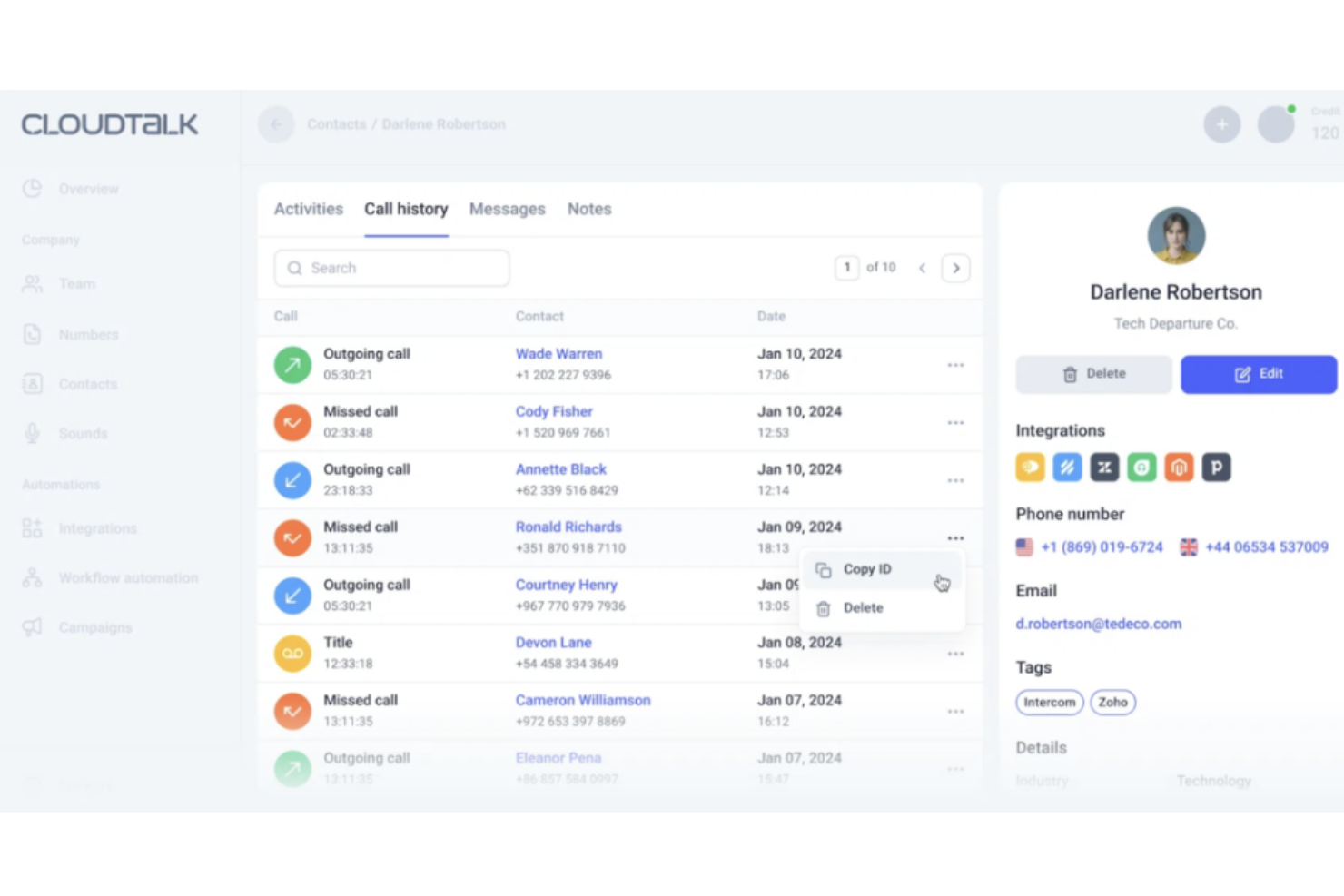
Keeping mobile sales reps aligned while they’re on the go takes more than a basic dialer, and that’s where CloudTalk fits in. Built for sales teams that rely on high call volumes and remote collaboration, it gives you advanced calling tools, real-time analytics, and international coverage in one platform. If your team needs better visibility into conversations and more control over outbound performance from anywhere, CloudTalk offers a focused approach to mobile sales software.
Why I Picked CloudTalk
I picked CloudTalk because of its advanced outbound calling capabilities designed for high-volume sales teams. With its power dialer and smart dialer, your reps can move through contact lists faster while automatically logging calls and outcomes. The platform’s call monitoring tools—like live call listening and call whisper—let you coach reps in real time, even when they’re working remotely. Combined with detailed call analytics and reporting, you get direct insight into rep activity and campaign performance without relying on manual updates.
CloudTalk Key Features
Aside from its AI capabilities and global reach, I also found several other features that enhance CloudTalk's utility for mobile sales:
- International numbers: You can purchase local, national, and toll-free numbers in 160+ countries to build a local presence for global sales outreach.
- Call recording: Every inbound and outbound call can be automatically recorded and stored for quality review and compliance tracking.
- Interactive voice response (IVR): You can set up custom call flows to route prospects to the right rep or team without manual intervention.
- SMS messaging: Reps can send and receive text messages directly within the platform to follow up with leads and confirm details without switching tools.
CloudTalk Integrations
Integrations include Salesforce, HubSpot, Zoho, Pipedrive, Zendesk, Intercom, Freshdesk, Shopify, Slack, and Monday.com.
Pros and Cons
Pros:
- Provides live call monitoring and whisper coaching.
- Supports international numbers in 160+ countries.
- Offers power dialer for faster outbound calling.
Cons:
- Setup of complex IVR flows may take time.
- Analytics customization options can feel limited.
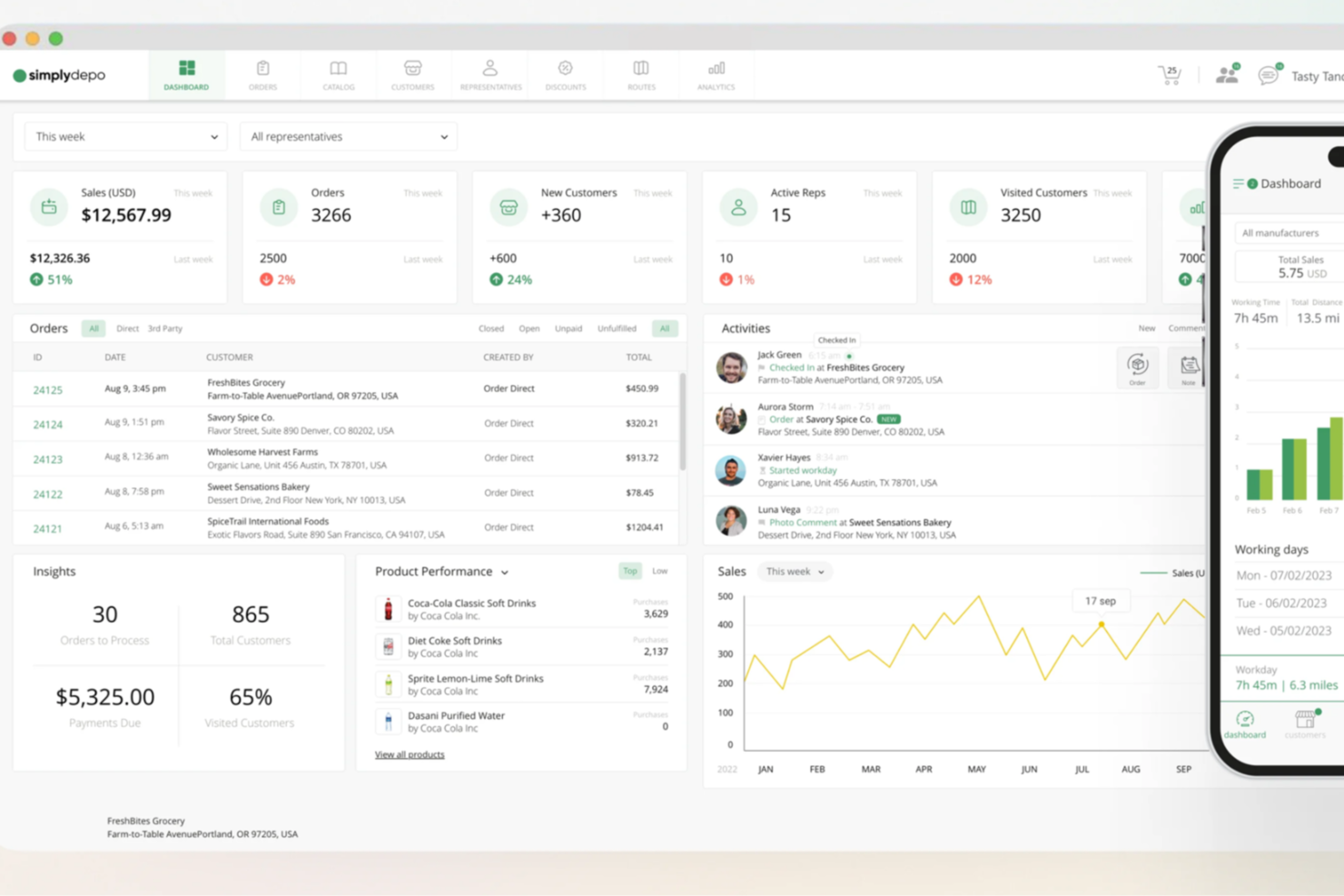
For businesses navigating the fast-paced world of distribution and retail, SimplyDepo offers a mobile sales software solution that stands out by addressing key operational challenges. Tailored for startups and growing enterprises, this platform empowers brands, distributors, and merchandisers to streamline operations, enhance sales processes, and foster stronger customer relationships. With SimplyDepo, your team can experience improvements in efficiency and productivity, supported by tools that make retail execution and field sales management more effective.
Why I Picked SimplyDepo
I picked SimplyDepo because of its targeted focus on distribution and retail execution, which is crucial for businesses in these sectors. The platform's Sales Rep App is particularly appealing, offering field sales teams the tools they need to manage customer relationships and orders directly from their mobile devices. Additionally, the Route Accounting feature helps optimize logistics, ensuring your team spends more time on sales rather than on planning routes. These features, combined with a B2B Order Portal, tackle common operational challenges and support business growth.
SimplyDepo Key Features
I also found several other features that make SimplyDepo a valuable tool for mobile sales:
- Retail Execution Tools: These tools help your team manage in-store activities, ensuring that products are displayed correctly and promotions are executed as planned.
- Field Sales Empowerment: Equip your sales team with mobile tools to manage orders, access customer data, and maintain communication with the home office.
- Distribution Management: This feature provides a comprehensive view of inventory and distribution channels, allowing for better decision-making and resource allocation.
- CRM for Distributors: A specialized CRM that helps manage distributor relationships, track sales performance, and identify growth opportunities.
SimplyDepo Integrations
Integrations include Stripe, Twilio SendGrid, ShipStation, and QuickBooks.
Pros and Cons
Pros:
- Route planning and territory mapping
- Integrated CRM for account tracking
- Built-in B2B order management system
Cons:
- No transparent API documentation
- Limited advanced reporting customization

ZoomInfo
Best for pushing profiles and data from your phone to your CRM

The ZoomInfo SalesOS mobile app is a comprehensive tool that offers the same functionality as a desktop app in your back pocket. This app ensures you have access to B2B intelligence, allows you to sync prospect insights to your calendar, and helps you push customer and business profiles from your mobile device to your cloud-based CRM.
Why I picked ZoomInfo: The mobile app from this platform deserves a spot on my list because you can get and share information with the rest of your CRM on-the-go. Build last-minute talking points from new analytics data, export customer phone numbers to and from your CRM, and call leads and customers right from the app.
ZoomInfo Standout Features and Integrations
Standout features include sync prospect data to your calendar app or to your CRM and overviews with profiles of every client available on your phone.
Integrations include Bullhorn, Dynamics 365, Google Analytics 360, HubSpot CRM, JobDiva, Marketo, Pipedrive, Salesforce Sales Cloud, Slack, and Zoho CRM.
Pros and Cons
Pros:
- Simple to access client information
- Easy to push data to your CRM
- Intuitive navigation on the app
Cons:
- Limited customization for dashboards
- Can be difficult to bulk edit accounts

Fluix
Best for medium to large field teams that handle utilities, construction, and pest control

Designed for teams of over 10 people, Fluix is a communication and document management platform that streamlines the flow between your mobile workforce, back office, and customers. This platform was built to automate inspections, checklists, work orders, and audits while onsite.
Why I picked Fluix: The thing that caught my eye about Fluix was the client-tracking features they offer, like the ability to add photos, annotations, and geotags to a client profile when online or offline. The platform can also send out real-time alerts in case of emergencies to ensure home base is never disconnected from the field team.
Fluix Standout Features and Integrations
Standout features include centralized reports updated on a regular schedule that are accessible from anywhere and automated export of data to your analytics tools to merge field operations and inspections.
Integrations include Asana, Box, Dropbox Business, Google Drive, Google Workspace, Microsoft 365, Monday.com, OneDrive, Trello, and Zapier.
Pros and Cons
Pros:
- Simple to set up and implement
- Paperless transition for traditionally paper-heavy industries
- Very user-friendly interface
Cons:
- Limited customizability for toolbars
- No mobile app — only portal accessibility

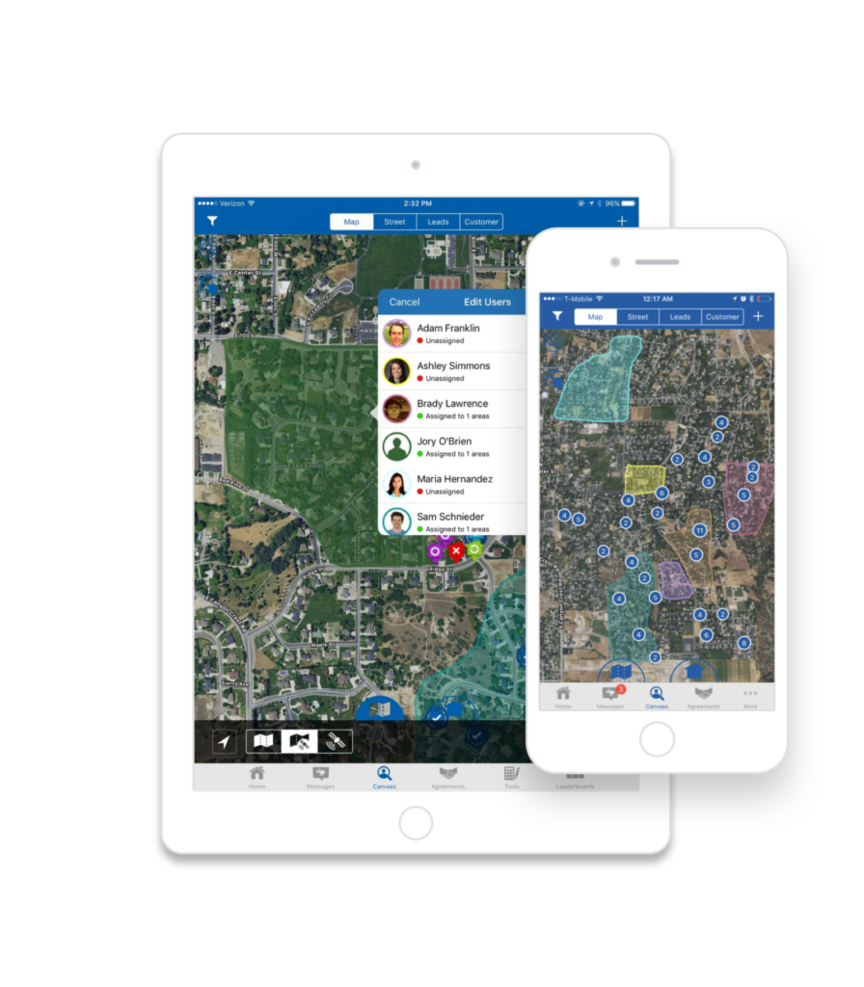
SalesRabbit is a mobility-focused sales tracking and lead management platform that’s designed for door to door field sales, including HVAC, contractor services, pest control, roofing, and pool maintenance. Your reps will have mobile access to tools that assess and analyze key behaviors to enhance motivation and increase efficiency.
Why I picked SalesRabbit: This tool caught my eye because it offers home office more visibility into field team activity. With additional information on where and how reps are operating, you can more easily rate and assign territories, monitor service progress, map out customers, and review historical data.
SalesRabbit Standout Features and Integrations
Standout features include lead generation that uses neighborhood buyer scores and new mover data, automated lead routing through the mobile app, and legally binding e-signing on any device.
Integrations include AccuLynx, Evolve, JobNimbus, Kixie PowerCall, MarketSharp, PestPac, Salesforce Sales Cloud, Thryx, TopBuilder, and Zapier.
Pros and Cons
Pros:
- Great customer support team
- Free plan is available
- Robust self-service help tools and training
Cons:
- Setting up new employees takes some practice
- Android and Apple OS have slightly different performance

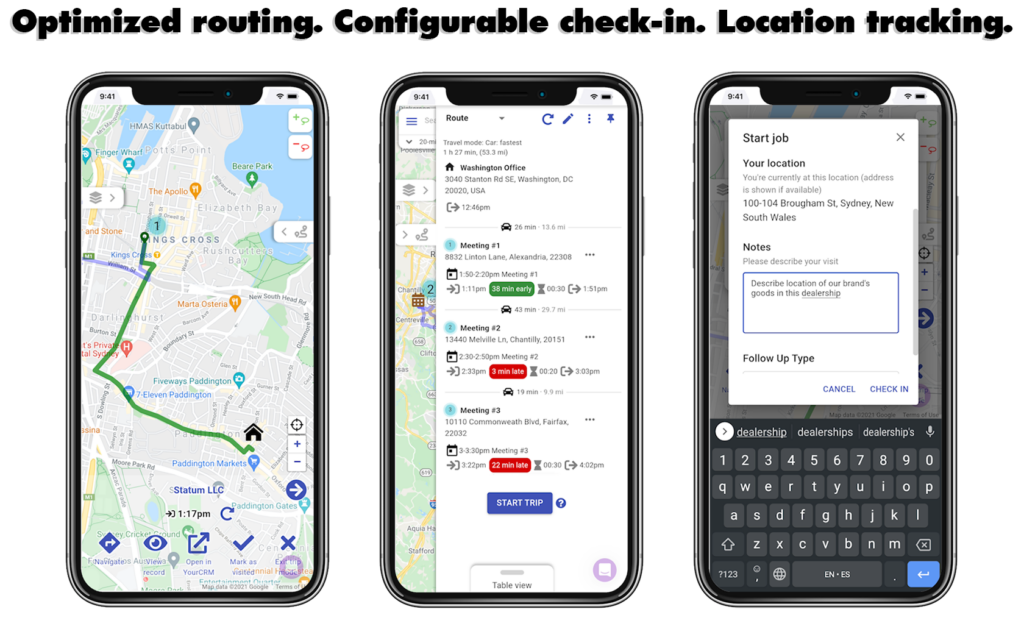
As an all-in-one sales platform that targets rep adoption and automated data capture, Zendesk Sell also prioritized the development of a mobile app that allows your team to access their essential tools from anywhere. The app is available for download in iOS in the Apple store and for Androids in the Google Play store.
Why I picked Zendesk Sell: What really sold me on this mobile app was the route optimization feature. Your reps can plan out their day more strategically when they know which route will take them between clients fastest, especially when combined with Mapsly. Zendesk Sell route optimization uses geolocation and traffic patterns to deliver better navigation.
Zendesk Sell Standout Features and Integrations
Standout features include configurable check-in on mobile that allows reps to save visit notes and outcomes, location tracking for every member of your sales team, and real-time activity tracking.
Integrations include Active Campaign, Constant Contact, Gmail, Google Drive, HubSpot Marketing Hub, LiveChat, Mailchimp, Slack, Trello, and Zapier.
Pros and Cons
Pros:
- Simple to set up with an intuitive user interface
- Lower cost of ownership with no hidden fees for maintenance
- Unified platform for prospecting, engagement, lead gen, and communication
Cons:
- Occasional downtime for updates
- Some add-ons are only available for top tier plans

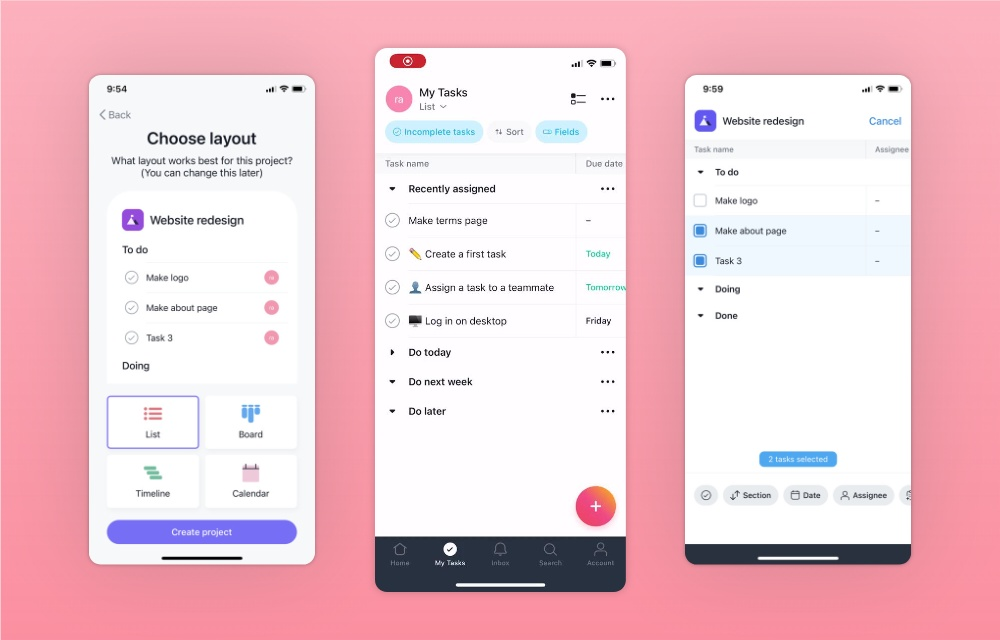
This work management platform is designed to coordinate your teams to ensure everything from strategic initiatives to daily tasks are aligned across the entire organization. With Asana, you have access to sales tools, marketing essentials, IT needs, and operations management. Asana also offers a phone app that has the exact same functionality as the web app.
Just like our web app, you can use it to create tasks and projects, have conversations about them, and get updates on their progress when you’re on and offline.
Why I picked Asana: This tool made my list because their Android mobile app is actually a winner of Google’s Material Design Award. Work on your device to create projects, manage tasks, collaborate on work, communicate with coworkers, and get updates right on your device – all in an intuitive, sleek app that’s engaging and exciting to use.
Asana Standout Features and Integrations
Standout features include milestone tracking to visualize the most important checkpoints in your sales process and time tracking so you can see exactly how much time employees are spending on each client or task.
Integrations include Box, Dropbox, GitHub, Google Drive, Harvest, Instagantt, Microsoft Teams, Okta, Slack, Splunk, and Tableau. Asana also offers a robust REST API.
Pros and Cons
Pros:
- Focus on cross-team collaboration
- Award-winning mobile design
- Mobile app is available for free plans
Cons:
- Email updates can feel redundant
- Tasks must be assigned to show up on to-do lists

This work management platform is designed to provide your team with organizational and communication tools to enhance their work processes wherever they are. Trello has mobile solutions for remote workers and traveling teams to ensure no project gets left behind with daily to-do lists, progress tracking on dashboards, and team communication on mobile.
Why I picked Trello: The main reason I chose this platform is because of the frequent updates and support the team provides for their mobile app, the newest of which is a custom fields update. Now, you can create new fields or update, input, and edit any existing field all from your phone.
Trello Standout Features and Integrations
Standout features include 50 custom or preset fields available per board, board filtering that supports drop-down lists, text, and checkbox fields, and drag-and-drop functionality on mobile to reorder tasks, cards, and fields.
Integrations include Costello, EasyQA, Focus|Project, GLIDR, Newton Mail, Slack, Toggl, WebWork Time Tracker, and YoCo Board.
Pros and Cons
Pros:
- Low barrier for entry
- Intuitive dashboards for better visualizations
- Impressive ease of use
Cons:
- Designed only for simple workflow management
- Limited built-in reporting and analytics

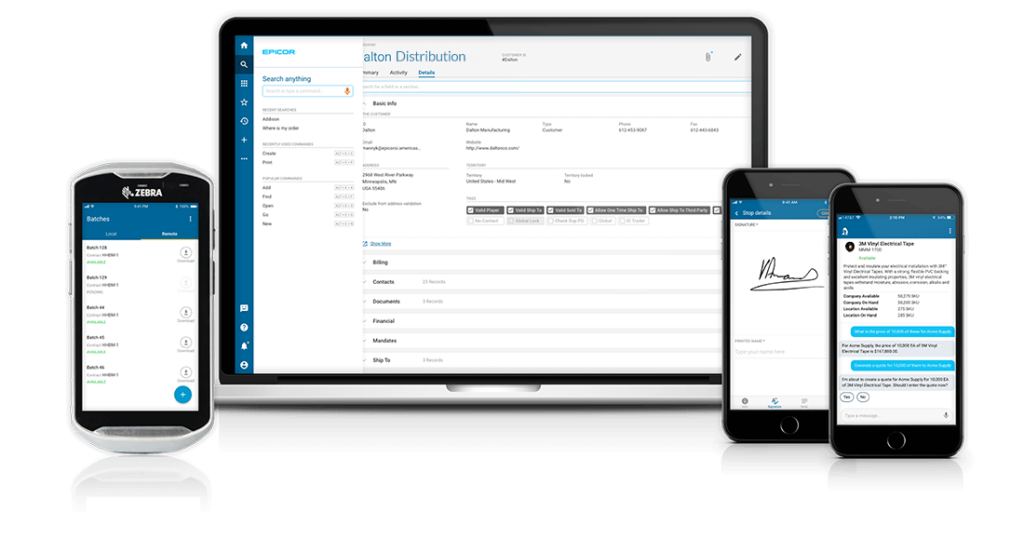
Epicor designed a browser-based app that works on any device to ensure your team members can stay productive whether they’re on the road, in the warehouse, or out in the field. Prophet 21 provides functionality that allows your team to build sales pipelines, address warehouse operations, and communicate with customers.
Why I picked Prophet 21: I like this platform because it offers solutions for more than just sales needs. You can also enjoy access to essential warehouse management features, including accepting purchase orders, cross docking, printing orders, and completing inventory reviews.
Prophet 21 Standout Features and Integrations
Standout features include account access and sales order entry through mobile, warehouse management for distributors, and mobile proof of delivery for delivery drivers.
Integrations include 2W Technologies Inc, Algorithm Inc, Comtec Solutions, Datanational Corporation, EpiCenter, Laminin Solutions, Mayan Technologies, Microsoft Azure Cloud. Prophet 21 also offers RESTful API integrations.
Pros and Cons
Pros:
- Robust seminars and classes to learn advanced features
- Easy to learn and navigate
- Constantly innovating to meet your changing needs
Cons:
- Customer support can be hard to reach
- Frequent updates cause lag issues
Other Mobile Sales Software
Here are some additional mobile sales software options that didn’t make it onto my shortlist, but are still worth checking out:
- Mailshake
For improving your cold email outreach
- Insightly
For easy integration that supports growth
- Spotio
For keeping track of leads and reps in the field
- monday CRM
Lead capture and management on a mobile app
- Salesforce CRM
Mobile sales software with cloud accessibility for small businesses
- ClickUp
For mobile project management to connect with the entire team
- Basecamp
For regular notifications and check-ins on any device
- Capsule
Online CRM with responsive design for readability on any device
- Nutshell
All-in-one mobile CRM for B2B marketing and sales
- Pipedrive
For pipeline and deal visibility on mobile phones and tablets


Mobile Sales Software Selection Criteria
When selecting the best mobile sales software to include in this list, I considered common buyer needs and pain points like managing customer interactions efficiently and accessing sales data on-the-go. I also used the following framework to keep my evaluation structured and fair:
Core Functionality (25% of total score)
To be considered for inclusion in this list, each solution had to fulfill these common use cases:
- Manage customer relationships
- Track sales pipelines
- Access sales data remotely
- Automate routine tasks
- Generate sales reports
Additional Standout Features (25% of total score)
To help further narrow down the competition, I also looked for unique features, such as:
- Customizable dashboards
- AI-driven sales insights
- Offline functionality
- Advanced analytics tools
- Personalized customer interactions
Usability (10% of total score)
To get a sense of the usability of each system, I considered the following:
- Intuitive navigation
- Clean interface design
- Minimal learning curve
- Quick access to key features
- Responsive design across devices
Onboarding (10% of total score)
To evaluate the onboarding experience for each platform, I considered the following:
- Availability of training videos
- Interactive product tours
- Access to templates
- Chatbot assistance
- Webinars for new users
Customer Support (10% of total score)
To assess each software provider’s customer support services, I considered the following:
- 24/7 support availability
- Multiple support channels
- Response time to inquiries
- Access to a knowledge base
- Quality of support resources
Value For Money (10% of total score)
To evaluate the value for money of each platform, I considered the following:
- Competitive pricing
- Features included in basic plans
- Scalability with business growth
- Cost versus benefits
- Discounts for annual billing
Customer Reviews (10% of total score)
To get a sense of overall customer satisfaction, I considered the following when reading customer reviews:
- Overall satisfaction ratings
- Feedback on ease of use
- Comments on customer service
- Reports on feature effectiveness
- User experiences with updates and support
How to Choose Mobile Sales Software
It’s easy to get bogged down in long feature lists and complex pricing structures. To help you stay focused as you work through your unique software selection process, here’s a checklist of factors to keep in mind:
| Factor | What to Consider |
|---|---|
| Scalability | Will the software grow with your business? Consider if it can handle increased data and user load as your team expands. Look for flexible pricing plans. |
| Integrations | Does it connect with your existing systems? Check if it supports your CRM, email, and other tools to ensure smooth workflows. |
| Customizability | Can you tailor it to your needs? Evaluate if you can modify workflows and dashboards to fit your processes without additional costs. |
| Ease of use | Is it simple for your team to adopt? Ensure the interface is intuitive and requires minimal training. Test with a demo if possible. |
| Implementation and onboarding | How quickly can you get started? Review setup time, available training resources, and support during the transition. |
| Cost | Does it fit your budget? Compare pricing models and total costs, including hidden fees or charges for extra features. |
| Security safeguards | Are your data and privacy protected? Verify the software's compliance with data regulations and its security certifications. |
| Support availability | Is help readily available when needed? Check for 24/7 support, response times, and the quality of resources like FAQs and chat support. |
What Is Mobile Sales Software?
Mobile sales software is a tool that lets you handle sales tasks right from your phone or tablet. Sales reps use it to check customer info, update their pipeline, send quotes, and chat with clients or teammates on the go. It helps you stay in the loop, make fast decisions, and close deals faster—no office needed.
Features
When selecting mobile sales software, keep an eye out for the following key features:
- Contact management: Organizes and stores customer information, making it easy to access and update client details.
- Sales tracking: Monitors sales progress and pipeline stages, helping you stay on top of deals and opportunities.
- Real-time data access: Provides up-to-date information, allowing you to make informed decisions quickly.
- Task automation: Automates routine tasks like follow-ups and reminders, freeing up time for more important activities.
- Customizable dashboards: Allows you to tailor views to fit your workflow and highlight key metrics.
- Integration capabilities: Connects with existing tools like CRM, email, and calendars for a cohesive workflow.
- Mobile accessibility: Ensures you can work from anywhere, using a smartphone or tablet to manage sales activities.
- Reporting and analytics: Generates insights and reports to help you analyze performance and refine strategies.
- E-signature support: Facilitates quick and secure signing of documents, speeding up the sales process.
- Security safeguards: Protects sensitive data with encryption and compliance measures to ensure privacy.
Benefits
Implementing mobile sales software provides several benefits for your team and your business. Here are a few you can look forward to:
- Increased productivity: Automating tasks and providing real-time data allows your team to focus more on selling and less on admin work.
- Better customer engagement: With contact management features, you can personalize interactions and build stronger relationships with clients.
- Improved decision-making: Access to up-to-date sales tracking and analytics helps you make informed choices quickly.
- Enhanced flexibility: Mobile accessibility ensures your team can work efficiently from anywhere, whether in the office or on the road.
- Streamlined collaboration: Integration capabilities connect your tools, making it easier for team members to collaborate and share information.
- Faster sales cycles: E-signature support and task automation speed up processes, helping you close deals more quickly.
- Data security: Security safeguards protect sensitive information, giving you peace of mind about data privacy and compliance.
Costs & Pricing
Selecting mobile sales software requires an understanding of the various pricing models and plans available. Costs vary based on features, team size, add-ons, and more. The table below summarizes common plans, their average prices, and typical features included in mobile sales software solutions:
Plan Comparison Table for Mobile Sales Software
| Plan Type | Average Price | Common Features |
|---|---|---|
| Free Plan | $0 | Basic contact management, limited sales tracking, and basic reporting. |
| Personal Plan | $10-$30/user/month | Advanced contact management, email integration, and mobile access. |
| Business Plan | $50-$100/user/month | Full sales pipeline tracking, task automation, and customizable dashboards. |
| Enterprise Plan | $150-$300/user/month | Advanced analytics, integration with CRM systems, and enhanced security features. |
Mobile Sales Software FAQs
Here are some answers to common questions about mobile sales software:
What is the difference between mobile sales software and CRM software?
Mobile sales software focuses on enabling sales activities on-the-go, often with mobile-specific features like GPS tracking and offline access. CRM software, on the other hand, is broader and manages all customer interactions across the business. A mobile sales tool might integrate with a CRM to enhance its capabilities. If you need field-specific features, consider mobile sales software; for comprehensive customer management, a CRM might be better.
Can mobile sales software work offline?
Yes, many mobile sales software solutions offer offline capabilities. This is useful if your team often works in areas with poor internet connectivity. Offline features typically include data entry and access to cached information. Once back online, the software syncs data automatically. Check if the solution you’re considering supports offline use and what limitations apply.
Do I need technical knowledge to use mobile sales software?
No, most mobile sales software is designed for ease of use without requiring extensive technical skills. However, some initial setup might be needed, especially for integrations with other tools. Vendors often provide resources like tutorials and support to help you get started. It’s useful to have someone in your team familiar with basic tech troubleshooting.
How do you drive user adoption among a field sales team?
Getting your reps to actually use mobile sales software often comes down to making it simple and relevant for them. Involve your team early, pick a tool that aligns with their workflow, and offer hands-on training rather than just slides. Monitor usage rates and follow up quickly if adoption is lagging to understand the blockers and reduce resistance.
In what ways does mobile sales software impact the sales-manager role?
Sales managers typically need to shift from tracking only in-office metrics to understanding how their team performs in the field. That means reviewing activity logs from mobile devices, spot-checking accuracy of inputs, coaching reps on mobile best practices, and adjusting expectations (e.g., number of field visits vs desk work). Managers will also need clearer dashboards and alerting to identify reps who drop off usage.
What’s Next:
If you're in the process of researching mobile sales software, connect with a SoftwareSelect advisor for free recommendations.
You fill out a form and have a quick chat where they get into the specifics of your needs. Then you'll get a shortlist of software to review. They'll even support you through the entire buying process, including price negotiations.