
14 Best Free Sales Management Software Reviewed in 2026

10 Best Free Sales Management Software Shortlist
Here's my pick of the 10 best software from the 14 tools reviewed.


Running a successful sales operation can be tough, especially when budgets are tight. You need tools that help your team manage leads, track performance, and close deals without breaking the bank. Whether you're a small business owner or part of a growing team, finding the right free solution can make all the difference. That's where free sales management software comes in.
In this article, I'll share my top picks for free sales management software. I'll dive into what each tool offers and how it can address your team's unique challenges. Let's find the perfect fit for your sales needs.
Why Trust Our Software Reviews
We’ve been testing and reviewing RevOps software since 2022. As RevOps leaders ourselves, we know how critical and difficult it is to make the right decision when selecting software.
We invest in deep research to help our audience make better software purchasing decisions. We’ve tested more than 2,000 tools for different RevOps use cases and written over 1,000 comprehensive software reviews. Learn how we stay transparent & our software review methodology.
Best Free Sales Management Software Summary
While all of the sales management software in my list have free offerings, they also have paid plans should you wish to upgrade. Here are the base costs for each of the tools that made it onto my shortlist:
| Tool | Best For | Trial Info | Price | ||
|---|---|---|---|---|---|
| 1 | Best for marketing automation tools | Free plan + free demo available | From $11.04/user/month (billed biennially) | Website | |
| 2 | Best for small business CRM needs | Free plan available | From $9/month (billed annually) | Website | |
| 3 | Best for Gmail integration | 14-day free trial available | From $49/user/month (billed annually) | Website | |
| 4 | Best for team collaboration tools | 15-day free trial + free plan + free demo available | From $49/month (billed annually) | Website | |
| 5 | Best for extensive app integrations | 30-day free trial + free plan + free demo available | From $25/user/month | Website | |
| 6 | Best for SMB sales pipeline management | Free demo + free plan available | From $39.99/user/month (billed annually) | Website | |
| 7 | Best for Microsoft ecosystem users | Free plan available | From $14/user/month (billed annually) | Website | |
| 8 | Best for Outlook integration | Free trial + free plan available | From $18/user/month (billed annually) | Website | |
| 9 | Best for basic CRM with no per-user cost | Free plan available | From $10/month | Website | |
| 10 | Best for simple contact management | 14-day free trial + free plan available | From $18/user/month (billed annually) | Website |
-

Pipedrive CRM
Visit WebsiteThis is an aggregated rating for this tool including ratings from Crozdesk users and ratings from other sites.4.4 -
Creatio CRM
Visit WebsiteThis is an aggregated rating for this tool including ratings from Crozdesk users and ratings from other sites.4.7 -
monday CRM
Visit WebsiteThis is an aggregated rating for this tool including ratings from Crozdesk users and ratings from other sites.4.6





Best Free Sales Management Software Review
Below are my detailed summaries of the best free sales management software that made it onto my shortlist. My reviews offer a detailed look at the key features, pros and cons, integrations, and ideal use cases of each tool to help you find the best one for you. While some of these tools offer a completely free version, others offer a free trial period. I’ve added a note about what’s free in each of my reviews.
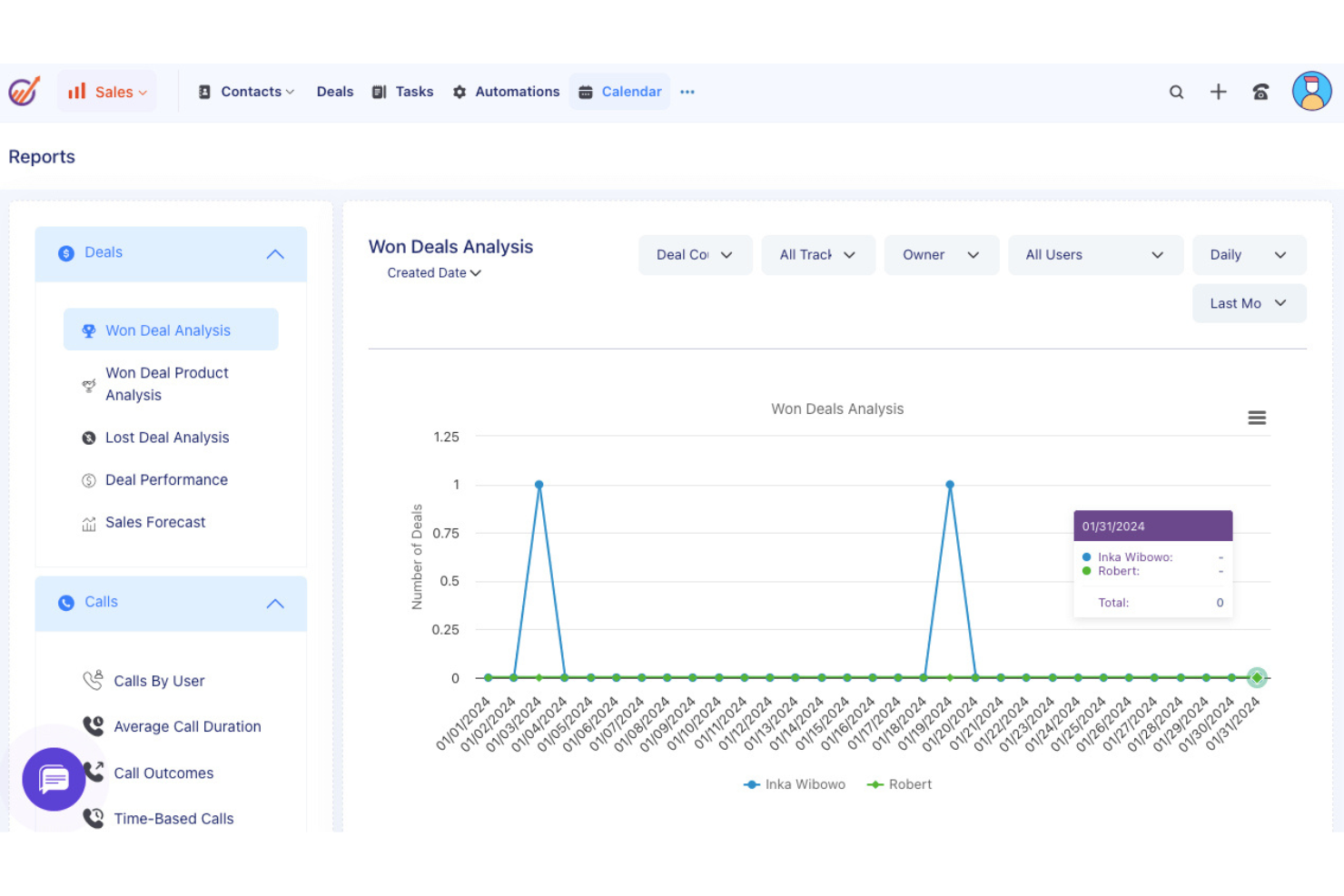
EngageBay is designed for small and medium-sized businesses, offering tools for marketing automation, CRM, and customer support. It aims to help businesses manage their sales and marketing efforts in one unified platform.
Why I picked EngageBay: EngageBay's free offering includes essential CRM and marketing automation tools, such as email marketing, lead management, and contact segmentation.
Your team can also access basic helpdesk tools and landing page builders. Its all-in-one approach makes it a versatile choice for businesses aiming to simplify their operations.
Standout features and integrations:
Features include a landing page builder that helps create professional pages without coding, a helpdesk that supports customer inquiries, and a form builder for capturing leads. These features ensure your team can manage sales and marketing tasks efficiently.
Integrations include Zapier, Mailchimp, Shopify, HubSpot, Stripe, PayPal, QuickBooks, Xero, Twilio, SendGrid, and more.
What's free? EngageBay offers a free-forever plan with limitations on emails sent, contacts stored, and the number of users, making it ideal for small teams.
Pros and Cons
Pros:
- Form builder for lead capture
- Landing page builder available
- Includes basic helpdesk tools
Cons:
- Learning curve for new users
- Restrictions on email sends
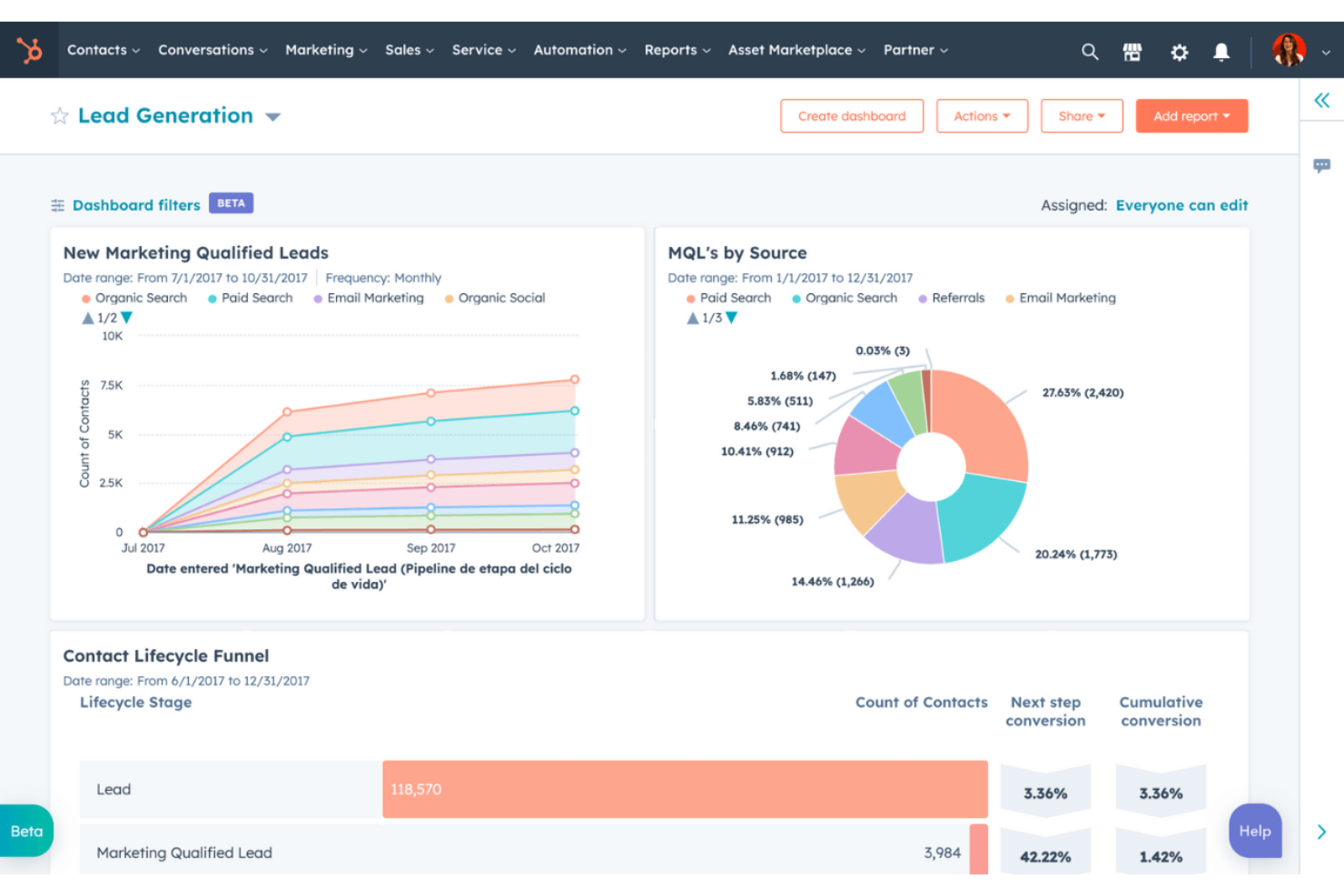
HubSpot is one of the best free CRM platforms designed for businesses of all sizes, offering tools for marketing, sales, and customer service. It helps teams manage leads, automate marketing efforts, and support customers efficiently.
Why I picked HubSpot: The tool’s free offering includes essential functionalities like contact management and deal pipelines. What sets HubSpot CRM apart is the extensive range of free marketing tools, such as email marketing and ad management.
Your team can also benefit from live chat and basic reporting features. Its vast array of features makes it a good option for small businesses looking to reinforce their sales efforts.
Standout features and integrations:
Features include customizable dashboards that provide insights into sales performance, email templates that save time on outreach, and task automation that boosts productivity. The ability to track customer interactions in one place ensures your team stays informed and aligned.
Integrations include Gmail, Outlook, Shopify, Zapier, Slack, Meta Ads, LinkedIn, WordPress, Mailchimp, Zoom, Salesforce, and more.
What's free? HubSpot offers a free-forever plan with limitations on advanced features and user seats. Users can access basic CRM tools and certain marketing functionalities without a time limit.
Pros and Cons
Pros:
- Task automation included
- Email tracking available
- User-friendly interface
Cons:
- Restricted reporting capabilities
- Advanced features require upgrades

Streak is a CRM tool within Gmail, ideal for small to medium-sized businesses looking to manage sales directly from their inbox. It helps users track leads, manage customer relationships, and automate workflows without leaving their email.
Why I picked Streak: Streak emphasizes its integration with Gmail, allowing your team to manage sales processes within the familiar email environment. The tool’s free version includes features like pipeline management, email tracking, and task reminders.
Your team can also utilize customizable fields to tailor the CRM to their specific needs. This native integration with Gmail makes it a convenient choice for teams that rely heavily on email communication.
Standout features and integrations:
Features include email tracking that provides insights on when emails are opened, task reminders that keep your team on schedule, and mail merge for sending personalized emails in bulk. These features enhance your team's ability to manage communications.
Integrations include Google Workspace, Mailchimp, Zapier, Slack, Calendly, LinkedIn, and more.
What's free? Streak offers a 14-day free trial with basic CRM functionalities, suitable for personal use or small teams with limited needs.
Pros and Cons
Pros:
- Prioritize follow-ups easily
- Customizable pipeline fields
- Direct Gmail integration
Cons:
- Less competitive than other tools
- Restricted to Gmail users
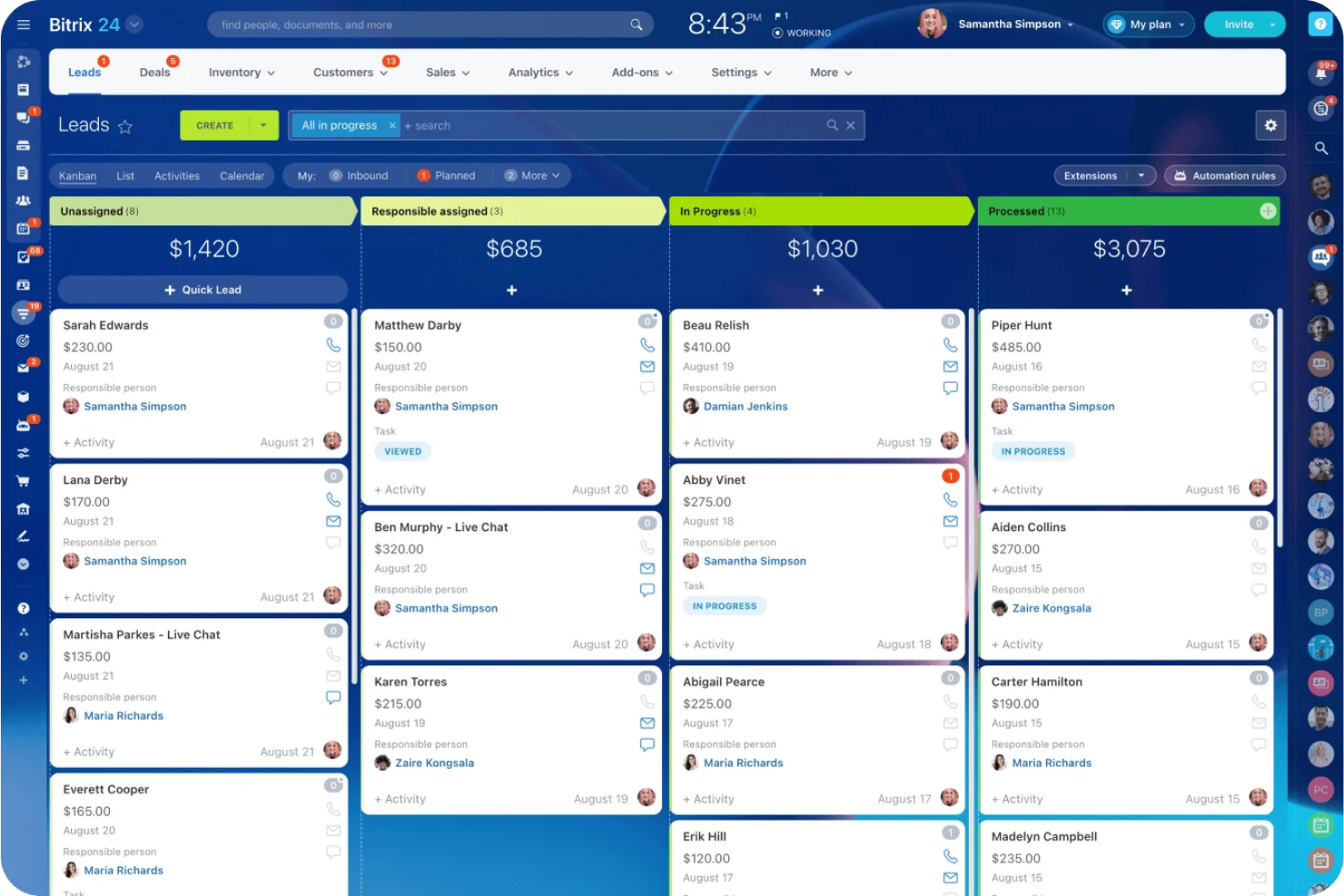
Bitrix24 is an all-in-one sales management platform designed for businesses of all sizes, offering tools for lead management, sales automation, and performance tracking. It helps teams manage the entire sales cycle, from lead generation to customer retention, using a single platform.
Why I picked Bitrix24: Bitrix24's free account provides 35 tools, including lead and deal management, omnichannel communication, and collaboration tools. Your team can use the platform's analytics, mobile CRM capabilities, and task management tools without any cost. Its versatility and variety of features make it a valuable tool for enhancing sales performance.
Standout features and integrations:
Features include task and project management that helps streamline your team's efforts, employee performance tracking that provides insights into team productivity, and website creation features that support marketing initiatives. These features ensure your team can manage sales and marketing effectively.
Integrations include Google Workspace, Microsoft Office 365, Zoho CRM, Mailchimp, QuickBooks, Zoom, Trello, WordPress, Asana, and more.
What's free? Bitrix24 offers a free-forever plan with essential sales management features, making it accessible for businesses of all sizes.
Pros and Cons
Pros:
- Supports the entire sales cycle
- Available in cloud and self-hosted
- Over 35 free tools
Cons:
- Some integrations require additional setup
- Inconsistent customer support
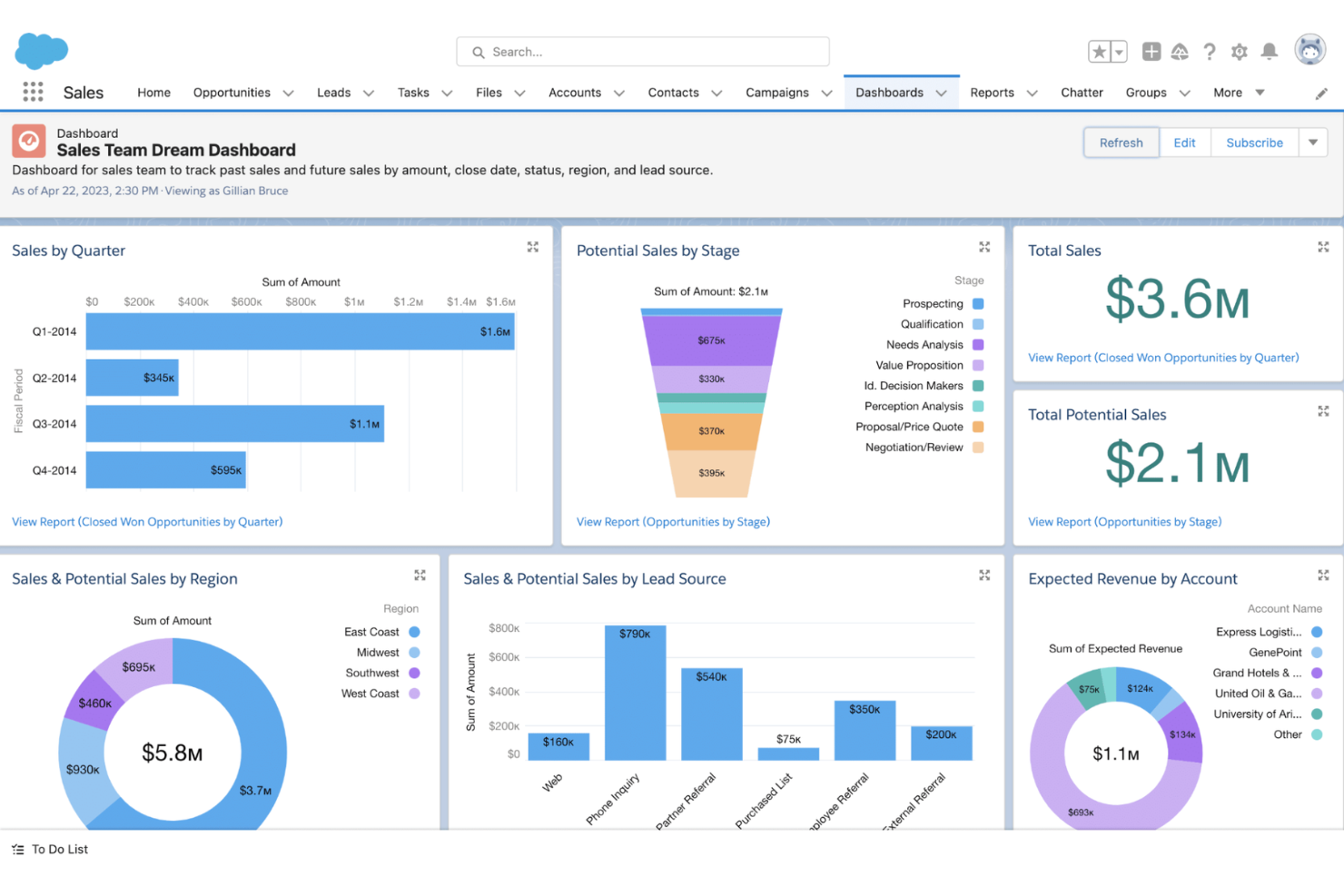
Salesforce is a cloud-based customer relationship management platform used by businesses of all sizes across many industries. It supports sales, service, marketing, and ecommerce teams by giving them tools to manage customer interactions, track leads, and automate processes.
Why I picked Salesforce: Salesforce's free trial gives your team access to Sales Cloud, which has features such as contact and account management, lead generation tracking, and mobile access. You can also use customizable dashboards and reports to monitor your pipeline. The built-in AI-powered tools let you set up task reminders and sales workflows.
Standout features and integrations:
Features include lead scoring and assignment rules, territory management, and forecasting tools. You can set up sales processes that match your team’s workflow and use Einstein Activity Capture to sync emails and calendar events. Sales paths guide reps through each stage, so they know what to do next.
Integrations include Slack, Google Workspace, Mailchimp, QuickBooks, Docusign, Dropbox, LinkedIn, and more.
What's free? Salesforce offers a 30-day free trial with access to Sales Cloud features for one user, with no long-term access after the trial expires.
Pros and Cons
Pros:
- Easy to add third-party apps
- Built-in AI sales tools
- Flexible reporting tools
Cons:
- Mobile features are more limited
- Hard to use without training
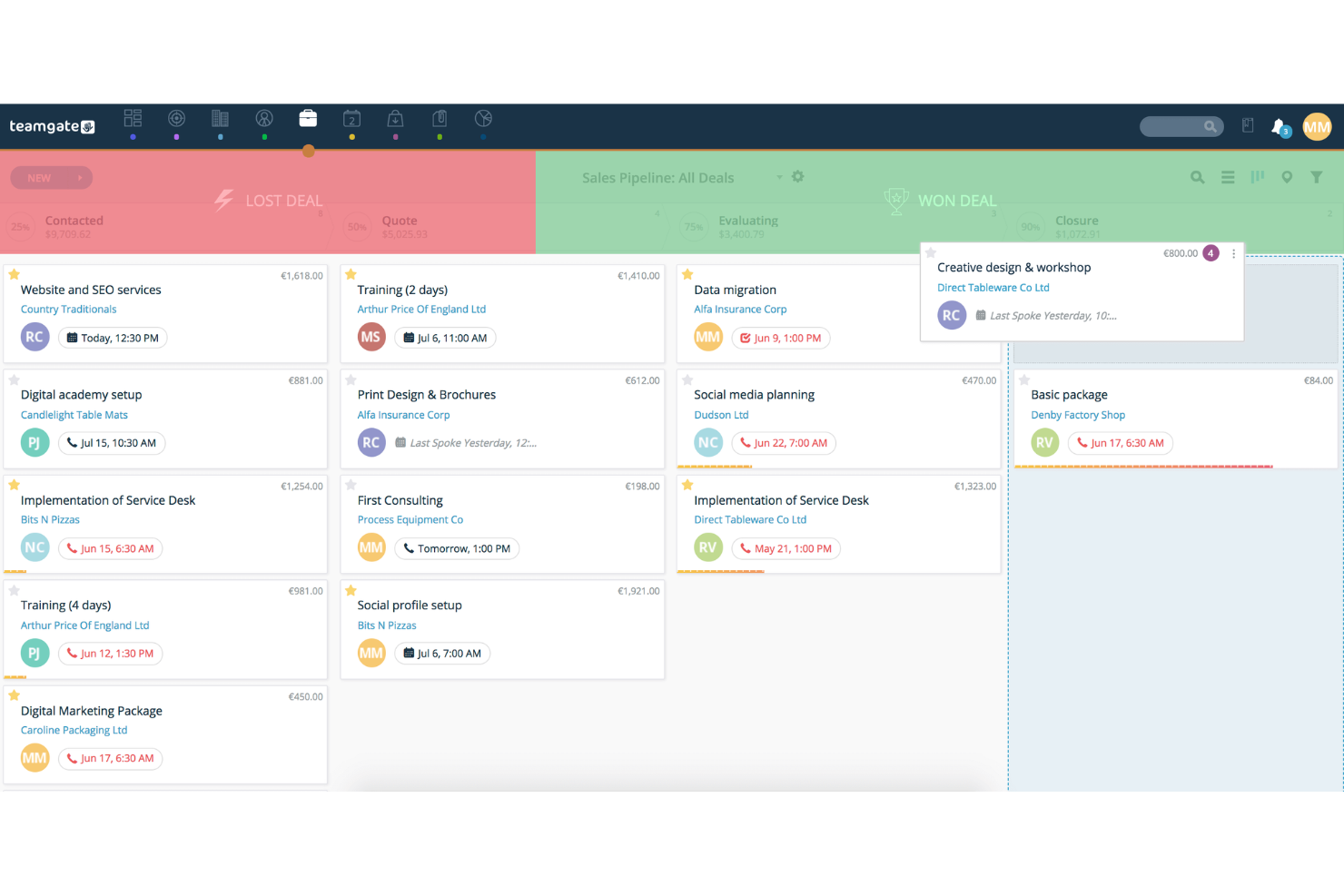
Teamgate is a sales CRM designed for small to medium-sized businesses, focusing on sales pipeline management and lead tracking. It helps teams manage leads, track sales activities, and improve their sales processes.
Why I picked Teamgate: Teamgate's free offering highlights its customizable sales pipeline management, supporting teams looking to strategically improve their sales processes. Its free version includes features like lead scoring, sales forecasting, and contact management. Its user-friendly interface makes it easy for sales teams to adopt and utilize.
Standout features and integrations:
Features include forecasting tools that help predict future sales, lead scoring to prioritize potential customers, and reporting features that provide insights into sales performance. These features enhance your team's ability to manage sales activities efficiently.
Integrations include Mailchimp, Google Workspace, Slack, Zapier, Xero, QuickBooks, LinkedIn, Microsoft Office 365, Dropbox, Trello, and more.
What's free? Teamgate offers a free plan for up to two users, allowing teams to explore the platform's basic contact and communication tools before committing.
Pros and Cons
Pros:
- Responsive customer support
- Lead scoring for prioritization
- Sales forecasting tools included
Cons:
- Limited integrations
- Initial setup can be complex


Dynamics 365 Sales is a CRM solution designed for organizations that already rely on Microsoft tools like Office 365, Teams, and Power BI. It supports sales teams that want tighter integration between customer data, collaboration tools, and reporting—without adopting a completely separate platform.
Why I picked Dynamics 365 Sales:
Dynamics 365 Sales stands out for teams embedded in Microsoft’s ecosystem. It connects sales data directly to Outlook, Teams, and Excel, reducing the need to switch between tools. Built on the Power Platform, it offers strong customization options for workflows, dashboards, and automation, making it a flexible choice for growing sales teams that need tailored processes rather than an off-the-shelf CRM.
While setup and configuration still require planning, it’s a solid option if your organization already uses Microsoft products and wants CRM data to live in the same environment.
Standout features and integrations:
Features include lead and opportunity management, customizable dashboards for sales forecasting, and automation through Power Automate to reduce manual tasks. Sales insights can be extended using Power BI for deeper reporting and pipeline visibility.
Integrations include Microsoft Outlook, Teams, Excel, Power BI, SharePoint, OneDrive, LinkedIn Sales Navigator, Azure, and the broader Dynamics 365 suite.
What's Free? Microsoft Dynamics 365 Sales does not offer a free-forever plan. However, you can try Dynamics 365 Sales at no cost with a 30-day free trial, which lets you explore its core CRM features, pipeline tools, and AI-driven insights before committing to a paid license.
Pros and Cons
Pros:
- Strong reporting with Power BI
- Highly customizable via Power Platform
- Deep integration with Microsoft 365 and Teams
Cons:
- No free plan
- Configuration and customization require Power Platform knowledge


eWay-CRM is integrated with Microsoft Outlook, aimed at small to medium-sized businesses. It helps teams manage customer relationships, sales, and marketing campaigns directly from their email client.
Why I picked eWay-CRM: eWay-CRM offers free CRM functionalities that integrate with Outlook, making it highly accessible for teams already using this platform. Features like contact management, sales tracking, and project management are available on the free plan.
Your team can also enjoy task and communication management, and the ability to integrate with Outlook. This is ideal for businesses seeking a CRM that fits naturally into their existing workflow.
Standout features and integrations:
Features include project management tools that help organize tasks and timelines, document management that stores important files in one place, and marketing automation to organize campaigns. These features ensure your team can easily manage their sales and marketing efforts.
Integrations include Microsoft Outlook, Microsoft Office 365, Microsoft Teams, SharePoint, Zapier, QuickBooks, WordPress, LinkedIn, and more.
What's free? eWay-CRM offers a free-forever plan with limitations on storage and some advanced features, making it suitable for small teams.
Pros and Cons
Pros:
- Unlimited users
- Document management capabilities
- Includes project management tools
Cons:
- Performance issues
- Slow loading in Outlook


FreeCRM is designed for businesses of all sizes, particularly small businesses in industries such as automotive, real estate, and professional services. It offers tools for tracking sales activities, managing customer interactions, and executing marketing campaigns.
Why I picked FreeCRM: FreeCRM's offering includes sales pipeline tracking, allowing your team to manage deals and customer interactions effectively. Key features like contact management and marketing automation are also available.
The platform supports task tracking and targeted marketing campaigns, supporting your team's productivity efforts. Its customizable dashboard provides real-time insights, making it a valuable tool for improving sales performance.
Standout features and integrations:
Features include a customizable dashboard that lets you monitor tasks and events in real time, deal and sales pipeline management tools that keep your team organized, and call-tracking software that helps manage customer interactions.
Integrations include Zapier, WhatsApp, Facebook, Twitter, Google Workspace, QuickBooks, Amazon AWS, and more.
What's free? FreeCRM offers a free-forever plan with essential CRM features, making it accessible for businesses of all sizes.
Pros and Cons
Pros:
- Secure cloud services
- Marketing automation features
- Real-time task monitoring
Cons:
- Limited customization
- Low storage on the free plan
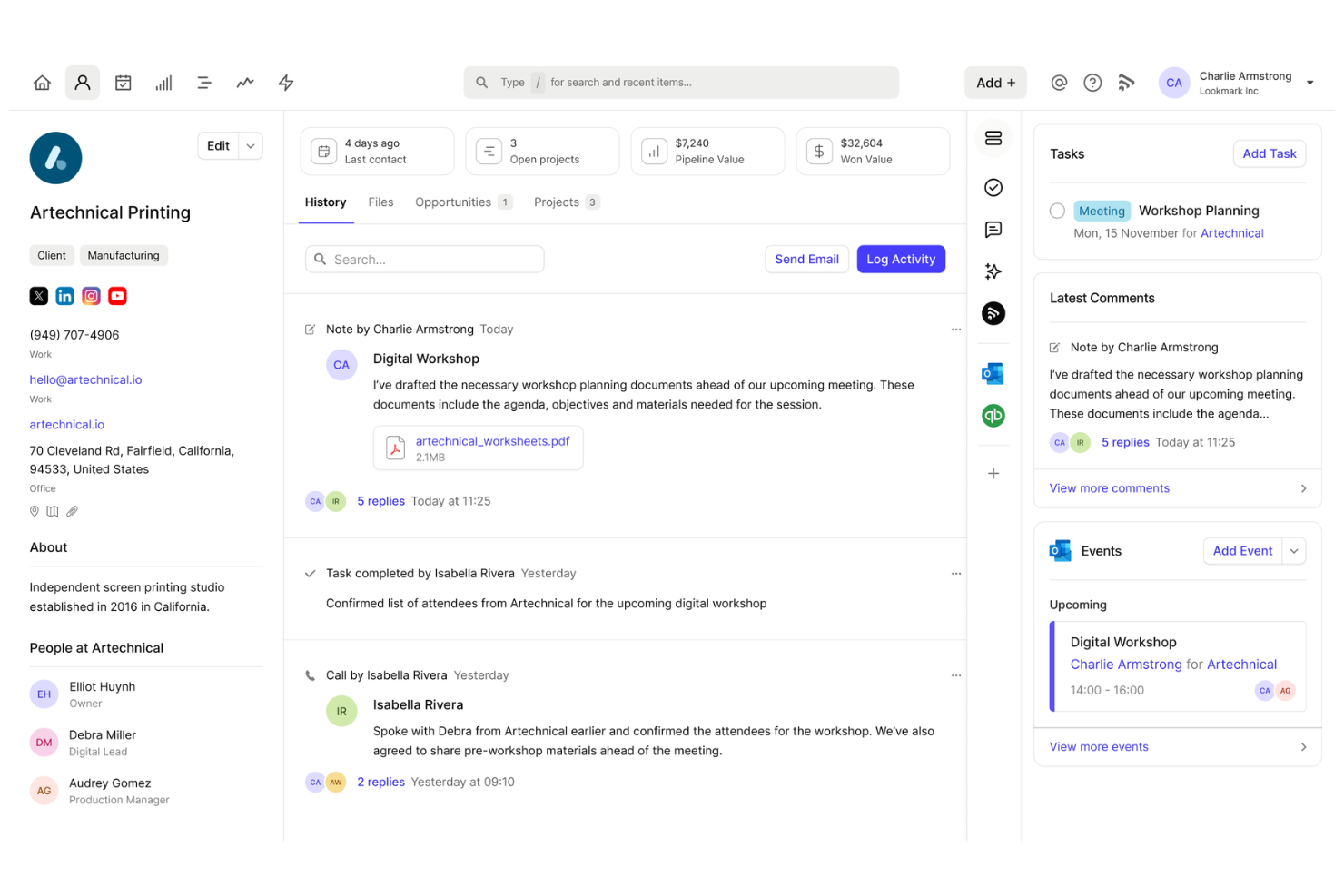
Capsule is a straightforward CRM tool designed for small businesses, offering contact management, sales tracking, and task management functionalities. It helps teams maintain customer relationships and manage sales pipelines effectively.
Why I picked Capsule: Capsule focuses on simple contact management, making it ideal for small teams looking to organize customer information. The free version includes features like opportunity management and task tracking, which help optimize sales processes.
Your team can also benefit from contact history tracking to maintain a holistic view of customer interactions. Its user-friendly interface and simple CRM features are great for managing business relationships.
Standout features and integrations:
Features include detailed sales pipeline views to track progress, task management tools to keep your team organized, and tools that highlight sales opportunities. These features optimize your team's ability to manage sales activities.
Integrations include Mailchimp, Xero, QuickBooks, Google Workspace, Microsoft Office 365, Zapier, Slack, FreshBooks, Wufoo, and more.
What's free? Capsule offers a free-forever plan for up to two users with limitations on storage and the number of contacts, making it suitable for small teams.
Pros and Cons
Pros:
- Easy to use
- Contact history tracking is available
- Opportunity and task management included
Cons:
- Lower usage limits
- Restrictions on the number of contacts
New Product Updates from Capsule

Capsule Unveils AI Summaries and Email Assist
Capsule introduces two AI-powered features—AI Summaries and AI Email Assist—to help you get quick context on your records and draft emails faster. These tools streamline your workflow so you’re always prepared and can communicate with ease. For more information, visit Capsule’s official site.
 .
.Other Sales Management Software
Here are some additional sales management software options that also offer free plans or trials. While these tools didn’t make it onto my shortlist, they’re still worth checking out:
- monday.com
For visual project tracking
- EspoCRM
For open-source flexibility
- Freshsales
For AI-driven free CRM for sales teams
- ClickUp
For customizable workflows


Free Sales Management Software Selection Criteria
When selecting the best free sales management software to include in this list, I considered common buyer needs and pain points like limited budget constraints and the need for basic functionality without cost. I also used the following framework to keep my evaluation structured and fair:
Core Functionality (25% of total score)
- Manage contacts
- Track sales pipeline
- Automate basic tasks
- Generate reports
- Schedule follow-ups
Additional Standout Features (25% of total score)
- Customizable dashboards
- Email integration
- Mobile app availability
- Advanced analytics
- Built-in communication tools
Usability (10% of total score)
- Intuitive interface
- Easy navigation
- Minimal learning curve
- User-friendly design
- Quick access to features
Onboarding (10% of total score)
- Availability of training videos
- Interactive product tours
- Access to templates
- Chatbot assistance
- Webinars for training
Customer Support (10% of total score)
- 24/7 customer service
- Live chat support
- Comprehensive help center
- Email support
- Community forums
Value For Money (10% of total score)
- Competitive pricing
- No hidden fees
- Free tier features
- Cost vs. features balance
- Upgrade options
Customer Reviews (10% of total score)
- Overall satisfaction ratings
- Feedback on reliability
- Comments on ease of use
- Insights into customer service
- Reports on feature functionality
How to Choose Free Sales Management Software
Complex feature lists and pricing structures can make it hard to figure out what you’re really getting from free sales management software. To help you stay focused as you work through your software selection process, here are some factors to keep in mind:
| Factor | What to Consider |
| Free Offer Scope | Check what's included in the free plan. Does it cover essential features like contact management and sales tracking? Make sure it meets your basic needs. |
| Scalability | Consider whether the software can grow with your team. Will it support more users or advanced features as your business expands? |
| Integrations | Look for compatibility with tools you already use, like email clients or accounting software. This will help streamline your workflow. |
| Ease of Use | Evaluate the user interface. Is it intuitive and easy for your team to navigate? A user-friendly design saves time and reduces training needs. |
| Customer Support | Check the availability of support options. Does the provider offer chat, email, or phone support? Good support can help resolve issues quickly. |
| Security | Ensure the software complies with data protection regulations. Your team's data must be secure and accessible only to authorized users. |
| Customization | Assess the ability to tailor the software to your processes. Can you customize fields or dashboards to fit your team's workflow? |
What Is Free Sales Management Software?
Sales management software is designed to help businesses manage their sales processes, track customer interactions, and organize leads. Typically, free offerings include limited versions of these tools, often with fewer features or user caps. These tools are commonly used by sales professionals, small business owners, and teams looking to improve their sales efficiency without incurring costs. They provide value by organizing sales activities, improving customer relationship management, and boosting productivity. Features such as contact management, sales tracking, and task automation help with organizing workflows, enhancing productivity, and managing customer relationships effectively.
Features
Let’s go over the features commonly found in sales management software and which ones are usually included in free vs. paid plans.
Typically Free Sales Management Software Features
- Contact management: Helps organize and store contact information, making it easy to track customer interactions and maintain relationships.
- Sales tracking: Allows users to monitor sales progress and performance, helping teams stay on top of their sales goals.
- Task automation: Automates repetitive tasks, freeing up time for sales teams to focus on more important activities.
- Email integration: Connects with email platforms to improve communication and track interactions within the CRM.
- Lead management: Provides tools to capture, track, and manage leads, supporting sales teams in converting leads into customers.
- Basic reporting: Offers simple reports to provide insights into sales activities and performance, aiding decision-making.
- Pipeline management: Visualizes sales pipelines to help teams manage and prioritize deals effectively.
- Mobile access: Allows users to access the CRM from mobile devices, ensuring they can manage sales activities on the go.
Typically Paid Sales Management Software Features
- Advanced analytics: Provide in-depth analysis of sales data, offering valuable insights for strategic decision-making.
- Customizable dashboards: Enable users to tailor dashboards to display key metrics and data relevant to their specific needs.
- Marketing automation: Automates marketing tasks, such as email campaigns, to enhance lead nurturing and customer engagement.
- Customer support tools: Include advanced support features like ticketing systems and live chat to improve customer service.
- Integration with advanced tools: Offers connections with specialized tools like accounting software and advanced marketing platforms.
- Enhanced security features: Provide advanced security options to protect sensitive customer data and ensure compliance with regulations.
- API access: Allows users to integrate the CRM with other software solutions and customize its functionality.
- Collaboration tools: Facilitate team collaboration with features like shared calendars and document sharing, enhancing teamwork.
Benefits
Implementing free sales management software provides several benefits for your team and your business. Here are a few you can look forward to:
- Cost savings: Provide essential sales management tools without the cost, helping your business save money while managing sales activities.
- Improved organization: Offers features such as contact management and sales tracking, which help your team stay organized and focused on sales goals.
- Increased productivity: Automates repetitive tasks and integrates with email platforms, freeing up time for your team to focus on closing deals.
- Accessibility: Allows access from mobile devices, enabling your team to manage sales activities on the go and stay connected.
- Enhanced communication: Integrates with email and communication tools, improving collaboration and customer interactions.
- Scalability: Offers a starting point for small teams, with the option to upgrade as your business grows.
- Data insights: Provide basic reporting features that deliver insights into sales performance, supporting informed decision-making.
Costs and Pricing
I realize you came to this article looking for the best sales management software options that are available for free. However, since free plans only offer limited features, there's a good chance you'll need to scale your plan up in the future.
The table below summarizes common plans, their average prices, and typical features included in sales management software solutions:
Plan Comparison Table for Sales Management Software
| Plan Type | Average Price | Common Features |
| Free Plan | $0 | Basic contact management, sales tracking, and limited reporting. |
| Personal Plan | $5-$25/user/month | Enhanced contact management, email integration, and basic automation. |
| Business Plan | $30-$60/user/month | Advanced reporting, marketing automation, and multiple user support. |
| Enterprise Plan | $70-$150/user/month | Customizable dashboards, advanced security features, and dedicated customer support. |
Free Sales Management Software FAQs
Here are some answers to common questions about free sales management software:
Can free sales management software grow with my business?
Free sales management software can be a great starting point, but it may have limitations as your business grows. Check if the software offers scalable options or paid plans with more advanced features. This way, you can upgrade when your team needs more functionality without switching systems.
What are the common limitations of free sales management software?
Free versions often come with limitations such as a cap on the number of users, limited storage, and restricted features. These plans typically include basic functionalities, which may be sufficient for small teams or startups. Review the free plan details to understand what’s included and any potential limitations.
How secure is my data with free sales management software?
Data security is crucial, even with free software. Ensure the provider complies with data protection regulations and offers features such as encryption and regular backups. It’s important to verify that your data remains secure and accessible only to authorized users.
Do free sales management software solutions offer customer support?
Customer support for free plans can vary. Some providers offer basic support such as FAQs and community forums, while others may include email or chat support. Check the support options available in the free plan to ensure your team can get help when needed.
Are there any hidden costs associated with free sales management software?
While the software itself may be free, there could be hidden costs such as charges for additional features, integrations, or more storage. Review the provider’s pricing details carefully to understand any potential costs associated with using the free version.
What’s Next:
If you're in the process of researching free sales management software, connect with a SoftwareSelect advisor for free recommendations.
You fill out a form and have a quick chat where they get into the specifics of your needs. Then you'll get a shortlist of software to review. They'll even support you through the entire buying process, including price negotiations.