

10 Best Digital Sales Room Software Reviewed in 2026

10 Best Digital Sales Room Software Shortlist


Managing revenue operations can be challenging—you’re balancing data, communication, and sales targets. Digital Sales Room (DSR) software helps simplify workflows and keeps your team aligned.
These tools help support collaboration and efficiency in sales organizations. They offer a centralized platform to manage sales content, track engagement, and close deals faster, helping you customize your customers' buying experience.
I've independently tested and reviewed a range of software to bring you an unbiased list of the best options. You'll find insights into their features, benefits, and potential drawbacks, helping you make an informed decision. Read on to discover which digital sales room software might be the right fit for your needs.
Why Trust Our Software Recommendations
Our reviews reflect our independent judgment—not a sales pitch. Learn how we stay transparent.
For this guide, we evaluated tools using hands-on testing and independent research, scoring tools using our selection criteria.
Our reviews reflect our human editorial judgment, not a sales pitch.
Best Digital Sales Room Software Summary
This comparison chart summarizes pricing details for my top digital sales room software selections to help you find the best one for your budget and business needs.
| Tool | Best For | Trial Info | Price | ||
|---|---|---|---|---|---|
| 1 | Best for personalized buyer experiences | Free plan + free demo available | From $350/month (billed annually) | Website | |
| 2 | Best for AI-powered deal execution | Free demo + free plan available | From $899/month | Website | |
| 3 | Best for sales readiness | Free demo available | Pricing upon request | Website | |
| 4 | Best for interactive proposals | 14-day free trial available | From $35/user/month (billed annually) | Website | |
| 5 | Best for personalized proposals | 14-day free trial | From $25/user/month | Website | |
| 6 | Best for sales training and coaching | Free demo available | Pricing upon request | Website | |
| 7 | Best for content management | Free demo available | Pricing upon request | Website | |
| 8 | Best for large enterprises | Free demo available | Pricing upon request | Website | |
| 9 | Best for collaborative sales processes | Free demo available | Pricing upon request | Website | |
| 10 | Best for multi-stakeholder negotiations | Free plan available | From $45/user/month | Website |
Best Digital Sales Room Software Review
Below are my detailed summaries of the best digital sales room software that made it onto my shortlist. My reviews offer a detailed look at the key features, pros and cons, integrations, and ideal use cases of each tool to help you find the best one for you.

Dock
Best for personalized buyer experiences
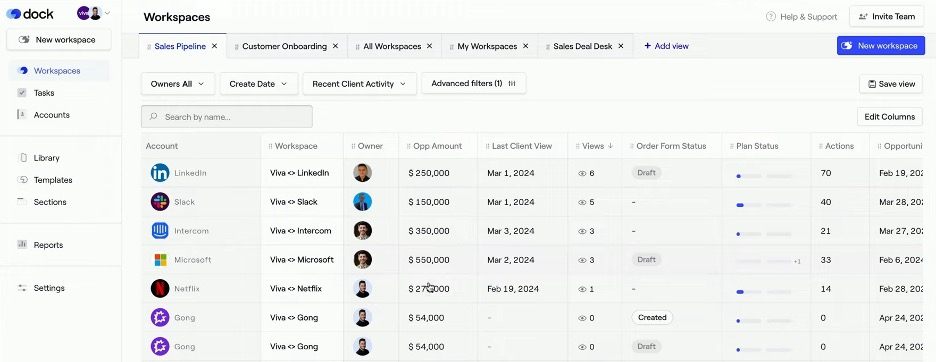
Dock is a digital sales room software for sales teams, providing tools to manage interactions, create proposals, and track engagement.
Why I picked Dock: It offers personalized buyer experiences through features such as standardized follow-up templates and dynamic action plans. The software includes signable order forms, which simplify the closing process. Engagement analytics provide visibility into buyer interactions, helping your team identify buyer intent and serious prospects. Dock's customizable branding options allow you to tailor the experience to meet specific client needs.
Standout Features and Integrations:
Features include mutual action plans that guide buyers through the sales process, helping make all necessary steps clear. Engagement analytics help you understand how buyers interact with your content, offering insights into their interests. Additionally, secure sharing options protect sensitive information while still allowing easy access for buyers.
Integrations include Salesforce, HubSpot, Zoom, Microsoft SharePoint, Google Drive, Asana, Jira, Slack, and more.
Pros and Cons
Pros:
- Customizable branding options
- Simplified proposal creation
- Personalized buyer interactions
Cons:
- Engagement analytics may be less detailed than specialized analytics tools
- Initial setup and training are required

Accord
Best for AI-powered deal execution
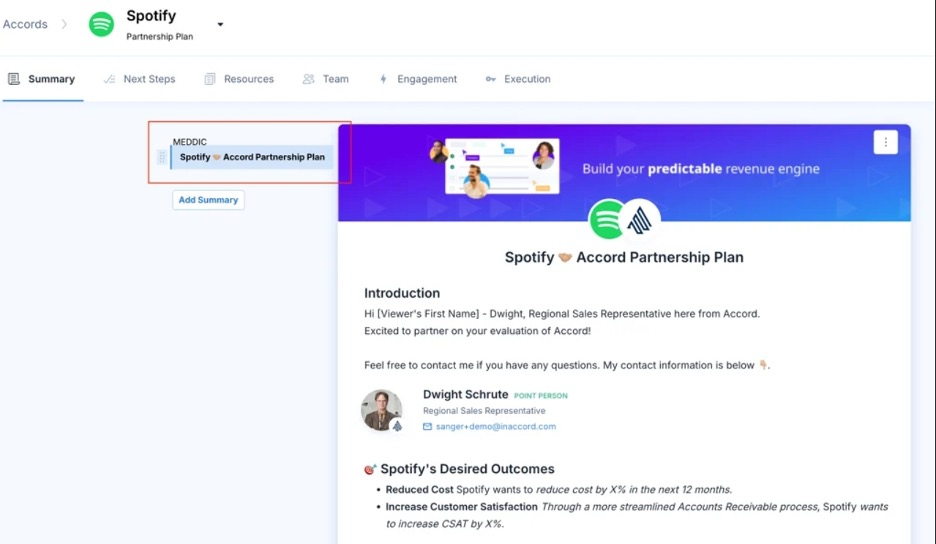
Accord is a digital sales room software designed for sales teams focused on improving deal execution and account planning. It provides AI-driven features that automate processes and offer structured playbooks to help drive sales outcomes.
Why I picked Accord: It excels in deal execution by providing enforceable playbooks that align with best practices, helping your team increase average deal sizes. The platform automates multithreading and offers stakeholder recommendations to facilitate communication. Accord's AI tools accelerate sales velocity, making it a strong choice for revenue teams looking to optimize their sales processes. These features help your team make deal progression more effective and efficient.
Standout Features and Integrations:
Features include structured playbooks that guide your team through best practices, helping keep everyone on the same page. Automatic performance tracking keeps your team informed and aligned with CRM systems. The platform also offers AI tools that support sales velocity, providing a competitive edge in deal execution.
Integrations include Salesforce, HubSpot, Slack, Zapier, Google Workspace, Outlook, LinkedIn, Zoom, Docusign, Dropbox, and more.
Pros and Cons
Pros:
- AI-assisted customer research
- Automates multithreading
- Enforceable playbooks
Cons:
- Many integrations require third-party tools
- Requires initial setup and configuration to use playbooks and AI features

Best for sales readiness
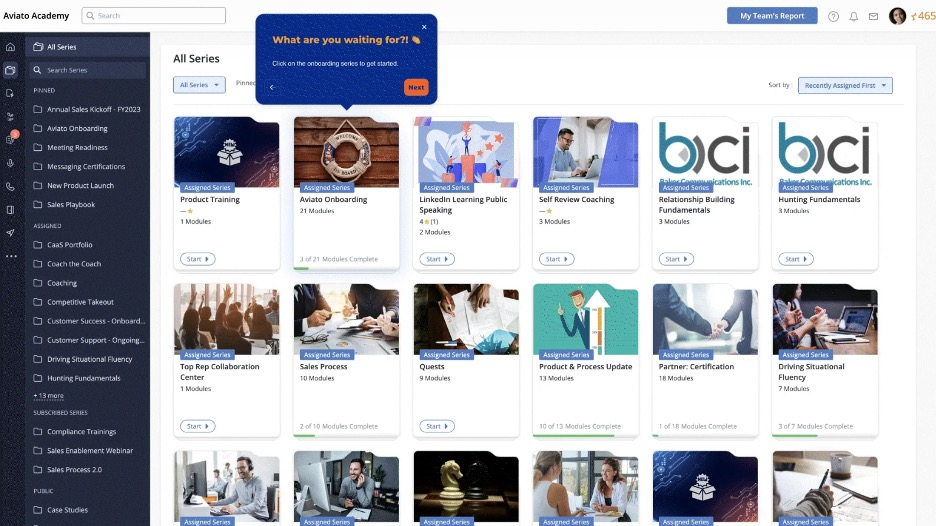
Mindtickle is a sales readiness platform designed for sales teams that focus on training and ongoing skill development. It provides tools for learning, coaching, and performance analytics to help equip sales teams to meet their revenue enablement goals.
Why I picked Mindtickle: It specializes in sales readiness by offering detailed training and coaching features, as well as providing DRS capabilities with room templates, automated customization, and content curation tools. The platform's metrics and analytics help your team understand their strengths and areas for improvement. Mindtickle's gamified learning modules make training engaging and effective, preparing your team to be confident in their sales roles.
Standout Features and Integrations:
Features include performance analytics so your team gets valuable insights into their progress and outcomes. The platform's coaching tools allow for personalized feedback and development plans. Mindtickle also offers gamified learning experiences, which keep training sessions interactive and fun.
Integrations include Salesforce, Microsoft Dynamics 365, Slack, LinkedIn Learning, Zoom, Google Workspace, Outlook, HubSpot, Docusign, Dropbox, and more.
Pros and Cons
Pros:
- Personalized coaching feedback
- Engaging gamified learning
- Thorough training modules
Cons:
- Limited project management features
- Requires consistent user engagement
Qwilr
Best for interactive proposals
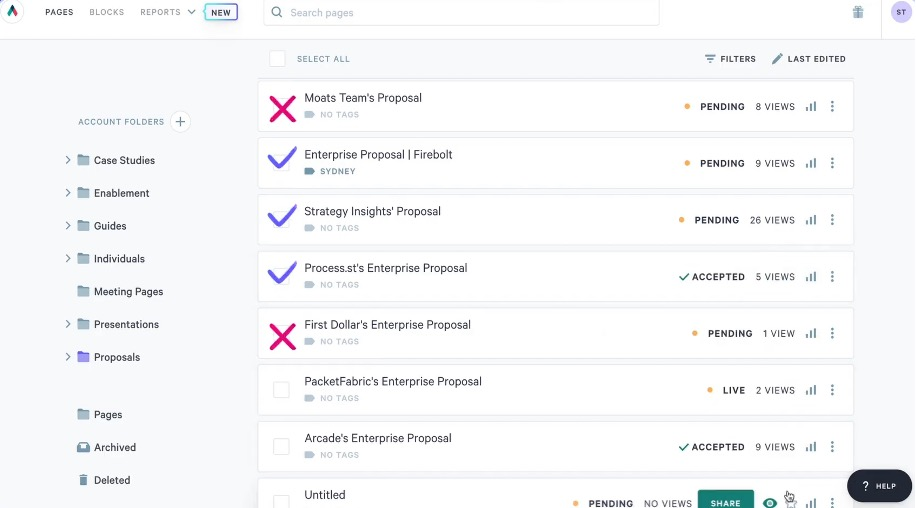
Qwilr is a proposal software designed for sales teams looking to create interactive and engaging proposal documents. It enables you to build visually appealing proposals that promote client engagement and improve the chances of closing deals.
Why I picked Qwilr: It allows your team to create interactive proposals that captivate clients and hold their attention. The platform's drag-and-drop editor makes designing proposals straightforward and efficient. With analytics, you can track how clients interact with your proposals, giving you insights to refine your approach. These features make Qwilr a great candidate for teams focused on creating impactful client presentations at every phase of the sales lifecycle.
Standout Features and Integrations:
Features include a drag-and-drop editor that simplifies the proposal creation process, allowing your team to design professional documents quickly. The platform provides valuable analytics that reveal how clients engage with your proposals. Qwilr also supports interactive content, such as videos and interactive pricing plans, to make your proposals more dynamic.
Integrations include Salesforce, HubSpot, Slack, QuickBooks, LinkedIn, Google Analytics, Zapier, and more.
Pros and Cons
Pros:
- Valuable client engagement insights
- Easy-to-use design tools
- Interactive proposal capabilities
Cons:
- Advanced interactive elements may require additional setup
- Some features lack customization options

Best for personalized proposals
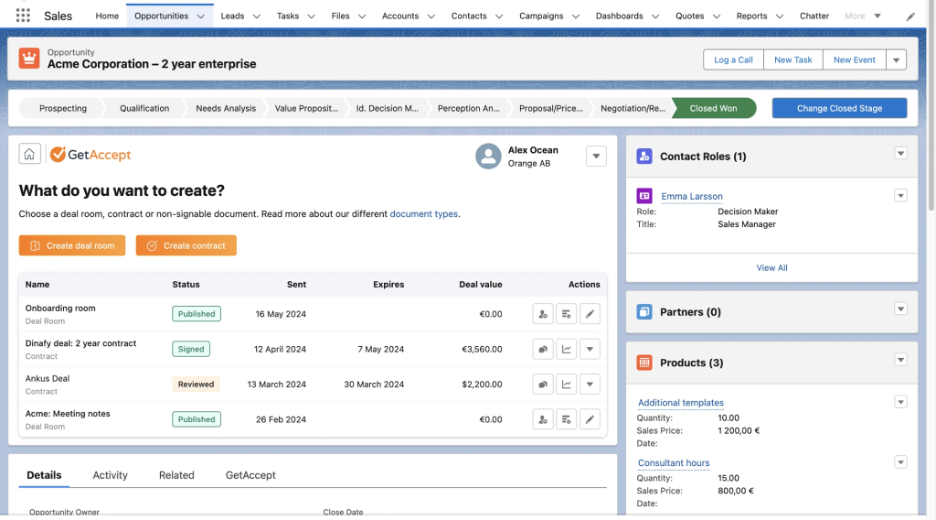
GetAccept is an AI-powered digital sales room and proposal software designed for sales teams aiming to improve communication and collaboration with clients. It facilitates the creation of personalized proposals and tracks interactions to support the sales process.
Why I picked GetAccept: Excelling in creating personalized proposals and tracking client interactions, this tool is practical for tailoring the sales approach. The software includes mutual action plans that align your team and clients on goals. It also offers electronic signatures within a centralized hub for efficient document handling. These features make GetAccept a strong choice for those needing personalized engagement with clients.
Standout Features and Integrations:
Features include mutual action plans that help your team and clients stay aligned on objectives. The software provides real-time insights and analytics, allowing you to measure effectiveness and adjust strategies. It also offers enterprise-grade security to protect sensitive sales data.
Integrations include Salesforce, HubSpot, Microsoft Dynamics 365, Slack, LinkedIn, Google Workspace, Outlook, Dropbox, Zoom, and more.
Pros and Cons
Pros:
- Supports mutual action plans
- Efficient interaction tracking
- Personalized proposal creation
Cons:
- Limited customization
- Lacks some advanced features

Allego
Best for sales training and coaching
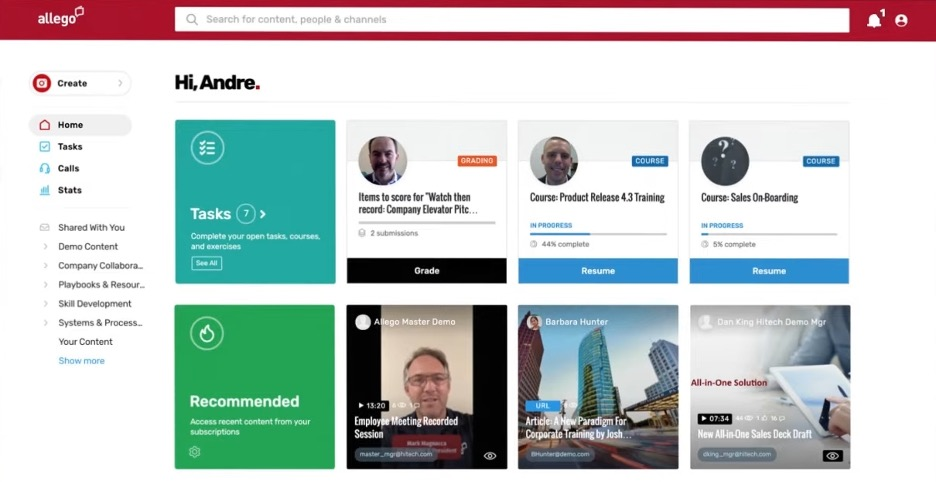
Allego is a sales enablement platform designed for sales teams that need complete training and coaching solutions. It helps boost sales performance by providing easy access to training materials, coaching tools, and digital sales rooms.
Why I picked Allego: It offers a unique blend of training and coaching features to help develop your team's sales skills. The platform's virtual sales rooms facilitate personalized buyer experiences, making it easier for your team to connect with clients via video conferencing and live chat. Allego's Conversation Intelligence provides valuable insights into sales interactions, helping you refine your approach. These features make Allego a great choice for teams focused on continuous learning and sales excellence to boost win rates.
Standout Features and Integrations:
Features include conversation intelligence that provides insights into sales calls and interactions, and the platform's digital sales rooms offer a space for personalized communication with buyers. Allego also includes a range of content creation tools to equip your team with the resources needed for effective selling.
Integrations include Salesforce, Microsoft Teams, Slack, LinkedIn, Zoom, Google Workspace, Outlook, HubSpot, and more.
Pros and Cons
Pros:
- Quick implementation process
- Personalization of buyer experiences
- Extensive training tools
Cons:
- Some file formats are not supported
- Learning curve for administrators

Highspot
Best for content management
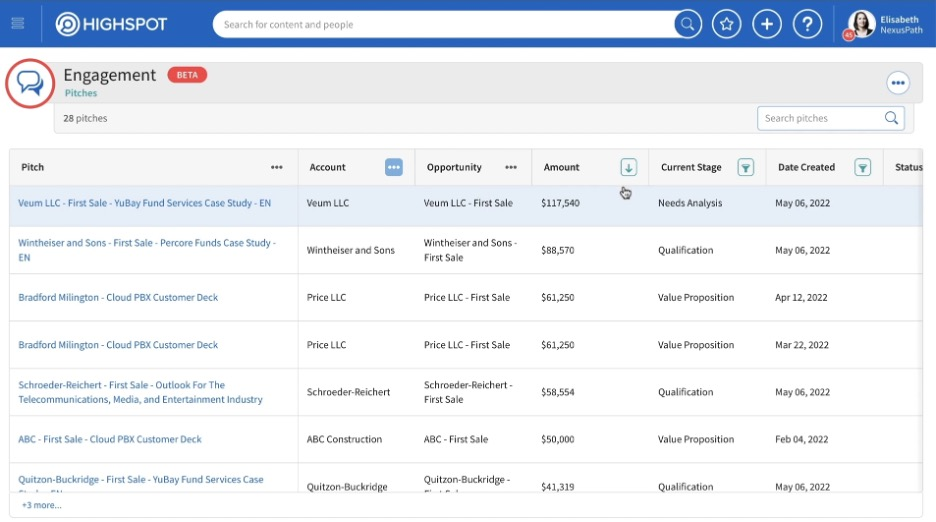
Highspot is a sales enablement platform designed for sales teams and account executives who need effective content management and customer engagement tools. It helps users organize, share, and analyze sales content to support sales performance and buyer interactions.
Why I picked Highspot: It excels in content management by providing features such as advanced search and agentic AI content recommendations. The platform offers detailed analytics that help your team measure content effectiveness, and it includes collaboration tools that facilitate communication between sales and marketing teams. Combined with branded microsite digital sales rooms, these capabilities make Highspot a solid choice for those needing sales collateral content organization and tracking.
Standout Features and Integrations:
Features include AI-powered content search functions that help your team find relevant materials quickly. The platform's content recommendations help you always have access to the most effective resources. Highspot also offers analytics tools that provide insights into how content performs with customers.
Integrations include Salesforce, Microsoft Dynamics 365, Slack, LinkedIn, Outlook, Google Drive, Dropbox, and more.
Pros and Cons
Pros:
- Tailored content recommendations
- Advanced search capabilities
- Effective content organization
Cons:
- May not suit small teams
- Integrations may require configuration

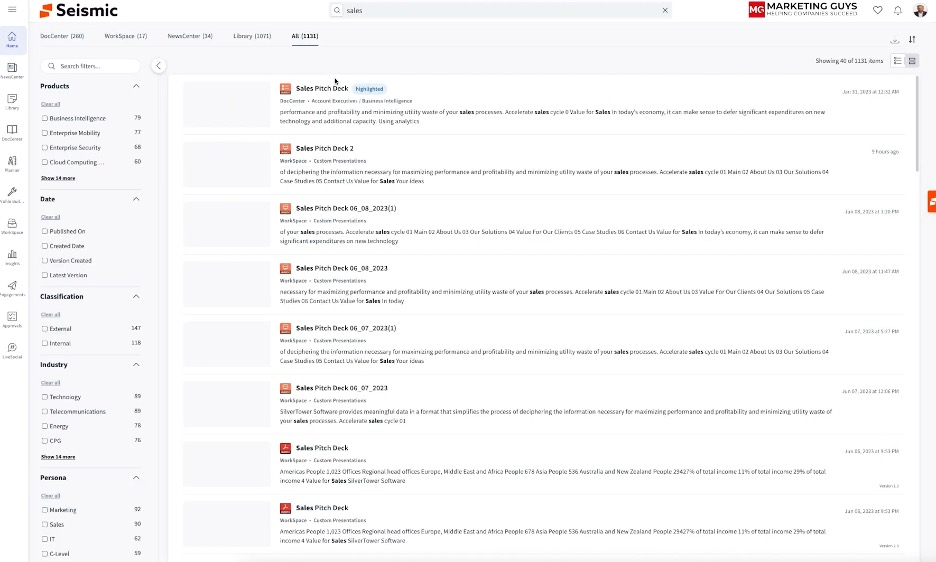
Seismic is a digital sales room platform tailored for large enterprises aimed at promoting collaboration between sellers and buyers. It centralizes the sales process by providing a secure environment for sharing content and tracking engagement.
Why I picked Seismic: It's ideal for large enterprises due to its secure and centralized platform that accelerates deal closures. The software allows for personalized content delivery and real-time engagement tracking, helping manage complex sales processes. Its integration with sales enablement tools and features, such as document sharing with password protection, makes it an all-in-one solution. These capabilities support effective communication and decision-making in large-scale GTM operations.
Standout Features and Integrations:
Features include personalized content delivery and real-time engagement tracking to help your team stay informed and responsive. The platform also offers customizable branding and messaging, allowing you to tailor your communications to different audiences. Seismic provides secure document sharing with password protection, giving you peace of mind for sensitive information.
Integrations include Salesforce, Microsoft Dynamics 365, Slack, Docusign, LinkedIn, Google Workspace, Outlook, and more.
Pros and Cons
Pros:
- Real-time engagement insights
- Personalized content options
- Secure document sharing
Cons:
- High resource consumption
- Advanced personalization and analytics features require additional setup

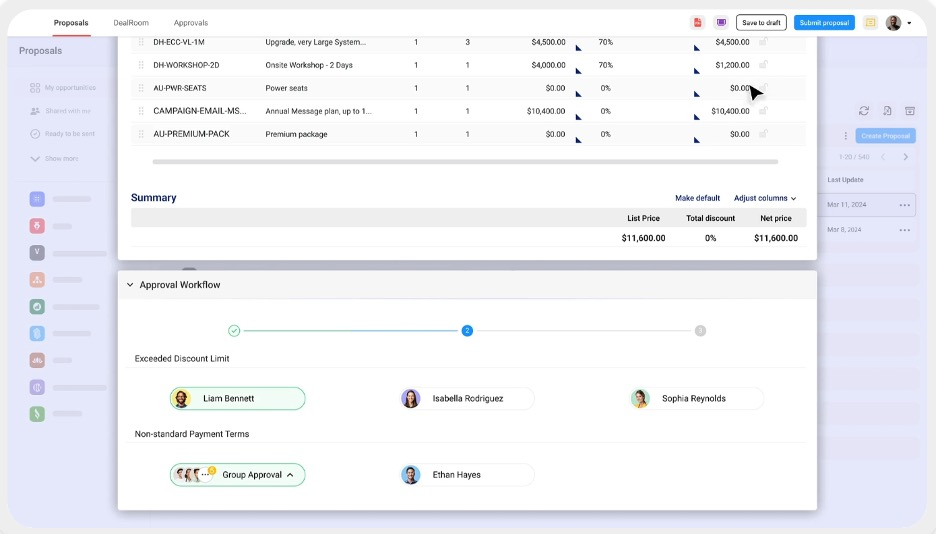
DealHub is a digital sales room software tailored for sales teams that need to centralize proposals, contracts, and approvals. It provides a collaborative workspace that frames buyer-seller engagement, making it a valuable tool for managing and closing deals efficiently.
Why I picked DealHub: DealHub centralizes all deal-related content in one platform, giving your team a single place to manage proposals, contracts, and buyer interactions. It offers customizable sales rooms, real-time engagement tracking, and built-in eSignature tools to speed approvals and support faster deal closures.
Standout Features and Integrations:
Features include customizable branded sales rooms that provide a personalized experience for buyers. Live buyer engagement tracking helps your team understand client interactions in real time. The platform also includes built-in eSignature capabilities, simplifying the contract process.
Integrations include Salesforce, Microsoft Dynamics 365, HubSpot, QuickBooks, NetSuite, Slack, Docusign, and more.
Pros and Cons
Pros:
- Simplified contract approvals
- Real-time engagement tracking
- Centralized content management
Cons:
- Limited advanced feature customization
- Initial setup can be complex for teams migrating existing deal workflows

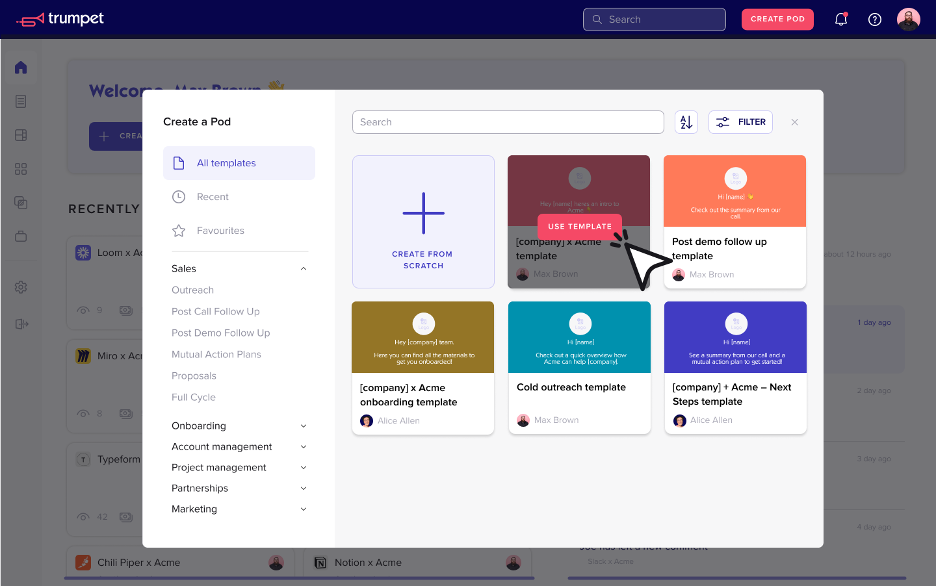
Trumpet is a digital sales room software designed for sales teams involved in complex, multi-stakeholder negotiations. It provides a centralized platform for managing sales processes, promoting collaboration, and delivering personalized buyer experiences.
Why I picked Trumpet: It excels in managing complex sales processes by offering customizable templates and real-time engagement tracking. The software supports multi-stakeholder negotiations through its collaboration tools, reducing the need for complex email threads. Features such as mutual action plans and personalized content delivery help your team engage effectively with different stakeholders. These capabilities make Trumpet particularly useful for teams dealing with intricate sales cycles.
Standout Features and Integrations:
Features include customizable templates that allow your team to tailor sales materials to specific client needs. Real-time engagement tracking gives insights into buyer interactions, helping you understand their intent. The platform also offers tools for asynchronous communication, encouraging ongoing collaboration.
Integrations include Salesforce, HubSpot, Docusign, Slack, Canva, Zoom, Microsoft Teams, Google Workspace, and more.
Pros and Cons
Pros:
- Asynchronous communication facilitation
- Multi-stakeholder collaboration tools
- Supports complex negotiations
Cons:
- Limited real-time engagement tracking
- Feature customization is limited


How I Evaluate Digital Sales Room Software
I split my evaluation into baseline requirements—like branded rooms, buyer analytics, and CRM sync—and the differentiators, like AI insights and CS handoff capabilities, that set the best tools apart.
Core Functionality (Table Stakes For This List)
When I'm selecting tools for my list, I rank each one on a scale from 0 (does not offer the functionality) to 5 (excels in this area) for each core functionality listed below. Then, I calculate the tool's total score into a percentage. Each tool needs to achieve a minimum total score of 65% to be considered for inclusion.
- Branded Buyer Workspaces: I look for customizable, deal-specific microsites where sellers can tailor layouts, logos, and messaging to match a buyer's brand or vertical.
- Content Sharing & Hosting: Each tool should support rich media like embedded videos, slide decks, and live docs—not just static file attachments dropped into a folder.
- Buyer Engagement Analytics: I evaluate whether the platform shows who opened what, how long they spent on each asset, and which stakeholders haven't engaged yet.
- Mutual Action Plans: Shared deal timelines with task owners, due dates, and status tracking help me gauge how well a tool keeps both sides accountable.
- Multi-Stakeholder Collaboration: The room should let multiple buyer contacts and seller team members comment, chat, or tag each other directly within the workspace.
- CRM Integration: I check for two-way sync with platforms like Salesforce or HubSpot so engagement data flows back into pipeline records without manual entry.
Once I have a list of tools that meet this criteria, I consider what sets each platform apart.
Differentiating Factors (What Sets Vendors Apart)
Here's how I compare and contrast different vendors:
Standout Features
Revenue intelligence signals matter here—I look for tools that translate buyer engagement into deal health scores or risk alerts that feed into forecasting models. Template and playbook libraries are another differentiator, especially for RevOps teams standardizing rooms across segments or regions. I also evaluate whether a platform supports onboarding or QBR rooms, since converting a closed-won deal room into a CS handoff workspace keeps context intact and reduces churn risk during transitions.
Beyond Features
Tech stack fit is a big one—I check whether a tool connects natively to sales engagement platforms like Outreach or Salesloft and content sources like SharePoint or Google Drive. Security certifications also weigh in, especially for teams sharing sensitive pricing or contract data with external buyers. I look for SOC 2 Type II and SSO/SAML support at minimum. Finally, I consider team fit—whether the platform suits high-velocity SMB sales cycles or complex enterprise deals with large buying committees.
How To Choose Digital Sales Room Software
It's easy to get bogged down in long feature lists and complex pricing structures. To help you stay focused as you work through your unique software selection process, here's a checklist of factors to keep in mind:
| Factor | What To Consider |
| Scalability | Can the software grow with your team? Look for platforms that support increasing users and data. Consider future growth and any potential need for more advanced features. |
| Integrations | Does it integrate with your existing tools? Confirm compatibility with CRM, email, and other essential platforms to avoid workflow disruptions. |
| Customizability | Can you tailor the software to fit your processes? Check if the solution allows adjustments to templates, workflows, and branding to match your team's needs. |
| Ease of use | Is the interface intuitive for all team members? A user-friendly design reduces training time and helps team members adopt the tool quickly. |
| Implementation and onboarding | How long will it take to get started? Assess the resources needed for setup and whether the vendor provides training or support during the transition phase. |
| Cost | Does the pricing fit your budget? Look beyond initial costs to understand the total cost of ownership, including any add-ons or future upgrades. |
| Security safeguards | Are data protection measures in place? Verify the platform complies with industry standards and provides encryption and access controls to protect sensitive information. |
What Is Digital Sales Room Software?
Digital sales room software is a tool that helps sales teams manage and improve their interactions with buyers through a virtual platform. Sales professionals and account managers use these tools to improve engagement, collaboration, and communication with clients. Features such as content sharing, engagement tracking, and virtual meeting capabilities help with managing sales processes and understanding buyer behavior. Overall, these tools provide value by improving the efficiency and effectiveness of sales interactions.
Features
When selecting digital sales room software, keep an eye out for the following key features:
- Content sharing: Allows teams to easily distribute sales materials and documents to clients for better communication and engagement.
- Engagement tracking: Monitors how clients interact with shared content, providing insights into their interests and improving follow-up strategies.
- Virtual meeting capabilities: Facilitate online meetings and presentations, enabling real-time interaction with clients.
- Customizable templates: Provide predesigned formats that can be tailored to fit specific sales processes, saving time and maintaining consistency.
- Analytics and reporting: Offer detailed insights into sales performance and client interactions, helping teams make informed decisions.
- Collaboration tools: Support teamwork by allowing multiple team members to work together on sales documents and strategies.
- Security safeguards: Protect sensitive data through encryption, permissions, and access controls, keeping information confidential.
- Integration with existing tools: Connect with CRM and other essential platforms to create an efficient workflow.
- AI-driven insights: Use artificial intelligence to analyze buyer behavior and suggest strategies for improving sales outcomes.
Benefits
Implementing digital sales room software provides several benefits for your team and your business. Here are a few you can look forward to:
- Improved buyer engagement: Features like interactive content and virtual meetings help capture clients' attention and keep them engaged throughout the sales process.
- Increased collaboration: Collaboration tools allow team members to work together efficiently on sales strategies and documents, improving teamwork and productivity.
- Data-driven insights: Analytics and engagement tracking provide valuable data on buyer behavior, helping teams make informed decisions and tailor their approach.
- Time savings: Customizable templates and integration with existing tools streamline workflows, reducing time spent on repetitive tasks.
- Increased security: Security safeguards protect sensitive client information, giving your team peace of mind and maintaining client trust.
- Better deal management: Centralized workspaces and mutual action plans keep everyone involved in the sales process aligned and informed.
- Scalability: The ability to grow with your team and adapt to changing needs supports long-term value and flexibility for your business.
Costs and Pricing
Selecting digital sales room software requires an understanding of the various pricing models and plans available. Costs vary based on features, team size, add-ons, and more. The table below summarizes common plans, their average prices, and typical features included in digital sales room software solutions:
Plan Comparison Table for Digital Sales Room Software
| Plan Type | Average Price | Common Features |
| Free Plan | $0 | Basic content sharing, limited analytics, and restricted user access. |
| Personal Plan | $20-$100/user/month | Increased content sharing, basic engagement tracking, and limited integrations. |
| Business Plan | $350-$700/user/month | Advanced analytics, customizable templates, and collaboration tools. |
| Enterprise Plan | $800-$1000/user/month | Full integration capabilities, advanced security features, complete analytics, and unlimited user access. |
Digital Sales Room Software FAQs
Here are some answers to common questions about digital sales room software:
How do digital sales room tools impact deal velocity for revenue operations teams?
Digital sales room tools can speed up deal velocity by giving buyers and sellers a single, shared space to access relevant content, communicate, and collaborate. This centralized approach reduces back-and-forth email threads and helps buyers get answers and approvals faster. As a RevOps leader, you can use built-in analytics to spot bottlenecks and guide your team in removing obstacles that slow down deals.
How can I get sales reps to consistently adopt our digital sales room platform?
You can encourage adoption by making the digital sales room part of your standard sales process and providing clear, step-by-step training. Highlight success stories, case studies, and quick wins from reps who use the platform. Reinforce usage in team meetings and recognize reps who excel so adoption feels natural and valuable to the sales team.
Can digital sales rooms support multi-stakeholder buying committees?
Yes, digital sales rooms are designed to handle complex deals involving multiple decision-makers. You can invite buyers from different departments, track their activity, and personalize content for each stakeholder. This setup makes it easier for everyone to stay aligned and move the deal forward.
What are the best practices for training my sales team on digital sales room usage?
Start with hands-on demos that show real use cases your team encounters daily. Provide bite-sized guides or video tutorials for key actions, and offer live Q&A sessions to tackle common questions. As implementation progresses, follow up with refresher sessions, and make sure reps know where to find ongoing resources and support.
What's Next:
If you're in the process of researching digital sales room software, connect with a SoftwareSelect advisor for free recommendations.
You fill out a form and have a quick chat where they get into the specifics of your needs. Then you'll get a shortlist of software to review. They'll even support you through the entire buying process, including price negotiations.