

10 Best Sales Territory Design Software In 2026

10 Best Customer Revenue Optimization Software Shortlist


With so many different customer revenue optimization software available, figuring out which is right for you is tough. You know you want to develop targeted strategies to maximize revenue from your current customers but need to figure out which tool is best. I've got you! In this post I'll help make your choice easy, sharing my personal experiences using dozens of different customer revenue optimization tools with various teams and accounts, with my picks of the best customer revenue optimization software.
Why Trust Our Software Recommendations
Our reviews reflect our independent judgment—not a sales pitch. Learn how we stay transparent.
For this guide, we evaluated tools using hands-on testing and independent research, scoring tools using our selection criteria.
Our reviews reflect our human editorial judgment, not a sales pitch.
| Tool | Best For | Trial Info | Price | ||
|---|---|---|---|---|---|
| 1 | Limited email template integration with Outlook | Free demo available | Pricing upon request | Website | |
| 2 | Best for reinforcing repeatable sales methodology | Free demo + free plan available | From $899/month | Website | |
| 3 | Best for interacting and engaging with customer feedback | Free demo available | Pricing upon request | Website | |
| 4 | Best for identifying risks and expansion opportunities | Free Demo | From $15/user/month | Website | |
| 5 | Best for quick and easy implementation | Free demo available | Pricing upon request | Website | |
| 6 | Best for developing strategic and prescriptive action plans | Free trial + free demo available | Pricing upon request | Website | |
| 7 | Best for predicting customer needs | Self-guided tour available | Pricing upon request | Website | |
| 8 | Best for making data-driven decisions | Free trial available. | From $15/user/month, billed annually. | Website | |
| 9 | Best for driving loyalty along the customer journey | Free demo available | Pricing upon request | Website | |
| 10 | Best for consolidating internal and external revenue processes | Free demo available | Pricing upon request | Website |
Best Customer Revenue Optimization Software Reviews
Ready to take a deep dive into customer revenue optimization software? Keep reading for a summary of every tool on my list, along with a few standout features that caught my eye, an overview of pricing and free trials, and a short list of pros and cons to help you make your final choice.

Limited email template integration with Outlook

ChurnZero is an AI-powered customer success platform built around churn prevention, health scoring, renewal forecasting, expansion tracking, and lifecycle automation for post-sale revenue teams.
Who Is ChurnZero Best For?
ChurnZero is a strong fit for B2B SaaS companies with dedicated customer success teams managing subscription-based revenue and renewal cycles.
Why I Picked ChurnZero
I've included ChurnZero in my top picks because its health scoring, renewal forecasting, and automated Plays give customer success teams tight control over recurring revenue. Email template support is limited for Outlook—if your team relies on Outlook-native templates, you'll need to build those directly in ChurnZero's email editor. ChurnZero's built-in email tools are solid: you can use any customer data field as a merge field for personalization, and configure conditional play logic to route contacts down different automation paths based on email engagement.
ChurnZero Key Features
- Customer segmentation: Group accounts by attributes like ARR, health score, or product tier to target specific cohorts with tailored actions.
- In-app messaging: Deliver targeted announcements, walkthroughs, and surveys directly inside your product to drive adoption.
- Success plans: Build collaborative goal-tracking plans shared with customers to align on milestones and outcomes.
- Product usage tracking: Monitor feature adoption and login activity at the account and contact level to spot disengagement early.
Pros and Cons
Pros:
- Features are easy to learn
- Features are easy to learn
- Has a very user-friendly interface
Cons:
- Comprehensive adoption is crucial for successful tool usage
- Features are easy to learn

Accord
Best for reinforcing repeatable sales methodology

Accord is a revenue excellence platform that enforces sales methodology, deal execution playbooks, and performance scoring across the full revenue cycle through AI-powered workflows and mutual action plans.
Who Is Accord Best For?
Accord is a strong fit for B2B sales teams that need to enforce a consistent sales methodology across every rep and every deal.
Why I Picked Accord
Accord earns its spot on my shortlist because it takes sales methodology enforcement seriously in a way most tools don't. I love that it converts frameworks like MEDDPICC into live, unavoidable deal workflows rather than static training materials. Execution scoring automatically evaluates how closely each rep follows the playbook on every deal, with activity captured and synced directly to your CRM. That means methodology gaps show up in your data, not just in your gut feeling after a lost deal.
Accord Key Features
- Mutual action plans: Create shared deal timelines that give buyers and sellers defined next steps and accountability checkpoints throughout the sales cycle.
- Accord Intelligence: Automatically researches key accounts based on your ICP and drafts executive summaries and business cases using your approved templates.
- Stakeholder mapping: Identify and track all buyer-side contacts, their roles, and engagement levels across active deals.
- Expansion playbooks: Apply the same structured execution workflows to upsell and renewal motions as you do to new business deals.
Pros and Cons
Pros:
- Clean and simple design
- Easy to navigate interface
- Takes about an hour to set up a basic account
Cons:
- Mobile experience is a little clunky
- Still expanding essential features

Planhat
Best for interacting and engaging with customer feedback

Planhat is a customer platform that brings together health scoring, revenue analytics, renewal management, and AI-led automation to give go-to-market teams full visibility and control across the post-sale customer lifecycle.
Who Is Planhat Best For?
Planhat is a strong fit for B2B SaaS companies with dedicated customer success teams managing recurring revenue, renewals, and expansion across a large customer base.
Why I Picked Planhat
Planhat stands out for how well it turns customer conversations into actionable revenue intelligence. Its Conversational AI analyzes emails, chats, and call transcripts to detect sentiment and assign topic categories like Product Feedback or Support—without manual tagging. I also like that those sentiment scores directly trigger automations, so if feedback from a key account trends negative, my team gets ahead of it before it becomes a renewal risk. Portals give customers a shared, branded space to surface updates, complete onboarding tasks, and run surveys, turning feedback into a two-way conversation rather than a one-way capture.
Planhat Key Features
- Customer health scoring: Build dynamic health scores using product usage data, survey responses, and manual inputs to flag at-risk accounts.
- Revenue analytics: Track NRR, churn, and expansion revenue with time-aware cohort reports built directly into the platform.
- Renewal management: Monitor renewal timelines alongside health scores and product adoption data in a single pipeline view.
- Playbooks: Trigger automated task sequences for onboarding, renewals, or risk escalations based on customer behavior or health changes.
Pros and Cons
Pros:
- Straightforward yet sophisticated interface
- Very friendly user navigation
- Intuitive workflow design
Cons:
- Limited user documentation capabilities
- Has a bit of a learning curve

Catalyst
Best for identifying risks and expansion opportunities

Catalyst is a customer growth platform that unifies CS and sales teams around health scoring, expansion pipeline tracking, automated playbooks, and NRR-focused account management.
Who Is Catalyst Best For?
Catalyst is a strong fit for B2B SaaS companies whose customer success teams are directly responsible for renewals, upsells, and net revenue retention.
Why I Picked Catalyst
I picked Catalyst as one of the best because of how it handles account-level risk and expansion tracking in a single view. The configurable health profiles pull in usage data, support activity, expansion opportunity tracking, and renewal dates, so my team can see exactly which accounts need intervention and which are ready to grow. Expansion opportunities are built into the health profile as a measurable input, not just a sidebar report.
Catalyst Key Features
- Automated playbooks: Trigger CS workflows automatically based on health score changes, lifecycle stage shifts, or expansion signals to keep accounts on track.
- Customer segmentation: Tier and filter accounts by attributes like ARR, product usage, or lifecycle stage to focus effort on priority accounts.
- Email and calendar sync: Connect Microsoft or Gmail to pull customer communications and meeting activity directly into account timelines.
- Success plan tracking: Set and monitor account-level goals to align CS activity around measurable customer outcomes tied to renewal and growth.
Pros and Cons
Pros:
- Great customer service
- Intuitive user interface
- Easy to navigate the platform
Cons:
- Limited prebuilt layouts
- Confusing onboarding process

Best for quick and easy implementation

ClientSuccess is a customer success management platform built around health scoring, lifecycle management, renewal tracking, and AI-driven automation to help teams reduce churn and grow customer revenue.
Who Is ClientSuccess Best For?
ClientSuccess is a good fit for B2B SaaS companies with dedicated customer success teams focused on managing recurring revenue, renewals, and account retention.
Why I Picked ClientSuccess
ClientSuccess is one of the few customer success platforms that bills itself as the "fastest to implement" in the category, and that claim holds up. Setting up SuccessScore™ health scoring and SuccessCycles playbooks takes days, not months, because the platform doesn't require a dedicated admin to configure or maintain it. Teams can track renewals and manage lifecycle stages almost immediately after go-live, so revenue visibility doesn't get delayed by a long onboarding process.
ClientSuccess Key Features
- SmartCS™ AI automation: Generates AI-drafted customer emails and prescribes next-best actions based on account health and engagement signals.
- NPS and pulse surveys: Sends in-platform surveys to capture customer sentiment and flags responses that indicate churn risk or upsell readiness.
- KBO and goal tracking: Logs customer business objectives and tracks progress against them throughout the lifecycle to surface expansion conversations.
- Customer segmentation: Groups accounts by tier, product, or custom attributes to apply targeted plays and prioritize revenue-critical accounts.
Pros and Cons
Pros:
- Ideal for non-technical users
- Quick implementation across the organization
- Very easy onboarding process
Cons:
- Limited customization options for reporting
- Client Success APIs are a little basic

Best for developing strategic and prescriptive action plans

Gainsight is a customer success platform that combines health scoring, renewal forecasting, expansion opportunity identification, and AI-powered action plans to help revenue teams retain and grow their customer base.
Who Is Gainsight Best For?
Gainsight is a strong fit for enterprise B2B SaaS companies with dedicated customer success teams managing large, complex customer portfolios.
Why I Picked Gainsight
I picked Gainsight as one of the best because of how it handles success planning at the account level. Where most tools let you log customer goals and call it a day, Gainsight builds prescriptive account plans that trigger automatically at key lifecycle milestones and feed AI-powered playbooks to guide the next best action. I've seen teams use this to coordinate multi-channel engagements across expansion workflows without manually deciding what to do next. The Success Snapshots feature also lets CSMs build business review presentations at scale, so strategic progress is visible to both customers and leadership.
Gainsight Key Features
- Customer health scoring: Build composite health scores using data from CRM, product usage, support tickets, and survey responses to surface at-risk accounts.
- Renewal forecasting: Use machine learning to generate renewal likelihood scores and forecast your book of business based on historical conversion data.
- Customer Success Qualified Leads (CSQLs): Identify expansion-ready accounts and route them directly to sales with context on product usage and engagement signals.
- Journey Orchestrator: Design and automate multi-step customer engagement programs triggered by health score changes, lifecycle stage, or behavior.
Pros and Cons
Pros:
- Simple integration with tons of apps
- Comprehensive suite of features
- User-friendly interface and navigation
Cons:
- Limited email template integration with Outlook
- Frequent updates necessitate relearning certain tools

Best for predicting customer needs

Pega Customer Decision Hub is a real-time AI decisioning platform that uses predictive and adaptive models to deliver next-best-action recommendations, personalized offers, and omnichannel customer engagement across web, mobile, email, in-store, and phone touchpoints.
Why Pega Customer Decision Hub Stands Out
Pega Customer Decision Hub stands out because its predictive AI goes beyond static segmentation—it uses adaptive models that continuously learn from customer behavior signals in real time. I particularly like how it runs predictive propensity scores on every customer at every interaction, so when a telecom customer calls in, the system already knows whether they're a churn risk or a prime upsell candidate before the agent says a word. That level of in-the-moment prediction is what makes it stand out for revenue optimization.
Pega Customer Decision Hub Key Features
- Next-best-action arbitration: Evaluates all possible offers, messages, and actions simultaneously and selects the single best one for each customer in real time.
- Omnichannel journey orchestration: Coordinates customer interactions across inbound and outbound channels, including web, email, call center, and in-store, within a unified conversation thread.
- AI-powered offer management: Builds, targets, and adjusts personalized offers using machine learning models tied directly to customer value and business constraints.
- Real-time decisioning analytics: Tracks response rates, conversion, and revenue impact across all channels to measure and refine engagement strategy performance.
Pros and Cons
Pros:
- Seamless integration with visualization tools
- Robust features and capabilities
- Easy for new users to learn
Cons:
- Cost prohibitive tool for smaller businesses
- Difficult business rules customization


Salesforce CRM Analytics is an AI-powered analytics platform built natively into Salesforce that combines revenue intelligence, predictive forecasting, pipeline analytics, and automated next-best-action recommendations.
Who Is Salesforce Einstein Analytics Best For?
Salesforce CRM Analytics is a strong fit for enterprise sales and RevOps teams already running on Salesforce who need AI-driven forecasting and pipeline visibility built directly into their existing CRM workflow.
Why I Picked Salesforce Einstein Analytics
I've included Salesforce CRM Analytics in my top picks because it turns raw CRM data into specific, actionable revenue signals. I particularly like Einstein Discovery, which surfaces predictive recommendations directly on opportunity records—telling my team not just what's likely to happen, but what to do next. I also rely on the pre-built Revenue Intelligence dashboards to track pipeline health and forecast accuracy across the entire sales cycle without building anything from scratch.
Salesforce Einstein Analytics Key Features
- Native CRM actions: Trigger Salesforce flows, update opportunity records, or schedule meetings directly from within an analytics dashboard.
- Multi-source data connector: Pull in data from external databases, spreadsheets, and third-party apps to build a unified view alongside Salesforce data.
- AI-powered predictive scoring: Score leads and opportunities automatically using machine learning models built on your historical CRM data.
- Automated anomaly detection: Surface unexpected drops or spikes in pipeline metrics and revenue trends without manually monitoring reports.
Pros and Cons
Pros:
- Can be used for nearly any industry
- Accessible customer support team
- Easy to set up using guided support
Cons:
- Limited analytics license is required
- Allows you to use limited data sources


Strikedeck is a customer success platform that centralizes customer health scoring, lifecycle playbooks, automated workflow recipes, and usage tracking to help SaaS teams manage renewals, reduce churn, and surface upsell opportunities.
Who Is Strikedeck Best For?
Strikedeck is a good fit for SaaS companies with dedicated customer success teams that need structured processes for managing post-sale engagement across large customer bases.
Why I Picked Strikedeck
I've included Strikedeck in my top picks because its lifecycle playbooks let you trigger automated actions at every stage of the customer journey, from onboarding through renewal. I also like that customer health scores update automatically based on product usage data, so my team can catch disengaged accounts before they churn. Strikedeck's automated recipe workflows then execute the right outreach or task assignment without any manual intervention.
Strikedeck Key Features
- Customer 360 view: Pulls account data, support tickets, and product usage into a single profile for each customer.
- Renewal management dashboard: Tracks upcoming renewals with risk flags to help prioritize accounts that need immediate attention.
- Upsell and cross-sell tracking: Surfaces expansion opportunities within existing accounts based on usage patterns and customer segments.
- Custom reporting: Builds tailored reports on customer health trends, churn risk, and revenue performance across your portfolio.
Pros and Cons
Pros:
- Simple to navigate the platform
- UI is easy to track
- Aggregates a ton of data
Cons:
- Reports could be more comprehensive
- Collaboration interface could be better

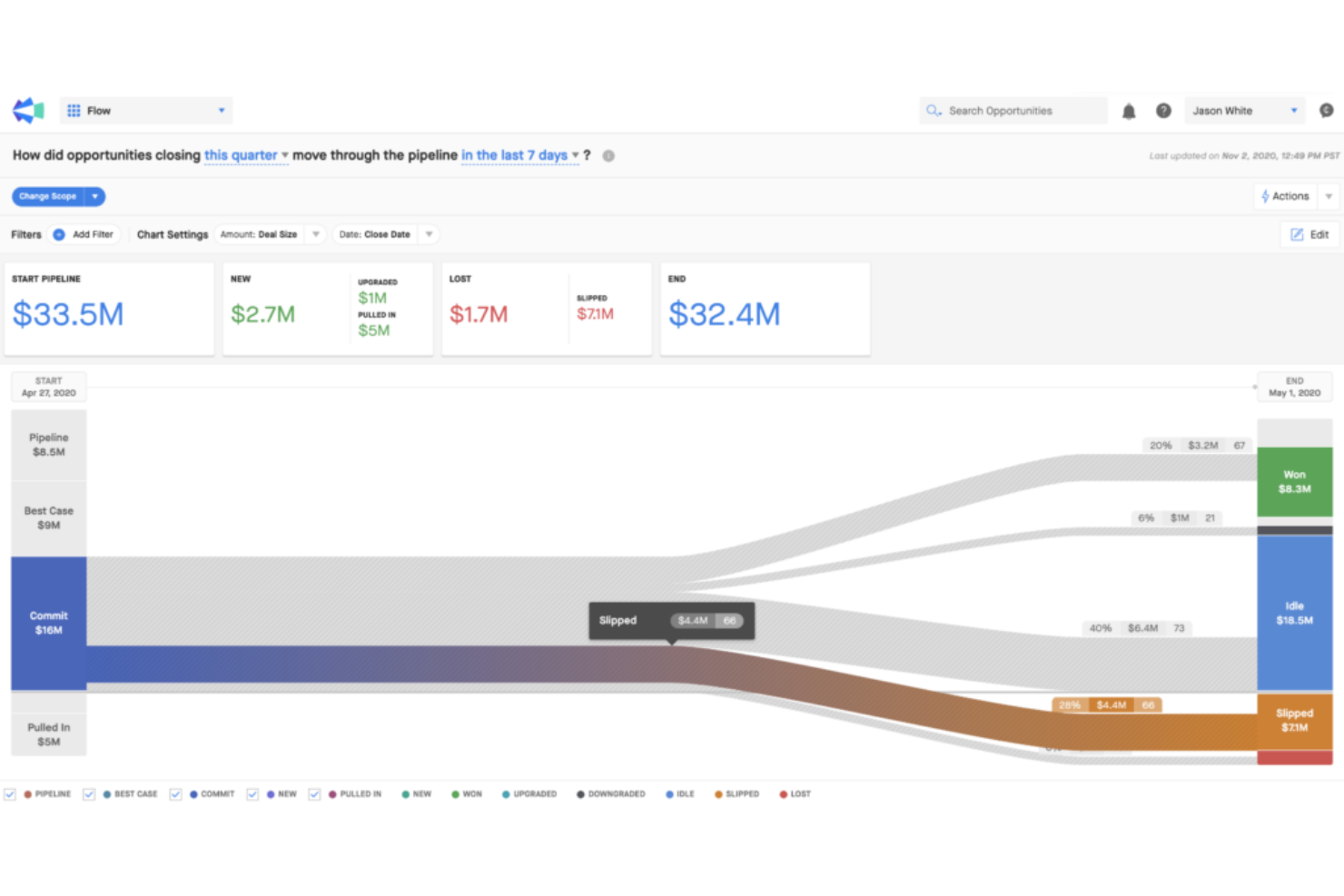
Clari is an AI-driven revenue orchestration platform that covers pipeline management, sales engagement, forecasting, and customer retention and growth workflows in a single system.
Who Is Clari Best For?
Clari is well-suited for mid-market and enterprise revenue teams where sales, marketing, and customer success need to operate from a shared revenue model.
Why I Picked Clari
I've included Clari in my top picks because no other platform I've seen connects internal revenue execution with external buyer-facing workflows as tightly as it does. I love how Revenue Cadences align sales, marketing, and customer success into a single operating motion, so renewals, QBRs, and upsell plays run on a shared playbook rather than disconnected spreadsheets. Clari also pulls signals from usage data, conversations, and account behavior to surface churn risk and expansion cues, giving go-to-market teams one place to act on both sides of the revenue equation.
Clari Key Features
- Copilot conversation intelligence: Records, transcribes, and analyzes sales calls to surface coaching cues and flag moments where reps deviate from winning talk tracks.
- AI-driven deal inspection: Uses AI health scores to assess opportunity risk across your pipeline, so managers can prioritize coaching and intervention before deals slip.
- Automated activity capture: Pulls data from email, calendar, and calls automatically, eliminating manual CRM entry and keeping account records accurate in real time.
- Revenue analytics and dashboards: Gives every level of the revenue org, from reps to the board, a shared view of pipeline conversion, performance trends, and forecast gaps.
Pros and Cons
Pros:
- Out-of-the-box implementation options
- Tools are self explanatory
- A user-friendly platform
Cons:
- Issue resolution is not an intuitive process
- Doesn’t automatically update with integrations
Other Customer Revenue Optimization Software
While my list may already seem like it has plenty of options to suit every organization, I just couldn’t let a few other selections go. Here are just a couple more customer revenue optimization solutions that could hold the key to your success.
- Totango
For modular components that help you scale customer success
- UserIQ
For identifying churn risk with the help of visual data
- Optimizely
Fully-composable DXP that creates digital experiences to wow customers
- Segment
For collecting, cleaning, and activating your customer data for more efficiency
- Aviso
Comprehensive platform for ensuring revenue execution is accurate, repeatable, and prescriptive
- Adobe Target
For A/B testing to optimize every contact your customers have with your team
- Monetate
For day-to-day relationship management that keeps you actively connected to customers
- Recapped.io
For sharing client-facing workspaces that consolidate your whole deal in a single space
- Dynamic Yield
For creating personalized experiences that create lasting impressions
- Tealium AudienceStream
For unifying customer data with real-time audience engagement


Related Customer Revenue Optimization Software Reviews
If you still haven't found what you're looking for here, check out these tools closely related to customer revenue optimization software that we've tested and evaluated.
- Sales Software
- Lead Management Software
- Business Intelligence Software
- Contract Management Software
- Revenue Management System
- CPQ Software
How I Evaluate Customer Revenue Optimization Software
My evaluation has two layers: baseline capabilities a tool must have—like customer health scoring and NRR forecasting—and the differentiators that separate strong vendors.
Core Functionality (Table Stakes For This List)
When I'm selecting tools for my list, I rank each one on a scale from 0 (does not offer the functionality) to 5 (excels in this area) for each core functionality listed below. Then, I calculate the tool's total score into a percentage. Each tool needs to achieve a minimum total score of 65% to be considered for inclusion.
- Customer Health Scoring: I evaluate whether a platform lets you build multi-factor health scores using inputs like product usage, support tickets, and engagement frequency rather than relying on a single static metric.
- Expansion & Upsell Identification: Each tool should surface revenue opportunities within your existing base, such as flagging accounts with high feature adoption that haven't upgraded to a higher tier.
- Churn & Renewal Forecasting: I look for predictive models that go beyond simple renewal date tracking to forecast revenue at risk and calculate retention metrics like NRR and GRR at the cohort level.
- Revenue Data Unification: The platform needs to pull customer data from CRM, billing, and product usage sources into a single account view so RevOps teams aren't reconciling spreadsheets across systems.
- Automated Revenue Playbooks: I check for workflow automation tied to lifecycle triggers, such as auto-assigning a renewal playbook when a health score drops below a configured threshold.
- Revenue Analytics & Reporting: Dashboards should cover account-level performance, pipeline, and retention KPIs with enough flexibility to segment by region, product line, or customer cohort.
Once I have a list of tools that meet this criteria, I consider what sets each platform apart.
Differentiating Factors (What Sets Vendors Apart)
Here's how I compare and contrast different vendors:
Standout Features
AI-powered recommendations are a major differentiator. I look for platforms that suggest specific next-best-actions, like triggering an upsell motion when an account's usage pattern matches a high-expansion profile. White-space analysis is another feature I value because it maps product adoption gaps across accounts, giving your team a clear visual of untapped revenue. Revenue intelligence signals round this out by capturing insights from calls and emails to flag risk or buying intent before it shows up in a health score.
Beyond Features
Integration depth matters a lot here. I check whether a platform connects natively to your CRM, billing system, and product analytics stack so your team isn't building manual data pipelines just to generate a health score. Implementation timelines also vary widely. Some vendors offer pre-built scoring models and playbook templates that get you live in weeks, while others require months of custom configuration. I also evaluate segment fit, since a tool built for enterprise SaaS portfolios won't always scale down well for a mid-market team managing a few hundred accounts.
How To Choose Customer Revenue Optimization Software
With so many different customer revenue optimization software available, it can be challenging to make decisions on what tool is going to be the best fit for your needs.
As you're shortlisting, trialing, and selecting customer revenue optimization software, consider the following:
- What problem are you trying to solve - Start by identifying the customer revenue optimization software feature gap you're trying to fill to clarify the features and functionality the tool needs to provide.
- Who will need to use it - To evaluate cost and requirements, consider who'll be using the software and how many licenses you'll need. You'll need to evaluate if it'll just be the revenue operation leaders or the whole organization that will require access. When that's clear, it's worth considering if you're prioritizing ease of use for all or speed for your customer revenue optimization software power users.
- What other tools it needs to work with - Clarify what tools you're replacing, what tools are staying, and the tools you'll need to integrate with, such as accounting, CRM, or HR software. You'll need to decide if the tools will need to integrate together or if you can replace multiple tools with one consolidated customer revenue optimization software.
- What outcomes are important - Consider the result that the software needs to deliver to be considered a success. Consider what capability you want to gain or what you want to improve, and how you will be measuring success. For example, an outcome could be the ability to get greater visibility into performance. You could compare customer revenue optimization software features until you’re blue in the face but if you aren’t thinking about the outcomes you want to drive, you could be wasting a lot of valuable time.
- How it would work within your organization - Consider the software selection alongside your workflows and delivery methodology. Evaluate what's working well and the areas that are causing issues that need to be addressed. Remember every business is different — don’t assume that because a tool is popular that it'll work in your organization.
Trends In Customer Revenue Optimization Software For 2026
Analyzing recent product updates, press releases, and release logs from leading tools in this sector reveals key trends and developments, shaping how organizations approach revenue optimization. These insights reflect the industry's response to changing market dynamics, customer behavior, and technological advancements.
Integration and Automation
- Deeper System Integrations: There is a notable trend towards enhanced integration capabilities, allowing customer revenue optimization software to seamlessly connect with CRM, ERP, and BI platforms, ensuring a unified data ecosystem and streamlined processes.
- Advanced Automation Features: Automation in data analysis, forecasting, and decision-making processes is rapidly evolving, minimizing manual efforts and enabling more strategic, data-driven actions.
Data-Driven Decision Making
- Enhanced Predictive Analytics: Leveraging AI and machine learning, these tools now offer more sophisticated predictive analytics, providing deeper insights into customer behavior, market trends, and potential revenue opportunities.
- Real-time Data Processing: The ability to process and analyze data in real-time supports immediate and informed decision-making, a crucial aspect for staying competitive in dynamic markets.
User Experience and Accessibility
- Improved User Interfaces: The focus on user experience is evident, with more intuitive and visually appealing interfaces that simplify complex data interpretation and strategic planning.
- Mobile Accessibility: Ensuring users can access critical insights and functionalities on the go reflects the industry's adaptation to the increasing mobility of the workforce.
Evolving Features and Demand
- Increased Focus on Customer Lifetime Value: Tools are placing greater emphasis on analyzing and optimizing customer lifetime value, shifting focus from short-term gains to long-term profitability.
- Declining Emphasis on Standalone Features: There is a noticeable shift away from standalone, feature-specific solutions towards more integrated, comprehensive platforms that offer end-to-end revenue optimization capabilities.
These trends illustrate the customer revenue optimization software industry's commitment to innovation, emphasizing features and functionalities that address key challenges faced by revenue operation leaders. As these tools become more integrated, automated, and user-friendly, they empower organizations to make more informed, strategic decisions that drive revenue growth and operational efficiency.
What Is Customer Revenue Optimization Software?
Customer revenue optimization software is a tool that businesses use to increase sales and revenue from their existing customer base. It analyzes customer data, identifying opportunities for upselling, cross-selling, and improving customer retention. The software utilizes predictive analytics and customer segmentation to tailor sales and marketing strategies, focusing on maximizing revenue from current customers.
The benefits of customer revenue optimization software include enhanced revenue generation from existing customers through targeted sales strategies. It helps in improving customer retention by understanding and addressing factors leading to customer churn. By providing data-driven insights into customer behavior and preferences, the software enables businesses to offer more personalized customer experiences. This leads to more efficient allocation of marketing and sales resources, better understanding of customer needs, and streamlining of the sales process through integration with CRM systems. The software is key for companies aiming to optimize their sales efforts and deepen customer relationships.
Features Of Customer Revenue Optimization Software
Customer revenue optimization software plays an important role in analyzing customer data, optimizing pricing strategies, and forecasting revenue potential, all of which are vital for sustaining business growth. Here are the most important features to look for:
- Data Integration Capabilities: Ensures seamless aggregation of data from various sources. Effective data integration provides a comprehensive view of customer interactions and transactions, which is critical for accurate analysis and decision-making.
- Advanced Analytics and Reporting: Offers deep insights into customer behavior and revenue trends. Access to sophisticated analytics enables businesses to identify patterns, assess performance, and make informed strategic decisions.
- Predictive Modeling: Employs AI and machine learning to forecast future revenue outcomes. Predictive modeling helps in anticipating customer behaviors and market trends, allowing for proactive strategy adjustments.
- Segmentation Tools: Facilitates the division of customer base into distinct groups. Proper segmentation supports tailored marketing strategies and product offerings, enhancing revenue potential for each segment.
- Pricing Optimization: Enables dynamic pricing strategies based on real-time data. Effective pricing optimization ensures that businesses remain competitive while maximizing revenue margins.
- Performance Monitoring: Tracks and evaluates the effectiveness of revenue optimization strategies. Continuous performance monitoring allows for the fine-tuning of approaches and the identification of best practices.
- User-friendly Interface: Provides an intuitive and accessible platform for users. A user-friendly interface ensures that team members can efficiently utilize the software, regardless of their technical expertise.
- Customization and Scalability: Adapts to the specific needs and growth of the business. Customization and scalability ensure that the software remains relevant and effective as the organization evolves.
- Collaboration Features: Supports teamwork and information sharing among departments. Collaboration features ensure that all relevant stakeholders can contribute to and benefit from revenue optimization strategies.
- Compliance and Security: Ensures that data handling and processing meet industry standards. Robust compliance and security features are essential to protect sensitive information and maintain trust.
When selecting customer revenue optimization software, it's crucial to choose a solution that not only aligns with your organization's immediate needs but also has the potential to adapt to future challenges and opportunities. The right software should provide comprehensive data insights, support strategic decision-making, and facilitate efficient revenue operations management.
Benefits Of Customer Revenue Optimization Software
By leveraging customer revenue optimization software, businesses can align their strategies more closely with market dynamics and customer behavior, driving increased revenue and operational efficiency. Here are five primary benefits of utilizing customer revenue optimization software:
- Enhanced Data Insights: Provides deep analytical capabilities to understand customer behavior and revenue trends. This feature enables businesses to make informed decisions based on comprehensive data analysis, leading to more effective revenue optimization strategies.
- Increased Operational Efficiency: Automates and streamlines revenue-related processes. By reducing manual tasks and optimizing workflows, this software allows teams to focus on strategic initiatives, thus improving overall operational efficiency.
- Improved Customer Segmentation: Offers advanced tools for segmenting customers based on various criteria. Effective segmentation enables tailored marketing and sales strategies, improving engagement rates and customer lifetime value.
- Dynamic Pricing Optimization: Allows businesses to adjust pricing based on real-time market conditions and customer data. This adaptability ensures optimal pricing strategies, enhancing competitiveness and revenue potential.
- Forecasting and Scenario Planning: Provides forecasting tools and scenario planning features. Organizations can anticipate future trends, prepare for various market conditions, and strategize accordingly, ensuring sustained revenue growth.
Costs & Pricing For Customer Revenue Optimization Software
Customer revenue optimization software is designed to enhance revenue operations by providing strategic insights, enhancing decision-making, and identifying revenue growth opportunities. The pricing and plan options for these tools typically cater to a variety of organizational sizes and needs, ensuring that businesses can find a solution that aligns with their specific requirements and budget constraints.
Plan Comparison Table For Customer Revenue Optimization Software
| Plan Type | Average Price | Common Features Included |
|---|---|---|
| Enterprise Plan | $2,000 - $10,000+ per month | Advanced analytics, unlimited user access, full integration capabilities, dedicated support, custom feature development |
| Professional Plan | $800 - $2,000 per month | Enhanced analytics, API access, increased user limits, priority support, additional integration options |
| Standard Plan | $300 - $800 per month | Basic analytics, standard integration, essential reporting tools, email support, moderate user limits |
| Free Plan | $0 | Limited analytics, basic features, community or email support, minimal user access, essential integration options |
When selecting customer revenue optimization software, it's essential to consider both the immediate and long-term needs of your organization. Factor in the size of your team, the complexity of your revenue operations, and the strategic importance of the insights you expect to gain from the software. Ensure that the plan you choose not only fits within your budget but also provides the functionalities necessary to drive meaningful improvements in your revenue operations.
Customer Revenue Optimization Software Frequently Asked Questions
Still have a few questions about customer revenue optimization? I have the answers! Check out the details with the most commonly asked questions below.
Who uses customer revenue optimization software?
While customer revenue optimization software is useful across a variety of different industries, the main department that benefits from CRO implementation is the sales team. However, with a higher level of adoption throughout your organization, you can surface more insights and identify more opportunities across sales, marketing, and customer support.
What is an example of revenue optimization?
Revenue optimization is designed to show you where you spend the most money and where you get the most returns.
Let’s say that your best source of revenue is paid advertising, but it requires the highest spend. However, social media brings in the second most revenue but requires the lowest spend. Seeing this may highlight that you should pivot to spending more on social media because you’ll see a higher ROI than with paid advertising.
What are the types of customer revenue optimization software?
Customer revenue optimization software is an essential tool for businesses looking to maximize their revenue potential from each customer interaction. These platforms leverage data analysis, machine learning, and strategic insights to enhance decision-making across various customer touchpoints. Here are the primary types of customer revenue optimization software:
- Pricing Optimization Software:
- This software analyzes customer data and market conditions to recommend optimal pricing strategies. It helps businesses adjust prices in real time to respond to market changes, competitor actions, and customer demand, maximizing profitability and revenue.
- Sales Performance Management Software:
- Focuses on optimizing sales strategies and operations to increase revenue. It includes features for sales forecasting, quota management, territory planning, and incentive compensation, all designed to align sales efforts with business revenue goals.
- Marketing Automation Software:
- Automates and optimizes marketing campaigns across multiple channels. By analyzing customer behavior and preferences, it helps businesses deliver personalized marketing messages at scale, enhancing customer engagement and conversion rates.
- Customer Lifetime Value Optimization Software:
- Uses predictive analytics to estimate the future value of customer relationships. Businesses can then tailor their strategies to maximize this value, focusing on high-potential customers and allocating resources more effectively.
- Customer Experience Management Software:
- Focuses on optimizing every aspect of the customer journey to enhance satisfaction and loyalty. By understanding and improving customer interactions at each touchpoint, businesses can increase retention rates, encourage repeat business, and drive revenue growth.
- Revenue Management Software for Subscription-Based Businesses:
- Tailored for businesses with recurring revenue models, this software optimizes pricing, retention strategies, and upsell opportunities. It helps businesses manage and grow their subscriber base, maximizing revenue from each customer over time.
When selecting customer revenue optimization software, businesses should consider their specific needs, industry, customer base, and strategic goals. The right software will not only align with these factors but also offer scalability, integration capabilities, and insightful analytics to support informed decision-making and drive revenue growth.
How does customer revenue optimization software integrate with existing sales tools?
Customer revenue optimization software often integrates seamlessly with existing sales tools such as CRM systems and ERP solutions through APIs or native integrations. This connectivity ensures that data flows between systems are smooth, allowing for consolidated data analysis and streamlined processes, which enhance strategic decision-making based on comprehensive insights.
Can customer revenue optimization software predict customer churn?
Yes, advanced customer revenue optimization software uses predictive analytics to assess customer behaviors and engagement levels, identifying patterns that may indicate a risk of churn. By leveraging historical data and machine learning algorithms, these tools can forecast potential churn, enabling proactive measures to enhance customer retention strategies.
How customizable are the revenue forecasting models?
Revenue forecasting models within these software solutions are highly customizable, allowing businesses to adjust variables and parameters according to their specific industry needs, market conditions, and business goals. This flexibility ensures that forecasts are as accurate and relevant as possible, providing essential insights for future planning.
Additional RevOps Software
I’m not quite done helping you find the best revops solutions to your needs. Take a look at a few other software options to round out your tech stack.
- Revenue Intelligence Platforms
- Conversion Rate Optimization Software
- Revenue Management Systems
- Pricing Optimization Software
- Sales Analytics Software
- Quote-to-Cash Software
Conclusion
You can pretty easily narrow down your options for customer revenue optimization software using the summaries and pricing breakdowns above. Once you have your top 3, it’s time to sign up for free trials and demos to see how each software performs in the real world with your use case.
I’m confident that you’ll find the one that works best for your needs with just a little more testing. And if you’re looking for other insights into revenue growth, make sure to sign up for the RevOps newsletter to get advice from the experts on a weekly basis.